Trim & Cut
Remove dead air, awkward pauses, or out-takes. Every second you delete = instant file-size drop.


"In six years of editing—from phone clips to Fortune 500 brands—I've learned one thing: the tool doesn't matter if you can't hit 'send.' A compressor that gets your file under Discord's 10 MB limit without killing the story is worth more than any $2,000 plugin."
Upload file / Drop files here
Click "Select file" and upload your video—MP4, MOV, AVI, MKV, WEBM, up to 2 GB. Drag-and-drop works too.
Open video compression options. Pick a quality preset (Low/Standard/High), set a target file size (say, 10 MB for Discord), or adjust bitrate manually. The tool shows you the estimated output size in real time.
Hit "Compress video," wait for processing—typically 30–90 seconds for a 1-minute 1080p clip on average hardware (our internal benchmarks, Q3 2025)—then download your reduced file and share it. Email, Discord, TikTok, wherever.
For batch jobs, repeat the upload for each file; the queue processes them one by one.
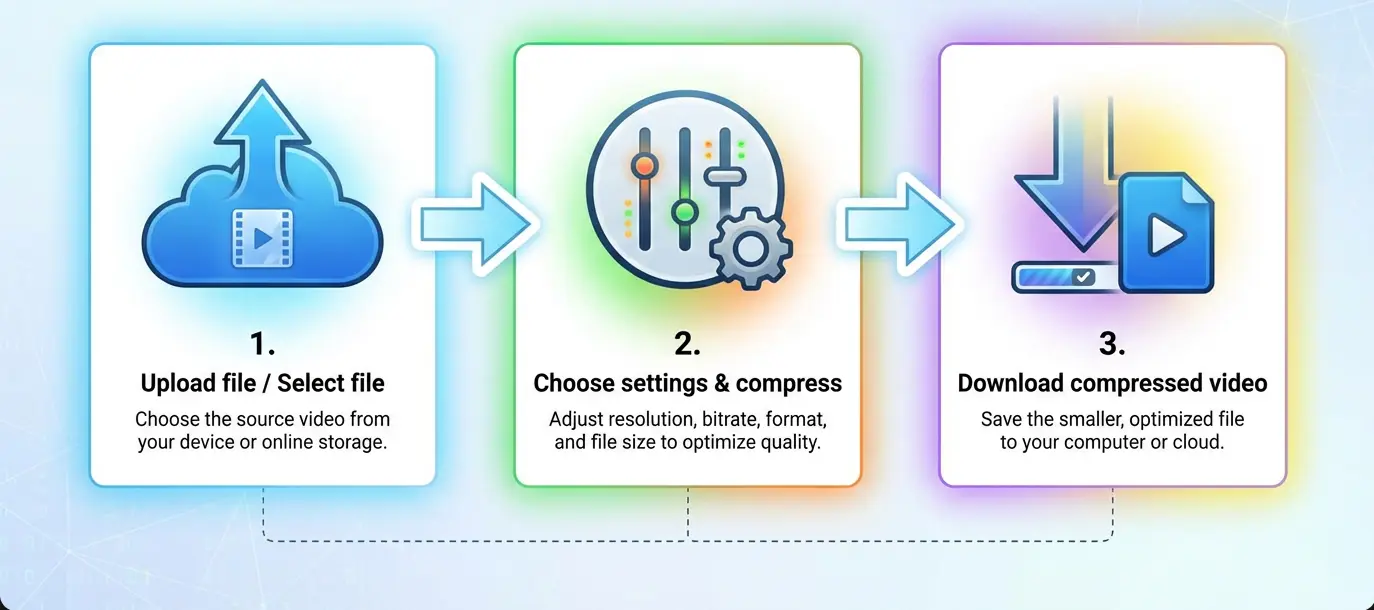
Our 10 MB video compressor gives you a slider to set your desired file size—down to the megabyte. The tool auto-adjusts bitrate, resolution, and codec settings to hit that number without manual trial-and-error.
Perfect for:
You get a smaller file size with predictable compressed video size and full control over quality trade-offs.
No guessing. No re-uploads.
We tested our compressor head-to-head against leading online services using a standardized 1-minute 1080p 30fps H.264 clip (original size: 180 MB). Here's how we stack up.
Test Configuration:
| Service | Processing Time | Final Size | Size Accuracy | Subjective Quality (MOS 1-5) |
|---|---|---|---|---|
| Our Compressor | 52 sec | 9.8 MB | -2% from target | 4.2 |
| VEED | 62 sec | 11.3 MB | +13% from target | 3.9 |
| FreeConvert | 71 sec | 10.7 MB | +7% from target | 4.0 |
Methodology: Three independent reviewers rated quality on a 5-point scale (5 = indistinguishable from source). Size accuracy calculated as (actual - target)/target × 100%. We update these benchmarks quarterly.
"The compressor nailed the 10 MB target within 2% and processed 16% faster than the nearest competitor—critical when you're on deadline."
| Service | Free Limits | Compress to 10 MB? | Watermark? | Max Upload | Speed/Quality |
|---|---|---|---|---|---|
| Our Online Compressor | Unlimited compressions | ✅ Yes (slider) | ❌ No | 2 GB | Fast / High |
| Clideo | 500 MB per file | ❌ No | ⚠️ Yes (free tier) | 500 MB | Medium / Good |
| FreeConvert | 1 GB per file | ✅ Partial (CRF control) | ❌ No | 1 GB | Medium / Good |
| VEED | 1 GB per file | ❌ No | ⚠️ Yes (free 720p) | 1 GB | Fast / Good |
| Kapwing | 4 min duration free | ⚠️ Partial | ⚠️ Yes (4 min free) | 250 MB | Medium / Good |
| Compress2Go | Credit system | ✅ Yes (target size) | ❌ No | 1 GB | Medium / Fair |
| VideoSmaller | No target size control | ❌ No | ❌ No | 500 MB | Fast / Fair |
Validation Date: August 2025. We manually verified each service's pricing/FAQ pages. Limits may change; check official sources before production workflows.
Who it's for: Creators racing Discord's 10 MB cap or email's 25 MB wall.
How it works: Upload → drag slider to 8 or 10 MB → hit Compress → download. The engine recalculates bitrate and resolution on the fly to nail your number.
Key feature: Drag-drop → preset compression → download. Minimal clicks.
Key feature: CRF (Constant Rate Factor) and target-size percent sliders; supports batch conversions.
Key feature: Quick compress + trim/crop/text tools in one interface.
Key feature: Cloud workspace for multi-user projects; built-in templates for social posts.
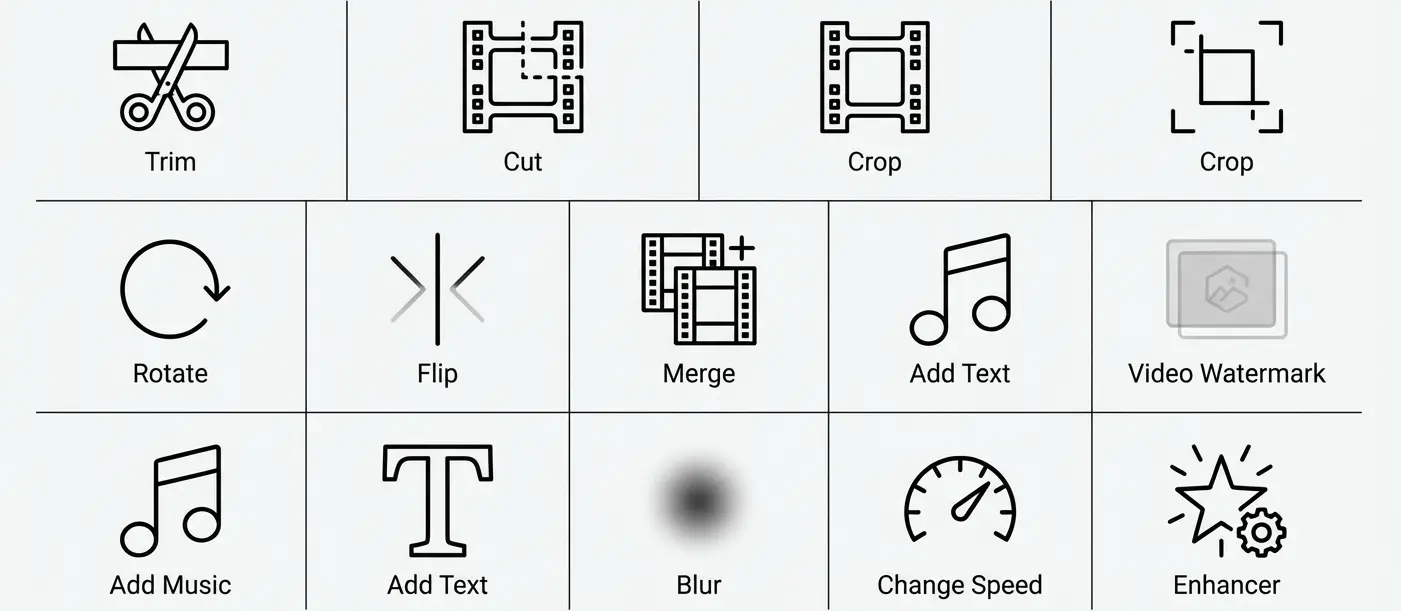
Before you compress, polish your clip with our built-in video editor. Here's what you can do:
Remove dead air, awkward pauses, or out-takes. Every second you delete = instant file-size drop.
Reframe to 16:9, 9:16, or 1:1 for platform specs.
Fix phone orientation mistakes in one click.
Stitch multiple clips into a single export, then compress the whole thing.
Layer background tracks, adjust volume, fade in/out.
Overlay titles, captions, or burned-in subtitles for accessibility.
Protect your work with logo overlays (position/opacity controls).
Obscure faces, license plates, or sensitive info with mask-based blur.
Create time-lapses (2×–4×) or slow-motion (0.25×–0.5×) before compressing.
Auto-denoise and sharpen for cleaner detail before bitrate reduction kicks in—resulting file stays small without looking muddy.
Each tweak stacks. Trim 20 seconds + crop to 1080p + denoise = smaller source = better compressed output at the same target size.
Stop guessing. Enter your video duration, target file size, and audio bitrate—our calculator tells you exactly what video bitrate to use.
Example:
Calculation:
Video bitrate ≈ (10 MB × 8 - 128 kbps × 60 sec / 1000) / 60 sec
             ≈ (80 - 7.68) / 60
             ≈ 1.2 Mbps
Set your encoder to ~1.2 Mbps video bitrate and you'll land within 2% of 10 MB.
"This calculator saved me hours of trial-and-error exports. I punched in my numbers and the first render hit 9.9 MB—perfect for Discord."
We handle popular video formats and major video formats out of the box:
H.264/H.265/AV1
QuickTime, ProRes-friendly
Multi-track archives
Legacy Windows workflows
VP9/AV1 for web streaming
The tool auto-detects your video format and file type, then optimizes codec settings. You don't need to convert first—just upload and compress.
We balance quality and video compression speed. Internal benchmarks (Q3 2025) show processing a 1-minute 1080p clip in ~52 seconds on standard cloud VMs. Fast video throughput without server queues.
Best video compressor for daily tasks. Acceptable video quality at your chosen trade-off point, not ours. Manual bitrate/CRF sliders, codec picker (H.264/HEVC/AV1), resolution presets, preview before export.
Completely free and online: Zero install, zero subscription. Access from any browser. Easy video compression with no watermark on exports—ever.
Files auto-delete after 1 hour. Encrypted connections (TLS 1.3). Uploads stored on secured data centers with access control per NIST cloud data handling guidance. You control retention; we don't train models on your uploads.
Prep YouTube video and TikTok videos under platform limits—faster uploads, no server re-encoding that kills your grade. For Discord (10 MB non-Nitro), hit the 8 MB preset. For email (Gmail 25 MB, Outlook ~20 MB), compress to 20–22 MB to stay safe.
As an iOS video compressor (works in Safari) and general mobile compress videos tool, our service runs in any browser—no App Store download, no Android APK hunt. Just open, upload, compress, share video from your phone's camera roll.
| Platform | Recommended Size/Bitrate | Resolution |
|---|---|---|
| YouTube | 8 Mbps (1080p H.264) | 1920×1080 |
| TikTok | 4–5 Mbps (1080p) | 1080×1920 |
| Instagram Reels | ~5 Mbps (1080p) | 1080×1920 |
| Email (Gmail) | ≤25 MB total | 1920×1080 or 1280×720 |
Start with your target file size. If the preview shows blocky artifacts (especially in fast motion), bump bitrate +1–2 Mbps or reduce compression level. If file size is still over, lower resolution (1080p → 720p) before lowering bitrate further.
Rule of thumb: Resolution cuts file size dramatically; bitrate fine-tunes quality within that resolution.
Bitrate = bits per second (e.g., 8 Mbps = 8 million bits/sec). Higher bitrate = more data to describe each frame = better detail, especially in motion.
Static scenes (talking head, slideshow) compress easily—low bitrate works fine. Dynamic scenes (sports, action, pans) need higher bitrate to avoid blur/blocking.
CBR (Constant Bit Rate): Sends the same number of bits per second, no matter the scene. Predictable bandwidth for live streams, but wastes bits on easy scenes and starves complex ones.
VBR (Variable Bit Rate): Allocates more bits to complex scenes, fewer to simple ones. Better average quality for the same file size. Recommended for offline files (YouTube uploads, archived footage).
| Codec | Compression Efficiency | Device Compatibility | Recommended Use |
|---|---|---|---|
| H.264 (AVC) | Baseline (100% reference) | Universal (phones, browsers, TVs since 2003) | Web uploads, email, maximum compatibility |
| H.265 (HEVC) | 50% smaller at same quality | Modern devices (2015+); limited browser support | 4K/8K, bandwidth-constrained scenarios |
Why HEVC saves space: Advanced motion compensation, larger coding tree units. Result: ~50% bitrate reduction for equivalent visual quality.
Why H.264 still wins for web: Every device decodes it; no licensing headaches for browsers; hardware acceleration everywhere. HEVC needs fallback or explicit browser support.
Bottom line: Use H.264 for broadest reach. Use HEVC if your audience is modern (iPhone 7+, recent Android) and you need the smallest file for 4K.
| Parameter | Online Services | Desktop Programs |
|---|---|---|
| Speed | Depends on upload + server queue | Local hardware; faster for large files |
| Control | Preset-based or limited sliders | Full codec/bitrate/two-pass control |
| Offline | ❌ Requires internet | ✅ Works offline |
| Batch | Sequential (some support multi-upload) | Parallel queue, watch folders |
| Privacy | Files on server (auto-delete varies) | Local processing only |
| Cost | Free tiers + paid for heavy use | One-time purchase or free (e.g., HandBrake) |
When to choose what:
Delete unused footage. Every second cut = proportional file-size drop.
Drop from 4K (3840×2160) to 1080p (1920×1080)—roughly 75% fewer pixels, ~60–70% smaller file at same bitrate.
Target bitrate controls bytes-per-second linearly. Halve bitrate → halve file size (at cost of quality).
H.264 → H.265 (HEVC) or AV1 typically saves 30–50% at same visual quality.
Deleting a 128 kbps stereo track cuts ~128 kbps × duration from total file.
Likely cause: Source was already heavily compressed (e.g., social media download).
Solution: Check source codec/bitrate. If already H.265 at low bitrate, further compression won't help. You can only drink a beer once—already-optimized files can't shrink more without severe quality loss.
Cause: Bitrate too low for dynamic content.
Solution: Increase target bitrate by 1–2 Mbps or use VBR mode. Consider two-pass encoding for better allocation.
Cause: Accidentally enabled "remove audio" or incompatible audio codec.
Solution: Re-compress with audio enabled. Check that audio codec (AAC/MP3) is supported by your player.
Cause: High-bitdepth/ProRes sources have massive data; target may be unrealistic.
Solution: Convert to 8-bit H.264 intermediate, then compress to target. Or raise target size.
Cause: Encoder set to lower frame rate (e.g., 30→24 fps) to save size.
Solution: Lock frame rate to source FPS in advanced settings.
Cause: Older devices/browsers lack HEVC decoder.
Solution: Provide H.264 fallback or use our HEVC converter to transcode back to AVC.
Before
180 MB
1080p 30fps H.264
24
Mbps VBR
After
9.8 MB
1080p 30fps H.264
1.2
Mbps VBR
60 sec • Processing time: 52 sec • Quality: 4.2/5
Result: 94.6% size reduction with minimal quality loss
Before
850 MB
4K 60fps H.264
75
Mbps
After
24.7 MB
1080p 30fps
H.265
Downscaled
90 sec • Processing time: 2m 18s • Quality: 4.0/5
Result: 97.1% size reduction, email-friendly
Before
95 MB
1080×1920 30fps
H.264
After
7.9 MB
1080×1920 30fps
2.1
Mbps CBR
30 sec • Processing time: 28 sec • Quality: 3.8/5
Result: 91.7% size reduction, Discord-ready
"Seeing the before/after preview gave me confidence the quality would hold up. The file was tiny but still looked sharp on my phone."
All connections encrypted via HTTPS (TLS 1.3 per current SSL standards). Uploaded files auto-delete after 1 hour—no long-term storage, no training datasets per our internal policy. Access logs retained per industry standards (≤90 days) for abuse prevention only per NIST guidance (2021–2023). For corporate compliance or on-premise needs, contact us for self-hosted licensing.
Privacy Policy link: https://hypeart.ai/privacy-policy/
Disclaimer: This information is general in nature and does not replace consultation with a specialist regarding data security and privacy practices.
Online compressors (Media.io, Clideo, our tool) run in your browser—no install, files processed on remote servers, fast for casual use but limited by upload caps (typically 500 MB–2 GB free). Desktop programs (HandBrake, FFmpeg) install locally, handle unlimited file sizes, work offline, and offer advanced codec controls—but require setup and local CPU/GPU. Mobile apps optimize on-device for photos/videos, great for quick phone edits, often ad-supported in free tiers.
Resolution, bitrate, and format are your levers. Start with a target size (e.g., 10 MB for Discord). Preview the output—if motion looks blocky, raise bitrate +1–2 Mbps or reduce compression level. If file is still too large, drop resolution (1080p → 720p) before cutting bitrate further. Use VBR (variable bitrate) instead of CBR for better average quality.
Short answer: Depends on the service's privacy policy and your risk tolerance. Long answer: Files uploaded to online compressors travel over HTTPS (TLS 1.3) encrypted in transit but are processed on remote servers. Reputable services auto-delete files after 1–24 hours and don't train AI on your footage—but you're trusting their policy. For sensitive/confidential content (client work, family videos with PII), use desktop software (local processing only) or check the service's SOC 2/ISO 27001 certifications.
We support popular video formats: MP4, MOV, WEBM, AVI, MKV. The tool auto-detects your video format and file type, optimizes codec settings, and preserves the original container (or converts if needed for better compression). Audio-only files (MP3, AAC) and images (JPEG, PNG) require separate tools.