Executive Summary: The Five-Minute Decision Brief
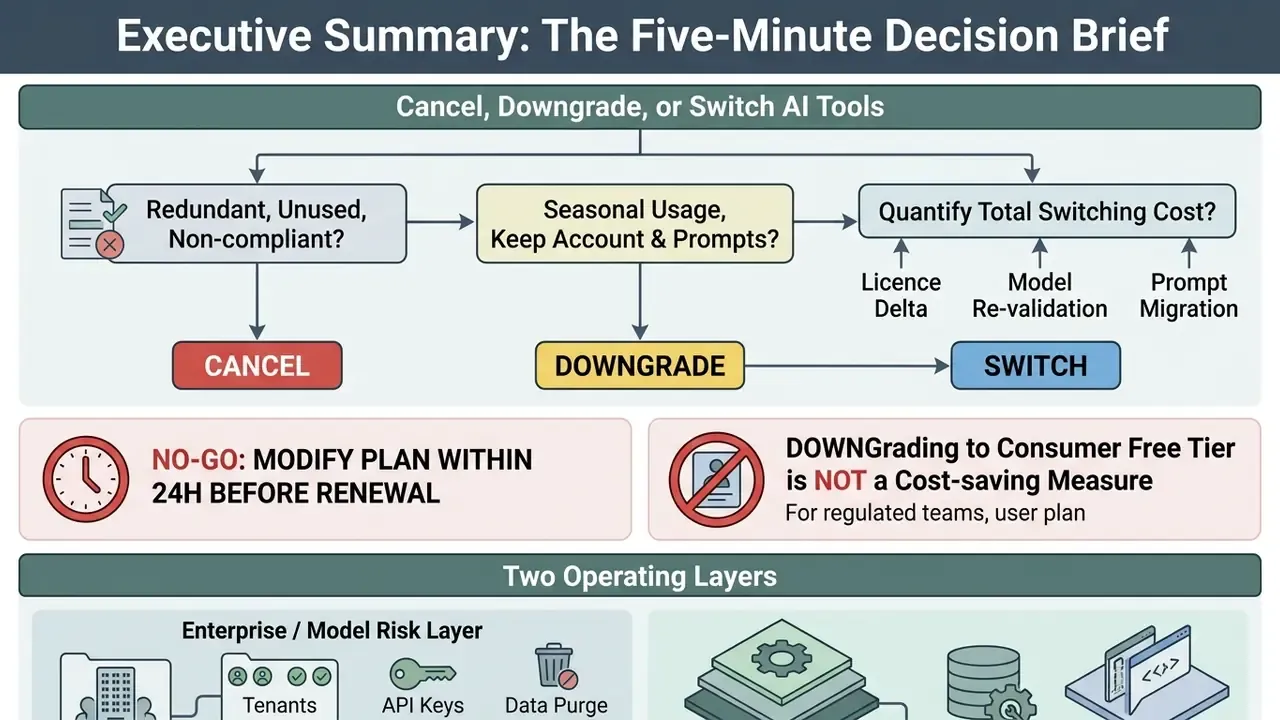
- Cancel when a tool is redundant, unused, or non-compliant. Cancellation stops renewal but normally preserves account access until the paid term expires (
cancel_at_period_end=true), with documented exceptions where resources are frozen instantly. - Downgrade when usage is seasonal and the account, prompt library, and history must remain retrievable. Downgrades are the most reversible option: 71% of paused or downgraded users eventually reactivate, versus only 42% of full cancellations.
- Switch only after quantifying total switching cost: licence delta minus model re-validation, prompt re-engineering, integration rewrite, and retraining costs.
- Never modify a plan inside the last 24 hours before renewal. Payment gateways operate in vendor time zones, and late cancellations frequently produce one more full charge.
- In regulated environments, downgrading to a consumer free tier is not a cost-saving measure. It is a data-handling change that may expose institutional inputs to model-training pipelines. Treat any tier change as a control change requiring documented approval.
Two operating layers are covered below: an Enterprise / Model Risk layer (tenants, API keys, data purge evidence, contractual notice periods) and a Workspace / individual layer (web billing panels, mobile marketplace subscriptions, refunds). Read the layer that matches the account of record, or both, if your organization tolerates BYOD and shadow AI.
Who Owns the Decision: Roles, Approvals, and Escalation
Most botched cancellations are not billing failures. They are ownership failures. Somebody clicked cancel in a workspace nobody had inventoried, or nobody clicked anything because the contract owner had already left.
Before you touch a plan, name the humans. One accountable owner, one approver, one escalation path.
| Role | Decision right | Evidence produced | Escalation trigger |
|---|---|---|---|
| Business owner of the workload | Proposes cancel, downgrade, or switch | Usage telemetry, business case | Workload supports a regulated process |
| Model risk / validation lead | Confirms re-validation scope for a switch | Model inventory entry, validation plan | Model change affects credit, KYC, or AML output |
| Procurement / vendor manager | Confirms notice period and exit terms | Written non-renewal notice, contract register update | Auto-renewal window is under 45 days |
| IT / IAM administrator | Executes seat, SSO, and API key removal | Deprovisioning log, key revocation record | Orphaned service accounts found |
| Compliance / internal audit | Accepts or challenges the evidence pack | Approval record, retention reconciliation | Deletion attestation missing |
If none of those cells has a name in it, you do not have a decision. You have an intention.
Cancel, Downgrade, or Switch AI Tools: Which Option Fits
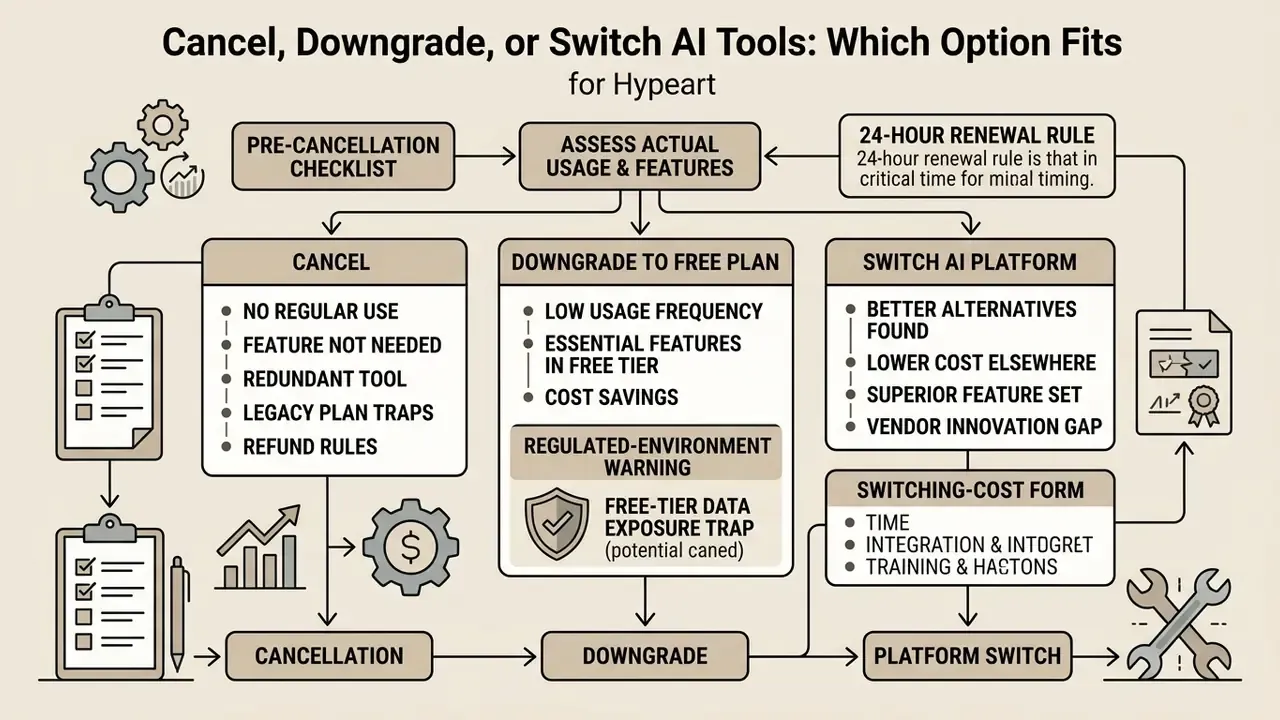
Choosing between canceling a subscription, downgrading to a free plan, or switching to an alternative AI platform depends on actual usage frequency, feature requirements, data governance needs, and the current billing cycle. Picking the correct path prevents wasted software spend while keeping critical data assets and custom configurations reachable.
| Scenario | Usage Frequency | Feature and Model Requirements | Data Retention Needs | Recommended Action |
|---|---|---|---|---|
| Infrequent or seasonal tasks | Occasional / Monthly | Standard model capabilities; no custom tools required | High need to retain chat history and account settings | Downgrade to free tier |
| Overlapping capabilities across vendor stack | Regular / Daily across multiple tools | Duplicate features covered by a primary enterprise platform | Low need to maintain secondary vendor environment | Cancel subscription |
| Performance, trust, or compliance gaps | High / Daily | Advanced reasoning, higher rate limits, strict data privacy | High need to export and migrate workflows | Switch to an alternative AI tool |
| Budget realignment under cost pressure | Moderate | Core workflows accessible via baseline paid tiers | Moderate need for team collaboration tools | Downgrade or change plan |
| Regulated workload with confidential inputs | Any | Enterprise data-handling guarantees, no training on inputs, audit logging | Contractual retention and deletion evidence required | Switch to enterprise tenant, never to a consumer free tier |
Before cutting a licence purely on cost, quantify the productivity that licence is buying. Controlled measurement of assistant deployments shows real time recovery in routine communication work:
For a $20 to $30 monthly seat, three recovered hours per week is rarely a candidate for cancellation. Redundant second and third seats covering the same capability are. That distinction gets lost in flat spend reports, which is why licence telemetry beats a spreadsheet every time.
When Moving to a Free Plan Is Enough
Downgrading to a free plan or free starter plan works when an AI tool is used intermittently and needs no proprietary enterprise integrations or specialized models. Moving to a free tier removes recurring billing while keeping basic conversational capabilities, account identity, and historical access to workspace records.
In consumer and lightweight business contexts, the major platforms now ship fairly capable free tiers. Free tiers across ChatGPT, Claude, and Gemini currently provide access to a lighter model family: a general-purpose default chat model on the ChatGPT side, capped Sonnet-class access on Claude, and Flash-class models in the Gemini app. That is generally sufficient for standard text drafting, summarization, and basic Q&A. Model names and quota structures change often during a release year, so verify the exact model available on the free tier in the vendor's own pricing or help documentation before you commit to the change.
A downgrade also behaves like a reversible hold rather than a permanent exit:
That asymmetry matters operationally. If there is any realistic chance the capability will be needed again inside two quarters, a downgrade preserves configuration continuity, seat identity, and historical records that a full cancellation may put on a deletion timer.
Regulated-environment warning: the free-tier data exposure trap
For non-sensitive creative or marketing tasks, replacing a paid licence with a capable no-cost tool is a legitimate consolidation move. Teams frequently benchmark free AI video generators before committing to another annual contract.
When Full Cancellation or a Vendor Switch Pays Off
Canceling a subscription outright, or moving to a competing platform, becomes advantageous when an organization hits subscription fatigue, overlapping capability stacks, or persistent model limitations. Running multiple AI subscriptions across different units usually produces redundant spend, untracked shadow AI usage, and fragmented audit trails.
Subscription analytics point at low utilization, not price alone, as the dominant cancellation driver:
The practical inference for a CFO or Finance Transformation lead: most spend leakage is a utilization problem discovered through licence telemetry, not a negotiation problem. When an operational assessment shows that two platforms perform identical functions, such as draft generation or basic coding support, consolidating onto a single approved primary tool like ChatGPT Plus, Claude Pro, or Google Gemini Advanced reduces licensing overhead. And if an existing tool shows high hallucination rates, weak data privacy controls, or restrictive rate limits, switching to alternative tools with larger context windows or verifiable safety parameters aligns the stack with institutional risk appetite.
When evaluating alternative media generation software or specialized enterprise suites, teams often review Pay-As-You-Go AI Video Alternatives to remove fixed monthly overhead while keeping specialized capacity on tap.
What to Audit Before You Cancel or Downgrade an AI Subscription
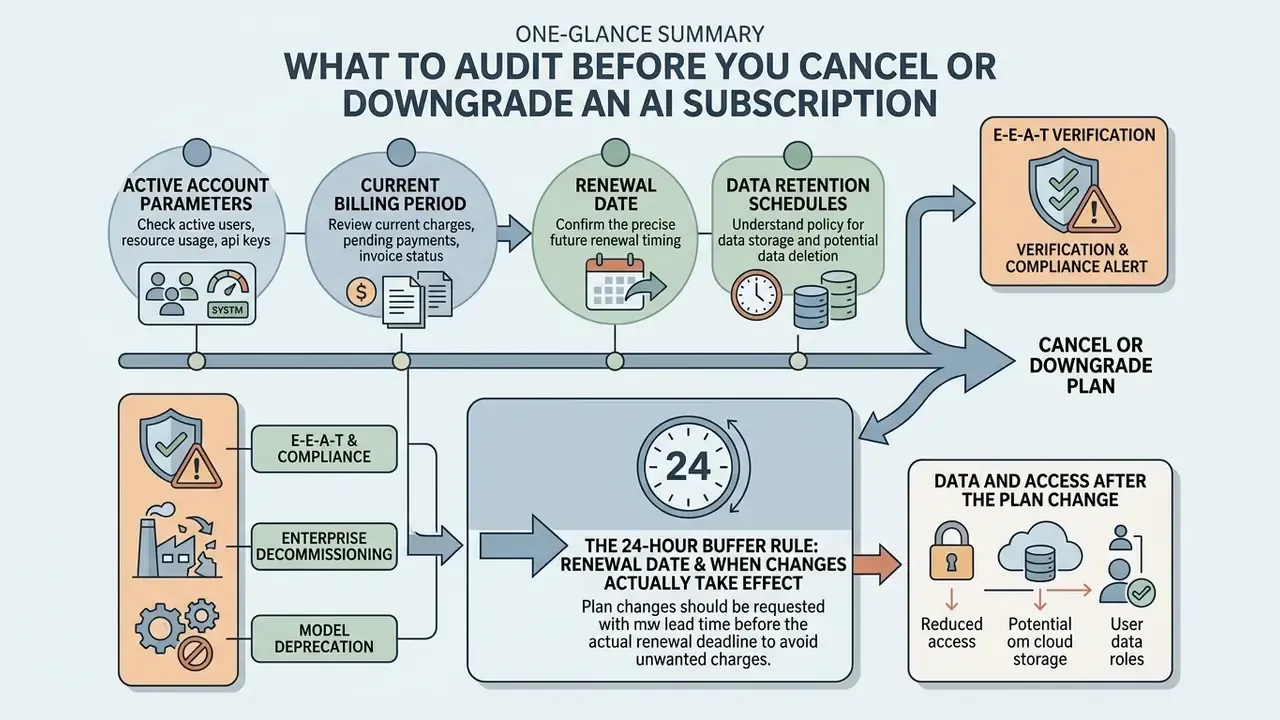
Before initiating a plan cancellation or downgrade, audit the active account parameters, the current billing period, the renewal date, and data retention schedules. Unplanned subscription modifications can wipe out custom configurations, revoke API keys, or trigger permanent deletion of workspace history.
Timing discipline matters, because cancellations cluster tightly around billing boundaries:
So the highest-risk window for accidental renewal is also the window in which most teams actually decide to leave. Run the audit below as soon as a plan is flagged for review, not on the renewal date itself.
[CHECKLIST: Pre-Cancellation & Downgrade Audit]
[ ] Verify current billing cycle and upcoming renewal date (Renewal Date).
[ ] Execute cancellation at least 24 hours prior to the renewal timestamp to account
    for time-zone differences in automated payment gateways.
[ ] Confirm whether the current plan is a legacy / grandfathered tier that cannot be
    restored after modification.
[ ] Identify account ownership (Individual, Team Workspace, or App Store purchase).
[ ] Confirm whether the plan uses monthly plans or annual billing, and note the
    unused remainder of the term.
[ ] Export all chat logs, prompt libraries, and custom instructions.
[ ] Archive custom GPT configurations, knowledge base files, and uploaded documents.
[ ] Check data retention and deletion policies following plan termination
    (e.g., 30-180 day windows).
[ ] Confirm status of API keys and billing thresholds (if attached to the consumer account).
[ ] Confirm whether the vendor executes soft downgrade (access to period end) or hard
    downgrade (immediate resource inactivation).
[ ] Verify the change target: plan cancellation only, NOT account deletion.
After confirming the plan change, re-open subscription settings and check that the entry now displays an expiry date rather than a renewal date. That single visual check is the most reliable evidence that the cancellation was registered by the billing system, and not merely submitted in the interface.
E-E-A-T verification and compliance alert:
Enterprise Decommissioning and Model Deprecation Checklist
For institutions operating under model risk management expectations, including Federal Reserve SR 11-7, OCC third-party risk bulletins, and FFIEC guidance on outsourced technology services, a billing cancellation is only the final step of a decommissioning process. The audit evidence produced during offboarding is what internal audit and examiners will ask for.
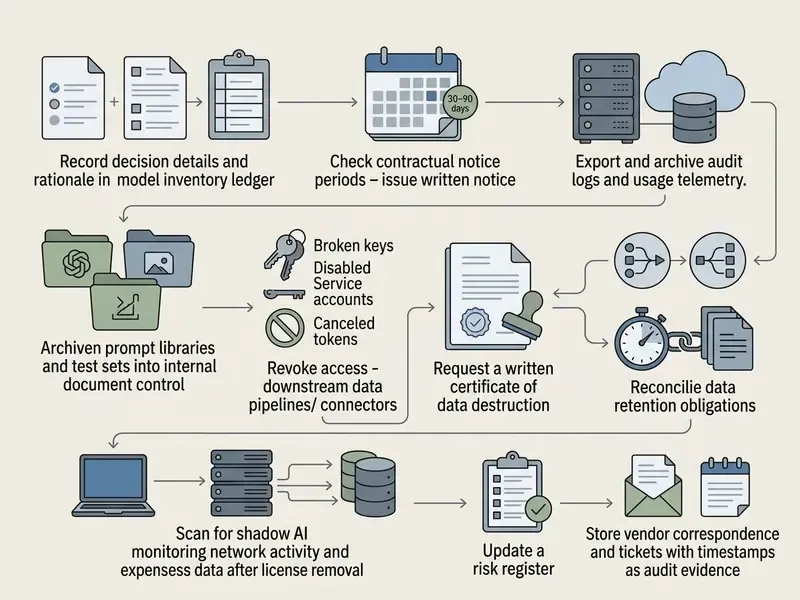
The final item is the one that most often fails an audit. A cancelled corporate licence tends to reappear as an unmanaged personal subscription within weeks, recreating exactly the data exposure the decommissioning was meant to close.
Data and Access After the Plan Change
Downgrading from a paid plan to a free tier changes feature access while generally preserving baseline account history. When you move off ChatGPT Plus or Claude Pro, previously generated chat history and uploaded files stay attached to the account. Advanced capabilities, such as custom GPT creation, high-tier file analysis, or extended memory windows, get restricted or disabled.
A user downgrading to ChatGPT Free keeps past conversations but loses the ability to invoke custom GPTs or run complex data analysis once paid entitlements expire. Export critical prompt libraries and output logs before the billing period ends. In corporate governance audits, those exports are what preserve an uninterrupted audit trail.
Retention windows differ sharply by contract class. Consumer accounts usually follow a short deletion schedule after account termination, while enterprise agreements specify a defined post-termination window. Microsoft's enterprise subscription guidance, for instance, describes residual customer data being deleted after 90 days and no later than 180 days after cancellation. That interval cuts both ways: it is a data-exposure risk, and it is also the only period in which a mistaken termination can normally be reversed without data loss.
Renewal Date and When Changes Actually Take Effect
Submitting a cancellation or downgrade request does not immediately terminate service access under standard web subscription models. Changes take effect when the current billing period ends. The subscription stays active, and paid features remain usable through the rest of the paid term.
Standard billing frameworks such as Stripe subscription management use end-of-cycle cancellation parameters (cancel_at_period_end=true). This mechanism prevents prorated forfeiture of paid time and maintains continuous service until the official renewal date. Watching the exact renewal date stops automated recurring charges while still letting the team use the full value of the current billing period.
The 24-hour buffer rule. Renewal timestamps are evaluated in the payment processor's or marketplace's own time zone, and retry logic can trigger a charge before an in-flight cancellation is committed. Execute any cancellation or downgrade at least 24 hours before the renewal date, then verify the status change in the billing panel. Cancelling on the renewal day itself is the single most common cause of "I cancelled and was still charged" support tickets.
How to Cancel Plan or Downgrade a Subscription in Account Settings
Canceling or downgrading a web-based AI subscription means navigating the administrative portal of that specific platform, identifying the active plan, and selecting the explicit cancellation or plan reduction option. Following the standard account flow ensures the request is registered correctly in billing.
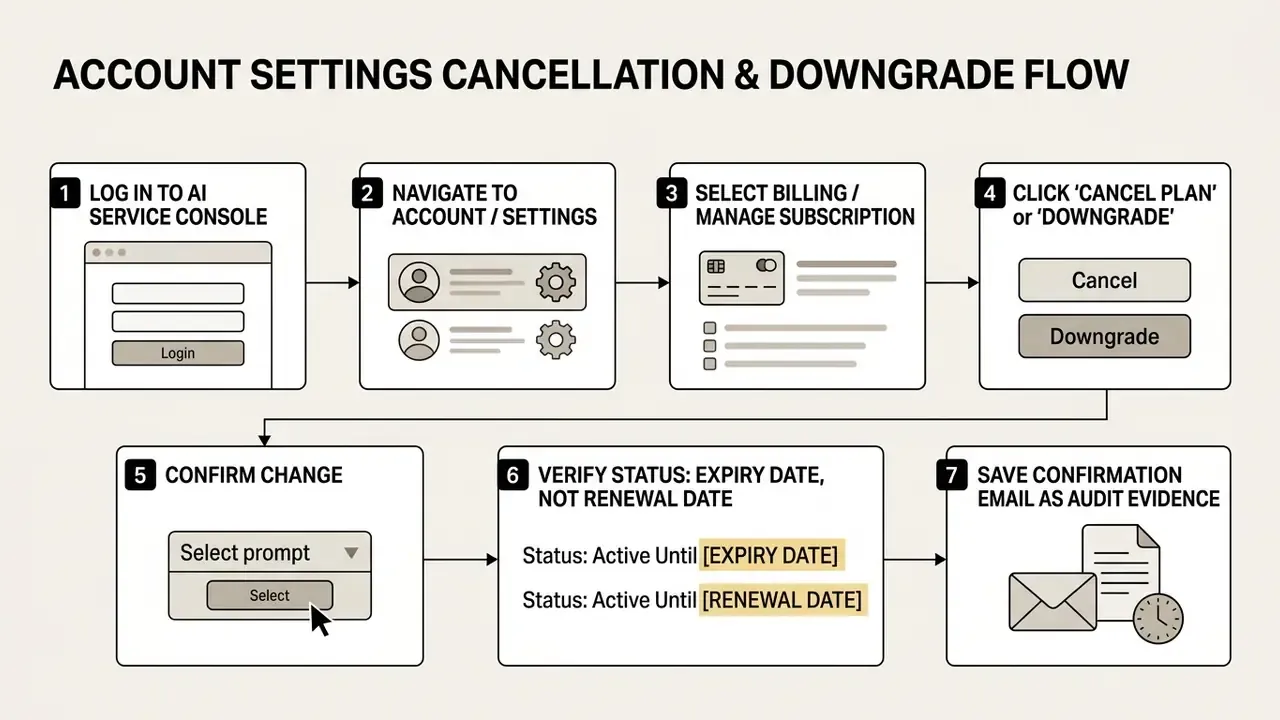
Cancelling or Downgrading an Individual Paid Plan
Individual plans such as ChatGPT Plus, Claude Pro, or Gemini Advanced are managed directly through profile settings in the browser, usually at chatgpt.com or the vendor's equivalent console.
To cancel or downgrade an individual plan:
- Log into the service interface with the primary account credentials.
- Click the user profile icon in the top right corner and select Settings or Billing.
- Under subscription details, locate the Current Plan status and click Manage Subscription or Cancel Plan.
- Follow the prompt to confirm the cancellation, or use Plan Select to change plan and drop to a free tier.
- Confirm that the system shows "Subscription scheduled to cancel on [Date]" and keep the confirmation email as audit documentation.
Warning: legacy plan forfeiture
A regional banking client facing duplicate software licensing ran an internal software audit across 120 analyst workstations. By reviewing active individual ChatGPT Plus subscriptions and routing low-usage accounts through the web cancellation interface, the organization removed $28,800 in annual redundant spend within two billing cycles, and moved non-core users to approved baseline models without losing historic project files. The second-order benefit was larger than the licence saving. Consolidating those users into a single approved tenant replaced 120 uninstrumented consumer accounts with one logged, SSO-governed workspace, closing an unmonitored data-egress path in the control inventory. Illustrative composite example, not a named client engagement.
Team and Enterprise Plans: What to Check First
Modifying corporate subscriptions such as ChatGPT Team, ChatGPT Enterprise, or Claude Team requires administrative privileges and careful coordination of user seats, access rights, and workspace data.
Workspace owners and admins should review seat allocations before altering billing structures. Reducing seat counts or canceling a team workspace revokes member access at cycle completion, or immediately upon user removal, depending on vendor settings. Unused seats are typically not refunded for the current billing period, and seat reductions usually apply to the next invoice or renewal rather than the current term. In other words, a mid-cycle headcount cut produces savings only from the following cycle onward. Enterprise workspace retention also depends on admin-level configuration: workspace data and shared prompt libraries may fall under centralized retention schedules or account-wide archiving once administrative plans are downgraded.
Three additional controls apply at the enterprise layer:
- Contractual notice windows. Annual and multi-year agreements commonly require written non-renewal notice 30 to 90 days before term end. Missing that window converts a planned exit into a full additional term, whatever the in-product cancel button says.
- Identity and access coordination. Seat removal in the vendor console must be paired with IAM action: deprovision through SCIM, revoke the SSO assignment, invalidate refresh tokens, and rotate or delete any API keys the departing user created.
- Knowledge preservation. Corporate prompt libraries, project instructions, evaluation sets, and shared artifacts are institutional assets. Export them into internal document control before the seat or workspace closes, not after.
How to Cancel AI Subscriptions Through the App Store and Google Play
This section applies mainly to individually purchased and BYOD subscriptions, a category that in most institutions maps straight onto shadow AI. Enterprise tenants are almost never billed through mobile marketplaces. Employee-funded app-store subscriptions, however, are exactly where uncontrolled AI usage lives, which makes marketplace cancellation a shadow-AI remediation step rather than a consumer footnote.
Subscriptions bought inside a mobile app must be canceled through the respective store app, not the AI service's web interface. Mobile operating systems manage billing through Apple ID or Google Play Store accounts, so web-based settings panels will not show a direct cancellation control at all.
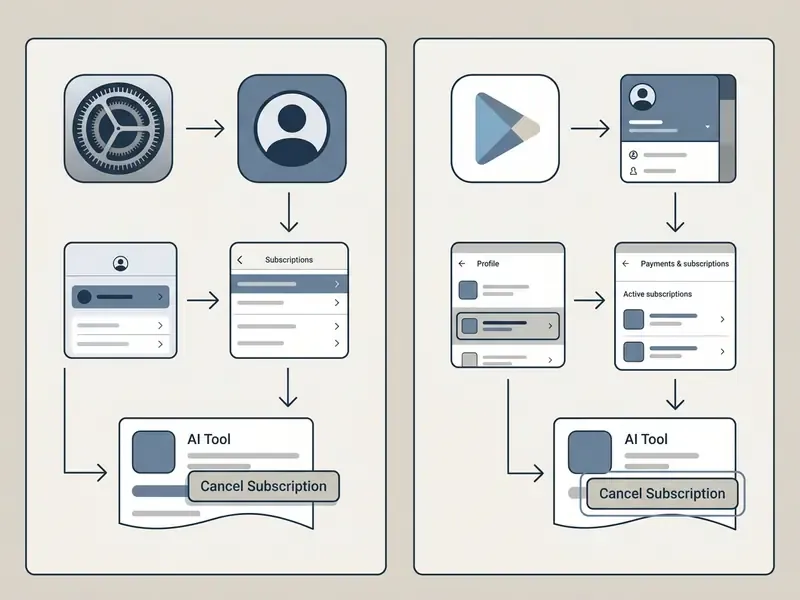
To cancel an AI subscription on iOS (Apple App Store):
To cancel an AI subscription on Android (Google Play Store):
- Open the Settings app on the iOS device.
- Tap the account owner's name at the top of the menu to open Apple ID settings.
- Select Subscriptions, find the AI application (for example the ChatGPT app or Claude), and tap it.
- Tap Cancel Subscription or Cancel Free Trial and confirm. If no cancel button appears and an expiration date is shown instead, the subscription is already canceled.
- Open the Google Play Store application.
- Tap the profile icon in the top right corner and select Payments & Subscriptions.
- Tap Subscriptions and select the active AI tool plan.
- Click cancel subscription at the bottom of the screen, select a reason if prompted, and confirm.
What Happens After Cancel, Downgrade, or Switch
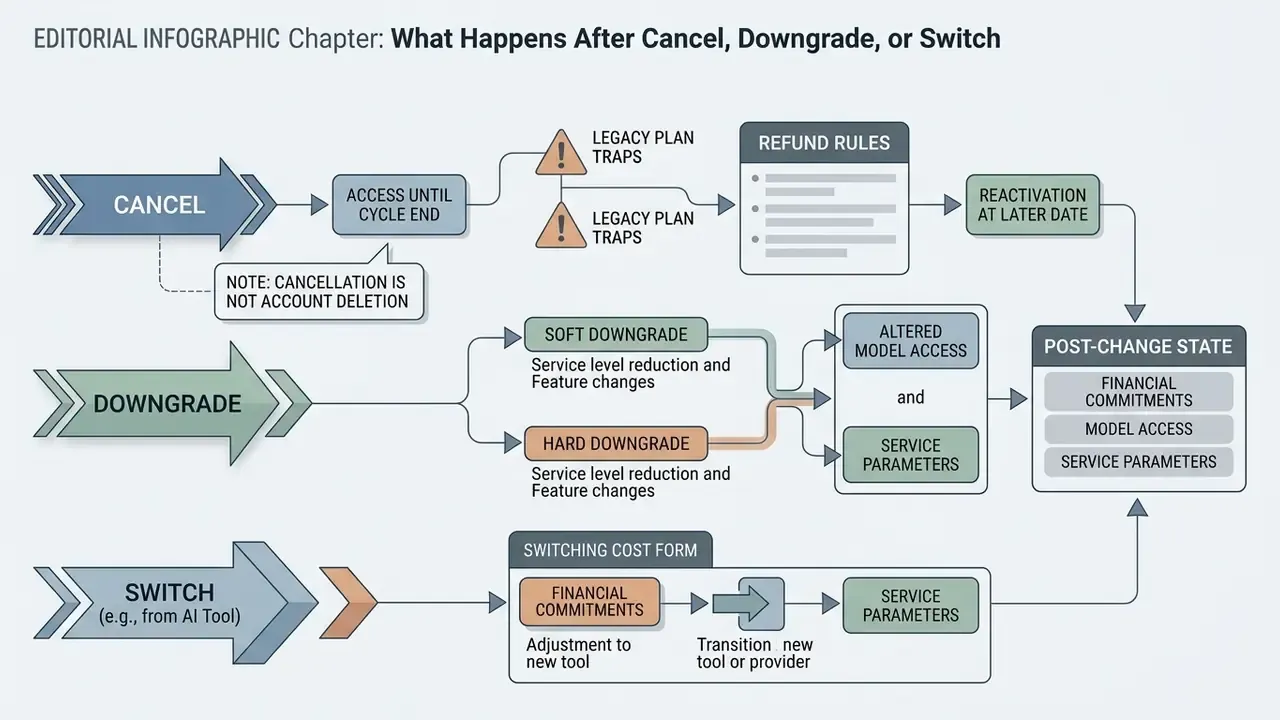
Executing a subscription change alters service parameters, model access, and financial commitments. Knowing the post-cancellation outcomes keeps operational workflows steady through the transition.
Access to Features Until the Billing Cycle Ends
When an AI subscription is canceled, access to paid features generally continues uninterrupted until the current billing period ends.
Paid entitlements, including priority processing at peak hours, flagship reasoning models, expanded context windows, and advanced generation tools, remain functional through the end of the paid cycle. Once that boundary is crossed, the account moves to the free plan structure with standard usage caps and baseline model access.
Soft downgrade versus hard downgrade. Most AI SaaS platforms keep entitlements alive until the billing period ends (cancel_at_period_end=true). Certain creative, prototyping, and collaboration platforms instead execute immediate resource inactivation on plan change. In those environments, projects above free-tier quotas, shareable prototype links, collaborator access, comment threads, and user-test results become locked or read-only the moment the downgrade is confirmed, even though the paid term has not expired. Documented behaviour on prototyping platforms includes reducing an account to a single active project and deactivating every share link previously embedded in documentation, emails, and tickets. Underlying files are usually retained rather than deleted, but external access breaks instantly.
| Downgrade Type | Timing of Feature Loss | Typical Platform Class | Required Precaution |
|---|---|---|---|
| Soft downgrade | End of paid billing period | Chat and LLM assistants, transcription, general SaaS | Export before the cycle boundary |
| Hard downgrade | Immediately upon confirmation | Prototyping, design collaboration, project-quota tools | Export and re-host share links before confirming |
| Seat reduction | Immediate for removed users; billing effect next invoice | Team and enterprise workspaces | Deprovision identity in parallel |
Before confirming any plan reduction, read the confirmation dialog literally. Wording such as "will be made inactive immediately" signals a hard downgrade, and every externally shared asset must be migrated first.
Refund Rules, Reactivation, and Re-Upgrading
Standard digital subscription terms do not grant automatic prorated refunds on voluntary cancellation outside specific statutory windows.
| Platform / Channel | Standard Refund Window | Statutory or Regional Exceptions | Reactivation Process |
|---|---|---|---|
| OpenAI (ChatGPT web) | Non-refundable after billing | 14-day prorated refund window for EU, UK, and Turkey residents; 7-day full refund in South Korea if unused | Upgrade from free tier at any time in account settings |
| Google (Google One / AI Premium) | Non-refundable in most regions | Limited statutory refund windows depending on local consumer protection law; refunds may take up to 14 days plus bank processing time | Select a new plan tier in the Google One membership console |
| Apple App Store | Managed exclusively by Apple Support | Assessed case by case via reportaproblem.apple.com | Re-subscribe through iOS app settings |
| Google Play Store | Non-refundable after the initial window | Refund request form via Google Play order history | Re-subscribe in the Play Store subscription menu |
| Enterprise / committed contracts | Generally no mid-term refund | Governed by the master agreement, not consumer law; termination-for-convenience clauses vary | Re-contracting at current list pricing |
The EU, UK, and Turkey window derives from statutory withdrawal rights for distance contracts (EU Directive 2011/83/EU) and is time-boxed. Outside it, unused paid time is normally forfeited rather than refunded. Note too that the unused remainder of a cancelled term generally cannot be restored later. It is refunded, credited, or lost.
If an account holder wants paid access back after cancellation, they can upgrade at any time. Re-subscribing restores premium features immediately and resets the billing cycle to the reactivation date. Reactivation is rarely automatic, though: a cancelled subscription is not silently resumed, and some ecosystems impose hard re-entry windows. Cloud providers, for example, publish conversion deadlines such as 30 or 90 days after expiry, after which an account cannot be reopened on its prior terms at all.
How to Switch AI Tools and Evaluate Alternatives
Switching AI tools means testing competing platforms against real operational requirements, cost per user, context window capacity, and enterprise security standards. Comparing flagship AI plans keeps a migration honest: better output quality without unnecessary control costs.
Consumer and small-team tiers:
| Evaluation Metric | ChatGPT Plus (OpenAI) | Claude Pro (Anthropic) | Google Gemini Advanced (Google) |
|---|---|---|---|
| Monthly Pricing | ~$20 per month | ~$20 per month (or ~$200 per year) | ~$19.99 per month (Google One AI Premium / Google AI Pro) |
| Primary Model Family | GPT-5-class models / GPT-4o | Claude Sonnet and Opus class | Gemini 2.5 Pro / Flash |
| Context Window Capacity | ~128K tokens standard | 200K tokens standard, up to 1M on selected models | Up to 1M to 2M tokens |
| Specialized Features | Custom GPTs, Advanced Voice, Code Interpreter | Projects, Artifacts, document analysis | 2TB storage, Google Workspace integration |
| Usage Limits Structure | Model-based dynamic messaging limits | Rolling 5-hour session reset plus weekly caps | Tiered quota via Google One AI Premium |
| Downgrade Behaviour | Access to period end; custom GPT creation lost on free tier | Downgrade effective at period end; chats, projects, files retained | Plan change in the Google One console; storage remains for the paid term |
Prices and quotas move. Treat the table as a shortlist frame and confirm current terms on the official pricing pages before you sign anything.
Enterprise and regulated-tenant options, which are the criteria that actually decide whether a switch is permissible inside a bank:
| Governance Criterion | Enterprise LLM Tenant (vendor-direct) | Hyperscaler-Hosted Model Endpoint | Consumer Paid Tier |
|---|---|---|---|
| Training on customer inputs | Contractually excluded | Contractually excluded | Frequently permitted by default |
| Data residency / region pinning | Often available by contract | Region selection typically native | Not offered |
| Admin audit logging and log export | Available | Available via cloud-native logging | Absent |
| SSO / SCIM / role-based access | Available | Available via cloud IAM | Absent |
| Third-party assurance (SOC 2, ISO, pen-test reports) | Available under NDA | Available via provider trust portal | Not applicable |
| SLA and support commitments | Contractual | Contractual, tiered | None |
| Exit terms / notice period | 30 to 90 days typical | Consumption-based; no term lock in pay-as-you-go | Cancel anytime |
| Deletion evidence on termination | Attestation obtainable | Tenant-controlled deletion, logged | Policy-based only |
Retention research also suggests that switches driven by feature envy underperform switches driven by measured outcomes:
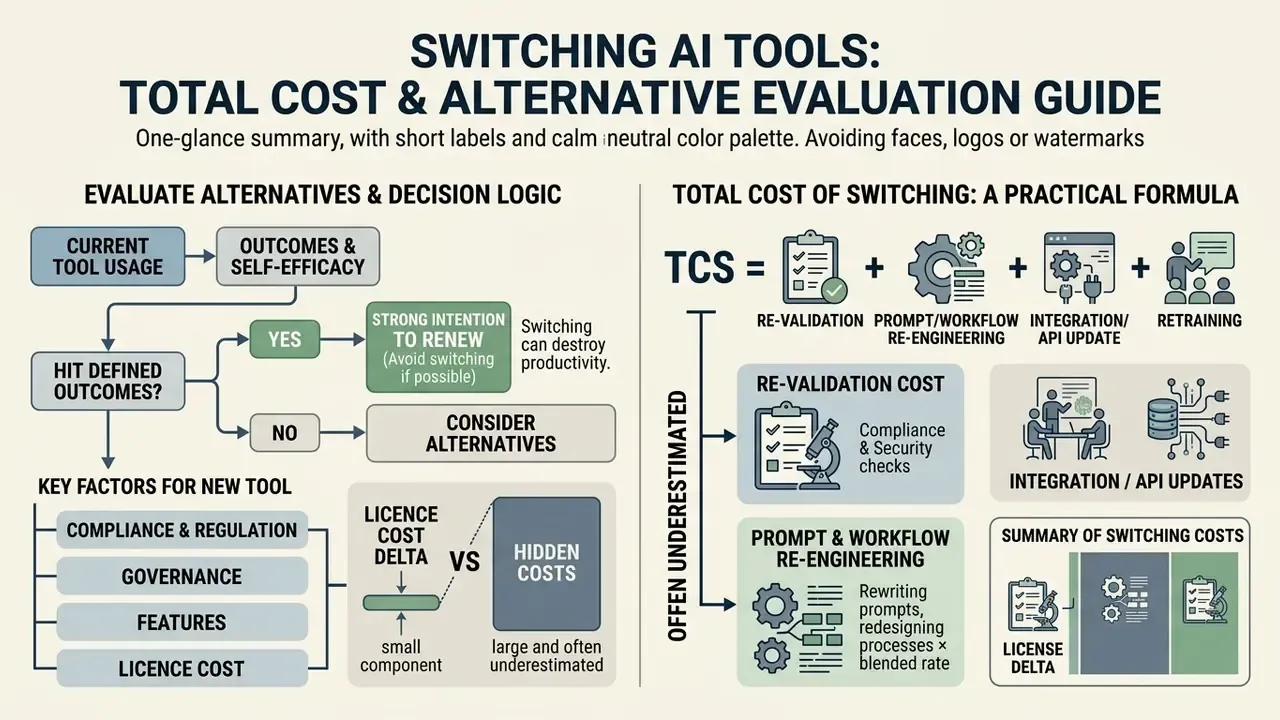
Put plainly: if users are hitting defined outcomes with the current tool, a switch will probably destroy value even when a competitor benchmarks higher. If they are not, no model upgrade will fix an unmeasured workflow.
When changing vendors, check whether switching costs such as prompt re-engineering, retraining, and API integration work are offset by higher performance or improved compliance. Media, marketing, and design teams migrating vendors usually shortlist specialized AI video generators separately from their general-purpose assistant, because consolidation logic differs between reasoning workloads and generative media workloads.
Total Cost of Switching: A Practical Formula
Licence delta is the smallest component of a platform migration in a governed environment. Use this model before approving a switch:
TCS = (Re-validation cost)
    + (Prompt & workflow re-engineering effort × blended rate)
    + (Integration / API rewrite effort × blended rate)
    + (Data migration & export/import cost)
    + (User retraining hours × blended rate)
    + (Parallel-run overlap cost: months of dual subscriptions)
    + (Contractual exit cost: unused committed term, early-termination fees)
    - (Annual licence savings × expected retention horizon in years)
    - (Quantified productivity gain, e.g., recovered hours × blended rate)
Decision rule: proceed only if TCS is negative within the institution's payback
threshold (commonly 12-18 months) AND the target platform closes at least one
open control gap.
Two line items are routinely underestimated. Re-validation applies whenever the model supporting a documented process changes: a new vendor means new model documentation, new testing, new sign-off. Parallel-run overlap is unavoidable in practice, since teams almost always pay for both platforms for one to three cycles during migration. Left out of the budget, that overlap can erase a full year of projected licence savings.
There is a regulatory tailwind on the cost side as well. Under the EU Data Act, switching charges for cloud data-processing services are being phased out by 12 January 2027, which lowers the contractual friction of vendor exit. It does not, however, oblige providers to retain data beyond their normal retention periods to satisfy a later portability request. Export while the contract is live. Do not lean on portability rights after termination.
Common Issues: Cannot Cancel, Downgrade, or Switch AI Tools
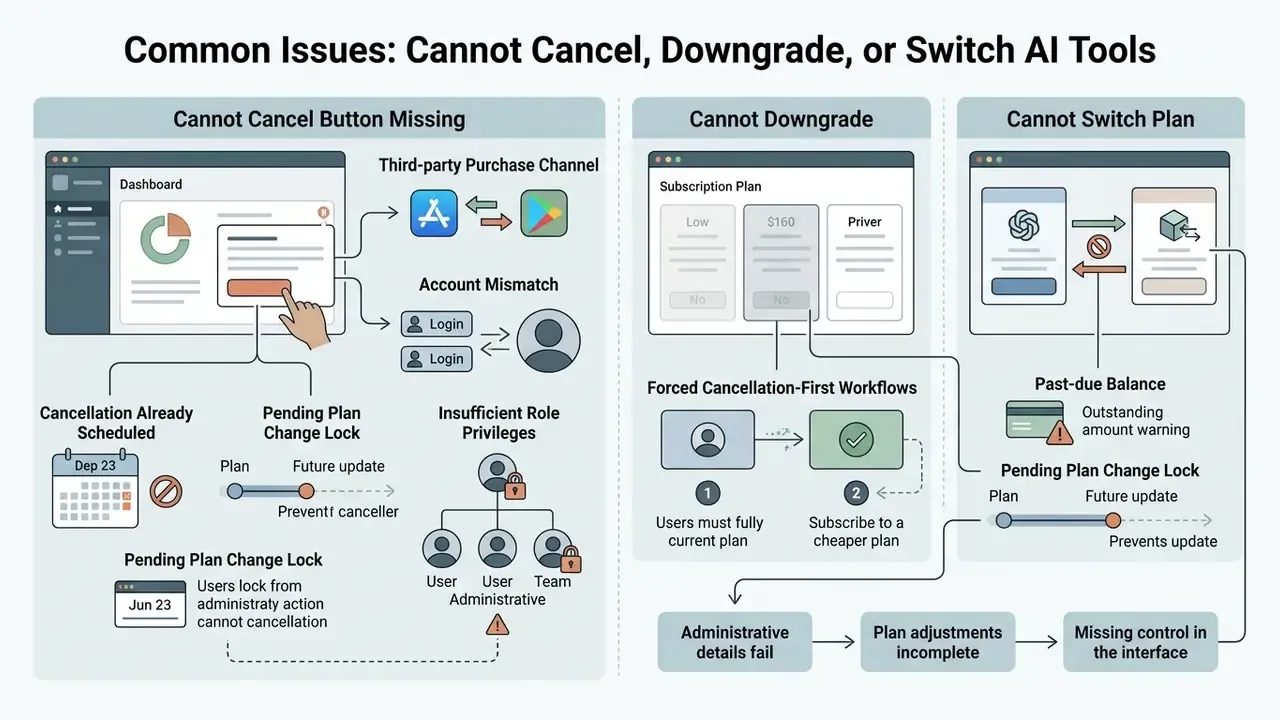
Plan adjustments sometimes fail on administrative details or a missing control in the interface. Finding the root cause of a cancellation failure is what prevents the next unexpected charge.
Forced Cancellation-First (Two-Step) Downgrade Workflows
Some specialized AI platforms offer no one-click plan reduction at all. To reach a lower paid tier, you first cancel the current plan, let the active billing cycle expire, then subscribe to the target tier from the account dashboard. Vendor guidance in this category states it plainly: switching to a lower-tier plan requires cancelling the current subscription and starting a new one.
Consequences to plan for:
- Coverage gap risk. If the lower tier is not purchased on the day the old term expires, the account drops to free-tier limits, which can inactivate assets on hard-downgrade platforms.
- Loss of grandfathered pricing. Re-subscription happens at current list price, so any legacy discount disappears.
- Diarised follow-up required. Set a calendar reminder for the expiry date. The second step is manual, and nothing transitions automatically.
Enterprise Contract Blockers: Notice Periods and Auto-Renewal Lock-In
At the enterprise layer the obstacle is usually legal, not technical. Committed annual agreements auto-renew unless written non-renewal notice arrives inside a defined window, commonly 30 to 90 days before term end. Miss it and the in-product cancel control is irrelevant: the term extends and the invoice stands. Other friction points include committed-spend minimums that penalize reduced consumption, seat floors that block downsizing below a contractual minimum, and data-egress or export assistance billed as professional services rather than included. Track every AI vendor's notice deadline in the contract register next to the renewal date, and treat the notice date, not the renewal date, as the real decision deadline.
When to Contact the Support Team
If technical glitches or billing anomalies block self-service cancellation, contact the vendor support team to prevent unauthorized recurring charges. If you still need help after that, escalate rather than wait.
When you submit a request or open a support ticket:
- Sign into the help portal with the affected account credentials. Most vendors act only on requests raised from the account actually charged.
- Attach screenshots showing the missing cancellation options or the error codes in subscription settings.
- Ask for explicit written confirmation that auto-renewal has been halted, and keep that confirmation as audit evidence.
- For marketplace-billed subscriptions, route refund requests through the store's own dispute flow (Apple's report-a-problem page, or Google Play's order "Report a problem" form) rather than the AI vendor, which is not the merchant of record.
- Expect no published SLA for billing disputes. Escalate again if there is no substantive response before the next renewal date.
When to Contact the Support Team
Provide payment verification details
invoice references, transaction dates, charge amounts, and the last four digits of the payment card.FAQ: Short Answers on Cancelling and Switching AI Plans
Is it advisable to keep multiple AI subscriptions at once?
Running multiple AI subscriptions is common among technical teams that need distinct model strengths, for example ChatGPT for broad code generation and Claude Pro for long-document context analysis.
«41% of consumers report subscription fatigue, 57% believe they are overpaying, and 40% say they have too many subscriptions.» Source: Shno.co / Churnkey, "Subscription Retention Statistics for 2026" (2026). https://shno.co/subscription-retention-statistics/ From a cost and risk view, enterprise operations should audit secondary subscriptions periodically to stop licence accumulation and untracked data pathways. Consolidating work onto one primary AI tool, supplemented by free tiers, reduces software fatigue and simplifies vendor management. For creative output that no longer justifies a dedicated licence, teams often substitute free AI art generators for the retired paid plan.
Can I reconnect a paid plan after cancellation?
Yes. Canceling a paid plan halts future auto-renewals but does not delete the account. You can re-subscribe and upgrade back to paid status at any time in billing settings. Re-subscribing restores access to advanced AI models, higher rate limits, and specialized workspace features, and resets the monthly billing cycle to the reactivation date. Two caveats: reactivation happens at current list pricing, since legacy rates are not restored, and the unused remainder of the previously cancelled term is not credited back.
Will I lose my chat history if I cancel?
Usually not. Cancellation moves the profile to a free tier while preserving the account, conversations, and uploaded files, subject to free-tier limits. History loss happens when a user chooses account deletion, which schedules permanent purging of the account and its contents. Check each provider's retention policy before acting, and export anything with record value regardless.
How long before renewal should I cancel?
At least 24 hours. Renewal timestamps are processed in the vendor's or marketplace's time zone, and same-day cancellations often land after the charge is authorized. After cancelling, confirm that the billing panel shows an expiry date rather than a renewal date.
Does a downgrade always preserve access until the end of the paid period?
No. Most assistant and LLM platforms honour end-of-period access, but prototyping, design, and project-quota platforms may inactivate assets, share links, and collaborator access the moment a downgrade is confirmed. Read the confirmation dialog wording and export externally shared assets first.
Can I return to my old, cheaper plan if I change my mind?
Only if that plan is still offered. Legacy and grandfathered tiers are typically forfeited permanently once you leave them, and re-subscribing puts the account on current pricing and current quotas. If your plan no longer appears on the vendor's public pricing page, treat any change as irreversible.
Who can cancel a corporate AI subscription if the account owner has left?
Vendors generally act only on requests from the registered owner's email address. If that person has departed, IT must either restore access to the mailbox and SSO identity, or transfer ownership to an active administrator before deactivating the departing account. Registering a role-based shared mailbox as owner of record prevents this failure mode entirely.
Is downgrading to a free tier acceptable for regulated workloads?
Generally no. Consumer free tiers usually lack contractual exclusions on training with user inputs, admin audit logging, data-residency commitments, and deletion attestation. In regulated institutions, cut seat counts inside a governed enterprise tenant instead, and document the change as a control modification.
What evidence should we retain after decommissioning an AI vendor?
At minimum: the approval record and decision owner, written non-renewal notice, exported audit and usage logs, archived prompt libraries and evaluation sets, proof of API key and SSO revocation, the vendor's data-deletion confirmation, and an updated entry in the model inventory and risk register.
Appendix A: Superseded Statements and Corrections
Open Questions We Have Not Settled
Two things remain genuinely unresolved, and it would be dishonest to pretend otherwise. First, there is no reliable public benchmark for the cost of re-validating a generative model after a vendor switch inside a US bank; the numbers we see are institution-specific and rarely published. Second, deletion attestation practices for agentic AI tenants, especially for intermediate agent state and tool-call logs, are still maturing. Ask for the attestation anyway, then read exactly what it covers.