That last part is where most teams get caught.
The short answer, up front
- Genuinely free, watermark-free export VistaPrint AI Logomaker (PNG, SVG, PDF up to 4000×4000), Namecheap Logo Maker (PNG, SVG after free sign-in), and DataEase / Free.ai-class tools with unlimited generation are the safest starting points.
- Where the money actually appears not at generation, but at export. Transparent alpha channels, SVG/EPS vectors, and full brand kits are the three most commonly paywalled items.
- The legal ceiling a logo produced purely by AI has no copyright protection in the United States. It can still function and be registered as a trademark if it identifies the source of goods or services and receives meaningful human modification.
- Non-negotiable pre-export checks zero visible overlay, minimum 2000 px width or native vector, alpha-channel transparency, explicit commercial-use grant, and no payment wall before file delivery.
Who this guide is written for. Three groups, mostly. Founders who need a usable mark this week and have no design budget. Marketing and operations leads inside larger organisations who must justify why a free tool is acceptable for a pilot. And governance-minded readers who need the licence and provenance questions answered before an asset enters production. The guide moves from definitions to a generation workflow, then to tool selection, commercial rights, post-generation refinement, and troubleshooting when a watermark appears at the worst possible moment.
Methodology and editorial transparency. For this review we tested a shortlist of 12 platforms, generated up to 10 concepts per tool, and recorded real export behaviour without entering payment details: presence of visible overlays, exact file formats offered, alpha-channel support, daily download caps, and whether registration was mandatory. Freemium terms change often. Treat every tier detail below as accurate at the time of testing, and re-verify the vendor's current Terms of Service before deployment. Fee structures across creative suites are tracked separately in our AI Media Pricing overview.
What "free without watermark" actually means in an AI logo generator
- Visual inspection the downloaded asset must be completely free of provider logos, grid overlays, or low-resolution raster stamps, in both the full-colour and the transparent version.
- Resolution standards a true free download delivers clean output specs. Minimum 2000 px width for raster PNG/JPG, or native vector SVG/PDF/EPS.
- Commercial rights the Terms of Service must grant explicit commercial usage rights for marketing materials, websites, social media, packaging, and paid channels.
- Paywall friction the export must complete without credit card details or a forced upgrade prompt before file delivery.
- Metadata integrity inspect the exported file for embedded provenance metadata, which is invisible on screen yet persists inside the payload.
Free generation, free trial, and paid export: what is the difference
Free AI logo generation lets you enter prompts and view generated concepts in-browser, then frequently blocks the download behind a paywall or subscription tier. A free logo maker running a free trial model works differently: it grants temporary access or a pool of generation credits, and high-resolution downloads stay open until the credits run out. Kleap-class tools allocate roughly 5 AI credits per day and up to 30 per month on the free plan, while Canva's free account caps generative prompts at about 20 per month. Pay-to-download platforms sit in a third category: unlimited concept creation for free, with final file packages such as vector SVG or a full brand kit reserved for paid tiers.
Assistant-style generators behave the same way, which is why it pays to read the quota rules before you commit a workflow. Our notes on perplexity ai image behaviour document that pattern in detail.
Understanding these platform economics prevents friction when you move from concept to final export. See also our guide on AI Credits Refund and Cancel Friction and the reference overview of logo generation platforms.
During one internal evaluation for a fintech client, an operations team generated 30 candidate marks on a freemium tool, then discovered that high-resolution vector exports cost a $60 plan upgrade per file. Rather than approve an unbudgeted spend, the team moved the prompt parameters to a 100 free ai logo generator with native SVG export. Production-grade assets in under ten minutes, at zero asset cost. Teams that need a comparable escape route for adjacent asset types can review our shortlist of free AI image generators.
TCO snapshot: "make it free" versus "buy the subscription"
| Scenario | Direct cost | Time cost | When it wins |
|---|---|---|---|
| Single vector file purchase on a freemium tool | Typically $20 to $65 per logo package | About 5 minutes | One-off launch with an immediate print deadline |
| Monthly subscription for unlimited brand kits | About $13 to $30 per month, recurring | About 5 minutes per asset | Agencies and multi-brand portfolios |
| Migrate the prompt to a fully free no-watermark tool | $0 | 10 to 20 minutes of re-generation | Pilots, MVPs, and internal prototypes |
| Manual vector tracing of a clean free PNG in Inkscape | $0 | 30 to 90 minutes per mark | When you also need documented human authorship |
Manual tracing is the only option that removes cost and strengthens the human-authorship position discussed in the legal section below.
When a watermark appears in the logo
Visible watermarks show up in three places: low-opacity text or grid overlays on browser previews, low-resolution raster exports, and free-tier downloads that include premium graphics or licensed fonts. Visible overlays protect vendor intellectual property during the preview stage. Technical invisible watermarks are a separate mechanism. Cryptographic metadata or pixel-level signals such as Google DeepMind's SynthID may still be embedded in the file payload for origin tracking.
"Watermarks can be signals invisible to humans but algorithmically detectable, embedded in model parameters or training-data patterns."
"In a live experiment with nearly 20 million Gemini users, SynthID watermarks produced no noticeable reduction in perceived response quality." DeepMind SynthID-Text, Nature editorial (2024). https://www.nature.com/articles/d41586-024-00518-y
Using a verified watermark-free platform, or an ai logo generator free trial that clears overlays on export, gives you clean assets that bypass the usual watermark export limits.
Risk box: invisible watermarks, C2PA metadata, and brand audits
- Do they affect branding visually? No. Pixel-level signals and C2PA content credentials do not alter perceived design quality, and search engines or social platforms do not read them as ranking or moderation triggers.
- Do they survive processing? Metadata is frequently stripped by social media re-encoding and by re-saving in a raster editor. Pixel-level signals are more persistent, though not indestructible.
How to inspect a file before deployment
open the exported PNG/SVG properties or run anexiftool-style metadata dump, look for XMP/C2PA "content credentials" blocks, and log the result in your asset register alongside the generation prompt and date. Governance implication
in regulated environments, record provenance deliberately instead of trying to remove it. An auditable origin trail is an asset, not a liability. Provenance can also be sanity-checked with AI image detectors.How to create a logo with AI free without watermark
To create and export a professional mark without watermarks, follow a structured pipeline: define brand context, select the logo type, generate and screen concepts, refine design elements in an editor, then run an export verification check. Modern ai create logo free without watermark platforms compress this workflow into minutes and require no prior design experience.
"Around 59% of participants with art and design backgrounds already use AI tools to generate static images."
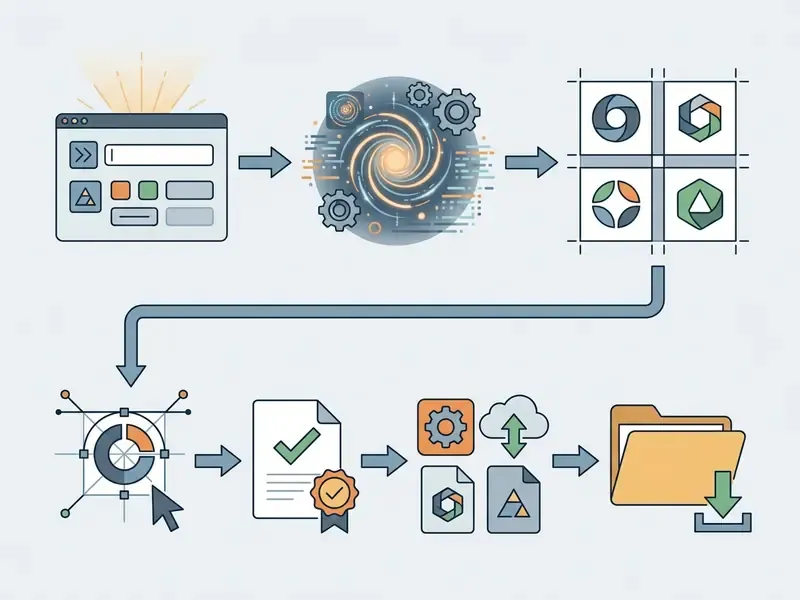
Flowchart: AI logo generation and watermark-free export pipeline
This seven-step pipeline is what allows non-designers to move from prompt text to production-ready brand assets without hitting an unexpected export fee or a silent resolution downgrade.
- Input phase
- enter the exact business name, tagline, and niche context into the prompt editor.
- Logo type selection
- choose the structural form, that is wordmark, lettermark, pictorial, abstract, mascot, combination mark, or emblem.
- Style selection and references
- pick style presets (minimal vector, geometric emblem, modern abstract) and optionally upload style or composition reference images.
- Concept generation
- produce multiple AI concepts, then evaluate visual hierarchy and legibility.
- Customization and editing
- adjust fonts, colors, line weights, and layout, and toggle to a transparent background.
- Pre-export verification
- confirm zero visible watermark overlay, check resolution specs, inspect metadata, and review the commercial licence terms.
- Final asset download
- save a high-resolution PNG or a vector SVG/PDF/EPS file to local storage.
Which logo type to choose for AI generation
Before writing the prompt, decide on the structural form of the mark. This single choice determines legibility, scalability, and how reliably the model can render it.
- Wordmarksthe brand name set in distinctive type (Google, Visa, Coca-Cola). Ideal for short, pronounceable names, and the easiest form for AI to keep clean.
- Lettermarks and monogramsinitials only (IBM, HBO). Best for long or complex legal names.
- Pictorial marksone recognizable object or symbol (Apple, Twitter). Needs a direct, unambiguous association with the product.
- Abstract marksgeometric or non-representational forms (Nike, Pepsi). Highly reliable in generative models and excellent for differentiation.
- Mascotsa brand character (KFC, Mailchimp). The hardest type to generate consistently, because character proportions drift between generations.
- Combination marksicon plus wordmark locked together (Lacoste, Burger King). The most versatile option for new brands and the safest default for AI output.
- Emblemstext enclosed in a shield, badge, or crest (Starbucks, Harley-Davidson). Strong for restaurants, breweries, and heritage-styled brands, but detail collapses at favicon scale.
Enter your business name and describe the style in the prompt
The logo creation process starts with your exact business name and a structured text prompt that defines industry, brand personality, and visual constraints. A workable prompt carries four parts: brand context, logo type, core visual symbols, and explicit style rules.
For example: "Flat vector logo for 'Apex Financial', a modern fintech company, minimalist geometric shield icon, deep navy blue and gold color palette, white background, clean typography, high readability, no gradients, 1:1 aspect ratio". Naming explicit style parameters prevents visual clutter and produces a unique logo that matches your market positioning rather than a generic template.
"AI image tools are used primarily as assistants in early design stages, inspiring creativity through a diversity of ideas and visualizations."
Negative prompt library, or what to exclude explicitly. Generative models fail on logos in predictable ways, so name the failure modes directly: no small illegible text, no lorem ipsum, no gradients, no drop shadows, no 3D bevel, no photorealistic textures, no mockup background, no business card, no watermark, no signature, no border frame, no multiple logo variants in one image. Excluding fine text is the single highest-impact constraint here, because garbled micro-typography is the most common reason an otherwise usable concept goes in the bin.
Reference-based generation tip (image-to-image and style reference). When a text prompt is not enough, switch to a platform that accepts style or composition uploads. Adobe Express-class editors explicitly allow you to upload style or composition references, so the model treats your sketch as inspiration. Upload an image carrying the geometry or palette you want and set the similarity parameter, often called image weight, to roughly 30 to 50%. That forces the network to preserve your structure while still producing a clean vector-style icon instead of a detailed illustration. For adjacent reference-driven workflows, compare behaviour across leading AI image generators and the perplexity ai image generation features we documented separately.
Generate logo concepts and screen the options
Once the prompt and business details are submitted, the ai free logo maker online engine processes the input and returns multiple design options, typically in 5 to 15 seconds. Platforms use deep generative models to produce diverse logo designs, with varied spatial arrangements of typography and icon.
When reviewing the output, prioritize structural simplicity, clarity at small scale, and semantic fit with your industry. Skip the multi-layered illustrations. Pick the clean geometric composition that survives digital screens, mobile apps, and printed materials without edits.
Rejection criteria. Discard a concept immediately if:
- micro-text inside the mark is garbled, duplicated, or misspelled;
- the icon contains more than three visual ideas competing for attention;
- stroke weights vary without an intentional rhythm, which breaks apart at small sizes;
- the composition leans on a photographic texture or gradient mesh that cannot be vectorized;
- the symbol is a generic industry cliché (leaf for eco, gear for tech, globe for logistics) with no distinctive geometry;
- the mark reads as a near-copy of a recognizable existing brand. That is a legal risk, not a style preference.
Research-grade evaluation rubrics score candidates on originality, simplicity, memorability, legibility, and brand fit. Apply the same five dimensions on a 1 to 5 scale across a shortlist of eight concepts and subjective preference turns into a documented selection record. Useful later, if anyone asks why this mark and not that one.
Customize, verify the export, and download the logo
After selecting a base concept, use the built-in canvas editor to refine fonts, adjust the colour palette, balance spacing, and apply a transparent background. Customization gives your designed logo visual balance and readability, and it also creates the human creative input that matters legally.
Before you click download, confirm two things: the canvas preview carries no visible vendor watermark, and export settings are set to high resolution (minimum 2000 px width) or a vector format (SVG/PDF/EPS). Export then downloads your logo directly, with clean files ready for websites and commercial media.
How to choose the best free AI logo generator without watermark
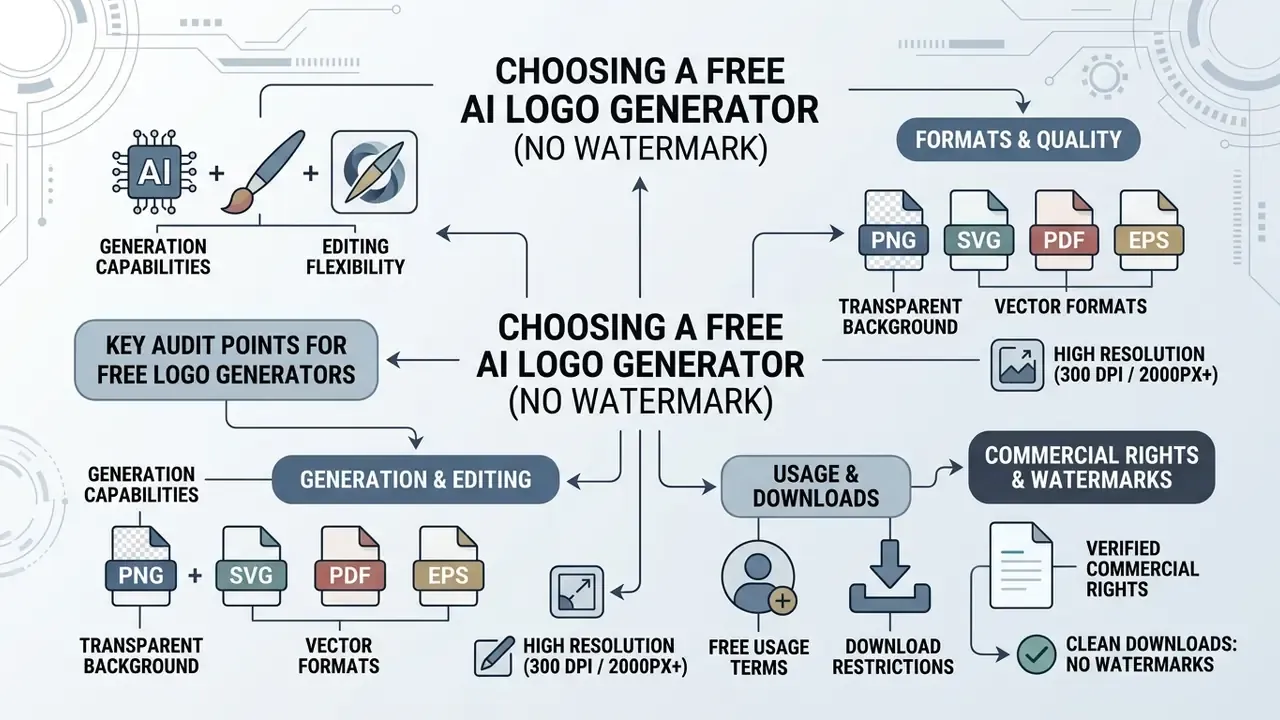
Selecting the best free ai logo generator without watermark means auditing export conditions, editing flexibility, resolution limits, registration requirements, and commercial usage terms before you commit to a tool. Evaluate against consistent criteria and hidden paywalls stop being a surprise.
Comparative assessment of AI logo generators, export conditions, and access requirements
| Platform | Free export status | Watermark policy | File formats | Transparent background | Registration and limits | Commercial usage rights |
|---|---|---|---|---|---|---|
| VistaPrint AI Logomaker | 100% free export | No watermark | PNG, SVG, PDF (4000×4000) | Yes, included | Free generations capped (about 4 before sign-in, about 60 after) | Full commercial licence |
| Namecheap Logo Maker | 100% free export | No watermarked images | PNG, SVG | Yes, included | Free account sign-in required before download | Allowed for commercial use |
| DataEase AI Logo Generator | Unlimited free | No watermark | PNG, SVG | Yes, default | Unlimited generations, no hidden fees stated | Full usage rights |
| Canva AI Logo Generator | Freemium (about 20 prompts per month) | No watermark on free assets | PNG, JPG, PDF (SVG paid) | Pro required for PNG alpha | Account required, monthly prompt cap | Subject to element asset licensing |
| Kleap AI Logo Maker | Free tier with credits | No watermark | SVG, PNG | Yes, PNG default | First generation without sign-up, 5 credits per day, up to 30 per month | Commercial use permitted |
| Logo Diffusion | Freemium tier | Watermark on free tier | PNG (vector on paid) | Paid upgrade only | Account required, credit-based | Restricted on free tier |
| Free.ai Logo Maker | 100% free export | No watermark | High-res PNG | Yes, default | No sign-up stated | Commercial use permitted |
| LogoMakr | Free low-res preview | Clean but downscaled free file | PNG, JPG, SVG, PDF (hi-res paid) | PNG supported | Account optional, paid unlock for vector and hi-res | Licence tied to purchased tier |
Summary: fully free platforms such as VistaPrint and Namecheap deliver clean vector (SVG/PDF) and high-resolution raster files with no paid upgrade, while freemium platforms tend to lock transparent alpha channels, scalable vectors, or higher daily volumes behind a subscription. Credit-based tools sit in between: free to try, capped per day and per month.
Generation and editing capabilities for logo designs
A serious ai logo maker free no watermark service pairs prompt intelligence with a usable design canvas. Strong platforms support post-generation editing: reworking typographic hierarchy, swapping symbol icons, entering exact hex codes, and rebalancing layout without quality loss. VistaPrint-class editors expose colour, font, and graphic refinement inside the free flow, and LogoMakr-class canvases add layout and font-style controls before export.
"Across 276 animations and a user study with 16 participants, LogoMotion produced higher-quality content-aware animations than an industry tool."
Formats, transparent background, and high resolution
Production-grade brand identity work requires specific file specs per medium:
- SVG (scalable vector graphics) essential for websites, responsive web apps, and large-format print, because vectors scale without pixelation. SVG is the master format from which every other export should be derived.
- PNG with transparent background required for social media overlays, email signatures, video intros, and web headers where alpha transparency is mandatory. JPG cannot carry transparency and should never be your primary logo file.
- PDF (vector) the standard print handoff format, provided the PDF wraps true vector artwork instead of an embedded raster image.
- EPS (Encapsulated PostScript) the professional prepress vector format. Unlike SVG, EPS is routinely accepted by legacy typesetting and plotter workflows and supports CMYK colour profiles, which matter for accurate reproduction on offset presses. Practical rule: keep RGB/HEX values for screen and a separate CMYK-converted EPS or PDF for physical print, because saturated RGB blues and greens shift noticeably at the printer.
- High resolution (300 DPI or 2000 px and up) necessary for printed marketing materials, business cards, and merchandise. Specify either a 2000 px-wide PNG for flexibility or 300 DPI at the final physical size.
Checking that an ai logo generator no cost option exports high-definition files with alpha-channel transparency prevents rework later. If your tool exports raster only, a lightweight free photo editor can produce the size variants you need before vectorization.
Free usage terms and download restrictions
When you evaluate an ai logo generator free website, read the terms on download limits, sign-up requirements, and credit caps. Some tools offer unlimited generations with no registration. Others enforce caps, for example three downloads per 24 hours or five credits per day, or require an account before clean export files unlock. One recurring pattern deserves attention: free trials that ask for no credit card still frequently cap the export rather than the generation. Quota mechanics differ by vendor, and our breakdown of perplexity ai image generation limits shows how easily a daily ceiling derails a launch schedule.
Two operational recommendations follow. Register with a role-based corporate address instead of a personal one, so brand assets and licence records stay with the organisation. And document the licence text as it existed on the download date, because vendors revise Terms of Service without notice. Read the full rights picture in our guide to commercial use of AI image generators, and compare fee structures across creative tools in the AI Media Pricing breakdown.
Can you use a free AI logo for commercial purposes
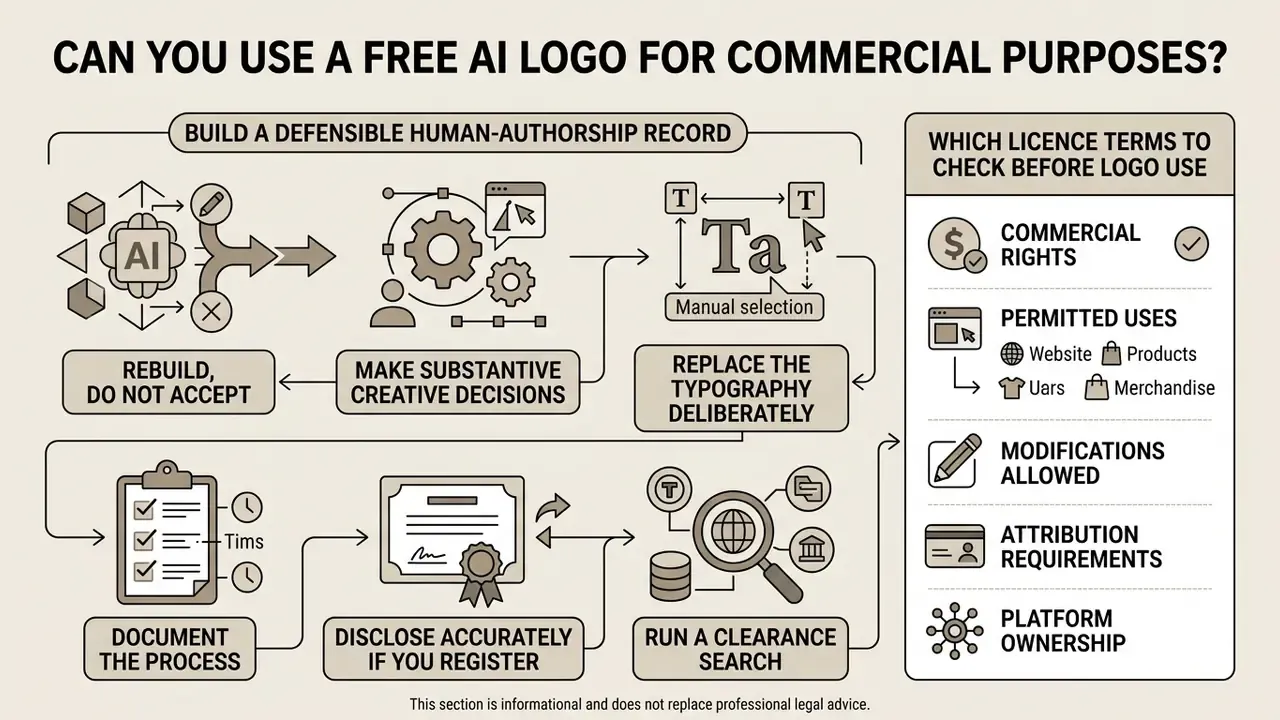
This section is informational and does not replace advice from a qualified intellectual property attorney. Verify all conclusions with counsel before registering a mark or launching a paid campaign.
Alert box: legal and IP disclaimer for AI-generated logos
Under current U.S. copyright law, images generated solely by artificial intelligence, without human creative authorship, are not eligible for copyright protection. An AI logo can still function as an enforceable trademark in commerce if it uniquely identifies the source of goods or services. Review the generator's Terms of Service to confirm explicit commercial usage rights before printing collateral or starting ad campaigns.
"Copyright protects only works of human creativity."
Using an AI-generated logo for commercial purposes, whether corporate branding, paid advertising, product packaging, or store signage, depends on two independent layers: the platform's licence, and the applicable intellectual property regime. The licence governs what the vendor permits. Statute and case law govern what you can own and enforce. Conflating the two is a common and expensive mistake.
Which licence terms to check before logo use
Before an AI logo enters commercial operations, audit the platform's End User Licence Agreement for these clauses:
- Commercial licence grant confirm the free tier explicitly grants rights to brand, market, advertise, and promote a business, product, service, or event. That is the standard wording used in mainstream logo-platform terms.
- Trademark registrability check whether the vendor prohibits users from registering the output, or any element of it, as a trademark, service mark, design mark, or industrial design. Some platforms permit commercial use yet forbid registration on free or "non-commercial composition" tiers.
- Exclusivity and asset ownership standard free AI output is typically non-exclusive. Identical or similar arrangements may be generated for other users unless substantial manual customization is applied. Paid exclusive or buyout licences exist precisely to close that gap.
- Vendor-side licence back several generative suites retain a broad, royalty-free licence to use submitted inputs and outputs, including for promotion, when content is published to a public gallery.
- Third-party elements stock icons and licensed fonts inside the canvas carry their own terms, which can survive even a headline claim of "full commercial rights".
International practice reinforces how seriously provenance markings are treated:
"The defendant removed the original watermark identifying the plaintiff as the author and failed to indicate a lawful source of the image."
Verify the provenance of any mark you inherit from a contractor or a marketplace with AI image detectors before printing collateral or starting ad campaigns, and cross-check platform-specific terms such as those documented for Google's AI image tools.
Where a finished logo can be applied
When the generator's terms grant commercial usage rights, your ai logo generator gratis asset can be deployed across channels:
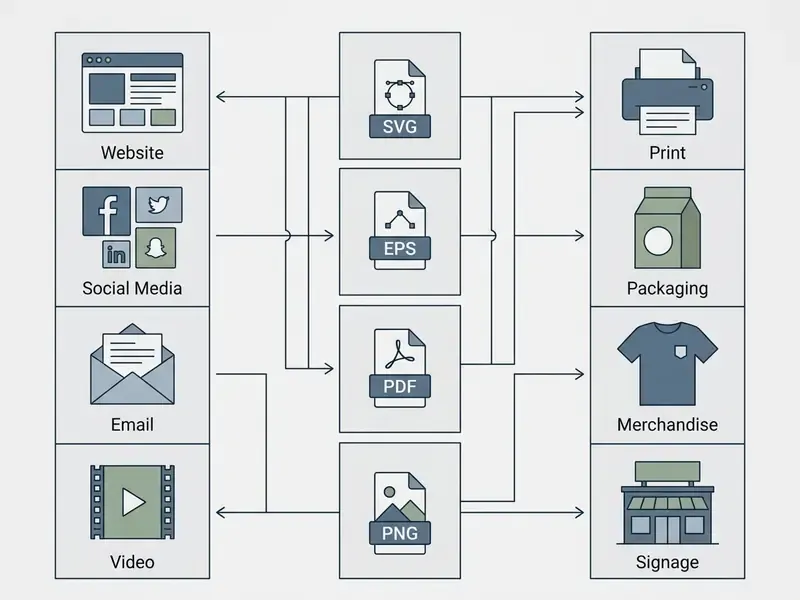
- Digital marketing company websites, mobile applications, social media banners and avatars, video intros, pitch decks, email signatures.
- Print collateral business cards, letterheads, brochures, signage, trade-show displays, vehicle livery.
- Product and packaging product labels, shipping boxes, apparel, and corporate merchandise.
- Paid channels search and social advertising creatives, sponsorship assets, and affiliate materials. These are the categories where an unclear licence causes the most expensive rework.
Reviewing permissible channels keeps you compliant while you build brand presence across physical and digital touchpoints. For comparative benchmarks on commercial licensing across creative suites, see our AI Media Alternatives breakdown.
How to improve an AI-generated logo after creation
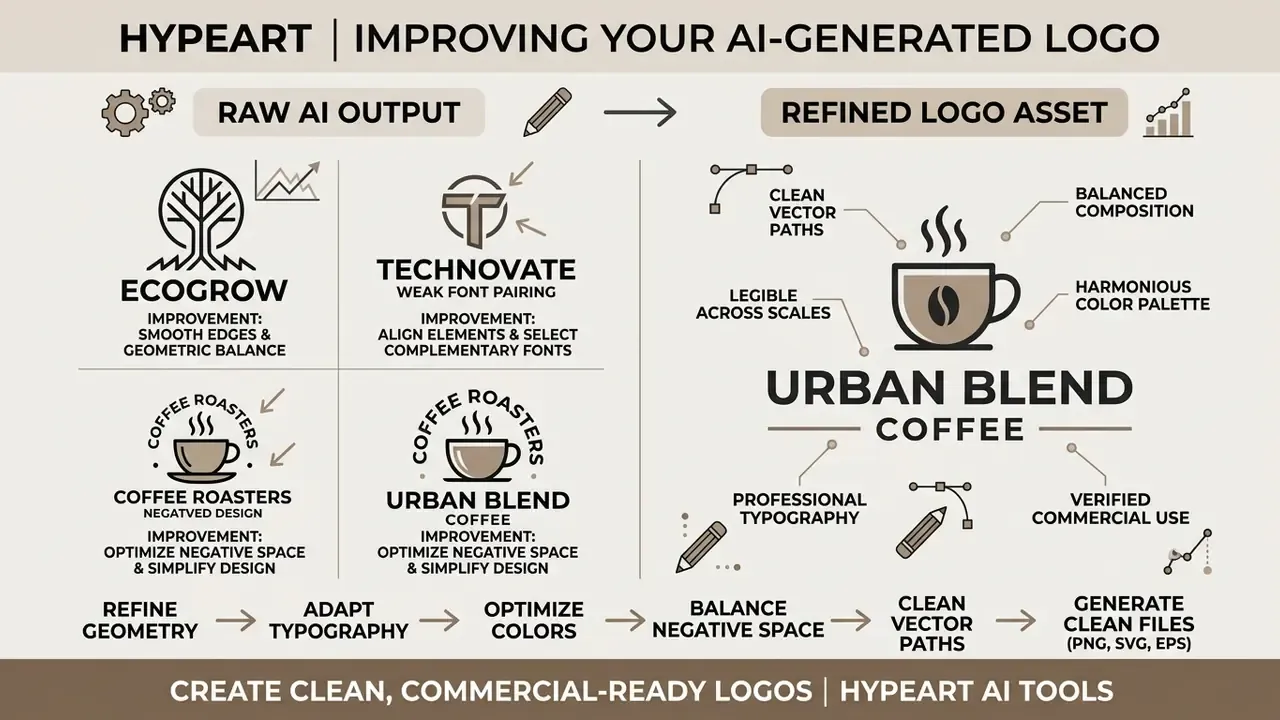
Automated tools produce strong preliminary concepts. Refining an ai generated logo through deliberate design controls is what improves visual harmony, hierarchy, and distinctiveness. Applying established graphic design frameworks turns raw output into a polished, professional logo, and, as noted above, it also creates your human-authorship record.
Tune typography, font colors, and readability
Typography and colour establish hierarchy and brand authority. When you customize text elements in an AI logo editor, choose legible font pairings that contrast clearly with the icon, and avoid decorative script faces for small tagline text.
- Dominant colour rule
- allocate roughly 80% of the composition to core brand colours and use accent shades sparingly, around 10 to 20%, for focal points. This ratio is an institutional brand-guideline convention rather than an academic finding. Purdue University's Brand Guidelines (2022) specify core colours at about 80% of the palette, and the University of North Carolina at Chapel Hill's Logos, Color Palette and Typography Reference Guide (2019) requires the primary palette to dominate with secondary colours used sparingly.
- Contrast thresholds
- make sure text-to-background contrast meets WCAG 2.1 AA, a minimum ratio of 4.5:1 for normal text and 3:1 for large text, so wordmarks stay legible on digital displays. W3C, Web Content Accessibility Guidelines (WCAG) 2.1. https://www.w3.org/TR/WCAG21/
- Variant set
- produce full-colour, single-colour, and reversed knock-out versions, and confirm the mark stays recognizable in grayscale. Accessible-branding guidance in institutional style manuals also documents a practical minimum on-screen height of roughly 30 to 40 px for a legible logo.
Use icons, symbols, and logo styles deliberately
Iconography has to carry brand meaning without leaning on stock imagery. AI generators default to literal representations, a leaf for sustainability, a gear for technology, which dilutes distinctiveness fast.
"Graphic logos function as signs whose meaning emerges from the interaction of visual form and audience interpretation, especially in online environments with varying display scales."
Prefer abstract geometric symbols or customized lettermarks with structural simplicity. Enforce one uniform stroke thickness across the icon set, use rounded corners and ends consistently, restrict the mark to one primary brand colour plus white, and fix proportional controls: clear space, minimum size, and explicit bans on stretching, rotating, or adding shadows. These are the same proportional rules mature corporate identity systems publish for their own icon families.
How to turn an AI logo into a complete brand kit
Downloading a watermark-free logo is only the first step. To actually launch an identity, complete four operations:
- Extract HEX codes.Open the downloaded SVG/PNG in a free editor such as Figma or Canva and eyedropper two primary colours plus one accent. Record HEX for screen, RGB for video, and CMYK conversions for print on a single one-page colour sheet.
- Lock a type pairing.Identify the logo's typeface, then choose a readable web pairing for headings and body text, for example Montserrat with Open Sans, and note licences, weights, and fallback stacks.
- Export favicons and avatars.Crop the icon to a 1:1 square, export PNG at 512×512 for social and app icons, 180×180 for Apple touch icons, and generate a 32×32
.icofor the website. - Assemble the kit.Produce ready-made derivatives, business card, letterhead, email signature, social cover, presentation title slide, from the same master vector. Store everything in one versioned folder with a clear-space and minimum-size rules page.
That sequence converts a single exported file into a usable identity system, and it is the step most free generators leave entirely to you.
What to do if the AI logo maker adds a watermark or asks for payment
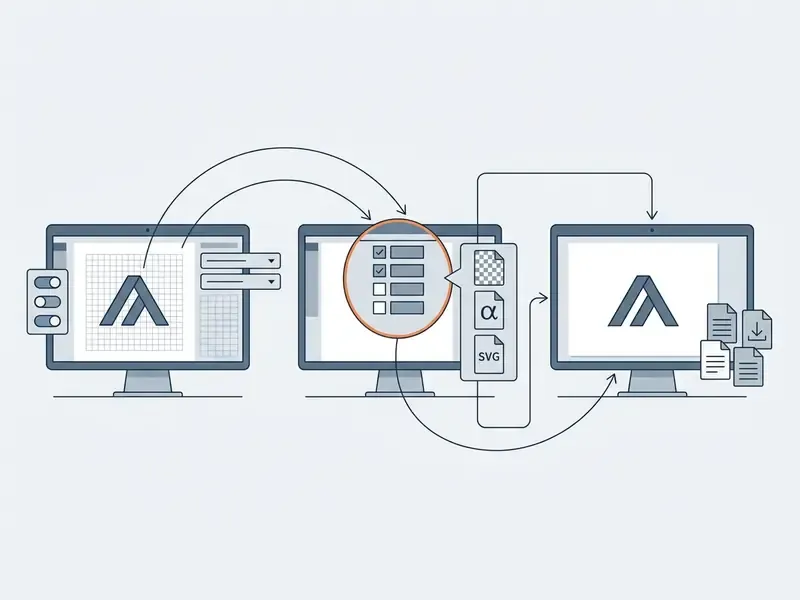
When an ai logo maker online free platform suddenly stamps a visible watermark or demands payment at export, the resolution path is mechanical. Fix the export configuration first, then migrate the prompt, then recreate manually as a last resort.
Check download settings and the selected format
Unexpected export paywalls are usually triggered by one element or format choice, not by the platform as a whole:
- Remove premium elements.Inspect the canvas for paid stock icons or proprietary typefaces. A design containing paid elements flips the export button into a "pay and download" state. Canva export guidance, Boise State University accessibility resources. https://www.boisestate.edu/accessibility/home/resources/canva/ Tier-by-tier limits are covered in our review of paid elements in Canva AI Generator.
- Adjust the export format.Switch from paid vector formats (SVG/EPS) to standard high-resolution PNG with a transparent background, which many tools release at no cost.
- Check font embedding.Failed embedding of proprietary fonts is a documented cause of degraded or blocked exports in print-oriented workflows. Substitute a licensed or open font and re-export.
- Inspect canvas overlays.Confirm whether grid lines or preview stamps are temporary UI markers that strip automatically at final rendering, rather than watermarks baked into the artwork.
Regenerate logo options or switch the free online tool
If a platform enforces an unbending paywall on every export format, migrate instead of negotiating:
- Migrate prompt parameters. Move the brand name, tagline, colour palette, logo type, and negative constraints to an unrestricted generator such as VistaPrint AI Logomaker, Namecheap Logo Maker, or DataEase.
- Iterate prompt variations. Re-generate concepts on open-access platforms that guarantee clean PNG and SVG exports. Free-tier tools advertising unlimited generation are the fastest way to reproduce a rejected concept without paying for it. Adjacent shortlists live in our roundup of free AI art generators, and capability notes for assistant-based tooling sit in our perplexity ai image review.
- Manual vector recreation. Import the clean PNG concept into open-source graphic software such as Inkscape and redraw the asset, which establishes full human creative control.
- Do not attempt to strip invisible marks. Beyond the licensing risk, removal is not reliably clean, and the research shows the arms race cuts both ways:
"Diffusion-based regeneration attacks consistently achieve lower watermark detection rates at higher image quality than previous attack methods."
The governance-correct posture is simpler: obtain a file that is legitimately free of visible overlays, and preserve provenance metadata as part of your audit trail. For workflow planning and cost modelling, use our suite of calculators.
FAQ about AI logo generators free without watermark
Do you need design skills to create a professional logo?
No design skills or specialist software are required. These tools run on natural-language prompts and style presets, so entering a business name, choosing a logo type, and generating refined concepts is enough to reach a usable draft. Vendor workflows from Adobe Express to LogoAI state explicitly that no designer and no design experience is needed.
"AI image tools are used primarily as assistants in early design stages, inspiring creativity through a diversity of ideas and visualizations." What's Next? Exploring Utilization, Challenges, and Future Development of AI-Generated Image Tools, arXiv (2024). https://arxiv.org/abs/2404.05836 Built-in editors handle canvas alignment, typographic spacing, and palette balance, which lets non-designers produce polished assets. The refinement steps in the section above are what separate a draft from an identity.
How fast does an AI logo generator create logo designs?
Almost immediately. Vendor documentation consistently promises results "in a few seconds", and our own testing put the first usable batch at roughly 5 to 15 seconds. Once a concept is chosen, customization and export take under two minutes, which makes the workflow dramatically faster than a traditional agency cycle. You can instantly generate and download production-ready PNG or SVG files straight to your desktop. Speed and output quality across tool categories are compared in our review of the best AI image generators.
Can a free AI logo be registered as a trademark?
Potentially, yes. Trademark protection depends on source-identifying use in commerce and on distinctiveness, not on how the artwork was produced. Two conditions must hold: the generator's terms must not prohibit registration of the output, and the mark must not be confusingly similar to an earlier registration. Copyright is a separate question, and there the answer is stricter. Purely AI-generated expression is not protectable without human authorship.
Could a competitor end up with an identical logo?
On free, non-exclusive tiers the risk is real. Template-recombination tools can serve visually similar arrangements to several users, and prompt-driven models converge on the same clichés for the same industry keywords. Mitigations, in order of strength: substantial manual redraw, purchase of an exclusive or buyout licence, removal of the icon from the vendor library where that is offered, and a clearance search plus reverse-image check before launch.
Can rights be transferred to an investor, acquirer, or client?
Only within the limits of the original licence. Check whether the EULA permits sublicensing or assignment, whether the rights are perpetual and worldwide, and whether the vendor keeps a licence-back to use your output in its own marketing. Agencies delivering logos to clients should keep the licence text, the invoice, and the human-authorship documentation in the handover package.
How do you make the logo background transparent for free?
Export as PNG, or WebP, with the transparency option enabled. JPG discards the alpha channel entirely. Several free generators output transparent PNG by default, while freemium suites gate transparency frequently, so verify it before you invest time in refinement. Confirm the result by placing the file over mid-grey and over a photographic background.
How many logos can you generate and download for free?
It depends on the monetisation model: unlimited on a handful of genuinely free tools, roughly 5 credits per day and up to 30 per month on credit-based platforms, about 20 prompts per month on mainstream freemium design suites, and capped totals on vendor-hosted logo makers, for example a few generations before sign-in plus a larger allowance after. Some services also throttle downloads, and three per 24 hours is a common pattern.
Which format should be sent to a printer?
Send a vector file, EPS or a true vector PDF, with colours converted to CMYK, plus a 300 DPI PNG at final size as a fallback. Keep SVG as the master for web and RGB/HEX values for screen use. Never send a JPG of a logo to a print vendor.
Appendix A: Citation Corrections Log
For transparency, the placeholder references used in earlier drafts of this guide are listed below alongside the verified sources that now appear in the text. Every entry marked Updated has been replaced in the main body.
| Earlier placeholder reference | Status | Verified replacement now used in the text |
|---|---|---|
| DeepMind SynthID-Text Study, 2024 (no URL) | Updated | EY Advisory Report on AI Watermarking (2024) plus DeepMind SynthID-Text, Nature editorial (2024) |
| Renderforest Prompt Design Guide, 2026 | Updated | What's Next? Exploring Utilization, Challenges, and Future Development of AI-Generated Image Tools, arXiv (2024) |
| LogoMotion HCI Study, Liu et al., 2025 (no URL) | Updated | Liu et al., LogoMotion, arXiv (2025), with study scope: 276 animations, 16 participants |
| ACM Semiotic Analysis of Product Logos, 2024 (no URL) | Updated | ACM, Product Logo Design in the Digital Age (2024), DOI 10.1145/3613904.3642157 |
| Digital.gov Accessibility Guidelines (no URL) | Updated | W3C, Web Content Accessibility Guidelines (WCAG) 2.1, the 4.5:1 and 3:1 thresholds |
| W3C Favicon Specifications (no URL) | Updated | W3C, How to Add a Favicon to Your Site, 16×16 and 32×32, PNG/GIF/ICO |
| Purdue University Brand Guidelines, 2022 | Retained with caveat | Institutional brand-guideline convention (Purdue 2022; UNC Chapel Hill 2019), not an academic study |
| LOGO.com Terms of Service Audit, 2026 | Updated | Standard commercial IP licence framework wording plus Beijing Internet Court, Li v. Liu, commentary (2023) |
| Canva Platform Guidance, 2026 | Updated | Canva export guidance, Boise State University accessibility resources |
| Slea.ai / DataEase Platform Analysis, 2026 | Updated | Invisible Image Watermarks Are Provably Removable Using Generative AI, NeurIPS (2023) |
| Adobe Express AI Workflow Guide, 2026 | Updated | What's Next? Exploring Utilization, Challenges, and Future Development of AI-Generated Image Tools, arXiv (2024) |
| U.S. Copyright Office AI Report, 2024 (no URL) | Updated | U.S. Copyright Office, Copyright and Artificial Intelligence, Part 2: Copyrightability (2024), official PDF |
Note on regulated topics: the commercial-use, licensing, and trademark material in this guide is general information, not legal advice. Consult qualified intellectual property counsel before registering a mark, signing a vendor agreement, or deploying an AI-generated logo in a regulated market.
Review cadence and open questions
Two limitations deserve a plain statement. First, freemium tiers move. A tool that exported clean SVG during testing can gate the same file next quarter, so this guide is re-verified on a quarterly cycle through 2026, and tier details should be re-checked on the vendor's own pricing page before any launch. Second, the legal position on AI-assisted authorship is still developing. Registration practice around disclaiming machine-generated portions continues to evolve, and reasonable counsel may read the same facts differently.
A safe next step, then, is modest rather than dramatic. Generate on a free no-watermark tool, redraw the mark in a vector editor, keep dated evidence of that work, and file the licence text with the asset. If the logo later carries real commercial weight, take that package to an IP attorney before you register.
For system documentation, technical guides, and platform assistance, visit our main support hub.