Executive Summary
- What it is An AI image animator converts a single static image () into a short, temporally coherent video clip () by predicting motion vectors across frames, preserving subject identity instead of generating a new scene from scratch.
- How it works Diffusion Transformers (DiT) and spatiotemporal U-Nets learn the conditional distribution , combining depth estimation, optical flow, and cross-frame attention.
- Model landscape (2025–2026) Sora 2, Google Veo 3.1, Kling 3.0 (O3), Seedance 2.5, Wan 3.0, MiniMax H3, Grok Imagine 1.5, Runway Gen-4.5, plus research backbones such as Hallo3, Motion-I2V, and ConsistI2V.
- Practical pipeline Upload a sharp source image (PNG/JPG/WebP/TIFF, ≤10 MB for web tiers, up to px typical ceiling), describe movement with structured text prompts, preview, then export MP4, GIF, or WebM.
- Quality control Keep motion strength in the – band; reduce intensity around facial meshes; match synthetic camera movement to the original depth plane.
- Governance Purely machine-generated output may lack copyright protection under US Copyright Office guidance (2023); verify TLS 1.3 and AES-256 encryption, automated asset purging, SOC 2 Type II, GDPR, and explicit no-retraining clauses before uploading confidential imagery.
- Cost reality Free AI tiers offer limited non-renewable or daily credits, watermarks, and 512p to 720p exports; commercial licensing requires paid or enterprise tiers.
One sentence version. An AI animate image tool is cheap to try, easy to misuse, and trivially capable of moving regulated imagery outside your perimeter.
What Is AI Animate Image and What Problems Does It Solve?
An AI image animator is a generative image-to-video system that converts a single static image () into a short, temporally coherent video clip () by predicting motion vectors across sequential frames. Unlike an ai image generator that creates new static visuals from a blank canvas, an image animator preserves the identity, composition, and semantic features of the source image while synthesizing natural movement.
That distinction matters commercially. The technology removes a real production bottleneck: creators, e-commerce operators, and enterprise marketing teams can turn static asset libraries into animated content without manual frame-by-frame editing or a new video shoot. In regulated environments the same capability also multiplies the number of synthetic assets that someone must eventually review, label, and archive.
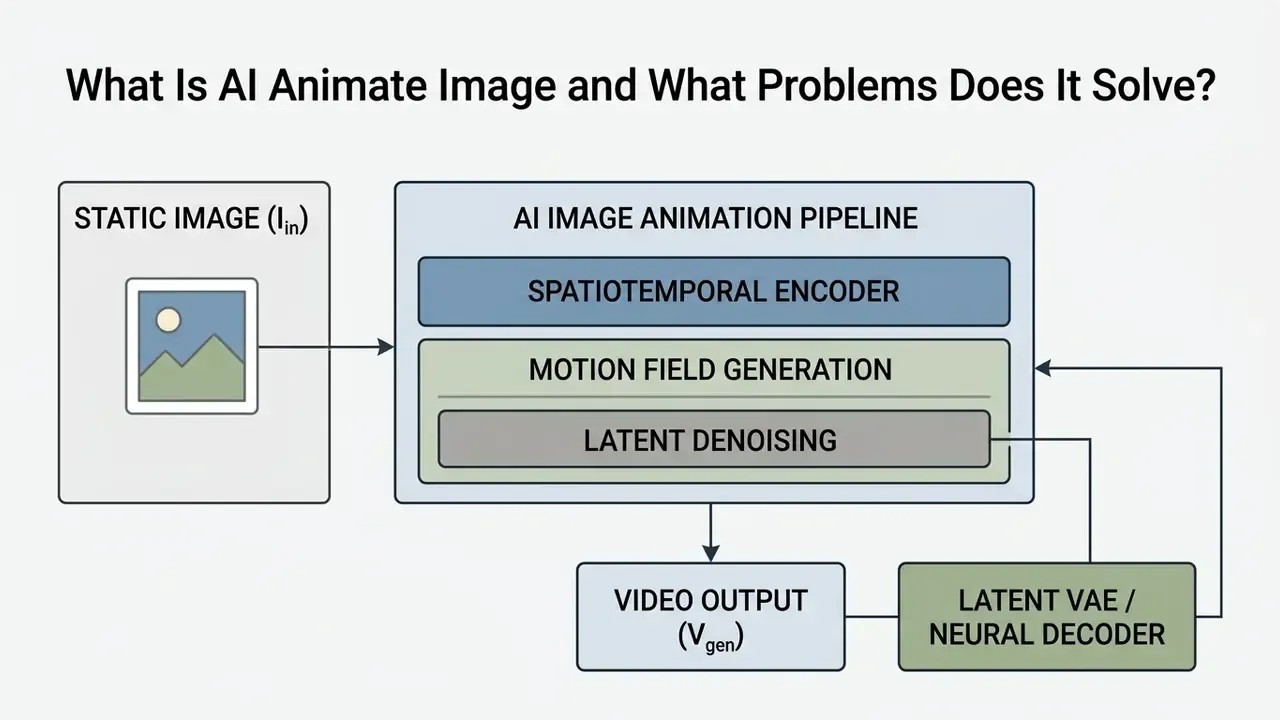
How AI Turns a Static Image into Animated Video
Artificial intelligence converts a static image into animated video by projecting the source frame into a spatiotemporal latent space and applying trained motion priors to estimate pixel transitions over time. Modern architectures combine depth map estimation, optical flow prediction, and cross-frame attention to generate intermediate and future frames. Readers who need a foundational breakdown of the category can start with our reference material on image-to-video AI tools before configuring production pipelines, or browse the wider AI glossary for adjacent definitions.
The underlying diffusion or transformer model conditions every generated frame on the original reference image. Structural fidelity survives, while the system introduces controlled local deformations such as facial expressions, or global shifts such as camera movement.
"Diffusion-based I2V models learn the conditional distribution , preserving the appearance of the input image while synthesizing plausible motion."
Three technical stages define the transformation. First, depth-aware interpolation estimates bi-directional optical flow together with depth maps, using depth cues to detect occlusions and keep motion boundaries sharp. Second, flow-guided alignment warps reference features onto the target frame so temporal consistency survives scene variation. Third, neural extrapolation predicts spatial and temporal continuation beyond the observed frame. That third stage is what makes single-image animation possible at all, rather than mere in-between frame filling.
What Images Can Be Animated: Photos, Illustrations, and Product Images
Virtually any sharp, well-defined raster visual can be animated: human portraits, old family photos, studio product photos, architectural renders, and 2D digital artwork. The best candidates share three traits, namely distinct foreground-background separation, balanced exposure, and clear edge boundaries that let neural encoders isolate subject geometry.
- Human Portraits and Archival Photos: These require precise facial landmark tracking to model natural blinking, eye gaze, micro-expressions, and subtle head rotations without distorting facial symmetry. Teams working systematically with portrait assets often pair animation with AI headshot generators to standardize source quality before motion synthesis.
"SadTalker generates 3D motion coefficients from audio and achieves superior motion synchronization and video quality for single-portrait talking heads."
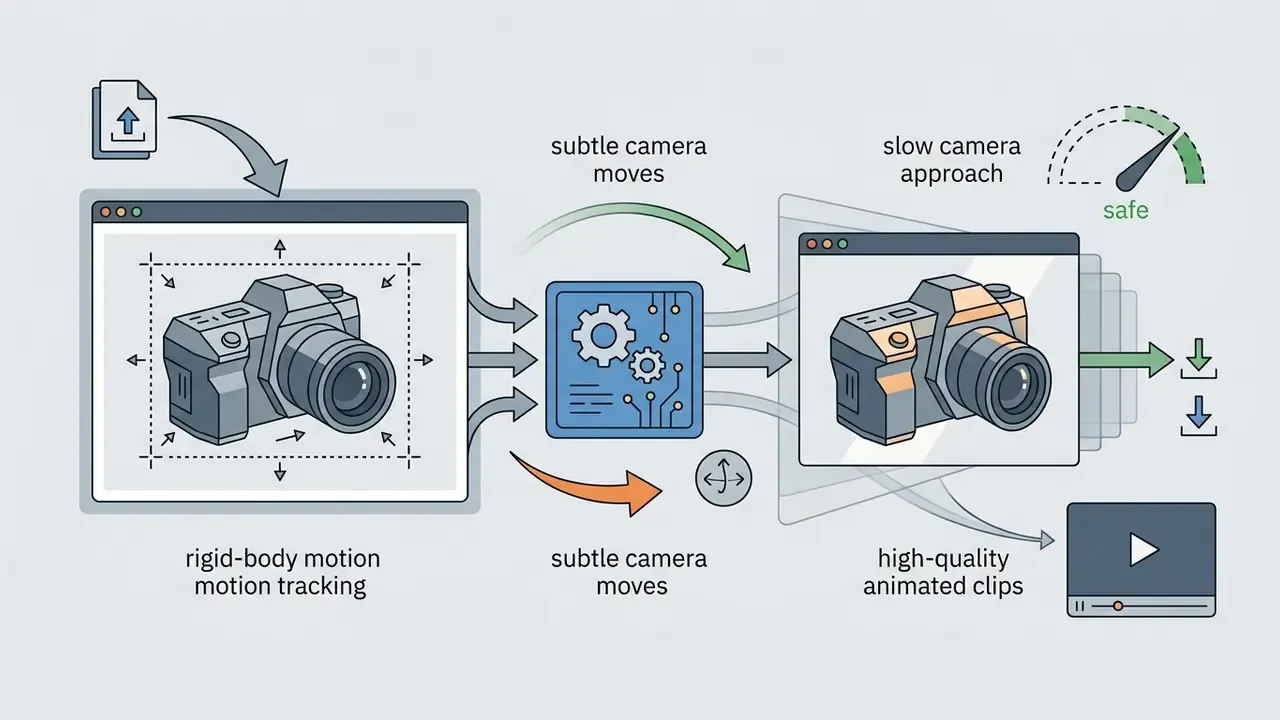
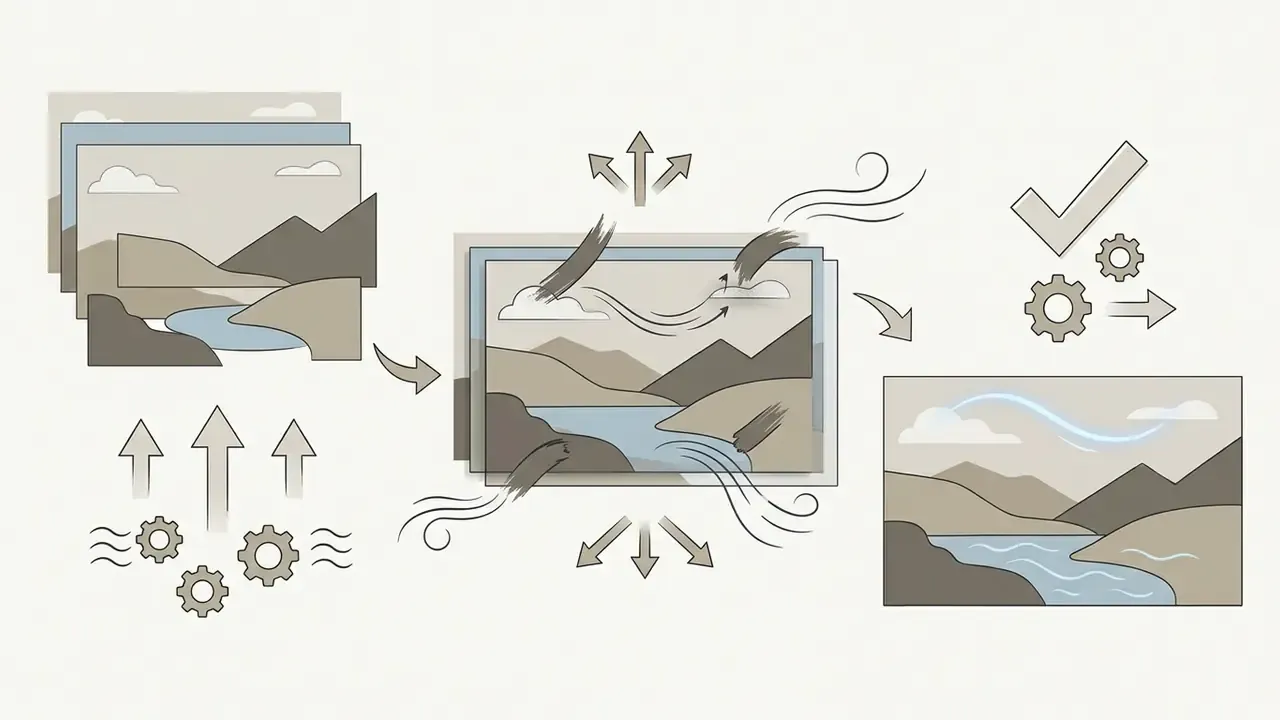
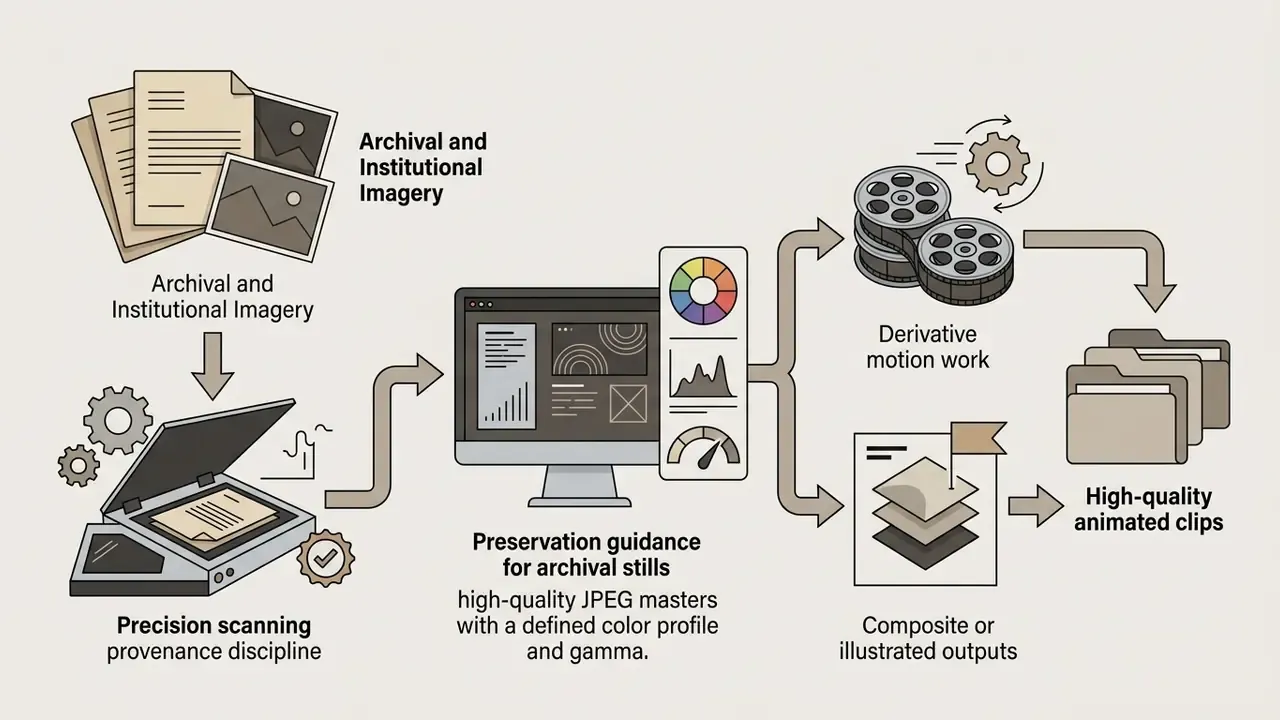
A caution worth stating plainly. Public-figure likenesses carry a different risk profile from product shots, as the reporting around the trump ai image wave and the trump ai pope composite demonstrated. Motion makes a synthetic still more persuasive, and more dangerous, in exactly the same step.
Interactive Before / After Animation Demonstration
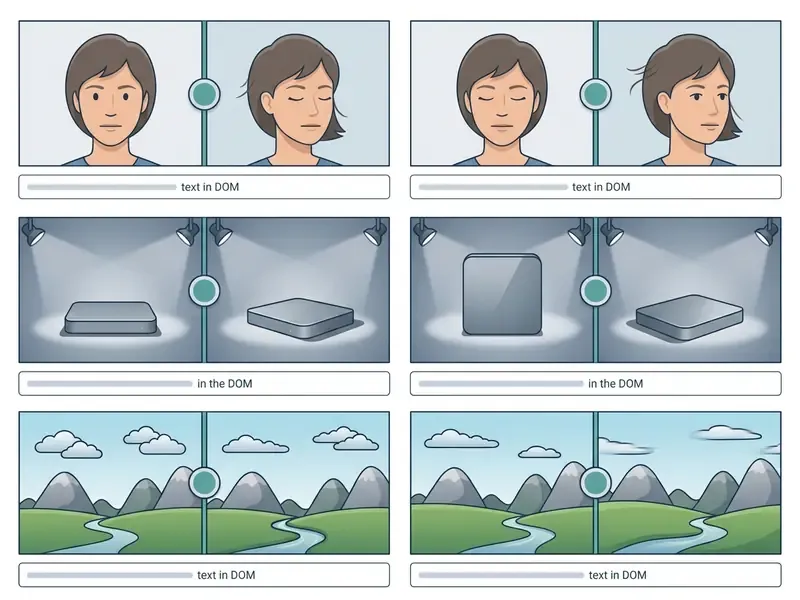
How AI Image Animation Works: Models, Motion, and Text Prompts
AI image animation operates through a conditional probability distribution , where the generated video sequence is synthesized from the reference image , an optional text prompt , and structural control signals . Modern image-to-video frameworks integrate deep spatial encoders with temporal attention layers, so the network processes spatial layout and time-series motion at once.
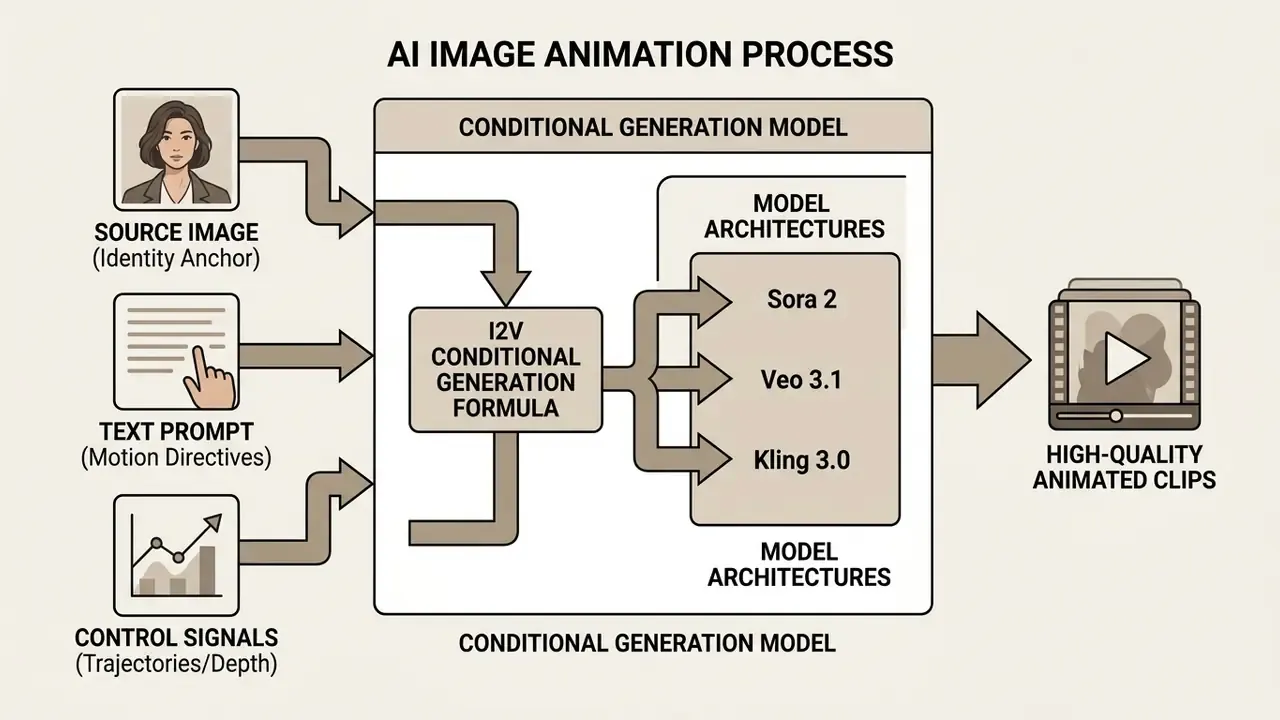
AI Video Models and In-Frame Motion Analysis
Updated (2026). Leading AI video generation platforms use state-of-the-art Diffusion Transformers or spatiotemporal U-Nets to separate static background environments from dynamic foreground subjects. Enterprise workflows now rely on a multi-model ecosystem rather than one engine. Sora 2 and Google Veo 3.1 handle complex spatial physics and longer temporal coherence. Seedance 2.5 and Wan 3.0 offer advanced spatiotemporal trajectory control. Kling 3.0 (O3) specializes in high-fidelity facial dynamics. Runway Gen-4.5 holds the throughput of Gen-4 while raising output quality. MiniMax H3 and Grok Imagine 1.5 deliver faster rendering for stylized 2D artwork and social media clips. Community-facing platforms such as tensor art ai add model variety, though with looser licensing hygiene.
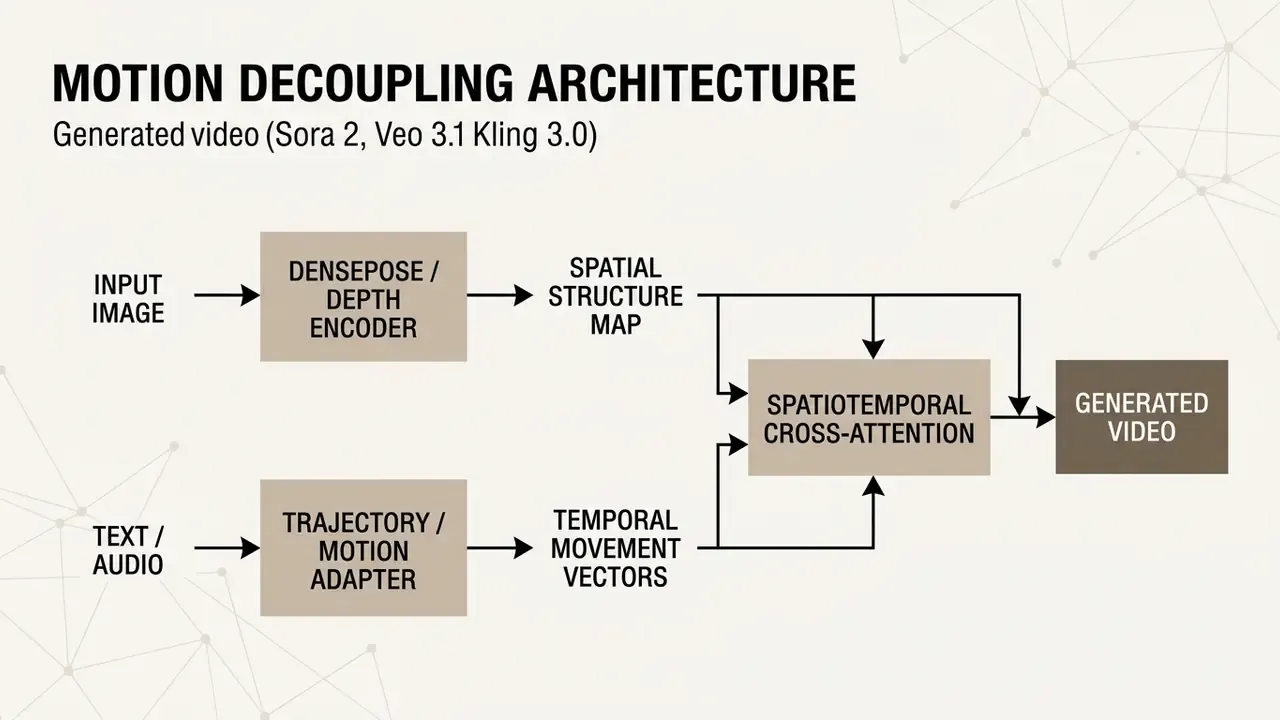
Architectures such as Hallo3 employ temporal causal 3D VAEs and stacked transformer layers to anchor subject identity, while Motion-I2V frameworks extract explicit pixel trajectories to decouple spatial geometry from motion dynamics. For a category-level map of these engines, see our overview of AI video generators.
"Motion-I2V splits the task into motion-field prediction and reference-frame feature propagation via motion-augmented temporal attention, sustaining consistency under large motion."

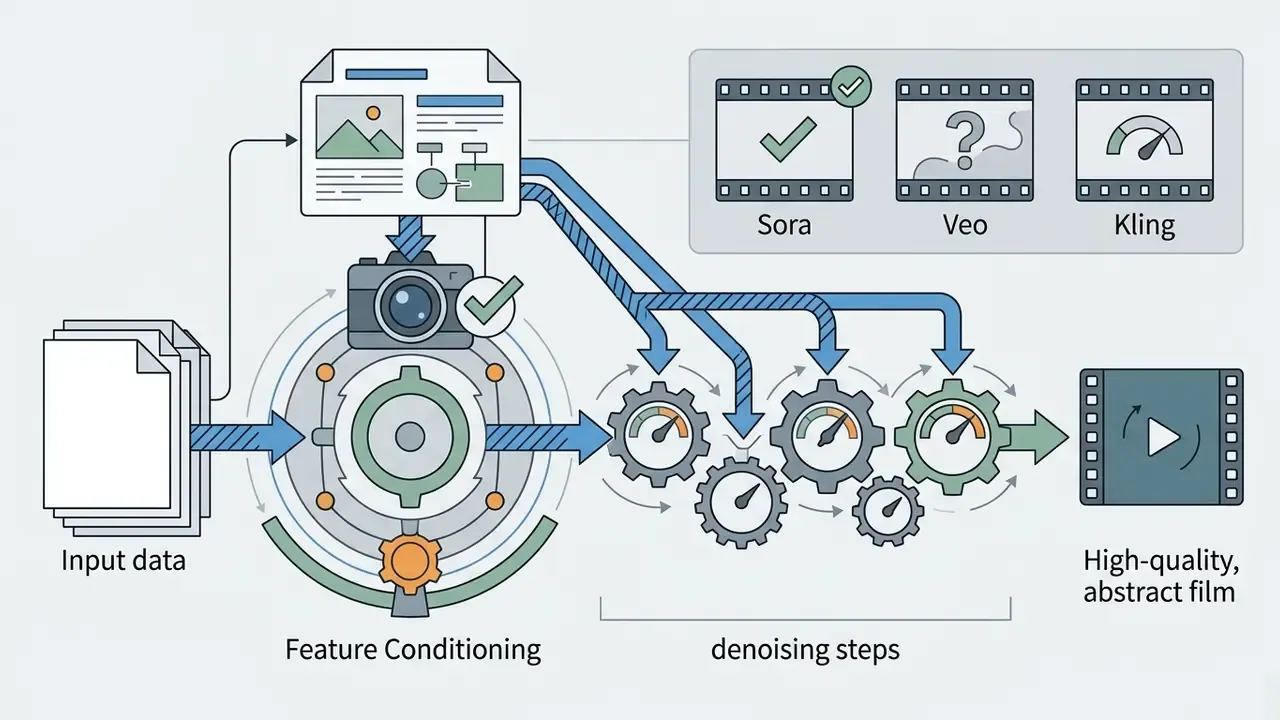

"ConsistI2V introduces spatiotemporal attention over the first frame and low-frequency noise initialization, reducing identity drift and background flicker."
How to Describe Motion Using Text Prompts
Text prompts act as guiding instructions for the temporal denoising process, specifying camera direction, motion speed, environmental action, and animation style. To get precise control, structured prompts should combine shot composition, camera technique, subject behavior, and environmental dynamics into one clear directive. A reliable prompt order used by leading vendors runs: shot size, angle, camera movement, direction, speed, subject, lens or look, lighting or mood, reveal target.
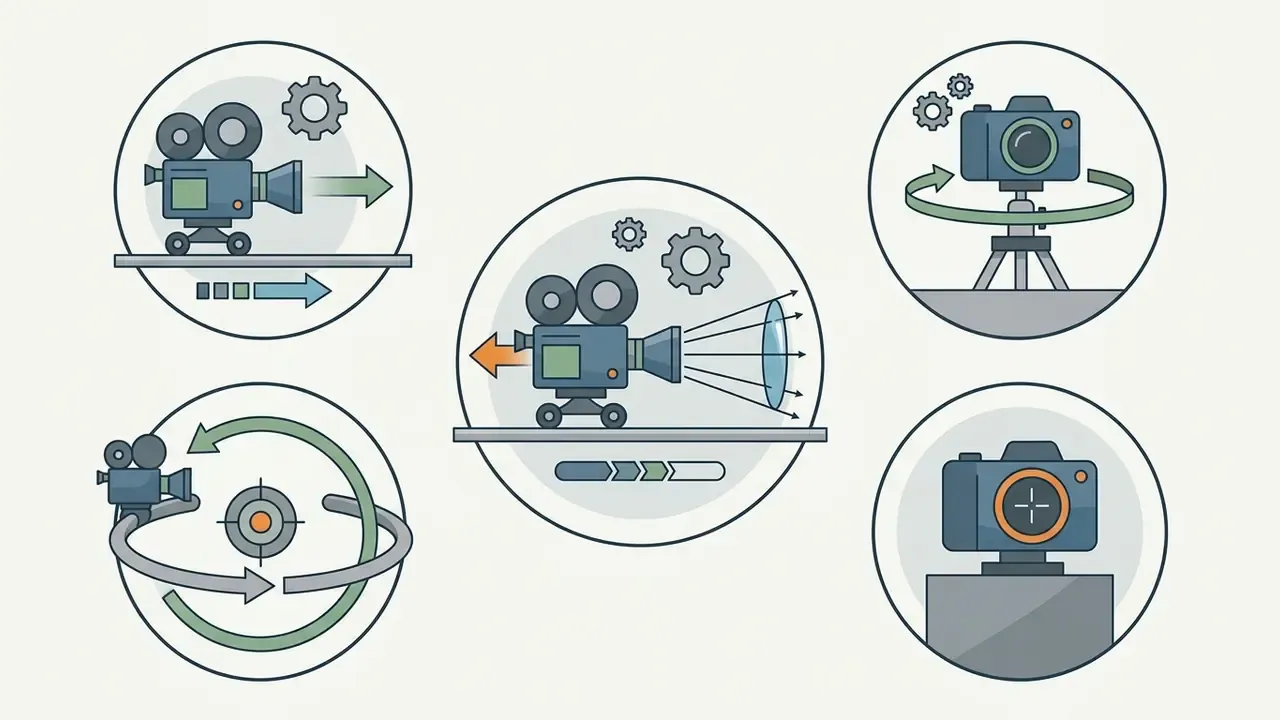
slow push-in, horizontal pan left, dolly zoom, 360-degree orbit, or locked-off camera. In formal terms, a pan is horizontal rotation on a fixed axis, a tilt is vertical rotation, a dolly moves the camera body forward or backward, and an orbit traces an arc around the subject. To match these controls against specific platforms, compare the best AI video generators by supported motion parameters.
subtle blinking, gentle smile, hair blowing in the wind, or rotating slowly on a turntable.
cinematic volumetric lighting, drifting steam, or soft focus background blur to push realistic motion further.
slow pacing, gentle breeze, or rapid whip pan. Use negative prompts where the engine supports them, to suppress unwanted deformation."VidCRAFT3 uses a Spatial Triple-Attention Transformer to control camera motion, object motion, and lighting direction independently through parallel cross-attention layers."
Production-Ready AI Animation Prompt Templates
| Use Case | Target Motion Objective | Ready-to-Use Prompt Template | Recommended Model |
|---|---|---|---|
| E-Commerce Product | 360 orbit and lighting shift | Cinematic 360-degree orbit around [subject], studio volumetric rim lighting, soft reflections, smooth 30fps movement, photorealistic, 4k detail --no warping | Kling 3.0 / Veo 3.1 |
| Portrait Dynamics | Natural micro-expressions | Subtle blinking, natural breathing motion, slow eye gaze turn towards camera, soft wind blowing hair strands, photorealistic facial symmetry maintained | Seedance 2.5 / Hallo3 |
| Social / Viral | Environmental parallax | Cinematic slow pan left, background elements moving with multi-layer depth parallax, foreground stays sharp, drifting atmospheric steam, 8k resolution | Wan 3.0 / Sora 2 |
| 2D Art / Anime | Stylized fluid motion | Fluid 2D animation cycle, flowing water and floating ambient light particles, gentle camera push-in, anime PV style, crisp edge retention | MiniMax H3 |
| Luxury / Perfume Ad | Premium product reveal | Macro cinematic push-in on [product], slow rotating light sweep across glass, floating dust particles, dark editorial backdrop, shallow depth of field, luxury commercial grade | Veo 3.1 / Seedance 2.5 |
| Storyboard to Motion | Sequential shot continuity | Animate storyboard panel into live action: locked-off medium shot, subject performs [action], consistent character design, cinematic color grade, 24fps film look | Sora 2 / Runway Gen-4.5 |
How to Animate a Photo with AI: Step-by-Step Process from Upload Image to Export
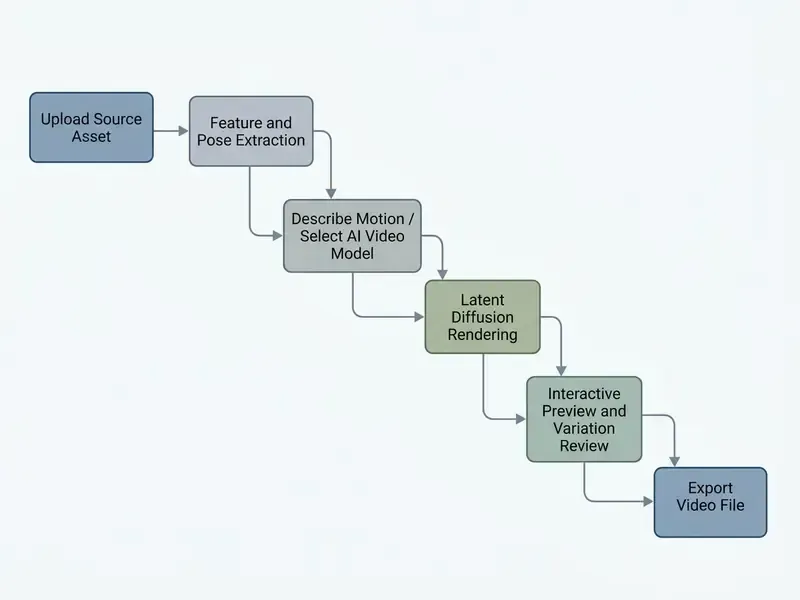
Converting a static photograph into an animated video clip follows a standardized execution pipeline. Online interfaces compress the work into three operational stages, and vendor documentation converges on the same sequence: upload a still image, optionally set an end frame and motion settings, generate, then download the result as a video file. Repeatable process beats clever prompting here.
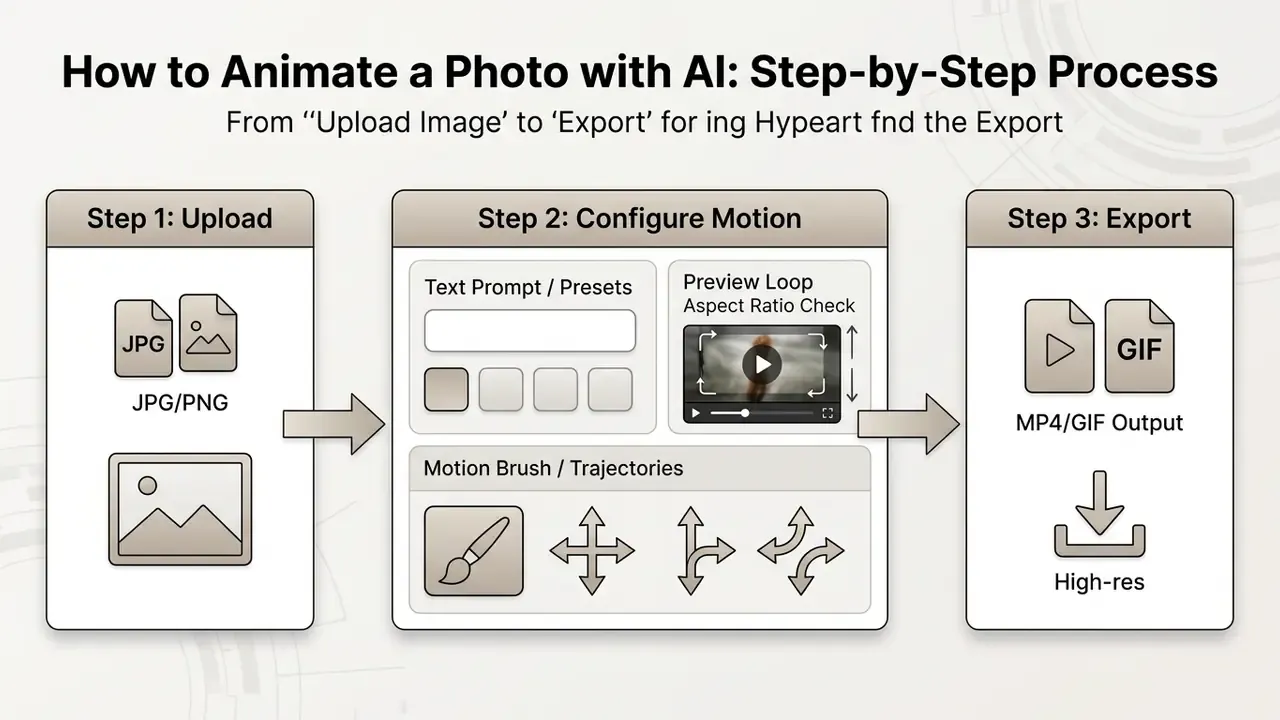
Step 1: Upload Image and Prepare Source Photo
The process begins when you upload an image in a compatible format such as PNG, JPG, or WebP. Input visuals should hold a minimum resolution of pixels, while high resolution files up to pixels preserve finer structural detail during latent feature extraction.
"When input image resolution is low, spatial ambiguity forces the model to synthesize blurry textures and unstable motion boundaries."
- Strict File Constraints:
- Supported Formats
- PNG (best for sharp edges and transparency), JPG/JPEG, WebP, TIFF. Convert HEIC or BMP before upload, since many I2V backbones cannot ingest those containers directly.
- File Size Limits
- Minimum px; maximum recommended px, or up to px on enterprise pipelines. Maximum raw file weight is 10 MB for most cloud web interfaces (some consumer tools cap at 6 MB, others allow 20 MB), and up to 50 MB for API payloads.
- Color Depth and Aspect Ratios
- 8-bit RGB or RGBA. Standard ratios are $1:1$ (square), $16:9$ (landscape), $9:16$ (vertical Reels and TikTok), plus $4:3$ and $3:4$ for catalog grids. Some pipelines additionally require width and height in multiples of 16 px and an aspect ratio no wider than $3:1$.
- Visual Clarity
- Check exposure and contrast. Extremely dark, overexposed, or heavily compressed source files inject visual noise during temporal extension. If the asset is degraded, pre-process it with AI image enhancers first; for soft-focus archives an unblur image ai free pass is often enough before animation, instead of asking the video model to reconstruct missing detail.
- Aspect Ratio Selection
- Pick framing that matches your publishing channel, which prevents unexpected edge cropping later.
- Subject Isolation
- Verify that primary subjects have clean, recognizable boundaries, so the spatiotemporal encoder can track foreground keypoints accurately. For legacy or low-resolution archives, AI image upscalers raise pixel density before the file enters the animation queue.
Step 2: Add Motion via Prompt or Animation Style
Once the asset is uploaded, configure motion parameters with structured text prompts, preset movement styles, or manual trajectory tools. This is the step where most teams either add motion to image ai workflows properly, or quietly create a library of unusable clips.
- Select Motion MethodChoose prompt-guided generation, motion preset selection, or direct trajectory sketching. Presets ship with pre-animated parameters that stay editable after insertion, which makes them the fastest route to repeatable brand motion.
- Apply Motion BrushesDraw over specific image regions such as water, hair, or wheels, confining movement to designated pixel coordinates while the rest of the scene stays still. Motion-brush implementations define movement by a path drawn directly on the frame, editable visually before generation.
- Define Camera PathsSet camera direction and speed multipliers to decide whether the viewpoint holds still or executes complex tracking. Path-based systems either link camera and target to a drawn path or record a fly-through route, the closest analogue to classic motion-path animation.
- Set Motion DegreeWhere available, use an explicit motion-strength scalar. Small values yield nearly static camera behavior. Larger values create pronounced subject dynamics, and pay for it in stability.
Step 3: Preview, Generation, and Exporting the Video Clip
With motion vectors configured, the system runs latent denoising to generate the video sequence. Review output in the preview player before final rendering and export.
- Iterative Preview Inspect intermediate clip variations for identity preservation, motion smoothness, and structural stability. Most platforms return several variations per generation, so check all of them before spending credits on a re-run.
- Resolution and FPS Settings Select frame rate (usually 24 fps or 30 fps) and output resolution (720p, 1080p, or upscaled 4K). Higher frame rates look smoother, and cost proportionally larger files plus longer export times.
- Format Selection Export as an MP4 container for broad media compatibility, or as an animated GIF for lightweight web embedding.
| Output Format | Ideal Use Case | Pros | Cons |
|---|---|---|---|
| MP4 (H.264 / H.265) | Social media content (Reels, Shorts), video editors | Maximum compression efficiency, high color fidelity, broad hardware acceleration | Requires player controls for continuous looping |
| Animated GIF | Email marketing, messaging apps, lightweight web badges | Native auto-play looping without scripts, universal browser support | Limited 256-color palette, larger file size, no audio, slower to export |
| WebM / VP9 | Modern web embedding, transparent visual layers | Alpha-channel transparency, lightweight footprint for HTML5 | Limited compatibility with legacy mobile video editing apps |
For motion graphics in institutional or accessibility-sensitive environments, keep clips under one minute and under roughly 3 MB, provide a transcript describing all imagery, supply alt text for animated assets, and add pause, stop, or hide controls whenever autoplay motion runs past five seconds.
Visual Workflow: AI Image Animation Pipeline
How to Get High-Quality Animations and Avoid Unnatural Motion
High quality animations depend on managing spatial resolution, temporal consistency, and motion strength to prevent artifacts. The usual generative defects are morphing surfaces, floating object details, boundary blurring, and anatomical distortion in human subjects. Anyone who has watched a portrait grow a sixth finger mid-blink knows the failure mode.
Why Source Image Quality Impacts Generated Video
The fidelity of a generated video is bounded by the pixel density and edge sharpness of the input. Spatiotemporal encoders read structural feature maps straight from source image latents, so low-resolution inputs create spatial ambiguity, and the model answers with blurry textures and unstable motion boundaries. High resolution assets keep fine features distinct through cross-frame attention cycles: facial skin grain, fabric weave, product typography.
"Video diffusion models consistently outperform image counterparts on action recognition, depth estimation, and tracking because they encode richer temporal representations."
This is not a software limitation. It is information-theoretic. Output sharpness cannot exceed the detail actually present in the source, re-encoding below that clarity destroys sharpness permanently, and rendering above native detail does not restore it. For print-adjacent product work, remember that 72 dpi stays an online-only standard, while assets destined for printed derivatives should originate at 300 dpi at full size.
Managing Motion Intensity and Camera Movement
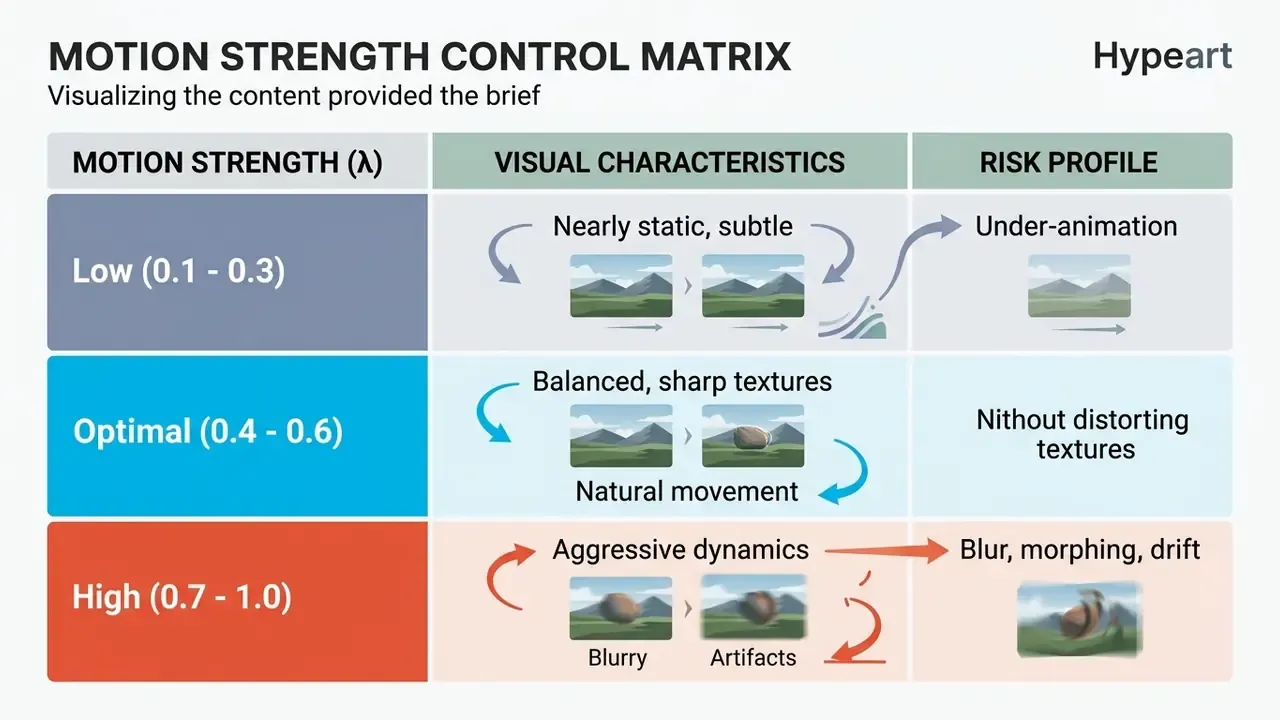
Controlling motion magnitude keeps anatomy plausible and objects stable. Setting motion strength () between and balances dynamic movement against structural sharpness; higher values raise the odds of texture morphing and temporal instability. Diffusion-morphing research reports the same trade-off from the other side: larger interpolation windows improve temporal smoothness but introduce blurry textures, while narrowing the window to roughly – suppresses blur at the cost of fluidity.
"FrameBridge reaches FVD 95 on MSR-VTT versus 192 for its diffusion counterpart, showing that explicit frame-transition modeling reduces artifacts and motion instability."
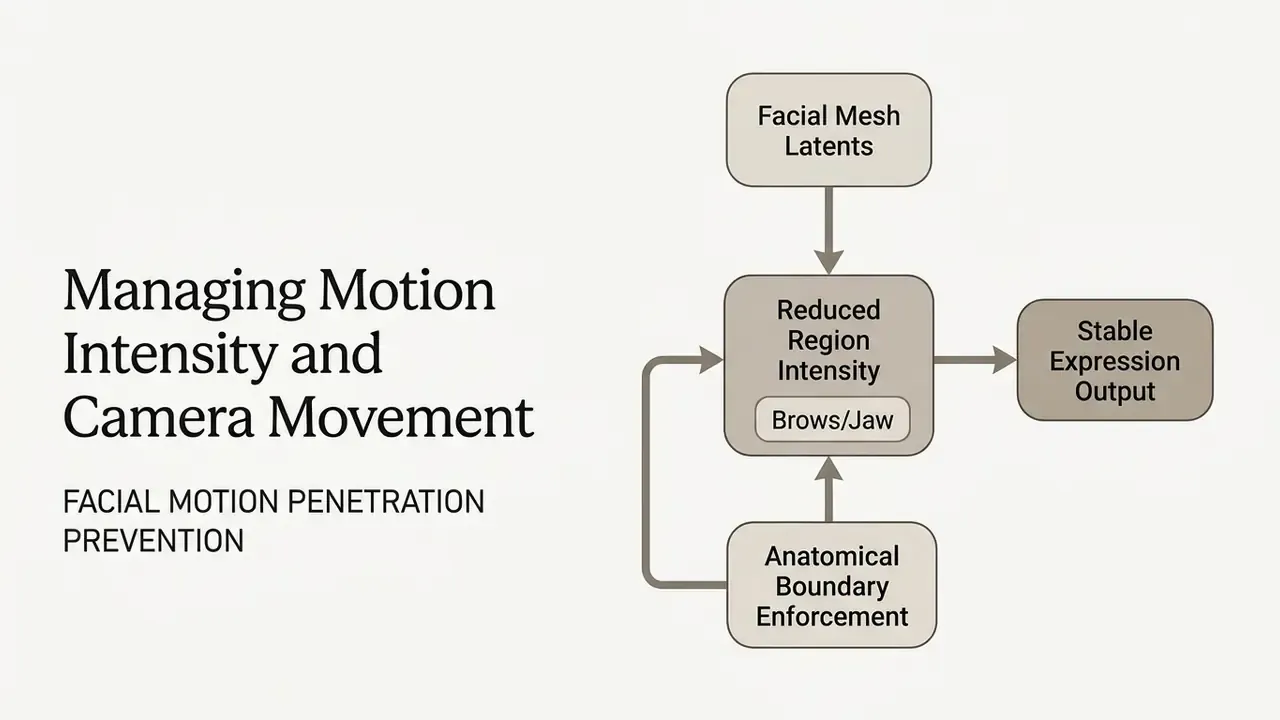
- Facial Realism
- Lower motion intensity around complex facial regions (eyebrows, eyelids, eyeballs, mouth, jawline, cheeks) to eliminate mesh penetration and hold subject identity. First-frame spatiotemporal conditioning stabilizes these regions at the architectural level: "ConsistI2V introduces spatiotemporal attention over the first frame and low-frequency noise initialization, reducing identity drift and background flicker." Source: ConsistI2V: Enhancing Visual Consistency for Image-to-Video Generation (2024). https://arxiv.org/abs/2402.04324
- Camera Matching
- Keep artificial camera movement aligned with the perspective and depth plane of the original photograph, otherwise the background shears. Mixed real and synthetic scenes need consistent camera position, orientation, and motion; moving-camera setups effectively demand matchmoving discipline.
- Iterative Denoising Windows
- Limit cross-frame feature interpolation to early denoising timesteps, letting later steps refine sharp surface texture without adding motion blur. Interpolated attention applied late in denoising is the main cause of degraded low-level texture.
- Selective Stabilization
- Light Gaussian smoothing of sketch or edge conditioning inputs during inference is a documented way to suppress frame-to-frame inconsistency in stylized animation pipelines.
Data Privacy, Encryption, and Asset Retention
Pre-Upload Security Checklist (Shadow AI Control)
Run this before any employee uploads imagery to a public animation service:
Checklist0 / 8
Practitioners building repeatable review steps around this checklist can borrow patterns from our documented AI workflows.
How to Choose an AI Animate Image Tool for Personal and Commercial Use
Choosing an ai animate images tool means evaluating cost structure, model architecture quality, rendering speed, export settings, and commercial licensing rights. Enterprise teams also weigh vendor data security, API availability, and integration with existing asset management. Price is rarely the deciding variable.
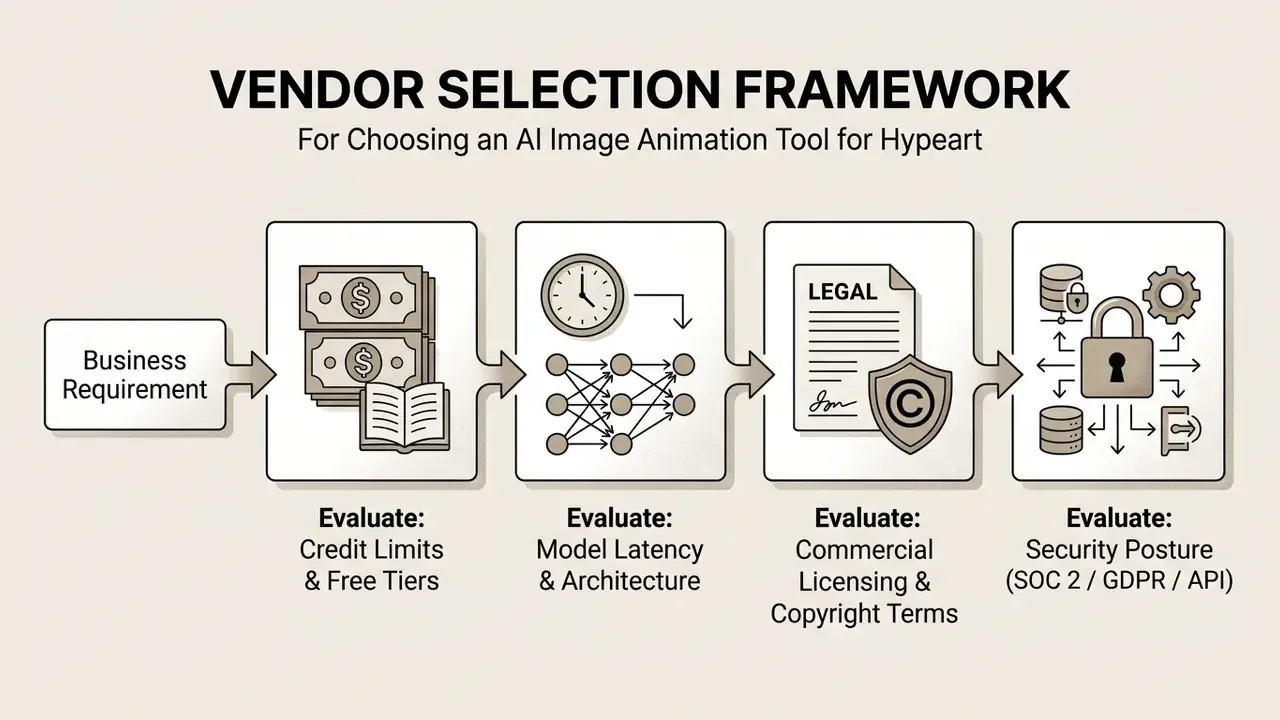
Free AI: What to Verify Before Creating Your First Animation
Free AI tiers and promotional trials are a reasonable way to test an ai animate image generator, and they almost always impose restrictions that break production use.
- Credit Limits and Allocations Free plans follow two patterns, either a non-renewable one-time credit grant or a capped daily refresh. Publicly documented examples include a one-time grant of roughly 125 credits on one major platform and a daily refresh of roughly 66 credits on another. In practice that converts to tens of seconds of finished video before the allowance dries up. Vendors revise allocations often, so re-check the live pricing page before planning a campaign; our breakdown of free AI video generators tracks limits, watermark rules, and export ceilings in more detail.
- Export Restrictions Free tier outputs frequently carry permanent watermarks, cap export resolution at 512p or 720p, and drop rendering priority during peak hours. Several consumer services also limit free clip length to about five seconds. So yes, you can ai animate picture free, but the deliverable is a test, not an asset.
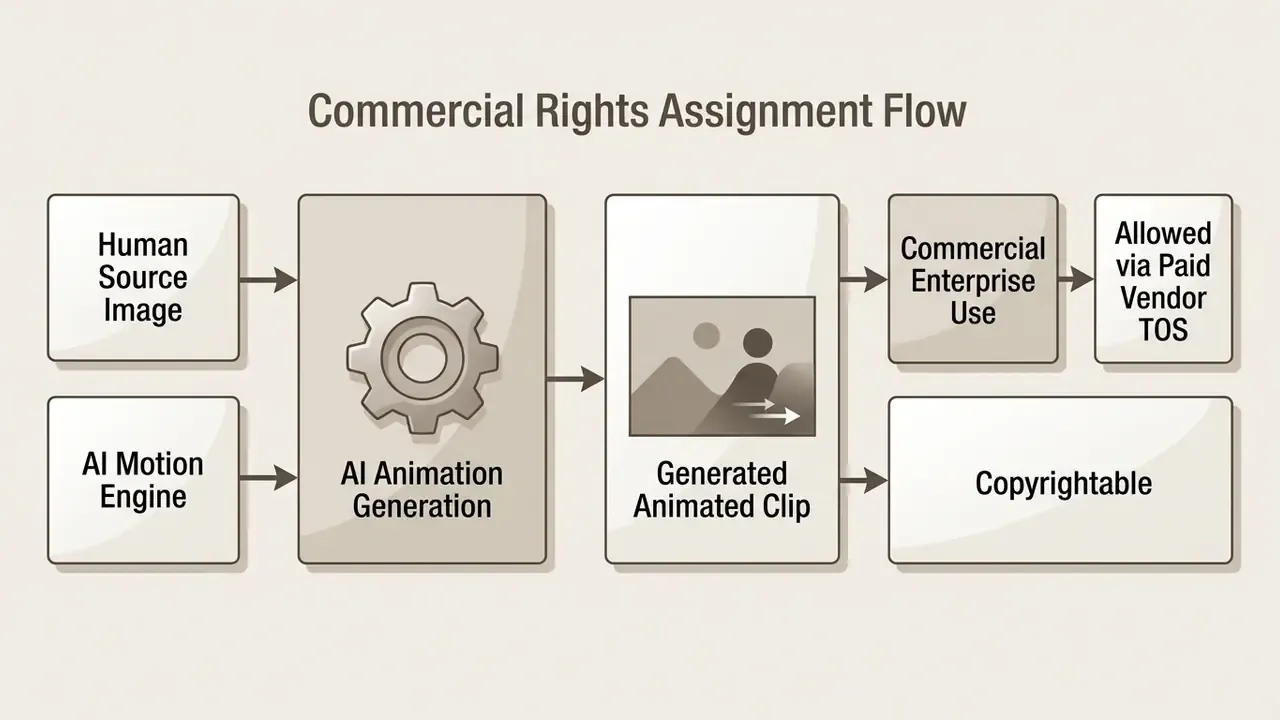
- Commercial Usage Rights Most free tiers prohibit commercial deployment outright, granting non-exclusive licenses limited to personal or educational experimentation.
- Credit Consumption per Render Per-generation cost predicts budget better than a monthly credit total. Published examples range from about 4 credits per animation on lightweight consumer tools to per-second billing on professional engines, for instance 10 credits per second for a flagship model against 5 credits per second for its turbo variant. Paid consumer plans in this segment commonly sit between roughly $24.9 and $85.9 per month for 120 to 400 credits, with separate one-time packs for burst workloads.
AI Video Models, Generation Speed, and Control
When comparing enterprise-grade platforms, judge the generative architecture on rendering throughput, physical motion accuracy, and control granularity.
- Model Latency: High-throughput models such as Runway Gen-3 Alpha Turbo or Pika Turbo optimize inference speed for rapid prototyping, while larger base models prioritize texture fidelity and complex physics. Vendor claims about newer releases, for example that Gen-4.5 preserves Gen-4 speed while improving quality, should be validated on your own asset mix rather than accepted at face value.
- Explicit Motion Control: Favor platforms with secondary control inputs: motion trajectory vectors, force prompts, camera path controls, multi-point motion brushes. Research keeps pointing the same way, namely that structured conditioning improves prompt adherence and physical plausibility far more than longer prose prompts do.
"AIGCBench evaluates I2V models across 11 metrics in four dimensions: control-signal alignment, motion effects, temporal consistency, and video quality."
- Integration Capabilities: Choose platforms with REST APIs or Python SDKs if your workflow needs automated batch processing of marketing catalogs or e-commerce asset libraries. Our side-by-side review of leading AI video generators matches API surface, model roster, and throughput to pipeline requirements, and the broader comparison guides cover adjacent tooling.
- Physics Grounding Caveat: Surveys of physical priors in I2V generation list weak physics grounding, temporal instability, and evaluation difficulty as unresolved limitations, especially for longer clips and scene changes. Treat "realistic physics" marketing language as a benchmark area, not a settled capability.
Commercial Use: Rights for Generated Animations and Marketing Content
Using AI animated video in commercial campaigns means managing intellectual property rights and platform licenses with some care. Under current US Copyright Office guidance (effective March 16, 2023), purely machine-generated visual elements are not eligible for copyright ownership; protection attaches strictly to human-authored contributions such as original source photographs, custom script sequences, or complex composite editing. A 2025 European Parliament study lands in the same place for the EU: output generated without substantial human intervention fails the originality requirement. Disputes in this space move quickly, and our tracker of AI Litigation and Case Timelines follows the active matters.
"VBench++ adds trustworthiness evaluation for video generative models, covering semantic correctness, absence of harmful artifacts, and physical plausibility, which is critical for public distribution."
| Feature / Criteria | Free / Entry Tier | Professional / Paid Tier | Enterprise API Tier |
|---|---|---|---|
| Credit Allocation | 66–160 credits/month (watermarked) | 120–2,250 credits/month | Custom usage volume |
| Typical Monthly Price | $0 | ≈ $24.9–$85.9 | Negotiated / usage-based |
| Max Export Resolution | 512p – 720p | 1080p Full HD / upscaled 4K | 1080p / uncompressed raw |
| Max Clip Length | ~5 s | 5–10 s per generation | Configurable, multi-shot |
| Commercial License | Personal use only (restricted) | Full commercial rights included | Full enterprise indemnity |
| Generation Control | Text prompts and simple style presets | Motion brush, trajectory, camera paths | Custom fine-tuned control points |
| Average Speed | Standard queue (lower priority) | Fast-track priority processing | Dedicated GPU cluster processing |
| Data Retention | Undisclosed or 24 h to 90 d default | Configurable retention window | Zero-retention / contractual SLA |
| No-Retraining Guarantee | Rarely granted | Partial, policy-dependent | Contractually explicit |
| SOC 2 Type II / GDPR | Typically unavailable | Partial attestation | Full attestation plus DPA |
| Private / VPC Deployment | No | No | Available on request |
| Audit Logs and SSO | No | Limited | Full SSO, RBAC, audit export |
Estimating ROI Including Residual Risk
Finance and transformation leads should model the return on an I2V rollout with risk overhead made explicit rather than buried in a footnote:
- is the baseline cost of shoots, editing hours, and agency fees for the same asset volume.
- is subscription or API spend plus credit consumption per accepted asset, including rejected generations, which are the largest hidden cost driver.
- covers review labor, DLP tooling, provenance logging, and legal sign-off.
- is expected loss from unprotectable output, brand-safety incidents, or rights disputes, weighted by probability.
Track acceptance rate (accepted clips divided by total generations) as the most sensitive single input. At a 30% acceptance rate, effective per-asset cost is more than triple the nominal credit price. That number, not the sticker price, is what a CFO should see.
Where to Use AI Animated Photos: Social Media, Marketing, and Digital Art
Adding movement to static visuals produces versatile assets for commercial marketing, social media publishing, digital publishing, and online education.
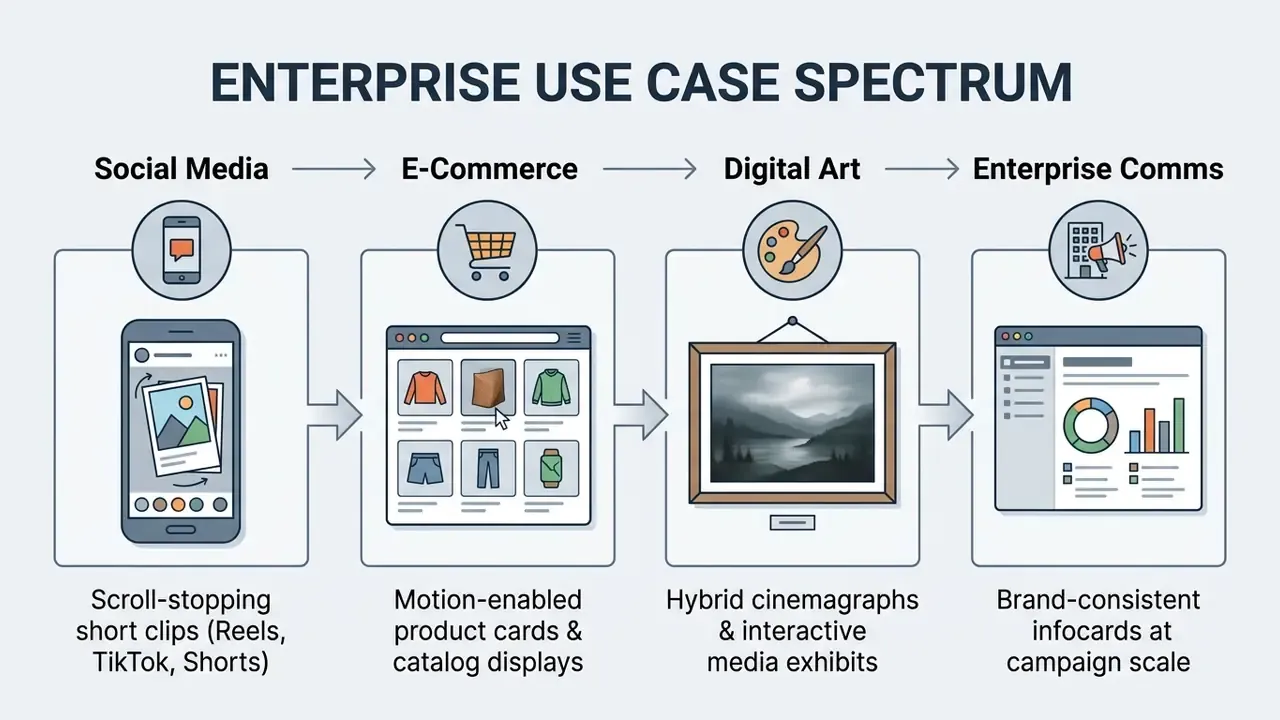
Enterprise Asset Automation: A Practitioner Case
Product Photos, Digital Artists, and Educational Materials
Beyond short-form social content, AI photo animation improves e-commerce displays, interactive artwork, and educational visual aids.
- E-Commerce Product Displays: Animating static product shots, for instance clothing fabric in motion, footwear against dynamic backgrounds, or luxury watches under shifting studio light, lifts customer engagement on product listing pages.
"Motion transfer applied to static e-commerce product images increases shopper engagement on listing pages."
- Digital Art and Gallery Exhibits
- Concept artists and digital artists turn 2D matte paintings into motion-enabled environmental art, applying parallax depth to bring static digital paintings to life. Many source frames originate in generative pipelines covered in our overview of AI art generators.
- Educational and Technical Visualization
- Instructors and technical authors animate static diagrams, historical portraits, and process flowcharts to improve comprehension and visual retention in digital learning modules. Recent education research reports AI-driven animation improving visualization, personalization, interactivity, and inclusivity in teaching and learning. Course-level guidance for animation assignments also expects a storyboard for complex character work plus a documented source-image bibliography, a habit that doubles neatly as provenance tracking.
- Web Design and UI Motion
- LLM-assisted workflows now generate CSS animation code directly from static SVG assets, which extends image animation from raster video into production front-end motion.
FAQ About AI Animate Image
Can You AI Animate Still Images Without Video Editing Skills?
Yes. No-code platforms let users generate animated video clips with no technical background in video editing. The flow is short: upload image, enter natural language prompts or select a motion preset, and the system calculates frame-to-frame movement, optical flow, and depth mapping automatically. Advanced production still benefits from traditional post-processing, but basic work to ai animate a still image needs only clear text instructions and a user friendly interface.
"UI2V-Bench evaluates I2V models across ~500 text-image pairs in four dimensions: spatial understanding, attribute binding, category understanding, and reasoning." Source: UI2V-Bench: Evaluating Spatial Understanding and Reasoning in Image-to-Video Generation (2025). https://arxiv.org/abs/2501.12558 A practical nuance is worth stating. The entry barrier for prompt-based generation is genuinely low, yet professional output still maps to formal editing competencies. Video editing remains a recognized occupation, and vendor documentation for agent-driven motion graphics shows the work shifting toward prompt specification, asset structuring, and timing decisions rather than disappearing.
Can You Animate Multiple Images in a Single Project?
Yes. Multiple static images can be animated in one project through sequential generation or multi-frame interpolation. Advanced platforms accept keyframe sequences, defining initial, intermediate, and final image states, while the engine synthesizes continuous motion transitions between them. You can also generate individual clips from separate images and stitch them in a cloud editor or timeline tool; our comparison of free video editing software covers suitable assembly options. Two mechanisms dominate when teams add motion to images ai style in batches: ordered frame-sequence assembly from numbered files, and per-image transitions with zoom or lateral movement between consecutively displayed visuals.
Which Image Formats Are Best for AI Photo Animation?
PNG and high-quality JPG JPEG remain the most reliable inputs. PNG suits graphics that need sharp edge definition, high color accuracy, or transparent layers. JPG JPEG is fully supported for photographic visuals as long as compression stays low enough to avoid digital noise. WebP is widely accepted and supports both animated frames and transparency, though compatibility is narrower than PNG or JPEG. Mobile formats such as HEIC should be converted to PNG or lightly compressed JPG before upload, because many pipelines cannot display or ingest the image/heic container directly. Tools reviewed in our guide to AI photo editors handle these conversions without quality loss.
What Should You Do If AI Image Generation Fails or Distorts?
Work through four fixes in order:
- Reduce Source Resolution or File Weight: Files over 10 MB or uncompressed formats can time out latent encoders. Downscale below pixels and re-export as optimized PNG or high-quality JPG.
- Lower Motion Intensity (): Values above 0.7 cause facial distortion and texture morphing. Move the slider into the – band and re-run.
- Switch Generative Backbone: Some models struggle with particular visual styles. If a photorealistic engine such as Sora 2 fails on a 2D illustration, switch to MiniMax H3 or Wan 3.0. Queue congestion on a single model is also a common cause of silent failures.
- Simplify Text Prompts: Remove conflicting directives, for instance
fast sprintcombined withlocked-off macro view, and use negative prompts where supported to suppress warping.
How Much Does One AI Animation Actually Cost?
It depends on the billing model. Credit-per-generation tools deduct a flat amount per render, commonly around 4 credits per animation on consumer platforms, while professional engines bill per second of output, for example 10 credits per second for a flagship model against 5 credits per second for its turbo variant. Consumer subscription tiers typically run from roughly $24.9 per month for about 120 credits to $85.9 per month for about 400 credits, with one-time packs for burst workloads. Divide total spend by accepted clips, never by total generations, if you want a realistic per-asset figure.
Is It Safe to Upload Personal or Corporate Photos?
Only after verifying the vendor's technical and contractual controls. Look for TLS 1.3 in transit, AES-256 at rest, a documented automated deletion window, an explicit no-retraining clause, SOC 2 Type II attestation, and a GDPR data processing agreement. Consumer free tiers rarely offer these guarantees. Mainstream platform terms also classify uploads and outputs as user "Content", with responsibility for lawfulness resting on the uploader, which means consent for identifiable people and rights clearance for third-party imagery are your controls to enforce.
Who Owns the Decision to Approve an AI Animate Image Tool?
In most mature institutions the accountable owner is a named business sponsor, with second-line review from model risk or compliance. Treat the tool as a digital worker: approved role, defined data classification limits, logged prompts and outputs, an escalation path for brand-safety incidents, and a documented shutdown mechanism. No evidence, no autonomy. If nobody can name the owner, the deployment is not ready, regardless of how good the generated animations look.
Limitations and Open Questions
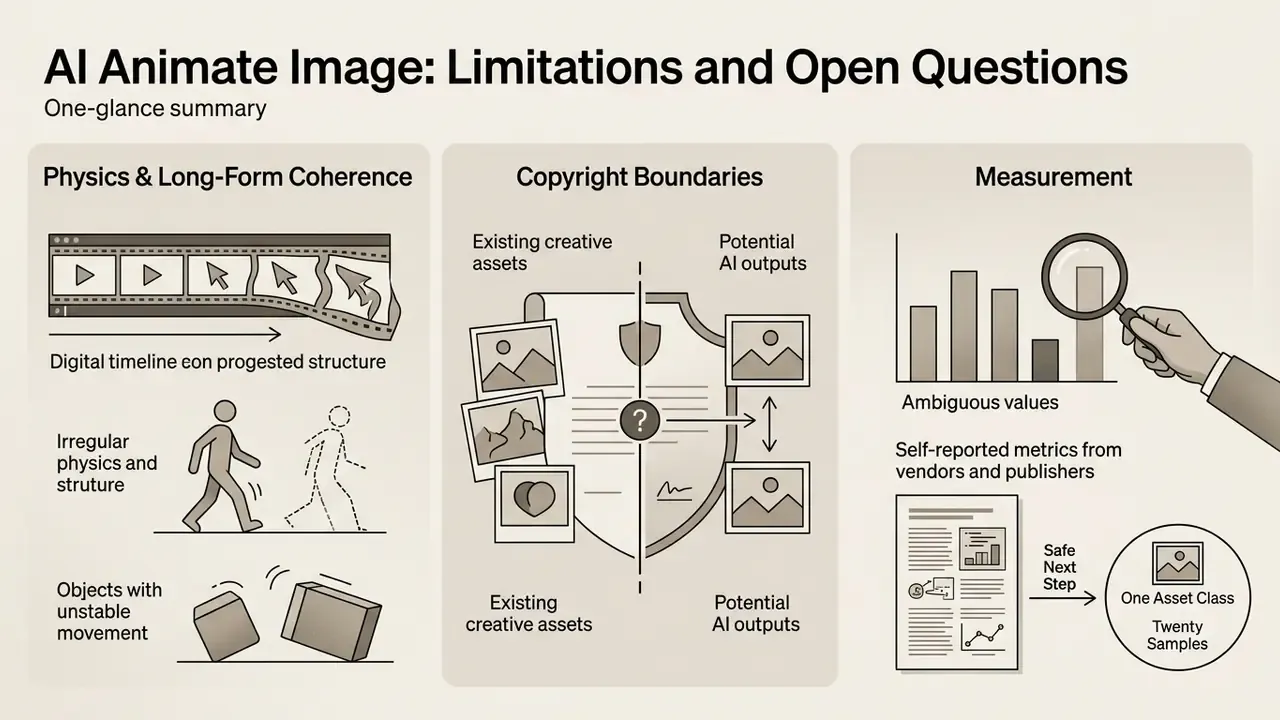
Three things remain unsettled, and pretending otherwise would be dishonest.
- Physics and long-form coherence. Benchmarks still flag weak physical grounding and drift beyond short clip lengths. Multi-shot narrative output is not a solved problem.
- Copyright boundaries. The line between "substantial human authorship" and machine output has not been tested extensively in US courts for animated derivatives of human photographs.
- Measurement. Engagement gains reported by vendors and publishers are largely self-reported, without holdout groups. Directional, at best.
A safe next step for a regulated team is narrow: pick one non-confidential asset class, run twenty generations, log acceptance rate and review time, then decide.
Appendix A: Editorial Revision Log
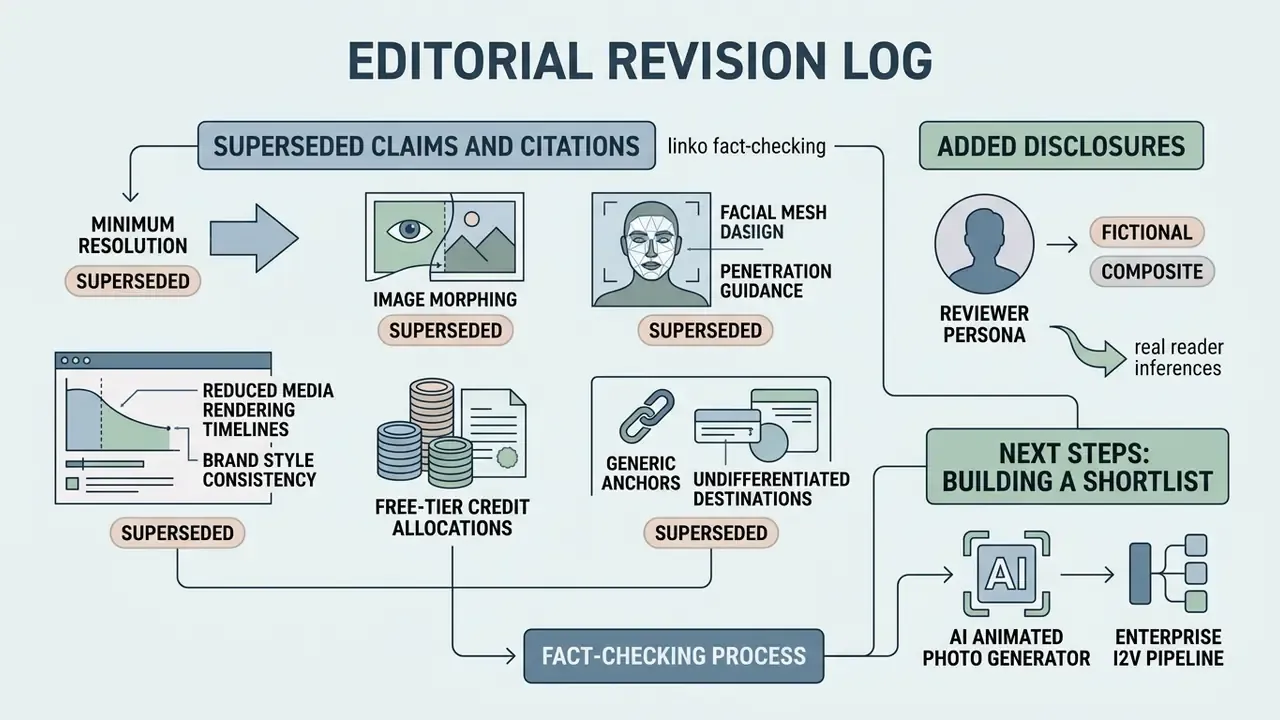
For transparency, the following claims and citations from earlier versions were superseded during fact-checking. Original wording is preserved here, and corrected versions appear in the main text above.
- Superseded citation: "Input visuals should maintain a minimum resolution of 640×480 pixels, though resolutions up to 3840×2160 pixels preserve finer structural details during latent feature extraction (Google Cloud Vision API Documentation, 2026)." The Vision API reference describes general image-recognition input limits and says nothing about image-to-video latent encoding. Replaced with FrameBridge (2024–2025).
- Superseded citation: "(Unleashing the Capability of Diffusion Models for Image Morphing, CVPR 2024)" attached to the – motion-strength range. The interpolation-window trade-off from that line of work is retained descriptively, but the numerical motion-quality claim now rests on FrameBridge FVD metrics.
- Superseded citation: "(Reallusion Faceware Documentation, 2024)" attached to facial mesh penetration guidance. The underlying practice, lowering per-region strength on brows, eyelids, eyeballs, mouth, jaw, and cheeks, is retained; the architectural claim is now supported by ConsistI2V (2024).
- Superseded figures: "reduced media rendering timelines by 74% while maintaining 100% brand style consistency" and "a 22% increase in average on-page dwell time and a 14% improvement in social click-through rates." Both were internal, self-reported, single-organization measurements without published methodology. They now appear with explicit caveats and directional framing.
- Superseded citation: "(Vidu AI Market Report, 2026)" for free-tier credit allocations. Credit figures are now described as publicly documented vendor examples subject to frequent change, with a recommendation to verify live pricing pages.
- Superseded internal links: generic anchors and undifferentiated destinations were replaced with descriptive anchors pointing to specific topical references.
- Added disclosure: the reviewer byline now credits Marcus Hale as author; illustrative examples are distinguished from documented client work and regulatory positions.
Building a shortlist for an ai animated photo generator or an enterprise I2V pipeline? Start with the security and licensing criteria above, then compare options across vendors before any confidential asset leaves your perimeter.
Social Media Content and Scroll Stopping Video
In short-form environments such as Instagram Reels, YouTube Shorts, and TikTok, thumb-stop rate depends on visual movement inside the first two seconds of playback. Turning static photographs into looping motion graphics or subtle cinemagraphs lets a content creator hold posting frequency without multiplying video production budgets. Eye catching does not have to mean expensive. Related template-driven tooling is covered in our guide to animation makers.
In one commercial publishing test, an online media team converted static article hero graphics into five-second looping background clips across roughly 150 published articles, inserting subtle camera pans and atmospheric movement. The team reported a low-double-digit percentage improvement in average on-page dwell time and social click-through over a 90-day window. Single-publisher, self-reported analytics, no controlled holdout group, so re-measure on your own audience before reallocating budget.
Independent research explains why format alone guarantees nothing. A randomized field experiment on video-sharing platforms found that AI-generated summaries significantly increased all measured forms of engagement, while a 2025 ACM study of TikTok short-video ads found that most viewers leave within the first quarter of an ad, with no significant correlation between churn and click-through rate. Comparative platform analyses from the same period report average engagement rates near 18.2% on TikTok, 12.5% on Instagram Reels, and 10.7% on YouTube Shorts, with emotional storytelling, interactive elements, and trending audio recurring as drivers. Captions matter too: one 2026 whitepaper reported that removing captions cut engagement by nearly 18% and CTA clicks by 26%. Cinemagraphs have the longest track record of all, since peer-reviewed work from 2021 documents the still-image-plus-looping-element format as an established advertising vehicle, and brand campaigns have paired cinemagraphs with sequential storytelling to spotlight product detail.