If you sit in a regulated organization, an AI video generator is never just a creative toy. It is a model that touches brand claims, personal likeness, and audit records. Marketing wants speed. Risk wants evidence. This guide tries to serve both without pretending the trade-off has disappeared.
Executive summary
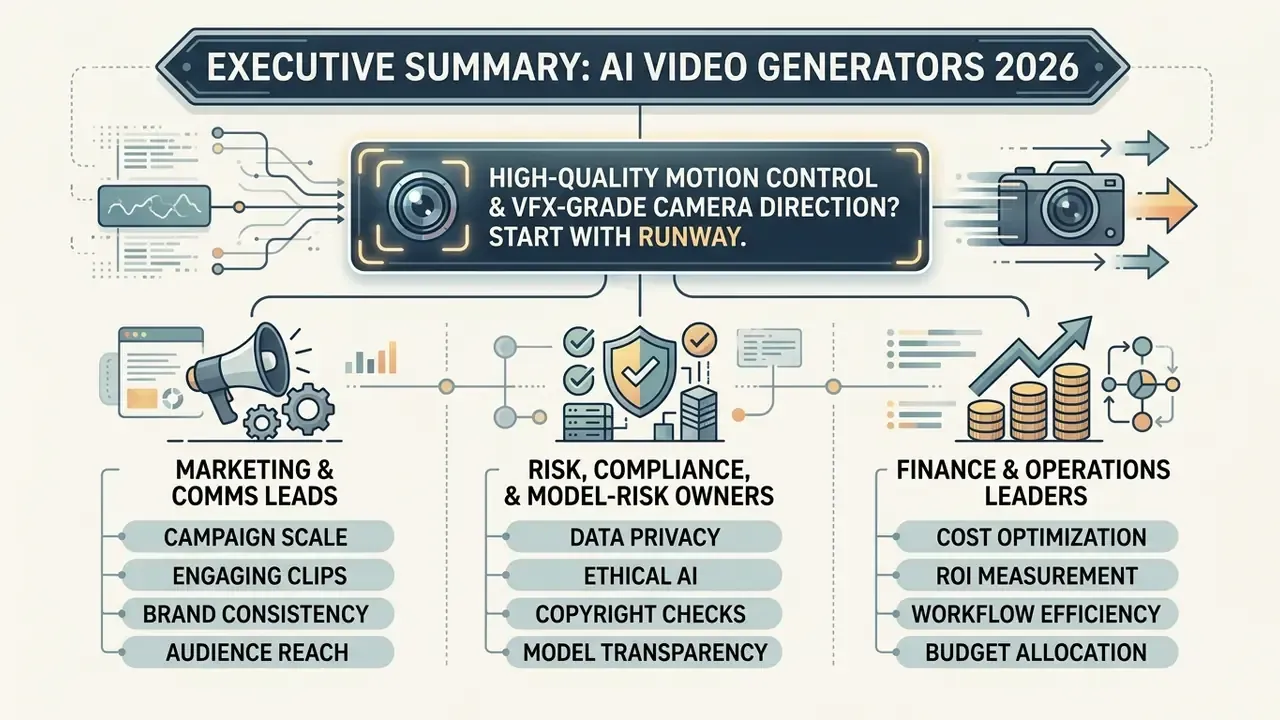
If you need cinematic motion control and VFX-grade camera direction, start with Runway. If you need physics-stable image-to-video with up to 15 seconds of multi-shot narrative, native audio, and 4K export, use Kling 3.0. For localized corporate training and multilingual internal comms, deploy HeyGen (175+ languages, phoneme-level lip-sync). For brand-safe, licensed-asset marketing output with indemnification-friendly terms, use Adobe Firefly. For high-volume social clips, VEED and InVideo AI convert one prompt into captioned vertical videos on top of 16M+ stock assets, while Canva (powered by Google Veo-3) generates 8-second 16:9 clips with synchronized dialogue, music, and sound design. For scripted long-form output, up to 50 minutes, evaluate storyboard-automation engines such as MagicLight AI.
Selecting the best AI video generator requires balancing visual realism, character consistency, and workflow efficiency against platform governance and operational costs. Modern AI video platforms span specialized categories, ranging from prompt-driven diffusion models to synthetic avatar generators and automated video editing suites.
When evaluating tools for commercial deployment, enterprise teams must assess how each vendor handles licensing, training data provenance, export fidelity, and residual risk. You can open the hub to review broader licensing criteria or examine individual model evaluation parameters across workflows.
Who this guide is meant to help
These are working hypotheses about readers, not verified segments. Treat them as such until interviews, analytics, or CRM data confirm them.
- Marketing and comms leads who need volume output across social media, ads, and product video, and who care most about cost per finished minute.
- Risk, compliance, and model-risk owners who inherit the same tools later, and who need version pinning, consent records, and reproducible evidence.
- Finance and operations leaders who approve the spend, and who want a risk-adjusted cost model rather than a headline subscription price.
One more note before the comparisons. Vendor capability sheets moved fast in 2026, and several limits below changed mid-year. Re-verify anything you plan to write into a contract.
How we evaluate the best AI video generator tools
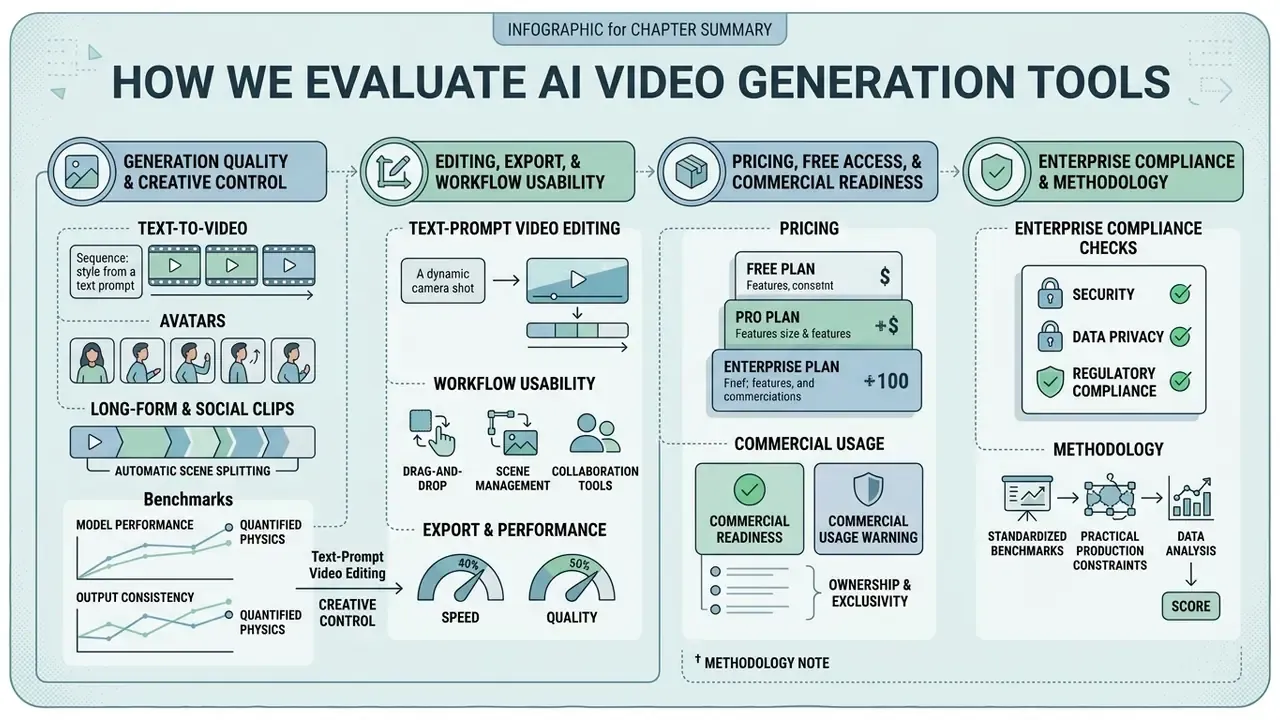
| Platform | Primary use case | Model & max clip length (2026) | Text-to-video | Image-to-video | AI avatars | Native audio / lip-sync | Built-in editor | Free access tier | Max native resolution |
|---|---|---|---|---|---|---|---|---|---|
| Runway | Cinematic control & VFX | Gen-3 lineage (5 to 10s clips; Gen-3 Alpha retired 8 July 2026, Alpha Turbo 30 July 2026); paid extensions to ~15s | Yes | Yes | No | No (external audio) | Advanced timeline | 125 one-time credits (watermarked) | 4K (paid) |
| Kling AI | Motion physics & 4K animation | Kling 3.0, up to 15s multi-shot, 60 fps | Yes | Yes (Anti-Morphing Face Lock) | Digital Human module | Yes, native voices plus multi-character lip-sync | Motion & storyboard controls | 66 daily credits (1080p, watermarked) | 4K (Pro) |
| VEED | Social clips & auto-captions | Short social clips, editor-first | Yes | Yes | Yes (paid tiers) | TTS / AI voice in timeline | Full browser editor | Free (720p with watermark) | 1080p / 4K |
| InVideo AI | Prompt-to-script social videos | Prompt to script to scene assembly; 16M+ stock photos & videos; 50+ voiceover languages | Yes | Yes | Yes | AI voiceover with accent control | Script, scene and "magic box" prompt editor | Limited trial | 1080p |
| HeyGen | Multilingual avatars & translation | Avatar video; 175+ languages/dialects, 177+ for custom avatars | Yes | Yes | Dedicated | Yes, phoneme-level, frame-accurate precision mode | Precision lip-sync editor | 1 credit trial (3 videos max) | 4K |
| Canva | Branded marketing templates | Google Veo-3, up to 8s, 16:9, one clip per prompt | Yes | Yes | Basic talking-head avatars (40+ languages) | Yes, synchronized dialogue, SFX, music | Layout & Brand Kit editor | Free tier available | 1080p |
| Adobe Firefly | Commercially safe video & extend | Firefly Video Model; Generative Extend; 16:9 and 9:16 native | Yes | Yes | No | Transcript-driven audio editing | Transcript-based editor | Free generative credits | 4K (720p/1080p/4K export) |
| MagicLight AI | Long-form storytelling | Story-to-video up to 50 minutes, Nano Storyboard Control | Yes | Yes | Recurring AI characters | Auto music syncing | Storyboard editor | Free tier | 1080p (no 4K) |
Generation quality, consistency, and creative control
To deliver high quality videos, an ai video generation model must maintain character identity, background details, and physical motion stability across consecutive frames. Academic benchmarks decompose that requirement instead of collapsing it into one score.
Legacy distribution metrics are no longer sufficient on their own.
Maintaining subject consistency remains a core technical challenge in AI video creation. Advanced pipelines use reference-conditioned image-to-video synthesis and cross-shot feature sharing to stabilize character identity across multiple scenes (Animate Anyone, CVPR 2024), while multi-shot consistency methods share features between shots to keep the same ai character across scene cuts without degrading motion or text alignment. Physics benchmarks like PhyWorldBench then show that proprietary video models vary significantly in simulating real-world gravity, object collision, and fluid dynamics.
Second-generation frameworks extend scoring into semantics and human plausibility:
Updated, replacing the earlier unquantified claim about Kling's "reliable" physics: Kling 1.6 scores 0.357 on overall physics in PhyWorldBench, below Pika 2.0 (0.521) and close to Luma (0.385) on fundamental measures. That positions Kling as strong for controlled object and environmental motion rather than as an unconditional physics leader. A small but useful distinction when someone in a review meeting says "it just looks more real".
Editing, export, and workflow usability
An integrated ai video editor must provide precise temporal control, allowing creators to refine generated clips without regenerating entire sequences from scratch. Temporal quality has to be measured separately from frame aesthetics:
Text-based editing capabilities let creators cut, rearrange, or alter footage directly through transcript adjustments. Adobe's Firefly Video Editor, for example, lets users cut, rearrange, or refine footage by editing the transcript itself, then export at 720p, 1080p, or 4K.
How text-prompt video editing works in practice. Instead of dragging timeline clips, creators issue natural-language commands directly to the editor:
[Scene command]   "Delete scene 3 and transition smoothly from scene 2 to scene 4."
[Script command]  "Shorten the intro to one sentence and add a funny hook."
[Audio command]   "Change the voiceover accent to British professional and raise
                   background music volume by 10%."
[Visual command]  "Replace the office background with a modern high-tech studio."
[Pacing command]  "Trim every shot longer than 3 seconds and tighten the CTA."
InVideo AI exposes exactly this pattern through its prompt "magic box" (change the accent, delete scenes, add an intro), while Sora-class APIs expose command-driven post-editing endpoints for programmatic revisions.
Production workflows require flexible aspect ratio settings (16:9 landscape, 9:16 portrait, 1:1 square) to serve multi-channel distribution. Professional export standards demand native 1080p HD or 4K resolution rendering alongside uncompressed audio tracks and clean alpha channels for compositing. One recurring compositing limitation is worth flagging: older Runway Gen-2 inputs rendered transparency as a black background rather than preserving the alpha channel.
Pricing, free access, and commercial readiness
Finding an affordable ai video generator requires evaluating subscription tiers, monthly credit refresh rates, and hidden export restrictions. Most platforms operate credit-based metering systems where high-resolution generations or high frame rates consume larger credit allocations per second.
Free plans often impose watermarks, cap video resolution at 480p or 720p, and restrict clip durations to four seconds. Enterprise readiness depends on explicit commercial usage rights, transparent data retention policies, and compliance with content provenance standards like C2PA.
Best AI video generators by use case
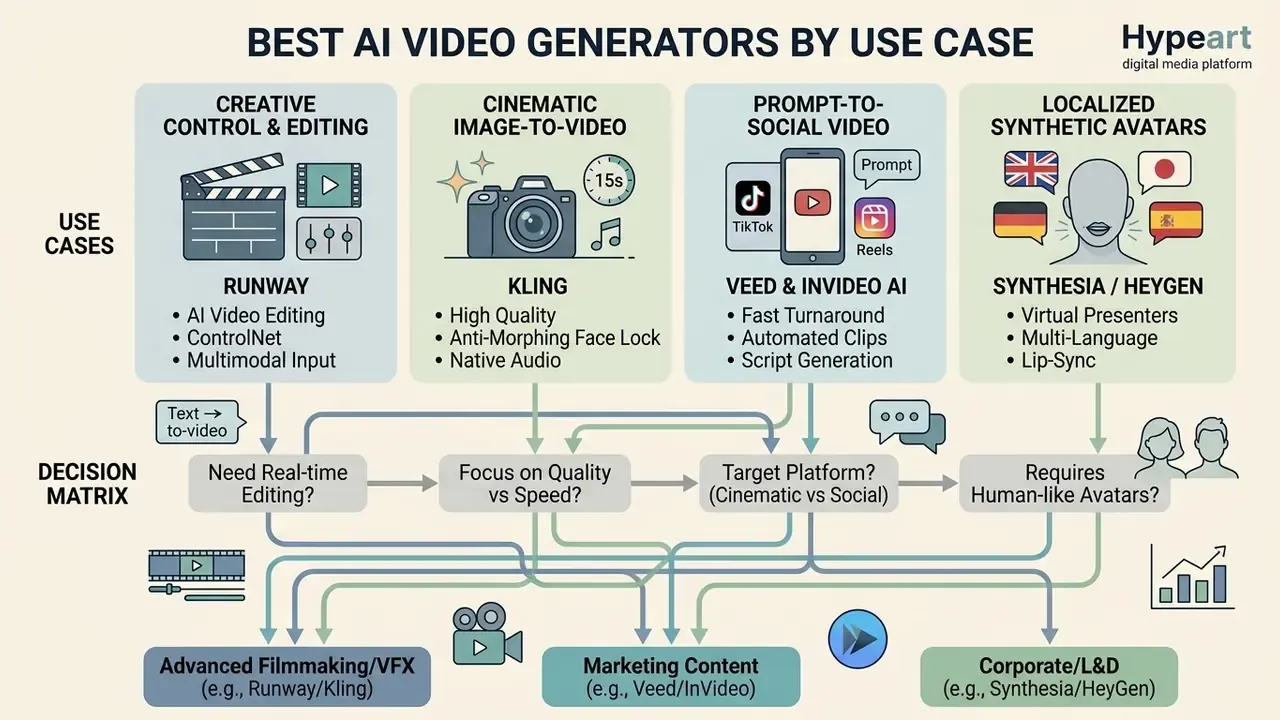
Selecting the optimal tool depends on whether your project requires cinematic film sequences, automated social media clips, localized synthetic avatars, brand-compliant marketing assets, or long-form scripted storytelling. To analyze broader tool categories, you can compare individual software tiers or compare options across dedicated AI generation stacks.
Runway for creative control and AI video editing
Runway specializes in high-fidelity text-to-video and image-to-video generation designed for filmmakers, visual effects artists, and creative directors. Its Gen-3 lineage delivered cinematic video quality with granular camera direction controls across six axes (horizontal, vertical, pan, tilt, zoom, and roll) plus a static-camera option. Note that Gen-3 Alpha and Gen-3 Alpha Turbo were retired in July 2026, and Motion Brush remained a Gen-2-specific capability that newer models approximate through prompting.
Benchmark data puts that "cinematic quality" claim in context:
The platform includes timeline-based editing tools, motion control layers, and advanced frame-interpolation features. Runway provides strong aesthetic quality and motion smoothness, yet free plan exports include a watermark and cap clip lengths at short intervals (4 seconds on legacy Gen-1 free generations versus up to 15 seconds for paid subscribers). Runway also states that users on Free, Standard, Pro, and Unlimited plans retain rights to uploaded and generated content, and that it does not restrict commercial use of outputs. Professional teams can inspect published AI video generator benchmarks to evaluate Runway's relative performance against alternative diffusion models.
Kling for cinematic image-to-video generation
Kling AI excels at transforming static photographs into realistic motion sequences with physical consistency and detailed camera movement. The engine lets creators adjust motion intensity settings, control character trajectories, and animate fine visual details from an uploaded image, which is the core of modern image-to-video generation workflows.
Kling 3.0 materially changed the specification sheet in 2026:
PhyWorldBench evaluations indicate that Kling delivers dependable fundamental physics behaviour, 0.357 overall physics for Kling 1.6, close to Luma and behind Pika 2.0. That makes it a strong choice for realistic object animation and environmental motion where trajectory control matters more than raw simulation accuracy. Product spins, packaging shots, slow reveals. Those work well.
- Up to 15 seconds
- of continuous, multi-shot narrative generation, directed through native storyboard controls in a single click.
- Anti-Morphing Face Lock
- a character's appearance can be strictly locked from a single photo, a short reference video, or multiple angles, which suppresses the "AI morphing" drift that distorts faces during motion.
- Native audio and lip-sync
- matched voices, regional accents, and realistic mouth movement, with per-character speaker assignment in multi-character scenes and no third-party tooling.
- Export
- 1080p on free tiers (watermarked), native 4K at up to 60 fps on Pro.
Long-form AI storytelling and extended video generation
While social clips average 5 to 15 seconds, a separate class of engines targets scripted long-form output. MagicLight AI uses Nano Storyboard Control to decompose a script into micro-actions, enabling automated production of multi-scene videos up to 50 minutes long. These platforms auto-sync scene beats, background music, and recurring character assets across dozens of shots without frame-by-frame manual adjustment, and support multiple aspect ratios and languages for global distribution. The trade-off is the output ceiling: long-form engines typically max out at 1080p with no 4K option, and offer less granular cinematic control than Runway or Kling.
Practical rule of thumb. Use long-form engines for structured narration, so documentaries, course modules, audiobook visualizations, faceless YouTube channels. Then use clip-level models for hero shots you intend to intercut into that timeline. Teams building internal enablement decks alongside video can also pair this with the best ai presentation maker 2024 shortlist, since script and slide assets usually share the same source document.
HeyGen for AI avatars, voices, and translated videos
HeyGen leads the market in photo-realistic AI avatar generation, AI voice generators and voice cloning, and automated video translation with lip-sync alignment. The platform supports over 175 languages and regional dialects for translation (177+ for custom avatars), allowing organizations to localize training videos and marketing assets at scale. Custom avatars can be created from video footage, a single photo, or a text prompt, with consent verification built into onboarding.
HeyGen uses phoneme-level lip-sync technology to re-animate mouth movements so they naturally match translated audio tracks, and exposes a frame-accurate "precision" mode intended for long-form video. Developer APIs let enterprise teams automate avatar video rendering directly from structured text scripts, which is how a 40-module compliance curriculum gets localized without booking a studio.
Avatar-led marketing also has empirical backing:
Canva and Adobe Firefly for templates and branded content
Canva and Adobe Firefly integrate generative AI video tools into established graphic design and brand management environments. Canva AI Generator lets marketing teams apply Brand Kits, custom fonts, Brand Templates, and automated template layouts to generated video clips, so AI output inherits brand colours and typography by default. Canva's Create a Video Clip is powered by Google Veo-3 and produces a single 16:9 clip of up to eight seconds per prompt, with synchronized audio that includes dialogue, sound design, and music. The clip is then dropped into a Canva design for cropping, captioning, and export. Canva also converts a photo or selfie into a talking head that delivers a script in 40+ languages.
Adobe Firefly's video model is trained on licensed Adobe Stock assets and public-domain content, and not on Adobe user content, which supports explicit commercial safety guarantees. The Firefly Video Editor supports transcript-based editing, Generative Extend for extending shot durations, aspect-ratio and duration selection before generation, and native export options up to 4K resolution (with documented 16:9 and 9:16 native model resolutions from 1280×720 up to 4096×2160). Firefly Custom Models trained on approved brand assets, plus Content Credentials metadata attached to generated files, make this the most defensible option for regulated industries.
AI video generation features that matter before choosing a tool
Evaluating an ai app to generate video requires understanding the underlying technical mechanisms that drive visual output, audio synthesis, and script structure. Feature lists blur together fast, so it helps to look at the pipeline instead.
Processing pipeline (text equivalent of the architecture diagram)
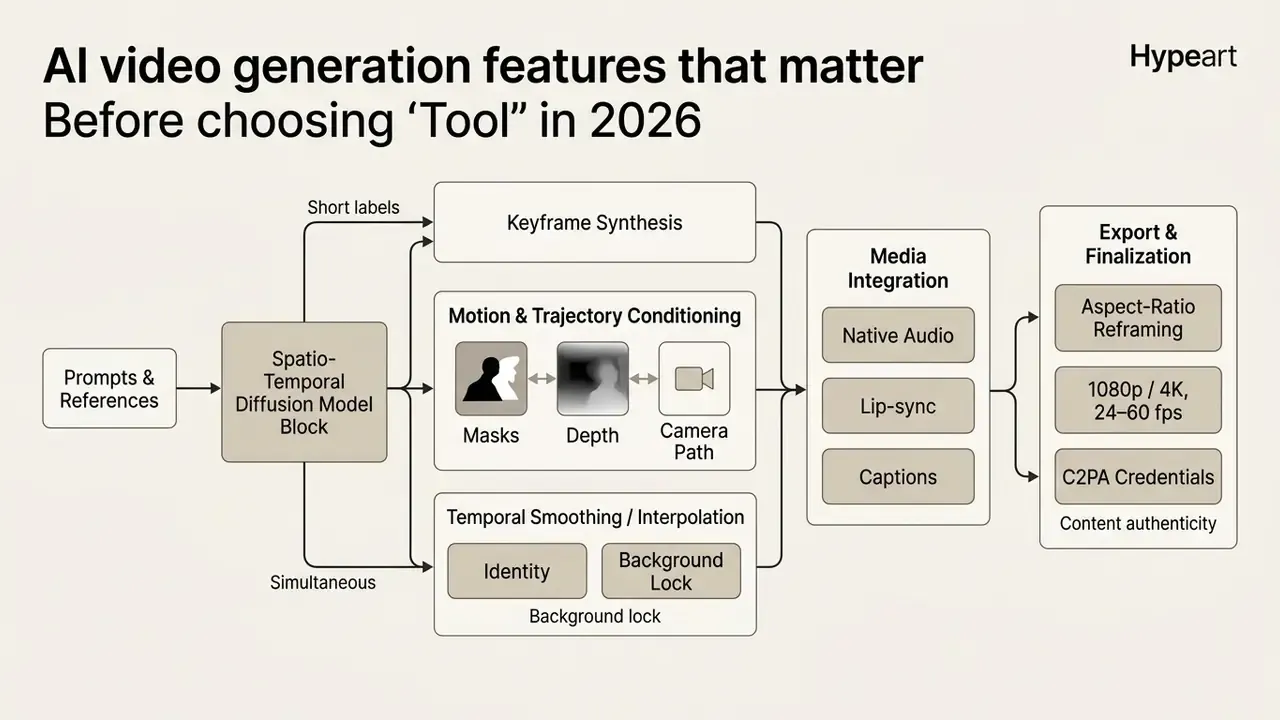
Text-to-video from prompts, scripts, and ideas
Text-to-video tools transform descriptive natural language prompts into animated video sequences using text-to-video diffusion models. Writing effective prompts requires specifying the camera shot type, main subject, core action, environmental lighting, and overall visual style. Vendor guidance converges on the same grammar: Adobe recommends shot type + character + action + location + aesthetic, while Runway advises separating visual description from motion description and avoiding conflicting instructions.
Structured Prompt Syntax:
[Shot Type/Camera Angle] + [Subject Description] + [Action/Movement] + [Environment/Lighting] + [Aesthetic Style]
Rule of thumb: one action per shot.
Automated script-to-video systems analyze text inputs to construct multi-scene storyboards, applying camera directions and transition beats automatically. It is the same mechanism that lets long-form engines translate a 3,000-word script into hundreds of timed micro-actions, and the reason so many ai apps for video generation now ship a script tab before a timeline.
Image-to-video and animated visual generation
Image-to-video generation animates static reference photos while preserving object geometry, lighting conditions, and character identity. Advanced AI animated video generation tools use trajectory motion masks and depth-map conditioning to control how elements move across the frame. Research in 2024 and 2025 moved from zero-shot bounding-box guidance (SG-I2V, ICLR 2025) to region-wise trajectory plus motion-mask control that separates object motion from camera motion (MotionPro, CVPR 2025), and then to 3D trajectory-oriented synthesis using cluster points with depth and instance data (LeviTor).
This approach prevents visual warping and maintains structural consistency during complex motion sequences. Commercially, Kling packages it as Anti-Morphing Face Lock, which suppresses frame-to-frame facial deformation by binding generation to a locked identity reference. Teams that need a strong base frame before animating can explore the guide to best ai text to image with high quality output, and creators extending image borders before animation can consult specialized tools to best ai to expand images. Niche generators, including the best ai tattoo engines, are useful here too, since a clean high-contrast design animates far better than a busy photo.
AI avatars, voiceovers, and native audio
Synthetic avatar systems combine neural speech synthesis with facial re-animation models to generate realistic talking head videos. Modern platforms offer instant voice cloning from short audio recordings. Vendor documentation describes cloning from a few seconds to a few minutes of speech, then generating synchronized multi-lingual speech with natural intonation across catalogues ranging from 29 to 140+ languages depending on the engine.
Precision lip-sync models adjust facial muscle movements frame by frame to align with synthesized audio waveforms. Native audio generation models can also synthesize background sound effects and ambient noise directly aligned with on-screen visual actions. Kling 3.0 and Google Veo-3 both generate dialogue, effects, and music inside the same pass as the visuals. Corporate headshots and channel branding sit adjacent to this work, so the best ai professional headshot tools often feed the same avatar pipeline.
That gap is exactly why avatar deployments need human review before publication. Automated quality scores under-detect the uncanny artefacts that damage brand trust, and no dashboard will flag the shot where a presenter's hand briefly grows a sixth finger.
Enterprise data privacy, biometrics, and regulatory compliance
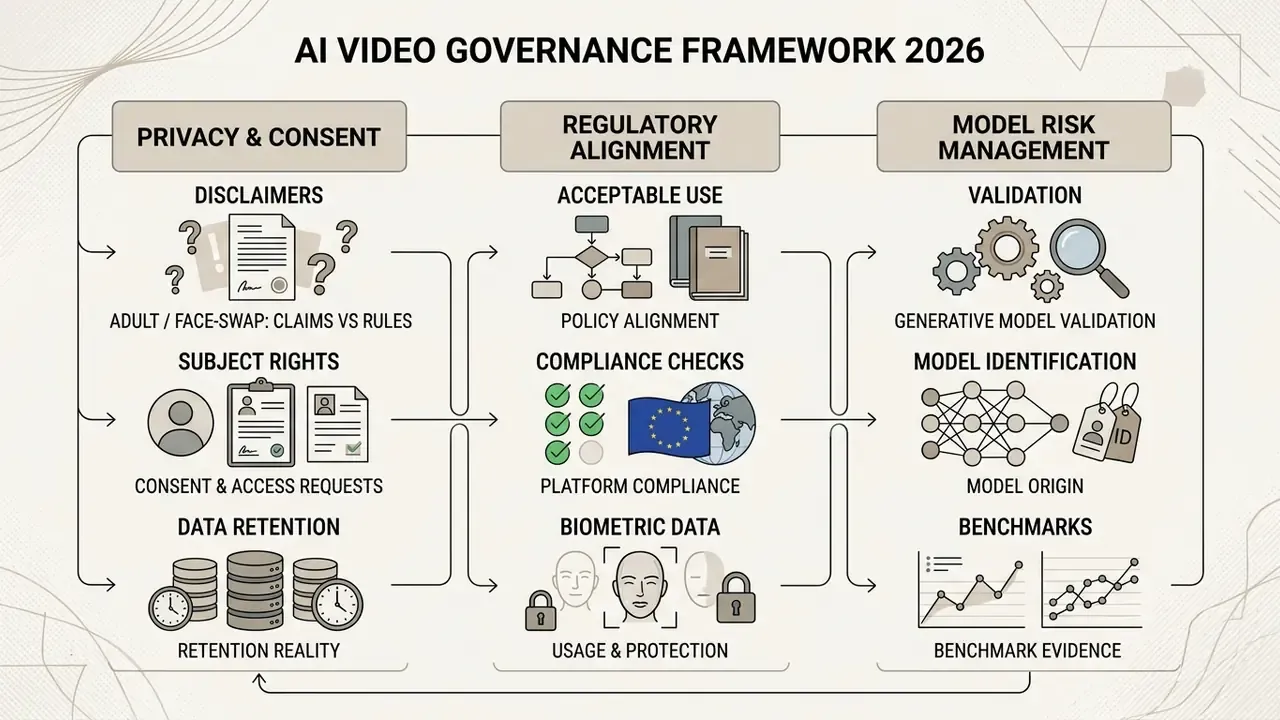
Operating ai adult video generator tools, face-swap technologies, or likeness-based avatars involves severe legal, regulatory, and data privacy obligations. Governance frameworks classify biometric likeness processing as sensitive personal data subject to strict regulatory enforcement.
International regulatory bodies mandate that biometric face processing relies on explicit, freely given, informed, and revocable consent. EDPB Guidelines 3/2019 and 05/2020 require that consent for biometric processing be explicit, specific, and unambiguous, and prohibit silently switching from consent to another lawful basis. Australia's OAIC facial-recognition guidance (July 2026) adds that sensitive-information FRT must be reasonably necessary and proportionate, and that signage alone does not constitute consent. SDAIA's 2026 deepfake guidelines require informed consent before using personal data in synthetic content, minimum-necessary data collection, secure storage, disclosure of purposes and risks, and a right to withdraw consent. National privacy commissions have also confirmed that a person's face and likeness are personal information, and that generating or sharing media using a real person's likeness constitutes processing of personal data.
Platform operators using face-swap technology must therefore enforce verifiable consent protocols, consent-pack identifiers tied to each generation, robust data deletion pathways, and permanent digital watermarking to prevent non-consensual media misuse. Control maturity across the market is weak: a 2026 evaluation found that 70% of apps with face-swap functionality had no technical safeguards against nude-image generation.
Standardized content transparency standards, such as NIST AI 100-4 and C2PA metadata tracking, require clear provenance labeling on synthetic media to distinguish generated content from authentic human footage. NIST AI 100-4 (2026) describes metadata recording and digital watermarking as the transparency mechanisms for synthetic video, while the NIST AI RMF companion (AI 600-1, 2024) recommends recording model name and version, output timestamps, and dataset provenance wherever possible. C2PA content credentials bind that provenance data to the file as secure metadata at the point of creation or alteration.
Organizations evaluating automated risk controls or policy alternatives can examine software alternatives or browse the hub to access governance assessment frameworks.
Adult and face-swap AI video tools: privacy claims versus platform rules
Search demand for ai adult video generation tools is real, and so is the exposure. Vendors in this niche advertise NSFW image-to-video, AI face swap, and "total privacy" processing, yet those marketing claims rarely survive a contract review. Three questions decide whether the category is usable at all inside an organization.
- Consent and subject rights. Does every uploaded face carry a documented, revocable consent record, and can the subject demand deletion of derived models as well as output files?
- Retention reality. Does "total privacy" mean local processing, encrypted ephemeral storage, or simply a marketing page with no retention window stated? Ask for the deletion SLA in writing.
- Acceptable-use alignment. Mainstream platforms, ad networks, app stores, and payment processors prohibit non-consensual sexual imagery and, in many cases, all synthetic adult content. Generated content that violates those terms becomes a brand and legal incident, not a creative experiment.
For regulated buyers the practical answer is usually a hard prohibition in the AI acceptable-use policy, enforced through network controls and API spend caps, with any exception routed through legal review. Blunt, but defensible.
Model risk management: validating a generative video model
Enterprise AI video governance checklist
Use this as a procurement gate before a pilot moves into production. Items marked (confirm in contract) are commercial terms that change per order form and must be verified with the vendor rather than assumed from marketing pages.
Checklist0 / 12
Affordable AI video creation tools: free plans, credits, and pricing
Finding affordable AI video creation tools requires evaluating credit consumption rates, export limits, and watermark policies across payment tiers. You can explore the hub to review structured software plan comparisons or calculate team licensing budgets.
| Platform | Free plan availability | Card required for free tier? | Watermark on free output? | Free tier generation limits | Paid tier entry price | Commercial rights & indemnification posture |
|---|---|---|---|---|---|---|
| Runway | Free tier (125 one-time credits) | No | Yes | Short clips (legacy Gen-1 free cap 4s; paid up to ~15s) | $12 to $15 / month | Commercial use of outputs not restricted; no exclusivity guarantee |
| Kling AI | Free tier (66 credits / day) | No | Yes (free exports) | Limited daily generations (1080p) | $6.99 / month (660 credits) | Commercial use permitted for ads and social; non-exclusive |
| Pika | Free tier (80 monthly credits) | No | Plan dependent | 480p to 720p output cap | $8 to $10 / month (700 credits at $10) | Commercial use on paid tiers; non-exclusive |
| HeyGen | Free trial (1 credit) | No | Yes | Up to 3 short videos total | $24 to $29 / month | Avatar consent verification required; enterprise credits at $0.50/credit |
| VEED | Free plan | No | Yes | 720p max resolution export | $12 to $18 / month | Commercial use on paid tiers; non-exclusive |
| Canva | Free tier (Veo-3 clips on Pro/Business/Enterprise/Nonprofit) | No | Plan dependent | Limited cinematic clips per month, 8s each | Pro tier pricing varies | Commercial use allowed; explicitly no exclusive rights, clearance is the user's responsibility |
| Adobe Firefly | Free generative credits | No | Plan dependent | Limited monthly credits | Bundled with Creative Cloud tiers | Trained on licensed and public-domain data; positioned as commercially safe |
| Google Gemini / Veo | Access via AI plans | Yes for paid tiers | Plan dependent | Credit-pool dependent | From $4.99 / month (AI Plus) | Commercial use per Google AI terms; non-exclusive |
| Zsky | Free tier | No | Yes ("Made with Zsky") | Restricted monthly renders | $19 / month | Commercial use on paid tiers |
Where vendor pages and secondary pricing trackers disagree, notably on Pika's watermark policy and VEED's export formats, treat the vendor page as authoritative at the moment of purchase.
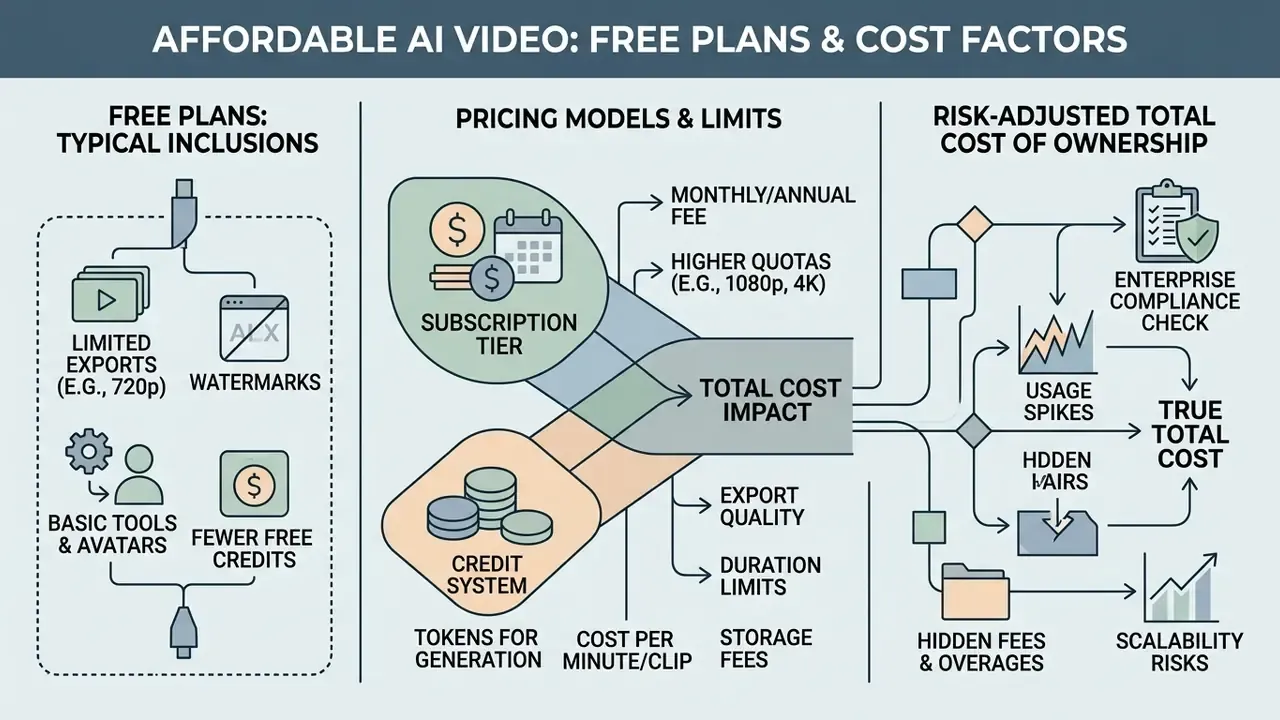
What free AI video generator plans usually include
Most free tier offerings function as restricted product trials rather than unrestricted production environments. An affordable ai video generator free plan usually provides a limited pool of non-refreshing or daily credits, capping output resolutions at 480p or 720p. Several vendors still require no credit card at signup, which makes side-by-side testing cheap; a few gate the trial behind card details, so check before you invite the whole team.
Free exports almost universally include a visible vendor watermark plate or embedded brand logo. Zsky stamps a "Made with Zsky" wordmark, Kling watermarks all free generations, and VEED caps free renders at 720p with a mark. A minority of vendors sell watermark-free free tiers, which is why the watermark column has to be re-checked per release. Commercial usage rights are frequently withheld on free plans too, restricting exported videos to non-monetized personal testing. Worth repeating: a file with no watermark may still be barred from commercial use by the terms. Teams that only need trimming and captioning may be better served by dedicated free editing tools and a video compressor for delivery, rather than burning generation credits.
How credits, generation limits, and export affect total cost
Credit metering systems calculate costs based on render duration, frame rate, output resolution, and model complexity. Generating a 4K resolution clip at 60 FPS consumes significantly more credits per second than rendering a standard 720p draft.
Effective Cost Formula:

Total Cost Per Minute = (Credits Consumed Per Second × 60) × Cost Per Credit
Worked example using published enterprise rates: HeyGen prices enterprise credits at $0.50 each and bills 0.1 credits/min for 1080p/30 fps, 0.2 for 1080p/60 fps, 0.15 for 4K/30 fps, and 0.3 for 4K/60 fps. Converted to dollars, that is $0.05/min at 1080p30, $0.10/min at 1080p60, $0.075/min at 4K30, and $0.15/min at 4K60. Across the wider market, high-resolution enterprise rendering typically ranges from $0.05 to $0.30 per generated minute depending on plan volume discounts, and Sora-class APIs bill per output second by resolution tier.
Risk-adjusted total cost of ownership. Headline credit cost is the smallest line item in a regulated deployment. A defensible TCO model adds the control layer:
Risk-Adjusted TCO =
    Generation cost (credits × rate × retries)
  + Seat/licence cost (incl. SSO and enterprise tenancy uplift)
  + Human-in-the-loop review (reviewer hours × loaded rate × clips reviewed)
  + Legal & clearance (trademark/likeness clearance, contract review, indemnity negotiation)
  + Model validation & recertification (MRM hours per model version)
  + Provenance & archiving (C2PA tooling, retention storage, audit logging)
  + Residual risk reserve (expected cost of takedown, rework, or brand incident)
  − Production savings displaced (agency, studio, voice talent, localization vendors)
Two multipliers dominate in practice. First, retry rate: a 30% reject rate raises effective generation cost by roughly 43% before any review time is counted. Second, review depth: clips containing faces, claims, or regulated product language require senior review, which can exceed generation cost by an order of magnitude. Against that, the documented upside is real. The WhatsApp field experiment reports 6 to 9 percentage-point engagement gains from GenAI personalization achieved at materially lower marginal production cost, which is the number to put in front of a CFO alongside the control-layer expense. Organizations evaluating high-volume API integrations can see the overview to review technical endpoint documentation and API rate limits.
How to create videos with an AI video generator
Creating professional video content using an ai app to create short videos follows a structured workflow from initial prompt formulation to post-generation editing. The steps look simple. The discipline is in the last two.
Production workflow (text equivalent of the flowchart)
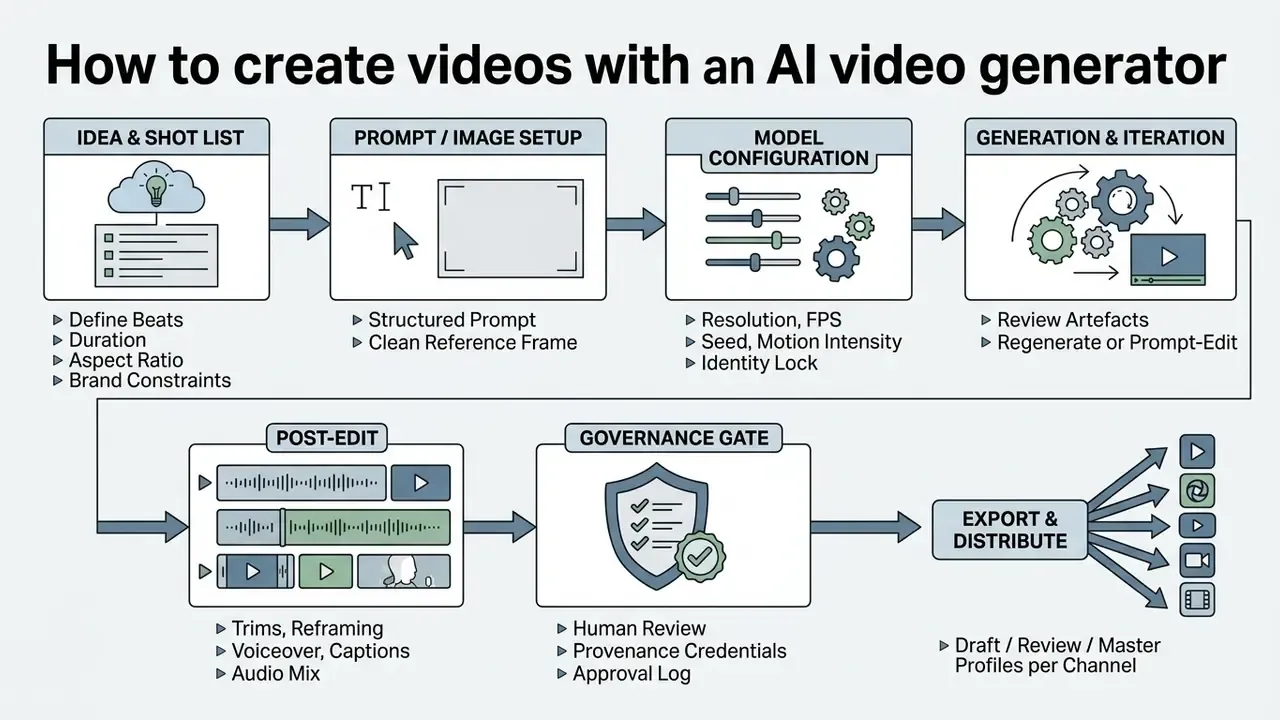
Write a prompt or upload an image to start generation
Begin by defining the visual parameters of your scene in a structured text prompt, or by uploading a clean, high-resolution source image. When using image-to-video generation, make sure the reference photo has clear subject lighting, stable geometry, and minimal motion blur. For edit-style passes, state explicitly what must be preserved: identity, geometry, camera angle, layout, lighting, on-frame labels, and surrounding objects.
Updated guidance on camera framing. Rather than relying on a single stylistic phrase, specify framing as separable components, because vendor documentation treats visual description and motion description as distinct inputs. Shot size ("medium close-up"), camera movement ("slow tracking dolly forward"), and lighting ("soft cinematic key, low contrast"). Keep one action per shot, avoid contradictory descriptors, and avoid overly complex multi-action instructions in a single prompt block.
One limitation to design around before you promise on-screen text to a client:
Practical workaround: generate the footage clean, then add typography in the editor as a vector overlay. Cheaper than ten regenerations, and the legal team can actually read the disclaimer.
Generate, edit, and export the finished video
Run the initial generation pass and evaluate the output for temporal artifacts, visual warping, or physical inconsistencies. If the model supports command-driven post-editing, apply text prompts to trim clip lengths, adjust camera motion, or modify background elements, for example "delete scene 3", "change the voiceover accent", or "replace the background with a modern studio".
Once the motion looks stable, add voiceovers, dynamic captions, and background audio overlays using standard video editing workflows. Select your target delivery aspect ratio (16:9 for YouTube, 9:16 for vertical Shorts) and export the complete video in native 1080p HD or 4K resolution. Keep three delivery profiles, Draft, Review, and Master, and archive the prompt, seed, reference images, and final export together so the asset can be reproduced or defended later. Auditors do ask.
Best AI video apps for social media, ads, and short-form content
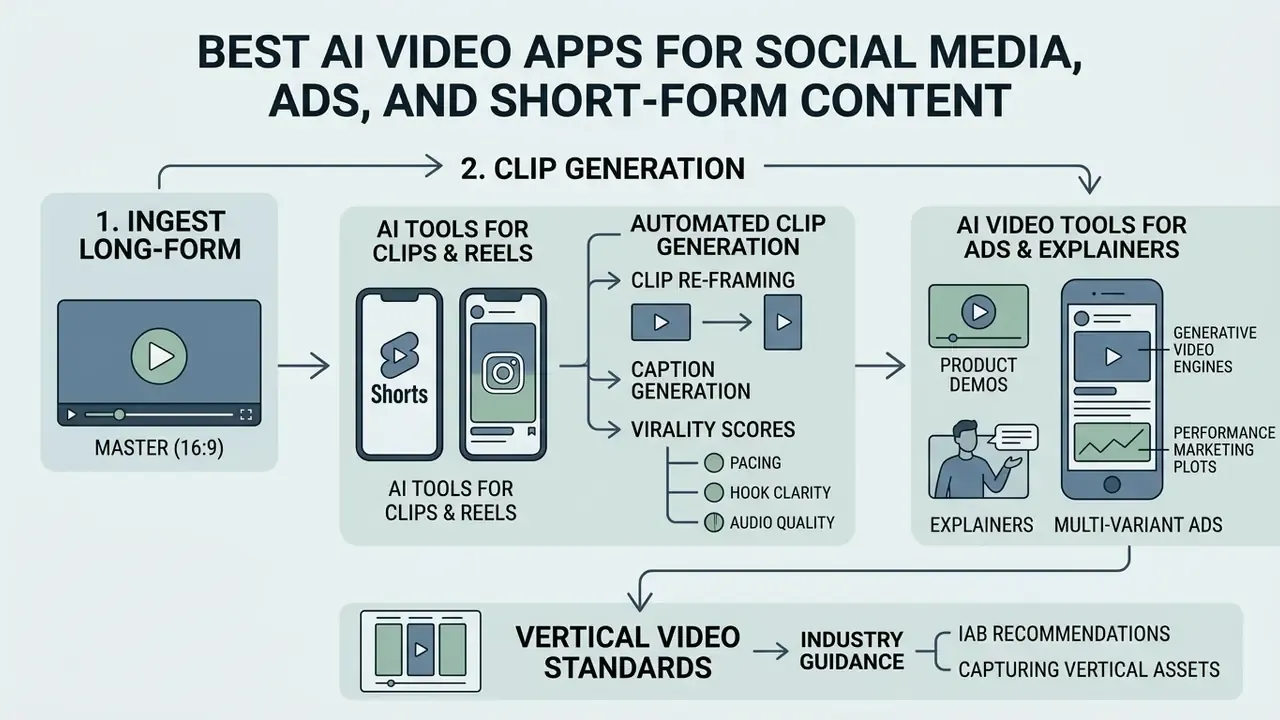
Leveraging ai apps for videos enables creators and performance marketers to automate clip re-framing, caption generation, and ad creative production. This is where ai apps for making videos earn their keep, because the work is repetitive and the volume is high.
Vertical adaptation, step by step (text equivalent of the walkthrough video)
1. Ingest 16:9 master (podcast, webinar, livestream, or long-form export)
2. Transcribe → detect highlight segments by hook clarity and topic density
3. Auto-reframe to 9:16 with speaker tracking (face-follow crop, not centre crop)
4. Burn in dynamic captions (word-level highlighting, brand font, safe-area margins)
5. Score candidates (pacing, hook, audio quality) and shortlist
6. Export per channel: Shorts / Reels / TikTok, plus SRT or VTT subtitle sidecars
AI tools for YouTube Shorts, reels, and short clips
Dedicated clip generation tools automatically process long-form videos, such as podcasts, webinars, and live streams, into vertical short clips optimized for YouTube Shorts and TikTok. These platforms use speech recognition models to detect key topic highlights, re-frame video focal points to 9:16 vertical layouts, and burn in animated subtitles. Tools in this category range from ClipCut (vertical clips with subtitles, auto-cropping, and virality scoring across 30+ languages) to Reels-Boss (20 to 100 ready Reels from one long video, working directly from platform links), Loomy (face detection, 9:16 crop, automatic subtitles), Vizard (subtitle generation with SRT and TXT export), plus OpusClip and Bytecap.
Automated clip generators calculate virality scores based on pacing, hook clarity, and audio quality. Treat those scores as a triage aid, not a verdict. Native vertical generation is also arriving at the model layer: Google's Veo 3.1 produces 8-second clips at 720p, 1080p, or 4K with native audio, and added native 9:16 portrait output rolling out through YouTube Shorts, YouTube Create, Flow, the Gemini API, Vertex AI, and Google Vids. Creators building repeatable channel workflows can also review animation maker tools for motion graphics, AI art generators for thumbnails and B-roll stills, and AI headshot generators for channel branding assets.
AI video tools for ads, product demos, and explainers
Performance marketing platforms use generative video engines to produce multi-variant ad creative tailored for social ad networks. These ai ad tools with video generation features build promotional videos by combining uploaded product photos with AI voiceovers, stock B-roll footage, and call-to-action text overlays. Enterprise stacks such as Adobe GenStudio for Performance Marketing extend this into direct publishing to Meta, TikTok, Snap, Google Campaign Manager 360, and Microsoft Advertising.
Industry standards, such as IAB vertical video advertising guidance, recommend capturing vertical ad assets directly in native 9:16 aspect ratios with optimal durations between 8 and 12 seconds, while noting the growing share of ads at 6 seconds or less. Note that this IAB document dates from 2017 and functions as a formatting baseline rather than current performance guidance.
Human oversight is what keeps brand safety, transparent disclosure, and platform advertising standards intact. The IAB's 2025 Generative AI Playbook for Advertising treats AI as a production layer for copy, visuals, and audience-specific messaging, and the UK Advertising Association's 2026 best-practice guide sets eight principles including transparency, responsible data use, human oversight, brand safety, and continuous monitoring. For explainer videos and product demos in regulated categories, add a claims review step before the creative review step. The order matters.
FAQ: commercial rights, model risk, and procurement
Do I own the videos an AI generator produces?
You generally receive a licence to use and monetize the output on a paid commercial tier, but not exclusive copyright ownership. Canva states plainly that you may not hold exclusive rights to AI-generated designs, and that clearance is the user's responsibility. Plan for the possibility that a visually similar output exists elsewhere.
Which platform is safest for regulated marketing?
Adobe Firefly, because Adobe states the video model is trained on licensed Adobe Stock and public-domain content and not on user content, and because Content Credentials plus Firefly Custom Models give you provenance and brand-lock controls. Confirm indemnification scope in your order form.
Will my prompts or uploads train the vendor's model?
This is a contract question, not a marketing-page question. Ask for a written no-training and zero-data-retention commitment, the retention window, and the deletion SLA before a pilot touches customer or employee data.
How long can an AI-generated video be in 2026?
Clip-level models: Google Veo-3 generates up to 8 seconds per prompt, Kling 3.0 generates up to 15 seconds of continuous multi-shot narrative, and Runway's Gen-3 lineage produced 5 to 10 second generations. Long-form engines such as MagicLight AI assemble scripted output up to 50 minutes by chaining storyboarded micro-actions.
Can I remove the watermark on a free plan?
Usually not. Watermark removal is normally tied to paid tiers (Kling memberships are watermark-free, Runway removes marks for subscribers). A handful of vendors ship watermark-free free tiers, but commercial use may still be prohibited.
How do I validate a generative video model for audit?
Treat it as an inventoried model: pin the version, capture benchmark evidence under fixed settings, document data lineage and biometric consent controls, record human approvals, and define a recertification trigger. The model risk management pack above lists the eight items in order.
Do avatars require consent?
Yes. Likeness and voice are personal data, and often biometric data. EDPB guidance requires explicit, informed, revocable consent, OAIC requires necessity and proportionality, and SDAIA requires disclosure of purposes and a withdrawal right. Vendors such as HeyGen build consent verification into custom-avatar creation.
What must be disclosed to the audience?
Follow risk-based disclosure: attach C2PA Content Credentials at export, label synthetic presenters and synthetic voices in advertising, and keep an internal log of prompts, model versions, and approvals for each published asset.
Conclusion and strategic recommendations
Selecting the right AI video generator depends on your operational priorities:
- For cinematic VFX and film control select Runway or Kling 3.0 for granular camera movement, fine-tuned motion control, identity locking, and high-resolution 4K output, with Kling adding up to 15 seconds of multi-shot narrative and native audio.
- For automated social content use VEED or InVideo AI to transform script ideas into captioned vertical clips for YouTube Shorts and Reels, blending synthetic footage with 16M+ stock assets.
- For long-form scripted output evaluate storyboard-automation engines such as MagicLight AI when the deliverable runs from several minutes up to 50 minutes.
- For global corporate training deploy HeyGen to generate multi-lingual synthetic avatar presentations with phoneme-level lip-sync precision and documented consent capture.
- For enterprise brand safety use Adobe Firefly for licensed-asset provenance, Content Credentials, and the strongest commercial-safety posture, remembering that commercial rights are non-exclusive everywhere.
A safe next step, if you are starting from zero: pick two tools, run the same five prompts through both under fixed settings, and log the retries. Then price the review time. That single test usually settles the debate faster than any vendor demo.
Appendix A: superseded statements from earlier revisions
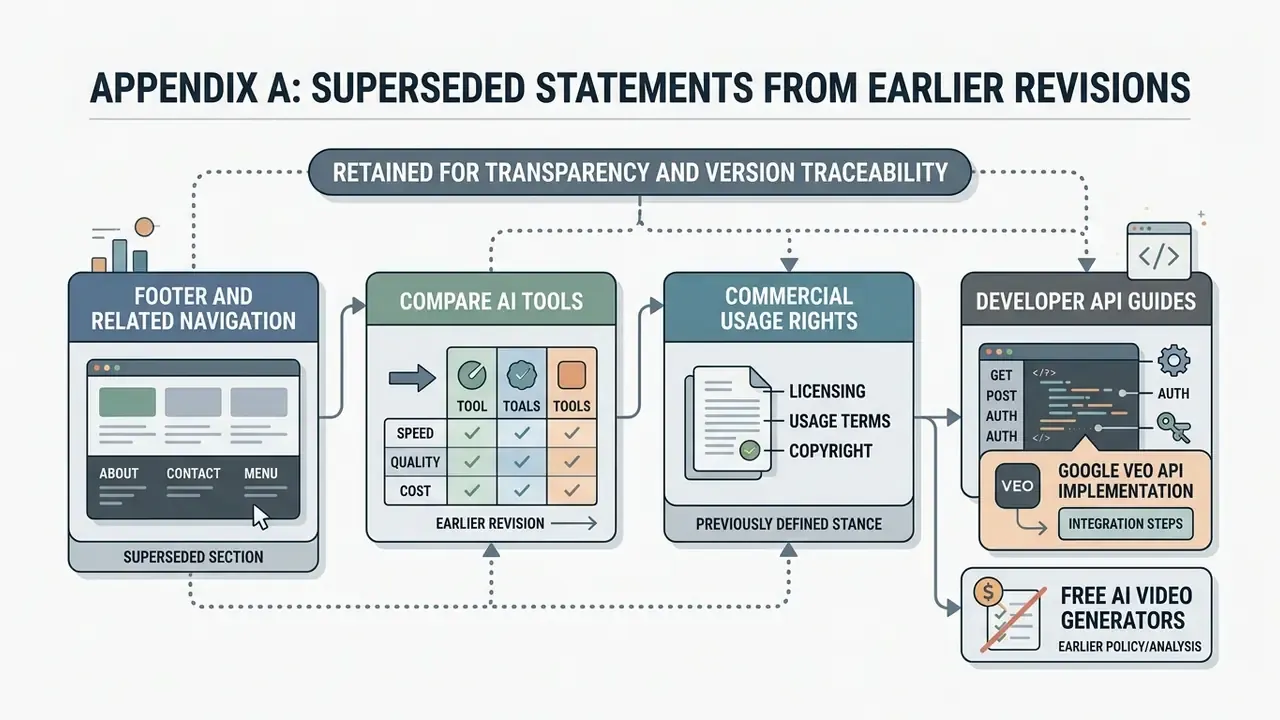
Retained for transparency and version traceability:
- "Marcus Hale, author", removed as an attribution. The editorial position is now attributed to the AI Media Benchmarks editorial analysis team and supported by primary benchmark sources.
- "PhyWorldBench evaluations indicate that Kling delivers reliable fundamental physics performance", superseded by the quantified score (Kling 1.6 = 0.357 overall physics; Pika 2.0 = 0.521; Luma = 0.385).
- "Runway Gen-1/Gen-2 max 4s", superseded by version-specific limits: 4s on legacy free Gen-1 generations, up to ~15s for paid subscribers, 5 to 10s Gen-3 generations, with Gen-3 Alpha and Alpha Turbo retired in July 2026. Kling 3.0 at 15s and Veo-3 at 8s now define the current ceilings.
- Earlier revision dropped the
/benchmarks/reference entirely; it is now restored alongside a live comparison destination so readers can inspect methodology and head-to-head results separately.