About the author: Marcus Hale is the author. Any frameworks or examples attributed to him are illustrative, not records of real clients or employers. Last reviewed: August 2026.
Executive Summary
- What the technology is An AI animated image generator is a conditional image-to-video (I2V) diffusion system. It treats a single still picture as an appearance anchor and synthesizes short, temporally coherent motion around it. In plain terms: you hand it one frame, it invents the next hundred.
- What decides quality Three variables dominate output fidelity. Source image resolution and subject separation come first. Structured prompts that separate camera mechanics from subject action come second. Motion-strength parameters kept inside conservative ranges (roughly 0.2 to 0.8 on normalized scales) come third.
- Where the risk sits Temporal artifacts (facial warping, finger deformation, text corruption, texture tearing), unverified commercial licensing, undisclosed synthetic content, and unmanaged uploads of sensitive imagery into public SaaS endpoints, commonly called Shadow AI.
- What governance requires Seed and hyperparameter logging for reproducibility, quantitative temporal-consistency metrics (FVD/FID and benchmark-style checks), human-in-the-loop approval before publication, C2PA-style provenance labeling, and vendor documentation covering SOC 2 Type II, ISO/IEC 42001, and data-retention terms.
- What to budget Entry commercial subscriptions commonly sit in the $7 to $35 per month range. Metered API pricing is typically charged per second of generated video, roughly $0.025 to $0.80 per second depending on model and resolution, with governance, review labor, and archival storage added on top in any honest total cost of ownership calculation.
Who this guide is for. Two readers, really. The first is a creator or marketer who wants to know how to make an AI animation photo without learning keyframing. The second is a risk, compliance, or model-risk owner at a bank, insurer, or mature fintech who has to decide whether an AI picture animation generator can be onboarded at all. The technical sections serve both. The security, validation, and licensing sections are written mainly for the second reader, because that is where approvals stall.
What Is an AI Animated Image Generator?
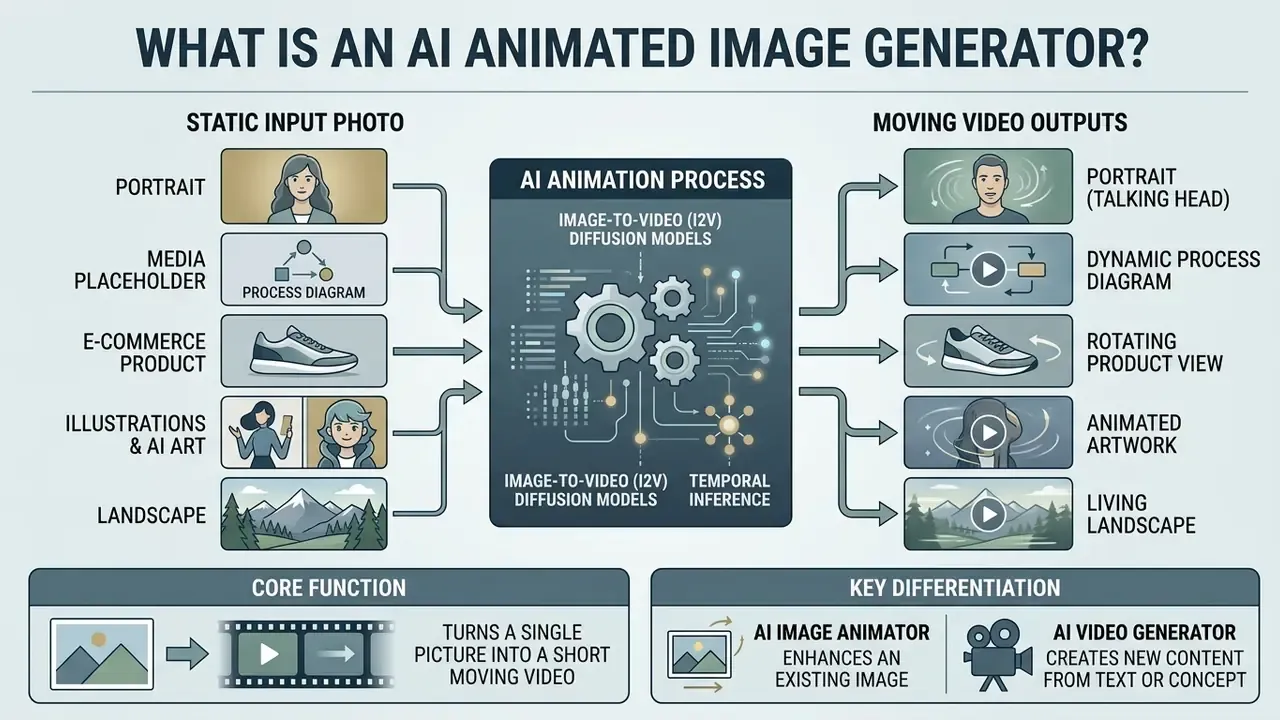
An AI animated image generator is a software tool powered by conditional image-to-video (I2V) diffusion models that converts a single static picture into a short, temporally coherent video clip. The system uses the input image as its baseline appearance anchor while predicting frame-to-frame movement guided by text prompts, audio signals, or camera motion parameters. That is the whole trick: transform static input into generated videos without a camera, a studio, or a shoot day.
Modern image animation architectures extend standard text-to-image models by adding temporal convolution and temporal attention layers on top of latent diffusion backbones (Versatile Transition Generation with Image-to-Video Diffusion, ICCV 2025). During inference, a variational autoencoder (VAE) encodes the static image into a low-dimensional latent space. The model then runs an iterative denoising process where Gaussian noise is progressively removed from video latents, producing realistic motion while preserving the subject's core visual identity.
"Modern I2V systems model a conditional distribution over video clips given a reference image, a text prompt, and motion control signals."
Readers who want a broader taxonomy of these systems can consult the reference entry on image-to-video AI tools, which catalogues condition encoding, temporal modeling, noise-prior design, and spatial-temporal upsampling as the four recurring architectural components.
Organizations evaluating these generative pipelines often test specialized tools inside a broader ai image generator infrastructure. The reason is practical rather than ideological: reproducible still-image standards make the video stage far easier to review later.
AI image animator vs. AI video generator
An AI image animator locks the initial composition, framing, and identity of a single source image and generates localized motion. A full AI video generator synthesizes complete multi-frame scenes from scratch or from broad text descriptions.
The primary functional distinction lies in structural constraint. An image animator uses a reference photo as a rigid condition frame, constraining latent variance so that synthesized frames do not drift away from the initial subject geometry. Text-to-video generators enjoy higher generation freedom, but they give you much weaker control over precise visual identity. If your brand depends on a specific product silhouette or a specific face, freedom is not a feature.
"The I2V task imposes stricter requirements on content consistency and identity preservation than unconstrained text-to-video generation."
For a side-by-side view of the unconstrained alternative, see the reference material on text-to-video generators. Creators who want broader media management context can explore the hub for deep dives into generative asset classification.
What images can AI bring to life?
AI animation tools can bring portraits, e-commerce product photos, stylized 2D and 3D illustrations, and landscape images to life by applying controlled motion vectors to static visual elements. The phrase "ai bring a picture to life" is marketing shorthand for something narrower: plausible local motion around a fixed appearance anchor.
- Portraits and talking heads. Facial animation models perform best on centered, high-resolution headshots with minimal cropping (LivePortrait, 2025). Subtle movements such as natural blinking, breathing, and small head turns preserve identity far better than extreme rotations.
"Hallo3 uses a causal 3D VAE and stacked transformer layers to preserve facial identity under non-frontal viewpoints and dynamic backgrounds."
Teams producing corporate portrait assets at scale frequently prepare source frames with AI headshot generators before passing them into an animation pipeline.
What Can You Create with AI Photo Animation?
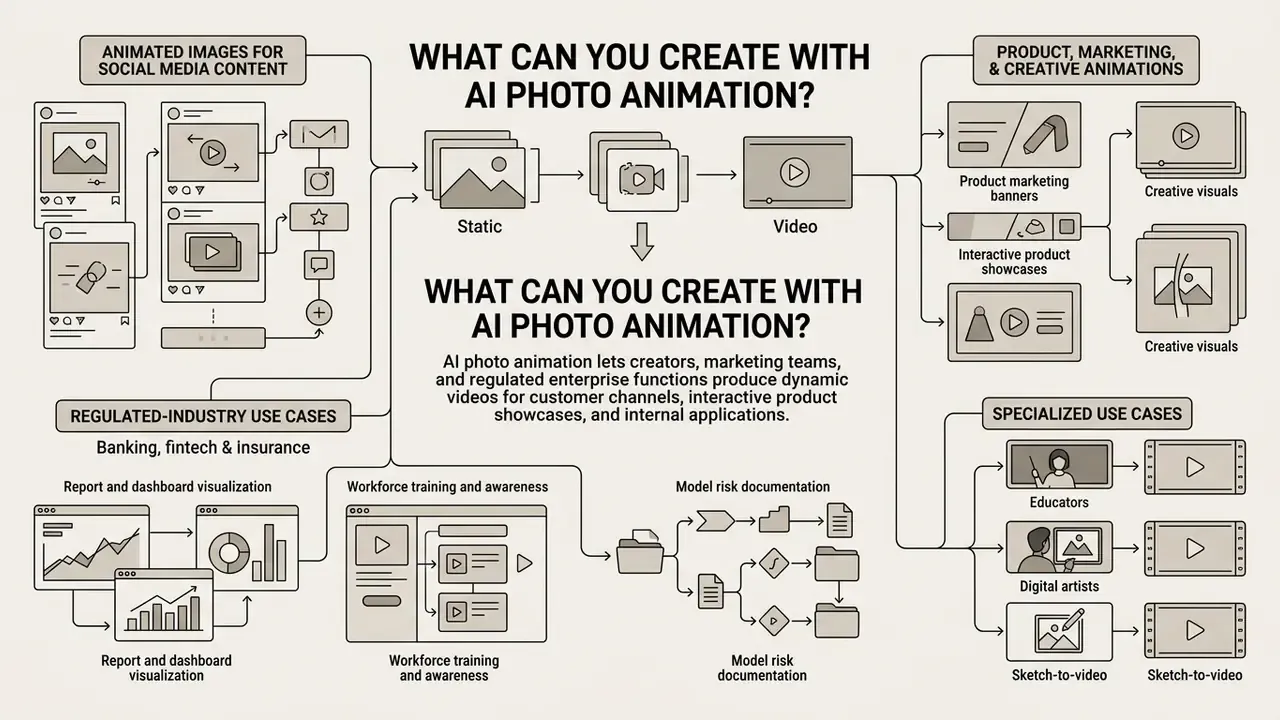
AI photo animation lets creators, marketing teams, and regulated enterprise functions produce dynamic videos for customer channels, interactive product showcases, internal training, and visual campaigns, all without a physical video shoot.
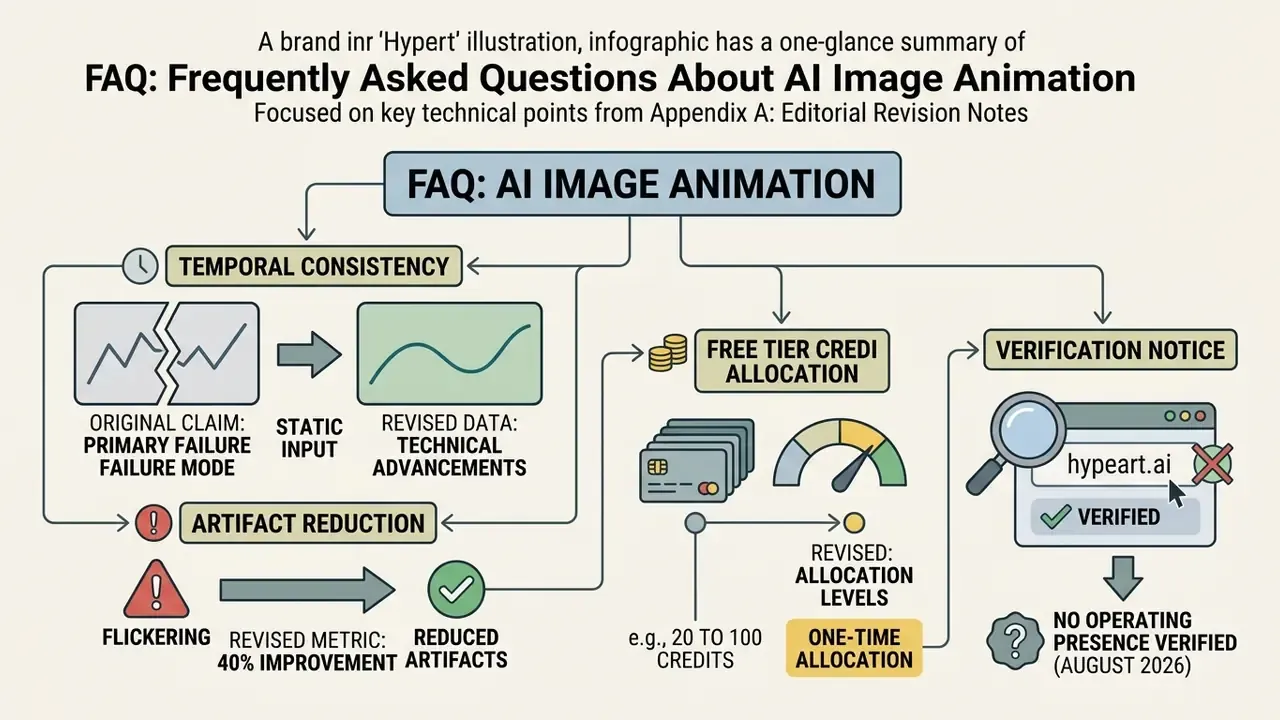
Illustrative workflow example, not a measured benchmark. In an internal editorial review of synthetic ad assets, a digital team tested an automated image-to-video pipeline for commercial product campaigns. By constraining motion parameters, fixing generation seeds, and inserting human approval checkpoints before export, the team reported qualitatively fewer temporal flickering artifacts across a batch of renders and a shorter asset production cycle. No independently audited artifact-reduction percentage exists for that workflow. Quantitative claims of this type require a documented test protocol, fixed prompts, and repeated measurement against a benchmark suite. Anything else is a vibe, not evidence.
"Rapid progress in video generation, combined with the popularity of video content on social platforms, intensifies concerns about the spread of misinformation."
Product, marketing, and creative animations
Commercial teams use AI animation to convert static product imagery into interactive e-commerce visual assets, dynamic ad banners, and promotional brand videos of near professional quality.
According to the Generative AI Playbook for Advertising (IAB, 2025), automated visual tools let creative teams scale asset production while trimming custom shoot expenditures.
"Controllable longer image animation provides precise control over motion direction and speed within a selected region across more than 100 frames."
Regulated-industry use cases: banking, fintech, and insurance
Financial institutions apply image-to-video animation to controlled, low-risk visual surfaces. Not to claims about products, performance, or people.
- Report and dashboard visualization. Static chart exports become short animated explainers that walk a customer through a statement, a fee structure, or a portfolio breakdown. Every numeric value is composited as overlay text, never generated pixels, because generated text corrupts during motion.
- Product marketing banners. Approved product photography (cards, devices, branch imagery) is animated with conservative camera moves for display placements, with synthetic-content labeling applied at export.
- Workforce training and awareness. Security-awareness modules and onboarding lessons animate diagrams, process maps, and scenario illustrations, which reduces dependence on external video vendors handling internal material.
- Model risk documentation. Animated diagrams of pipeline architecture appear inside validation reports and committee packs. The asset is non-customer-facing, so the residual risk is low by construction.
In all four cases the governing principle holds: no synthetic depiction of an identifiable person, no synthetic rendering of regulated disclosures, no generated numbers.
Specialized use cases: educators, digital artists, and sketch-to-video
- Educators and trainers. Animating diagrams of the heart, plant growth, planetary orbits, or geometric transformations makes step-by-step processes visible. One labeled illustration becomes a short loop that shows sequence and direction, which a static slide cannot do.
- Digital artists and animators. Concept sketches can be animated to test walk cycles, camera framing, and lighting direction before final keyframing. Creative authority stays with the artist, and pre-production shortens.
- Sketch-to-video and 2D-to-3D depth. Line art and flat illustrations animate with high temporal stability because contours are unambiguous. Parallax and a subtle camera pan convert a flat drawing into apparent 3D space without remodeling the asset.
- Storyboard-to-video. Individual board panels are animated into 3 to 5 second beats and strung together as an animatic for client sign-off.
Audio-driven animation and lip-sync integration
Modern image-to-video pipelines reach beyond silent motion by adding multi-modal temporal conditioning. Couple an input image with an audio waveform or a driving script, and the system syncs facial geometry to speech phonemes.
- Lip-syncing talking heads. Tools map a speech track onto a static portrait, matching mouth movement, facial muscle contraction, and blinking. Quality depends on a frontal, unoccluded face and clean audio without overlapping speakers.
- Voiceover generation. Several platforms generate synthetic narration with language, accent, and delivery controls, then align clip pacing to narration length. Reference material on voice quality tiers and licensing sits in the guide to AI voice generators.
- Automated sound effects. Advanced diffusion backbones predict spatial soundscapes from visual cues, matching rising steam with a faint hiss or ocean waves with ambient surf. That is the mechanism behind ASMR-style generated clips.
- Governance note. Synthetic voice cloned from a real person is treated as biometric-adjacent data in several jurisdictions. Keep it out of self-service workflows unless a consent record exists.
How to Generate Animation from an Image with AI
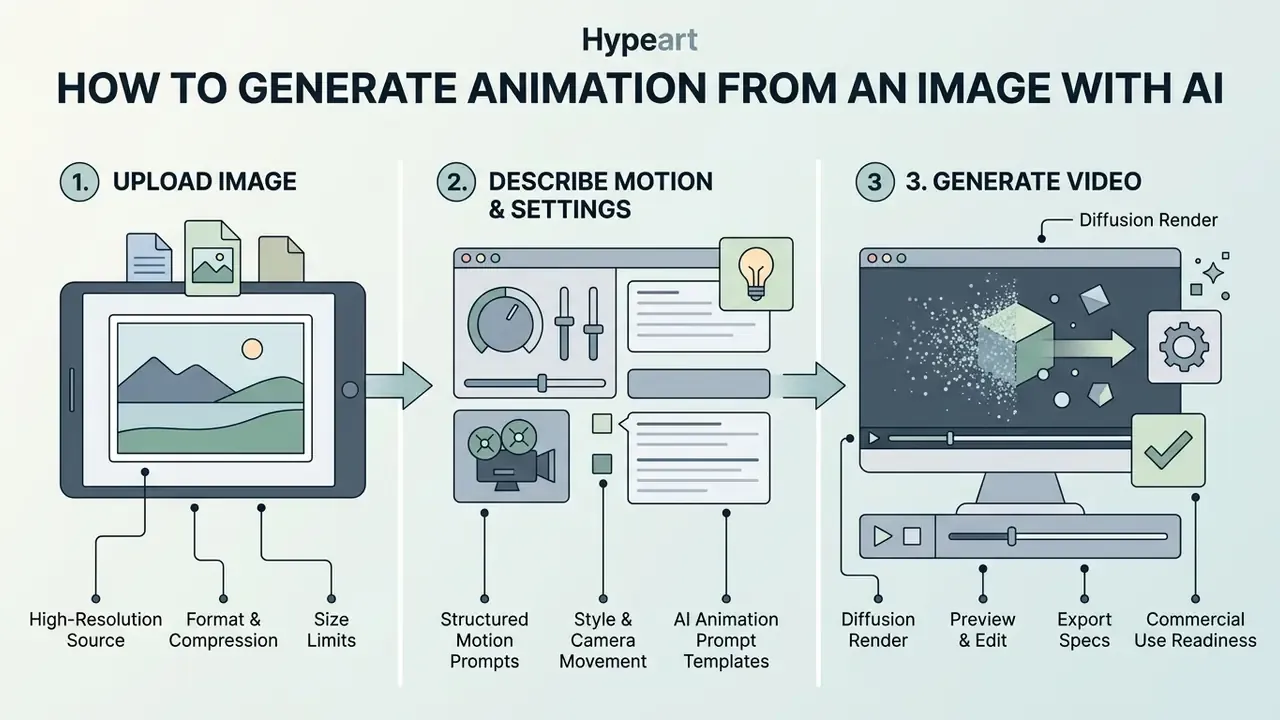
Generating animation from a static image takes three moves: upload a high-resolution source file, enter structured motion prompts or settings, then run the diffusion render and export the clip. No coding. No timeline scrubbing.
Upload an image and prepare the source file
Preparing a source file means selecting a clear, uncropped photo in JPG, JPEG, or PNG format with strong contrast and distinct subject boundaries.
- Format and compression. Use high-quality JPG or uncompressed PNG files. Heavily compressed sources introduce artifacts that the neural VAE encoder misreads as visual texture, which shows up as frame flickering (National Archives Digital Guidance).
"The VAE encoder maps the input image into a compact latent representation; compression artifacts are interpreted as visual texture and provoke frame flickering."
- Resolution. Keep source width and height above 1080 pixels. Images below 300 pixels lack the pixel density temporal upsamplers need to hold edge clarity (Columbia University Libraries Standards).
- Size limits. Most hosted tools accept files up to 20 to 50 MB and a single reference image per request. Extra uploaded images are usually ignored by the API rather than blended, which surprises people more often than it should.
Describe motion, style, and camera movement
Users direct animation with simple text prompts that spell out subject action, camera movement (pan, zoom, orbit), and an aesthetic style preset.
Effective prompts separate camera mechanics from subject action. Structured prompting guides recommend this sequence: [Shot Size/Angle] + [Subject Action] + [Camera Movement] + [Style/Lighting] (Runway Gen-4 Guide, 2025; Google Veo Prompting Guide, 2026). For example: "Medium shot of a coffee cup with rising steam, slow camera dolly-in, cinematic lighting."
"Follow-Your-Click uses short motion prompts plus clicks to specify 'what to move' and 'how to move it', reducing the user's cognitive load."
Teams testing basic generation functionality without creating an account can review an ai image generator free no sign up tool guide.
Copy-and-paste AI animation prompt templates
To get predictable movement without frame tearing, use these prompt structures tailored to specific commercial and creative styles. Replace the bracketed placeholders with your own subject description and keep the motion-strength value inside the listed range.
| Use Case | Recommended Prompt Template | Motion Strength Setting |
|---|---|---|
| 360-degree product showcase | Studio shot of [Subject], smooth 360-degree rotation, seamless looping, soft studio lighting, static isolated background, neutral colors, 8k resolution. | 0.2 - 0.4 |
| Portrait and talking head | Close-up shot of [Subject], natural eye blinking, subtle smile, soft breathing motion, slow camera dolly-back, cinematic depth of field. | 0.3 - 0.5 |
| 2D illustration to 3D depth | Dynamic anime style, character [Action], flowing hair in the wind, atmospheric parallax effect, subtle camera pan left, high contrast shading. | 0.5 - 0.7 |
| Cinematic landscape | Wide angle landscape of [Scene], slow forward camera drone shot, moving clouds, gentle water ripples, sunset golden hour lighting. | 0.4 - 0.6 |
| Two-subject interaction | Medium shot of [Subject A] and [Subject B] stepping toward each other and embracing, arms closing around shoulders, slow camera push-in, warm ambient light. | 0.3 - 0.5 |
| Data and diagram explainer | Flat vector diagram of [Process], sequential highlight reveal from left to right, subtle depth parallax, static typography, clean white background. | 0.1 - 0.3 |
Generate, preview, edit, and export the video
Once settings are configured, click generate to start the latent diffusion render, then preview the clip, apply basic edits, and export the file.
During preview, inspect for temporal jumps, background warping, and distorted facial features. If defects appear, drop the motion intensity slider or simplify the prompt before final export. Resist the urge to fix a broken render with more prompt words; it usually adds instability.
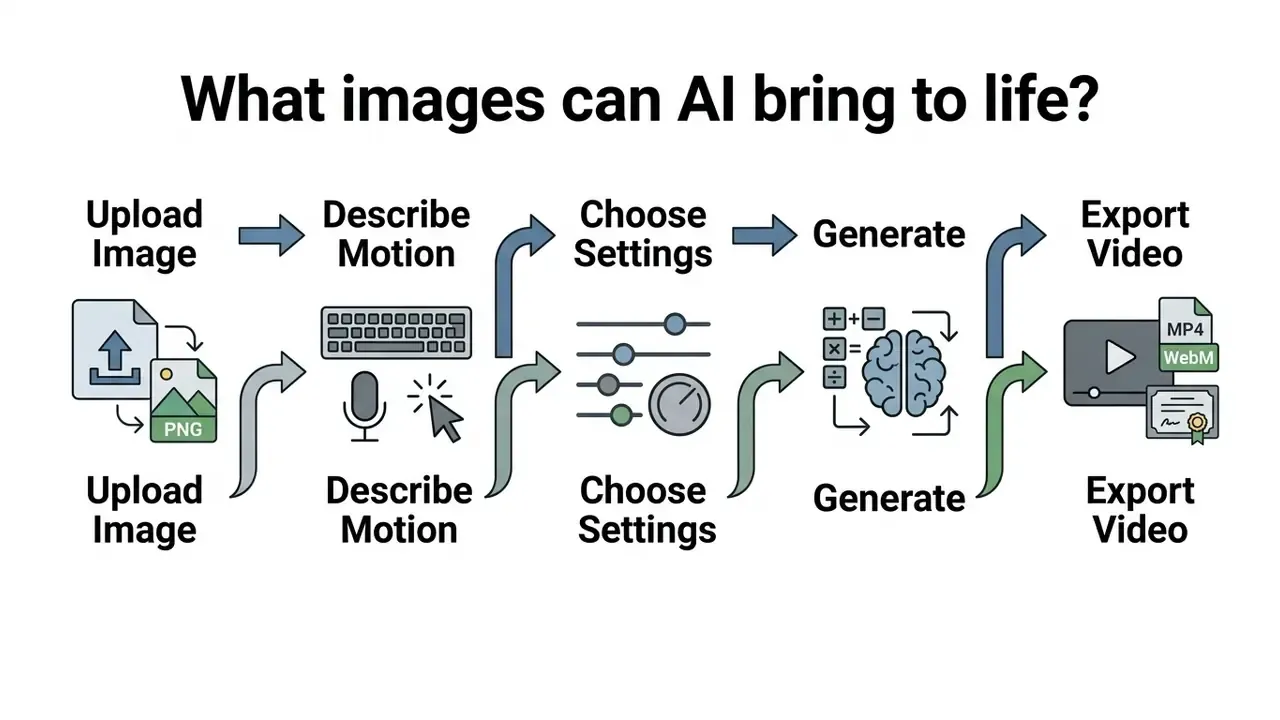
Step-by-step workflow for creating AI image animation:
- Prepare the source asset.Select an uncropped, high-resolution JPG or PNG image with sharp contrast.
- Upload the file.Import the image into the animation tool so it becomes the initial latent conditioning frame.
- Configure motion control.Enter a structured prompt specifying camera direction (pan, zoom, orbit) and subject motion.
- Set parameters.Adjust motion strength, fix the generation seed, and select an aesthetic style preset.
- Render and preview.Click generate to process the diffusion latent steps, then check the preview for structural artifacts.
- Export the clip.Export in MP4 or WebM at the target platform aspect ratio (9:16 or 16:9), with provenance metadata attached.
API and batch generation for production pipelines
Enterprise teams rarely live in the web interface. Production usage is API-driven and asynchronous: a job is submitted with the reference image, prompt, seed, duration, and resolution; the client polls a job endpoint until completion; the finished asset is pulled into object storage with its request payload stored beside it.
Three operational details matter at this layer.
- Asynchronous job handling.Documented I2V endpoints are submit, poll, download rather than synchronous, so orchestration must tolerate multi-minute latency, especially for 4K renders.
- Payload constraints.Commonly documented limits include one conditioning image per request, PNG, JPEG, or WebP inputs, per-file caps around 50 MB, and request body caps well below that.
- Parameter versioning.Store the model version string with every job. Silent backbone upgrades change output characteristics and quietly invalidate previously approved visual baselines. That is the failure mode that embarrasses teams six months later.
How to Get High-Quality AI Image Animation
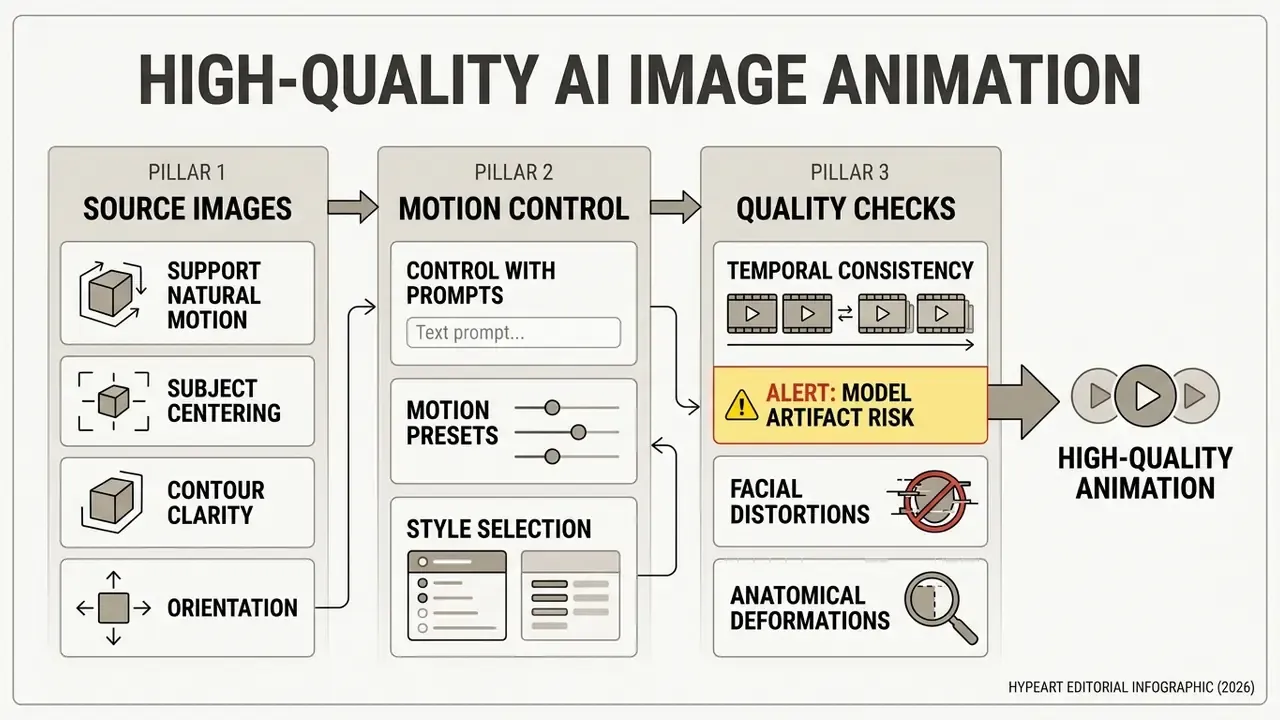
High quality AI image animation comes from three things: well-structured source images, motion parameters controlled with precise prompts, and temporal consistency checks that catch artifacts before publication.
Temporal inconsistency is the primary technical failure mode in image-to-video diffusion. When temporal layers in autoencoders are poorly aligned, frame-by-frame decoding produces visible jitter, texture flickering, and object warping across the sequence.
"AIGCBench evaluates image-to-video algorithms across 11 metrics, including temporal consistency and motion quality, and demonstrates correlation with human judgments."
Choose images that support natural motion
Images that yield natural motion share three traits: a centered subject, clear subject-background separation, and full anatomical contours without heavy occlusion or awkward angles.
- Subject centering. Place the primary subject near the center of the frame, occupying roughly 50 to 70 percent of the visual field (Ministry of Culture Object Photography Standards, 2025).
- Contour clarity. Outer edges should read distinctly against the background, otherwise you get temporal bleeding during motion synthesis.
- Orientation. Keep the subject's longer axis horizontal or vertical rather than diagonal, and avoid strong occlusions that hide limb or object boundaries.
Sources that fall short on contrast, cropping, or background separation can often be repaired before animation with AI photo editors instead of being regenerated from scratch. Cheaper, and usually faster.
Control motion with prompts, presets, and styles
Granular motion control comes from combining structured text descriptions with numerical motion-strength parameters and model-specific presets.
Advanced systems expose parameter scales such as cameraMotionStrength ranging from 0.0 (subtle) to 2.0 (intense) (Scenario Docs for LTX-Video, 2026). Keeping motion scales in the lower band, roughly 0.2 to 0.8, preserves structural fidelity. Push much higher and you get scene tearing that no amount of post can rescue.
"Cinemo applies a structural similarity index (SSIM)-based strategy to control motion intensity, linking animation strength to preservation of the source image's details."
Advanced creators exploring multi-image blending can review specialized ai image fusion techniques.
ALERT: model artifact risk and quality control. Generative video models frequently introduce structural errors during temporal synthesis (NIST AI Reference Guidelines, 2026). Before publishing, run a manual QC pass for:
- Facial distortions. Unnatural eye warping or asymmetric lip movement during speech.
- Anatomical deformations. Blended fingers, extra limbs, unnatural joint bending.
- Text corruption. Legible text or logos dissolving into garbled characters during camera moves.
- Texture tearing. Haloing, ghosting, or sudden lighting pops across sequential frames.
Validate outputs: metrics, seed governance, and audit trails
For organizations that must produce evidence rather than impressions, a subjective preview is not enough. A defensible validation layer pairs quantitative metrics with reproducibility controls.
- Quantitative metrics. Fréchet Video Distance (FVD) measures distributional similarity between generated and reference clips and serves as the standard proxy for temporal realism. Frame-level FID captures per-frame fidelity. CLIP-style alignment scores measure prompt adherence. Benchmark suites such as AIGCBench formalize image-conditioned evaluation across consistency, motion effect, and video quality.
- Seed and hyperparameter governance. Record the seed, prompt string, negative prompt, motion-strength value, guidance scale, sampler, step count, resolution, duration, and model version for every accepted asset. Without these, the render cannot be reproduced for an auditor or a regulator. Period.
- Immutable audit trail. Store request payloads, model responses, reviewer identity, review timestamp, and approval decision in append-only logs. The asset, its inputs, and its approval record should be retrievable as one package.
- Human-in-the-loop approval. Define at least two gates, a technical artifact review and a brand or compliance review, and require named sign-off before anything externally facing goes live.
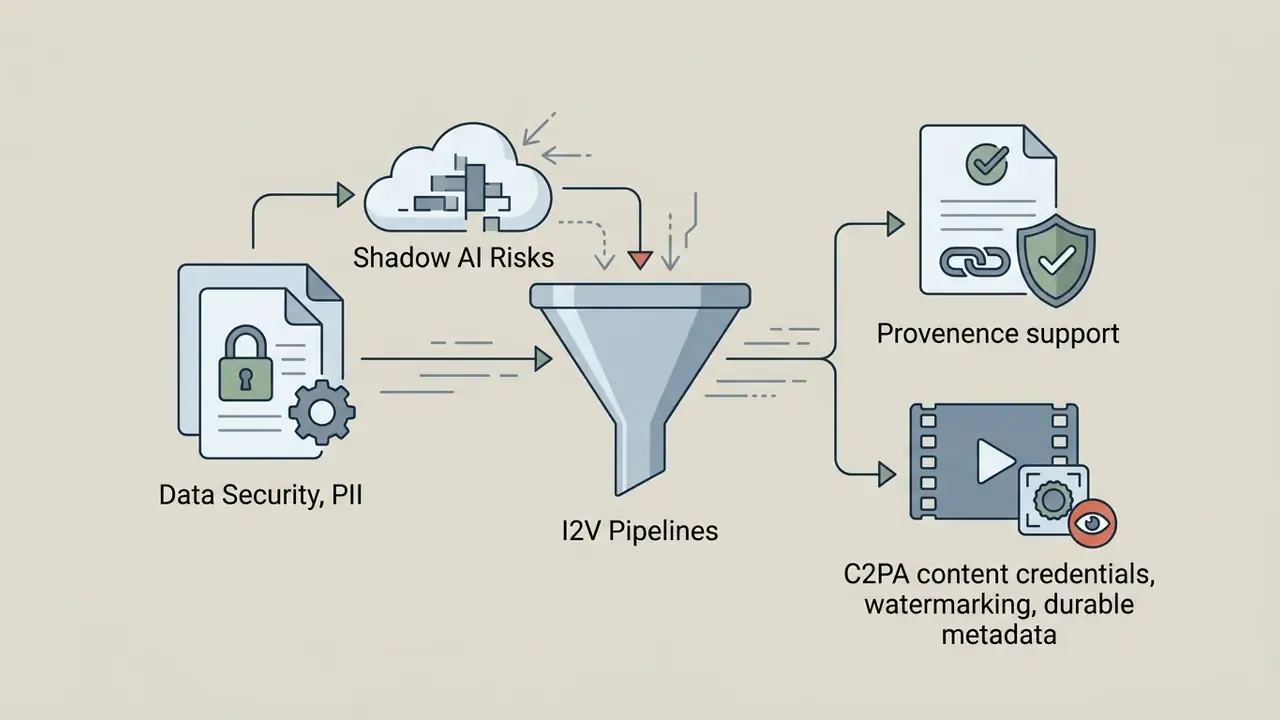
- Provenance attachment. Apply C2PA-style content credentials and durable metadata at export so downstream systems can tell synthetic from captured footage.
Enterprise risk and compliance checklist
- Confirm the source image is owned or licensed for derivative works, with model and property releases on file.
- Confirm no identifiable person is synthetically animated without documented consent.
- Confirm no regulated disclosure, price, rate, or performance figure is rendered as generated pixels.
- Record seed, prompt, parameters, and model version in the asset register.
- Run artifact QC against the four failure classes listed above.
- Compute or log at least one quantitative consistency metric for accepted batches.
- Attach provenance metadata and, where required, a visible synthetic-content label.
- Capture dual human sign-off with named reviewers and timestamps.
- Verify that the vendor tier in use grants commercial rights for the intended distribution channel.
- Archive the final deliverable plus its evidence package under the applicable retention schedule.
Data Security, PII, and Shadow AI Risks in I2V Pipelines
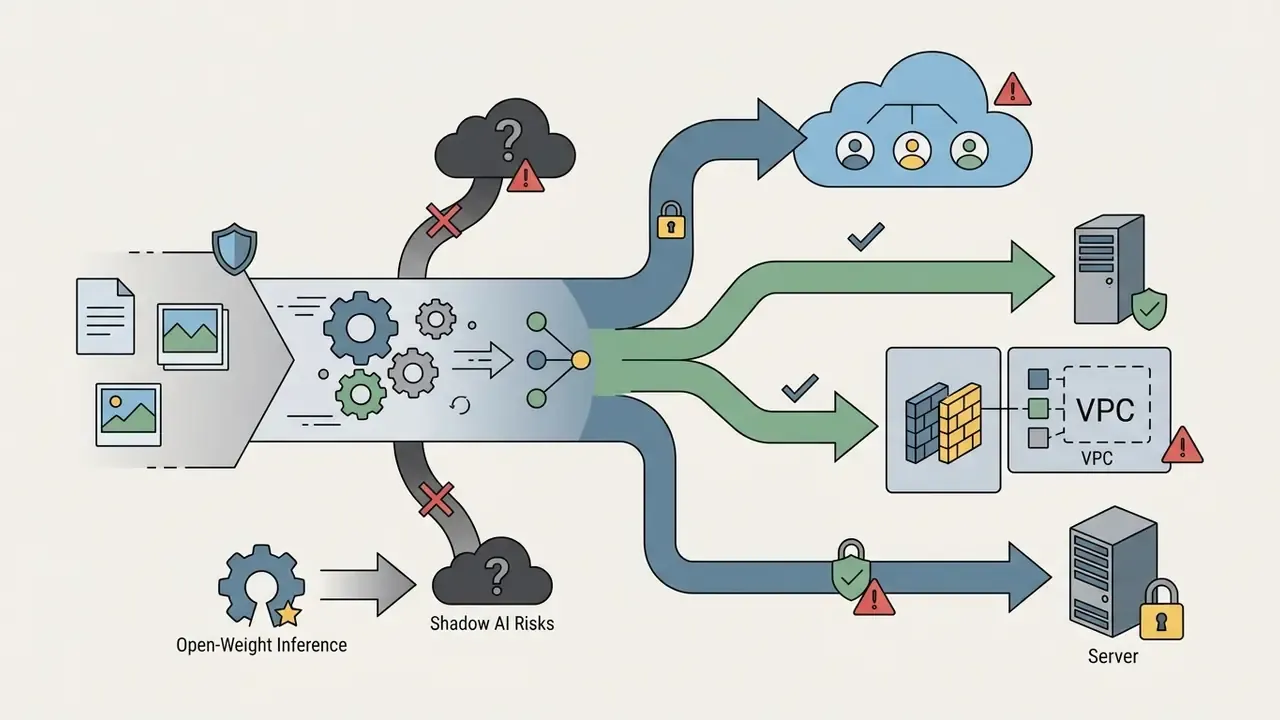
Image-to-video tooling creates an outbound data-flow problem before it creates a content problem. Every animation request uploads an image to a third-party inference endpoint. That is the part nobody puts in the creative brief.
Shadow AI exposure. Self-service animation sites open in any corporate browser. The realistic failure mode in regulated environments is not a malicious actor; it is a marketing or HR employee uploading a customer photograph, an internal diagram, or a document scan into a consumer tool with no enterprise agreement. Controls that shrink this exposure include DNS or CASB-level allow-listing of approved generative endpoints, an internal catalogue of sanctioned tools, and a lightweight intake path so that the compliant option is faster than the unsanctioned one. Speed is the control here, oddly enough.
PII and biometric sensitivity. Facial imagery counts as biometric or special-category data under several regimes. Portrait animation and lip-sync workflows therefore deserve stricter handling than product photography: restricted user groups, consent records, shorter retention, and no customer-identifiable faces in experimental prompts.
Vendor due-diligence questions. Before onboarding an I2V vendor, get written answers on:
- Whether uploads and outputs are used for model training, and whether opt-out is default or must be requested.
- Retention periods for inputs, outputs, and prompt logs, plus deletion SLAs.
- Sub-processor list, hosting regions, and cross-border transfer mechanism.
- Incident notification terms and the evidence available to internal audit.
Architecture options by sensitivity tier. Public marketing imagery can reasonably run through a hosted API under a commercial agreement. Internal or customer-adjacent imagery should move to a single-tenant or VPC deployment with training disabled. Faces of identifiable customers, employees, or claimants belong in a locally hosted open-weight pipeline, or nowhere at all.
How to Choose an AI Image Animation Generator
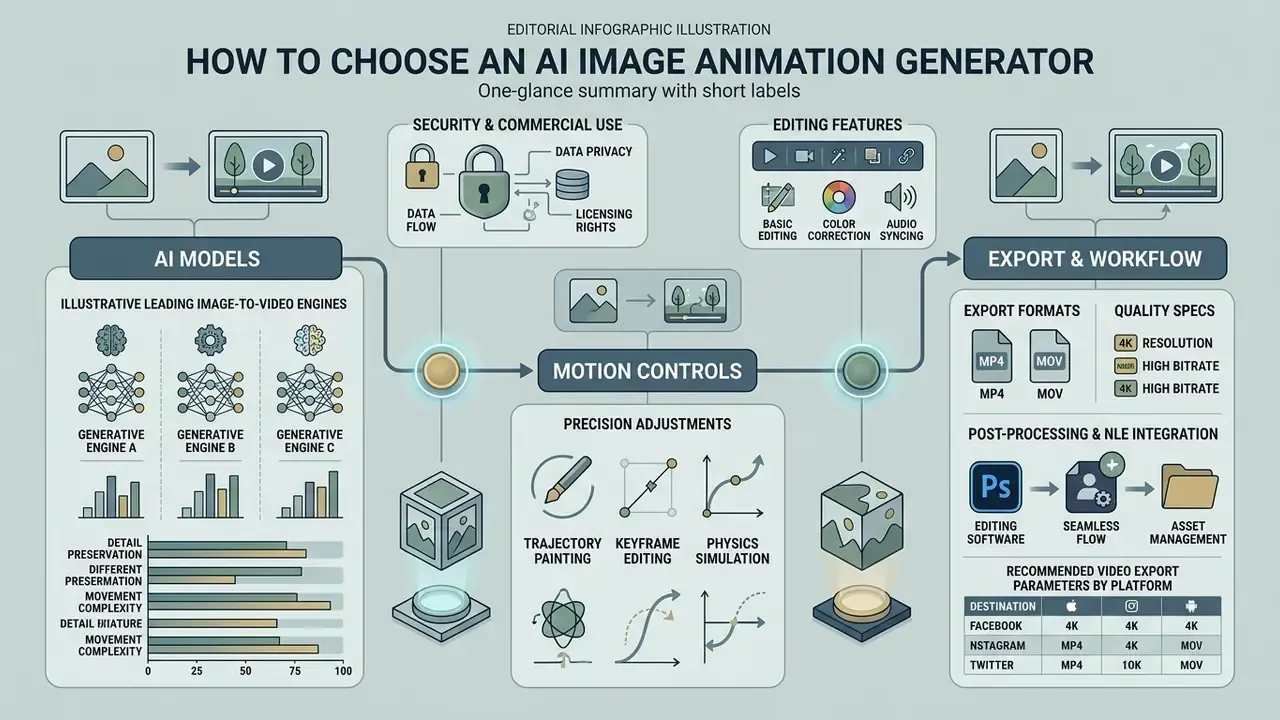
Choosing an AI image animation generator means weighing model architecture, motion control precision, export flexibility, security parameters, and workflow integration. Individual creators weight the first two. Enterprises live or die on the last three.
AI models, motion controls, and editing features
Modern generators run on U-Net or Diffusion Transformer (DiT) architectures, with motion controls ranging from reference-video transfer to custom camera paths and pose constraints.
"A 2025 survey of video diffusion models catalogues systems such as Gentron, LTX-Video, Vidu, and Movie Gen, and describes the trade-offs between memory footprint, reconstruction quality, and speed."
Motion control depth varies a lot between vendors. Reference-video motion transfer, where you upload a driving clip and apply its motion to a character image, typically accepts 3 to 30 second driving videos and matches output duration to the reference. Parameterized control exposes camera path, subject action, pacing, first and last frames, and pose reconstruction as separate fields. Built-in editing is usually post-generation trim, audio, subtitles, and scene merging rather than a full non-linear editor, so plan for a handoff.
While individual users prioritize ease of use, commercial enterprises prioritize formal governance, data privacy, and model auditability (NIST AI 600-1, 2024). Teams narrowing a shortlist can use the structured comparison of AI video generators instead of testing every platform in isolation.
Comparing leading image-to-video AI engines (2026 landscape)
Picking a generative backbone depends on how much your project needs temporal physics, identity retention, or raw rendering speed. The stability scores below are editorial comparisons drawn from vendor documentation and published benchmark behaviour, not a single controlled test. Treat them as orientation, not proof.
| Model Architecture | Primary Strength | Best For | Temporal Stability (editorial score) |
|---|---|---|---|
| Kling 3.0 / O3 | Complex physical dynamics and longer sequences | Action scenes, human body motion | 9.2 / 10 |
| Wan 3.0 | Prompt adherence and high-definition spatial fidelity | Commercial product visualizations | 9.0 / 10 |
| Google Veo 3 | Photorealistic lighting and camera simulation | Cinematic shorts and b-roll footage | 9.4 / 10 |
| Seedance 2.5 | Rapid iteration and low-latency rendering | Social media content and memes | 8.5 / 10 |
| MiniMax H3 | Stylized 2D and 3D anime motion coherence | Character animation and illustrations | 8.8 / 10 |
| LTX-Video / open-weight | Self-hosted inference and explicit motion parameters | Regulated or air-gapped pipelines | 8.2 / 10 |
Multi-model platforms cut switching cost: the same conditioning image can be rendered through several backbones and compared side by side, which remains the fastest way to find the engine that holds identity for your specific subject type. Implementation-level cost and quota details for one widely used backbone are documented in the Google Veo implementation guide.
Export formats, quality, and workflow integration
Enterprise workflows need platforms that support standard containers (MP4, MOV, ProRes, WebM), 4K resolutions, variable frame rates from 24 to 60 fps, and direct API integration without switching between tools.
Wiring video generation straight into existing digital asset management through REST APIs removes context-switching delays and keeps metadata tagging consistent across marketing departments.
"Controllable longer image animation shows that videos beyond 100 frames remain scene-consistent through noise rescheduling."
Downstream trimming, captioning, and compression can be handled with free video editors when a full NLE licence is unnecessary, and file weight can be tamed with the tooling described in the guide to video compressors. Practitioners reviewing creative software comparisons can see the overview of leading tools, and teams mapping the wider production stack can compare options across modern digital pipelines.
Recommended video export parameters by platform
| Platform / Use Case | Aspect Ratio | Resolution | Frame Rate (FPS) | Target Container |
|---|---|---|---|---|
| TikTok / Reels / Shorts | 9:16 (vertical) | 1080 × 1920 px | 30 fps | MP4 (H.264) |
| YouTube / desktop web | 16:9 (landscape) | 1920 × 1080 px or 4K | 24 or 60 fps | MP4 / WebM |
| E-commerce product cards | 1:1 (square) or 4:3 | 1080 × 1080 px | 30 fps | WebM / optimized MP4 |
| Display banner placements | 4:5 or 1:1 | 1080 × 1350 px | 24 to 30 fps | MP4 (low bitrate) |
| Broadcast / agency handoff | 16:9 | 3840 × 2160 px | 24 fps | ProRes / MOV |
| Selection Criterion | Technical Parameter | Operational Impact | ||
| :--- | :--- | :--- | ||
| Model architecture | Latent diffusion or Diffusion Transformer (DiT) | Dictates motion fluidity, spatial fidelity, and rendering speed. | ||
| Motion control depth | Trajectory prompts, pose transfer, camera vectors, motion strength range | Determines precision over camera paths and localized subject action. | ||
| Resolution and frame rate | 720p to 4K, 24 fps to 60 fps | Governs display quality across high-definition commercial channels. | ||
| Container formats | MP4 (H.264/H.265), MOV, ProRes, WebM | Controls post-production compatibility and compression loss. | ||
| Reproducibility | Seed control, pinned model versions, parameter logging | Enables re-creation of an approved asset for audit or rework. | ||
| Enterprise and financial governance | SOC 2 Type II, ISO/IEC 42001, VPC or single-tenant option, no-training guarantee, GRC and API readiness | Determines whether the tool can be onboarded in a regulated environment at all. | ||
| Provenance and rights | C2PA content credentials, watermark policy, commercial licence tier, revenue thresholds | Ensures compliance with disclosure duties and enterprise legal standards. |
Reading the table as text: architecture sets the ceiling on quality, motion control sets your creative precision, resolution and container decide whether post-production is painless, reproducibility decides whether audit is possible, and governance plus rights decide whether the tool ever clears procurement. In regulated buying cycles the last two rows usually eliminate more vendors than the first five combined.
Post-processing and NLE integration
In high-end commercial pipelines, AI-generated clips are intermediate visual passes, not final deliverables. Export ProRes or high-bitrate MP4, then import into Adobe Premiere Pro, After Effects, or DaVinci Resolve for optical-flow interpolation, colour grading, frame stabilization, and VFX compositing. Typical post steps include replacing generated on-screen text with real typography layers, masking a warped region and patching it from an adjacent clean frame, and conforming frame rate and colour space to the delivery spec. Publishing workflows for the resulting master are covered in the guide to YouTube video editors.
Are Free AI Animated Image Generators Worth Using?
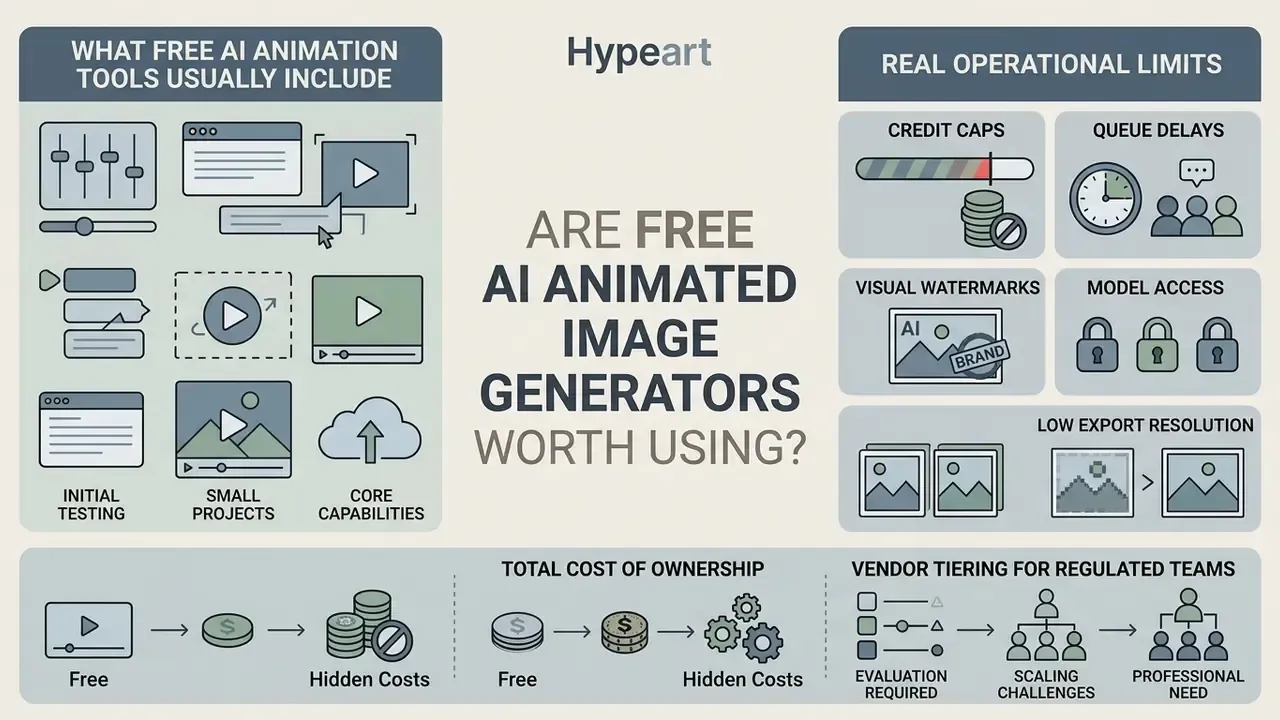
Free AI animated image generators are useful for initial testing and small trial projects, but they come with real operational limits: low export resolutions, restrictive generation caps, and watermarks. A full inventory of the category sits in the reference entry on free AI video generators.
"AIGCBench and TC-Bench evaluate algorithmic performance without distinguishing free from paid access; no comparative peer-reviewed data on pricing tiers was found."
What free AI animation tools usually include
Free animation tiers typically offer a small allocation of trial credits, a daily generation allowance, basic camera presets, and standard-definition exports from 480p to 720p, with clip lengths commonly capped around 2 to 8 seconds.
Those tiers are enough to experiment with basic motion prompts and test interface responsiveness at no cost. Some vendor free tiers beat the category average: documented examples include free daily generations with export up to 1080p on a curated model set. Regional teams looking for localized interfaces can read about ai image generator arabic free implementations, and adjacent free-tier constraints in static imaging are catalogued in the guide to free photo editors.
Free-plan limits: credits, watermarks, and export quality
The operational bottlenecks on free plans are hard generation ceilings, lower queue priority, mandatory watermarks, and non-commercial licensing.
- Credit caps. Free allowances are expressed inconsistently across vendors: one-time credit grants that never refresh, daily generation counts, or a fixed number of weekly exports. Published examples range from a handful of daily generations to a single credit pool, so read the constraint from the vendor's current pricing page rather than assuming a category average.
- Queue delays. Free requests route through shared server pools, which means noticeably slower processing during peak compute hours.
- Visual watermarks. Exported clips often carry prominent platform logos, which makes them unusable for professional distribution.
- Model access. Free tiers are usually limited to a curated subset of models, excluding the newest high-fidelity backbones and the longest durations.
Total cost of ownership and vendor tiering for regulated teams
For a bank, an insurer, or a listed company, the question is not whether a free tier exists. It is what a compliant clip actually costs, fully loaded. Free tiers fail that test structurally: they typically reserve broader data-use rights for the vendor, apply watermarks, and grant non-commercial licences only. Three disqualifying conditions before anyone even looks at output quality.
A realistic TCO model includes:
- Direct generation cost. Subscription ($7 to $35 per month at entry tiers, more for team plans) or metered API spend charged per second of output.
- Compute overhead for self-hosting. GPU instance hours and VRAM-class requirements where an open-weight pipeline keeps sensitive imagery inside the perimeter.
- Review labour. Artifact QC plus brand and compliance sign-off, usually the largest per-asset line item.
- Governance overhead. Vendor due diligence, model-risk documentation, control testing, and re-validation after every model version change.
- Evidence storage. Retention of inputs, parameters, outputs, and approval records for the full audit window.
- Rework rate. The share of renders discarded for artifacts, which multiplies every line above.
Vendor tiering follows directly: use a free tier only as a throwaway feasibility test with non-sensitive images; use a paid commercial tier for public marketing assets; use a VPC, single-tenant, or self-hosted deployment for anything touching customers, employees, or internal documents.
Can You Use AI-Generated Animated Images Commercially?
"Detailed prompting, parameter tuning, and iterative selection among variants may substantiate human authorship and copyright protection for an AI-generated work."
Because rights, disclosure duties, and licence tiers interact, the practical sequence runs: clear the source asset, confirm the vendor licence covers the intended channel, document the human creative contribution, label the output, then publish. A broader treatment of these rights is collected in the overview of commercial use of AI image generators.
Check platform terms and AI model licensing
"The GenVideo dataset, containing over one million AI-generated and real videos, confirms that synthetic content remains detectable through spatio-temporal inconsistencies even after platform transformations."
Teams that want to know how their own output will be classified downstream can test assets against AI image detectors before release. Legal teams tracking synthetic asset liability should browse the hub for policy analysis.
Verify rights to the original image and final video
Advertising compliance for financial and regulated marketing
FAQ: Frequently Asked Questions About AI Image Animation
This section covers common operational questions about technical skill requirements, supported file formats, clip length, and hardware specs for AI image animation.
Do I need technical skills to animate an image with AI?
No coding or advanced video editing skills are required to animate images with cloud-based AI generation tools.
Modern platforms ship graphical interfaces where you upload an image, select camera presets, type a descriptive motion prompt, and generate the clip automatically. Professional outputs depend mostly on prompt structure and source image quality, not manual keyframing expertise.
"TI2V-Zero enables video generation from an image on top of a frozen text-to-video model without fine-tuning, requiring no user understanding of architecture or hyperparameters." TI2V-Zero, arXiv (2024). https://arxiv.org/abs/2401.08190
The realistic skill requirement is structured prompt writing: subject, action, camera movement, lighting, constraints, always in the same order. Adjacent tooling for teams building longer sequences is described in the guide to animation makers.
What file formats are accepted for source images?
Most tools accept standard JPG, JPEG, PNG, and WebP files up to 50 MB. For the most stable temporal rendering, upload uncompressed 1080p PNG files with clear subject separation. As the 2026 arXiv image-to-video survey notes, I2V systems encode inputs as H×W×3 RGB frames, so high resolution and minimal compression artifacts are critical for a stable latent representation (https://arxiv.org/abs/2501.05162). Note that .jpg and .jpeg denote the same still-image format, and neither can hold motion on its own. Low-resolution sources can be prepared first with AI image upscalers.
Can I animate AI-generated pictures from other tools?
Yes. Images generated in Midjourney, DALL-E, or Stable Diffusion can be exported as PNGs and imported into an image-to-video generator as conditioning frames. TI2V-Zero uses DDPM inversion to initialize Gaussian noise from a supplied image, which lets any PNG act as a conditioning frame (arXiv, 2024, https://arxiv.org/abs/2401.08190). For choosing the upstream generator, see the comparison of the best AI image generators.
What local hardware is required for web-based animation tools?
Cloud-hosted services run inference on remote GPU clusters, so you need only a modern browser and a stable connection. Local open-source implementations such as ComfyUI need dedicated GPUs with at least 8 GB to 16 GB of VRAM, and requirements are model-specific rather than universal.
How long can a generated clip be?
Documented per-request limits usually land between 5 and 30 seconds, with several APIs fixed at 6 or 8 seconds per generation. Longer sequences are assembled by chaining clips or using start and end frame conditioning, and research on controllable longer animation shows scene consistency can hold beyond 100 frames through noise rescheduling.
Why does the same prompt produce a different result each time?
Diffusion sampling starts from random noise, so outputs vary unless the seed is fixed. Pin the seed, the model version, and every sampler parameter to make a render reproducible. That is also the minimum requirement for audit evidence in regulated environments.
Can the tool add voice or sound to the animation?
Some platforms generate narration, ambient audio, and effects alongside the visual track, and lip-sync modes align mouth movement to a supplied speech file. Voice cloned from a real person requires documented consent and should stay out of self-service workflows without one.
Can AI-animated clips be detected as synthetic after publishing?
Yes. Large-scale detection datasets show synthetic video stays identifiable through spatio-temporal inconsistencies even after platform re-encoding. That is an argument for proactive labeling rather than concealment.
Appendix A: Editorial Revision Notes