Executive Summary
- What it is An AI avatar generator converts a photo, text prompt, or script into a static digital portrait, a stylized character, or a lip-synced talking-head video using diffusion models, neural radiance fields (NeRFs), and 3D Gaussian splatting.
- Three deployment modes stock presenters (instant, generic), custom digital twins (24–48 hours setup, identity-bound), and real-time interactive avatars connected to an LLM (sub-800 ms conversational latency).
- Quality benchmarks that matter LipLMD at or below ~0.015 for mouth accuracy, low FID for frame realism, and temporal stability across long clips.
- Operational reality expect roughly 5 to 7 minutes of cloud GPU processing per finished minute of 1080p/25 FPS video; browser workspaces need at least 4 GB RAM (8 GB recommended) and a WebGL 2.0 browser.
- Governance non-negotiables written biometric consent, C2PA provenance metadata, AES-256 encryption at rest, 24–48 hour purge windows for raw source media, SOC 2 Type II / ISO 27001 attestation, and model validation aligned with SR 11-7 model risk management practice.
- Commercial rule of thumb free tiers are for testing (720p, watermarks, 5 to 60 second clips); commercial rights, voice cloning, 4K export, SSO, and audit logging sit behind paid enterprise plans.
Why should a risk or finance leader care about a creative tool at all? Because the moment an executive's face and voice become a reusable corporate asset, that asset behaves like a model: it has training data, a version, an owner, and a failure mode. The sections below move from formats and selection criteria through the production workflow, the control set, and the risk-adjusted business case.
What Is an AI Avatar Generator and What Can It Create?
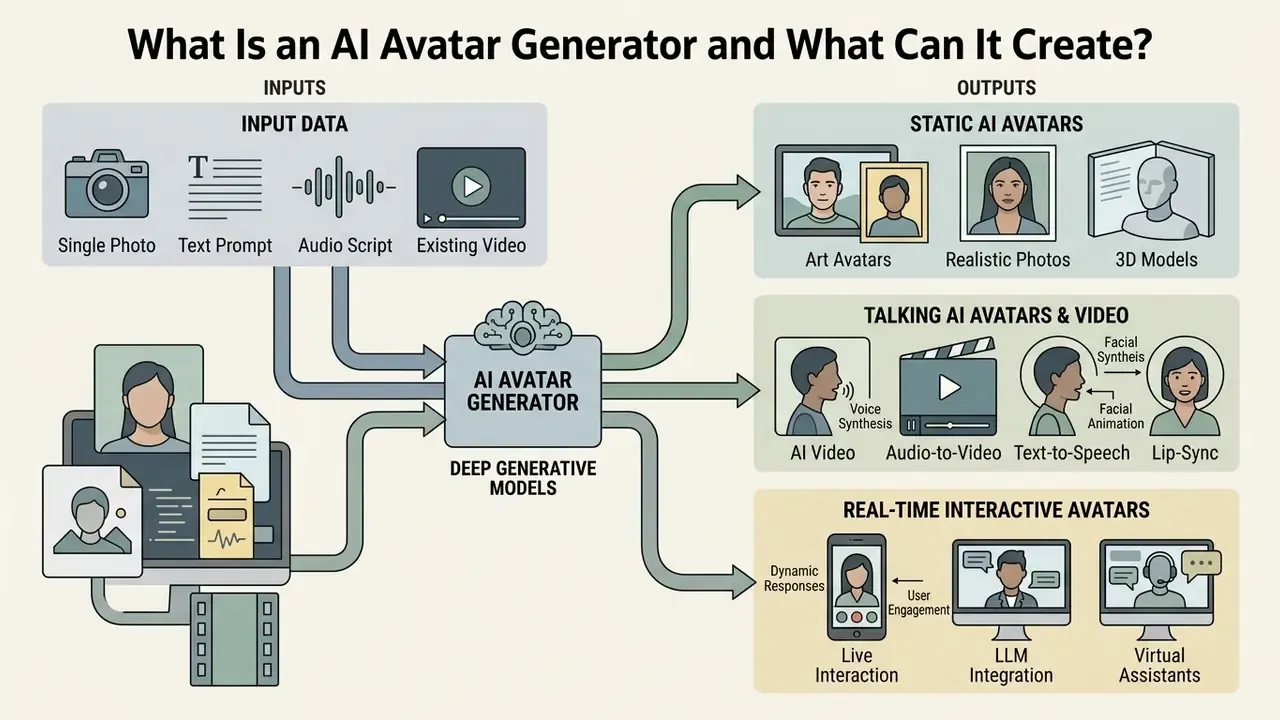
An AI avatar generator is a software system powered by deep generative models that transforms input data, such as a single photo, text prompt, or audio script, into a digital character or presentation video. These systems synthesize static digital portraits, stylized character art, or dynamic talking head videos with speech-synchronized facial expressions and lip movements.
Modern generative AI architectures, including diffusion models, neural radiance fields (NeRFs), and 3D Gaussian splatting, enable these tools to reconstruct identity, facial geometry, and motion. Organizations deploy an ai avatar generator to automate video production, localize training content across languages, and build consistent digital presenters without traditional camera crews.
Academic literature classifies these outputs by the scope of the body region being modeled: head avatars, digital humans, or talking heads, depending on whether the system animates only the face or a full body. The distinction is not cosmetic. Full-body systems carry more degrees of freedom, more failure surface, and more validation work.
Static AI Avatars from a Photo, Text or Prompt
Static AI avatars are two-dimensional or three-dimensional facial renders generated from a single photograph or descriptive text prompt. Image-driven architectures perform ai avatar creation from photo inputs by predicting 3D facial geometry and textures from a single photo, preserving individual identity across multiple viewing angles.
When starting from textual descriptions, text-to-image diffusion models condition output parameters to build an ai art avatar or custom avatar from scratch. Peer-reviewed 2024 pipelines demonstrate this two-stage pattern explicitly: a latent diffusion model first synthesizes high-detail front and back human views, and a pixel-aligned reconstruction stage converts those views into a coherent 3D avatar. These static assets serve as high-resolution digital headshots, social profile images, or baseline visual models for subsequent animation workflows. Teams building corporate profile imagery frequently pair this output with dedicated AI headshot generators to standardize lighting and framing across an entire leadership team.
One practical note from reviewing vendor output side by side: a prompt-generated ai avatar art character is legally cleaner than a photo-derived one, because no identifiable person's likeness is involved. That single fact often decides which path a compliance team approves first.
Talking AI Avatars and AI Avatar Video
A talking avatar combines a visual character render with an audio speech track to generate complete synthetic videos. An avatar video generator uses transformer-based audio-to-lip-sync models to align mouth shapes, facial expressions, and eye blinks directly with spoken phonemes.
Zero-shot frameworks animate previously unseen faces while maintaining temporal stability across dynamic clip lengths, and the scaling behavior is now documented quantitatively:
Contemporary research decomposes the task into three independently controllable channels: lip and expression, head pose, and high-resolution rendering. SyncTalk (CVPR 2024) implements a Face-Sync Controller for lip and expression alongside a Head-Sync Stabilizer for pose, driving eyebrows, forehead, and eye regions from seven blendshape expression coefficients. SyncAnimation (arXiv, 2025) extends this with an AudioPose Syncer and AudioEmotion Syncer to generate synchronized upper body, head, and lip shapes in real time, while VLOGGER (CVPR 2025) applies multimodal diffusion to embodied avatars with gaze, blinking, and upper-body motion.
These systems output localized talking head videos suitable for corporate briefings, product demos, and social media campaigns without requiring manual frame-by-frame animation. Readers comparing adjacent synthesis tooling can review general-purpose AI video generators alongside avatar-specific platforms.
Real-Time Interactive AI Avatars and LLM Integration
Beyond asynchronous video rendering, modern enterprise systems deploy interactive AI avatars capable of real-time, bi-directional conversation. These systems couple real-time text-to-speech (TTS) synthesis engines with large language models (LLMs) over WebSocket transport, so the avatar layer and the reasoning layer remain architecturally decoupled.
Operating with sub-800 ms latency, interactive avatars process user voice or text inputs, pass queries through an agentic LLM pipeline, and stream lip-synced video outputs back to web interfaces, custom mobile apps, or customer service kiosks. This architecture supports automated interactive sales agents, real-time onboarding assistants, responsive digital tutors, and lead-qualification bots that greet prospects by name.
Real-time rendering feasibility is grounded in measured performance data rather than marketing claims:
Governance note: interactive avatars introduce a live inference surface. Prompt-injection controls, conversation logging, and output moderation must be treated as part of the avatar control set, not as separate chatbot concerns. In a regulated setting, an avatar that can improvise an answer about fees or eligibility is a customer-facing model, with all the second-line review that implies. Treat it as a digital worker with an owner, an approved role, and a shutdown path.
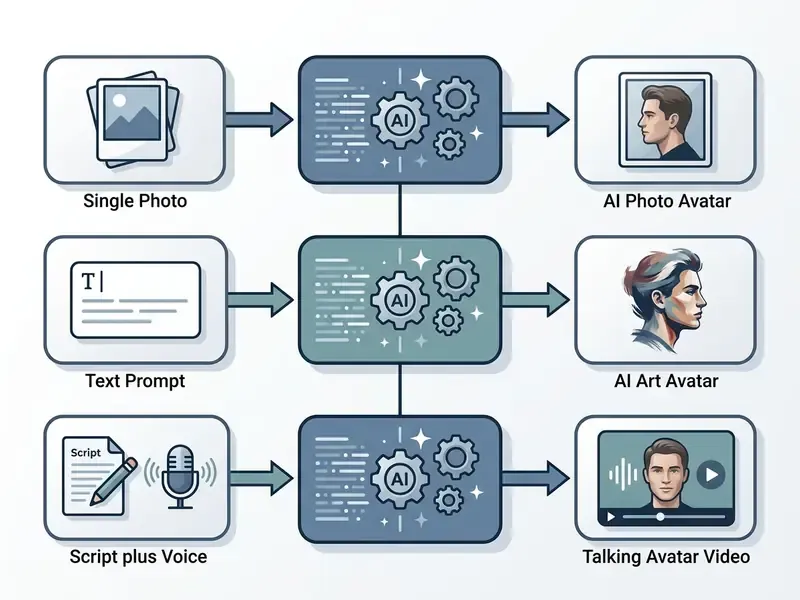
| Avatar Type | Source Requirement | Production Time | Primary Use Case | Interactive Capability |
|---|---|---|---|---|
| Stock Presenter | Pre-trained library | Instant (under 2 mins) | Generic training & fast ads | Static scripted only |
| Custom Twin | 30s video / 4K photo | 24–48 hours setup | Executive branding & sales | Static scripted only |
| Interactive Avatar | 3D mesh / real-time API | Instant stream | Live support & tutors | Real-time LLM response |
Which Type of AI Avatar Should You Choose?
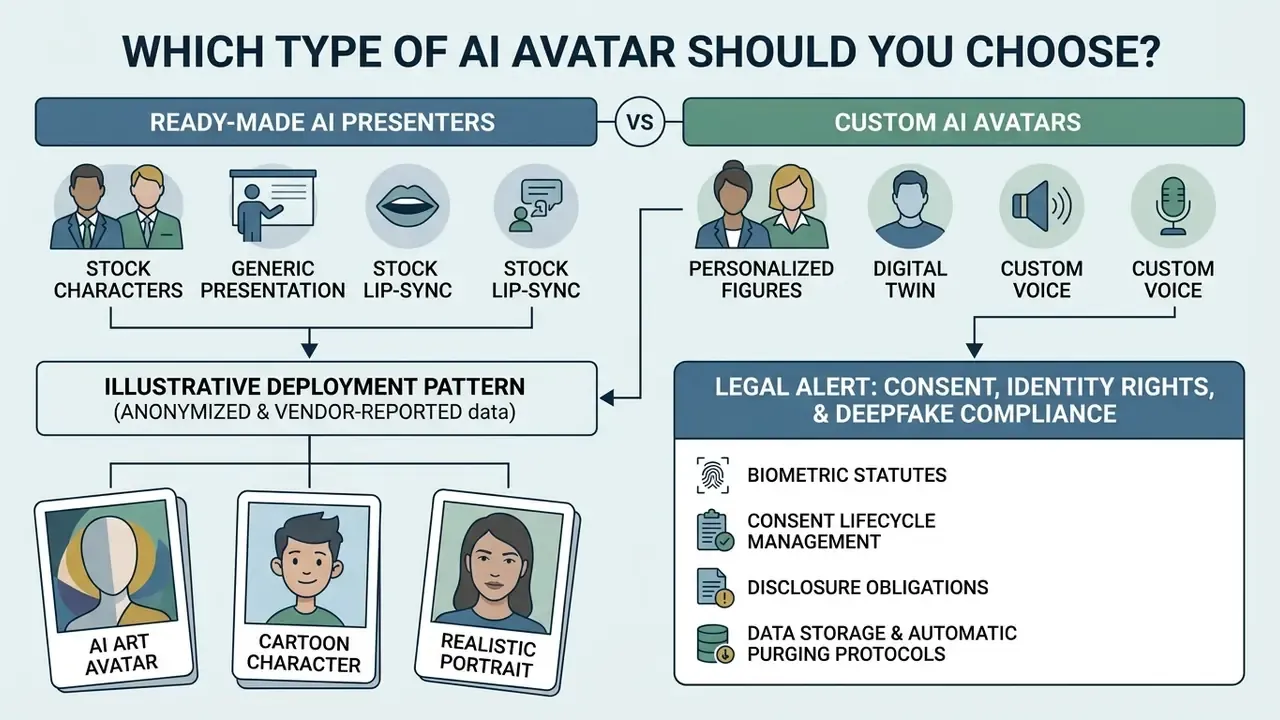
The decision to select a ready-made presenter, a custom digital twin, or an artistic character depends on your deployment context, visual consistency needs, and governance constraints. Real-time customer communication demands identifiable personal representation, while broad marketing campaigns often prioritize speed and neutral branding.
Evaluating your target audience helps match the visual style to institutional trust requirements. Enterprise training modules benefit from photorealistic digital presenters, whereas creative social media content frequently leverages stylized characters. Start narrow. One approved use case with one approved avatar beats five pilots nobody owns.
Ready-Made AI Presenters vs a Custom AI Avatar
Ready-made ai presenters are pre-trained digital avatars provided within cloud software libraries to allow immediate video generation without setup delays. Commercial libraries now range from roughly 240 to more than 1,100 prebuilt presenters spanning ages, appearances, and wardrobe styles. These stock presenters eliminate capture overhead, require no actor-specific training data, and work well for standardized internal announcements or rapid prototyping.
A custom ai avatar clones a specific individual using submitted video and audio samples, delivering a consistent own ai avatar for brand leadership. Creating a custom digital twin requires high-definition camera capture under controlled studio conditions to maintain visual identity across all produced video assets. Vendor capture specifications diverge: some platforms accept a 1920x1080 minimum at 25 FPS with even facial lighting and centered framing, while studio-grade pipelines recommend 4K UHD at 29.97–30 FPS for best identity retention. Roughly 30 seconds of on-camera recording is typically sufficient for a look-alike avatar, and visual consistency across sessions depends on reusing identical framing, brightness, contrast, clothing, background, and voice settings.
Illustrative deployment pattern (anonymized, vendor-reported, not independently audited). A large US financial institution required standardized training media across global compliance teams while reducing video production overhead. The compliance team replaced manual camera shoots with a verified custom AI avatar trained on 4K studio footage and integrated localized scripts in six languages. According to the internal figures reported for this rollout, the automated workflow reduced turnaround time from roughly three weeks to a few hours while maintaining consistent branding across compliance modules. Because these figures come from a single unaudited enterprise account rather than a published study, treat them as directional evidence of workflow compression rather than a benchmark, and validate cycle-time claims against your own pilot data before building a business case on them.
Legal Alert: Consent, Identity Rights, and Deepfake Compliance
AI Art Avatar, Cartoon Character or Realistic Portrait
Selecting a visual aesthetic involves balancing personal brand requirements against target audience expectations. Photorealistic headshots provide DSLR-like detail, natural skin textures, and balanced lighting, making them the standard default for corporate communications and executive profiles.
Stylized avatars, such as an ai art generator avatar, anime renders, or 3D cartoon models, use simplified facial proportions and vibrant color palettes. Creators exploring these aesthetics can survey the broader landscape of AI art generators before committing to a single avatar style, and animation-led brands often supplement avatar output with a dedicated animation maker. Anime and illustrated treatments rely on bold line work and expressive eyes and suit gaming, entertainment, and creator-economy contexts, while render-based 3D characters behave more like brand mascots than literal faces. Platform expectations diverge sharply: LinkedIn rewards tight, natural, professional headshots, whereas Instagram, TikTok, and YouTube tolerate looser, more playful stylization.
Research demonstrates that diffusion transformer engines like OmniSync achieve an 87.78% generation success rate on stylized avatars, preserving mouth synchronization even when facial geometry deviates from photorealism:
«OmniSync achieves 97.40% generation success across all videos and 87.78% for stylized characters, outperforming MuseTalk at 67.78%.»
How to Choose the Best AI Avatar Generator
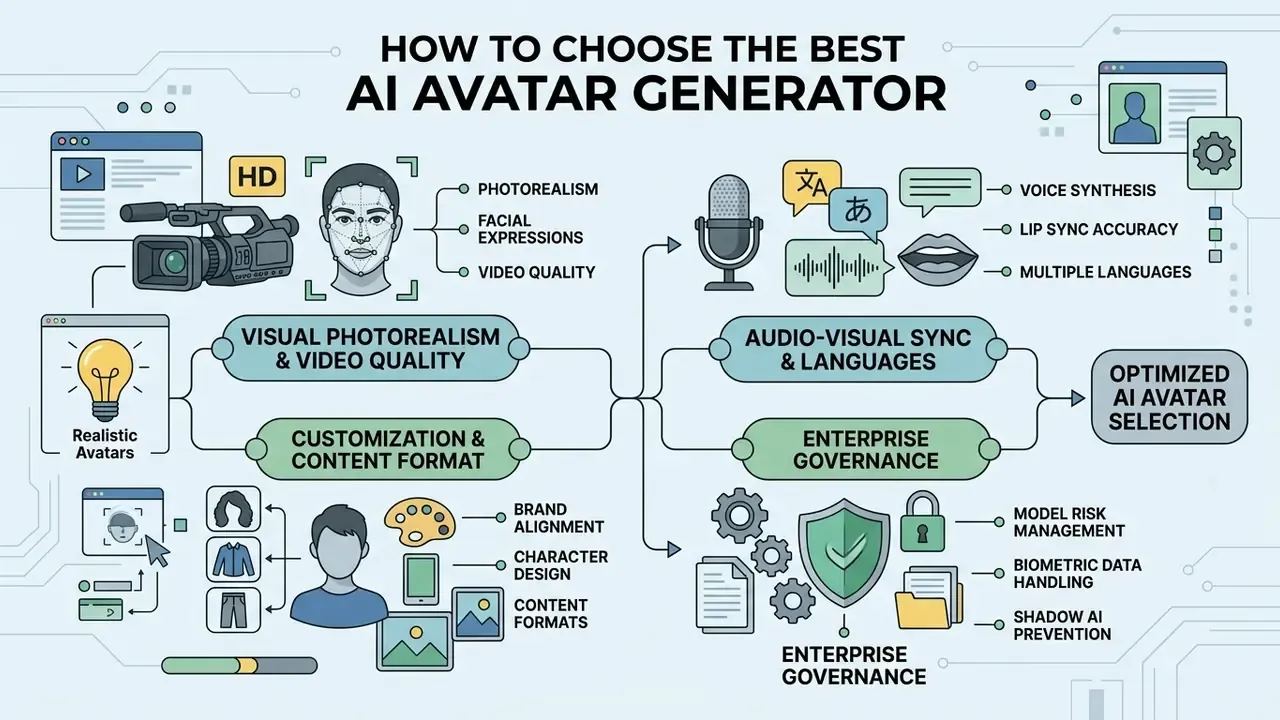
To identify the best ai avatar generator, evaluate core performance dimensions: visual photorealism, audio-visual synchronization accuracy, language support, and platform control options.
«Evaluating an AI avatar generator requires moving beyond surface visual fidelity: you must inspect model risk, consent protocols, and auditability.»
Realism, Video Quality and Facial Expressions
Visual realism in generated video depends on temporal stability, skin texture preservation, and natural non-verbal expressions. Legacy architectures suffer from flickering artifacts or rigid neck movements, whereas modern non-autoregressive models decouple head pose, eyebrow movement, and lip alignment (SyncTalk, CVPR 2024).
Standard objective metrics include Fréchet Inception Distance (FID) for frame quality and Landmark Distance (LipLMD) for mouth motion. High-performing platforms yield LipLMD scores near or below 0.015, ensuring natural facial expressions and fluid movement without visual distortion.
«Wav2Lip records LipLMD 0.0180 on VoxCeleb; a transformer model with diffusion rendering reaches 0.01151–0.01552, delivering tighter synchronization.»
Note the limits of automated scoring. Platform-side evaluation research argues that FID, FVD, SSIM, and PSNR can miss perceptual defects specific to photorealistic avatars, so subjective multidimensional frameworks should supplement the numbers; a 2024 open-source framework scores avatars across ten dimensions including realism and emotion accuracy. User-study evidence from 2026 additionally shows that perceived expression realism rises sharply once audiovisual desynchrony is eliminated, confirming that timing is a separate axis from static image fidelity. Treat vendor claims of "93% facial accuracy" or "94/100 emotional transfer" as commercial summaries, not standards, and run a blind internal preference test on your own scripts.
Voice, Lip Sync and Multiple Languages
Advanced platforms integrate neural text-to-speech synthesis with automatic lip synchronization across multiple languages. When localizing content, the system must adjust mouth movements to match the unique phonetic structures of target languages. Teams evaluating the speech layer independently should review dedicated AI voice generators to compare cloning fidelity and licensing terms.
Leading enterprise tools support voice cloning and automated translation across large language inventories, though the exact count is vendor- and product-specific rather than an industry constant. HeyGen documents localization into 175+ languages and dialects with voice cloning and phoneme-level lip-sync; Synthesia documents 160+ languages with 1,000+ voices; Synthesys states dubbing into 140+ languages; Braiv reports 80+ languages for dubbing and lipsync. Independent survey work on multilingual dubbing describes the underlying pipeline as speech recognition, machine translation, and speech synthesis with voice imitation. Verify the specific locale list against your target markets before signing, because aggregate counts typically include dialect variants.
This enables a single presenter avatar to deliver identical corporate messages globally while maintaining authentic lip alignment for every target locale. One caution worth repeating to marketing teams: machine translation of a regulated disclosure is not a compliance-approved translation. Terminology review still needs a human reviewer per market.
Customization for Brand, Character and Content Format
Enterprise deployment requires comprehensive visual control over aspect ratios, background scenes, clothing colors, and corporate visual assets. Selecting tools that offer custom branding kits ensures color scheme, logo placement, and font choices remain uniform. Documented customization surfaces include clothing color, uploadable custom backgrounds, brand kits that auto-apply company colors, fonts, and logos, and prompt-level control over gaze, posture, gesture energy, and on-screen action. ITU-T FGMV-22 notes that generative media systems should support capture of user audio and video data for personalized avatar creation, while NIST's Guidance and Templates for Public-Facing AI Documentation (AI Standards Zero Draft, July 2026) signals active standardization of public-facing AI disclosure artifacts.
Marketing teams often evaluate different platform options using our AI Media Comparison Matrices to verify that output dimensions seamlessly match distribution channels, whether rendering 16:9 landscape videos for desktop platforms or 9:16 vertical clips for mobile channels. Brand-design teams frequently pair avatar exports with template systems such as the Canva AI generator for lower-third graphics and thumbnails, and standardize repeatable scene layouts with a reusable youtube video template.
Enterprise Governance: Model Risk, Biometrics and Shadow AI
Regulated buyers, including banks, insurers, and healthcare providers, evaluate avatar platforms as models under management, not as creative apps. Three control domains determine whether a platform can pass second-line review.
Model risk management. US banking supervisors' guidance on model risk management (Federal Reserve SR 11-7 / OCC 2011-12) expects documented model inventory entries, conceptual soundness review, ongoing monitoring, and independent validation. For an avatar generator, that translates into: recording the generator as a third-party model or tool in the inventory; documenting intended use and limitations (for example, "scripted internal training only, not for customer-facing financial advice"); defining acceptance thresholds for lip-sync and artifact rates; and scheduling periodic revalidation whenever the vendor upgrades the underlying model version. Ask vendors for model cards, version-pinning options, and advance notice of model deprecations. Silent model swaps break reproducibility and invalidate prior validation evidence.
Biometric data handling. Face embeddings and voice prints derived from avatar training are biometric identifiers. Controls should include: a published retention schedule, AES-256 encryption at rest with customer-managed keys where available, contractual exclusion of customer biometrics from vendor model training, regional data residency options, and deployment choices spanning multi-tenant SaaS, virtual private cloud (VPC), and on-premise inference for the most sensitive identities. Require SOC 2 Type II and ISO/IEC 27001 attestation reports, not just a trust-page badge.
Shadow AI prevention. The dominant real-world risk is not the sanctioned platform. It is an employee uploading an executive's photo and a confidential earnings script to a free consumer tool. Mitigations: publish an approved-tools list, block unsanctioned avatar domains at the egress proxy, enforce SSO and role-based access control (RBAC) on the sanctioned platform so avatar assets cannot be shared outside the workspace, enable immutable audit logging of every render request and script, and route all likeness-based avatar creation through a single consent registry. A sanctioned tool that is easier to use than the free alternative is the most effective Shadow AI control available.
How to Create an AI Avatar from a Photo or Script
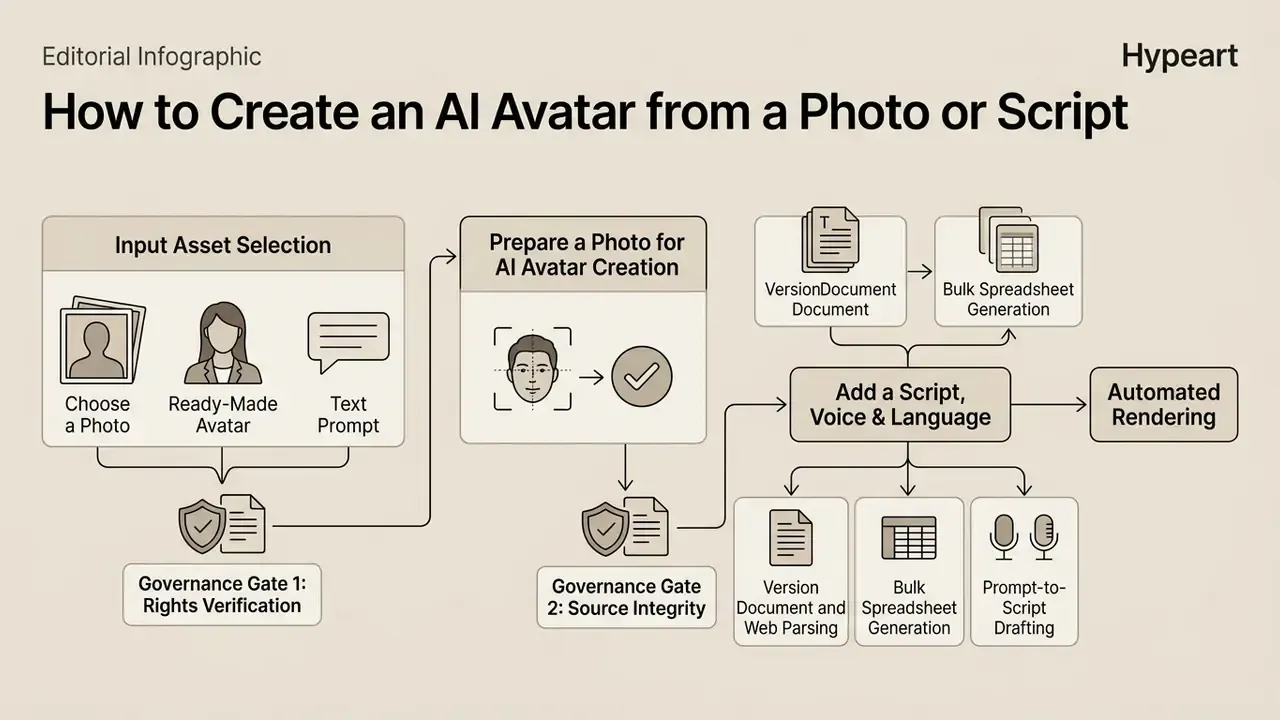
Creating a talking AI avatar video follows a structured production pipeline: input asset selection, face alignment verification, script audio setup, and automated rendering. Standardizing this workflow prevents identity drift and visual artifacts across generated content, and inserting explicit governance gates at each stage produces the reproducible trail auditors request.
Teams managing multi-channel video distribution can consult our AI Media Workflows to align avatar generation steps with automated post-production systems.
Choose a Photo, Ready-Made Avatar or Text Prompt
The creation process begins by selecting the baseline visual asset within your chosen ai avatar creation tool. Users can upload a high-resolution photograph, select a pre-trained studio presenter from the platform's gallery, or submit a text prompt to render a novel character via an ai art avatar generator. Vendor API schemas make this explicit: creation endpoints expose photo, digital_twin, and prompt asset types, with prompt-based generation set as the default path and photo upload reserved for real-person digital twins.
When using an ai avatar creator from photo tool, starting with an uncompressed source image ensures the generator extracts accurate facial landmark coordinates for subsequent expression mapping.
Governance gate 1, rights verification. Before upload, confirm you hold the rights to the likeness. Stock presenters are pre-cleared by the vendor; a colleague's headshot is not. Record the consent artifact ID against the avatar before any render is queued.
Prepare a Photo for AI Avatar Creation
High-quality avatar rendering requires optimal initial photo capture parameters. The source photograph must feature frontal lighting without harsh shadows, a neutral facial expression with a closed mouth, and direct eye contact with the camera lens. Vendor engineering documentation adds that soft natural light, window light for example, outperforms direct flash, that small head tilts are tolerated but profile views are not, and that open-mouth laughter, exaggerated emotion, and closed eyes degrade results.
Image resolution should meet or exceed 1024x1024 pixels; some platforms accept 512x512 as a hard floor while recommending 1152x1152 or 1080p and above for production use. Where a source image falls short, photo editors and lightweight free photo editors can correct exposure, crop to a square frame, and remove distracting background elements before upload.
Profile angles, heavy occlusions, or dramatic expressions impair 3D head geometry reconstruction and lead to visual distortion during lip animation.
Governance gate 2, source integrity. Log the source file hash, capture date, and capture conditions. This record is what allows you to prove later that an avatar was built from an authorized session rather than a scraped image.
Add a Script, Voice and Language Version
Once the visual character is set, input the speech layer by entering a written text script or uploading a pre-recorded voice audio file. Configure voice parameters by selecting language, regional accent, emotional tone, and speaking cadence. SSML 1.1 formalizes voice matching through required voice features, which is the mechanism behind explicit voice-attribute control in enterprise TTS pipelines.
Instead of manually writing scripts, advanced avatar generation platforms allow technical teams to ingest content directly via unstructured files and web sources:

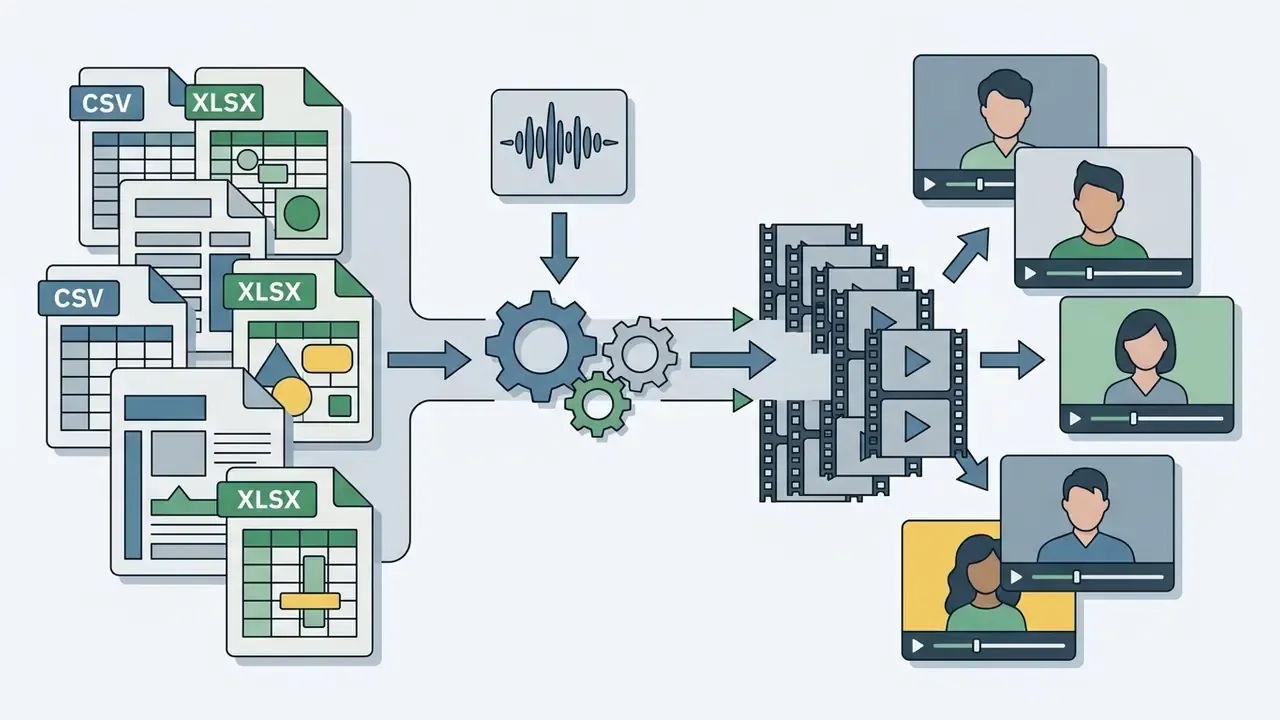
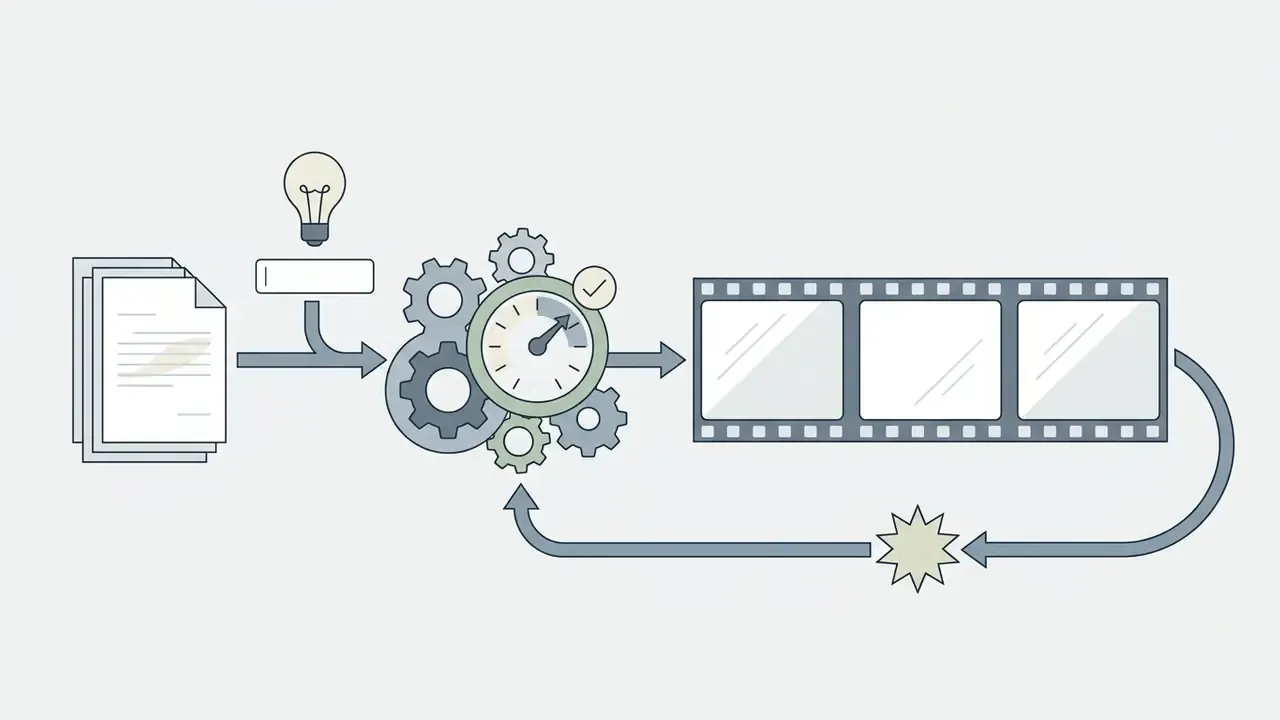
For multi-region rollouts, lock the master script first before generating localized translations. The documented localization sequence is: approve the master script, translate and localize, settle terminology and pronunciation, then cast native voices matched to the audience and approve voice samples before full production. Specialized editing tools, including a youtube video transcript generator, help creators extract verified text transcripts from existing videos to speed up script preparation.
Governance gate 3, script review. Route customer-facing or regulated scripts through the same approval workflow you apply to written disclosures. Verify names, figures, pronunciation of product terms, and required disclaimers before rendering, since correcting a claim after distribution costs more than a pre-render review.
Generate, Review, Export and Share the Avatar Video
Click generate to initiate neural rendering, where the model synthesizes facial dynamics and syncs lip movements to the audio track. Once processing completes, review the preview clip specifically for mouth-audio alignment, frame jitter, or temporal drift, and confirm that lip-sync was applied to the correct face when multiple people appear in the source footage. Engineering documentation attributes persistent drift and artifacts to sync configuration, audio quality, duration mismatch between audio and video, and low source resolution; cleaning the audio track and selecting a higher-robustness sync mode resolves most cases.
Export the final media file in H.264 MP4 format at native resolution (1080p or 4K) and 25 FPS; some platforms additionally export transparent WEBM for compositing. Large libraries benefit from a video compressor pass before distribution to control bandwidth costs without visible quality loss. For quick internal review cycles, a lightweight youtube video player online url embed is often faster than circulating large files by email.
Camera angles and cinematic framing. Configure camera angle parameters prior to final synthesis. Modern NeRF and Gaussian splatting models extract multi-view spatial representations from a single photo or video clip, allowing creators to dynamically switch between framing styles within the same timeline from one recording session:
System requirements and rendering benchmarks
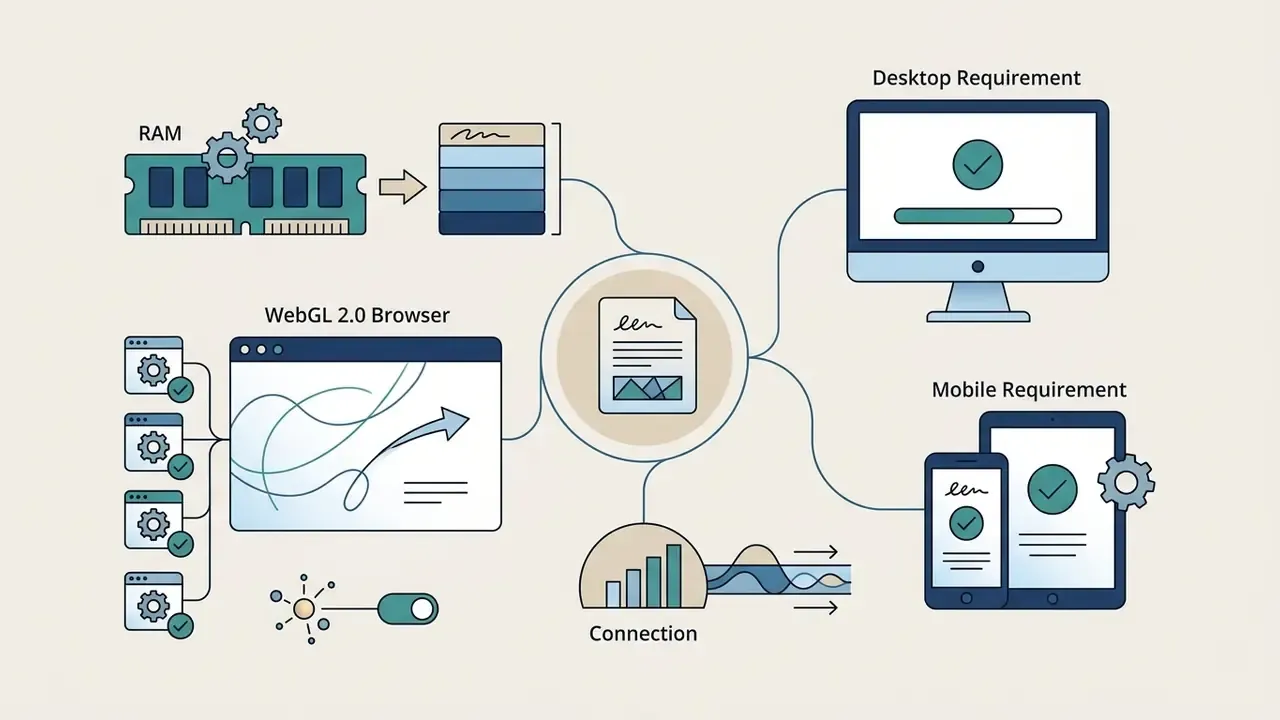
Cloud-based neural rendering offloads GPU computation from the client, but browser workspace playback and preview inspection impose baseline hardware requirements:
Governance gate 4, provenance and labeling. Before distribution, embed C2PA provenance metadata, apply the platform's synthetic-media label where required by EU AI Act Article 50 or platform policy, and archive the render manifest (avatar ID, script version, voice model, consent ID, timestamp) to your evidence store.
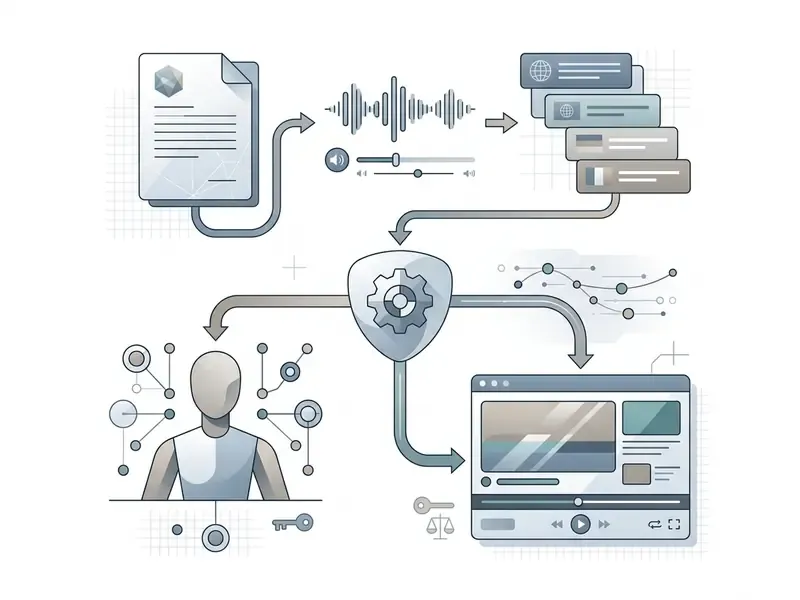
- Select input sourceChoose between a single photo upload, a pre-trained stock avatar, a text prompt, or an ingested PDF/URL/CSV dataset.
- Verify rights and consent (gate)Confirm likeness and voice authorization, attach the signed consent record, and log the permitted usage scope and expiry.
- Verify source qualityEnsure source photos are front-facing, well-lit, at least 1024x1024 resolution, and free of face occlusions.
- Input audio scriptType your written transcript, ingest a document, or upload a WAV/MP3 voice recording; select language, accent, and tone settings.
- Approve script (gate)Route regulated or customer-facing copy through compliance review; confirm figures, product terms, and mandatory disclaimers.
- Configure visual sceneSet aspect ratio (16:9, 9:16, 1:1), camera framing (close-up, medium, wide), background environment, and brand asset overlays.
- Render and inspectInitiate generation and review the output preview to check lip-sync accuracy, correct-face targeting, and facial motion stability against your LipLMD and artifact acceptance thresholds.
- Apply provenance metadata (gate)Embed C2PA credentials, add the required AI-disclosure label, and archive the render manifest for audit.
- Export final mediaDownload the verified video in 1080p or 4K MP4 (H.264, 25 FPS) format for distribution across digital platforms.
- Confirm data purge (gate)Verify that raw source uploads and temporary caches are deleted within the vendor's documented 24 to 48 hour retention window.
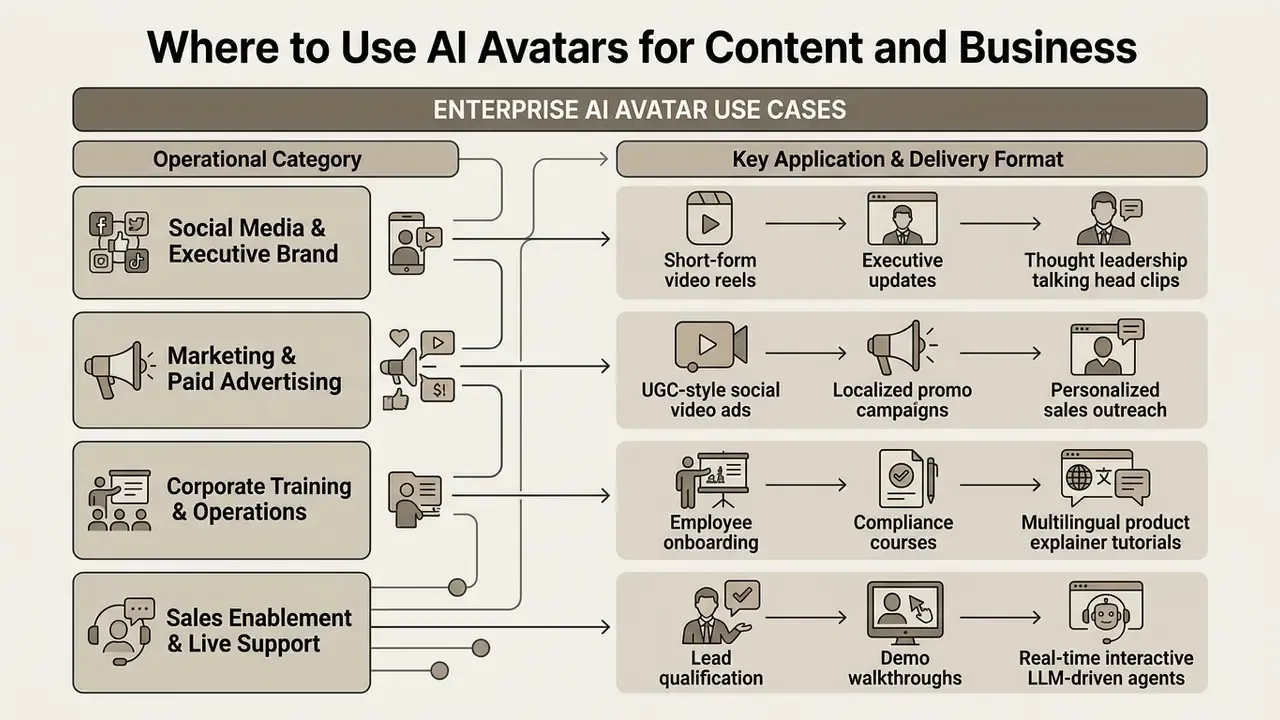
Where to Use AI Avatars for Content and Business
AI avatars allow organizations to scale video production across customer-facing and internal operations without proportional cost increases. Replacing physical studio setups with automated generation pipelines significantly lowers video production costs per minute.
Teams evaluating potential cost savings across media operations can use our financial calculators to model efficiency gains when moving from manual video shoots to automated AI presenter workflows.
Marketing, UGC Ads and Sales Videos
Marketing teams deploy avatars to generate user-generated content (UGC) style advertisements and personalized sales videos at scale, selecting creator-style presenters matched to the target demographic.
«AI-personalized video advertisements achieved 6.5% higher CTR than generic video ads and a 9.4% lift over personalized static image ads.»
Treat this figure as the strongest available quantified signal, with two caveats: it measures AI-personalized video advertising broadly rather than avatar-specific production, and the summary is a research communication rather than a peer-reviewed replication. Academic reviews of short-form video marketing (2023–2024) consistently link Reels- and Shorts-format content to higher brand engagement but report no direct ROI figures for avatar-led production, so avatar-specific ROI should be measured in-house via holdout testing.
Integrating customer relationship management (CRM) data with avatar generation APIs enables automated bulk video personalization, allowing sales teams to address prospects by name and company directly within outreach videos. Documented commercial implementations build the avatar from a roughly two-minute sample video, then apply bulk keyword replacement enriched from customer-intelligence platforms to produce hundreds of variants from one master render template. For regulated products, keep the variable fields strictly to non-substantive personalization: a name and a company are safe, an interpolated rate or eligibility statement is not.
Training, Product Explainers and Internal Communications
Enterprise learning and development (L&D) departments use digital presenters to convert static documentation, PDFs, and training decks into video courses covering onboarding, compliance, roleplay, and process training.
Empirical research demonstrates that viewers watching hyper-realistic AI presenters retain information and report trust levels statistically equivalent to watching human presenters:
«A study of 290 participants found no significant differences in information retention, engagement, or trust between a real presenter and their hyper-realistic avatar.»
Comparable findings appear elsewhere: a study of 500 adult learners reported no significant difference in engagement or retention between AI avatar and human instructor videos, with viewers completing the AI version roughly 20% faster, and a USC Marshall experiment across 250+ professionals found identical knowledge transfer between avatar-led and human-led delivery. Instructional-design literature attributes part of this parity to reduced extraneous cognitive load in tightly scripted animated delivery.
Internal communications teams use the same pipeline for CEO updates, HR policy changes, and compliance bulletins, where a two-minute video outperforms an unread email thread.
When publishing educational videos online, creators can review reference materials using a youtube video summarizer online free to streamline script creation from existing video libraries.
Calculating Risk-Adjusted ROI
Production-cost savings are the easy half of the business case. A defensible model nets those savings against the control costs the technology introduces.
Gross savings. Baseline the fully loaded cost of the replaced workflow: studio day rate, presenter time, editor hours, translation vendor fees per language, and the cycle time cost of re-shooting when a policy changes. Multilingual localization is usually where avatars generate the largest measurable delta, because one master render replaces N separate shoots.
Risk and control costs to subtract. Platform licensing and per-minute render credits; legal review of consent artifacts and advertising disclosures; model validation and annual revalidation effort for regulated inventories; security review, penetration test, and vendor due-diligence cycles; C2PA and labeling tooling; incident-response provisioning for misuse of a corporate likeness; and insurance or indemnity gaps where the vendor caps liability.
Recommended metric. Risk-adjusted ROI = (gross production savings + cycle-time value) minus (licensing + governance + validation + security + legal review), divided by total programme cost. Track it per use case rather than per platform, because a low-risk internal training rollout and a customer-facing executive likeness carry very different control overheads from the identical software subscription. Model the inputs using our media ROI calculators and re-run the figures after the first quarter of real render volume.
Free AI Avatar Generator vs Paid Tools for Commercial Use
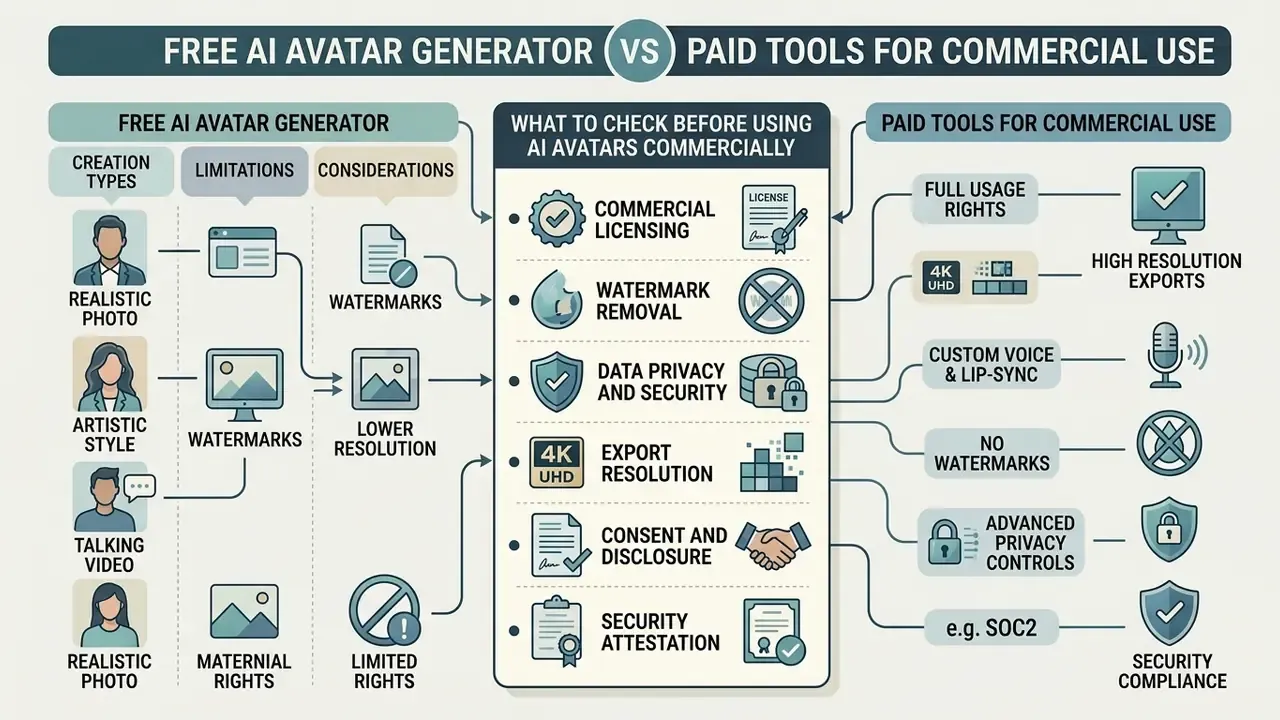
Choosing between an ai avatar creator online free tool and a commercial paid platform requires balancing initial cost against usage rights, output quality, and security controls. Free tiers allow creators to test software features, but enforce structural constraints that hinder commercial publishing. Side-by-side quality comparisons of free AI video generators illustrate how quickly those constraints bind on real projects.
Organizations seeking commercial licensing frameworks can inspect our AI Media Commercial-Use Hub to review legal terms, usage rights, and enterprise compliance considerations.
What You Can Create with a Free AI Avatar Generator
A free ai avatar creator free plan provides entry-level access to basic static headshot generation and brief video renders. Most platforms limit free video exports to short durations (5 to 60 seconds), output resolution capped at 720p, and enforce mandatory platform watermarks. Documented examples include one credit totaling roughly one minute at 720p with a watermark, five-second caps on core avatar tools, and small persistent watermarks removed only on paid tiers that unlock watermark-free 1080p MP4 export. An ai animated avatar generator free tier or an ai art avatar free render is generally enough to judge motion quality, though not enough to ship.
These free tools serve as functional testing environments to evaluate lip-sync precision and user interface workflows before committing capital to enterprise tier subscriptions. Free-tier limits are not standardized, since each vendor sets its own duration, resolution, and watermark policy, so test the specific locale, script length, and framing you intend to ship.
What to Check Before Using AI Avatars Commercially
Commercial deployment demands verified commercial usage rights for all underlying avatar assets, synthetic voices, and background elements. Using free-tier exports for commercial advertising often violates platform terms of service and exposes businesses to copyright claims; vendor terms commonly restrict free tiers to personal, non-commercial use and grant advertising and client-work rights only on eligible paid plans. Before scaling, confirm how the platform handles commercial use of AI image and media generators across both stock and custom assets.
Before launching public ad campaigns, teams should review performance benchmarks in our AI Media Benchmarks index and verify compliance requirements:
- Commercial licensingConfirm that your subscription plan explicitly grants commercial rights for client work and paid advertising, including rights to custom avatars and cloned voices, not only stock presenters.
- Watermark removalEnsure exported media is clear of platform watermarking.
- Data privacy and securityVerify that uploaded photo and audio data are excluded from public model training datasets, and obtain the written retention and deletion schedule.
- Export resolutionMandate 1080p or 4K rendering output at 25+ FPS for professional media publication.
- Consent and disclosureMaintain the consent artifact for every likeness and apply required synthetic-media labels plus C2PA provenance metadata.
- Security attestationRequest SOC 2 Type II and ISO/IEC 27001 reports, sub-processor lists, and data residency options before onboarding.
| Feature & Capability | Free AI Avatar Generators | Paid Commercial AI Platforms |
|---|---|---|
| Commercial Usage Rights | Restricted to non-commercial personal use | Explicit commercial license for ads & business |
| Export Resolution | Capped at 720p resolution | Full 1080p HD to 4K UHD rendering |
| Watermark Status | Enforced platform watermark | Watermark-free clean exports |
| Video Duration Limits | Restricted to 5–60 second clips | Unlimited clip rendering based on credits |
| Voice Cloning & Languages | Basic stock voices in few languages | Custom voice cloning across 140–177+ languages |
| Input Ingestion | Manual text entry only | PDF, URL parsing, CSV/XLSX bulk generation, API |
| Camera Framing Control | Fixed single framing | Close-up, medium, and wide shots from one capture |
| Real-Time Interactive Mode | Not available | LLM-connected streaming avatars (sub-800 ms) |
| Identity & Access Control | Basic account access | Enterprise SSO, audit logging, & RBAC |
| Security Attestation | Typically none published | SOC 2 Type II, ISO/IEC 27001, penetration test reports |
| Biometric & BIPA Handling | Unclear consent and retention terms | Documented consent registry, retention schedule, purge SLA |
| Data Retention | Undisclosed or indefinite | Documented 24–48 hour purge of raw source media |
| Deployment Options | Multi-tenant public cloud only | Multi-tenant SaaS, VPC, or on-premise inference |
| Model Governance Artifacts | None | Model cards, version pinning, change notifications |
Read the table as a control map, not a feature war. The rows that decide procurement in a regulated institution are the bottom six, and none of them are visible in the output video.
Limitations and Open Questions
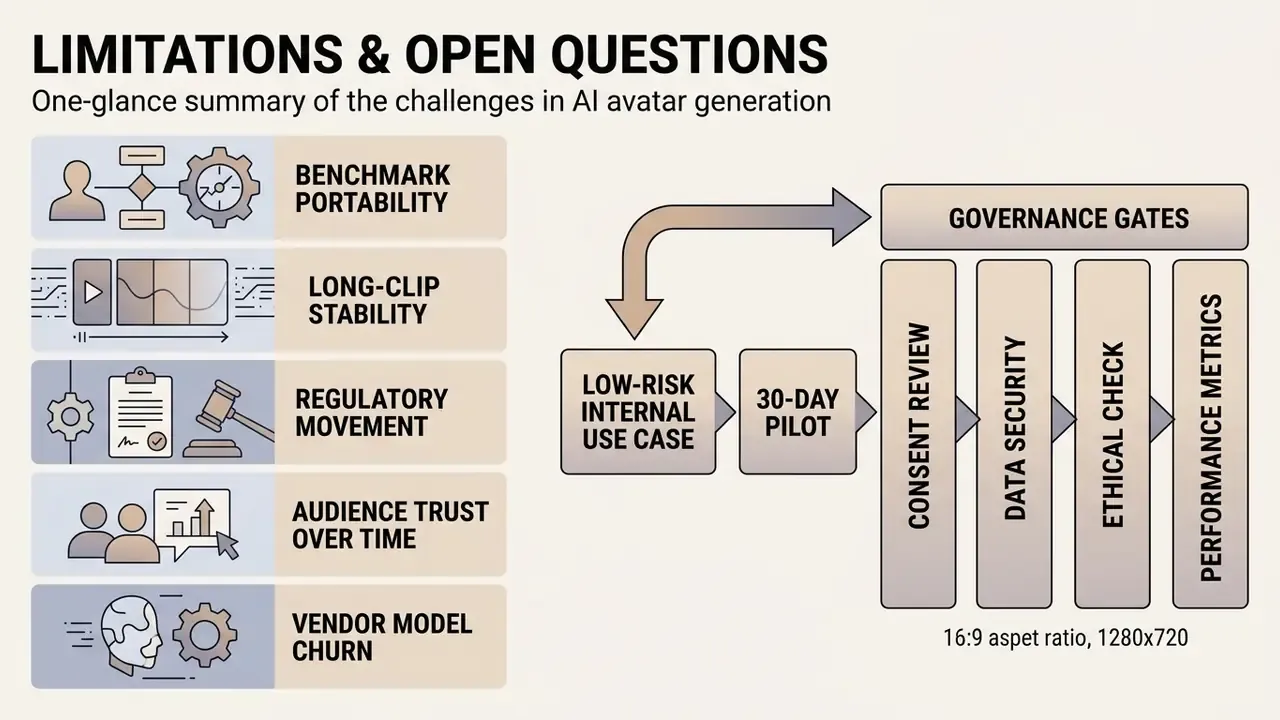
Honest caveats, because the evidence base is younger than the marketing.
- Benchmark portability. LipLMD and FID scores published on research datasets rarely transfer cleanly to your scripts, accents, and lighting. Reproduce them on your own material before writing acceptance thresholds into a contract.
- Long-clip stability. Most published results cover clips of seconds, not a 20-minute compliance module. Temporal drift over long renders remains under-measured.
- Regulatory movement. US federal digital replica legislation is still in draft, state biometric statutes differ, and EU AI Act Article 50 guidance continues to evolve through 2026. Treat any labeling workflow as a living control.
- Audience trust over time. Parity studies measure first exposure. Whether repeated avatar-led communication erodes trust in internal messaging has, as far as we can tell, not been tested longitudinally.
- Vendor model churn. Version pinning is not universally offered. Where it is absent, prior validation evidence expires silently with the next model update.
A safe next step: pick one low-risk internal use case, run a 30-day pilot with the four governance gates enabled, and compare measured render volume and control effort against the risk-adjusted ROI formula above before expanding scope.
FAQ: Frequently Asked Questions About AI Avatar Generators
Does an AI Avatar Require More Than One Photo?
No, modern AI avatar generators do not require more than one photo to create a dynamic talking avatar. Advanced 3D-aware diffusion architectures and neural radiance fields synthesize missing geometric angles, depth maps, and facial textures from a single frontal snapshot. Crucially, the missing viewpoints are not recovered from the photo; they are hallucinated by learned priors. Morphable Diffusion (CVPR 2024) generates multiple target views from fixed camera poses and then reconstructs a 3D-consistent, animatable head avatar, while GAS: Generative Avatar Synthesis from a Single Image (2025) first generates intermediate novel views and poses before conditioning a video diffusion model on them. Efficiency has improved to the point where single-image avatars render at interactive rates:
«LightAvatar renders an image from 3DMM parameters in one network forward pass at 174.1 FPS at 512x512 on an RTX 3090.» — LightAvatar: Efficient Head Avatar as Dynamic Neural Light Field (arXiv:2409.18057), 2024. https://arxiv.org/abs/2409.18057 While a single image is sufficient for head-shot video generation, providing multiple high-resolution studio photos or short video capture sequences improves output quality for custom digital twins, enabling accurate multi-angle visual rendering during complex movements.
How Long Does Rendering Take, and What Hardware Do I Need?
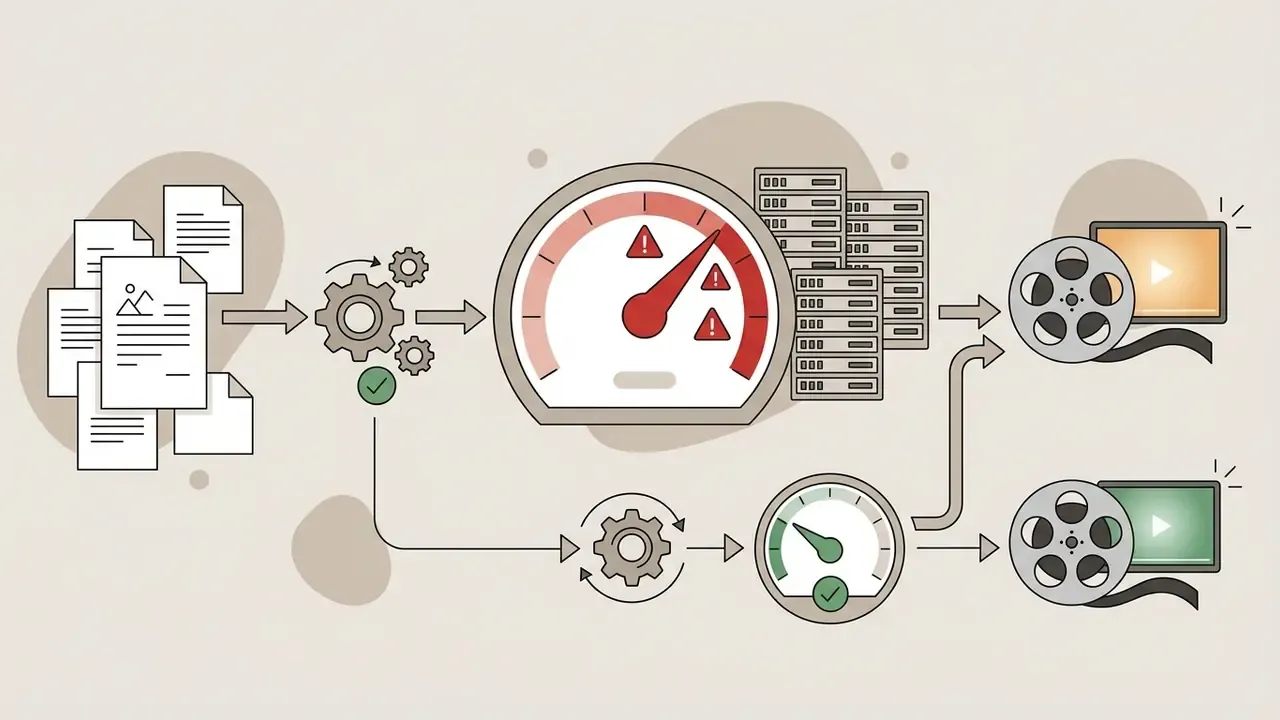
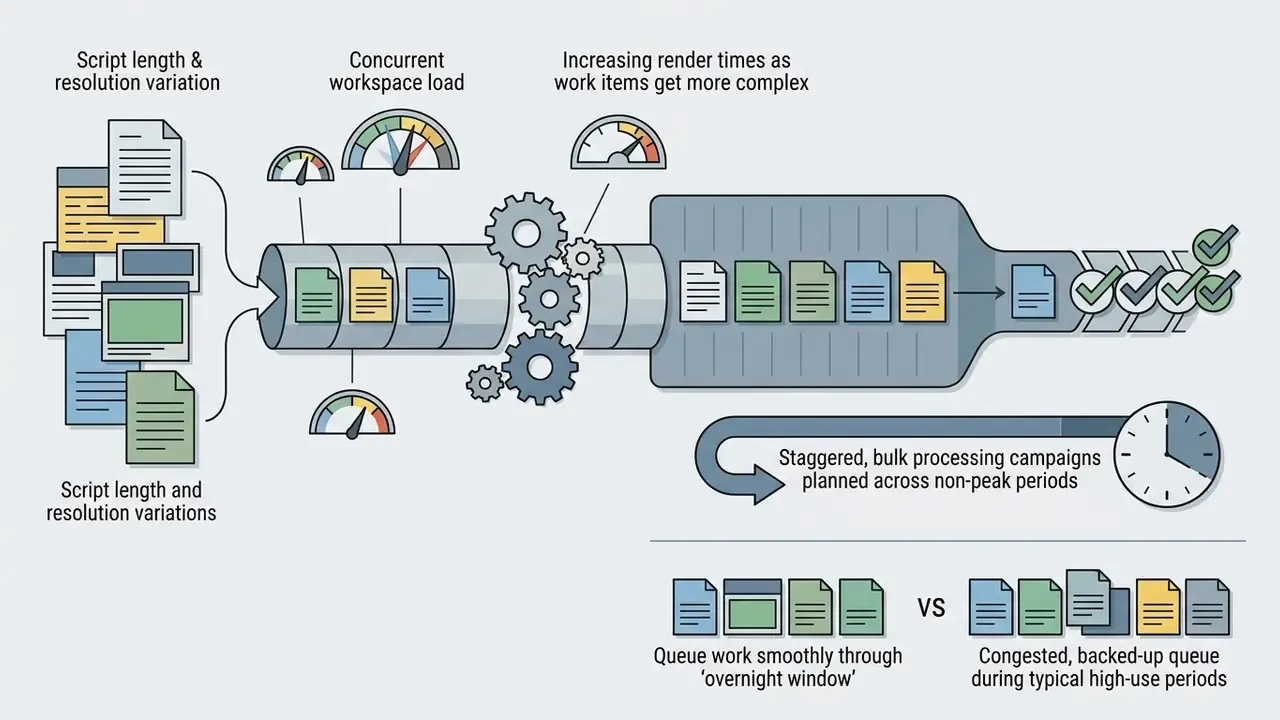
Rendering time scales with script length. Budget roughly 5 to 7 minutes of cloud GPU processing per finished minute of 1080p output on standard non-autoregressive pipelines; optimized photo-avatar pipelines can turn a 90-second script around in approximately two minutes. The client machine only handles preview and editing, so the practical floor is 4 GB RAM (8 GB recommended), a WebGL 2.0 browser (Chrome 110+, Edge 110+, Firefox 113+, Safari 17.4+), JavaScript enabled, and a 10 Mbps connection. Mobile editing requires iOS 17.4+ or Android 9.0+.
Can AI Avatars Respond in Real Time Instead of Reading a Script?
Yes. Interactive avatar APIs stream a lip-synced video feed while an external LLM or agent supplies the dialogue, typically targeting sub-800 ms end-to-end latency over WebSocket. The avatar vendor supplies the rendering layer; you connect your own model, retrieval system, and guardrails. Note that real-time modes require additional controls, including prompt-injection defenses, conversation retention policies, and output moderation, because the script is no longer reviewed before it is spoken.
Can I Generate Hundreds of Videos from a Spreadsheet?
Yes. Bulk generation endpoints accept CSV or XLSX files containing per-row variables such as prospect name, company, and offer, then render one personalized clip per row from a single avatar and voice template. Teams commonly enrich those variables from CRM or customer-intelligence platforms before submitting the batch. Schedule large batches outside peak hours, since throughput depends on shared GPU queue capacity.
How Long Does the Platform Keep My Photo and Voice Sample?
Enterprise-grade platforms publish a retention schedule. A common standard is encryption in transit (TLS 1.3) and at rest (AES-256), with raw uploaded photographs, uncompressed voice samples, and temporary render caches purged within 24 to 48 hours of render completion unless promoted to a permanent workspace asset. Because face and voice data may qualify as biometric identifiers under statutes such as Illinois BIPA, request the retention and destruction policy in writing and confirm that deletion propagates to backups and sub-processors.
Are AI Avatar Videos Safe to Use Under the EU AI Act?
Realistic synthetic content that could pass as authentic must be disclosed under EU AI Act transparency obligations, and Article 50 labeling requirements apply to AI-generated media shown to EU audiences. Practical compliance means embedding C2PA provenance credentials at export, applying a visible or metadata-level AI label per platform policy, and retaining the consent record for any real-person likeness. This is general information, not legal advice; confirm the applicable obligations with counsel for your jurisdiction and use case.
Who Owns an Avatar Inside a Bank's Model Inventory?
Ownership should sit with the business function that publishes the content, not with the tooling team that bought the licence. Name a single accountable owner per avatar asset, record the approved use and its limits, define the escalation path for misuse, and document who can disable the avatar. No evidence, no autonomy: if you cannot produce the consent record, the script approval, and the render manifest, the asset should not be live.
Key Technical Terms Reference
- LipLMD (Lip Landmark Distance): A standard metric measuring spatial error between predicted and target mouth shape coordinates; lower scores indicate superior lip-sync accuracy. Competitive systems report 0.0115–0.0155.
- FID (Fréchet Inception Distance): A visual quality metric evaluating generated image distributions against real datasets; lower scores reflect higher visual photorealism.
- LPIPS (Learned Perceptual Image Patch Similarity): A perceptual distance metric used alongside FID to assess texture fidelity and identity preservation.
- Zero-Shot Generation: The ability of an AI model to animate previously unseen facial identities without requiring identity-specific model retraining.
- Non-Autoregressive Diffusion: A video generation method that synthesizes full frame sequences simultaneously, preventing error accumulation over long clips.
- NeRF (Neural Radiance Field): A volumetric scene representation enabling view-consistent rendering of a head or body from novel camera angles.
- 3D Gaussian Splatting: An explicit point-based representation that renders animatable avatars in real time at 50+ FPS, orders of magnitude faster than NeRF baselines.
- C2PA Provenance Metadata: A cryptographically signed content credential recording how a media asset was created and edited, used for synthetic-media disclosure.
- Digital Replica: A legal term for an AI-generated likeness or voice of an identifiable individual, subject to consent and authorization requirements.
- SR 11-7: US Federal Reserve supervisory guidance on model risk management, defining expectations for model inventory, validation, and ongoing monitoring.
Related Media Resources and Platform Hubs
Explore our media workflow tools and technical reference hubs:
- AI Media Workflows — Standardized operating procedures for media automation.
- AI Media Comparison Matrices — Technical comparisons of generative visual models.
- AI Media Commercial-Use Hub — Licensing guide for commercial AI media.
- AI Media API Guides — Integration documentation for enterprise video APIs.
- AI Media Benchmarks — Empirical performance metrics for generative models.
- AI Voice Generator Guide — Voice quality, language support, pricing, and commercial licensing.
- AI Headshot Generator Guide — Portrait quality, customization, privacy, and professional use.
- Best Free AI Video Generators — Quality, duration limits, credits, watermarks, and exports.
- Best AI Art Generators — Image quality, style control, pricing, and licensing.
- Google Veo Implementation Guide — Video capabilities, API access, costs, and limits.
- Animation Maker Guide — Creation methods, templates, AI features, and export options.
- Photo Editor Guide — Core features, platform support, and commercial workflows.
- Video Compressor Guide — File-size reduction, format support, and quality trade-offs.
- Media ROI Calculators — Production cost estimation tools.
Supplementary Resources for Content Creators
The following channel-production utilities are aimed at social and creator workflows rather than enterprise governance, and are grouped separately for that reason:
- YouTube Video Editor Workflow — Editing guides for digital media creators.
- YouTube Video Player Online URL — Web player integration utility.
- YouTube Video Summarizer — AI-powered transcript summarization tool.
- YouTube Video Template — Standardized scene layout templates.
- YouTube Transcript Generator — Automated voice-to-text extraction.
- 2048x1152 Banner Template — Channel artwork dimension guide.
- Free Photo Editor Guide — Feature limits, export restrictions, and paid upgrades. Disclaimer: This article provides general technical and operational information about AI avatar generation. It does not constitute legal, compliance, or financial advice. Consent requirements, biometric privacy statutes, advertising disclosure rules, and model risk management expectations vary by jurisdiction and industry; consult qualified legal and compliance professionals before deploying likeness-based synthetic media. Audience assumptions and illustrative deployment patterns referenced above remain hypotheses until confirmed by analytics, interviews, CRM data, or verified customer research.
Social Media Content and Personal Brand Videos
Maintaining a consistent social media presence requires frequent video publishing across platforms like YouTube Shorts, Instagram Reels, and LinkedIn. Generating
talking head videosusing anai avatar creator onlineplatform allows creators to publish daily video updates from text scripts, typically in vertical 9:16 format with automatic subtitles. Consistency matters more than volume: saving the avatar and voice as reusable presets keeps the presenter identical across channels, and a matching 2048x1152 youtube banner keeps channel artwork aligned with the avatar's visual identity.Creators editing multi-format video content can refine their post-production using a youtube video editor to splice avatar segments with secondary B-roll footage.