Reviewer profile: This guide is maintained by an editorial team specializing in AI governance, model risk assessment, and enterprise media operations. Every technical claim traces back to peer-reviewed computer vision literature or published platform documentation. No vendor sponsored, reviewed, or paid for this analysis.
What you actually get from a free 4K video enhancer
- Free really means "test drive."Expect 5 to 20 second clips, 720p or 1080p exports, 200 MB file caps, shared GPU queues, and a branded watermark burned into the bitstream. Clean 4K export almost always sits behind a paid tier.
- AI upscaling raises perceived sharpness. It does not recover lost data.Super-resolution reconstructs plausible texture. Beyond roughly 2x to 4x magnification, the output is generative, not forensic.
- The best results come from moderately compressed 720p to 1080p sourceswith a constant frame rate, stable framing, and distinct subjects. Heavily crushed 240p to 360p footage, clipped highlights, and extreme motion smear cannot be repaired. Not partially. At all.
- Before uploading corporate footage, run the security checklistTLS 1.2/1.3 in transit, AES-256 at rest, a published retention window (24 hours to 30 days), explicit "no training on your uploads" language, and written commercial-use rights.
What this guide covers, and how the evidence was checked
What a free online AI video enhancer can do
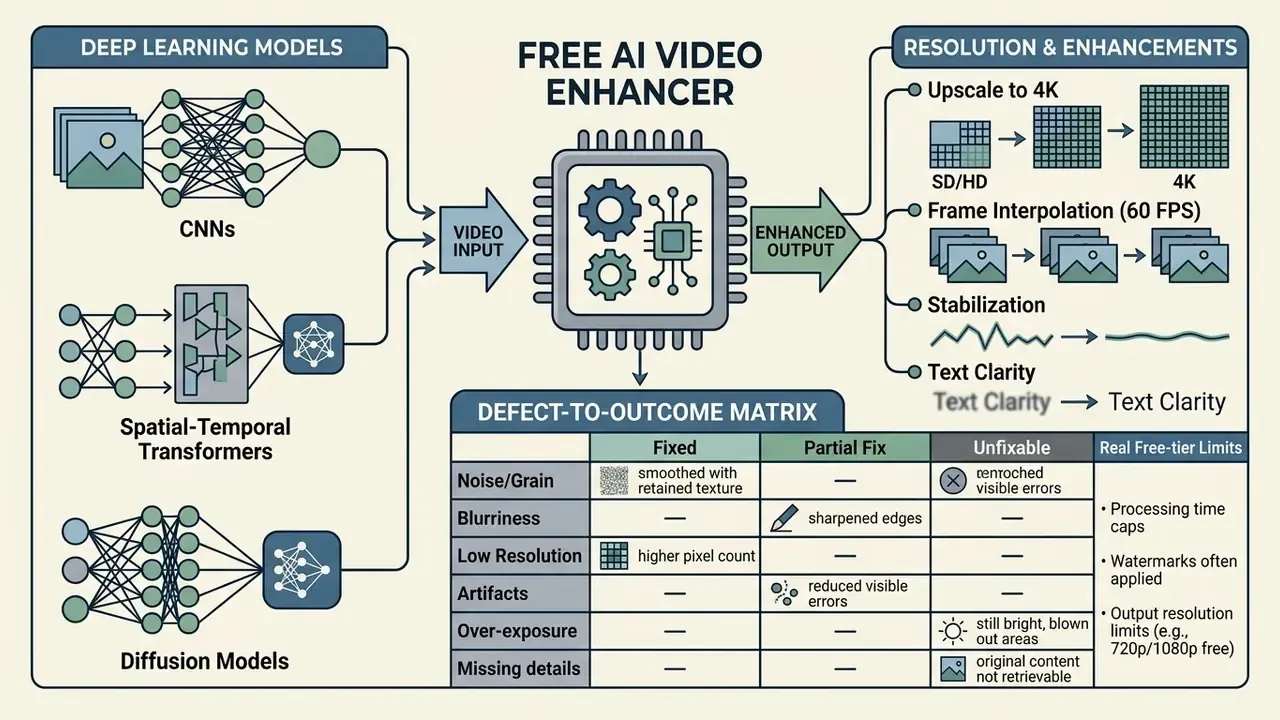
An online AI video enhancer uses deep neural networks, including convolutional neural networks (CNNs), spatial-temporal transformers, and diffusion models, to upscale resolution, suppress compression noise, and recover visual clarity in digital video clips. Traditional spatial interpolation just duplicates pixels. These tools do something different: they read motion across adjacent frames and synthesize realistic high-frequency detail.
Deep learning architectures process degraded source footage by mapping low-quality frame sequences to high-resolution targets. Peer-reviewed video restoration work confirms that temporal fusion models analyze surrounding frames to hold structural consistency while removing MPEG and H.264 blocking artifacts. The mechanism is documented in detail for transformer-based compressed-video super-resolution:
These tools restore perceived video quality across a wide range of scenarios, provided the baseline signal still contains enough structural information to work with. That proviso does a lot of work, and most disappointing results trace straight back to it.
Upscale to 4K and 8K: what changes in resolution
AI video upscaling expands the spatial grid of a file from standard definition or High Definition (1920x1080) up to 4K (3840x2160) or 8K (7680x4320), a 4x to 16x increase in total pixel volume. That expansion gives the neural model a wider canvas for sub-pixel textures, sharp edges, and detailed surface patterns.
When scaling footage to 4K, models like RealisVSR use structural and textural priors to prevent boundary blurring, generating coherent high-frequency detail across sequential frames.
Ultra-efficient diffusion frameworks show something similar on the speed axis: 4K frame generation can run in latent space at downsampled token counts, reaching per-frame processing of roughly 0.14 seconds on enterprise hardware.
Here is the part vendors underplay. Upscaling to 8K increases spatial density; it does not add recorded information. Published super-resolution research consistently reports that recoverable detail collapses as the magnification factor rises. Practical single-image super-resolution stays numerically stable only around 2x, and signal-to-noise-dependent studies place maximum attainable factors near 2.5x at 10 dB, 3x at 20 dB, and 4x at 40 dB SNR. Push past those thresholds and you are relying on generative hallucination rather than deterministic recovery. The pipeline still hands you a 4K or 8K container. The pixels inside it are inferred, not retrieved. Worth remembering before you promise a client a "restored" master.
Which defects AI can fix, and which it cannot
AI video enhancement removes compression noise, mild motion blur, and color fading with real reliability. It cannot reconstruct scene elements that were obscured or simply absent at capture. Knowing that boundary in advance prevents most operational failures on legacy footage.
Neural networks excel at spatial-temporal denoise and compression artifact reduction. TAVSR-class architectures, for instance, use U-shape transformer networks to estimate deformable convolution offsets, align global pixel movement, and strip blockiness out of compressed streams (IEEE Transactions on Consumer Electronics, 2024). Severe optical out-of-focus blur, extreme motion smearing, and clipped highlight exposures are a different story: the structural data needed for mathematical reconstruction is gone. Push aggressive recovery on that kind of clip and you get "plastic" skin, line distortion, and unnatural edge ringing. Readers comparing still-image pipelines can review our guidance on the AI image enhancer for a parallel defect taxonomy.
Defect-to-outcome matrix
| Source defect | AI recovery potential | Realistic outcome |
|---|---|---|
| H.264 / HEVC blocking, banding | High | Near-complete removal without texture loss |
| High-ISO sensor grain (night footage) | High | Clean shadows, preserved edge contrast |
| Low resolution 480p to 720p, output 1080p/4K | Medium to high | Convincing structural detail, plausible texture |
| Low resolution 240p to 360p, output 4K | Low | Generative invention, "painted" surfaces |
| Mild motion blur or camera shake | Medium | Directional deblur, edge realignment |
| Severe optical out-of-focus blur | Very low | Over-sharpening, ringing, halos |
| Clipped highlights, crushed blacks | Very low | No data to reconstruct, banding risk |
| Faded film dye, color cast | High | Restored density and contrast |
| Small on-screen text, logos, subtitles | Medium to high | Readability restored with text-aware models |
Which videos benefit most from AI quality enhancement
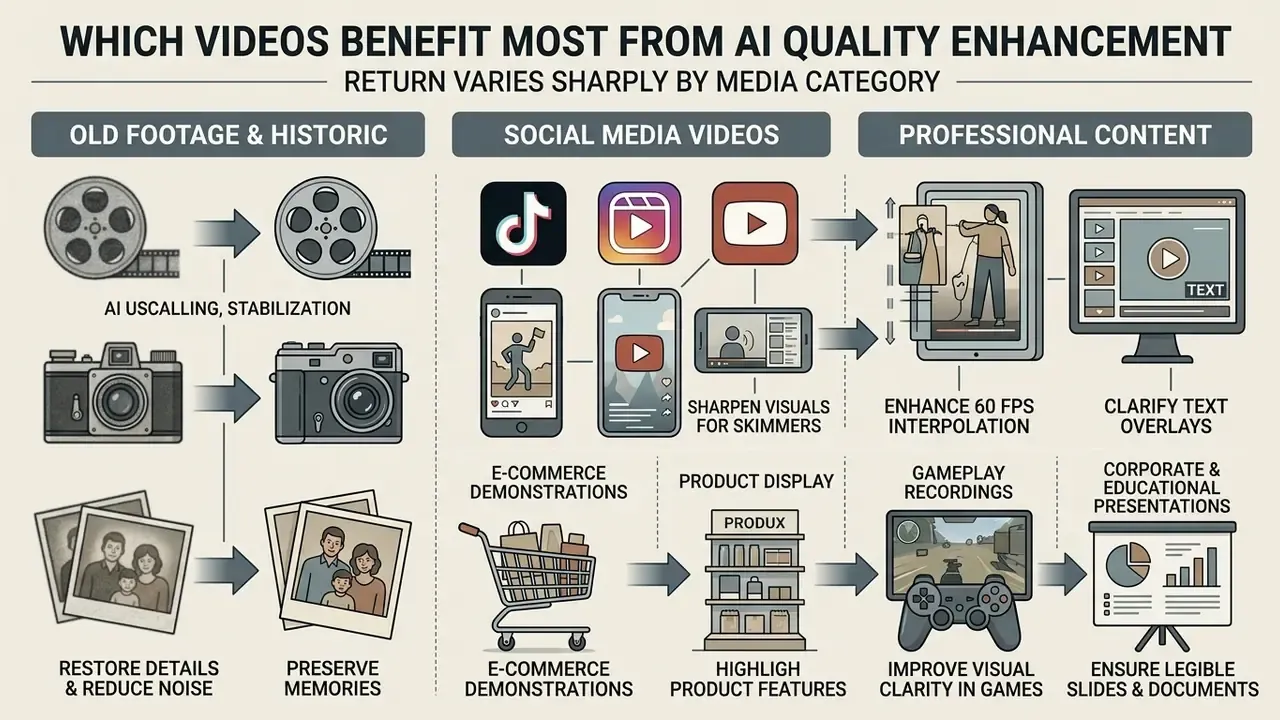
Return on AI video quality enhancement varies sharply by media category. Neural processing delivers the largest measurable gains on assets with moderate compression damage, stable camera framing, and distinct structural subjects. Teams weighing tool options across content categories can also consult our comparison of the best free AI video generators to align enhancement with production tooling.
Old family videos and historic footage
Archival home movies and historic film carry analog grain, faded dye, optical frame shake, and low native resolution. Multi-stage AI restoration improves legibility substantially while stabilizing the asset for modern playback.
Optimal archival workflows run temporal flicker correction before resolution upscaling, then isolated face restoration, then secondary color rebalancing. Published restoration research supports exactly this staging: 2024 to 2025 photo and video pipelines separate damage removal, noise reduction, facial restoration, and colorization into discrete passes, and 2025 ICCV work on temporally coherent video face restoration explicitly targets flicker before detail enhancement.
Sequenced this way, authentic film grain structure survives while physical distortion and chromatic fading go. In practice, on a digitized VHS transfer that means reducing grain in the low-light indoor shots, rebalancing skin tones bleached by dye loss, and only then upscaling the cleaned sequence toward 4K. Reverse those steps and the upscaler faithfully enlarges the grain you meant to remove.
TikTok, Instagram Reels and YouTube videos
Short-form vertical platforms run primarily on 9:16 aspect ratios at a 1080x1920 base playback resolution. Current publishing guidance across these platforms converges on 9:16 in MP4 or MOV containers. YouTube Shorts specifications cap practical playback at 1080p, and while some TikTok developer documentation accepts 4K uploads, consumption still resolves near 1080p. So upscaling vertical content to 4K overshoots mobile display requirements. AI quality enhancement is still worth running, because it clears the heavy compression artifacts stacked up during multi-platform re-uploading.
Lightweight neural sharpening plus face stabilization keeps portrait Reels and YouTube Shorts legible when they are consumed over patchy mobile data. Creators building a social publishing pipeline can test a free ai image to video generator online tool to optimize vertical output, or evaluate a free AI video generator for net-new short-form assets.
Product videos, gameplay and professional content
E-commerce showcases, gaming highlight reels, and corporate presentation decks live or die on edge sharpness and color accuracy. Enhancing a compressed product demo improves surface texture readability and, bluntly, brand presentation.
- E-commerce product demonstrations recovers fine fabric weaves, polished metal detail, and material surfaces (Vmake E-Commerce Media Workflows). Vendor documentation for e-commerce pipelines pairs enhancement with noise reduction, background removal, and watermark cleanup on product footage.
- Gameplay recordings removes capture compression artifacts and sharpens HUD overlays, text menus, and high-speed motion effects. Highlight-reel workflows built on gameplay captures are a documented commercial use case.
- Corporate and educational presentations upscales legacy recordings and converted document assets into presentation media (Adobe Express Enterprise Workflows). Document-to-video tools convert PPTX, PDF, and DOCX sources into branded decks that then benefit from text-aware sharpening.
For corporate teams scaling commercial visual pipelines, browse the hub for full integration guidelines.
How to enhance video online free: upload, processing and export
Enhancing footage through an online AI platform is a three-stage workflow: file ingestion and format validation, model parameter selection, then frame preview before final export. Run the stages in order and you retain maximum quality while avoiding cloud rendering failures. Skip the preview and you spend credits on a file you will re-render anyway.
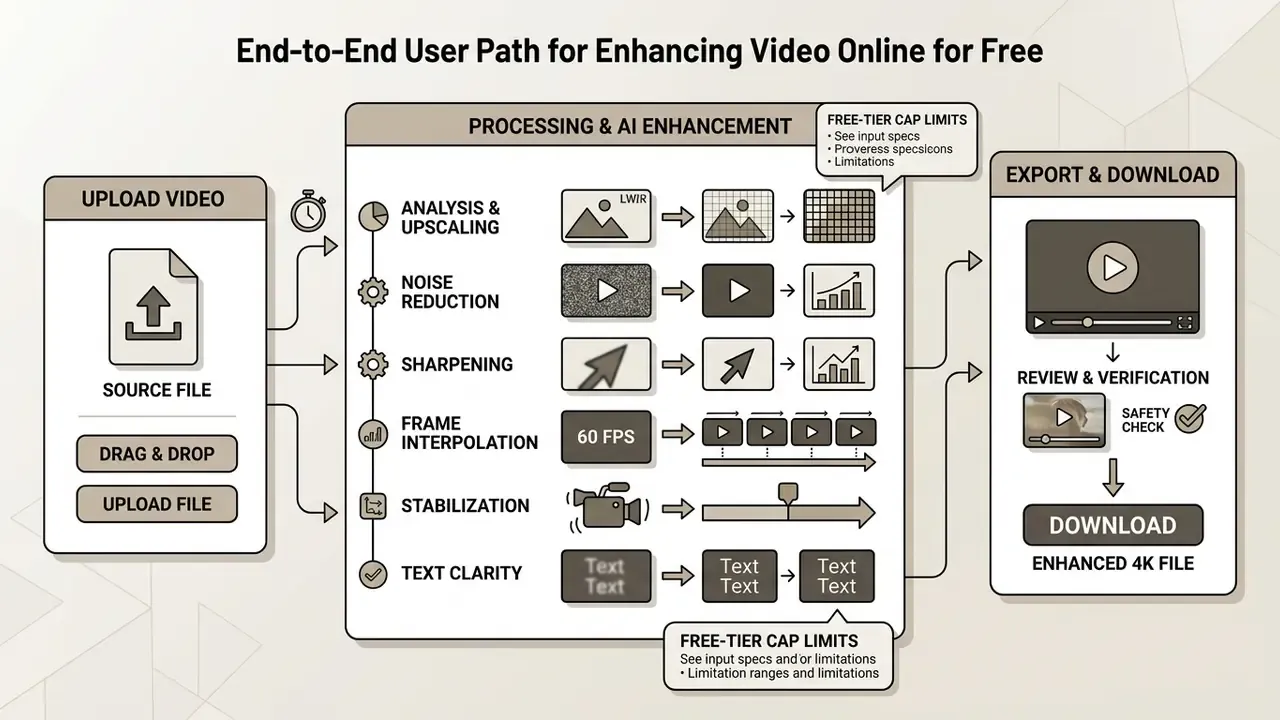
To examine broader media workflows and automated generation tools across our platform, see the overview.
Uploading the source file, supported formats and technical parameters
Successful cloud ingestion needs two things: an uncorrupted container and file parameters that match the server's input specification. Most online video quality enhancers accept standard web and broadcast formats, including MP4, MOV, WebM, M4V and AVI.
Cloud transcoding nodes accept standard MIME types including video/mp4, video/quicktime (MOV), video/webm, video/x-msvideo (AVI), and video/mpeg (Google Cloud Transcoder API Documentation), with typical maximum input dimensions around 4096 px per side. Matching your source to those preferences prevents frame-drop rendering errors that surface only at the end of a long render.
For clean neural enhancement, source files should keep standard aspect ratios (16:9 or 9:16) and fixed frame rates (24, 25, 30, or 60 FPS). Variable frame rate (VFR) streams from phones should be converted to constant frame rate (CFR) before upload, otherwise temporal synchronization fails during AI frame interpolation.
Technical delivery standards from digital repositories point the same way: upload with high initial bitrates and clean chroma subsampling. Cornell's VOD ingestion specification accepts MP4, MOV, AVI and WEBM, sets a 2 GB upload ceiling, and names 1920x1080 or 1280x720 as ideal source frame sizes. The U.S. Copyright Office eCO system caps single files at 500 MB. The National Archives specifies MP4 for online delivery and ProRes MOV for master derivatives. Processing efficiency peaks when input resolution sits between 720p and 1080p.
Uploading pre-compressed or heavily throttled files raises processing overhead and reduces the accuracy of temporal fusion algorithms. If you are still selecting a production stack, compare free video editing software before committing an archive to one cloud pipeline.
Hard technical limits of free online ingest
| Parameter | Free tier limit | Recommended standard |
|---|---|---|
| Supported containers | MP4, MOV, WebM, M4V, AVI | MP4 (H.264), MOV (ProRes or native) |
| Max file size | Up to 200 MB per session (some portals 10 MB; repository portals 500 MB to 2 GB) | Up to 500 MB to avoid gateway timeout |
| Clip duration | 5 to 20 seconds on generative tiers; up to 20 minutes on basic browser editors (120 s on some free enhancers) | 10 to 30 seconds for a test pass |
| Export resolution | 720p or 1080p | 4K (3840x2160) on paid tiers |
| Frame rate | Fixed (CFR): 24, 25, 30, 60 FPS | Convert Variable Frame Rate (VFR) to CFR before upload |
| Max input dimensions | About 4096 px per side on major cloud transcoders | 1920x1080 source for best fidelity |
Choosing the AI enhancement mode for a specific problem
Mode selection means matching the dominant visual degradation to a specialized network. Throw a general upscaler at a noisy low-light clip with no targeted pre-filtering and output fidelity drops, sometimes below the source.
- Upscale mode for clean HD footage that needs resolution expansion to 4K without edge distortion.
- Denoise and deblock targets H.264/HEVC compression artifacts, suppressing grain and block boundaries.
- Sharpen and unblur boosts edge definition on soft-focus footage using high-frequency loss functions.
- Color restoration rebalances exposure and tone curves on faded film or underexposed night recordings.
- Face enhancement uses facial landmark priors to stabilize portrait features across motion sequences.
- Frame interpolation (FPS boost) synthesizes intermediate frames to reach 60 FPS or smooth slow motion.
- Stabilization compensates high-frequency camera wobble with minimal crop.
- Text and scene presets dedicated profiles for concert, product, animation, text and gameplay scenarios preserve category-specific detail.
Vendor API documentation confirms these are architecturally distinct operations. Upscaling, denoising, compression recovery, and frame interpolation are exposed as separate functions rather than one "enhance" switch (Topaz Labs Developer Documentation; BytePlus Video Enhancement Pro API).
Batch processing (Batch Upload) for commercial workloads
For catalog automation in e-commerce and archive migration, use Batch Upload rather than sequential single-file jobs. Batch mode applies one enhancement profile, say 4K Upscale + Denoise, to a group of 10 to 50 files in a single submission. Rendering runs in a background cloud queue, and the platform emails a completion notice, so nobody has to babysit a browser tab.
Practical batch guidance:
- Normalize every input to one container, aspect ratio and frame rate before submitting. Mixed VFR and CFR batches are the single most common cause of partial failures.
- Run one representative file as a single-file test pass, confirm the preset, then release the batch.
- Keep batch groups under the free-tier credit ceiling. On shared queues, large batches inherit standard, non-priority GPU scheduling.
- For brand consistency, reuse one preset across every product video in a category instead of re-tuning per clip. This is precisely how sellers refresh old advertising footage without paying for a reshoot.
Previewing the result and exporting the enhanced video
Preview lets operators inspect render accuracy on split-screen sample frames before allocating credits or launching a full export. Checking temporal motion stability at this stage is what prevents flicker surprises in the delivered file. Evaluate three things specifically: artifact presence on high-contrast edges, motion smoothness across a pan, and whether the quality-to-file-size balance suits the destination screen.
Export settings should follow the distribution channel. Standard web playback relies on H.264/AVC for universal browser compatibility, while archival transfers benefit from HEVC/H.265 or ProRes (Library of Congress Digital Format Guidance, which notes that HEVC is explicitly designed to let operators choose the balance between picture quality and file size or transmission bandwidth). ITU-T H.264 (ITU, 2024) remains the official baseline for AVC level limits and export parameters.
For 4K exports, bitrate targets between 20 Mbps and 45 Mbps balance clarity against bandwidth. If the resulting master is too heavy for distribution, run it through a video compressor rather than re-encoding at a lower resolution. Creators exploring specialized creation stacks can test a free ai content framework or review full tool parameters in our AI Media Comparison Matrices.
AI video enhancement tools: upscale, sharpen, denoise, restore
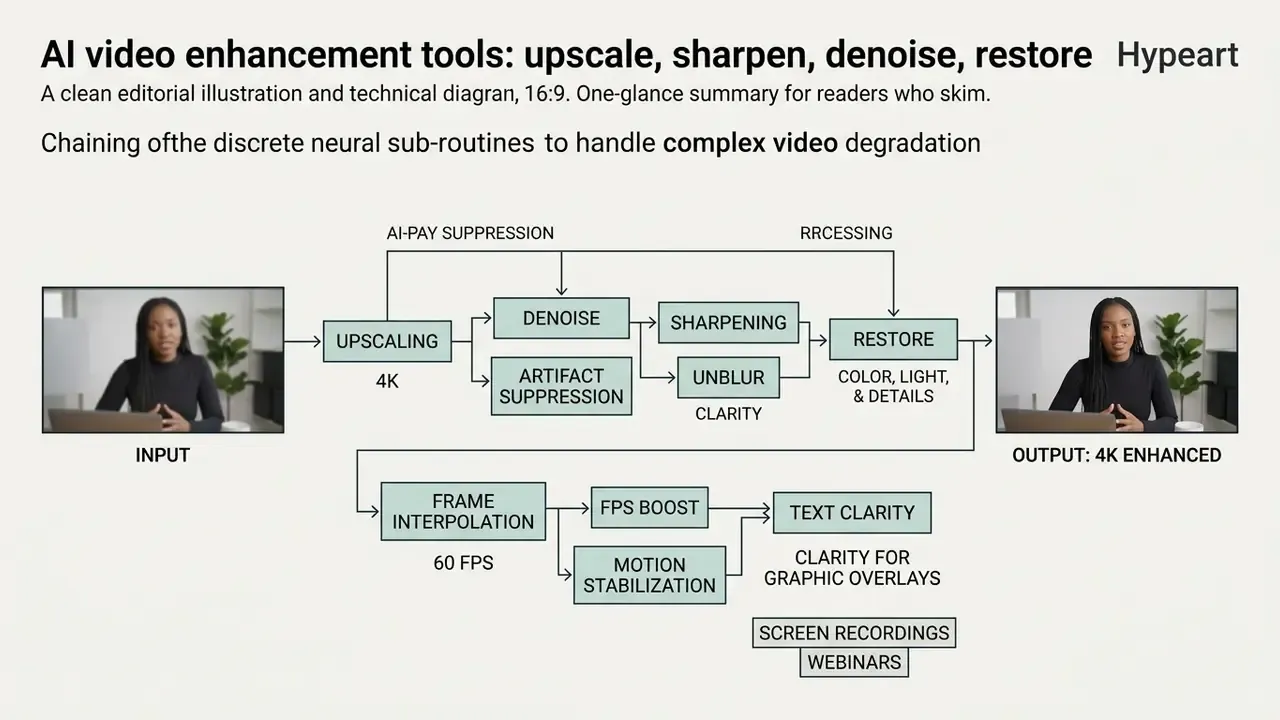
Modern AI video enhancement suites chain discrete neural sub-routines to handle complex degradation patterns. By separating spatial sharpening, temporal noise suppression, and generative color reconstruction, platforms deliver targeted improvements instead of one blunt filter.
AI sharpening and unblur for higher clarity
AI sharpening reads high-frequency contrast boundaries across frames to raise perceived edge sharpness and restore clarity to soft footage. Unlike a basic contrast filter, neural unblur models estimate motion vectors and correct directional camera shake.
Advanced models add High-Frequency Rectified Diffusion Losses to align edge orientation vectors.
Intensity still needs a hand on the dial. Over-enhanced edge gradients introduce ringing, halos, and unnatural "crispy" boundaries that read as fake. Deconvolution literature describes ringing as displaced echoes of edges, produced when filters are poorly chosen or high-frequency components are boosted too aggressively. Saturated, clipped pixels violate linear-image assumptions and generate especially obtrusive deblurring artifacts. Practical rule: keep sharpening strength below the point where a 200% zoom shows a bright outline hugging every dark edge. The same physics applies to stills, as covered in our guide to the AI image upscaler.
Denoise and compression artifact suppression
Digital noise reduction removes high-ISO sensor grain and codec artifacts by evaluating spatial variance across consecutive frames. Temporal filtering compares pixel blocks over time, suppressing random noise while keeping static background texture intact.
Recent work on spatial-temporal attention-guided enhancement shows that combining spatial wavelet filters with motion-compensated temporal averaging reduces blocking without smearing fine detail. In-loop filtering studies quantify how much of that gain is measurable rather than cosmetic:
This dual-pass approach separates artificial compression artifacts from legitimate image texture, so foliage, fabric weaves, and skin pores survive the cleanup. Texture-aware bilateral and block-variance filters serve the same purpose in classical pipelines: detect textured regions first, then suppress blocking only where texture is absent.
Restoring color, light and detail in old footage
Generative color restoration models lift underexposed regions, correct color cast, and rebuild dynamic range in legacy footage. Neural architectures trained on dynamic exposure datasets isolate luminance from chromatic information, which is what keeps corrections from turning skin green.
Frameworks like VECNet use Retinex-based dual-stream networks to raise underexposed shadow areas in dynamic scenes without blowing out highlights, built on the first real-world paired video dataset for underexposed and overexposed dynamic scenes.
Multi-scale exposure correction research splits the task into color enhancement and detail enhancement stages trained on 24,000 or more images, which explains why professional pipelines almost never apply a single global curve. For archival film, temporal attention networks hold chromatic consistency across scene cuts and kill temporal flicker; DeepRemaster's temporal source-reference attention colorizes and remasters long sequences while maintaining that consistency. Colorists moving between motion and still assets can cross-reference our AI photo editor breakdown.
AI frame interpolation (60 FPS) and motion stabilization
Beyond resolution, current services perform spatio-temporal processing that changes how motion itself reads on screen:
- Frame interpolation (FPS boost)motion-aware networks (RIFE-class models and motion transformers) estimate displacement vectors between consecutive frames and synthesize intermediate ones, turning 24 or 30 FPS sources into smooth 60 FPS playback, or generating stutter-free slow motion from standard-rate footage. Because interpolation depends on reliable motion estimation, it degrades on heavily compressed sources where block boundaries fake false motion. Denoise first, interpolate second.
- Digital video stabilizationstabilization compensates high-frequency camera wobble without the aggressive crop of classic warp stabilizers, using AI inpainting to redraw edge pixels lost during frame realignment. Handheld dance clips, walking shots and gimbal-free gameplay capture end up reading as tripod-steady while keeping the original framing.
Operational note: interpolation and stabilization both rewrite temporal relationships, so apply them before final sharpening. Sharpen first and you bake edge halos into every synthesized in-between frame. That mistake is cheap to make and expensive to undo.
Clarity for text, documents and graphic overlays
Compression damages small vector-like elements first: slide text, logos, watermarks, brand lockups, subtitles, captions, gameplay HUD interfaces. Specialized neural filters localize text regions, apply gradient-aware reconstruction inside them, and remove the halo blur around glyph boundaries, restoring document readability inside a video without distorting the surrounding scene.
This matters most for three B2B workloads:
- Screen recordings and webinars, where a 720p re-encode turns 12 pt UI labels into grey smears.
- Document-derived presentations, where PPTX or PDF-to-video conversions compound font softening.
- Branded product footage, where a blurred logo or an illegible spec sheet damages perceived quality directly.
Scenario presets (concert, product, animation, text, gameplay) exist precisely because text-heavy frames need different loss weighting than skin or foliage.
Content teams converting static assets into motion clips can use a free ai image tool or deploy a standalone free ai image processing pipeline.
Free, no watermark and commercial use: how to verify service terms
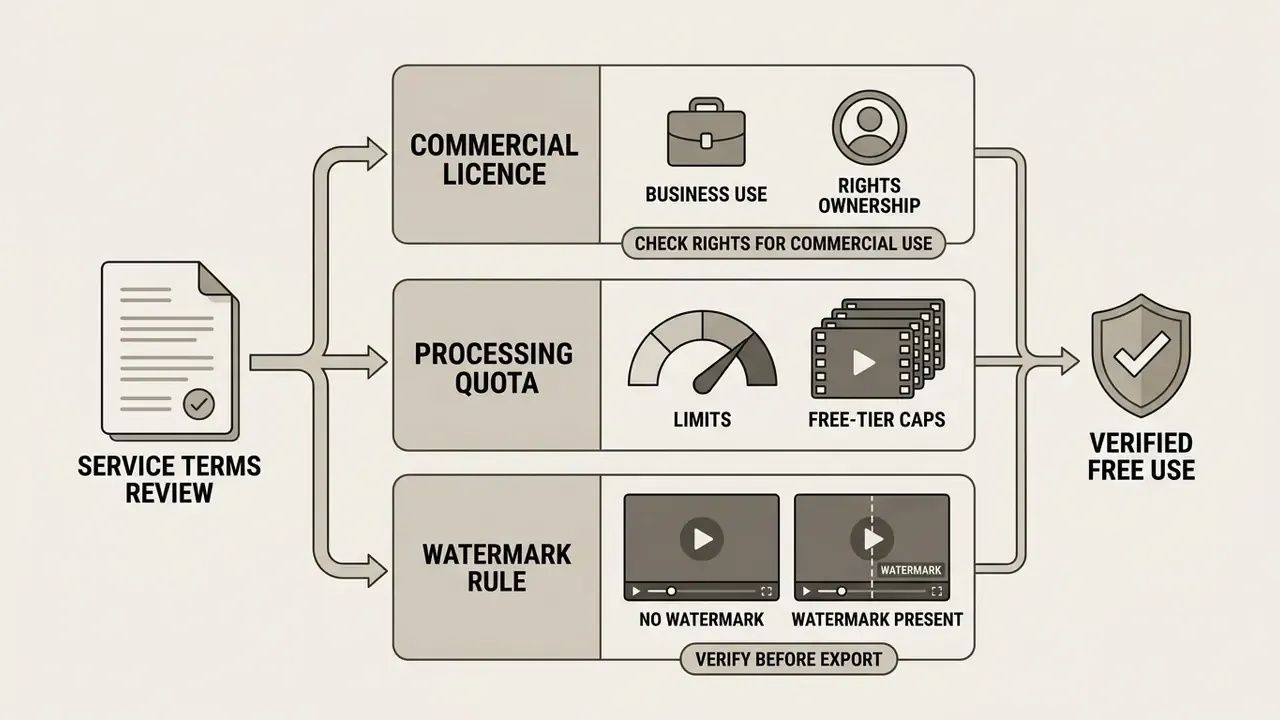
Evaluating an online AI video enhancement platform means reading three things: the commercial licence, the processing quota, and the watermark rule. Free tiers are fine for quality testing. Production deployments usually require a paid subscription to secure unrestricted commercial rights.
Vendor policies genuinely conflict, so verify per product. Some tools advertise watermark-free export on every plan while capping free clips at 10 seconds and 10 MB. Others reserve clean export for trial or paid access only. At least one platform permits commercial use of free-plan output provided the watermark is never removed, cropped or masked, even after upgrading. Read that clause twice if the output is going into paid advertising.
To evaluate computational cost models and infrastructure tiers, teams can review our setup calculators or inspect subscription structures when they open the hub.
What a free video enhancer usually includes
Free online AI video upscalers offer restricted testing access, designed to demonstrate model capability on short clips. Output rendering is typically limited to 720p or 1080p, and clip length to 5 or 10 seconds. Some browser enhancers stretch to 120 seconds, and basic editors to 20 minutes at lower output quality.
Free-tier processing runs on shared compute queues, so rendering waits stretch during peak hours; generative tiers frequently place free jobs in a standard or low-priority queue. In-browser local tools avoid queues entirely but cap resolution instead. Previews and mode tests are usually unmetered, yet exporting the final file often deducts non-replenishable trial credits. Budget those credits: three careless exports can burn a whole evaluation.
When watermarks appear and how to verify export before paying
Watermarks are embedded automatically into files exported from logged-out or free accounts across most cloud media platforms (Kapwing Watermark Policy; VEED Support Documentation). The overlay is rendered permanently into the bitstream during encoding. Two additional trigger conditions are documented: exporting before a subscription starts, in which case the file stays watermarked until re-exported after payment, and including an unpaid premium stock asset in an otherwise clean project.
To evaluate visual quality without committing capital:
- Generate a single-frame preview inside the web interface at full resolution.
- Inspect line sharpness, noise reduction, and temporal stability on high-contrast regions.
- Confirm output clarity meets production standards before initiating a paid export.
- Re-render the complete project only after confirming active account licensing, which is what guarantees clean, watermark-free output.
Do not screen-record the preview as a workaround. Preview compositing differs from the encoded master, and the practice violates most platform terms.
Licensing and rights to enhanced videos for business use
Commercial deployment of AI-enhanced media requires verifying that the Terms of Service grant explicit commercial rights to rendered output. Under US frameworks, copyright protection applies only to elements with sufficient human creative input, and pure algorithmic output lacks standalone protection (US Copyright Office Guidance, 2025). The Office states that AI may assist creation and may be embedded in a larger human-authored work, but "the mere provision of prompts" does not by itself make output copyrightable.
Marketing teams, e-commerce managers, and digital publishers must confirm that service terms permit commercial monetization, broadcast distribution, and sub-licensing (Adobe Generative AI Product Specific Terms). Note the asymmetry buried in those terms: users receive commercial rights to generated output, yet submitting output to a vendor-hosted gallery can grant the vendor a worldwide, royalty-free licence to use, modify, sublicense and display both the output and the corresponding input. Enterprise deployments also need assurance that pipelines do not retain submitted footage for public AI training datasets. Teams mapping rights across formats can review our analysis of commercial use of AI image generators for comparable licence patterns.
Formats, file size, processing speed and privacy of online services
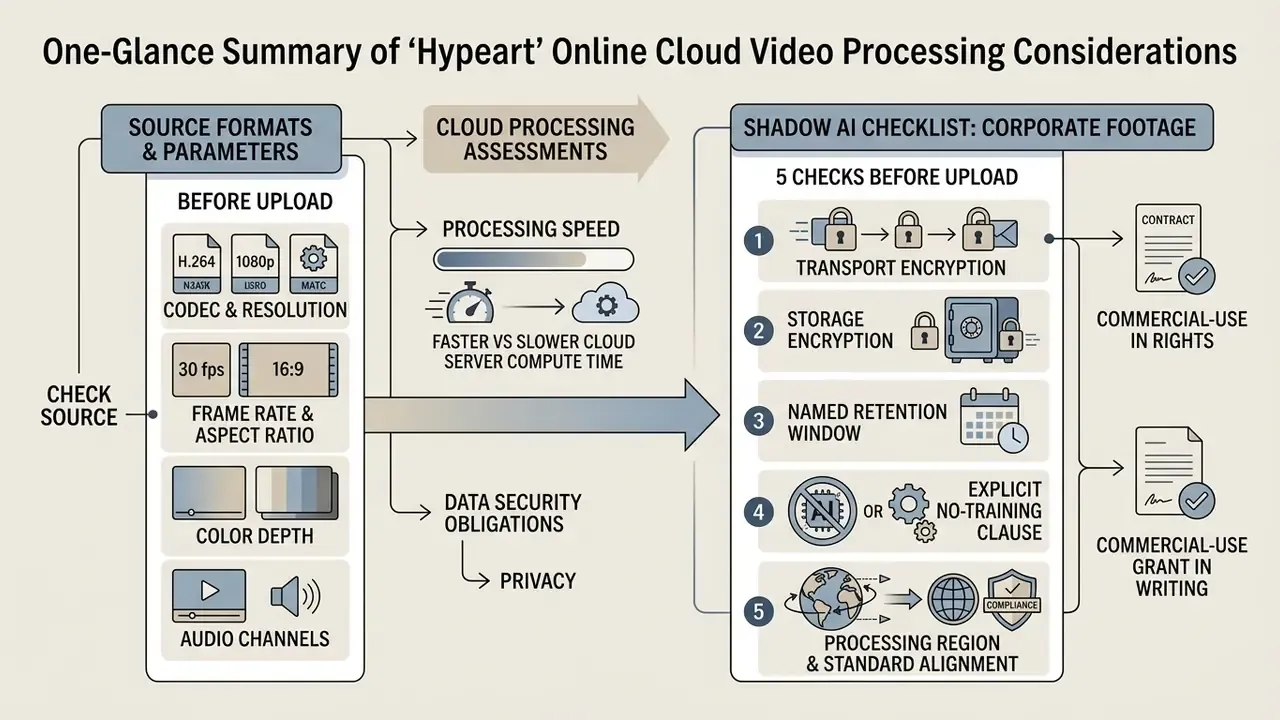
Running cloud video processing means balancing file parameters against transmission speed and data security obligations. Enterprise platforms are expected to meet strict compliance standards while client media sits on their GPUs. Teams benchmarking providers side by side can consult our roundup of the best AI video generators for infrastructure comparisons.
Which source formats and parameters to check before upload
Two numbers decide most compatibility outcomes: container plus codec, and file size against the tier ceiling. Confirm the container (MP4, MOV, WebM, M4V, AVI), the codec inside it (H.264 or HEVC for delivery, ProRes for masters), the frame rate mode (CFR, not VFR), and the native resolution. A 1080p H.264 clip under 500 MB clears almost every ingest gate. A 4K ProRes master will not, and forcing it through a free portal usually ends in a gateway timeout rather than a useful error message.
On the export side, decide the target before you render: HD video for internal review, 1080p for vertical social feeds, 4K for UHD display or archive. Then match bitrate to that choice, 20 to 45 Mbps at 4K, and keep the aspect ratio exactly 16:9 or 9:16 so the destination platform does not re-crop your work.
How to assess cloud processing speed and security
Processing speed follows server GPU architecture, frame count, and model complexity. Ultra-efficient diffusion backbones process 1080p frames in roughly 0.14 seconds on enterprise hardware, whereas multi-pass face restoration networks want noticeably more time per frame.
Expectation setting, in plain terms: a short clip normally completes in under a minute on a healthy queue. Large files, 4K sources, or heavily degraded footage take materially longer, which is why mature platforms render in the background and email a completion notice instead of blocking the browser.
Data security should map to recognized privacy frameworks, notably NIST Privacy Framework 1.1 and ISO/IEC 27018 controls for cloud data protection. Secure platforms enforce TLS 1.2/1.3 in transit, AES-256 at rest, and automated deletion routines that purge processed media within 24 hours of export. Published policies vary a great deal: one application-infrastructure provider documents a fixed 24-hour deletion job after job completion, an AI platform commits to removing deleted personal data within 30 days, one enterprise mode advertises zero data retention after processing, and other vendors fall back on open-ended wording such as "a reasonable amount of time." For regulated media, that last phrasing is not a policy. It is a gap.
Enterprise technical teams can review operational infrastructure models when they view the guide or examine risk frameworks across AI Litigation and compliance indexes.
Shadow AI checklist: five checks before uploading corporate footage
Run this list against any free online enhancer before a single client frame leaves your network. If a service fails any item, treat it as Shadow AI and block it at the proxy.
- Transport and storage encryption.Confirmed TLS 1.2/1.3 in transit and AES-256 at rest, stated on the security page, not inferred from an HTTPS padlock.
- Named retention window.A specific number: 24 hours, 7 days, or 30 days. Reject "reasonable amount of time" phrasing for regulated media.
- Explicit no-training clause.Written confirmation that uploads are not added to public or vendor training datasets, and that the vendor claims no sub-licensing rights over your inputs.
- Processing region and standard alignment.Stated jurisdiction (EU or US region) plus alignment with NIST Privacy Framework 1.1 and ISO/IEC 27018 controls for PII in public clouds.
- Commercial-use grant in writing.ToS language permitting monetization, broadcast distribution and, where needed, sub-licensing, plus clarity on whether the watermark must contractually remain intact.
Two operational add-ons. Verify whether free-trial projects are deleted on a separate schedule; some services purge trial projects after 180 days and never-subscribed accounts after 90. And log every approved tool in your AI inventory, so media operations does not quietly re-onboard an unvetted clone of the same service next quarter.
Checklist: why AI enhancement did not deliver, and how to fix it
- Problem: the video is still blurry after exporting to 4K.Cause: source resolution below 360p, or footage already re-compressed by aggressive platform encoders before you touched it. Fix: enable a denoise / deblock pre-pass before 4K upscale. Then step the target down. A clean 1080p output usually reads sharper than a hallucinated 4K one. If the clip came off a social platform, source the original master instead of the re-encoded copy.
- Problem: faces look plastic or waxy.Cause: face restoration strength above roughly 80%, over-suppressing pore-level texture. Fix: reduce model influence to 40 to 50% to keep natural skin texture, and disable global sharpening while face restoration is active.
- Problem: the video judders or flickers (temporal flicker).Cause: frame-by-frame processing without temporal consistency. Identity and shape drift measurably between frames. Fix: select a model with a spatial-temporal fusion adapter, lock the clip to constant frame rate, and run flicker correction before upscaling.
- Problem: bright outlines or halos around every edge.Cause: over-sharpening, high-frequency boosting past the ringing threshold, aggravated by clipped highlights. Fix: lower sharpening intensity until the halo disappears at 200% zoom. Recover exposure first if highlights are blown.
- Problem: the export looks worse than the preview after publishing.Cause: platform-side compression on YouTube, Instagram or TikTok re-encodes your upload. Fix: export at the highest permitted resolution and 20 to 45 Mbps for 4K, apply noise reduction before upload so the platform encoder has less noise to spend bits on, and match the aspect ratio exactly to 9:16 or 16:9.
- Problem: the batch job failed partway.Cause: mixed containers, variable frame rate files, or a file over the 200 MB session cap. Fix: normalize the batch to one container and CFR, split oversized files, resubmit.
FAQ about AI video enhancer online free
Is an AI face enhancer suitable for portrait videos?
Yes, specialized AI face enhancement works well on portrait video, provided the model carries temporal consistency constraints across frame sequences. Modern face restoration architectures use spatial-temporal codebooks and 3D-VQGAN backbones to sharpen eyes, rebuild natural skin texture, and restore facial clarity.
"VividFace, a one-step diffusion model for video face enhancement, outperforms baselines in perceptual quality, identity preservation and temporal consistency." (VividFace, arXiv, 2025). https://arxiv.org/abs/2501.09396 Intensity control is not optional here. Unconstrained frame-by-frame face restoration causes identity drift, expression distortion, and unnatural smoothing as the camera moves. "KEEP (Kalman-Inspired Feature Propagation) improves PSNR, SSIM, LPIPS and identity metrics (IDS/AKD) over baseline video face restoration methods." (KEEP, arXiv, 2024). https://arxiv.org/abs/2408.14128 Reference-guided face restoration preserves authentic subject identity while clearing compression artifacts from video call recordings and interview footage. "FSFVE trains on 10 frames of a subject in under 100 seconds and runs in real time on smartphone CPUs, substantially improving compressed video-call quality." (FSFVE, arXiv, 2026). https://arxiv.org/abs/2507.04990 Practical guardrail: at large facial angles and heavy head motion, exactly the conditions in concert clips and handheld interviews, cap strength at 40 to 50% and rely on temporal models rather than per-frame restoration. Teams producing net-new portrait content can also evaluate an AI video generator.
Can I upscale a 480p video to 1080p, or to 4K?
Yes for 1080p. Selecting HD or FHD output on a 480p source produces a visibly cleaner, higher-resolution version, because the 2x to 4x range sits inside the reliable reconstruction band. 4K from 480p is 8x, technically available but firmly in generative territory, so preview before spending credits and pick the output that matches the destination screen rather than the largest number on the menu.
How long does AI video enhancement take?
It depends on file size, resolution and how many models you chain. A short standard-definition clip usually finishes in under a minute. 4K sources, long clips or multi-pass jobs (denoise, then upscale, then face restore) take substantially longer and are normally queued in the background with an email notification. Free tiers inherit standard queue priority, so peak-hour jobs crawl.
Will enhanced videos look fake or over-processed?
Not if intensity is controlled. Over-processing has two signatures: waxy, texture-free skin from excessive denoise or face restoration, and bright halos from excessive sharpening. Use scenario presets (portrait, concert, product, animation, text, gameplay) instead of one global "enhance," and reduce strength until pore-level and fabric-level texture reappears. Natural output keeps the original atmosphere of the footage and removes only the artifacts.
Can I enhance text, subtitles or documents inside a video?
Yes. Text-aware models detect and reconstruct glyph regions across formats, including logos, watermarks, brand assets, titles, captions, HUD elements and slide text, restoring readability without distorting the background. This is the highest-value mode for screen recordings, webinars and document-derived presentations.
Can I process multiple videos at once?
Yes, via Batch Upload. Submit 10 to 50 normalized files with one enhancement profile; rendering runs in a background cloud queue and completion arrives by email. Normalize container, aspect ratio and frame rate first, and validate the preset on a single representative clip before committing the batch.
Is 4K AI upscaling worth it for low-resolution footage?
It is worth it when soft footage will play on HD or UHD displays, or when you are preparing an archive for modern playback. It is not worth it when the destination is a vertical short-form feed that resolves at 1080p, or when the source is so degraded that the model has to invent most of the frame. Compare HD, UHD and 4K previews against the source before exporting, every time. For technical assistance with media pipelines or troubleshooting rendering errors, consult our AI Media Support and Troubleshooting portal.
Appendix A: Superseded source attributions and original phrasings
Retained for transparency. The main text above carries the updated, verifiable attributions.
- Original phrasing (section 1)
- "Recent research in deep neural network video restoration demonstrates that temporal fusion models analyze surrounding frames to maintain structural consistency while removing MPEG and H.264 compression blocking artifacts (ACM Computing Surveys, 2021)." Attribution replaced because the 2021 survey falls outside the 2024 to 2026 evidence window used in this guide.
- Original phrasing (section 2)
- "...fundamental super-resolution research indicates that single-image and temporal upscaling factors beyond 2x to 4x face severe information recovery limits (Limits on Super-Resolution, IEEE)." Retained, reformulated in the main text with SNR-dependent magnification figures.
- Original phrasing (section 5)
- "While web portals accept files ranging from 50 MB on standard free tiers up to 2 GB on cloud nodes..." Retained, superseded in the main text by the itemized free-tier limits table.
- Original phrasing (section 9)
- "Over-enhancing edge gradients introduces ringing artifacts, halos, and unnatural 'crispy' boundaries that degrade visual realism (NIST Technical Notes on Deblurring Artifacts)." Retained, reformulated with deconvolution-artifact mechanics in the main text.
- Original phrasing (section 11)
- "...without blowing out highlight regions (Learning Exposure Correction, 2024)." Retained, supplemented with the ALT (IEEE, 2024) citation.
- Original phrasing (section 20)
- "...followed by isolated face restoration and secondary color rebalancing (ICCV Archival Restoration Studies, 2025)." Retained, reformulated with staged-pipeline evidence and the SVFR citation.
- Original phrasing (section 21)
- "Short-form vertical video platforms operate primarily on 9:16 aspect ratios at 1080x1920 base playback resolutions (TikTok and Instagram Developer Specifications, 2026)." Retained, reformulated with the upload-versus-playback distinction.
- Original phrasing (section 24)
- "...restore facial clarity (ECCV; ICCV Research, 2024 to 2025)", "(KEEP Temporal Stability Evaluation, 2024)", "(FSFVE Studies, 2026)." Retained, each replaced in the main text with the corresponding primary arXiv reference.