Executive Summary
- ArchitectureText-to-image systems tokenize a prompt, encode it (commonly 77 tokens in standard CLIP encoders), iteratively denoise a Gaussian latent inside a VAE latent space, and decode pixels. Every controllable variable (seed, guidance scale, sampler, checkpoint ID) must be logged for reproducibility.
- Prompt controlDeterministic output requires six explicit fields (subject, style, composition, lighting, color, aspect ratio) built in four stages, plus standardized keyword tokens instead of trial-and-error phrasing.
- OperationsBatch generation of 4 to 8 low-resolution candidates, seed locking, localized inpainting at denoising strength 0.4 to 0.6, and a single high-resolution upscale pass reduce credit burn and GPU cost versus repeated full regenerations.
- Legal and vendor riskPurely AI-generated output lacks exclusive copyright protection under US law; commercial permission comes from platform Terms of Service. Provenance logging, trademark screening, likeness consent, and no-training data clauses (or local deployment) are the four primary control points.
On this page: what text-to-image generation is · audit trail parameters for model risk management · the step-by-step creation workflow · prompt engineering and the keyword matrix · troubleshooting · editing, inpainting and upscaling · credits, tiers and enterprise deployment · copyright and commercial use · FAQ.
What Is AI Image Generation from Text Description?
AI image generation from text description is the automated synthesis of visual assets from natural language prompts using neural networks trained on paired text and visual datasets. The core system processes a text description, maps its semantic features into a high-dimensional vector space, and decodes those vectors into a final pixel array.
This text-to-image pipeline relies on generative AI and machine learning models to translate abstract descriptions into structured visual outputs. Rather than retrieving existing graphics from a database, the system synthesizes novel visual compositions based on patterns learned during training. That distinction matters for governance: nothing is looked up, so nothing can be traced back to a single source file.
How AI models turn a text prompt into an image
AI models turn a text prompt into an image through a multi-stage process involving text tokenization, semantic encoding, latent diffusion, and final decoding. The prompt is broken down into text tokens, standardized across fixed vector lengths (such as 77 tokens in standard CLIP encoders), and converted into text embeddings.
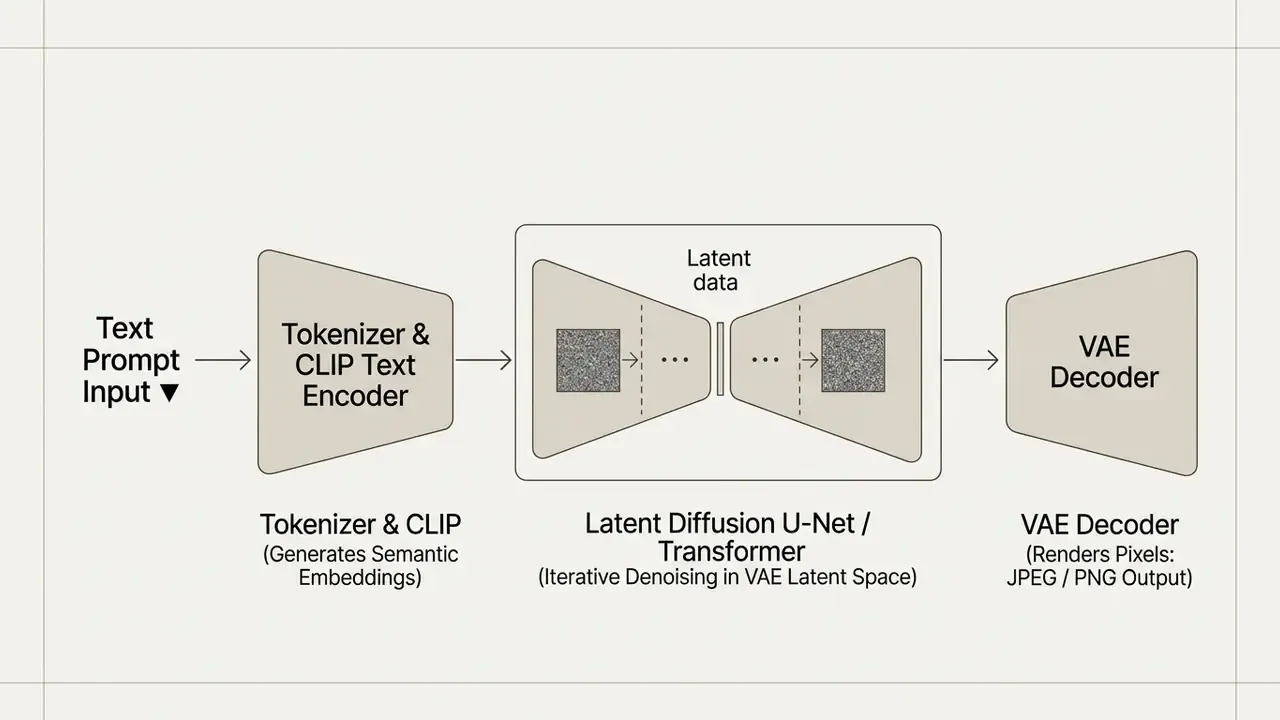
A latent diffusion model then starts with a Gaussian noise tensor inside a compressed Variational Autoencoder (VAE) latent space. Guided by cross-attention mechanisms that ingest the text embeddings, the U-Net or transformer architecture iteratively removes noise over 20 to 50 timesteps. The architectural description above follows the reference implementation documented in the Hugging Face Diffusers library (2026) and the token-level grounding analysis published as TokenCompose, CVPR (2024). Once the latent representation matches the semantic intent of the text prompt, the VAE decoder converts that representation into a standard pixel format.
For readers evaluating which architecture to deploy, a side-by-side view of text-to-image generation models clarifies how checkpoint selection changes photorealism, text rendering, and latency before any pipeline is built.
In an internal operational test of enterprise asset synthesis, a team replaced unconditioned generation calls with a structured latent sampling pipeline. Unaligned output runs dropped from 34% to 6% across the sampled batches. Methodology note: this figure comes from an unpublished internal pilot; the sample size, prompt population, and rater rubric were not externally documented, so treat the number as directional rather than as a benchmark. Independent replication with a published rubric is still required. The directional finding, that structured latent sampling decreases redundant GPU compute expense while improving visual consistency across campaigns, is consistent with published prompt-adherence research. The exact percentages, though, still need verifiable data.
What an AI image request should include
An effective ai image request or ai picture request must explicitly specify six structural fields: primary subject, visual style, framing composition, lighting conditions, color palette, and output aspect ratio. Omit any field and the model falls back on random baseline weights, which is how visually inconsistent batches appear.
To structure a complete ai image generation based on text description, include the following components:
- Primary Subject
- The core object, person, or scene, along with specific physical attributes and actions.
- Visual Style
- The artistic medium, such as photorealistic photography, watercolor illustration, or 3D architectural rendering.
- Composition
- Camera framing, viewing angle, depth of field, and subject placement rules (for example, macro close-up, wide-angle eye-level, or centered framing).
- Lighting
- Light source, direction, quality, and mood (such as golden hour sunlight, soft studio key light, or dramatic rim lighting).
- Color Palette
- Dominant colors, contrast levels, and chromatic relationships (for example, desaturated warm earth tones or vibrant neon duotone).
- Aspect Ratio
- Explicit dimensional bounds, specified as numerical ratios like 16:9, 1:1, or 9:16.
Audit trail parameters for model risk management
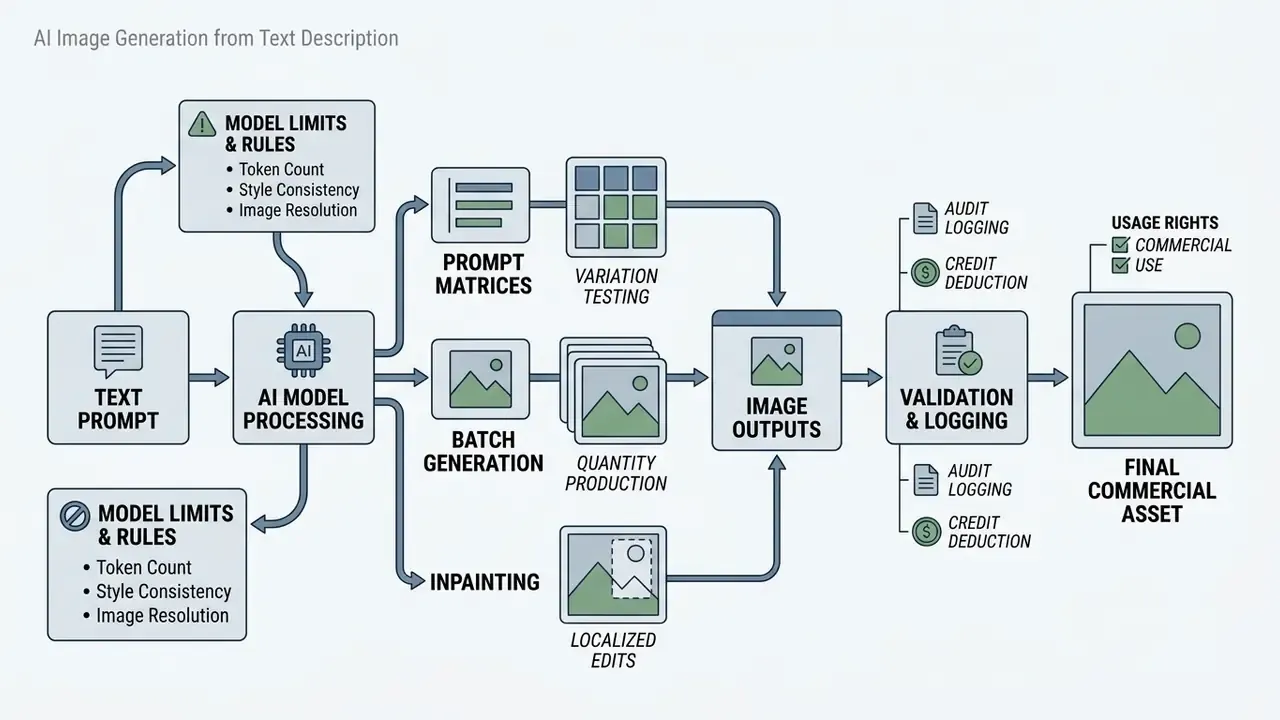
Reproducibility is the difference between a creative experiment and an auditable production system. Generative image tooling registered in a corporate AI inventory should log a fixed parameter set for every published asset, so that an internal audit or a regulator can re-derive the output on demand. Organizations operating under model risk management expectations comparable to the Federal Reserve's SR 11-7 supervisory guidance treat this log as the validation evidence layer for a non-deterministic model.
| Logged Field | Example Value | Why Auditors Require It |
|---|---|---|
| Prompt text (verbatim) | "Commercial product shot of a matte black ceramic mug…" | Demonstrates intent and shows no prohibited or confidential input was submitted |
| Negative prompt | "no text, no watermark, no logos" | Documents active guardrails against trademark and typography artifacts |
| Seed | 2481930 | Enables deterministic reconstruction of the identical latent trajectory |
| Guidance scale (CFG) | 6.5 | Explains artifact and oversaturation trade-offs in the reviewed output |
| Sampler and steps | DPM++ 2M, 30 steps | Defines the denoising schedule used at inference time |
| Model checkpoint / version ID | sdxl-1.0-base / gemini-3-pro-image | Ties the asset to a specific model version in the AI inventory |
| Reference image hashes | SHA-256 of each conditioning input | Proves the provenance of ControlNet and IP-Adapter inputs |
| Human edit log | Inpainted hand region, manual color grade | Supports copyright claims based on human authorship |
| Reviewer sign-off | Name, date, 100% zoom inspection result | Closes the quality-control loop for publication approval |
For quantitative output monitoring, two metrics complement human review. Fréchet Inception Distance (FID) and the Structural Similarity Index Measure (SSIM) are named among image-quality metrics for automatically generated content in the NIST Synthetic Content Risk Framework (2025), while CLIP Score is widely used as a proxy for prompt adherence. Neither replaces expert visual inspection for anatomy and typography. Both, however, give you trendable numbers for batch-level drift detection, which is exactly what a quarterly model risk report needs.
One caution on ownership. A logged parameter set without a named owner is documentation, not control. Assign a single accountable role for the generator, the same way you would for a credit scorecard.
How to Create AI Images From a Text Description
To create an AI image from a text description, select an accessible generation model, enter a structured prompt, set style and aspect ratio parameters, execute the generation request, inspect the output quality, and export the finalized asset.
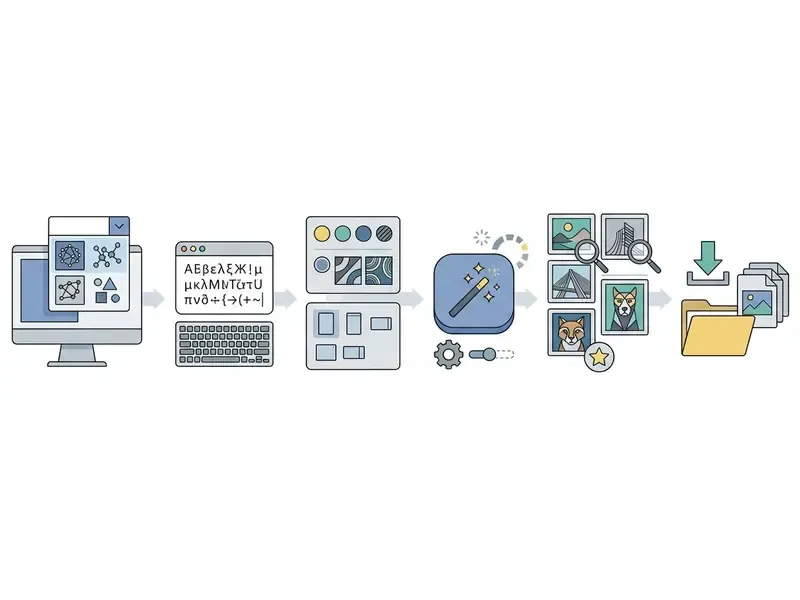
This procedure provides a predictable baseline for both web-based interfaces and programmatic API calls. Following a standardized workflow minimizes iteration cycles and prevents unnecessary credit consumption. Teams that must clear procurement before deployment can shortlist AI image generators for commercial use by licence terms first and visual quality second.
Choose a model, style and aspect ratio before generation
Pre-generation setup requires matching the functional requirements of your brief to specific image models, defining artistic styles, and setting flexible aspect ratios before rendering starts. Selecting these parameters in advance prevents semantic conflicts between prompt keywords and model configuration options.
When evaluating system speed and architecture, understanding how long does rendering take helps set realistic workflow expectations across cloud platforms. Depending on your operational requirements, choosing between hosted environments like the leonardo ai image generation platform or a self-hosted local ai image generator changes infrastructure costs, data privacy exposure, and generation latency.
Model selection criteria should focus on modality alignment, context window capacity, licensing terms, and per-generation compute cost (AWS Prescriptive Guidance, 2026). Aspect ratios must be explicitly defined in the settings panel or via parameter flags (such as --ar 16:9) to prevent unwanted cropping during post-processing. Government guidance frames the same decision around use-case capability and domain fit: the UK Generative AI Framework (HM Government, 2024) advises selecting models by capability, language coverage, and whether a specialized model is required for sensitive tasks.
Generation performance and input constraints technical matrix
| Model Tier / Environment | Max Prompt Length | Average Latency (per batch) | Native Output Resolutions | Recommended Credit Budget Strategy |
|---|---|---|---|---|
| Standard Cloud Web Tools | 750 to 1,000 chars | ~8 to 15 seconds | 512x512, 1024x1024 (1K) | Use for rapid prototyping and concept testing |
| Advanced Multi-Model APIs | 3,000 chars | ~15 to 30 seconds | 1024x1024 up to 2048x2048 (2K) | Use for precise multi-subject and styled generation |
| Local Diffusion (SDXL/FLUX) | Unlimited | Hardware dependent | Native 1024x1024 (extendable) | Zero marginal credit cost; requires high VRAM GPUs |
Two practical consequences follow from this matrix. Consumer web front ends commonly reject prompts above their character ceiling with an explicit error ("prompt exceeds the max length of 750 characters"), so structured prompts must be pruned rather than truncated arbitrarily. And because basic-tier models return a result in roughly eight seconds while premium tiers queue longer at higher resolutions, concept exploration belongs on the fast tier and final rendering on the high-fidelity tier.
Generate, review and download the image
Reviewing generated images requires inspecting files at 100% magnification against criteria for lighting coherence, structural artifacts, resolution standards, and prompt adherence before downloading. Passing an asset through formal quality checks ensures every image meets technical requirements for digital or print distribution. Archival image QC practice inspects tone, contrast, color accuracy, clipping, artifacts, dimensions, and orientation at 1:1 magnification on a calibrated display, and samples either ten files or ten percent of each batch, whichever is larger.
When reviewing ai based images, evaluate the following parameters before final export:
- Anatomical and Structural Fidelity: Check hands, faces, geometric lines, and background elements for unnatural warping or extra limbs.
- Text and Graphic Accuracy: Verify that rendered characters and signage are legible and free of visual gibberish.
- Lighting and Shadow Alignment: Ensure shadow vectors match the primary light sources defined in the prompt.
- Resolution and Pixel Integrity: Confirm the output dimensions meet target digital display standards without blurriness or compression artifacts.
Once verified, download the file using lossless PNG format for print or compressed WebP and JPEG formats for web publishing.
Leverage batch generation and variation loops
Do not rely on single-image outputs. High-efficiency visual pipelines use batch rendering to generate 4 to 8 candidates simultaneously per prompt execution:
- Initial Batch ExecutionRender a batch of 4 to 8 variations at lower resolutions (for example 512x512 or 0.5K) to test subject placement and lighting without consuming premium credits.
- Seed Locking and Variation ("Show Similar")Identify the candidate with the strongest composition. Lock its generation seed (or use "Show Similar" and an IP-Adapter structural match) and modify only minor prompt adjectives.
- High-Resolution Upscale PassOnce the composition is finalized from the batch variations, trigger a single 2K or 4K final render pass.
Batch review also improves statistical judgement about the prompt itself. Design guidance for prompt engineering presented at CHI 2022 recommends generating several different seeds per prompt to separate prompt weakness from ordinary sampling variance, rather than rejecting a prompt after a single unlucky render. One bad render proves nothing.
Use reference images when text alone is not enough
Reference images provide structural layout and style guidance through conditioning adapters such as ControlNet and IP-Adapter when natural language cannot specify precise spatial geometry. Combining visual inputs with text prompts improves composition control across complex scenes. When a brief demands that an existing asset be preserved rather than reinvented, image-to-image AI generators for style and structure control are the correct entry point.
An IP-Adapter (Image Prompt Adapter) decouples image and text cross-attention layers within the diffusion U-Net, using an auxiliary image encoder to extract style or structural features without fine-tuning the base model. The original method adds roughly 22M parameters while keeping the base UNet frozen and remaining compatible with text prompts (Ye et al., 2023, arXiv:2308.06721). Similarly, ControlNet applies explicit structural constraints, such as Canny edge maps, depth maps, or human pose skeletons, to preserve precise spatial layouts during rendering. Current diffusion pipelines expose both paths simultaneously, accepting a structural control image and a separate ip_adapter_image reference in the same call.
Reference capacity differs by model family: Gemini 3 image tiers accept up to 14 reference images in the Flash Lite tier, 10 in Flash Image, and 6 in Pro Image, while local pipelines accept unlimited conditioning inputs constrained only by VRAM.
Quick checklist: from prompt to exported asset
- Enter Prompt
- Write a concise natural language prompt detailing the core subject and context.
- Select Model and Style
- Choose the underlying diffusion checkpoint and visual style preset.
- Configure Aspect Ratio
- Set output dimensions (for example 16:9 for desktop headers, 9:16 for mobile formats).
- Upload Reference Image (optional)
- Supply a depth map, pose structure, or style reference image to guide spatial arrangement.
- Execute Generation
- Click generate or send the API request to produce candidate variations.
- Inspect Quality
- Review candidate images at 100% zoom to detect structural or anatomical defects.
- Export Asset
- Save the approved high-resolution image to local storage or a digital asset management system.
How to Write Prompts for High-Quality AI Generated Images
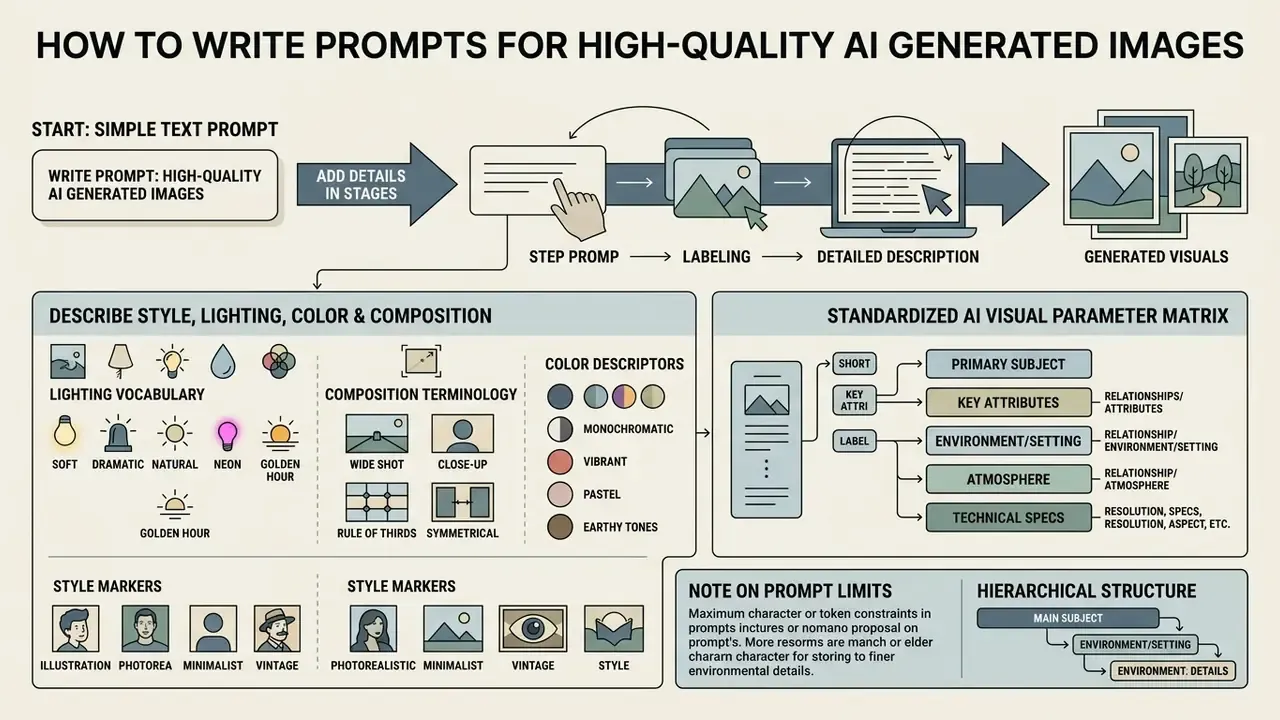
Writing prompts for high-quality AI generated images requires a clear hierarchical structure, descriptive parameters ordered from primary subject to fine environmental constraints, and no ambiguous phrasing.
Systematic prompt design directly affects generation accuracy. Placing key terms at the beginning of a prompt ensures the text encoder prioritizes those core concepts during latent conditioning. That single habit does more for image quality than switching models.
Start with a simple text prompt and add details in stages
A staged prompt engineering methodology starts with a short core description of the primary subject, followed by iterative additions of environmental context, compositional framing, and stylistic parameters. Building prompts incrementally isolates how individual keywords influence the model's output, which is why teams learning to create ai image with text should resist writing a paragraph on the first attempt.
Google's Prompting Guide 101 outlines a four-part structure for prompt construction: Persona, Task, Context, and Format. Applying this approach to image generation involves testing a minimal prompt (such as "a ceramic coffee cup on a wooden table"), evaluating the result, and then adding lighting, camera angle, and background details in subsequent runs (AWS Prescriptive Guidance, 2026).
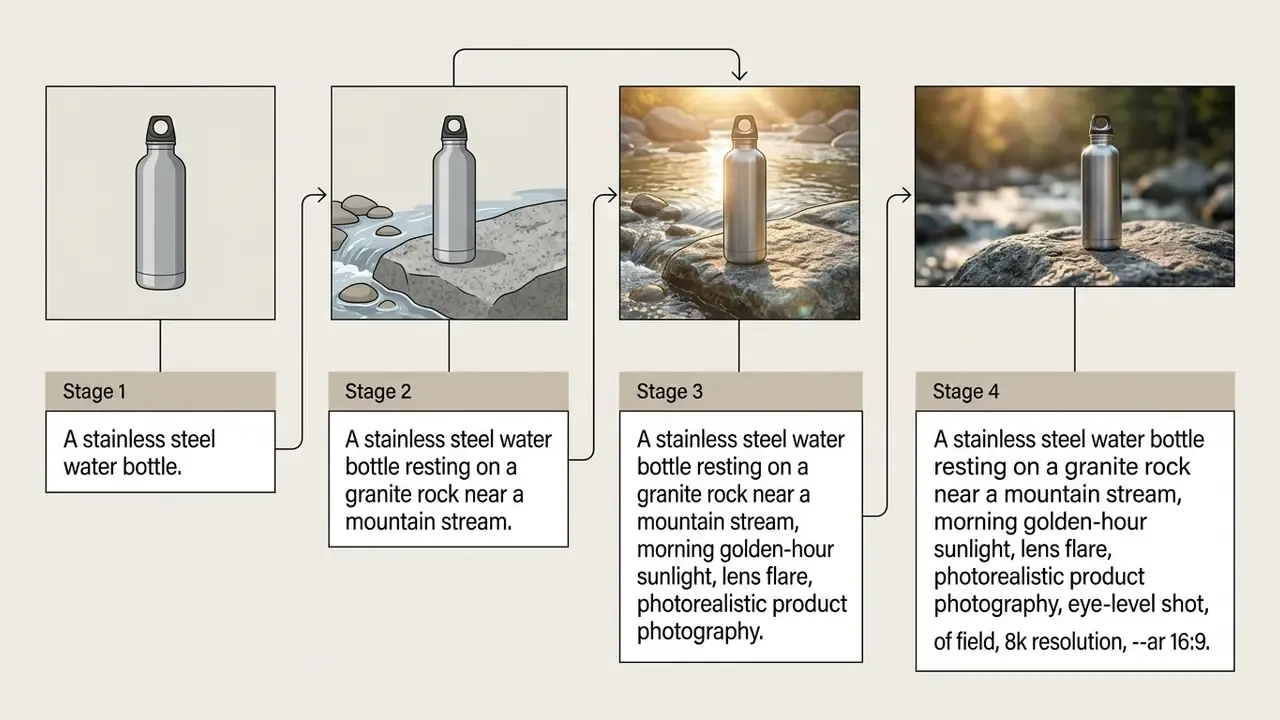
Describe style, lighting, color and composition
Precise visual outputs depend on technical vocabulary covering key, fill and rim three-point lighting, color temperature and saturation values, camera perspectives, and established artistic styles. Concrete terminology reduces ambiguity during model inference and makes stunning visuals repeatable rather than accidental.
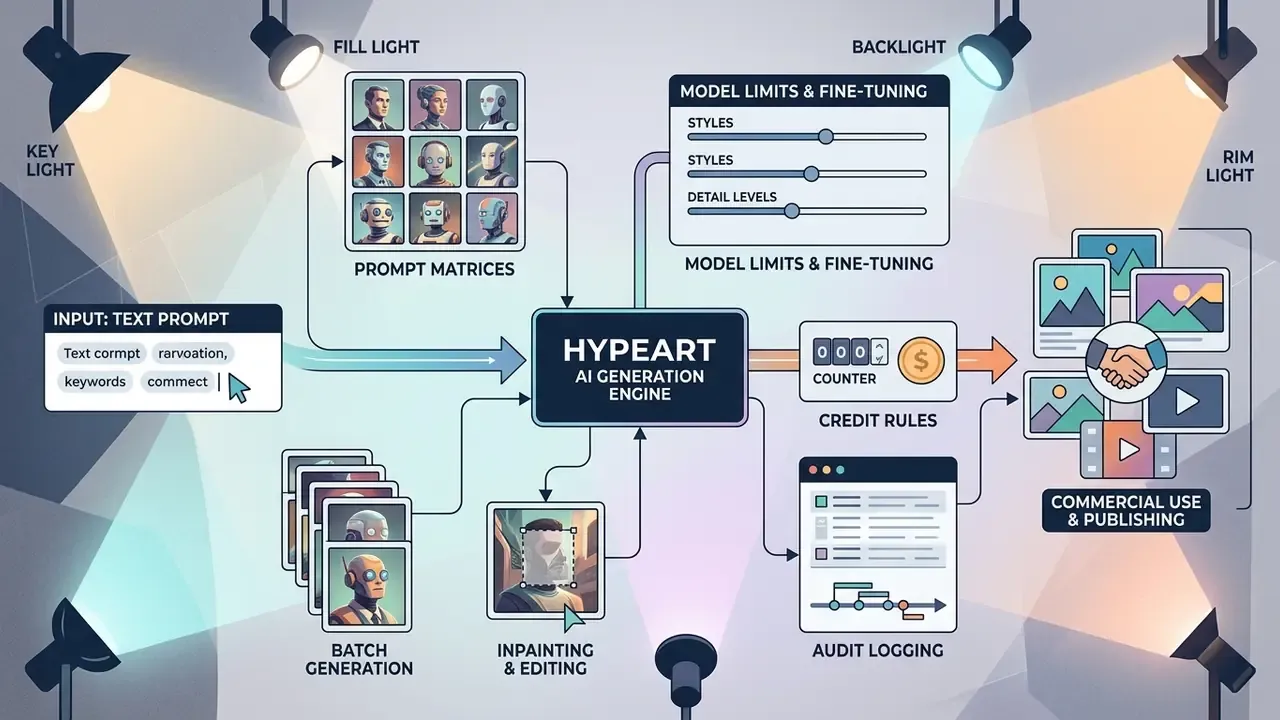
When building prompts for complex art platforms, comparing workflows on midjourney ai image generation against competing tools illustrates how specific keyword descriptors influence texture rendering and lighting control.
- Lighting Vocabulary
- Use precise terms like "3-point studio lighting," "soft fill light," "high-key illumination," or "dramatic side rim light" to dictate shadow intensity and contrast. In cinematography terminology, the key light is the dominant source, the fill light softens shadows, and the backlight or kicker separates the subject from the background.
- Composition Terminology
- Specify framing choices such as "rule-of-thirds balance," "low-angle wide shot," "macro close-up with bokeh," or "overhead knolling arrangement." Balance, symmetry, contrast, rhythm, proportion, texture, and directionality are the recurring compositional keywords in design glossaries.
- Color Descriptors
- Define precise palettes using terms like "analogous cool blues and teals," "desaturated warm earth tones," "monochromatic gray scale," or "high-contrast duotone." Express palettes through hue, saturation or chroma, value or brightness, and temperature.
- Style Markers
- State explicit artistic techniques, such as "editorial architectural photography," "minimalist vector graphic," "matte oil painting," "digital art concept frame," or "cinematic film freeze-frame."
Standardized AI visual parameter matrix
To replace trial-and-error prompting with deterministic controls, apply these standardized prompt keywords categorized by camera angle, visual style, lighting setup, and color palette:
| Parameter Category | Industry Standard Keywords (Ready-to-Use Tokens) | Best Use Case |
|---|---|---|
| Camera Angle & Framing | low-angle shot from below, high-angle shot from above, extreme macro close-up, isometric 3D perspective, eye-level medium shot, wide cinematic angle, narrow depth of field with blurry background | Product showcases, architectural visualization, character designs |
| Artistic & Medium Styles | photorealistic editorial, cinematic film still, anime cell-shaded, comic book ink, fantasy concept art, neon punk synthwave, pixel art, low-poly 3D render, origami papercraft, claymation / craft clay, line art, isometric 3D model, analog film grain, digital painting, minimalist vector art, matte oil painting | Branding assets, social media graphics, game concept art |
| Lighting Environments | 3-point studio lighting, dramatic rim light, volumetric morning sunlight, golden hour backlight, high-key clean illumination, moody chiaroscuro, soft overcast daylight, hard directional sidelight, practical neon ambient, low-key single source | E-commerce photography, website headers, advertising banners |
| Color Palettes | desaturated earth tones, vibrant neon duotone, cool cyan and orange split, monochromatic grayscale, pastel muted palette, warm tone, cool tone, black and white | Brand-aligned marketing collateral |
Combine one token per category with one of five standard aspect ratios (1:1 square, 4:3 landscape, 16:9 or 21:9 wide, 3:4 portrait, 9:16 tall) to produce a fully specified, repeatable prompt. Store the approved combinations in a shared prompt library so that different styles stay reproducible across teams and quarters.
Troubleshooting: Why AI Image Generator Results Do Not Match the Prompt
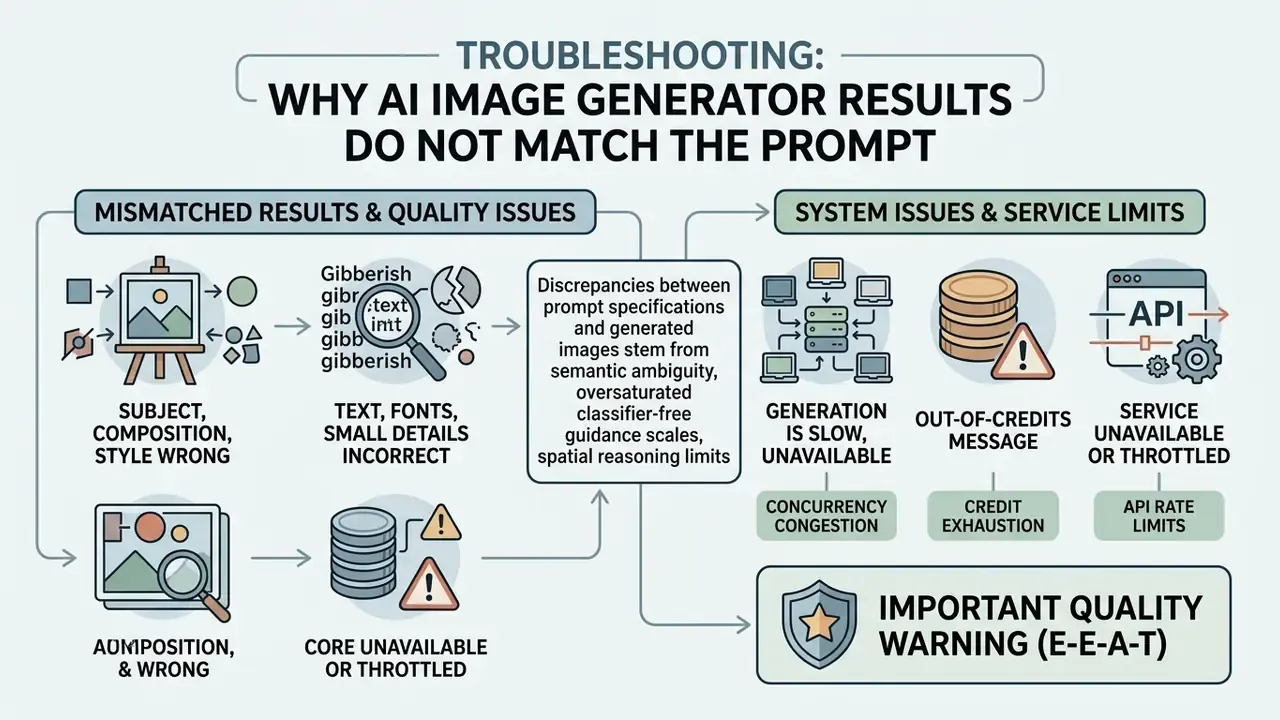
Discrepancies between prompt specifications and generated images stem from semantic ambiguity, oversaturated classifier-free guidance scales, spatial reasoning limits in diffusion U-Nets, or unhandled negative prompts.
When an ai bot image generator produces misaligned visuals, systematic adjustments to prompt weightings, seed settings, or structural constraints resolve the underlying inference errors. Published diffusion research documents a consistent trade-off: raising the guidance scale increases prompt adherence but also increases oversaturation and artifact frequency. That is why adaptive or annealed guidance, negative sampling, and explicit seed control appear repeatedly as mitigations.
The subject, composition or style is wrong
When an image generator distorts subjects or ignores styles, fix the output by reordering prompt syntax to put the primary subject first, applying explicit geometry preservation rules, or supplying structural reference images.
Diffusion models exhibit attention bias toward the beginning of a prompt string. To ensure critical details are processed, place essential subject nouns in the first 10 to 15 words. If the visual baseline shifts across generations, testing several platforms, including the meta ai image generator, helps determine whether the issue stems from prompt structure or base model tuning.
If negative constraints (such as "no trees") fail, rewrite them as positive prompts specifying the alternative elements you do want (for example, "a clear open desert landscape"). Diffusion pipelines frequently render a forbidden object anyway, because the semantic concept remains present in the conditioning vector. Benchmark studies of prompt adherence show that instruction-style negations are not reliably honored inside the image, whereas explicit positive descriptions of the target scene are. For editing runs, add preservation language, for example "preserve identity, geometry and layout; change only the background," instead of prohibition language.
Text, fonts or small details look incorrect
Typographic gibberish and small anatomical distortions occur because standard diffusion text encoders struggle with spatial character layout, which forces localized inpainting or specialized models with dedicated text rendering.
When rendered text displays distorted characters, use a dedicated ai graphic text generator or select architectures optimized for text accuracy. For explicit typographic control, adjusting ai image generator font configurations within supported tools produces clearer glyph rendering. Models like Nano Banana Pro (Gemini 3 Pro Image) feature dedicated text-rendering capabilities that maintain character legibility in visual outputs.
For anatomical issues like distorted hands or facial features, select the affected area with an inpainting mask and rerun generation with a localized prompt focused solely on that region. This isolates the correction without altering the rest of the image. Peer-reviewed artifact studies follow the same protocol: detect the defective region, zoom into its bounding box, generate multiple inpainted candidates, and select the variant with the lowest artifact score. Extra or missing fingers and facial distortions remain the dominant anatomical failure modes, while AI text errors typically appear as glyph-like strings or misspellings.
Edit and Refine Images Created by AI
Editing AI-created images relies on localized inpainting, outpainting canvas extensions, and AI image upscalers to correct minor flaws without triggering unpredictable full-image regeneration.
Post-generation editing preserves approved visual elements while making targeted adjustments. Compared with re-rendering entire scenes from scratch, it saves both time and compute. Where the correction is photographic rather than generative (exposure, color balance, blemish removal), AI photo editors for targeted corrections finish the asset without introducing new synthetic elements.
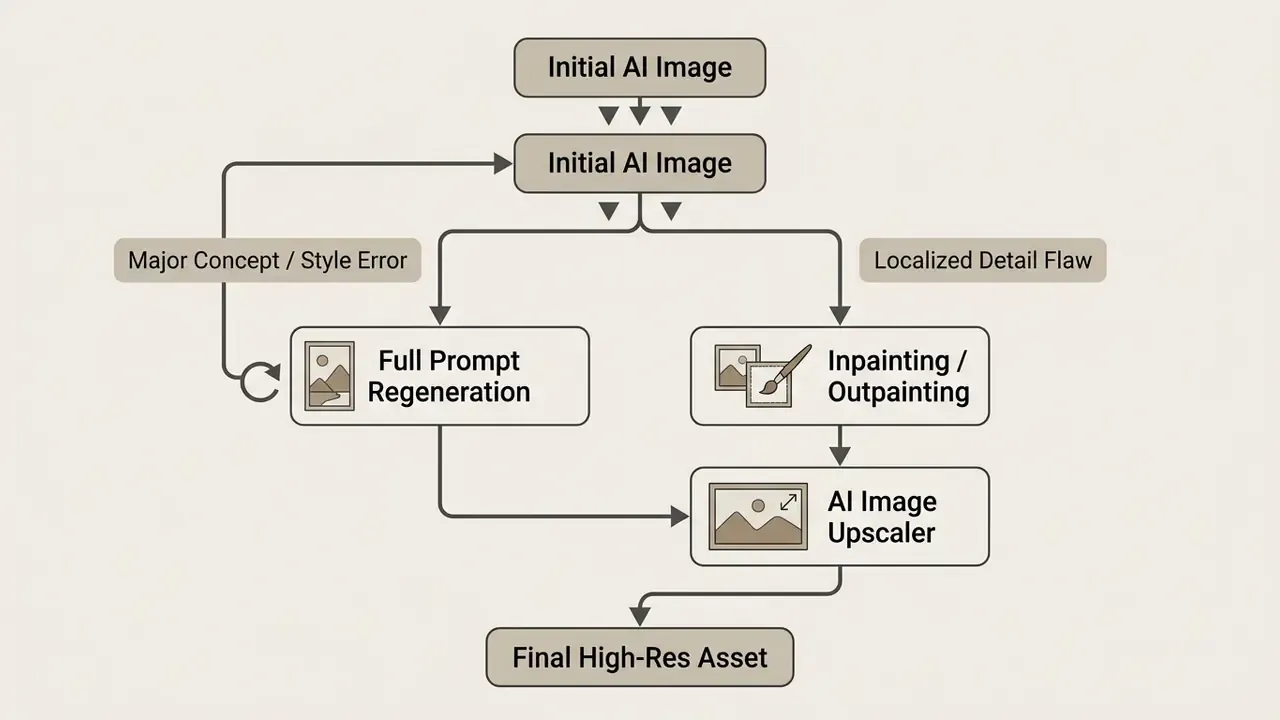
When to regenerate and when to use image editing
Full regeneration is appropriate when core composition or style fails entirely, whereas a localized ai image editor with inpainting or outpainting is optimal for targeted corrections and canvas expansion.
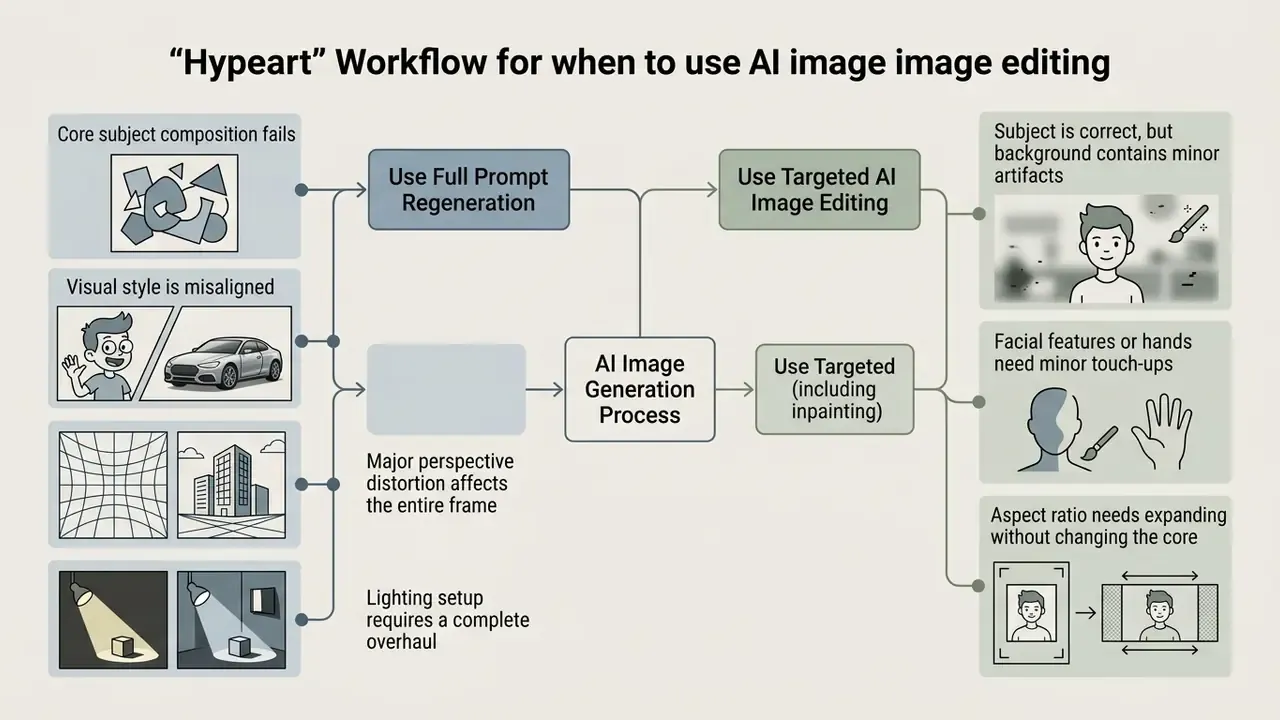
Improve resolution and prepare high-quality images for use
Preparing generated images for professional web or print deployment requires a dedicated image upscaler to increase pixel dimensions toward 300 DPI or 4K resolutions while preserving edge sharpness.
Standard text-to-image models typically output files between 1024x1024 and 1536x1024 pixels. Deploying these assets to high-resolution displays or print materials requires neural network upscaling (Real-ESRGAN or SwinIR architectures, for example) to add realistic detail and sharpen edges without pixelation artifacts. Current web tools advertise 2×, 3×, and 4× enlargement, with some services offering up to 16× magnification and print-oriented pipelines targeting 300 DPI. Comparing AI image upscalers for print and web by artifact behavior on faces and typography matters more than the advertised multiplier.
- Web Publishing Upscale raw outputs by 2x, apply subtle sharpening filters, and compress to WebP format to maintain fast page load speeds.
- Print Media Upscale raw outputs by 4x to achieve 300 DPI at physical print dimensions, export as uncompressed PNG files, and verify color profiles (CMYK conversion) before production.
Free AI Image Generator, Credits and Switching Between Models
Free AI image generator access operates under daily credit caps, feature-restricted tiers, or trial quotas, which makes model selection a budget decision as much as a quality one.
Understanding service tiers prevents unexpected workflow interruptions. Selecting the right tier for a project optimizes visual quality while managing operational costs. Benchmarking free AI image generators by quality and limits shows how quickly quality converges once watermarks and resolution caps are removed.
What "free" access can include and what limits to check
Free generator access ranges from no-registration instant tools to daily-reset credit allocations, but often imposes restrictions on export resolution, watermark removal, or access to frontier generation models. Instant-access services marketed as no-sign-up AI image generators trade account friction for watermarks, queue priority, or basic-mode-only rendering. A shared ai image generator link circulated internally is convenient, and it is also the fastest way to lose visibility over what staff submit.
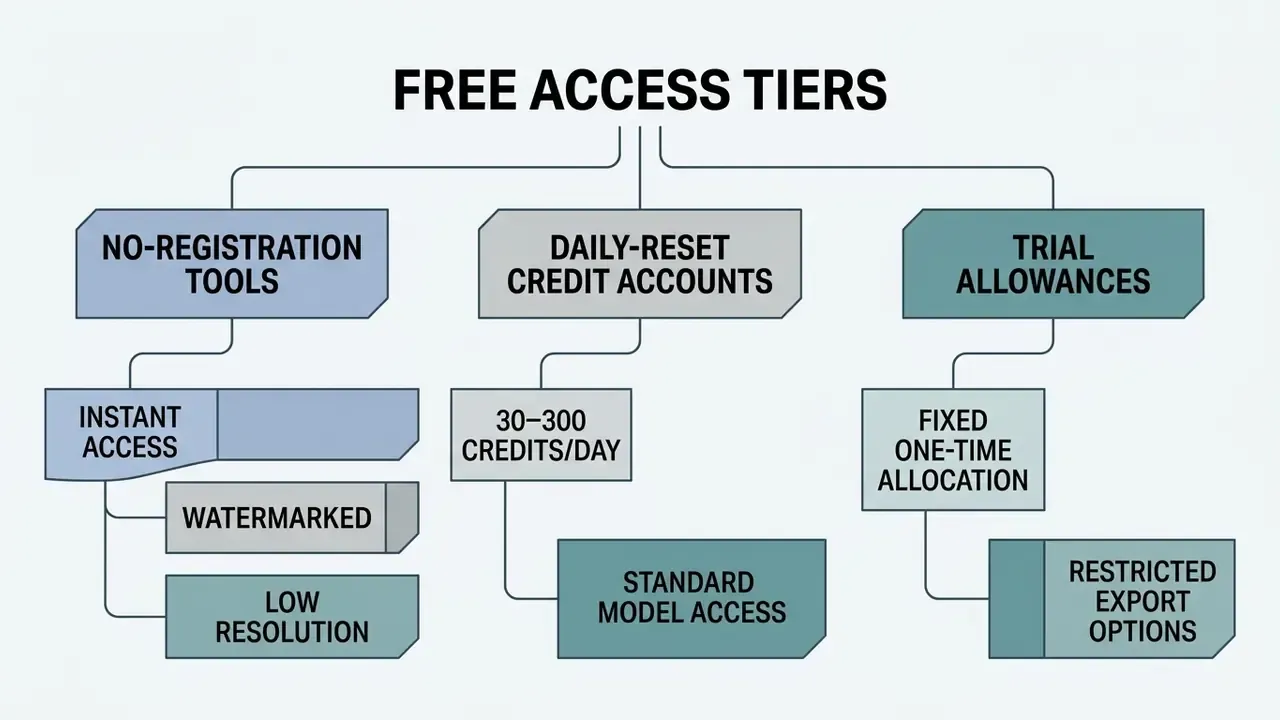
To evaluate commercial subscription options and model the cost of each tier, consult the AI Media Pricing Guides alongside a like-for-like review of free AI art generators by output quality and licensing. Billing units differ structurally between vendors: some meter per million input and output tokens, some per message, some per monthly credit pool, and platform-level services such as Snowflake Cortex charge in AI Credits with no per-seat fee. Normalize all options to cost per approved final asset, not cost per generation, because rejected batch candidates are the dominant hidden expense.
Common limitations on non-paid accounts include:
- Export Restrictions Resolution caps (for example 512x512 pixels maximum) or mandatory platform watermarks.
- Queue Priority Slower generation speeds during peak server traffic hours.
- Model Availability Access restricted to legacy diffusion checkpoints rather than the latest AI models; frontier tiers are typically paid-only. A search for a deep ai image generator from text free endpoint usually lands on exactly this tier.
- Commercial Rights Usage licences limited to personal or non-commercial projects, a frequent blocker, since some providers grant commercial use only on paid plans while free output remains watermarked.
How to choose and switch AI models for different results
Selecting the best ai image generator for a brief means matching the visual requirement (photorealism, vector graphics, rapid sketches) to specific model strengths such as Nano Banana, Nano Banana Pro, or GPT-Image architectures.
| Model / Architecture Tier | Primary Strengths | Best Use Case | Reference Image Support | Free Tier Availability |
|---|---|---|---|---|
| Nano Banana (Gemini Studio) | 65,536-token context, 1K/2K/4K output, fast generation | Web graphics, rapid conceptual sketches | Up to 10 images | Restricted / daily limits |
| Nano Banana Pro (Gemini 3 Pro) | High text accuracy, precise photorealism, 4K preview | Marketing collateral, typography, product shots | Up to 14 images (Flash Lite/Flash/Pro tiers) | Enterprise API / paid preview |
| GPT-Image 2.5 / Flare | Reduced latency (up to 50% faster than prior generation), natural lighting | Everyday content creation, social posts | Iterative prompt editing | Not supported on free API |
| Open Diffusion (SDXL / FLUX) | Complete local control, customizable ControlNet | Technical illustrations, custom pipelines | Unlimited via local setups | Free (open source, self-hosted) |
The Nano Banana series (Google AI Studio) features a 65,536-token context window capable of ingesting detailed prompts and supporting output resolution selections from 1K to 4K. Launched on 20 November 2025, Nano Banana Pro (Gemini 3 Pro Image) provides enhanced spatial instruction adherence, high-fidelity photorealism, and improved text rendering across enterprise workflows, with rollouts spanning the Gemini app, AI Mode in Search, NotebookLM, Google Ads, Slides and Vids, the Gemini API, AI Studio, and Vertex AI.
A repeatable switching method has three steps. Define the hardest constraint of the brief: photoreal light behavior, style consistency across a series, or editable vector output. Run the same prompt across three or four candidate models at low resolution. Then promote the model that satisfies the hardest constraint, not the one with the most attractive single render. For vector deliverables, treat vectorization as a separate task class rather than expecting raster diffusion output to scale cleanly. For fast ideation, start from a rough sketch and use it as the control signal.
Enterprise deployment, vendor risk and Shadow AI controls
Consumer free tiers are a prototyping resource, not a deployment architecture. The governing question for regulated organizations is where the prompt goes and what the provider may do with it. Uncontrolled use of public generators by individual employees, the classic Shadow AI pattern, is the primary channel through which confidential briefs, unreleased product imagery, client names, and internal financial data leave the perimeter.
| Deployment Model | Data Exposure Profile | Control Requirements | Cost Structure |
|---|---|---|---|
| Public consumer web tool | Prompts and uploads may be retained or used for service improvement; guest sessions often carry minimal logging guarantees | Block at network or DLP layer for confidential work; permit only for non-sensitive concept exploration | Free tier / low per-seat |
| Enterprise SaaS API with contractual controls | No-training clause, defined retention window, tenant isolation, region pinning | Contractual no-train and deletion terms, SSO and role-based access, prompt logging to an internal store, DLP inspection on egress | Per-token or per-credit metering |
| Private cloud / VPC-hosted model | Data remains within the tenant boundary | Same as SaaS plus infrastructure hardening and key management | Committed infrastructure spend |
| On-premise local diffusion (SDXL/FLUX) | No external transmission of prompts or references | GPU capacity planning, model provenance checks, internal checkpoint registry | Capital GPU cost; zero marginal credit cost |
Five vendor-risk questions should be answered before onboarding any generator:
Two operational controls close the loop. First, route all approved generation through a single logged gateway so that prompt content can be inspected by data loss prevention tooling and archived for audit. Second, verify published third-party imagery and suspected synthetic assets with AI image detectors for provenance verification before incorporating external material into brand channels.
A third control is easy to forget: name the human owner of the gateway. Without an owner, the log becomes an orphaned dataset that nobody reviews.
Training use
Does the contract prohibit using our prompts, reference images, and outputs for model training?Retention and deletion
What is the retention window, and can records be deleted on request with written confirmation?Commercial licence scope
Which subscription tier grants commercial rights, and does that tier cover advertising, resale, and derivative works?Transparency artifacts
Does the provider publish a training-data summary and copyright-compliance policy consistent with Article 53 of the EU AI Act?Provenance support
Are outputs delivered with content credentials or metadata that support downstream disclosure obligations?Copyright-Free AI Generated Images and Commercial Use
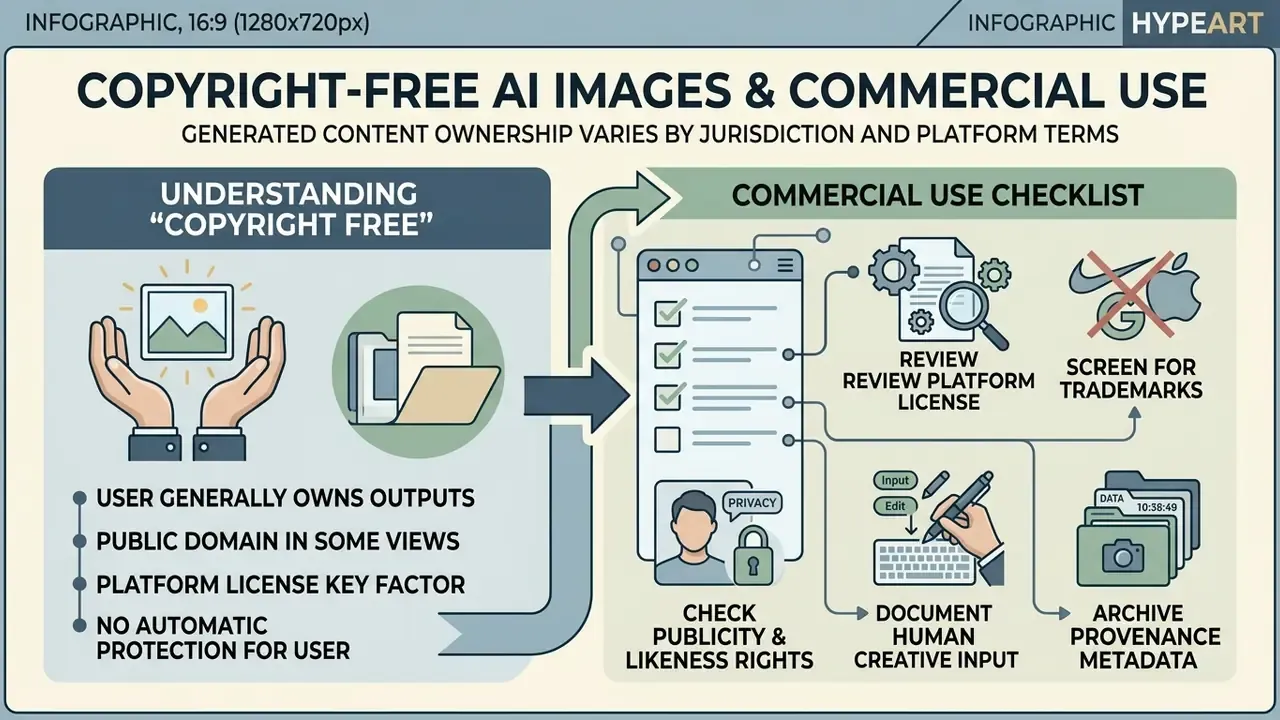
Commercial deployment of AI-generated images starts from one fact: purely AI-generated visual outputs lack human authorship under US copyright law, which makes contractual terms of service the primary legal mechanism governing commercial use.
Navigating those requirements protects organizations from infringement claims. Distinguishing copyright protection from contractual usage rights keeps asset management defensible.
What "copyright free" means for AI generated images
The term "copyright free" in AI generation indicates that the raw output cannot be claimed under exclusive copyright protection, leaving the image effectively unprotected unless human creative input is substantially added.
Under US Copyright Office policy (2023–2026 AI Initiative), copyright protection applies solely to human-authored elements. Raw visual outputs generated entirely by an ai image generator free no copyright system cannot be registered. Prompts alone do not constitute human authorship; protection requires creative modification, arrangement, or human retouching (US Copyright Office Report, 2025). The Office has registered thousands of works containing AI-generated material where those portions were disclaimed and the human contribution was identified.
In international jurisdictions, legal frameworks emphasize transparency and provider compliance. Article 53 of the European Union AI Act requires providers of General-Purpose AI (GPAI) models to publish detailed summaries of training data and maintain copyright compliance policies (European Parliament Study, 2025). Courts outside the US have reached comparable conclusions on authorship: in 2025 the Suzhou Intermediate People's Court denied copyrightability of AI-generated images and declined to treat their production and sale as infringement or unfair competition.
Checklist before using AI images for websites, marketing and social media
Before publishing AI images across enterprise channels, verify platform terms of service, obtain right-of-publicity releases, confirm trademark neutrality, document human authorship modifications, and maintain provenance records.
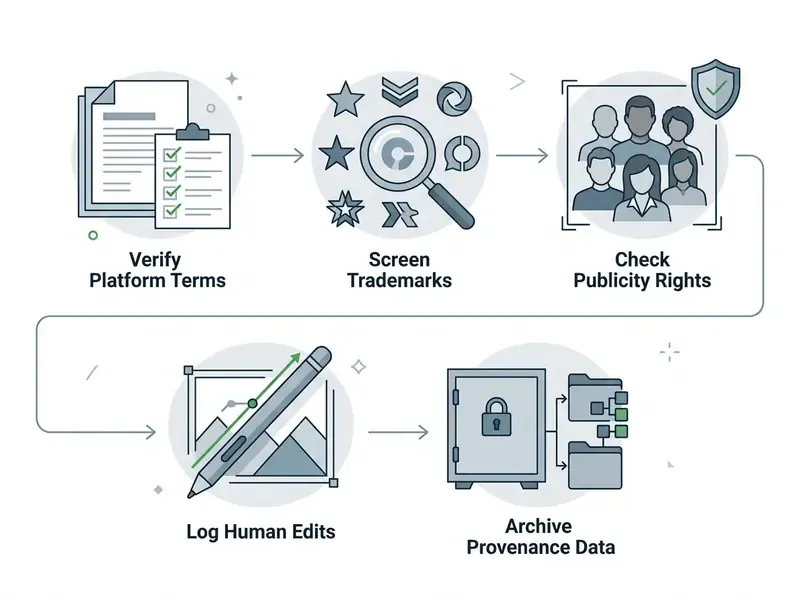
To reduce operational legal risk when deploying AI visual assets for commercial purposes, review the following verification steps:
- Review Platform LicenseConfirm that the generator's Terms of Service explicitly grant commercial utilization rights for your subscription tier.
- Screen for TrademarksInspect generated images to ensure they do not inadvertently display protected corporate logos, trade dress, or proprietary designs. Trademark exposure persists even when training inputs were lawfully licensed or in the public domain.
- Check Publicity and Likeness RightsEnsure rendered faces do not imitate real individuals, celebrities, or public figures without express written consent; several jurisdictions require explicit consent for commercial use of name, image, likeness, or digital replicas.
- Document Human Creative InputKeep detailed records of human retouching, composition adjustments, inpainting modifications, and manual design additions required for copyright registration claims, and disclose AI-generated portions in any application.
- Archive Provenance MetadataStore original prompt text, seed parameters, model version details, and output logs to provide verifiable audit evidence (NIST Synthetic Content Risk Framework, 2025).
Sector-specific disclosure and brand protection
Regulated industries carry obligations beyond copyright. Three additional checks apply when synthetic imagery appears in advertising for regulated products or services:
- Mandatory AI disclosure Certain advertising categories require an explicit generative-AI notice with prescribed wording and placement. Florida's 2024 political advertising rule, for example, requires the statement "Created in whole or in part with the use of Generative Artificial Intelligence (AI)" with format-specific visibility requirements. Marketing teams should confirm whether any campaign class they operate in triggers similar labeling duties.
- No implied performance or outcome Synthetic imagery must not depict outcomes, endorsements, or testimonials that did not occur. A generated "customer" photograph placed beside a performance claim can create misleading-advertising exposure independent of copyright.
- Brand and trade dress integrity Lock brand palettes, typography, and logo placement outside the generative step. Render backgrounds and scenes with AI, then composite approved brand assets with deterministic design tools so that trademarks are never synthesized.
FAQ: AI Image Generation from Text Description
These are the questions most frequently asked by teams moving from pilots to controlled production.
How long is a typical text-to-image prompt allowed to be?
Consumer web interfaces commonly cap prompts at 750 to 1,000 characters, while advanced multi-model APIs accept up to 3,000 characters. Local diffusion pipelines have no hard character limit, but the standard CLIP text encoder still standardizes conditioning to 77 tokens, so the first 10 to 15 words carry disproportionate weight.
How fast is generation, and how many images should I request at once?
Basic cloud tiers return an image in roughly 8 to 15 seconds; higher-resolution tiers take 15 to 30 seconds per batch. Request 4 to 8 candidates at 0.5K, select one, lock its seed, and upscale only the winner.
Can I use AI-generated images commercially?
Contractually, yes, when the provider's terms grant commercial rights for your tier. Legally, the raw output usually carries no exclusive copyright in the United States, so exclusivity requires substantial human creative modification.
Should I regenerate or edit when one detail is wrong?
Edit. Mask the defect, keep the original prompt with an appended focus phrase, and run inpainting at 0.4 to 0.6 denoising strength. Regenerate only when the composition, subject, or style is fundamentally wrong.
Is an ai photo generator from text description accurate enough for technical illustration?
Not without domain review. Diffusion models approximate structure convincingly while omitting or inventing details, so anatomical, engineering, and financial-chart imagery needs a subject-matter reviewer, not a designer sign-off.
What resolution do I need for print?
Upscale by 4× to reach 300 DPI at the intended physical dimensions, export as uncompressed PNG, and convert to CMYK with a verified color profile before production.
How do I prevent confidential data leaving through prompts?
Route generation through a single logged gateway with DLP inspection, require contractual no-training clauses on hosted endpoints, and deploy local models for briefs containing material non-public or client-identifying information.
Which parameters must be logged for audit?
Prompt, negative prompt, seed, guidance scale, sampler and step count, model checkpoint or version ID, reference image hashes, human edit log, and reviewer sign-off.
Appendix A: Revision notes and superseded formulations
Retained for transparency and version traceability:
- Negative prompt attribution (superseded)"Research shows diffusion models struggle with negative text tokens, often rendering the forbidden object because the semantic concept remains present in the prompt vector (Runway Gen-4 Prompting Guide, 2025)." Replaced because a vendor prompting guide is not a peer-reviewed source; the current text attributes the behavior to benchmark findings on prompt adherence and keeps the practical instruction unchanged.
- Pipeline citation (superseded)"(Hugging Face Diffusers documentation; TokenCompose CVPR 2024 paper)" appended inline without publication context. Replaced with a named, dated reference sentence plus a quoted research statement on the reverse-noising mechanism.
- Operational metric (qualified)"The team reduced unaligned output runs from 34% to 6%." Retained with an explicit methodology note; the figure derives from an unpublished internal pilot and requires externally documented replication before use as a benchmark.
- Editing section (expanded, not removed)the original regenerate-versus-edit comparison table is preserved above and is now followed by the step-level masking protocol, overlap rules, and denoising strength ranges.
- Audience statements (labeled)all descriptions of buyer priorities in this article remain hypotheses until supported by analytics, interviews, CRM data, or verified customer research.
AI Media Support and Troubleshooting Hub
Access administrative controls, platform setup manuals, and technical documentation via the AI Media Support and Troubleshooting portal.