For a bank or a mature fintech, that speed is both the appeal and the problem. A form is an intake control. If a model writes the field set, the validation rules, and the consent wording, someone still has to own what got published.
Executive Summary
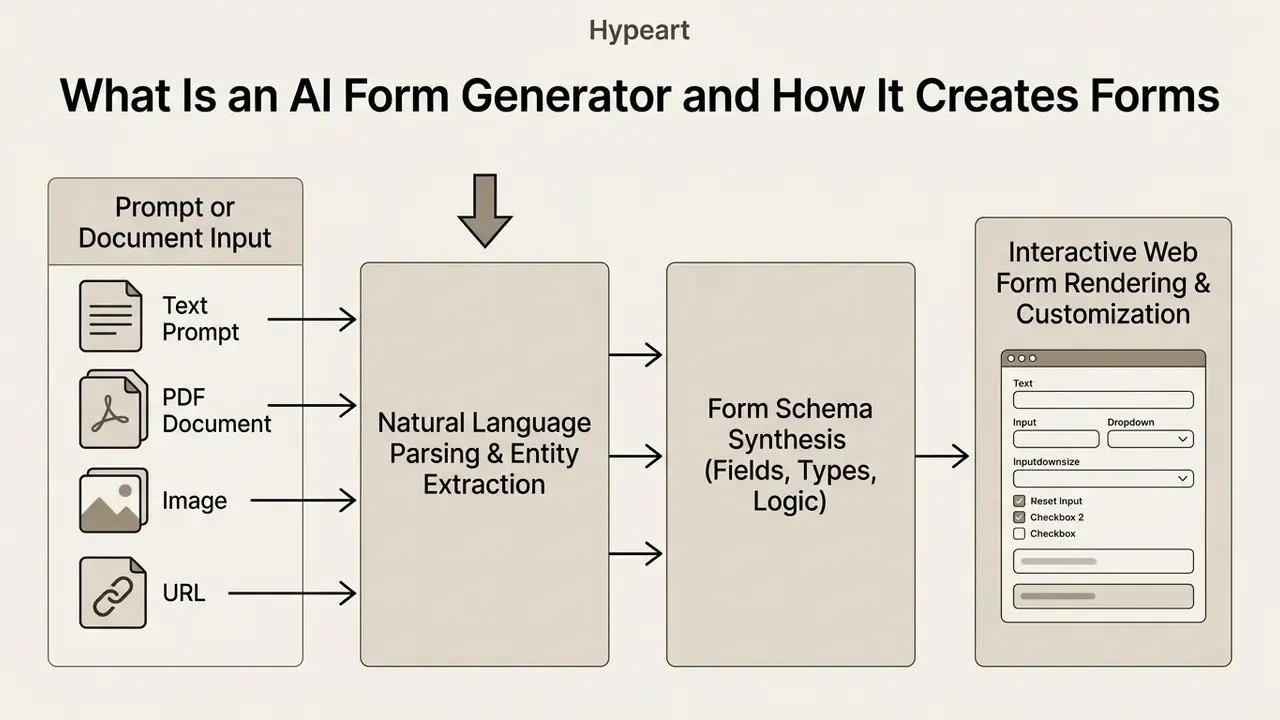
- What it is An AI form generator converts a prompt, raw text, PDF, screenshot, or URL into a form schema (fields, input types, validation rules, and conditional logic) in roughly 15 to 30 seconds.
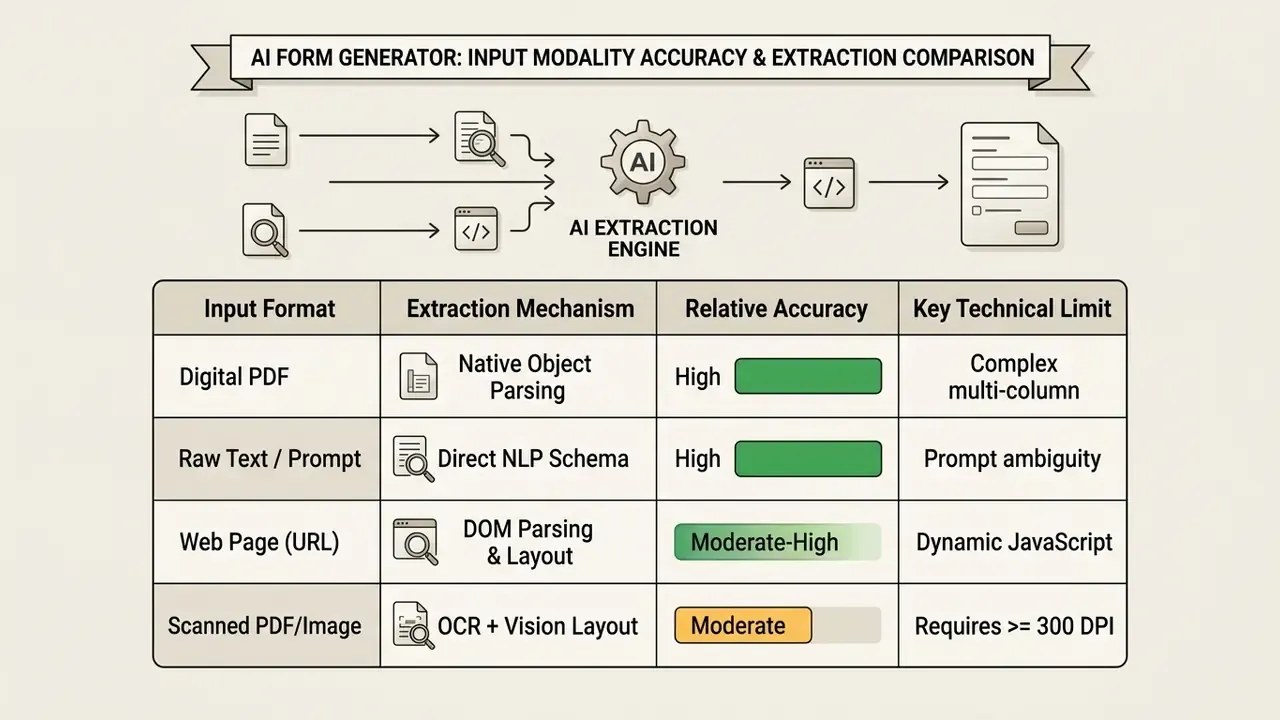
- Input reality check Native digital PDFs and plain text deliver the highest extraction fidelity. Scanned documents and phone photos depend on OCR and a source resolution of 300 DPI or higher to stay reliable.
- What AI decides for you Email regex validation, international phone masks, date pickers instead of free text, required and optional flags, and logical field grouping.
- What humans must still own Question ordering, item diversity, logic verification, accessibility compliance, and, in regulated sectors, lawful basis, retention rules, and audit evidence.
- Commercial reality Free tiers diverge sharply, from 100 responses per month on some platforms to 1,000 or unlimited on others. Enterprise buyers should weigh SSO/SAML, DPAs, SOC 2 Type II reports, and explicit no-model-training clauses rather than submission caps alone.
- Developer layer Beyond webhooks and REST, Model Context Protocol (MCP) servers now expose form schemas and submissions directly to AI agents such as Claude or custom GPTs.
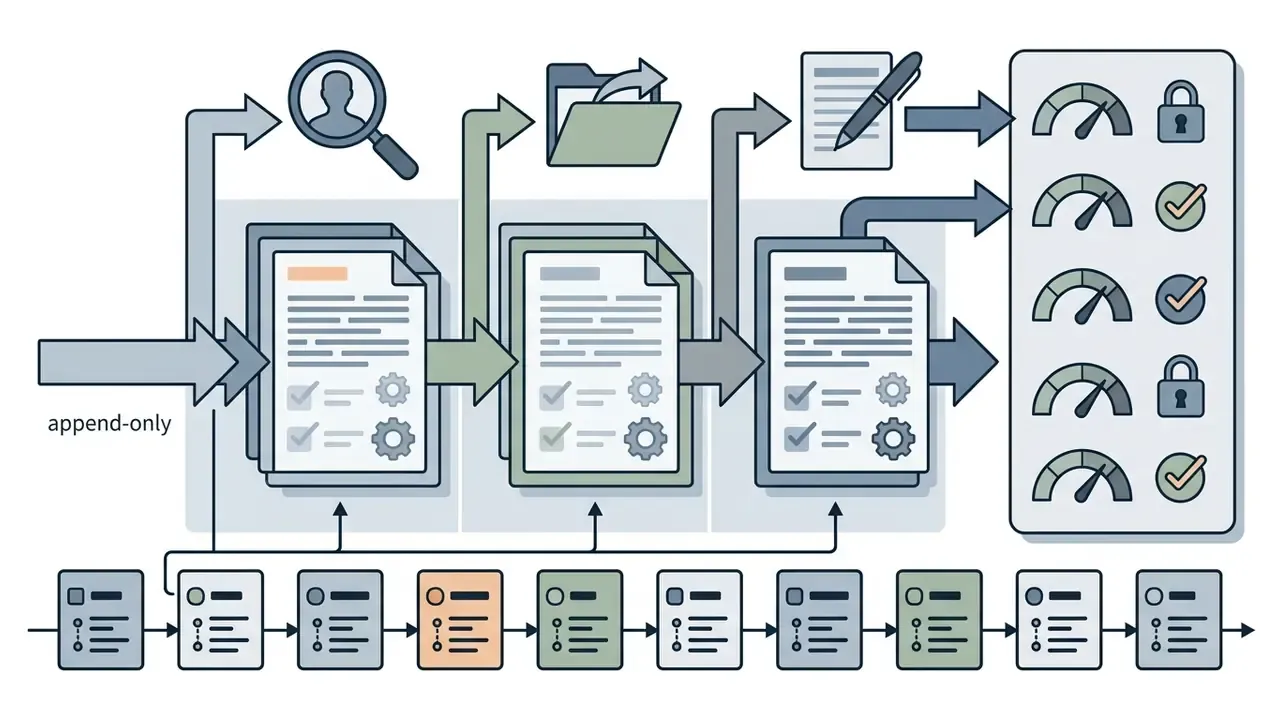
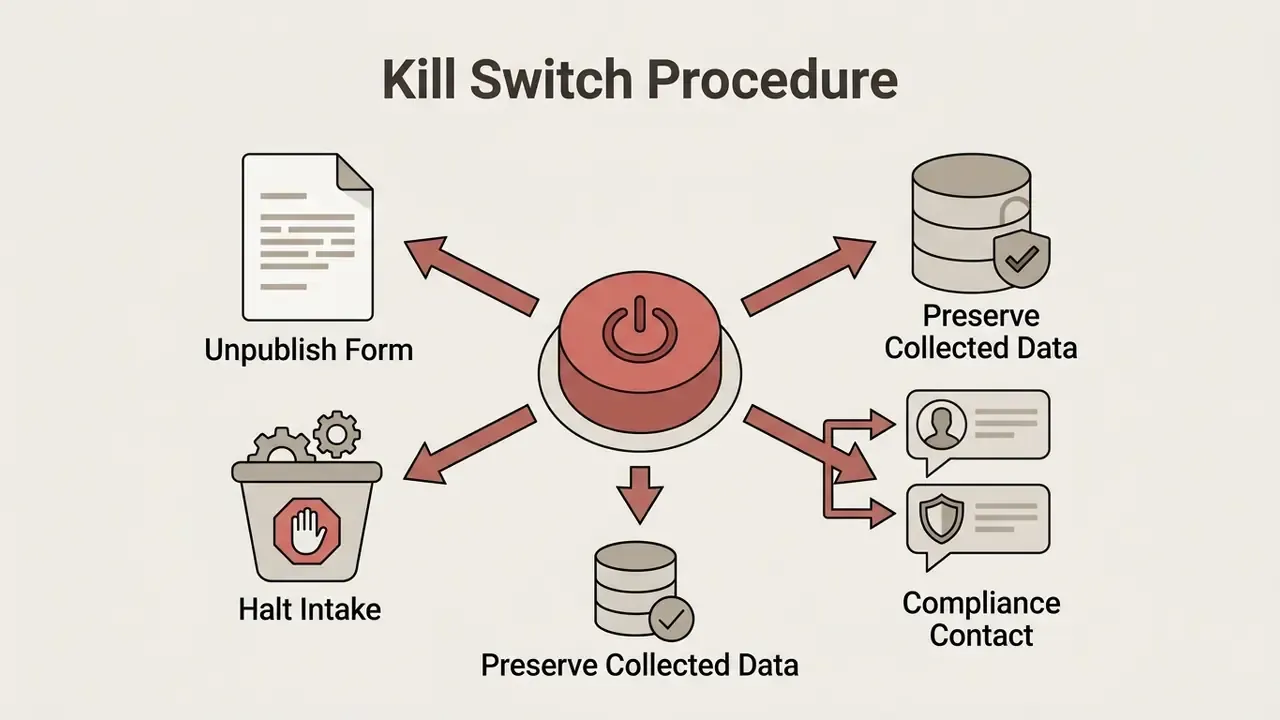
- Governance layer Schema version history, immutable submission audit logs, and a documented kill switch are the minimum controls for automated generation in banking, insurance, and healthcare intake.
What Is an AI Form Generator and How It Creates Forms
An AI form generator is a software system that automates form creation by converting unstructured text or document inputs into a machine-readable form schema. Traditional drag-and-drop builders require users to pick field types and arrange layouts by hand. An AI form builder instead reads natural language input, infers the form's intent, selects field types, and constructs a logical layout on its own.
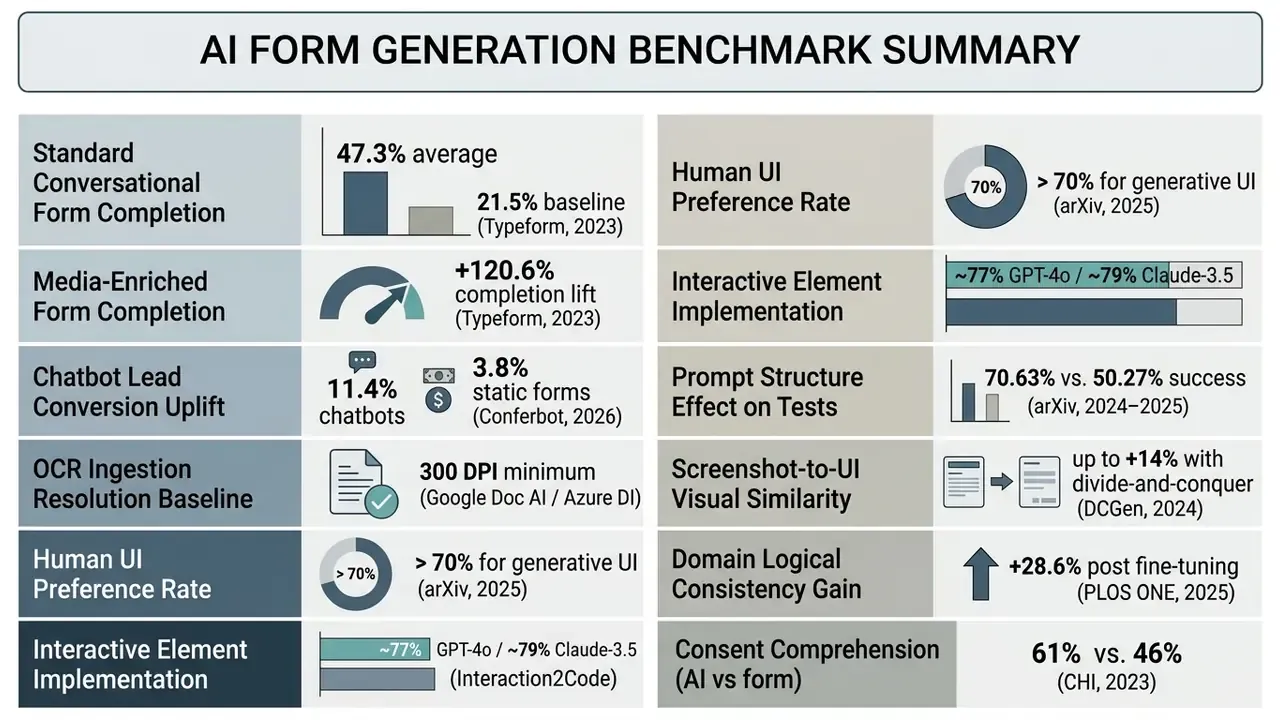
Research on generative user interfaces shows that large language models can synthesize complete web interfaces, including input controls and dynamic conditional logic, by mapping user goals into structured requirement specifications. In controlled user studies where evaluators completed defined tasks through either a generated task-specific interface or a standard chat window, generated interfaces were preferred in more than 70% of comparisons, and up to roughly 72% for certain task categories, across quality dimensions such as task efficiency and interaction control.
«Generative interfaces outperformed conventional chat windows across several interaction-quality dimensions, including task efficiency and interaction control.»
Microsoft documents the same shift on the product side: Power Pages Copilot builds a preview form from a written description, then suggests questions and response field types, replacing manual canvas assembly (Microsoft Learn, 2025. https://learn.microsoft.com). Vendors such as Kizeo Forms report that a description or an uploaded PDF or JPG is converted into a structured form with sections, mandatory flags, and logic in under 15 seconds (Kizeo Forms, 2026). Vendor timing claims are marketing figures, not measured benchmarks, so treat them as directional.
When building digital workflows, enterprise operators can explore the hub for integration specifications on connecting generation models into operational pipelines.
Which Elements AI Adds to a Form Automatically
An AI system detects and populates field labels, question text, input types, choice options, validation rules, and conditional branching logic during initial schema generation. Based on document layout analysis or prompt context, the underlying model configures text boxes, dropdown menus, checkboxes, date pickers, and file upload fields without manual setup.
Document processing engines such as PlatoForms AI Recognition evaluate uploaded PDFs and scanned files to identify structural markers, placing labels, help text, and selection controls according to the source document's physical layout (PlatoForms, 2026). Teams benchmarking recognition quality on document-heavy pipelines can compare image-to-text and OCR tooling before committing to a single extraction engine. Systems such as Microsoft Forms also apply built-in conditional logic to auto-generate rule sets that show or hide later questions based on prior answers (Microsoft Support, 2026. https://support.microsoft.com/en-us/forms/use-branching-logic-in-microsoft-forms).
Automated Field-Level Heuristics Applied by AI Generators
During schema synthesis, the generation engine evaluates semantic intent to configure five critical field-level parameters without manual user intervention:
- Strict input validation rules Email fields receive format validation before the response ever reaches an inbox, and phone fields receive dynamic international country-code masks so respondents never guess the expected format.
- Contextual choice controls Short option sets (fewer than five choices) render as radio buttons or segmented controls, while long enumerations become searchable dropdown menus.
- Adaptive date and time selectors Scheduling and event questions receive native calendar pickers instead of free-text fields that would otherwise return unusable answers such as "next Tuesday."
- Logical field grouping Related entities (first name, last name, work email) sit in a single visual block, scoring questions cluster together, and open-ended feedback lands at the end of the form.
- Required versus optional flag allocation The engine scans document context to mark operationally mandatory fields as required while leaving supplementary demographic questions optional.
These heuristics resolve roughly the obvious 80% of design decisions. The remaining 20%, meaning tone, question order, and regulatory wording, still needs human judgment inside the editor. That last fifth is where audit findings live.
Which Types of Forms You Can Create with AI
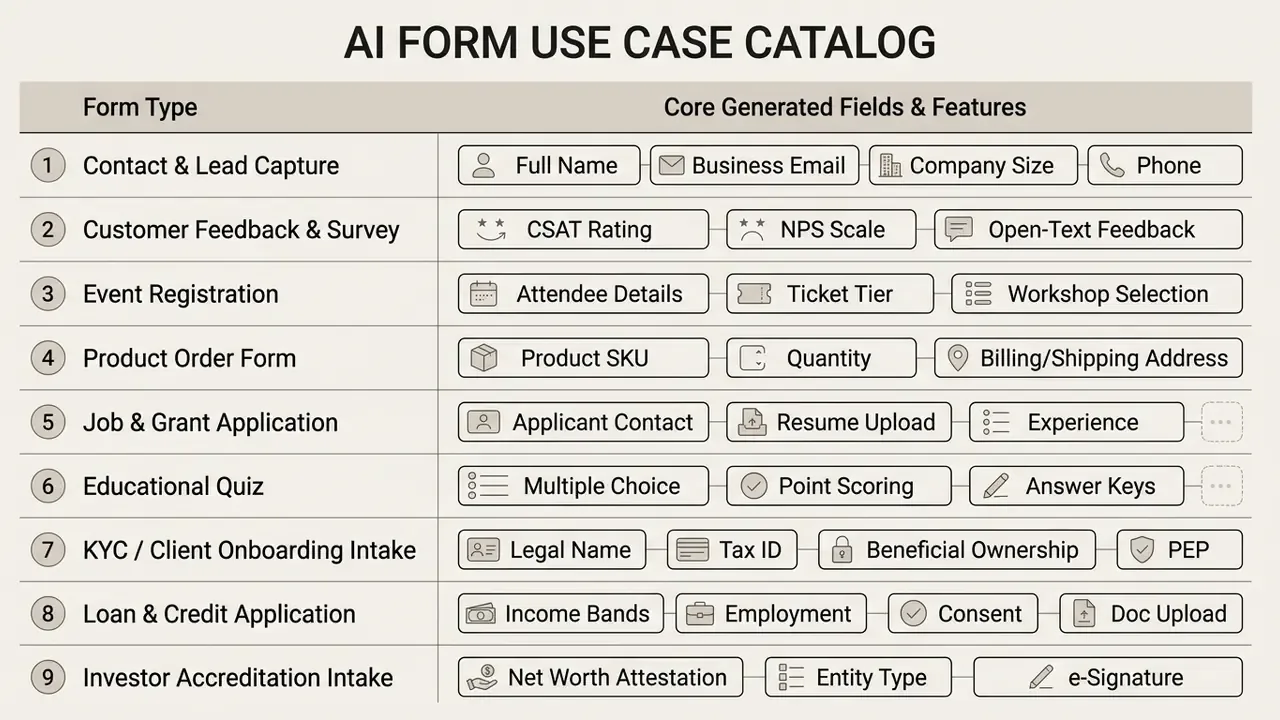
Organizations use an ai forms generator to produce lead capture workflows, customer feedback surveys, event registrations, job applications, order forms, regulated intake questionnaires, and interactive quizzes. Using an ai form creator, teams convert static documentation into interactive web forms that streamline data collection across business operations. In practice, most banks start with internal request forms before they let a model near customer-facing intake, which is a sensible sequence.
Large-scale data from Typeform's Data on Data Report indicates that one-question-at-a-time conversational formats reach an average completion rate of 47.3%, against an industry baseline of 21.5% for conventional static forms.
«One-question-at-a-time conversational forms averaged 47.3% completion versus 21.5% for traditional static forms.»
Teams evaluating multi-step workflow deployments can review the AI Media Comparison hub to weigh interface frameworks side by side.
Forms for Leads, Contacts, and Orders
Commercial forms built with an ai order form generator focus on qualified prospect details, product selections, shipping information, and transaction requisitions. An ai form maker improves lead generation by trimming unnecessary input fields, setting clear field validation, and embedding dynamic routing logic.
«A/B tests across 1.2 million sessions recorded an 11.4% lead conversion rate for AI chatbot intake versus 3.8% for standard web forms.»
Accessibility standards are not optional in commercial intake. The W3C Web Accessibility Initiative (WAI) guidelines specify that forms should collect only the data required to complete the transaction, which reduces abandonment while keeping fields grouped and error recovery explicit (W3C WAI Forms Tutorial. https://www.w3.org/WAI/tutorials/forms/). WCAG 2.2 extends this with criteria that hit regulated forms directly: adjustable timeouts, redundant-entry reduction, accessible authentication, and programmatic identification of input purpose (W3C, WCAG 2.2. https://www.w3.org/TR/WCAG22/).
In one implementation, an institutional intake pipeline replaced a legacy static PDF form with a multi-step digital intake flow. The technical team configured automated validation rules, structured field groupings, and automated CRM routing. Reported effect: form abandonment dropped by roughly 28% and manual re-entry errors disappeared across operational intake cycles. A caveat is required here. That figure reflects a single internal deployment measured against the prior quarter's baseline. It is a client-reported operational metric, not a peer-reviewed benchmark, and multi-site data would be needed before generalizing. The direction of the effect is at least consistent with W3C guidance on reducing required fields and with the Typeform completion data cited above.
A parallel pattern shows up in regulated finance. A commercial lending team converted a 14-page paper credit application into a generated multi-step intake flow. Income and employment fields received numeric validation. Document upload fields were constrained to PDF and PNG under 10 MB. Consent language rendered as an explicit checkbox with a linked privacy notice. Applications above a defined exposure threshold routed automatically to manual underwriting review rather than to auto-decisioning. That last rule is the governance point: generation speeds up intake, it does not earn the right to decide. Teams evaluating automated workflow tools can view the guide for commercial plan specifications.
Surveys, Quizzes, Registrations, and Applications
Research, registration, and feedback forms live or die on question sequencing, precise scale definitions, and neutral wording. An ai forms creator generates structured questionnaires, event registration forms, and employment applications from high-level project summaries or operational briefs.
Research on questionnaire construction notes that LLMs produce topically relevant questions but still need human review for ordering and item diversity.
«LLM-generated questionnaires are topically relevant but weaker than human-authored instruments in diversity, specificity, and logical question order.»
In specialized domains such as psychological assessment, fine-tuned models show measurable structural gains.
«After three-phase fine-tuning on a corpus of 169 psychological questionnaires, models showed a 28.6% improvement in logical consistency under expert evaluation.»
Public-sector questionnaire methodology reinforces the same sequence: define objectives, specify required variables, draft and review items, format for readability, then pilot the instrument (U.S. Census Bureau, Survey Questionnaire Construction; World Bank, Principles of Questionnaire Design). Nothing exotic. It is the same order a model risk validator would expect for any measurement instrument.
Governance Guardrails for AI-Generated Forms: Audit Logs, Versioning, and Kill Switches
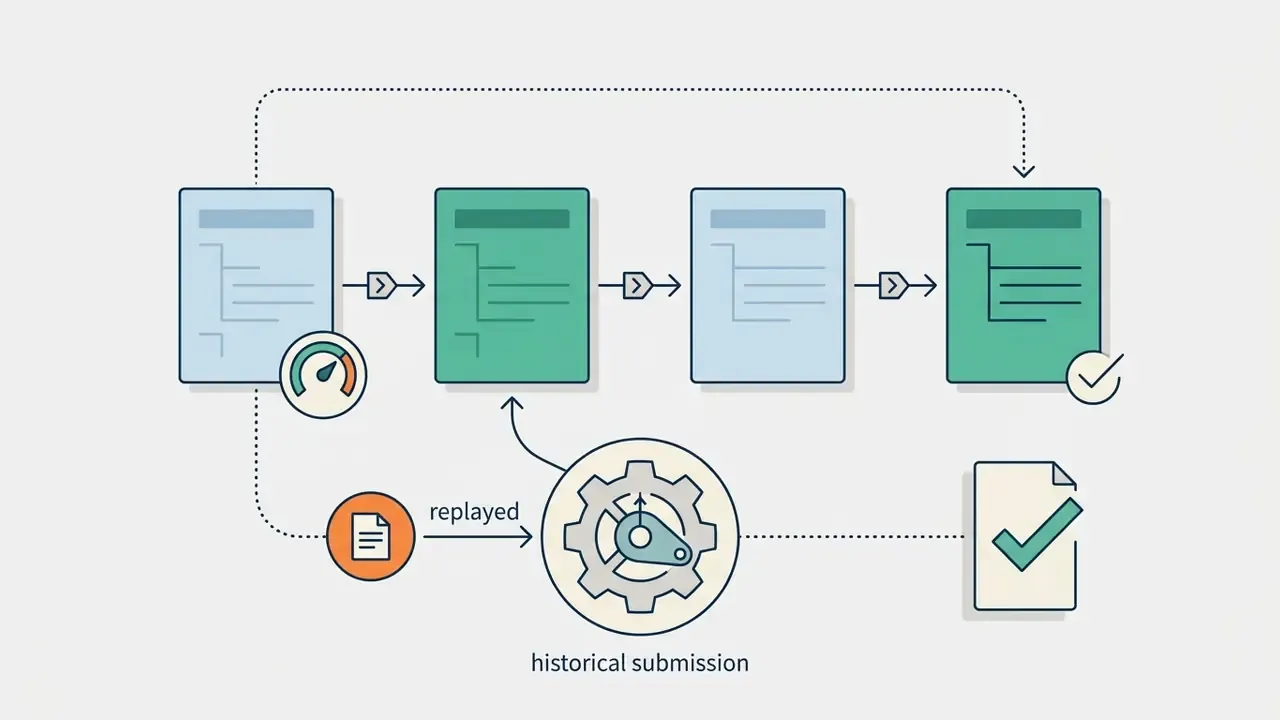
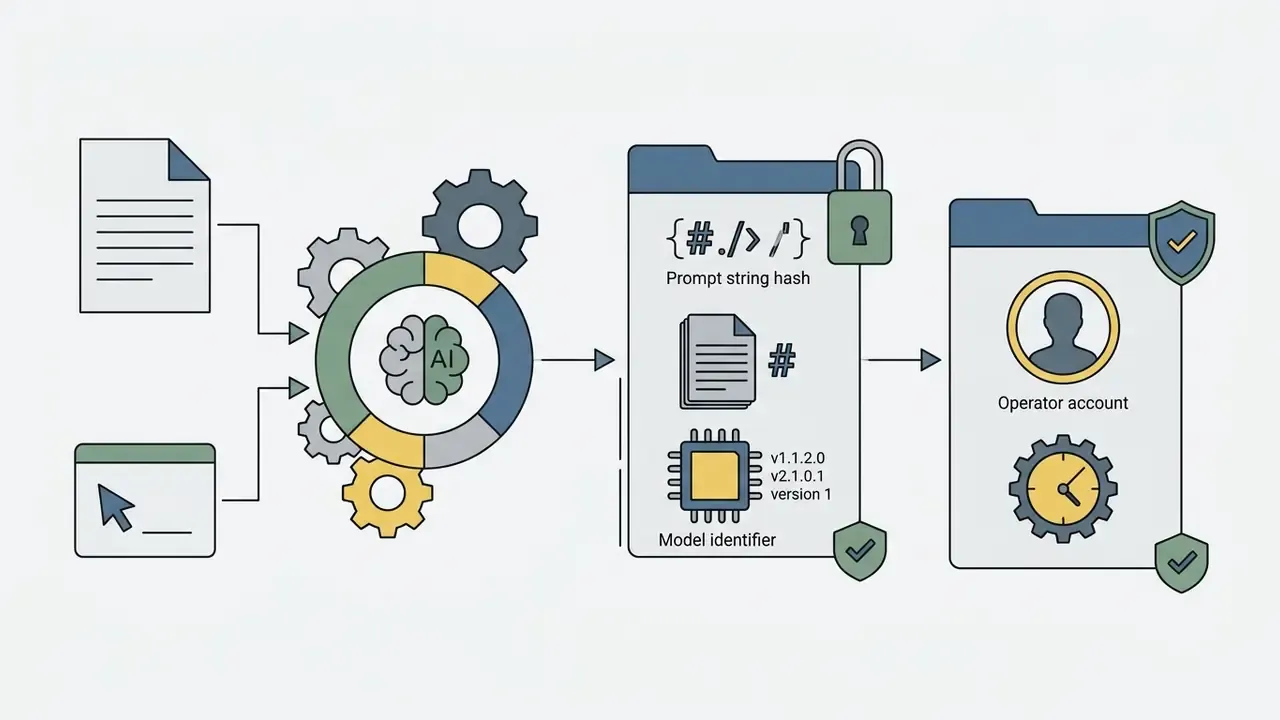
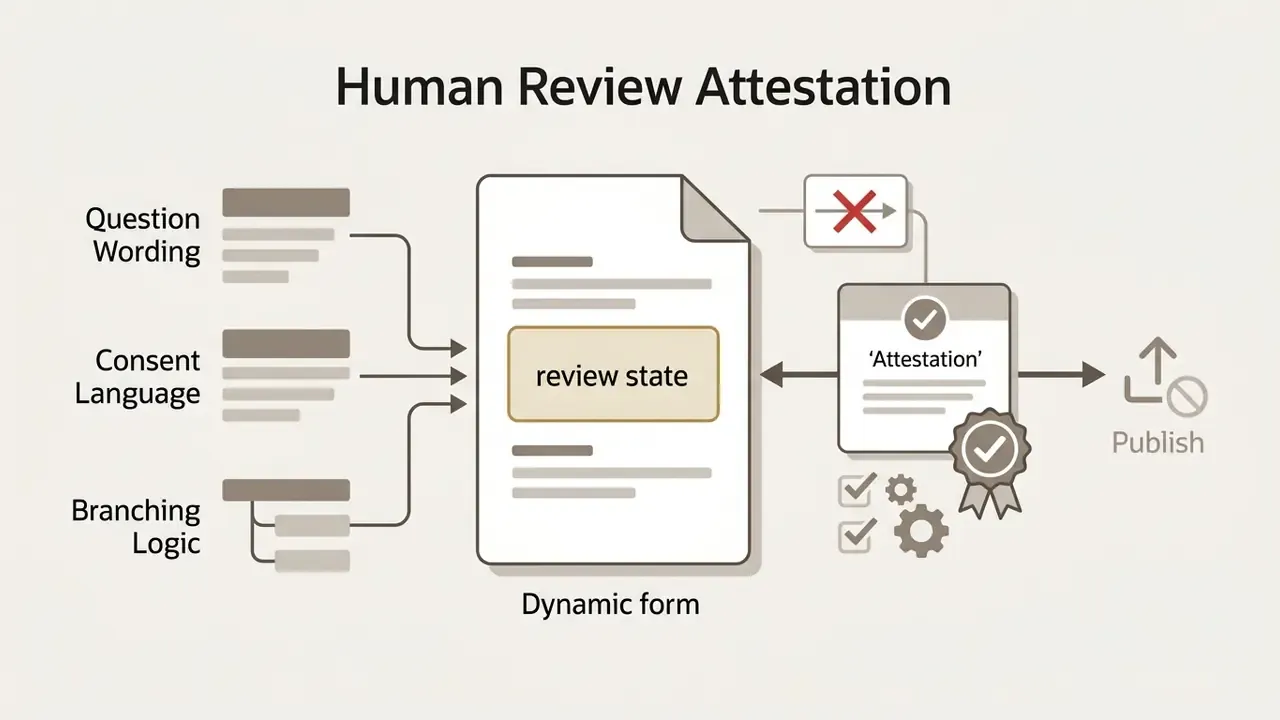
Automated generation introduces a model-risk surface that manual form building does not. When a model authors question wording, validation rules, and routing logic, the institution must be able to reconstruct what was published, when, by whom, and on which model version. Without that, "the tool made a form" becomes an audit finding rather than an efficiency story.
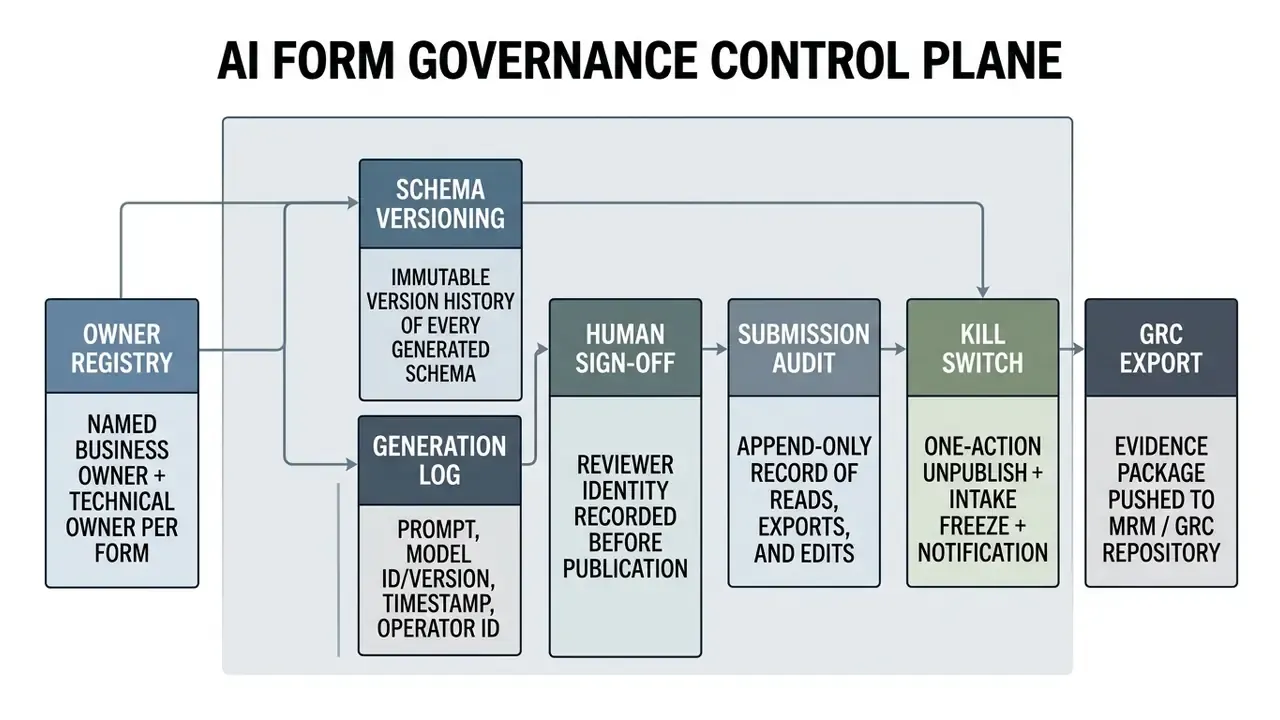
One open question deserves honesty: there is no settled industry standard for how deeply a generated form schema falls under SR 11-7 style validation. Where the form only collects data, most institutions treat it as a process control. Where generated logic influences a decision, treating it as a model is the safer reading.

Preventing Shadow AI in Regulated Environments
The fastest route to a data incident is an employee pasting an internal document into a free public form generator. Practical controls: publish an approved-tool allowlist, block unsanctioned form-builder domains at the egress proxy, require SSO/SAML-gated tenants for any form touching customer data, add "external form builders" to data-loss-prevention rule sets, and run periodic discovery scans for unapproved form domains embedded on company web properties. Pair the technical controls with a short, published exception path. Unsanctioned usage tends to grow precisely where no sanctioned alternative exists.
How to Create a Form with AI: Prompt, Text, PDF, URL, or Image
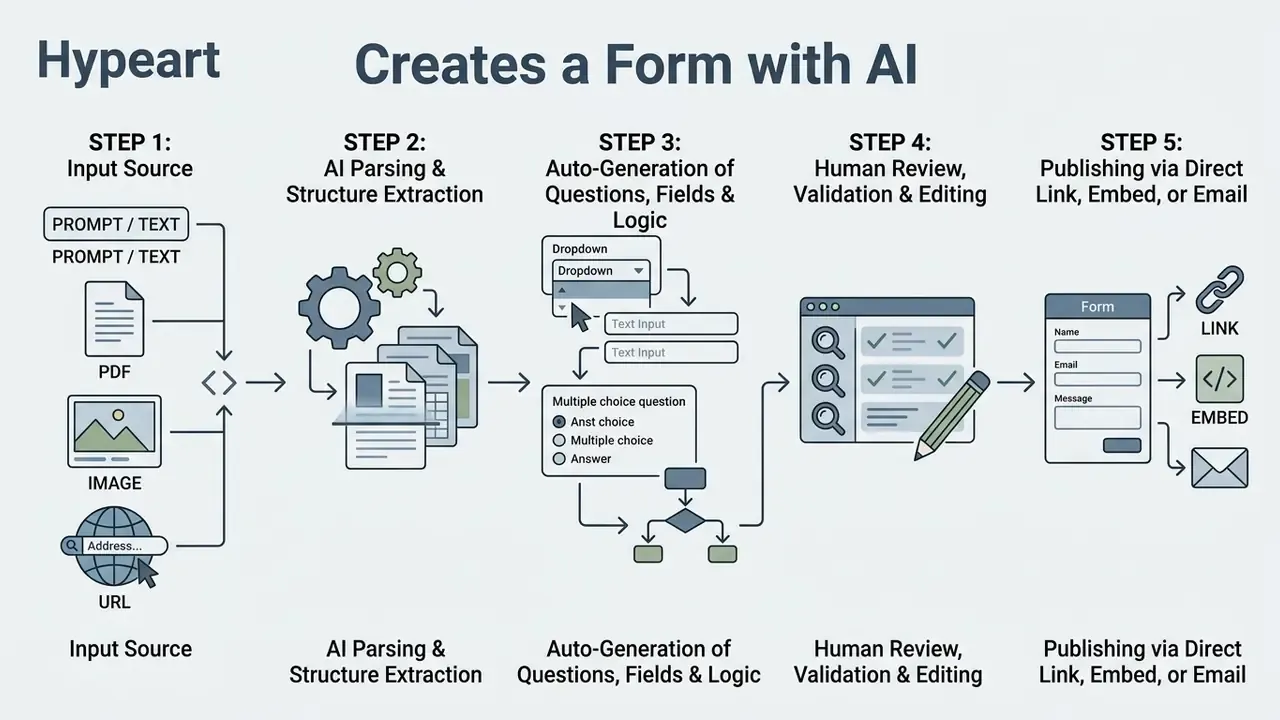
Users can create a form with ai by providing a natural language prompt, pasting unstructured text, uploading a PDF, supplying a webpage URL, or submitting a scanned image. The system processes the input source, extracts key entities, and returns an editable digital form.
Creating a Form from a Text Description
To generate a form from text, the user provides a prompt describing the form's objective, target audience, required fields, and logical constraints. The ai form creation engine interprets those instructions and constructs the structure automatically.
Effective prompts are schema-first. Naming field labels, declaring explicit data types (dropdown, date, short text), setting required status, and stating a missing-value rule inside the prompt yields higher structural accuracy (MLJAR Structured Extraction Guide, 2026; Prompt Patterns for Structured Data Extraction from Unstructured Text, University of Wisconsin-Madison). Vague prompts produce plausible forms that quietly omit the field your compliance team cares about.
Generating Forms from PDF, Image, and URL
Generating forms from complex files means combining document structure parsing, optical character recognition (OCR), and computer vision. An ai form generator pdf tool extracts text and table structures from digital documents, while an ai form generator from image converts scanned paper and screenshots into interactive fields. An ai pdf form generator is therefore only as good as its layout model. Teams working across mixed document and visual assets can also review adjacent AI image editing and document preparation tooling when source scans need deskewing or contrast correction before ingestion.
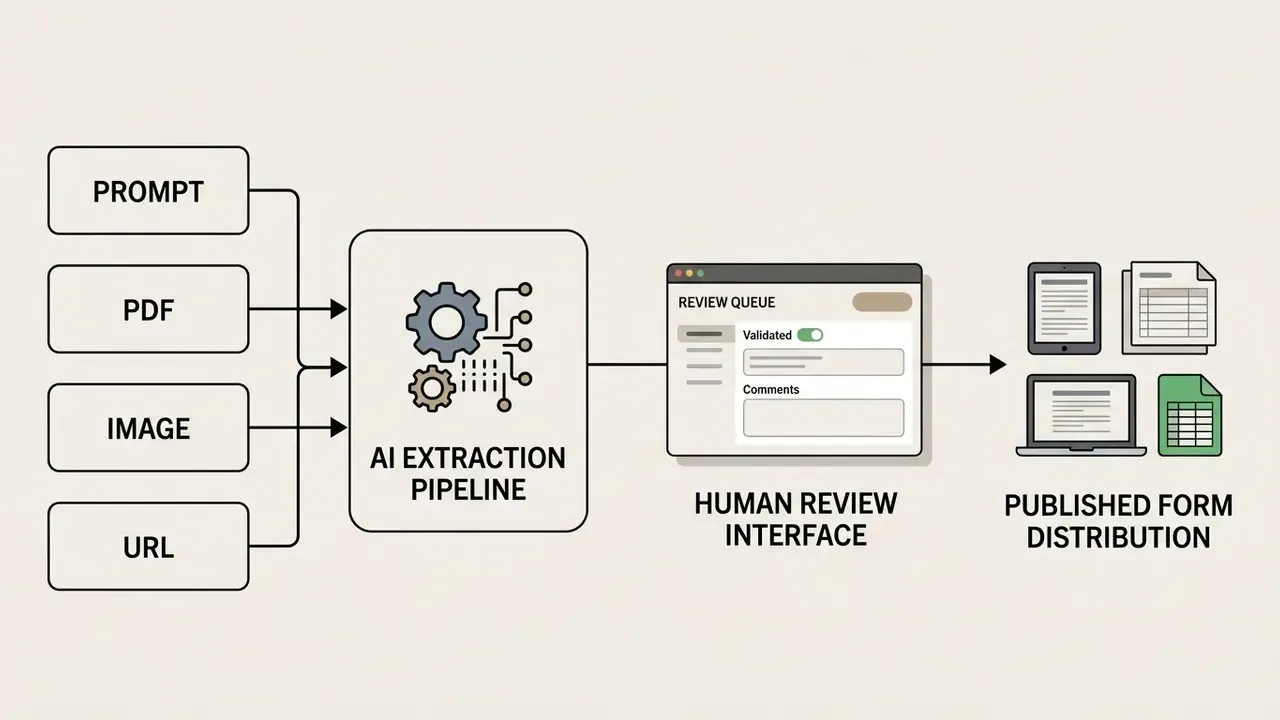
Developer documentation for document understanding platforms, including Google Cloud Document AI and Azure Document Intelligence, indicates that native digital PDFs deliver higher extraction fidelity than scanned images, because scanned files depend on OCR engines that want source resolutions of 300 DPI or higher (Google Cloud Document AI. https://cloud.google.com/document-ai/docs; Azure AI Document Intelligence. https://learn.microsoft.com/azure/ai-services/document-intelligence/). Open pipelines follow the same architecture: Docling's standard PDF pipeline combines layout analysis, table structure extraction, and OCR as the default engine for page-level structure recovery.
«Fine-tuning LLMs with automated feedback from compilers and multimodal models narrows the UI-code generation gap toward proprietary model quality.»
«A divide-and-conquer strategy for generating UI code from screenshots improves visual similarity to the original design by up to 14% over competing methods.»
Practically, image-first ingestion should be treated as a draft accelerator rather than a source of record. Recreate the fields, then verify every label, option list, and required flag against the original document. Field by field. Tedious, yes, and cheaper than a remediation cycle.
How to Create a Form with AI and Prepare It for Publication
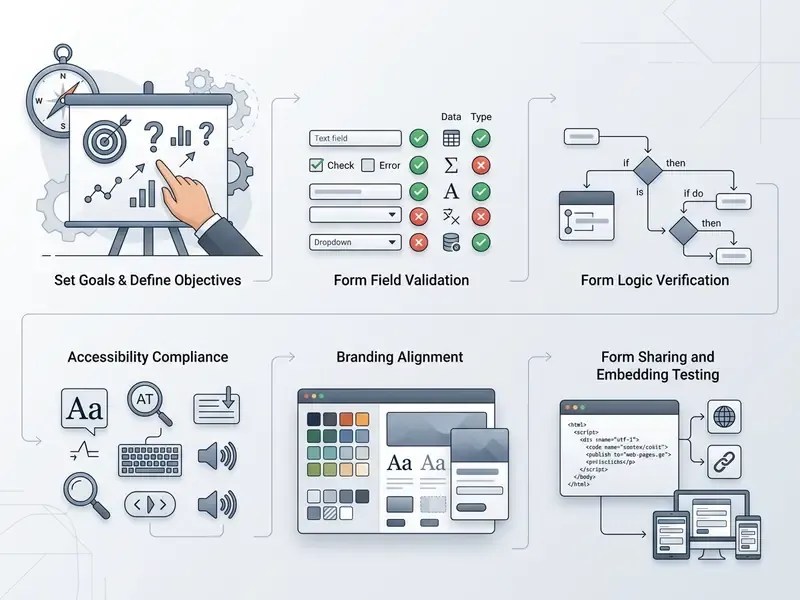
Publishing an AI-generated form means defining objective requirements, generating the draft, reviewing question accuracy, customizing branding, and configuring distribution. A structured publication checklist protects data integrity and accessibility at the same time.
To ai create a form properly, and to let teams ai create form structures at scale, operators can follow a five-step deployment framework: NIST guidance on public-facing AI documentation and LLM-generated technical content supports the same sequencing: document intended use, validate generated content, disclose AI involvement, then release only after human review (NIST, 2024 to 2026. https://www.nist.gov/itl/ai-risk-management-framework).
- Define objective: State the primary data collection purpose and identify the required response metrics.
- Generate draft: Feed structured prompts or source files into the ai form creator free interface or the licensed workspace.
- Validate fields: Review generated questions for tone, clarity, answer completeness, and logical branching.
- Apply branding: Customize colors, typography, logos, and success messages to match brand standards.
- Publish and distribute: Share via direct URL, embed snippet, or automated email distribution.
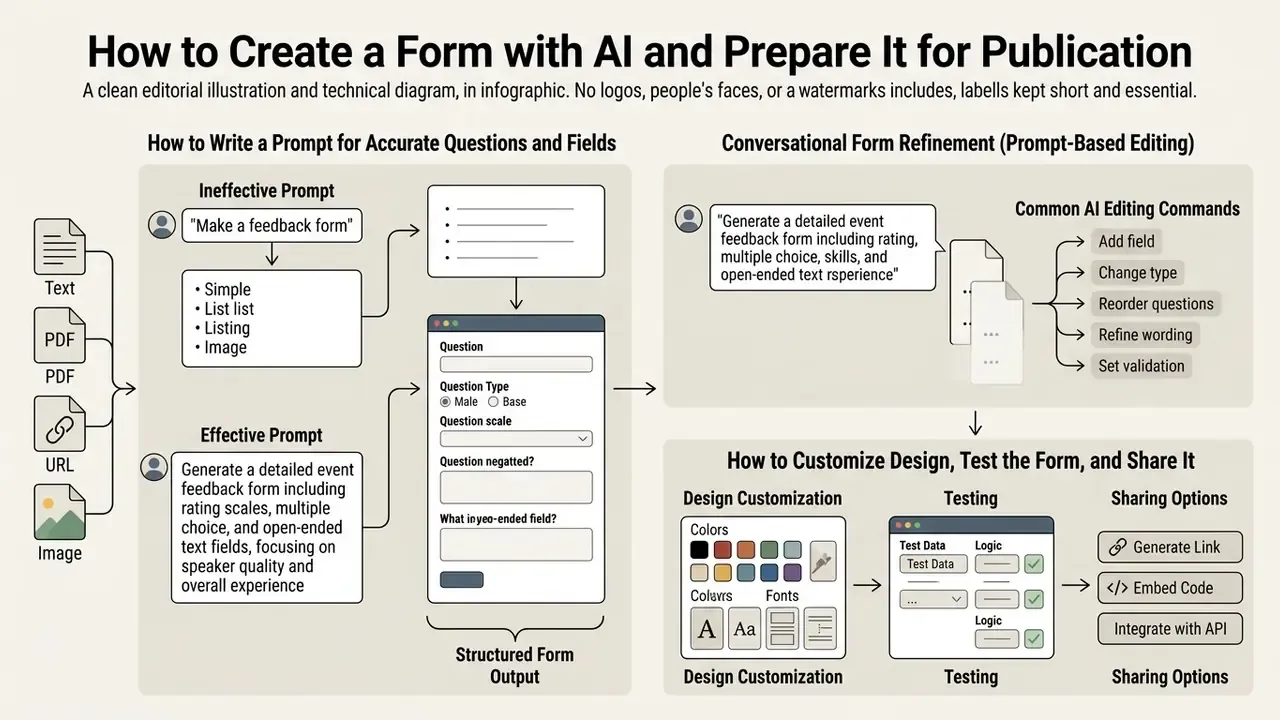
How to Write a Prompt for Accurate Questions and Fields
Generation quality tracks prompt quality closely. Effective prompts combine action directives, explicit field inventories, constraint rules, and target output specifications.
- Ineffective prompt "Create a feedback form for my website."
- Effective prompt "Generate a customer feedback form for an e-commerce platform. Include mandatory fields for Full Name, Email Address (validated format), Order Number (numeric), CSAT Rating (1-5 scale), and an optional open-text Feedback field. Add conditional logic: if CSAT is below 3, display a required dropdown asking for the primary issue category."
The operational takeaway is consistent across prompt research: structure beats verbosity. Name every field, state its type, declare required or optional status, define what happens when a value is missing, and constrain the output to a single machine-readable schema. Anything you leave implicit, the model will invent.
How to Customize Design, Test the Form, and Share It
Once generated, forms need visual customization and technical validation before public deployment. Builders provide styling controls, custom domain routing, and response collection settings.
Conversational Form Refinement (Prompt-Based Editing)
Modern AI form builders ship multi-turn conversational editing. Instead of dragging fields across a canvas, creators modify draft or published schemas through natural language. Jotform describes chat-based changes to colors, fields, and text, and Fillout drafts updates automatically when the creator types what should change.
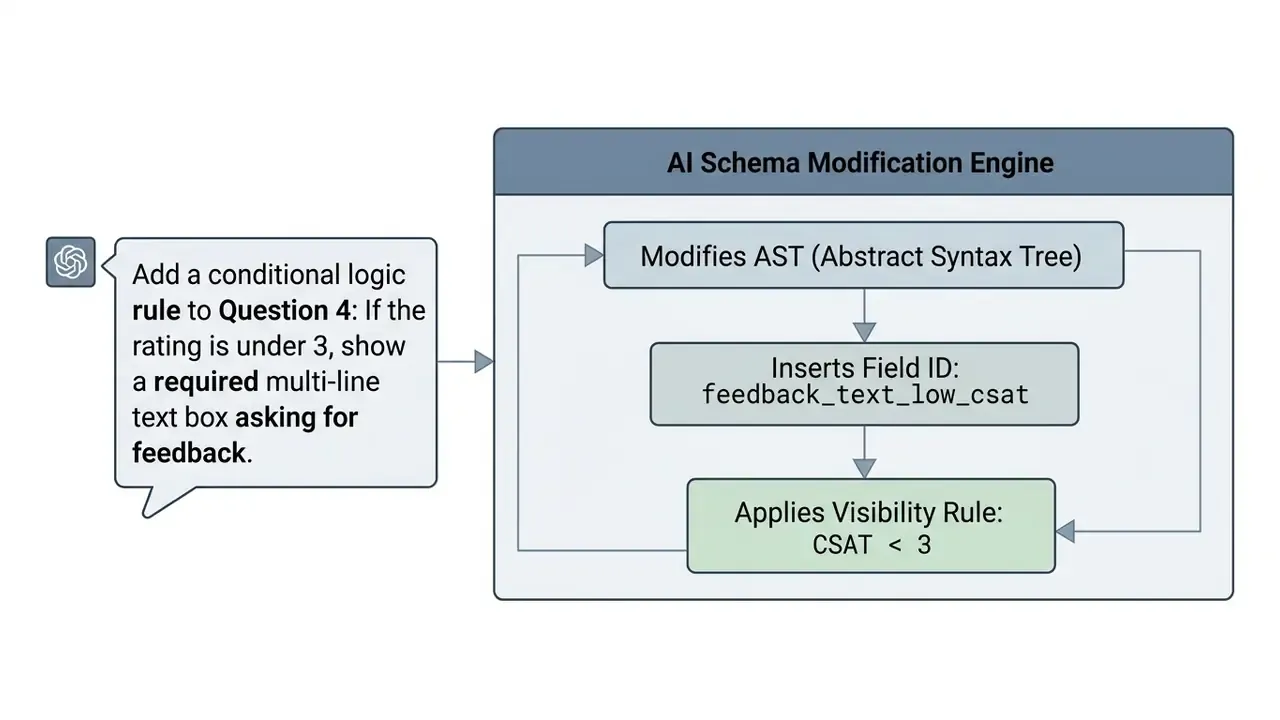
Common AI Editing Commands
- Style updates: "Change the form primary color scheme to dark slate blue and set corner radii to 8px."
- Tone adjustment: "Rewrite all survey question labels to sound professional yet empathetic."
- Field ingestion: "Insert a file upload field accepting PDFs or PNGs up to 10MB after the resume field."
- Logic edits: "If the respondent selects 'Enterprise', show the procurement contact and security review questions."
- Localization: "Duplicate this form in Spanish and keep field IDs identical for reporting parity."
Two governance notes apply to conversational editing. First, every accepted chat edit should create a new schema version rather than overwrite the previous one. Second, some platforms constrain edits procedurally. PlatoForms, for example, asks the user to accept, merge, or discard suggested fields before customization continues (PlatoForms, 2026), while Jotform documents that form-level conditional logic does not carry into its PDF editor, which means hidden fields can still surface in generated PDFs (Jotform, 2025). That second detail is easy to miss and awkward to explain afterwards.
Forms can be distributed through direct URL sharing, iFrame embedding, or email delivery. Platforms such as HubSpot and Google Forms support responsive embedding across external web properties (HubSpot Forms, 2026), and Typeform documents URL parameters for prefilled and validated data plus in-email embedding (Typeform, 2026). Before launch, test the embed in the actual host environment: QR code entry, mobile viewport, keyboard-only navigation, and screen-reader label announcement. Support teams can see the overview for documentation on embed troubleshooting.
Essential AI Form Builder Features for Production Workflows
Enterprise form tools need advanced field controls, conditional logic execution, email notification routing, security auditing, and automated CRM integrations. An ai form builder must handle complex data validation and multi-system workflows to carry commercial operations.
«GPT-4o correctly implemented roughly 77% of interactive interface elements and Claude-3.5-Sonnet roughly 79% across a benchmark of 374 interactions.»
That reliability ceiling is the practical argument for server-side validation and human logic review. Roughly one in five generated interactive behaviors needs correction before production use. Assume the fifth one is the branch that hides a required disclosure.
Advanced Fields, Logic, and Question Personalization
Advanced capabilities include conditional show and hide rules, hidden fields for attribution tracking, answer piping, and URL query parameter pre-population. These features adjust form behavior dynamically based on respondent attributes and prior interactions.
Answer piping inserts responses from earlier questions into later question labels, which produces a personalized survey experience. Query parameter pre-population lets marketing teams pre-fill known contact details through URL strings, cutting user effort and lifting completion rates (Fillout Documentation, 2026). Yandex Forms documents the equivalent pattern for hidden questions populated through a query parameter (Yandex Forms, 2026), while Slate exposes conditional logic at section, field, and prompt level (Slate, 2026).
One caution for regulated intake: hidden fields are a UX convenience, not a security boundary. Values passed through URL parameters are visible to the respondent and can persist in referrer logs, so identifiers tied to PII should be tokenized rather than transmitted in plain text.
Responses, Email Notifications, and Workflow Integrations
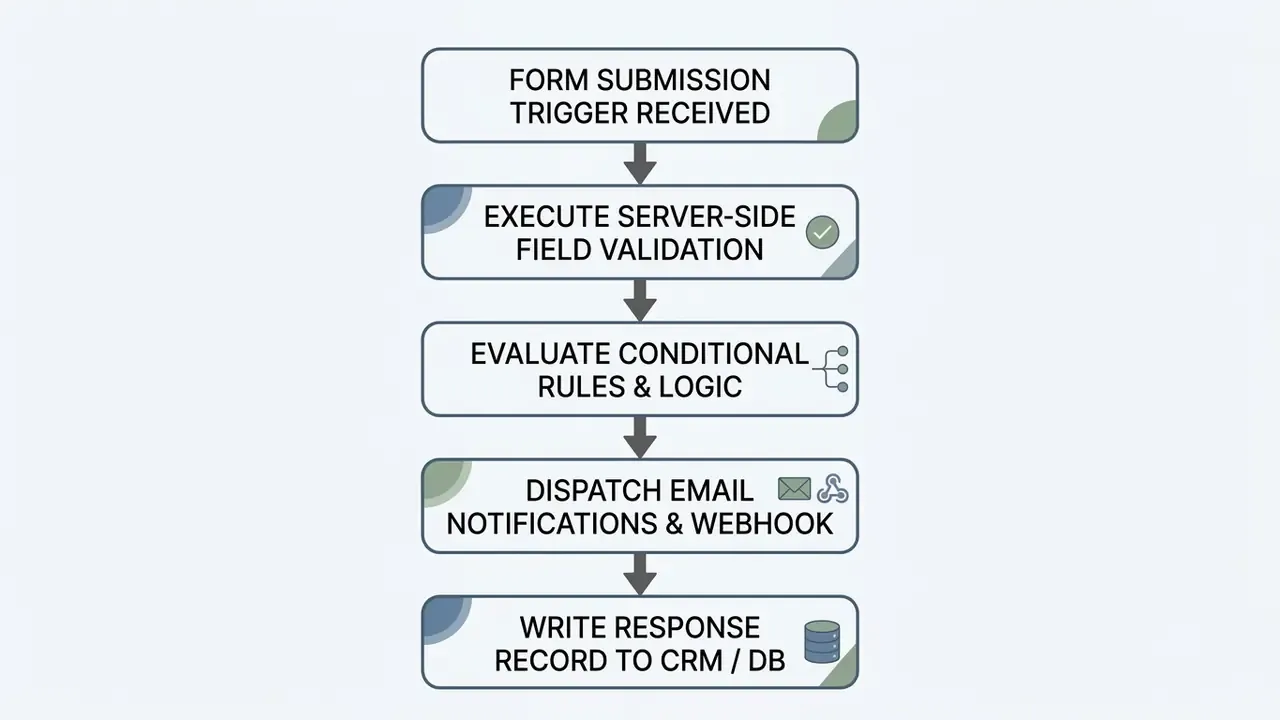
When a respondent submits, the form system processes the payload, dispatches notification emails, and fires downstream webhooks. Integrating forms with HubSpot, Salesforce, Slack, or Zapier keeps data in sync across enterprise systems in near real time.
Automated triggers let submissions initiate workflow actions such as generating sales tasks, routing support tickets, or updating customer records (HighLevel AI Studio, 2026). HubSpot notes that form-triggered internal notifications and task creation are tier-gated, so validate notification requirements against the plan before rollout (HubSpot, 2026). A small detail that has derailed more than one launch week.
Next-Gen AI Agent Integration: Model Context Protocol (MCP) and REST APIs
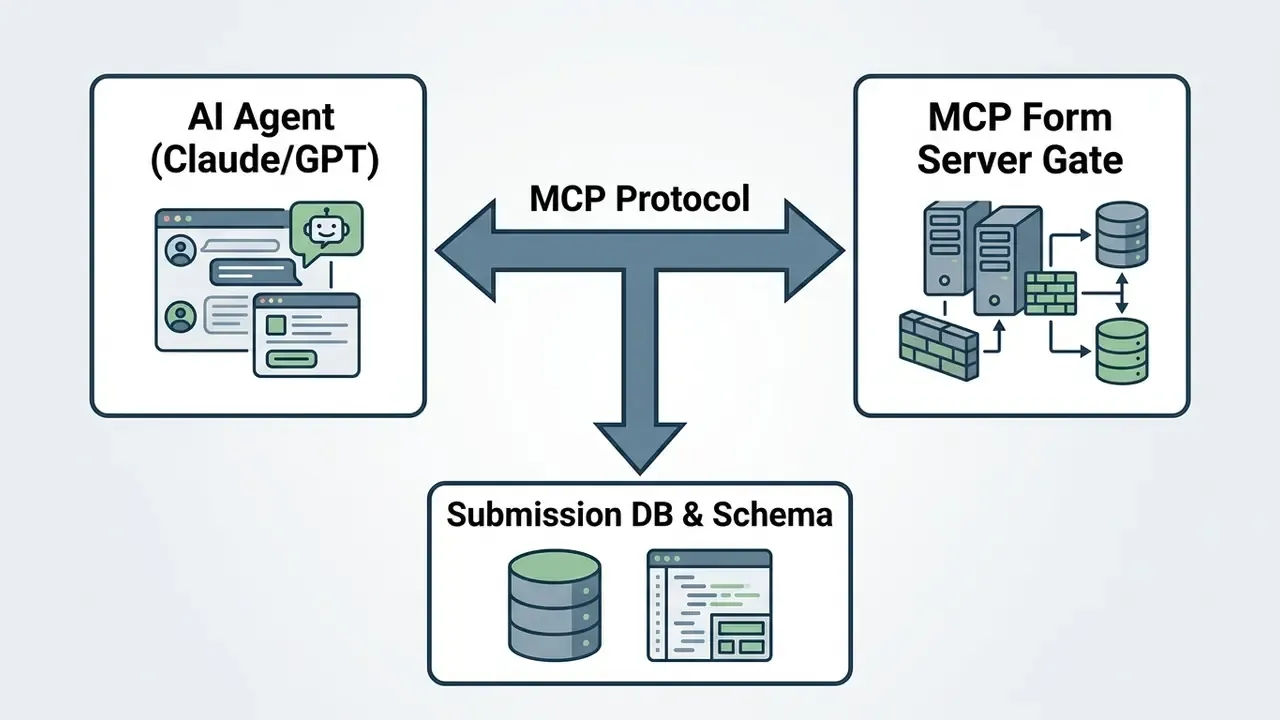
Primary MCP Capabilities for Form Infrastructure
- Real-time submission querying: Ask an agent, "Which leads submitted through the enterprise registration form today report a company size above 500?"
- Automated lead and application scoring: Pipe raw text responses into an LLM to apply fit scores against a role brief or ICP definition before the CRM record updates.
- Programmatic form generation: Trigger form creation dynamically through API calls when an upstream workflow detects a missing data requirement.
- Schema introspection: Let the agent read field types and validation rules so downstream automations break loudly on schema drift instead of silently mismapping columns.
Access Control Requirements for MCP and REST Layers
Agent access must be scoped, never blanket. Practical controls: issue read-only tokens by default, scope tokens per form rather than per workspace, redact or tokenize PII fields before they enter the model context window, log every agent query with token identity and returned record count, and enforce token expiry plus rotation on a fixed cadence. REST v2 patterns stay complementary: pulling submissions into a warehouse, pushing pre-filled form URLs back from a CRM, or building enrichment pipelines with webhook fan-out. The agent is a digital worker here, with an owner, a role, and a shutdown path.
Free AI Form Generators and Choosing a Commercial Plan
Free tier plans cover entry-level form creation, but enterprise teams evaluating an ai form generator free option have to account for submission caps, file storage limits, branding constraints, integration restrictions, and, critically for regulated buyers, the absence of contractual data protections.
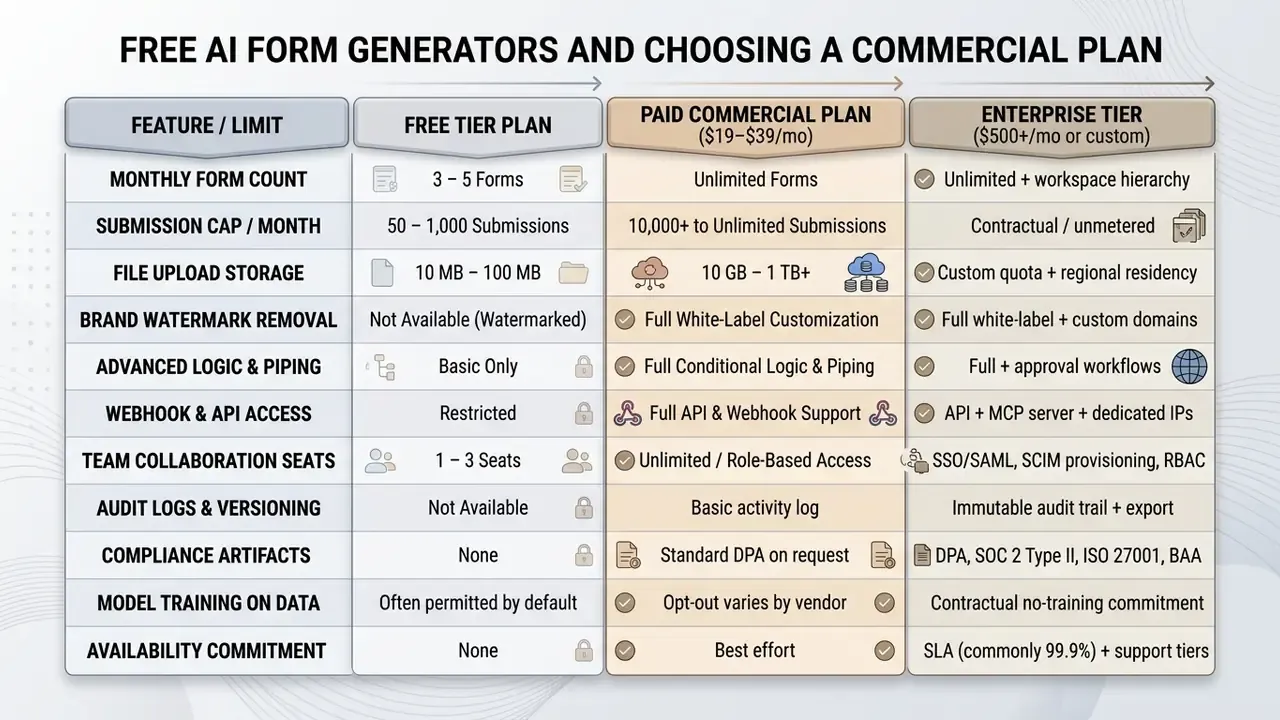
Real-World Commercial and Free Tier Comparison (2026 Market Snapshot)
When selecting the best ai form generator for your environment, the useful question is not which tool writes the prettiest draft. It is which free-tier restriction forces the upgrade, and whether that upgrade buys controls or just volume.
| Feature / Platform Limit | Formester-class (unlimited-first) | Fillout AI | Jotform AI | Google Forms + Gemini |
|---|---|---|---|---|
| Free monthly submissions | Unlimited | 1,000 / month | 100 / month | No set cap (Drive storage bound) |
| Free form limits | Unlimited | Unlimited | 5 active forms | No set limit |
| Entry paid tier | ~$13 / month | from ~$15 / month | ~$34 / month | ~$6 / user / month (Workspace) |
| What the first paid tier buys | Branding removal, conditional logic, GA4/GTM | Higher response caps, branding | Higher caps (1,000 submissions, 25 forms) | More storage and admin controls |
| AI prompt editing | Full support | Draft-update assistant | Conversational agent | Gemini in Workspace |
| Developer API & MCP | Native MCP server + REST | REST API | REST API | Apps Script / API |
Key takeaway: Some platforms cap free-tier volume aggressively at around 100 responses per month and sell the caps back as paid tiers. Others keep operational volume high, at 1,000 responses per month or unlimited, and reserve white-labeling, logic, and API access for paid plans. Pricing and caps in this table reflect publicly posted vendor plans checked in 2026 and change without notice. Verify on the vendor plan page before purchase.
«Forms with images or video showed a 120.6% lift in completion, and forms with six or fewer questions collected the highest response volumes.»
That finding matters for plan selection. Media-rich, short forms often outperform longer text-only forms, so storage and media-hosting limits on a free tier can constrain conversion more than the raw submission cap does.
Free Plan Limits to Verify Before Selection
Before deploying a free ai form builder in a commercial environment, administrators should verify submission caps, storage ceilings, team seat allocations, AI-generation quotas, and branding removal options.
Platform free tiers vary widely. Publicly posted vendor plans show patterns such as roughly 1,000 monthly responses on some free plans, a cap of around five active forms on others, and unlimited-form offerings that reserve branding removal for paid tiers. These figures come from vendor-published plan pages rather than independent methodology, and providers explicitly reserve the right to change free-tier AI quotas, response caps, and storage limits without prior notice. Treat any number in this category as a snapshot requiring re-verification at procurement time.
Additional free-tier limits that frequently surprise buyers: per-file upload ceilings around 10 MB, AI generation quotas expressed as a handful of generations per day or a monthly credit pool, response data accessible only inside the vendor interface with no export, and integrations limited to one or two basic destinations. Teams tracking budget allocations across tooling can use the AI Media Calculators to estimate operational platform costs.
For regulated buyers, the decisive free-tier limitation is contractual rather than numerical. Free plans typically ship without a data processing agreement, without a no-model-training commitment, and without audit-log export. Those three gaps make them unsuitable for customer data in banking, insurance, or healthcare intake, whatever the response cap says.
Data Security, Privacy, and Control for AI-Generated Forms
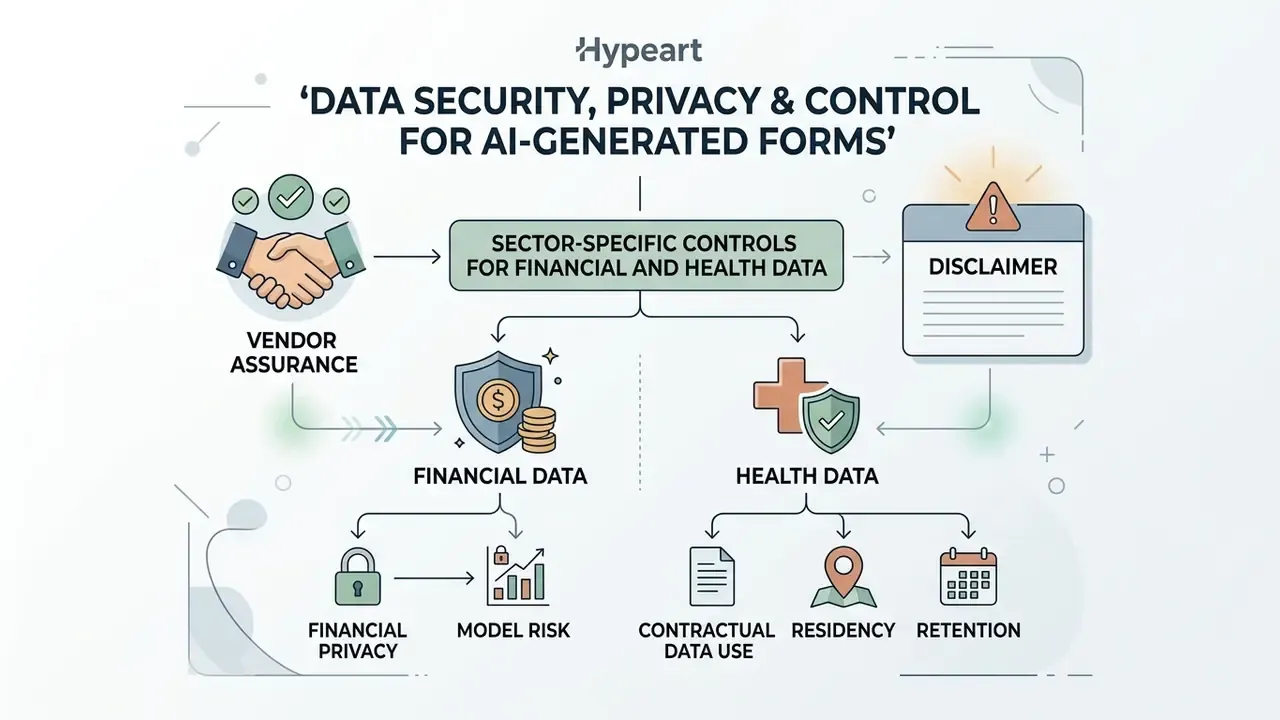
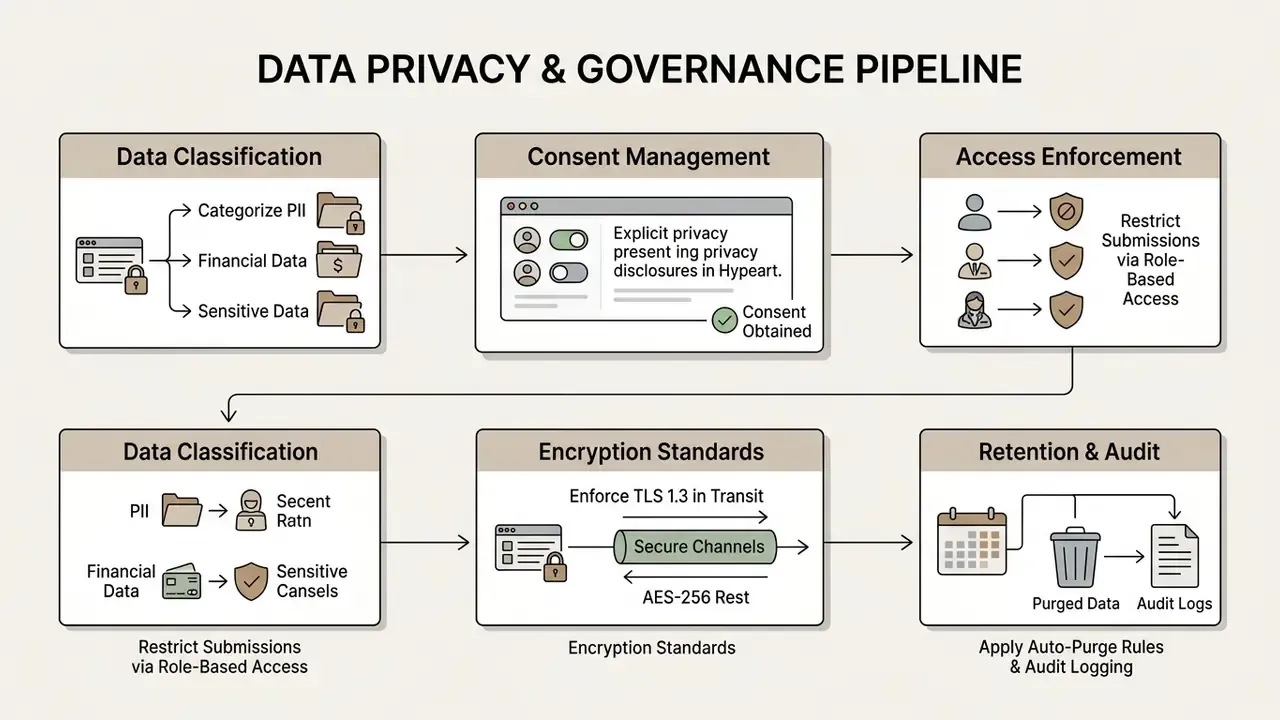
Processing customer data through an ai printable form generator or a web form engine requires strict data governance, end-to-end encryption, role-based access control, and alignment with data privacy regulation. Using ai to create forms does not transfer accountability to the vendor.
«Participants who reviewed consent through an AI chatbot demonstrated 61% comprehension, versus 46% for the static form group.»
That result cuts both ways. Conversational delivery can measurably improve whether respondents understand what they are consenting to. It also turns the consent text into generated content that must be reviewed and version-controlled like any other regulated disclosure.
The NIST AI Risk Management Framework stresses that systems processing sensitive customer disclosures need explicit retention rules, output monitoring for personally identifiable information (PII), and access control lists (NIST AI RMF 1.0, 2024; NIST SP 800-53 Rev. 5. https://www.nist.gov/itl/ai-risk-management-framework). EDPS guidance for generative AI adds documented processing purposes, defined controller and processor roles, and records of processing. Australia's OAIC guidance for commercially available AI products requires a privacy impact assessment and vendor security review before deployment.
Sector-Specific Controls for Financial and Health Data
Institutions in regulated sectors should map form deployments against the frameworks their examiners already use:
- Vendor assurance Request a current SOC 2 Type II report and, where applicable, an ISO/IEC 27001 certification scope that covers the form processing environment, not just the corporate website.
- Financial privacy Confirm that customer intake aligns with GLBA safeguards obligations and applicable FFIEC examination expectations for third-party service providers.
- Model risk Treat the generation model under SR 11-7-style governance where its output drives customer-facing decisions or disclosure language. Document purpose, validate output, assign an owner.
- Health data Where PHI is involved, require a Business Associate Agreement (BAA) and confirm that attachments and response exports remain in scope.
- Contractual data use Require a written commitment that submissions, uploaded documents, and prompts are excluded from vendor model training and from human review outside defined support workflows.
- Residency and retention Specify the processing region, the retention period, the auto-purge mechanism, and the deletion evidence provided on request.
Essential Verification Steps Before Uploading Files and Publishing
Before uploading internal documents or publishing customer-facing forms, administrators should run a formal privacy impact assessment and an access control review.
- Verify PII collection authority: Confirm legal authorization exists for requesting sensitive applicant or customer data (NIST SP 800-53).
- Review vendor AI training terms: Confirm that uploaded PDFs, images, and submission data are excluded from vendor model training sets.
- Inspect file storage security: Check that uploaded attachments are encrypted at rest and stored in regional data centers compliant with local regulation. For high-risk intake, add automated screening of submitted images and documents. AI image detection and provenance tools help flag synthetic or manipulated identity documents before they reach a reviewer.
- Validate access controls: Ensure response databases are restricted to authorized personnel with multi-factor authentication (NIST SP 800-171 Rev. 3).
- Confirm audit and rollback capability: Verify that schema versions, generation provenance, and access events are logged and exportable, and that the documented kill switch has been tested at least once. Untested kill switches are theatre.
Fact Check and Vendor Service Verification (E-E-A-T)
For governance over AI-generated media assets and intake forms, teams can view the guide on regulatory and litigation exposure.
- Data controller responsibility
- Vendor terms of service (for example IntakeForge, Dashform) state that the subscribing organization acts as the Data Controller responsible for lawful consent, privacy notices, and regulatory compliance under GDPR, CCPA, and HIPAA (IntakeForge ToS, 2026; Dashform ToS, 2026).
- Free tier modification clause
- Providers reserve the right to alter free-tier AI generation quotas, response caps, and storage limits without prior notice.
- Audit trail verification
- Official terms specify that organizations collecting regulated financial or health disclosures must independently verify data processing addendums (DPAs) before publication.
- Accessibility baseline
- W3C WAI forms guidance and WCAG 2.2 remain the referenced standards. Vendor claims of "WCAG 3.0 AAA" compliance are marketing language, since WCAG 3.0 is not a finalized recommendation.
- Verification date
- Pricing, privacy, and terms pages for each shortlisted builder should be re-checked at contract signature and again at renewal, with the review date recorded in the vendor file.
FAQ: AI Form Generators, Google Forms, and Governance
Can You Use AI to Create Google Forms?
Yes. You can build Google Forms with built-in Gemini features or third-party Workspace add-ons, which is what most searches for an ai google form generator or ai google forms generator are really after. Google Forms includes a "Help me create a form" feature powered by Gemini that drafts forms from natural language prompts or existing Drive files, including Docs, Sheets, Slides, and PDFs (Google Workspace Updates, 2025. https://workspaceupdates.googleblog.com). Google also shipped "Suggest questions," which generates two to four additional items for forms that already contain at least two questions, plus Gemini-based response summarization and theme analysis for open-text answers. Note that the native feature launched English-only and is plan-gated by Gemini and Workspace availability, so a fully free ai google form generator free path usually means a marketplace add-on rather than the native tool. Third-party extensions acting as an ai google form creator or ai google form maker can build form structures from uploaded PDFs, Word documents, and scanned images via OCR (Google Workspace Marketplace, 2026).
Can You Edit a Form After Initial AI Generation?
Yes. AI-generated forms stay fully editable. You can change question phrasing, add or remove fields, adjust input types, update conditional logic, and apply custom themes directly in the platform editor (Jotform AI, 2026; Microsoft Power Pages, 2025). The difference between platforms is workflow rather than capability: some allow direct drag-and-drop editing of the generated draft, others require accepting or merging the AI suggestion set first, and a growing number offer chat-based edits alongside the manual canvas.
How Fast Does an AI Form Generator Build a Complete Form?
Most engines return a structured draft within 15 to 30 seconds after receiving a prompt or parsing an uploaded file. Speed depends on document length, layout complexity, and the amount of conditional logic requested. Google does not publish a fixed generation time for its native Forms feature, so plan around observed behavior rather than a vendor number.
What Is the Best AI Form Generator for Business Workflows?
It depends on what breaks first in your environment. Prompt-first tools excel at rapid drafting and visual design. Document-first engines specialize in high-accuracy PDF field extraction and OCR. Regulated buyers should weight SSO/SAML, audit-log export, DPA availability, and no-model-training commitments above raw submission caps. An ai form maker that generates beautifully but cannot export an access log will fail the first internal audit.
Are AI-Generated Forms Secure for Collecting Customer Data?
They can be, when hosted on platforms enforcing TLS in transit and AES-256 at rest, role-based access control, multi-factor authentication, and defined retention policies. Verify that vendor terms exclude customer responses from AI model training datasets and that audit logs are exportable as examination evidence. Security here is contractual as much as technical.
Can an AI Form Generator Connect to Claude or ChatGPT?
Yes, when the platform exposes an MCP server or a REST API. MCP lets a compatible model read submissions and schemas directly, for example scoring job applications against a role brief, while REST endpoints support warehouse ingestion, pre-filled URL generation, and webhook-driven enrichment. Scope tokens per form, keep them read-only by default, and redact PII before it enters the model context.
Can I Generate a Form from a Scanned Paper Document?
Yes. OCR-based ingestion recreates fields from scans and screenshots, but accuracy tracks source quality. Aim for 300 DPI or higher, deskew the page, and manually verify every label, option list, and required flag before publishing.
Do AI-Generated Forms Meet Accessibility Requirements Automatically?
No. Generated drafts usually include programmatic labels, but keyboard navigation, error recovery messaging, timeout adjustment, and input-purpose identification must be verified against W3C WAI forms guidance and WCAG 2.2 before publication. Teams reviewing adjacent tooling can compare free photo editors for document cleanup or review AI Media Commercial-Use licensing guidance for generated assets.
Technical Summary and Verification Metrics
Pre-Publication Checklist
Checklist0 / 10
Limitations, Open Questions, and a Safe Next Step
Three things in this article remain unsettled, and pretending otherwise would be dishonest. First, the strongest completion-rate data comes from vendor research rather than independent replication, so treat the 47.3% figure as indicative of a pattern, not a promised outcome. Second, interface-generation benchmarks measure code correctness, not regulatory suitability. A form can be 100% functional and still collect data you had no lawful basis to request. Third, there is no consensus yet on whether a form-generating model belongs in the model inventory. Reasonable institutions currently answer differently.
A safe next step is narrow by design. Pick one low-risk internal form, generate it, log the prompt and model version, have a named reviewer approve the schema, publish it behind SSO, and test the kill switch once. Then decide whether the control set holds before anything customer-facing gets near a generator.
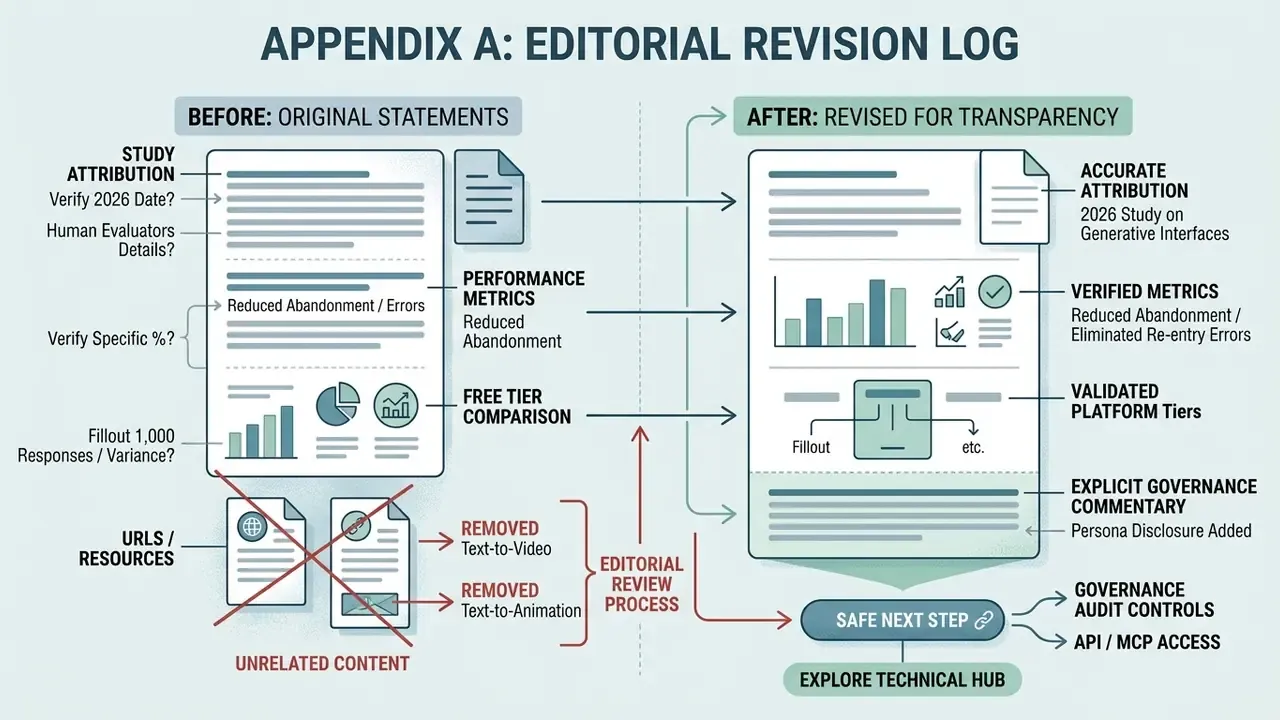
Appendix A: Editorial Revision Log