Why does this matter to anyone outside a design team? Because marketing imagery is a customer-facing artifact. In a bank or a mature fintech, an edited photo can carry a claim, a product feature, or a person's likeness. That puts image tooling inside the same conversation as any other non-deterministic model.
Executive Summary
- Editing is not generation.An AI photo editor conditions output on both the source image tensor and the prompt, so unmasked geometry, product identity, and camera perspective survive the edit. A text-to-image generator rebuilds the scene from scratch on every run.
- Quality is now measurable, not anecdotal.Region-aware benchmarks (BPM, ComplexBench-Edit, I2EBench, DiQuID, VIEScore) let risk and creative teams score instruction adherence and background preservation instead of trusting vendor marketing claims.
- Legal exposure sits in two placesrights to the source photograph, and the platform Terms of Service that govern the output. U.S. copyright protects only human-authored contributions; commercial deployment rights come from vendor terms and, for regulated buyers, from enterprise IP indemnification clauses.
- Free tiers are a Shadow AI vector.Consumer freemium editors are excellent for personal work and small-business catalogs. Uncontrolled uploads of internal, customer-facing, or PII-bearing imagery need a documented policy: zero-data-retention, encrypted transport, SSO, and audit logs of prompts, masks, and model versions.
This guide moves from the editor-versus-generator distinction to the task list, commercial rights, industry scenarios, the six-stage workflow, tool selection, data protection, a model risk checklist, pricing tiers, and a plain-language FAQ. Read it end to end, or jump to the part your team is stuck on.
What Is an AI Photo Editor and How It Differs from an AI Image Generator
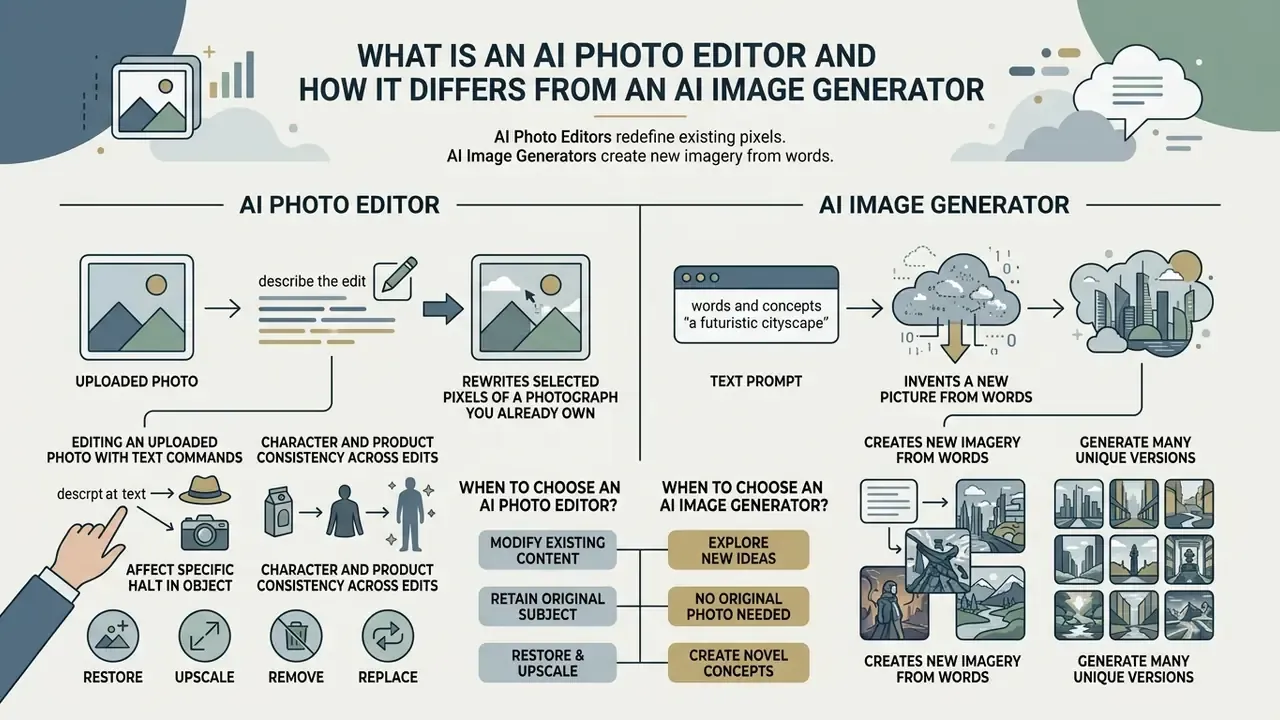
In two sentences: an AI photo editor rewrites selected pixels of a photograph you already own, while an AI image generator invents a new picture from words. The difference is the conditioning signal, and it decides which tool is legally and visually safe for your task.
An AI photo editor operates directly on an uploaded source photograph to execute localized modifications while preserving surrounding composition. An AI image generator synthesizes an entirely new visual from scratch using text prompts alone. The primary technical distinction lies in input conditioning: instruction-based image editing (IIE) conditions generation on both the source image tensor and text prompt guidance, whereas text-to-image generation relies solely on textual conditioning vectors (R-Genie REditBench, 2024; ImgEdit, 2025).
Editing an Uploaded Photo with Text Commands
Editing an uploaded ai photo or ai image using natural language means translating textual commands into spatial modifications via mask proposals or user selections. Modern diffusion-based pipelines receive an input image X_img, a target mask M, and a text prompt P, then modify pixels exclusively within M while enforcing structural consistency across unmasked regions (Imagen Editor and EditBench, CVPR 2023). When a user asks to add ai to photo or run editor edit tasks, cross-attention layers steer latent denoising to inject the specified subject without distorting background lighting, camera angle, or perspective.
Prompt-to-Prompt research showed that changing only the text stream, while holding cross-attention maps fixed, reroutes synthesis without touching layout. That finding is the theoretical basis of every modern "describe your edit" interface. SmartBrush (CVPR 2023) added detector-derived mask proposals so the background is explicitly constrained during training, not merely hoped for at inference.
Character and Product Consistency Across Edits
One property separates professional editors from novelty filters: character consistency. Faces, proportions, hairlines, body geometry, and garment style have to stay uniform across different poses, outfits, or backgrounds. For storytelling, brand mascots, employee headshot batches, and fashion catalogs, identity drift is the dominant failure mode. Reference-conditioned pipelines soften it. Adobe Firefly guidance for realistic portraits recommends supplying a second reference photo to hold the same face across generations, which suggests identity stability depends on visual conditioning rather than text alone (Adobe Firefly Help, 2026).
When to Choose an AI Image Generator and When to Choose an AI Photo Editor
Select an AI photo editor when the business objective demands modifying specific details on a pre-existing asset: replacing packaging backgrounds, removing transient objects, or executing local generative fills without altering original product geometry or subject identity. Choose an AI image generator when you need broad conceptual assets, hypothetical marketing compositions, or digital artwork where no real-world source image constrains the frame.
Instruction-based editing quality is now quantified through region-level distance metrics rather than a single blanket percentage.
«ComplexBench-Edit measures preservation of non-edited regions via L1/L2 distances; OmniGen achieves the best values, L1 = 0.0377 and L2 = 0.0068.»
Independent human-rating work adds a sobering counterweight to vendor demos. Evaluations published in 2025 found that even leading editors fully satisfied only about one third of real user requests, with spatially precise tasks (object removal, background replacement) scoring far below global style or color edits (2024–2025 IIE benchmark studies). Worth remembering before you promise a marketing lead a one-click miracle.
Table: Comparison of AI photo editor (instruction-based editing) versus AI image generator (text-to-image synthesis).
| Dimension | AI photo editor (instruction-based editing) | AI image generator (text-to-image synthesis) |
|---|---|---|
| Primary input | Uploaded source photo or image, target selection mask, text prompt | Textual instruction prompt, optional style or reference image |
| Structural preservation | High: retains non-masked geometry, camera angle, subject identity | None: generates new structural layout and perspective per prompt |
| Core use cases | Object removal, background replacement, generative fill, product updates, restoration, upscaling | Concept art, brand-new visual creation, abstract background generation |
| Evaluation focus | Instruction adherence plus background consistency (BPM score) | Prompt-image semantic alignment (CLIP score) plus global aesthetics |
| Legal anchor | Rights to the source photo plus derivative-work permissions | Training-data provenance plus platform output terms |
In plain text: the editor keeps your frame and changes a region inside it. The generator keeps your idea and invents a frame around it. Everything downstream, from licensing to validation, follows from that single difference.
What Tasks an AI Photo Editor Solves
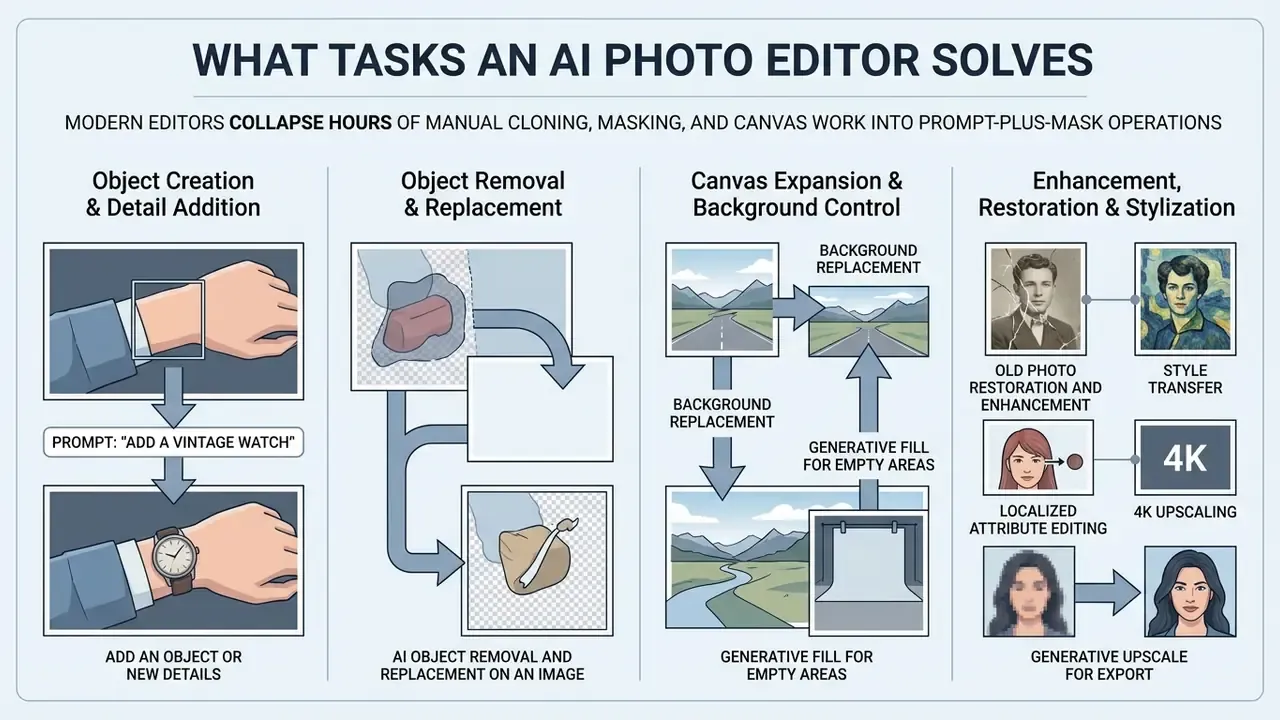
In two sentences: modern editors collapse hours of manual cloning, masking, and canvas work into prompt-plus-mask operations. The functional surface now spans removal, insertion, background swaps, restoration, upscaling, style transfer, multi-image fusion, and perspective-aware typography.
Current ai photo editor tools resolve the familiar visual production bottlenecks by automating localized object additions, unwanted distraction removals, background substitutions, and generative canvas extensions. Vendor benchmarking reports Generative Fill and Generative Expand removing unwanted elements and reconstructing backgrounds in seconds, over 10x faster than traditional retouching in Adobe's own benchmark tests (Adobe Firefly Report, 2025). Independent quality benchmarks such as DiQuID (2025) confirm that visual realism across spatial boundaries has improved sharply, while noting that spatially precise edits remain the hardest class.
How to Add an Object or New Details to a Photo with AI
To add ai image to photo or insert new elements onto a pre-existing picture, the underlying inpainting pipeline uses a bounding mask alongside context-aware prompts. To add details to photo ai without creating unnatural boundaries, the model reads peripheral illumination, shadow vectors, and color temperature before it paints anything.
«DiQuID evaluates 95,839 inpainted images with PSNR, SSIM and LPIPS: modern diffusion models produce results that are hard to distinguish from the original.»
During an operational review of visual workflow automation in financial services marketing, an editorial team applied controlled inpainting masks to add ai to a picture for promotional campaigns. By restricting mask bounds and specifying exact lighting parameters in the prompt, the team eliminated artifact bleeding across 150 brand assets while cutting manual editing cycle time from three hours to four minutes per image in internal workflow benchmarks (single-team measurement, not a vendor-published figure, and illustrative rather than audited).
When executing an instruction to add something to photo ai, say adding a laptop to a desk, best practice is a slightly enlarged mask around the insertion zone. That headroom lets diffusion models such as Stable Diffusion Inpainting or FLUX.1 Fill render matching shadows and ambient occlusion directly onto surrounding surfaces (OpenArt Lighting Guide, 2025; Runware Inpainting Specs, 2026). Runware documentation is explicit about mask polarity: white areas are modified, black areas are preserved, and blurred or gradient mask edges smooth boundary transitions. Amazon Nova guidance adds that a mask image is usually more effective than a mask prompt, and that the prompt should describe the whole intended scene after the edit, not only the new object. Small detail, big difference.
Object Removal and Replacement on an Image
Background Replacement and Generative Fill for Empty Areas
Background replacement and generative fill decouple foreground subjects from peripheral environments via automated matting networks. Generative fill lets you select empty canvas boundaries (outpainting and image expansion) or interior regions and populate them with contextually congruent content. Systems like Adobe Firefly Generative Expand and Canva Generative Fill analyze edge pixel densities to extend compositions beyond original framing limits, preserving horizon lines and depth-of-field blur (Adobe Help Center, 2026).
Harmonization is a separate stage in the academic pipeline. DoveNet (CVPR 2020) describes composite imaging as segmentation followed by foreground adjustment, which is precisely why professional editors expose a distinct "Harmonize" or "Match lighting" control after a background swap. Firefly's documented order of operations, Remove background then Generate Background, mirrors this two-step logic and keeps the edit non-destructive.
Old Photo Restoration, Style Transfer, and 4K Upscaling
Beyond point edits, current models handle heavy reconstruction and transformation work:
- Old photo restoration and enhancement removal of scratches, dust, and compression noise, plus reconstruction of lost facial detail with clarity gains up to roughly 400% (toward 4K output) without introducing blur or plastic skin. Family-archive restoration is one of the highest-satisfaction consumer scenarios: a blurry 1990s print of a relative can be genuinely brought back into focus, not merely sharpened.
- Style transfer transferring artistic texture, palette, and lighting from a reference image onto the source photograph while fully preserving object geometry. Upload a reference and the editor recreates your frame with matching colors, grain, and tonal treatment.
- Localized attribute editing fast swaps of character-level elements, for example
"change hair color to platinum blonde, keep natural light"or"change outfit to a black tuxedo". - Generative upscale for export detail-aware upscaling for print or marketplace requirements, applied after the creative edit is approved so artifacts are not amplified.
Multi-Image Fusion: Working with 2 to 3 Source Photos
Advanced editors accept two or three input images at once. One photo acts as the subject, the second supplies texture, style, or environment. You can apply the aesthetic of the first image to the objects of the second, or combine separate shots into a single coherent collage. Cross-attention vectors reconcile depth of field, focal length, and shooting angle of both sources inside the final tensor, so a fused composite reads as one exposure rather than a paste-up. Typical prompt patterns: "combine these into a single product collage", "apply the style of the first image to the others", "place the subject from image 1 into the scene from image 2, match the light direction". Also a practical way to add to an image with ai when a second shot holds the missing element.
Adding Text, Logos, and Typography with Correct Perspective
Classic raster editors stamp flat type onto a layer. An AI photo editor integrates lettering and marketing logos into the photographic light environment instead. The algorithms estimate surface curvature, shadow direction, and material texture, so an added element (a brand print on a T-shirt, a shop sign on a facade, a watermark on a lifestyle shot) behaves like an original part of the frame. Practical effect: captions, price badges, and logo overlays for social and e-commerce visuals no longer require manual warping, displacement maps, or hand-painted shadows. One caveat for regulated marketing: any added on-image text is a claim, and it needs the same review path as body copy.
Can AI-Edited Images Be Used in Commercial Projects
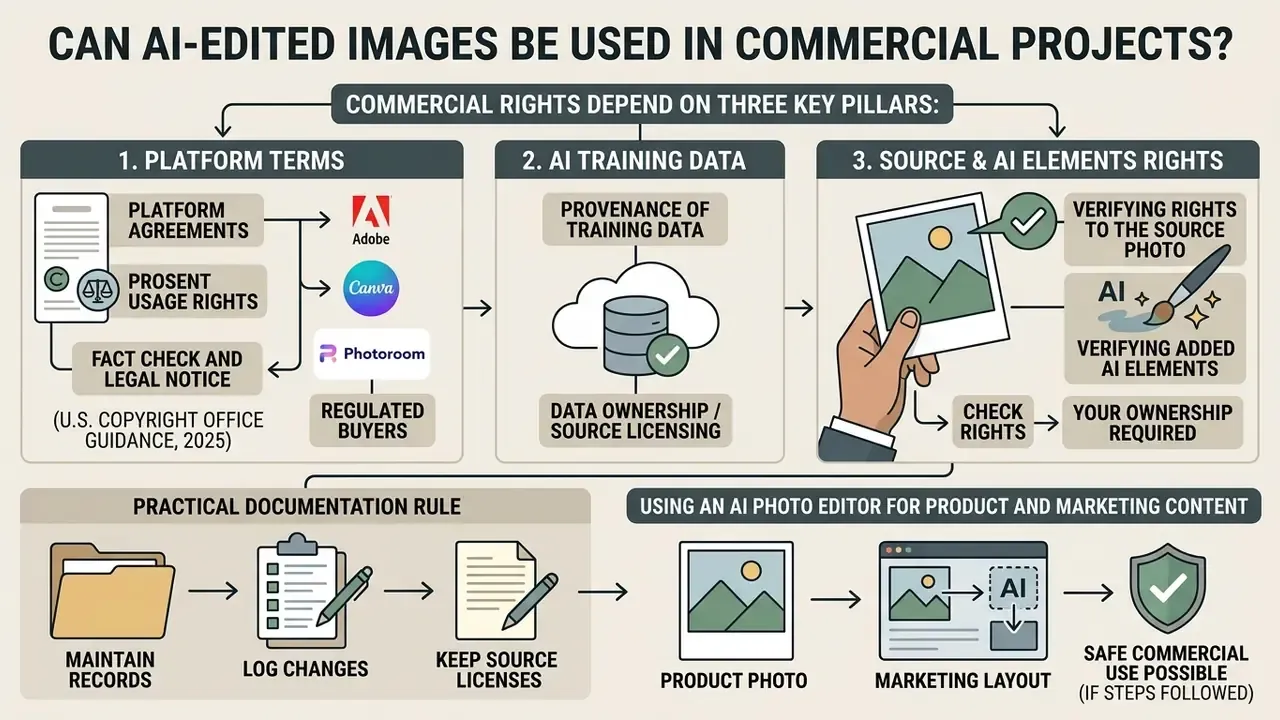
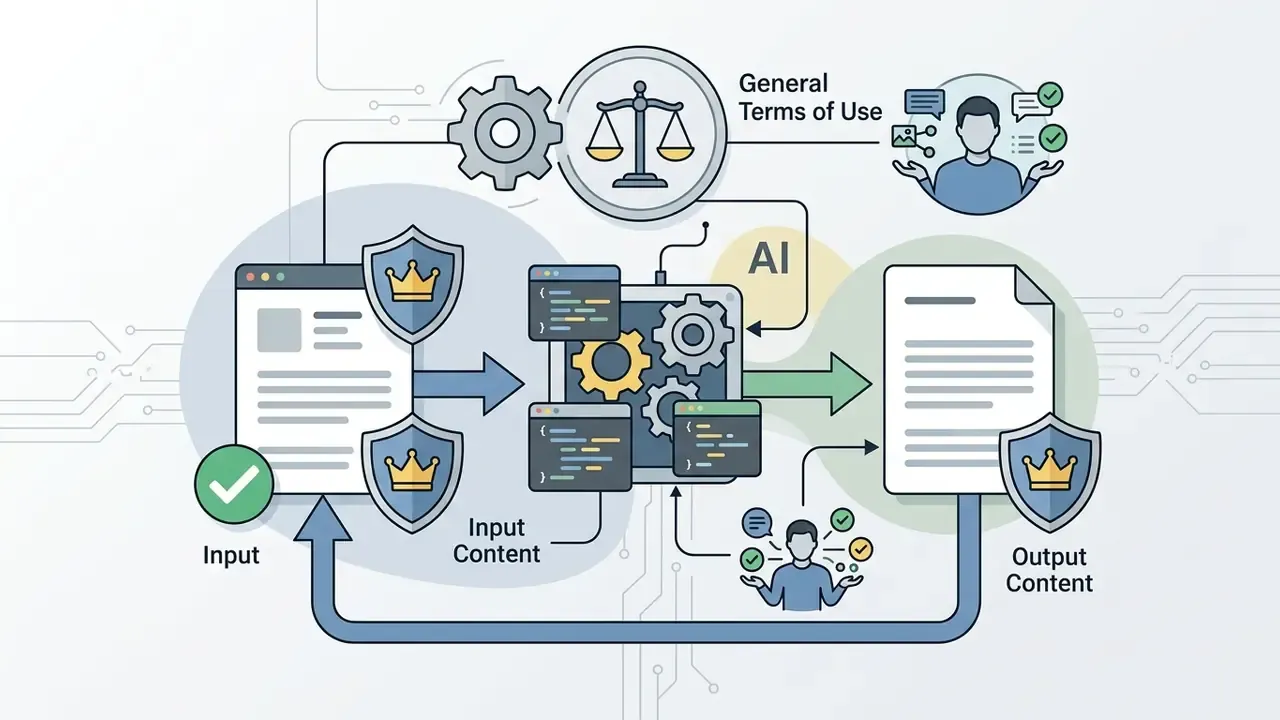
In two sentences: commercial rights depend on the platform terms, the provenance of training data, and, most often overlooked, your rights to the original photograph. Copyright protects the human contribution; the license to publish comes from the vendor agreement.
Commercial use of AI images is governed by platform Terms of Service, underlying training data provenance, and regional legal frameworks on artificial intelligence authorship.
Fact check and legal notice (U.S. Copyright Office guidance, 2025):
Vendor terms differ in emphasis, and the differences matter for procurement:
This information is general and does not replace advice from a qualified attorney on copyright and intellectual property matters.

Verifying Rights to the Source Photo and Added AI Elements
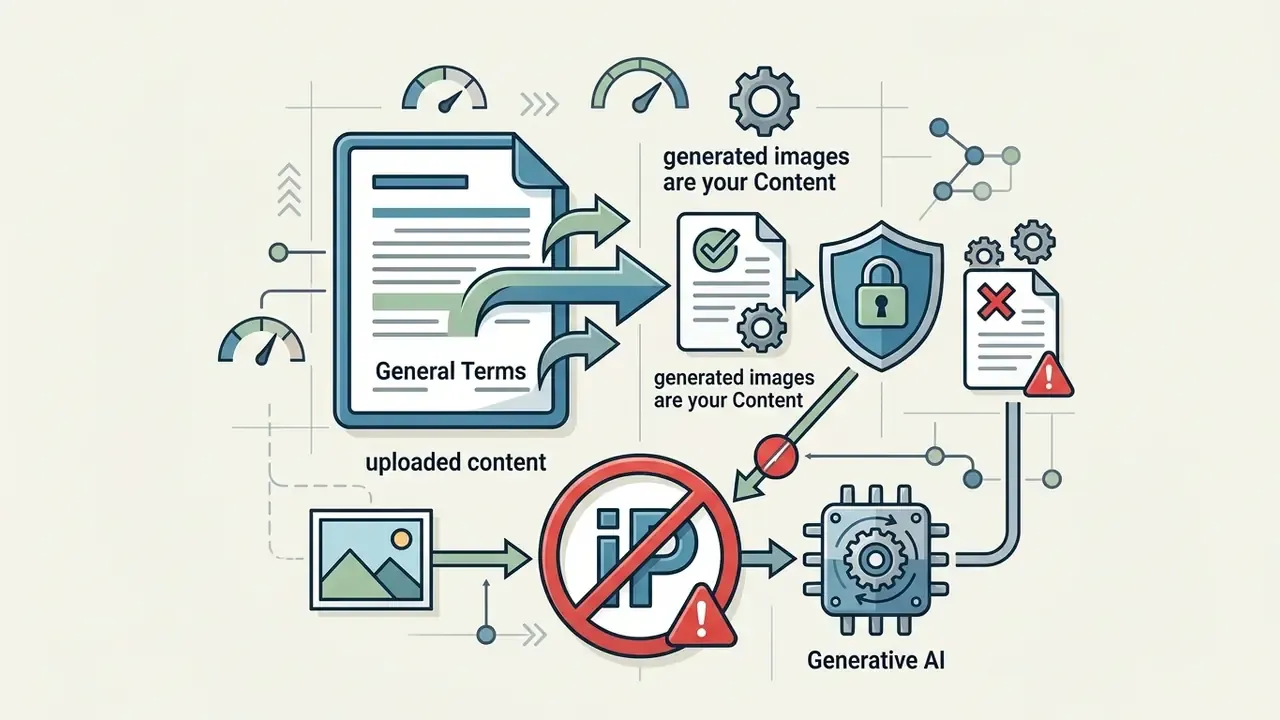
Running an ai photo editor on proprietary or licensed stock photos creates derivative-work considerations. If a user uploads a copyrighted third-party photograph without a license permitting modification, adding AI elements (add to a photo with ai) is unauthorized derivative creation. Verify that source photos carry commercial-use rights before deploying generative fills for distribution, and where provenance is unclear, run a check of the image's AI origin first. The same discipline applies when you add to a picture with ai on behalf of a client brand.
Public-sector guidance is stricter still. The U.S. GSA visual-information directive (2026) permits stock imagery only from approved sources, requires conformance with copyright law, and mandates labeling and review of AI-generated images before use. Japan's Agency for Cultural Affairs checklist (2024) similarly requires verifying stakeholders' rights when AI output incorporates third-party material, and the Canadian Marketing Association AI Playbook (2026) asks teams to document rights, prompts, and approvals before publishing.
Practical documentation rule: keep the source file, its license, the prompt text, the mask, the model name and version, and the approver's name. That record is the difference between a defensible marketing asset and an unquantified liability. It also takes about ninety seconds per asset if you build it into the export step.
Using an AI Photo Editor for Product and Marketing Content
For e-commerce sellers and marketing teams, AI editors streamline catalog production by placing product photography onto synthetic backgrounds, a workflow adjacent to image-to-image generation for product photos. Vendor terms from major editors (Adobe, Canva, Photoroom) affirm that enterprise subscribers retain full commercial licensing over output visuals, provided uploaded assets do not infringe third-party intellectual property or trademark rights (Photoroom Enterprise Agreement, 2025). For a broader map of usage rights across asset types, open the hub.
Which Tasks People Use an AI Photo Editor For
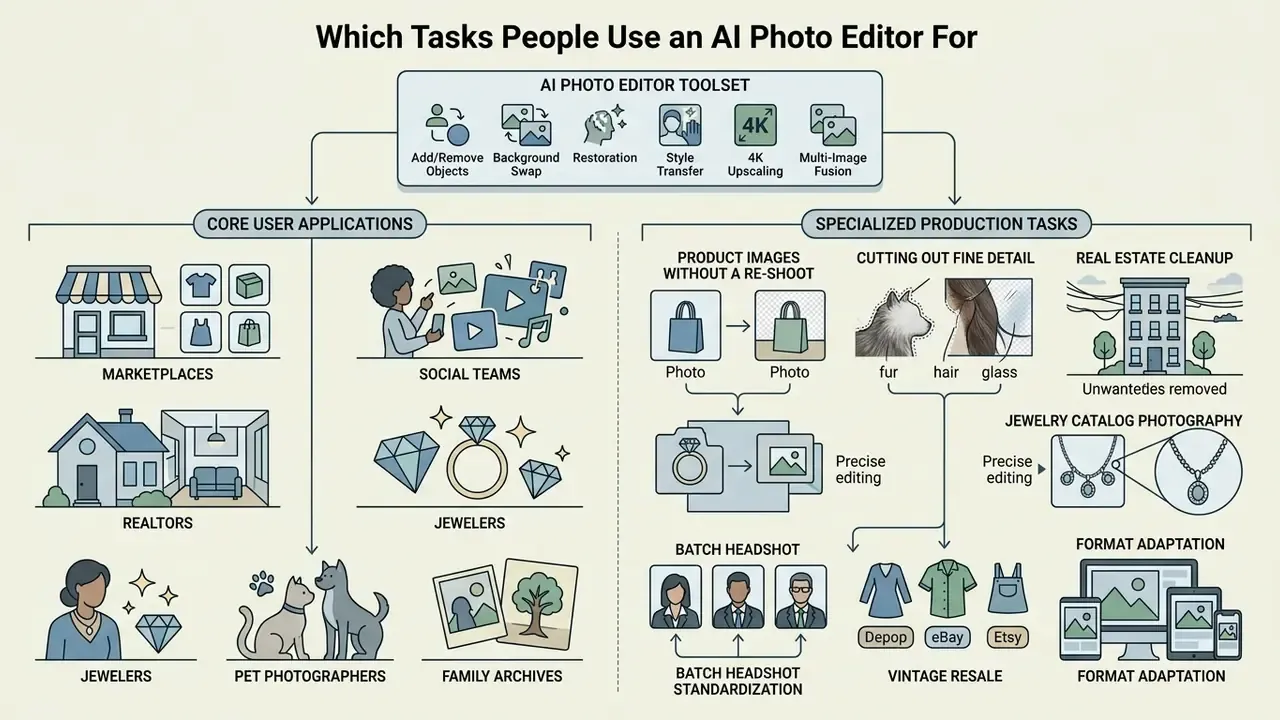
In two sentences: the same core toolset serves marketplaces, social teams, realtors, jewelers, pet photographers, and family archives. What changes between niches is mask discipline and prompt vocabulary.
AI photo editors now cover commercial e-commerce, digital marketing, content creation, and personal image enhancement with essentially one engine and many presets.
E-commerce and Online Stores: Product Images Without a Re-Shoot
Online retailers use AI inpainting to replace studio backgrounds with contextual lifestyle environments, for instance placing a beverage bottle onto a marble countertop or a kitchen shelf.
«ProductConsistency reports a fivefold reduction in OCR errors when rendering packaging text after fine-tuning Qwen-Image-Edit-2511.»
How to Edit Photos in an Online AI Photo Editor
In two sentences: the workflow is a six-stage loop from upload to export, and the two stages that decide the result are masking and prompting. Everything else is iteration and format selection.
Editing photographs inside an online editor ai image environment follows a structured six-stage workflow designed to keep precision from upload to final download.
Online AI photo editing pipeline:
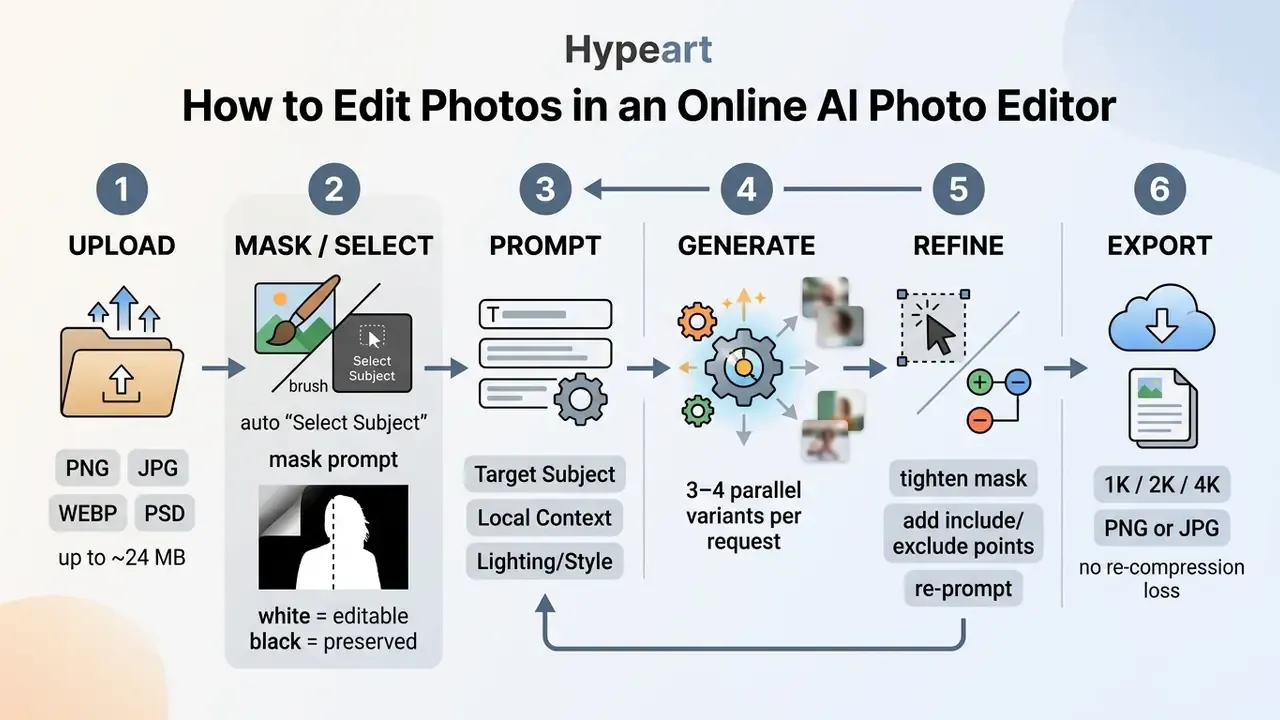
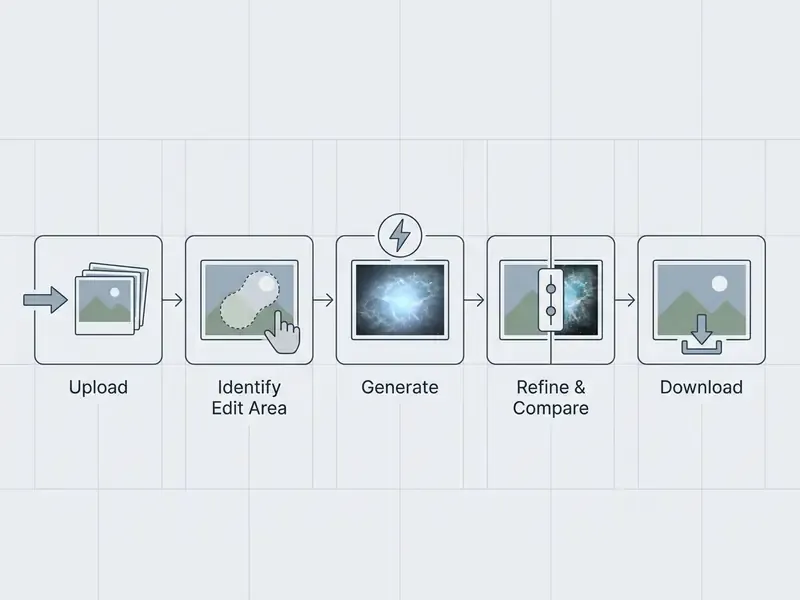
- Upload source image
- load raster files (PNG, JPG, WEBP, or PSD) into the browser-based canvas.
- Select target mask
- use brush tools or automated AI segmentation such as "Select Subject" to define the edit area.
- Input natural language prompt
- write concise instructions covering the requested modification, color scheme, and style parameters.
- Generate variants
- trigger inference to produce three or four visual iterations at once.
- Iterative refinement
- inspect outputs against unedited regions, then adjust prompt specifics or mask boundaries.
- Export and download
- save flattened assets at the target resolution (1K, 2K, 4K) without structural compression loss.
Upload the Photo and Select the Area to Change
The workflow begins when you upload your source asset, or in search-box language, when you add photo to ai. Precise masking dictates editing success: transparent mask overlays mark modification zones, where white pixels are editable and black pixels are preserved context. Strong online editors offer both manual brush controls and automatic subject or background identification (NIST AI Technical Guidelines, 2025).
Preparation matters more than most people expect. Feed the highest-resolution original you have, because upscaling a compressed export multiplies artifacts. Browser editors typically accept PSD, PNG, JPG/JPEG, WEBP, PDF, TIFF and similar raster formats; JPG suits photographs, PNG preserves transparency for cutouts. For selection tooling, mixed workflows win: automatic segmentation for the first pass, then a small brush (1 to 2 px) or include and exclude points to clean the boundary, exactly as documented in Midjourney's Smart Select and in NIST's brush-mask procedures for ImageJ. The same add image to ai step is where governance starts, since this is the moment a confidential file leaves your network.
Describe the Desired Result in a Text Prompt
A high-performing edit prompt follows a simple formula: [Target Subject] + [Local Context] + [Lighting/Style details]. Instead of a vague "add cat," specify "a sleek ginger tabby cat resting on the oak table, soft morning sunlight, sharp focus." Explicit lighting and material properties reduce prompt ambiguity and minimize unintended background alterations (Kive Documentation, 2026; Adobe Firefly Help, 2026).
«ComplexBench-Edit shows i-CoT preferred in 67% of cases against OmniGen and in 76% against Step1X-Edit on complex multi-step instructions.»
Ready-to-use prompt presets:
| Task | Source photo | Prompt example |
|---|---|---|
| Background replacement | Product on a white sweep | "Place the product on a luxury polished dark walnut table, soft moody studio spotlight, bokeh background" |
| Object removal | Portrait with passers-by | "Erase pedestrians in background, fill with soft blur European cobblestone street" |
| Style change | Daytime landscape | "Transform scene to atmospheric rainy night, neon light reflections on wet pavement, cinematic tone" |
| Attribute edit | Studio portrait | "Change hair color to platinum blonde, keep natural light and skin tone unchanged" |
| Restoration | Scanned 1990s print | "Remove scratches and film grain, reconstruct facial detail, natural color, no smoothing" |
| Typography | Plain T-shirt mockup | "Add brand wordmark on chest, follow fabric folds, match ambient shadow and cotton texture" |
| Generative expand | Vertical phone shot | "Extend scene left and right, continue shopfront and pavement, preserve horizon and depth of field" |
Compare Variants, Refine, and Download the Image
Generative models return several variations per request. Evaluate them by boundary blending, shadow logic, and text or brand integrity in the untouched regions. Once the result holds up, click download to retrieve high-resolution assets in PNG or JPG. When print or marketplace specs demand more pixels, apply AI upscaling of the finished image as the final step, never before approval.
Structured review beats eyeballing. NIST's Generative AI profile of the AI RMF (2024) recommends assessing generated output against known ground truth using human oversight plus automated checks before downstream use. The 2024 NIST GenAI pilot study shows the operational version: validating submissions against schema, field, and limit requirements before scoring. Applied to imagery, that means a fixed acceptance list: mask boundary, shadow direction, reflection logic, packaging text legibility (OCR check), face and identity match, export resolution. Six checks. Two minutes.
How to Choose the Best AI Photo Editor for Your Task
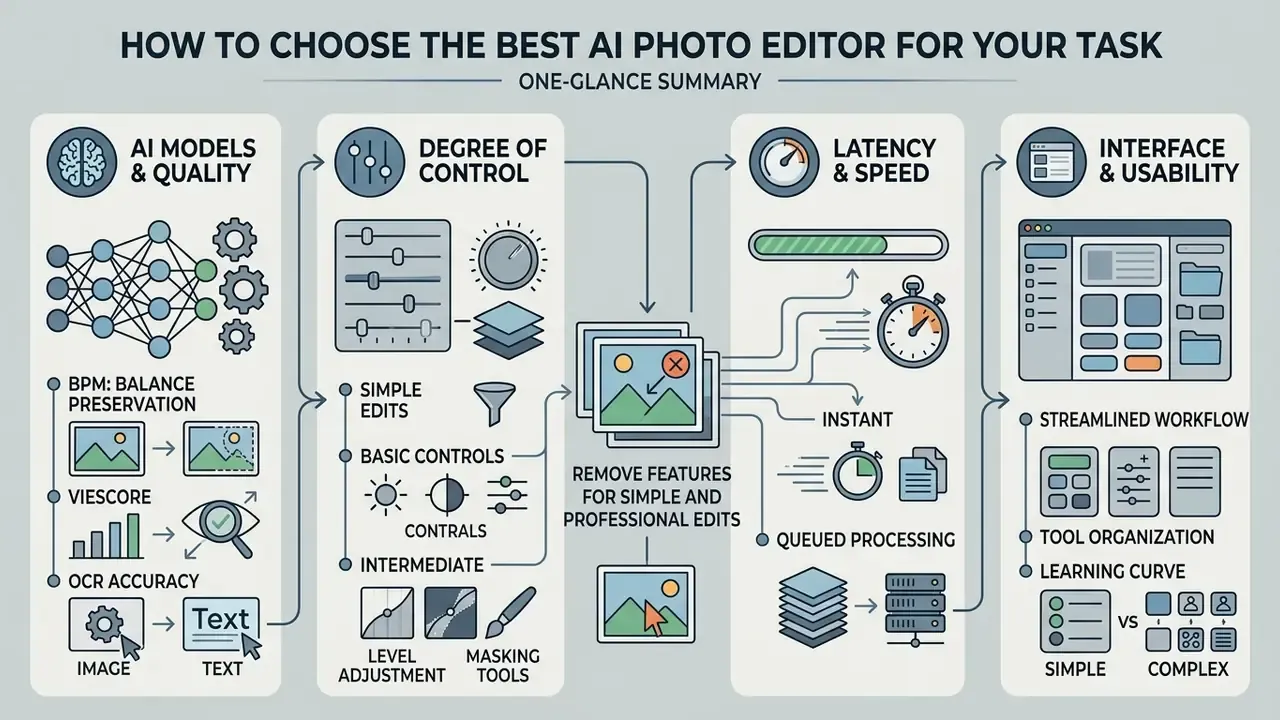
In two sentences: four criteria decide the choice, namely model quality, degree of control, latency, and interface. Regulated buyers add a fifth: whether the vendor can be audited.
Selecting the best AI photo editor means evaluating the foundational model architecture, spatial preservation quality, interface usability, and processing speed. If you are shortlisting products side by side, compare options before you commit a seat budget.
AI Models and Image Editing Quality
Leading base models behind modern photo editing platforms include FLUX.1 Fill, Adobe Firefly Image 3, Stable Diffusion Inpainting, and specialized enterprise architectures such as Qwen-Image-Edit (ProductConsistency Benchmark, 2025). Editing quality is judged with a small set of metrics:
«I2EBench covers more than 2,000 images and 4,000 instructions across 16 quality dimensions, enabling automatic comparison of IIE models.»
- BPM (Balancing Preservation Modification): measures exact spatial compliance and preservation of unedited regions.
«BPM separates scoring into region-aware and semantic-aware components and shows the highest correlation with human judgments among competing metrics.»
- VIEScore
- evaluates perceptual quality, artifact suppression, and semantic prompt adherence (InsightEdit, 2025).
- OCR character error rate
- assesses packaging text preservation during product background swaps.
- ReMOVE
- reference-free scoring of erasure realism, separating removal from replacement.
Note the honest limits documented by the model owners themselves. The Stable Diffusion Inpainting model card states that the system generates photo-realistic imagery but is not trained to be factual or true to real events. Adobe's Generate Image API, by contrast, describes prompt-driven edits that preserve structure and composition: capability language, not a benchmark score. Weigh independent benchmark numbers above vendor capability statements.
Features for Simple and Professional Edits
Entry-level tasks, single-click background removal or simple distraction erasing, need lightweight inference networks tuned for speed. Advanced professional workflows need multi-layer generative fills, brush-based density masks, lighting harmonization, and RAW color space support.
A pragmatic tiering:
- Basic one-click background removal producing a transparent or masked layer; single-click removal of clutter such as people, wires, and cables; crop, straighten, quick enhance.
- Intermediate generative fill and generative remove with brush selection; generative expand; localized attribute edits; style transfer from a reference.
- Advanced multi-image fusion, lighting harmonization matched to shadows and perspective, generative upscale, batch or API processing, fine-tuned brand models with text-integrity guarantees.
Enterprise Selection Criteria for Regulated Organizations
Consumer comparison tables rank credits and resolution. Regulated buyers need a different scorecard.
| Criterion | What to require | Why it matters |
|---|---|---|
| Data handling | Zero data retention option, no training on customer uploads, documented deletion window | Prevents inadvertent disclosure of internal or customer imagery |
| Certification | SOC 2 Type II report, encryption in transit and at rest, breach notification terms | Evidence for vendor-risk and audit files |
| Identity and access | SSO/SAML, SCIM provisioning, role-based permissions | Removes shared logins and orphaned accounts |
| Auditability | API logs of prompt, mask, model name and version, seed, timestamp, user | Reproducible trail for model-risk and legal review |
| Determinism controls | Seed pinning, fixed model version, change notice before model upgrades | Undisclosed model swaps invalidate prior validation |
| Legal | Enterprise IP indemnification, training-data provenance statement | Transfers part of the IP risk to the vendor |
| Portability | Documented API, no proprietary-only project format, export of source plus edit metadata | Avoids platform lock-in |
| SLA | Uptime target, support response times, capacity for batch peaks | Campaign deadlines depend on it |
For volume workloads, integration terms matter as much as image quality; teams evaluating programmatic access can compare options for batch endpoints, rate limits, and organizational key management.
Data Protection, PII, and Shadow AI in Photo Editing
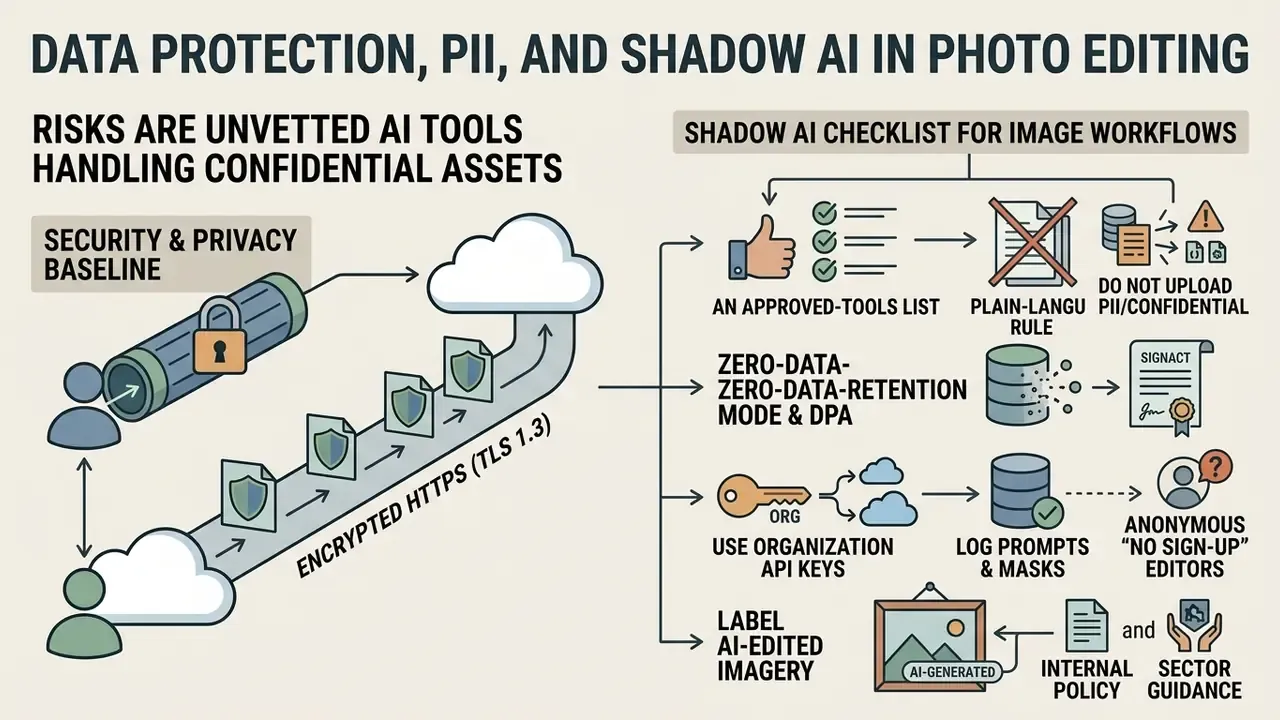
In two sentences: the biggest risk in AI photo editing is not a badly rendered shadow, it is an employee uploading a confidential asset to an unvetted free website. Policy plus one sanctioned tool removes the incentive to go around IT.
Security and privacy baseline for uploads: every user file should travel over encrypted HTTPS (TLS 1.3). Sanctioned services state clearly that uploaded originals and generated outputs are not used to train public models and are permanently deleted from cloud servers automatically, commonly within 24 hours of session completion. Consumer editors advertise similar promises. Enterprise buyers should demand the same commitment in a contract rather than in marketing copy.
Shadow AI checklist for image workflows:
- Publish an approved-tools list and a plain-language rule for what may never be uploaded: customer documents, ID scans, screenshots containing PII or account data, unreleased product designs, internal dashboards.
- Prefer tools offering a zero-data-retention mode and a signed DPA. Verify whether "no training on your data" applies to free tiers as well as paid ones. Frequently it does not.
- Route high-volume work through an API with organizational keys instead of personal browser accounts, so usage is attributable.
- Log prompts and masks centrally. Treat prompts as business records, because they may contain confidential descriptions even when the image does not.
- Watch for anonymous "no sign-up" editors. Convenient for personal photos, unsuitable for corporate assets precisely because there is no account, no contract, and no audit trail.
- Label AI-edited public-facing imagery according to internal policy and applicable sector guidance. Several public-sector directives already require labeling and pre-publication review.
- Give staff a fast path to ask questions before they improvise; a short internal FAQ plus vendor documentation (view the guide) prevents most well-intentioned policy breaches.
Model Risk Checklist for Validating AI Editing Tools
- In two sentences diffusion editors are non-deterministic systems that touch customer-facing communications, which places them inside the model inventory at many institutions. Validation is possible if you fix what can be fixed and measure what cannot.
- Inventory and tiering register the editing tool as a model or tool-supported process, then tier it by exposure (internal deck versus public advertising versus regulated disclosure material).
- Purpose and limits statement document approved uses (background swap, distraction removal, canvas expansion) and prohibited uses (altering evidentiary photos, fabricating product features, editing compliance-relevant claims or on-pack text).
- Reproducibility pin model name and version; record seed, prompt, negative prompt, mask file, resolution, and post-processing steps. Without a version pin, a silent vendor upgrade breaks reproducibility.
- Performance metrics adopt region-aware scoring (BPM), perceptual scoring (VIEScore), erasure realism (ReMOVE), and an OCR character-error-rate gate for any image containing text.
- Human in the loop require named reviewer sign-off before publication, consistent with the NIST AI RMF Generative AI profile guidance on comparing output against ground truth with human oversight.
- Bias and representation review for imagery depicting people, check outputs for unintended changes to skin tone, age, body shape, or ethnicity. Attribute drift is a documented failure mode of localized editing.
- Change management re-validate after model upgrades. Keep a dated log of vendor model releases and your acceptance decisions.
- Records retention store source file, license proof, prompt, mask, output, and approval for the period your policy requires. This doubles as the copyright documentation trail.
- Sector context marketing and customer-communication material produced with AI remains subject to the ordinary advertising, fair-representation, and record-keeping expectations of your regulators. Generative tooling does not create an exemption.
This section describes general risk-management practice and is not legal, regulatory, or compliance advice for any specific institution.
Free AI Photo Editor: Limits, Credits, and Licensing Models
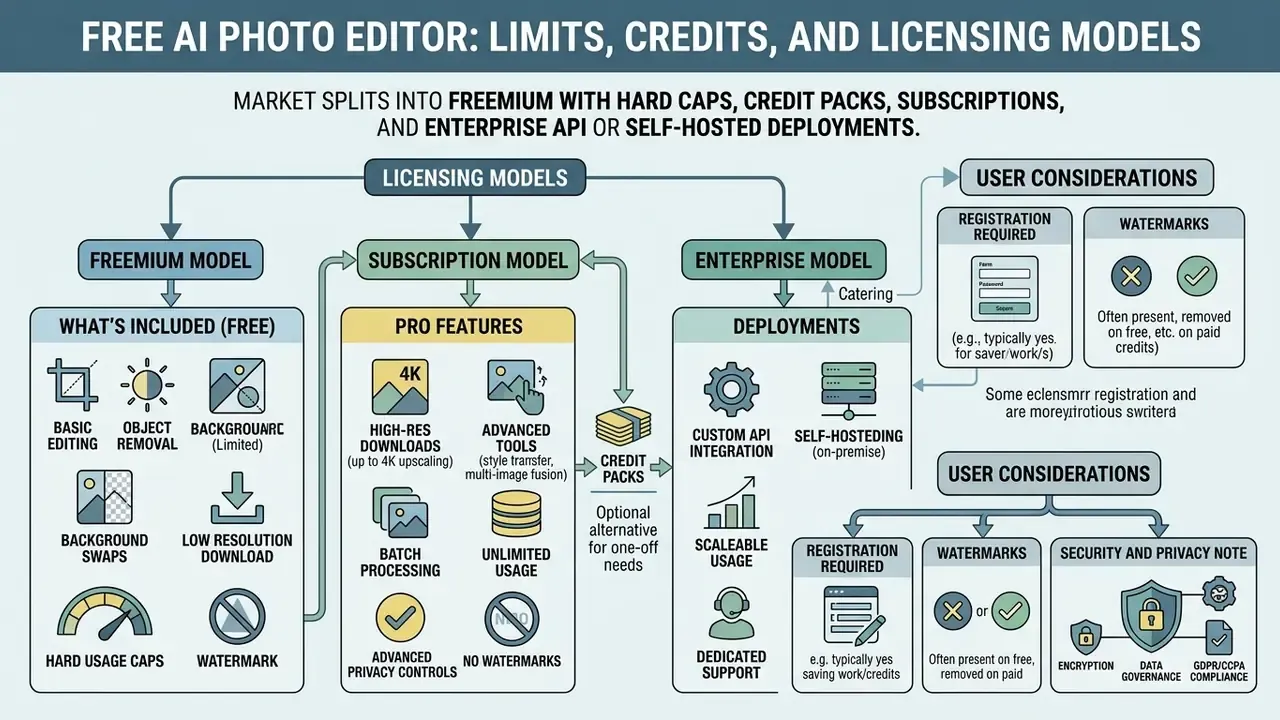
In two sentences: the market splits into freemium with hard caps, credit packs, subscriptions, and enterprise API or self-hosted deployments. Pick the model that matches your volume and your risk appetite.
Most browser-based 100 free ai photo editor tools run on a freemium model governed by daily or monthly credit caps, resolution constraints, or feature locks. For a deeper walkthrough of tier limits, see our guide to the free photo editor online, and for current commercial packages, open the hub.
Table: comparative analysis of free tier versus paid Pro subscriptions in online AI photo editors.
| Feature or parameter | Free tier (free AI photo editor) | Pro tier (paid subscription) |
|---|---|---|
| Monthly AI generation credits | 4 to 20 credits on signup or daily reset | 800 to 10,000 credits per month |
| Maximum export resolution | Standard, up to 1024x1024 px | High resolution: 2K, 4K, RAW export |
| Available neural models | Basic diffusion models, standard speed | Premium models (FLUX.1 Fill, Firefly, ultra-fast) |
| Watermarking and export restrictions | Clean export or optional branding tag | Full commercial usage, no watermarks |
| Concurrent processing slots | 1 concurrent generation task | 4 to 8 concurrent parallel generations |
| Governance features | None: no DPA, no SSO, no retention controls | Enterprise API, SSO, zero-data-retention option, indemnification |
Licensing Models: Freemium, Subscription, Enterprise API
| Model | Typical allowance | Best fit | Main risk |
|---|---|---|---|
| Anonymous free or freemium | 4 to 60 credits or generations per month or day, 1K export | Personal photos, one-off fixes, students | No DPA, no SLA, possible training on uploads, Shadow AI exposure |
| Consumer subscription | 80 to 1,000+ credits per month, 2K to 4K export, premium models | Solo creators, small e-commerce, social media teams | Seat-based cost creep, limited audit logging |
| Business or team plan | 900 to 10,000 credits, parallel jobs, brand kits | Marketing departments, agencies | Model upgrades without notice, shared-account sprawl |
| Enterprise API or self-hosted | Metered API calls or private deployment | Regulated industries, high-volume catalogs | Integration effort, requires model-risk validation |
What Is Included in a Free AI Photo Editor
A standard free photo editor plan online usually grants the core tools: single-click background removal, object erasure, low-resolution generative fill, and standard canvas cropping. Services such as Pixlr, Fotor, and basic Canva tiers provide limited recurring credits without requiring a credit card (Pixlr Pricing Report, 2026; Fotor Terms, 2025). That is often enough for someone who just wants to add picture ai elements to a birthday collage.
«Pixlr Plus provides 80 AI credits per month (about 80 quick AI edits or 4 AI videos); Premium 1,000 credits; Professional up to 10,000 credits.»
Comparable published allowances show the spread. Some editors grant 4 to 6 signup credits with 1K export and two models. Piktochart lists 60 AI credits per month. Microsoft 365 subscriptions include 60 monthly credits for image generation and editing across Designer, Paint, and Photos. Free tiers also differ in concurrency and export: Pixlr is free in-browser but ad-supported with limited AI credits, while Fotor Basic caps concurrent generations at one and restricts some exports.
When You Need Additional Credits or Pro Features
Moving to a paid plan becomes necessary for high-volume catalog processing, batch generative fills, high-resolution exports at 2K or 4K, or fine-tuned enterprise models that guarantee packaging text integrity. Three further triggers appear consistently in vendor documentation: commercial redistribution is permitted only on a paid package, the newest or largest models sit behind paid tiers, and watermark-free or high-resolution export is a paid entitlement on some platforms.
Is Registration Required and Will There Be Watermarks
Many browser-based utilities allow anonymous editing without account creation. Leading web image editors, for example Pixlr, the Photoroom free web tier, and Fotor, offer clean, watermark-free downloads on free basic edits, keeping paywalls for high-volume batch work, premium models, high-resolution export, or API access (vendor practice review, 2026). Watermark policy is the item most worth checking before you invest editing time: some services brand only specific premium features, others export clean at every tier.
Security and privacy note: all files uploaded by users should be processed over an encrypted HTTPS connection (TLS 1.3). In a well-governed service, uploaded originals and generated layouts are not used to train public models and are automatically and permanently deleted from cloud servers within 24 hours of session completion. Ask for that in writing, not in a landing-page bullet.
FAQ
What is an AI photo editor?
A browser or desktop tool that modifies an existing image from a natural-language instruction plus an optional mask, performing background removal, object erasure, generative fill, restoration, upscaling, or style transfer without manual pixel work.
Is there a genuinely free AI photo editor?
Yes. Multiple editors run in-browser with a limited monthly or daily credit allowance, and several permit anonymous use without registration. Expect caps on resolution, concurrency, and premium models.
Do I need to sign up?
Not always. Anonymous editing is common for basic operations such as add to image ai fixes. For team work, audit logging, or commercial indemnification, you need an account and usually a paid plan.
Which file formats are supported?
Typically PNG, JPG/JPEG, and WEBP up to roughly 24 MB, with professional editors additionally handling PSD, TIFF, PDF, and RAW color spaces.
Can I use AI-edited images commercially?
Usually yes on paid tiers, provided you hold rights to the source photograph and the feature is not labeled a non-commercial beta. Copyright protects only your human contribution; publication rights come from the platform terms.
Can it remove objects without ruining the background?
Yes, diffusion erasure networks reconstruct the underlying texture. Quality is highest on repeating textures such as pavement, sky, and wood, and lowest on complex occluded geometry.
How does it handle fur, hair, and glass?
Two-stage segmentation with confidence-guided edge refinement preserves individual strands and semi-transparent edges, avoiding the hard plastic borders typical of threshold-based cutouts.
Can I combine several photos?
Yes. Multi-image fusion accepts two or three inputs, using one as the subject and another as the source of style, texture, or environment. This is the simplest way to add to images with ai when a single frame lacks the element you need.
Does it support high-resolution downloads?
Paid tiers commonly export at 2K or 4K. Generative upscale can recover detail from low-resolution originals before print or marketplace upload.
Is my data safe?
On sanctioned services, uploads are encrypted in transit, excluded from public model training, and deleted automatically within a stated window, often 24 hours. Verify these claims contractually before uploading confidential or PII-bearing imagery.
Social Content, Creative Visuals, and Personal Photos
Content creators use AI editing suites to resize aspect ratios for platform-specific feeds (Generative Expand for Instagram, YouTube thumbnails, Pinterest banners), erase background pedestrians from travel photos, and apply style transformations without sacrificing facial or structural fidelity. Plenty of people simply want to
add ai to my photoand get a cleaner frame for a profile picture.Documented workflows combine tools rather than betting on one. A 2024 Turku UAS thesis describes ChatGPT drafting social copy, Midjourney generating image variants, and a photo editor finalizing retouching and text placement. A 2025 Journal of Retailing and Consumer Services article reports a Midjourney plus ChatGPT process converting a plain product shot into a fashion-style shoot visualization. On the consumer side, Google Photos documents Magic Editor for background and lighting adjustment, Magic Eraser for object removal, and an Image Upscaler for sharpening: the same primitives, packaged for one-tap use. For adjacent tooling and pricing comparisons, see our guide to online photo editors.
Text and image work often sit in the same campaign sprint, which is why teams pair an editor with copy tooling such as an ai script generator for video briefs, an ai rewrite generator for caption variants, or an ai schedule maker for the publishing calendar. Lighter social formats have their own utilities too, from an ai roast generator for community banter to an ai rizz generator for playful DM copy, while training teams use an ai rubric generator to score submitted creative consistently. Different outputs, same governance question: who approved it, and can you show the trail?