Author: Marcus Hale, AI Risk & Model Governance Analyst · Last updated: February 2026 · Review scope: transcript ingestion architecture, vendor delivery formats, factual-accuracy controls, enterprise governance.
Executive Summary: What Matters Before You Approve the Tool
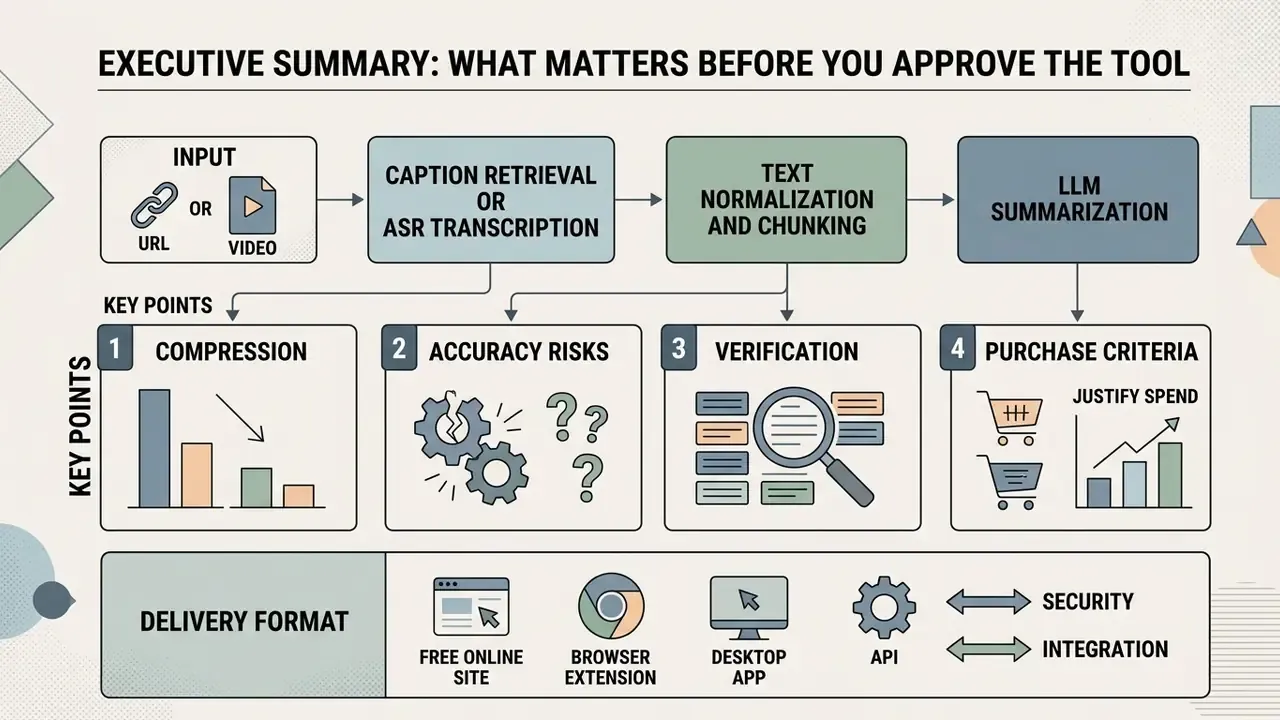
- What it is. An AI YouTube video summarizer is a modular pipeline: URL or file input, caption retrieval or ASR transcription, text normalization and chunking, LLM summarization, then multi-format delivery (short TL;DR paragraph, bullet points, timestamps, mind maps).
- How much it compresses. Research-grade cross-modal summarizers target roughly 15%–20% of original duration; the Instruct-V2Xum dataset averages a 16.39% summarization ratio.
- Where accuracy breaks. Noisy audio, technical jargon, speaker overlap, and over-compression cause omissions and temporal hallucinations. Peer-reviewed captioning research has reported factual errors in 57.0% of generated sentences, so marketing claims of "99.9% accuracy" are not defensible.
- What to verify. Content coverage, timestamp anchoring, and qualifier preservation, aligned with the NIST AI Risk Management Framework (AI RMF 1.0).
- What to buy. Evaluate delivery format (free online site, browser extension, desktop or API) against data-retention policy, SOC 2 and ISO 27001 attestation, on-premise options, video-length ceilings, batch and playlist support, and PKM export into Notion or Obsidian.
- How to justify spend. Use a risk-adjusted ROI model that subtracts validation labour, subscription and API cost, and residual model risk from gross analyst time savings.
Who This Guide Is For and Which Decision It Supports
This is written for the people who sign off, not for the people who paste links. If you run model risk, compliance, or AI governance at a US bank or a mature fintech, the question is rarely "can AI summarize YouTube videos?" It can. The real question is narrower: under what controls may an analyst use an AI summarizer on material that later informs a credit memo, a market view, a vendor assessment, or a disclosure.
Three decision points recur in practice.
First, scope. Public conference talks and earnings webcasts sit in a different risk class than an unlisted internal town hall. Second, deployment topology. A free online tool with an unspecified retention policy is a shadow-AI incident waiting for a calendar date. Third, evidence. If a summary shapes a decision, someone must be able to reproduce the check months later without re-watching three hours of footage.
Everything below is organised around those three points: how the pipeline actually works, how to run it, what it can and cannot summarize, how to choose a tool, where the accuracy ceiling sits, and what the business case looks like once control costs are honestly counted.
What Is an AI YouTube Video Summarizer and How Does It Work?
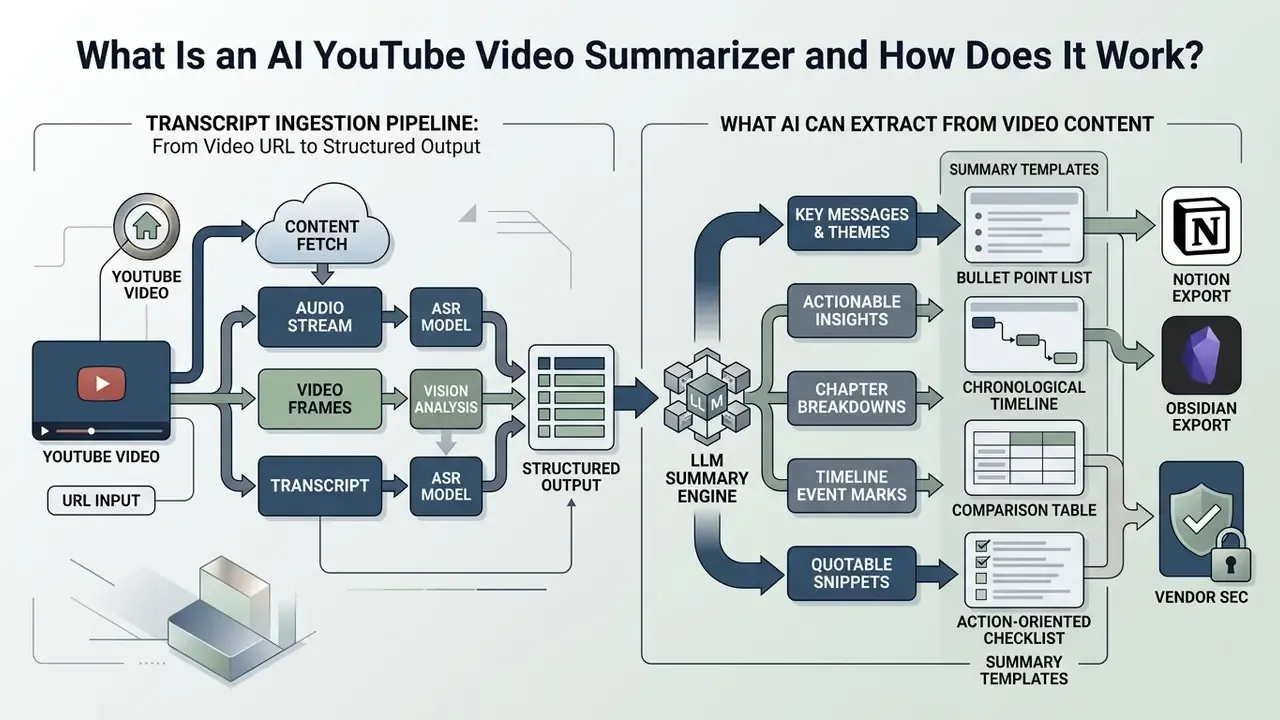
An AI YouTube video summarizer is a software tool that automatically processes video content, audio tracks, and transcripts to generate condensed textual or visual overviews. It converts spoken dialogue into machine-readable text, then passes that data through large language models (LLMs) to extract core ideas, key points, and actionable insights without requiring manual video playback.
«Video summarization transforms a long video into a compact representation that preserves the most important information, using extractive or abstractive approaches.»
Modern video summarization pipelines integrate automated speech recognition (ASR) with natural language processing (NLP) to parse unstructured multimedia streams. When a user submits a video link, the system ingests the video metadata, extracts the text transcript, and chunks the context window to prevent information loss. Research on cross-modal video summarization shows that specialised LLMs use temporal prompt instruction tuning to condense videos to a small fraction of their original duration while retaining the key narrative concepts.
«The Instruct-V2Xum dataset contains 30,000 YouTube videos with an average summarization ratio of 16.39%, so summaries run roughly one-sixth of source length.»
Architecturally, production systems in 2026 fall into two families. Transcript-first pipelines (React/Vite or Streamlit front ends, Flask or Node/Express back ends, Hugging Face abstractive models, AssemblyAI or Whisper for missing captions) return structured JSON containing a summary plus a full timestamped transcript. Multimodal pipelines add ffmpeg audio extraction, scene and keyframe detection, OCR of on-screen slides, and generation of derivative artifacts such as PDF notes or slide decks. Both families remain constrained by two documented weaknesses: real-time summarization latency and contextual awareness across very long inputs.
The Transcript Ingestion Pipeline: From YouTube Video URL to Structured Output
Turning a YouTube video into a textual summary relies on a structured ingestion sequence that translates a video URL into clean text tokens. The system resolves the public video URL or unique video ID and queries the YouTube Data API, where contentDetails.duration returns length in ISO 8601 format and contentDetails.caption returns only a boolean availability flag, not caption quality. Actual caption tracks are retrieved separately through captions.list and captions.download.
When no usable caption track exists, the pipeline falls back to an ASR engine. Engine choice materially affects downstream fidelity:
| ASR Engine | Training / Architecture Note | Practical Strength | Practical Weakness |
|---|---|---|---|
| OpenAI Whisper (large-v3) | Trained on 680,000 hours of multilingual supervised audio; emits segments with start/end timestamps | Strong multilingual coverage, robust to accents, deployable locally | Slower on CPU; occasional repetition loops on silence |
| AssemblyAI | Hosted API with speaker labels and punctuation restoration | Turn-level diarization for panel content | Cloud-only; data-residency review required |
| Deepgram-class streaming ASR | Low-latency streaming architecture | Near-real-time captioning of live streams | Domain jargon requires custom vocabulary boosting |
| YouTube auto-captions | Native platform ASR | Zero cost, instant retrieval | Degrades on background noise, overlapping speakers, technical terms |
Independent evaluations of auto-generated captions report accuracy ranging from roughly 60%–70% under poor audio conditions to 85%–95% with clean studio audio. That spread is exactly why enterprise pipelines treat native captions as a convenience layer rather than a source of record.
Once the raw transcript is extracted, the service normalizes the text by removing filler words, acoustic noise artifacts, and duplicate subtitle timestamps. The cleaned youtube transcript is then divided into semantically coherent chunks sized to fit LLM context windows, which typically range from 32,000 to over 1 million tokens in current models. The LLM summarizes each chunk individually before a final synthesis pass produces a unified video summary, all without watching the full video. Optional translation may be applied to the transcript before summarization, so the final output language is decoupled from the source audio language.
Illustrative scenario (hypothetical, not a measured client result). In a financial intelligence evaluation, an analyst needed to review 40 hours of public earnings calls uploaded as YouTube webcasts. The analyst deployed an automated script using Whisper ASR and GPT-4 context-chunking to ingest the raw audio streams. The modelled effect was a reduction of initial screening time on the order of three-quarters, while preserving verifiable timestamp references for secondary audit. Treat the figure as a planning estimate for scoping exercises, not a benchmarked measurement.
What AI Can Extract from Video Content
An AI summarizer extracts both structural metadata and semantic intelligence from unstructured video content, shaped to the user's intent. The system can output broad high-level overviews, structured bullet points, key insights, interactive FAQ blocks, or chapter outlines linked to specific timestamps. Across current tooling, four export primitives recur: a short summary or TL;DR paragraph, structured bullet notes or chapter outlines, timestamped transcripts, and visual mind maps. Delivery formats span TXT, PDF, Markdown, DOCX, CSV, and presentation decks.
Beyond basic text conversion, advanced cross-modal systems analyse visual keyframes using models like TransNetV2 and CLIP to capture on-screen slides, diagrams, and physical demonstrations.
«CLIP-based adaptive clustering selects keyframes closest to cluster centroids, then removes duplicates using HSV colour-histogram comparison.»
Multimodal benchmarks such as MMSum (2024) evaluate systems that combine transcript text with visual frame representations, producing paired text-and-visual summary outputs and chapter-level segment boundaries. Hierarchical mind map node trees are a product-layer construction built on top of that chapter structure rather than a native benchmark output. Academic validation for video-to-mind-map generation comes from separate 2025 work evaluating prompt-tuned LLMs that produced mind maps from ethnographic video with 28 practitioner reviewers. These flexible summary formats let users extract key ideas and core ideas quickly while skipping redundant conversational fluff.
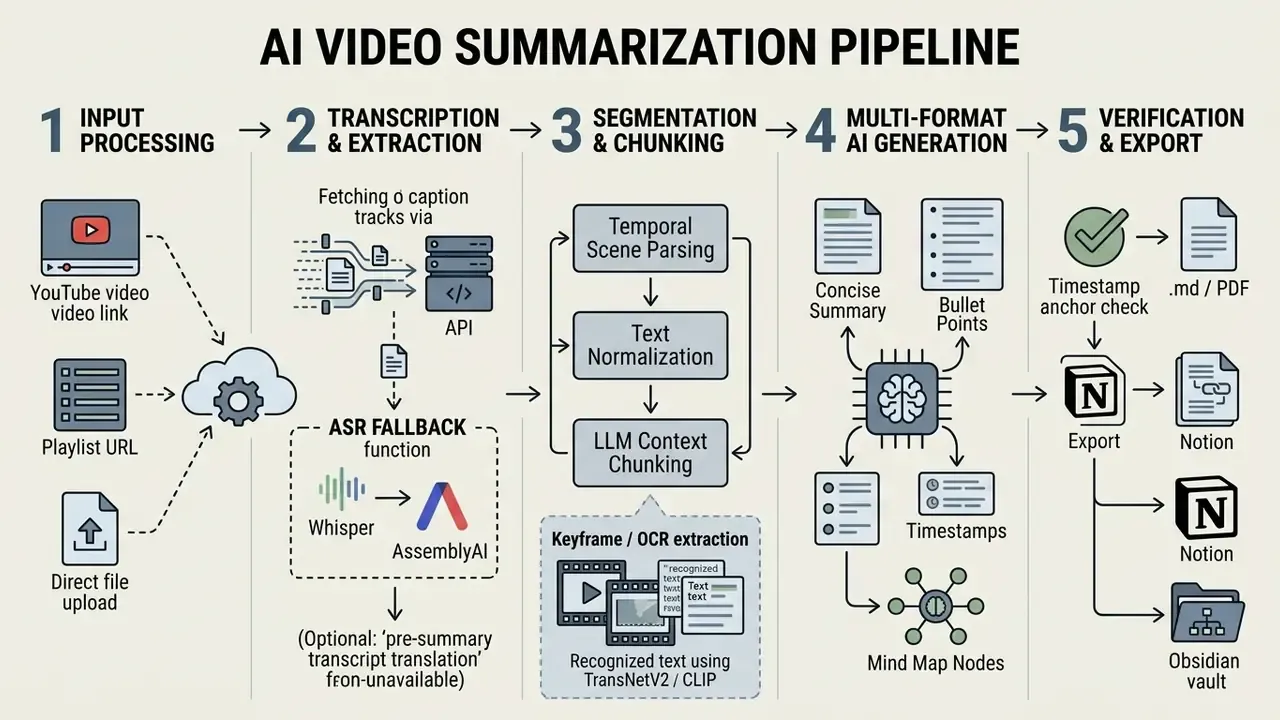
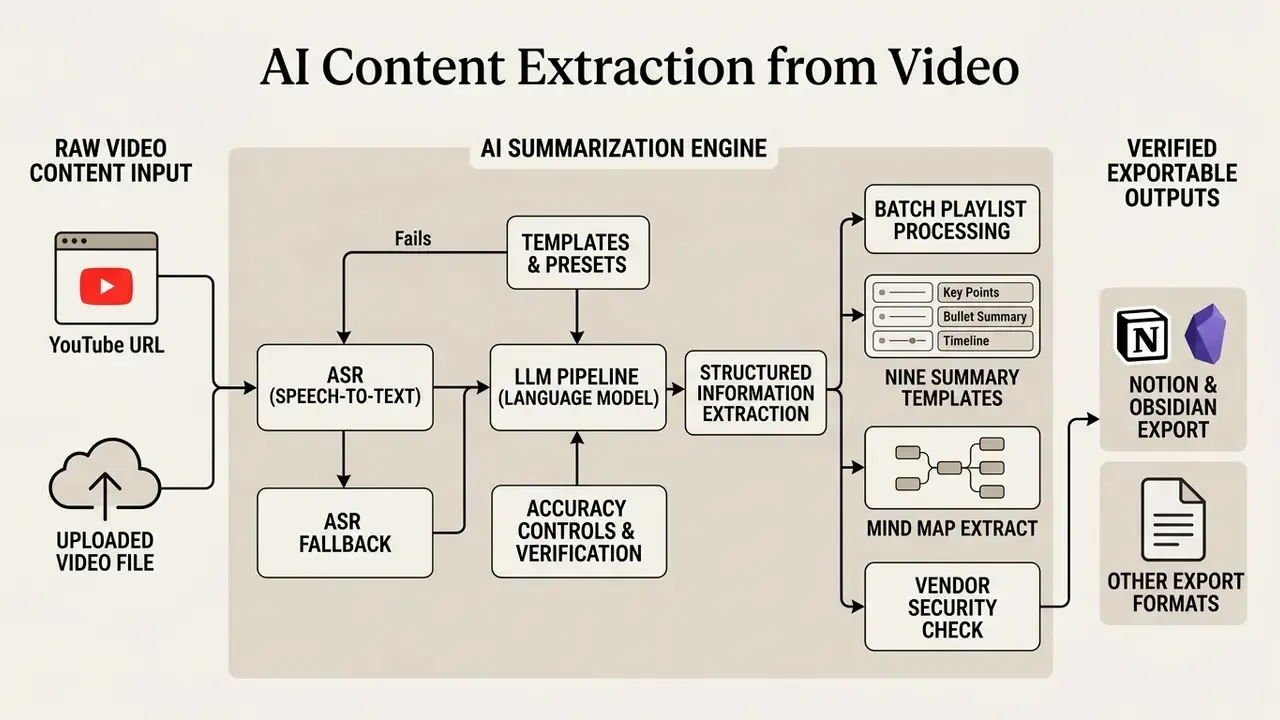
Read the schematic as five discrete stages: input capture, transcription, segmentation, generation, and verified export. Each stage is a control point, and each one can be logged.
How to Summarize YouTube Videos with AI
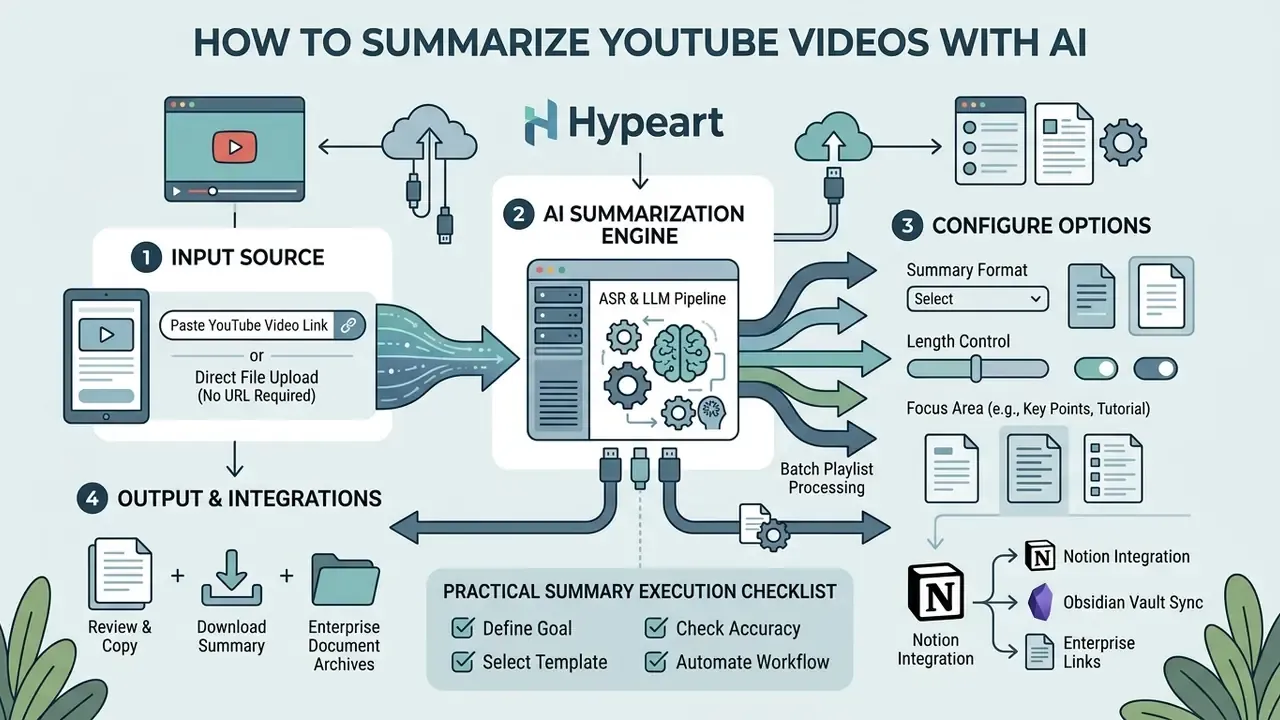
Summarizing a YouTube video with an AI tool is a four-step operational workflow that turns long videos into concise summaries within seconds. The user provides the target video URL, configures the output parameters, executes the transformation pass, and reviews the generated summary for accuracy.
This sequence replaces manual note-taking with automated processing and lets users extract key points with minimal friction. Whether you use a free online summary tool, a browser extension, or a standalone AI app, the core order of operations does not change.
Paste a YouTube Video Link or Video URL
The workflow begins when the user copies a public or unlisted youtube video link from the browser address bar or the sharing menu. Open the chosen free online video summarizer site, then just paste the video url into the primary input box.
No software installation or account creation is required for standard web-based tools that use public caption tracks, which is why the no login route remains popular for one-off research. The platform resolves the unique YouTube video ID automatically, verifying that transcript data is accessible before launching the downstream extraction algorithms. Visibility status matters here: YouTube documentation confirms that unlisted videos are viewable by anyone holding the link, while private videos cannot be opened through a shared URL and therefore cannot be processed by URL-only tools.
Direct File Upload Option (No YouTube URL Required)
If the source video is not hosted publicly on YouTube, advanced platforms allow direct file uploads (MP4, MOV, WebM, MP3, WAV) up to roughly 1 GB per file, with some transcription services accepting media up to 10 hours long and 5 GB in size on paid tiers. The tool bypasses the YouTube Caption API entirely and routes the raw binary into a cloud-hosted or locally executed Whisper ASR pipeline, generating timestamped transcripts and summaries exactly as it would for URL-based ingestion. This is the correct route for board recordings, internal town halls, customer interviews, and any asset that must never touch a public platform in the first place. Before uploading sensitive media, confirm the vendor's retention window. Several consumer services delete uploads automatically within 24 hours, but that policy has to be verified contractually rather than assumed from a marketing page.
Choose Summary Format, Length and Focus
After entering the video url, select your output parameters: summary length, tone, language, and structural format. You can choose short executive TL;DR paragraphs, detailed bullet points, mind map structures, or a dedicated FAQ mode, depending on the learning goal.
Advanced AI tools also accept a custom prompt to steer the model toward specific topics, such as technical steps, market metrics, or product pricing details. Setting strict context boundaries stops the LLM from generating irrelevant facts and keeps the output aligned with your workflow. At the API layer, maximum output length is enforced through parameters such as max_output_tokens (or max_completion_tokens for reasoning models). There is no minimum-length parameter, so any floor on detail must be stated explicitly inside the prompt itself.
Review, Copy or Download the YouTube Summary
Once the pass completes, the AI service presents the generated summary on an interactive output panel alongside the video player. Users can inspect highlighted key insights, verify linked timestamps, and edit text directly in the browser.
The completed video summary can be exported with one click or downloaded as Markdown (.md), PDF, Word, or raw text. For personal knowledge management (PKM) and enterprise archive integration:
- Notion integration. Use direct webhook triggers, or export formatted Markdown with embedded front-matter headers (
title,url,channel,duration,timestamps,verification_status) and paste it into a Notion database. Front-matter preserves header hierarchy, so your H2 and H3 chapter structure survives the transfer instead of collapsing into flat paragraphs. - Obsidian vault sync. Save summaries as
.mdfiles containing wiki-links ([[Topic]],[[Speaker Name]]) and deep timestamp links in the formyoutube.com/watch?v=ID&t=120s. Each key claim then sits one click away from its source second, and the note joins your local knowledge graph rather than an isolated folder. - Enterprise document archives. Convert the same Markdown into PDF for immutable records retention, keeping the raw
.mdas the machine-readable artifact for retrieval-augmented search.
Our detailed guide on AI media workflows shows how structured Markdown exports feed directly into enterprise document archives and publishing systems.
Practical Summary Execution Checklist
- Source link acquisitionCopy the full YouTube video URL from the address bar, or prepare the local media file if no public link exists.
- URL or file inputSimply paste the video link into the primary prompt box of the chosen AI summarizer, or upload the media file within size limits.
- Parameter configurationSelect summary length, output format (bullet points, mind map, chapter outline, or plain text), depth level, and target language.
- Custom promptingAdd focus directives, for example: "extract key financial metrics and action items only; ignore introductory remarks."
- Generation executionRun the summarization pass over the underlying transcript.
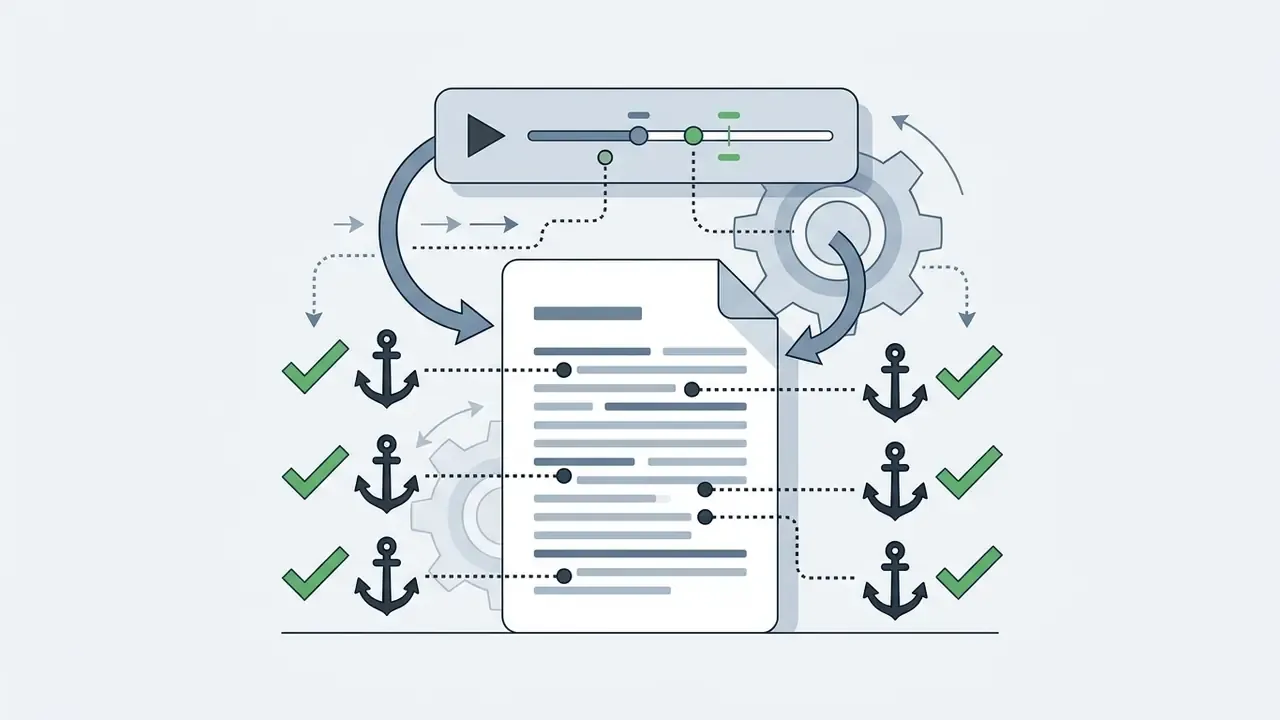
- Fact verificationCross-check key numbers, named entities, and critical claims against the linked timestamp markers, inspecting roughly 20 seconds of audio either side of each anchor.
- Output exportCopy the verified text or download the file as Markdown, PDF, or a Notion/Obsidian-ready note with front-matter metadata.
Seven steps. Only one of them is optional, and it is not step six.
Which YouTube Videos Can AI Summarize?
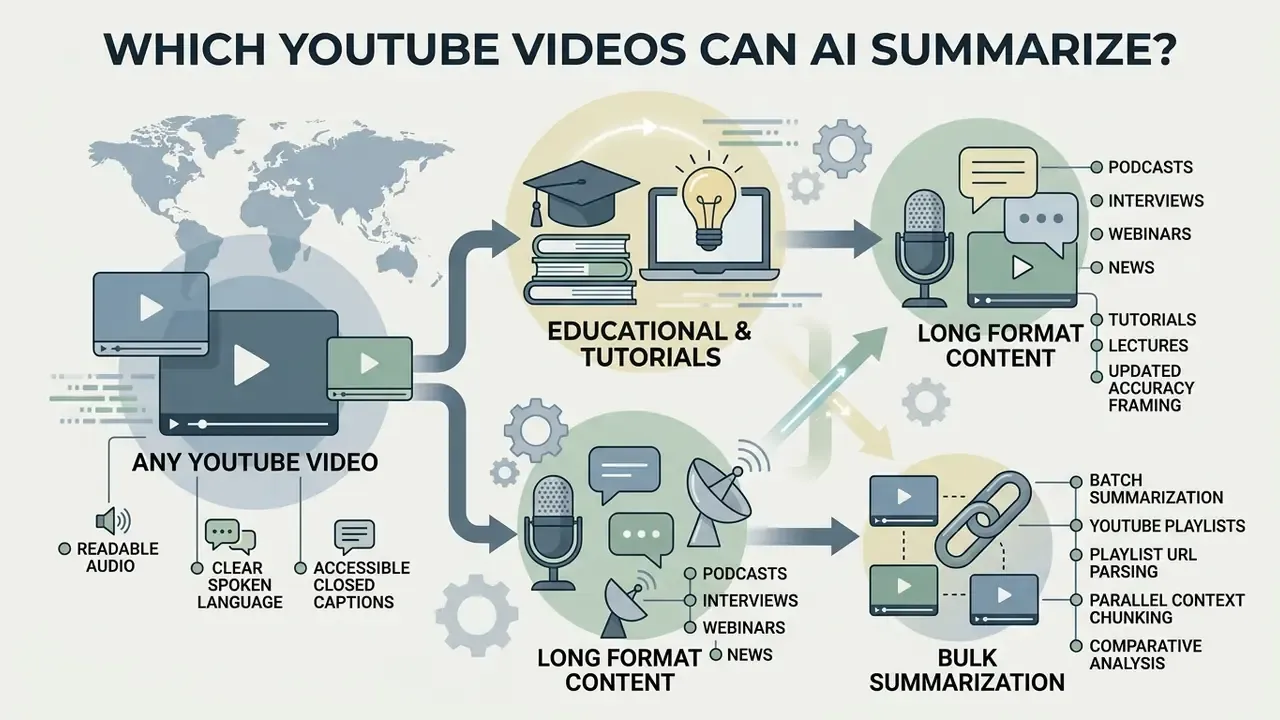
AI tools can summarize any YouTube video with readable audio, clear spoken language, or accessible closed captions. The underlying algorithms handle diverse formats, from short promotional clips to long videos spanning multiple hours of continuous speech.
Fidelity, though, varies with audio clarity, speaker density, domain specialisation, and transcript availability. Understanding those structural boundaries keeps expectations realistic across video categories.
Educational Videos, Tutorials and Lectures
Educational videos, technical tutorials, and academic lectures are the highest-value use cases for AI summarization. They feature structured speaking patterns, explicit topic transitions, and dense information that translates cleanly into text.
AI algorithms parse long lectures into structured study notes, extracting formulas, definitions, and step-by-step instructions.
«EDUVSUM comprises 98 annotated videos drawn from YouTube, EdX and the TIB AV-Portal, covering Python, machine learning and computer vision.»
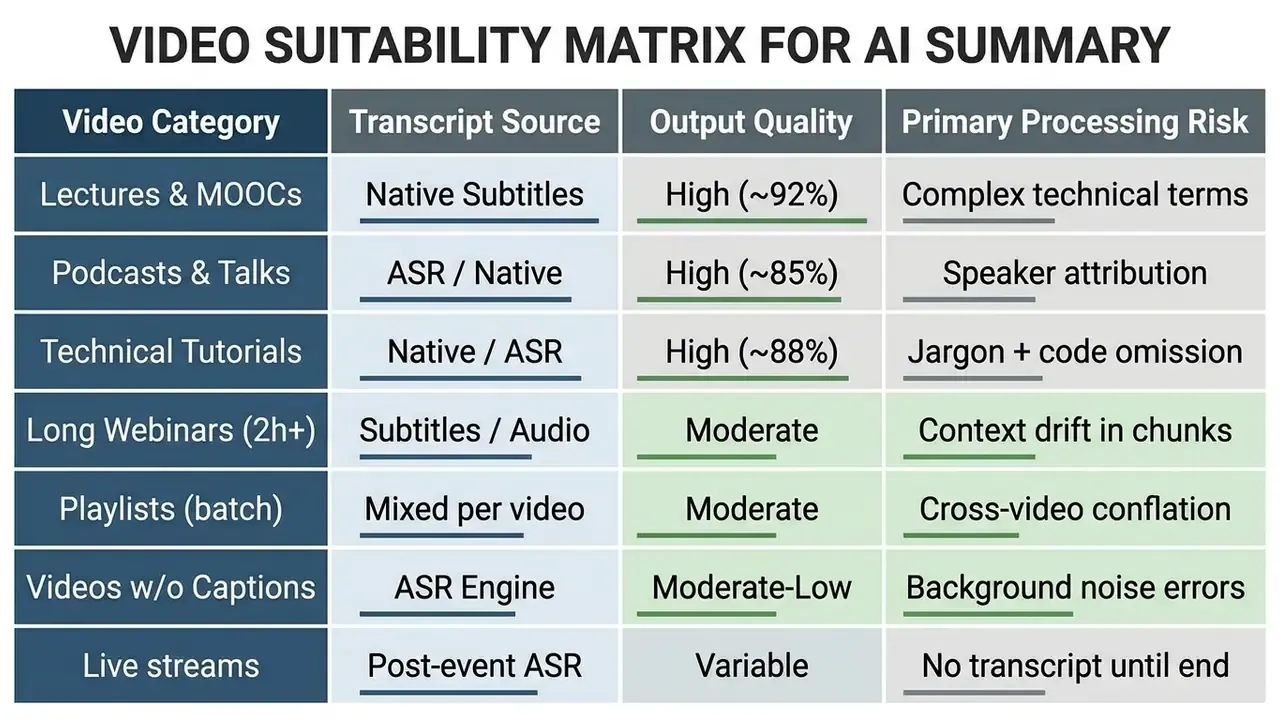
Updated accuracy framing. Earlier drafts of this guide cited a single "over 88% accuracy" figure for pedagogical key-point identification without methodological context. The defensible reading is narrower. EDUVSUM annotations were produced by an annotator with a computer-science academic background, so the benchmark reflects expert-judged relevance on a 98-video sample rather than population-level accuracy. Independent transcript-summarizer evaluation reports a category gradient of roughly 92% on educational videos, 88% on technical videos, and 85% on entertainment content, with the drop attributed to jargon density and context loss. A 2023 ACL Anthology user study of LLM-generated lecture summaries measured improvement in studying experience, not test scores. That is the honest claim boundary for education use cases.
Podcasts, Interviews, Webinars and News
Conversational content such as podcasts, panel interviews, webinars, and news commentary carries a lot of informal dialogue and digression. AI summarizers process these long files by applying speaker-turn segmentation and topical discourse parsing.
The canonical research pipeline converts audio into a speaker-segmented, punctuated transcript, splits it by speaker turn, then applies hierarchical summarization: turn-level summaries are clustered by semantic similarity, merged, pruned of low-value fragments, and re-summarized to yield medium and short variants. Meeting-minute systems extend this with unsupervised topical segmentation, so each discourse segment is summarized independently before final assembly.
The system strips small talk, filler phrases, and sponsor reads, distilling 60-minute discussions into key insights and the major debate arguments. For multi-party webinars, the better tools categorise consensus points and recorded agreements, which makes long conversational videos far easier to digest.
Long Videos, Multiple Videos and Videos Without Subtitles
Summarizing long videos, or processing multiple YouTube videos at once, requires robust handling of LLM context limits and missing subtitle tracks. When native captions are absent, modern AI services run ASR pipelines to transcribe raw audio locally or through API endpoints before the summary prompt runs. Service ceilings differ sharply here: some tools advertise no length limit when captions exist but cap caption-free videos at 120–150 minutes, because audio transcription consumes far more compute than caption retrieval.
For videos exceeding context boundaries, tools use recursive chunking: summarize individual 15-minute segments first, then condense those segment summaries into a single macro overview.
«On Mr. HiSum (31,892 videos, 1,788 hours), PGL-SUM and VASNet reach roughly 55.9 F1 and 61.6 MAP at a 50% summarization budget.»
Those figures are the practical reality check against vendor accuracy marketing. Even leading highlight-detection models agree with human reference summaries on only a little over half of the selected content, which is why timestamp verification is non-negotiable in regulated use.
Batch Summarization and YouTube Playlists
Enterprise research usually means multi-video series, full course modules, or structured YouTube playlists rather than isolated clips. Modern AI summarizers handle this through batch ingestion pipelines:
- Playlist URL parsing.Paste a full playlist link (
youtube.com/playlist?list=...) to extract metadata and caption availability for up to roughly 20 videos in a single request; consumer tools commonly cap free batch throughput at 20 simultaneous videos or 50 summaries per day. - Parallel context chunking.The pipeline initialises concurrent ASR and transcription sessions, then merges individual video summaries into a master dynamic index with per-video chapter anchors.
- Comparative analysis.Advanced batch tools surface overlapping arguments, consensus points, contradictions, and chronological developments across every video in the queue. That is the difference between "20 summaries" and one synthesised research brief.
- Deduplication and noise control.Multi-video pipelines apply frame deduplication and scene filtering before summarization, so repeated intros, sponsor reads, and recurring boilerplate do not inflate the merged output.
One constraint applies to all batch work: YouTube developer policies prohibit scraping YouTube content or ingesting scraped datasets, and the API terms require compliance with applicable privacy law for any personal data captured in transcripts. Batch pipelines must therefore run on sanctioned API access with documented data handling, never on bulk harvesting.
How to Choose an AI Tool to Summarize YouTube Videos
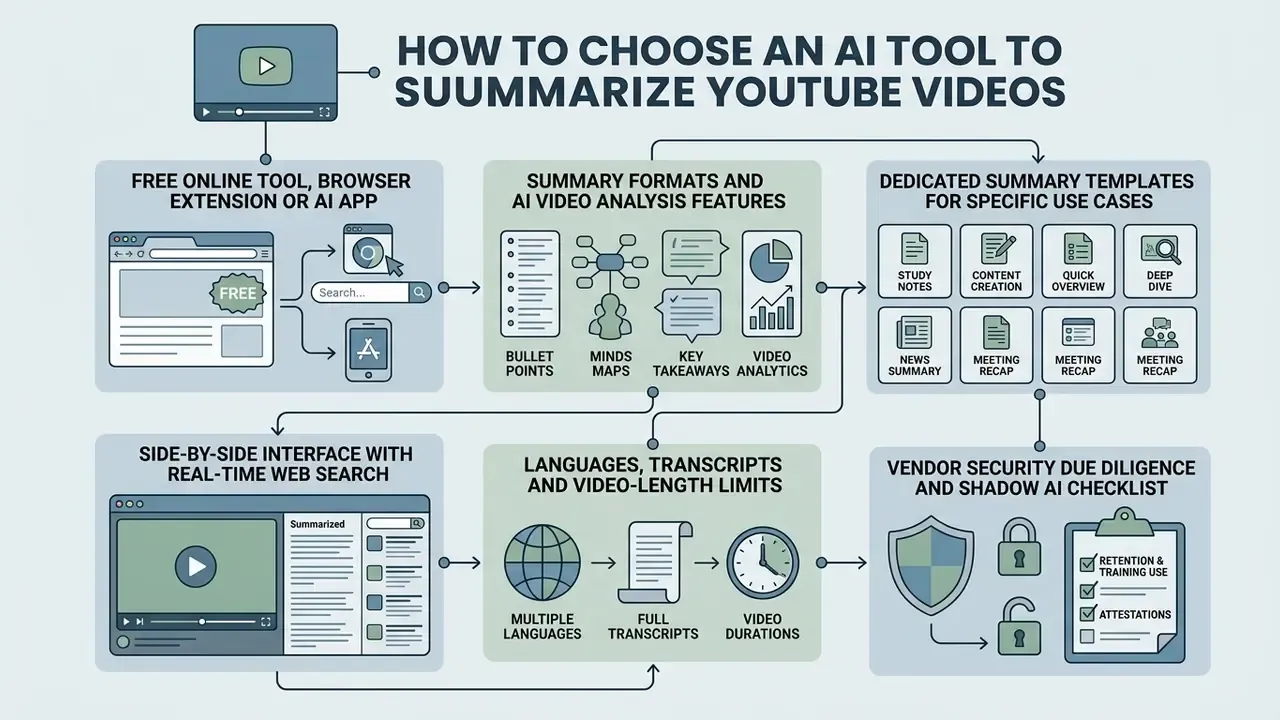
Selecting the best AI service to summarize YouTube videos means evaluating delivery format, security policy, context window capability, and multi-language support. Decision-makers have to balance browser convenience against data privacy risk and output customisability.
Comparing web applications, browser extensions, and standalone API services keeps the chosen solution aligned with real workflows without exposing confidential research queries to data-retentive platforms. Teams that also need downstream production tooling can cross-reference our comparison of free AI video generators when summarization feeds a content pipeline rather than a research archive.
Free Online Tool, Browser Extension or AI App
You can reach AI summarizers through web applications, browser extensions, or dedicated desktop and mobile apps. Free online sites require no sign-up and no installation, offering immediate single-link processing inside the browser, which makes them the most registration-free of the three options.
Browser extensions embed a summarization button directly in the native YouTube player interface, enabling one click summary generation while you watch. Highest convenience, clearly. However, decision-makers must weigh extension security permissions: official security guidance notes that extensions run with privileged browser access and can read or modify page data, which is a materially larger attack surface than an isolated web form. Standalone desktop applications and API integrations invert the trade-off. Installation friction is higher, but processing can stay local and session dependency on third-party web services drops sharply. Post-production teams pairing summaries with editing work usually settle on desktop tooling, consulting a dedicated YouTube video editor guide to align automated text cut-lists with timeline software, or a video editor for mac where the studio standardises on Apple hardware.
Summary Formats and AI Video Analysis Features
Modern AI tools do more than extract text. Interactive chat modes, mind map visualisation, and timeline navigation are now standard on paid tiers. Chat features let users ask follow-up questions against the video context, effectively turning a static recording into a conversational knowledge base.
«The VSL pipeline uses pre-trained vision-language models for scene-level semantic analysis driven by user genre preferences, without additional supervised training.»
Visual tools render topic hierarchies as interactive mind maps, letting users expand or collapse themes, while timestamped nodes jump straight to the referenced moment in the video timeline. When choosing specialised production software, teams often compare creative suites through structured AI Media Comparison Matrices to confirm that export capabilities match corporate documentation standards.
Dedicated Summary Templates for Specific Use Cases
Generic bullet points fail on specialised video structures. Leading AI tools ship pre-configured domain templates, currently between five preset modes and nine customisable templates, and template choice affects output fidelity about as much as model choice does.
| Summary Template | Primary Focus Area | Output Format & Elements |
|---|---|---|
| General TL;DR | High-level overview | 3-sentence executive summary + 5 core takeaways |
| Chapter Summary | Long-form structured video | Section headers with start/end timestamps per chapter |
| Meeting Minutes | Webinars & town halls | Action items, assigned owners, decisions, agreements reached |
| Educational Lecture | Courses & tutorials | Key definitions, formulas, step-by-step procedures |
| Code & Technical | Developer streams | Extracted code snippets, architecture choices, known bugs |
| Film & Media Review | Video essays & critiques | Narrative structure, visual style notes, final rating |
| Podcast Q&A | Interviews & panels | Host vs. guest statements, interactive FAQ blocks |
| Product Review | Unboxings & comparisons | Pros, cons, spec table, pricing, purchase recommendation |
| Compliance Audit | Regulated disclosures | Disclosure statements, qualifiers, timestamped evidence anchors |
Side-by-Side Interface with Real-Time Web Search
High-efficiency tools use a dual-pane, side-by-side interface. The native YouTube player anchors on the left, while timestamped summaries, transcript lines, and an interactive chat window refresh on the right, so verification happens without tab switching. Modern systems also add web-enhanced search, issuing Bing or Google API calls alongside the transcript LLM pass, to resolve obscure factual references, term definitions, and sources cited aloud by the speaker. Treat enrichment results as a second, separately citable layer. Web-retrieved context should never be silently merged into transcript-grounded claims, because that destroys the audit trail between summary sentence and source second.
Languages, Transcripts and Video-Length Limits
Free plans and commercial platforms enforce different constraints on video length, transcript parsing, and translation. Leading tools support 8 to 100+ languages for summarization and up to 120+ languages for subtitle translation, converting foreign-language YouTube transcripts into clean English summaries automatically. Support for multiple languages making cross-border research viable is now a baseline expectation, not a differentiator.
Published free-tier ceilings show how wide the spread is. One subtitle platform caps free processing at 30 minutes per file, 1 GB, and a 5-minute watermarked export. A transcription service allows three transcripts per day at 30 minutes each while supporting files up to 10 hours on paid tiers. A video tool restricts its starter plan to 10 minutes per video. Length restrictions follow processing architecture, not brand promises.
«Video-XL applies Visual Context Latent Summarization, compressing visual tokens into dedicated VST tokens in chunks of 1,440 frames to process hour-scale video in a single pass.»
Review vendor tier limits, then confirm them against a test video matching your longest realistic input. That single test prevents silent truncation from reaching a deliverable.
| Feature Criterion | Free Online Site | Browser Extension | Standalone Desktop/API |
|---|---|---|---|
| Installation requirement | None (browser-based) | Extension store install | Package / binary install |
| Account / no-login access | Commonly supported | Often requires account | API key / local auth |
| Security risk profile | Low–Medium (server-side retention) | Medium–High (browser permissions) | Low–Medium (local execution) |
| Data retention policy | Often unspecified; verify ToS | Varies; check permission scope | Configurable; zero-data-retention (ZDR) negotiable |
| SOC 2 / ISO 27001 attestation | Rare on free tiers | Rare | Available from enterprise vendors |
| On-premise / private cloud | Not available | Not available | Supported (self-hosted Whisper + local LLM) |
| Auto-deletion window | Sometimes 24h (verify) | Session-based | Policy-defined, contractually enforceable |
| Max video duration limit | 10–120 minutes | 60–150 minutes | Unlimited (hardware bound, up to ~10h files) |
| Batch / playlist support | Up to ~20 videos, daily caps | Limited | Full queue orchestration |
| Direct file upload | Up to ~1 GB | Rare | Up to ~5 GB depending on tier |
| Interactive AI chat | Variable | Common (in-page drawer) | High (full parameter control) |
| Mind map visual export | Rare | Selective | Supported via Markdown / JSON |
| Notion / Obsidian export | Copy + .md download | Occasional native export | Webhook + front-matter automation |
| Multi-language support | 8–100+ languages | 12–50+ languages | Full model capability |
Read the table as a risk ladder rather than a feature list: convenience rises left to right in the browser, control rises right to left from the API.
Vendor Security Due Diligence and Shadow AI Checklist
Uncontrolled use of consumer summarizers is the most common shadow-AI vector in research-heavy organisations. An analyst pastes an unlisted internal webinar link into a free tool, and confidential material leaves the perimeter without a contract, a retention policy, or a log entry. Screen vendors and internal usage against the following:
- Retention and training use.Does the provider retain transcripts, links, or summaries? Are inputs excluded from model training by default, and is that exclusion contractual rather than a blog statement?
- Attestations.Is there a current SOC 2 Type II report or ISO 27001 certificate? Request the report, not the badge.
- Deployment topology.Is on-premise, VPC, or self-hosted deployment available for confidential media? Self-hosted Whisper plus a local LLM eliminates third-party transmission entirely.
- Deletion guarantees.Is there a documented auto-deletion window for uploaded files, and can deletion be evidenced on request?
- Sub-processors and data residency.Which ASR and LLM vendors sit behind the interface, and in which jurisdictions is audio processed?
- Extension permission scope.For browser tools, does the manifest request access to all sites, or only to YouTube domains?
- Content-source legality.Does the workflow rely on sanctioned API access rather than scraping, in line with YouTube developer policy, and does it respect applicable privacy law for personal data appearing in transcripts?
- Shadow-AI detection.Are consumer summarizer domains monitored on corporate networks, and is an approved internal alternative published so analysts have a compliant default?
Point eight is the one most programmes skip. Blocking without providing a sanctioned tool simply pushes usage onto personal devices.
Enterprise Risk Alert: AI Summaries Are Analytical Aids, Not Absolute Substitutes
Hallucination Error Taxonomy for Video-Language Models
Understanding how these models fail is more useful than a single headline error rate. Documented failure classes include:
- Hallucinated time content. Invalid or invented temporal information inside a summary; 2025 ACL Findings analysis reports this defect as more severe in Video-LLaVa and VTimeLLM than in comparison models.
- Structured error counts. For Video-ChatGPT on ActivityNet, the same analysis enumerates 273 temporal-slot errors, 258 time-range errors, 127 regular-time-division errors, 83 fragment-repetition errors, 281 template violations, and 9 camera-movement misfocus cases.
- Sentence-level factual error. The 2023 study Models See Hallucinations: Evaluating the Factuality in Video Captioning reports factual errors in 57.0% of generated sentences. Note the scope difference: captioning and summarization are distinct tasks, so this rate is not directly comparable to the temporal counts above.
- Long-range degradation. A 2025 survey on hallucination in video-language models finds that longer videos worsen referential inconsistency and long-range dynamic distortion, which is precisely the regime of multi-hour earnings calls and webinars.
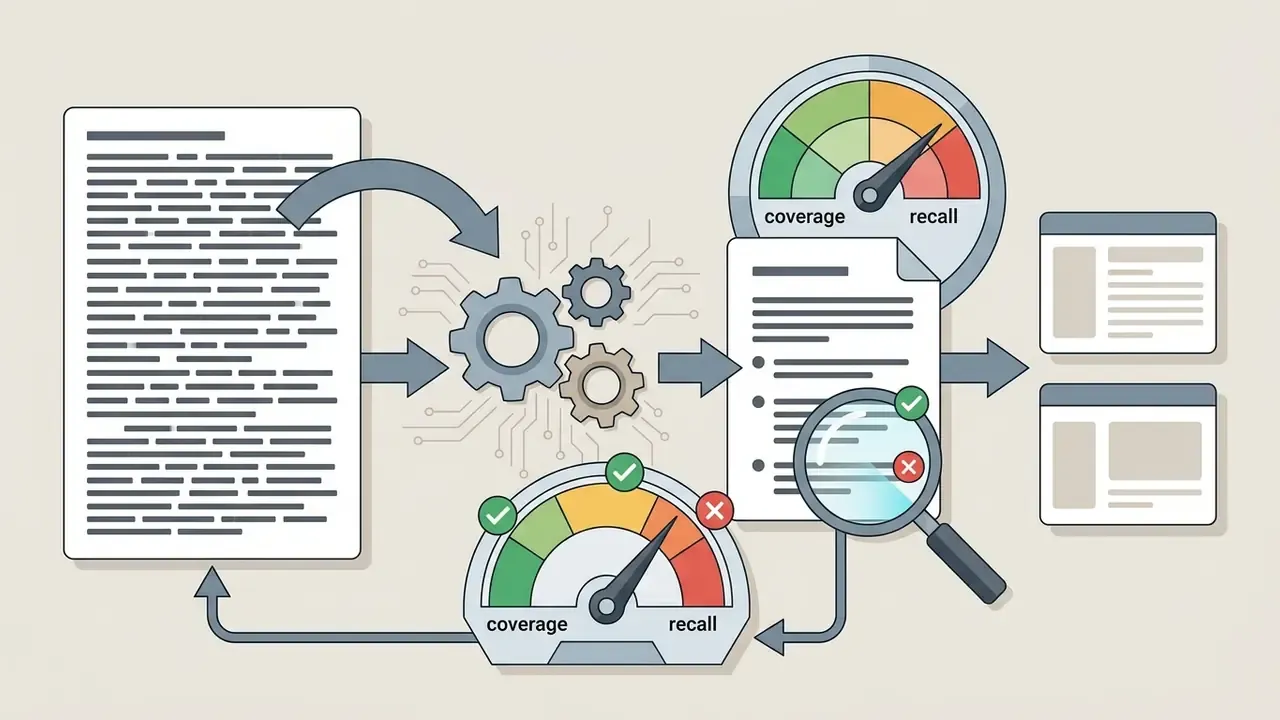
- Recall gaps. Coverage-oriented metrics quantify what was left out rather than what was invented.
«MFACTSUM averages visual and textual recall, showing that even leading models omit a meaningful share of source-video facts.»
Any vendor advertising "up to 99.9% accuracy" is making a claim that no published benchmark in this field supports.
Verification Methodology for AI-Generated Summaries
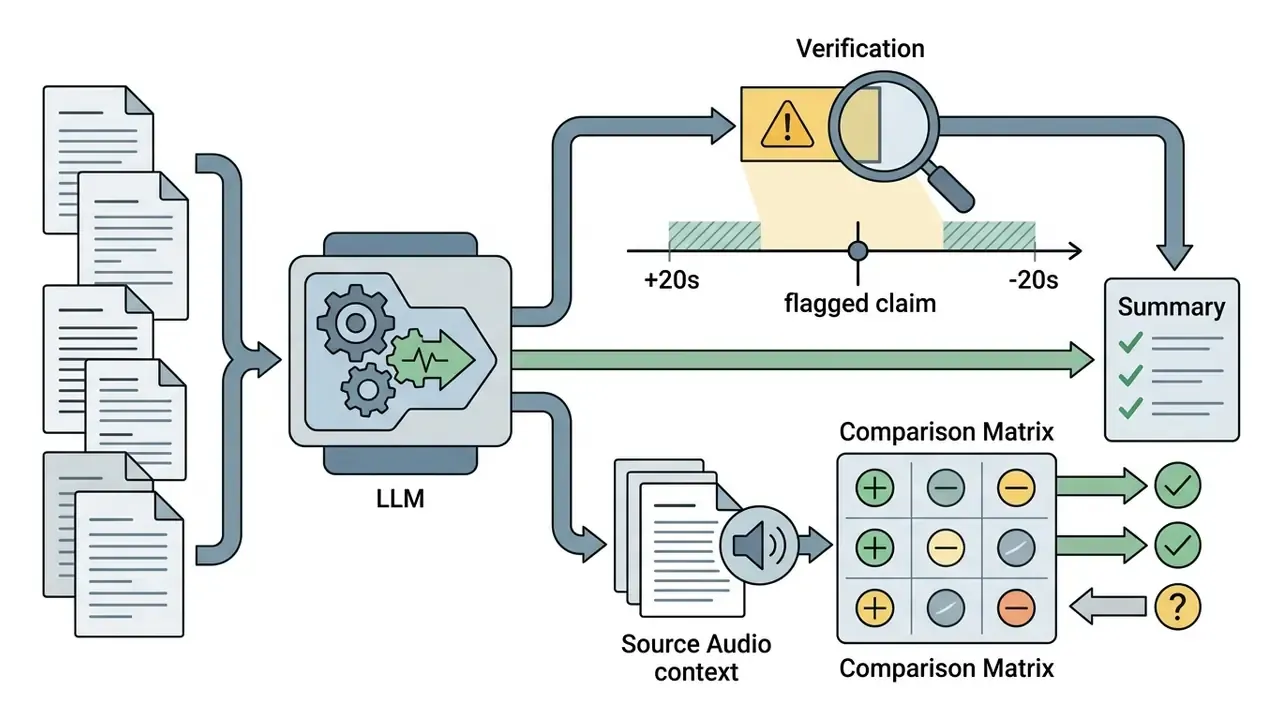
Evaluating the factual accuracy of an AI-generated video summary requires a three-tier procedure aligned with the NIST AI Risk Management Framework (NIST AI RMF 1.0), which frames evaluation around trustworthiness characteristics and documented risk control. NIST's own summarization and generative-AI evaluation work scores outputs on whether required information is present and whether it is expressed accurately, which is a claim-level check rather than surface similarity:
Escalation Path and Accountability Matrix
Verification only reduces risk if someone owns the decision when verification fails. Define the path before deployment, not after the first bad summary reaches a committee pack.
| Finding Severity | Example Defect | First Responder | Decision Owner | Required Action |
|---|---|---|---|---|
| Low | Cosmetic wording or formatting drift | Analyst | Analyst | Correct inline, note in change log |
| Medium | Missing secondary key point; ambiguous attribution | Analyst | Team lead | Re-run with narrowed prompt; document delta |
| High | Misstated metric, date, or guidance figure | Analyst | Head of Model Risk | Quarantine summary; revert to manual transcript review |
| Critical | Hallucinated regulatory or legal statement | Analyst | CRO / Compliance Officer | Halt distribution, trigger incident log, review model suitability |
| Systemic | Repeated defect class across videos or vendors | Model Risk team | AI Governance Committee | Vendor remediation, control redesign, or removal from approved tooling |
Human-in-the-loop (HITL) review stays mandatory for High and above. No AI summary should reach an external or regulatory audience without a named human attestation that timestamp anchoring was checked.
Use Cases for AI YouTube Video Summaries
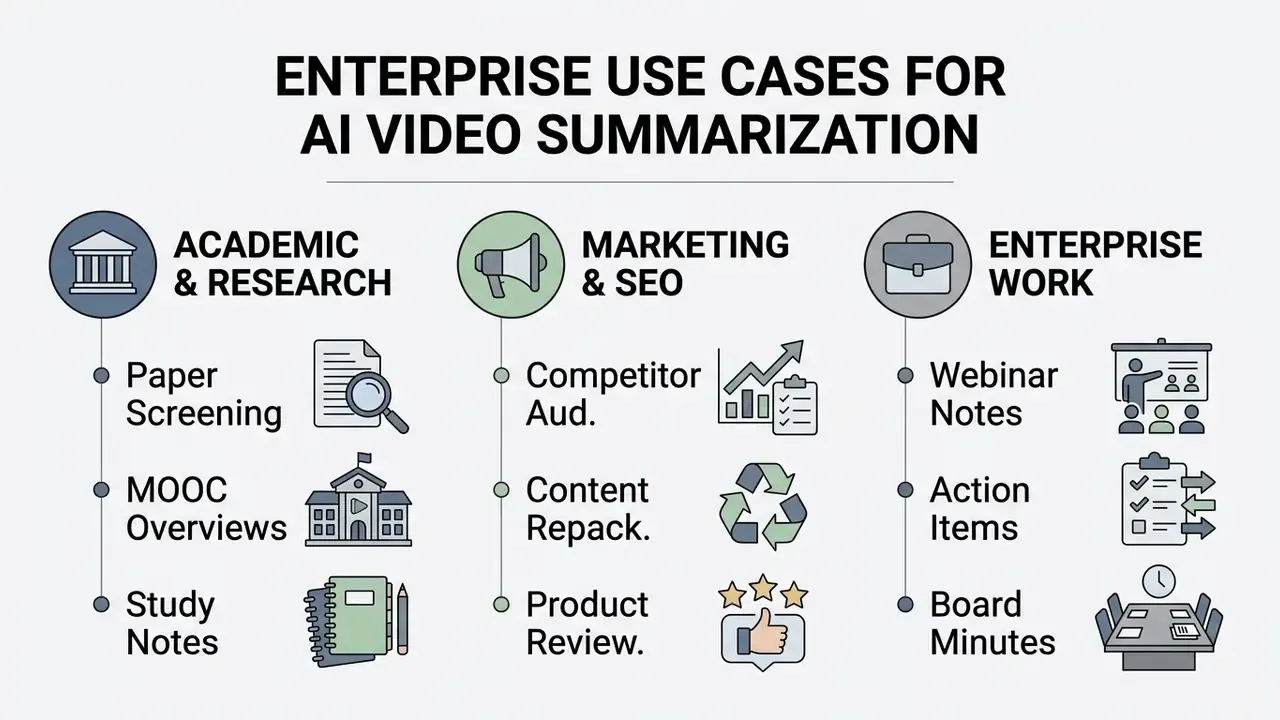
AI summaries of YouTube videos serve distinct operational roles across education, digital marketing, corporate management, and market research. Condensing long videos into structured text lets professionals process large visual libraries efficiently and save time that used to disappear into passive watching.
By automating content extraction, organisations free up analyst hours and turn video repositories into searchable corporate assets.
Learning and Research Without Watching Full Videos
Students, academics, and industry researchers use AI video summarizers to scan lectures, literature reviews, and instructional webinars without watching every minute of footage. The system extracts core arguments, technical formulas, and bibliographical references into compact study sheets, and university library guidance now lists YouTube video summarization alongside PDF summarization as a legitimate research support workflow.
Researchers can process dozens of conference presentations in one session, triaging relevant recordings for deeper review and discarding non-essential talks. Summaries of conference programmes are explicitly documented as helping attendees choose sessions, which is a modest but real benefit. This targeted approach preserves focus and reduces cognitive fatigue during long research projects, letting a reader quickly grasp key ideas before committing an hour of attention. Student-facing tools extend the same pipeline into flashcards and quizzes, though the evidence base supports faster orientation rather than guaranteed comprehension gains.
Content Creation, Marketing and Product Research
Digital marketers, content creators, and SEO analysts use video summaries for competitive research, script ideation, and multi-channel repurposing. Summarizing competitor product reviews reveals customer pain points and feature comparisons without manual logging; academic work on online reviews shows that comparative customer requirements and product competitiveness can be extracted systematically and tracked over time as new reviews arrive.
Creators repurpose long YouTube videos into blog posts, social media summaries, newsletters, and video descriptions. Two constraints matter. First, search guidance is explicit that rewritten material must add substantial original value rather than restate a source, so a summary is raw input for original analysis, not publishable output. Second, repackaging works best when the derived outline is rebuilt around user intent and related evergreen topics instead of being reposted verbatim. Teams that convert summarized insight into new media assets typically pair the text layer with production tooling: a YouTube video editor workflow for timeline assembly, an AI voice generator for narration of the condensed script, and a video compressor to deliver the finished cut-down across platforms without quality collapse.
Professional Workflow for Meetings, Talks and Webinars
In corporate environments, team leads use AI summarization to extract decision records, action items, and strategic targets from recorded town halls, client webinars, conference talks, and meetings hosted on YouTube or internal platforms. Enterprise documentation from major vendors describes exactly this flow: generating meeting notes from Teams or Zoom transcripts, producing sectioned overviews and key points, then distributing the result to participants. One platform explicitly surfaces "agreements reached" as a distinct output field.
«Topic-segmented recursive summarization with action-item extraction reaches BERTScore 64.98 on the AMI corpus, 4.98 points above fine-tuned BART.»
Structured meeting summaries keep non-attending stakeholders aligned on outcomes without re-watching multi-hour streams. Exporting those action items into central management systems turns passive recordings into actionable workflows, and teams handling the resulting media assets often combine the notes with dedicated editing and publishing workflows for clip production.
Illustrative scenario (hypothetical). A corporate training team audited 120 internal training webinars hosted on unlisted YouTube links to build an operational compliance index. The team implemented an automated transcript pipeline converting the video roster into structured Markdown summaries with linked timestamps. The modelled saving was on the order of 160 hours of manual review, letting compliance officers verify policy disclosures directly through precise timestamp links. Treat the hours figure as a scoping estimate rather than an audited result; actual savings depend on caption availability, audio quality, and the depth of required verification.
Risk-Adjusted ROI Model for Enterprise Deployment
Gross time saved is a vanity metric. Governance-grade business cases net out the cost of the controls that make AI output usable:
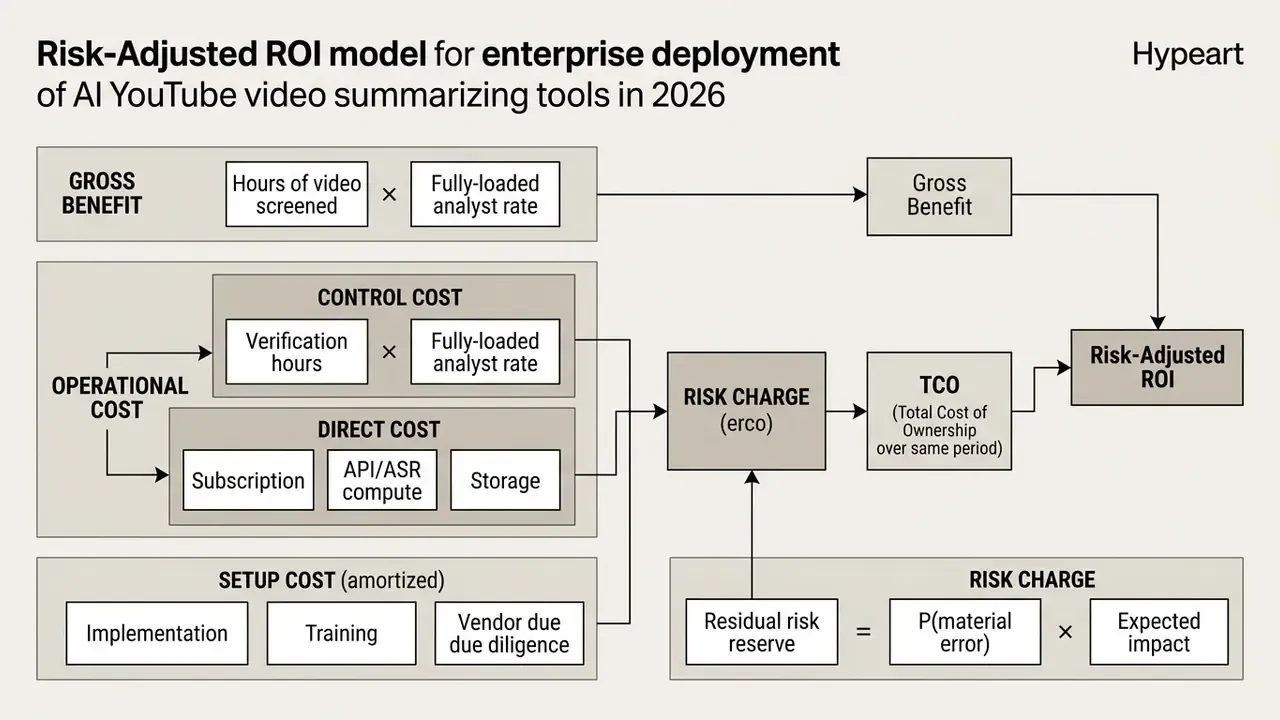
Worked illustration (hypothetical parameters). An intelligence team screens 200 hours of public webcasts per quarter. Manual review at 1.2 times real time costs 240 analyst hours. A summarization pipeline reduces first-pass screening to 60 hours but adds 40 hours of timestamp verification, so net labour saving is 140 hours. At a fully-loaded rate of $110 per hour that is $15,400 of gross benefit. Subtract $1,800 of API and ASR compute, $2,500 of amortised implementation and vendor due diligence, and a residual risk reserve of $2,000 (a 2% probability of a material misstatement with a $100,000 modelled impact). Net benefit is $9,100 against $6,300 total cost of ownership. A defensible case, and one that collapses immediately if verification hours are omitted from the model. Cost inputs can be modelled with our media calculators and API pricing references before you commit to a tier.
Two sensitivities dominate the result: caption availability, since ASR compute is the largest variable cost, and required assurance level, since regulated outputs push verification hours up sharply and sometimes erase the benefit entirely for the highest-criticality material.
How to Get More Accurate YouTube Video Summaries
Accurate summaries come from deliberate prompt engineering, disciplined context window management, and systematic verification. Default parameters tend to produce missed technical context or, worse, confident hallucinations.
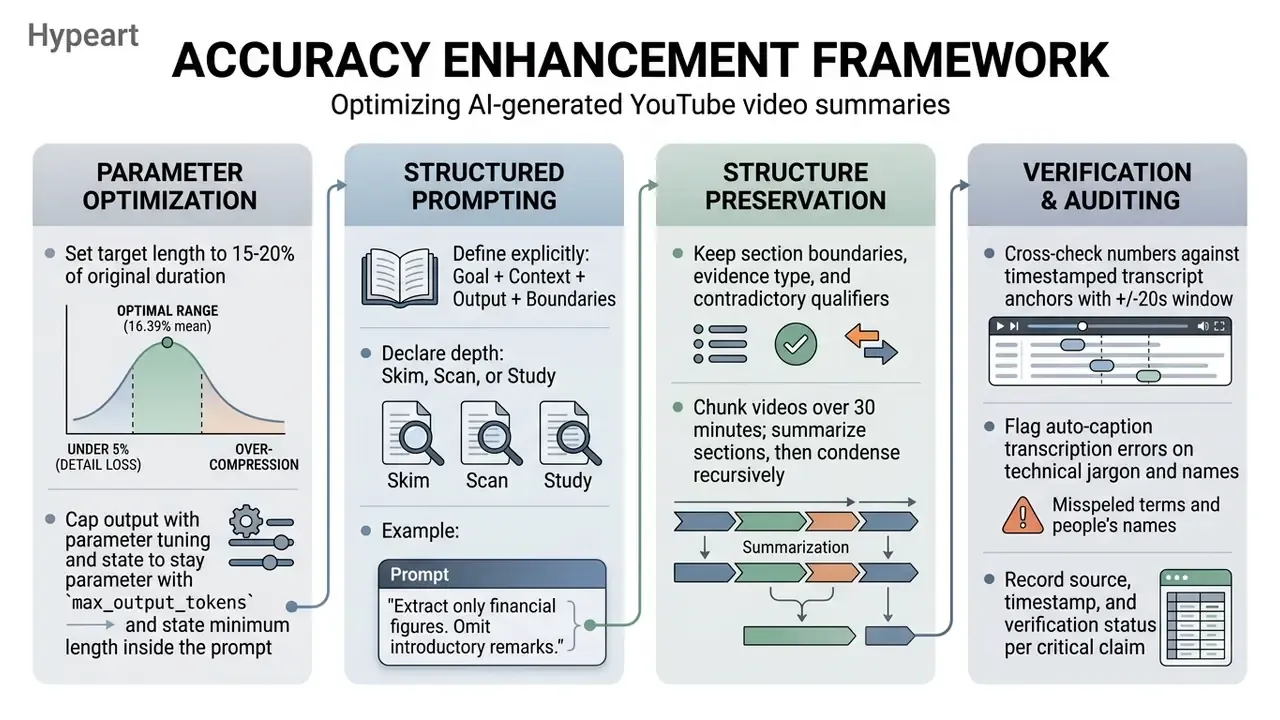
Structured prompts plus verification against native transcript anchors keep summaries faithful to the original source video.
Use a Clear Prompt and the Right Summary Length
Summary accuracy tracks prompt clarity and target length more closely than most buyers expect. Setting an aggressive compression ratio, say a 50-word summary for a two-hour lecture, forces the LLM to drop essential nuance and critical disclaimers.
For better results, configure output length to roughly 15%–20% of the original video duration and use structured prompt templates. Explicit constraints, meaning target audience, required bullet structure, depth label, and strict exclusions, stop the model from importing external assumptions.
«Text-query-conditioned models use contextualized embeddings and specialized attention mechanisms to align summaries with user intent, evaluated by accuracy and F1.»
Prompt guidance converges on four fields, Goal, Context, Output, Boundaries, plus an explicit depth setting and a section list. For inputs over 30 minutes, chunk first and condense recursively instead of demanding a single pass.
Recommended Prompt Template for Detailed Video Extraction
Check Context, Timestamps and the Original Video
Because ASR systems mishear technical jargon, proper names, and numerical figures, critical data points have to be verified against the primary video.
Interactive transcripts let users search specific terms and jump directly to the matching point on the video timeline, with each claim tied to a transcript line. Reviewing the 20-second audio window around each key claim confirms that spoken context, conditional statements, and tone survived the compression pass. Document source, timestamp, and verification status for every critical claim, so a reviewer can reproduce the check without re-watching the entire recording. That log is the difference between a useful research note and an unauditable one.
FAQ: Common Questions About AI YouTube Video Summarizers
Can AI Summarize YouTube Videos Created by Me?
Yes, an AI video summarizer can process videos you created and uploaded, provided the permissions allow access. If your video is Public or Unlisted, copy the video URL and paste it into any web-based summarizer; YouTube documentation confirms unlisted videos are viewable by anyone with the link. If the video is Private, standard URL-based tools cannot reach the transcript, because private videos cannot be opened through a shared URL. To summarize private videos, download the video or audio file from YouTube Studio and upload the raw file into an AI transcription tool, or authenticate the service with explicit OAuth tokens against the YouTube Data API.
Can I Use an AI Summarizer for YouTube Videos on a Smartphone?
Yes. Mobile browsers handle most free online summarizer sites without installation, and several vendors ship dedicated iOS and Android apps that accept a shared video link straight from the YouTube app's share sheet. Two caveats apply. Mobile sessions often impose shorter video-length caps than desktop tiers, and verification is harder on a small screen, since side-by-side player and transcript panes collapse into tabs. For anything above the Medium severity band in the escalation matrix, do the timestamp check on desktop.
Can AI Summarize an Entire YouTube Playlist or Multiple Videos at Once?
Yes. Batch-capable tools accept a playlist URL (youtube.com/playlist?list=...) and process the queue in parallel, commonly up to 20 videos per request, with free-tier caps often set around 50 summaries per day. Enterprise pipelines add cross-video synthesis, surfacing consensus points and contradictions across the whole series rather than returning 20 unrelated summaries. Throughput depends heavily on caption availability: videos requiring ASR consume far more compute than videos with native caption tracks.
How Do I Export a YouTube Summary to Notion or Obsidian?
Most tools offer one-click copy plus download as TXT, Markdown, Word, or PDF, and some offer direct export to Notion or Obsidian. For Notion, export Markdown with front-matter metadata (title, url, duration, timestamps) so header hierarchy survives the paste, or wire a webhook into a Notion database. For Obsidian, save the .md file into your vault with wiki-links for recurring entities and &t= deep links for each timestamp, which turns every summary into a connected node in your knowledge graph rather than an orphan file.
Can I Summarize a Video File Without a YouTube Link?
Yes. Direct upload paths accept MP4, MOV, WebM, MP3, and WAV files, typically up to around 1 GB on consumer tiers and up to 5 GB or 10 hours on paid transcription plans. The pipeline skips caption retrieval entirely and runs ASR on the uploaded media. For confidential recordings, prefer self-hosted Whisper or a contractually guaranteed zero-data-retention endpoint over a free public tool.
How Do AI Summarizers Handle Videos Without Subtitles?
When a YouTube video lacks pre-existing captions or manual subtitles, advanced AI summarizers run an integrated ASR engine such as OpenAI Whisper to convert raw spoken audio into text. Once the audio track becomes a timestamped transcript, the text passes to the LLM for summarization. Note that caption-free videos are frequently capped at 120–150 minutes on free plans, because audio transcription is compute-intensive.
Is It Free to Summarize Long YouTube Videos Using AI?
Many free online tools let you summarize YouTube videos up to 30 or 60 minutes long without payment or registration, and a few are completely free within those limits; other free tiers permit only three transcripts per day or a 10-minute ceiling per video. Processing ultra-long videos, in the two to ten hour range, generally requires a paid plan to cover the higher compute cost of ASR transcription and expanded LLM context windows.
How Accurate Are AI Video Summaries, Really?
Accuracy is high for clean, well-structured educational videos and degrades for jargon-dense technical material, noisy audio, and multi-speaker discussion. Published evaluation reports roughly 92% on educational videos, 88% on technical videos, and 85% on entertainment content, while highlight-detection benchmarks cluster around 55.9 F1 against human reference summaries. Claims of "99.9% accuracy" appear only in marketing copy and are unsupported by any published benchmark in this field.
What Is the Difference Between Extractive and Abstractive Video Summarization?
Extractive summarization selects and compiles exact visual keyframes, audio clips, or verbatim transcript sentences directly from the original video. Abstractive summarization uses generative models to rewrite, synthesise, and condense video content into entirely original phrasing. Extractive output is easier to audit; abstractive output reads better but carries higher hallucination risk.
Can AI Summarize YouTube Videos in Languages Other Than English?
Yes. Modern AI summarization services support processing across 8 to over 100 different languages, with subtitle translation reaching 120+ languages on specialised platforms. These tools can transcribe foreign-language YouTube audio, generate summaries in the source language, or translate the condensed summary into English automatically. For terminology consistency, translate the transcript before the summarization pass rather than after.
Can AI Summarize Live Streams and Premieres?
Reliable summarization needs a completed transcript, so live streams are best processed after the broadcast ends and the caption track is generated. Low-latency streaming ASR can produce rolling captions during a live event, but interim summaries should be treated as provisional and re-run against the final transcript before distribution.
Are There Legal or Policy Limits on Bulk Video Summarization?
Yes. YouTube developer policies prohibit scraping YouTube content or acquiring scraped data, and the API terms require compliance with applicable privacy laws for personal data, which transcripts frequently contain. Bulk and batch workflows should therefore run on sanctioned API access with documented retention, access control, and deletion practices.
Technical Resource Directory & Data Access
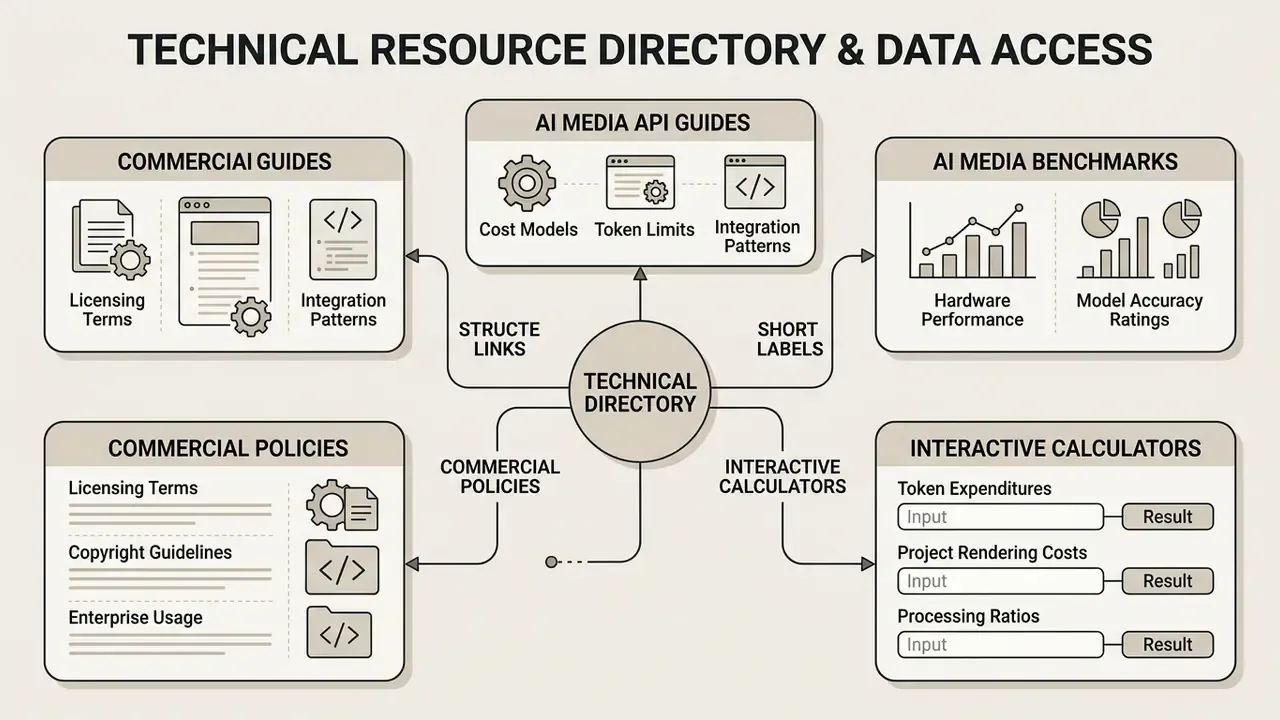
To support further technical integration, model benchmarking, and workflow optimisation, developers and media engineers can consult our structured developer databases:
- Inspect cost models, token limits, and integration patterns via our comprehensive AI Media API Guides, including the Google Veo implementation guide for adjacent video-generation economics.
- Review hardware performance evaluations and model accuracy ratings across our published AI Media Benchmarks and Review Proof.
- Calculate project rendering costs, token expenditures, and processing ratios using our interactive media calculators.
- Evaluate licensing terms, copyright guidelines, and enterprise usage policies in our dedicated commercial use documentation hub.
Institutional AI Governance Framework (Hypothetical Operational Guide)
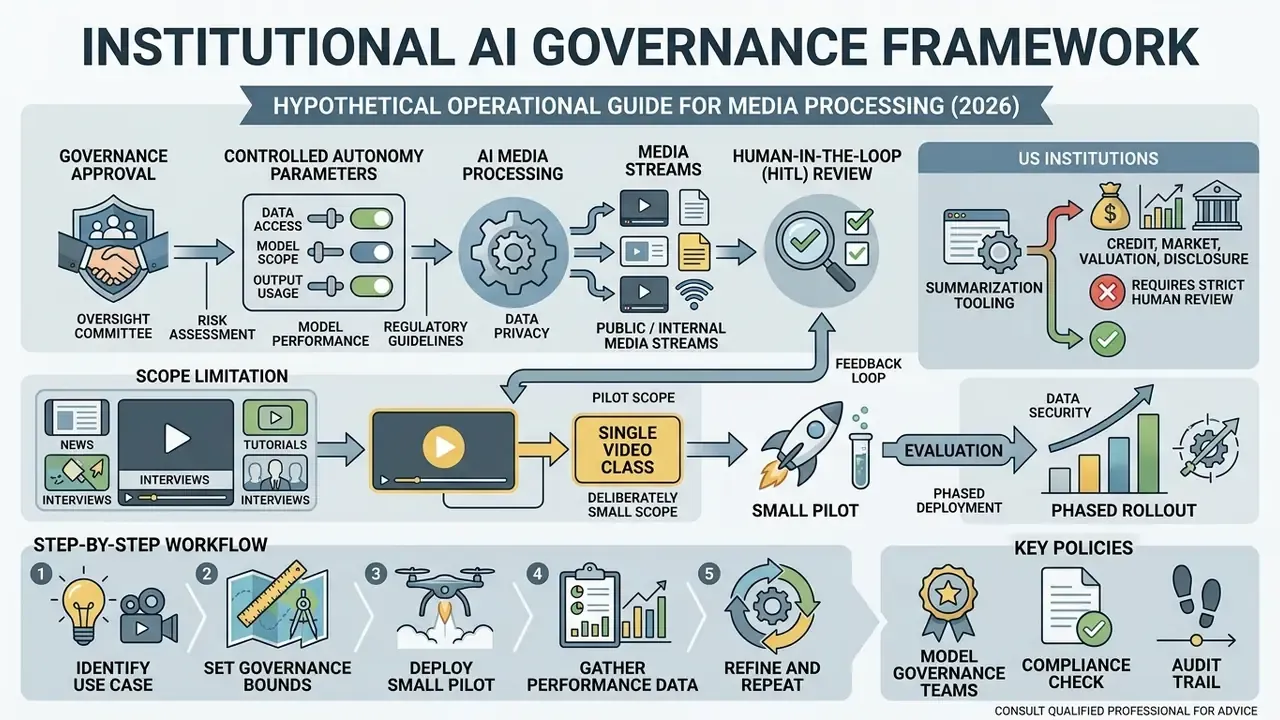
When deploying AI media processing services inside regulated financial institutions, model governance teams must establish controlled autonomy parameters before the first pilot summary is produced.
Company Positioning Note
No verified information is available for hypeart.ai domain resolution or operational status as of the publication window referenced in internal drafting notes. Any proposed operational deployment frameworks mentioned here are strictly hypothetical and intended for illustrative model-risk governance evaluation rather than as descriptions of a live production service.
Appendix A: Revision Record of Adjusted Claims
Maintained for transparency; superseded statements are retained here rather than silently deleted.
| Original Statement | Status | Current Treatment |
|---|---|---|
| "V2Xum-LLM condenses videos to 15%–20% of original duration" (no dataset detail) | Updated | Replaced with Instruct-V2Xum dataset specifics: 30,000 videos, 16.39% mean summarization ratio. |
| "EDUVSUM… over 88% accuracy" (no methodology) | Updated | Reframed with dataset scope (98 videos; expert CS annotator) and category gradient (92% / 88% / 85%). |
| "MMSum yields mind map node trees" | Updated | MMSum described as a text-plus-visual multimodal benchmark; mind-map trees attributed to product layer and a separate 2025 LLM mind-map study. |
| "Reduced initial screening time by 78%" | Updated | Retained as an explicitly labelled hypothetical planning estimate. |
| "Eliminated 160 hours of manual review" | Updated | Retained as an explicitly labelled illustrative scenario. |
| "Advanced systems handle 10-hour streams using Video-XL" (no mechanism) | Updated | Expanded with Visual Context Latent Summarization and 1,440-frame VST chunking. |
| "ACL Findings (2025)… 57% of automated video captions" | Updated | 57.0% reattributed to the 2023 video-captioning factuality study; ACL Findings 2025 cited for temporal hallucination error counts, with scope caveat. |
| Consumer design-tool links (banner creator, PFP maker, intro/outro templates) | Replaced | Substituted with workflow-relevant references: YouTube video editor workflow, video editor for Mac, AI voice generator, video compressor, free AI video generator comparison. |