Executive summary

#Shorts for immediate categorization.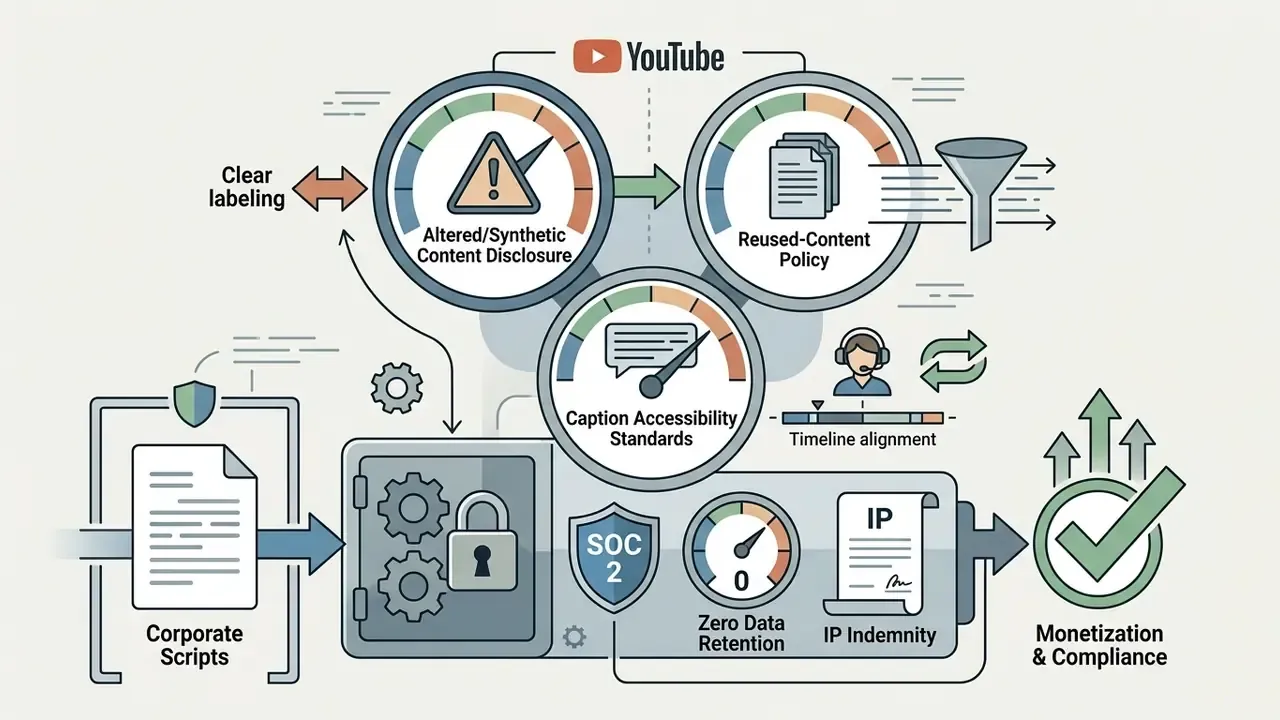

Who this guide is written for, and why the framing is conservative
So this guide reads AI video for YouTube Shorts through a control lens: who owns the asset, which prompt produced it, who approved it, and what evidence survives if someone asks six months later. If your organization has a model inventory, synthetic media belongs in the same conversation, even when the output is a 30-second clip about deposit rates rather than a credit scorecard.
Three assumptions run through the text. First, a human stays accountable at every publish gate. Second, free consumer tiers are treated as public-material-only tools. Third, any performance figure without a resolvable source is labelled directional. Where the evidence is thin, it says so.
What AI video for YouTube Shorts can create
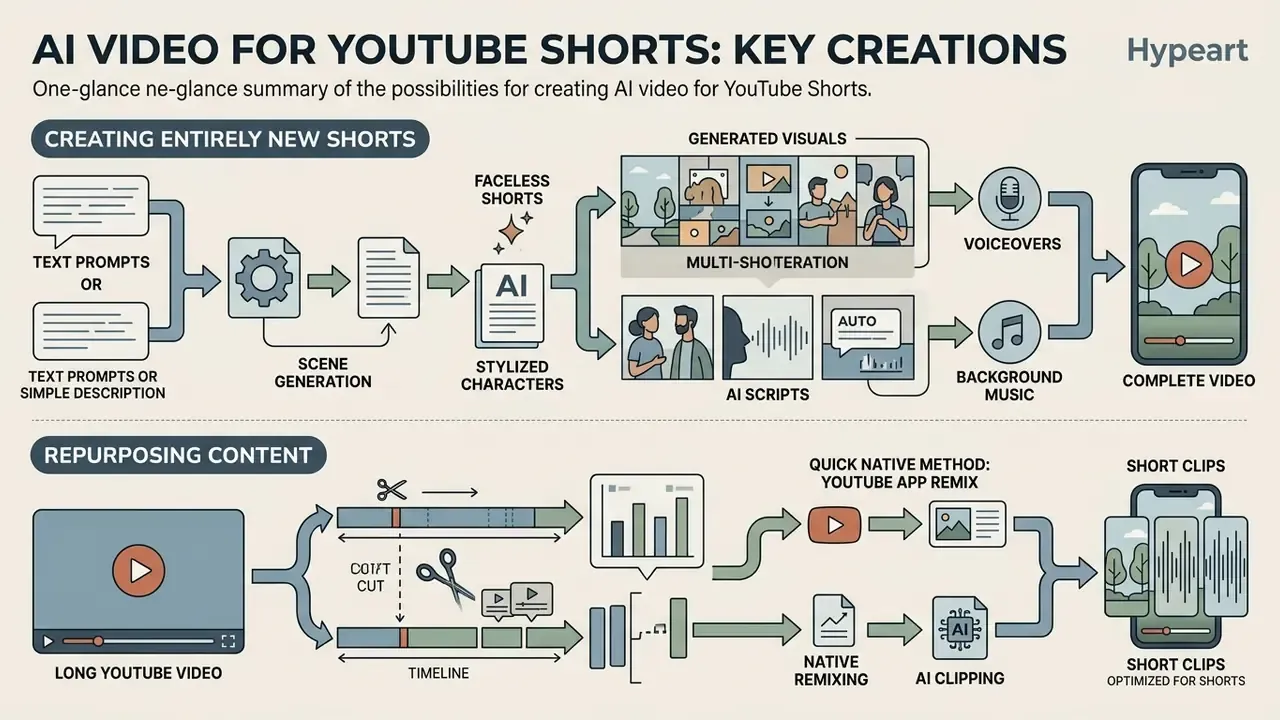
AI video generation platforms produce complete vertical short-form content by automating scriptwriting, voice synthesis, multi-shot visual rendering, background music composition, and automated long-form clipping. These systems let creators automate technical asset assembly while keeping editorial oversight over narrative structure, factual accuracy, and channel branding.
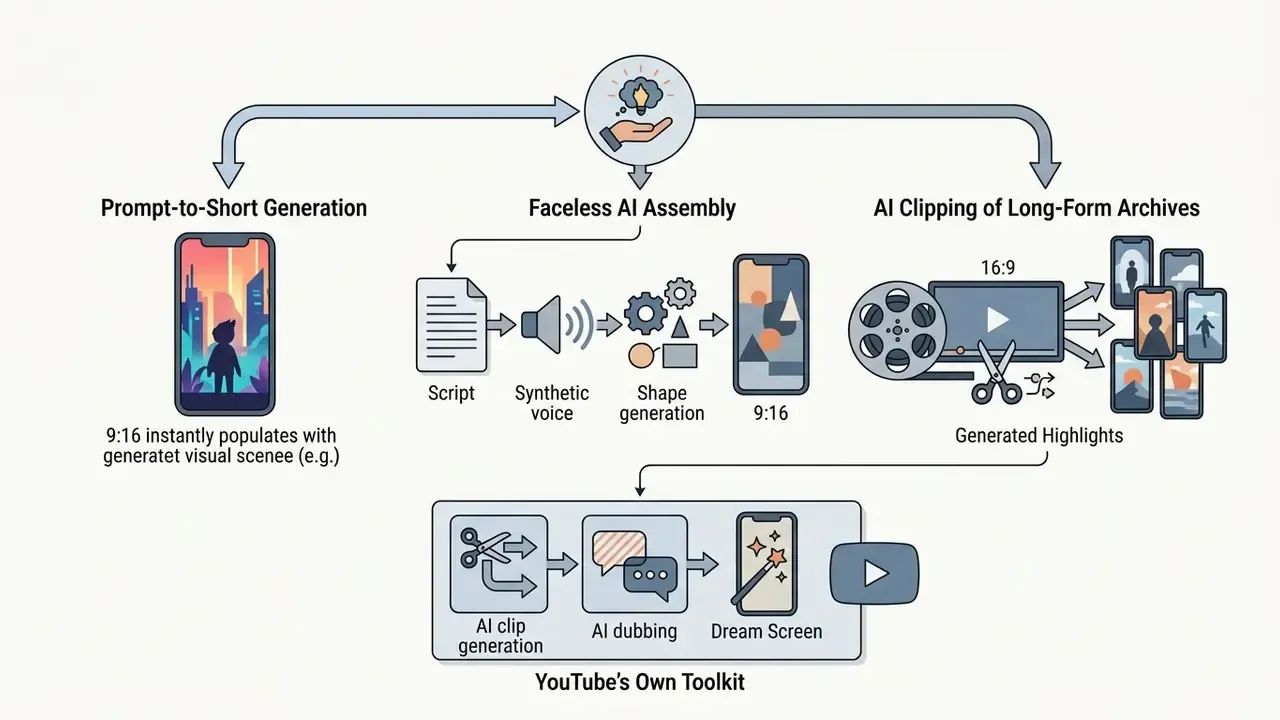
In practice, three levels of automation coexist. At the lowest level, YouTube classifies any upload that already matches Shorts specifications as a Short, which is a format decision rather than a creative one. At the middle level, hybrid assistants such as "Edit with AI" accept up to 25 clips or photos, assemble the moments, and layer narration, music, and captions while the creator still refines and publishes. At the highest level, prompt-based generation invents footage outright. Fully autonomous publication without any human input is not documented in official platform guidance: a human remains mandatory at the upload, prompt, or publish stage.
That last point matters more than it looks. It is the difference between an assistant and an unsupervised digital worker.
Faceless Shorts, AI scripts, voiceovers and generated visuals
Faceless YouTube Shorts rely on generative software stacks to assemble complete video products without on-camera talent or manual shooting. Large language models generate structured scripts from text prompts, which synthetic text-to-speech engines transform into natural-sounding voiceovers. Diffusion-based text-to-video AI tools then create matching visual scenes, while automated audio tools layer background music and sound effects.
Research into text-to-video generation demonstrates that state-of-the-art diffusion architectures can maintain visual consistency across multi-shot sequences using structured textual storyboards.
"Diffusion architectures maintain visual consistency across multi-shot sequences when guided by structured textual storyboards."
Field experiments with personalized generative video report engagement increases of 6 to 9 percentage points compared with static or non-personalized content.
"Personalized AI-generated video advertisements raised engagement by 6-9 percentage points versus static, non-personalized formats."
The audio layer has matured in parallel. Text-to-speech APIs generate script-timed narration, prompt-based music engines expose controls for style, genre, tempo, energy, and duration, and separate sound-effect generators fill the ambience layer. A faceless production stack in 2026 therefore looks like this: script, then TTS voiceover, then generated or stock B-roll, then burned-in subtitles, then background music on an isolated track mixed below the voice.
Repurposing long YouTube videos into short clips
Repurposing long-form YouTube videos into vertical Shorts involves transcript analysis, highlight detection algorithms, and automated aspect ratio reframing. AI clipping platforms evaluate speech transcripts, speaker inflection, and engagement markers to identify high-retention moments from existing horizontal uploads. The software then crops 16:9 video into 9:16 vertical clips while auto-tracking active speakers.
Comparative platform studies analyzing 9.9 million YouTube Shorts show that short-form uploads attract higher view-to-like ratios than long-form uploads, particularly in entertainment categories.
"Short videos accumulate more views and likes per uploaded item than long-form videos, with the gap widest in entertainment categories."
However, quasi-experimental research across 250 established channels indicates that unmanaged Shorts adoption can measurably cannibalize long-form viewership when short clips fail to target the primary channel audience.
Creators must therefore ensure clipped moments keep thematic alignment with core long-form offerings rather than harvesting decontextualized entertainment fragments. Volume without alignment is not growth.
Quick native method: the YouTube app Remix workflow
Not every Short requires an external service. When the source material already lives on the channel, YouTube's own mobile application performs the trim, reframe, and publish steps end to end:
- Open the source video inside the YouTube mobile app while signed in to the owning account.
- Tap the Remix button beneath the player and choose Edit into a Short.
- Drag the timeline handles to select the segment (up to 60 seconds for a remix selection).
- Record or import additional footage if the clip needs a stronger opening beat.
- Preview the selection, then add text overlays, timeline adjustments, and native filters.
- Add music from the library. Library audio clips are capped at 15 seconds per insertion.
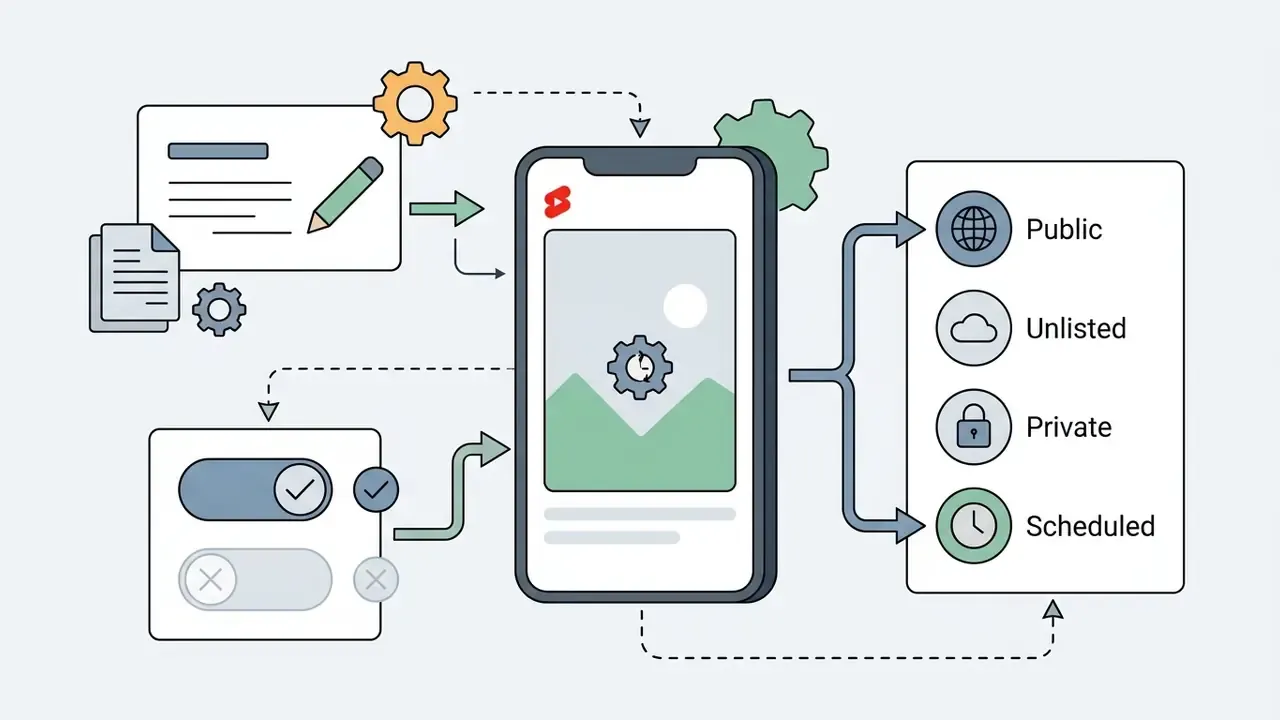
- Enter the title and description, including the
#Shortshashtag. - Set visibility (Public, Unlisted, or Private) and declare audience status.
- Tap Upload Short.
Creators can also start a Short from scratch natively: tap the plus sign (+) icon at the bottom of the app, then select Create a Short to open the Shorts camera with speed controls, effects, and music access. The native path costs nothing, adds no watermark, and keeps audio licensing inside YouTube's own library. The trade-off is limited multi-track control, no batch processing, and no brand template automation.
Comparison of AI YouTube Shorts creation scenarios
| Use case | Primary inputs | Typical outputs | Extent of manual editing |
|---|---|---|---|
| Prompt-to-Short | Text prompt, topic description, target duration, visual style guidelines | Multi-shot 9:16 video with synthetic voiceover, generated visuals, captions | Medium: prompt tuning, scene filtering, script verification, caption adjustment |
| Faceless AI video | Detailed script outline, audience target, brand voice, scene storyboard | Complete faceless Short with AI voiceover, generated or stock visuals, audio mixing | High: script fact-checking, voice synthesis tuning, visual pacing, sound balance |
| Long-video clipping | Long-form YouTube URL or MP4, full transcript, target clip duration | Vertical 9:16 highlight clips with speaker tracking and dynamic auto-captions | Medium: clip selection approval, frame boundary adjustment, hook optimization |
| Native YouTube Remix | Existing channel upload, in-app selection window, library audio | 60-second vertical Short with native text, filters, licensed music | Low: handle-based trimming, overlay text, metadata entry inside the app |
| Manual video editing | Raw camera footage, custom audio recordings, manual script, graphical overlays | Custom-edited vertical Short with hand-crafted transitions and timed graphic callouts | Very high: full timeline assembly, manual keyframing, color grading, audio mastering |
Plan an AI YouTube Short before generating video
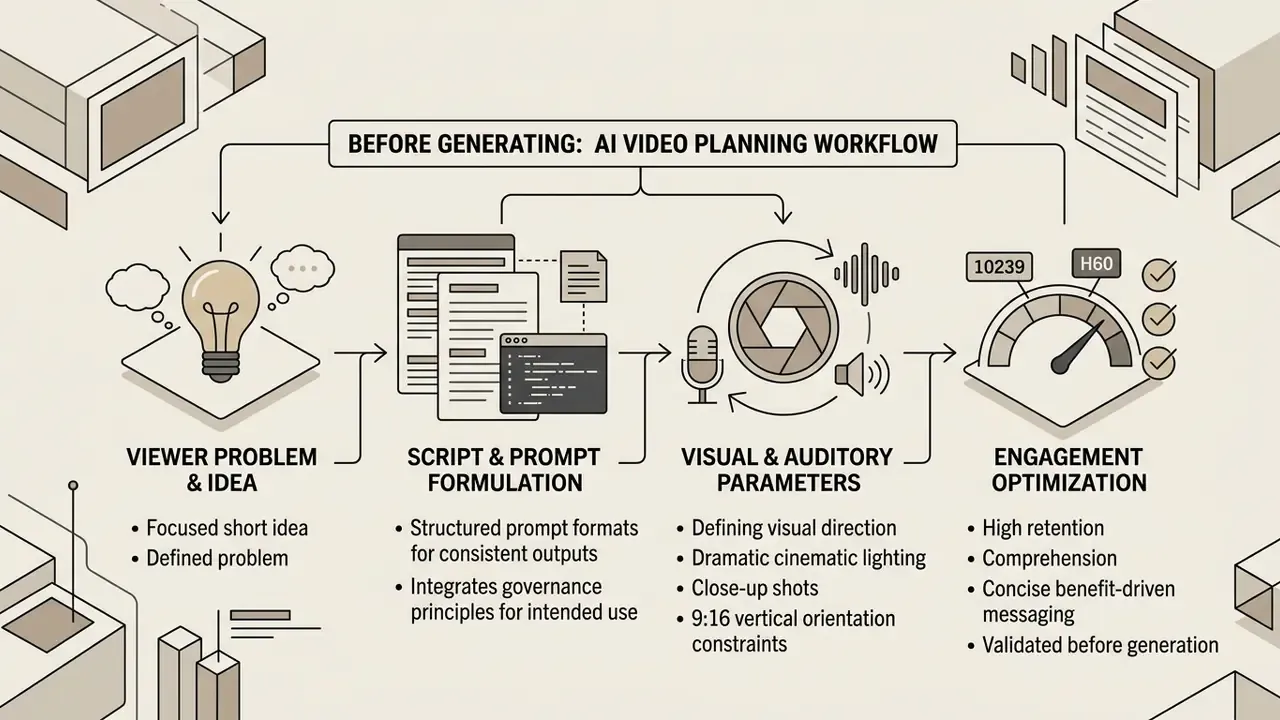
Pre-generation planning establishes the narrative boundaries, visual direction, and structural constraints needed to prevent templated, low-retention AI outputs. Defining parameters before prompting keeps generated assets aligned with specific audience needs and platform mechanics.
Start with the viewer problem and a focused Short idea
Effective short-form content addresses a single, clearly defined viewer problem within the first few seconds of playback. Start by selecting one concrete issue, question, or misconception rather than trying to summarize a broad topic. Focusing on one outcome keeps the script concise and manageable for AI generation tools.
Governance frameworks for artificial intelligence emphasize defining intended use cases and operational constraints before system execution.
"Organizations should define intended use cases and operational constraints before an AI system is put into operation."
Applied to content creation, that principle means verifying the intended audience response before writing prompts. A practical three-step narrowing method works reliably: identify one audience segment and one main idea; state the response you want that segment to have; then rewrite the Short around a single problem-solution axis supported by one visual evidence chain. Public-sector plain-language guidance reinforces the same discipline, since content should be designed and tested so that a specific, named audience understands it.
Short-form engagement data suggests that concise, benefit-driven messaging yields higher comprehension and retention than unfocused narratives, and that on-screen text materially assists comprehension.
"Captions improved content comprehension and indirectly increased engagement, particularly among viewers facing language or accent barriers."
Write a script and prompt for AI video generation
Prompts for AI video tools need a structured format to produce consistent visual and auditory outputs. High-performing video prompts combine camera angles, subject actions, lighting conditions, pacing indicators, and audio directions into single, cohesive instructions. Vendor documentation converges on the same five-part frame: cinematography, subject, action, context, and style or ambiance.
[Visual Style & Shot Type] Close-up shot, dramatic cinematic lighting, 9:16 vertical orientation.
[Subject & Action] A digital interface displaying financial charts with fluctuating lines.
[Pacing & Motion] Smooth slow-motion zoom toward the highest data point.
[Voiceover Text] "Most risk frameworks fail because they ignore real-time model drift."
[Audio Direction] Subtle low-frequency ambient tone, clean voiceover audio.
To keep narrative control, separate the script into timed blocks containing single sentences paired with specific visual cues. Narration lines stay short and conversational, with one clear sentence per beat: hook, proof, payoff. Prompt engineering research shows that specifying context, constraints, and explicit output formats improves output quality.
"Prompt instructions should constrain the task with specific background details, response requirements, output format, and evaluation criteria."
One governance habit is worth the small effort: version prompts in the same repository as the script. When a Short underperforms or triggers a compliance question, the prompt version becomes the audit artifact that explains what the model was asked to produce.
How to create AI video for YouTube Shorts step by step
Creating AI YouTube Shorts means executing a controlled six-stage pipeline from initial concept to post-publish analysis. Following a systematic tutorial-style sequence protects visual quality, audio clarity, and regulatory compliance. The diagram below is the architectural reference. The concrete tool-level scenarios that instantiate it appear later, in the creator workflows section.
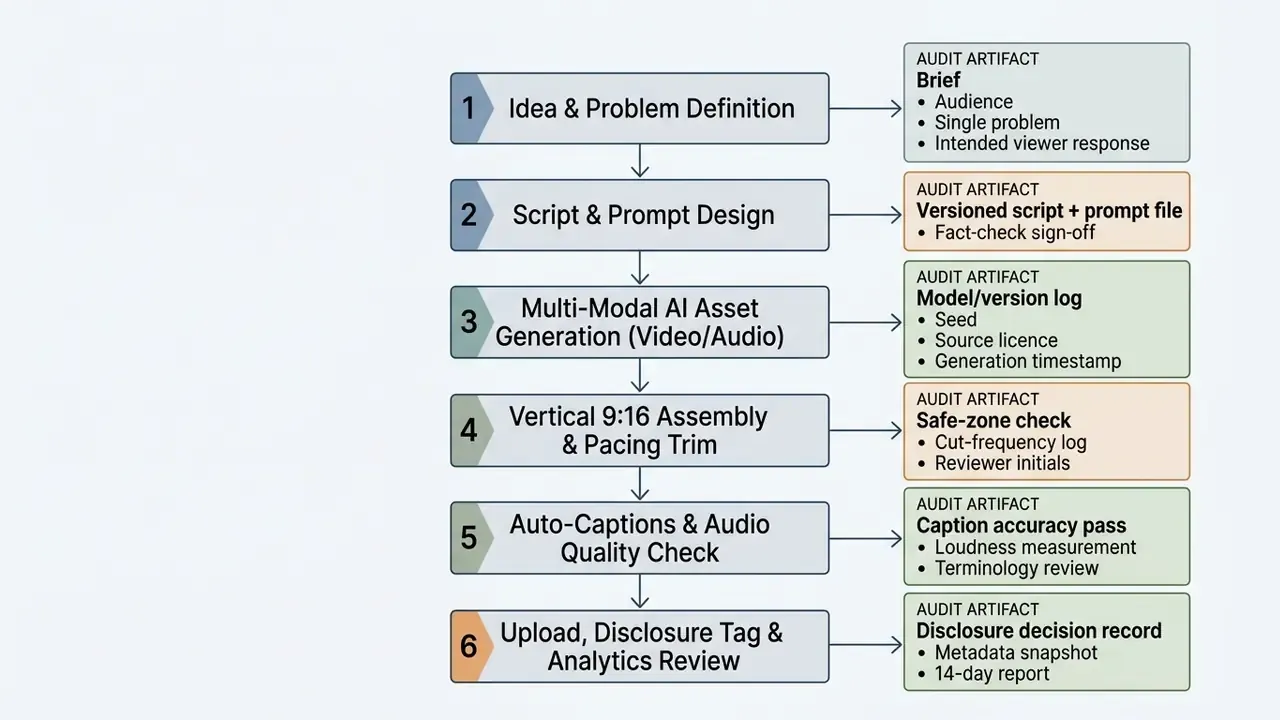
Accessible flow description for the diagram, covering the ai video for youtube shorts steps: idea and problem definition, script and prompt design, multi-modal asset generation, vertical 9:16 assembly and pacing, captions and audio quality check, then upload with disclosure tagging and analytics review.
Each stage carries a quality gate: nothing advances until its artifact exists. In regulated environments this converts a creative process into a reviewable one. The disclosure decision at stage six, in particular, must be traceable back to what was actually generated at stage three.
Generate scenes, images, voice and music from a prompt
Multi-modal AI tools synthesize visual footage, spoken voiceovers, and background audio from structured text inputs. Unified text-image-to-video methods condition generation on both prompt text and reference stills, giving control over character and scene continuity, while advanced audio engines produce synchronized 44.1 kHz stereo background tracks with vocals, timed lyrics, or full instrumental arrangements (Google Lyria 3 documentation, 2026). Generate scenes individually to keep granular control over narrative pacing rather than requesting one monolithic clip.
Synthetic speech engines need explicit direction on tone, pace, and pronunciation to stay clear on mobile playback. Teams comparing narration options can review available AI voice generators before locking a channel voice, since licensing and language coverage differ sharply between vendors. Experimental data on video comprehension shows that speech clarity and on-screen text directly affect audience understanding and, indirectly, engagement.
Audit generated voice tracks to eliminate robotic inflections or mispronounced terminology before final assembly. Domain vocabulary is where synthetic speech fails most visibly: model names, regulatory acronyms, product SKUs. Keep a pronunciation lexicon and re-render individual lines rather than the whole track. Re-rendering one line costs seconds; re-rendering a full narration costs credits.
Edit the generated video for the vertical Shorts format
Editing AI video for YouTube Shorts involves reframing footage into a 9:16 aspect ratio while keeping a central visual safe zone. Teams that standardize on repeatable video editing workflows reduce reframing errors across contributors. Important graphic elements, text overlays, and subject actions must stay inside the middle third of the screen so they do not collide with YouTube's native interface.
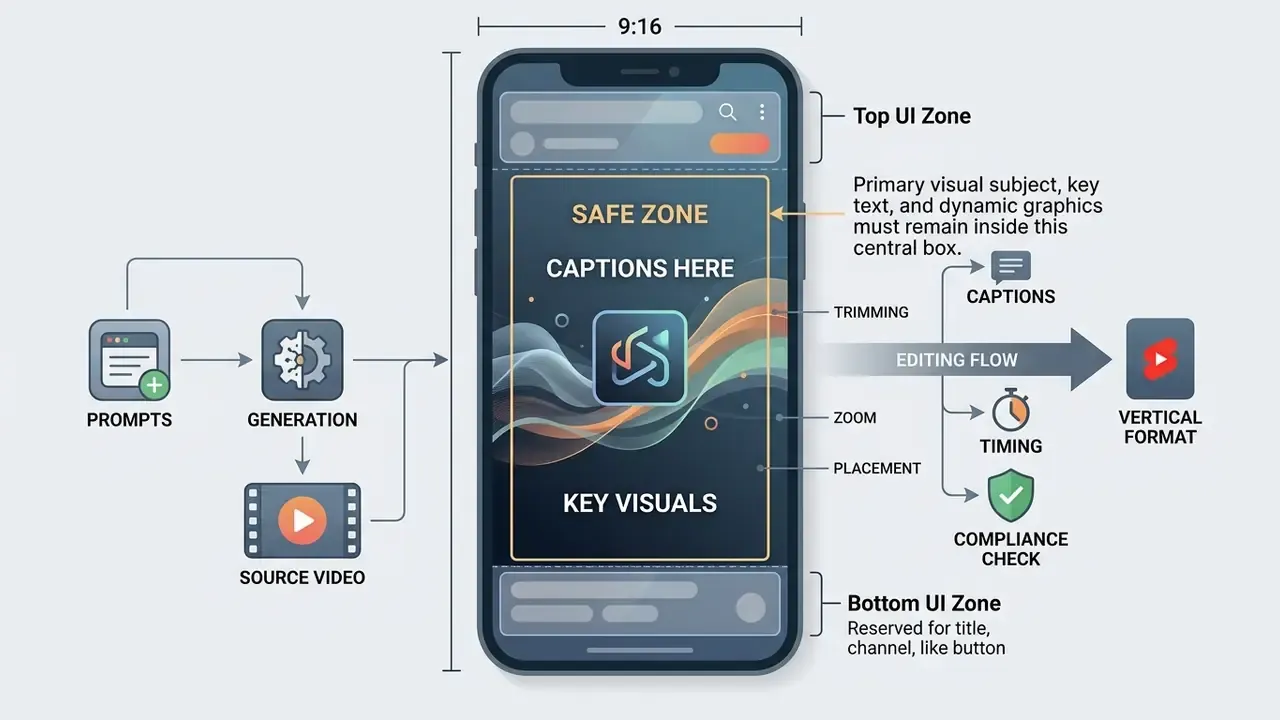
Build the vertical version as a separate project rather than overwriting the horizontal master. Reframe by tracking the active speaker or the saliency point of each shot, and adapt motion to the phone: zoom, push-in, and vertical scroll effects read cleanly, while fast horizontal pans lose their subject inside a narrow frame.
Executing text-based rough cuts. Instead of cutting frames on a traditional timeline, open the AI-generated transcript panel and edit the words. Select and delete filler words ("um", "ah", "you know"), pauses longer than 0.5 seconds, and incorrect spoken takes. The video track ripple-deletes the matching frames automatically, so the sequence tightens without leaving gaps or forcing manual re-alignment downstream. The practical sequence:
- Generate a timestamped transcript of the assembled sequence.
- Highlight the strongest passage and mark it as the clip boundary. Selection happens in text, not on the timeline.
- Delete duplicated takes and verbal false starts; the ripple edit closes the gap.
- Run automated filler-word and dead-air removal, then spot-check the three roughest joins by ear.
- Keep only the pauses that carry meaning: a beat before a punchline, or breathing room after a complex figure.
Transcript-first editing typically halves rough-cut time on interview and webinar material, because the operator reads instead of scrubbing. Directional, but consistent across teams I have seen report it.
Pacing edits. Removing silent pauses, redundant visual frames, and slow transitions is the highest-leverage retention work available. As editorial practice, change the visual (angle, scale, overlay, or B-roll) every 1.5 to 3 seconds, and cut dead air aggressively. Platform-scale evidence supports the direction of travel: Shorts that deliver more value per second accumulate more views and likes per upload than slower long-form equivalents (Violot et al., ACM Web Science Conference, 2024. https://dl.acm.org/doi/10.1145/3614419.3644016).
Add captions and prepare the final YouTube Short
Dynamic, high-contrast captions are essential for mobile viewers who watch short-form content muted. Accessibility guidance converges on sans-serif fonts, white text on a translucent dark background, a maximum of two lines per frame, lower-third placement unless it obscures key visuals, and exact synchronization with speech (US Section 508 accessibility guidance; University of Melbourne caption style guidance). Section 508 permits up to 45 characters per line, while stricter editorial styles cap lines at 32 to 37 characters. For a 9:16 phone frame, the tighter limit of roughly 37 characters is the safer default.
Caption length also interacts with engagement, and the relationship is not linear:
"Posts with captions under ten words and clips under 20 seconds consistently outperformed longer formats on engagement."
"Optimizing caption length can raise engagement by up to 25%; the relationship follows an inverted-U curve." Maximizing Engagement Through Caption Optimization, ISMS Marketing Science Conference (2023). https://www.informs.org/Publications/INFORMS-Journals/Marketing-Science/Blog/Caption-Optimization-2023
Caption sound cues matter too. Music stings and meaningful sound effects should be captioned when they carry information, and no caption should scroll or flash.
Before final export, run an audio check across multiple listening environments, including mobile speakers and headphones. The voiceover track must stay distinctly louder than background music loops; a working target is music mixed roughly 15 dB below narration. Final rendering should use 1080x1920 resolution at 60 frames per second with a high bitrate to prevent compression artifacts during YouTube processing. If upload bandwidth is constrained, apply controlled video compression rather than lowering the export resolution.
How to choose AI tools for YouTube Shorts
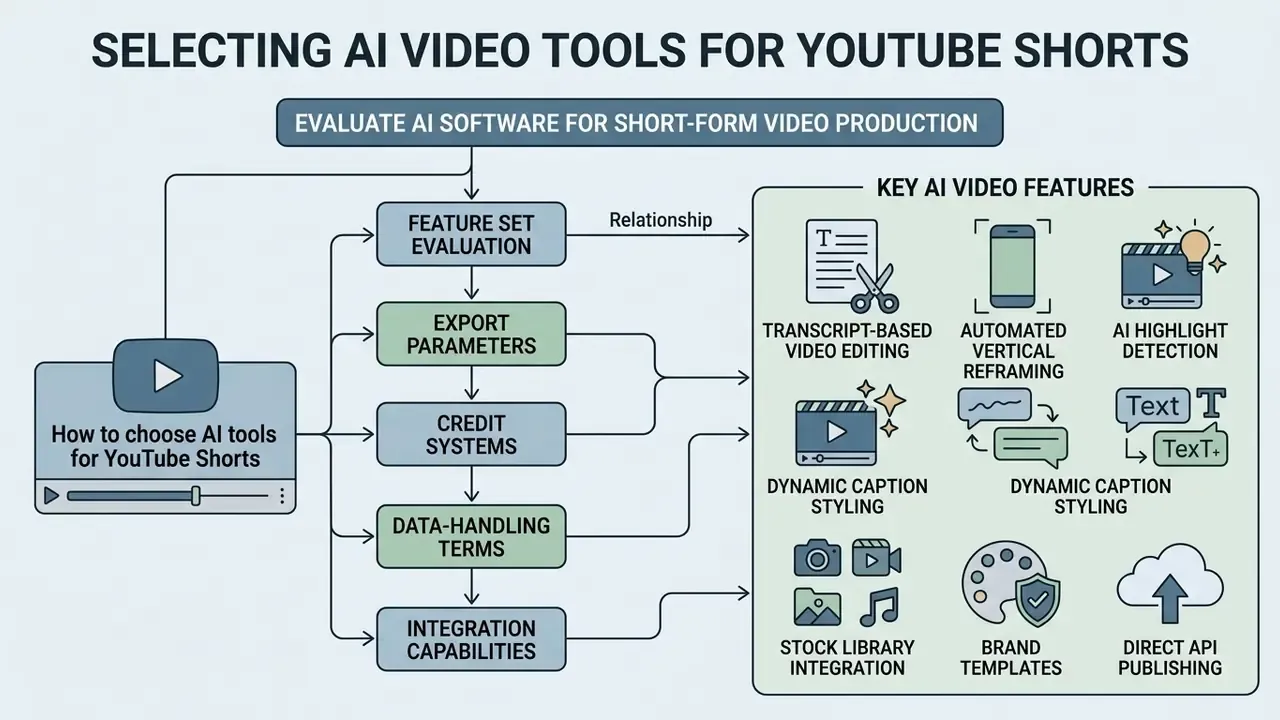
Selecting AI software for short-form video production means evaluating feature sets, export parameters, credit systems, data-handling terms, and integration capabilities against operational requirements. Feature lists are easy to compare. Contracts are not.
Features that matter in an AI YouTube Shorts generator
An effective short-form video engine combines automated transcript processing, multi-shot text-to-video generation, auto-captioning, and vertical reframing into one workflow. Evaluating dedicated AI video generators alongside clipping specialists helps production teams identify platforms that offer granular control over scene generation and caption customization. A broader survey of AI Video Tools is useful when the shortlist spans generators, clippers, and all-in-one editors at once.
Essential software capabilities include:
- Transcript-based video editing
- cutting video frames by editing text transcripts, including plain-language edit commands.
- Automated vertical reframing
- smart motion tracking that keeps active subjects centered in 9:16 frames.
- AI highlight detection
- ranking of candidate 15 to 60 second segments from a long source, with a reviewable list rather than a single forced output.
- Dynamic caption styling
- customizable subtitle templates with word-level animation options and SRT export.
- Stock library integration
- direct access to royalty-free video, image, and audio assets.
- Brand templates
- persistent logo, font, color, and caption presets applied across a batch.
- Direct API publishing
- export pathways to YouTube Studio for scheduling uploads.
Enterprise safety screen: avoiding shadow AI and data leakage
Feature parity is not the deciding factor in a regulated organization. Before any script, transcript, or unreleased recording leaves the perimeter, the vendor must clear a security screen. Free consumer tiers are the most common shadow-AI vector precisely because they require no procurement approval. A corporate card and five minutes, and the recording is gone.
Vendor due-diligence checklist:
- SOC 2 Type II or ISO/IEC 27001 attestation, with a current report available under NDA, not a trust-page badge.
- Zero data retention mode: contractual confirmation that uploads, transcripts, and prompts are not used for model training and are deleted on a defined schedule.
- Data residency and sub-processor list: where footage is processed, and which downstream model providers receive it.
- SSO / SAML and role-based access control, so accounts are provisioned and revoked centrally rather than by individual credit cards.
- IP indemnification for generated output, plus written commercial-use rights at the subscribed tier.
- Audit logging and export, so generation events reconcile with the pipeline artifacts described earlier.
- Human-in-the-loop enforcement: the ability to block auto-publishing and require named approval before export.
- Shadow-AI control: an approved-tool allowlist communicated to marketing, plus network or DLP rules blocking uploads of unreleased material to unvetted generators.
A pragmatic policy is to permit free tiers only for public, already-published material, and to require the enterprise screen for anything containing customer data, unreleased financials, internal terminology, or identifiable employees.
Free vs paid AI video tools: pricing, credits and limits
| Platform category | Free tier access | Credit system and limits | Clipping and editing features | Caption quality | Watermark policy | Paid tier benefits | Enterprise controls to verify |
|---|---|---|---|---|---|---|---|
| Generative video engines | Limited one-time credits (~125 credits) | 10 to 20 seconds of generation per month | Prompt-to-video generation; limited timeline editing | Basic auto-captions; manual text adjustments required | Watermark applied to free exports | Commercial licensing, higher resolution, priority GPU queuing, watermark removal | Training opt-out, IP indemnity, prompt retention window |
| AI clipping tools | Recurring monthly allowance (~60 minutes) | Limits on source video processing length | Automated highlight detection, transcript editing, vertical reframing | High-accuracy speech-to-text with animated templates | Corner watermark on free plan exports | Increased processing volume, custom brand templates, 1080p rendering | Zero data retention for uploads, SSO, deletion SLA |
| All-in-one editors | Free access with restricted export features | Unlimited draft exports; credit caps on AI features | Full multi-track timeline, visual effects, stock media | Multi-language captions with custom font styling | No watermark on standard exports; watermarked AI assets | Advanced AI voice synthesis, expanded stock libraries, direct YouTube API export | Role-based access, audit log export, asset licence provenance |
| Native YouTube tools | Free with channel access | No credit system; library audio capped at 15 seconds | Remix, trim, speed, filters, text overlays | Auto-captions via YouTube caption tracks | No watermark | Not applicable | Channel permissions managed in YouTube Studio |
Teams that also maintain a long-form pipeline can cross-check editor capabilities against dedicated free video editing software before consolidating vendors.
Modelling the real cost: TCO per finished minute
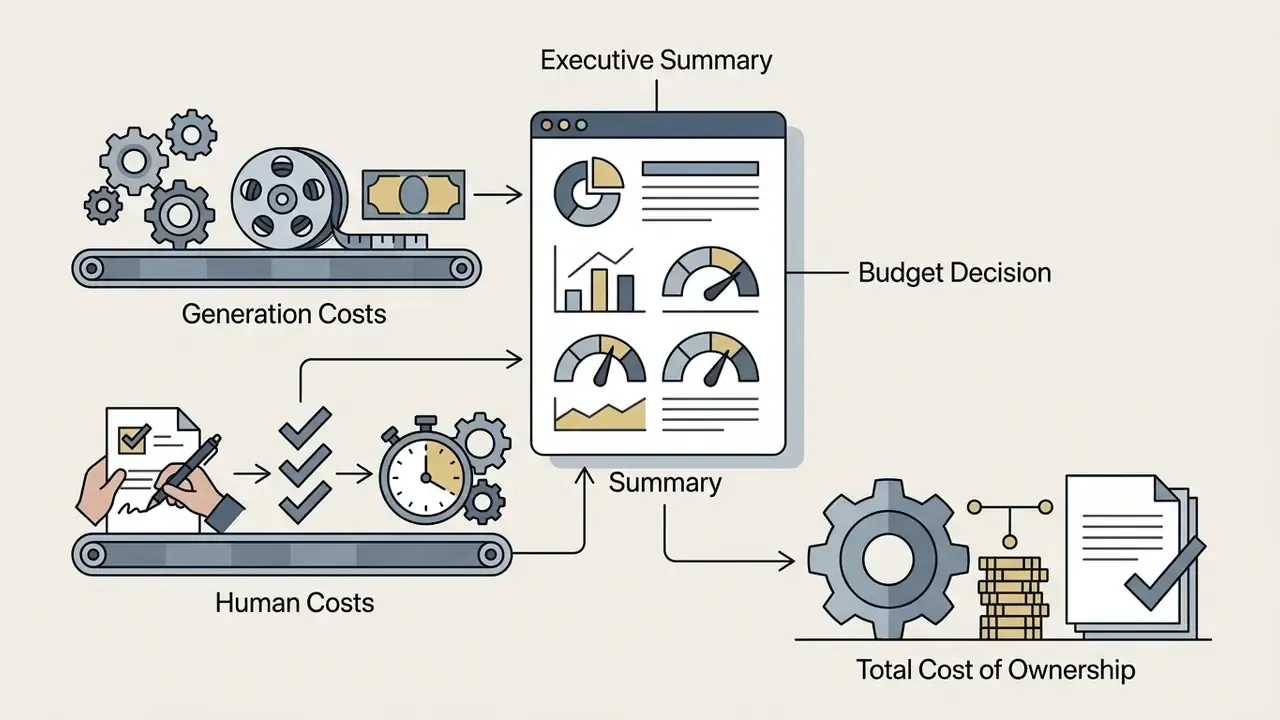
Generation invoices understate true cost, because validation labour is invisible on the vendor bill. Use the following model when presenting a budget:
Cost per finished Short =
    (Credits consumed x cost per credit)
  + (Prompting + script hours    x blended hourly rate)
  + (Review + fact-check hours   x reviewer hourly rate)
  + (Editing + caption QA hours  x editor hourly rate)
  + (Compliance/disclosure review x risk-function hourly rate)
  + (Re-generation waste factor: failed renders x cost per render)
  ------------------------------------------------------------
  / Number of publishable Shorts produced
Cost per finished minute = Cost per finished Short / average duration (min)
Two calibration notes. First, the waste factor is the line item teams forget: budget 20% to 40% of generations as discards during the first month of a new channel, falling as prompt libraries stabilize. Second, human-in-the-loop review does not scale linearly. Batching ten Shorts into one review session typically cuts per-unit compliance cost by roughly half. To model credit consumption specifically, an AI Video Credit Calculator converts planned duration, resolution, and model choice into a monthly subscription tier before procurement.
Creator workflows for making YouTube Shorts with AI
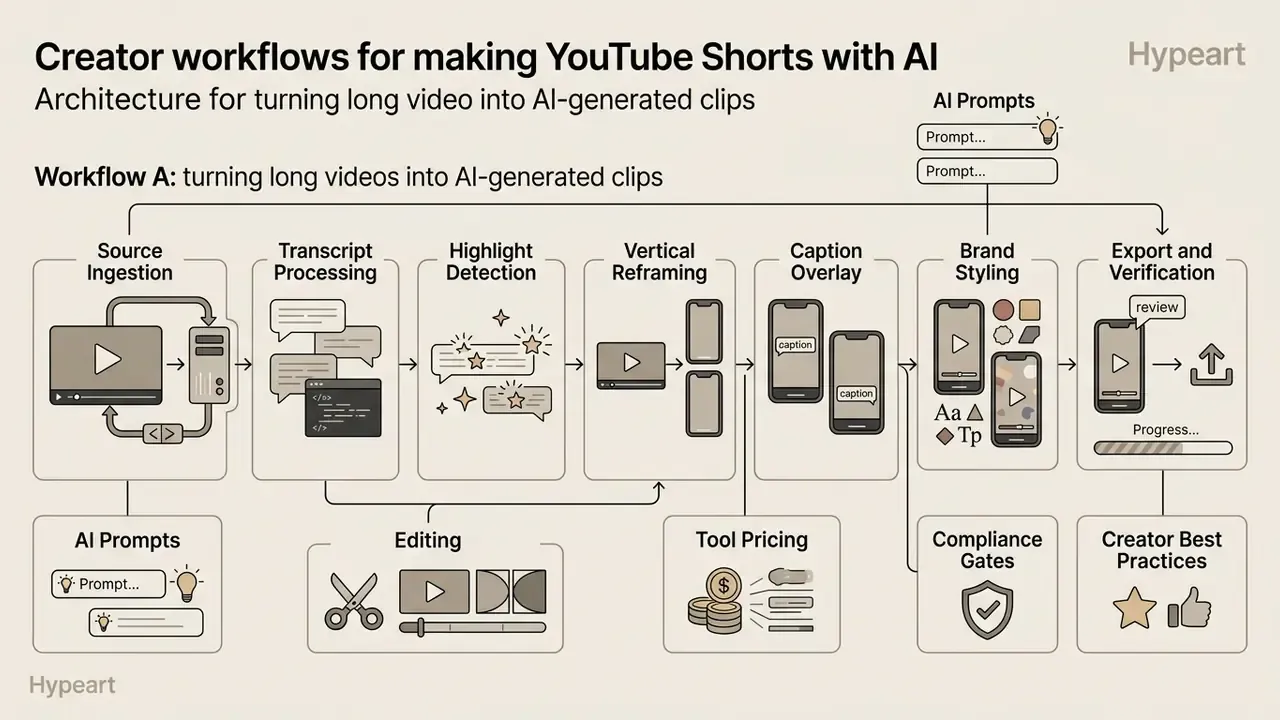
The architecture above describes what must happen. This section describes how two dominant creator workflows instantiate it in production, and where each one differs from the generic pipeline.
Workflow A: turning long videos into AI-generated clips
This workflow inverts the pipeline. Assets already exist, so stage three becomes selection rather than generation. Repurposing horizontal long-form footage into short-form assets follows a structured seven-step operational sequence:
AI prompting for viral-moment extraction. Highlight detection improves sharply when the search is specified rather than left to a generic "find clips" button. When processing recordings longer than 20 minutes, pass the transcript to the clipping engine with explicit selection criteria:
Find 3 high-retention segments (30-45s) that each contain:
1) A controversial, counter-intuitive or surprising statement within the first 3 seconds;
2) A complete, self-contained resolution - no unresolved reference to earlier context;
3) A clear change in vocal inflection or emphasis;
4) No client names, unreleased figures or personally identifiable details.
Return start/end timestamps plus the opening sentence verbatim.
- Source ingestionimport a YouTube URL or upload a high-bitrate MP4 into the editing environment. Choosing the right AI video generator or clipping engine at this step determines whether transcript editing is available downstream.
- Transcript processinggenerate a timestamped speech-to-text transcript of the complete recording.
- Highlight detectionrun AI natural language processing to identify high-retention narrative moments and return a reviewable shortlist rather than a single clip.
- Vertical reframingapply automated 9:16 cropping with active speaker tracking.
- Caption overlaysynthesize dynamic multi-line subtitles aligned with spoken audio cadence.
- Brand stylingapply channel logos, font palettes, and color profiles to the project.
- Export and verificationrender the 1080x1920 clip and perform an audio-visual quality audit.
- A controversial, counter-intuitive or surprising statement within the first 3 seconds;
- A complete, self-contained resolution - no unresolved reference to earlier context;
- A clear change in vocal inflection or emphasis;
- No client names, unreleased figures or personally identifiable details.
The fourth criterion is the compliance clause. It stops the model from surfacing exactly the material that cannot be published.
That upside is not automatic, and the counterweight belongs in the same business case:
"Among large lifestyle creators, long-form view declines following Shorts adoption reached approximately 920,000 views per channel."
Clip selection must therefore serve the long-form thesis, not merely maximize short-form impressions.
Workflow B: creating faceless AI YouTube Shorts from text
This workflow front-loads editorial risk. Nothing exists until the model generates it, so the script gate carries the entire factual burden. Creating original faceless Shorts from text prompts relies on an end-to-end multi-modal synthesis loop:
Batch variant. High-volume faceless channels parallelize this loop: a niche scan produces a topic queue, hooks are written in one sitting, scripts are batched, generations run concurrently, and a single review session clears the batch before scheduling. Batching is what makes the human-in-the-loop cost sustainable at ten or more Shorts per week.
- Topic selectionidentify a specific viewer problem and formulate a core outcome statement.
- Script generationuse an LLM prompt to produce a 150-word script structured around a 1.5-second hook, then fact-check every claim before any asset is rendered.
- Voice synthesisconvert the approved script into a natural 44.1 kHz text-to-speech voiceover track, applying the pronunciation lexicon.
- Visual scene generationgenerate matching 9:16 visual clips for each script sentence using text-to-video diffusion, storyboarding as stills rather than issuing one mega-prompt.
- Timeline assemblyalign visual clips to the voiceover audio track in a vertical editing timeline.
- Caption and audio balancingoverlay dynamic subtitles and mix background music roughly 15 dB below voiceover levels, keeping caption lines short in line with the inverted-U engagement curve.
- Final renderexport the finished vertical MP4 for publication with the disclosure decision recorded.
Best practices for AI YouTube Shorts that hold attention
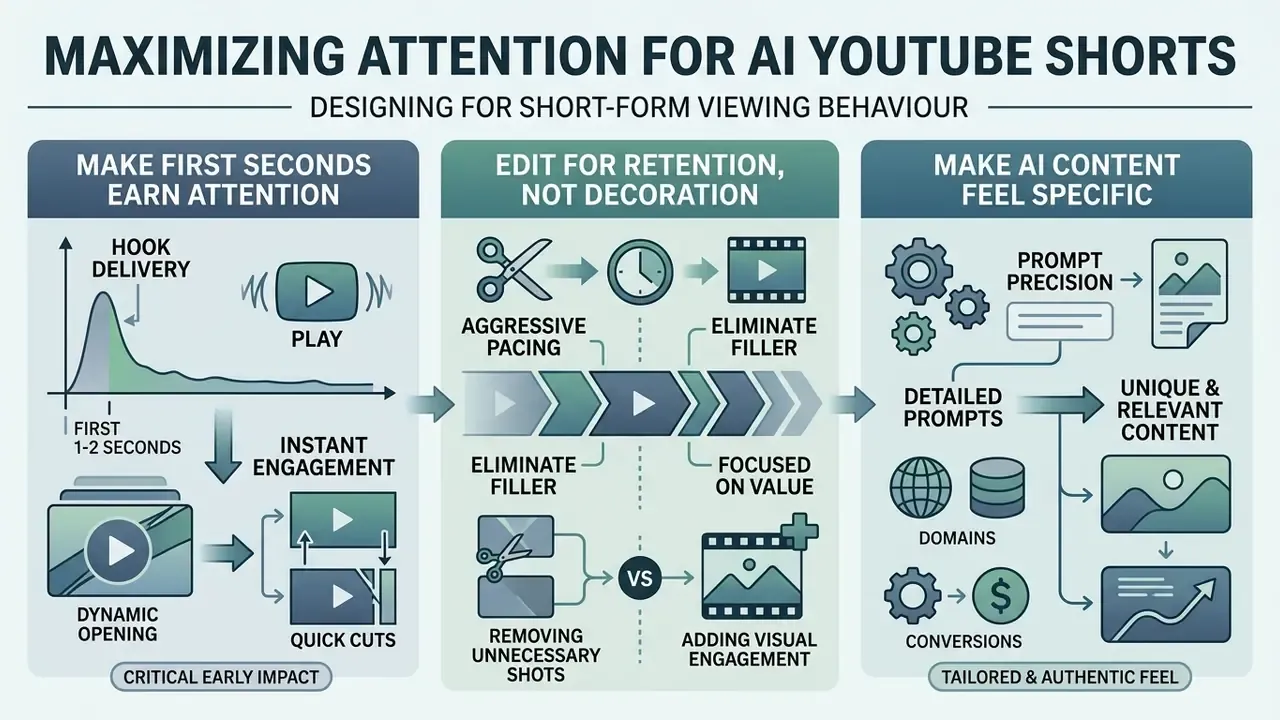
Maximizing audience retention means designing content specifically for short-form viewing behaviour: rapid hook delivery, aggressive pacing, and precise prompt domain details. These are the ai video for youtube shorts best practices that survive contact with real analytics.
Make the first seconds earn attention
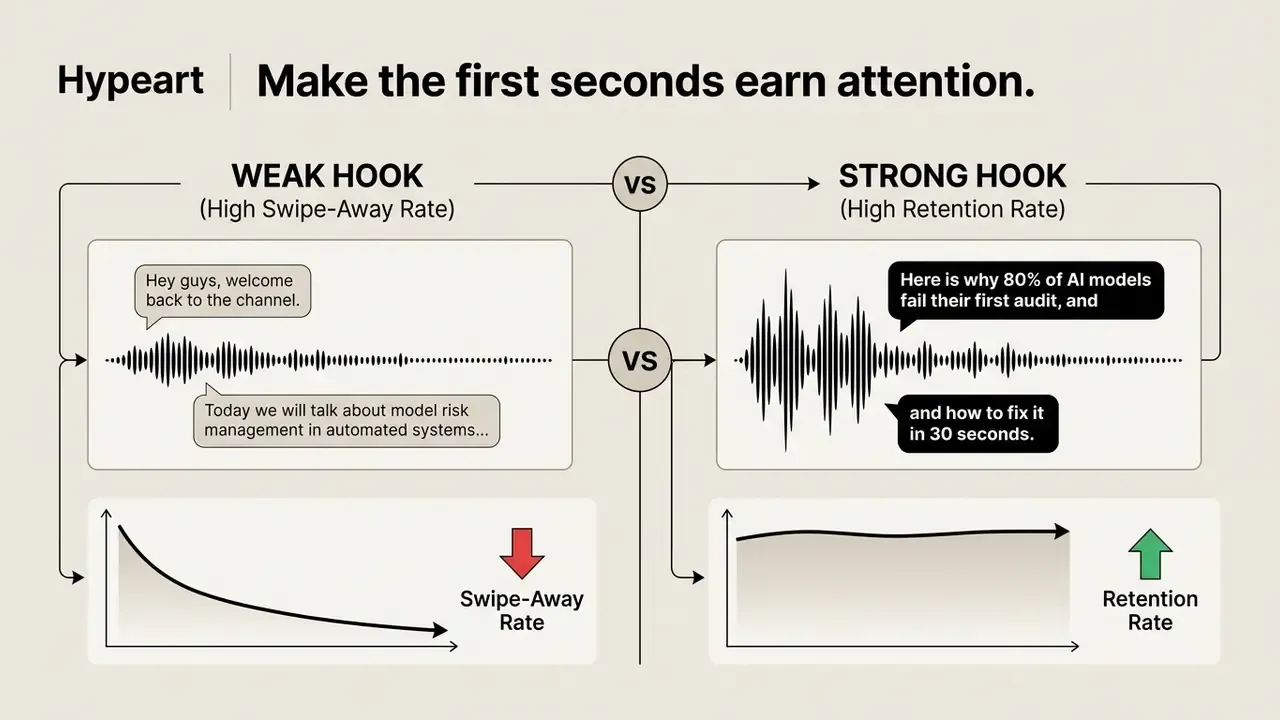
The opening 1.5 seconds decide whether a viewer stays or swipes. Deliver an immediate visual and auditory hook that states the core benefit without introductory delay. Guidance differs on the exact window. Some sources measure the decisive moment at 0.5 to 1.5 seconds, others allow up to three seconds for full hook delivery, because they measure first attention versus complete hook comprehension. Design for the shorter window and you satisfy both.
Practitioner analyses of Shorts retention report average completion around 52%, rising above 68% for videos with clear, immediate hooks (short-form audience analysis, 2025; figures reported by creator-facing analytics sources rather than peer-reviewed research, so treat as directional and validate against your own YouTube Studio data). Algorithmic context reinforces why the opening frame matters:
"The Shorts recommendation system showed a systematic preference for joyful or neutral emotional tone and a measurable skew toward entertainment content."
The first sentence must state a compelling promise or problem while dynamic text appears on screen at the same time. Captions from the first word, not after a delay.
Edit for retention instead of adding decoration
Retention editing preserves narrative momentum by eliminating unnecessary visual elements, silent gaps, and repetitive explanations. Excessive animated stickers or chaotic transitions distract from the core message and lower comprehension.
https://dl.acm.org/doi/10.1145/3614419.3644016
Trim dead air between spoken words and change visual angles or text callouts every 2 to 3 seconds to sustain interest. Remove repeated points, long transitions, and lead-in phrases. Retain only pauses that create emphasis or give the viewer time to absorb a difficult figure.
Make AI-generated content feel specific rather than generic
Generic prompts produce generic, uninspired videos that struggle to retain viewers. To create distinct content, supply generation tools with detailed domain context, specific technical terms, real-world examples, and explicit stylistic rules, including your own position on the subject. That position is the one element no model can infer.
"Explicit style rules, reference author text, and domain constraints in the prompt significantly improved output alignment with the intended editorial voice."
A practical structure for style control mirrors the C-O-S-T-A-R frame documented in NIST's quick-start guidance for using artificial intelligence: Context, Objective, Style, Tone, Audience, Response format. Supplying two or three sentences of your own previously published writing as a style exemplar is the fastest way to escape templated phrasing.
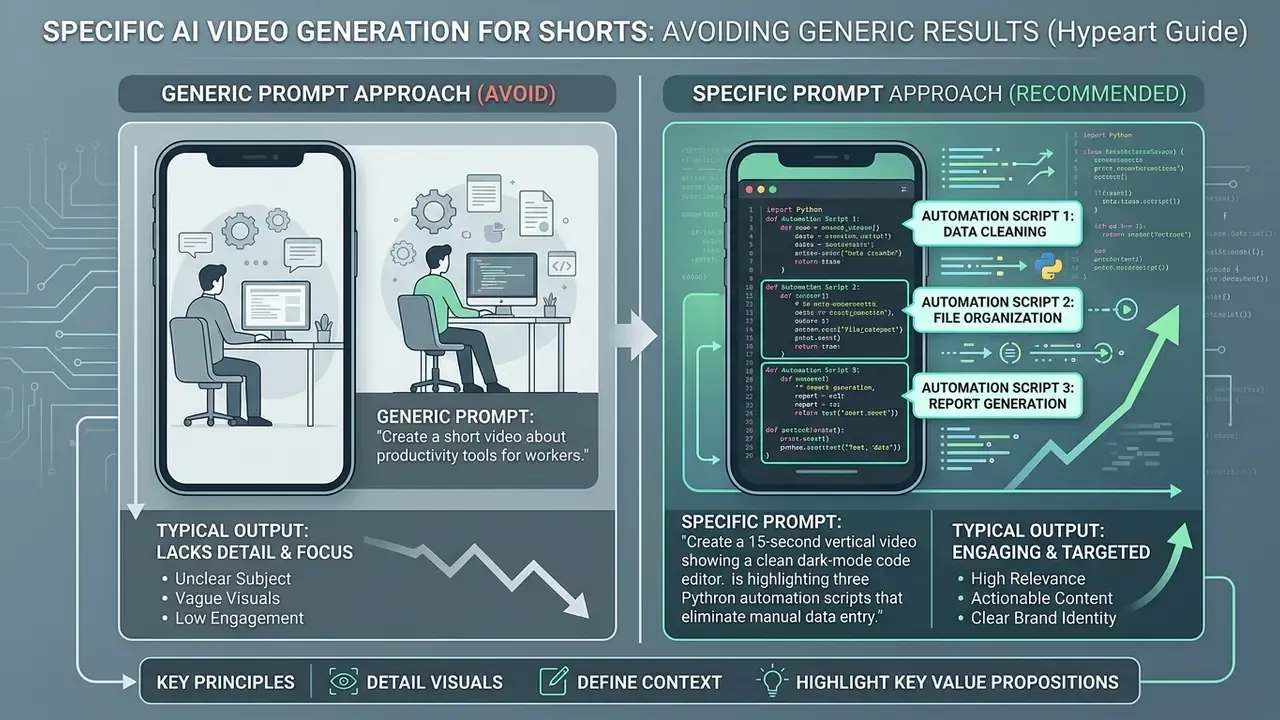
For consistency across a channel, keep one sequential scenario running through hooks, scripts, and visual prompts. Model-risk automation, for example. Viewers then recognize the editorial thread instead of meeting an unrelated topic in every upload.
Upload, package and improve AI-generated YouTube Shorts
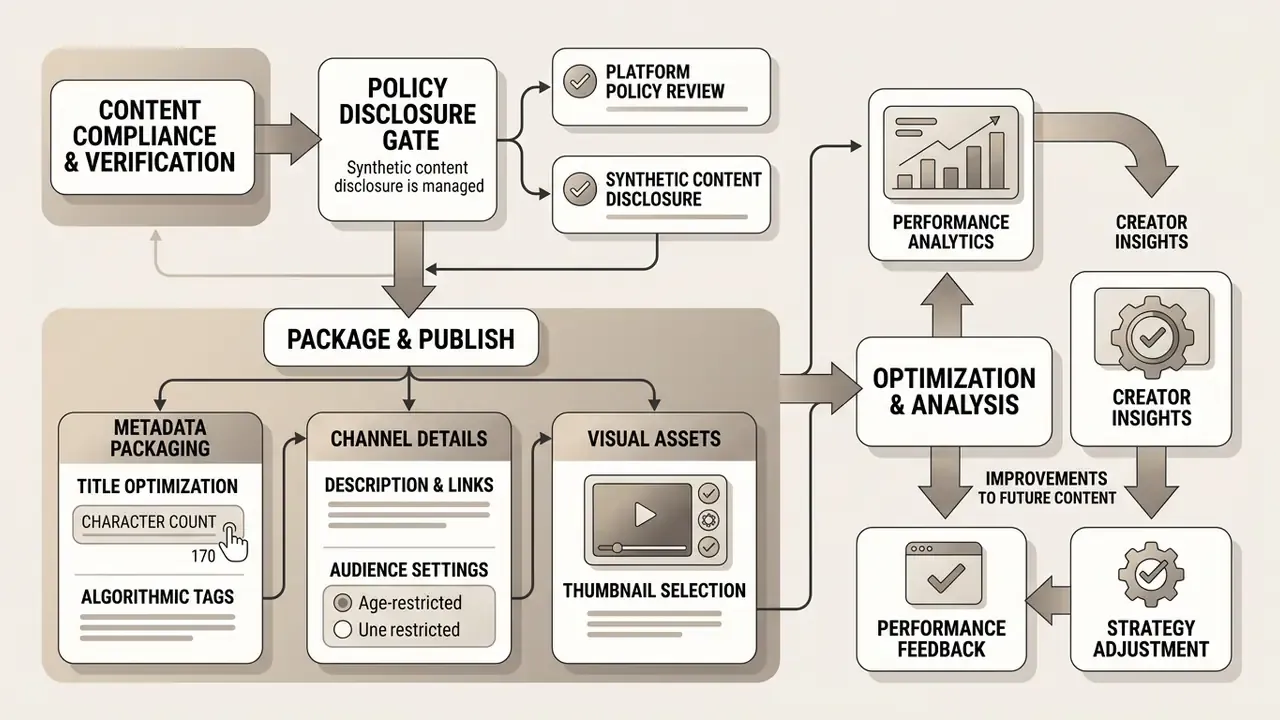
Proper upload procedures, metadata packaging, and performance analytics keep publication compliant with platform policy while driving channel growth.
Prepare the title, description and channel publishing details
Optimizing YouTube Shorts metadata starts with a concise, benefit-driven title inside the platform's 100-character limit. The title should state the primary topic clearly while carrying targeted search terms.
Packaging requirements include:


#Shorts in the title or the first line of the description. This is the explicit categorization signal YouTube's indexing engine reads, so treat it as mandatory rather than optional. Combine it with one or two niche hashtags (for example #modelrisk, #datagovernance) instead of stacking generic tags.



Use viewer response to compare and improve Short versions
Continuous optimization relies on analyzing audience retention metrics inside YouTube Studio. Evaluate performance data to refine script structure, hook framing, and visual pacing for future releases.
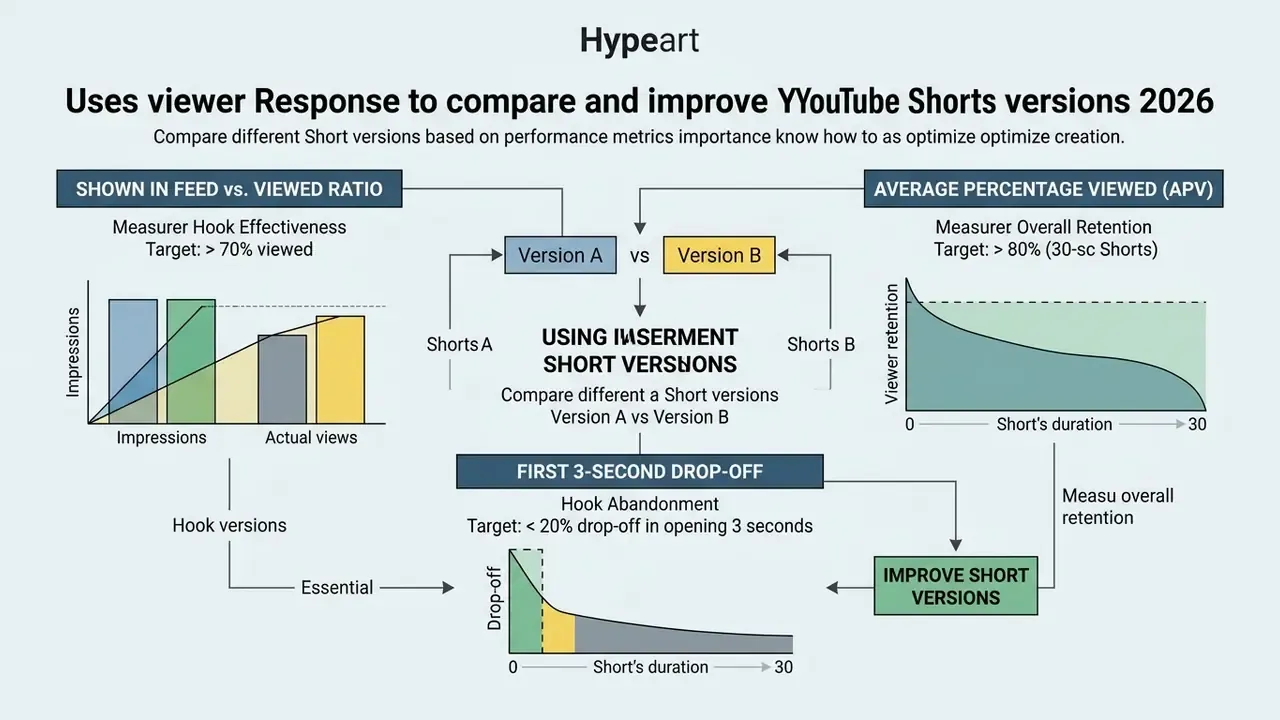
A/B testing means publishing two variations of a Short with identical content but different opening hooks or visual styles. Controlled-experiment practice applies directly: state one hypothesis, change one element, assign viewers persistently, fix the unit of analysis before comparing click-through rates, and let the test run one to two weeks to absorb traffic variation. Reviewing performance after 14 days shows which structural choices produce better retention.
Interpret those results against known platform behaviour:
"The audit found a recommendation skew toward entertainment content and a systematic preference for videos already showing high view and like counts."
In other words, a variant may win partly because the feed favours its tone, not only because the edit is stronger. That is why hypotheses should isolate one variable and be re-tested across several uploads.
Pre-publication compliance and quality checklist
Run this gate before every publish. Any unchecked line blocks the upload.
Checklist0 / 22
FAQ about AI video for YouTube Shorts
Can creators publish YouTube Shorts made with free AI tools?
Yes. Free AI tools are acceptable provided the video meets YouTube's formatting standards and community guidelines. Free tools often apply visible watermarks, restrict export resolutions to 480p or 720p, and limit credit allocations. Paid plans remove watermarks and provide higher resolution exports suitable for commercial publishing. In an organizational context, also confirm that the free tier grants commercial-use rights, since several consumer plans license output for personal use only.
Does YouTube require disclosure for AI-generated Shorts?
YouTube requires disclosure of realistic synthetic or altered AI content during upload. If the video depicts realistic human figures, realistic synthetic speech, or simulated real-world events, select "Yes" under the "Altered content" (or "AI use") setting. Purely visual animations, fantasy scenes, and obvious graphic overlays do not require explicit disclosure. Where a creator fails to disclose and detection occurs, YouTube may apply the label automatically.
What are the aspect ratio and duration limits for YouTube Shorts?
Shorts must be rendered in 9:16 vertical or 1:1 square. Following the platform update, Shorts can run up to 3 minutes. Vertical or square videos uploaded on or after 15 October 2024 within that window are categorized as Shorts, while material uploaded before that date remains capped at 60 seconds. Horizontal 16:9 uploads or anything longer than 3 minutes is treated as standard long-form. For retention, clips between 30 and 60 seconds still yield the highest completion rates, and staying under 60 seconds also avoids the stricter copyright-claim blocking that applies above one minute.
Can AI-generated Shorts be monetized through the YouTube Partner Program?
AI-generated Shorts are eligible provided they comply with YouTube's Reused Content and Originality policies. Content composed entirely of automated stock clips or unedited synthetic speech, without original commentary or transformative editing, may be flagged as low-value repetitive content and disqualified from ad revenue sharing. Shorts revenue is pooled from the Shorts Feed and allocated by watch share. Vendor guidance commonly cites eligibility thresholds of 1,000 subscribers plus 10 million Shorts views in 90 days, but confirm those figures against YouTube's own monetization policy pages, which are the authoritative source.
How do creators calculate credit usage across different AI video tools?
Platforms charge varying credit amounts based on generation parameters such as duration, model complexity, and export resolution. Some price per second of generated footage per model tier. To estimate monthly operational costs and GPU credit requirements before purchasing subscriptions, use an AI Video Credit Calculator to align software budgets with planned production volume, then add the human validation hours from the TCO formula above.
Who owns the copyright in AI-generated visuals used in a Short?
Ownership depends on jurisdiction and on the vendor's terms. In several jurisdictions, purely machine-generated output without sufficient human authorship may not attract copyright protection, which means a competitor could reuse the same visual without infringing your rights. Commercial licensing granted by the tool vendor is a separate matter from copyright ownership, and only some enterprise contracts include indemnification against third-party infringement claims arising from training data. Treat generated visuals as licensed assets with defined usage terms rather than owned intellectual property, and seek qualified legal advice before building brand equity on them.
How should an organization prevent shadow AI in short-form production?
Publish an approved-tool allowlist, enforce SSO-based access so accounts cannot be created ad hoc, block uploads of unreleased material to unvetted domains through DLP rules, and require documented zero data retention for any tool touching internal data. Pair the technical controls with a short internal rule that is easy to remember: public material may go to free tools; anything internal goes only to contracted platforms.
Limitations, open questions and a safe next step
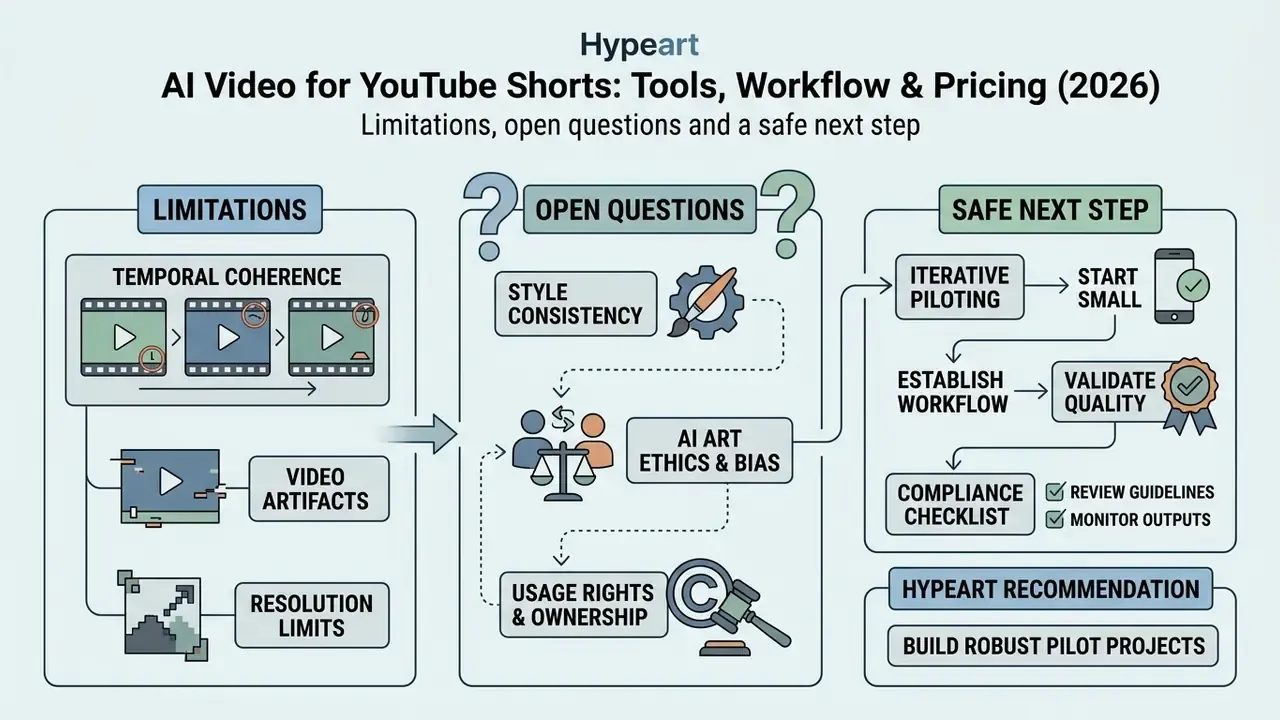
Two things in this guide remain unresolved, and pretending otherwise would be dishonest. First, retention benchmarks for Shorts come mostly from creator analytics commentary rather than peer-reviewed work, so treat the 52% and 68% figures as directional until your own Studio data confirms or contradicts them. Second, copyright status for machine-generated visuals is still moving in several jurisdictions, which makes long-term brand investment in generated characters a live risk rather than a settled one.
A conservative next step: run one controlled pilot of ten Shorts on a single, low-sensitivity topic. Log the prompt version, the model version, the reviewer, and the disclosure decision for each. Measure cost per finished minute using the TCO formula, then compare it against your current production baseline before scaling anything.
About this guide