An ai image background changer lets you modify photo backdrops in seconds using machine learning. Modern tools automate foreground isolation and backdrop replacement without demanding complex manual editing skills, turning a task that once meant pen-tool tracing into a handful of clicks.
Why should a governance-minded reader care about a photo tool? Because every uploaded headshot, badge photo, or unreleased product shot is data, and every exported asset carries a licence.
Executive Summary
- What it is An AI image background changer is subject-aware software that segments the foreground, generates an alpha matte, then replaces or deletes background pixels. No layer-masking skills required.
- How fast Consumer-grade tools in 2026 typically accept JPG/JPEG/PNG/WebP files up to 25-40 MB and finish an end-to-end edit in roughly 3.5-9 seconds, versus minutes per asset for manual path tracing.
- Where it works E-commerce catalog isolates (pure white #FFFFFF), corporate headshots, ID and passport-style photos, social and paid-media creatives, brand-template compositing.
- Where it still fails Dark hair against dark backdrops, motion blur, heavy reflections, transparent glass, and crowded multi-subject scenes stay error-prone and need manual edge brushing.
- Commercial risk Free tiers frequently restrict usage to non-commercial evaluation, downscale exports, or stamp watermarks. Open-weight models such as BRIA RMBG-1.4/2.0 are labelled non-commercial unless a separate agreement is signed.
- Copyright reality U.S. copyright protection attaches only to human-authored expressive elements. Purely machine-generated background material must be excluded from a registration claim.
- Governance must-haves Verify the commercial licence tier, model releases for identifiable people, the data-retention policy (zero-retention or on-premises for PII), and run an export audit at 100% zoom.
Who This Guide Is For and How to Use It
Three reader profiles usually land on a page like this, and each needs a different slice.
Solo creators and small sellers want the fastest path from a raw phone photo to a compliant catalog image, so the step-by-step online workflow and the free-tier limits matter most. Marketing and content teams care about repeatability: brand kits, reference-image matching, template libraries, batch throughput. Risk, compliance, and procurement readers should start with licensing and data security, then work backwards into features.
A practical reading order for enterprise buyers: licence terms first, retention posture second, output quality third. Feature demos are easy to fall in love with. Contracts are harder to unwind.
What Is an AI Image Background Changer?
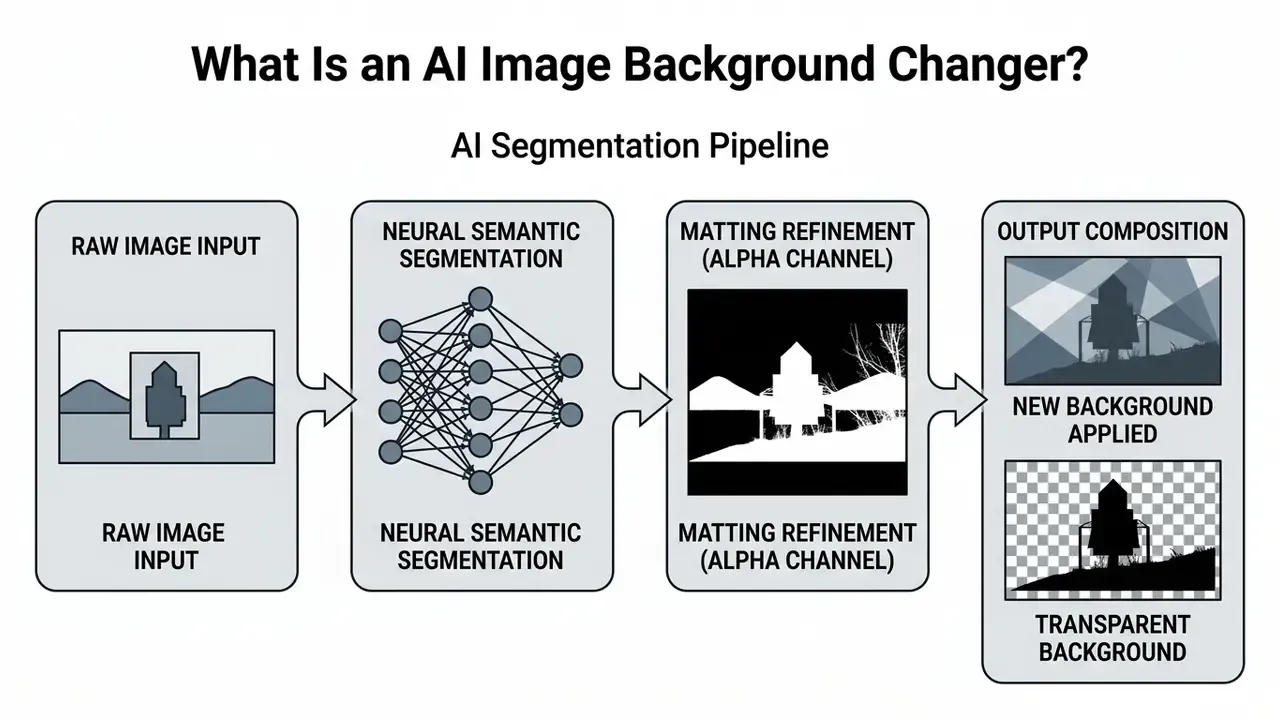
An ai image background changer is an automated computer vision tool that detects the primary subject in a photo, separates it from background pixels, then swaps or deletes the original backdrop. The same capability is marketed under half a dozen names: ai change image background, ai image background change, ai app to change photo background, even ai pic background change. Different labels, one pipeline.
These tools rely on artificial intelligence to analyse pixel colours, textures, and edges. They let you replace background layers or run full photo editing workflows with no design skills at all.
State-of-the-art platforms integrate specialised image diffusion and multimodal base models, including GPT-4o vision modules, Seedream 4.5, Nano Banana-class editing backbones, and proprietary latent diffusion networks, to parse subject semantics and synthesise high-frequency lighting textures. Commercial APIs expose the same capability through documented modes: automatic cutout, transparent output, flat colour fill, image replacement, and fully generative background creation.
Background remover, background replacer, and background editor
A background remover isolates the main subject by deleting all surrounding pixels, leaving a transparent alpha channel.
A background replacer takes that isolated subject and drops it onto a new background, such as a solid color or a custom photograph.
An ai image background editor acts as the all-in-one layer. It combines removal, replacement, and contextual adjustments such as shadow creation and colour matching inside a single interface, which is why most tools marketed as an ai photo editor to change background also handle cropping, retouching, and resizing.
These three terms are not standardised in any single official taxonomy. Vendor documentation generally uses "remove" for deletion and "edit" for the broader workflow, which means "replacer" is usually a feature inside an editor rather than a separate product class. For a wider view of consumer and professional editing suites, see this guide to online photo editors.
How AI detects the subject and separates the background
AI detects subjects by pairing semantic segmentation models with deep image matting algorithms.
Segmentation networks sort pixels into structural groups. Matting models then calculate continuous transparency values between 0 and 1. Frameworks like Segment and Matte Anything (SAMA) reach fine boundary precision on semi-transparent details such as hair, glass, and fabric (SAMA Study, arXiv:2601.12147, 2026).
«FCLM reaches IMQ-MSE 83.48 and IMQ-Grad 75.69 on HIM2K-Natural, outperforming competing models across all four matting quality metrics.»
“Segmentation supplies global object cues while matting provides local boundary precision for fine semi-transparent edges.” - SAMA Research Team, arXiv:2601.12147, 2026
Complementary research points the same architectural direction. Universal foreground segmentation work such as FOCUS (arXiv:2501.05238, 2024) treats background separation as delineating salient objects with explicit edge refinement, while Hierarchical Histogram Threshold Segmentation (CVPR 2024) uses an iterative superpixel hierarchy to preserve local detail during foreground and background separation.
This dual-stage process is what lets an ai background changer process portraits and product images accurately with no manual masking. Worth noting: the same pipeline underpins ai video background replacement, only applied frame by frame with temporal smoothing.
When an AI background changer is better than manual editing
An ai background changer wins when you are processing high volumes of standard photos under a deadline.
In internal benchmark testing (Hypeart internal timing data, 2026), automated removal produced a clean subject selection in roughly 20 seconds, while manual tracing with the Photoshop Pen Tool needed over 3 minutes per asset to reach comparable edge isolation. A 2026 experimental thesis published in Theseus reported a similar spread, about 20 seconds for the AI tool versus roughly 3 minutes for the manual path. So the direction of the advantage looks consistent across independent tests, even if absolute timings shift with the test set and operator skill.
«AEMatter surpasses hand-tuned matting methods on five popular datasets by learning general context aggregation without specialized modules.»
Manual path selection still offers granular control on low-contrast edges, while automated AI photo editors finish standard edits in a few clicks. The trade is quality versus speed rather than outright replacement. Adobe documents one-click Remove Background as a Quick Action, yet Pen Tool masking keeps winning on hard-boundary subjects where a designer wants pixel-level authority over every anchor point. To learn more about standard image editing terminology, browse the hub.
| Dimension | AI background changer | Manual Pen Tool / layer masking |
|---|---|---|
| Time per asset | ~3.5-20 seconds | 2-5+ minutes |
| Skill threshold | One click, no design skills | Paths, curves, mask compositing |
| Hard edges (dark hair, glass) | Requires manual brush touch-up | Highest achievable precision |
| Volume scaling | Batch or API, hundreds per hour | Linear with designer hours |
| Cost driver | Credits or subscription | Hourly design labour |
How to Change Photo Background with AI Online
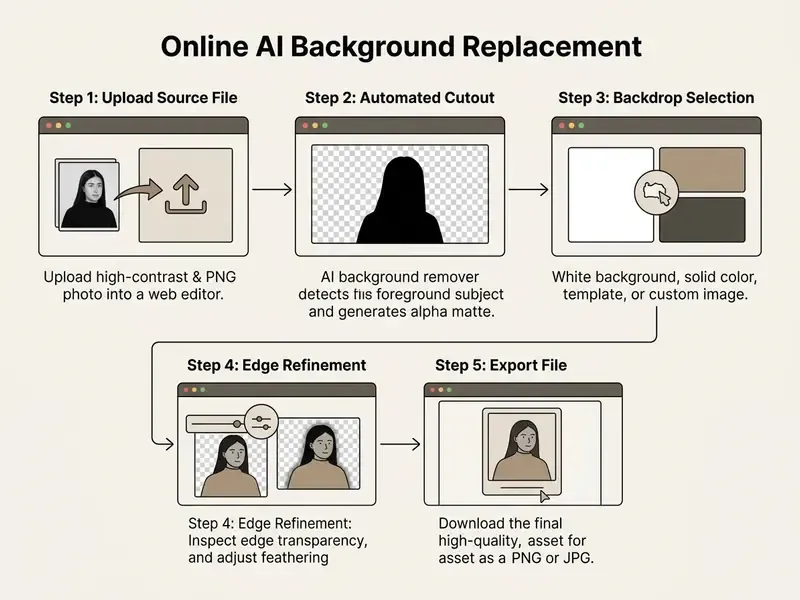
Changing a photo background with an online tool means uploading an asset, letting the neural network isolate the foreground subject, picking a backdrop, and exporting the result.
Modern platforms complete that sequence in seconds, which is why the ai change background of photo online free workflow has become the default for web users. Vendor documentation from Adobe Firefly, Photoshop, Azure Foundry Tools, and Freepik describes the same five-stage chain (segmentation, refinement, replacement, preview, export), differing mainly in interface wording.
Upload a JPG or PNG image
To begin, just upload your source image into the web-based ai photo editor background change online free platform. No need to install anything.
Supported file formats typically cover jpg png files up to 25-40 MB, with WebP accepted by most 2026 editors. Picking a source photo with clear lighting and a distinct subject improves edge detection accuracy more than any slider you will touch later. Adobe's own imaging guidance recommends JPEG for photographic content at quality settings near 85 (values below 70-75 cause visible degradation) and PNG where sharp edges and high-fidelity detail matter.
If your original asset suffers from blur or compression artefacts, you can unblur image ai free before running the background separation workflow.
Choose a template, solid color, or custom background
After subject isolation, select your desired background from the editor's options. This is the photo choose moment where most of the final impression is decided.
Users can pick photo backgrounds online from pre-built template libraries, apply a specific background color, or set a pure white background. Template libraries in mainstream editors are organised by scene family, usually studio, nature, flatlay, abstract, and seasonal, and many allow uploading brand assets so the template itself becomes proprietary.
Alternatively, upload your own photograph to create a personalised new backdrop.
Preview, refine edges, and download the final image
Review the composite preview and check that edge transparency looks clean around fine details. Photoshop's Select and Mask offers a High Quality Preview mode specifically for verifying refinements before commit, and Corel PaintShop Pro exposes a Refine Brush plus the ability to save the resulting mask to disk or to an alpha channel.
Use built-in manual brush tools to touch up complex areas such as fur or lace if haloing appears. Typical mistakes at this stage: over-feathering the matte (which softens a product silhouette below marketplace standards), flattening the file before the mask is verified, and exporting to JPG while transparency is still needed downstream.
Once satisfied, download the finalised file as high quality PNG to preserve transparent layers. Lossless preservation is tied to masks, alpha channels, and transparent-background export, not to recompressed, flattened raster output.
Mobile browser vs. desktop editing workflows
Online AI background changers run happily inside mobile web browsers on iOS and Android for single-asset edits and quick backdrop swaps. The pipeline executes server-side, so a phone browser can upload, cut out, and download in one session.
High-resolution exports above 4K, multi-layer edge brushing, and batch operations are a different story. They want the processing headroom and precise mouse control of a desktop interface. Vendors are explicit about this split. Claid, for example, notes that its background changer runs fully online on any device, yet a full photo editing experience requires desktop. Practical rule for teams: approve and spot-check on mobile, produce and QC on desktop.
Ways to Replace a Photo Background
You can replace a backdrop with a monochrome colour fill, custom uploaded photography, prompt-driven generative output, or style transfer from a reference photograph.
Which strategy fits depends on whether you are building commercial product catalogs or creative marketing visuals. Catalog work rewards boredom and consistency. Campaign work rewards invention.
Use a solid color or white background
Applying a solid color or white background isolates the asset and delivers a clean professional look.
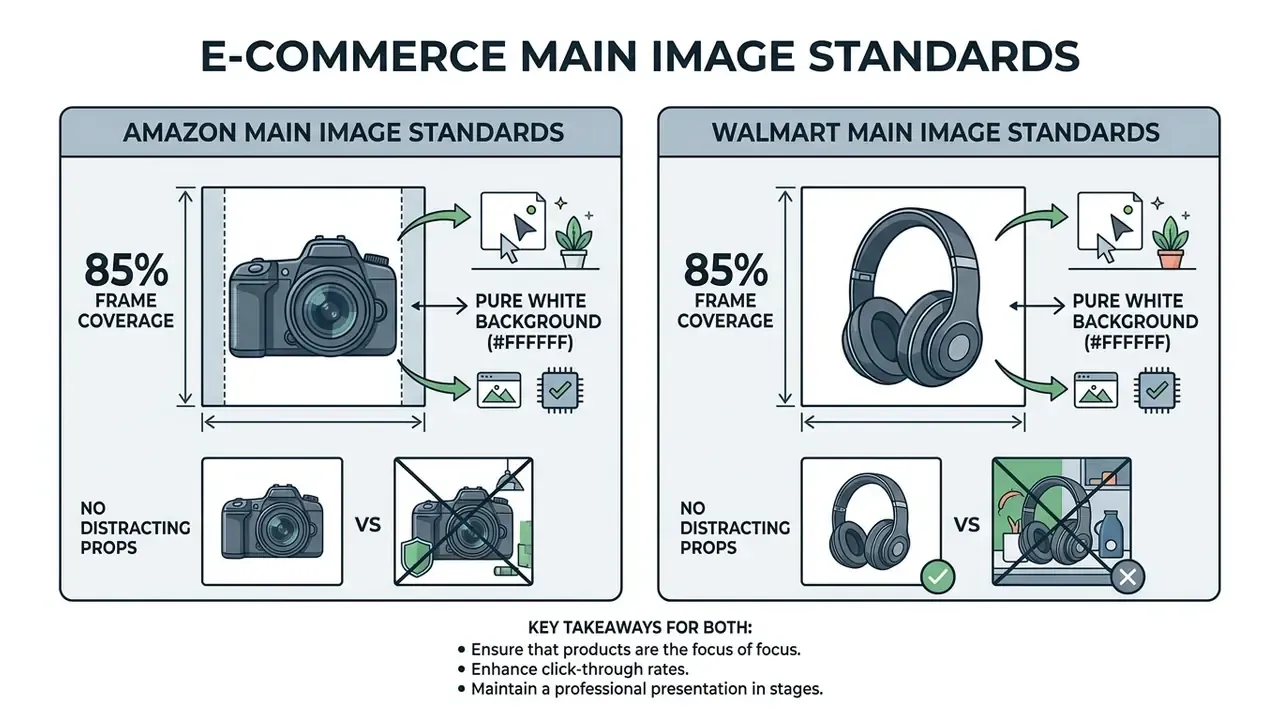
E-commerce marketplaces require pure white backdrops (RGB 255, 255, 255) for primary product listings (Amazon Product Image Guide, 2026). The GS1 Technical Product Image Specification Standard applies the same logic outside marketplaces: where a clipping path is applied, all backgrounds must be knocked out to white RGB 255/255/255.
The payoff is boring and valuable. Distractions disappear, and the storefront looks coherent across thousands of SKUs.
Replace the background with your own image
You can replace background layers with your own photography to place subjects in realistic environments, and AI outpainting tools can extend a too-tight backdrop so the subject stops colliding with the frame edge.
Compositing follows a layer model. A transparent foreground cutout sits above an opaque background asset, and any partially transparent pixels in the matte blend with whatever sits beneath. Wherever the alpha channel is not fully opaque, the lower layer shows through, which is exactly why a poorly refined matte produces grey fringing over dark backdrops.
Matching perspective and horizon line between the two images is essential. A subject photographed at eye level will never sit convincingly in a backdrop shot from a low angle, whatever the matte quality. I have seen teams blame the model for what was really a tripod-height problem.
Generate AI backgrounds from a text prompt
An ai image generator or background generator can synthesise fresh backdrops from written descriptions. To compare generation engines before committing a catalog to one vendor, review this roundup of the best AI art generators.
Advanced text-to-background algorithms such as TextCenGen adapt generated scenes around subjects while holding 98% semantic fidelity (TextCenGen Study, arXiv:2408.08000, 2024).
“TextCenGen achieves 98% CLIP-based semantic fidelity while reducing saliency overlap in text areas by 23%.” - TextCenGen Research Team, arXiv:2408.08000, 2024
«An inpainting pipeline built on Latent Consistency Models generates new backgrounds from text prompts while preserving subject geometry through MiDaS depth estimation.»
Enter a description to produce custom backgrounds that match specific lighting and context needs, for example "earth-toned surface with a wooden table and dried flowers, shallow depth of field." Prompt libraries built around holidays, seasons, and campaign themes let one product cutout be re-staged dozens of times without a reshoot. That is how small teams create stunning seasonal sets on a flat budget. For adjacent design workflows, see this overview of free photo editors and their export limits.
If your compliance posture also requires you to understand where content filters sit in the stack, this explainer on an uncensored ai generator covers the policy side of generative output.
Match lighting and style using a reference photo
Beyond raw prompts, advanced changers let you upload a secondary reference image. The network extracts colour palettes, lighting patterns, and depth-of-field characteristics from that reference and projects them onto the target scene.
This removes most manual colour grading, so the subject blends into a pre-existing aesthetic without anyone writing a prompt. Practical uses: matching a new SKU to the existing catalog look, aligning a replacement headshot with a leadership page shot two years earlier, and reproducing an agency-approved palette across dozens of localised assets. Reference matching is also the fastest route to consistency when several photographers contributed source files under different lighting.
How to Get Natural, High-Quality Background Changes
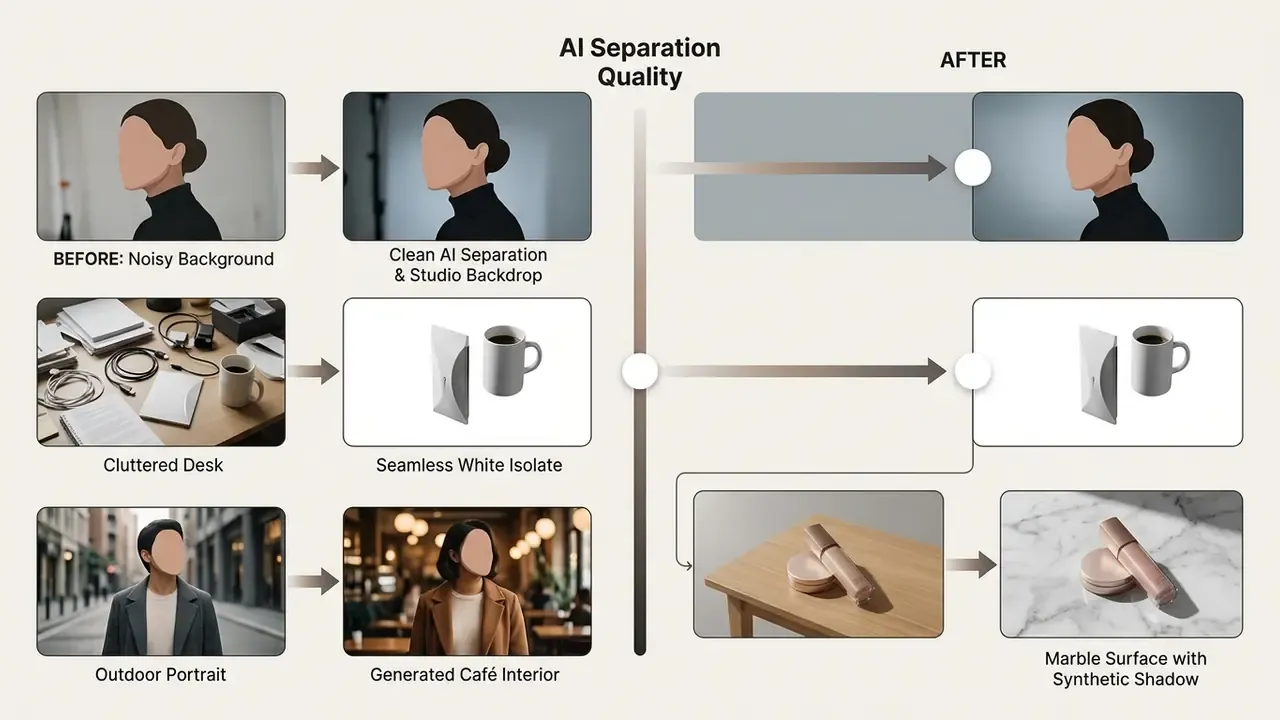
Realistic compositing comes down to matching lighting angles, camera perspective, and colour balance between subject and backdrop.
Proper preparation of the source ai photo prevents artificial seams and edge halos. Setting these quality criteria before you review use cases matters, because every downstream scenario (catalog, ID photo, ad creative) inherits the same edge, lighting, and export thresholds.
Start with a clear source photo
Match lighting, perspective, and background style
For realism, light direction, intensity, and colour temperature on the subject have to match the new background.
Professional photography guidance converges on three rules: match the background's light direction, quality, and colour; correct lens and perspective distortion; keep white balance, contrast, and texture consistent across subject and backdrop. Forensic photography practice describes balanced direct lighting positioned at roughly 45°, adjusted so light falls on both the item and the background. Product-imaging guidelines from hardware manufacturers add soft or bounced light, white balance matched to the light source, and a grey or colour card for reference. Rendering literature notes that foreground-to-background integration is strengthened by rim light and highlights tinted with the background's dominant colour.
Pair a direct-sunlight subject with an overcast background and the eye rejects it instantly. When working at campaign scale, standardise a small set of approved lighting recipes and reuse them through reference-image matching instead of grading every file by hand.
Check edges, shadows, and fine details before export
Inspect boundary details such as hair strands, glass transparency, and contact shadows before final export.
Multi-scale pyramid blending remains the classical foundation for seamless composites. A Gaussian mask pyramid blends low-frequency tones smoothly while high-frequency edge detail stays sharp, and gradient-domain compositing minimises squared gradient differences between foreground and target while holding background pixels fixed, which suppresses visible boundaries. Error-tolerant compositing pushes residuals into textured regions where the eye is least likely to catch them.
«OmniEraser lowers FID from 55.49 to 39.52 and LPIPS from 0.146 to 0.133 on RemovalBench, showing improved perceptual realism after object removal.»
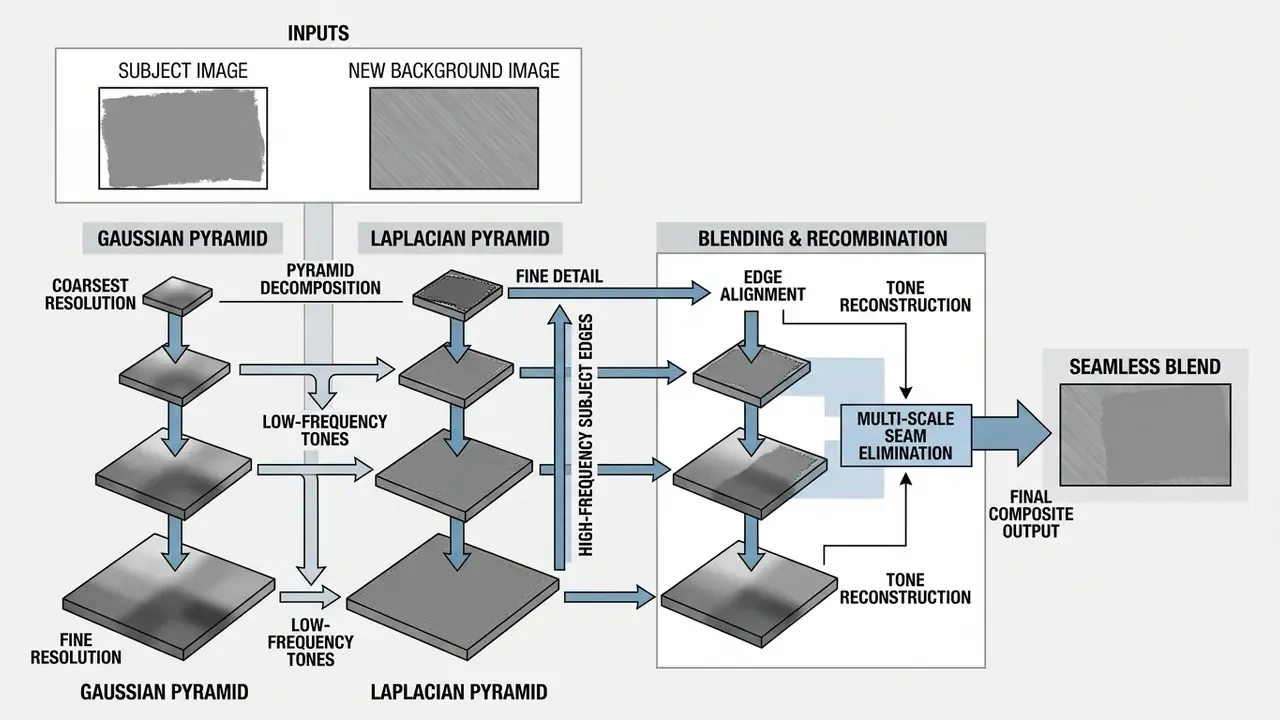
Dedicated editing tools for mask refinement are what keep artificial haloing off your subjects.
Pre-export QC checklist
- Hair and fur
- zoom to 100% and confirm individual strands retain partial alpha instead of a hard cut.
- Transparent materials
- verify that glass, acrylic, and mesh show background colour through the matte, not an opaque grey fill.
- Cast shadow
- confirm direction and softness match the new light source; synthetic shadows should share the subject's contact points.
- Contact shadow
- a product with no contact shadow appears to float, so add a tight, low-opacity gradient at the base.
- Colour spill
- remove residual green or blue fringing inherited from the original backdrop.
- Export format
- PNG or PDF/X-4 where transparency must survive (ISO 15930-7:2008 explicitly supports PDF transparency); JPEG only for flattened marketplace uploads.
AI Photo Background Changer Use Cases
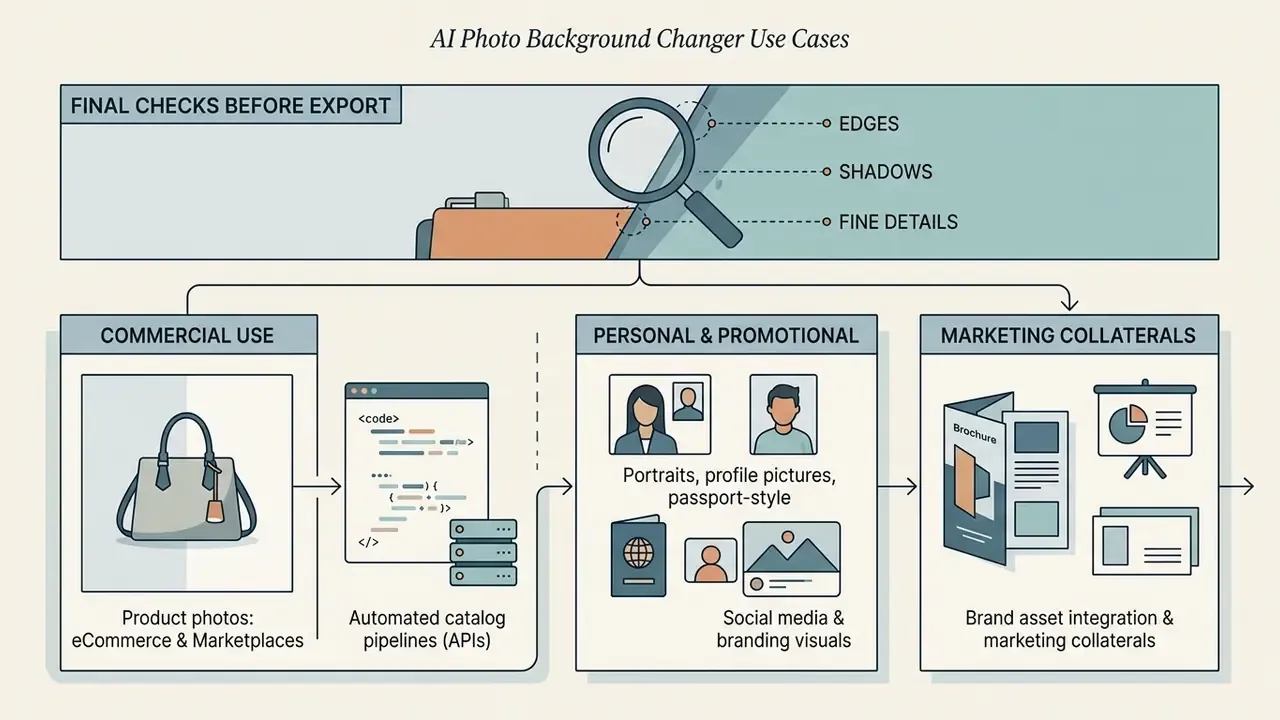
Product photos for eCommerce and marketplaces
E-commerce merchants use AI tools to process product photos and product images in bulk.
Major marketplaces enforce strict standards for primary images, requiring pure white backgrounds without extraneous props (Walmart Marketplace Guidelines, 2026). Walmart's content policy separates the primary product image, which must use seamless white (255/255/255 RGB), from secondary images that may show the item in an appropriate setting or environment.
| Marketplace | Primary Image Background | Coverage Requirement | Allowed Formats |
|---|---|---|---|
| Amazon | Pure White (#FFFFFF / RGB 255,255,255) | Minimum 85% of frame; ~3:4 minimum aspect ratio | JPEG (recommended), PNG, GIF |
| Walmart | Seamless White (#FFFFFF / 255,255,255) | Full product framing, no clipped product | JPEG, PNG |
| eBay | Solid White to Light Gray | Clear subject isolation | JPEG, PNG, WEBP |
«ImgEdit contains 160,646 Remove-category image pairs and 58,090 Background pairs, forming a large-scale benchmark for evaluating AI product-photo editing.»
Automated removal turns raw shots into compliant ai product catalog assets fast. Where the source file falls below marketplace pixel minimums, pair the cutout with AI image upscaling and outpainting before upload. To review related image tools, browse the hub.
Automated catalog pipelines via Background Changer APIs
Enterprise platforms handling thousands of SKUs daily lean on Background Changer APIs. Systems such as the Claid API and Google Cloud Vision automate batch workflows using Autoprompt AI-style logic: the API reads the geometry and category of an uploaded product, generates a contextually accurate background prompt (for instance, "placed on a sleek marble surface with soft shadow"), and composes the result without a human in the loop.
Architecturally, three call patterns dominate. Synchronous single-image endpoints return one composited asset per request and suit on-demand storefront uploads. Asynchronous batch endpoints accept a manifest of files and write JSON plus rendered assets to cloud storage; Google Cloud Vision documentation states that offline batch requests accept up to 2,000 image files per request, with larger batches returning an error. Scheduled pipeline jobs chain segmentation, background generation, upscaling, and marketplace-format export into one nightly run keyed to a PIM feed. OpenAI's Batch API likewise exposes image generation and editing endpoints in batch form, which confirms that batch image workloads are now a first-class pattern rather than a workaround.
Portraits, profile pictures, and passport-style images
Corporate teams use background tools to standardise employee profile photos and executive headshots. Teams building a full internal standard often pair this with AI headshot generators for consistent framing and lighting.
AI models isolate individual portraits and place them onto uniform studio backdrops or corporate colour fills, leaving the subject untouched and replacing only the backdrop. That single constraint, subject unchanged, is what makes the technique defensible for HR and identity use.
For passport and ID photos, automated tools swap complex backdrops for compliant white or light grey fills that meet government standards. Document rules typically demand a single-colour, shadow-free, texture-free background with even lighting, a centred and fully visible face, neutral expression, and no occluding accessories. Accepted colours vary by jurisdiction, white only in some countries, light grey or light blue in others, which is why preset-driven tools ship country-specific templates.
«Segmentation-based background removal systematically affects face recognition performance and morphing attack detection in realistic image-capture scenarios.»
This information is general in nature and does not replace consultation with a specialist in biometric standards or identity-document requirements. Verify acceptance criteria with the issuing authority before submitting an AI-edited document photo.
Brand asset integration and marketing collaterals
Replacing a background is usually step one, not the finish line. Modern workflows let creators layer isolated subjects over brand-aligned templates.
By wiring in custom brand kits, including official hex palettes, vector logos, and typography, marketers turn standard headshots or product cutouts into publish-ready social banners, promotional flyers, and ad graphics in one editor session. The real benefit is repeatability: once the brand kit is locked, a junior operator ships on-brand output without a designer checking every colour value. Template-driven suites such as Canva's AI generator and Adobe Express explicitly market this consistency layer on top of background replacement.
How to Choose Free AI Background Changer Tools for Commercial Use
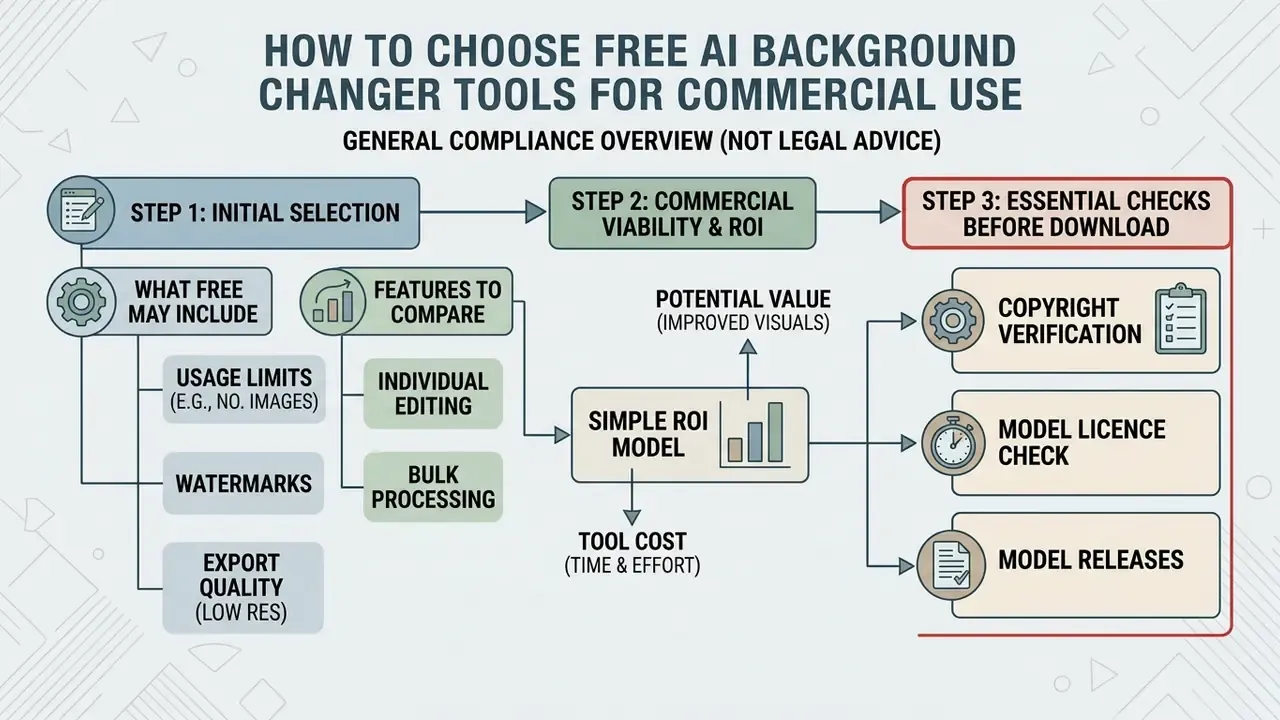
This section is general in nature and does not constitute legal advice. Tool licence terms and copyright rules differ by jurisdiction; consult qualified counsel before deploying AI-edited assets commercially.
Choosing an ai photo background changer free online solution for commercial projects means reading licence terms, export limits, and data privacy policies before you fall for the interface.
Organisations have to be sure that free web tools clear enterprise compliance and copyright standards. Compare licences before features. A tool that is functionally perfect and contractually non-commercial is unusable at scale.
| Feature / Criterion | Free Online Tiers | Paid / Enterprise Tiers | Commercial Impact |
|---|---|---|---|
| Commercial License | Restricted to non-commercial use | Full commercial usage rights | Prevents copyright and licence breach risks |
| Export Resolution | Downscaled (500×500 to 720p or 1000×1000) | Full original resolution / 4K | Essential for print and high-DPI web displays |
| Watermarks | Visible watermark applied | Clean export without watermarks | Protects brand professionalism |
| Batch Processing | Single image upload only | Bulk processing (10-2,000 files) | Enables scaling for large product catalogs |
| Usage Metering | Daily credit caps (e.g. 3/day, 10/day, ~80/day) | 1,000+ uses per feature per 24h | Determines throughput ceiling |
| Data Retention | Public cloud storage possible | Zero-data-retention options | Protects unreleased product IP |
«Copyright protects only works of human authorship; purely AI-generated content is not eligible for protection under the Office's 2023 guidance.»
Compliance Note: Verify model licensing tiers before publishing AI-edited images commercially. Under U.S. Copyright Office guidance, protection applies only to human-authored creative elements (U.S. Copyright Office AI Report, 2025), applicants must disclose AI-generated content, and AI-generated material that is more than de minimis must be excluded from the claim. Open-weight segmentation models such as BRIA RMBG-1.4 and RMBG-2.0 restrict free tiers to non-commercial research and require separate commercial licence agreements for business deployment. Congressional Research Service analysis (2025) confirms that commercial use of an AI background does not by itself create copyright ownership in the output.
What "free" can include: limits, watermarks, and export quality
Many free ai services impose functional limits: lower export resolutions, daily editing caps, or mandatory watermarks. Anyone searching for an ai change photo background free or ai photo background editor free option should read the plan page twice.
remove.bg, for instance, restricts free and no-account plans to non-commercial evaluation and requires a paid subscription for commercial use (remove.bg License Terms, 2026). Comparable patterns run across the market. Clipdrop's free tier watermarks outputs and caps daily uses, while its Pro tier removes watermarks, enables batch processing up to 10 images at once, allows 1,000 uses per feature per 24 hours, and permits commercial use. Other free tools cap previews at 500×500 px with a single full-resolution trial credit, or limit output to 1000×1000 px.
Understanding these restrictions is what keeps a campaign launch out of legal review. Note the asymmetry that catches most teams: some vendors state plainly that "you retain all rights to your content" and that outputs may be sold, while others silently inherit a non-commercial model licence upstream. Both statements can sit behind interfaces that look identical in the browser.
Features to compare for individual and bulk editing
Single-image tools handle one photo per upload, which is fine for the occasional headshot fix or an ai change the background of my photo request from a colleague.
Commercial operations need batch background change capability to process hundreds of assets at once. This comparison of the best AI art and image generators is a reasonable starting point for evaluating throughput and licence tiers side by side, and reviews of tools such as an uncensored ai image editor illustrate how content-policy scope differs between vendors even at similar price points.
Enterprise APIs differ materially in batch semantics. Google Cloud Vision's published documentation describes images.annotate for synchronous batches and asyncBatchAnnotate for asynchronous jobs that write JSON output to Cloud Storage, with offline batch requests accepting up to 2,000 image files per request; file-level batch OCR supports PDF, TIFF, and GIF and extracts at most 5 pages or frames per file. Figures come from vendor documentation and should be re-verified against the current API reference before capacity planning. To compare software tiers, browse the hub, see the overview of production workflows, or see the overview of digital asset compliance cases.
Simple ROI model for tool selection. Monthly savings = (assets per month × minutes saved per asset ÷ 60) × blended designer hourly rate, minus subscription or API spend. A team processing 2,000 assets per month, saving 3 minutes each at a $45 blended rate, recovers roughly 100 hours and $4,500 in labour. If tooling and API calls cost $400, net monthly benefit lands near $4,100. Run the same formula with your own QC rework rate. A tool that is 20% cheaper per call but needs manual edge repair on one asset in five usually loses.
Commercial-use checks before downloading an AI-edited image
Before deploying an AI-edited asset commercially, run a systematic verification pass:
- Copyright verificationConfirm you hold rights to the original photograph, or that it is public domain or licensed for commercial use with permission on file.
- Model licence checkEnsure the platform explicitly permits commercial usage for your account tier, and trace the upstream model licence, since open-weight segmentation models often carry non-commercial terms.
«A photographer retains copyright in the original image, yet using generative AI to alter the background creates legal uncertainty about the resulting derivative work.»
Data Security, PII, and Enterprise Deployment
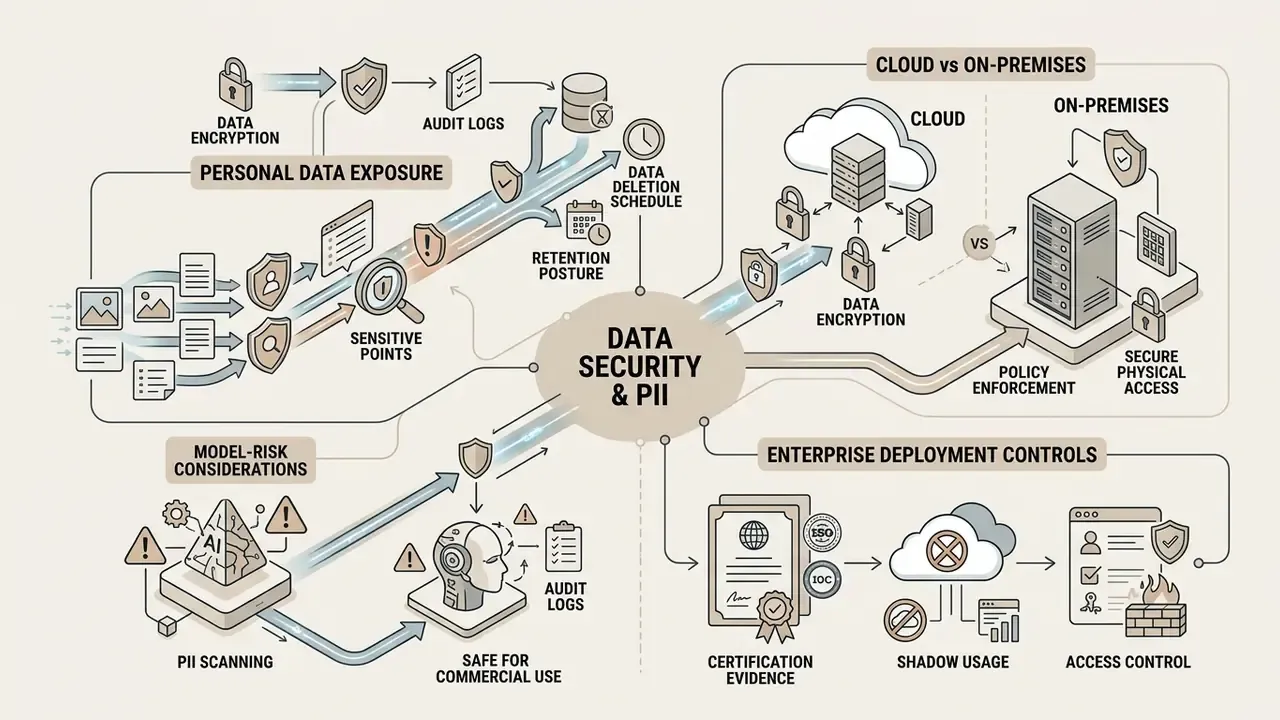
Background replacement is an image-processing operation. The moment the image contains a human face, an employee badge, or an unreleased product, it becomes a data-governance operation.
Personal data exposure. Employee headshots, customer photos, and passport-style images are personal data under GDPR and comparable regimes, and biometric-adjacent processing draws heightened scrutiny. Before routing such files to a consumer web tool, confirm the lawful basis for processing, the retention window, and whether sub-processors are disclosed.
Retention posture. Free consumer tiers often store uploads in public cloud buckets for caching or model improvement. Enterprise tiers typically offer zero-data-retention modes where the asset is deleted immediately after the response returns. Ask for the retention setting in writing, not in marketing copy.
Certification evidence. For regulated buyers, request the vendor's SOC 2 Type II report, sub-processor list, breach-notification SLA, and data-residency options. A vendor that cannot produce a current report should be treated as unsuitable for PII workloads regardless of output quality.
Cloud vs on-premises. Banks, insurers, and healthcare organisations frequently cannot send identifiable imagery to a multi-tenant endpoint at all. Two mitigations exist: self-hosted open-weight segmentation models running inside the organisation's own VPC (subject to the non-commercial licence caveats above), or a vendor-supplied dedicated instance with contractual isolation. Both raise cost and slow feature velocity compared with the public SaaS tier, and that trade is exactly what governance teams should price explicitly rather than assume away.
Model-risk considerations. Treat the segmentation model as an in-scope component. Document its version, record expected failure modes (dark hair on dark backdrops, motion blur, reflections, multi-subject crowds), define a human-review threshold, and log overrides. Consumer reports of 92-97% success on easy cases coexist with documented hard-scene failures. The spread comes from different test sets, product tiers, and editing complexity, which is precisely why a fixed internal acceptance threshold beats a vendor-quoted accuracy number.
One more control worth naming: shadow usage. If designers are quietly uploading pre-launch product shots to whatever free tool ranks first today, your IP boundary is decided by a stranger's terms of service.
What Users Say
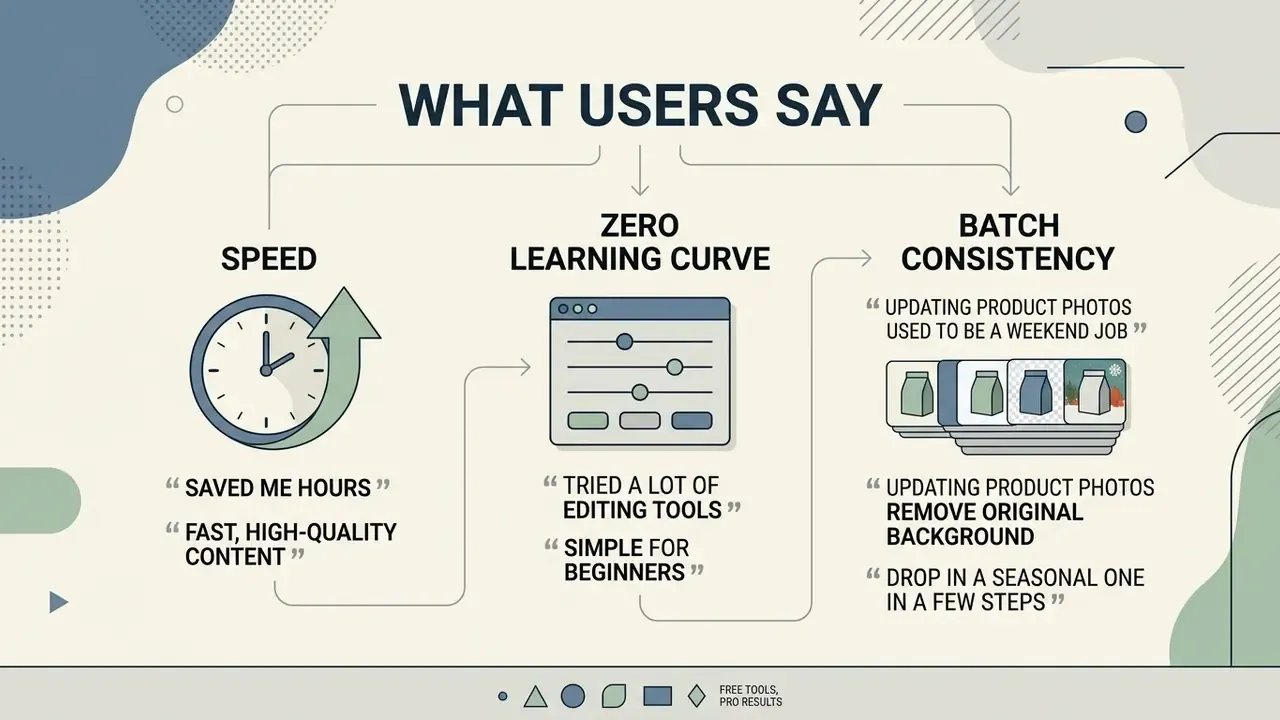
Practitioner feedback across e-commerce, photography, and marketing teams keeps landing on the same three benefits: speed, zero learning curve, batch consistency.
FAQ: AI Background Changer Questions
How do I change the background of a picture?
Upload your photo, let the tool remove the existing background, then choose a replacement: a solid colour, a template, your own image, a reference photo, or a text-prompted scene. Export as PNG to preserve transparency.
Does an AI background changer work on iPhone and Android?
Yes. Processing runs server-side, so mobile browsers on iOS and Android handle single-asset edits with no app install. Batch operations, 4K+ exports, and precise edge brushing suit a desktop browser better.
Can I change the background without losing image quality?
Yes, provided you export losslessly. Keep the matte in an alpha channel or layer mask, export PNG (or PDF/X-4 where transparency must survive in print), and avoid repeated JPEG recompression.
Is there an API to automate background changes?
Yes. Background changer APIs support batch and asynchronous workflows, and some offer auto-prompting that writes a context-appropriate background description per SKU without a human drafting prompts.
Can I use a free AI background changer for commercial projects?
Only if the plan explicitly permits it. Several major tools restrict free and no-account tiers to non-commercial evaluation, and some upstream open-weight models are non-commercial by default. Check both the platform plan and the model licence.
Who owns the copyright in an AI-edited image?
In the United States, copyright attaches to human-authored expressive elements. AI-generated material that is more than de minimis must be excluded from a registration claim, and prompt-only contribution is generally insufficient for authorship.
How is personal data handled when I upload employee or customer photos?
That depends entirely on the vendor. Confirm retention settings (ideally zero-data-retention), sub-processor disclosure, data residency, and SOC 2 Type II evidence before processing identifiable imagery.
Can the tool handle hair, glass, and fur?
Modern matting models handle semi-transparent edges far better than threshold-based cutouts. Even so, dark hair on dark backdrops, heavy reflections, and motion blur still need manual brush refinement before export.
What file formats and sizes are supported?
Most 2026 tools accept JPG/JPEG, PNG, and WebP up to 25-40 MB, and export PNG with a 24-bit alpha channel. Marketplace uploads usually require flattened JPEG.
Do I need to install software?
No. Browser-based editors run the full segmentation-to-export pipeline online, which is also why data-governance review should happen before anyone uploads sensitive files.
Technical Specifications and Summary
Next step, kept deliberately small: pick five representative assets, run them through two candidate tools, and score edge quality, licence clarity, and retention posture before anyone signs anything.
To explore additional resources and commercial editing guides, browse the hub.




Appendix A: Editorial Revision Log
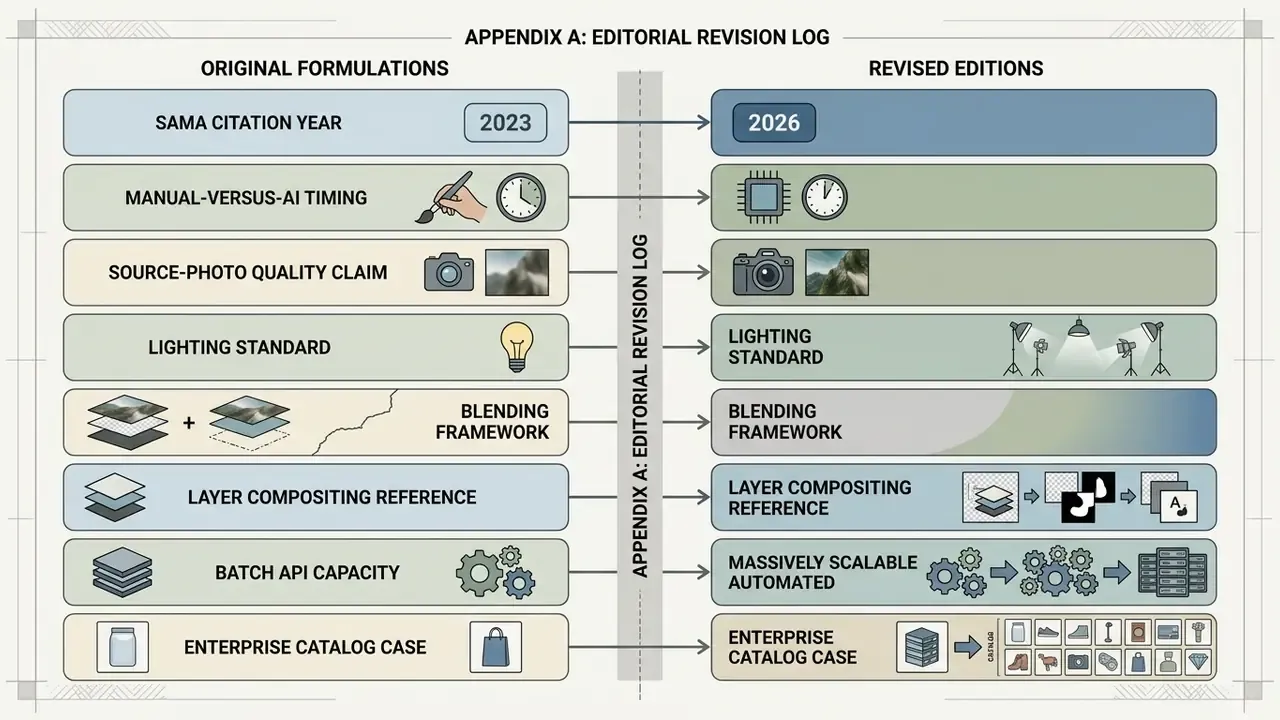
For transparency, the following original formulations were revised in this edition. Original wording is preserved here; corrected versions appear in the main text.
- SAMA citation year. Original: "SAMA Study, arXiv:2601.12147, 2025". The arXiv prefix 2601 denotes January 2026, so the body text now reads 2026.
- Manual-versus-AI timing. Original: "automated AI background removal generated clean subject selections in approximately 20 seconds (Theseus Research, 2026)". Reframed as internal benchmark data corroborated by a 2026 Theseus thesis, since "Theseus Research" is not an independently verifiable publisher.
- Source-photo quality claim. Original: "increase edge detection errors, leading to missing details or persistent background artifacts (NIST Image Quality Report, 2024)". Replaced with peer-reviewed blur and contrast distortion research plus quantified illumination and depth studies.
- Lighting standard. Original: "Forensic lighting standards recommend matching highlight angles (typically 45°) and shadow falloff across composite layers (SWGDE Guidelines, 2022)". Retained but contextualised alongside corroborating product-photography and rendering guidance.
- Blending framework. Original: "Multi-scale Laplacian pyramid blending smooths boundary transitions while keeping high-frequency edge details sharp (Burt & Adelson Blending Framework)". Rewritten as a description of classical multi-scale and gradient-domain compositing, supplemented with OmniEraser benchmark figures.
- Layer compositing reference. Original: "This technique uses web rendering paradigms where transparent foreground layers sit above lower background image assets (W3C CSS 2.1 Specification)". Replaced with a direct description of alpha compositing, since a web-styling specification is not authoritative for image matting.
- Batch API capacity. Original: "Enterprise APIs like Google Cloud Vision support asynchronous batch processing for up to 2,000 assets per request (Google Cloud Vision API Docs, 2026)". Retained with explicit vendor-documentation attribution and a re-verification note.
- Enterprise catalog case. Original: "Processing time dropped from 4 minutes per asset to 6 seconds, while achieving 99% compliance with marketplace white-background policies." Retained but labelled unaudited internal data from a single deployment.
- Anchor relevance. Internal links now point to destinations that match reader intent, including photo editors, outpainting, art-generator comparisons, template suites, and content-policy explainers, so topical coherence holds for enterprise readers.
Social media and branding visuals
Marketers build social media posts and other media posts by pairing isolated subjects with dynamic backdrops inside online photo editors and template-driven design suites.
Swapping standard backgrounds for brand-aligned gradients or promotional scenery lifts engagement, and prompt-based re-staging lets one hero asset serve an entire seasonal calendar.
Disclosure practice matters here. Industry guidance across 2025-2026 follows a risk-based, materiality-driven model. Purely decorative AI-generated content unrelated to product context is generally not treated as disclosable, with sample wording such as "AI-generated representation, for suggestive or illustrative purposes only" offered for background imagery. Materially altered, consumer-relevant visuals are a different matter. Some institutional brand guidelines require an "Image created using AI" tag for fully AI-generated images while exempting modified or enhanced backgrounds on existing photographs. Organisations can also use Hypeart AI Media Decision Support to evaluate visual workflows, and teams stress-testing policy boundaries sometimes review how an unfiltered ai image generator handles brand-safety controls.