Why should a risk or compliance leader care about a marketing feature? Because in a regulated institution, a generated pixel is a model output. It lands in campaign creative, investor decks, branch signage, and disclosure-adjacent material. Someone owns that output. Someone has to evidence it.
Last updated: June 2026 · Reviewed for: model risk, commercial licensing, and production image pipelines.
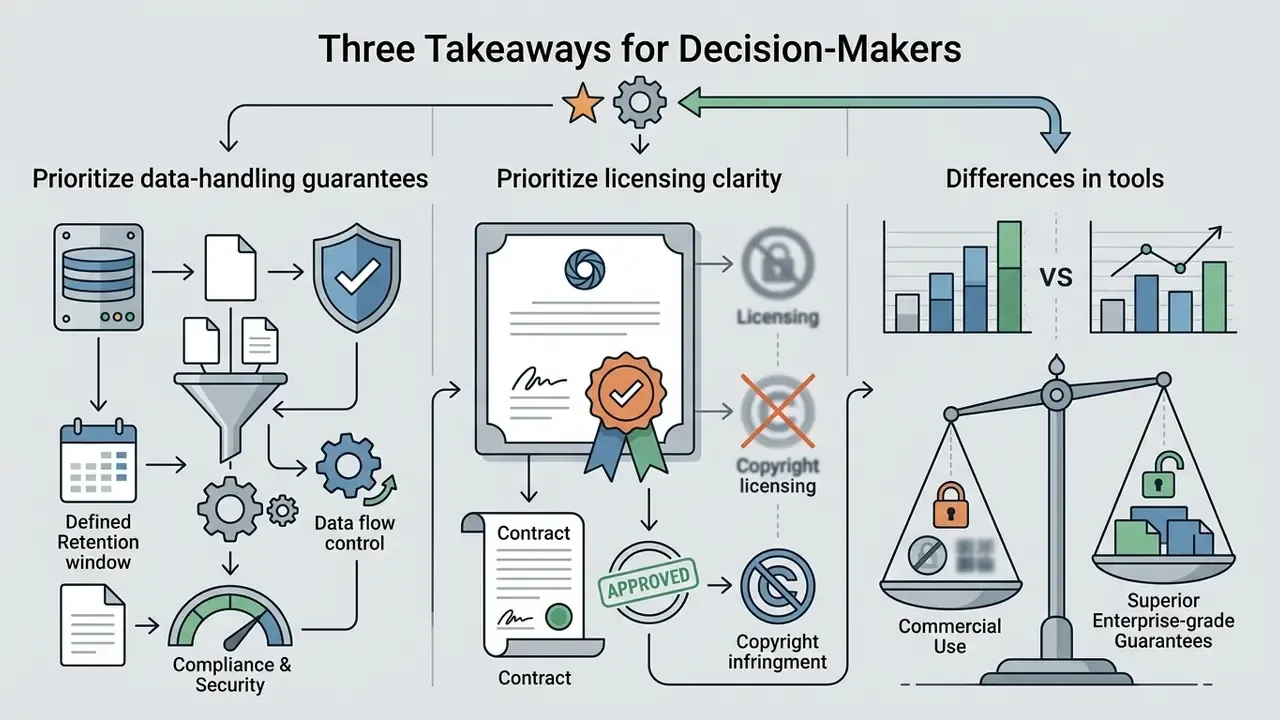
Three Takeaways for Decision-Makers
Who This Guide Serves and Which Decisions It Supports
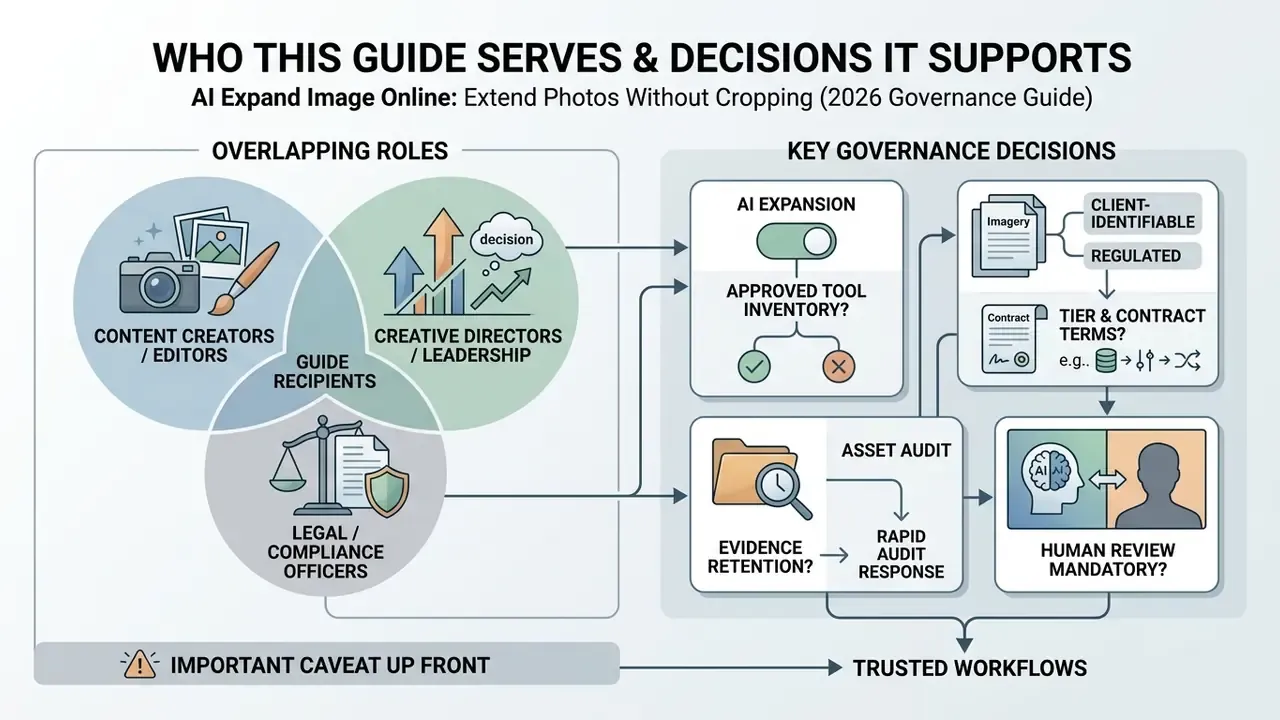
This material is written for three overlapping roles. Creative and brand operations teams who need faster asset adaptation. Marketing technology owners who must select a platform. And the governance layer (model risk, compliance, security, internal audit) that has to sign off before assets reach the public.
The decisions it is designed to support:
- Whether generative expansion belongs in your approved-tool inventory at all.
- Which tier and contract terms are acceptable for regulated or client-identifiable imagery.
- What evidence must be retained per published asset so an audit request is answerable in minutes.
- Where human review is mandatory rather than advisory.
One caveat up front. Image expansion is a low-severity use case compared with credit modeling or KYC automation. That is exactly why it slips past governance. Small risk, no owner, no log, broad distribution.
What is AI Image Expansion and AI Outpainting?
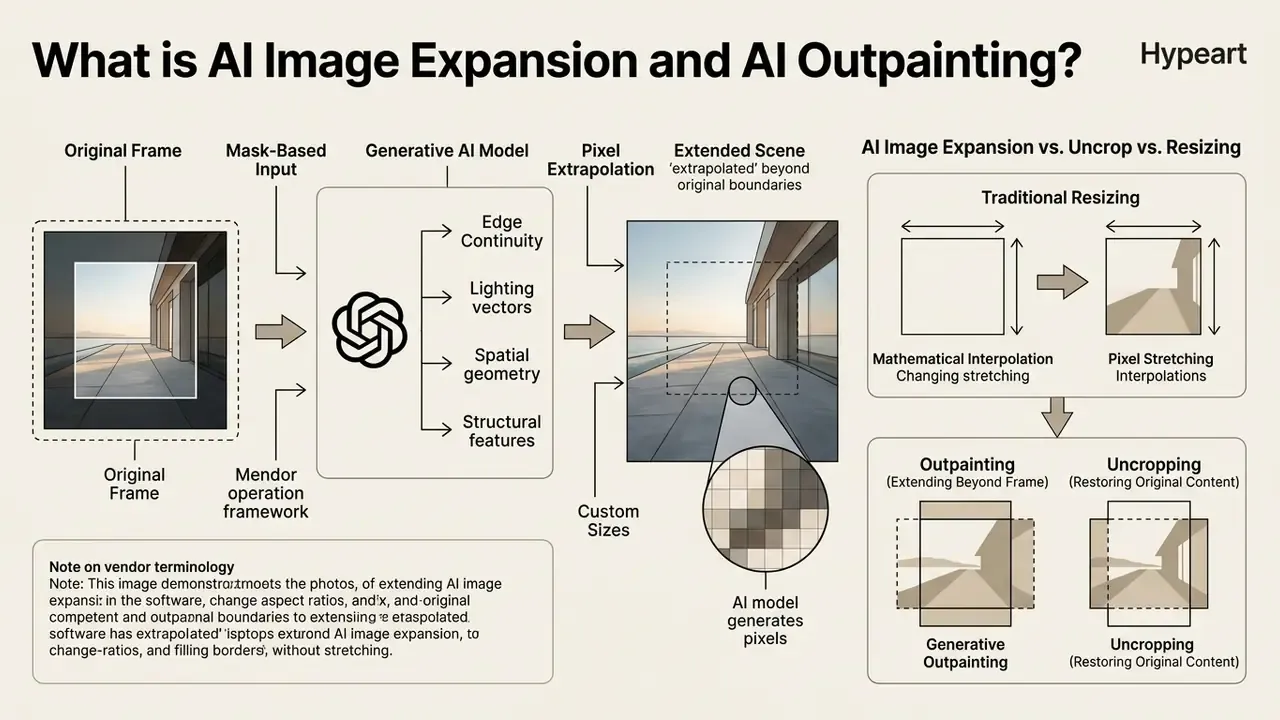
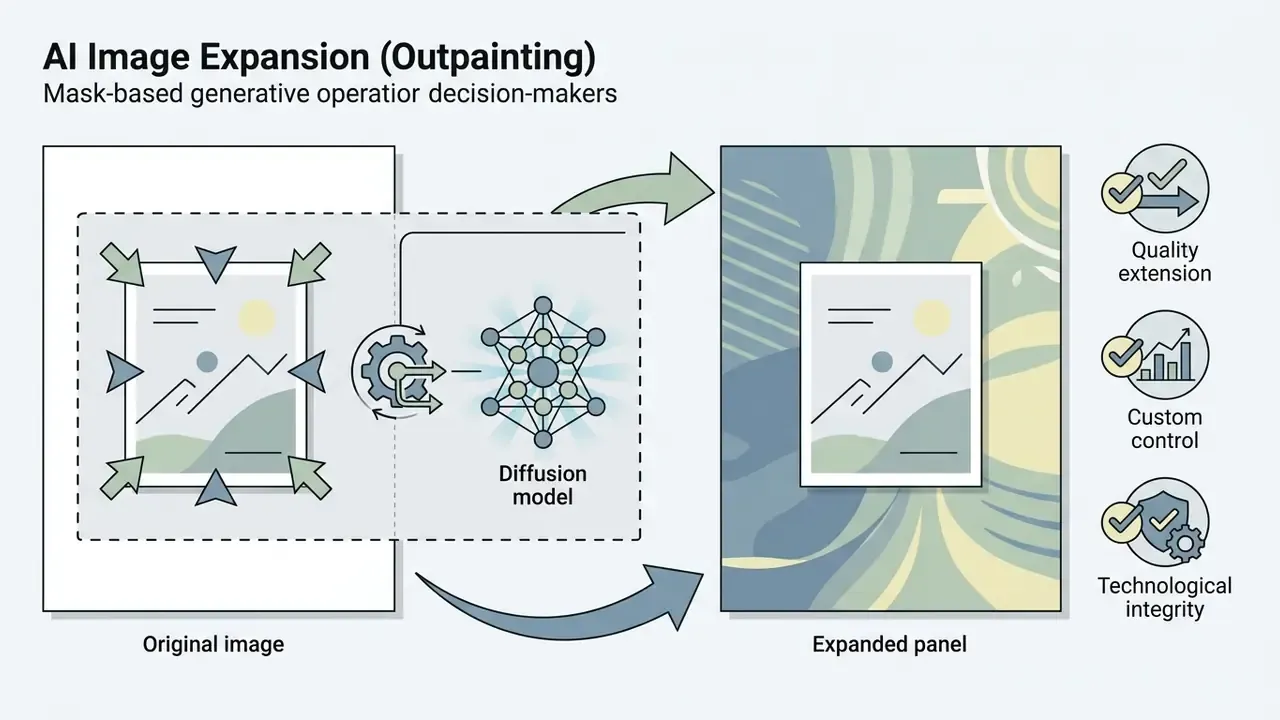
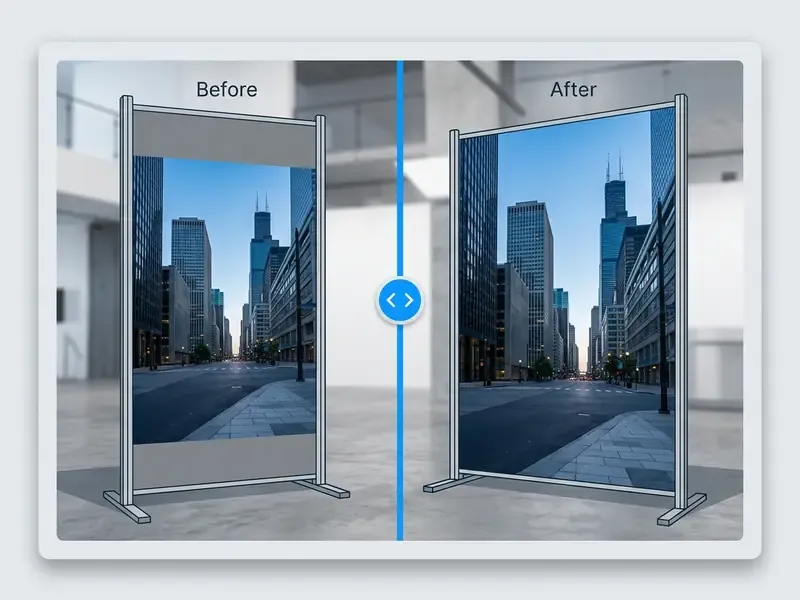
An ai image extender is a generative software system designed to extrapolate scenes beyond their original boundary limits. Unlike traditional canvas tools, an image extender predicts plausible lighting, textures, and structures using surrounding visual context.
In production documentation, the operation is consistently described as mask-based: the user supplies an original image plus a mask (at identical resolution) that defines the newly exposed canvas, and the model generates only inside that mask while leaving the source pixels untouched. That single design decision is what separates outpainting from every destructive editing method that preceded it.
A note on vendor terminology. The same operation ships under a dozen labels. You will see it marketed as ai auto fill image, ai autofill image, ai continue image, ai complete image, or simply as a request to ai expand a picture. Some interfaces promise to ai complete the image, others to ai complete images in bulk, and a few advertise the ability to ai expand an image to any custom canvas. Treat the naming as marketing. Audit the mechanics, the licence, and the retention policy instead.
How AI Generates Pixels Beyond the Original Frame
Generative ai outpainting algorithms analyze the structural features, spatial geometry, and lighting vectors of an original photo to synthesize new pixels in the expanded area. Modern systems employ diffusion models conditioned on positional query embeddings and semantic region descriptions to extend image backgrounds seamlessly.
«PQDiff reached FID 21.512 on the Scenery dataset and cut generation time to 40.6% of the baseline method at 2.25× expansion.»
When an ai photo enters the pipeline, the underlying generative ai model evaluates edge continuity and projects plausible environmental structures into the unmasked space. The ai technology calculates depth maps and surface textures, ensuring that the ai extended image maintains perspective consistency across the synthesized perimeter. Depth-guided architectures reinforce this behavior explicitly: structure-aware multimodal fusion with depth guidance was introduced precisely to keep geometry stable when pixels are invented outside the frame, while shadow-aware outpainting variants align cast shadows in the generated field with the original illumination model.
Practically speaking, the model does not "know" what was outside the lens. It predicts what a plausible continuation looks like. Those are different claims, and the distinction matters when the asset carries a factual message.
AI Image Expansion vs. Uncrop vs. Resizing: Key Differences
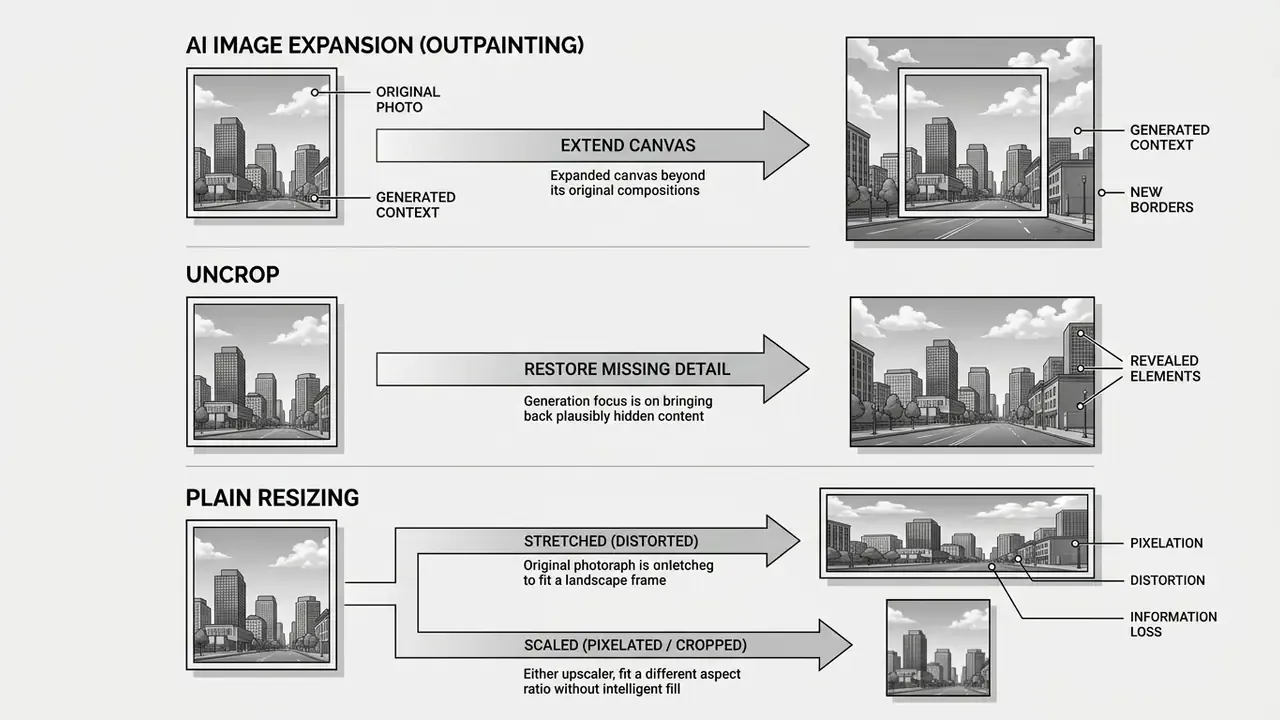
Traditional image resizing changes pixel dimensions via mathematical interpolation, which frequently stretches subjects or introduces destructive blur. An uncrop image process expands the total spatial canvas by generating net-new visual content while preserving the exact scale and geometry of the original photo.
Conversely, an image upscaler increases pixel density and edge sharpness within the existing frame boundaries rather than adding new environmental context. When teams resize images, changing the photo size without generative fill causes geometric distortion or forces lossy cropping. Practitioners evaluating adjacent tooling can review the terminology baseline for AI photo editors before standardizing on a single photo editor stack.
«Diffusion models learn the distribution of real images and synthesize genuinely new content, whereas interpolation merely rescales pixels that already exist.»
Risk matrix by operation, useful when writing internal policy:
| Operation | What changes | Composition altered? | IP / hallucination risk | Typical governance control |
|---|---|---|---|---|
| Resize / stretch | Pixel dimensions via interpolation | No | Very low, no synthetic content | Visual QA for distortion only |
| AI upscaling | Pixel density, micro-detail | No | Low to medium, "creative" modes can invent texture | Compare against source at 100% zoom |
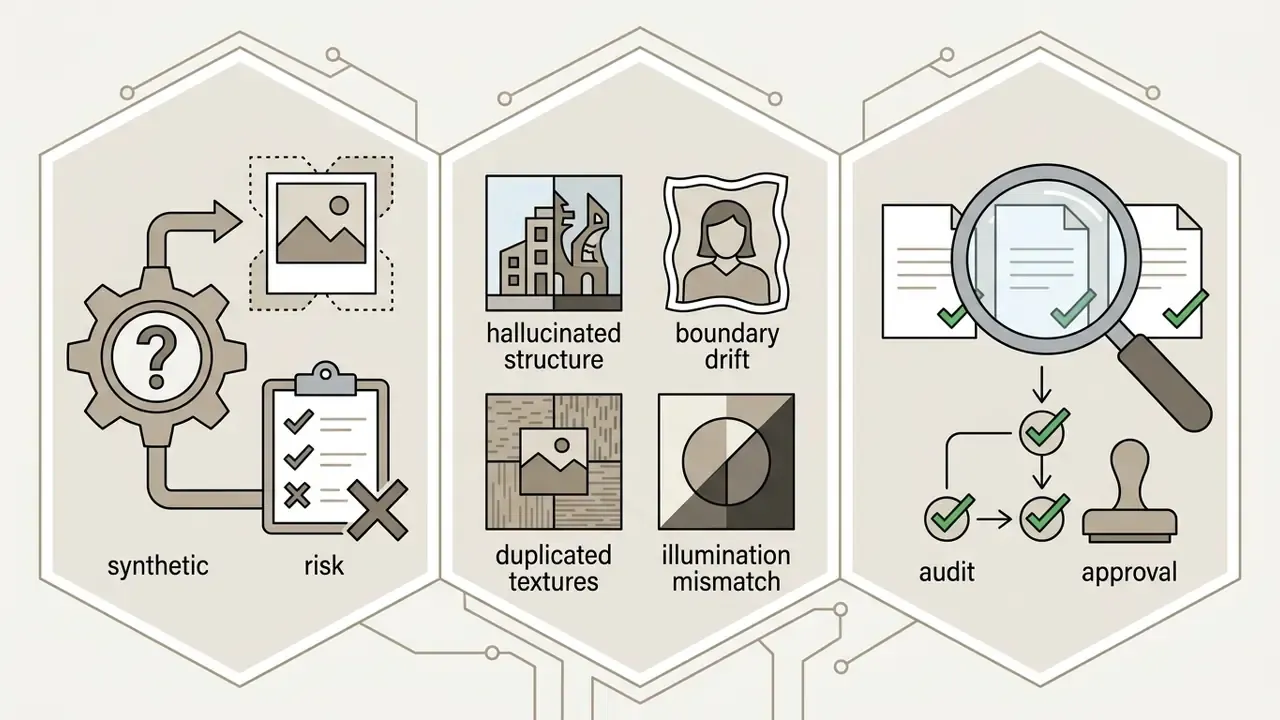
| AI outpainting / uncrop | Canvas size, net-new scene content | Yes | High: hallucinated structures, boundary drift | Mandatory human audit plus generation log |
Primary Use Cases for AI Image Extenders
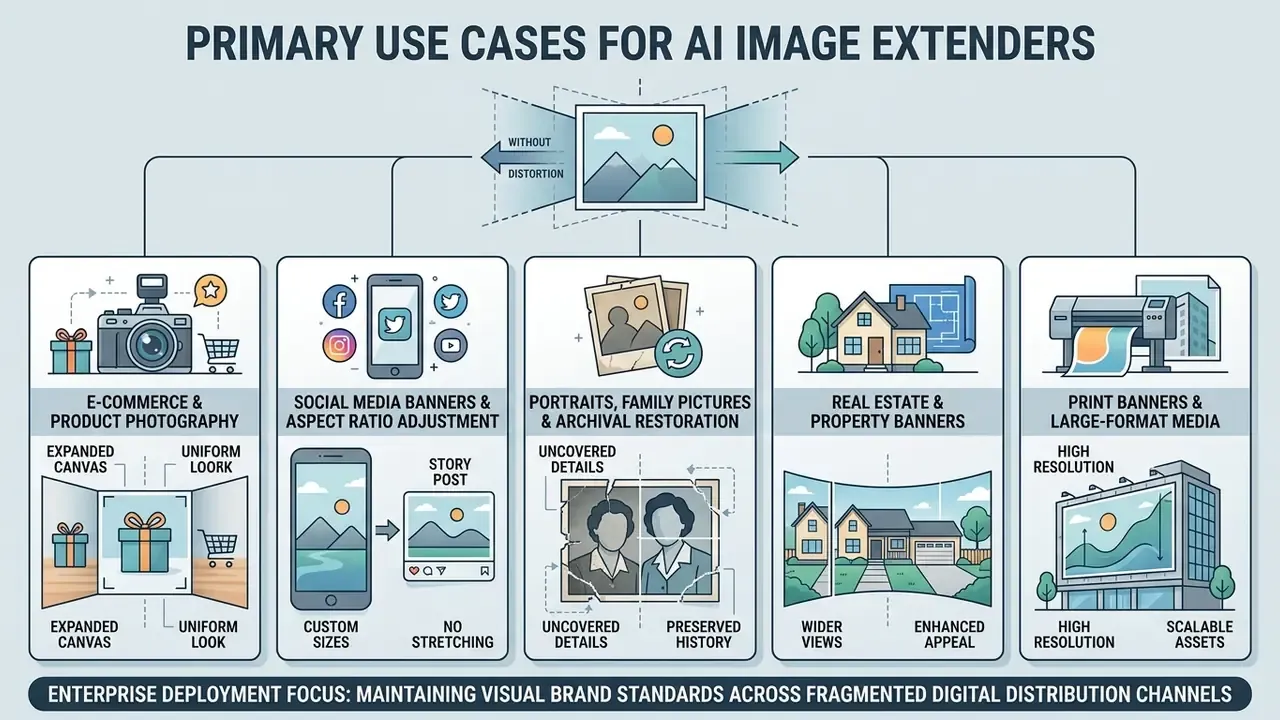
Enterprise deployment of an ai photo extender focuses on maintaining visual brand standards across fragmented digital distribution channels. Controlled canvas expansion allows organizations to expand photos rapidly without re-shooting primary visual assets.
E-Commerce & Product Photography
E-commerce managers use an ai image expander to adjust product photos for marketplace display requirements without truncating key merchandise details. Extending background canvas space around product images creates essential margins for price tags, promotional badges, and interface overlays while maintaining subject centrality.
Marketplace compliance is the concrete driver here. Amazon's product image guidance requires main images on a pure white background (RGB 255, 255, 255), while Yandex Market accepts white or transparent backgrounds, files up to 10 MB in .jpg, .jpeg, .png, .heic, or .webp, with a 300×300 px minimum and a recommended total side-sum around 2048 px. A single universal production asset commonly used across marketplaces is 3:4 vertical at 1500×2000 px on pure white with 10 to 15% clearance margins around the product. Those margins are exactly what outpainting can generate instead of forcing a reshoot.
In a recent digital asset overhaul, a retail merchandising team needed to convert 1,200 square catalog shots into 3:4 vertical marketplace listings without clipping product packaging. The team implemented automated ai outpainting masks to generate neutral studio margins across all assets. This controlled workflow eliminated manual photo editing bottlenecks and met marketplace compliance standards in two business days.
«GenCrop trained a subject-aware cropping model on outpainted photographs without manual annotation, matching fully supervised methods.»
Once margins are generated, resolution uniformity becomes the next constraint; teams typically finish the batch through an AI image upscaler for commercial imagery before export.
Portraits, Family Pictures & Archival Restoration
Restoring archival media or tight executive headshots requires careful preservation of human anatomical structure. An ai app to extend photo assets can reconstruct clipped shoulders, restore missing headwear, and repair damaged borders in old photos. For portrait-specific pipelines, review how dedicated AI headshot generators handle facial geometry before routing archival scans through a general-purpose extender.
Operators must exercise caution when applying an ai art extender near human faces or complex architectural lines. Generative models must focus strictly on background extrapolation, leaving primary facial geometry unmanipulated to avoid perceptual artifacts.
«Research emphasizes that outpainting can degrade in complex scenes; faces and expressive objects require mandatory visual inspection before publication.»
Archival material carries compounded risk: damaged borders and low source resolution mean artifacts concentrate exactly at the seam between original and generated content. Always start from the highest-resolution scan available, and treat straight lines, signage text, and building edges as mandatory inspection points. For a family photograph, a warped doorframe is a shrug. For a bank's centenary campaign, it is a correction notice.
Print Banners & Large-Format Media
Preparing media for print posters or trade show displays requires wide margins that original photographic assets often lack. Expanding the spatial canvas via AI outpainting prior to running an upscaling pass provides the necessary bleed area without distorting primary visual subjects.
Order matters. Expanding first gives the upscaler more genuine image data to reference; upscaling first and then expanding forces the generative model to extrapolate from already-interpolated pixels. Print pipelines commonly target 300 DPI at final trim size, with lossless intermediate formats to avoid compounding compression artifacts across stages.
Selecting the Best AI Image Expander for Enterprise & Personal Use
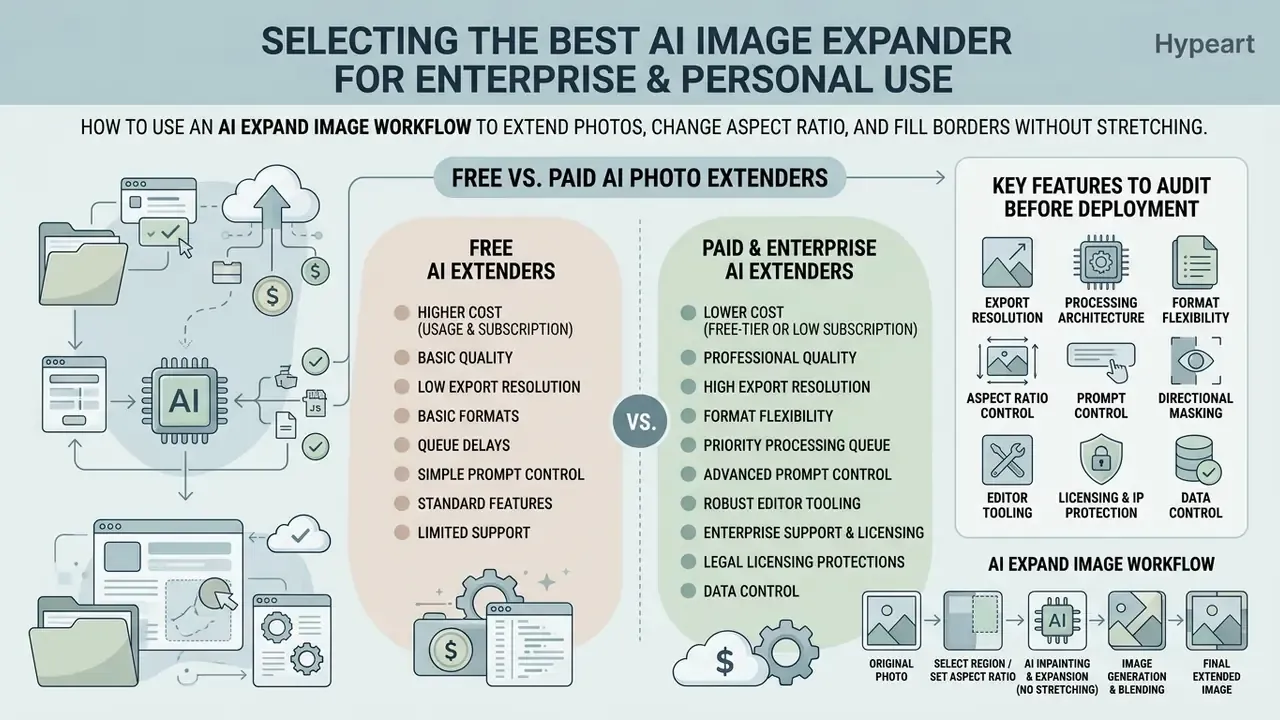
Selecting an affordable ai picture extender app or enterprise image tool depends on export resolution demands, queue priority, legal licensing protections, and, for regulated organizations, verifiable data-handling controls. Evaluate the platform before routing production assets through it. Reversing that order is how shadow AI usage enters a creative department.
Free vs. Paid AI Photo Extenders
A free ai image platform typically imposes restrictions on export resolution (capping outputs at 720p), applies visible watermarks, and processes requests through shared standard queues. Paid subscription tiers remove watermarks, unlock 4K exports, and provide priority processing speed. Pricing models diverge as well: some vendors bill per operation (roughly $0.02 per image expansion at the low end), others bundle expansion into monthly creative subscriptions, and commercial rights on several platforms are gated behind paid tiers or revenue thresholds.
| Feature / Criteria | Free AI Tier | Paid / Enterprise Tier |
|---|---|---|
| Export Resolution | Capped at 720p / 1080p | Full native resolution (up to 4K / 16K) |
| Watermark Policy | Visible platform watermark | No watermark on exports |
| Commercial License | Personal / evaluation use only | Full commercial utilization rights |
| Queue Priority | Shared standard processing queue | Dedicated fast GPU queue |
| Format Support | Standard jpg jpeg png | jpg jpeg png, WEBP, BMP, TIFF, GIF |
| Custom Pixel Input | Fixed ratio presets only | Exact width × height in px |
| Text Prompt Control | Usually automatic fill only | Optional guided prompts plus negative prompts |
| Data Retention Policy | Often undefined / indefinite | Contractual retention window (e.g. deletion within 24 hours) |
| Training-Data Ingestion | Uploads may be reused for model training | Explicit no-ingestion guarantee in contract |
| Security Attestations | None published | SOC 2 / ISO 27001 attestations available on request |
| Privacy Compliance | Generic consumer policy | GDPR / CCPA data processing agreement |
| Access Control | Email or social login | SSO / SAML, role-based permissions |
| Audit Logs | Not available | Exportable generation logs for regulator review |
| Support & SLA | Community / email best-effort | Contractual uptime and response SLA |
Key Features to Audit Before Deployment
When evaluating a best ai extension platform, technical teams must audit supported upload formats, web online editor integration, and boundary manipulation flexibilities. Procurement teams comparing platforms can also review AI image generators for commercial use to benchmark licensing terms across vendors.
- Format Flexibility Verify native support for jpg jpeg png, plus WEBP, BMP, TIFF, and GIF for mixed archives, and confirm the maximum accepted file size (commonly 10 MB, up to 20 MB on paid tiers).
- Aspect Ratio Control Check for custom pixel input (exact width × height) alongside standard ratio presets such as 1:1, 16:9, 9:16, 3:4, and 4:3.
- Prompt Control Confirm whether the engine supports optional text prompts and negative prompts, or fills the canvas automatically from edge context only.
- Directional Masking Validate that expansion can be constrained to a single axis (left, right, top, bottom) rather than symmetrical growth.
- Processing Architecture Evaluate if the system uses advanced ai diffusion models for single-step continuous expansion (PQDiff Study, 2024).
- Editor Tooling Ensure availability of embedded brush masks for targeted canvas generation, and check whether the same ai powered editor also offers an image enlarger and retouch pass.
- Governance Hooks Require exportable generation logs, retention settings, and an API or SSO path that keeps assets inside an approved corporate contour.
A blunt filter for regulated buyers: if the vendor cannot describe retention and training policy in writing, the evaluation ends there. Output quality is the easy part. Evidence is the hard part.
Commercial Licensing, Copyright & Data Privacy
«Purely machine-generated visual elements are not eligible for copyright protection absent substantial human creative contribution.»
The Office's guidance is explicit on a second point that matters operationally: prompting alone is generally insufficient, while human-authored expression, creative arrangement, and post-generation modification can be protected. European analysis reaches a comparable conclusion, since outputs produced without substantial human intervention fall outside copyright eligibility.
Documenting "substantial human contribution" in practice. To make the human-in-the-loop defensible rather than theoretical, retain for each published asset: the source file and its provenance, the mask geometry or expansion direction, the prompt (or an explicit note that no prompt was used), the model and version identifier, the timestamp and operator identity, the audit result from the boundary checklist below, and any manual retouching performed after generation. Preserving original capture metadata and attaching content-provenance signals (for example, C2PA-style manifests) keeps the chain traceable for downstream regulator or agency review.
Furthermore, corporate policies must ensure uploaded original content is not ingested into public model training sets without explicit consent. Vendor generative-AI terms commonly prohibit uploading third-party copyrighted material or personal data, and public analysis notes that generative datasets can contain both PII and copyrighted works, which makes upload handling a legally material control rather than a preference. Require a written data processing agreement specifying retention duration, deletion guarantees, sub-processor disclosure, and a no-training clause. To assess enterprise safety, teams can consult the B2B AI Media Trust Checklist before integrating third-party generative services.
How to Expand Images Online: Step-by-Step Guide
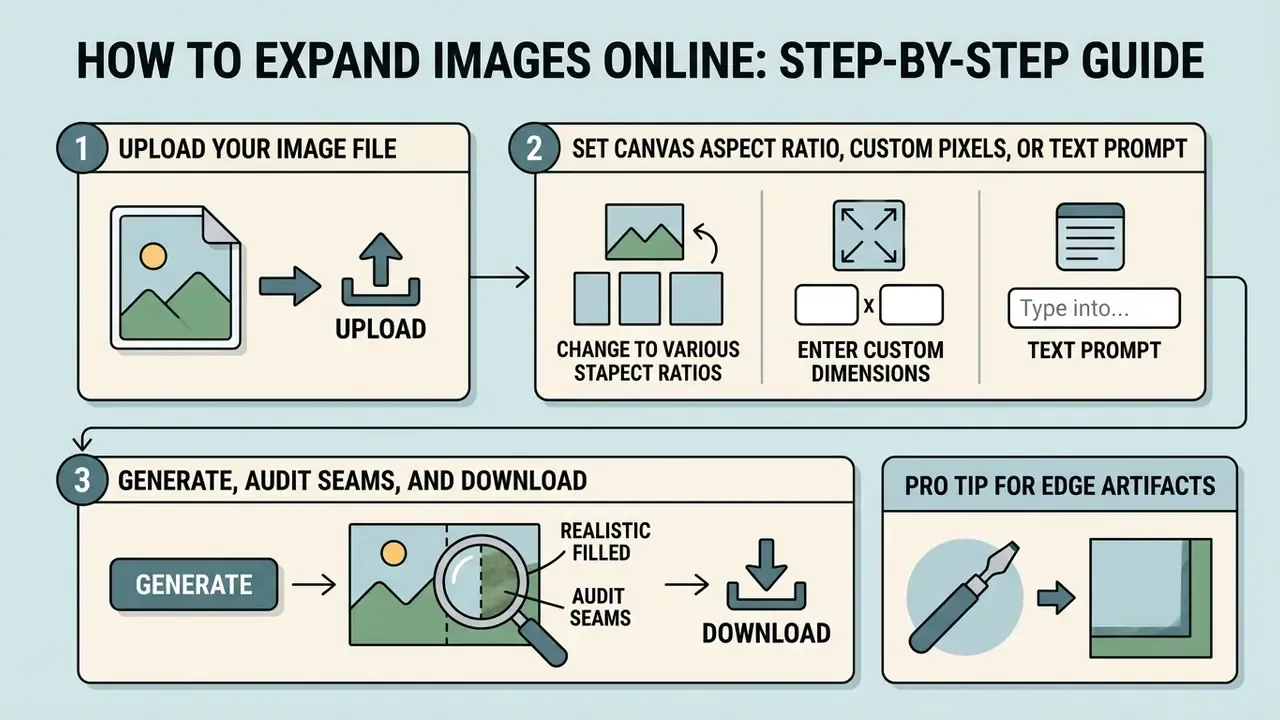
Executing an ai complete image online process requires a systematic, controlled workflow so generated borders remain visually realistic. Follow these operational steps to ai add more to image assets reliably, and in regulated environments run them inside an approved tool selected using the audit criteria above.
1. Upload Your Image File
Begin by selecting a source asset in JPG, JPEG, PNG, WEBP, BMP, TIFF, or GIF format. Ensure the file size does not exceed the platform threshold (typically 10 MB, extending to 20 MB on paid tiers). High-initial-resolution inputs provide cleaner contextual features for the generative diffusion pipeline, because sharp edge definition gives the model more genuine detail to reference when synthesizing the perimeter.
- Open the upload dialog in your selected online editor.
- Upload imagefiles in JPG, JPEG, PNG, WEBP, BMP, TIFF, or GIF format, up to 10 MB.
- Confirm that the original photo exhibits no severe compression artifacts near the outer edges.
- Verify the file's confidentiality classification before it leaves your network. Confidential or client-identifiable imagery belongs only in an approved enterprise contour, never in a consumer free tier.
«Diffusion models are sensitive to input quality: compressed or noisy images degrade reconstruction and outpainting at frame boundaries.»
2. Set Canvas Aspect Ratio, Custom Pixels, or Text Prompt
Select your target aspect ratio from standard platform presets (for example 1:1 square, 16:9 landscape, 9:16 vertical story, 3:4, or 4:3) or manually enter exact custom pixel dimensions (width × height), such as 2400×1200 px for a web header or an exact print trim size. If supported by your editor, add an optional text prompt to guide the synthesized background (for example, "extend background with blurry modern office interior" or "extend the sky"). Leaving the prompt blank is valid on most engines, and it simply lets AI infer the fill purely from edge context.
- Select target aspect ratios (1:1, 16:9, 9:16, 3:4, 4:3) or enter custom pixel dimensions.
- Define spatial directions for generation (left, right, top, bottom) or choose symmetrical expansion on all sides.
- Add an optional text prompt or negative prompt where the engine supports guided fill.
- Specify negative margin requirements for visual text overlays, logos, or price badges.
Choose the final ratio before generating. Expanding an already-expanded asset compounds synthetic content and softens fine detail.
3. Generate, Audit Seams, and Download
When you click generate, the system will automatically construct a background mask and generate new pixels to match the surrounding scene. Once generation finishes, conduct a boundary inspection before executing a one click download.
- Evaluate transition seams between original and new content.
- Verify that light source vectors and shadow angles remain continuous.
- Export the finalized high quality file at full resolution, not a preview size, so blended edges stay sharp in print or on retina displays.
- Record the generation log entry (model, prompt, operator, timestamp) alongside the exported asset.
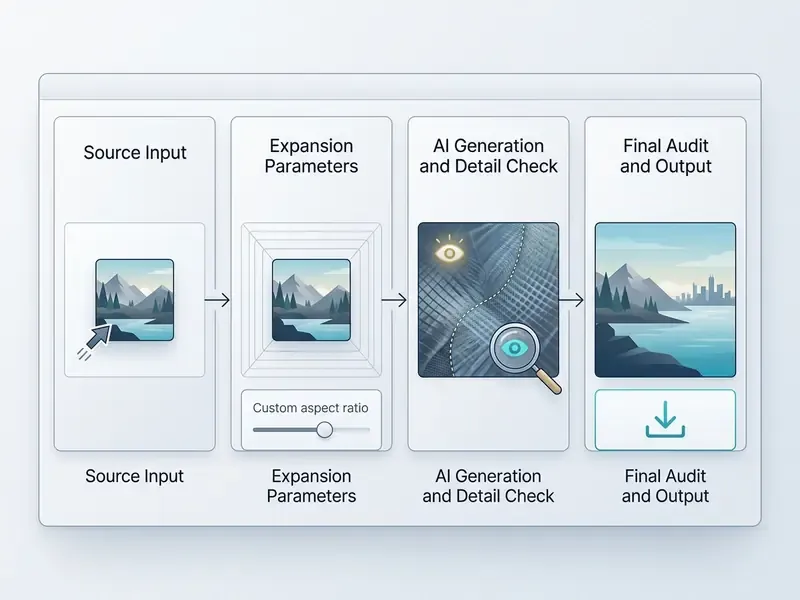
How to Achieve Natural Extensions Without Distortion
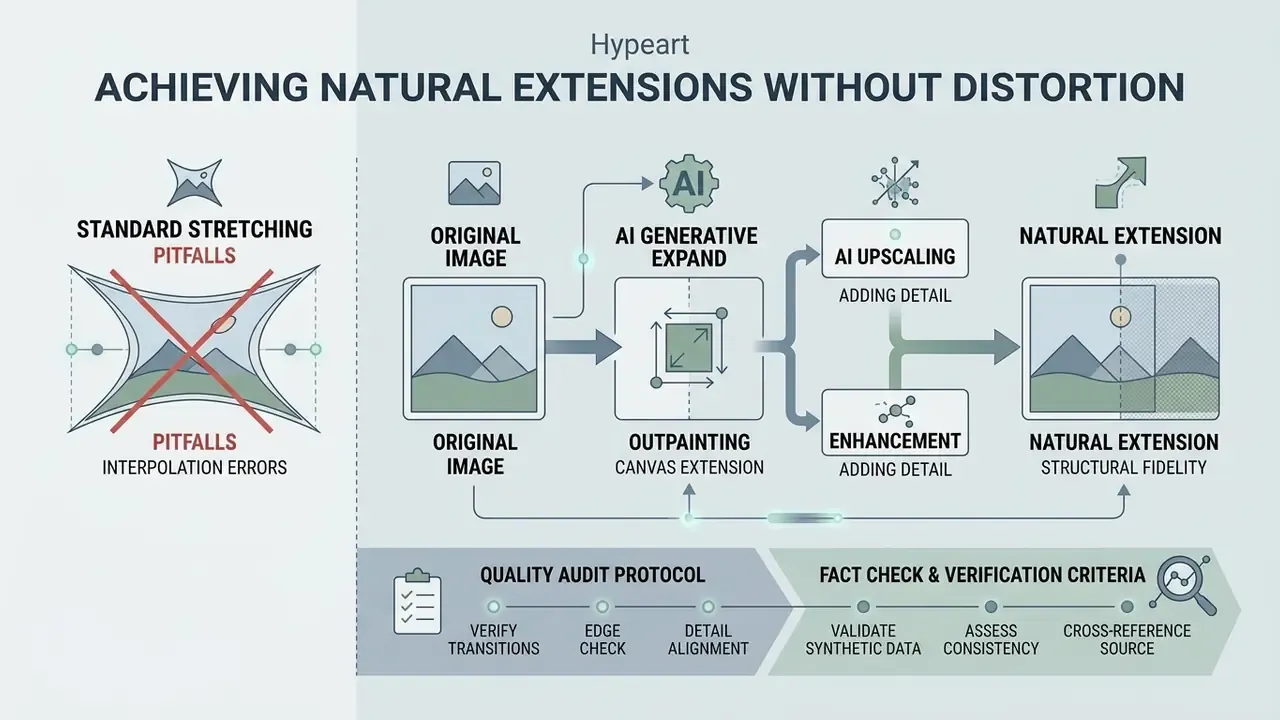
Maintaining structural fidelity during generative extension requires avoiding physical interpolation errors and verifying edge transitions. Organizations must establish clear verification protocols for every ai extended image.
The Technical Pitfalls of Standard Image Stretching
Stretching pixels to fill a larger canvas introduces immediate geometric distortion. When tools enlarge images without generative filling, objects lose their real-world proportions, circles distort into ellipses, and sharp edge textures degrade into pixelated blur.
The cause is mathematical, not aesthetic. Output coordinates rarely align with integer positions on the source lattice, so each new value is interpolated from neighbors. That approximation of a continuous signal by discrete samples produces blur, ringing, and jagged edges. Where source detail exceeds the Nyquist limit, the result is aliasing and moiré: false large-scale structures that never existed in the scene.
Mathematical resampling interpolation cannot invent missing contextual information. Generative fill uses statistical priors to synthesize net-new environmental structures, allowing teams to adjust canvas scale without cropping core subjects and without losing quality in the subject itself. The trade-off is a change in error type: from deterministic geometric distortion to probabilistic model error. Which is precisely why the audit protocol below is mandatory rather than optional.
Combining Outpainting with AI Upscaling and Enhancement
An ai image upscaler should be deployed after the initial outpainting step is complete. Once an ai tool extends the background canvas, applying a secondary photo enhance pass restores high-frequency micro-textures and sharpens fine details across both original and synthesized regions. For finishing work, compare dedicated AI image enhancer options against the sharpening controls bundled into your extender.
Sequential processing ensures that the generative model first establishes global composition at native resolution, while the subsequent upscaling pass polishes detail uniformity and delivers a consistent quality image across the full frame.
«LLMGA-7B improved FID by 2.57 points versus Stable Diffusion 1.5 on wide outpainting over the Places dataset.»
Be deliberate about upscaler mode selection. "Precision" profiles scale faithfully and suit product and documentary imagery, while "creative" or diffusion-driven profiles invent additional texture and can drift from the source. Gentle presets preserve thin structures such as small text and product labels. Teams building a repeatable finishing stage can evaluate a dedicated AI image upscaler, or view the guide to see how top generative toolsets handle post-processing refinement.
Quality Audit Protocol for Extended Canvas Boundaries
Before approving synthetic visual assets for commercial distribution, operators must execute a visual audit of the expanded canvas perimeter. No image should reach publication without it.
Fact Check & Verification Criteria for Synthetic Extensions:
- Perspective Alignment: Verify that vanishing points and horizon lines in the generated field match the original perspective grid. Multiple vanishing points signal an assembly error.
- Illumination Consistency: Confirm that shadow direction, length, contrast, and soft-edge gradients match primary light sources across the seam.
- Pattern Duplication: Check at 100% zoom for repeating "cloning" artifacts in complex natural textures like foliage, water, or brickwork, and for unnaturally smooth or uniform regions.
- Anatomical and Architectural Integrity: Ensure straight structural lines (rooflines, door frames, rails, signage) do not warp or bend at the transition seam, and that no body part, hand, or garment edge is duplicated or merged.
- Salient Object Boundaries: Confirm the primary subject has not been silently widened or reshaped. Diffusion outpainting is known to extend salient object edges during fill.
- Text and Metadata: Verify that no generated pseudo-text appeared in the new region, and that capture metadata plus provenance signals survived export.
«COMEX filters images containing artifacts, watermarks, and defects, confirming that manual inspection remains critical for commercial deployment.» Source: COMEX: A Composition-Grounded Benchmark and Learning Framework for Explainable Aesthetic Image Cropping (2026). https://ieeexplore.ieee.org/
Integrating Image Extenders into Automated Editing Workflows
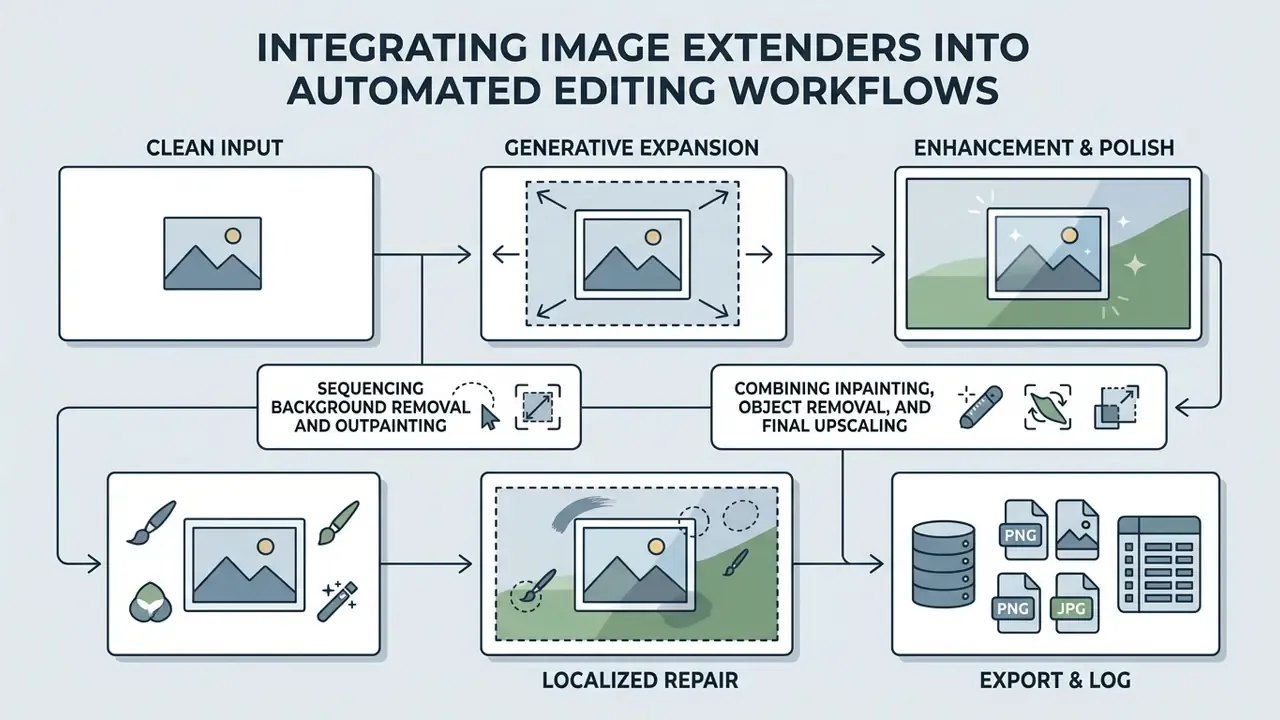
Generative canvas expansion functions best as one component of a broader digital media pipeline. Integrating photo editing utilities in a structured sequence yields superior visual fidelity.
Sequencing Background Removal and Outpainting
For standard compositing workflows, operators should execute ai outpainting first, allowing the generative model to leverage contextual background cues. Once the extended canvas is generated, apply a background remover to isolate the subject if clean transparency is required.
«GenCrop showed that outpainting which retains background context gives the cropping model more scene information than an isolated subject.»
Conversely, if the original background contains heavy noise or unwanted artifacts, removing the background prior to expansion allows the image generator to synthesize a completely fresh, uniform environment in the expanded area. Some diffusion pipelines document background removal as an explicit input-preparation step before outpainting, so treat order as a decision driven by whether existing background context is an asset or a liability.
Combining Inpainting, Object Removal, and Final Upscaling
A complete asset restoration pipeline follows a strict execution order:
Powerful AI stacks fail on sequencing far more often than on model quality. Fix the order once, document it, and the failure rate drops without any new licence.
Teams exploring adjacent transformations can also study image-to-image generators for stylistic conversions that outpainting alone cannot deliver. Those looking to implement specialized image creation workflows can compare the bing ai art generator or analyze bing ai art solutions alongside dedicated bing ai image generation tools. For alternative creative pipelines, review the dedicated art generator breakdown or view the guide for automated workflow integration.
Limitations, Open Questions, and a Safe Next Step
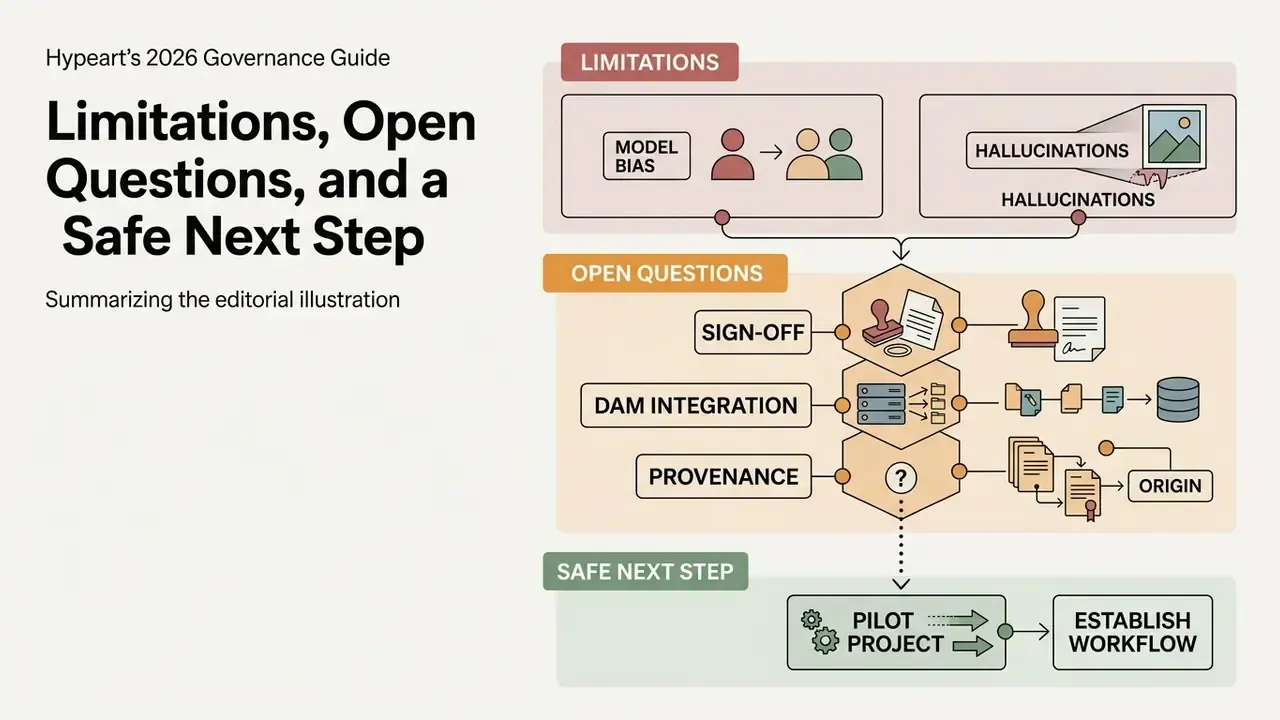
Two limitations deserve plain statement. First, benchmark scores such as FID measure distributional similarity, not factual accuracy at the seam; a low score does not certify that a given frame is publishable. Second, copyright treatment of partly synthetic assets is still moving, and guidance published in 2025 and 2026 leaves room for interpretation on how much human contribution is "substantial".
Open questions worth tracking internally:
- Who signs off when a generated margin appears in regulated or disclosure-adjacent material?
- Does your DAM actually store the generation record, or does it live in an analyst's folder?
- How would you reconstruct a two-year-old asset's provenance if the vendor has since changed models?
A safe next step, and deliberately a small one. Run a two-week pilot on a single non-sensitive asset class, log every generation, and measure three things: assets produced per hour, audit rejection rate, and time to answer an evidence request. If the rejection rate stays low and the evidence trail holds, widen the scope. If not, you have learned that cheaply.
FAQ: Frequently Asked Questions About AI Image Extenders
Can I control what the AI generates using text prompts?
Yes on advanced platforms. You can supply an optional text prompt (for example, "extend with a misty mountain landscape" or "add clean marble countertop") and, on some engines, a negative prompt to suppress unwanted elements. Standard automated extenders take a different approach: they generate context-aware backgrounds directly from edge pixels, and the prompt field can be left blank entirely. Check which behavior your tool uses, because prompt-driven and context-only engines produce noticeably different results on the same source file.
Can I set custom pixel dimensions instead of standard aspect ratios?
Yes. Built-in presets (1:1, 16:9, 9:16, 3:4, 4:3) streamline social and marketplace workflows, but professional image extenders also accept exact custom pixel dimensions, for example 2400×1200 px for a web hero or a specific print trim size. Custom input is the difference between a usable asset and one that a layout tool will crop again.
Are uploaded photos stored securely, and is data used for AI model training?
Enterprise-grade tools transmit over encrypted HTTPS, store uploaded assets only for the duration of processing, and delete them from servers within a defined window (commonly 24 hours). Before uploading anything sensitive, verify in writing that the platform does not ingest your original content into public training datasets, and confirm retention duration, sub-processor disclosure, and regional data residency in the data processing agreement. Free consumer tiers frequently leave these terms undefined.
Can I uncrop photos directly on a mobile device?
Yes. Modern web-based AI image extenders are fully responsive and run inside mobile browsers (iOS Safari, Android Chrome) without a separate app installation. Upload, select the ratio, generate, and download in the same session, though the boundary audit is easier to perform accurately on a larger screen.
What should I do if the generated boundary looks repetitive or distorted?
Re-generate. Outpainting is stochastic, so a second pass with a mask boundary shifted by 5 to 10 pixels, a reduced expansion multiple, or an added negative prompt often resolves repeated textures and seam artifacts. If only a small region is defective, run it through an AI object remover or inpainting brush instead of regenerating the whole canvas. Expanding in two smaller steps is generally safer than one aggressive multiple.
Is AI image extension the same as resizing or upscaling?
No. Resizing scales existing pixels through interpolation and often stretches geometry. Upscaling increases pixel density and detail within the existing frame. AI image extension (outpainting) calculates context beyond the original boundary and generates entirely new pixels to broaden the spatial canvas. That is why it is the only one of the three that changes composition, and the only one that introduces hallucination risk.
Can AI complete missing body parts or clipped objects at the edge of a frame?
Partially, and with clearly defined limits. Outpainting models extrapolate structural trajectories (shoulders, hats, rooflines, background architecture) from edge context and can produce convincing continuations. They cannot recover true geometry that the lens never captured. Published work on amodal completion warns against overextension, incompletion, and physically implausible configurations, and one 2024 diffusion study found inpainting models routinely widened salient object boundaries until the method was explicitly corrected. Treat reconstructed anatomy as plausible, not factual.
Can AI complete the picture if part of the scene is missing entirely?
Yes, generative outpainting models can ai complete the picture when significant structural elements are cut off at the edge of the frame. The underlying neural network analyzes surrounding contextual cues, such as line trajectories, lighting vectors, and color gradients, to extrapolate missing details.
«A GAN context encoder can extrapolate scenes beyond all four image edges, using MSE and discriminator score as quality metrics.» Source: Van Hoorick, Image Outpainting and Harmonization using Generative Adversarial Networks, IEEE Access (2020). https://ieeexplore.ieee.org/ However, models cannot recover true historical geometry that was never captured by the lens. If an ai auto complete image process attempts to reconstruct a completely absent object without sufficient contextual tokens, the system will synthesize plausible, hallucinated structures based on its training distribution rather than authentic reality. This behavior is documented: outpainting research notes that when adjacent information is insufficient for a large empty area, conventional methods generate inconsistent, blurry, and repeated pixels, and the task itself is described as inherently ambiguous. Operators must carefully inspect generated outputs for structural plausibility before publishing, and can route questionable assets through an AI image detector to confirm which regions are synthetic.
How do we prevent staff from using unauthorized outpainting services?
Treat it as a shadow-AI control problem rather than a creative-tooling preference. Publish an approved-tool list with named platforms and tiers, block unapproved image-generation domains on managed devices, route approved access through SSO so usage is attributable, and require that every published synthetic asset carries a generation log entry. Pair the restriction with a genuinely fast approved path, because unauthorized tools are usually adopted when the sanctioned workflow is slower, not when policy is unclear.
How do we capture a generation trail when an outsourced agency does the editing?
Write it into the contract rather than hoping for it. Require the agency to deliver, alongside every final asset: the source file, the model and version used, mask geometry or expansion direction, the prompt text (or a statement that no prompt was used), operator identity and timestamp, the completed boundary-audit checklist, and a record of manual retouching. Require that client imagery is processed only on platforms with a no-training clause, and retain the package in your own DAM so the trail survives the vendor relationship.
Navigation & Hub Footers
- To explore enterprise licensing options and compare commercial platforms, compare options across our testing suite.
- For comprehensive regulatory and commercial compliance guides, open the hub for full access to our technical research library.
- To review ongoing generative copyright disputes and compliance precedents, view the guide on AI asset governance.
Social Media Banners & Aspect Ratio Adjustment
Digital marketing campaigns require multi-channel visual assets, ranging from a 9:16 vertical shot for mobile stories to a 16:9 youtube thumbnail banner. Applying an ai art expander allows creators to effortlessly expand asset perimeters to meet any target aspect ratio.
Current working standards are stable enough to hard-code into presets: 9:16 at 1080×1920 px for Stories and Reels, 16:9 at 1280×720 px for YouTube thumbnails, and 16:9 at 2560×1440 px for channel covers, with text kept clear of the top and bottom UI zones.
By leveraging advanced ai tools, content teams can expand images beyond original borders for platforms like Instagram, LinkedIn, and Facebook without suffering awkward subject crops. Several suites now bundle expansion with short-form video generation, which is convenient and also a reason to check whether one licence really covers both output types.
Creative teams standardizing a platform stack can compare the best AI image generators alongside dedicated extenders. You can also explore the hub to review foundational terminology for digital asset transformation.