A foreign-language invoice arrives as a photograph. A customs declaration lands as a 900-pixel screenshot. Someone on the operations floor starts retyping it by hand, and the control environment quietly loses sight of the data. That is the real problem an image to text translator solves, and also the reason it deserves governance attention rather than a quick browser bookmark.
Converting non-editable text embedded within photos, screenshots and scanned paper documents into searchable digital text requires automated visual extraction followed by translation. Organizations and individuals hit operational friction whenever foreign-language documents, signs, receipts or technical diagrams arrive as locked raster images. An online image to text translator removes the retyping step by combining optical character recognition with automated neural translation, delivering usable target-language text in seconds.
Executive Summary
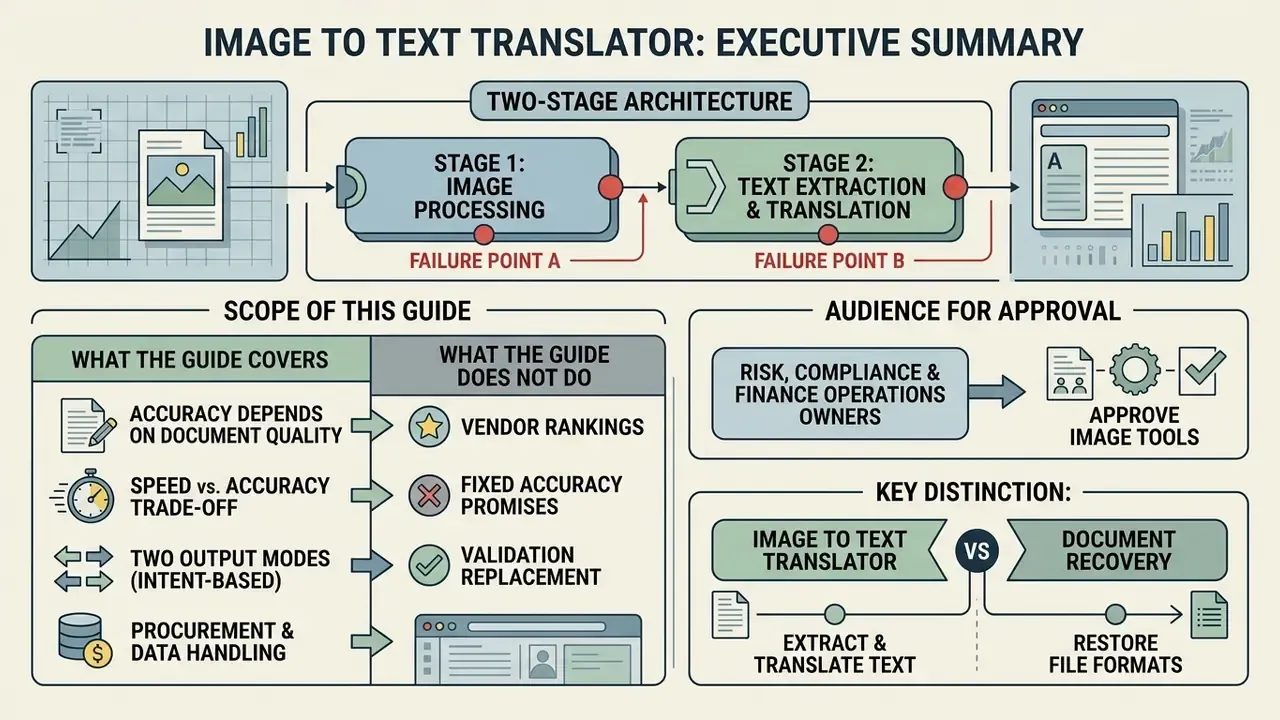
- Two-stage architecture, two distinct failure points. An image to text translator runs optical character recognition (OCR) first, then neural machine translation (NMT) or a large multimodal model (LMM). Character Error Rate (CER) at stage one propagates directly into Translation Error Rate (TER) at stage two, so validation has to cover both stages independently.
- Accuracy is document-dependent, not vendor-dependent. Clean printed text reaches 94% to 99% character accuracy on commercial engines. Unstructured handwriting, stylized fonts and low-resolution social media graphics collapse to 60% to 85%, and below 5% for legacy engines on noisy memes. Any tool advertising "100% accuracy" contradicts published benchmark data.
- Speed and accuracy trade off predictably. Lightweight open-source OCR completes extraction in 0.05 to 0.15 seconds per image. Multimodal LLM engines need roughly 1.3 to 2.2 seconds but read complex layouts far better. Direct LLM-only extraction can exceed 13 seconds per document.
- Two output modes serve two different intents. Text-extraction mode returns editable strings for databases and ERP ingestion. In-place image translation repaints translated copy onto the original graphic, preserving background, font and layout for manga, packaging and e-commerce assets.
- Procurement hinges on data handling, not features. Verify ephemeral RAM-only processing, zero-data-retention contracts, PII redaction before upload, encryption in transit and at rest, and documented alignment with model risk validation expectations (Fed SR 11-7, OCC 2011-12, NIST AI Risk Management Framework) before any regulated document touches a public web tool.
Scope of This Guide
What Is an Image to Text Translator and How Does It Work?
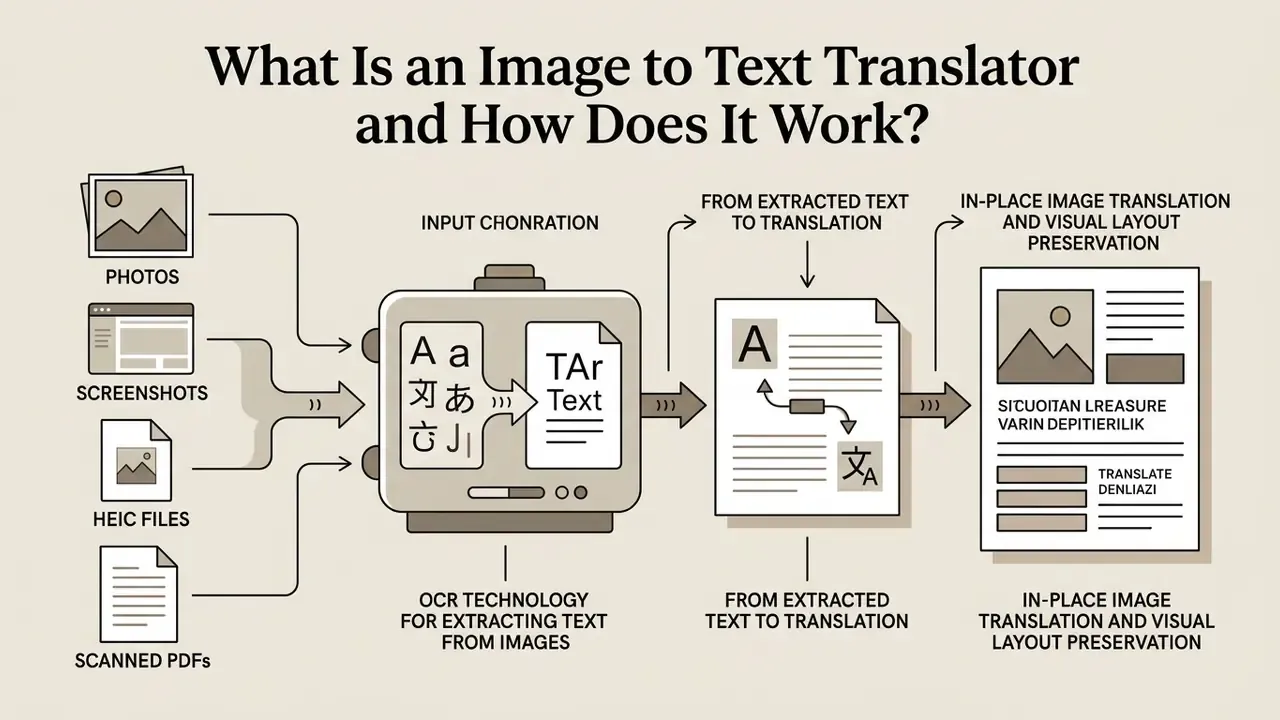
An image to text translator is an automated pipeline that extracts visual characters from raster graphics using optical character recognition and converts them into machine-readable strings, then passes those strings to a machine translation engine. This dual-stage architecture turns bitmap pixels into fully editable, translated text inside a single browser transaction.
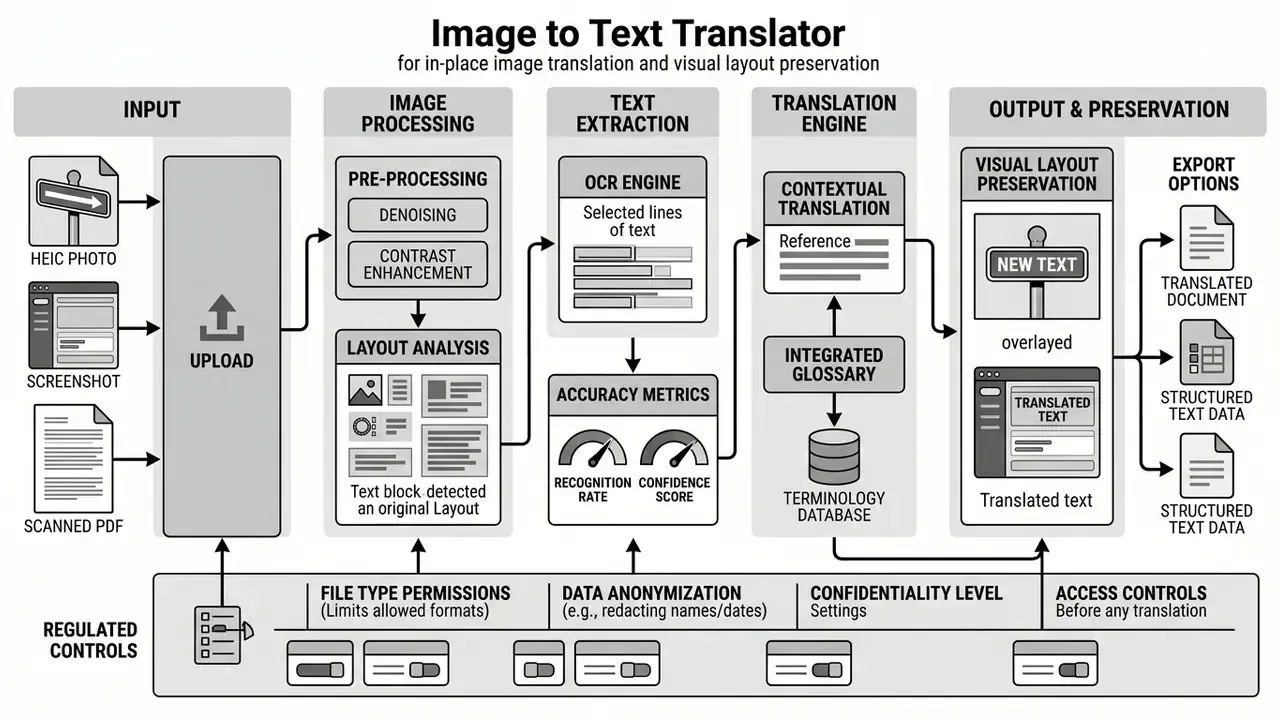
Modern image to text translation tools operate through a modular sequence designed to keep structure intact. The initial phase ingests uploaded graphic files (JPG, PNG, HEIC or PDF), identifies bounding boxes around textual regions, and normalizes pixel contrast. The OCR engine isolates visual glyphs and converts geometry into standard string tokens. Once character extraction yields digitized text, a machine translation engine or large multimodal model renders the source text into the requested target language.
Contemporary image translation platforms no longer rely on a single generic "AI model." Production stacks route requests across several vision-language architectures, including OpenAI's GPT-4o, Anthropic's Claude 3.5 Sonnet, Google's Gemini 1.5 Pro, xAI's Grok, and open-weight systems such as DeepSeek-VL and Kimi. These AI powered multimodal models fuse visual perception with contextual language understanding, and they outperform classical pipelines when reading embedded text captured in low light, printed in stylized typography, or wrapped around curved product packaging. Review literature from 2025 confirms the direction of travel: large models are being coupled with OCR rather than replacing it outright, because dedicated detection and segmentation modules still deliver the bounding-box precision that layout reconstruction depends on.
OCR Technology for Extracting Text From Images
OCR technology isolates textual regions within raster graphics, corrects spatial skew, and classifies visual glyphs into machine-readable characters. Modern optical character recognition engines use deep convolutional networks and transformer backbones to process photos, screenshots and scanned documents.
The technical sequence starts with preprocessing: binarization, thresholding, background noise reduction, thinning and skew correction to align tilted text lines. Page segmentation then splits the canvas into text regions, after which line and glyph segmentation cuts those regions into words and characters using density histograms or scan-line column cuts. Character recognition models classify the isolated glyphs against trained character sets. In comparative benchmark studies across document digitization tasks, commercial engines such as Google Vision API reached roughly 94% overall character recognition accuracy, while open-source pipelines like DocTR and Tesseract v4 recorded 91% and 85% average accuracy respectively.
Engine selection matters far more on photographic input than on clean scans. Peer-reviewed comparisons on Thai vehicle-registration photographs measured Google Cloud Vision at 84.43% accuracy against Tesseract at 47.02% on the same image set, with the best results on 1024x768 colour captures after sharpening and brightness normalization. On handwritten Devanagari, published mean Character Error Rates diverged even further: roughly 0.146 for Google Vision, 0.468 for EasyOCR and 0.855 for Tesseract. That spread is the whole argument against generalizing a single vendor accuracy figure across scripts, capture conditions and document classes.
From Extracted Text to Translation
Once character recognition converts visual graphics into digital string tokens, neural machine translation or multimodal vision-language models process meaning in context and output target-language text. A well-built pipeline holds reading order and sentence boundaries so the result arrives as structured, editable text for downstream enterprise workflows.
Getting raw OCR output into a translation model usually requires cleanup: restoring missing punctuation, removing line-wrap hyphenation, rejoining broken tokens. Character-level encoder-decoder correction models are often inserted between OCR and translation precisely because recognition noise degrades sentence segmentation. Neural machine translation engines then evaluate full sentence context rather than translating isolated words, which is what produces idiomatic output instead of word salad. On complex multi-column documents, layout preservation algorithms link translated blocks back to their original page geometry so tables, headers and paragraph order survive the round trip.
Dedicated evaluation datasets now measure this coupling explicitly instead of scoring OCR in isolation. OCR-for-MT corpora released in 2025 assess end-to-end multilingual document inputs, which confirms a practical point for procurement teams: benchmark the joint pipeline, not two separate components. Teams reviewing media digitizing frameworks can compare image-to-text tools for business against their internal asset conversion guidelines.
In-Place Image Translation and Visual Layout Preservation
In-place image translation replaces source-language typography directly on the original graphic instead of exporting raw strings to a separate file. The engine returns a finished PNG, WebP or JPG asset in which translated copy sits in the same position, colour and weight as the original text.
Unlike traditional ocr tools that dump text into a text file, image-to-image engines perform in-place replacement. The system identifies original text bounding boxes, removes source typography with AI inpainting, reconstructs the background texture behind the erased glyphs, and renders target-language text using detected font families, sizes, stroke weights and colours. Documented production pipelines follow that same order: text-region detection, cropping, machine translation, background inpainting, rendering back into the image. Research on text-image translation frames it as three mandatory stages: source text detection and recognition, text image translation, and text fusion, where the translated string is fused back into the source picture while visual structure is preserved.
Integrated visual editors let operators tune the result before export. Typical controls include manual repositioning of bounding boxes, resizing of text frames when the target language expands or contracts (German and Finnish frequently overflow English layouts by 20% to 35%), line-wrapping adjustments, font substitution when the source typeface is unavailable, and colour matching against the reconstructed background. This manual layer is the human-in-the-loop checkpoint for brand-critical assets. A mistranslated compliance badge on packaging carries regulatory consequences that a raw text export never would. So output-mode selection really comes down to destination: text export for databases, CRM and ERP ingestion, in-place rendering for catalogue images, marketing creatives, comics and instructional diagrams.
How to Translate Text From an Image Online
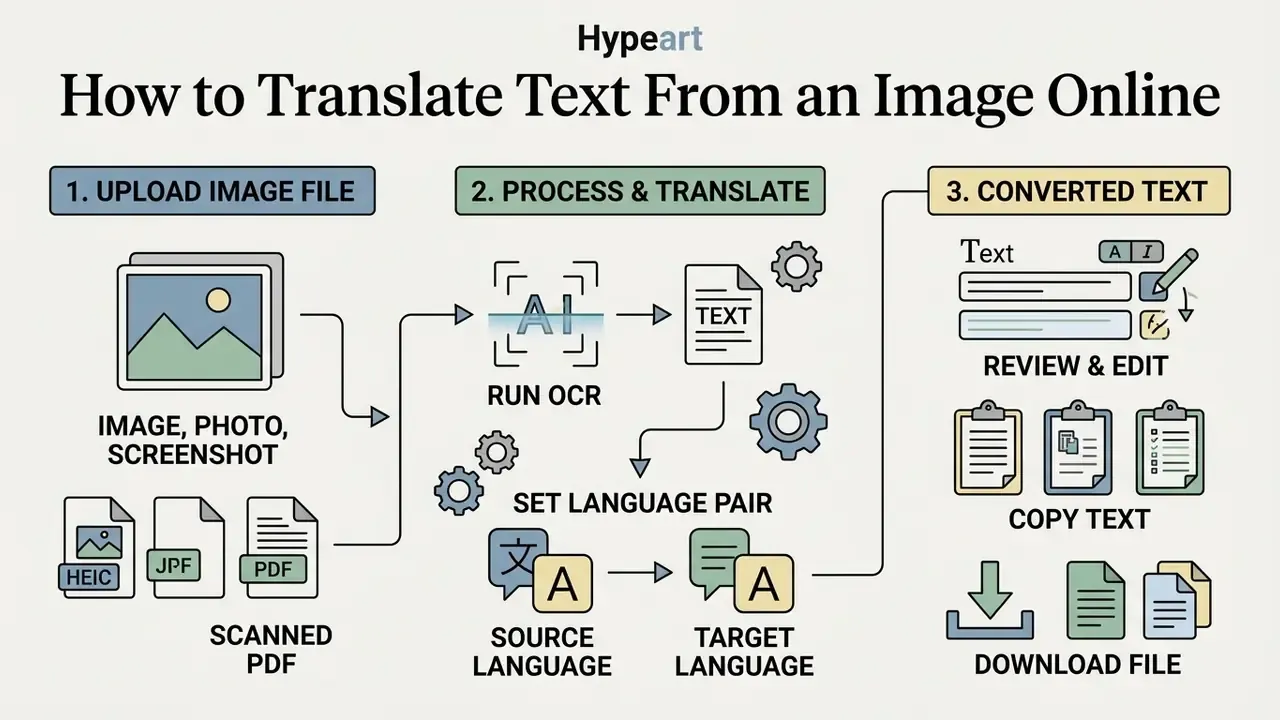
Translating text from an image online means uploading a clear graphics file, setting source and target languages, running automated extraction, then reviewing the converted text. It replaces manual transcription and returns foreign text in seconds.
Web applications simplify how to translate image text by consolidating recognition and translation behind one interface. Users simply upload files from local storage or paste from the clipboard, select the target language, and trigger the ai powered text converter. The system processes the image asynchronously and displays extracted original text next to the translated result for verification. Vendor documentation across the category converges on the same four operations: upload or paste the image, choose the target language, run OCR plus translation, then review the output for errors in names, numbers and dates before saving as PDF, TXT, DOCX or HTML.
Upload an Image, Photo, or Screenshot
Users begin by uploading a raster file (jpg png, jpeg png, WebP or HEIC) or dropping a screenshot straight into the web interface. Getting resolution and framing right prevents character truncation during OCR ingestion.
Preparation pays off more than people expect. Capture straight-on with uniform lighting to limit drop shadows and lens distortion, keep the full document inside the frame, and leave a margin of roughly 5% around the edges. Documented ingestion requirements set a practical floor near 1,280x720 pixels and a ceiling around 10,000x10,000 pixels, while cloud OCR APIs commonly cap payloads at 20 MB and 75,000,000 pixels per image. Most online image translation platforms accept file size up to 20 to 30 MB, covering everything from standard screen captures to high-resolution document scans.
Select the Translation Language
Language selection means choosing the source language or enabling automatic detection, then specifying the output language. Auto-detection identifies character sets on its own, though manual selection still yields higher recognition precision on complex scripts.
Automatic source detection relies on language identification models analyzing character distributions across extracted tokens. Cloud translation APIs handle standard Latin scripts well enough, but specifying the source script manually for Arabic, Mandarin or Devanagari prevents character misclassification. API design adds another constraint: some translation services require English as the target when the detected source is non-English, forcing a pivot-language hop that adds a second opportunity for semantic drift. Once the source is set, users pick from supported target languages, including English, Spanish, French, German, Japanese or Chinese.
Copy, Edit, or Download the Converted Text
After translation completes, the system shows the converted text in an interactive editor for copying, editing or downloading. Export options typically include plain text (.txt), Word documents (.docx), searchable PDF, and localization formats such as XLIFF or TMX.
Web interfaces use the asynchronous browser Clipboard API for one-click copying. The W3C specification governs permissioned read and write access, and navigator.clipboard.writeText() writes extracted strings to the system clipboard after a user gesture. Interactive editors let operators audit numerical values, personal names, dates and structure against the original image side by side. Exporting into standardized plain text files eases ingestion into corporate databases, spreadsheets and content management systems, while searchable PDF output keeps the visual page for archival evidence.
- Upload the image file. Select a clear JPG, PNG, HEIC or scanned PDF and load it into the translator interface. Expected result: the file is held in memory and preprocessed for text region detection.
- Run OCR and set the language pair. Leave source detection on auto or pick the script manually, then select your target language. Expected result: optical character recognition extracts glyphs and machine translation generates target text.
- Review and export. Verify key names, totals and dates in the editor, then copy to clipboard, download as a text file, or render the translated text back onto the image. Expected result: clean, editable text ready for enterprise databases, or a finished localized visual asset.
Which Languages Does an Image Translator Support?
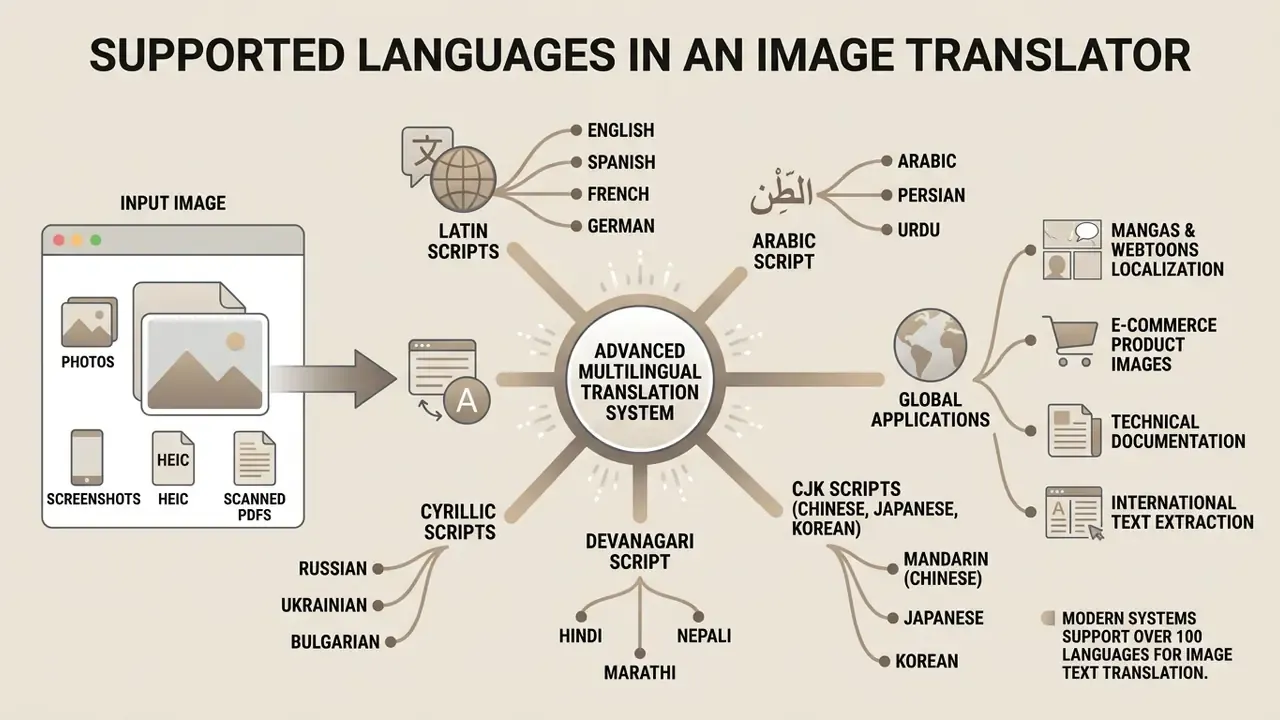
Modern image translation systems support over 100 languages across Latin, Cyrillic, Arabic, Devanagari and CJK (Chinese, Japanese, Korean) script families. Engine capability varies with character density, text directionality and training corpus availability.
Coverage depends on two things at once: the OCR engine's script recognition models and the translation system's vocabulary. Vendor counts are not directly comparable, which trips up a lot of shortlists. Some publish 201 OCR languages by counting script variants such as Azeri Latin and Azeri Cyrillic separately. Others ship universal multilingual models that need no language code at all. Others split coverage by script family, so one model handles Latin and Cyrillic while separate models handle Arabic, Greek, Hebrew, Japanese, Korean, Thai or Chinese alongside Russian and English only. Commercial cloud vision APIs offer broad multilingual text extraction; lightweight open-source engines specialize in narrower script pairs.
Translate Image Text to English
Translating foreign image text to English is the primary bridge workflow for international business and compliance documentation. High-resource training corpora mean English output is usually more reliable than rare language pairs.
When you convert image text to english, the pipeline leans on heavily optimized neural translation models, and standard OCR engines hit their best benchmark scores on Latin character sets in the first place.
Arabic, Mandarin, Chinese, and Japanese Image Translation
Complex scripts such as right-to-left Arabic, character-dense Mandarin and Japanese kanji or kana need specialized tokenization and layout parsing. Bidirectional text flow and non-spaced CJK logograms push up character error rates without script-specific pre-segmentation.
Arabic recognition has to handle cursive shaping, contextual positional variants of the same letter, and right-to-left reading order mixed with left-to-right numbers. Mixed-direction documents generate ordering errors in tables, numbered lists and inline Latin strings, because directionality resolves per run rather than per document. Anyone searching image to text arabic google style workflows should test on their own filings first.
Mandarin and Japanese processing needs segmentation algorithms because logographic scripts carry no whitespace delimiters, and a misplaced character boundary propagates straight into translation and field extraction. Whether you are handling image to text mandarin invoices or image to japanese text on product labels, selecting the document language before recognition is still mandatory in most engines. Vendor documentation says so bluntly: leave the script unselected and the output is simply wrong.
| Source Script Family | Supported Languages | OCR / Translation Complexity | Primary Enterprise Use Case |
|---|---|---|---|
| Latin / Cyrillic | English, Spanish, French, German, Russian | Low; standardized word boundaries | Cross-border contracts, receipts, global invoices |
| Arabic Script | Arabic, Persian, Urdu | High; RTL directionality and cursive ligatures | Regulatory filings, identity verification, regional shipping |
| CJK Logograms | Mandarin Chinese, Japanese, Korean | High; dense characters without spacing | E-commerce product labels, technical schematics, manga |
| Devanagari | Hindi, Marathi, Sanskrit | Moderate; connected top header line (Shirorekha) | Educational materials, regional administrative forms |
The table reads as a risk ranking as much as a capability list: english arabic and chinese japanese pairs deserve larger test samples and tighter review thresholds than Latin-to-Latin work. Before running low-contrast or softly focused captures of complex scripts through OCR, teams frequently apply image quality enhancement to sharpen glyph edges and even out illumination.
Localizing Manga, Webtoons, and E-Commerce Product Images
Specialized visual translation workflows target awkward graphical layouts: comic speech bubbles, manga panels, webtoon vertical scrolls, e-commerce product banners. These assets pair dense stylized typography with artwork that has to survive translation untouched.
Manga and webtoons demand segmentation models that can parse vertical orientation, hand-drawn fonts, furigana annotations and sound-effect characters printed directly over illustration. Bubble detection isolates dialogue containers, inpainting clears the original lettering while reconstructing the bubble interior, and target-language text is re-typeset with automatic line breaking that respects the bubble's irregular shape. Light-novel and long-form prose modes solve the opposite problem: continuous paragraphs where reading order across columns and page gutters decides whether the translation is coherent at all.
In global e-commerce, automated image translation localizes product infographics, ingredient and allergen lists, size charts, care instructions and promotional badges. Marketplace sellers can refresh multilingual catalogue listings quickly while brand design standards hold, since fonts, corner radii, badge colours and grid alignment stay intact and only the text layer changes. Batch modes compound the benefit, converting an entire SKU folder into five or ten locales in one operation. Regulated categories deserve extra caution though. Nutrition panels, dosage text and safety warnings should always pass human linguistic review before publication, because an inpainting artefact that deletes a decimal point is a labelling defect, not a design flaw.
Supported Image Formats, Documents, and File Quality
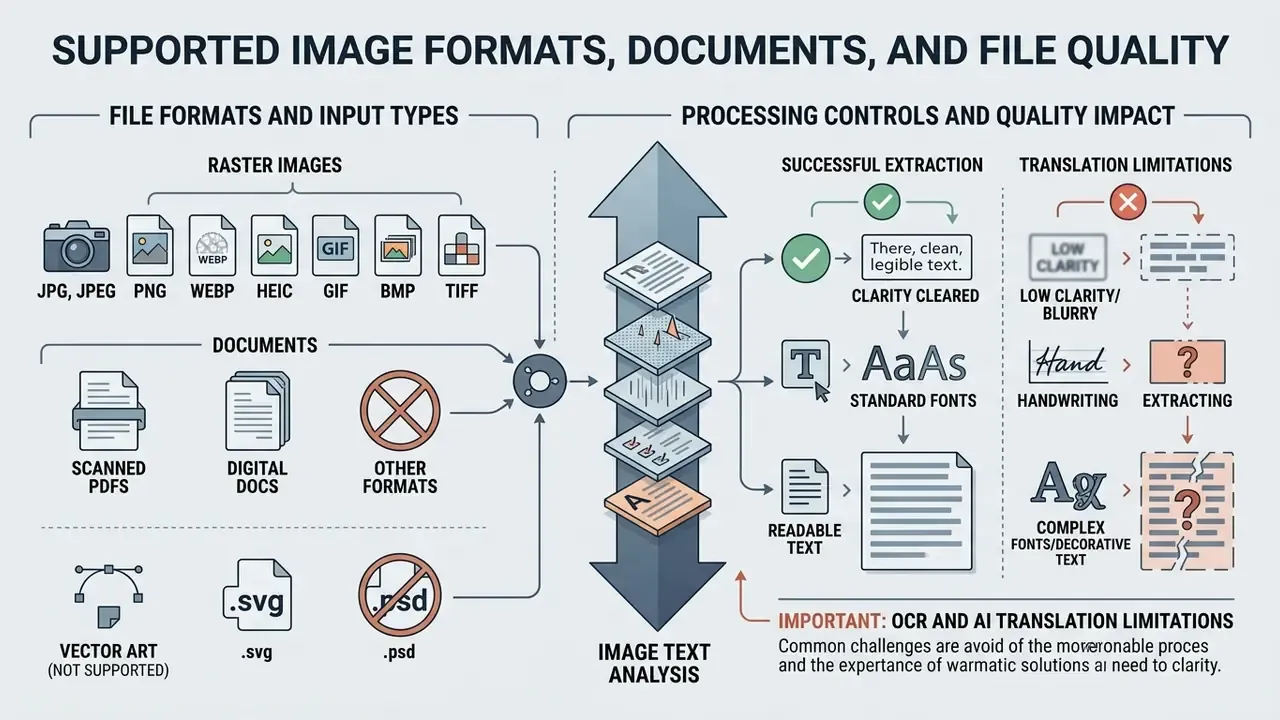
An image to text language translator accepts standard raster formats (JPG, JPEG, PNG, WebP, HEIC, GIF, BMP, TIFF and scanned PDFs) provided the input resolution clears clarity requirements. Low contrast, motion blur and spatial distortion degrade character recognition directly.
Format compatibility decides how effectively an image translator to text ingests visual media. Lossless image formats preserve crisp edge definition around characters, while compressed files introduce artifact distortion right where the glyph boundaries are. Enterprise OCR pipelines enforce minimum resolution thresholds, typically 300 DPI, to hold classification confidence across scanned legal and financial documents. Archival guidance goes further, rejecting records where lossy compression or OCR substitution degrades the original bit-mapped image.
JPG, PNG, HEIC, WebP, GIF, and Scanned PDFs
Browser-based translators handle a wide format spread: PNG, jpg png and jpeg png variants, WebP, HEIC (the High Efficiency Image Container from iOS devices), animated or static GIF, BMP, multi-page TIFF and scanned PDFs. PNG files and clean vector-rendered screenshots give lossless compression that suits high-precision online ocr, while heavily compressed JPG files smear text edges.
Screenshots captured from desktop or mobile applications present uniform pixel grids and usually score high on extraction. Converting native iOS HEIC captures and lossless WebP graphics inside the browser removes a manual conversion step before ingestion, which is a genuine saving for teams whose source material arrives straight from iPhone camera rolls. GIF support matters for social and support workflows, where instructional frames and chat captures circulate in that format. Scanned physical documents stored as lossy JPEG, on the other hand, often carry lighting gradients and paper grain noise; TIFF is generally recommended over JPEG or PNG for document processing because of its DPI handling fidelity. Enterprise document workflows therefore convert multi-page TIFF or scanned PDF files into uncompressed bitmaps before OCR ingestion, and cloud services commonly cap PDF or TIFF jobs at around 2,000 pages per request. Teams standardizing pre-processing can evaluate an AI photo editor for cropping, deskewing and contrast normalization before upload, or see the overview of adjacent tooling terms.
How Image Quality Affects OCR Results
That 14x spread on noisy, low-resolution social imagery may be the single most actionable number in this article. Legacy OCR is effectively unusable on compressed social graphics, while multimodal vision models stay serviceable. Where source captures fall below usable resolution, AI image upscaling can restore enough glyph detail to lift recognition back into a workable range before the OCR stage runs.
Handwriting, Fonts, and Complex Image Text
Handwritten notes, decorative fonts, inverted background colours and embedded mathematical syntax are the severe accuracy bottlenecks. These structures lack uniform glyph geometry, so they need vision-language models or specialized human review.
Standard OCR models expect clear geometric contrast between foreground typography and background. Inverted colour layouts are technically supported by major engines, yet excessive colour counts and certain foreground and background combinations interfere with region detection and cut accuracy. Stylized cursive fonts and unstructured handwriting drag confidence down hard, and mathematical equations are frequently misread or silently dropped because OCR is architected for running text, not dense symbolic notation. Published operational figures put normal adult handwriting at roughly 70% to 85%, cursive or poorly legible script below 70%, and clean printed scans at 98% to 99%. One 2025 document-processing review reports handwriting recognition averaging about 64% against 80% to 85% for cleanly printed documents.
Disclaimer: the information in this guide is general in nature and does not replace professional verification. Legal, medical and financial documents require review by a qualified specialist before any decision, filing or payment is executed on the basis of machine-extracted or machine-translated text.
None of those limits is a reason to avoid automation. They are the specification for how to deploy it. The practical bridge is a tiered workflow: route clean printed material to fully automated extraction, send handwriting and stylized typography to multimodal models with mandatory field-level review, and hard-block unverified output from posting to systems of record. The feature set described next is what makes that tiering cheap to operate.
Image to Text Translator Features for Personal and Business Use
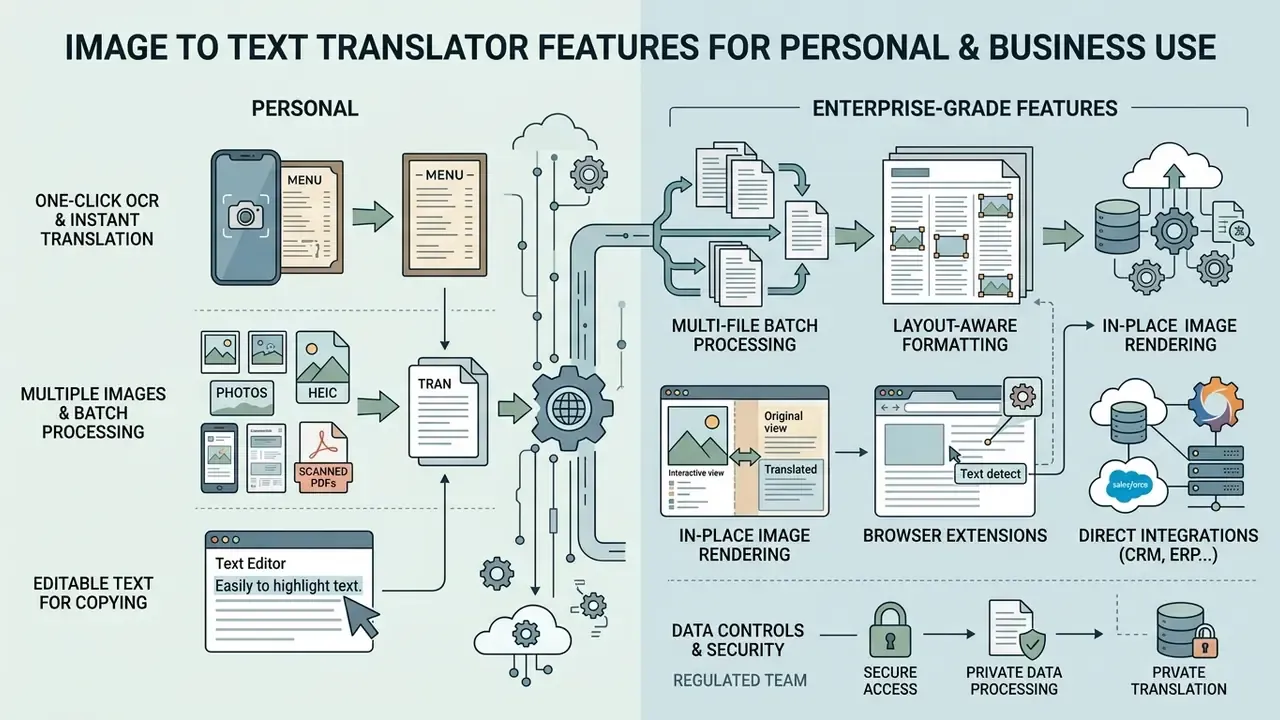
Enterprise-grade features include one click execution, multi-file batch processing, layout-aware formatting, in-place image rendering, browser extensions and direct CRM, ERP or GRC integration. Together they replace manual data entry with scalable, auditable information workflows.
Deploying image translation across business operations cuts processing latency and administrative overhead. Modern text converter platforms pair a fast browser interface with back-end application programming interfaces. Automated field extraction converts visual documents into structured formats such as JSON, XML or CSV, which then flow into risk management, accounting, logistics or customer relationship platforms.
For high-volume operations, these tools also ship browser extensions and developer-facing REST APIs. Chrome extensions let users right-click any graphic on an external website and trigger in-page translation, useful for competitive research, marketplace monitoring and support triage where the source image never leaves the tab. Programmatic REST APIs accept base64-encoded payloads or file URLs and return structured JSON with bounding-box coordinates, extracted source tokens, per-field confidence scores and target translations. Public documentation in this category typically exposes the same engine as the web application, so output parity between manual and automated runs can be validated during onboarding. For engineering teams, that parity is a procurement requirement rather than a nicety: it means a pilot run in the browser actually predicts production behaviour through the API.
One-Click OCR and Instant Text Translation
One-click image ocr folds image loading, text boundary detection and translation into a single browser transaction. Sub-second execution converts visual information into translated text instantly on well-formed inputs.
Optimized neural backbones are what make rapid text region spotting possible.
Document-processing measurements from 2026 show the same pattern at pipeline level: OCR preprocessing around 0.056 seconds for a speed-first tool, roughly 1.3 to 1.5 seconds for OCR-heavy tools, and 13.4 to 13.6 seconds for direct LLM extraction with no OCR front end. Accuracy holds up in the faster configurations on clean inputs. The same study reports F1 of 1.0 at 0.97 seconds on structured documents and F1 of 0.997 at 0.6 seconds on challenging image inputs using PaddleOCR-based integration. Larger multimodal engines need roughly 1.3 to 2.2 seconds per image but read complex layouts, stylized packaging and mixed-script signage better. Operators weighing throughput against fidelity can review this comparison of OCR tools for commercial use across accuracy, supported formats and pricing tiers.
Multiple Images and Batch Processing
Batch processing lets organizations upload, extract and translate hundreds of scans or multiple images at once through automated queues. Good batch pipelines preserve directory structure and keep audit logs across enterprise repositories.
Enterprise batch processing rests on asynchronous queuing: object-storage event triggers feeding a message queue, with a scheduled state-machine workflow performing periodic processing. Instead of translating images one at a time, operators submit entire folders of scanned invoices, receipts or shipping manifests. The system processes in parallel and outputs organized text files or consolidated spreadsheets while maintaining data lineage for compliance reporting. Platform limits shape the design: per-image OCR caps of roughly 30 MB with multi-gigabyte project totals are common, and free tiers frequently restrict processing to the first two pages of a PDF.
That ceiling is why batch pipelines need sampling gates instead of blind trust. A nightly run of 5,000 scans at 65% structural fidelity produces roughly 1,750 documents needing correction, and that has to be budgeted as human review capacity rather than discovered three weeks later in a reconciliation. System architects designing automated media processing can reference established AI Media Workflows for structural guidance.
Editable Text for Copying and Data Entry
Converting visual text into clean structured strings removes manual typing and speeds automated data entry into CRM, ERP and GRC systems. APIs format extracted output as plain text, JSON or markdown for direct ingestion.
Manual data entry from paper forms introduces error and bottlenecks in equal measure. OCR-driven extraction isolates specific fields (invoice numbers, transaction dates, VAT identifiers, totals) and outputs clean editable text mapped to named schema keys. Documented robotic-process-automation flows follow the same pattern: read a scanned form, PDF or image, define the required fields, then use the extracted values to update applications and trigger workflow steps. CRM implementations push the same output into custom record fields for creation or update.
A typical structured response for a translated document field looks like this:
{
  "document_id": "INV-2026-004417",
  "source_language": "ja",
  "target_language": "en",
  "engine": "vision-lmm",
  "fields": [
    {
      "key": "invoice_total",
      "source_text": "合計 ¥128,400",
      "translated_text": "Total ¥128,400",
      "bounding_box": [812, 1044, 1190, 1092],
      "confidence": 0.981,
      "review_required": false
    },
    {
      "key": "signatory_name",
      "source_text": "田中 一郎",
      "translated_text": "Ichiro Tanaka",
      "bounding_box": [140, 1502, 480, 1556],
      "confidence": 0.712,
      "review_required": true
    }
  ],
  "retention": "ephemeral-ram-only"
}
Confidence values and a review_required flag are what turn extraction into a governable process. Fields below a configured threshold route automatically to a human queue; high-confidence fields post straight to the ledger. In one internal operational review, an international logistics team implemented automated OCR receipt parsing across foreign shipping documents and reported a 74% reduction in manual data entry time while keeping record auditability intact. Note on that figure: it reflects a single illustrative engagement and has not been independently published or peer-reviewed. Comparable published benchmarks report 0.6 to 1.5 second per-document extraction and 95% to 99% printed-text accuracy, but throughput gains vary with document mix, field count and review thresholds. Measure your own baseline before modelling savings.
Use Cases for Translating Image Text
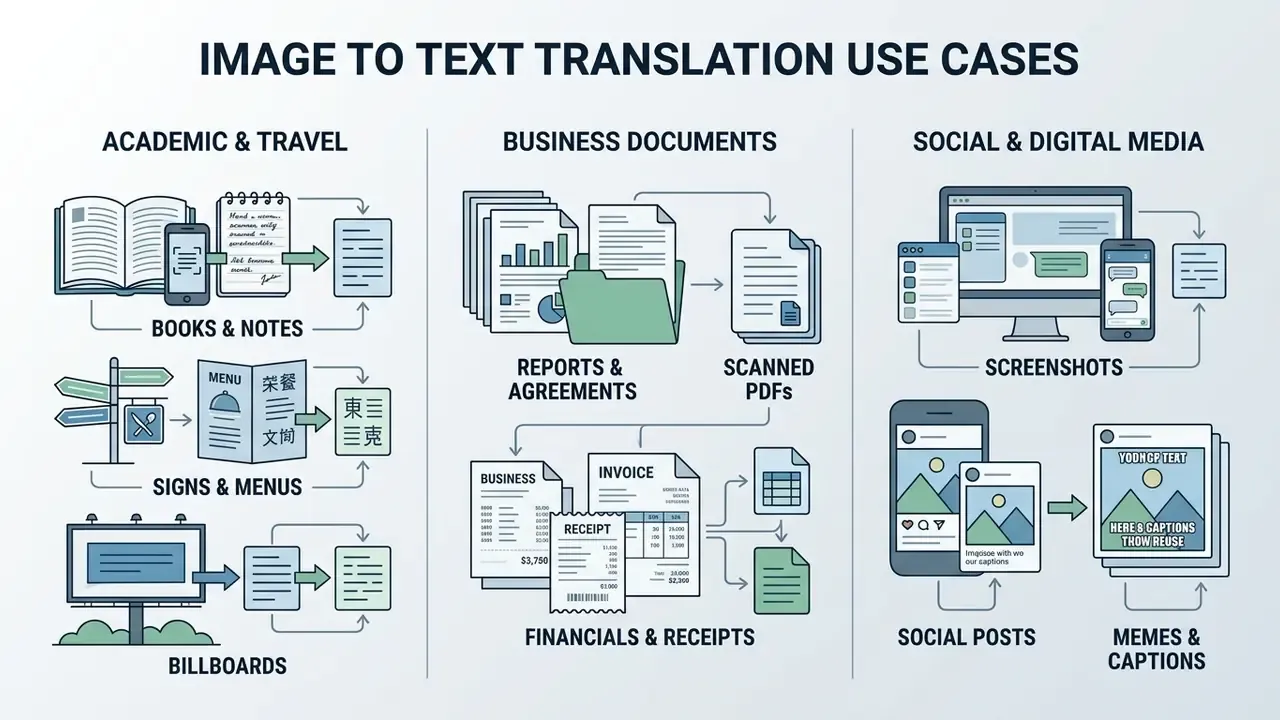
Image to text translation tools clear operational bottlenecks across academic research, international travel, corporate document management, expense auditing, social media monitoring, comics localization and cross-border e-commerce. The common denominator: eliminating manual transcription speeds up information retrieval.
Across these use cases, translating image to text replaces slow retyping with immediate digitized output. Converting street signs during travel, extracting line items from foreign financial statements, re-typesetting a webtoon panel: different domains, same mechanic.
Extract Text From Business Documents and Receipts
Corporate finance and compliance teams use image translation to extract structured data from foreign-language invoices, bills of lading, customs declarations and expense receipts. Automated extraction populates ERP systems while preserving the audit trail.
Cross-border transactions generate large volumes of physical or PDF paperwork in other languages. Intelligent document processing pipelines run OCR on scanned documents such as bills of lading and receipts, extracting itemized lines into database records exportable as JSON, XML or CSV. Receipt parsers ingest photographs, PDFs and email attachments, then export normalized fields through API into accounting platforms. Converting foreign corporate filings into English lets model risk and compliance officers audit disclosures efficiently, with document reconstruction keeping tables, headers and annex numbering aligned. Teams benchmarking vendors for this workload can review image-to-text tools for business across accuracy and licensing terms, while legal teams tracking statutory precedent can reference AI Litigation and Case Timelines for regulatory context.
How to Choose an Image to Text Translation Tool
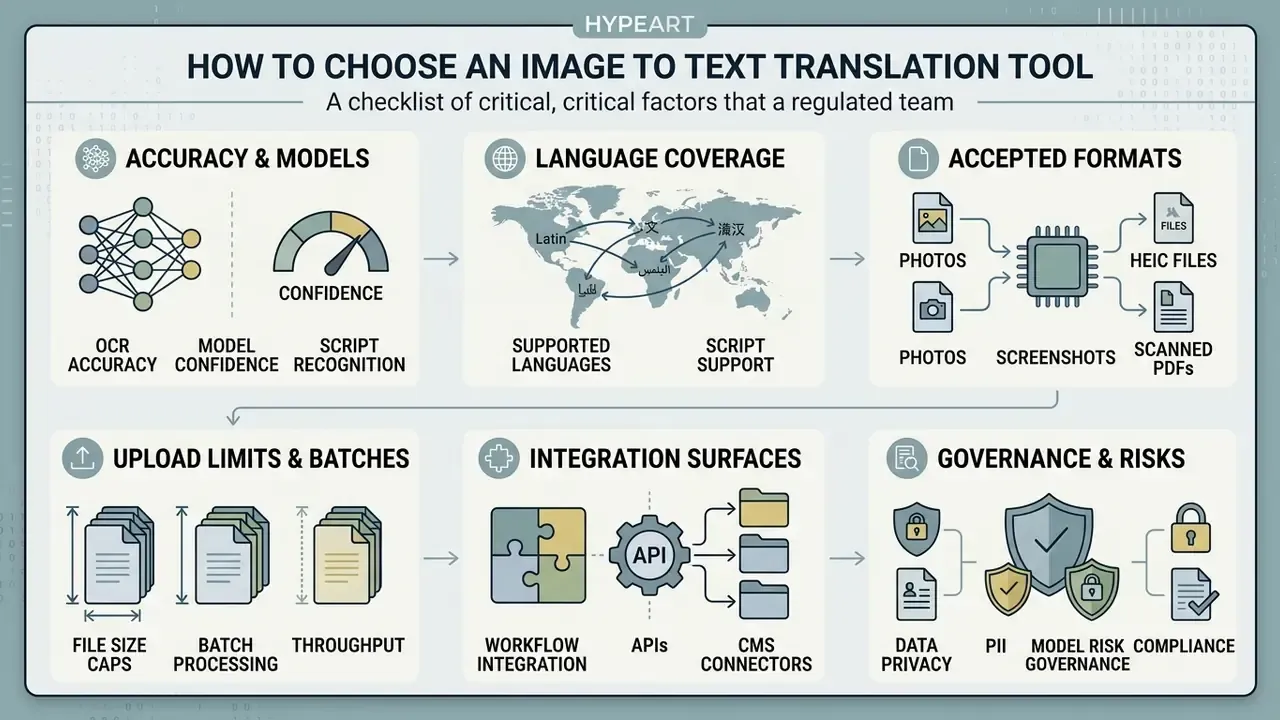
Selecting an image to text translation tool means evaluating recognition accuracy, supported language pairs, accepted formats, per-file upload caps, batch support, integration surfaces and data privacy safeguards. Match vendor capability against your own workflow volume and regulatory constraints, not against a feature grid.
Choosing between free online tools, enterprise cloud APIs and large multimodal models comes down to scale and security. Established OCR evaluation methodology recommends defining the target application first, enumerating the document tasks it must handle, assembling a reference image database that mirrors real production inputs, and tallying measurable performance against that reference set rather than vendor marketing claims. Standards-based guidance reinforces the same discipline: ISO/IEC 30116:2016 specifies a measurement and assessment method for OCR character strings and notes it can be applied in whole or in part to other OCR fonts, while public-sector print-quality guidance separates print testing from performance testing, judging readers by reject rate, sampling plan and whether unreadable forms are correctly kicked out. In practice: audit accuracy against your own representative samples, deliberately test low-quality scans and handwriting, and verify data protection terms before signature.
Teams building a shortlist can start from this overview of image-to-text tools for commercial use, which compares accuracy, formats and pricing side by side, or browse the hub for related tooling reviews.
Checklist: Accuracy, Languages, Formats, and Upload Limits
A workable evaluation checklist measures six criteria: benchmarked accuracy (CER and WER), script and language coverage, supported image formats, maximum file size and page limits, integration and batch throughput, and a transparent data-handling policy. Testing sample documents against these criteria surfaces bottlenecks before procurement, not after.
- OCR accuracy and model confidence.Measure Character Error Rate and Word Error Rate on samples containing your target fonts, scripts and layouts, including deliberately poor scans. High accuracy claims mean nothing without your documents behind them.
- Language and script coverage.Confirm the ocr engine natively supports required source scripts (Arabic RTL, CJK logograms, Devanagari) and your target pairs, and check whether vendor language counts include script variants. Ask specifically which languages does the engine support with layout awareness, not just detection.
- Format and input flexibility.Ensure compatibility with operational files: PNG, JPG, WebP, HEIC, GIF, multi-page TIFF and scanned PDF documents.
- File size and batch throughput.Audit per-file upload limits in MB, page caps per PDF or TIFF job, daily quotas, and whether multiple images can queue in one batch.
- Integration surfaces.Verify REST API availability, JSON schema with bounding boxes and confidence scores, webhook callbacks, browser extension support, and export formats (TXT, DOCX, XLIFF, TMX, searchable PDF).
- Data privacy and compliance.Verify encryption in transit and at rest, whether processing is ephemeral, and whether uploads are contractually excluded from model retraining.
| Evaluation Criterion | Basic Free Online Tool | Enterprise Cloud API | Multimodal LMM Engine |
|---|---|---|---|
| OCR Accuracy (Printed) | 85% to 90% (Tesseract base) | 94% to 96% (Google/Azure Vision) | 95% to 98% (GPT-4o/Gemini 1.5 Pro) |
| Language Support | 20 to 50 standard languages | 100+ languages and scripts | 100+ languages with contextual translation |
| Format and File Limits | JPG, PNG, WebP; ~5 MB cap per file | JPG, PNG, HEIC, PDF, TIFF; up to 500 MB, 2,000 pages | JPG, PNG, WebP; API payload limits |
| Latency per Image | 0.05 to 0.15 s (local engine) | 0.6 to 1.5 s including transport | 1.3 to 2.2 s (up to 13 s LLM-only) |
| Batch Processing | Manual single-file uploads | Automated queues and object-storage triggers | Async API batch endpoints |
| In-Place Image Output | Rare; text export only | Optional via render add-on | Native inpainting and typography matching |
| Data Privacy and Audit | Ephemeral, weak retention guarantees | Enterprise GRC and SOC 2 aligned | Configurable zero-data-retention |
Read the table as a tiering decision rather than a winner. Free online access is fine for a travel sign; it is not fine for a customer's passport scan.
Data Security, PII Redaction, and Model Risk Governance
Data handling decides whether an image translator is deployable in a regulated environment, whatever its accuracy scores. The core control set covers ephemeral processing, contractual exclusion from model training, pre-upload redaction and documented validation evidence.
Leading online translators state that they enforce ephemeral processing. Images are handled in temporary server RAM and deleted once extraction completes; zero-data-retention architectures are meant to ensure confidential scans, corporate invoices and identity documents never reach persistent storage or public model training. Vendor privacy statements commonly specify that no translation data is stored, that results are deleted when the job finishes, and that history remains only in the local browser. Treat those statements as claims to be contracted, not facts to be assumed. Require them in writing, with retention windows, sub-processor lists and regional processing locations named explicitly.
Operationally, split the tooling into two tiers. Public web tools carry high exposure risk and belong on non-confidential material only: travel signage, public marketing creatives, open-source documentation. Enterprise APIs or on-premise deployments take anything with personal data, banking secrecy material, health information or unreleased commercial terms. Before any image leaves the controlled perimeter, apply a redaction matrix: mask account and credit card numbers, national identifiers, dates of birth, signatures and biometric photo regions; keep only the fields translation actually needs; log a hash of every submitted asset so the audit trail can be reconstructed later.
For model risk functions, image translation is a model like any other and should be documented as one. Validation packs aligned to supervisory expectations for model risk management (Federal Reserve SR 11-7, OCC 2011-12) and to the NIST AI Risk Management Framework should capture intended use and explicit out-of-scope uses (handwriting, formulas, safety labels); a reference test set with measured CER, WER and TER by document class; confidence thresholds and the human-in-the-loop escalation rule; monitoring for drift when the vendor silently upgrades its underlying model; and a documented fallback when the service is unavailable.
Cost deserves the same rigour. Model total cost of ownership as (volume x API unit cost) + (volume x expected review rate x reviewer cost per document) + integration and monitoring overhead, where the expected review rate comes from measured accuracy on your own samples rather than vendor averages. At 95% field accuracy on a 10,000-document month, the review line item usually dominates the budget, not the inference line item. That is the number most pilot business cases quietly omit.
FAQ: Security, Accuracy, and Governance
These are the frequently asked questions that surface in procurement reviews and second-line challenge sessions.
Is a free online image to text translator safe for confidential documents?
Only if the retention terms are contractual. Free tiers typically process files in RAM and discard them, but they rarely provide auditable guarantees, sub-processor disclosure or exclusion from model training. Use enterprise APIs with written zero-data-retention terms for anything containing personal, financial or health data, and redact identifiers before upload.
What accuracy should we expect in production?
Plan for 95% to 99% character accuracy on clean printed documents at 300 DPI, 84% to 94% on photographic captures depending on engine and script, and 60% to 85% on unstructured handwriting. Low-resolution social imagery is the outlier: legacy engines fall below 5% word accuracy while multimodal models hold near 67%.
Do these tools support HEIC files from an iPhone?
Yes. Browser-based translators increasingly accept HEIC alongside JPG, PNG, WebP, GIF, BMP, TIFF and scanned PDFs, converting the container in-browser so no manual format conversion is needed before OCR ingestion.
Can we get the translated text rendered back onto the image?
Yes, that is in-place image translation. The engine detects text bounding boxes, inpaints the original lettering, reconstructs the background and re-renders translated copy with matched fonts and colours. A visual editor then allows manual adjustment of position, size, wrapping and typeface before export as PNG or WebP.
Is there an API and a browser extension?
Mature platforms offer both. REST endpoints accept base64 payloads or file URLs and return JSON with bounding boxes, source tokens, translations and confidence values. Chrome extensions enable right-click translation of any image on any website without leaving the page.
How do we handle handwriting, formulas, and safety labels?
Exclude them from full automation. Route these classes to multimodal models with mandatory field-level human review, and block automated posting to systems of record. Mathematical notation in particular is frequently misread or dropped entirely, because OCR is designed for running text rather than dense symbolic layouts.
What SLA and monitoring should we require?
Request documented per-image latency percentiles rather than averages, batch throughput ceilings, page caps per job, model-version change notifications and incident disclosure timelines. Vendors update underlying models without notice, so ongoing drift monitoring against a frozen internal test set is a governance requirement, not an optional extra.
What is a safe first step if we have no image translation policy yet?
Start narrow. Pick one document class, freeze a 200-image test set, measure accuracy and review rate, then write the confidence threshold and escalation path into an operating procedure before expanding scope. No evidence, no autonomy.
For broader enterprise licensing and operational compliance considerations, view the guide.