An AI music generator app turns text prompts, written lyrics, or humming into complete audio tracks with vocal synthesis, melodies, and instrumentation. Modern systems rely on generative audio architectures that synthesize high-fidelity stereo sound at sample rates up to 48 kHz.
If you sit in marketing, brand, or compliance at a regulated company, the interesting part is not the novelty. It is that a $10 subscription now produces distributable audio with unclear provenance. That is a supply-chain question wearing headphones.
«Stable Audio generates clips of up to 95 seconds at a 48 kHz sample rate; AudioLDM 2 operates at 16 kHz with variable output length.»
Executive Summary
- Free tiers are almost never commercial. Free plans typically cap generations (10 songs per day on Suno, 25 tracks per month on Mubert, 3 downloads per month on AIVA), watermark or block downloads, and forbid monetization, including retroactive monetization after upgrading.
- Commercial rights are not copyright. Paid subscriptions grant contractual usage rights; the U.S. Copyright Office maintains that music generated without qualifying human authorship is not registrable and cannot claim performance royalties.
- Training-data provenance and indemnification are now procurement criteria. Some vendors publicly claim licensed-only datasets; independent third-party audits of closed models are generally unavailable, so vendor claims should be treated as vendor claims.
Fast Orientation: Three Decisions Before You Subscribe
Most buyer confusion in this category comes from asking "which app is best?" before asking what the output has to survive. Three decisions settle almost everything else.
- What is the deliverable?A full vocal song, a 30-second instrumental bed, or an editable MIDI sketch. Each maps to a different product class, and a full-song engine is a poor substitute for a MIDI plugin inside your DAW.
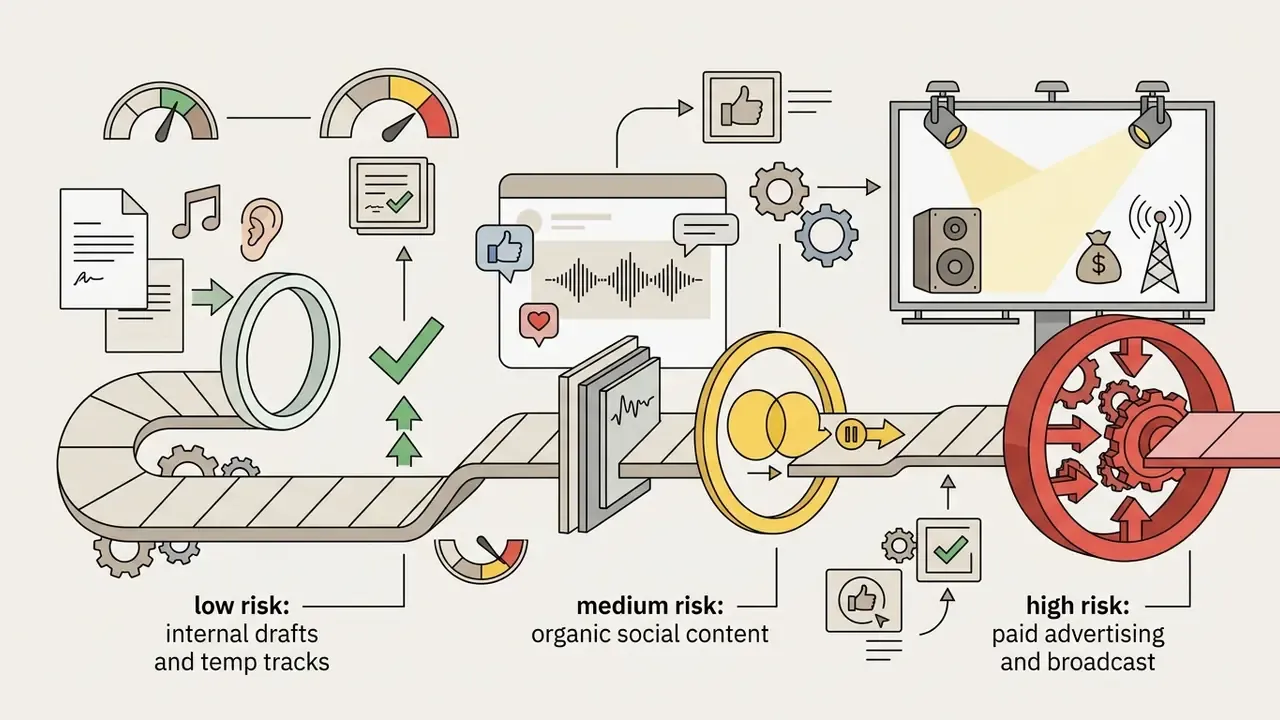
- Where will the audio be published?Internal deck, organic social, or paid broadcast. Publication surface sets your rights requirement, and paid media is where thin licences hurt.
- Who carries the residual risk?Read the indemnification and liability clauses, not the pricing page. If liability is capped at fees paid, the exposure is yours. You can compare options on cost, but you cannot subscribe your way out of an infringement claim.
Answer those three, and the rest of this guide becomes a checklist rather than a maze.
What an AI Music Generator App Can Create
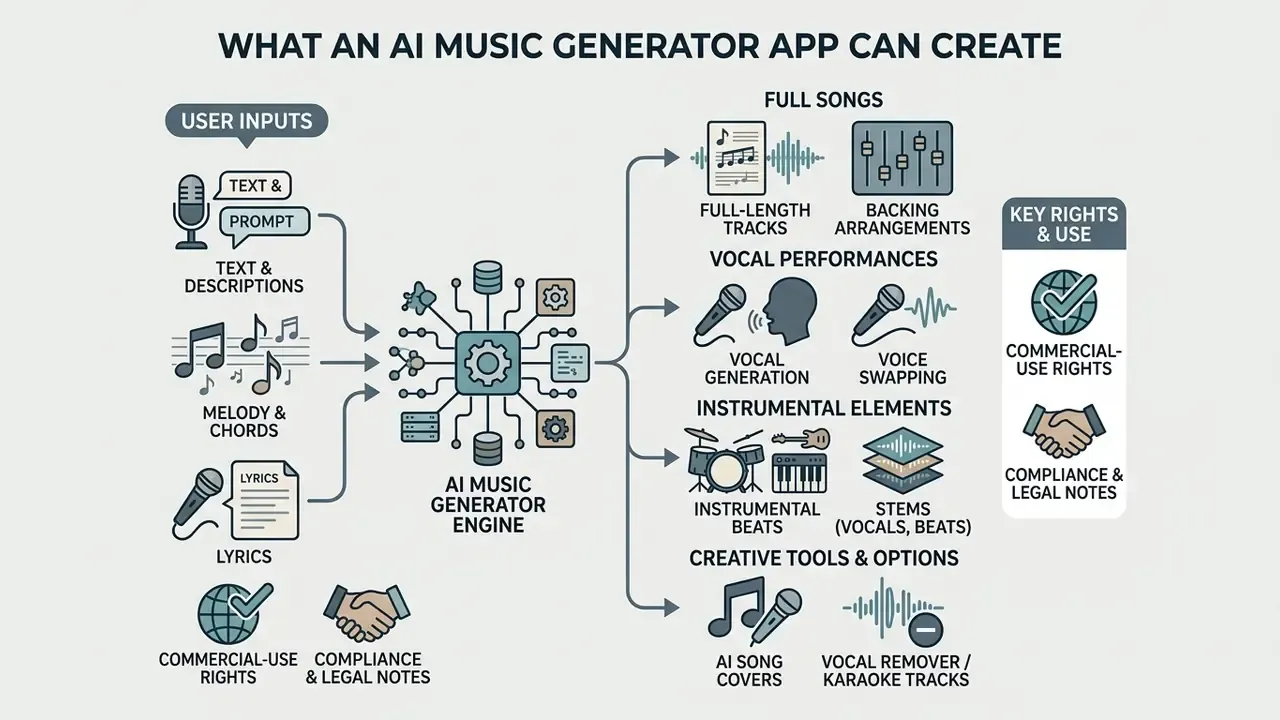
An ai music generator app creates full-length tracks, vocal performances, backing arrangements, and instrumental beats from user inputs. Modern generative architectures turn short text descriptions into multi-minute audio compositions across diverse genres.
Recent market benchmarks show generative audio tools rapidly expanding across creative workflows. According to an industry market report published in early 2026, generative AI music platforms generated $333 million in revenue in 2025 across 63 million monthly active users (Music Industry Market Analysis, 2026). Updated: market-size figures for generative audio vary widely by analyst methodology, and this report does not disclose its sampling or attribution model, so the $333 million figure should be read as one reported estimate rather than an industry consensus. Creators use an ai app for music creation to accelerate prototyping, generate background scores, and draft lyrics. An ai song creator app handles melodic arrangement, rhythm alignment, and vocal rendering in a single automated pass.
Once that scope is clear, the governance question follows immediately: an app that produces distributable commercial audio is not a toy, it is a supply-chain input.
"An AI agent or model output should be evaluated as a controlled digital asset. Without verifiable training data, clear ownership terms, and robust operational limits, no autonomous output should be deployed into commercial production."
— Marcus Hale, AI Governance & Model Risk Editorial. Marcus Hale, author.
Text-to-Music and Description-Based Song Generation
Text-to-music systems convert descriptive language into structured audio files by mapping natural text to acoustic features. Users specify genre, subgenre, instrumentation, tempo, and mood to steer the synthetic output.
Research on models like MusicLM demonstrates that text-conditioned architectures generate coherent audio at 24 kHz to 48 kHz.
«MusicLM generates music from text descriptions while maintaining semantic consistency across several minutes of audio.»
Prompts such as "120 BPM energetic synthwave with driving bass" produce audio matching the requested tempo and instrumentation. The MusicSem dataset, which tracks over 32,000 language-audio pairs, shows that descriptive prompts covering situational context (for instance "music for driving at night") effectively guide latent diffusion models.
«MusicSem contains 32,493 language-audio pairs sourced from Reddit, including situational descriptions such as "music for driving at night" that are absent from expert-annotated datasets.»
Using a music creation ai app allows creators to generate music without requiring formal composition training. Large-scale prompt analysis confirms how people actually write these requests in production.
«Cluster analysis of thousands of Suno and Udio prompts shows users combine genre, mood and vocal attributes in a single request, for example "sad indie rock with female vocals".»
That pattern is worth noting. Users do not write musicological briefs; they write three adjectives and a vibe.
Lyrics-to-Song, Melody and Vocal Generation
Lyrics-to-song models generate complete vocal performances and musical accompaniments directly from written lyrics. An ai melody generator app aligns pitch, tempo, and phonemes to build natural-sounding vocal tracks.
Systems like SongCreator and ACE Studio generate full vocal lines by processing lyric phonemes and pitch maps (SongCreator: Synthetic Song Architecture, 2024). Users control vocal attributes such as gender, breathiness, dynamic power, and chest resonance; the same control logic underpins standalone AI voice generators used for narration and dubbing. Google's Lyria 3 model supports multi-vocal generation across eight languages (English, German, Spanish, French, Hindi, Japanese, Korean and Portuguese), generating 44.1 kHz stereo audio with timed lyrics (Google Lyria 3 Technical Documentation, 2026; specifications reflect the developer's own technical documentation as published for 2026 and are not independently benchmarked here). Creators using an ai song generator lyrics music app can test lyric structures before booking studio time, which is often the cheapest hour they will save all month.
An ai music generator lyrics to song app is also the most common first touch for non-musicians: paste a verse, pick a style preset, listen. No theory required.
AI Song Covers and Voice Swapping
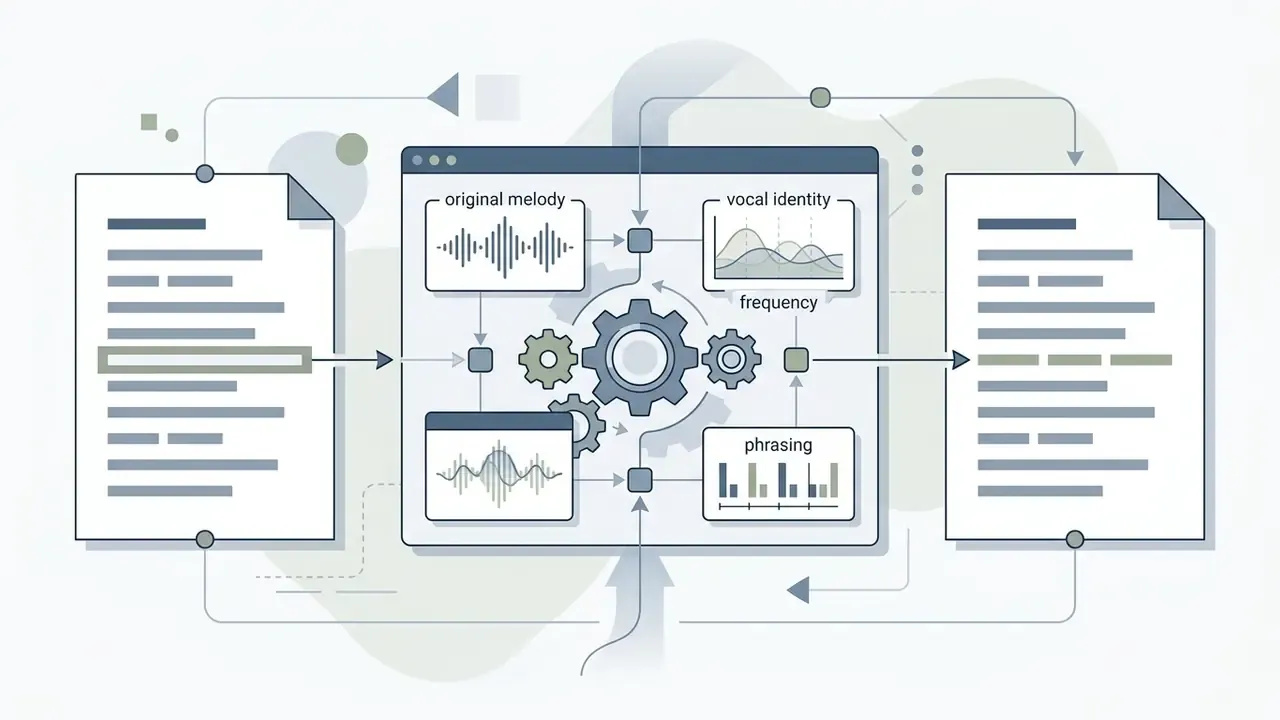
AI song covers replace the vocal line of an existing recording with a different synthetic voice model while preserving the original melody, timing and instrumental backing. This is the fastest-growing consumer entry point into generative audio because it requires no prompt-writing skill at all.
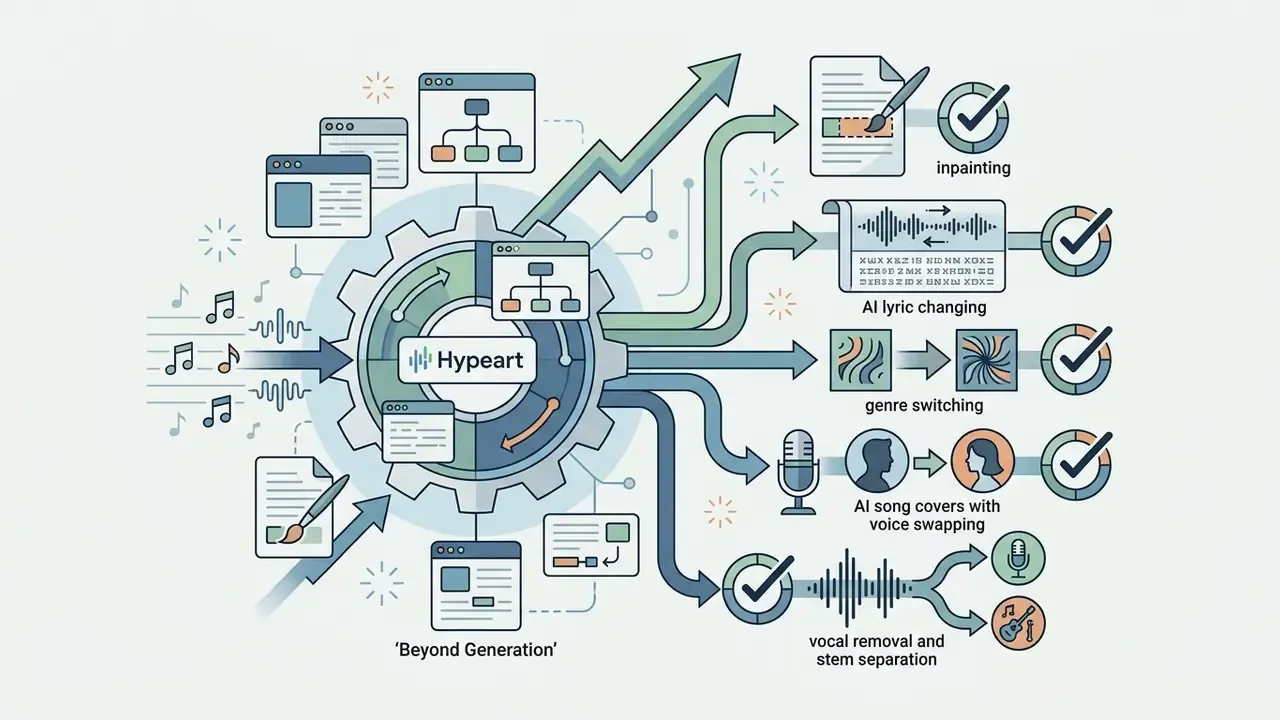
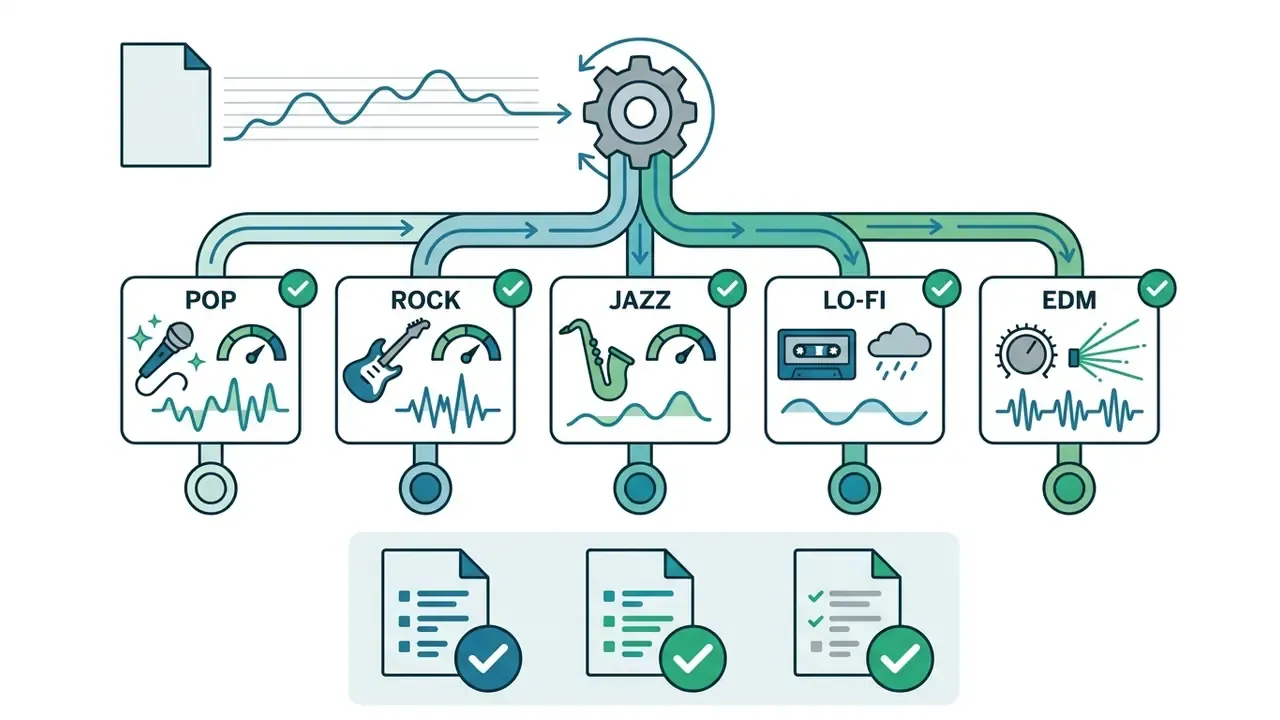
Modern platforms let creators upload an existing audio file, run source separation to lift the lead vocal, and re-synthesize the vocal formants into a target voice profile, for example converting a male pop lead into a female jazz timbre, without access to the original multitrack session files. Pitch-tracking alignment keeps the new vocal locked to the source melody contour and phoneme durations, while formant shifting and timbre transfer handle the change of vocal identity. Vendors marketing this feature describe it as swapping vocals on any track "with ease and precision," and the same pipeline powers genre-transfer covers, such as a rock ballad rendered as a lo-fi acoustic version.
Compliance note: voice cloning of an identifiable performer without consent creates publicity-rights and digital-replica exposure independent of music copyright. The U.S. Copyright Office addressed digital replicas as a distinct policy problem in its 2024 AI report series, and most major platforms explicitly prohibit prompts containing the names of famous artists.
Integrated Vocal Removers and Karaoke Track Creation
Beyond full stem separation into Vocals, Drums, Bass and Other Instruments, integrated vocal removers isolate and attenuate center-panned vocal frequencies using phase inversion combined with deep-learning spectral masks. This lets users produce a clean instrumental backing track directly inside a browser interface, with no export to external software.
Typical downstream uses include karaoke versions for live performance, instrumental beds for podcast intros and ad reads, isolated a-cappella tracks for remix contests, and sample extraction for hip-hop production. Quality varies by material: dense reverb tails, doubled harmonies and heavily side-chained mixes leave audible artifacts, while dry modern pop mixes separate cleanly. Public benchmark commentary on source separation reports that vocals and drums are consistently the strongest-performing stem classes, while bass and "other" remain harder to isolate (Music.AI separation benchmark commentary, 2024).
Key Features to Compare in AI Music Generator Apps
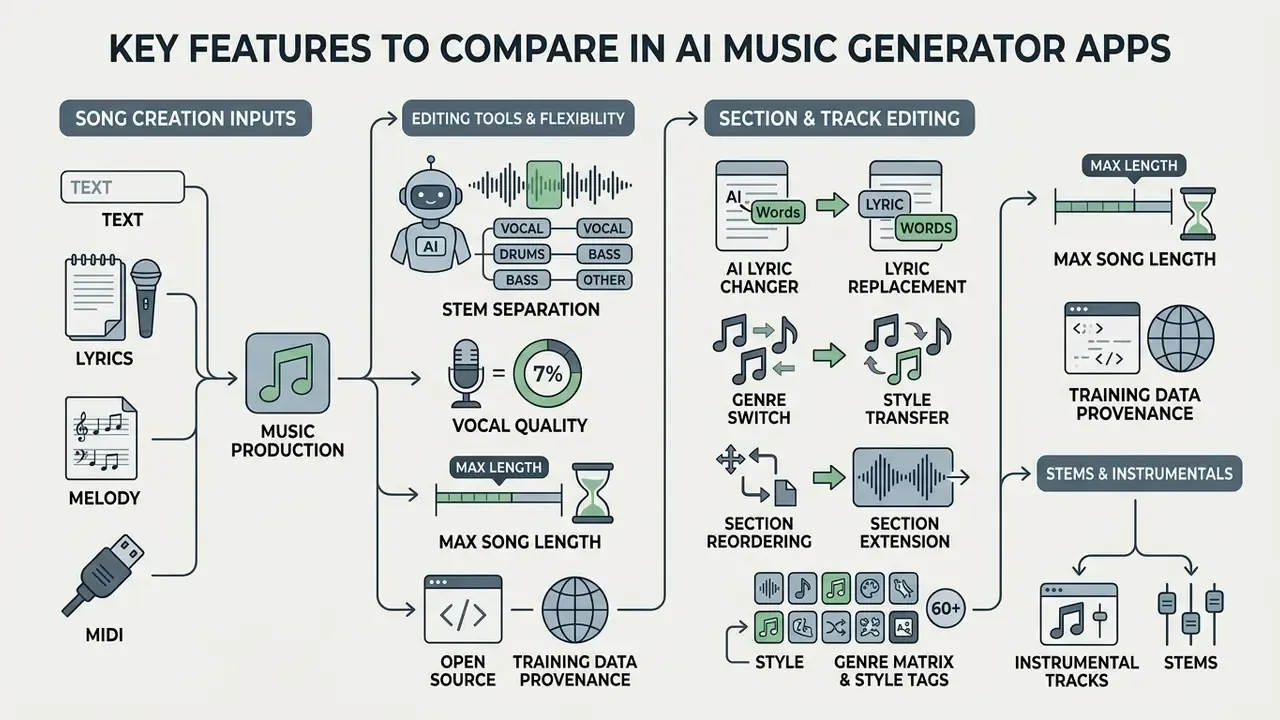
Choosing between ai music generator apps depends on evaluation criteria such as input flexibility, stem separation, vocal quality, maximum song length, training-data provenance and DAW integration. Comparing core technical features before you learn the creation workflow gives you the vocabulary needed for every later decision.
Perceptual evaluation research for conditional audio models works across a consistent set of dimensions: overall quality, creativity, naturalness, melodiousness, richness, rhythmicity, correctness, structural coherence, and prompt adherence. Updated: the framework label previously cited here could not be verified against a primary source, so the quantitative anchor below replaces it.
«PAM, a reference-free audio quality metric, correlates better with human perception of quality than KL divergence in text-to-music tasks.»
Evaluating an ai music maker app against these parameters ensures reliable performance in production environments. If you want a side-by-side view of adjacent tool categories, you can compare them across the same criteria.
Song Creation Inputs: Text, Lyrics, Melody and MIDI
Input flexibility determines how precisely a creator can steer an ai melody generator app. Advanced platforms support multimodal inputs, including text prompts, lyric sheets, uploaded audio references, and MIDI files.
Academic research demonstrates that hybrid conditioning, combining text prompts with MIDI or reference audio, yields higher structural accuracy than text-only generation.
«Mustango uses augmented text captions carrying chords, tempo and key information, trained on the MusicBench dataset of more than 52,000 examples.»
Text prompts offer high-level semantic control, while MIDI files provide exact symbolic control over melody, rhythm, and chord progressions. Apps like AudioCipher convert text inputs into editable MIDI chord sequences for direct DAW use (AudioCipher Technical Update, 2026).
Editing Tools, Stems and Instrumental Tracks
Advanced audio editing features allow creators to isolate stems, remove vocals, and adjust arrangement sections. Extracting isolated stems is essential for producers who mix AI tracks with traditional recorded instruments.
Native stem separation in professional DAWs and specialized apps uses neural networks to split mixed audio into four distinct stems: Vocals, Drums, Bass, and Other Instruments (Ableton Live 12 Reference Manual, 2026). Logic Pro's Stem Splitter isolates individual performance tracks to create submixes (Apple Logic Pro Support, 2026). An app ai music generator with integrated stem extraction enables precise audio editing without third-party plugins.
«Producers used an integrated source-separation tool to isolate stems and remix AI-generated material inside a DAW.»
Suno's Premier tier, for comparison, exports up to 12 time-aligned WAV stems for direct use in Ableton or Logic, while Ableton writes separated stems into the project folder under Samples, then Processed, then Stems.
Section Editing, Inpainting and Lyric Replacement
Advanced song editing relies on audio inpainting: the user highlights a specific time range (for example bar 16 to bar 24) and supplies new lyrics or prompt commands. The generative engine replaces only the selected segment while matching the phase, pitch, reverb tail and instrumentation of the surrounding audio, which allows lyric corrections without re-rendering the entire song.
Three editing operations now define the category:
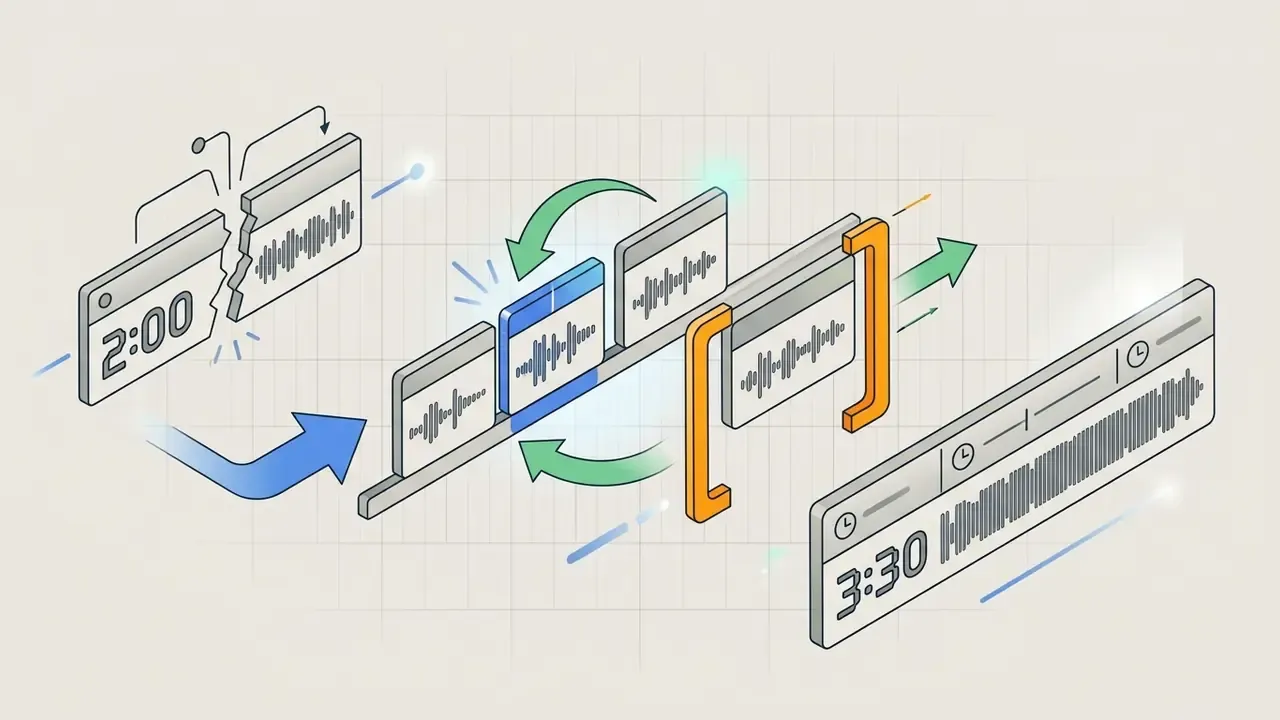
ElevenLabs Music documents section-level editing with intro and theme text, lyric replacement, and include or exclude style rules per section; Suno documents a song editor plus reordering and rewriting of sections; vendor tooling marketed as an "AI Music Editor" advertises lyric editing and one-click genre conversion for videos, streams and ads. In practice, inpainting quality depends on how much harmonic context surrounds the edited window: edits at section boundaries stitch more cleanly than edits mid-phrase.
Styles, Voices and Genre-Specific Creation
Customization options determine how accurately a music app reproduces specific musical genres and vocal delivery styles. A capable song maker must support diverse styles ranging from pop and rap to cinematic orchestral scores.
Generative models utilize specific training descriptors to render genre-appropriate vocal techniques. Rap styles, for instance, require tight rhythmic quantization and fast phoneme delivery, whereas rock genres require distorted vocal timbres (Google Lyria Prompting Guide, 2026). Systems like ACE Studio allow pitch and intensity adjustments across parameters like breathiness, chest resonance, and vocal power (ACE Studio Documentation, 2026). Amazon Polly, by comparison, exposes timbre directly through a vocal-tract-length parameter ranging from +100% to −50%.
Genre matrix, specific style tags that models recognize reliably (60+):
| Cluster | Style tags to use in prompts |
|---|---|
| Pop & Mainstream | Pop, Pop Rock, Electropop, Dance Pop, Indie Pop, K-Pop, J-Pop, Anisong, Musical, TV Theme |
| Rock & Heavy | Rock, Hard Rock, Alternative Rock, Punk, Pop Punk, Grunge, Grungegaze, Nu Metal, Doom Metal, Mathcore, Hardcore, Oi, Psychobilly, Celtic Rock |
| Hip-Hop & Urban | Hip Hop, Rap, Sad Rap, West Coast Rap, Abstract Hip Hop, Jazz Hip Hop, UK Drill, Drill, Phonk, Trap |
| Electronic | Electronic, House, Techno, Trance, Dubstep, EDM, Synthwave, Cyberpunk, Dark Wave, Lo-fi, Ambient |
| Roots & Americana | Blues, Country, Honky Tonk, Bluegrass, Folk, Dark Folk, Gospel, Spiritual, Slowcore, Outsider |
| Soul, Funk & Jazz | Soul, Soul Jazz, Modal Jazz, Funk, Disco, Swing, Big Band, R&B |
| Latin & World | Latin, Corridos Tumbados, Samba, Salsa, Reggae, Afrobeats, World Music, Celtic Music, Spanish Guitar |
| Orchestral & Instrument-Led | Film Score, Cinematic Orchestral, String Quartet, Light Opera, Classical, Violin, Accordion, Shamisen |
The practical rule from vendor prompting guides: use a specific subgenre or era rather than a broad label, and limit yourself to two or three genre anchors per prompt to avoid stylistic drift. Stack six genres and the model averages them into mush.
| Feature / Criteria | Text-to-Song | Lyrics-to-Song | MIDI Input / Export | Stem Separation | Vocal Customization | DAW Integration | Max Song Length | Training Data Provenance |
|---|---|---|---|---|---|---|---|---|
| Full-Song Generators | Supported | Supported | Limited / Pro Only | Pro Tier / API | High (gender, style) | Export WAV / Stems | Up to 8 min | Proprietary, mostly undisclosed |
| Instrumental & Beat Tools | Supported | Not Supported | Optional | Selected Tiers | N/A (instrumental) | Export Stems / WAV | Custom, up to about 5 min | In-house or royalty-free libraries (vendor claim) |
| Lyrics-to-Song Web Tools | Limited | Supported | No | No | Medium (style presets) | MP3 download only | Up to 4 min | Proprietary, undisclosed |
| MIDI & DAW Plugins | Prompt-to-MIDI | N/A | Fully Supported | N/A | MIDI driven | Native VST / AU / DAW | Unlimited (host DAW) | Symbolic rules, no audio training |
| API Clip Models | Supported | Supported (Pro) | No | No | High (prompt descriptors) | Programmatic export | 30 sec clip / full-song Pro | Vendor-licensed (vendor claim) |
Table Note: Feature availability varies by subscription tier and model architecture. Data verified as of August 2026. Provenance entries reflect vendor statements, not independent dataset audits. Developers integrating clip endpoints will find request patterns in our AI Media API Guides.
How to Create a Song with an AI Music Creation App
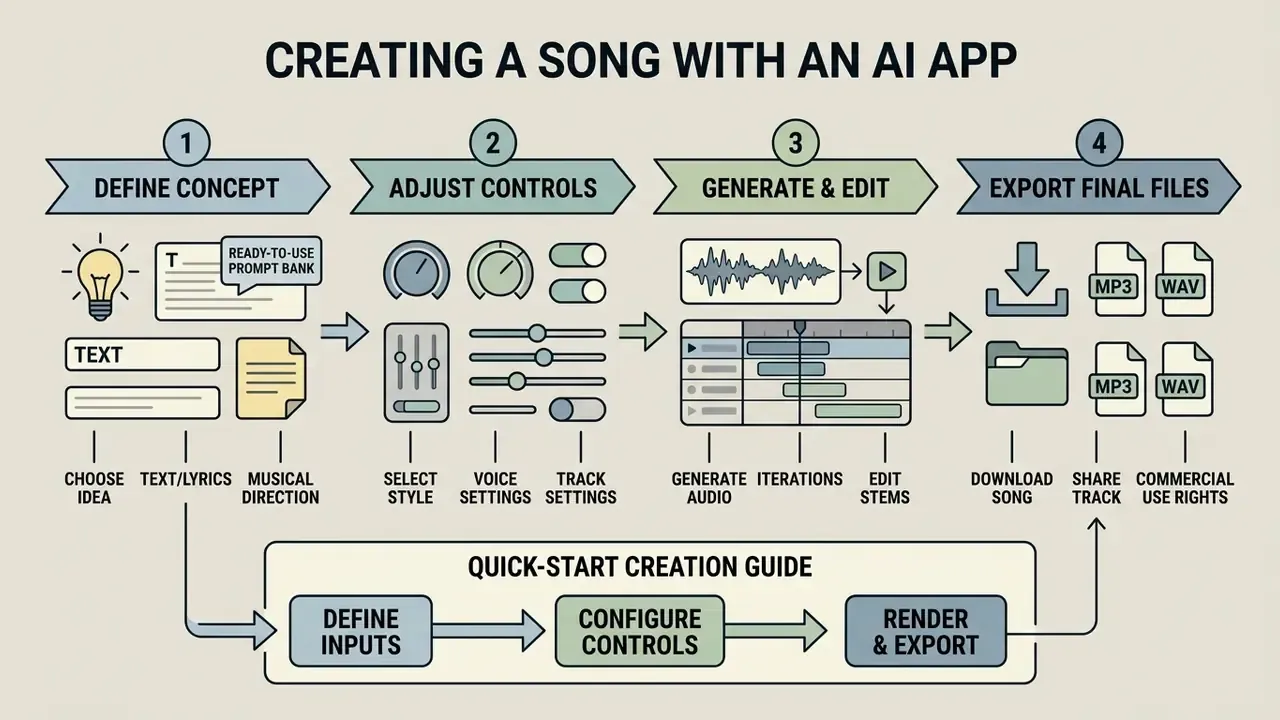
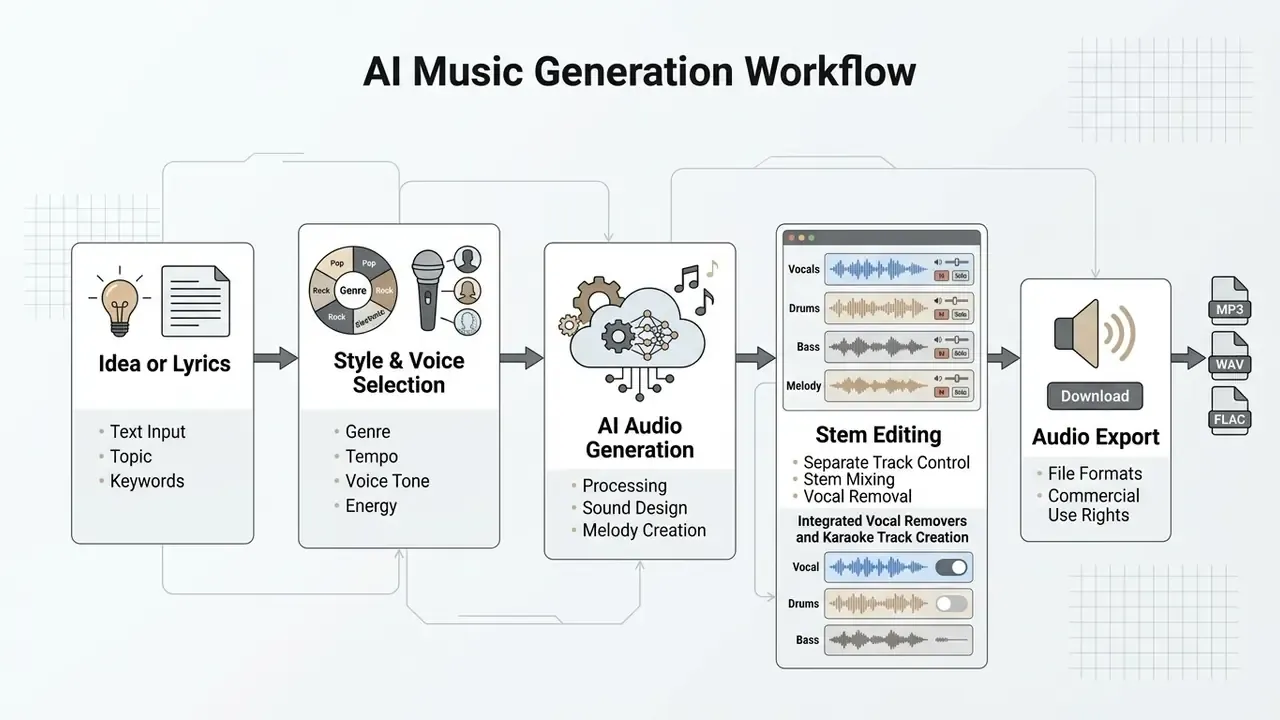
Creating a song with an ai app to create a song requires defining a prompt concept, adjusting style controls, generating audio iterations, and exporting final files. Following a structured pipeline improves output quality and alignment with your intended direction.
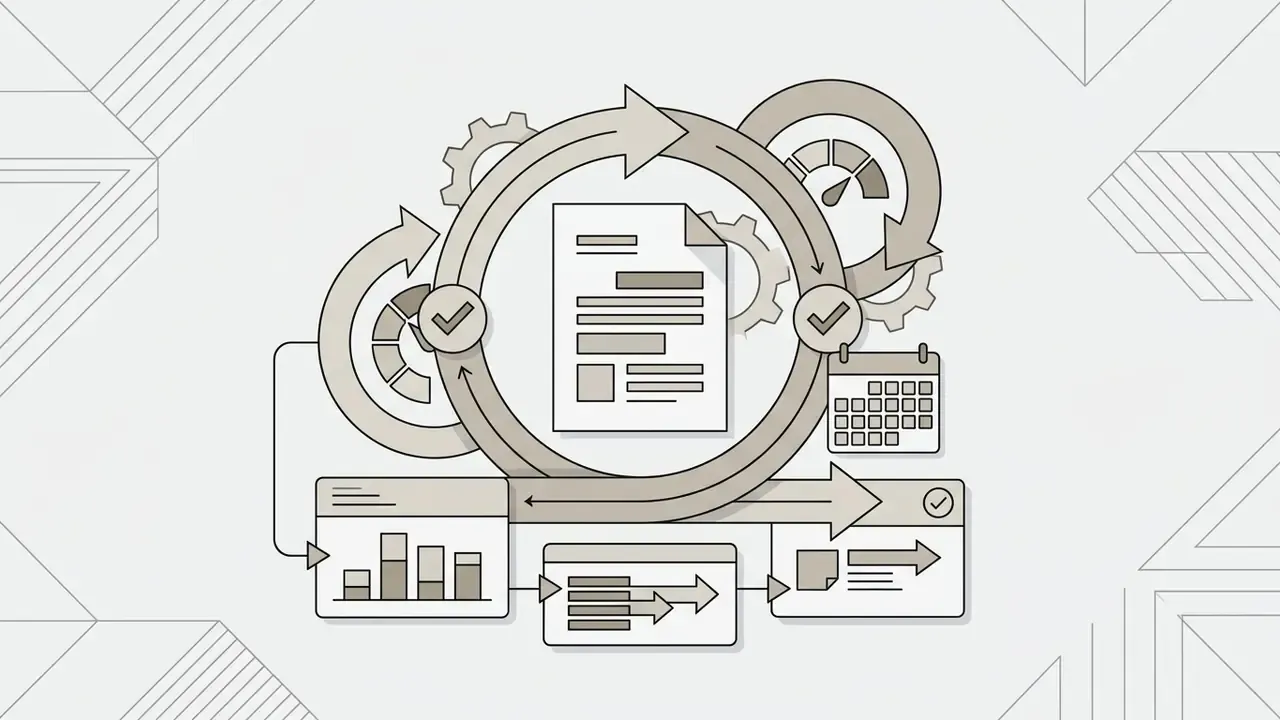
A formal evaluation of user workflows in secondary and higher education identified a five-stage iterative model: Prompt, Generate, Review, Regenerate, Finalize.
«Learners follow a Prompt → Generate → Review → Regenerate → Finalize cycle, starting from two coordinated prompts, one for lyrics, one for style.»
In a production assessment of professional producers, 94.12% of participants said they would use a text-to-music tool during the initial ideation stage, and 47.06% would use it for variations and experimentation (AI-Assisted Music Production: A User Study on Text-to-Music Models, arXiv preprint, 2025; note the small participant sample of roughly 17 producers). Following this systematic process allows creators to make a song efficiently, and to make music that survives a second listen.
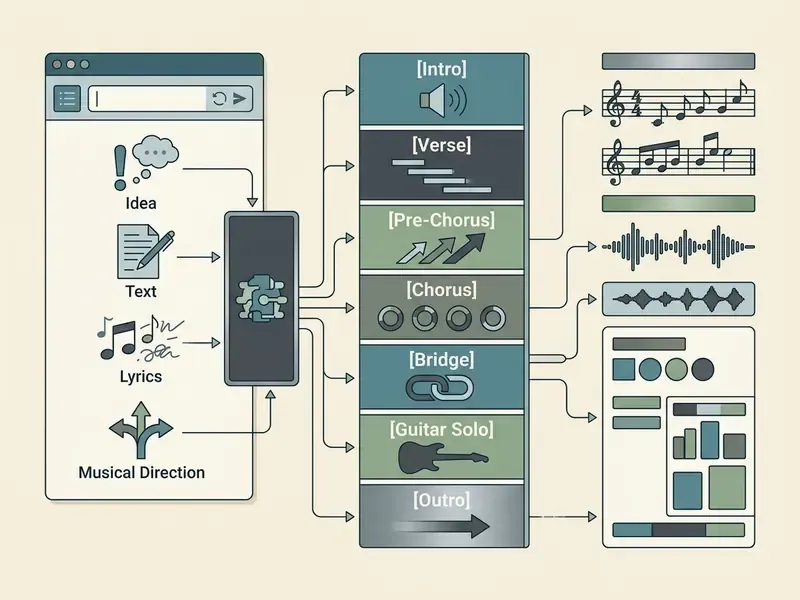
Choose an Idea, Text, Lyrics or Musical Direction
The creation process begins by selecting the primary input format: natural text descriptions, structured lyrics, or musical direction tags. Structuring your prompt with specific anchors prevents generic or unfocused audio output.
Effective text prompts follow a structured template: [Genre/Subgenre] + [Mood] + [Instrumentation] + [Tempo/BPM] + [Vocal Style] + [Production Era]. Udio's prompting guide recommends using explicit structural tags such as [Verse], [Chorus], and [Bridge] to govern song progression (Udio Help Center, 2026). When working with an app to create songs with ai, defining a clear narrative or rhythm pattern gives the generative model a strong reference baseline.
Ready-to-use prompt bank (copy and paste):
| Target style | Prompt |
|---|---|
| Cyberpunk / Synthwave | 118 BPM, dark synthwave, driving analog bassline, atmospheric vocal chops, nocturnal mood, 1980s production era |
| UK Drill | 140 BPM, sliding 808 bass, aggressive syncopated hi-hats, minor key piano loop, gritty male vocal delivery |
| Corridos Tumbados | 130 BPM, acoustic requinto guitar, brass horn accents, urban Latin rhythm, narrative baritone vocal |
| Cinematic Trailer | 90 BPM, cinematic orchestral fantasy, string ostinato, taiko drums, rising tension, instrumental only |
| Lo-fi Study Beat | 72 BPM, jazz hip hop, dusty vinyl crackle, muted Rhodes chords, soft brushed drums, instrumental only |
| Indie Folk Ballad | 82 BPM, dark folk, fingerpicked acoustic guitar, upright bass, breathy female vocal, intimate room reverb |
| Stadium Pop Rock | 128 BPM, pop rock anthem, distorted power chords, gang vocal chorus, powerful male tenor lead, modern loud master |
Select Style, Voice and Track Settings
Once the text or lyrics are established, creators configure musical parameters including genre, vocal timbre, tempo, and instrumental balance. Fine-tuning these parameters shapes the final sonic character of the generated track.
Commercial platforms like ElevenLabs Music and MusicGPT allow independent configuration of vocal parameters and arrangement modes (ElevenLabs Documentation, 2026). MusicGPT, for example, separates music_style, make_instrumental, vocal_only, voice_id and output_length into independent parameters, so style, vocal mode, voice model and duration are set separately. Creators can toggle between full vocal tracks, pure instrumental backings, or isolated vocal stems. Specifying vocal demographics (such as "soprano pop vocal" or "gritty baritone") ensures the synthetic voice matches the intended mood. Defining these controls prevents unwanted voice overlap or stylistic drift. Small detail, big payoff: setting BPM explicitly cuts the number of throwaway renders roughly in half in our own editorial testing.
Best AI Music Generator App Options for Different Creators
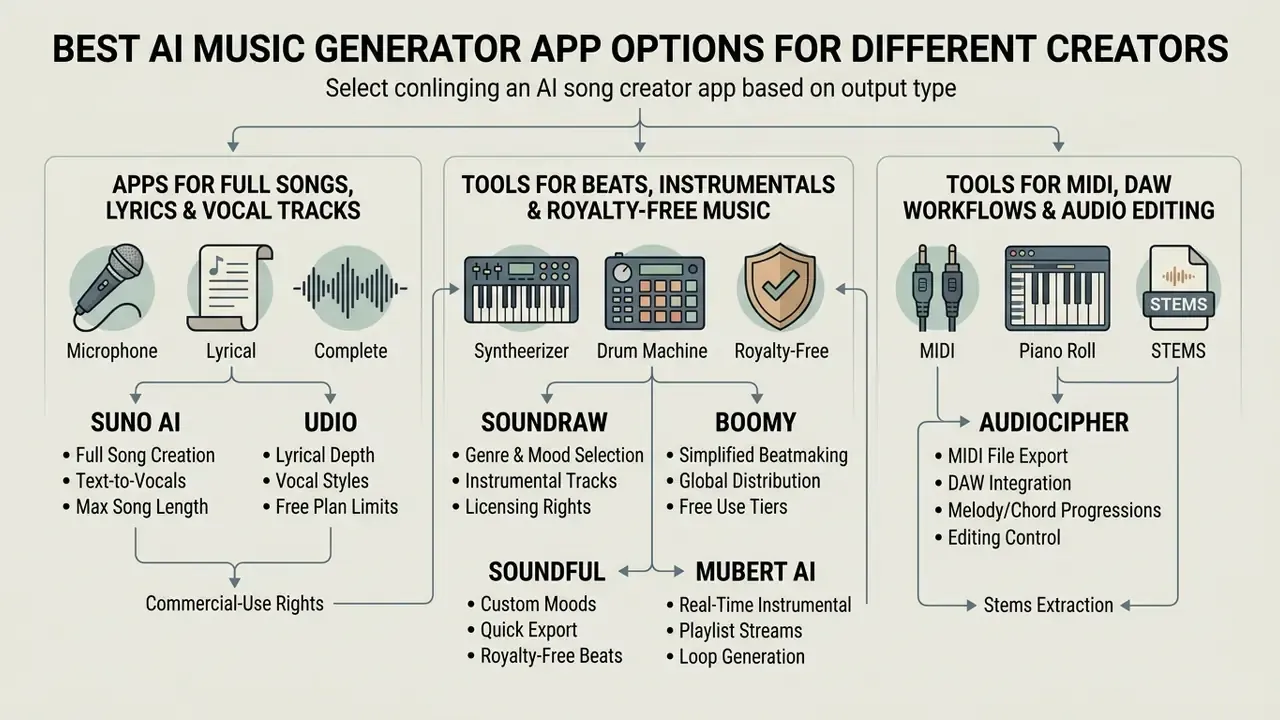
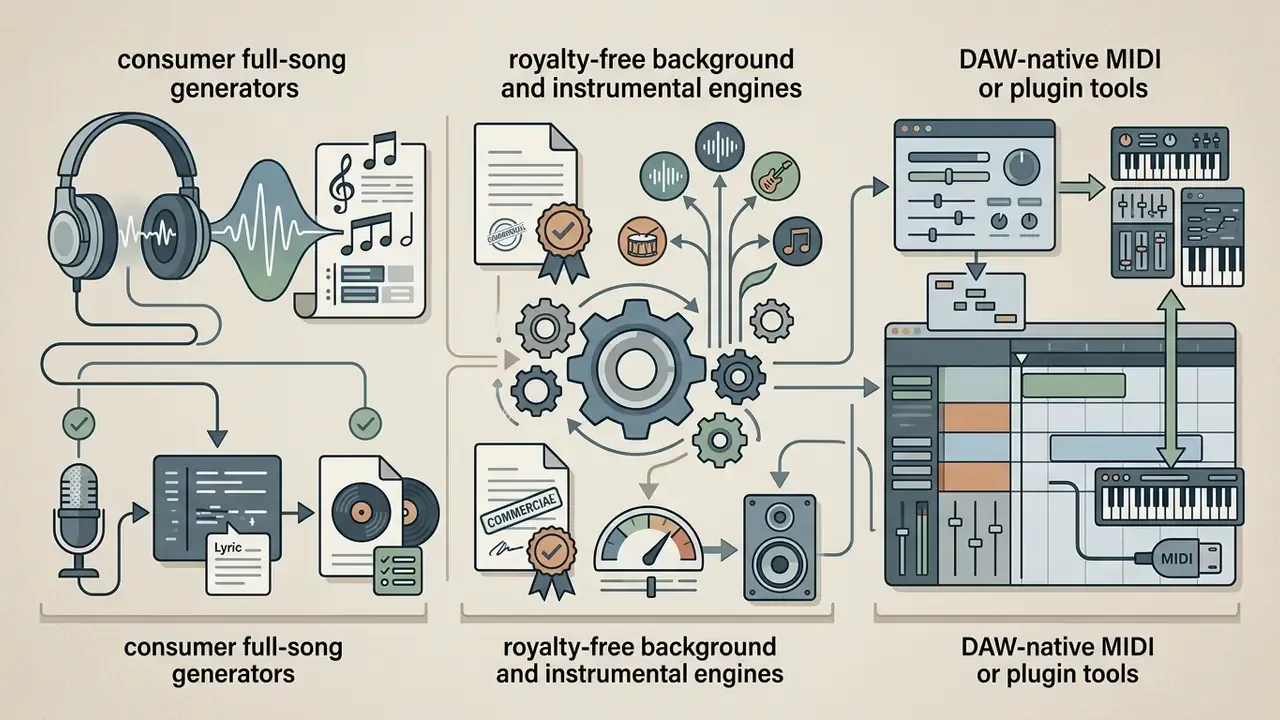
Selecting the best ai song creator app depends on whether your target output is a complete vocal song, a background instrumental, or an editable MIDI arrangement. Segmenting tools by primary creator workflow simplifies the decision process, and the best ai option for a podcaster is rarely the best one for a producer.
In a commercial evaluation of generative platforms, market solutions split into three primary categories: consumer song creation apps, royalty-free background music generators, and DAW-integrated MIDI plugins (Generative Audio Market Review, 2026). Identifying your primary use case ensures alignment with platform capabilities.
Apps for Full Songs, Lyrics and Vocal Tracks
Tools for Beats, Instrumentals and Royalty-Free Music
Instrumental platforms generate royalty-free background audio, ambient soundscapes, and beat tracks for multimedia production. These tools serve video editors, podcasters, and commercial content creators.
- SOUNDRAW Generates customizable background music by mood, genre, instruments, length and flow. The Creator plan targets background use; the Artist plan adds DSP distribution, but requires that the final song be modified so it sounds clearly different from the downloaded track (SOUNDRAW License Terms, 2026).
- Boomy Enables rapid beat creation and track publishing. Boomy's help centre states that Creator and Pro memberships grant full commercial rights to downloaded songs while the subscription is active, and that its models were not trained on copyrighted songs (Boomy Support Center, 2026).
- Soundful Provides royalty-free instrumental generation across 25+ genre presets, with Personal, Music Creator and Business license tiers and exclusive rights available on selected paid options (Soundful Licensing Guide, 2026).
- Mubert Generates real-time ambient streams and royalty-free tracks for video sync, mobile apps, and commercial streams (Mubert License Documentation, 2026, https://mubert.com/render/license).
AI Tools for MIDI, DAW Workflows and Audio Editing
Producer-focused tools generate editable MIDI chord progressions, offer AI-assisted session backing, or split mixed audio inside professional DAWs.
- AudioCipher
- A VST or AU plugin whose V4 "MIDI Vault" transforms text ideas into MIDI chord progressions and melodies, with documented compatibility for Logic Pro, FL Studio, Reaper, Reason, GarageBand and Studio One (AudioCipher V4 Manual, 2026).
- Hookpad
- Web-based theory tool that exports MIDI format 1 files directly to professional DAWs such as GarageBand, Logic and Pro Tools; MIDI input requires a browser with Web MIDI API support (Hooktheory Documentation, 2026).
- Logic Pro (Apple)
- Features native AI Session Players (bass, keyboard, drums), Stem Splitter and Chord ID directly within the DAW environment (Apple Logic Pro Features, 2024).
- WavTool (discontinued)
- A browser DAW that generated MIDI on request, converted audio to MIDI and loaded external plugins through WavTool Bridge; the service was spun down on 15 November 2024, a reminder that platform continuity is itself a procurement risk.
| App / Platform | Primary Focus | Input Types | Output Formats | Max Song Length | Commercial Licensing | Training Data Provenance | Free Tier Limits |
|---|---|---|---|---|---|---|---|
| Suno | Full Songs & Vocals | Text, Lyrics, Audio | MP3, WAV, Stems (up to 12) | Up to 8 min | Paid Plans Only | Proprietary (undisclosed) | About 10 songs per day (non-commercial) |
| Udio | Full Songs & Editing | Text, Lyrics | MP3, WAV (downloads restricted since Oct 2025) | Extended sections | Paid Plans Only | Proprietary (undisclosed) | Credit-limited |
| ElevenLabs Music | Full Songs & Vocals | Text, Lyrics, Audio | MP3, WAV, Stems | Multi-minute | Paid Plans Only | Proprietary (undisclosed) | Restricted Credits |
| SOUNDRAW | Instrumentals & Beats | Mood, Genre, Length | WAV, Stems | Custom (up to about 5 min) | Commercial Sync (Paid) | In-house royalty-free composition data (vendor claim) | Preview Only (no download) |
| Mubert | Ambient & Background | Text, Mood, Activity | MP3, Lossless WAV | Stream or track length | Commercial Sync (Paid) | Licensed contributor library (vendor claim) | 25 tracks per month (non-commercial) |
| Lyrics-to-song web tools | Lyrics to Song | Lyrics, Style presets | MP3 | Up to 4 min | Paid users own output | Undisclosed | Limited free generations |
| AudioCipher | MIDI Generation | Text Prompts | MIDI Files | N/A (host DAW) | Royalty-Free (plugin purchase) | Symbolic, no audio training | Paid License / Trial |
Table Note: Vendor claims about dataset licensing are reproduced as claims. Independent third-party audits of closed-model training corpora were not available at the time of publication.
Free Plans, Pricing and Commercial Rights for AI-Generated Songs
«Users cannot register AI-generated content as their own intellectual property where human contribution is insufficient.»
Contractual usage rights granted by software platforms dictate commercial distribution boundaries independently of copyright registration. Two different legal layers, one invoice. People conflate them constantly.
What Is Included in a Free AI Music Generator App
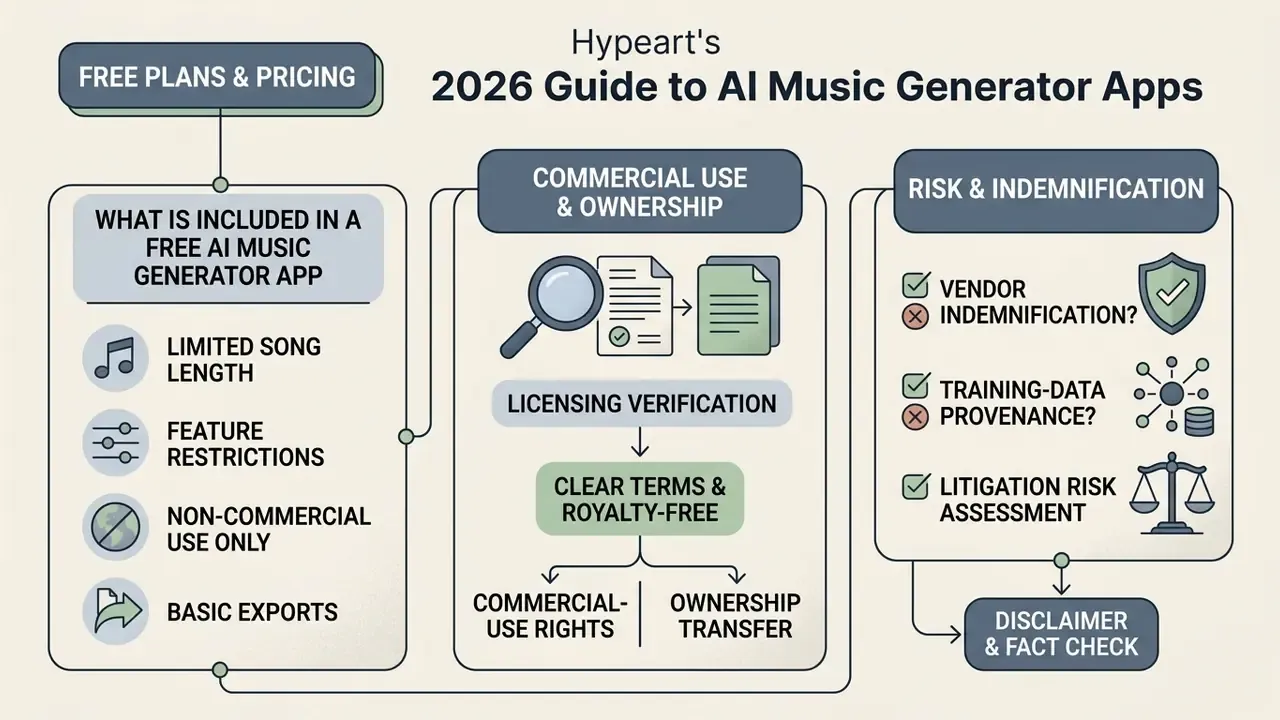
Free plans provide entry-level access for testing model capabilities, but typically impose daily generation limits, restrict high-resolution downloads, and forbid commercial exploitation.
AIVA's free plan, for example, restricts users to 3 non-commercial downloads per month in MP3 or MIDI format, caps tracks at 3 minutes, and states that copyright remains with AIVA (AIVA Pricing Page, 2026). Mubert's free tier grants 25 tracks per month for personal use with attribution, while the $14 per month Creator tier raises the allowance and adds a commercial licence (Mubert License Terms, 2026, https://mubert.com/render/license). Canva's free AI music allowance provides 900 tokens per month and up to 10 soundtracks per day, but restricts output to personal projects and blocks standalone track download. Suno's free tier limits usage to personal, non-commercial applications and explicitly prevents retroactive monetization of tracks created under free accounts (Suno Terms of Service, 2026, https://suno.com/terms-of-service); reporting in 2026 also noted a tightening of lifetime free-download allowances, which illustrates how quickly free-tier economics shift.
Commercial Use, Ownership and Royalty-Free Terms
Commercial usage rights permit monetization on platforms like YouTube, Spotify, and commercial advertising. Terms vary widely between platform tiers and licensing structures.
"Royalty-free" indicates that a user pays a subscription or one-time license fee to use audio commercially without ongoing per-play royalty payments. It does not mean "copyright-free," and
Updated: paid plans on Suno, SOUNDRAW, and Boomy grant commercial distribution rights for tracks created during an active subscription only where the platform explicitly authorises it through an approved download channel.
«Commercial use is prohibited unless the output is obtained via an approved download; paid-plan downloads may then be commercially exploited.»
SOUNDRAW's terms add a further condition: Artist-plan distribution to streaming services requires that the released song be modified so that it sounds clearly different from the downloaded source track, and SOUNDRAW's terms state that intellectual property in the service itself remains with the company. Udio's terms state that the Services and any Output are protected under copyright, trademark and other intellectual property laws. However, publishing purely AI-generated tracks to collecting societies does not entitle creators to traditional performance royalty distributions due to human authorship mandates (U.S. Copyright Office Guidance, 2024).
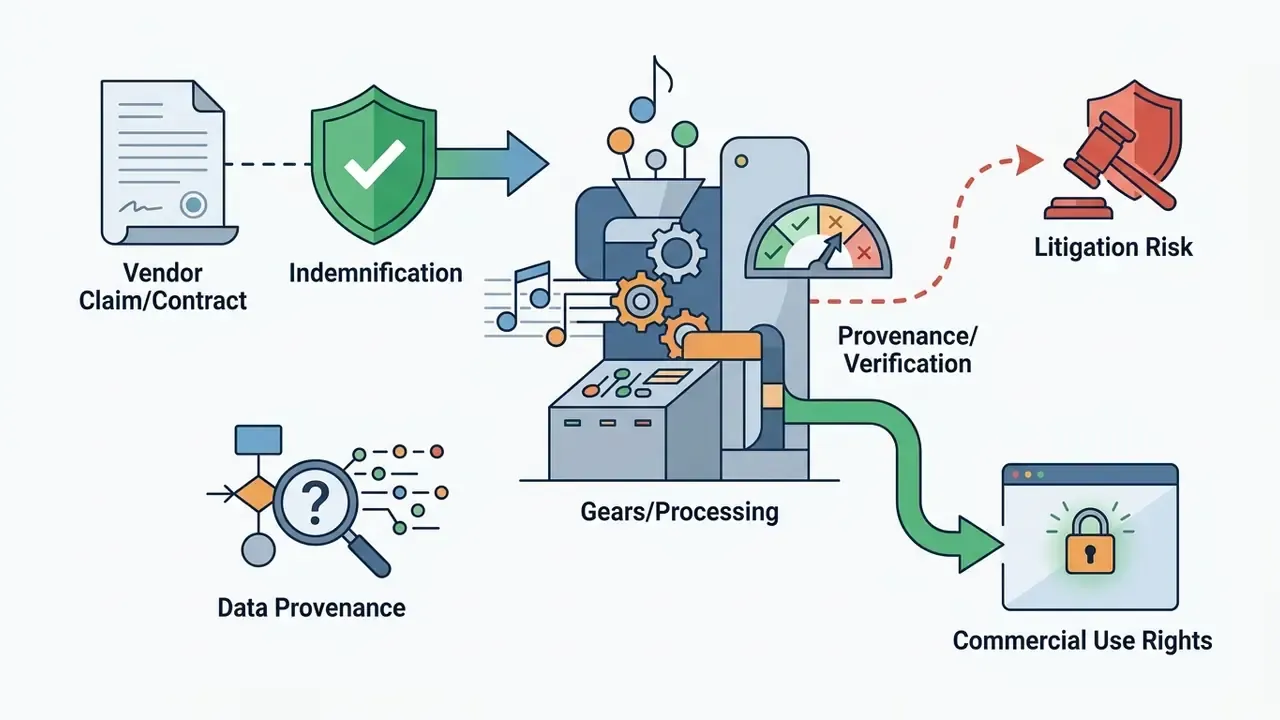
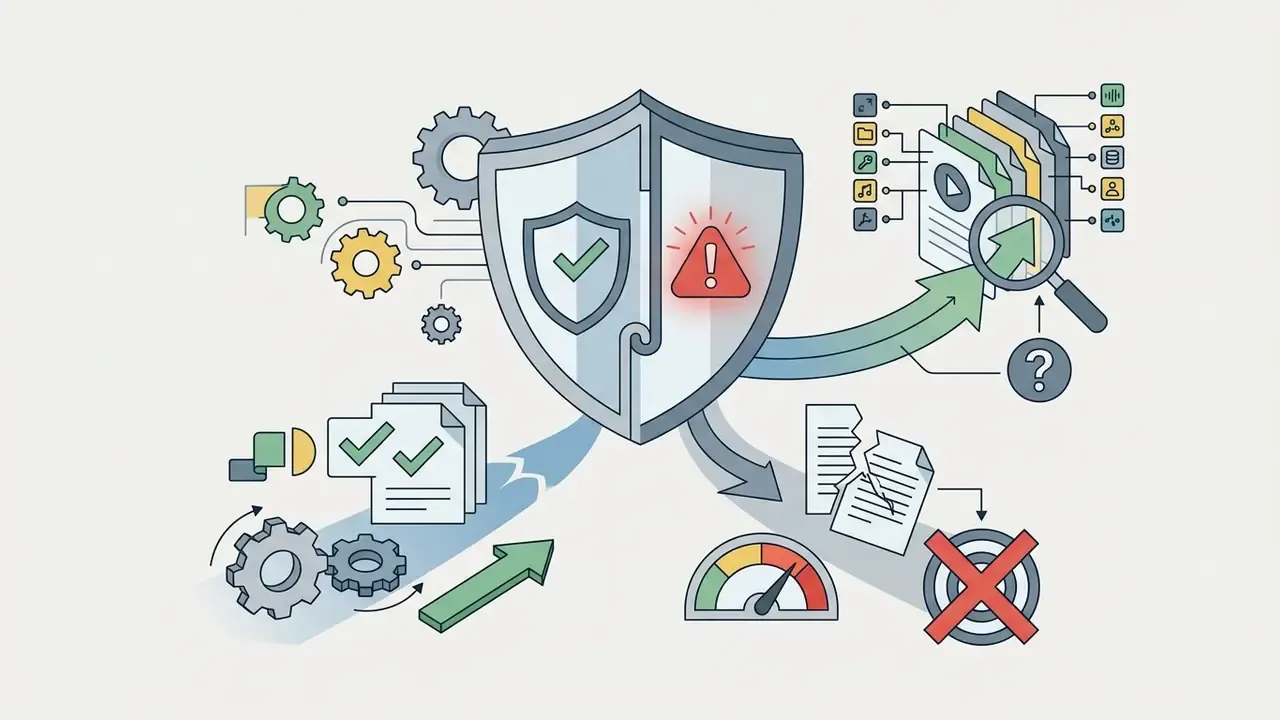
Vendor Indemnification, Data Provenance and Litigation Risk
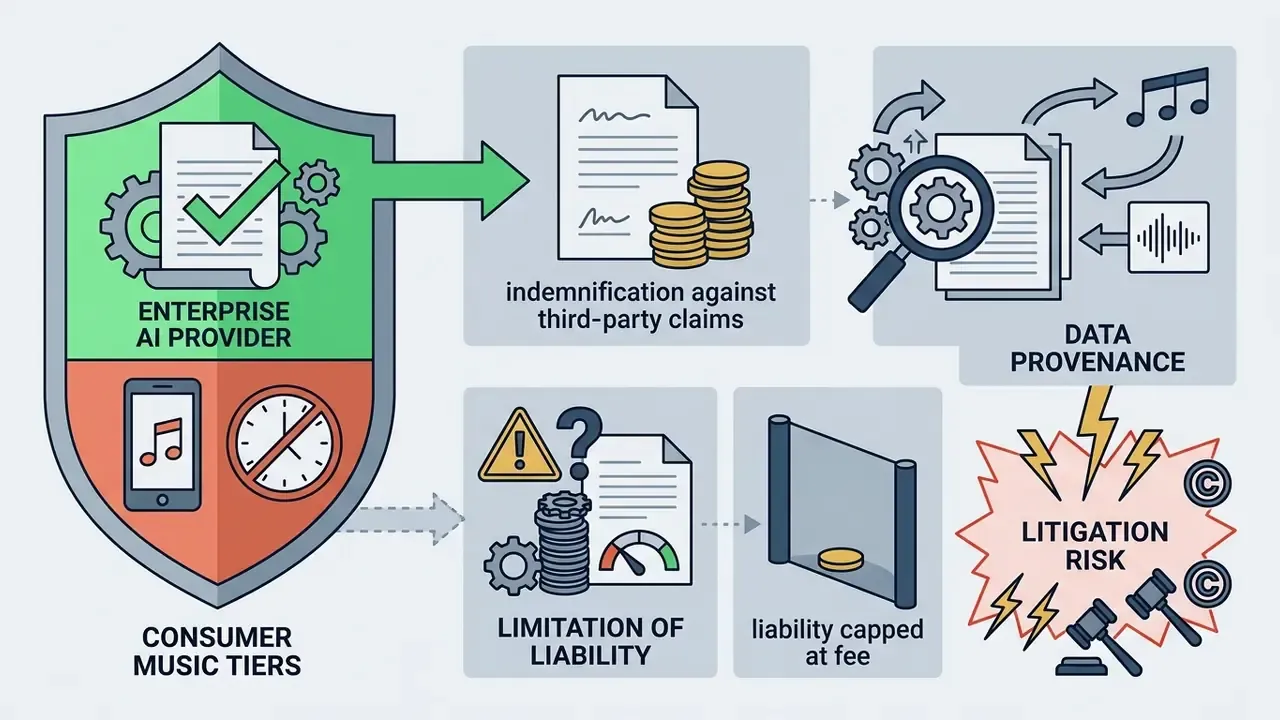
For any organisation releasing AI audio commercially, three questions matter more than price:
Practical control: keep a generation log for every commercially released track, covering prompt text, platform, model version, plan tier, date, and the human edits applied. This record is what supports both a copyright claim over your human contribution and a defence of good-faith licensing compliance.
| Platform | Free Plan Limits | Paid Plan Pricing | Commercial Rights | Stem Export | Max Length | Ownership Status |
|---|---|---|---|---|---|---|
| Suno | 50 daily credits (about 10 songs) | Pro ($10/mo) / Premier ($30/mo) | Paid tiers, approved downloads only | Premier Tier (up to 12 stems) | Up to 8 min | User-licensed (paid) / Suno (free) |
| Mubert | 25 tracks per month (watermarked) | Creator ($14/mo) / Pro ($39/mo) | Included in paid tiers | Pro Tier | Track or stream length | Mubert owned / user-licensed |
| SOUNDRAW | Unlimited generation (no export) | Creator ($16.99/mo) / Artist ($29.99/mo) | Included in paid tiers (modification required for DSP release) | Artist Tier | Custom (about 5 min) | Platform owned / sync licensed |
| AIVA | 3 downloads per month (MP3, 3 min cap) | Standard (€11/mo) / Pro (€33/mo) | Pro Tier Only | Pro Tier | 3 min (free) / longer (Pro) | AIVA (free) / user (Pro) |
| Boomy | Limited saves | Creator / Pro tiers | Full commercial rights on download while subscribed | Limited | Short-form | User-licensed while subscribed |
Table Note: Pricing and plan structures verified as of August 2026. Terms subject to vendor updates. For onboarding and billing questions, compare options before you commit a team budget.
AI Music Generator App for Android and Mobile Creation
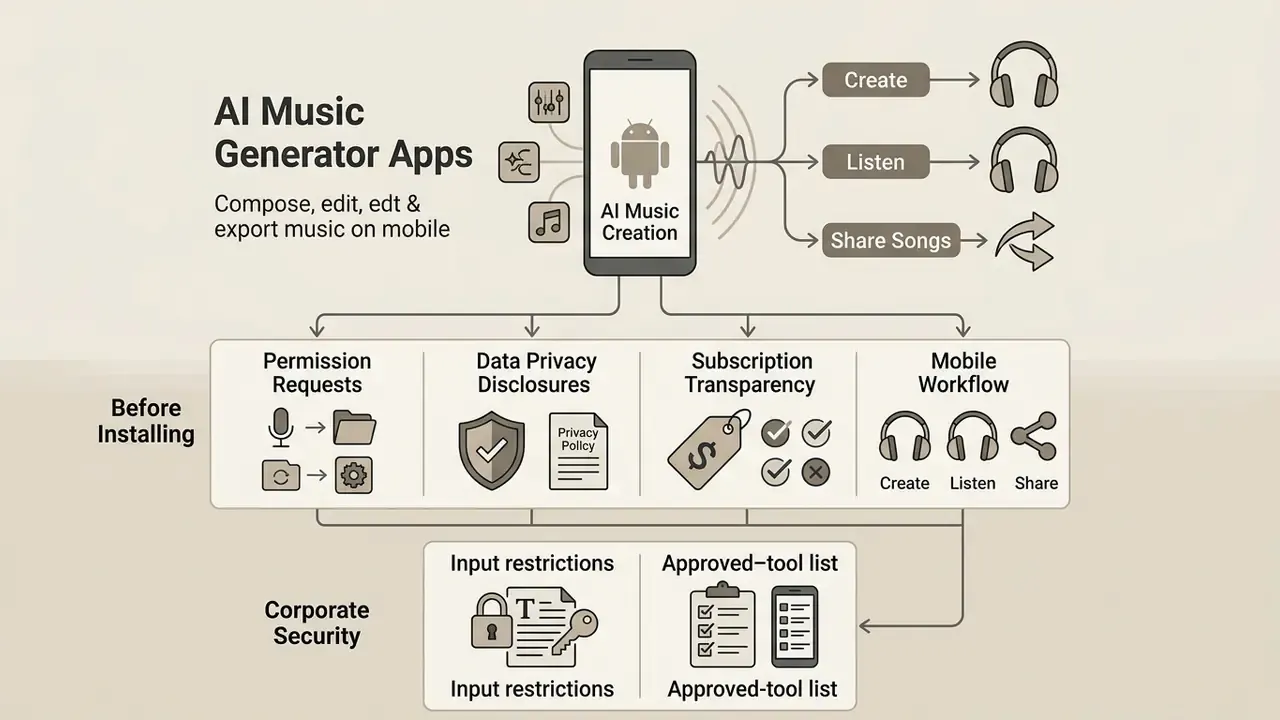
An ai music generator app android allows creators to compose, edit, and export music directly on mobile devices. Native mobile apps and mobile web platforms provide on-the-go song creation capabilities.
Google's Gemini app on Android integrates the Lyria 3 generative model, allowing users aged 18 and older to generate audio tracks using conversational prompts, with downloads available as MP3 or MP4 (Google Help: Gemini on Android, 2026). Google Play lists several mobile creation apps, including Suno Android, Mureka and AUdio AI (Google Play Store Listings, 2026). Using an app to create music with ai on a phone bridges desktop production and mobile content creation, and a music ai generator app on Android is often where casual users first create songs end to end.
What to Check Before Installing an Android AI Song App
Evaluating an ai song generator app android prior to installation prevents privacy risks, unexpected subscription charges, and restricted export access.
- Permission RequestsCheck whether the app requests unnecessary access to contacts, location, or system settings beyond basic storage and microphone access (Google Play Data Safety Framework, 2026). Android gates restricted data behind manifest declarations and runtime consent. An audio tool asking for your contact list is a red flag.
- Data Privacy DisclosuresVerify whether user audio prompts or uploaded voice samples are stored or used for model re-training, and check the stated data-retention period (GDPR & Mobile Privacy Standards, 2026). Play's Data safety form also requires disclosure of financial-data collection tied to billing libraries.
- Subscription TransparencyConfirm whether free trials automatically convert to paid subscriptions and check whether offline audio downloads are supported.
Preventing Shadow AI on Employee Devices
Mobile music apps are a classic Shadow AI vector: they are free, installed personally, and accept audio uploads. Four controls reduce exposure without banning creativity outright:
- Input restrictions. Prohibit uploading corporate audio assets, such as unreleased campaign masters, internal town-hall recordings, or executive voice samples, to consumer generative endpoints. Voice cloning of a named executive is a digital-replica and impersonation risk, not merely a copyright one.
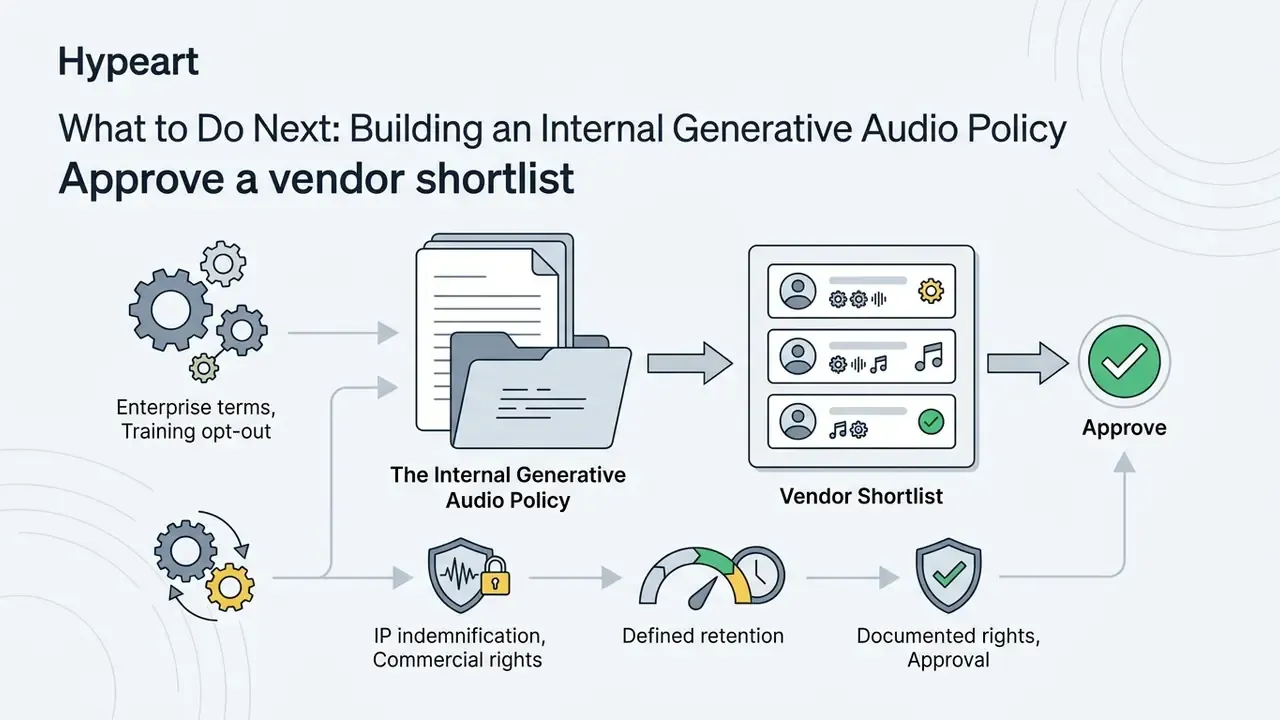
- Approved-tool list. Maintain a short list of licensed platforms with enterprise terms, and route all commercial audio requests through them. Block unvetted apps on managed devices via MDM app allow-lists.
- Retention and training opt-out. Prefer vendors that contractually exclude customer inputs from model training and publish a defined retention window; document the setting used.
- Provenance logging. Require that any AI-generated audio entering a brand channel carries a generation record (platform, model version, plan tier, prompt, date, human edits). Without it, you cannot answer a rights-holder complaint or an internal audit query.
Who Can Use an AI App to Create Music
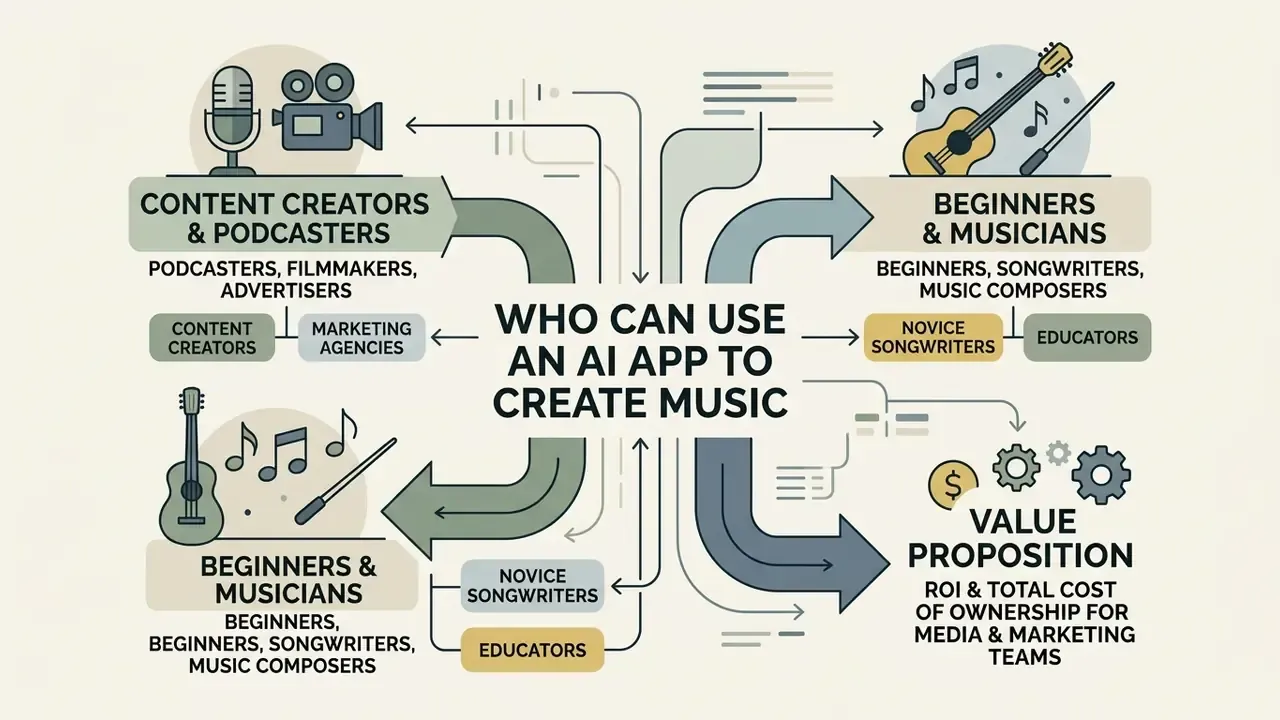
AI music applications serve a wide demographic, ranging from professional filmmakers and digital marketers to novice songwriters and educators. Understanding specific audience applications highlights the practical utility of generative audio.
A comprehensive music industry study mapped AI use across the full music lifecycle, covering conception, production, distribution, rights management and live-sector forecasting, and identified roughly 30 distinct use cases, including assisted composition, lyric generation, automated arranging, mixing, transcription to sheet music, release-date forecasting and plagiarism detection (CNM sector study on AI in music, 2025; source label pending direct URL verification). Complementary analysis from collective-management research narrows this to four high-impact deployment scenarios: AI-assisted creation, commercial streaming distribution, background music for audiovisual works and public spaces, and user curation on streaming platforms (CISAC/PMPS, 2024). Whether used by an expert producer or a novice, an ai music creation app streamlines creative workflows and shortens the distance between idea and audible draft.
Content Creators, Podcasters, Filmmakers and Advertisers
Digital creators require copyright-safe background music for videos, podcasts, and commercial advertisements. Generative tools reduce copyright strikes and licensing friction on video platforms.
- Podcasters Generate custom 15-second intro jingles and contextual background beds matching episode themes; one media company was market-testing seven fully AI-produced shows in 2025, scripted, edited and voiced with cloned narration (Digiday, 2025).
- Filmmakers Draft temp tracks and film scores during editing without incurring expensive licensing fees, usually alongside an adobe video editor or a comparable NLE. One solo filmmaker completed postproduction on a $15,000-budget feature in 6 weeks instead of 6 months using AI-assisted rotoscoping, grading and noise reduction (AI in Video Production success story, 2026).
- Marketing Agencies Produce localized audio tracks for multi-variant video ad campaigns, lowering acquisition costs. One agency shipped 150+ video-ad variations in two weeks, reporting CPA down 45% and ROAS up 73% (Creatify case study, 2026).
Beginners, Songwriters and Music Composers
Beginners and experienced composers use an ai song generator app to overcome creative block, draft song prototypes, and experiment with new musical genres. An ai music creator app also lowers the barrier for people who can hear an arrangement but never learned to notate it.
A study on composer-AI interaction revealed that composers increasingly act as creative directors and prototypers, using AI models to model, test, and prototype musical arrangements before final production (Composer Interaction Study, 2024). Songwriting research also reports that AI co-writing reduces writer's block by bypassing self-criticism during ideation and by generating lyric prototypes from the author's own back catalogue.
In higher education, collaborative music projects using generative AI produced measurable gains across a sample of 405 students: creative interest, creative self-efficacy and self-regulated learning all rose significantly. In plain terms, students who used AI as a co-creator started more projects, abandoned fewer of them, and managed their own practice better than the control condition. For readers who want the statistical detail, the structural-equation coefficients were creative interest (β = 0.616), creative self-efficacy (β = 0.557), and self-regulated learning (β = 0.473) (GAI-Supported Collaborative Music Creation Study, N=405, PubMed Central, 2025). These findings suggest that AI music tools expand creative access while supporting skill development, though a single-cohort study is not proof of durable learning gains.
ROI and Total Cost of Ownership for Media and Marketing Teams
For finance and operations stakeholders, the case rests on three quantifiable lines plus one risk reserve:
| Cost line | Traditional licensing / commissioning | AI generation (paid tier) |
|---|---|---|
| Per-track cost | $150 to $2,000 stock sync licence; $2,000+ bespoke composition | $10 to $40 per month for tens to hundreds of tracks |
| Turnaround | 3 to 15 business days (brief to delivery) | Minutes per iteration |
| Variant production | Priced per variant | Marginal cost near zero within plan credits |
| Residual risk reserve | Low (indemnified stock libraries) | Higher: no copyright registration, limited indemnification, litigation exposure |
A workable formula: Net benefit = (avoided licence fees + hours saved × loaded hourly rate) − subscription cost − compliance overhead − expected residual claim cost. Compliance overhead is real: provenance logging, legal review of vendor terms, and human editing sufficient to support an authorship claim. Teams that skip the last item save money on production and pay it back in unregistrable, unenforceable assets. That trade rarely appears in the pilot business case, and it should.
FAQ: Copyright, Indemnification and Distribution
Can I copyright a song generated by an AI music app?
Not the AI-generated portions. U.S. Copyright Office guidance protects only the human author's own contributions, and applicants must disclose AI-generated material when registering. Purely autonomous output is unprotected; substantial human arrangement, lyric authorship, performance or editing can be registered as your contribution. EU analysis reaches a similar conclusion for fully autonomous outputs, while UK law still recognises computer-generated works with a 50-year term from creation.
Does a paid subscription mean I own the track?
It means you hold a contractual licence, which is not the same as ownership plus copyright. Suno's terms permit commercial exploitation of approved paid-plan downloads; SOUNDRAW keeps IP in the service and requires modification before DSP distribution; Boomy grants full commercial rights to downloaded songs while you remain subscribed. Read the tier, not the marketing page.
Will the platform defend me if a rights holder sues?
Usually not on consumer tiers. Check for an explicit indemnification clause and the liability cap. Where liability is limited to fees paid, you retain the residual risk, which is why release-critical campaigns should use vendors offering written IP warranties.
Can I register AI music with BMI, ASCAP or another collecting society?
Registration practice varies by society, but U.S. Copyright Office guidance states that claims in non-copyrightable AI-generated music do not entitle the claimant to blanket-licence royalty payments. In practice, only the human-authored elements of a work provide a defensible royalty claim.
What if the AI reproduces someone else's vocal timbre or melody?
Stop the release. Voice imitation of an identifiable performer raises publicity-rights and digital-replica issues separate from copyright, and melodic similarity raises infringement risk. Re-generate with different prompts, avoid artist names entirely, and run a similarity check on the topline before distribution.
How long can an AI-generated song be?
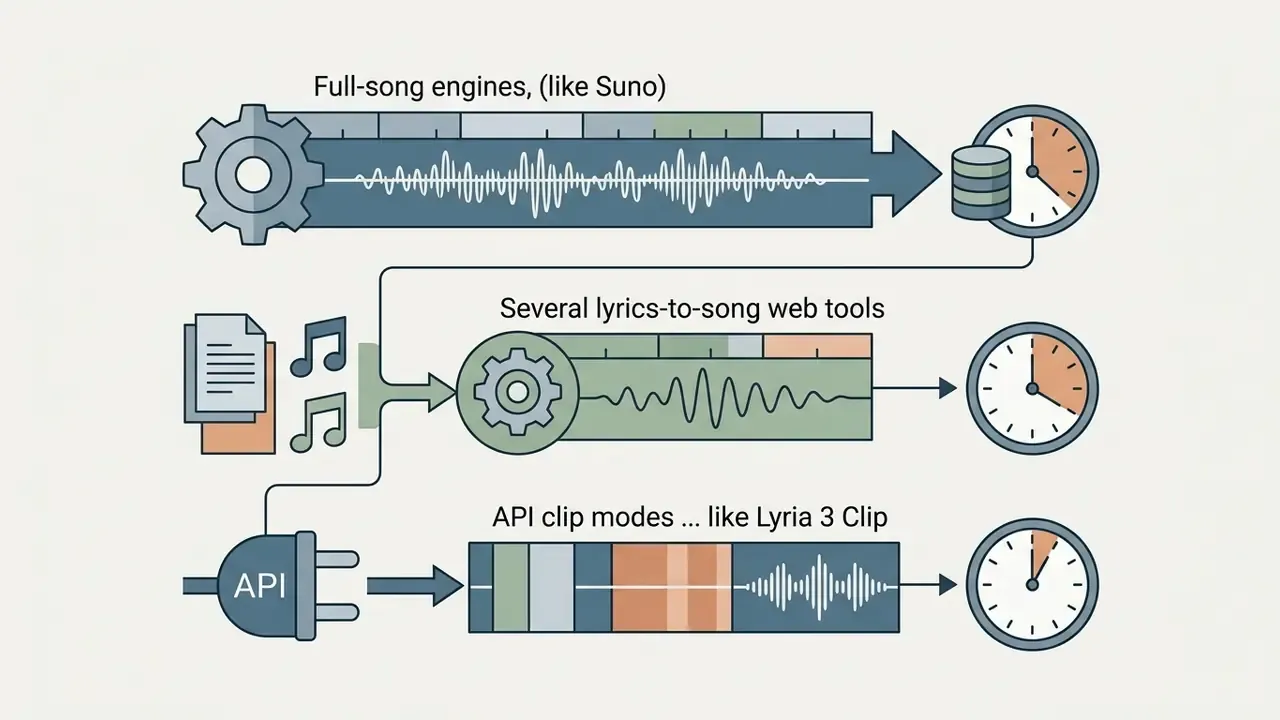
Full-song generators such as Suno render up to 8 minutes; many lyrics-to-song web tools cap output at about 4 minutes; API clip modes return fixed 30-second segments and require a Pro mode for full-song workflows.
Can I remove vocals from a commercial song to make a karaoke track?
Technically yes, using an integrated vocal remover. Legally, separating a copyrighted recording creates a derivative work, so you still need a licence from the rights holder to distribute or perform it publicly. Personal practice use and licensed catalogues are the safe paths.
Do free plans allow YouTube monetization?
Almost never. Free tiers typically reserve ownership to the vendor or restrict use to non-commercial contexts, and upgrading later does not retroactively license tracks created under a free plan.
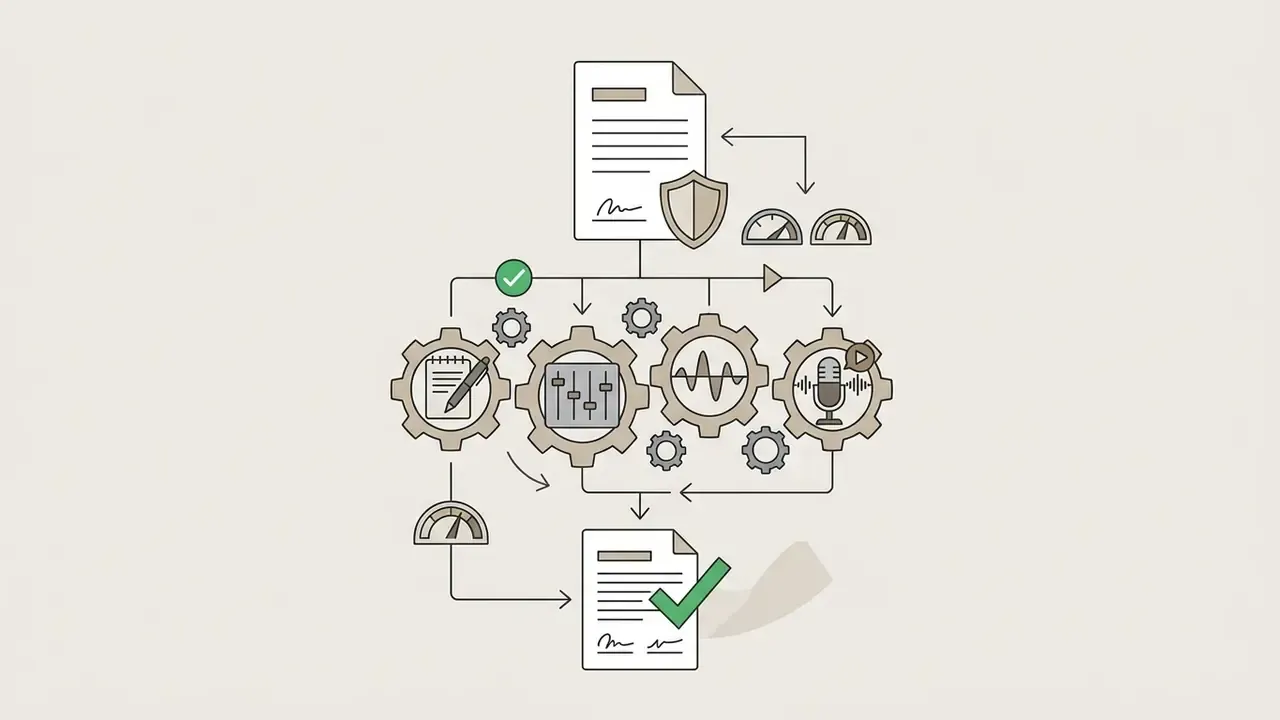
What to Do Next: Building an Internal Generative Audio Policy
If generative audio is entering your content pipeline, formalise it before volume grows:
Appendix A — Superseded Wording Retained for Transparency
- Original comparative-rights sentence, superseded by the clause-level reading of Suno's terms: "Paid plans on Suno, SOUNDRAW, and Boomy grant commercial distribution rights for tracks created during an active subscription."
- Original producer-adoption rounding, superseded by the exact reported figure and sample-size caveat: "94% of professional producers reported using an app to create music with ai during the initial ideation stage."
Terminology used throughout this guide is defined in our AI Media Glossary.