When an AI credit balance drops without warning, the cause is rarely a deleted record. In enterprise and SaaS environments, missing credits almost always trace back to policy-driven expiration, workspace context switching, or a billing ledger that has not finished syncing with the interface you are staring at.
Why does this matter beyond the helpdesk queue? Because in a bank or a mature fintech, metered AI spend is a control surface. Unexplained drawdown touches procurement, model risk, and information security at the same time.
Fast triage table (read this first)
| Symptom | Most likely cause | Fastest action | Typical resolution window |
|---|---|---|---|
| Counter vanished from the toolbar, but AI features still work | UI rollout, feature gating or A/B test | Reload the console, then test in a Private/Incognito window | Minutes to a few days (platform-side) |
| Balance shows zero on one device only | Stale client cache or browser extension conflict | Incognito isolation test, then clear site data for that domain only | Under 15 minutes |
| Balance is zero in a personal profile but the team paid | Wrong workspace, organization or billing group selected | Switch to the purchasing workspace in the org switcher | Under 5 minutes |
| Balance dropped overnight with no manual prompts | Background indexing, agentic planning loops, unmonitored Shadow AI jobs | Terminate editor/agent processes, add exclusion files, set per-user budgets | 1 hour (plus governance follow-up) |
| Balance zeroed on a specific calendar date | Hard policy expiration or billing-model migration | Check platform changelog and expiry policy; contact procurement | Policy-dependent |
| Payment cleared but credits never posted | Asynchronous webhook retries or bank settlement latency | Verify settlement, wait 24 to 72 hours, then escalate with an evidence packet | 24 to 72 hours |
| Purchased inside a mobile or desktop app | App Store / Play Store entitlement sync delay | Force-close the app, then use "Restore Purchases" | Minutes to 24 hours |
How this page runs: causes of disappearance, then account and workspace checks, then display versus real loss, then Shadow AI and background agents, then post-payment checks, then the step-by-step fix protocol, then support escalation with a ticket template, and finally the FAQ.
Why AI credits disappeared from your account
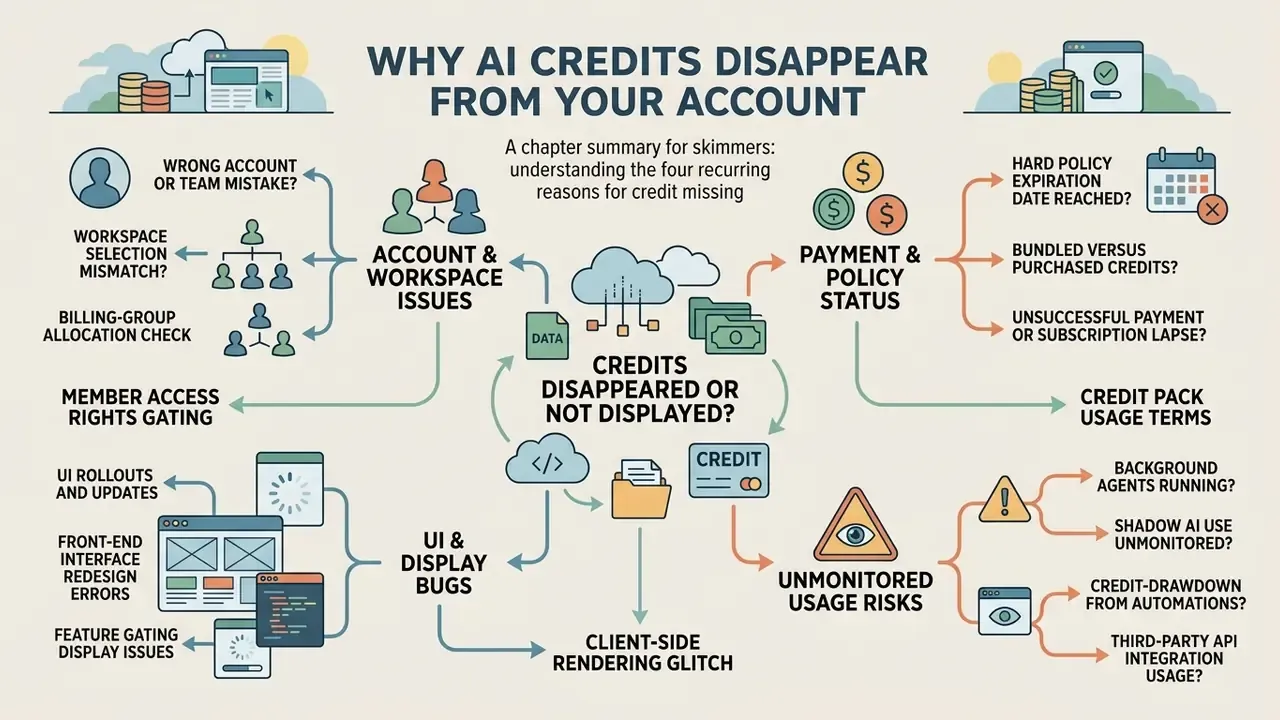
AI credits disappear for four recurring reasons: a hard policy expiration date, a workspace selection mismatch, background processing that nobody authorised, or a front-end display lag. Knowing which of the four you are facing separates an actual ledger reduction from a cosmetic interface problem. That distinction saves money.
Platforms keep rewriting billing models and credit lifecycles. GitHub Copilot shifted on June 1, 2026, from Premium Request Units to token-based AI Credits, which changed how usage is metered against existing balances (GitHub Changelog, 2026, https://github.blog/changelog/). Because consumption is now charged by tokens rather than by request units, an unchanged workload can drain a balance faster than the old meter implied. Microsoft, in parallel, announced the end of seeded AI Builder credits for premium licenses effective November 1, 2026, pushing organizations toward Copilot Credits (Microsoft Learn, 2026, https://learn.microsoft.com/en-us/ai-builder/endofaibcredits). Elsewhere, vendors simply enforce a hard expiry window.
«Promotional, accrued and legacy credits were given a hard expiration date of June 18, 2026; at midnight the system automatically zeroed every unused remaining balance.»
That single cut-off explains a large share of the "credits disappeared randomly, now at 0 credits" reports. The ledger lost nothing. It applied an expiry rule at a fixed timestamp, which is a very different conversation with your vendor.
Unintended consumption is the second big bucket, and it happens without a single manual prompt. Integrated development environments and automated agents run background semantic indexing, repository scanning, and agentic planning cycles. Leave those agents alive in an unmonitored session and prepaid allocations drain quietly overnight.
«The IDE continues semantic repository indexing and agentic planning loops, consuming credits while the user is not interacting with the model at all.»
Check that you are in the right account and team
«Credits are not shared between workspaces: every workspace maintains an independent plan and its own shared credit pool.»
When a user belongs to several departments, switching teams inside account settings is mandatory before the purchased balance becomes visible. Vendor help desks put it in blunt language: if you belong to multiple teams, switch to the team where the credits were bought before you conclude they are gone. The wrong team means the credits exist, just not in the view you are looking at (Mavic Knowledge Base, 2026).
OpenAI Enterprise and Business structures allocate credits at the contract or organization level rather than to an individual profile (OpenAI Billing Guide, 2026, https://help.openai.com/). Enterprise and Edu credits are purchased and allocated at contract level, while Business credits are pooled across all users of that workspace. Two further allocation models produce the same false disappearance:
- Billing-group allocation. Figma documents billing-group AI credits for Enterprise plans, where administrators distribute credits across teams, departments or cost centres. A user can legitimately see nothing in a personal view while credits sit reserved at group level (Figma Enterprise Documentation, 2026).
- Bundled versus purchased credits. JetBrains states that monthly AI credits bundled with AI Pro or AI Ultimate are not listed in the account "Credits" section at all. They surface only in the IDE widget after subscription activation, whereas separately purchased credits do appear in the account (JetBrains Account Documentation, 2026).
Verify the active organization ID before you conclude that anything was removed. Thirty seconds of checking beats a week of dispute correspondence.
UI rollouts, feature gating and interface redesigns
Interface updates and A/B tests can push a credit indicator into a sub-menu or hide it entirely. During a rollout or a UI migration, the visual counter in the main toolbar may vanish while backend entitlements stay fully active. If plan features keep working and only the number is missing, you are looking at a rollout artefact, not a balance reduction.
Community engineering discussions describe exactly this mismatch: a vendor "sometimes removes or relocates the AI credits indicator during interface updates, so the counter disappears even though the backend still tracks usage," and dynamic feature gating can reshape the interface without any change to the underlying plan (Figma Community Forum, June 2026). A related symptom is a "buy a subscription" upsell prompt appearing while credits remain available. That prompt often fires because the client failed to fetch the remaining entitlement, nothing more.
Practical rule for administrators: if generation requests succeed and the billing ledger in the web console reports a non-zero balance, log the missing counter as cosmetic and hold off on a financial dispute. Raising a chargeback over a rendering bug damages your credibility with the vendor when you next need goodwill.
Credits disappeared or are not displayed?
A zero balance on a dashboard is often a client-side display error rather than a real loss. Client applications and browser extensions cache older session states for performance, and that caching creates a temporary desynchronization between the front end and the backend billing ledger. Credits not showing does not equal credits not existing.
Oracle's technical documentation notes that browser cache persistence depends on configured cache-control rules, which can retain stale interface data for up to eight hours unless something forces a refresh (Oracle Web Caching Guide, https://docs.oracle.com/).
Oracle also points out that the web-server cache must be cleared separately from the client browser cache, which opens a second independent path for display lag when only one side updates. Reporting systems such as Z.AI compound this by refreshing consumption logs on a delayed cycle, reflecting the previous day (n-1) rather than the current second (Z.AI Billing Documentation). Anthropic surfaces available balance and usage on the same Billing page, so the number on screen reflects a billing-system view that can trail the live transaction state until synchronisation completes (Anthropic Console Documentation, 2026). Credits that disappeared from a widget may therefore be perfectly intact on the server. The same caveat applies to consumer tools such as AI video generators, where widget and ledger update on different schedules.
One enterprise development team reported an apparent loss of 10,000 credits after an automated system upgrade. Rather than repurchasing, they queried the platform's billing API endpoint directly and confirmed the full balance was sitting on the server. Clearing the local application cache and re-authenticating restored the correct figure on the dashboard immediately. Cost of the fix: about four minutes.
That finding matters for governance reasons. Modern metering pipelines are sampled and aggregated for efficiency, yet they retain very high anomaly-detection accuracy. In practice, the server-side ledger is the authoritative record; the dashboard widget is a downstream, cache-sensitive rendering of it. Treat the two as separate evidence sources in any dispute file.
Important safety notice. Do not submit a duplicate payment while you investigate missing credits. Microsoft Support and the Mastercard Chargeback Guide both stress that double-purchasing during a display delay creates administrative complexity and slows refund processing. Microsoft advises checking order history for closely spaced identical charges and, if none are found, checking whether another account uses the same card. Mastercard requires duplicate transactions to be proven with identical amount, date and time before a dispute proceeds. Nacha likewise treats duplicate payments and payments sent to the wrong receiving account as formal reversal scenarios. Verify the backend ledger, the order history, and the active workspace before you initiate any new transaction.
Shadow AI, unmonitored agents and credit-drawdown risk
For model-risk and AI-governance owners, unexplained credit depletion is a control signal rather than a billing nuisance. Unattended agents, personal API keys and unsanctioned copilots consume metered capacity outside approved workflows. That inflates spend and widens the data-exposure surface at the same time, which is the part auditors ask about.
Three enforceable controls cut that exposure:
- Per-user and per-group budgets.GitHub documents user-level budgets that cap how many AI credits a single user can consume in a billing cycle, covering shared-pool and metered usage. Once the allocation is exhausted, credits legitimately appear absent for that user (GitHub Billing Documentation, 2026). Figma's billing-group model does the same at cost-centre level.
- Hard spend limits and verification gates.Fireworks documents that usage stops when credits hit zero, when the monthly spend limit is reached, or when payment and account verification fails, with the billing dashboard "Credits" section acting as the source of truth (Fireworks Billing Documentation, 2026). An organisational spend ceiling converts a silent overrun into a controlled stop.
- Repository and workspace exclusions.Excluding build artefacts, vendored dependencies and data dumps from agentic indexing stops background jobs from burning capacity on material with no analytical value. In regulated estates it also keeps sensitive directories out of model context entirely, which is arguably the bigger win.
Recommended governance artefacts: an inventory of agentic integrations mapped to named owners, a monthly reconciliation of ledger drawdown against approved use cases, alerting on consumption outside business hours, and a documented escalation path to procurement and the model-risk committee whenever drawdown deviates from baseline. No evidence, no autonomy. An agent without an owner, a budget and an audit trail is not a digital worker; it is an unpriced liability.
Marcus Hale, author.: Marcus Hale, author.
What to check when credits are missing after payment
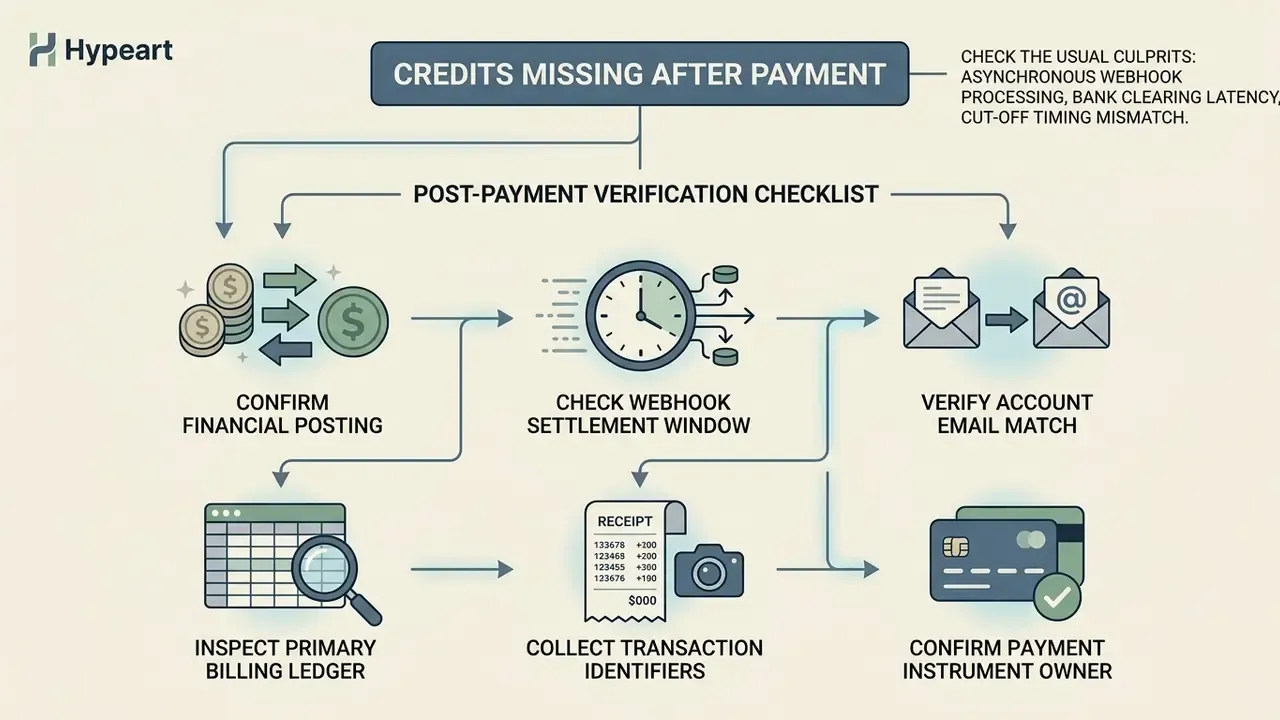
When AI credits stay missing after a successful payment, the usual culprits are asynchronous webhook processing, bank clearing latency, or a cut-off timing mismatch. Payment gateways and core banking systems finish their validation routines before the entitlement ledger updates, and those routines do not run in real time.
Payment infrastructure vendors such as Stripe use automated retry schedules for webhook notifications, and those retries can stretch to 72 hours when endpoint delivery hits network friction (Stripe Webhook Documentation). GOV.UK Pay requires webhook handlers to return a 2xx response immediately and exposes payment event delivery status in its admin tool, which confirms that this latency is tracked and observable at the webhook layer rather than being invisible. Payment status standards defined by Paysafe further separate completed transfers from intermediate states such as PAYMENT_PENDING (bank-to-merchant transfer not yet complete) or SA_CREDIT_PENDING (transfer delayed by bank processing or time-zone offsets) (Paysafe Developer Guide). TrueLayer goes one step further with a settlement_stalled_at marker for payments that never reach settled after a configured delay, formally splitting execution from settlement.
Federal frameworks matter here too. U.S. CFPB Regulation Z clarifies that financial institutions must credit payments as of the date received, while posting to the visible customer account may take extra business days depending on daily processing cut-offs (CFPB Regulation Z, https://www.consumerfinance.gov/rules-policy/regulations/1026/).
Payments submitted after a daily cut-off are generally credited on the next business day, and some government and enterprise portals document visibility windows of up to seven days before a payment is expected to appear in the account view. If an accidental plan change or a team migration happened during checkout, review the options to cancel downgrade switch before you file a formal transaction dispute.
Post-payment verification checklist
- Confirm financial posting.Verify with your bank that the transaction moved from "Pending" to "Settled."
- Check the webhook settlement window.Allow 24 to 48 hours for asynchronous payment webhooks and cloud provisioning jobs to finalise across systems (Google Help Community, 2026).
- Verify the account email match.Confirm that the payment receipt carries the exact email address of the active user profile.
- Inspect the primary billing ledger.Sign in to the official web console billing tab instead of trusting a local IDE panel or a third-party plugin.
- Collect transaction identifiers.Save the invoice, order ID, and transaction timestamp.
- Confirm the payment instrument owner.Check whether a second account, a corporate card or a reseller contract received the credits instead of the active tenant.
Disclaimer. This information is general and does not replace advice from your financial institution or a qualified legal or compliance specialist on payment disputes, chargebacks or contractual entitlements. Institutional environments add their own latency: inside an isolated network, a FedRAMP boundary or a SOC 2 Type II controlled estate, provisioning delays may originate from internal proxies, egress filtering or change-management windows rather than from the vendor at all.
AI credits disappeared: how to fix the issue
Fixing missing AI credits calls for a structured sequence that rules out client-side caching, confirms account context, and inspects background execution settings. Work through it in order and you avoid both an unnecessary support ticket and a repeat charge.
«From November 1, 2026, Microsoft stops providing seeded AI Builder credits for premium licenses; organisations must migrate to Copilot Credits.»
Before you touch anything technical, confirm that the platform has not quietly changed the entitlement you are hunting for. Add-on customers can keep spending an existing balance while losing the ability to renew or buy more, which produces a pool that shrinks and never refills. That looks like a bug. It is a lifecycle decision.
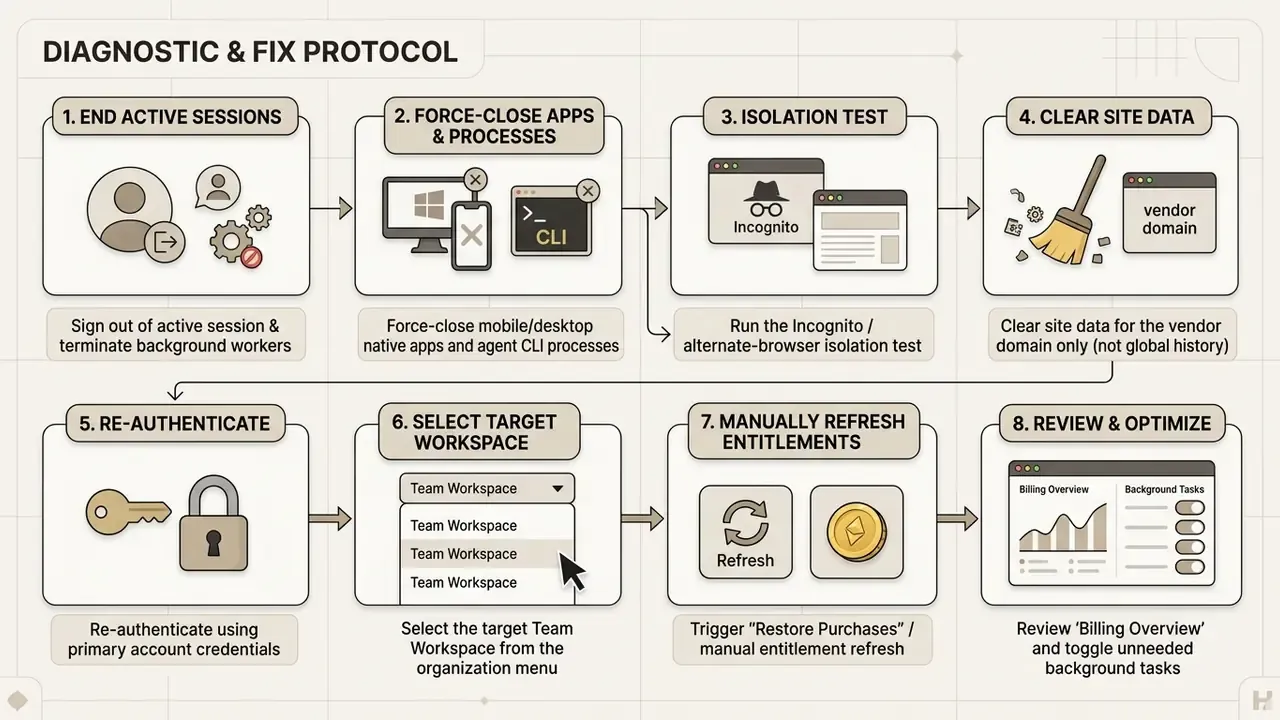
For mobile and desktop native apps. App Store and Play Store purchases can hit localized synchronization delays. Force-close the application, confirm a stable network connection, and trigger a manual entitlement refresh or the "Restore Purchases" button in app settings so local state matches the store receipt. Help desks for app-first products, whether voice, video or image tools, recommend this exact order: check the connection, close and reopen the app to refresh the balance, then re-check after a few minutes, because credits are usually added automatically within minutes of a completed purchase (Voices AI Help Center, 2026). The behaviour repeats across consumer-grade AI voice generators sold through app stores.
Follow the checks in the correct order
Sequence matters. Running the steps out of order tends to destroy the very evidence support will ask for. Microsoft's enterprise support guidance sets a clear troubleshooting order: sign out of the application, clear local application cache files, re-authenticate, then verify the team context (Microsoft Enterprise Support Guide).
First, log out entirely and close every associated background process. In AI-integrated editors such as Cursor, VS Code with Copilot, or agentic IDEs, background processes keep scanning repositories and burning compute units until the editor process is fully terminated (Google AI Developer Forum, 2026, https://discuss.ai.google.dev/). Excluding heavy build directories with a configuration file, .cursorignore in Cursor, workspace-level exclusion rules in VS Code, or .antigravityignore in agentic Google tooling, stops background indexing from draining a balance while nobody is watching.
«Creating an ignore file that excludes heavy directories prevents background indexing and silent credit drawdown.»
Second, run the Incognito isolation test before you touch global browser storage. Open a private window or a different browser. If the correct balance appears there, the cause is a local extension (an ad-blocker or privacy shield, usually) or a stale domain cookie. Then clear only site-specific data through Developer Tools → Application → Storage → Clear site data for that one domain. Wiping your entire browser history would take out sessions and MFA trust on unrelated internal systems, which is a self-inflicted incident nobody needs on a Friday.
Third, clear the browser cache or local application storage so the client pulls fresh state from the server ledger. Fourth, sign back into the web console and confirm that the active organization or team matches the entity holding the payment method, the same reconciliation logic used by the credit systems of AI platforms that sell prepaid packs. If the balance is still zero after all four steps, the cause sits in backend provisioning or policy expiration, not in your browser.
Planning spend rather than chasing it? Model your expected drawdown first with the AI Video Credit Calculator, then set the per-user cap that matches your risk appetite.
AI credits disappeared help: when and how to contact support
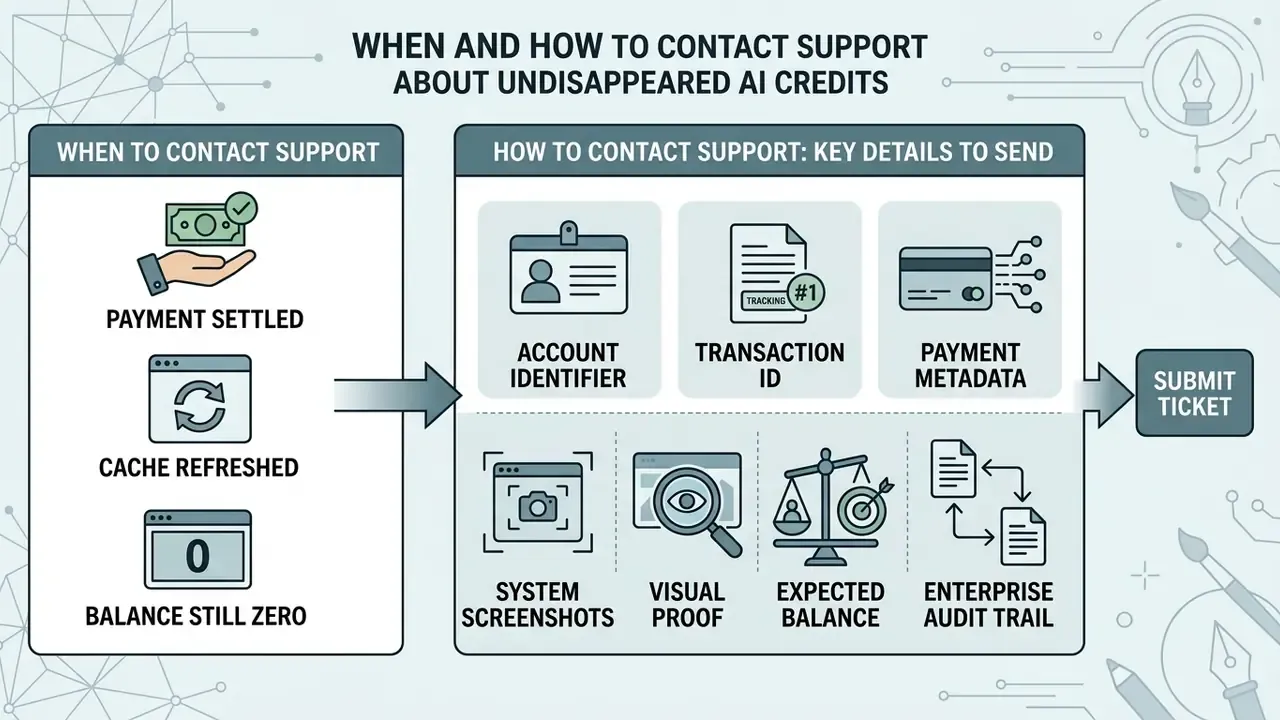
Contact official technical support once your own checks confirm three things: the payment has settled, the session cache has been refreshed, and the balance is still zero after 24 to 48 hours. Escalate immediately, without waiting, if you suspect unauthorized activity or an account compromise.
Vendor policy shapes how a missing-credit claim gets investigated. OpenAI terms specify that purchased credits are non-refundable, valid for 12 months, and non-transferable (OpenAI Help Center, 2026, https://help.openai.com/).
«Purchased OpenAI credits are non-refundable, valid for 12 months from the purchase date, and cannot be transferred to another user.»
That said, where an account compromise is confirmed after prompt reporting, support teams can review system access logs and restore lost balances (OpenAI Help Center, 2026).
«OpenAI's stated position is that it does not provide itemised credit-consumption records or usage logs on user request.»
There is a direct operational consequence to that constraint. Your own telemetry, meaning gateway logs, API correlation IDs and agent job history, is frequently the only reconstructable audit trail you will have. Capture it before you open the ticket, not after.
A complete technical evidence packet lets support trace transaction logs quickly instead of trading five emails with you. Vendor documentation converges on the same minimum set, receipt or invoice, transaction date and amount, account email, order or transaction ID, and screenshots, precisely because those fields let an engineer join payment-gateway records to the entitlement ledger in a single query (payment support and helpdesk documentation, 2026). Cloud administration guides add the organization ID as the unique tenant identifier needed to bind a ticket to the right account record.
Send support the useful account and payment details
Assemble the package before you submit anything. Precise account metadata lets support engineers correlate payment gateway logs against backend ledger records without guesswork.
Include the following:
- Account identifier. Primary email address plus the unique organization ID or tenant ID.
- Transaction identifiers. Payment receipt, invoice number, and the transaction ID issued by the payment gateway.
- Payment metadata. Exact date, time, currency, and amount charged.
- System screenshots. Full-screen captures of the "Billing Overview" tab, current usage logs, and active workspace settings.
- Visual proof. A full-screen, uncropped screenshot of the credits dashboard showing both the missing counter and the signed-in profile, plus any in-app error banners or upsell prompts.
- Expected balance. The number of credits you expected, the purchase date, and the workspace or team that owns them.
- Enterprise audit trail. SSO or IdP authentication log excerpts for the affected window, API correlation or request trace IDs, and agent job identifiers where background consumption is suspected.
- Diagnostic summary. A short list of what you already tried: cache clearing, Incognito isolation test, workspace verification, background process termination.
- Support channel selection. Use in-app support chat for an immediate transaction lookup. If that channel is unavailable, email the official helpdesk with the subject line
[Urgent] Missing Credits After Payment - [Organization ID].
Copy-ready ticket template
Subject: [Urgent] Missing Credits After Payment - ORG-<organization_id>
1. Account email:              <email>
2. Organization / Tenant ID:   <org_id> / <tenant_id>
3. Workspace or team name:     <workspace>
4. Payment email (if different):<email>
5. Invoice / order / txn ID:   <ids>
6. Amount, currency, timestamp:<amount> <ccy> <UTC timestamp>
7. Credits expected vs shown:  <expected> / <displayed>
8. Date & time first noticed:  <UTC timestamp>
9. Steps already completed:    logout, incognito test, site-data clear,
                               workspace switch, agent processes terminated
10. Attachments:               receipt, full-screen billing screenshot,
                               usage log export, SSO log excerpt,
                               API correlation IDs
For teams comparing consumption models and projecting ongoing operational costs in media workflows, a structured comparison of AI video generators helps set predictable usage baselines and matching risk controls.
Internal notification and escalation protocol
Missing or silently consumed credits are a procurement and model-risk event, not only a helpdesk item. Notify these owners in parallel with the vendor ticket:
- Procurement and vendor management.Log the incident against the contract, confirm entitlement terms, and preserve remedy rights before any expiry window closes.
- Model risk management.Record the drawdown anomaly, assess whether unapproved agents contributed, and decide whether an interim spend cap is warranted.
- Information security.If credential sharing, unauthorized access or unexpected off-hours consumption is suspected, treat it as a potential account-compromise case and open the incident-response runbook.
- Finance and FP&A.Prevent a duplicate payment during the investigation and align the dispute timeline with the accounting close.
One open question deserves honesty: none of these vendors publish a standard restoration policy for agent-driven overconsumption. Until they do, your budget caps and exclusion files carry more weight than any escalation letter.
FAQ: AI credits disappeared
Do AI credits expire?
Frequently, yes. Purchased OpenAI credits run 12 months and are non-refundable, while promotional and legacy balances can be zeroed on a fixed policy date, as happened with the June 18, 2026 expiration documented on the Google AI Developer Forum. Read the expiry clause before you assume a defect.
My counter is gone but AI features still work. Is my balance lost?
Almost certainly not. That pattern points to a UI rollout, feature gating or an A/B test. Verify the number in the web console billing tab; if it is intact, take no financial action.
How long should I wait after payment before escalating?
Allow 24 to 48 hours for provisioning and webhook retries, stretching to 72 hours where webhook delivery has failed. Regulation Z credits a payment as of the receipt date, but visible posting can trail by additional business days.
Should I buy the pack again if credits do not appear?
No. Duplicate purchases muddy refunds and weaken dispute evidence, and both Microsoft Support and the Mastercard Chargeback Guide expect proof that the cardholder was not debited twice.
Can support restore credits that were consumed by a background agent?
Restoration is discretionary and policy-dependent. Confirmed account compromise is the strongest documented path; routine background consumption is normally treated as legitimate usage. That is exactly why exclusion files and per-user budgets matter more than appeals.
Credits are missing after an in-app purchase on mobile. What now?
Force-close the app, confirm a stable connection, use "Restore Purchases," then re-check after a few minutes. If the store receipt exists but the entitlement does not, attach the store receipt ID to your ticket.
Additional resources and platform options
For a broader view of alternative media generation tools, architectural options, and comparative licensing frameworks across operational scenarios, start from the AI Media Alternatives by Reason hub. If your priority is transparent quotas with no prepaid lock-in, compare free AI video generators and their credit ceilings before you commit budget. The governance procedures above reflect standard enterprise AI platform guidelines, vendor documentation and published regulatory guidance current as of June 2026. Verify vendor-specific terms in your own contract before acting on them.