Executive Summary: What Matters Before You Publish
- Capability. An AI video generator turns text prompts, static images, or audio tracks into 1080p motion sequences using diffusion transformers. In 2026 the practical ceiling for a single native generation is roughly 8 to 15 seconds, extendable to about 120 seconds through chained extension passes.
- Selection. Model choice is a trade-off matrix, not a ranking: Sora 2 and Runway Gen-4.5 for cinematic physics, Veo 3.1 for camera steerability and C2PA content credentials, Kling 3.0 for lip-sync and motion dynamics, Seedance 2.0 for speed and multimodal reference control, HunyuanVideo 1.5 for auditable open-weight deployment.
- Governance. Commercial rights, prompt logging, provenance metadata (C2PA), reference-asset clearance, and human-in-the-loop review are the controls that separate a publishable enterprise asset from an uncontrolled Shadow AI experiment. Free tiers rarely grant commercial rights, and purely machine-generated output cannot be registered for copyright without human creative contribution.
How to Read This Guide
What Is an AI Video Generator and What Kinds of Video It Creates
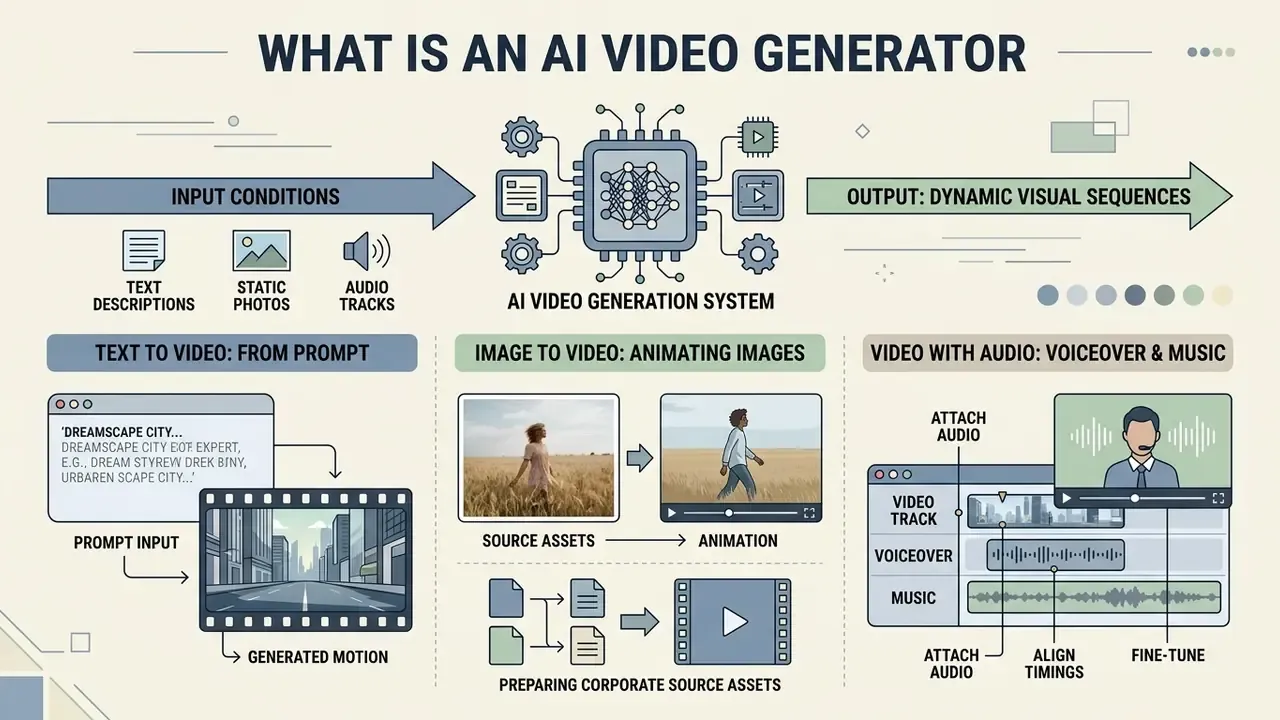
An AI video generator is a machine learning system that synthesizes dynamic motion and visual sequences from input conditions like text descriptions, static photos, or audio signals. It enables scalable video creation by transforming narrative concepts into high-resolution visual clips without requiring manual frame-by-frame animation.
Modern architectures move beyond legacy keyframe interpolation by employing diffusion transformers (DiT, a transformer backbone that denoises latent video representations) and space-time U-Net frameworks trained on massive video corpora. Whether producing rapid social media assets, product motion graphics, or cinematic multi-shot sequences, an AI video generator constructs spatial geometry and temporal continuity simultaneously. Research on large-scale datasets demonstrates that rich caption granularity directly improves visual fidelity and text alignment in AI generated content.
"OpenVid-1M contains over one million video clips at 512×512 resolution and above with expressive captions, outperforming WebVid-10M and Panda-70M on fidelity benchmarks."
Foundation-model design has converged on a common blueprint: large-scale curated video data, a diffusion-transformer backbone with a purpose-built video VAE, progressive resolution scaling, and dedicated temporal modules. HunyuanVideo (2024) documented this pattern at 13B+ parameters as an open-weight system, while two-stage pipelines such as FusionFrames generate storyline keyframes first and interpolation frames second to preserve narrative continuity.
Generating Video from a Text Prompt
Text-to-video generation constructs novel visual sequences directly from natural language instructions that define scene elements, subject motion, camera movement, and lighting parameters. Teams building a repeatable prompt library can start from our reference material on text-to-video AI tools.
To generate AI videos reliably, enterprise prompt design relies on a structured multi-part schema: subject specification, environmental context, motion direction, camera composition, and aesthetic style. Guidelines from Adobe Firefly and Runway (2025 to 2026) emphasize separating shot types (such as wide-angle or tracking shots) from descriptive visual filters. Firefly formalizes the order as Shot Type + Character + Action + Location + Aesthetic, while Tencent's HunyuanVideo-1.5 Prompt Handbook (2025) uses Subject + Motion + Scene + [Shot Type] + [Camera Movement] + [Lighting] + [Style] + [Atmosphere]. Creators working on stylized graphics often use a text animation generator or explore a text art generator to refine visual concepts before submitting prompts to diffusion pipelines. Clear kinematic terms ("walks slowly", "camera trucks left") prevent semantic drift across generated frames.
A small practical note from repeated testing: prompts that read like a shot list outperform prompts that read like a poem. Almost every time.
Image to Video: Animating Images and Photographs
Image-to-video (I2V) synthesis animates static images, photographs, or reference graphics while preserving original subject identity, texture fidelity, and visual styling. A side-by-side breakdown of platforms is collected in our overview of image-to-video AI tools.
Advanced I2V frameworks use dual-stream encoders, combining a reference image appearance network with pose-control signals, as seen in systems like MagicAnimate (CVPR, 2024) and ReferenceNet-based character animation pipelines. Techniques such as DyMoS (2026) rebalance initial frame attention logits to prevent over-anchoring, allowing fluid object motion while preserving initial visual attributes; adaptive low-pass guidance (CVPR, 2026) achieves a similar trade-off by conditioning early denoising steps on a blurred reference frame. Businesses frequently deploy this capability to animate static portraits using a talking photo online system, or to convert product photos into motion ads.
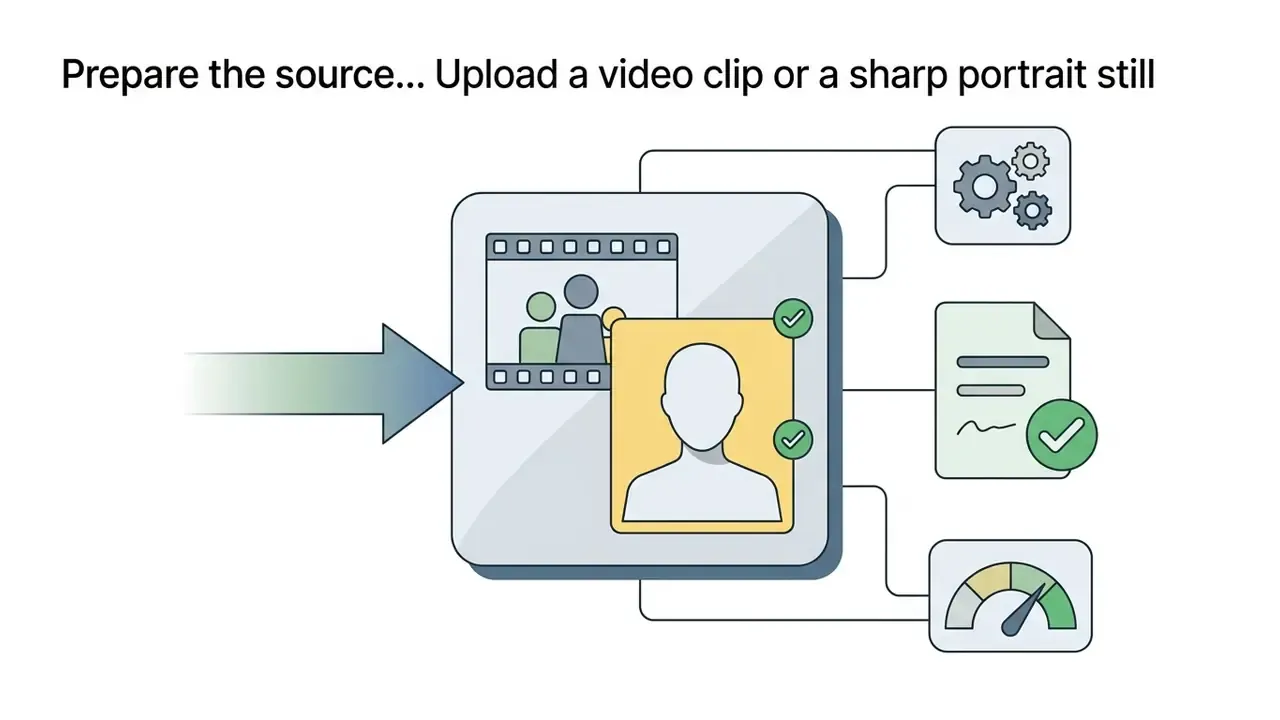
Preparing corporate source assets. Input quality dominates output quality. Before submitting brand assets, normalize resolution, crop to the target aspect ratio, remove third-party trademarks from the frame, and confirm that no personal data appears in the background of internal photography. That last point catches teams off guard: a whiteboard, a badge, an open laptop screen. Retouching and clean-up of brand and talent imagery is best handled upstream in an AI photo editor for reference-image preparation or a conventional photo editor, so that the generator receives a cleared, on-brand still rather than a raw capture. Cosmetic touch-up utilities, down to a consumer-grade teeth whitening app used on presenter headshots, belong in that same upstream stage, never after render, where re-edits force a full regeneration and a new approval cycle.
Generating Video with Audio, Voiceover, and Music
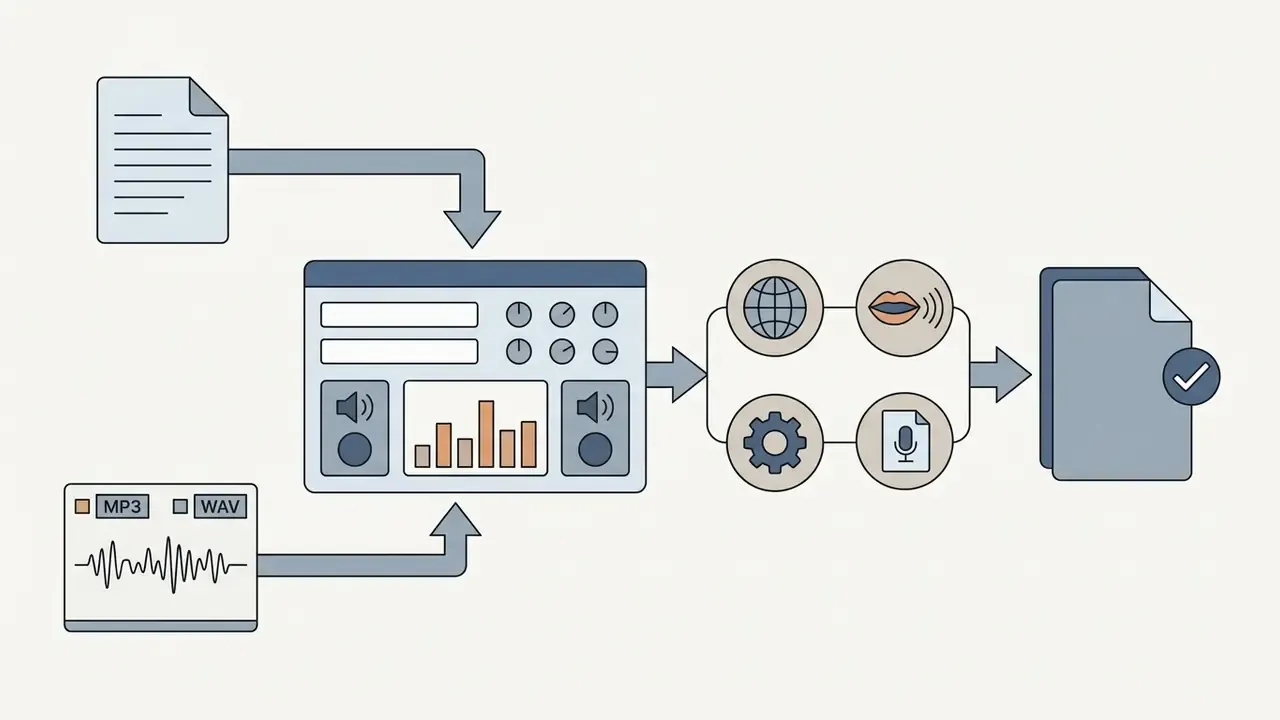
An AI audio and video generator synchronizes visual frame rendering with spoken dialogue, narration, and audio tracks within a unified generative workflow.
Frameworks like SyncDiT (2026) and SyncTalk (CVPR, 2024) combine specialized facial controllers with cross-attention modules to align lip movements directly with audio waveforms; MTV (2025) goes further and demixes the soundtrack into speech, effects, and music so that lip motion, event timing, and visual mood can be steered independently. However, behavioral research indicates that synthetic narration carries an engagement cost.
Consequently, enterprise workflows frequently pair synthetic visual rendering with human voiceovers, or with a text to animation module for explainer segments, to preserve consumer engagement. Where synthetic speech is unavoidable, voice quality and licensing terms should be evaluated through a dedicated AI voice generator comparison before production. Voice cloning of a named executive deserves its own release, its own approval record, and a documented revocation path.
How to Choose an AI Video Model
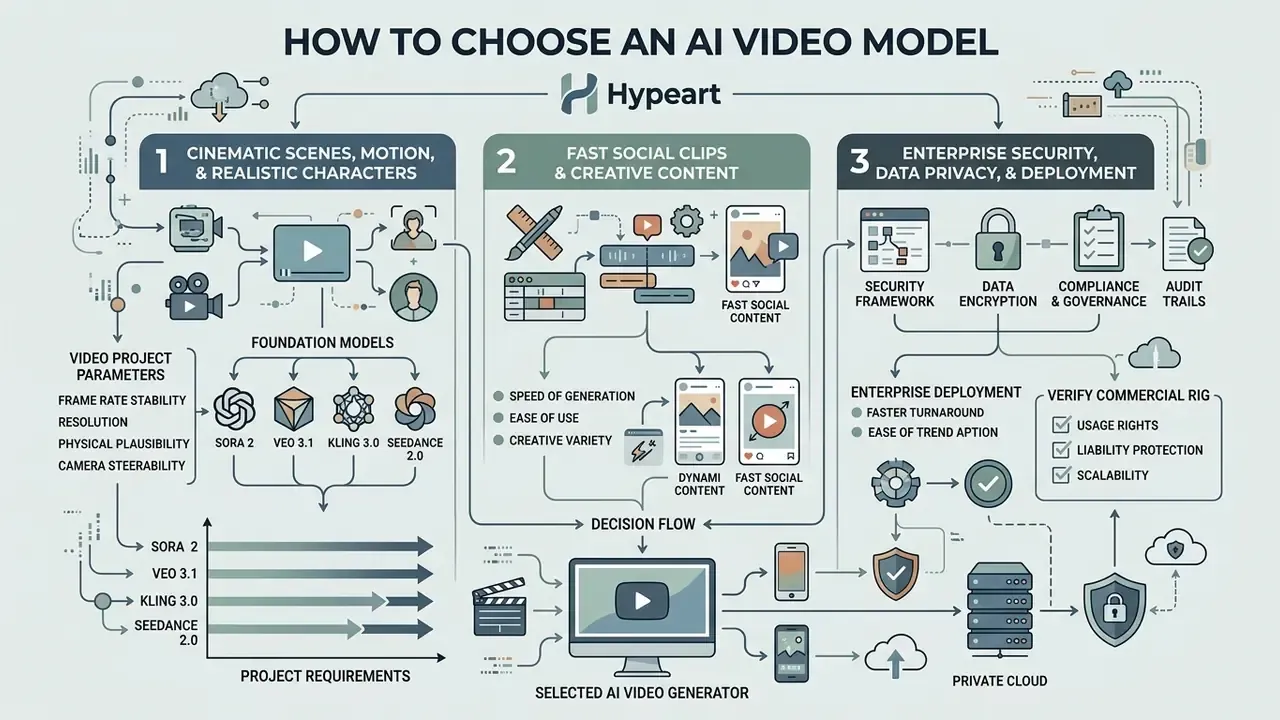
Selecting a suitable video model requires evaluating project parameters (frame rate stability, resolution, physical plausibility, camera steerability) against specific foundation models.
Enterprise teams evaluate parameter scale, inference latency, and fine-tuning flexibility across platforms like OpenAI Sora, Google Veo, Kuaishou Kling, and ByteDance Seedance. A capability-versus-cost breakdown of the current field is maintained in our roundup of the best AI video generators. Closed proprietary models emphasize zero-shot visual realism; open-weight choices like HunyuanVideo 1.5 allow internal auditability and custom infrastructure integration. Organizations comparing model performance across commercial suites rely on AI Media Comparison Matrices to analyze compute requirements and subscription tiers.
One structural point for procurement: independence from a single AI platform is worth paying for. Model leadership has rotated roughly every two quarters since 2024, and a pipeline welded to one API becomes a migration project the moment quality or pricing shifts.
Models for Cinematic Scenes, Motion, and Realistic Characters
Cinematic video synthesis requires foundation models capable of continuous 24 FPS temporal stability, complex camera trajectories, and consistent physical interactions.
Runway Gen-4.5 and Kling 3.0 excel in camera steerability and multi-character coreference, helping maintain character identity across scene transitions. Runway documents realistic weight, momentum, and force behavior, while Kling exposes dolly zooms, tracking shots, and rack focuses as native camera directives. Vendor claims should still be treated as marketing input rather than validation evidence: recent academic evaluations show that visually smooth output can violate mechanically admissible motion, and that character identity degrades without explicit seed-frame anchoring (A Multistage Pipeline for Character-Stable AI Video Stories, ACL ARR 2026). Public system documentation for Sora likewise acknowledges continuing difficulty with long-duration physical interactions, which is why extended sequences should be assembled from short validated shots rather than one long generation. Engineering teams building production pipelines consult AI Media API Guides to integrate high-fidelity generation endpoints into existing rendering software.
Enterprise Security, Data Privacy, and Deployment Criteria
Model quality is only one axis of selection. For regulated organizations, the decisive criteria are data handling, identity management, and auditability, and none of them appear in creative benchmark tables.
| Control | What to require in writing | Why it matters |
|---|---|---|
| Data retention | Zero-data-retention or contractual opt-out from training on prompts, reference assets, and outputs | Prevents leakage of unreleased campaigns, customer imagery, and internal scripts |
| Certifications | SOC 2 Type II, ISO/IEC 27001, documented sub-processor list | Baseline third-party assurance for vendor risk assessment |
| Identity & access | SSO/SAML, SCIM provisioning, RBAC, per-workspace isolation | Eliminates shared logins and orphaned accounts; enables least privilege |
| Deployment model | SaaS vs. VPC/private cloud vs. on-premise open weights | Determines whether data ever leaves the controlled perimeter |
| Logging & audit | Exportable prompt, seed, model-version, and reviewer logs | Supplies audit evidence and reproducibility for model risk reviews |
| Provenance | C2PA Content Credentials and/or invisible watermarking on export | Supports AI-content labeling obligations and deepfake defence |
| Regional processing | Choice of processing region, DPA with cross-border transfer terms | Aligns with data-residency and privacy obligations |
Open, fully documented alternatives simplify audit work when a closed API cannot satisfy these requirements.
"Open-Sora releases the full training and inference code plus model weights, generating video up to 16 seconds at 720p with arbitrary aspect ratios."
Agency and in-house teams should also verify collaboration mechanics: check for multiplayer editing, meaning simultaneous real-time editing of the script, timeline, and prompts by several users, plus versioned project history and role-based comment threads. Without that, review cycles migrate into untracked chat channels, and the approval record you need six months later simply does not exist.
Pricing, Free Access, and Commercial-Use Terms
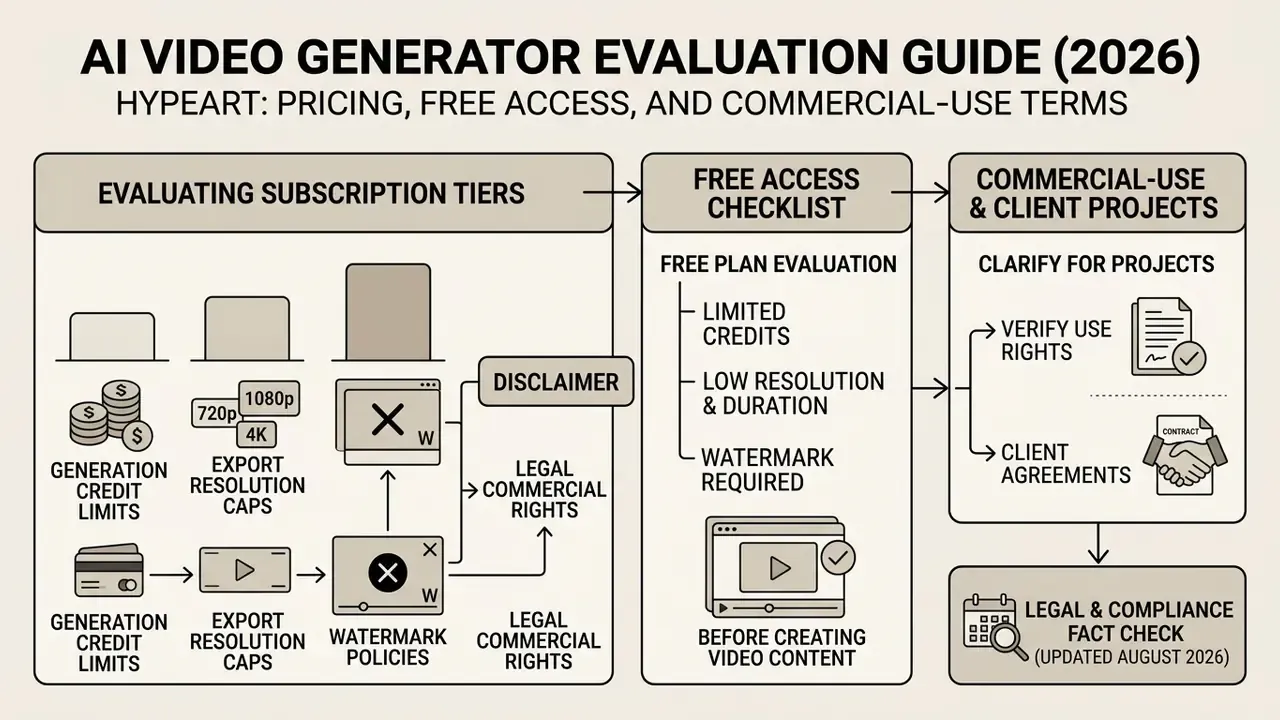
Evaluating subscription tiers requires examining generation credit limits, export resolution caps, watermark policies, and legal commercial usage rights.
Access models range from restricted free trials to high-volume enterprise API subscriptions. A structured comparison of entry-level offers, including credit resets and watermark rules, is available in our review of free AI video generators with credit limits and watermarks. Free plans enable functional testing, but explicit commercial rights generally require paid subscriptions. Licensing philosophies differ across adjacent modalities as well, which is worth checking against the commercial-use terms for AI generators before standardizing a stack.
What to Check in a Free Plan Before Creating Video
What to Clarify for Commercial Use and Client Projects
Commercial deployment requires confirming that platform Terms of Service grant commercial ownership over output files, and ensuring all input reference assets (images, audio, characters) are fully cleared.
US Copyright Office guidance (2026) clarifies that purely machine-generated outputs lacking human creative input cannot register copyright protection; registration must disclaim AI-generated portions and identify the human contribution. Separately, the Office's digital-replica report stresses that a person's image and voice should be licensed rather than assigned outright, and Congressional Research Service analysis notes that imaginary characters can carry protection independent of the work they appear in. So reusing a licensed character in a client campaign may require its own clearance. Using third-party likenesses or proprietary characters in client projects requires explicit legal release, in writing, before generation rather than after. For legal analysis of copyright rulings affecting synthetic media, compliance teams check the AI Litigation and Case Timelines database. Broader operational policies are detailed within the AI Media Commercial-Use Hub.
Regulated sectors should also map synthetic media against sector-specific obligations: financial-promotion review requirements (including SEC and FINRA advertising rules for firms in scope), transparency and labeling duties emerging under the EU AI Act, and internal marketing-approval workflows. Synthetic presenters that could be mistaken for employees, advisors, or customers warrant explicit on-screen disclosure. A generated "advisor" delivering a performance claim is not a creative decision. It is a supervised communication.
| Platform / Tier | Free Plan Limits | Paid Subscription Pricing | Commercial Rights | Export Resolution & Features |
|---|---|---|---|---|
| Adobe Firefly | Daily resetting credits | Integrated with Creative Cloud ($9.99+/mo) | Included on Free & Paid | 1080p, no watermark (paid), commercially safe training data |
| Runway Gen-3/4 | 125 one-time credits | $12 / $28 / $76 per month | Paid tiers only | 720p (free, watermarked) to 4K (paid) |
| Kling AI | ~66 daily credits | Starts at $6.99 / month | Paid tiers only | 720p watermarked (free) to 1080p 48fps (paid) |
| Pika Labs | 80 monthly credits | Starts at $8.00 / month | Paid tiers only | 480p watermarked (free) to 1080p crisp (paid) |
| HeyGen (avatars) | Limited trial minutes | From ~$24 / month | From Creator tier | 1080p, brand kits, avatar reuse |
| Enterprise API tiers | Not applicable | Custom (per-second or per-credit inference) | Contractual, negotiated | SSO, private deployment, retention controls, SLAs |
Total cost of ownership extends well beyond the subscription line. Budget for GPU inference or per-second API charges, storage of source and intermediate renders, moderation and human review hours, audit-log retention, and legal review of each externally published asset. In most enterprise pilots, review and clearance labor, not generation credits, is the dominant cost. Any ROI model that omits control cost and residual risk will overstate the return, and reviewers notice.
How to Create an AI Video: From Idea to Export
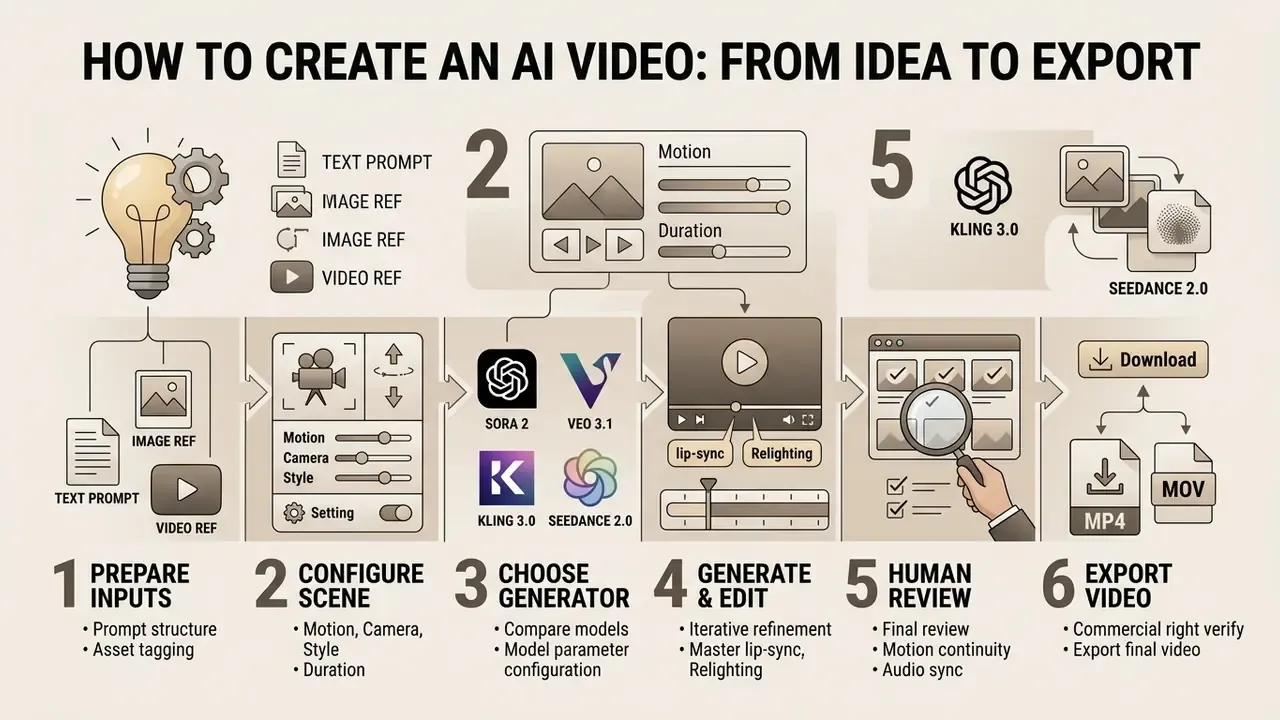
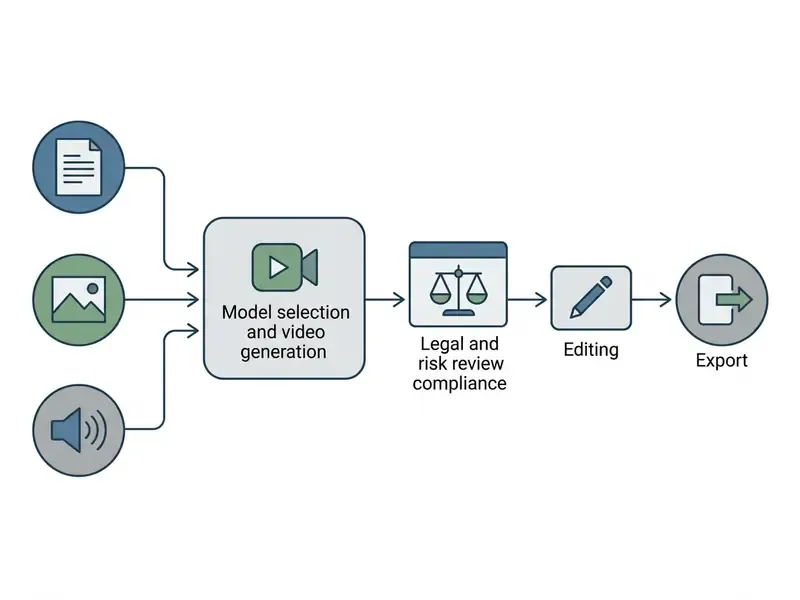
Creating commercial AI video involves an organized workflow: prompt crafting, reference media selection, model parameter configuration, iterative refinement, human review, and high-resolution export.
Standardized workflows set technical constraints before inference starts. In one illustrative enterprise scenario, a financial technology firm turned static presentation slides into three vertical video ad variants. Before generation, the source deck was scrubbed of client logos and any personally identifiable data in screenshots, and the underlying claims were pre-approved by the compliance team. By defining structured text descriptions, generating low-resolution drafts, routing approved drafts through a legal and risk sign-off gate, and only then upscaling, the team reduced production timelines from two weeks to under four hours while keeping brand alignment and an auditable approval trail. The example is composite and hypothetical, offered to show sequence rather than to promise results.
Prepare Prompt, Image, or Reference Video
Input preparation means structuring natural language prompts alongside high-resolution reference images or audio files tagged for the model encoder.
Public-sector generative-AI guidance converges on two rules that apply directly here: write clear, specific, constraint-bearing instructions, and never place confidential or sensitive information into a prompt. Washington State's generative AI guidelines explicitly instruct users to exclude sensitive data and to review AI-generated text, image, audio, and video output for bias and inaccuracy, while the U.S. Department of Energy's reference guide names "clear and specific instructions" as the first principle of prompt crafting. NIST's secure-development guidance (SP 800-218A, draft) is relevant at the platform layer, not the creative one. It addresses secure AI system development practices, so cite it for pipeline hardening rather than prompt wording.
Every reference file uploaded to an AI app generate video interface must be labeled clearly (for example @image1, @audio1) to maintain identity stability and sync alignment during multi-modal conditioning. Tag order matters more than people expect: vendor guides for 2026-generation models warn that mismatched reference order breaks identity, motion, or rhythm alignment.
Configure Scene, Motion, Camera, and Duration
Parameter setup involves selecting camera movement commands, clip frame rates, target scene lengths, and frame aspect ratios prior to generation.
Standard API configurations support clip durations of 4, 6, or 8 seconds at 24 FPS, with up to four candidate videos per prompt in a single call. Camera controls should use precise terminology (pan, tilt, truck, pedestal, tracking shot, static shot, aerial orbit) to keep model execution consistent across iterations.
"CamTrol enables training-free camera control: rearranging pixels in intermediate latents simulates perspective shifts of the camera within a 3D point-cloud representation."
Generate, Edit, and Export
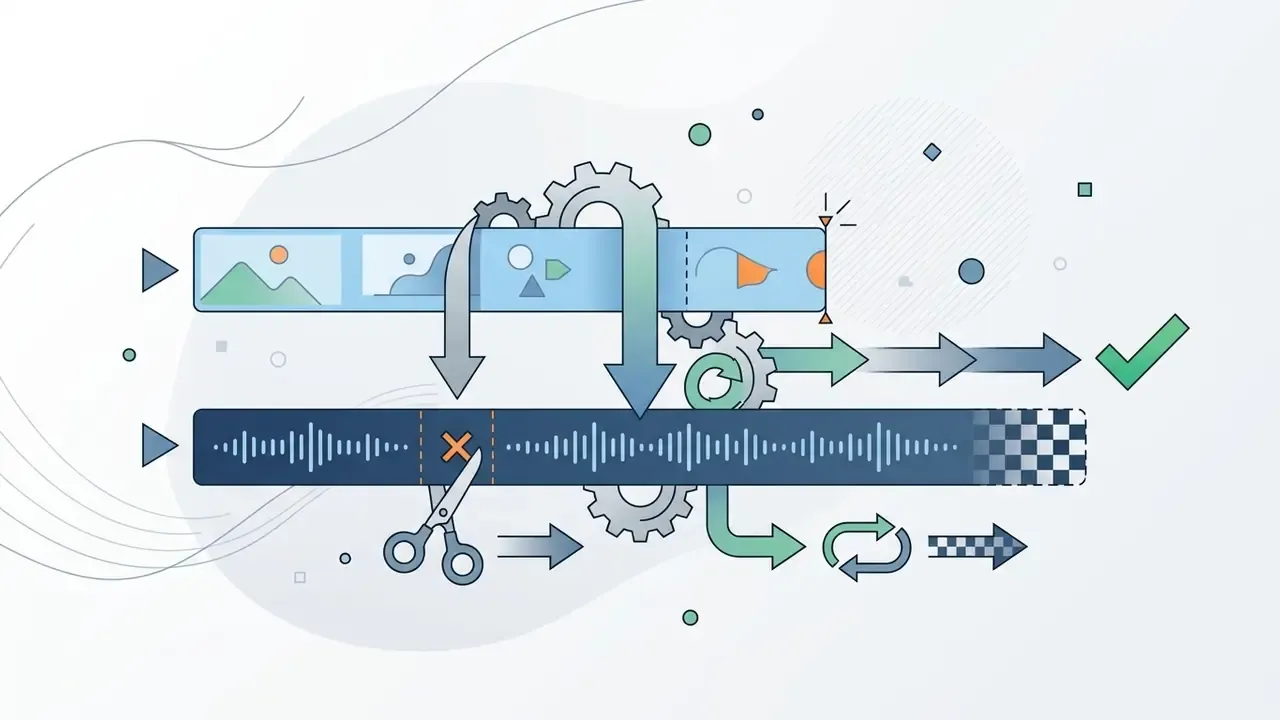
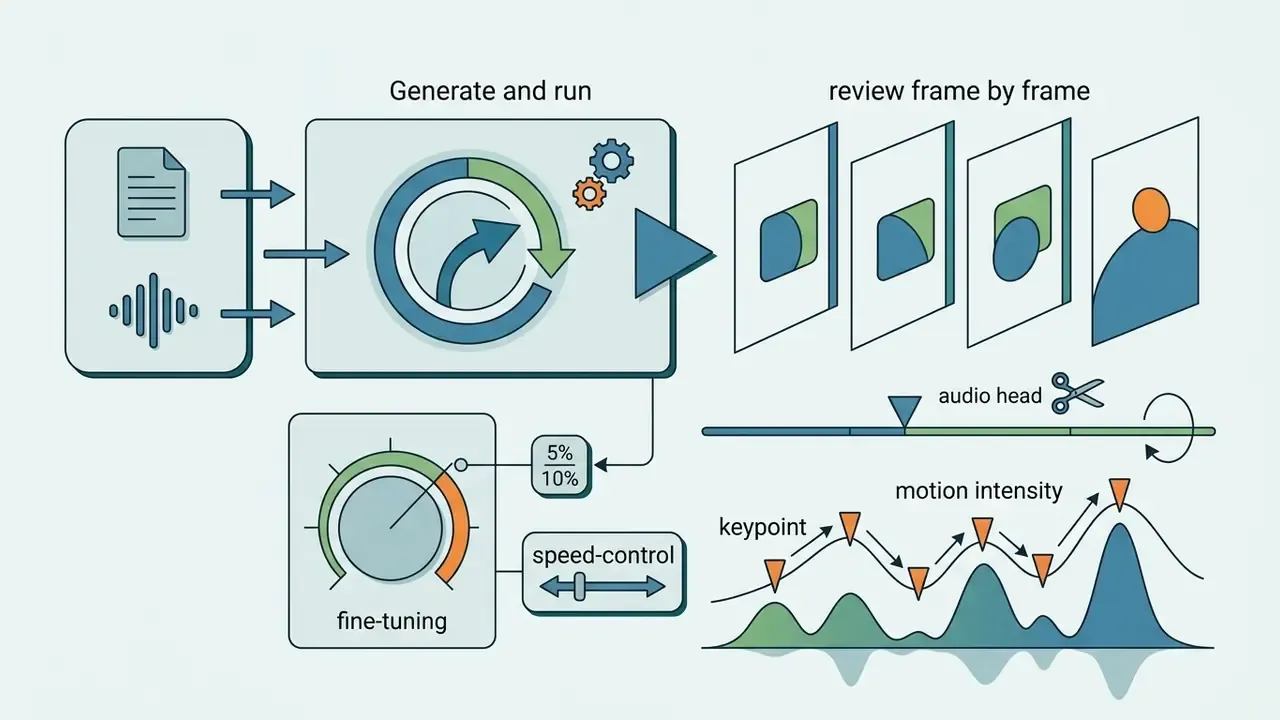
The final phase consists of running latent diffusion generation, executing prompt-based local edits or upscaling passes, and exporting finalized MP4 files.
Advanced pipelines employ a two-stage process: initial latent sampling at 480p or 720p, followed by a temporal super-resolution pass to produce crisp 1080p output.
Text-guided latent diffusion upscaling has been formalized in research as well. Upscale-A-Video (CVPR 2024) targets temporal consistency during real-world video super-resolution, which is the failure mode most visible after naive frame-by-frame upscaling: the shimmer nobody spots until the asset is on a homepage. Teams managing rendering budgets use AI Media Calculators to estimate compute costs before executing large generation batches, and finalize sequences in conventional video editing software for trimming, sound mixing, and brand compliance checks. Large source files destined for social platforms are usually passed through a video compressor before delivery.
Final review of AI video before export
Generative video introduces failure modes that traditional media QA does not cover: identity drift across shots, temporal flicker, physically implausible motion, unintended text or logo hallucination, and non-reproducible output. Organizations already operating a model risk framework should extend it rather than build a parallel one. A second framework tends to become a second backlog.
- Reproducibility. Log the seed, model version, sampler settings, prompt text, and every reference asset hash for each accepted render. Without those five fields, a published asset cannot be reconstructed during an audit.
- Stress testing for drift. Generate the same character across at least five sequential shots and score facial geometry, wardrobe, and palette stability. Identity drift typically appears after the second extension pass.
- Artifact scoring. Sample frames systematically (for example, every 12th frame) and score temporal flicker, limb deformation, background morphing, and text hallucination on a fixed rubric, so results stay comparable across models and releases.
- Prohibited-output testing. Probe the model with prompts that could produce a real person's likeness, a competitor mark, or a regulated claim, and record refusal behavior.
- Human-in-the-loop. Fully automated publication of generative video into customer-facing channels should not be permitted in regulated environments. A named reviewer must approve each asset, and the approval must be logged.
Provenance, C2PA, and watermarking. Content Credentials under the C2PA standard attach cryptographically signed metadata describing how an asset was produced and edited. Google's Veo documentation lists C2PA credentials as a native feature, and invisible-watermarking schemes such as SynthID provide a complementary signal that survives re-encoding. Because metadata can be stripped by social platforms and re-encoding pipelines, the durable control set is layered: signed provenance metadata, invisible watermark, visible on-screen disclosure where required, and an internal registry entry mapping the published asset to its prompt and reviewer.
Open question, stated plainly: no widely adopted method yet proves that a given clip was not generated by a specific model. Detection remains probabilistic. Governance therefore depends on your own records rather than on forensic certainty.
Checklist0 / 10
Controlling Style, Characters, and Editing AI-Generated Video
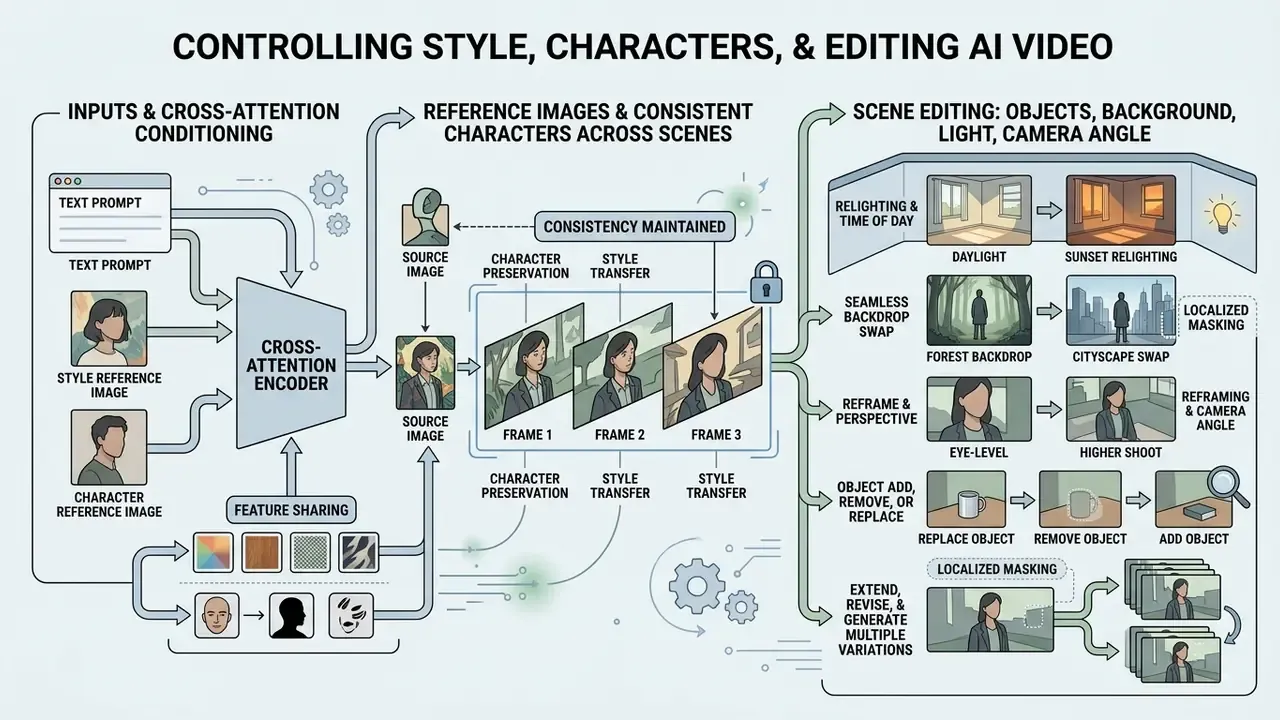
Controlling style, preserving character appearance, and editing specific scene elements are achieved through cross-attention conditioning, localized masking, and feature-sharing modules.
"A survey of 708 works from 2020 to 2025 organizes controllable video generation into seven control classes: structure, identity, image, temporal, audio, style, and unified multimodal control."
Maintaining visual identity across sequential video clips has historically been the hard part. Modern foundation architectures address it with cross-shot feature sharing, letting a character identity persist across distinct scene setups without full model retraining.
Reference Images and Consistent Characters Across Scenes
Character consistency relies on embedding reference encoders and query injection strategies to anchor visual features across multiple shot generations.
"CharaConsist applies point-tracking attention and adaptive token merging, separating foreground identity from background so a character stays stable across changing scenes."
Frameworks like CharaConsist separate foreground identity tokens from background elements, so characters hold stable facial features, hair details, and clothing across changing scenes. Consistency improves further when reference stills are cleaned and colour-matched in advance using an AI photo editor for reference-image preparation. This is what makes a recurring presenter viable across a multi-shot commercial campaign.
"Video Storyboarding injects self-attention query features across shots, balancing identity preservation against motion freedom without retraining the base model."
Complementary approaches include RefDrop (NeurIPS 2024), which treats consistency as an adjustable control signal, and multi-reference conditioning studies that measure reference fidelity when several images describe the same subject. For headshot-style presenters, identity anchoring can start from a controlled portrait produced with an AI headshot generator.
Scene Editing: Objects, Background, Light, and Camera Angle
Localized editing lets creators add, remove, or replace specific objects, adjust background environments, and alter lighting using text-guided inpainting masks, that is, prompt-driven regeneration confined to a selected region.
Systems such as Runway Aleph and Kling VIDEO O1 allow users to isolate bounding masks within a scene to execute edits while preserving surrounding shadows and camera motion. The result: flexible restyling without full sequence re-renders.
Advanced editing recipes for finished shots:
- Relighting and time of day. State the light source, colour temperature, and hour explicitly, for example "Change lighting to golden hour sunset, soft volumetric shadows, warm key from camera left." The model recomputes highlights and reflections on existing surfaces without altering scene geometry.
- Seamless backdrop swap. Name the foreground subject in the prompt and describe the new environment: "Move subject from outdoor street to a minimalist tech studio background, seamless edge blending." This removes the need for manual rotoscoping or alpha-mask creation.
- Reframe and perspective transformation. Use cinematographic directives to change shot size and viewpoint: "Change wide shot to cinematic close-up on subject's eyes, shallow depth of field, 85mm lens", or "Turn front-facing view into a three-quarter profile, camera height lowered." The network regenerates the frame with new perspective, focal length, and depth of field rather than recovering detail from outside the original frame, so verify that regenerated regions remain brand-accurate.
- Object add, remove, or replace. Describe the target and the replacement in one instruction; production tools preserve camera angle, cast shadows, and neighbouring objects during substitution.
Extend, Revise, and Generate Multiple Variations
Video extension mechanisms lengthen existing clips by using trailing frames as context, while prompt adjustments generate targeted visual variations.
Platform features allow extending clips by 5 to 20 seconds per pass, reaching cumulative lengths of up to 120 seconds across up to six extension passes. Adobe Premiere Pro's Generative Extend marks AI-generated frames and offers a regenerate action when the first variant fails review. When revising an AI-generated clip, prompt engineers recommend changing one variable at a time, such as camera speed or lighting temperature, to isolate the visual impact of each adjustment. Log each variant with its seed so the accepted take can be reproduced later. Sounds bureaucratic. It saves a week when someone asks for "the version we approved in March".
Use Cases for AI Video Generators
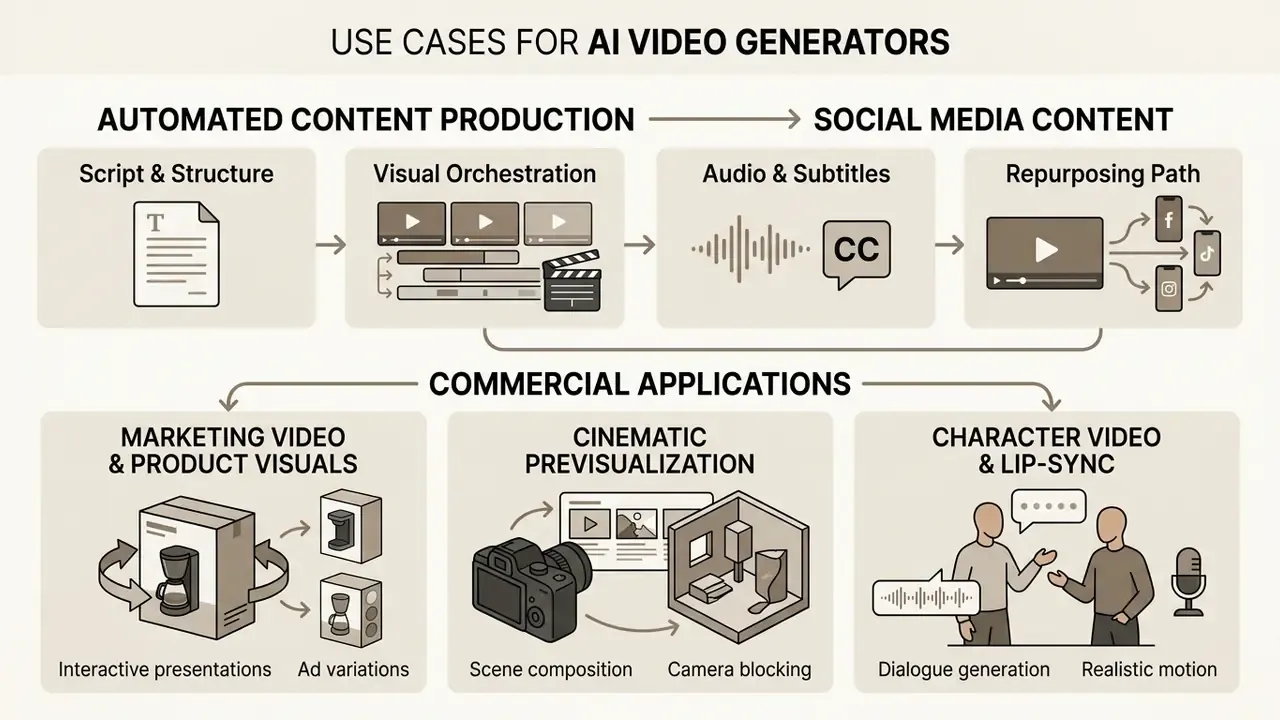
Commercial applications for AI video generation span automated social media production, marketing ad variations, interactive product presentations, and cinematic previsualization.
Organizations adopt an AI app for video creation to expand content output while reducing manual studio production costs. Teams establishing cross-functional media standards consult the AI Media Glossary and our full AI video generator guide to align technical terminology across creative, legal, and technical departments.
Marketing Video and Product Visuals
Marketing teams deploy AI video tools to create short product teasers, landing page hero assets, and ad variations from existing image catalogs.
By animating static e-commerce photographs, brands build dynamic product displays that show material textures and features. Development teams wiring generation into product and CMS pipelines can reference the Google Veo API for video generation for quota, latency, and content-credential behavior. Effective briefs stay narrow: one audience, one offer, one proof point, one visual hook, one measurable next action. Adjacent formats, including animated HTML5 and GIF banners, multi-size ad sets, and deck-to-video presentation drafts built from PPTX, PDF, or a URL, follow the same brief discipline.
Cinematic Scenes and Character Video
Directors and visual artists use advanced generators for concept storyboarding, B-roll generation, and multi-character dialogue scenes.
Multistage narrative pipelines combine script-generation models, image anchor frames, and video diffusion transformers to produce detailed previsualization animatics, which shortens pre-production schedules on commercial projects. Research pipelines that store canonical character traits in a shared knowledge base, as in narrative-graph prompting (ICCVW 2025) and multi-agent storytelling orchestration (CVPRW 2026), report measurably lower visual drift across story turns.
FAQ About AI Video Generators
This section covers the practical questions that usually remain: skill requirements, entry barriers, editing workflows, avatars, labeling, and commercial rights.
Do You Need Editing Skills to Create Videos with AI?
Basic prompt-driven video generation requires no prior traditional video editing experience, though professional timeline skills remain valuable for fine-tuning pacing, audio balance, and scene cuts. AI tools lower entry barriers by automating keyframe rendering, visual effects, and motion synthesis from plain text descriptions. High-quality commercial production, however, is still a hybrid discipline.
"AI tools automate keyframe rendering and motion synthesis, while final trimming, sound mixing, and brand compliance still require manual editing." Controllable Video Generation: A Survey, arXiv (2025). https://arxiv.org/abs/2503.00347 In practice, teams use an AI app for video generation to produce raw clips and B-roll, then finish in video editing tools for trimming, sound mixing, and brand compliance checks. Creator-workflow studies of YouTube production describe the same split: generative AI supports planning, scripting, visual and audio production, upscaling, and reformatting, while subtitles, titles, and final cuts stay under human review.
Is an AI Avatar the Same as a Digital Human?
The terms overlap in marketing copy but describe different systems.
- AI avatar. A synthetic presenter, realistic or stylized, generated from a photograph or text description. It renders offline from recorded audio or a script, and serves ads, tutorials, internal comms, and social content. Avatar presets can usually be saved and reused with fixed voice and performance settings.
- Digital human. An interactive, often 3D, real-time conversational agent integrated with an LLM and dialogue or support systems, producing expression and gesture on the fly. That is an engineering integration with latency, moderation, and escalation requirements, not a render job. Choosing the wrong category is a common procurement error. An offline avatar tool cannot satisfy a real-time customer-service requirement, and a conversational digital human is unnecessary overhead for a scripted 30-second ad.
How Do We Meet AI-Content Labeling and Anti-Deepfake Requirements?
Attach C2PA Content Credentials at export, add an invisible watermark where the platform supports it, apply visible on-screen disclosure when the content could be mistaken for a real person or a real event, and keep an internal registry entry linking the asset to its prompt, seed, reviewer, and approval date. Because metadata is frequently stripped during platform re-encoding, treat the internal registry, not the file itself, as the authoritative record.
Can Free-Plan Output Be Used in Client Campaigns?
Usually not. Most free tiers grant a personal, non-commercial licence, cap resolution at 480p to 720p, and burn in a watermark; commercial rights typically begin at the first paid tier. Adobe Firefly is a notable exception with commercial use on its free daily credits, and a small number of vendors claim perpetual commercial licences on free plans. Verify the specific service terms rather than relying on category norms.
How Long Can an AI-Generated Video Be?
Native single generations currently run 4 to 15 seconds depending on the model. Longer sequences are built by chaining extension passes, up to about 120 seconds, or by stitching separately generated shots in an editor while using reference images to hold characters and locations consistent. Long-form coherence remains an assembly problem, not a single-inference capability.
Which Model Is Best?
There is no single winner; the best model depends on the shot. Photoreal physics, camera precision, lip-sync quality, generation speed, and audit transparency are optimized by different systems, which is why multi-model platforms and per-shot model selection have become the dominant enterprise pattern.
Can I Edit Real Footage, Not Just Generate from Scratch?
Yes. Current video-to-video models add, remove, and replace objects, relight scenes, swap backdrops, generate new camera angles, and transfer style onto existing footage, keeping untouched regions of the original clip intact. For regulated content, treat any edit to real footage as a factual-accuracy question as well as an aesthetic one.
What Is a Safe First Step for a Regulated Organization?
Start narrow and internal. Pick one low-risk format, for example an internal training clip with no customer data and no performance claims, name a single accountable owner, log prompts and seeds from day one, and require one human sign-off before distribution. Measure two things: cycle time and review effort. Expand only when the evidence trail holds up under a mock audit. About the review. This guide is maintained by the AI Media editorial team, which tracks foundation-model releases, vendor licensing changes, and provenance standards for marketing, media, and regulated-industry workflows, with governance review attributed to Marcus Hale, AI Governance Editorial Lead. Marcus Hale, author. Model specifications, pricing, and terms were verified against vendor documentation and primary research as of August 2026. Audience assumptions in this guide remain hypotheses until confirmed by analytics, interviews, CRM data, or verified customer research. Disclaimer. This article is informational and does not constitute legal, financial, or compliance advice. Licensing terms, regulatory obligations, and model capabilities change frequently; validate current vendor terms and applicable regulations with qualified counsel before deploying AI-generated video commercially. Fully automated publication of generative video without human review is not recommended in regulated environments. Reference material and terminology standards are collected in the AI Media Glossary.
Social Media Content and Short Clips
Social media workflows use AI generators to convert text scripts or long-form recordings into vertical 9:16 video clips with animated captions.
Automated pipelines use LLMs to draft 15-second voiceover scripts, synthesize matching visual sequences, and export ready-to-post Reels, TikToks, and Shorts. Marketers evaluating software options check whether an AI app that generates videos supports native vertical rendering, and often supplement generation with animation maker tools for motion typography and lower-thirds.
Automated assembly pipeline from a single text prompt: