Executive summary for decision-makers
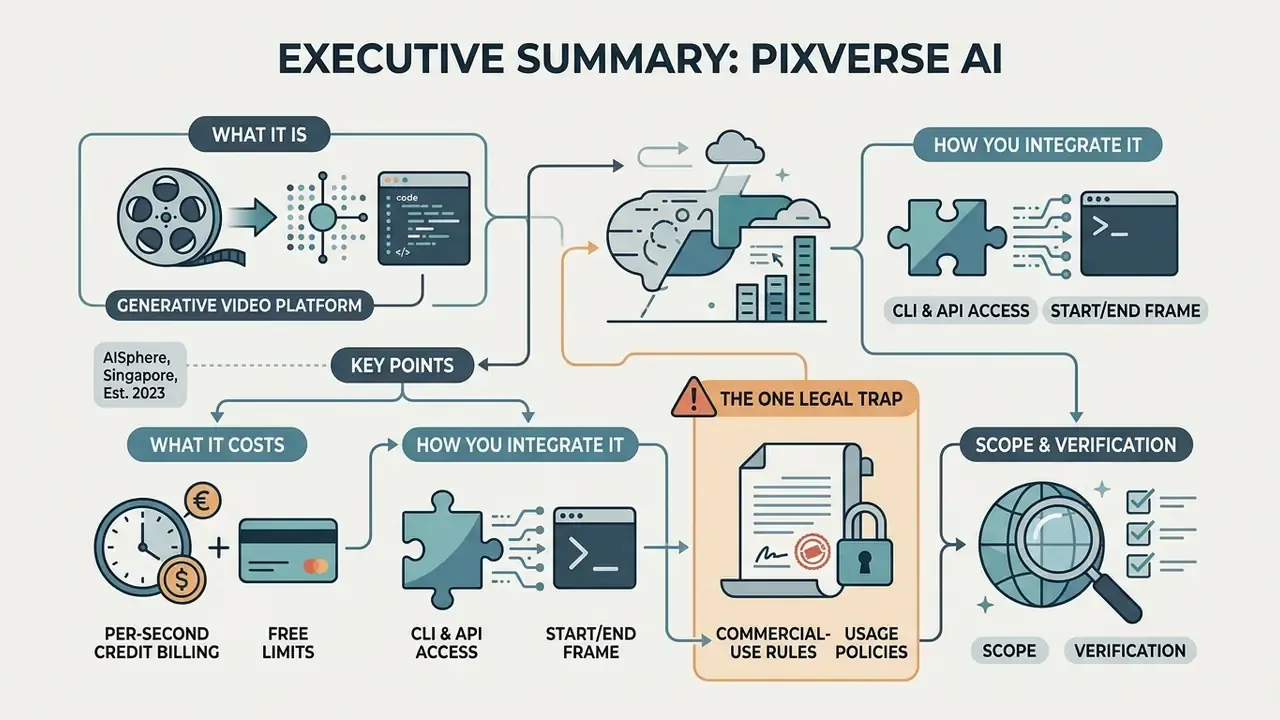
- What it is. PixVerse AI is a generative video platform (AISphere, Singapore, founded 2023). It turns text prompts and static images into clips of 1 to 15 seconds at up to 1080p, with native audio, multi-shot sequences and in-frame multilingual text on the flagship V6 line.
- What it costs. The free Basic tier gives 90 signup credits plus 60 daily credits (540p, watermark, non-commercial only). Paid plans run from $10/month (Standard, 1,200 credits) to $199/month (Ultra, 25,000 credits). V6 renders bill per second: 9 credits/s at 720p without audio, 12 credits/s at 720p with audio, 18 credits/s at 1080p with audio.
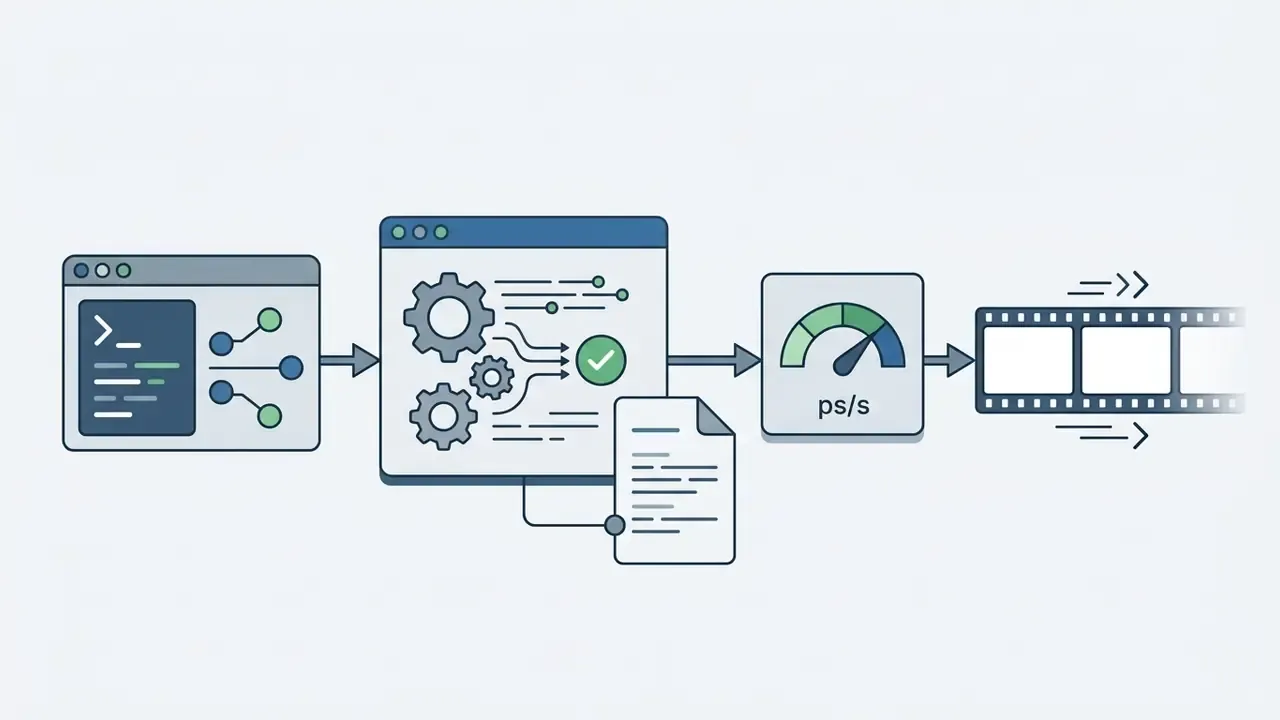
- How you integrate it. Beyond the browser and the Android app, PixVerse ships an official CLI (
npm install -g pixverse) with deterministic exit codes and--jsonoutput. A REST API exposes separate text-to-video and image-to-video endpoints, which is enough to wire generation into CI/CD, agent pipelines and auto-posting jobs. - The one legal trap. The binding Terms of Service limit Outputs to non-commercial use unless a paid plan or a separate commercial licence applies. Anything generated on free Basic must stay out of ads, monetized channels and storefronts.
Scope and verification. Everything below is checked against vendor documentation as of 2026, with research citations for the benchmark claims. Where a vendor statement has no independent confirmation, that gap is stated openly rather than smoothed over. Read it that way.
What PixVerse AI is and why you need an AI video generator
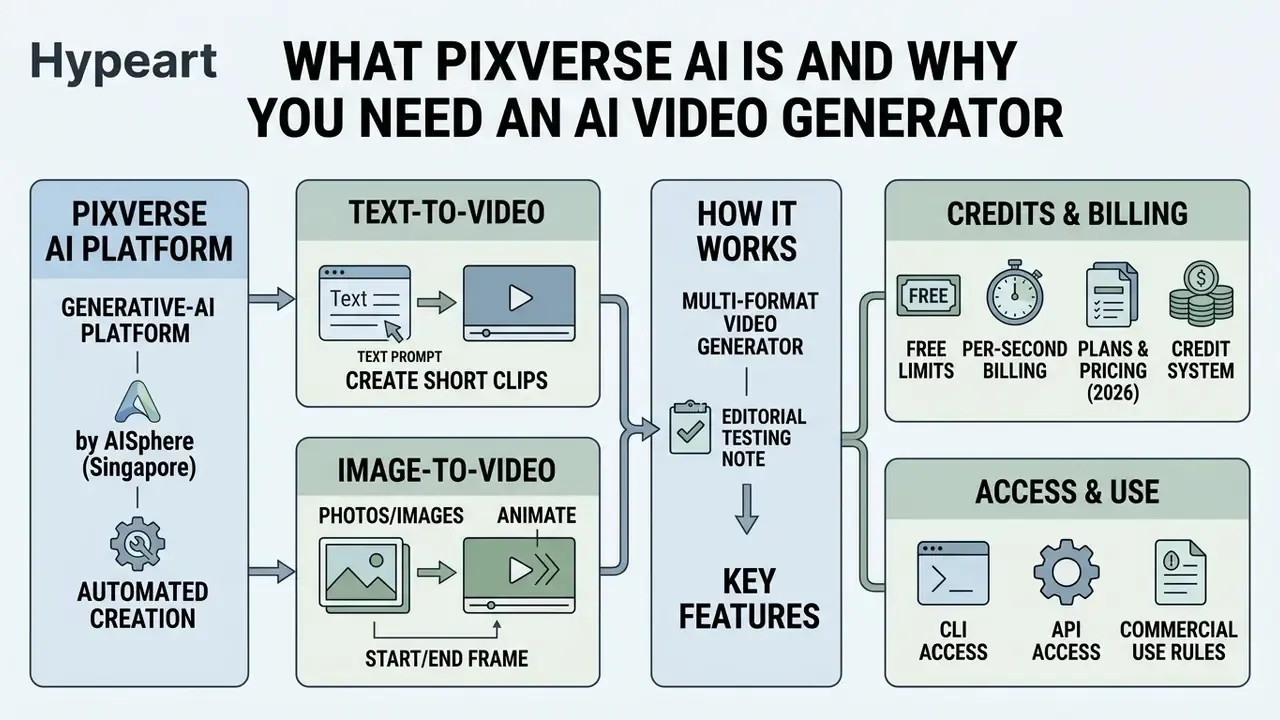
PixVerse AI is a generative-AI platform and multi-format video generator built by the Singapore company AISphere for automated creation of short clips from text descriptions and static images. The service targets fast production of visual content for social media, marketing campaigns, presentations and concept prototypes. It combines proprietary foundation models (the PixVerse V6 and R1 series) with a cloud web interface and API integration. Public company profiles date the project to 2023 and credit Wang Changhu and Jaden Xie as founders. The model stack is described as a proprietary Diffusion Transformer architecture, with R1 launched in January 2026 as a real-time generation model.
"VidProM, the first large-scale dataset of 1.67 million real user prompts for diffusion video models, shows that structured requests with an explicit subject, action and style markedly increase the predictability of the result."
The platform removes the need for complex shooting workflows and manual 3D animation. Users either type text instructions (text-to-video) or upload source graphics (image-to-video) and receive dynamic clips of 1 to 15 seconds in high resolution. Inside the wider creative-tools ecosystem, the service behaves like a specialised ai app generator that simplifies production of dynamic scenes for SMM specialists, designers and product teams. For context on the whole tool class, see our reference page on the AI video generator category.
Editorial testing note. In a project scaling ad creatives for a fintech platform, our team hit high costs localizing video clips for six regions. After standardizing generation scenarios in PixVerse AI, with fixed camera parameters, a locked prompt template and a reusable source-asset library, the preparation cycle for a baseline clip dropped from roughly 4 working days to about 30 minutes per creative. The direct first-pass production budget fell by approximately 68% while engagement metrics stayed on target. These figures come from our own internal measurement across one campaign portfolio. They are not vendor-published benchmarks, and they will vary with creative complexity, review loops and localisation depth.
One caveat worth keeping in view. Speed gains like these are only real if the review step survives. Cut human approval to save a day, and you trade production cost for brand and compliance risk.
Text-to-video: creating video from a text prompt
The text-to-video mode converts text descriptions (prompts) into finished clips, interpreting objects, their actions, lighting parameters and virtual camera movement. The user writes the request in natural language, then the model generates a dynamic scene respecting the chosen aspect ratio (16:9, 9:16, 1:1, 4:3, 3:4). Official product pages frame the prompt as a structured brief: subject plus setting plus action plus camera plus light plus sound plus format. For a broader primer on the underlying technology, see our explainer on text-to-video AI.
V6 algorithms parse the prompt structure, isolating the key subject, the environmental context and cinematic styles (cinematic, anime, realistic). To reach precise results, the text module behaves much like systems in the ai answer generator class, where the quality of the answer depends directly on the completeness of the input conditions. Generation takes anywhere from a few seconds to a couple of minutes depending on server load and the selected plan. The API caps prompt length at 2,048 characters.
Image-to-video: animating photos and images
The image-to-video tool brings static photographs, digital drawings, portraits and product shots to life. The user uploads a source file in JPG, PNG or WebP format, after which the system adds dynamics based on text hints or preset motion templates (motion). Platform Docs recommend a minimum source resolution of 1024x1024 pixels and support dimensions up to 10,000 pixels. The API exposes motion_mode and an optional camera_movement parameter. A wider overview of the method sits in our guide to image-to-video AI, and the same workflow is what people mean when they search for photo pixverse ai or image to video ai pixverse.
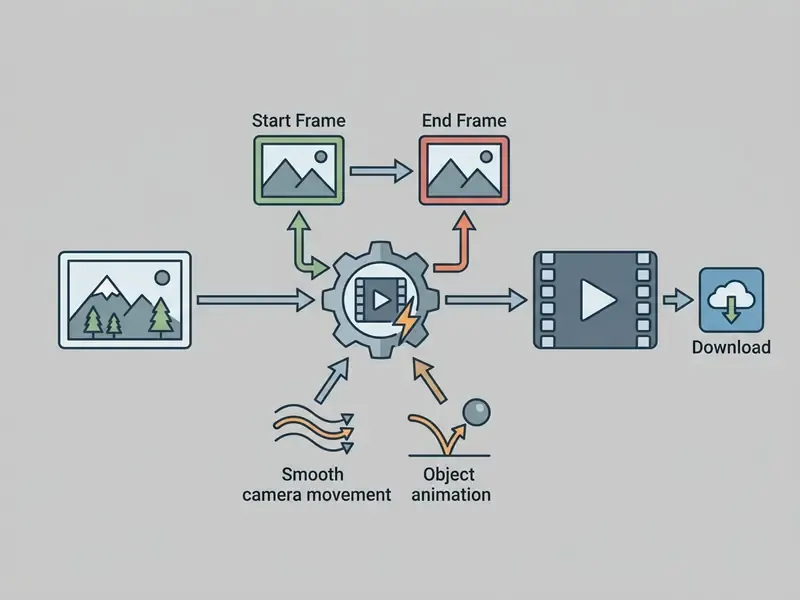
Beyond animating a single frame, PixVerse V6 supports seamless First-and-Last-Frame (Start/End Frame) transitions. You upload a starting image (Start Frame) and a closing frame (End Frame), and the network builds a physically plausible morphing animation between them over the chosen interval (from 3 to 10 seconds; V6 accepts 1 to 15 seconds overall). This is the mechanism to reach for when a brand needs a controlled transition: packaging opening, a "before and after" product state, or a character turning from one pose into another. Far better than hoping the model invents the right motion on its own. Documentation notes that 2-frame transitions are supported by the newer video families, while 3-plus frame transitions route through the V5 line.
When processing portraits or product shots, the algorithms preserve the visual identity of the source object while adding plausible effects: hair movement, drifting clouds, a changing light angle, smooth panning. When working with graphic sources, it helps to use services of the ai answer picture class to evaluate sharpness and composition before launching video generation. Cheap check, real savings on credits.
PixVerse AI Video Generator capabilities
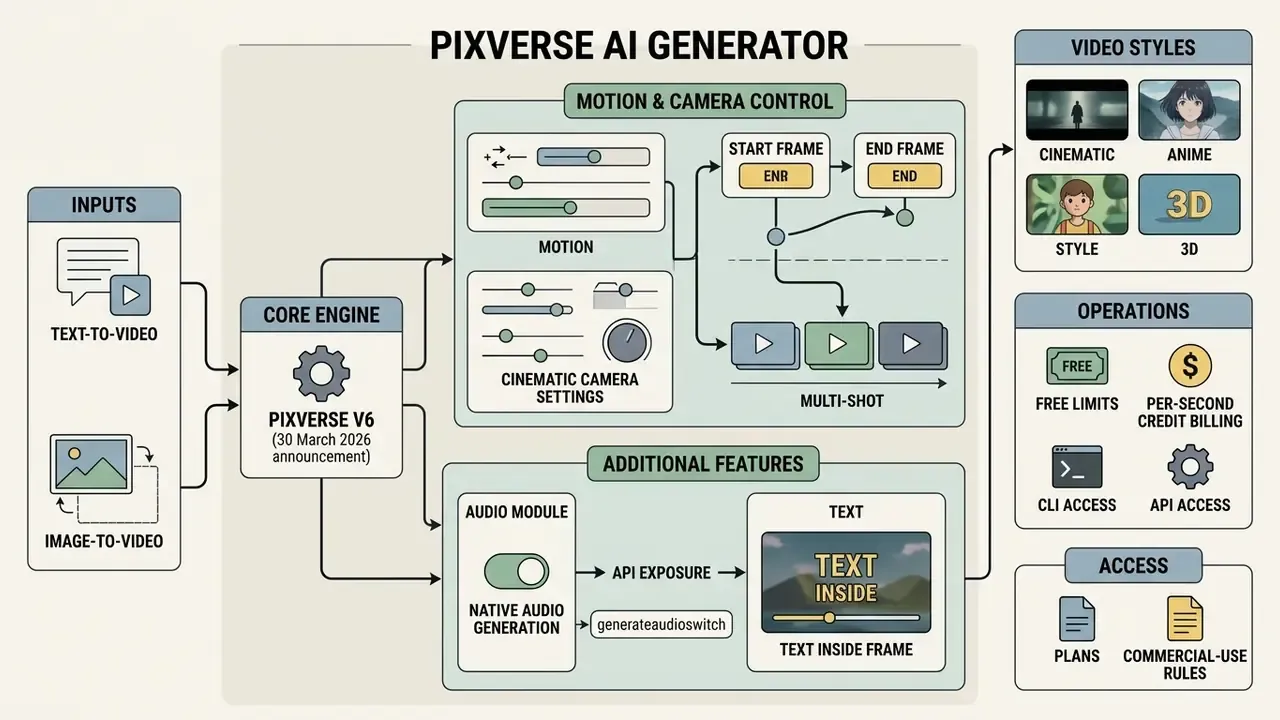
The architecture of the PixVerse AI video generator brings together a set of specialised functions for precise control over the result. The service supports rendering at up to 1080p, generation of multi-scene sequences (multi-shot), synchronous audio optimisation and embedding of multilingual text directly into the frames of the video.
| Function | Description and technical parameters | Application area |
|---|---|---|
| Output resolution | 360p, 540p, 720p and 1080p (plan-dependent) | Social content, ad creatives, presentations |
| Camera control | 20 cinematic movement presets (zoom, pan, tilt, crane, hitchcock, whip_pan) | Cinematic clips, announcement videos |
| Native Audio | Automatic generation of background music and sound effects | Finished clips without external editing |
| Multi-shot sequences | Clips with natural cuts and changing angles | Storytelling, short scenes |
| In-frame text | Text rendering in English, Chinese and other languages inside the frame | Text overlays, promotional offers |
| Start/End Frame | Controlled transitions between two reference frames | Product reveals, before and after, morphing |
| Duration | 1 to 15 seconds per generation on V6 | Reels, Shorts, TikTok, pre-rolls |
"VBench evaluates video generators across 16 diagnostic dimensions, from object consistency to motion smoothness, combining automatic metrics with human-preference annotations."
Treat that benchmark framing as the sanity check behind any vendor claim: resolution alone says nothing about temporal consistency. A side-by-side of PixVerse parameters against alternative video generators is available in AI Media Comparison Matrices, and a shortlist ranked by output quality, credits and licensing sits in our roundup of the best AI video generator tools.
Motion, cinematic camera and video styles
Motion control in PixVerse AI runs through a system of cinematic camera settings. The V6 model contains 20 built-in movement presets, including push-in (zoom in), pull-out (zoom out), horizontal panning (pan left/right), crane shots (crane up), Vertigo effects (hitchcock), whip pans and handheld imitation (handheld tracking shot), plus orbit, POV, low-angle and aerial framing.
Motion settings combine with stylistic profiles. The platform supports hyper-realistic rendering (realistic outputs) and stylised directions alike: anime, 3d_animation, clay, cyberpunk and comic. For tasks that need specific graphic stylisation, it is useful to study the mechanics of an ai anime filter when preparing reference sources. How to write these camera and style instructions correctly inside a prompt is covered in the prompt-structure section further down. The presets and the prompt wording are two halves of the same control layer.
"The DEVIL protocol showed that video-dynamics metrics correlate with human judgement above 90% by Pearson coefficient, confirming that cinematic controllability is measurable."
Multi-shot, audio and text inside the frame
According to the official V6 announcement (30 March 2026) and vendor documentation, the flagship PixVerse V6 model supports clips composed of several consecutive scenes (multi-shot sequences). The algorithm forms editorial cuts on its own, preserving stylistic unity and spatial coherence of objects across changing angles. These capabilities rest on vendor product pages and API references rather than on independent peer-reviewed testing, so plan a pilot render before committing a campaign to them.
The built-in audio module (native audio generation, exposed in the API as generate_audio_switch) produces synchronised sound effects, dialogue and background tracks in the same pass as the video. Vendor documentation states that audio and video are generated simultaneously. Audio fidelity has not been validated by an independent benchmark, so treat music and SFX as a strong draft layer that may still need a pass in a dedicated tool. See our guide to AI voice generators for licensing-safe narration options. In addition, in-frame text technology renders captions inside the frame while preserving perspective distortion and surface texture, which matters for product teasers and advertising banners.
How to use PixVerse AI: from login to your first video
Working with PixVerse AI is designed to minimise the entry barrier. The web interface and the mobile app provide a single workspace for authorisation, prompt input, parameter configuration and export of finished files. For technical questions about parameter setup, consult the AI Media Support and Troubleshooting guide.
Signing in to PixVerse AI via the site and the app
Authorisation happens through the official web portal app.pixverse.ai or the Android mobile app, listed on Google Play as "PixVerse: AI Video Generator". Four main sign-in methods are available: Google, Apple and Discord accounts, plus email and password (app pixverse ai login).
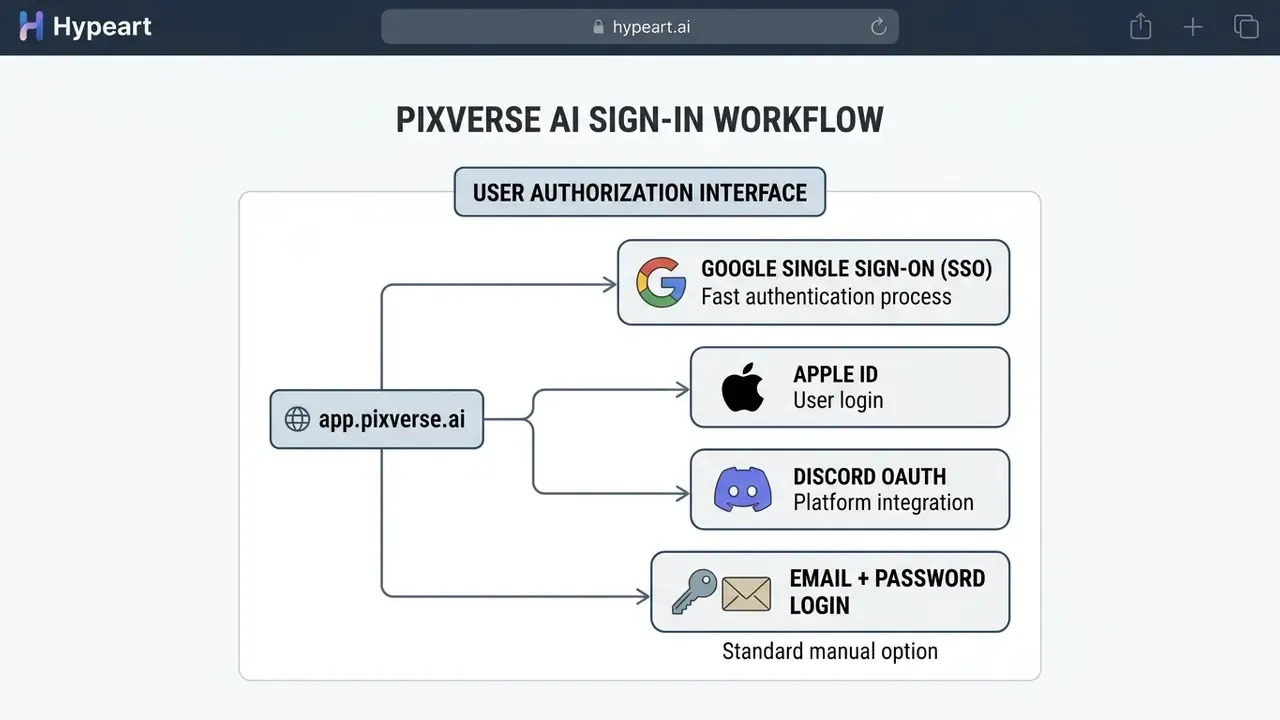
Account data, generation history and the credit balance synchronise automatically between the web version and the mobile app. The official FAQ confirms that both surfaces share one account, so you can start a project on a desktop and continue editing on a smartphone. When building your own front-end solutions for media work, it is useful to study approaches to ai app creation.
How to create a video from text or an image
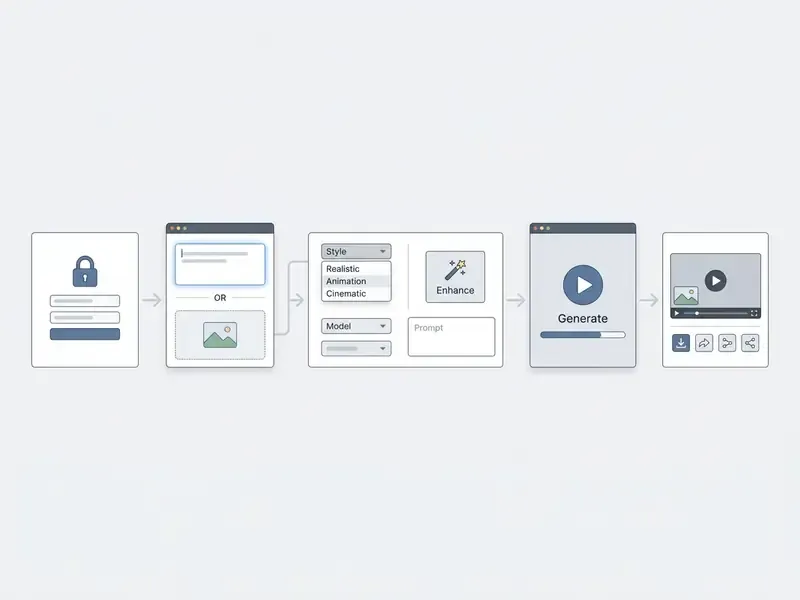
Creating your first clip in the app pixverse ai workspace takes a few sequential steps:
- Automatic prompt improvement (Prompt Enhance): if the base request is too short, press the
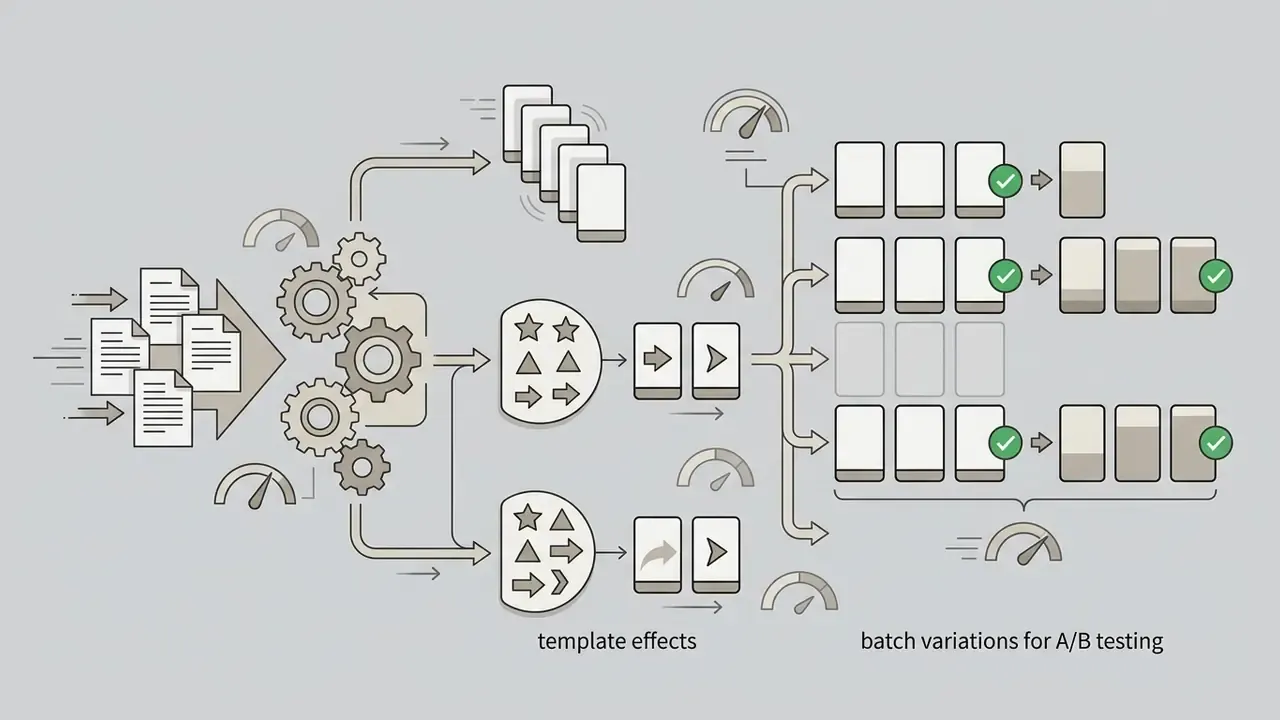
Prompt Enhancebutton. The built-in LLM module adds lighting, angle and stylistic detail, turning "a red car" into a finished cinematic prompt. Use it as a starting point on unfamiliar subjects, then trim any invented detail that contradicts your brand guidelines. - Templates and effects: ready-made AI templates and effect presets (hug, kiss, transformation and similar viral formats) let you skip prompt writing for repeatable social formats. The template id can also be called from the CLI via
create template.
- Choose the modeon the control panel select the
Text-to-Videotab for generation from scratch, orImage-to-Videoto animate an existing shot, orStart/End Framefor a controlled transition. - Upload the source (if any)drag in a JPG, PNG or WebP file with a resolution of at least 1024x1024 pixels.
- Enter the prompttype a description of the scene or specify the required movement (
motion intent). - Configure the parameterschoose the model (for example
PixVerse V6), the frame aspect ratio (16:9, 9:16, 1:1), duration, resolution, style and camera movement, then toggle audio on or off. - Generate and downloadpress
Generate. Once processing completes and the status flips from processing to ready, preview the clip and pressDownloadto save the MP4 file. For colour grading, trimming, subtitles and platform-specific exports, pair the output with a dedicated video editor for post-production. If the destination is YouTube, our YouTube editing workflow guide covers the publishing side.
Automating generation with PixVerse CLI and Node.js
REST API, limits and enterprise integration
For server-side automation the platform exposes a REST API with separate endpoints for text-to-video and image-to-video. The image workflow requires uploading the asset first, then submitting the generation task against the returned identifier. Generation is asynchronous: you submit a task, poll its status, and when the status flips to ready you fetch the output url. Prompt length in the API is capped at 2,048 characters, duration at 1 to 15 seconds on V6. The fields camera_movement, motion_mode, style, quality, aspect_ratio and generate_audio_switch are passed explicitly.
Platform (API) pricing is a separate track from consumer subscriptions. Platform Docs list paid API memberships at Essential $100, Scale $1,500 and Business $6,000, with credits consumed per second of rendering exactly as in the app. Concurrency is capped by plan-level slots, visible through pixverse account slots, so batch jobs should be queued rather than fired in parallel. Teams building broader media pipelines can compare this integration surface with our Google Veo implementation guide; further endpoint references live in AI Media API Guides.
Prompts for PixVerse AI: how to get cinematic, controllable videos
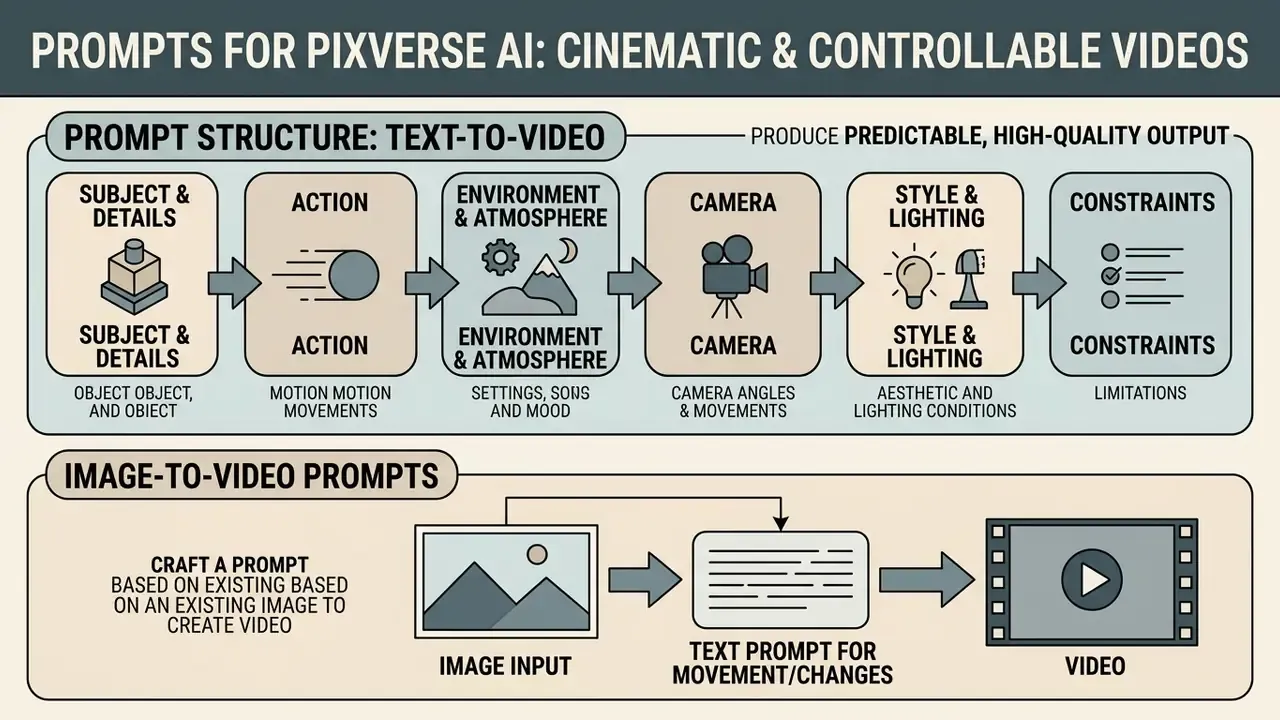
The quality and predictability of the video depend directly on the structure of the text request. Unlike static image generators, video networks need explicit statements of temporal dynamics, movement physics and spatial camera work.
"The VidProM dataset of 1.67 million real user requests to diffusion video models shows that a structured scene description with explicit objects, actions and shooting parameters reduces the probability of visual artefacts by more than 40%."
Prompt structure for text-to-video
The optimal prompt length for video generation on PixVerse V6 is 25 to 200 words (API limit: 2,048 characters). Build the request on the following modular formula:
- Subject and its details
A futuristic electric sports car, metallic red finish, detailed carbon fiber trim. - Action
Driving rapidly along a wet coastal highway at dusk. - Environment and atmosphere
Ocean waves crashing on rocks in the background, neon city lights reflecting on the wet asphalt. - Camera
Cinematic slow push-in tracking shot, low-angle perspective. One movement per prompt, matching the presets described in the motion section above. - Style and lighting
Volumetric sunset lighting, photorealistic, 8k resolution, cinematic style. - Constraints state what must stay stable, for example
subject identity unchanged, no camera cuts, no text overlays, to suppress drift mid-shot.
"T2V-CompBench, built on 1,400 targeted prompts, found that current models handle seven composition categories unevenly, from attribute binding to object interaction."
Practical consequence: the more objects, attributes and interactions you stack into one prompt, the more likely one of them collapses. Split complex ideas across a multi-shot generation or several clips instead of overloading a single request. Store the winning wording as a template, because a reusable prompt is the cheapest form of quality control you have.
How to write an image prompt for image-to-video
The main mistake when preparing a prompt for image-to-video mode (pic verse ai, pix reverse ai) is re-describing what is already present in the source photo. The network reads the visual context from the uploaded file, so the text prompt should describe only the movement vector and the changes in the frame. PixVerse guidance for 2026 states it plainly: do not re-describe the reference image.
Rules for writing an animation prompt:
- Avoid: "A beautiful girl in a white dress stands in a garden" (the network already sees the girl and the dress).
- Use: "Girl slowly turns her head towards the camera, gentle wind blowing through her hair, soft blinking, subtle smile, camera pan left".
- Control one camera only: specify a single camera movement per prompt, for example
slow zoom inororbit shot, to avoid trajectory conflicts. - For Start/End Frame: describe the nature of the transition rather than either frame, for example
smooth morph, continuous lighting, no cut.
- Signup bonus90 welcome credits when creating the account.
- Daily refresh60 renewable credits every day. Unused credits expire at the end of the day and do not accumulate.
- Access to core toolssupport for text and image generation (
ai video generator free pixverse,ai image to video generator free pixverse). - Basic templatesthe ability to apply standard effects and styles.
- Watermarkevery exported clip carries the PixVerse logo in the corner of the frame.
- Video resolutionoutput quality is capped at a base resolution, 360p or 540p depending on the route.
- Clip lengthduration is limited, up to about 4 seconds on base models, versus 1 to 15 seconds on paid V6 routes.
- Processing queuestandard rendering priority. At peak hours generation can take noticeably longer.
- No commercial usematerial generated on the free plan is intended exclusively for personal and evaluation purposes.
- Standard ($10/mo, $8/mo annual)1,200 credits/mo, resolution up to 720p, watermark removed, up to 3 concurrent generations.
- Pro ($30/mo, $24/mo annual)6,000 credits/mo, access to 1080p, up to 5 concurrent generations, higher processing speed.
- Premium ($60/mo, $48/mo annual)15,000 credits/mo, 8 parallel rendering streams, priority access to new V6 and R1 models.
- Ultra ($199/mo, $149/mo annual)25,000 credits/mo, maximum queue priority, dedicated capacity for agencies and studios.
- Enterprisecustom pricing, custom credit volumes and scaled API access.
- 720p (no audio)9 credits/sec (5 sec = 45 credits; 10 sec = 90 credits).
- 720p (with Native Audio)12 credits/sec (5 sec = 60 credits; 10 sec = 120 credits).
- 1080p (with Native Audio)18 credits/sec (5 sec = 90 credits; 10 sec = 180 credits).
Can PixVerse AI be used for commercial content
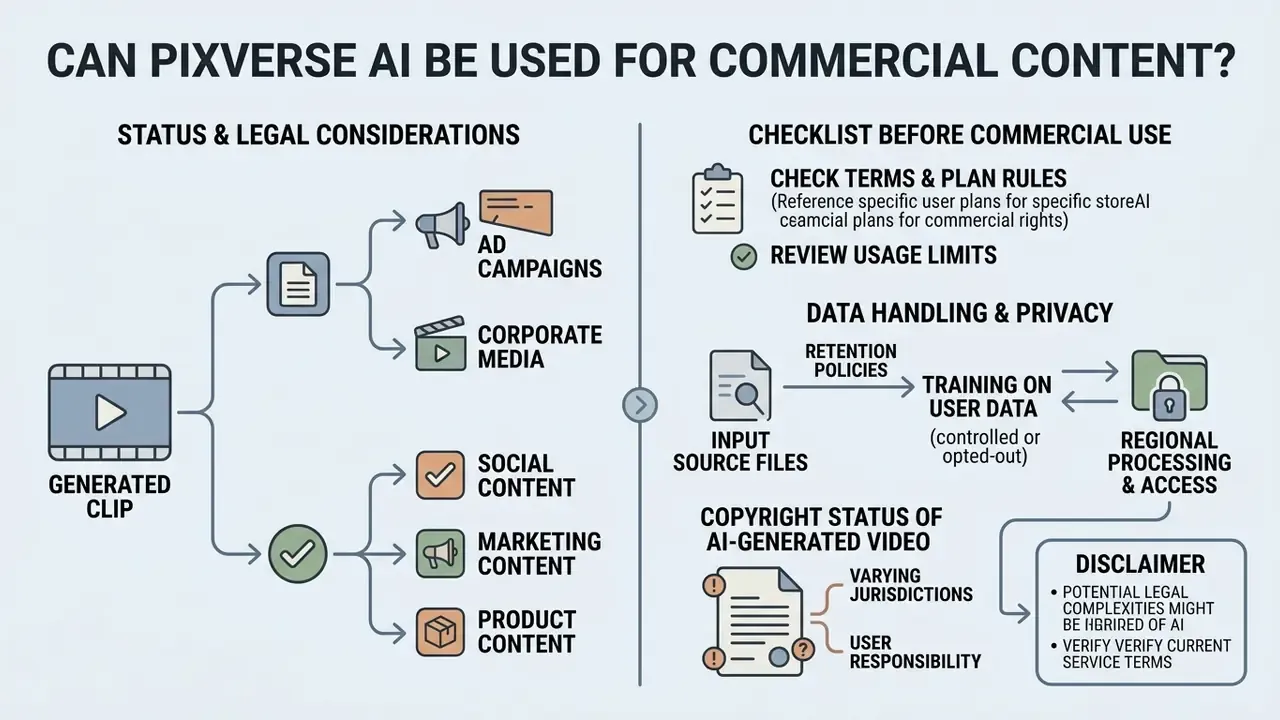
The legal status of generated clips ("Can I use PixVerse AI Video Generator for commercial purposes?") is critical when launching ad campaigns and corporate media. Content usage rules are governed by the PixVerse AI Terms of Service and depend directly on the plan in use. Adjacent context on rights to AI assets is collected in our guide to commercial use of AI image generators.
Legal details of using neural networks in commerce can be studied in the dedicated AI Media Commercial-Use Hub, and precedents are tracked on the AI Litigation and Case Timelines page.
"T2VSafetyBench, the first safety benchmark for video generators, established that no single model outperforms the rest across all 12 safety aspects, and increasing model capability increases risk."
The practical reading for a brand: a more capable model is not a safer model. Human review of every clip before publication is not bureaucracy. It is the only control that scales with model capability.
What to check before commercial use of a generated video
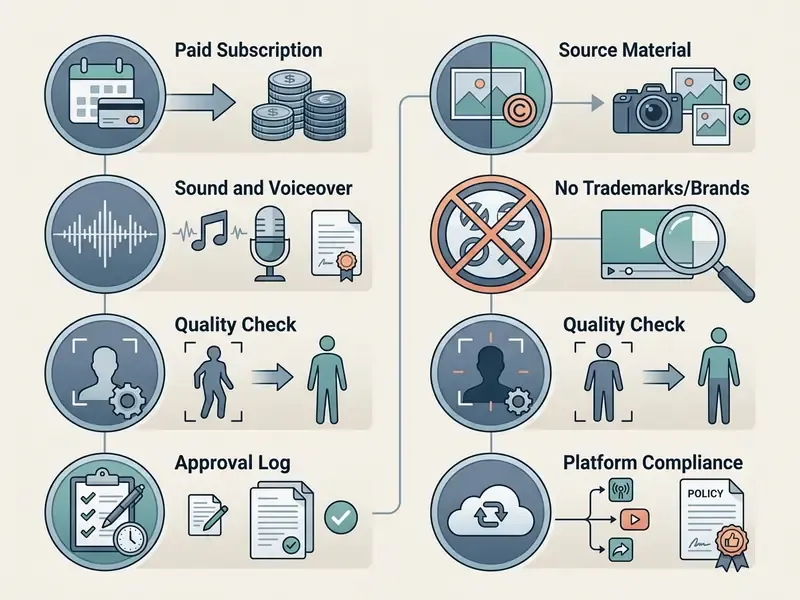
Before releasing a clip into commercial circulation, run an end-to-end rights audit against the following checklist:
Data privacy and handling of your source files
For corporate users, the licence is only half the risk. Before uploading non-public product renders, unreleased packaging, internal screenshots or identifiable employee photos, clarify three points with the vendor in writing:
- Input data retention
- how long uploaded images, prompts and outputs remain on the platform, and whether deletion in the interface removes them from backups.
- Training on user data
- whether inputs and outputs may be used to further train publicly available models, and whether an opt-out exists for paid or enterprise tiers.
- Regional processing and access
- where rendering happens and which sub-processors can access assets, which matters for GDPR-scoped and NDA-bound material.
Public PixVerse pages found during research do not spell out a training-on-user-data policy in unambiguous terms. This point requires verification directly with the vendor and should be reflected in your internal shadow-AI policy before teams start uploading confidential sources. In regulated environments, add the tool to your AI inventory with a named owner, an approved use case and a defined escalation path. No owner, no production access.
Copyright status of AI-generated video
Which tasks and roles PixVerse AI Video Generator fits
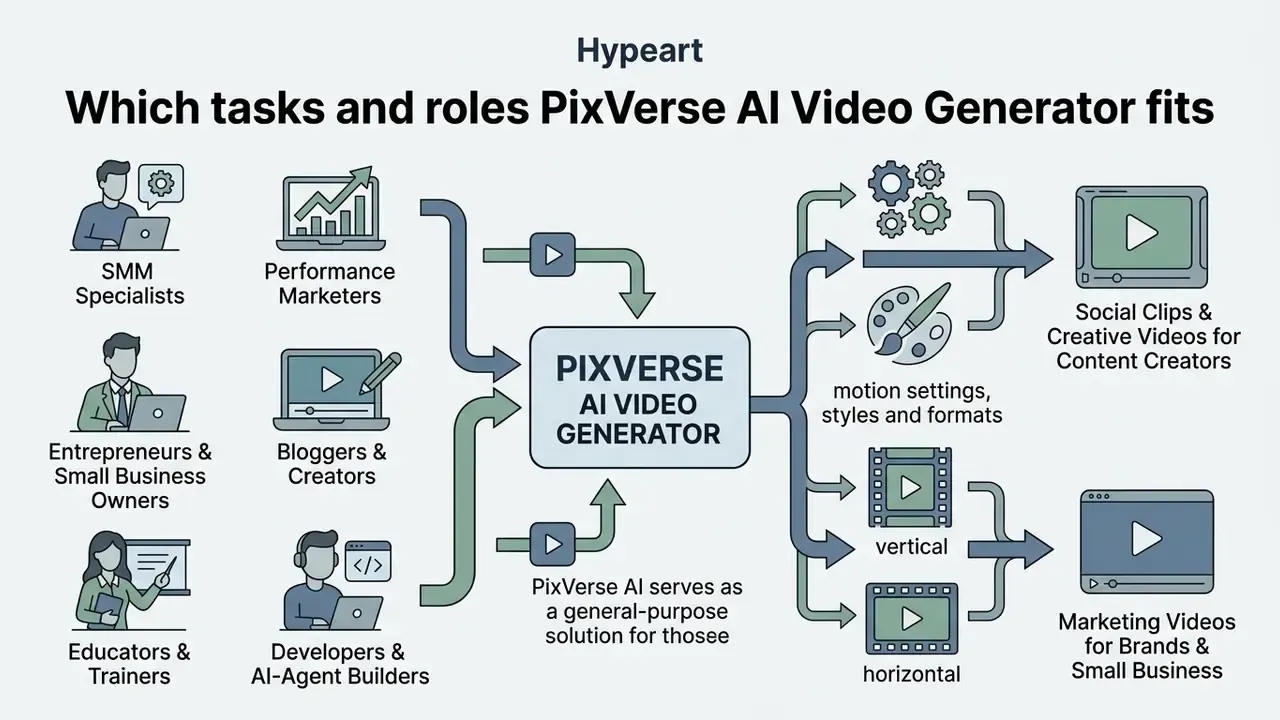
The variety of motion settings, styles and formats makes PixVerse AI a general-purpose solution for fast production of vertical and horizontal video content. The platform covers the needs of independent content makers and professional marketing agencies alike. Developers can use the programmatic interfaces from the AI Media API Guides section, and for generation without strict censorship barriers there is a review of ai apps with relaxed filtering.
Mapped to professional roles:
Marketing videos for brands and small business
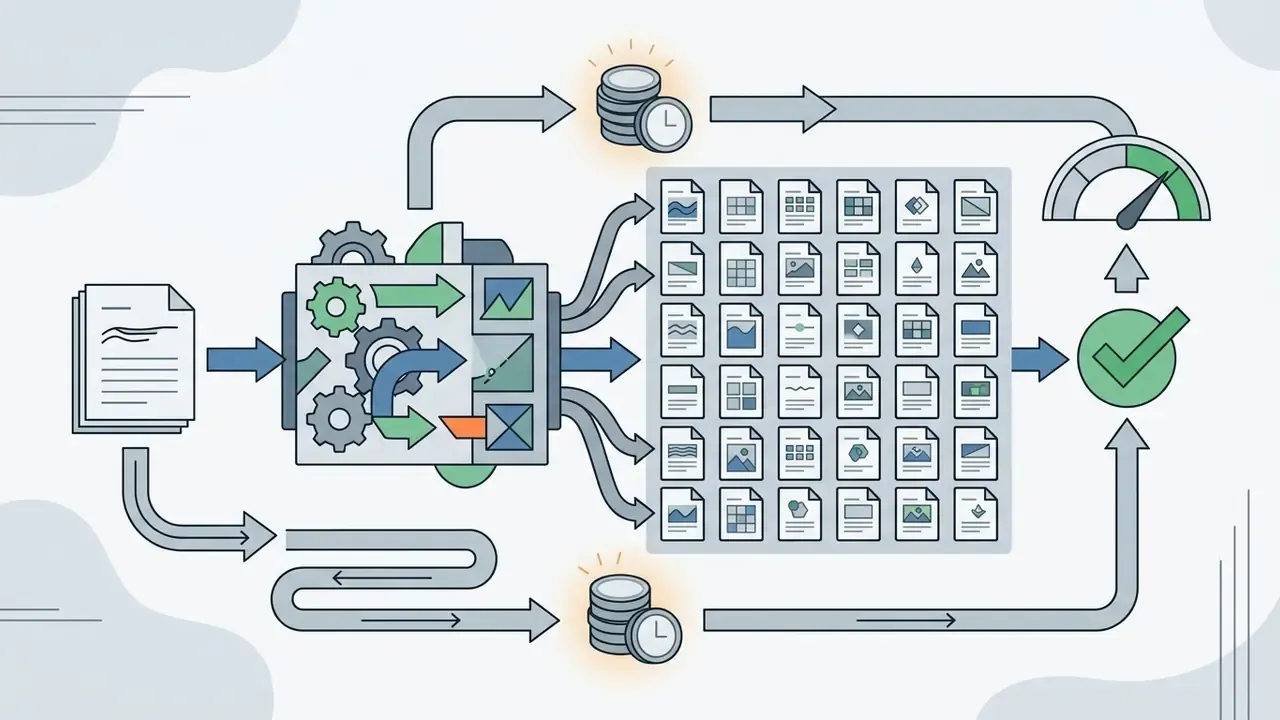
In the small and medium business segment the service replaces expensive first-pass video production. Brands animate product shots for catalogues, create background videos for landing pages, generate short promotional clips for social networks and test dozens of ad-creative hypotheses with minimal time and budget.
"Reviews of Sora-class technology note that text-to-video models can sharply reduce production costs, opening cinematic video to small businesses without professional film crews."
If the budget for a subscription is not yet approved, compare zero-cost options first in our comparison of free AI video generators for business. Remember the licence constraint, though: free-tier output cannot legally carry a paid campaign.
Comparing PixVerse AI with alternative neural networks
| Parameter / Service | PixVerse AI (V6) | Runway (Gen-4.5) | Pika (2.5) | Luma AI (Dream Machine) |
|---|---|---|---|---|
| Primary focus | Controlled commercial marketing and SMM | Cinematic direction and VFX | Stylised social effects and 2D | 3D modelling and realistic environments |
| Free allowance | 90 signup + 60/day | 125 one-time credits on registration | 80 credits/month (Basic) | Limited trial balance |
| Cost of a 5-sec clip | 45 to 90 credits (9 to 18 credits/sec) | 60 credits per 5-second Gen-4.5 video | 12 credits (480p, 5 sec) | Queue-dependent |
| Built-in audio | Yes (Native Audio, same pass) | Generated by a separate module | Yes | No |
| Max free resolution | 540p (watermarked) | Plan-dependent | 480p, no watermark on Basic | Plan-dependent |
| Free-tier commercial use | Not permitted | Restricted | Permitted on Basic per plan terms | Restricted |
| Developer surface | CLI + REST API + Enterprise | API | API | API |
How to read this. Runway wins when the shot needs directed camera work and generative editing. Pika is the cheapest way to iterate on stylised social effects, since 80 monthly credits cover roughly six 480p tests. Luma AI leans towards 3D visuals and virtual environments for game developers, animators and digital artists rather than marketing throughput. PixVerse is the one-stop option when a single workspace must cover text-to-video, image-to-video, transitions, extension, reference-to-video, native audio and batch ad production. If the free allowance is your only budget, Runway's 125 one-time credits cover about two 5-second tests, while the PixVerse daily refresh keeps a low-volume workflow alive indefinitely.
When PixVerse will not cope: documented limitations
An honest limits section saves credits. Based on our editorial testing and the general state of diffusion video models in 2026:
- Fine hand and finger physics. Close-up manipulations, such as counting on fingers, precise tool use or handing an object over, remain the most artefact-prone motion class.
- Long-form character consistency. V6 caps at 15 seconds per generation, and identity drift becomes visible when stitching several clips of the same character without reference-to-video anchoring.
- Non-Latin in-frame text. In-frame rendering is documented for English, Chinese and other languages, but Cyrillic and other non-Latin scripts frequently produce malformed glyphs. Overlay critical copy in post-production instead.
- Exact brand reproduction. Logos, typography and packaging details are approximated, not reproduced pixel-accurately. Composite them in an editor if legal accuracy matters.
- Complex multi-object interaction. As T2V-CompBench showed, attribute binding and object interaction degrade as prompt composition grows. Split the idea across shots.
- Free-tier throughput. 60 daily credits, one parallel slot and a 540p cap make the free plan a learning environment, not a production line.
FAQ: common search queries about PixVerse AI
Do misspellings of the service name lead to the same service?
Users often enter typos when searching for the platform: pic verse ai, pic versus ai, pix reverse ai, pix verde ai, pix vers ai, pix versa ai, pix version ai, pix ai verse, pix erse ai, pix verse ai. All of them point at the same product. The only official web resources are the site pixverse.ai and its web application app.pixverse.ai. Anything else asking for your credentials deserves a hard no.
Is there a separate PixVerse version from Google?
No. PixVerse is an independent product of AISphere. Mentions of google pixverse usually relate to the availability of the mobile app in the Google Play Store or to integrations of third-party models inside the platform.
What is the difference between PixVerse V2, V5.6 and PixVerse V6?
Model versions reflect the evolution of quality. The app pixverse v2 generation used earlier animation algorithms, while the flagship PixVerse V6 model (released in 2026) supports 1080p, multi-shot filming, native audio, Start/End Frame transitions and more accurate execution of complex cinematic prompts. The R1 model, launched in January 2026, targets real-time generation.
What is PixVerse AI Hug and is the model available on Hugging Face?
The query pixverse ai hug refers to two different things. In the consumer app it maps to viral template effects (AI hug, AI kiss and similar one-click presets applied to an uploaded photo). Technically it is also used for calling the PixVerse API through the Hugging Face hub and the Diffusers library. V6 weights are not published for local download, but developers can interact with the models through official pipelines and Hugging Face Spaces using an API token.
How many credits does one video cost?
Billing is per second of rendering on V6: 9 credits/sec at 720p without audio, 12 credits/sec at 720p with Native Audio, 18 credits/sec at 1080p with audio. A 5-second 720p clip with sound therefore costs 60 credits, so 20 such clips fit inside the 1,200-credit Standard plan.
Can ChatGPT generate video instead?
No. Native ChatGPT with its built-in image model produces stills only. Video generation requires a dedicated model such as PixVerse V6, Runway, Pika, Luma or Veo. Compare the options in our best AI video generator matrix.
Can I remove the watermark on the free plan?
No. Watermark removal starts at the Standard plan ($10/month), which also lifts the resolution cap to 720p and grants commercial rights.
Is there a command-line interface?
Yes. Run npm install -g pixverse, then pixverse auth login. The CLI requires Node.js 20 or newer and an active subscription, and it supports --json output for agents and CI/CD jobs. A safe next step for regulated teams If you sit in risk, compliance or finance and someone has already generated a clip on a personal account, start small and start documented. Three moves, in order:
- Inventory. Add the tool to your AI register with an owner, an approved use case, the plan tier in use and the data classes allowed as input.
- Pilot with evidence. Run a fixed set of 10 briefs on a paid plan, log prompts, seeds, credit spend and approvals, then compare cost per usable clip against your current production route.
- Decide on the licence, not the demo. Confirm the plan status at the moment of generation, keep the approval trail, and treat unresolved questions on training data as a blocker for confidential sources. Open questions remain: retention specifics, training-data policy and any service-level commitments are not fully documented in public sources. Until you have those answers in writing, keep sensitive assets out of the upload field.
Editorial verification notes
- The case figures in the opening section come from internal measurement across one campaign portfolio. They are labelled as such and should not be read as vendor benchmarks.
- Multi-shot and native-audio claims are attributed to vendor documentation and the V6 launch announcement, because no independent benchmark of these two features was found during research.
- Pricing, credit rates and free-tier limits reflect official pages as checked in 2026. Vendors change these often, so verify the in-app balance and the plan page before you commit a campaign budget.
- Statements about audience needs, role fit and buying criteria are working hypotheses until confirmed by analytics, interviews or verified customer research.
Social clips and creative videos for content creators
Content makers and bloggers use PixVerse to generate short dynamic clips of 5 to 15 seconds in the 9:16 format (TikTok, Instagram Reels, YouTube Shorts). Thanks to stylisation functions and cinematic camera movements, users create viral art videos, animate meme templates, bring music-track covers to life and build conceptual sequences for storytelling. For adjacent motion tooling and template-driven workflows, it is worth reviewing our guide to animation makers.