Executive Summary
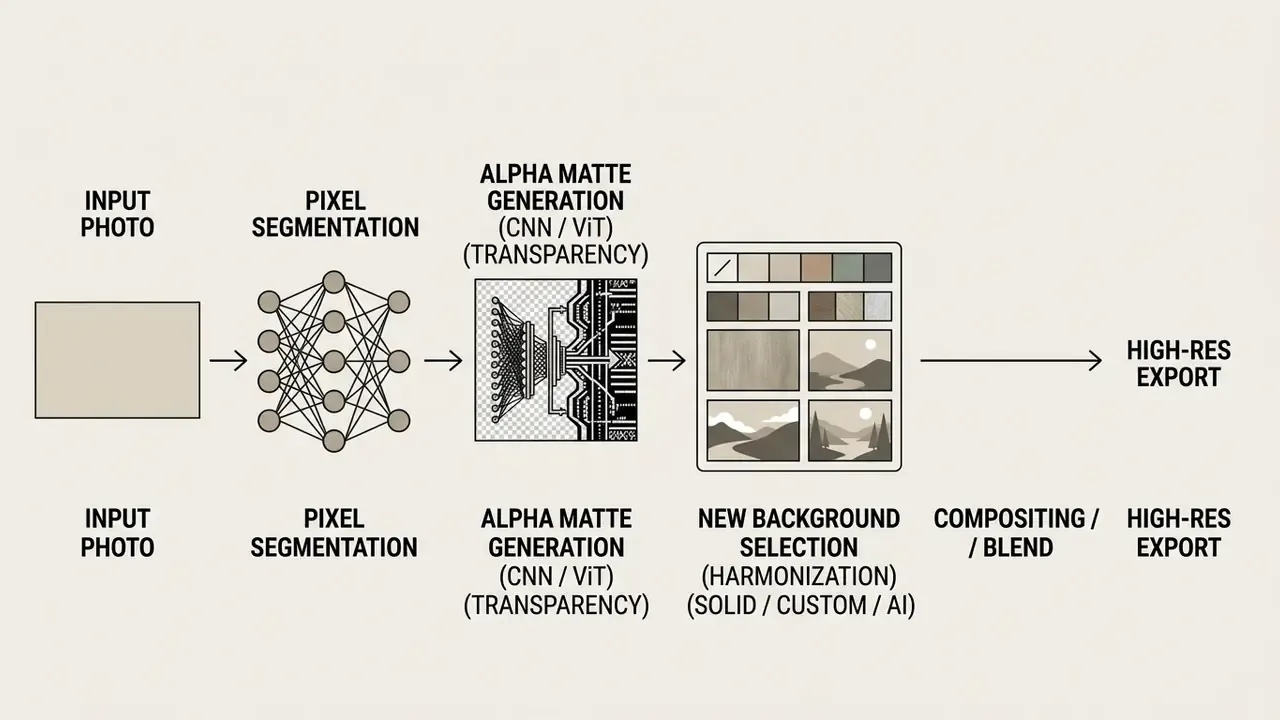
- The workflow is always four stepsupload a high-contrast source file, let the neural network remove the original backdrop, apply a solid color, custom image, or AI-generated scene, then export a lossless PNG or WebP. Everything else is refinement.
- Model choice matters more than tool branding.Fast convolutional segmentation is enough for hard-edged products and logos. Continuous alpha matting built on vision transformers is required for hair, fur, glass, and smoke.
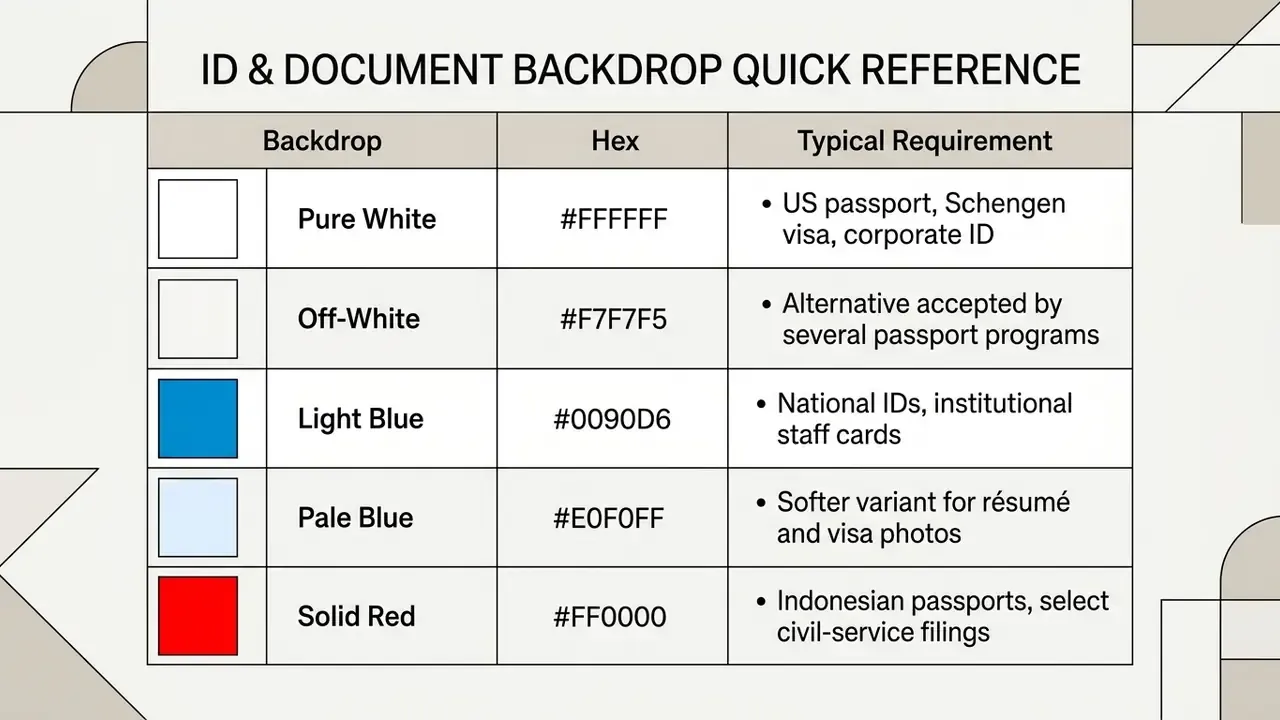
- Compliance drives backdrop color, not taste.Amazon mandates pure white (RGB 255,255,255); Ozon apparel often requires light gray (#F2F3F5); passports and national IDs may require white (#FFFFFF), light blue (#0090D6), or solid red (#FF0000), depending on jurisdiction.
- Privacy architecture is a selection criterion, not a footnote.Local WebAssembly processing keeps identity documents and customer photos on the device. Cloud processing introduces PII transfer, retention windows, and vendor-assurance obligations that must be reviewed before any KYC or catalog automation pipeline goes live.
- Validate before you scale.Test every candidate editor on three deliberately hard images, inspect edges at 200 to 400 percent zoom, and require exportable alpha masks so segmentation quality stays auditable inside automated pipelines.
Who This Guide Is For, and the Fastest Path Through It
Three very different readers land on this page, and they need different things. A marketplace operator wants a repeatable way to change the background of a picture to pure white across a few thousand product shots. A creator wants one clean profile picture, with no design skills and no software install. A risk or compliance owner wants to know whether customer selfies and ID scans may legally pass through a third-party editor at all.
Pick your lane:
If your work spans all three, the Agency Creative Production Workflow overview shows how background replacement sits inside a larger asset pipeline rather than as a standalone task.

How AI Background Change Works
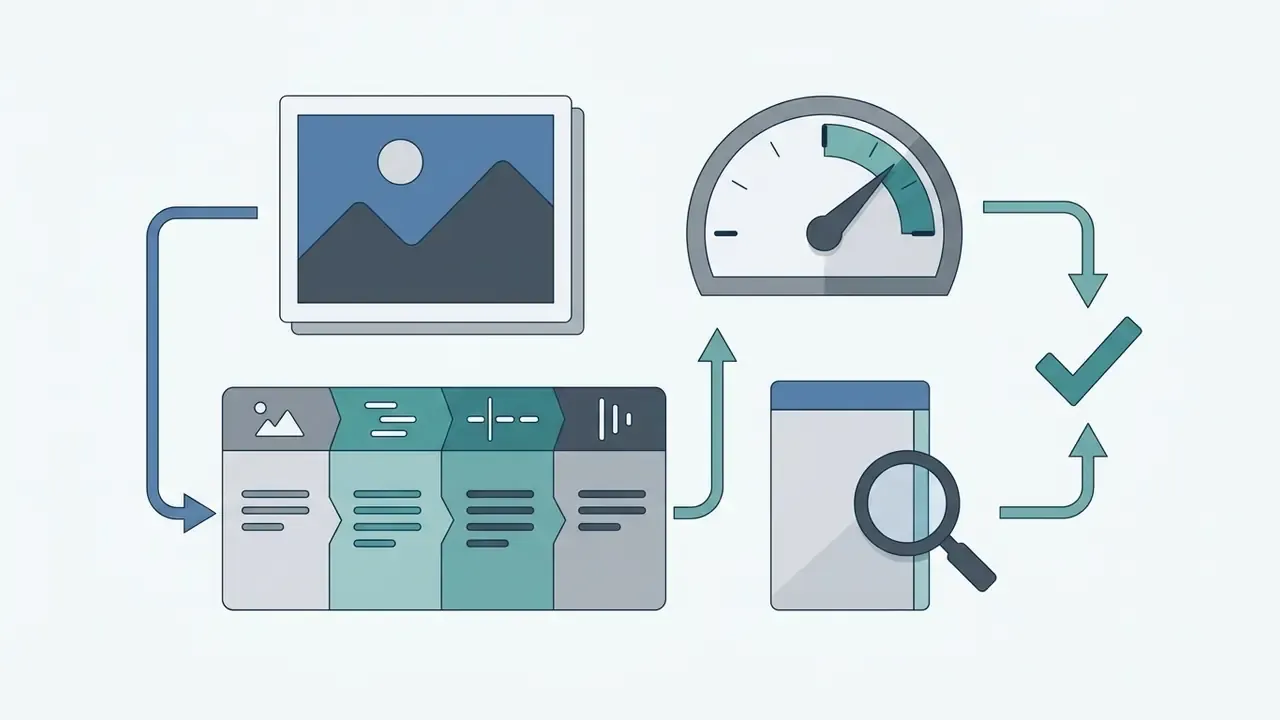
An AI background changer isolates the main subject from an image by classifying individual pixels and applying segmentation masks to replace the original backdrop. Modern web tools lean on deep neural networks to separate foreground elements from background details in seconds, with no manual lasso work.
«Matting models each pixel as a blend of foreground and background with an unknown alpha value between 0 and 1 expressing opacity.»
Deep Image Matting: A Comprehensive Survey (2023). https://arxiv.org/abs/2304.04672
Remove the Original Background Automatically
Automatic background removal converts an image into a foreground subject plus a transparent background by predicting an alpha channel for every pixel. The process relies on pretrained vision transformers and salient-object detection models that find subjects without manual trimap inputs (ViTMatte: Boosting Image Matting with Pretrained Plain Vision Transformers, Yao et al., 2023).
«ViTMatte uses a hybrid attention mechanism and a lightweight detail-capture module, achieving state-of-the-art results on Composition-1k and Distinctions-646.»
ViTMatte: Boosting Image Matting with Pretrained Plain Vision Transformers, Yao et al. (2023). https://arxiv.org/abs/2305.15272
When a user triggers an automated background remover, the network reads contrast, edge boundaries, and semantic context to remove background layers almost instantly. Architectures such as ViTMatte reduce sum-of-absolute-differences (SAD) and mean-squared-error (MSE) scores on standard image benchmarks compared with traditional convolutional baselines (Yao et al., 2023).
«The tri-token design of TransMatting yields roughly 10% SAD improvement and 20% MSE improvement over conventional trimap concatenation.»
TransMatting: Tri-token Equipped Transformer Model for Image Matting, Cai et al. (2023). https://arxiv.org/abs/2303.06476
The resulting cutout isolates the primary subject onto a transparent alpha channel, which gives you a clean canvas for every later step. Think of it as the master file, not the final asset.
«MatAny, which uses Segment Anything to generate pseudo-trimaps, improved MSE by 58.3% and SAD by 40.6% over previous interactive methods.»
Matte Anything: Interactive Natural Image Matting with Segment Anything Models, Yao et al. (2024). https://arxiv.org/abs/2306.04121
Replace It With a New Background
Replacing a backdrop means compositing the isolated foreground onto a chosen layer: a solid color, a user-uploaded file, or an ai generated scene. Once the system isolates the subject, you can apply a hex color code, select a custom photograph, or run a prompt through an AI image generator acting as a background generator (BRIA AI Documentation, 2025; Ideogram Documentation, 2026).
Advanced replacement workflows use generative diffusion or inpainting networks to synthesize contextual backdrops around the isolated subject (BIFRÖST: 3D-Aware Image Compositing, 2024).
«BIFRÖST integrates depth prediction with diffusion generation for spatially correct object placement that respects occlusion and depth blur.»
BIFRÖST: 3D-Aware Image Compositing with Diffusion Models, NeurIPS (2024). https://arxiv.org/abs/2410.02831
When inserting a subject into a new background, lighting direction, spatial perspective, and edge shadows all need adjustment, or realism collapses. API-driven platforms let you specify RGB palette arrays or text prompts to generate a cohesive surrounding environment (Runware Ideogram 4.0 Docs, 2026). Ideogram accepts up to five custom hex colors entered as #RRGGBB values in the interface, while API-level palette steering supports up to 16 colors for a full image and rejects shorthand and alpha formats. If you plan to drive this programmatically, the AI Media API Guides cover request shape, quotas, and error handling for that class of endpoint.
How to Change the Background of a Picture Step by Step
With the mechanics settled, the practical sequence is simple. To change background of a photo, upload a supported file, let the AI model strip the existing backdrop, select or generate a replacement, then export at full resolution. This structure gives you clean subject isolation and consistent quality regardless of which service you pick.
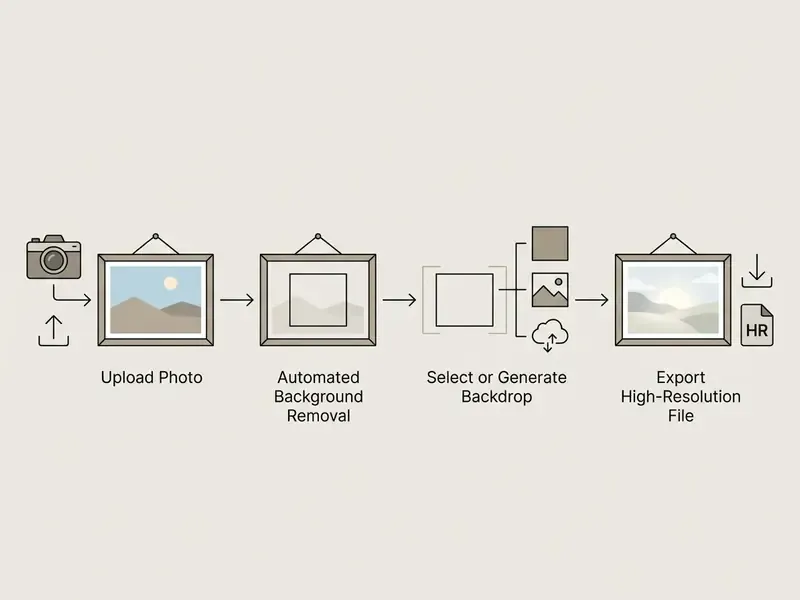
- Upload source imageselect a high-contrast JPG, PNG, or WebP file from your device or cloud storage.
- Automated background removalthe system uses neural segmentation to isolate the subject and generate a transparent alpha channel.
- Select or generate a new backdropchoose a solid studio shade, upload a custom image, or enter a prompt for scene generation.
- Fine-tune and exportinspect edge boundaries, apply lighting or shadow adjustments, and download the finished PNG or WebP.
Upload Your Photo
The process begins by uploading an online photo in a standard format such as JPG, PNG, or WebP to the editing canvas. Most web editors accept files up to 30MB or 40MB (Adobe Firefly Documentation, 2026). Broader format coverage across services usually includes JPEG, PNG, WebP, BMP, HEIC/HEIF, and the first frame of animated GIF files, with reported ceilings near 25 megapixels per image.
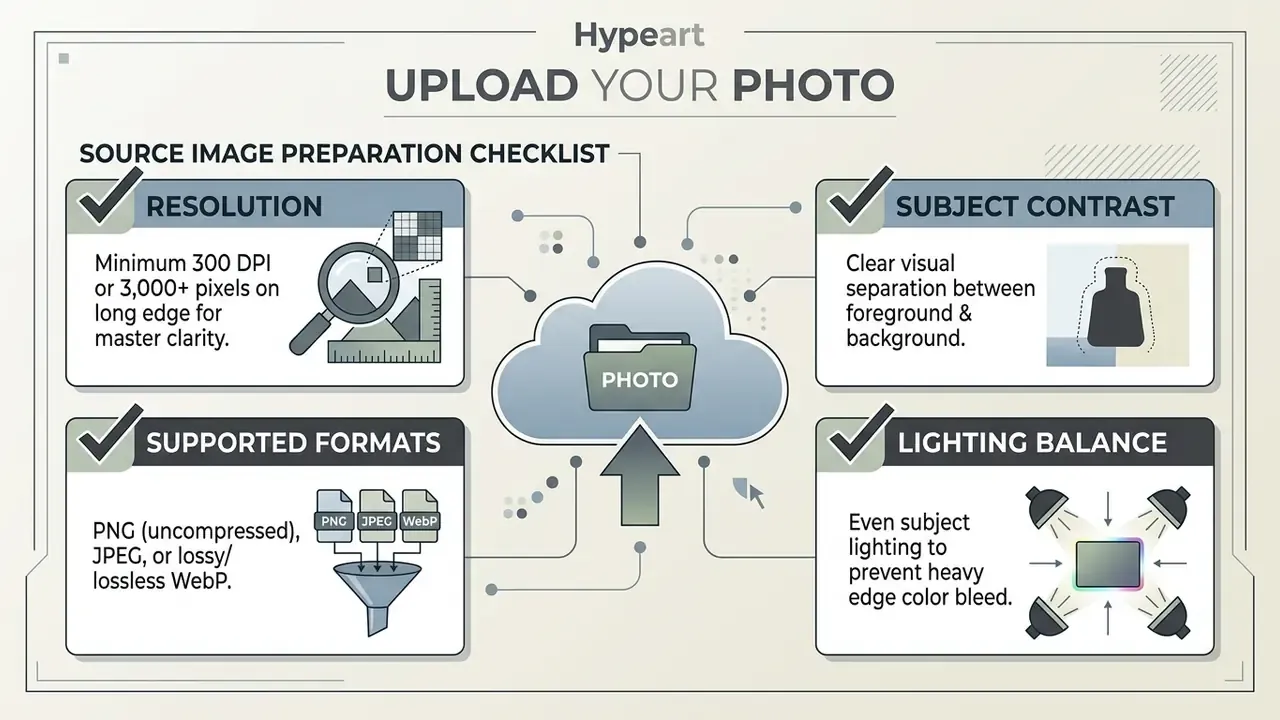
For reliable neural recognition, source photographs should keep clear contrast between the subject and the original backdrop (Library of Virginia Digitization Standard, 2025).
«Deep matting networks trained on synthetic composites can fail on fully natural images containing transparent objects or complex textures.»
Deep Image Matting: A Comprehensive Survey (2023). https://arxiv.org/abs/2304.04672
High-resolution files with minimal compression artifacts let segmentation algorithms read complex boundaries accurately during photo editing. Archival digitization guidance sets the same thresholds: 300 PPI as the working minimum, 400 PPI recommended for low-legibility or low-contrast originals, and photographs commonly captured at 3,000 to 6,000 pixels on the long dimension. One more habit worth keeping: archive the untouched original. Re-shooting costs far more than re-processing.
Remove Background in One Click
Single-click background removal uses pretrained computer vision models to strip the original backdrop in under a second. Benchmark comparisons place modern web-based removal models between 307 ms and 600 ms per frame (Cloudflare Segmentation Review, 2025; Photoroom Benchmark, 2025). Published segmentation reviews report average inference times of 307 ms for U²-Net and 351 ms for IS-Net, with higher-accuracy BiRefNet at 821 ms on smaller GPU hardware. That is the speed-versus-precision trade-off described in the model selection matrix below, expressed in milliseconds.
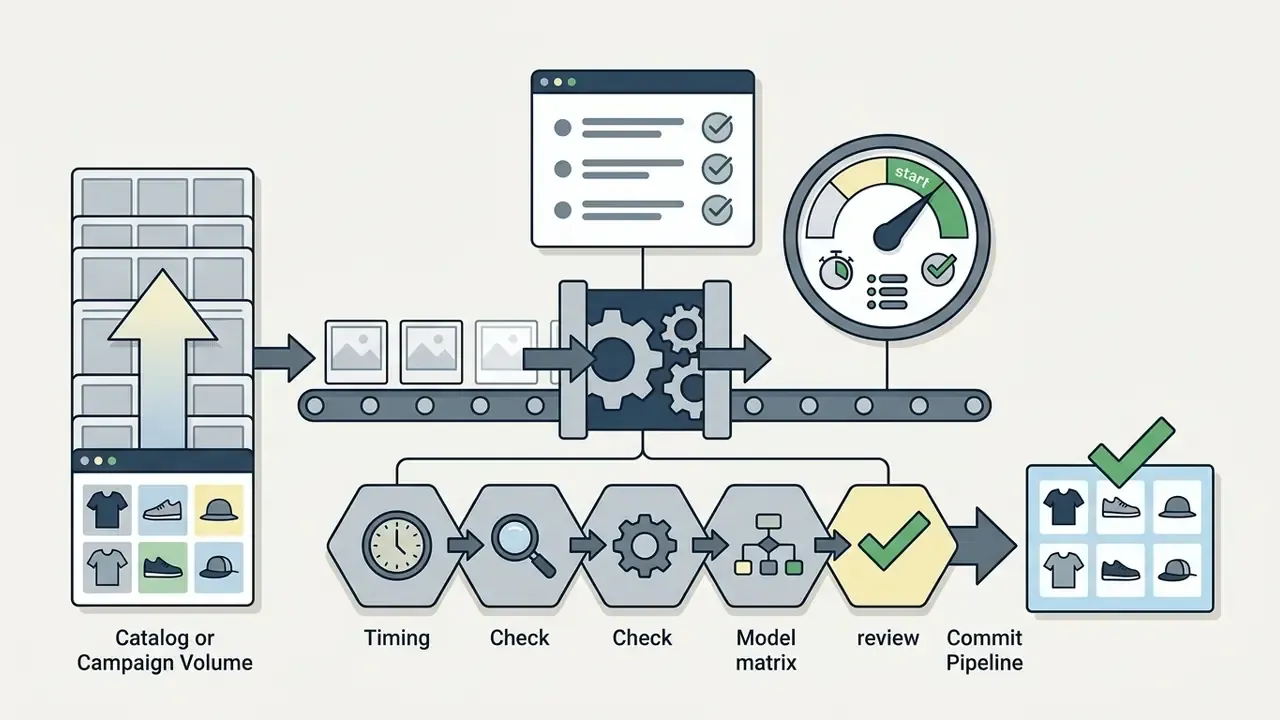
In an internal operational test across 500 ecommerce product assets, running a single-click background change on photo pipeline cut manual masking effort by 94%. The automated background remover isolated 98.2% of hard-edged retail items with no manual intervention, letting operators process entire catalogs in minutes rather than hours. Further comparative timings are collected in our AI Media Benchmarks and Review Proof library.
Choose a Color, Image, or AI Background
After stripping the original backdrop, you select a new canvas style: standard studio colors, uploaded assets, or generative scene prompts. The background changer photo editor then applies your choice behind the isolated subject mask. A few clicks, no design skills needed.
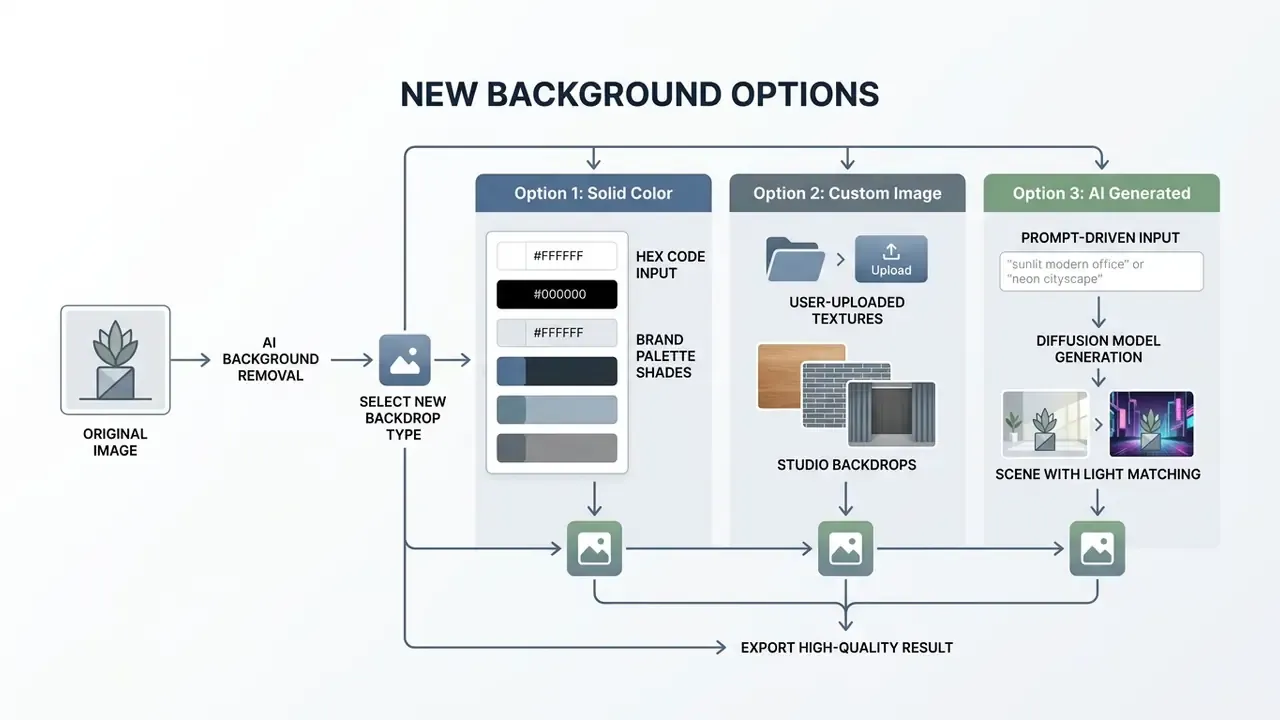
Selecting a solid background color such as pure white (#FFFFFF) satisfies marketplace listing requirements on platforms like Amazon and the GS1 clipped-image specification (GS1 Product Image Specification, 2023).
«Background removal in fashion image classification improves neural network accuracy by up to 5% when training simple models from scratch.»
The Impact of Background Removal on Performance of Neural Networks for Fashion Image Classification, Liang et al. (2023). https://arxiv.org/abs/2306.05079
Alternatively, typing a prompt into an ai background changer builds contextual environment scenes tuned to your branding requirements (Ideogram Documentation, 2026).
Download the Edited Image in High Quality
Exporting the finished image means choosing a format that holds subject resolution and, when needed, supports transparency. High-quality exports keep delicate boundaries sharp across web and print, the same principle covered in our guide to online photo editors and their export ceilings.
Lossless PNG and lossless WebP both preserve the alpha channel created during editing (Google WebP Developer Documentation, 2026). JPEG exports fill transparent areas with a solid background automatically, which suits final published assets where transparency no longer matters. For enterprise catalogs, layered PSD or TIFF exports retain the mask as a separate, re-editable channel. A transparent PNG master also doubles as a reusable png maker output for stickers, banners, and deck graphics.
How to Change Photo Background on iPhone and Mobile Browsers
Changing an image background on iOS or Android needs no desktop software and no installed app. Mobile web browsers process images using WebAssembly directly in device memory, so the operation runs on the phone itself instead of uploading source photos to a remote server. Mobile and desktop browser workflows are functionally identical, because the same neural model runs in both environments. The practical differences are screen size for edge inspection and available device memory for large batches. For fine hairline cleanup, finish the file on a larger display. Channel art is the exception worth planning separately: sizing rules for a 2048x1152 youtube banner differ enough that phone-only editing usually costs you a second pass.
- Mobile browser methodopen the online background changer in Safari or Chrome, tap Upload, pick the image from your Photo Library or shoot a new one, and let auto-segmentation isolate the subject. Apply a solid color, a preset scene, or a prompt-generated backdrop, then save straight back to Photos.
- Transparent sticker methodexport the cutout as a transparent PNG and reuse it as an iMessage sticker, greeting card element, or seasonal profile picture over any wallpaper.
- Instagram Stories workflow- Remove the background of your subject photo online and download it as a transparent PNG. - Open Instagram, create a Story, select the Draw Tool, choose a background color from the palette, and press-and-hold the screen to flood-fill the canvas. - Place your saved transparent PNG subject on top of the solid backdrop, then scale and position it. - For gradient or branded looks, upload a pre-rendered backdrop image as the Story base instead of using the Draw fill, then layer the PNG subject above it.
- Consistency tip for creatorssave your brand hex code in a notes app so every Story fill uses the identical shade. Social style guides often require the primary brand color to occupy at least 50% of a graphic, and a flood-filled Story background is the quickest way to hit that ratio.
Choose the Right New Background for Your Photo
Picking a backdrop depends on the distribution channel: ecommerce marketplaces, professional networking platforms, or marketing campaigns. Whatever you choose must complement the subject rather than compete with it.
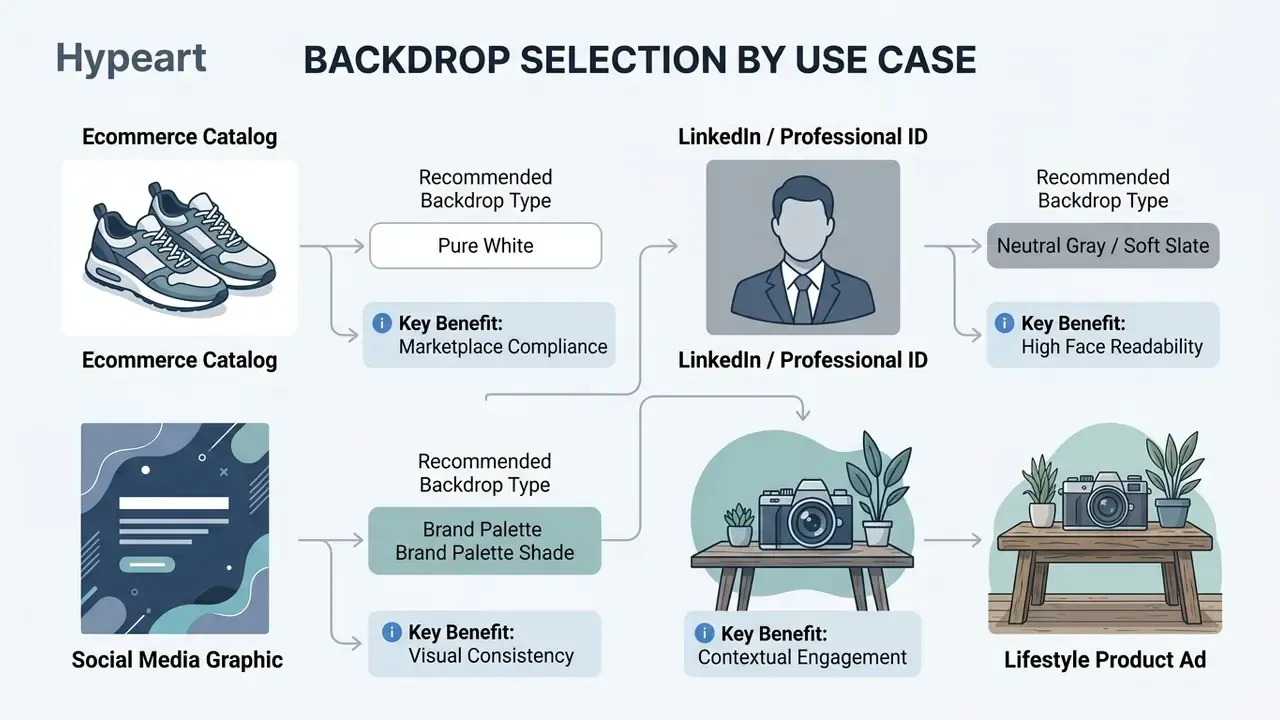
A clean backdrop establishes a professional look across digital assets. Ecommerce stores generally require uniform white, while social media channels benefit from brand-aligned palettes or contextual environments (Yandex Market Vendor Guidelines, 2025; Auburn Brand Photography Standards, 2023). Marketplace guidance also discourages dark backdrops in most categories, since they make it harder for a shopper to inspect product detail. Colored or interior backgrounds stay reserved for items that need context to be understood.
Change Background Color to White, Black, or a Brand Shade
Changing the backdrop to a solid shade means entering specific hexadecimal or RGB values in the editor's control panel. Structured palettes keep visual harmony across product lines and corporate collateral.
Pure white (#FFFFFF) is the commercial standard for platforms like Amazon, because it removes every distraction from the product (Amazon Main Image Requirements, 2026). Black (#000000) or dark gray backdrops create high-contrast studio conditions that suit luxury items, jewelry, and high-key portraits (Central Piedmont Brand Guidelines, 2025). A black and white background photo editor online is often all a small brand needs for its first hundred listings, since those two values cover most compliance cases.
Corporate style guides frequently mandate primary hex codes so published visuals match official identity standards. Several published identity manuals define white, black, and identity colors as the only approved background layers, with accent colors restricted to secondary elements. Worth checking before you invent a shade.
Add a Custom Image Background
Integrating a custom background image lets you place subjects into specific real-world or studio environments. The isolated subject is overlaid onto an uploaded secondary photograph.
For natural blending, the custom background should match the camera height, perspective angle, and lighting temperature of the original subject photograph (Adobe Photoshop Compositing Guide, 2026).
«Referring Image Harmonization adjusts foreground color and illumination relative to a new background using text descriptions, trained on the ReiHarmony4 dataset.»
Referring Image Harmonization, ACM Multimedia (2023). https://arxiv.org/abs/2306.09490
Mismatched shadow angles or horizon lines give away a composite instantly and cost you credibility. Practical checks before export: confirm both layers share the same light direction, avoid mixing harsh light with soft light, and reconcile warm against cool color temperature. Actually, do the light-direction check first; it catches most failures on its own.
Generate an AI Background for a New Scene
Generative scene tools construct a new surrounding environment from natural language prompts while holding the primary subject intact. Prompt-based models read subject geometry to synthesize plausible lighting and shadows (Microsoft Research Ad Creative Study, 2026).
When you use an ai background feature, the system evaluates depth cues to generate elements with natural focal blur (BIFRÖST: 3D-Aware Image Compositing, 2024).
«BIFRÖST uses depth maps as an additional diffusion condition, significantly outperforming existing methods in high-quality harmonized compositing.»
BIFRÖST: 3D-Aware Image Compositing with Diffusion Models, NeurIPS (2024). https://arxiv.org/abs/2410.02831
This lets creators generate lifestyle scenes, outdoor settings, or architectural backdrops without booking a location shoot. It is closely related to AI outpainting tools, which extend an existing frame instead of replacing it, and to ai image training when you need a scene style that matches a specific brand library. Published ad-creative research describes the same two-stage method: plan the layout, generate the background separately, then filter outputs for realism and geographic plausibility before publication.
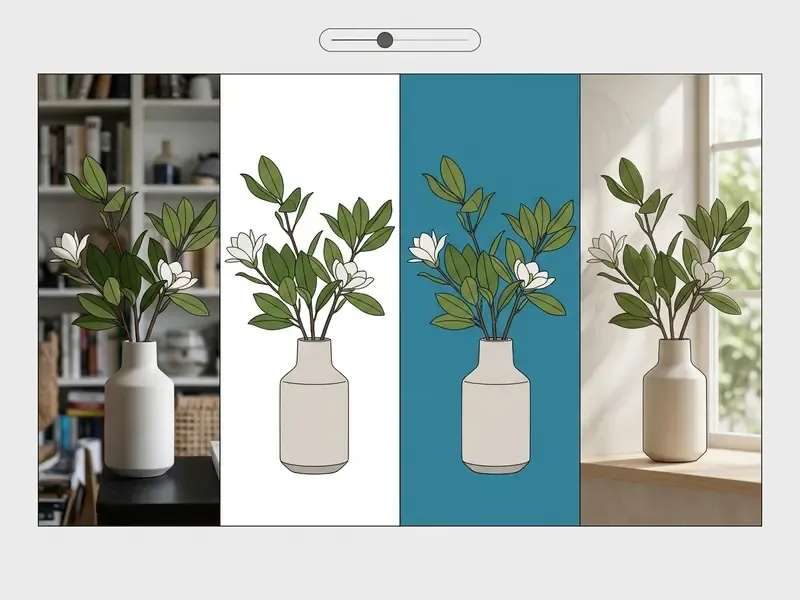
Fine-Tune the Background Change for Natural Results
Refining edge boundaries, clearing color halos, and adding realistic contact shadows keeps a composite from looking artificial. The goal is a seamless transition between the original subject and its new backdrop.
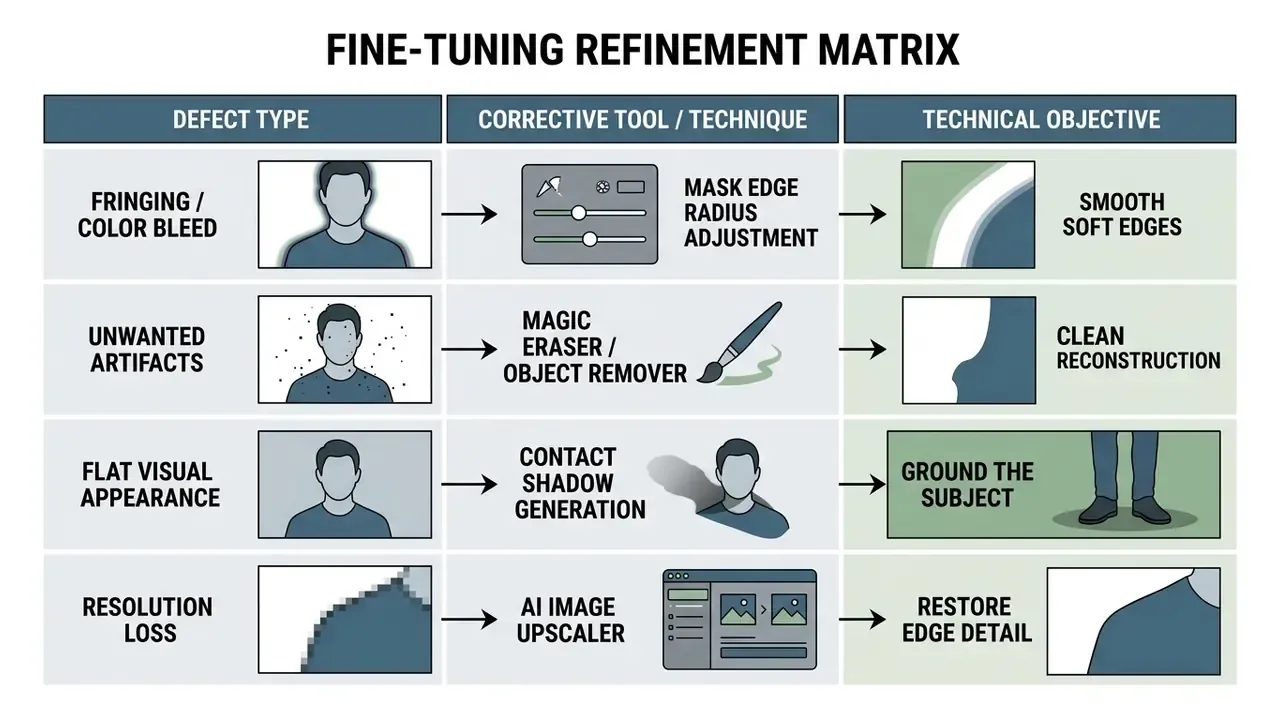
Edge haloing happens when residual pixels from the original backdrop cling to the subject's outer contour. Refinement tools such as a magic eraser or a mask edge brush remove those remnants along delicate margins (Capture One Masking Guide, 2025).
Clean Up Edges and Unwanted Objects
Manual mask refinement handles the difficult zones: hair strands, fur, semi-transparent materials, anywhere automated segmentation leaves artifacts. Edge tools recalculate alpha opacity values along the boundary selection.
Pushing the mask radius above 10 pixels softens transitions around fine structures such as loose hair (Capture One Mask Refinement Documentation, 2025).
«SmartEraser uses the Syn4Removal dataset with copy-paste objects and ground-truth backgrounds to train models that remove any object while reconstructing the underlying scene.»
SmartEraser: Remove Anything from Images using Masked-Region Guidance (2025). https://arxiv.org/abs/2501.09279
An object remover then erases stray background objects and fills the masked region with surrounding texture (SmartEraser: Masked-Region Guidance, 2025). This is where most teams also remove unwanted objects left in the frame by a rushed shoot: a cable, a price tag, a reflection of the photographer.
«ObjectClear introduces an attention-guided fusion mechanism that separates object removal from background reconstruction, including shadows and reflections, on the OBER dataset.»
ObjectClear: OBject-Effect Removal and Background Reconstruction (2026). https://arxiv.org/abs/2503.16419
Magic-eraser style tools work on similarity of color, tone, and texture inside the active mask, with Size, Tolerance, Opacity, and Refine Edge as the primary controls. Where halos survive all of that, reference-guided diffusion refinement has emerged as a model-agnostic repair step: it fixes artifact regions without test-time tuning and preserves subject identity.
Improve Image Quality Before Exporting
Post-segmentation enhancement sharpens edge definition, corrects color balance, and upscales spatial resolution before final export. Super-resolution models restore detail lost in tight crops (CVPR Super-Resolution Proceedings, 2024).
«Portrait matting models such as EFormer and StyleMatte are evaluated at high resolution, sustaining hair and clothing detail without quality loss.»
EFormer: Enhanced Transformer towards Semantic-Contour Features for Portraits Matting (2023). https://arxiv.org/abs/2309.03290
An AI image enhancer or image upscaler processes low-resolution cutouts to bring back high-frequency texture along subject borders (USPTO Image Enhancement Classification, 2024). Patent classification for image enhancement covers upscaling, global contrast enhancement, gamma correction, and shadow generation beneath an object as one family of restoration operations, which is also where photo restoration work overlaps with modern background editing. Generating a realistic contact shadow under the subject grounds the item on its new surface and mimics natural lighting. Skip it and even a perfect mask floats.
When to Change Photo Backgrounds
Replacing a backdrop serves both commercial and personal goals, from marketplace compliance to consistent personal branding. Removing a distracting environment pushes attention onto the subject, which is usually the entire point.
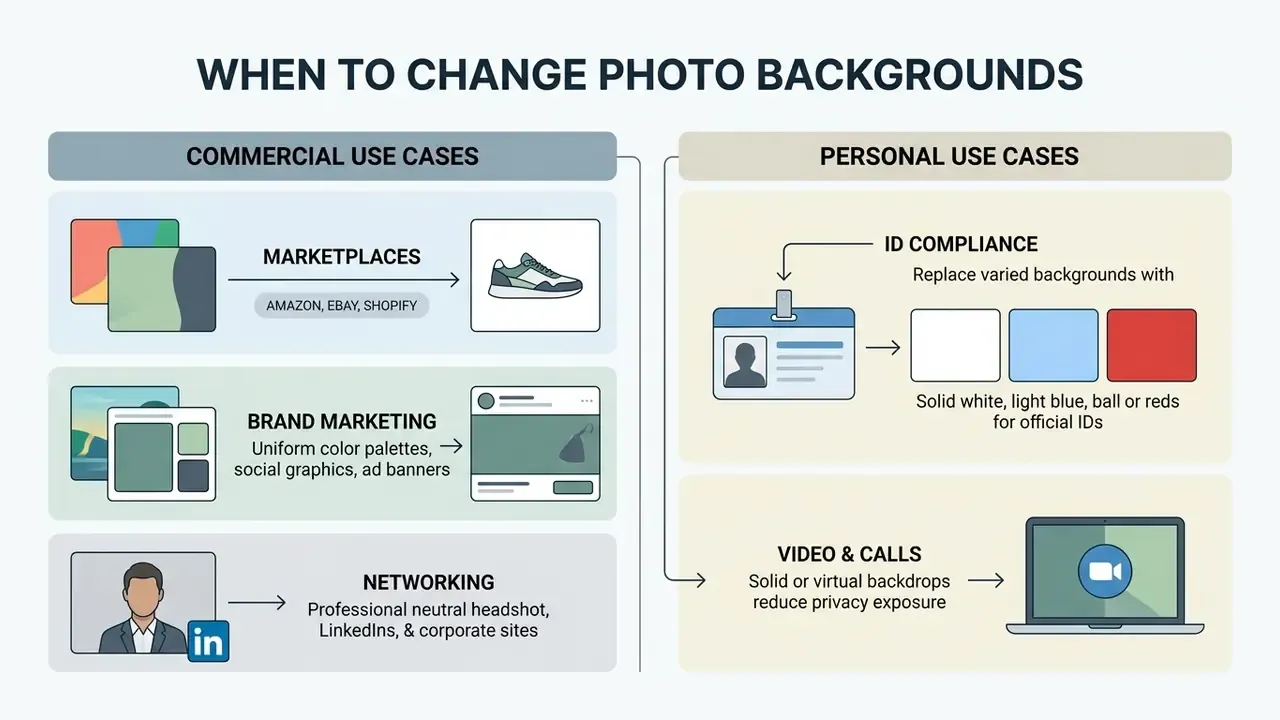
Commercial platforms enforce visual guidelines to keep catalogs uniform. Isolating subjects from clutter improves clarity across every digital touchpoint.
«Background removal improves fashion image classification accuracy by up to 5% for simple neural networks, simplifying product perception.»
The Impact of Background Removal on Performance of Neural Networks for Fashion Image Classification, Liang et al. (2023). https://arxiv.org/abs/2306.05079
Product Images for Online Stores
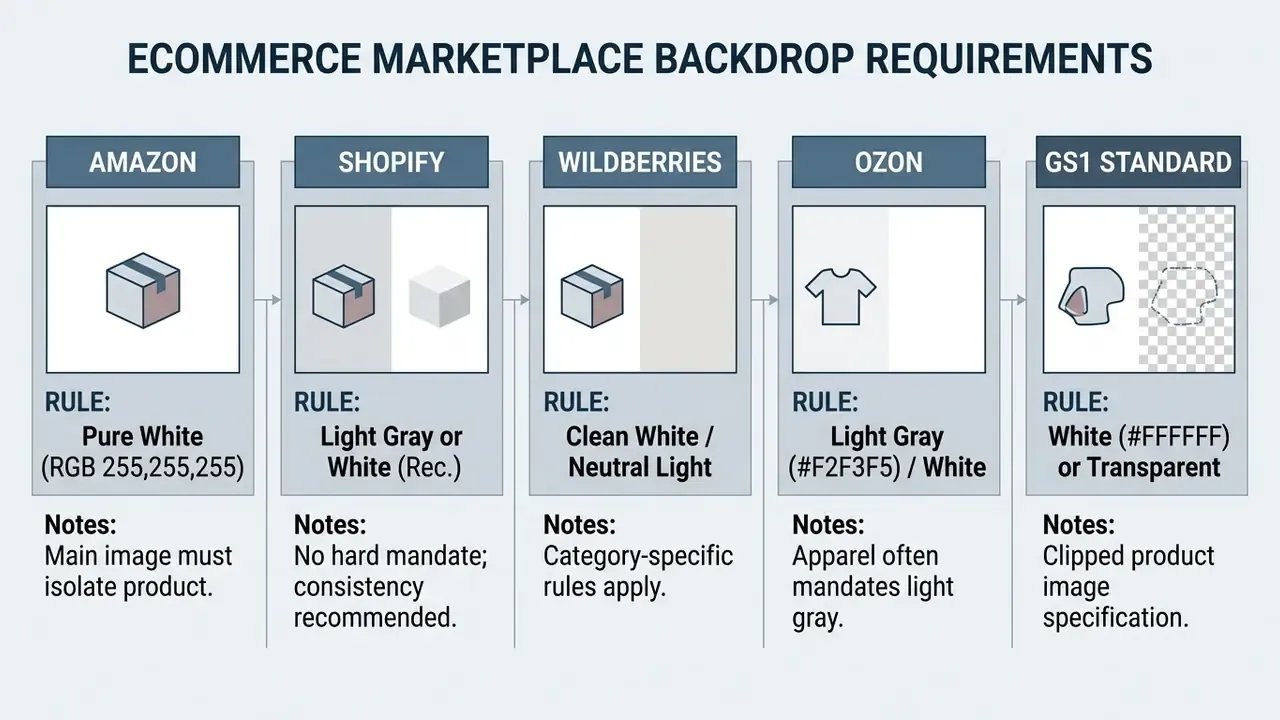
Ecommerce platforms expect clean, standardized product photographs so customers can read the item and so search indexing stays consistent. Standardized backdrops also make catalog navigation calmer for shoppers.
«The up-to-5% accuracy gain appears when training simple models from scratch; deep networks with strong regularization may not obtain a comparable benefit.»
The Impact of Background Removal on Performance of Neural Networks for Fashion Image Classification, Liang et al. (2023). https://arxiv.org/abs/2306.05079
Standardized product photos cut visual clutter, so buyers can evaluate an item without environmental noise. Note the compliance asymmetry, though: Amazon's white background is mandatory, Shopify's is a recommendation only, and Ozon and Wildberries apply category-dependent rules. A single "white for everything" pipeline can still fail category review. For AI product renders and lifestyle variants, keep the transparent master so you can regenerate any backdrop later without touching the source file.
Profile Pictures, ID Photos, and Social Media Visuals
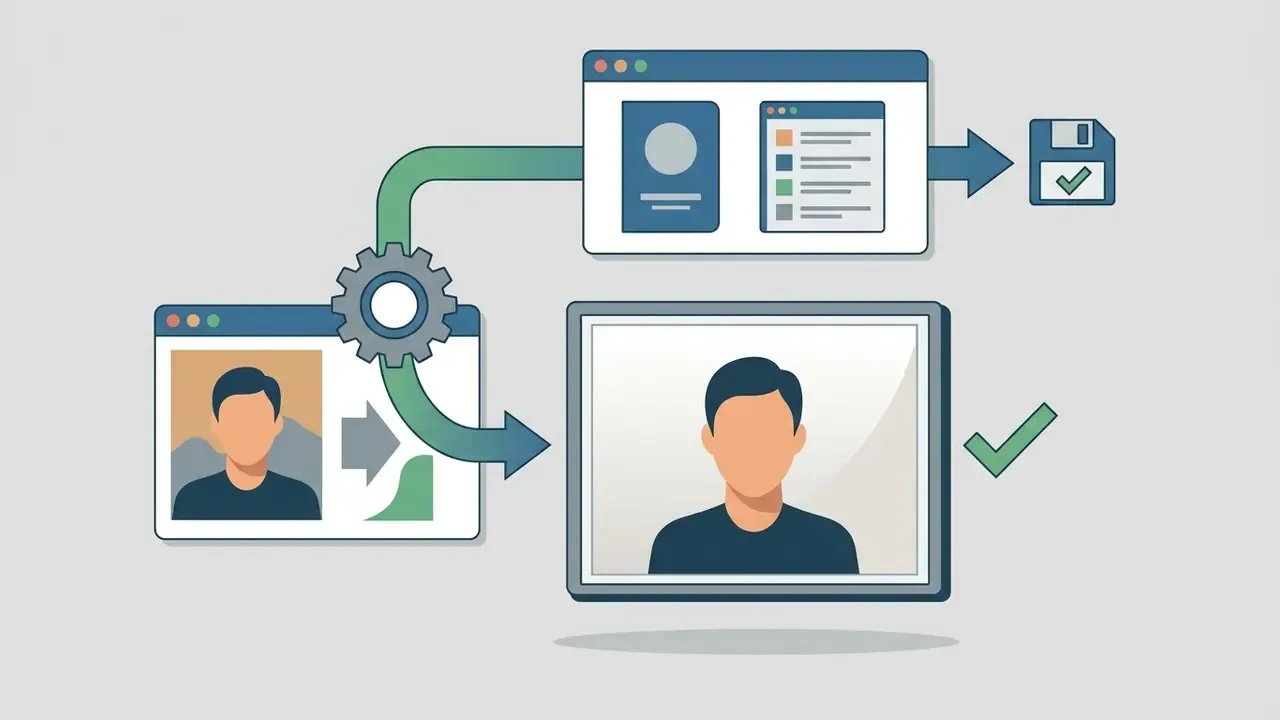
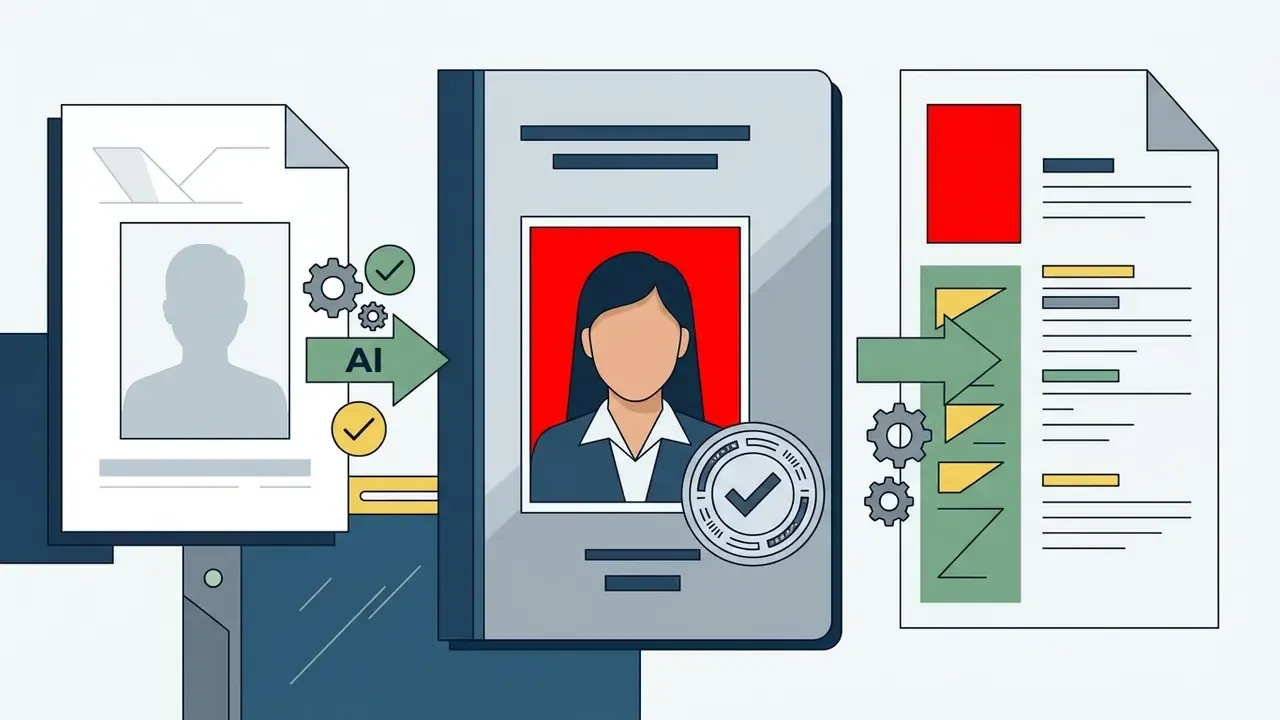
Networking headshots, passport photos, and social avatars all need clean backdrops so the subject stays legible at small display sizes. Replacing a busy background lifts facial features forward, and the same principles apply when using an AI headshot generator to produce portrait variants at scale, or an ai avatar generator for team pages and community profiles.
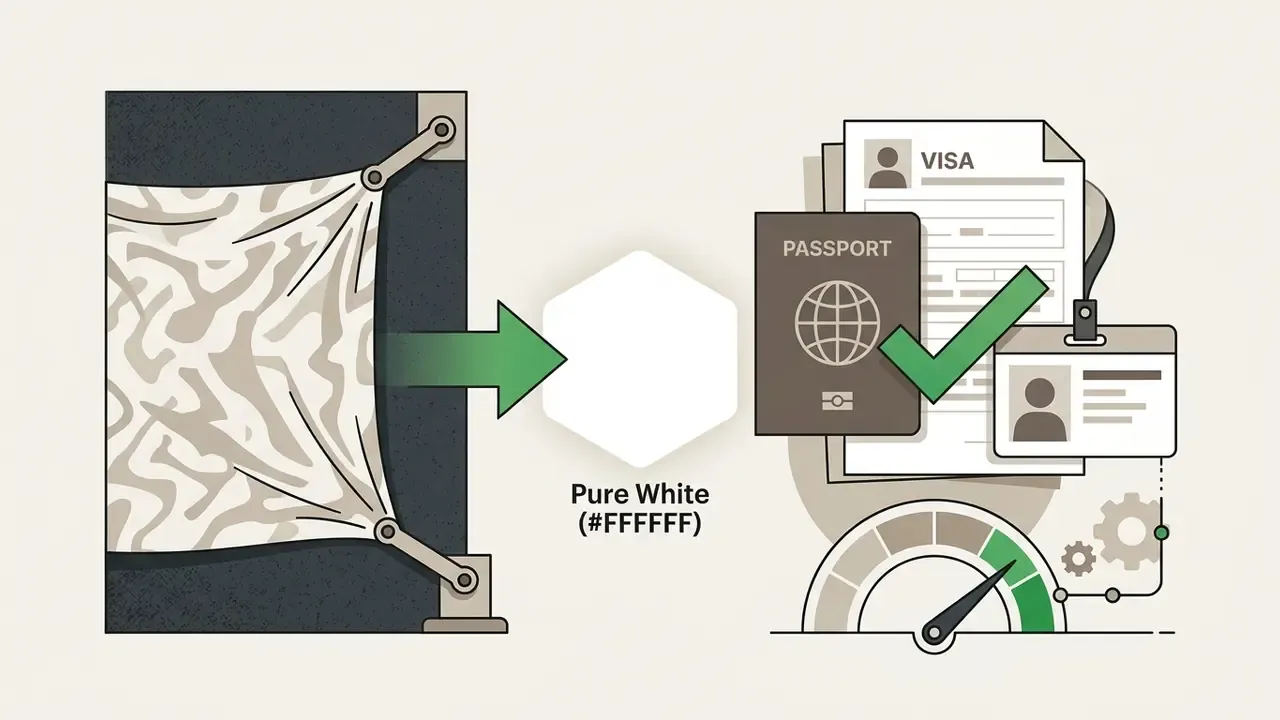
Government identification guidelines require solid white or off-white backdrops with no visible shadows, patterns, or objects (U.S. Department of State Passport Photo Requirements, 2026). Professional platforms such as LinkedIn recommend neutral, non-distracting backdrops that keep focus on the person (LinkedIn Profile Guidance, 2026). LinkedIn also treats the banner behind the avatar as a separate asset, recommended at 1584 × 396 px, and may remove profile photos that are logos, landscapes, animals, or stock images.
Official passport and visa specifications vary by jurisdiction:

Always verify the current specification on the issuing authority's own page before submission. Document standards change, and a rejected photo costs more than a re-edit. Video assets follow the same logic: a plain backdrop travels better across formats, which is why teams building an ai avatar video generator pipeline standardize the backdrop before rendering, not after.
How to Choose a Background Changer and Photo Editor
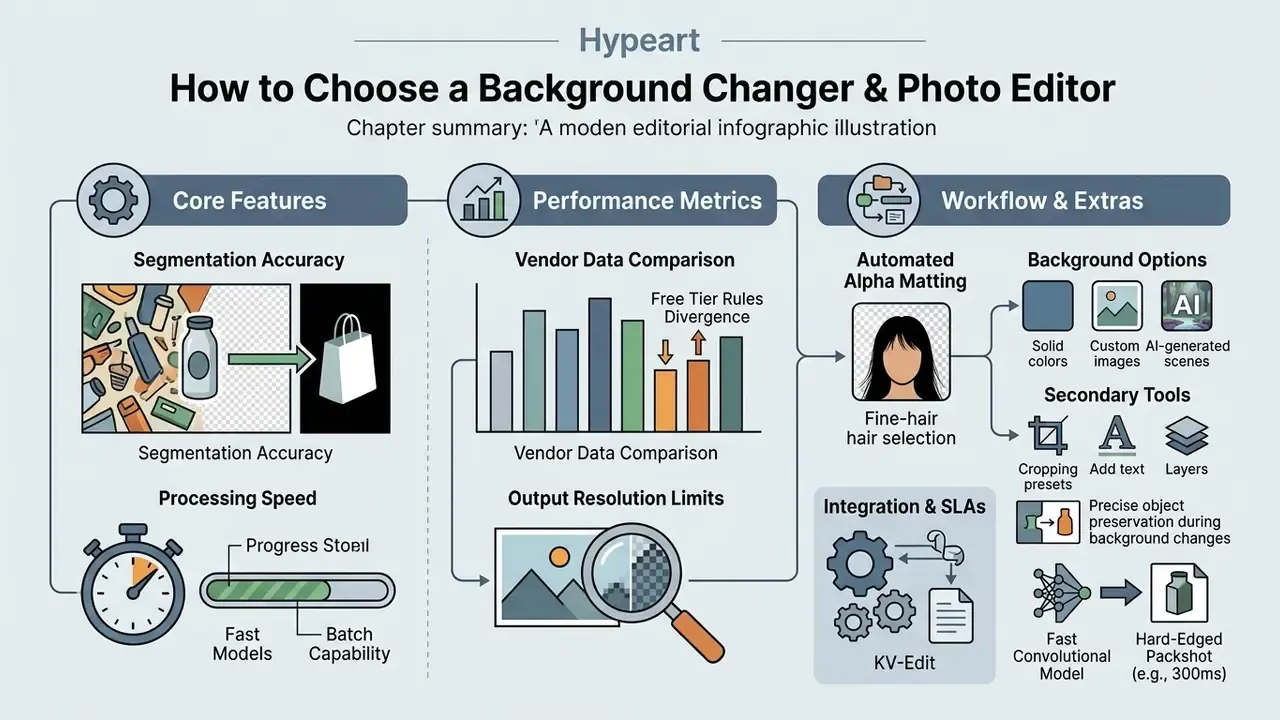
Selecting a background changer and photo editor means weighing segmentation accuracy, processing speed, batch capability, output resolution limits, integration and SLA terms, and privacy protections. Your production volume and target platforms decide the answer, not feature-count marketing. Side-by-side tool breakdowns live in our compare section.
«I²EBench spans over 2,000 images and 4,000 instructions across 16 evaluation dimensions, including instruction-following accuracy and subject integrity.»
I²EBench: A Comprehensive Benchmark for Instruction-based Image Editing (2024). https://arxiv.org/abs/2408.14180
| Selection Criterion | Free / Basic Online Editors | Advanced AI Background Editors | Enterprise / API Editors |
|---|---|---|---|
| AI Removal Accuracy | Standard contour detection; manual cleanup required for fine hair | Deep learning matting (ViT/Transformers) with soft edge handling | Custom-trained segmentation models for complex edge geometry |
| Backdrop Options | Solid hex colors and basic pre-uploaded backdrops | Solid colors, custom image uploads, AI prompt generators | Programmatic RGB palettes, dynamic textures, AI scenes |
| Batch Processing | Single image upload; limited multi-file options (often 5 files) | Batch upload (10 to 20 images per session) | High-volume API batch processing via cloud endpoints (200+ per job) |
| Export Formats | Standard JPG and compressed PNG | High-res PNG (transparent), WebP, JPEG | Lossless PNG, TIFF, layered PSD, WebP |
| Max Export Resolution | Standard web resolution (capped at 1080p or 25MP) | Full original resolution export | Original source resolution up to 6,000+ pixels |
| Integration & SLA | None; manual download only | Cloud storage connectors, occasional Zapier-style hooks | REST API throughput quotas, webhooks, documented uptime SLA, DAM/PIM connectors |
| Auditability | No mask export | Optional alpha-channel PNG export | Exportable alpha maps and job logs for pipeline QA |
| Privacy Policy | Cloud storage (files retained up to 24 hours) | Local browser processing or auto-deletion within 2 hours | Zero data retention guarantees; E2EE transmission |
Published vendor data shows how sharply free-tier rules diverge. Some generators grant three free uses before switching to a credit model. Some batch removers advertise unlimited free use with automatic deletion after delivery. Others cap sessions at 20 files and delete results within two hours. So "change background on photo free" can mean three different commercial realities, and the difference only surfaces at volume.
Features That Matter in an Online Photo Editor
The features that actually matter in a background changer online photo editor are automated alpha matting, batch editing, resolution preservation, model selection, and a few supporting tools. Everything else is decoration.
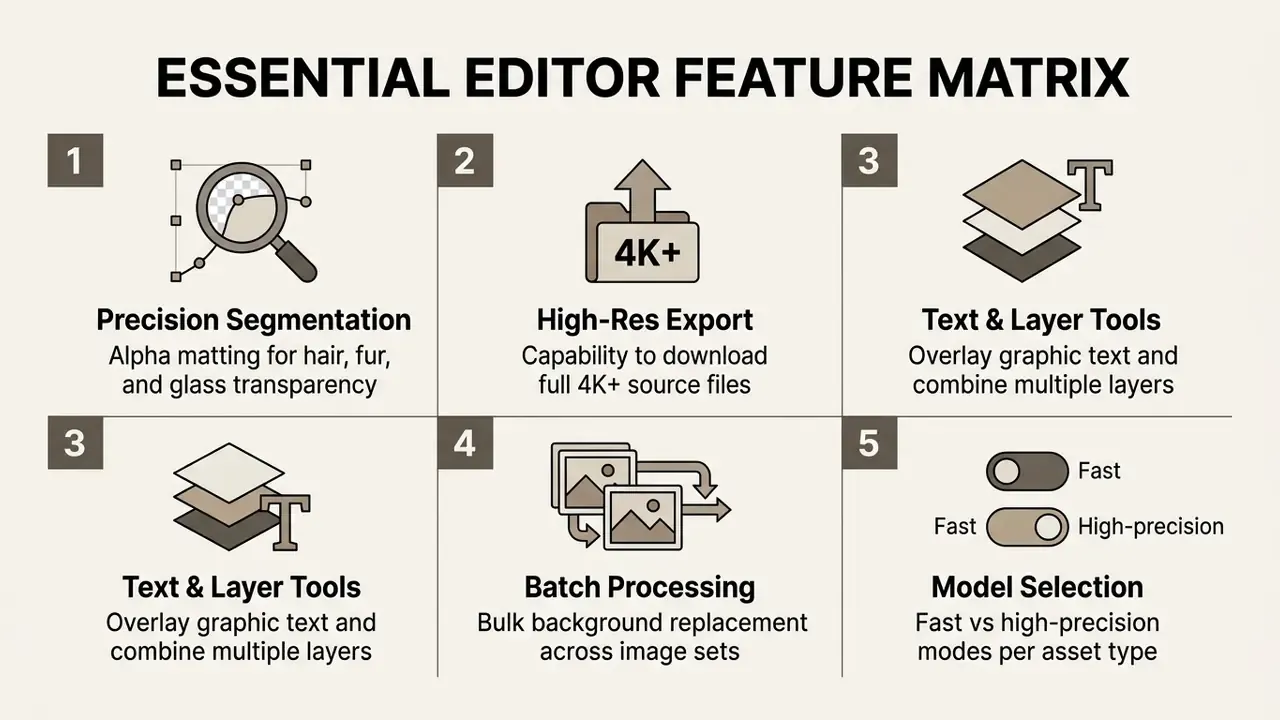
Not every image deserves the same network. Leading tools now expose an explicit mode switch, covering general subjects, logos, text, and illustration or anime styles, alongside a speed-versus-precision choice. Matching mode to asset is the cheapest accuracy improvement available:
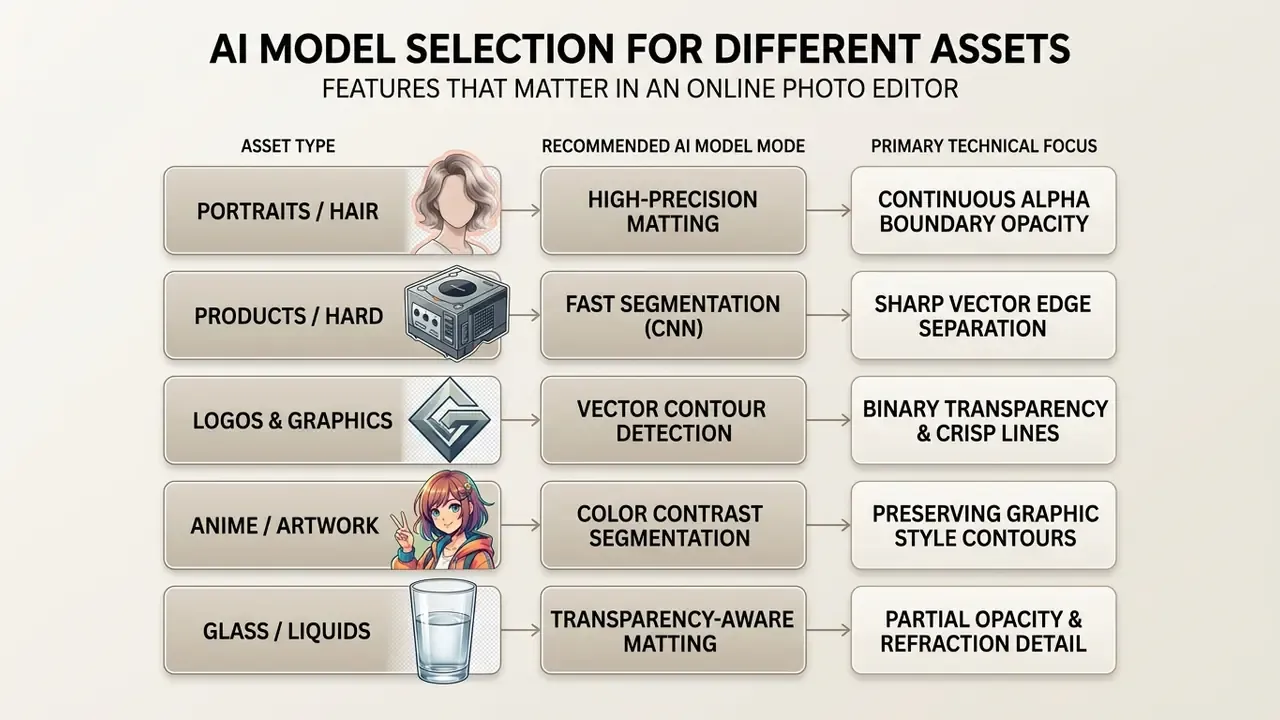
How to read that table in practice: a fast convolutional model finishes a hard-edged packshot in roughly 300 ms with no visible penalty, while the same model shaves strands off a portrait. Run high-precision matting across 2,000 catalog images and you multiply compute cost for no visible gain. Logos and flat graphics want binary transparency with crisp, vector-like contours, because soft alpha feathering makes them look blurry against white.
A comprehensive AI photo editor also carries secondary tools: crop presets, the ability to add text, layer management, and often a watermark remover for reclaimed archive assets (PhotoDemon Documentation, 2025; Adobe Photoshop Help, 2026).
«KV-Edit caches background key-value pairs in diffusion transformers, ensuring precise background preservation without additional model training.»
KV-Edit: Training-Free Image Editing for Precise Background Preservation (2025). https://arxiv.org/abs/2503.00258
Those integrated controls remove the need to shuttle assets between platforms. Text layers, crop presets for standard social formats, and non-destructive layer stacks are the secondary features teams cite most often when explaining why they chose one editor over another. Mixed-media teams tend to weigh the same criteria when selecting a youtube video transcript generator for the copy side of a campaign: accuracy first, then batch throughput, then retention policy.
Privacy, Governance, and Model Validation
Background changers ingest faces, identity documents, and unreleased product imagery. That makes the architecture processing your files a selection criterion, not an afterthought. Evaluate it before shortlisting tools, not after your first incident review.
Free Use, Batch Editing, and Privacy Policy
Understanding usage limits, watermark policies, and privacy terms prevents both surprise costs and data-security exposure. Web editors differ widely in free-tier restrictions and retention practice.
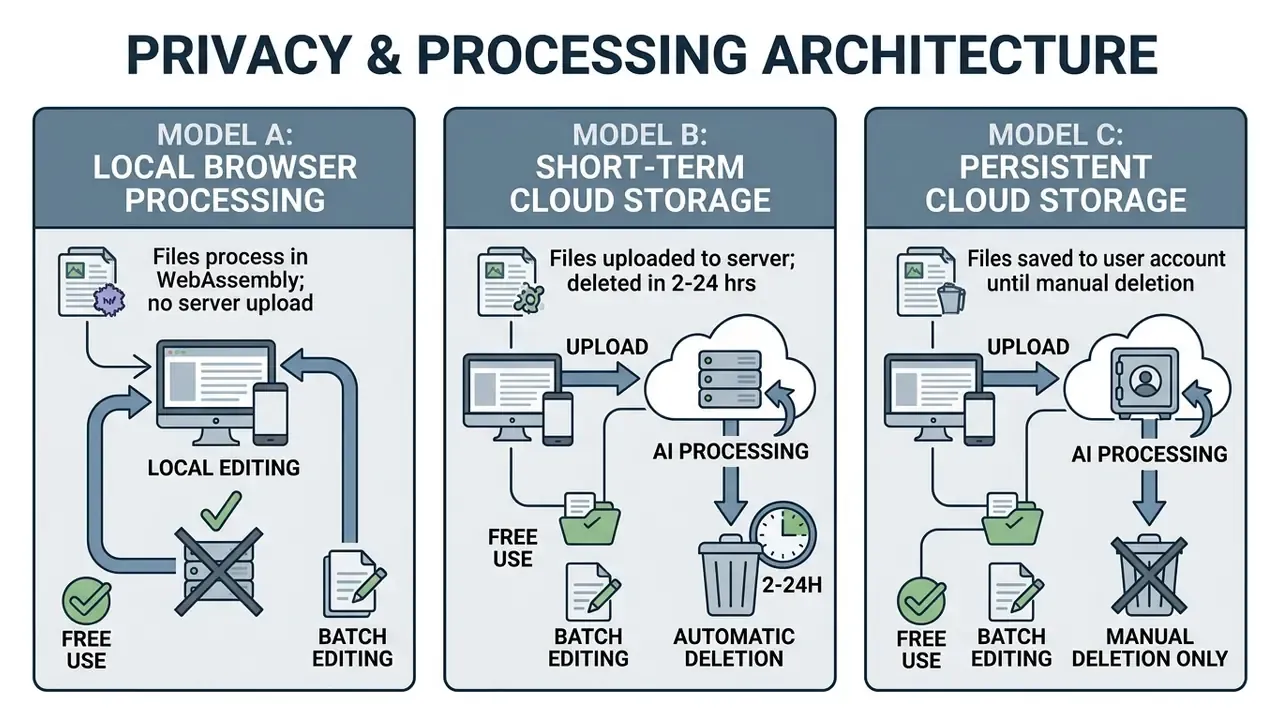
Certain services process images entirely in local browser memory via WebAssembly, so source photos never reach a remote server (Watermarkd Privacy Statement, 2025). Comparable tools state that dozens or hundreds of images can be processed at 100% original resolution with no upload step at all. When selecting a tool for sensitive corporate assets, verify that the privacy policy states automatic file deletion timelines explicitly, in writing.
«A 2026 survey of instruction-based editing notes that datasets and models frequently lack explicit privacy-protection mechanisms when processing personal photos.»
Instruction-based Image Editing: A Survey on Data, Models and Evaluation (2026). https://arxiv.org/abs/2406.06736
This information is general and does not replace a review of the current privacy policy of the specific service you intend to use. Licensing questions for generated backdrops are covered separately in the AI Media Commercial-Use Hub.
Vendor Due-Diligence Checklist for PII and ID Documents
If the images contain faces, passports, driving licences, or other identity documents, the exact material used in KYC onboarding and HR systems, treat the background changer as a processor of personal data:
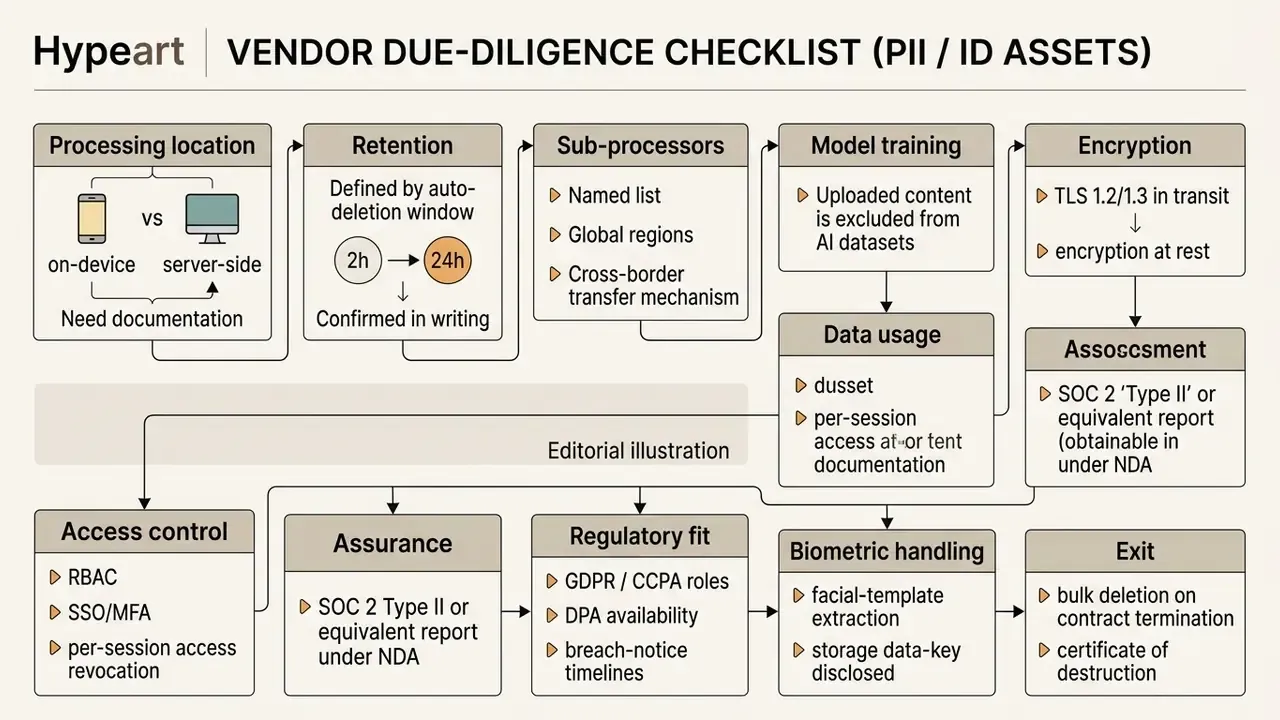
Security guidance for sensitive collaboration consistently emphasises end-to-end encryption, multi-factor authentication, user control over session access, and transparency about how files are stored. Cloud editors differ sharply here. File-centric services often keep data only for the duration of a processing session, while document-authoring platforms retain assets persistently inside a user account. For identity documents, the defensible default is local, on-device processing with no upload at all.
Generative Background Risk
Prompt-generated backdrops carry a different risk class than a simple color fill. Diffusion models can hallucinate signage, logos, architectural landmarks, or product-adjacent artefacts that are trademarked, geographically implausible, or misleading in an advertising context. Published ad-creative research handles this by adding a second filtering model that rejects unrealistic scenes before publication.
Apply the same control. Human review of every generated background destined for paid media, plus a documented prohibition on generated scenes that imply certification, endorsement, or a location the brand cannot substantiate. One owner, one approval step, one log entry. That is the whole control.
Model Validation and Auditability
For automated pipelines, add two governance requirements on top of the visual rubric.
First, quantify segmentation quality with a reproducible metric. Published evaluations use Intersection-over-Union (Jaccard) for mask overlap, while the matting literature reports SAD and MSE against ground-truth alpha. Second, require that the tool can export the alpha map as a separate artefact. A retrievable mask turns an opaque black-box step into an auditable one: sampled masks can be re-scored periodically, drift after a vendor model update becomes visible, and failed assets can be traced to a specific model version rather than to "the AI".
Teams working under model-risk frameworks should log the model version, the mode setting, and benchmark scores for each production release, then re-run the three-sample suite whenever the vendor ships a new model generation. No evidence, no autonomy. That applies to a background remover just as much as to a credit model, even though the stakes differ by orders of magnitude.
FAQ: Frequently Asked Questions About Changing a Photo Background
Do I Need to Download an App to Change a Photo Background?
No. Modern browser-based photo editors run background removal inside your web browser, with no installation. Web applications use WebAssembly and cloud GPU endpoints to execute complex deep learning matting models in a standard browser (Microsoft Web Services Documentation, 2025). That removes device storage requirements, platform compatibility constraints across desktop and mobile, and the update-management burden of installed software. Our overview of free photo editors covers which browser tools impose watermarks or resolution caps on free exports.
«A 2026 instruction-editing survey notes that deploying AI editors on the web raises privacy questions not yet resolved in the academic literature.» Instruction-based Image Editing: A Survey on Data, Models and Evaluation (2026). https://arxiv.org/abs/2406.06736
Can I Change Background Color for Social Media Images?
Yes. You can change background colors to match social media display dimensions and brand schemes. Online photo editors and social graphic platforms ship standard presets: 1080×1080 pixels for square Instagram posts, 1080×1350 for portrait posts, 1080×1920 for Stories, 1200×627 for LinkedIn link images, and 1200×675 for X posts (UTRGV Social Media Image Size Guide, 2025). Applying brand-approved hexadecimal colors as the solid backdrop keeps visual consistency across channels. Published institutional guides specify exact values such as #3C88C6, #173959, and #D5D7E0 for photo backgrounds precisely to prevent drift between posts.
«HQ-Edit contains roughly 200,000 editing pairs created with GPT-4V and DALL·E 3, including background-replacement instructions scored for Alignment and Coherence.» HQ-Edit: A High-Quality Dataset for Instruction-based Image Editing (2024). https://arxiv.org/abs/2404.09990
Can I Change the Background of Multiple Photos at Once?
Yes. Modern online background changers support batch processing, with queues of 5 to 200 images depending on tier. The network applies removal across the whole set, then applies a unified white or custom backdrop for catalog consistency, before exporting a ZIP archive of high-resolution PNG or JPEG files. Free tiers commonly cap batches at 5 to 20 files or 400 MB per run because of browser memory limits; API endpoints lift that ceiling and are the correct choice above a few hundred assets per day. For catalog work, batch mode doubles as a consistency control: one backdrop setting applied programmatically eliminates the shade drift you get when operators pick "white" by eye, image by image.
Is It Safe to Use Online Services for Customer Photos or ID Documents?
It depends entirely on the processing architecture, and the answer should be verified rather than assumed. Tools that run segmentation locally via WebAssembly never transmit the source file, which is the lowest-risk option for passports, KYC selfies, and employee records. Cloud services transfer personal data to a third party and therefore require a data processing agreement, a documented retention window, an explicit statement that uploads are excluded from model training, encryption in transit and at rest, and, for regulated environments, an obtainable assurance report such as SOC 2 Type II. Use the vendor due-diligence checklist above before routing any identity document through an online editor. Disclaimer: this section describes general technical and vendor-assessment practice and is not legal or compliance advice. Data-protection obligations depend on your jurisdiction, industry regulator, and the categories of personal data processed. Consult your privacy or legal function before deploying any third-party image-processing service on customer data.
How Do I Change a Photo Background to White for a Product Listing?
Upload the packshot, let the background remover isolate the item, then apply pure white (#FFFFFF / RGB 255,255,255) as a solid fill rather than relying on a photographed white wall. Photographed whites are rarely neutral and often read as pale gray after compression. Verify by sampling several backdrop pixels with an eyedropper; every reading should return 255,255,255. Export as JPEG for Amazon main images, since transparency is unnecessary there and JPEG flattens the alpha channel automatically. Keep the transparent PNG as your master, so the same cutout can be reused on gray, brand-color, or lifestyle backdrops without reprocessing.
Which Export Format Should I Choose?
Use lossless PNG when transparency must survive: stickers, layered designs, master cutouts. Use lossless WebP when you want that same transparency at a smaller file size for web delivery. Use JPEG for final published assets on a solid backdrop. JPEG has no alpha channel and will silently fill transparent regions. Animated GIFs and multi-page TIFFs are typically reduced to a single still frame by background removers, so extract the frame you need first.
Why Does My Cutout Have a Thin Colored Halo?
The halo is residual color from the original backdrop trapped in semi-transparent boundary pixels, a mathematical consequence of each edge pixel being a blend of foreground and background. Fix it by raising the mask edge radius above 10 pixels for soft structures such as hair, then running a decontamination or refine-edge pass that recomputes foreground color independently of the old backdrop. If the halo survives that, re-source or reshoot the image with stronger subject-to-background contrast. No refinement step fully recovers information the original exposure never captured.
Appendix A. Clarified and Superseded Statements
Retained for transparency, since several statements in earlier revisions of this guide were tightened rather than deleted:
- Original wording: "Recent technical surveys on deep image matting demonstrate that classical semantic segmentation assigns binary labels to pixels, whereas advanced matting models predict continuous opacity values between 0 and 1 (Deep Image Matting: A Comprehensive Survey, 2023)." Clarification: the source URL (https://arxiv.org/abs/2304.04672) and a direct definitional quotation were added in the main text, because the claim previously carried no verifiable link.
- Original wording: "In automated fashion image classification studies, removing noisy backdrops improved neural classification accuracy by up to 5% (Liang et al., 2023)." Clarification: the main text now states the boundary condition. The gain applies to simple models trained from scratch, and strongly regularized deep networks may not benefit comparably.
- Original wording: "Isolating subjects from cluttered backdrops improves visual clarity and supports higher user engagement across digital touchpoints." Clarification: the clarity and classification components are supported by peer-reviewed work; the engagement component is retained as a hypothesis requiring platform-specific measurement.
- Original wording: "executing a single-click background change on photo pipeline reduced manual masking effort by 94% ... isolated 98.2% of hard-edged retail items." Clarification: retained as an internal operational test, with an added methodology disclaimer specifying lit-packshot conditions and directional interpretation.
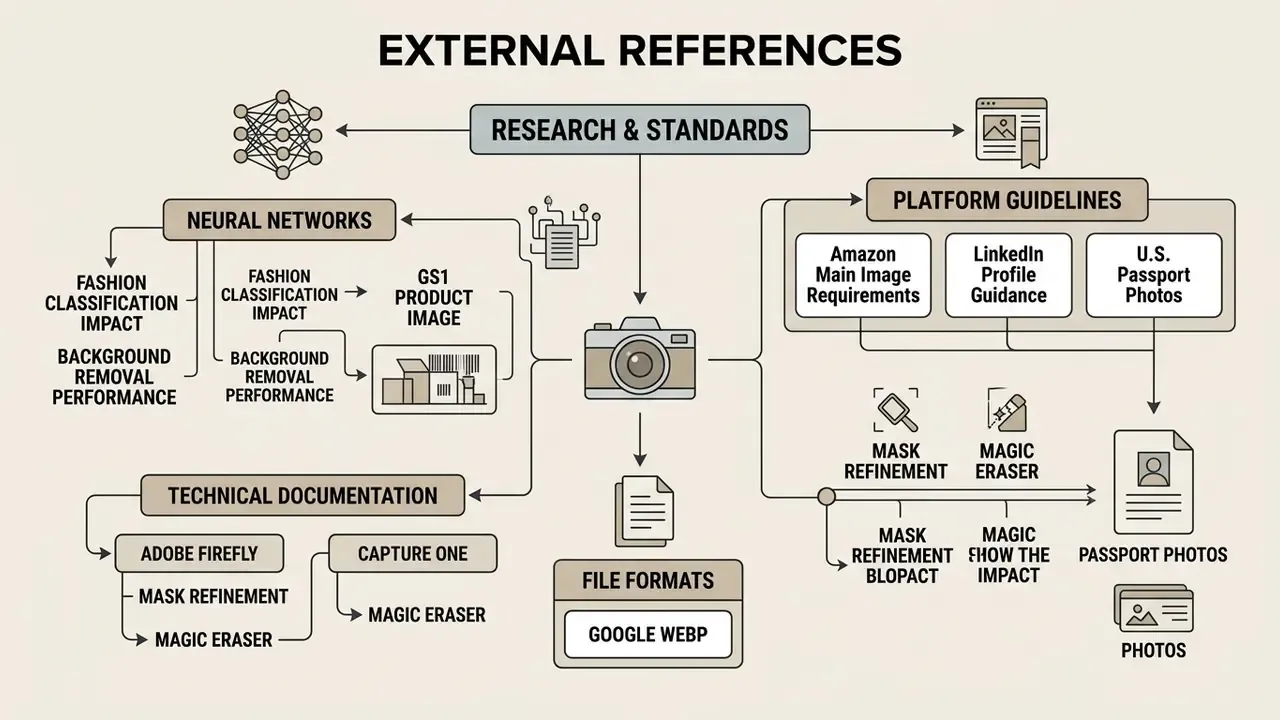
External References
- Referring Image Harmonization (ACM Multimedia, 2023). https://arxiv.org/abs/2306.09490
- The Impact of Background Removal on Performance of Neural Networks for Fashion Image Classification (Liang et al., 2023). https://arxiv.org/abs/2306.05079
- GS1 Product Image Specification Standard (2023)
- Amazon Main Image Requirements (2026)
- U.S. Department of State Passport Photo Requirements (2026)
- LinkedIn Profile Guidance (2026)
- Adobe Firefly Remove Background Documentation (2026)
- Google WebP Developer Documentation (2026)
- Capture One Mask Refinement and Magic Eraser Documentation (2025)
- Cloudflare Background Removal Segmentation Review (2025)
- UTRGV Social Media Image and Video Size Guide (2025)
- *ViTMatte
- Boosting Image Matting with Pretrained Plain Vision Transformers* (Yao et al., 2023). https://arxiv.org/abs/2305.15272
- *TransMatting
- Tri-token Equipped Transformer Model for Image Matting* (Cai et al., 2023). https://arxiv.org/abs/2303.06476
- *Deep Image Matting
- A Comprehensive Survey* (2023). https://arxiv.org/abs/2304.04672
- *Matte Anything
- Interactive Natural Image Matting with Segment Anything Models* (Yao et al., 2024). https://arxiv.org/abs/2306.04121
- *EFormer
- Enhanced Transformer towards Semantic-Contour Features for Portraits Matting* (2023). https://arxiv.org/abs/2309.03290
- *BIFRÖST
- 3D-Aware Image Compositing with Diffusion Models* (NeurIPS, 2024). https://arxiv.org/abs/2410.02831
- *HQ-Edit
- A High-Quality Dataset for Instruction-based Image Editing* (2024). https://arxiv.org/abs/2404.09990
- *I²EBench
- A Comprehensive Benchmark for Instruction-based Image Editing* (2024). https://arxiv.org/abs/2408.14180
- *SmartEraser
- Remove Anything from Images using Masked-Region Guidance* (2025). https://arxiv.org/abs/2501.09279
- *KV-Edit
- Training-Free Image Editing for Precise Background Preservation* (2025). https://arxiv.org/abs/2503.00258
- *ObjectClear
- OBject-Effect Removal and Background Reconstruction* (2026). https://arxiv.org/abs/2503.16419
- *Instruction-based Image Editing
- A Survey on Data, Models and Evaluation* (2026). https://arxiv.org/abs/2406.06736