One framing note before the details. If your organisation buys creative tools centrally, the interesting question is not "is the output pretty" but "who owns the asset, what data left the building, and can we prove it later". That question runs through this whole review. New here? You can open the hub for the rest of our commercial-use coverage.
1. What Playground AI Image Generator is and for which tasks it fits
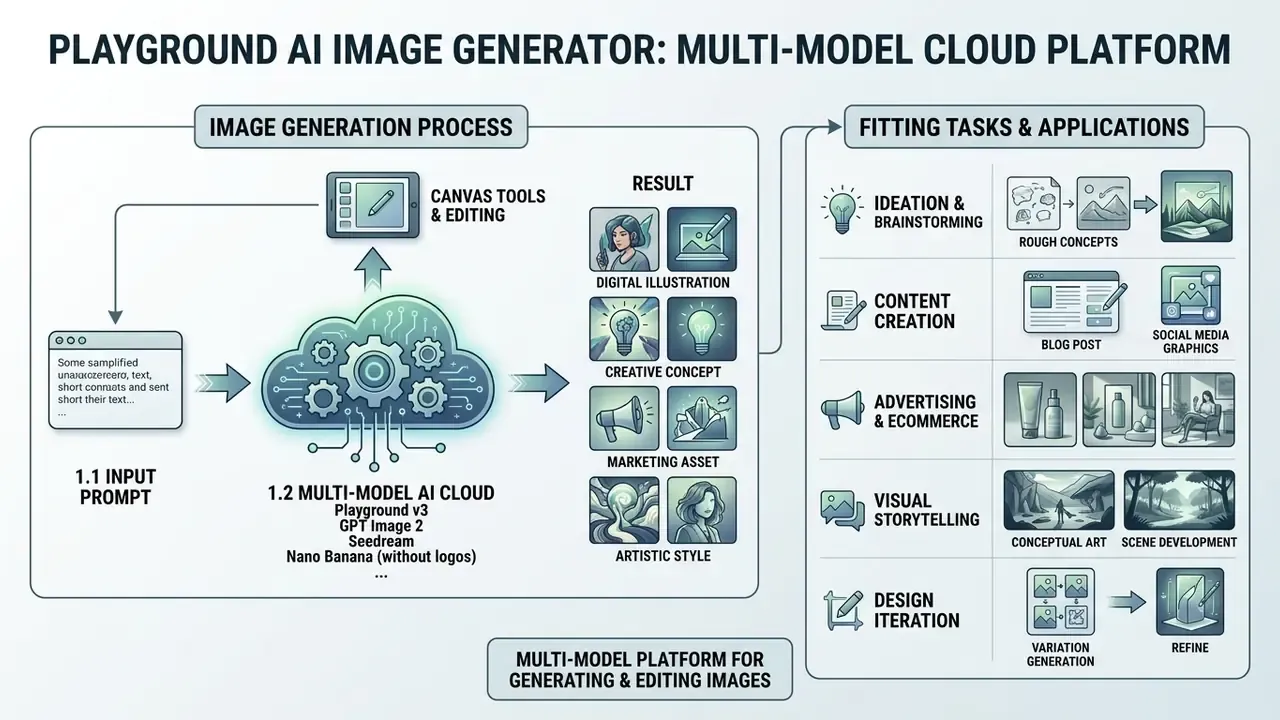
Playground AI is a multi-model cloud platform for generating and editing digital images with artificial intelligence. The service combines its own diffusion architecture, Playground v3, with the GPT Image 2, Seedream and Nano Banana model stacks. Together they form a cross-platform ecosystem: a browser workspace plus official iOS and Android applications, aimed at design, marketing assets and vector elements. (Updated: the earlier claim that Playground is a web-only product is incorrect; the platform ships companion mobile apps.)
Platform scale and rebranding. Since launch, the service has passed 9 million registered users and more than 1 billion generated images. As part of its transformation from an experimental generator into a full graphics workhorse, the company dropped "AI" from its name, rebranded to "Playground", and migrated its primary domain from playgroundai.com to playground.com. On independent review platforms, G2 in particular, the product holds an average score of 4.4 out of 5.0 based on user reviews. Interface and ease of use are praised most often. The free-tier caps are the most common complaint.
Playground AI Image Generator is designed for the fast creation of AI art, ad creatives, logos, interface concepts and illustrations from text queries. The service targets marketers, content producers, graphic designers and product teams that need controllable visual generation without deploying local neural networks. Unlike a pure generator, its centre of gravity is a template-driven design workflow: logos, social posts, posters, flyers, stickers, T-shirt prints and product mockups.
One small caveat, since it shapes expectations: Playground is an image platform. There is no AI video generator inside it. Teams that need AI video alongside stills will still run a second tool for motion work.
1.1 What kinds of images you can create in Playground AI
The platform generates vector-style graphics, anime art, 3D renders, digital painting and photorealistic frames. Playground's own style library exposes named families: anime and 3D anime, 3D model/CGI render, realistic and photographic, oil painting, watercolour, colour pencil, comic, cyberpunk, fantasy art and pixel art. That makes the choice of art style an explicit step rather than a prompt-only guess.
The architecture makes it an effective tool for preparing artwork for social media posts, print production, merchandise and posters. If you want to benchmark specialised alternatives before committing, compare the wider market, including the available image generators and Ghibli-style AI image generators for stylised illustration work.
1.2 How image generation works: prompt, model, result
Generation is based on processing a text query (text prompts) with the selected neural model, then decoding the latent representation into the final raster. The API-level logic is explicit: a model field selects the generator (if omitted, the latest model is used), width/height define output size, iterations roughly correspond to detail and quality (maximum 150), prompt scale controls how strongly the text steers the result, and seed seeds the random number generator. The choice of algorithm determines detail level, instruction adherence and the accuracy of rendered symbols on the image. If any of those terms are new, explore the hub of definitions we maintain for diffusion parameters.
Fact check / platform parameter verification
2. Playground AI capabilities: generation, styles and image editing
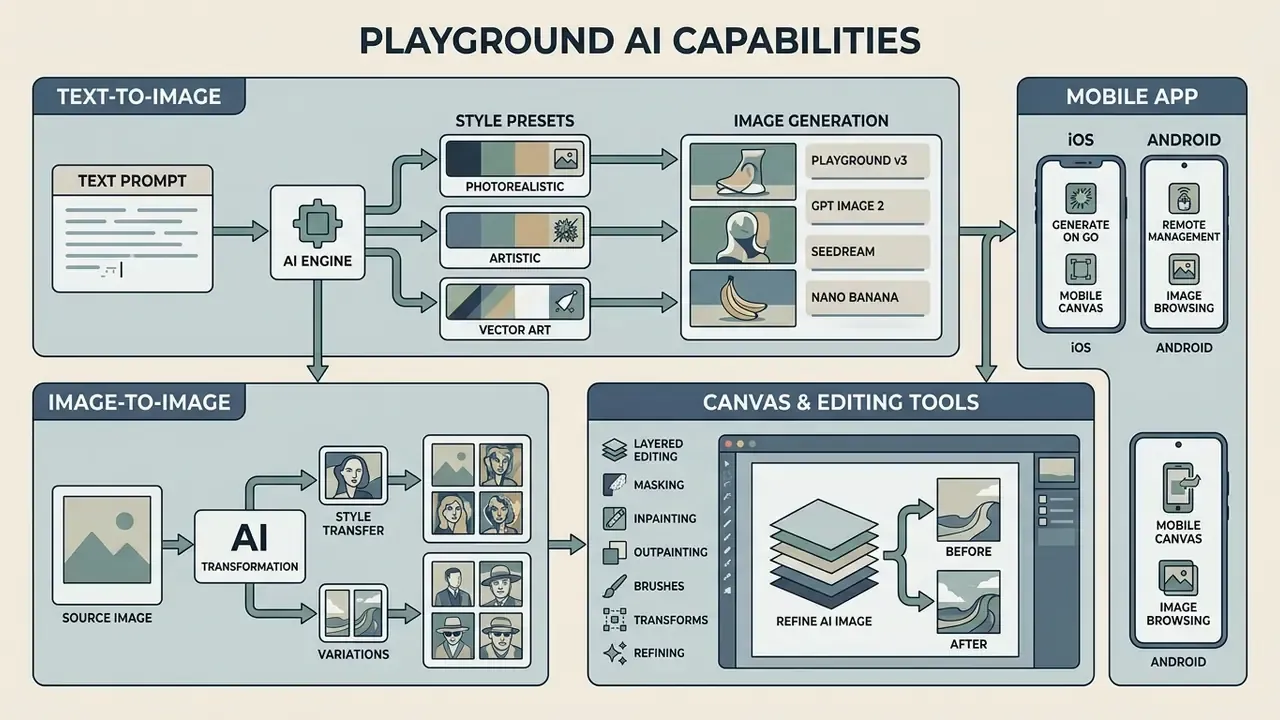
Playground AI offers combined functionality that pairs direct text generation, transformation of existing sources, and layered graphic editing. The built-in toolkit includes text-to-image, image-to-image, background cut-out, resolution enlargement and frame proportion changes. In scope it sits closer to a browser design suite than to a prompt-only generator.
2.1 Text-to-image and image-to-image in Playground AI
The text-to-image mode converts a textual description into a graphic object, with fine control over style and exclusion of unwanted elements. The image-to-image function accepts an uploaded user file (init_image) and reworks its structure according to the given prompt, preserving the base composition of the frame. The platform also accepts PNG, JPG and WebP attachments and lets you keep editing the result inside the design editor. If you need alternatives for reference-driven work, review other image-to-image generation tools that specialise in outpainting and background extension.
2.2 Canvas and tools for refining an AI image
The interactive Canvas allows local editing (inpainting and outpainting), removal of unwanted objects, background swaps and image scaling. Inpainting works by masking part of an image and regenerating only that region. Deleted objects are filled in seamlessly, and elements can be grabbed, moved, resized and rotated as discrete layers. The canvas itself can be resized across ten aspect ratios without redesigning the layout.
The AI upscaler raises detail sharpness by 4×, so layouts can be prepared without losing quality on the main subject. If you are building a production pipeline, it is worth comparing AI upscalers for resolution enhancement and other AI image editors for post-processing steps such as retouching, cropping and colour correction. For a template-first alternative to Canvas, see how a template-driven design generator handles the same jobs. For end-to-end pipelines built around these steps, explore the hub of documented workflows.
2.3 The Playground AI mobile app (iOS and Android)
Beyond the browser Canvas editor, the platform is available on mobile devices running iOS and Android. The mobile version is adapted for rapid generative sketching, basic style remixing and exporting finished visuals. However, layered compositing, background cut-out and pixel-accurate inpainting at 4K-grade resolution are optimised primarily for the desktop Canvas. The mobile experience is a simplified companion: generation, light editing and downloads rather than full production work.
Table 1. Playground AI functional capabilities and tools
| Tool | Technical purpose | Use case | Plan availability |
|---|---|---|---|
| Text-to-Image | Raster generation from a text description | Concepts, banners, illustrations | Free, Pro, Pro Plus |
| Image-to-Image | Restyling and reworking of a source file | Logo restyling, sketch processing | Free, Pro, Pro Plus |
| Canvas Editor | Layered editing, inpainting, outpainting, compositing | Complex montage, detail fixes, multi-image boards | All plans (base mode) |
| Background Removal | Automatic subject segmentation and isolation | Product cards, stickers, transparent PNG | Pro and Pro Plus only |
| AI Upscaler (4×) | Generative resolution and detail enlargement | Print preparation, large-format output | Pro and Pro Plus only |
| Image Resizer | Reframing to preset sizes (1024×1024, 1024×1536, 1536×1024) | Cross-platform adaptation of one asset | All plans (base mode) |
| SVG Vectorisation | Conversion of a raster result into vector paths | Logos, icons, scalable brand marks | Pro and Pro Plus only |
Read the table as a paywall map rather than a feature list. Everything that turns a render into a deliverable, transparency, print resolution, vector paths, lives on the paid side.
3. How to create an image in Playground AI: a step-by-step workflow
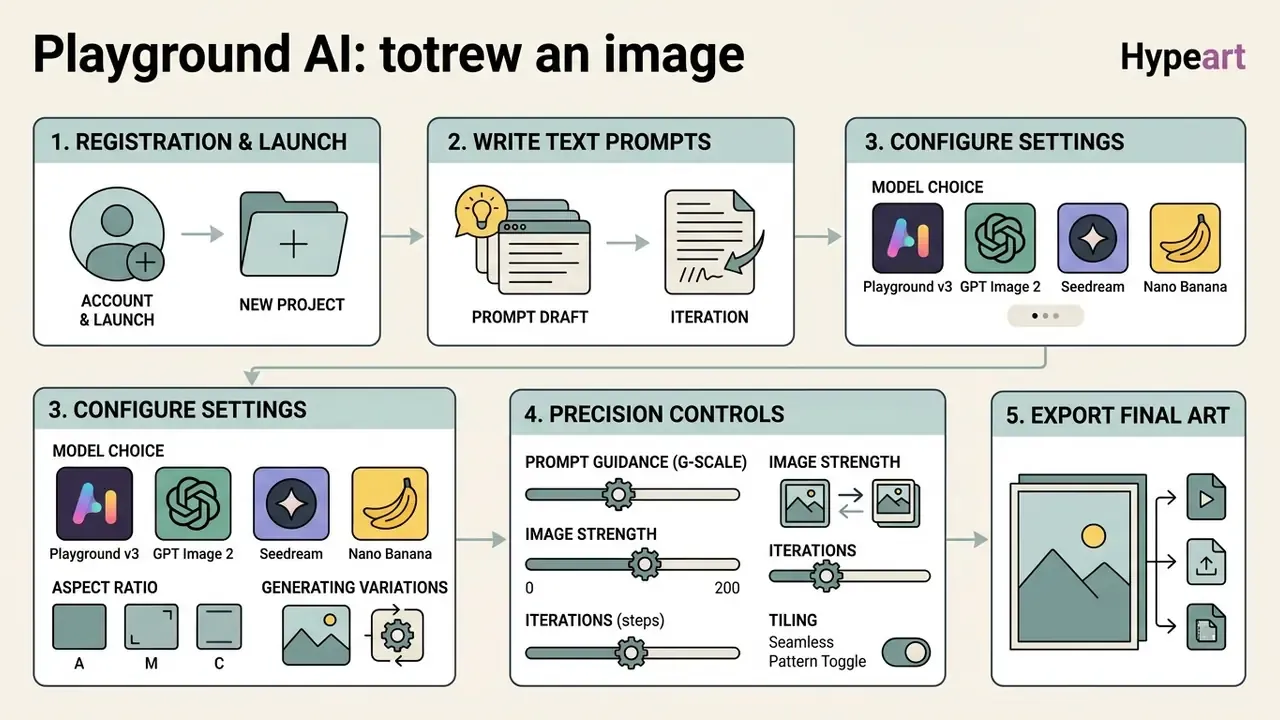
Creating graphic art in the Playground AI generator follows a principle of progressive parameter complexity, moving from the first text draft to the final export. Following the sequence reduces the cost of repeated generation cycles.
3.1 Registration and launching a new project
To start, authorise on the official portal with a Google or Apple account, or with an email and password. After entering the dashboard, the user either creates a new file on the infinite Canvas ("Start your design" opens a blank canvas with editable layers) or opens the standard Playground AI image generator panel from the left sidebar. No credit card is required for the free tier, and design files themselves are unlimited.
3.2 How to write text prompts for AI art
An effective prompt structure contains three mandatory blocks: the description of the main subject, the environment and lighting, and the stylistic markers. Replace vague adjectives with concrete descriptors of style, colour, lighting and composition. Detailed prompts consistently outperform short descriptions in the model's own benchmark categories such as "Poster" and "Social media post".
Using a negative prompts block lets you exclude blur, anatomical deformation and unwanted text. Typical entries: "blurry", "low resolution", "bad anatomy", "no watermark", "no text", "extra limbs".
3.3 Model choice, aspect ratio and generating variations
In the project settings you define the aspect ratio (1:1, 16:9, 9:16 and other presets) and the base generation model. The Playground v2.5 algorithm is trained on balanced data buckets, which prevents face and proportion distortion in wide frames. Its model card documents native 1024×1024 output plus portrait and landscape ratios, following the SDXL architecture with dual text encoders (OpenCLIP-ViT/G and CLIP-ViT/L).
«Playground v2.5 follows the same architecture as Stable Diffusion XL and supports 1024×1024 together with portrait and landscape aspect ratios». — Playground v2.5 model card, Hugging Face (2024). https://huggingface.co/playgroundai/playground-v2.5-1024px-aesthetic
Precise diffusion control parameters:
- Prompt Guidance (G-scale / prompt scale). Defines how strictly the network binds to the text. Values of 7 to 10 are optimal for most tasks; above 12 you risk oversaturation and artefact build-up.
- Image Strength (in Image-to-Image mode). The influence coefficient of the source photo (
init_image) on the final raster. At roughly 0.2 almost the entire original is preserved. At 0.8 the model builds a new composition and borrows little more than the colour range from the source frame. - Iterations (steps). Roughly correspond to detail and quality, with a documented maximum of 150. Beyond a certain point the gain flattens while generation time keeps rising.
- Tiling (seamlessness). An edge-looping algorithm for generating seamless textures, fabric patterns and background wallpapers.
- Seed. Fixes the starting random conditions. This is the only reliable way to reproduce a successful result.
4. How to get high-quality images in Playground AI
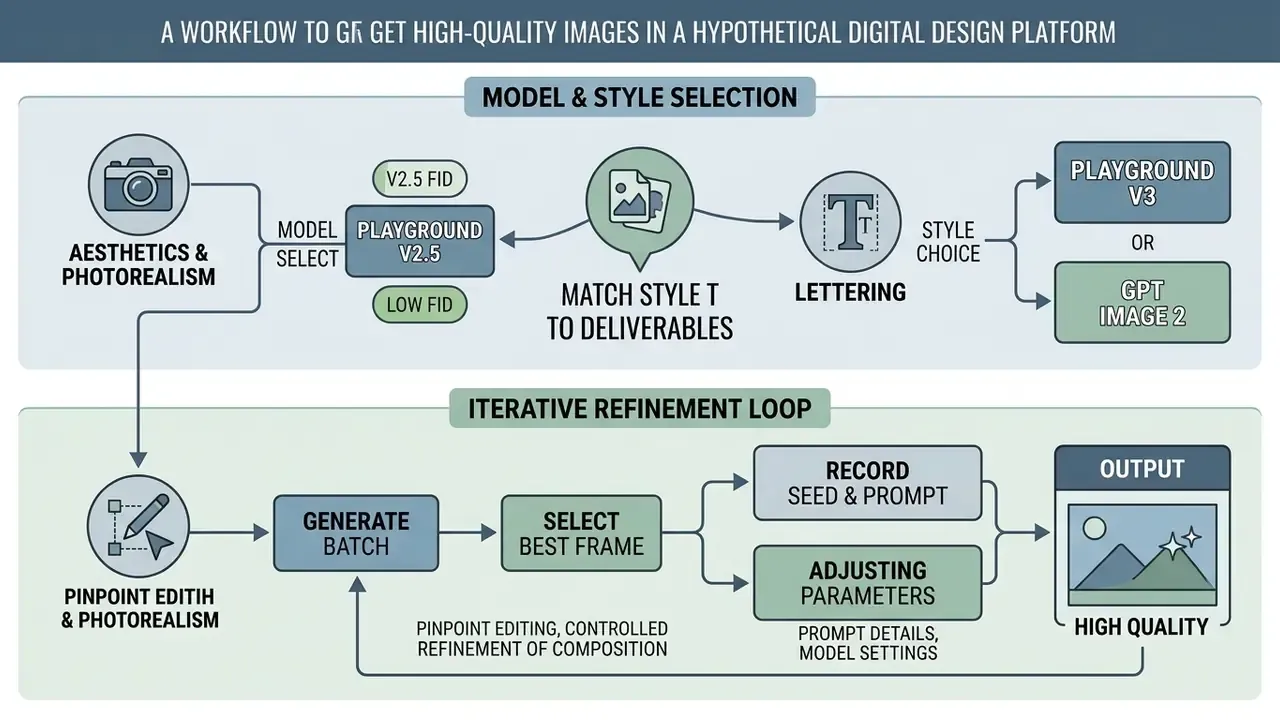
High output quality comes from a correct combination of model parameters and a detailed prompt structure. The absence of artefacts depends directly on the chosen diffusion algorithm, and equally on understanding what these models still do not know.
«The WISE benchmark records an overall score of 0.49–0.71 for Playground v2.5 depending on prompt-rewriting strategy, exposing persistent gaps in physical and cultural world knowledge». — WISE: World Knowledge-Informed Semantic Evaluation (2025). https://arxiv.org/abs/2503.07265
In practice this means the platform is strong at aesthetics and typography, but unreliable for prompts that require physical causality, precise cultural artefacts or factual diagrams. Those tasks need either manual correction in Canvas or a different pipeline. Do not ask a diffusion model to draw a process chart and then publish it unchecked.
4.1 How to choose art style and AI models for a task
For artistic illustration and photorealism, Playground v2.5 remains a strong choice, scoring an FID index of 4.48 on the MJHQ-30K test.
«Playground v2.5 reaches FID 4.48 on MJHQ-30K, substantially outperforming the SDXL-1.0 refiner (FID 9.55) and the previous Playground v2 (FID 7.07)». — Playground v2.5 model card, Hugging Face (2024). https://huggingface.co/playgroundai/playground-v2.5-1024px-aesthetic
For accurate lettering on posters and layout-driven graphic design, switch to Playground v3 or GPT Image 2, where text rendering accuracy reaches 82%.
«PGv3 achieves 82% text-synthesis accuracy, outperforming other contemporary models at the time of publication». — Playground v3: Improving Text-to-Image Alignment with Deep-Fusion Large Language Models (2024). https://arxiv.org/abs/2409.20252
Style selection should follow the deliverable, not personal taste. "Realistic/photographic" for product and e-commerce frames. "Digital art/digital painting" for editorial illustration. "3D model/CGI render" for app icons and packaging mockups. "Anime/comic" for community and gaming content. For brand-mark tasks it is worth cross-checking dedicated AI logo and headshot generators, since specialised tools often enforce stricter geometry and typography control than a general-purpose diffusion model.
4.2 Iterative refinement and saving successful prompts
Fixing the seed parameter makes it possible to preserve the initial random conditions for later pinpoint corrections. Minor defects are fixed by regenerating selected areas on the canvas while keeping the overall colour range of the frame.
A practical loop looks like this: generate a batch, record the seed and full prompt of the best frame, change exactly one variable (guidance, style keyword or negative prompt), re-run, mask and inpaint the remaining defects, then upscale last and never first. Storing the prompt, seed, model name and guidance value in a shared sheet turns one lucky render into a repeatable brand template. Repeatability is what separates a hobby workflow from a production one, and it is also the first thing an auditor asks about.
5. Playground AI free plan: generation limits and what the free tier gives you
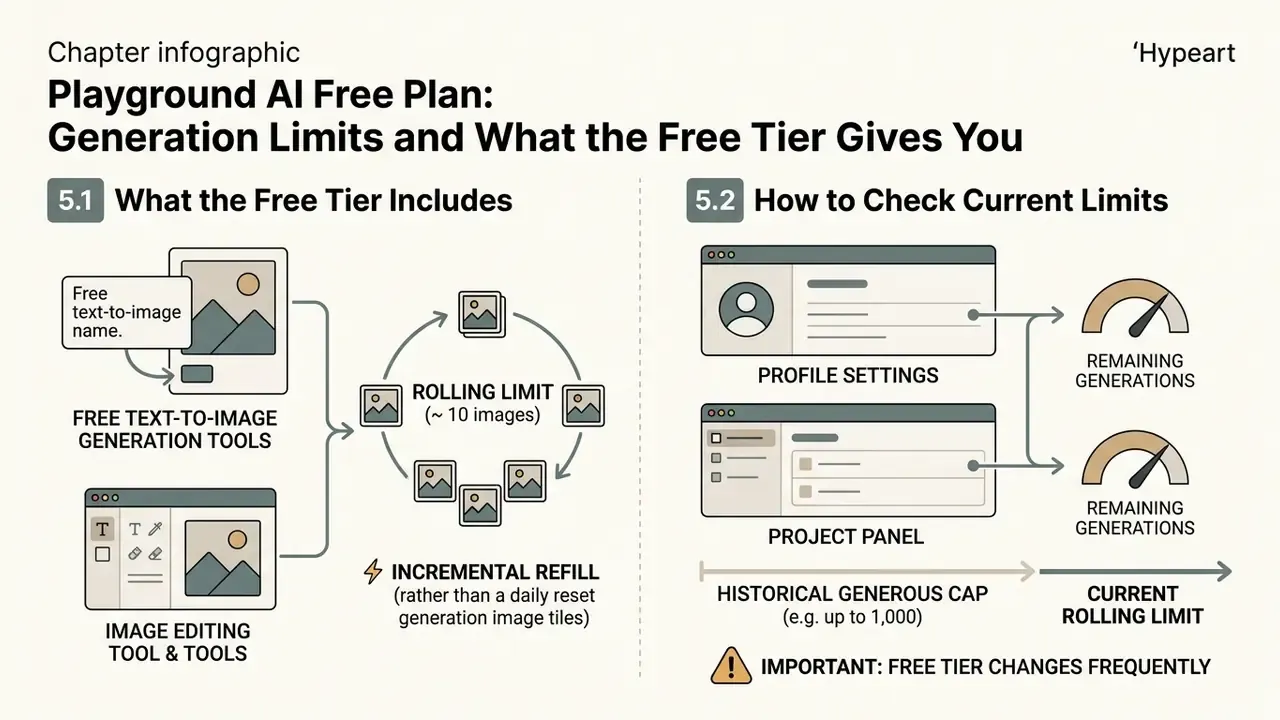
The service operates on a freemium model in which free-tier image generation has strictly defined administrative boundaries. Free access is intended solely for personal familiarisation and testing, and its outputs carry no commercial licence. If your goal is unrestricted volume rather than editing depth, it is worth comparing free AI image generators before settling on one platform.
5.1 What the Playground AI free image generator includes
Free-tier users get access to free text-to-image generation with a cap of roughly 10 images inside a rolling 3-hour window (the current Help Center article documents 5 Playground v3 edits per 3 hours). In addition, 3 monthly credits are provided for calls to third-party networks (GPT Image 2, Seedream, Nano Banana), plus a limited number of design downloads per day: the Pricing page states 10, the Help Center states 2. Design files themselves are unlimited, and no credit card is required. Background removal, 4× upscaling and SVG vectorisation are not available.
The window refills incrementally rather than resetting as a flat daily cap. Burn all ten generations at 9 a.m. and quota begins returning around noon. In a full day of active use that yields roughly 40 to 50 images per day, but only in small batches with forced gaps.
5.2 How to check your current image limits
6. Playground AI pricing: when to replace the free plan with a paid one
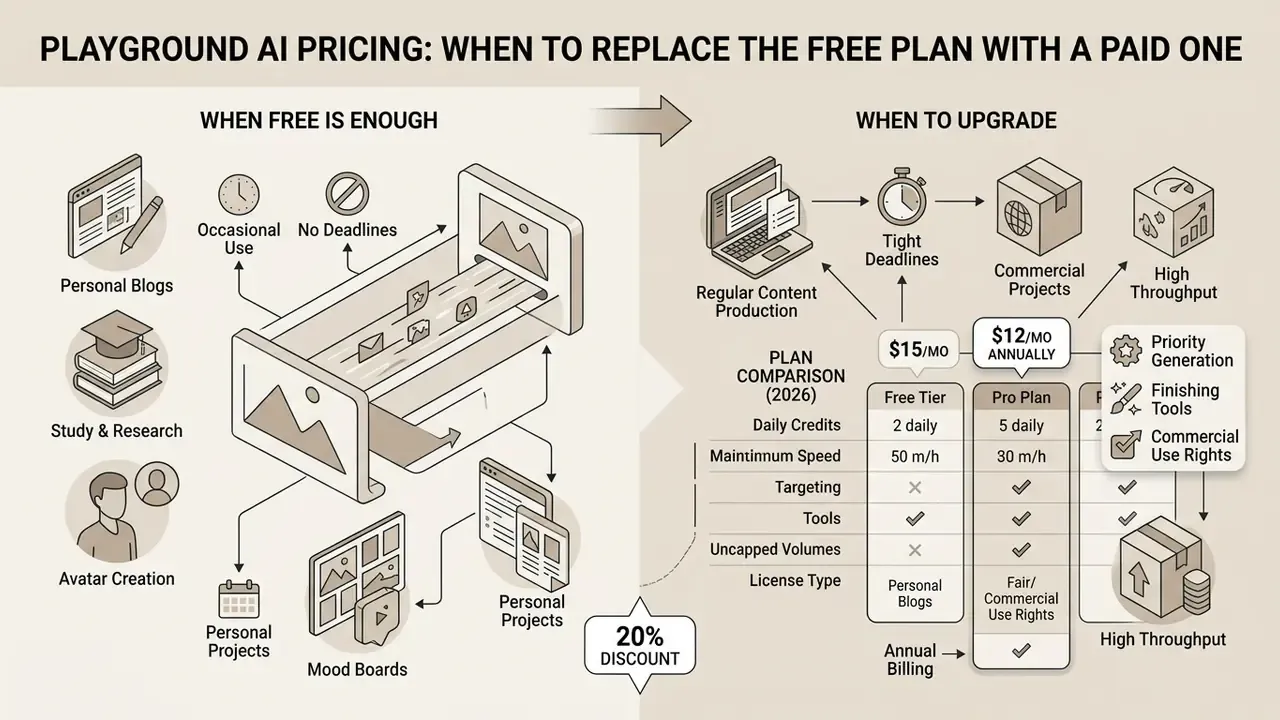
Moving to a paid plan is justified when you need regular content production, relief from throughput limits, access to the finishing tools, and the legal right to use the resulting graphics commercially.
6.1 When the free tier is genuinely enough
The free functionality is sufficient for personal blogs, avatar creation, study and research tasks, mood boards, thumbnails and initial prompt testing. The volume of free image generation covers one-off graphics production without hard deadlines, provided the work is non-commercial, single-user, and does not require background removal, upscaling or vector export.
6.2 When you need the Pro plan or another paid plan
A Pro subscription ($15 per month, or $12 per month billed annually, a 20% discount) or Pro Plus ($45 per month, $36 annually) is necessary for advertising agencies, commercial designers and product teams. Paid tiers unlock background removal, 4× upscaling, SVG vectorisation, higher throughput (75 PGv3 images per 3-hour window on Pro; unlimited PGv3 on Pro Plus), monthly credit pools for premium models (150 on Pro, 1,000 on Pro Plus), faster generation and a full commercial licence.
Note the credit arithmetic. Nano Banana Pro consumes 4 credits per generation while other models consume 1, so a "150-credit" month is only 37 Nano Banana Pro renders. Pro Plus additionally exposes API access for integration into internal systems. Official help documentation explicitly states that no paid plan offers truly unlimited usage across all AI models. Caps simply move higher.
Table 2. Playground AI plan comparison (2026)
| Parameter | Free Plan | Pro Plan ($15/mo, $12 annual) | Pro Plus Plan ($45/mo, $36 annual) |
|---|---|---|---|
| PGv3 generation limit | ~10 images / 3 h (Help Center: 5 edits / 3 h) | 75 images / 3 h | Unlimited PGv3 generations |
| Premium models (GPT Image 2, Seedream, Nano Banana) | 3 credits per month (shared) | 150 credits per month | 1,000 credits per month |
| Credit cost per generation | 1 credit (Nano Banana Pro: 4) | 1 credit (Nano Banana Pro: 4) | 1 credit (Nano Banana Pro: 4) |
| Downloads | 2 to 10 designs per day (source-dependent) | Unlimited downloads | Unlimited downloads |
| Finishing tools (Upscale, Remove BG, SVG) | Unavailable | Full access | Full access plus priority support |
| Generation speed | Slower during peak hours | Faster generation | Fastest, priority queue |
| Commercial licence | None (personal use only) | Included (worldwide, royalty-free) | Extended licence plus API |
Prices and caps move. Re-check them on the official pricing page and record the verification date in your procurement file, because the licence you rely on is the one documented at the moment of generation.
7. Data security, privacy and Shadow AI risk
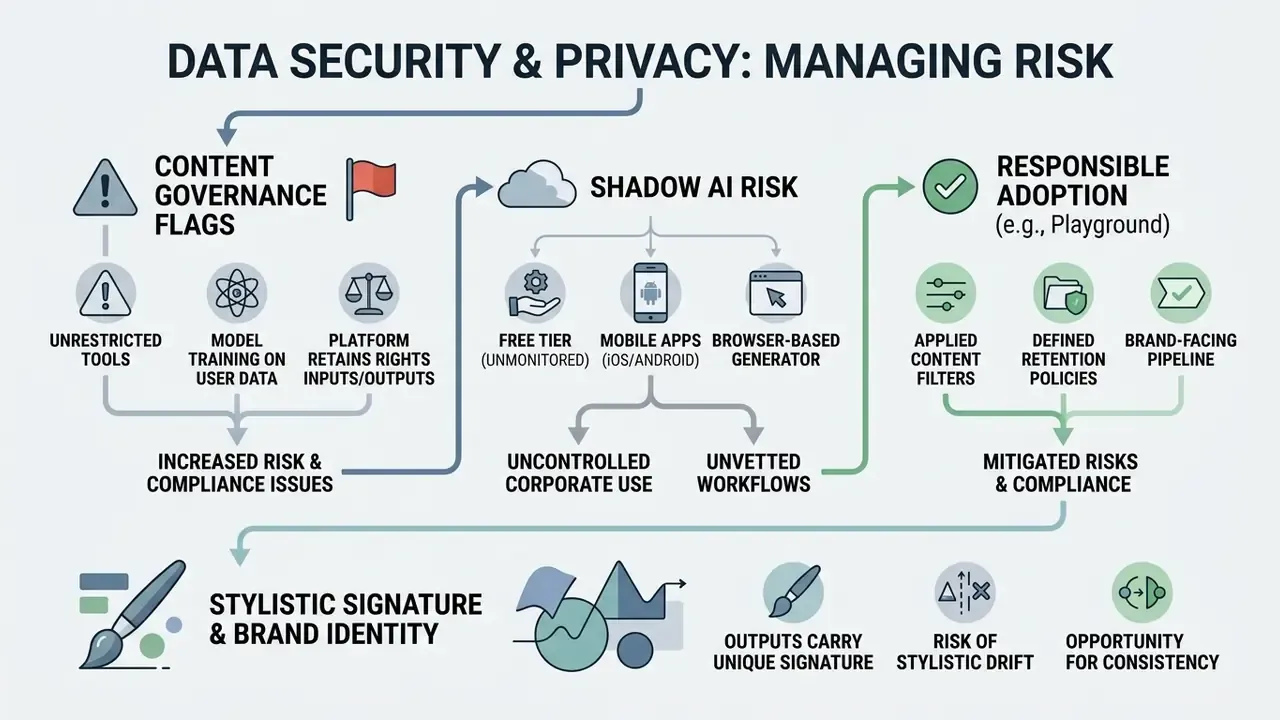
For risk, compliance and finance owners, throughput is the easy question. Data handling is the hard one. Three points deserve a formal decision before Playground AI is approved for corporate use.
1. What rights the platform retains over your inputs and outputs. Playground's Terms of Service assign ownership of created assets to the user. At the same time, they grant Playground a broad, royalty-free licence to user inputs and outputs, and the platform reserves the right to use generated content for service improvement and promotion. That language is standard across consumer AI image platforms. It is also precisely why uploading unreleased packaging, internal roadmaps, customer photographs or unpublished brand marks as init_image should be treated as an external disclosure, not an internal edit.
2. Model-training and retention posture. Public documentation describes plan limits, credits and licensing in detail. The officially published pages reviewed here do not document a zero-data-retention mode, enterprise SSO/RBAC, audit trails, or SOC 2 / ISO 27001 / GDPR processing addenda for the standard consumer tiers. Where such controls are mandatory, in regulated finance, healthcare, legal work, or anything touching personal data, the correct position is to request them in writing from the vendor before adoption rather than to infer them. This is a documented gap in the public record, not a confirmed absence of controls. The distinction matters when the finding lands in an audit report.
3. Shadow AI. The practical corporate risk with a browser-based generator that has a free tier and mobile apps is unsanctioned use. A designer signs up with a personal account, ships free-tier output into a client deck, and the company inherits both an unlicensed asset and an uncontrolled data flow. Two mitigations cost nothing. Publish an explicit internal rule that free-tier output may never enter commercial materials. Then route all approved generation through a small number of company-billed Pro or Pro Plus seats, where the commercial licence and an access log actually exist. Storing exports in a managed asset repository with version history and permissions, rather than personal drives, closes the audit loop.
7.1 Content policy limits and why "no restrictions" tools raise governance flags
Playground applies content filters, and that is a feature, not a bug, for any brand-facing pipeline. Teams that hit a filter often start shopping for permissive alternatives, which is exactly where corporate exposure grows. A nsfw ai generator or a self-hosted nsfw ai art generator github build sits outside vendor moderation, outside procurement, and usually outside any data agreement. If your policy does not name these categories explicitly, someone will assume they are merely undocumented.
The same applies to marketing claims. Tools advertised as a nsfw ai generator no limit option rarely publish retention terms, and a nsfw ai image editor that accepts uploaded photographs of real people creates likeness and consent problems no licence text will solve. For context on how these categories are framed commercially, see our notes on nsfw ai art and on generators marketed as a nsfw ai image tool without restrictions. The governance rule is simple: approved list, named owner, logged access, and no personal accounts in the pipeline.
One further, less obvious consideration: outputs carry a measurable stylistic signature.
«Centroid analysis of output embeddings can de-anonymise Playground v2, v2.5 and other generators on anonymous leaderboards with roughly 99.6% average accuracy». — Model Deanonymization via Output Embeddings (2026). https://arxiv.org/abs/2406.09056
For brand teams this cuts both ways. House style is reproducible across a campaign, but "this was made with tool X" is not a secret you can keep.
8. Commercial use: can you use Playground AI images in business?
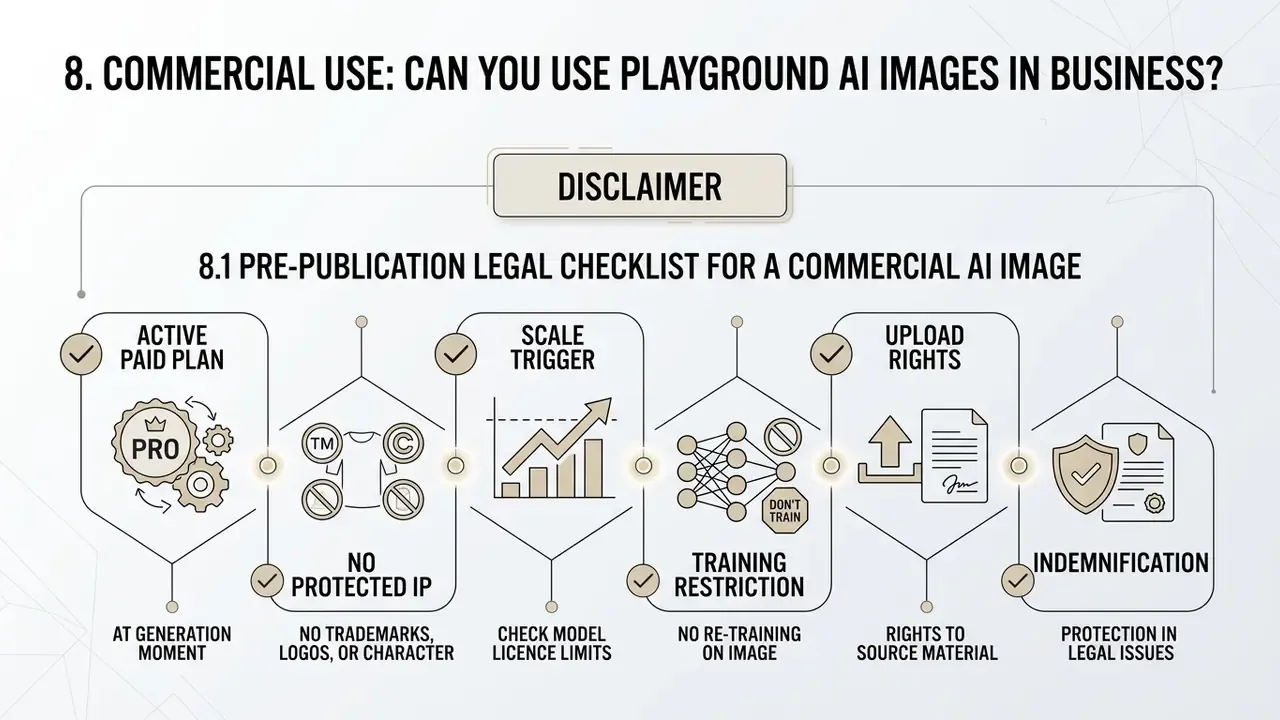
The ability to use generated visuals commercially is determined directly by the user's active subscription and by the rules of the underlying models. Using free-tier results for commercial purposes violates the Terms of Service. Playground states plainly that the free plan is for personal, non-commercial use, while the worldwide royalty-free commercial licence is included with paid plans and explicitly covers marketplaces and client work: Etsy, Redbubble, Merch by Amazon, Printify, YouTube, Instagram and commissioned projects. For broader context on rights and licensing across platforms, see this overview of AI image generators for commercial use. For disputes and case law around generative output, explore the hub of litigation summaries.
8.1 Pre-publication legal checklist for a commercial AI image
Before using artwork in advertising or on products, confirm each of the following:
- Active paid plan at the moment of generation.The licence attaches to the plan under which the asset was created, not to the account in general. Assets produced on the free tier do not become commercial retroactively because you later subscribed.
- No protected trademarks, logos or recognisable characters in the frame.This is the single most common failure mode in AI production pipelines, and it is measurably reducible:
«Prompt rewriting and negative prompts reduce the detection rate of copyrighted characters in Playground v2.5 from 30.33 to 4.33 without a substantial loss of quality». — Fantastic Copyrighted Beasts and How to Generate Them (2024). https://arxiv.org/abs/2406.14526
«The PREGen method reduces generation of copyrighted content in Playground v2.5 and SDXL while preserving acceptable aesthetic image quality». — PREGen: Pre-Generation Filtering for Copyright-Safe Image Synthesis, Nature (2025). https://www.nature.com/articles/s41598-025-94222-0
https://huggingface.co/playgroundai/playground-v2.5-1024px-aesthetic/blob/main/LICENSE.md
9. Playground AI review: pros, cons and alternatives for image creation
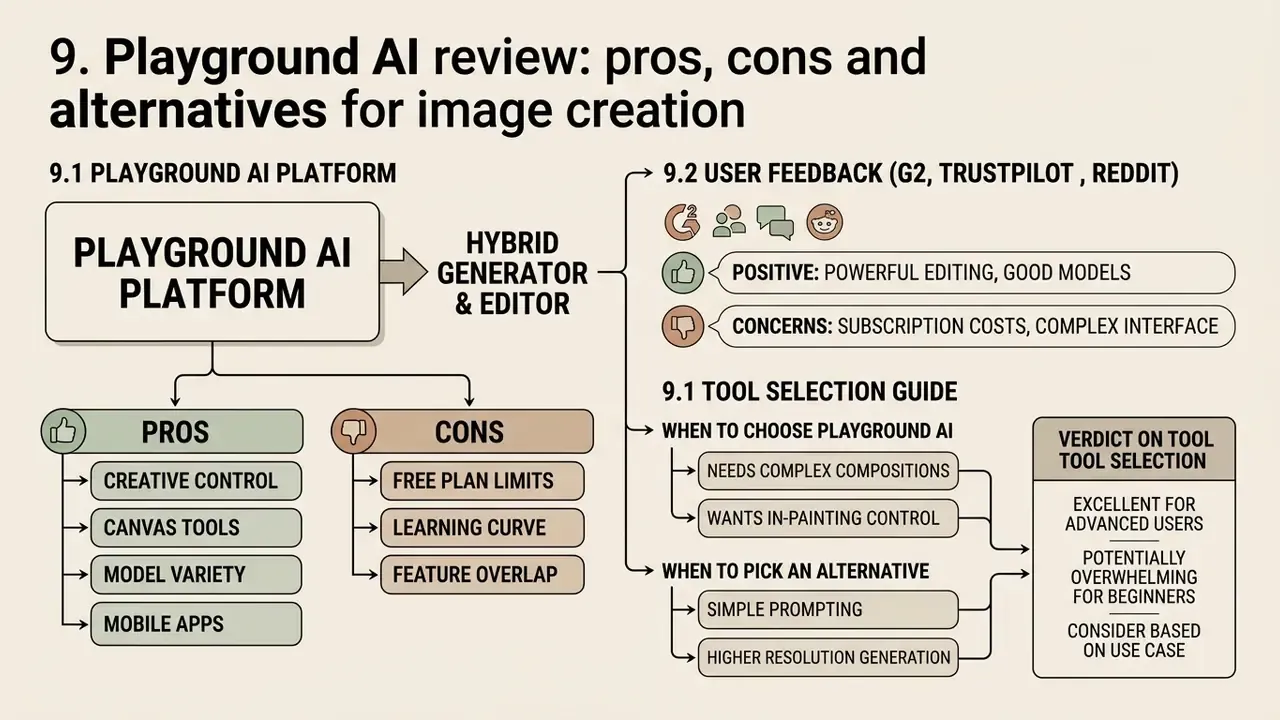
Analysis of the Playground AI platform shows a balanced hybrid of a neural generator and a graphics editor. The tool stands out for interface convenience and typography handling, but it lags behind narrowly specialised solutions in complex 3D modelling scenarios and in cinematic photorealism. In raw output quality, Playground sits mid-field. Side by side with Midjourney v6 or Flux Pro, results are noticeably less refined for photorealistic subjects and complex compositions. Where it recovers that ground is everything that happens after generation.
9.1 When to choose Playground AI and when to pick an alternative
Playground AI is optimal for fast marketing tasks, work with text on images, template-led layouts and layered refinement in Canvas. If you need cinematic painterly quality, the alternative is Midjourney. Compare Midjourney against its competitors before switching, keeping in mind that Midjourney has no regular free tier and offers no built-in editor at all, while its paid tiers now extend into HD video generation. That matters if your roadmap includes AI video as well as stills, since Playground remains an image-only platform and pairs poorly with teams expecting a combined image and video generator.
For SDXL-native prompt libraries, Playground's Stable Diffusion v1.5 and SDXL options let existing workflows be reused without rewriting. Where the requirement is scripted automation or batch pipelines, API access on Pro Plus is the entry point. For template-first teams, a design-suite generator may be a closer fit than a diffusion-first one.
Table 3. Playground AI advantages and drawbacks matrix
| Advantages (Pros) | Drawbacks (Cons) |
|---|---|
| Multi-model architecture (PGv3, GPT Image 2, Seedream, Nano Banana, SD 1.5/SDXL) in one interface | Severe free-tier caps (~10 generations per 3 hours, 3 premium edits per month) |
| Built-in Canvas editor with layers, inpainting and outpainting | No commercial rights on the free plan |
| High font and lettering rendering accuracy in PGv3 (82% text accuracy) | Background removal, upscaling and SVG vectorisation sit behind the paywall |
| Flexible aspect-ratio control without subject distortion; ten canvas ratios | Limited world knowledge and physical reasoning (WISE 0.49–0.71; Commonsense-T2I 18.5–29.0) |
| Cross-platform: web plus official iOS and Android apps | Mid-field photorealism versus Midjourney v6 and Flux Pro |
| Built-in product mockups and templates for POD workflows | No AI video generator; enterprise controls (SSO, retention modes, certifications) not documented publicly |
The matrix reads as a trade: you accept mid-tier raw fidelity and a thin free tier in exchange for a finishing pipeline that keeps the whole job in one browser tab.
9.2 Consolidated user feedback (G2, Trustpilot, Reddit)
| What users praise | What users complain about |
|---|---|
| Fast, legible text rendering in Playground v3 | Hard cap of ~10 images per 3 hours on the free tier (a ~99% cut from the old 1,000 per day) |
| Canvas convenience as an alternative to the Midjourney plus Photoshop combination | Canvas lag accumulating with 10 or more high-resolution layers on large projects |
| Built-in mockups and one-click background removal | Difficulty reproducing a generation without recording the seed |
| Beginner-friendly onboarding: first usable image within minutes | Complex, densely detailed prompts often need several attempts |
| Multiple models and styles behind one interface for quick comparison | Learning curve for advanced controls (guidance, image strength) |
The aggregate picture is consistent: a 4.4/5 G2 average, praise concentrated on usability and the editor, criticism concentrated on the free plan and on performance under heavy canvases. That is the predictable outcome of building a nine-million-user base on generosity and then withdrawing it.
Verdict on tool selection
Playground AI positions itself as a complete ecosystem for solving design tasks quickly. The platform shortens the chain between a text idea and a finished marketing layout: generation, inpainting, background removal, upscaling, vectorisation and mockup fitting happen without leaving the browser, which is exactly what pure generators do not offer. Full integration into business processes, however, requires a commercial subscription. On the free tier you are testing the product, not producing with it.
For legal entities the decisive factors remain transparency of rights over the resulting graphic assets, the 1-million-MUU licence trigger for embedded use, and a documented answer from the vendor on data retention. Choose Pro if one person ships commercial visuals weekly. Choose Pro Plus if a team ships daily and needs API access. Stay on Free only if nothing you make will ever be sold, published under a brand, or shown to a client.
A safe next step, if you are evaluating this centrally: run a two-week pilot on a single company-billed Pro seat, log prompt, seed, model and manual edits for every asset, then review the log with whoever signs off on vendor risk. Small pilot, real evidence, no surprises.
10. FAQ
Is Playground AI free?
Yes, there is a free tier, but it is heavily restricted: roughly 10 Playground v3 generations per rolling 3-hour window (the Help Center documents 5 edits per 3 hours), 3 monthly edits across the premium models, and a limited number of daily downloads. Background removal, upscaling and SVG vectorisation are excluded, and the free plan is personal-use only.
How many images per day can I generate for free?
There is no fixed daily cap. The free tier uses a rolling 3-hour window that refills incrementally, which works out to roughly 40 to 50 images across a full day of active use, but only in small batches with forced gaps.
Why were the free limits cut so drastically?
Playground historically offered up to 1,000 free generations per day. The reduction to 10 per 3-hour window accompanied the strategic shift from a free experimentation sandbox to a paid, template-driven design platform, and it reflects the compute cost of Playground v3 and GPT Image 2.
Can I sell images made with Playground AI?
Only on a paid plan. Pro and Pro Plus include a worldwide, royalty-free commercial licence covering marketplaces and client work. Free-tier output may not be used commercially, and the licence attaches to the plan active at the time of generation.
Does Playground AI have a mobile app?
Yes. The platform is available on the web plus official iOS and Android apps. Mobile covers generation, light editing and downloads. Layered compositing, background cut-out and high-resolution inpainting are optimised for the desktop Canvas.
Does Playground AI offer video generation?
No. Playground is an image platform: text-to-image, image-to-image, Canvas editing and finishing tools. If you need an AI video generator in the same workflow, plan for a second vendor and a second licence review.
Which model should I pick for text on an image?
Playground v3 or GPT Image 2. PGv3 reports 82% text-synthesis accuracy, which is why posters, logos and social graphics with overlaid copy are its strongest category.
How do I reproduce an image I already liked?
Record and reuse the seed, together with the exact prompt, model name, guidance value and aspect ratio. Without the seed, reproduction is effectively impossible.
Is my uploaded image used to train Playground's models?
The public terms grant the platform a broad royalty-free licence to inputs and outputs, and reserve the right to use generated content for service improvement and promotion. No zero-retention mode is documented on consumer tiers, so confidential material should not be uploaded without a written agreement from the vendor.
What does the 1-million-user clause mean?
If image generation or editing is core to your own product and your service exceeds 1 million monthly unique users, the model licence requires you to request a separate agreement. The licence also prohibits using the model or its outputs to train other text-to-image models.
Which alternatives should I consider?
Midjourney for cinematic painterly quality (no regular free tier, no built-in editor), SDXL-based tools if you already maintain prompt libraries, and template-first design suites if layouts matter more than raw model quality. Comparative breakdowns are available in our reviews of the best AI art generators and the best free AI art generators.
More licensing guides, tool reviews and commercial-use checklists: browse the hub.