An AI hairstyle generator lets you preview new haircuts, styling options, and hair colors on your own photo before you ever sit in a salon chair. Modern computer vision models separate facial identity features from hair geometry, which is what makes a photorealistic virtual try-on possible without warping your expression or repainting the background.
Executive Summary
- What it does an AI hairstyle generator edits hair length, cut structure, volume, bangs, texture, and color on a single portrait while keeping facial identity, pose, clothing, and background stable.
- How it works diffusion and GAN pipelines (HairDiffusion, Stable-Hair, StyleGAN Salon, HairFastGAN, HairCLIPv2) decouple hair shape from hair color in latent space, then re-render occluded regions such as the forehead and ears.
- Speed 1 to 15 seconds for 2D previews; under one second for fast GAN transfer; up to roughly 22 seconds for hair-conditioned 3D image generation, and several minutes for full strand-based 3D reconstruction.
- Cost freemium dominates. Typically 3 to 30 starter credits, one free daily preview, 720p export caps, watermarks, and personal-use-only licensing on free tiers.
- 2026 trend coverage taper fade, broccoli haircut, textured crop, buzz cut, French bob, curtain bangs, wolf cut, money piece highlights, caramel and honey balayage.
- Governance facial photographs become biometric data when processed for unique identification (GDPR Recital 51, EDPB Guidelines 05/2022). The EU AI Act prohibits untargeted facial-image scraping, with fines up to €35 million or 7% of global annual turnover.
- Before you deploy commercially run the vendor audit checklist in this guide (retention window, DPA, SOC 2 / ISO 27001 / ISO/IEC 42001, training-data opt-out, commercial licence).
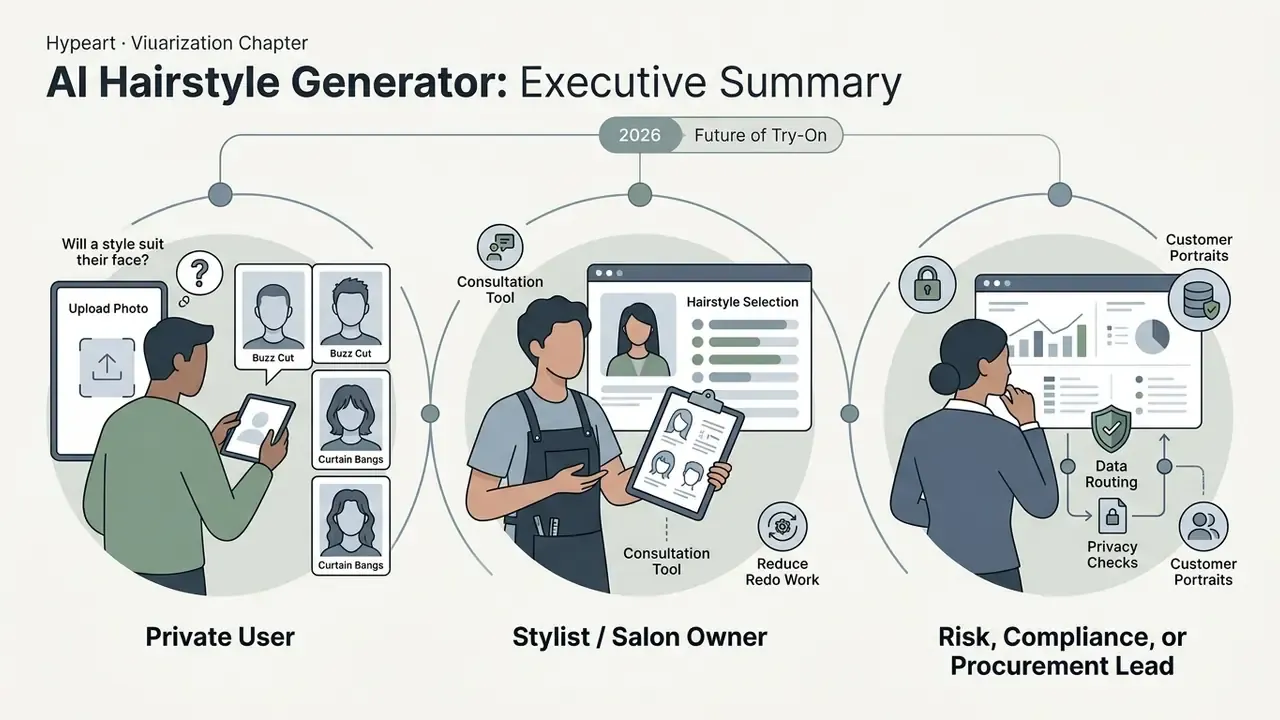
Who This Guide Is Written For
Three readers use a page like this very differently, and the guide is built for all three.
The first is a private user with one question: will a buzz cut or curtain bangs suit my face? That reader needs photo rules, prompts, and a realistic sense of what a preview can and cannot promise.
The second is a stylist or salon owner who wants a consultation tool that reduces redo work. That reader needs the ROI logic, including control costs, not vendor conversion slides.
The third is a risk, compliance, or procurement lead at a company that plans to route customer portraits through a third-party API. That reader can skip straight to the governance and audit sections. Face photos are not ordinary marketing assets, and the paperwork matters more than the render quality.
What an AI Hairstyle Generator Can Change in Your Photo
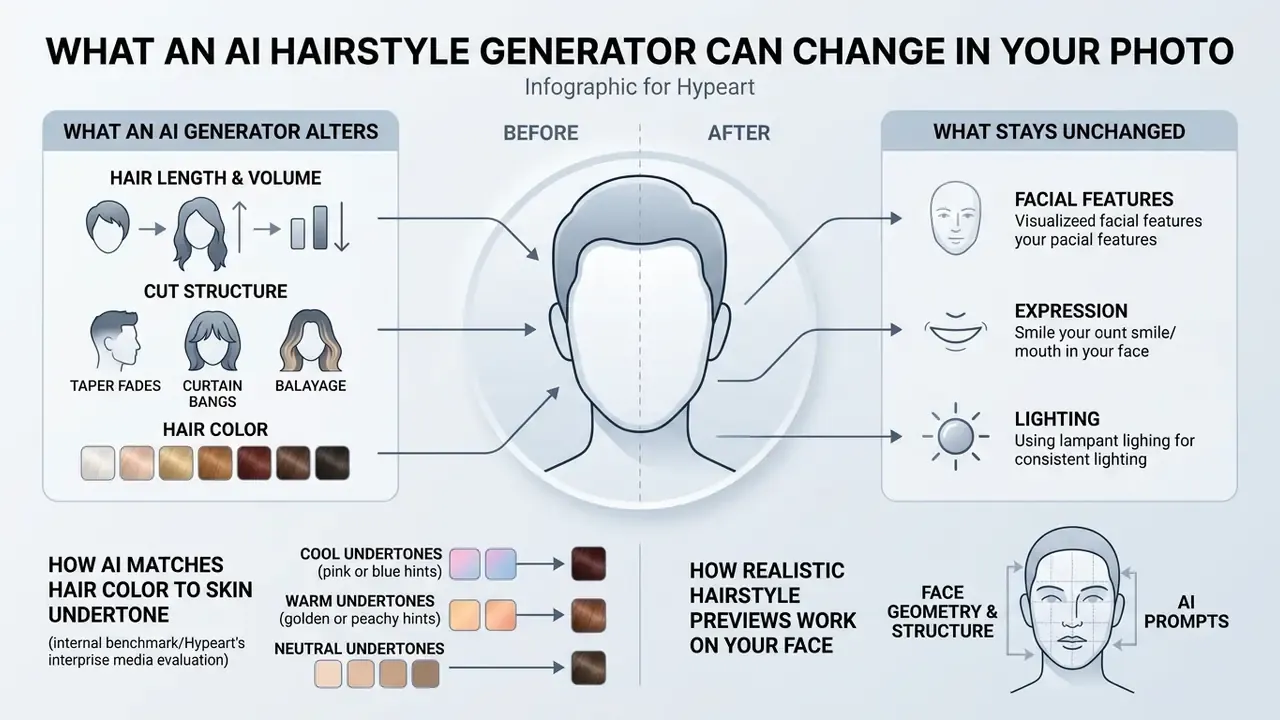
An AI hairstyle generator alters hair length, cut structure, volume, bangs, and hair color on a digital portrait while leaving facial features, expression, lighting, and background intact. You can test dramatic transformations on a static image and evaluate several hairstyles and hair color options before committing to anything irreversible.
Haircuts, Hairstyles and Hair Color in One AI Photo Editor
Modern portrait tools fold haircut modification, styling adjustment, and multi-tone color rendering into a single editing pass. Rather than dropping a static graphic overlay on your head, an ai hairstyle generator or ai hairstyle changer analyses the input image to isolate the existing hair region. A general-purpose photo editor works on pixels. An ai hair photo editor works on semantics, and can substitute a short pixie cut, a layered bob, or long waves onto your actual head shape.
When you request a new hair color, advanced models manipulate hue and tone parameters independently from hair geometry. That separation is the whole trick.
«HairDiffusion uses a Multi-stage Hairstyle Blend mechanism that separates hair color and hair shape control in the diffusion latent space, enabling precise manipulation of each component, supported by a warping module for pose-robust editing.»
How Realistic Hairstyle Previews Work on Your Face
Realistic hairstyle transfer forces the network to solve two hard problems at once: structural occlusion and lighting consistency. When an ai photo editor hair tool strips long hair to render a short haircut, it has to invent previously hidden areas such as the forehead, ears, and neck.
Frameworks like StyleGAN Salon (CVPR 2023) handle this with multi-view latent optimisation to infer unseen facial regions.
«StyleGAN Salon applies multi-view latent optimization to reconstruct hidden facial regions, forehead and ears, when replacing long hair with a short cut, preserving portrait identity; the paper reports user-study preference over prior pose-sensitive transfer baselines.»
Diffusion-based pipelines take a different route. Stable-Hair (2024) runs an initial bald-conversion stage to erase the original hair entirely, then applies the target hairstyle through cross-attention, supported by a Hair Extractor and a Latent IdentityNet for strand-level detail. ControlNet conditioning holds head pose and facial proportions steady, so generated texture aligns with the original light direction and shadow gradient. Identity adapters such as IP-Adapter or InstantID are often layered on top to lock facial geometry during inpainting.
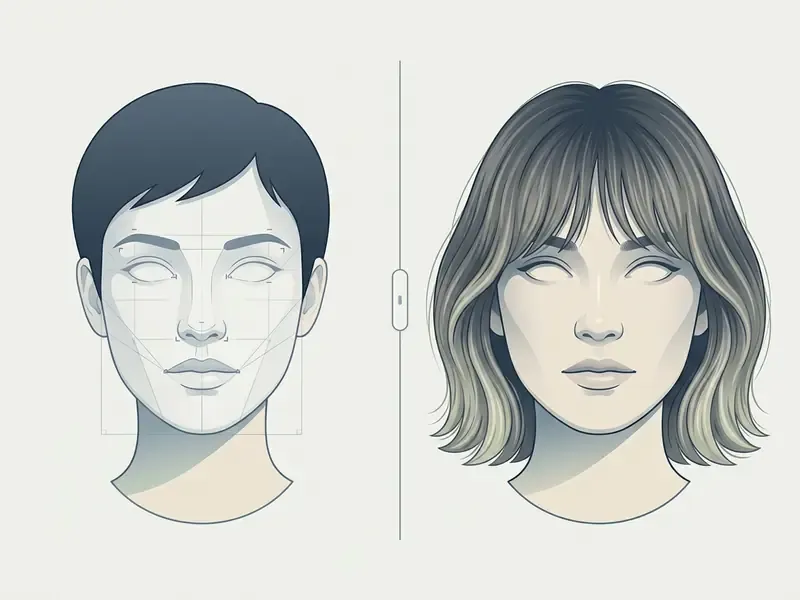
- Markup rules (text specification, no image tags in this article): each image needs a descriptive alt text containing the phrase "ai hairstyle generator" (for example, "Generated preview showing long waves and copper hair color using ai hairstyle generator"). Under the slider, place a DOM-readable caption: "Figure 1: comparison between input portrait and generated hairstyle outputs. The system preserves facial identity, skin texture, and background lighting across all haircut variants." Group the pair with an accessible label so screen readers announce it as one comparison unit.
How to Use an AI Hairstyle Generator Online
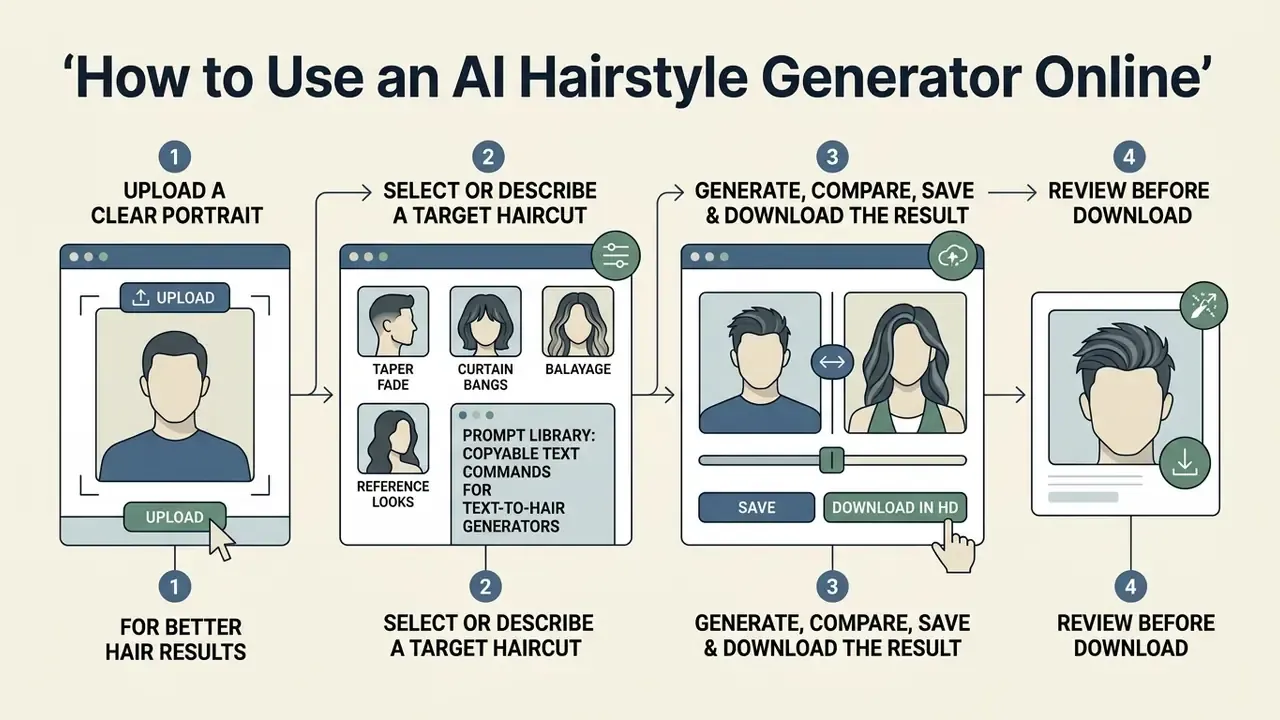
Using an ai hairstyle generator free online comes down to four moves: upload a clear portrait, select or describe a target haircut, generate, then review before download. Follow the input guidelines and alignment stops being a lottery.
Upload a Clear Portrait for Better Hair Results
Preview quality depends directly on the uploaded photo. Generative models rely on facial landmarks to map new hair structure onto the skull and hairline, and they cannot guess what the camera never saw.
Input photos should be front-facing with even illumination across the face. According to official photograph guidance from GOV.UK Photo Standards and EU biometric identity documentation frameworks, face detection requires open eyes, uniform lighting without harsh shadows or flash reflections, and clear visibility of the facial oval. Updated: this guide previously cited a European Commission (2026) document; the corrected reference is the published GOV.UK photo standard together with EU biometric identity photo guidance and ICAO-style digital face image rules. German biometric photo instructions add a useful framing rule: the head, chin to crown, should occupy roughly 70 to 80% of the frame. Pull existing hair back and away from eyes and jawline so the algorithm can read natural contours without obstruction.
Choose a Hairstyle, Haircut or Reference Look
Once the image is in, you specify the target look through presets, custom text prompts, or a reference photo. Most platforms ship a catalog of popular cuts sorted by length, gender, and style. Before spending credits, it is worth reading the best AI art generators comparison to see how rendering quality differs between the underlying image models, because an ai hair maker is only as good as the diffusion backbone behind it.
- Preset catalogs
- predefined templates such as "Textured Bob," "Buzz Cut," or "Layered Cascade." Commercial tools like Perfect Corp API use template IDs (for example "Curly Bob" or "Side-Swept Bangs") to apply validated 3D hair models to your face structure. Catalog size varies enormously by vendor, from 150+ trending styles to 14,000+ style-and-color combinations, mostly because vendors count presets, colors, and variants differently.
- Text prompts
- descriptive text covering cut length, layering, and color. Prompt precision is the single biggest lever on output quality. Naming the fade height, the parting, the strand texture, and the light behaviour produces far cleaner renders than naming only the cut.
- Reference images
- a secondary photo containing the hair you want to clone. The hairstyle generator ai extracts hair geometry and colour from the reference and transfers it onto your portrait. Vendor APIs expose this as a reference file URL or file ID alongside the template parameter, so prompt plus reference can travel in one request.
Prompt Library: Copyable Text Commands for Text-to-Hair Generators
Text-to-hair engines respond to structured description in a specific order: cut geometry, then texture, then colour system, then light behaviour. The prompts below follow that order and can be pasted straight into any ai hairstyle changer that accepts free text.
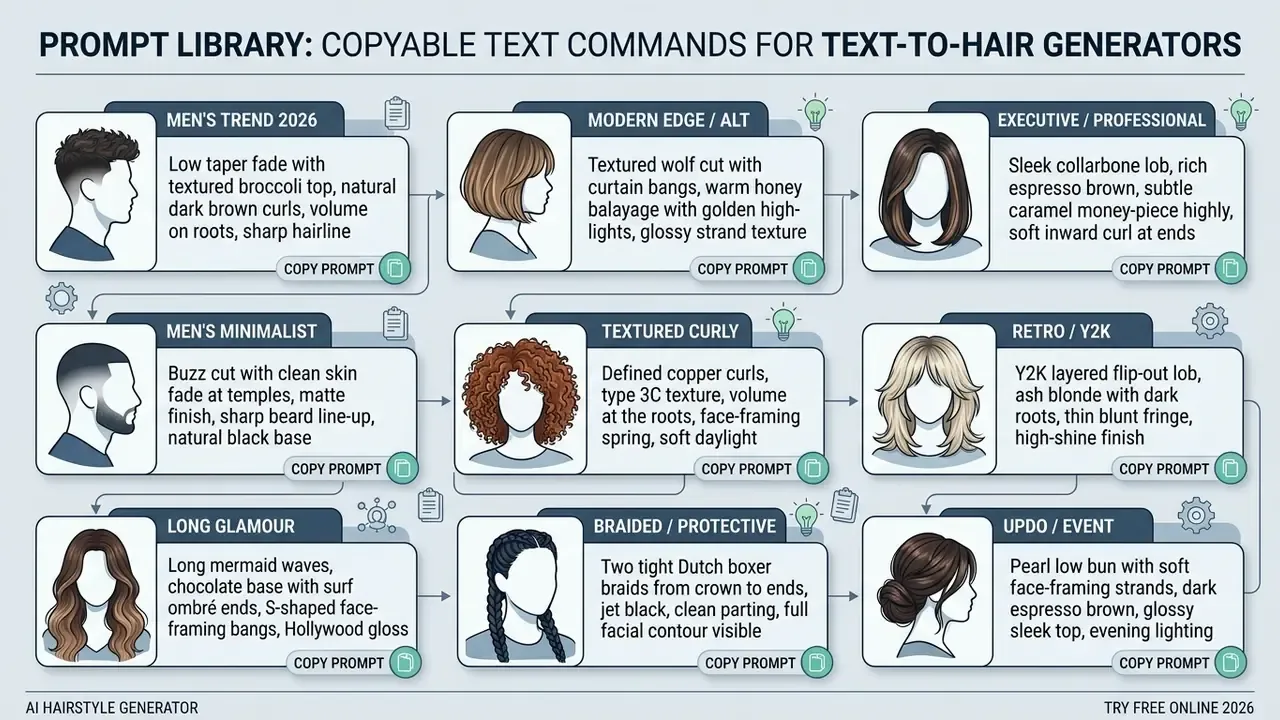
Two prompt-writing rules lift the hit rate immediately. First, always state the base colour and the highlight technique separately ("dark brown base with caramel balayage" instead of "caramel hair"). Second, always say whether the hairline, ears, and forehead should be exposed, because that determines how much occluded region the model has to reconstruct from nothing.
Generate, Compare, Save and Download the Result
After you pick a style, the generate button ships your photo and parameters to cloud GPU infrastructure. Processing usually finishes within 1 to 15 seconds, depending on architecture.
The system then returns one or several preview variations. Current OpenAI image generation documentation notes that image APIs support multiple variations per request via an n parameter, with export sizes up to 3840×3840 (or 3840×2160) in PNG, JPEG, or WebP, PNG being the default. Updated: the earlier reference to OpenAI API Documentation (2026) has been reframed as vendor documentation for current image-generation endpoints rather than a dated publication. Google's image generation documentation lists 1K, 2K, and 4K output tiers and notes that invisible SynthID watermarking is embedded by default and cannot be disabled on some API surfaces. That last detail matters a lot if generated hair previews will be republished commercially. Compare options side by side, pick a variation, then download the full-resolution file. Most hairstyles photo editor tools also keep a session history, which is handy when the second-best render turns out to be the honest one.
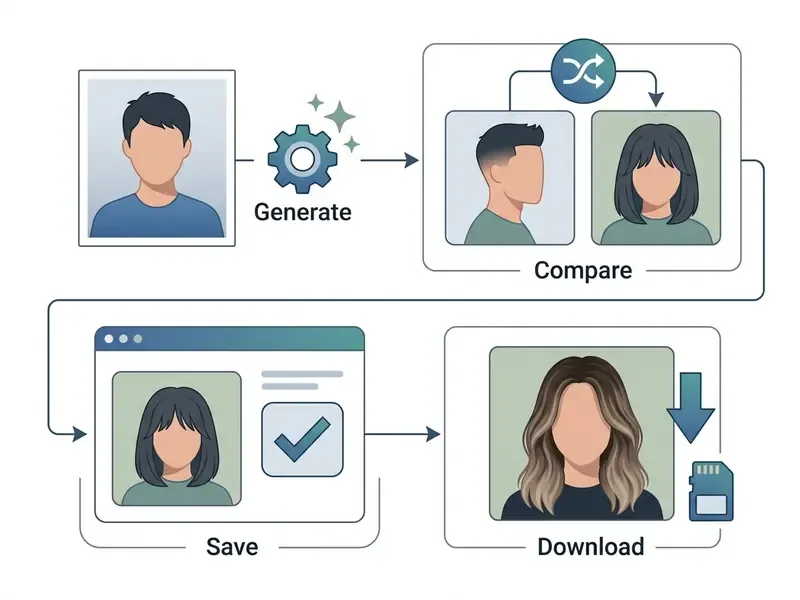
- Markup rules (text specification)
- implement as an ordered list in the DOM, with visible text links between steps, never as an image alone.
- Upload photo
- select a front-facing, well-lit portrait with unobstructed features and clear background contrast.
- Choose style
- pick a preset haircut, type a text prompt, or upload a reference image with the target hairstyle.
- Generate preview
- process the image through cloud neural networks that map new hair geometry and hair color onto the face.
- Download result
- compare variations side by side and export high-resolution PNG or JPEG files.
How to Choose a Hairstyle for Face Shape, Length and Texture
Choosing a flattering ai hairstyle means balancing facial proportion against your real hair texture. A virtual try-on lets you test how short cuts, long waves, layers, or bangs shift the visual geometry of your face before anyone picks up scissors.
Hairstyles to Try for Different Face Shapes
Classic styling guidance aims at visual balance, using the 1.5:1 height-to-width ratio of an oval face as the reference. Research published by the University of Kentucky Extension (2025) outlines how specific cuts balance different contours:
- Round faces: benefit from vertical height and crown volume. Long layered cuts, elongated bobs, and high ponytails lengthen the perceived shape, while blunt chin-length bobs tend to widen it. Side parts and curtain bangs add the asymmetry that breaks visual width.
- Square faces: need softening around a strong jawline. Soft waves, side-swept parts, and textured layers pull focus off the angular corners; wispy bangs and soft bobs work particularly well.
- Heart-shaped faces: wider forehead, narrower chin. Side-swept bangs and volume at chin level restore lower-face balance.
- Long or oblong faces: benefit from side volume and forehead coverage. Chin-length bobs and full curtain bangs visually shorten face length.
- Oval faces: the balanced baseline. Pixies through long waves all read well, which makes this shape the best candidate for testing radical colour changes rather than radical geometry.
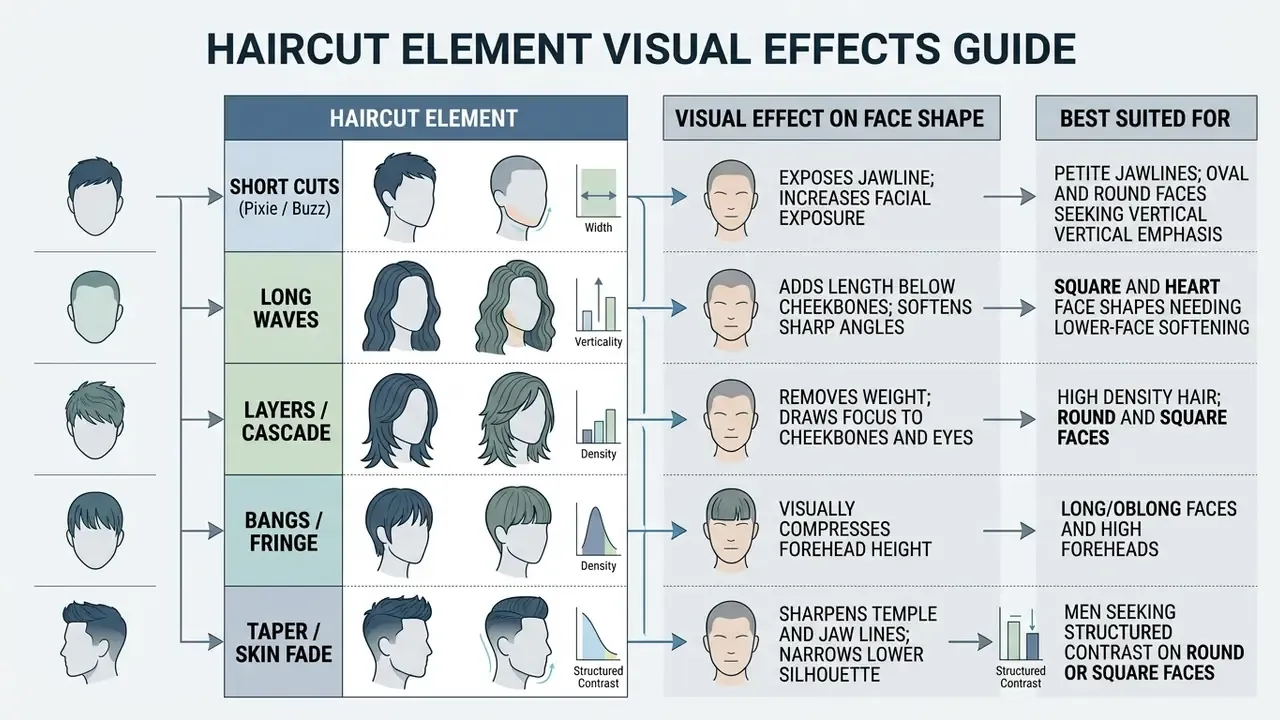
Short Cuts, Long Waves, Layers and Bangs
Specific haircut elements shift visual focal points across head and neck. A haircut photo editor makes that shift measurable instead of theoretical:
Male and Female Hairstyle Previews
Try-on systems usually split their libraries into male and female collections, mainly to accommodate different hairline structures and grooming expectations. A hairstyle photo editor female preset set, for instance, leans heavily on face-framing layers and multi-tonal colour, while the men's set leans on fade heights.
2026 Style Spectrum for Men and Women
- Popular men's styles:
- Textured crop and low taper fade: clean side gradients under messy volume on top. The most-requested combination in current preset catalogs.
- Modern broccoli cut: voluminous curly or wavy crown with tight temple skin fades, dominant among Gen Z requests.
- Textured quiff with high fade: natural volume on top against skin-level sides.
- Classic buzz cut and beard line-up: minimalist geometry that puts the jawline on display. The highest-risk real-world change, and therefore the highest-value preview.
- Modern mullet and medium-length flow: softer retro shapes with movement through the mid-lengths.
- Popular women's styles:
- Curtain bangs and layered cascade: frames cheekbones while keeping length at the back.
- French bob and wispy fringe: chin-length structure that compresses forehead height.
- Caramel balayage and money piece: dimensional colour concentrated on front face-framing strands.
- Soft wolf cut: shaggy crown volume with thinned, tapered ends for a rock-leaning silhouette.
- Sleek lob and beach waves: collarbone staples that read professional in headshots and casual in social content.
Fairness across these libraries is not automatic. Not even close.
«Hairmony proposes multi-attribute hairstyle classification, baldness, bangs, length, hair type, strands, with fairness criteria used to balance quality across demographic groups.»
Multi-attribute evaluation of hair density, length, and strand type is exactly what stops a model from rendering type 3C curls as a flat wig, still the most common complaint about weaker try-on tools.
How to Get Better Results from an AI Hair Photo Editor
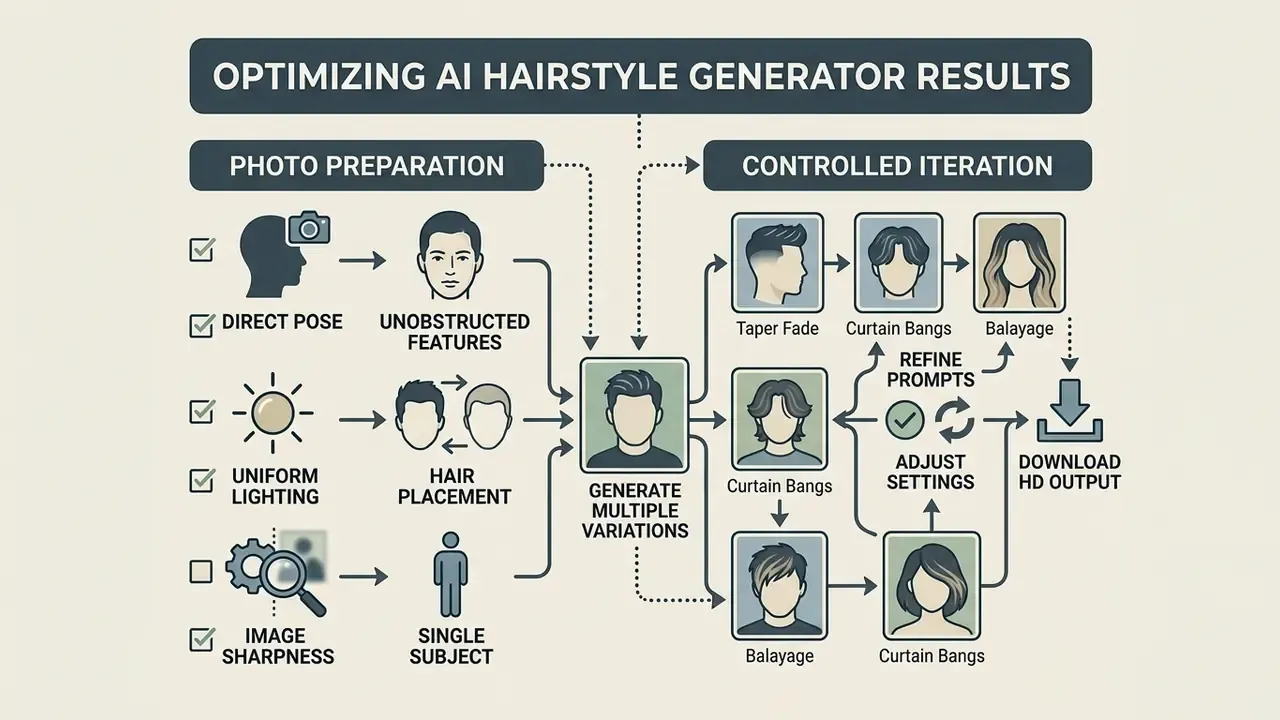
Getting clean output from an ai photo editor hairstyle or hairstyle photo editor is mostly about photo preparation and controlled iteration. Systematic input standards remove the usual artifacts: blurred borders, waxy strands, unnatural hair boundaries. If cost rather than quality is your constraint, comparing free photo editors clarifies which export limits and watermark rules you will hit before you pay for anything.
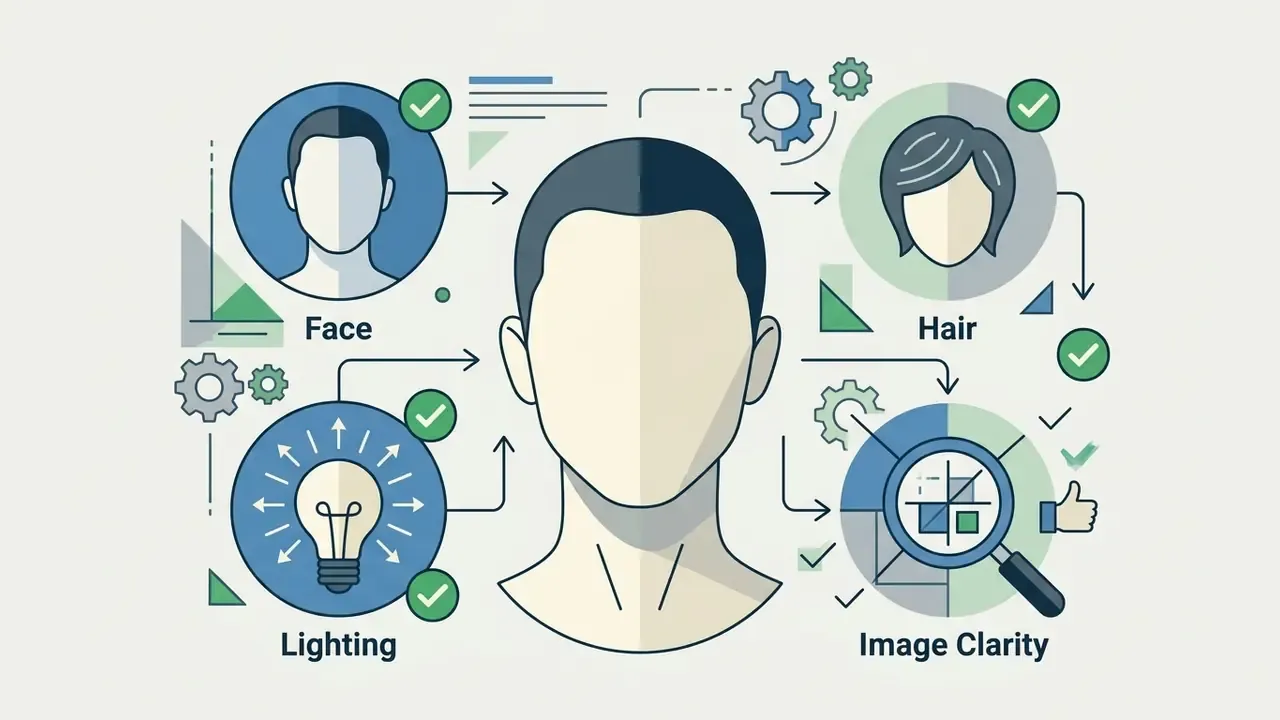
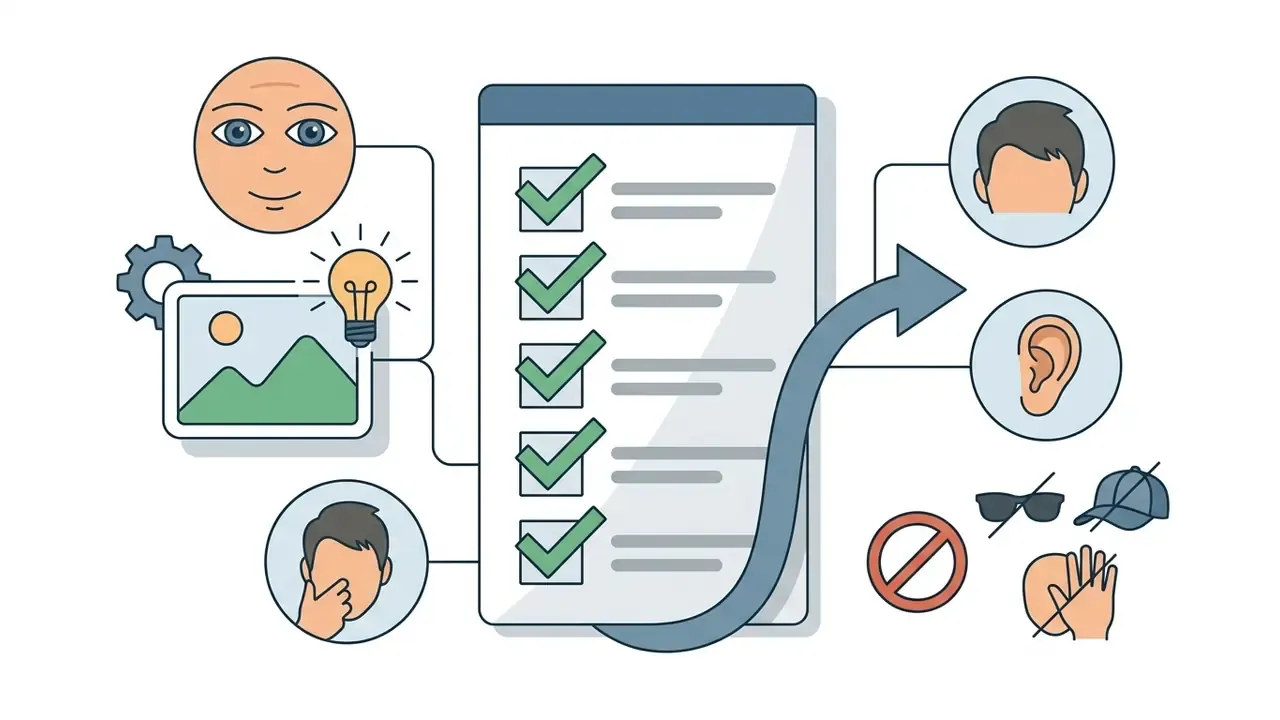
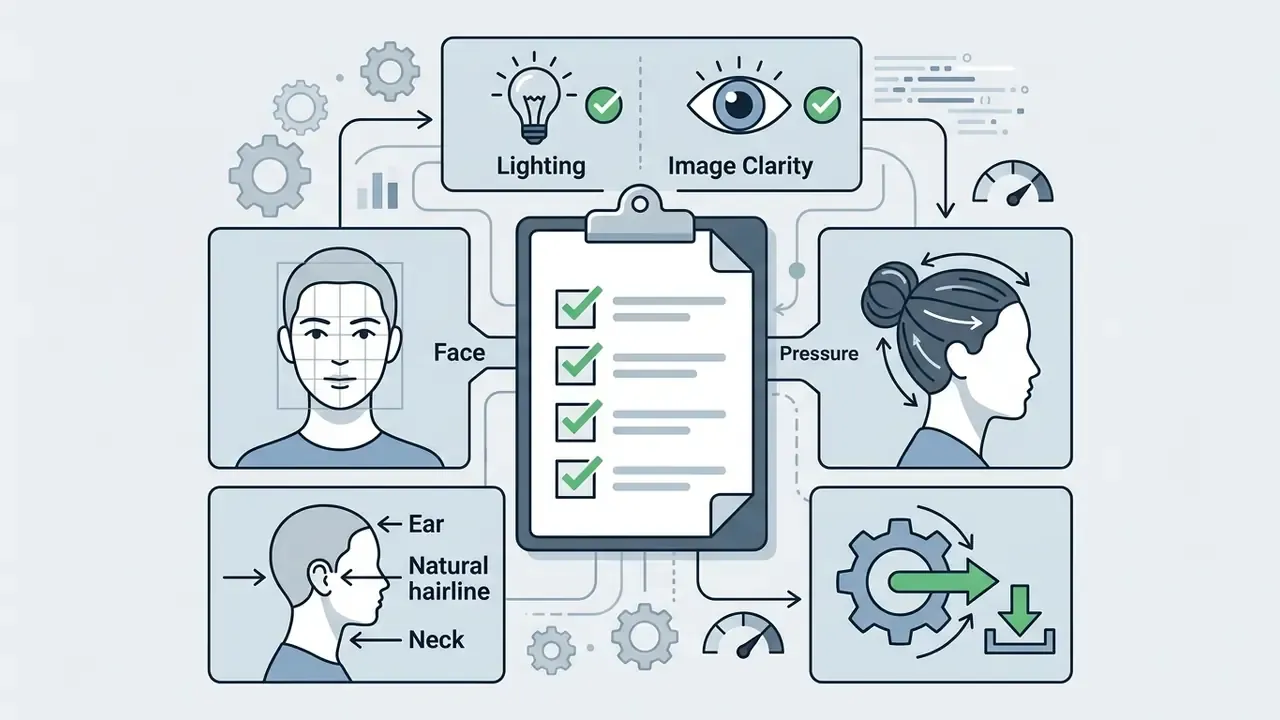
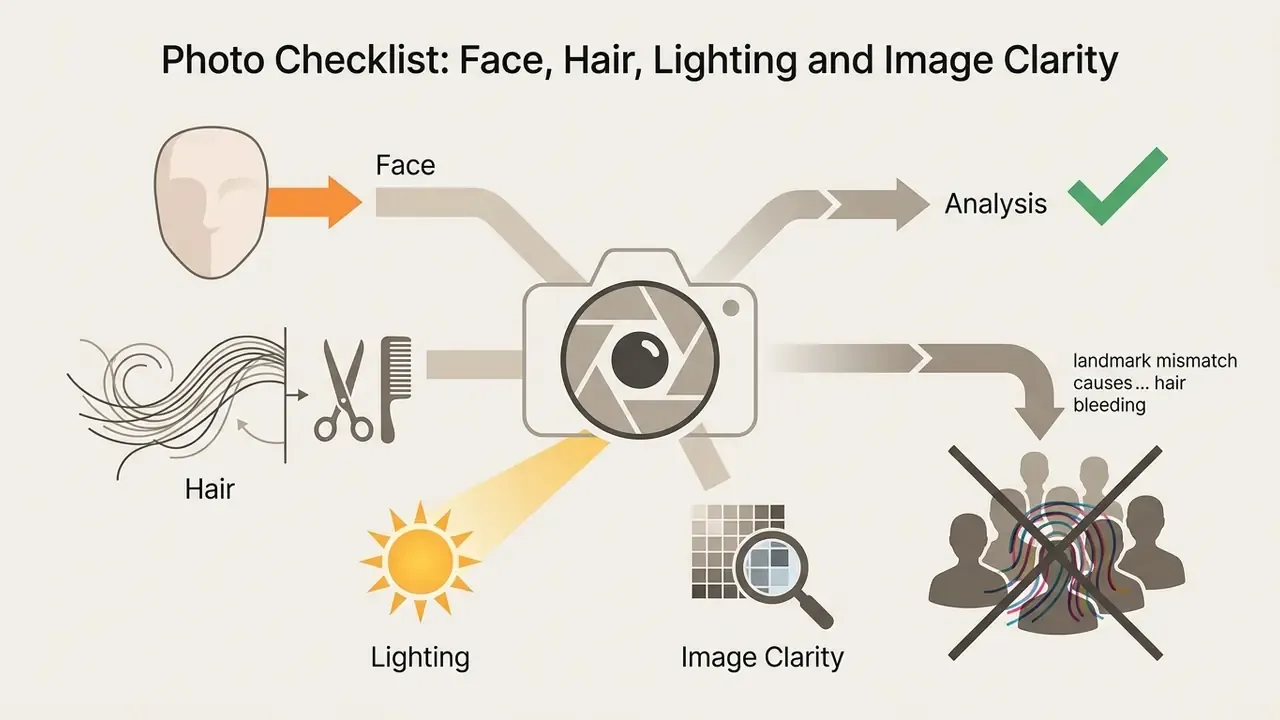
Photo Checklist: Face, Hair, Lighting and Image Clarity
To get precise segmentation between skin, hair, and background, the input image should meet a few concrete criteria:

When to Generate More Than One Hairstyle Variation
Generative models use random noise seeds and probabilistic sampling at inference time. So generating several variations of one prompt or reference photo is not indulgence, it is how you find the cleanest render.
Developer guidance published for Amazon Nova Canvas recommends fixing the generation seed first, adjusting text prompts or style weights iteratively, then varying the seed once the prompt is final to explore structural alternatives. Updated: the earlier citation to Amazon Nova Canvas (2026) is presented here as vendor developer guidance rather than a dated specification. The same fixed-seed-then-vary-seed pattern appears in other image API documentation, where identical seed, prompt, model, and parameters reproduce the same image.
«Research on text-based editing via cross-attention recommends a silhouette parameter k = 0.0, cross-replace step 0.2 and self-replace 0.8 for an optimal balance between edit strength and preservation of the original image.»
Iterating this way lets you compare subtle differences in wave pattern, bang separation, and root transition without losing facial identity between runs.
- a compact checklist of ideal photo parameters for upload into an AI hairstyle editor.
- Markup rules (text specification)render as a semantic unordered list with checkbox indicators; every item must remain readable as plain text without JavaScript.
- Full face exposurecentered, front-facing angle showing both eyes and ears.
- Balanced lightingneutral, front-lit environment, free of heavy shadow or backlight.
- Hairline visibilityforehead and jawline exposed, no accessories or loose strands across them.
- Neutral expressionrelaxed face or a subtle smile, to avoid landmark distortion.
- High resolutionsharp facial detail without digital noise or heavy compression.
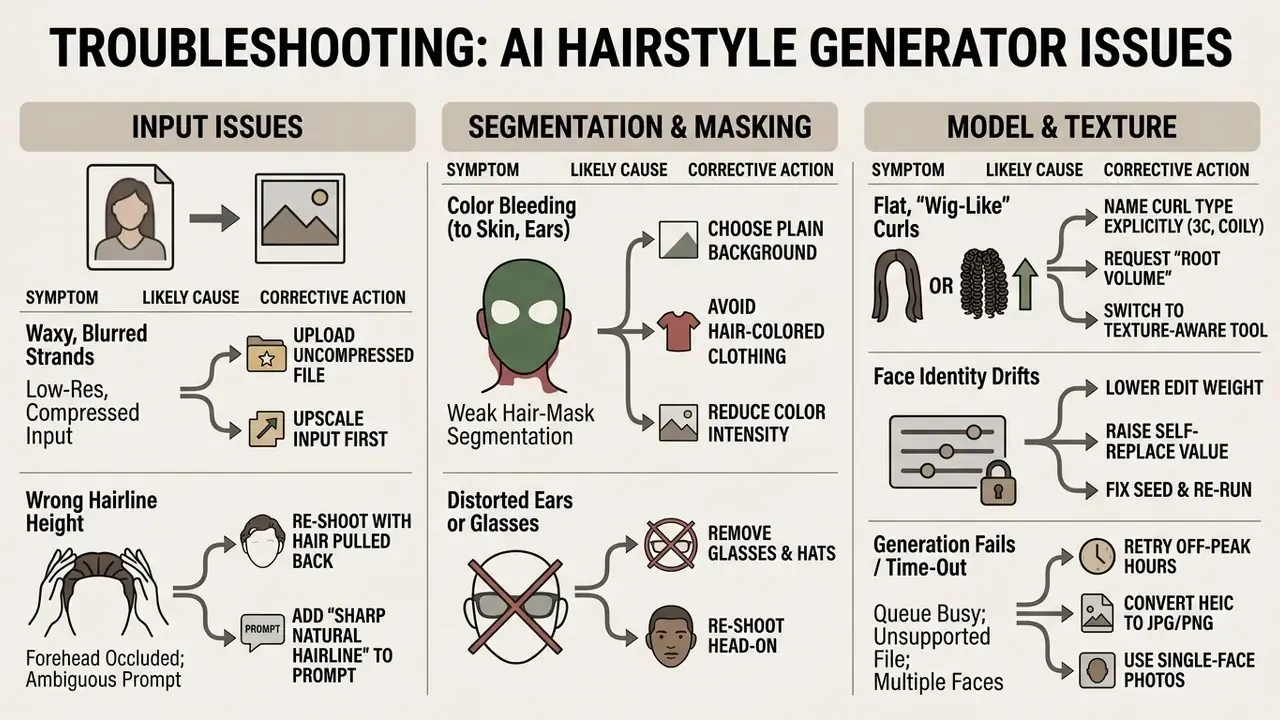
Troubleshooting: Fixing Artifacts, Wrong Hairlines and Failed Generations
Artifact patterns in hair generation are predictable, which makes them fixable without switching tools. Published ablation studies on HairDiffusion show that removing the warping, patch-match, and bilateral-filtering modules degrades FID and damages preservation of unrelated attributes. In practice, that is precisely what users see as smudged edges and waxy strands. HairFastGAN documents that complex head poses reduce reconstruction quality, and strand-level systems such as TANGLED add post-processing constraints specifically to keep braid structure coherent.
Most services do not consume a free credit for a failed generation, and several state explicitly that the daily limit counts only after a successful result is returned. Verify that in the usage terms before you buy a top-up, though. Wording changes quietly.
Is an AI Hairstyle Filter Free and What Are the Limits?
Most online services offer an ai hair filter free or ai hairstyle filter free trial so you can test the functionality. Free access almost always comes with daily quotas, catalog restrictions, and export limits.
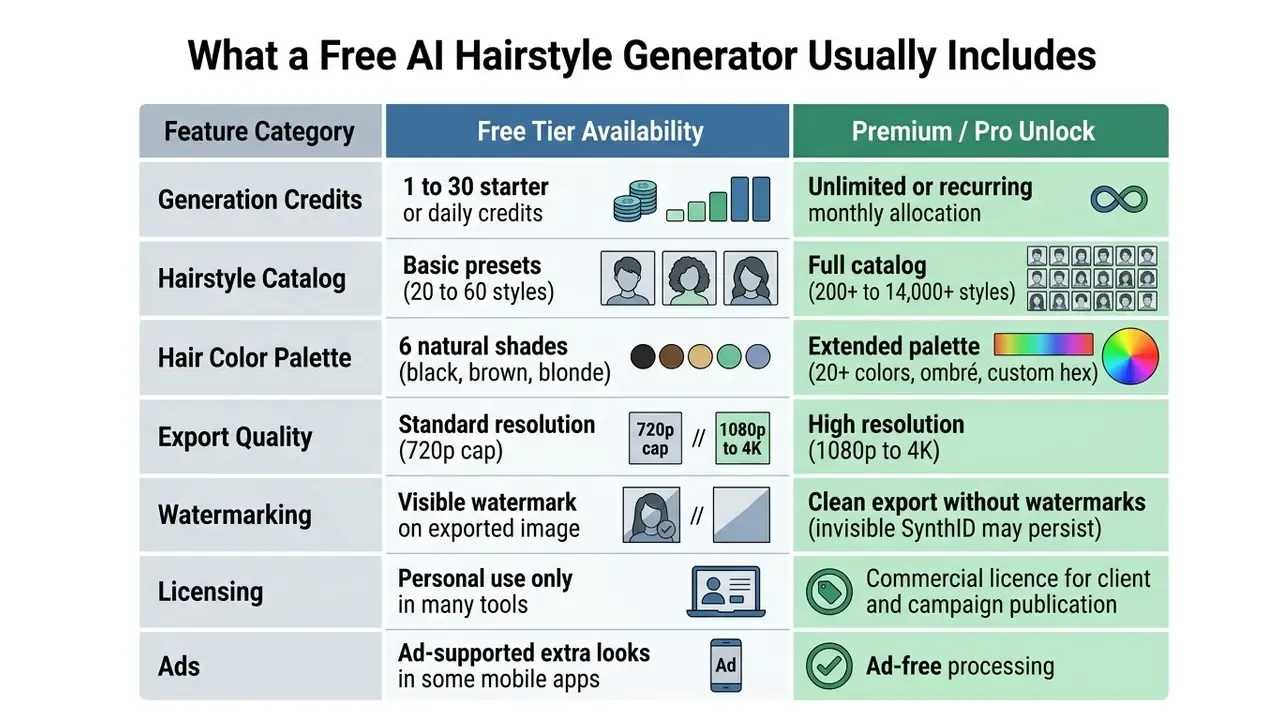
What a Free AI Hairstyle Generator Usually Includes
Free tiers hand out starter credits to test the core feature. Perfect Corp AI Hairstyle Generator allocates 5 free credits on registration (2 credits per generated style across a 200+ style library). HairstyleTryOn issues 3 credits at signup plus 1 free credit every 24 hours. HairstyleChanger offers 4 free credits with 21+ hairstyles and 6 hair colors (blonde, brown, black, auburn, gray, platinum). Hairstyle Try On grants 30 non-expiring credits, at 10 credits per hairstyle change and 5 per colour change. Any ai hairstyle maker priced per credit deserves a quick arithmetic check: three seeds per look is normal, so a 5-credit trial is really one and a half experiments.
What to Check Before You Start Generating
Before you push images into any free photo hair editor, read the platform terms on usage limits and licensing. To weigh subscription models or platform tiers across related creative editing tools, you can compare options on our comparison hub or review the parameters in our pricing guide.
Three things deserve attention: export watermarks, token reset frequency, and commercial licensing terms. Many free tools restrict output to personal use and require a paid plan for publication in marketing feeds or client portfolios. The practical boundaries are set out in our guidance on commercial use of AI-generated imagery. Note too that some engines embed invisible provenance watermarking that cannot be switched off, which matters for brands carrying disclosure obligations.
Privacy, Compliance and Vendor Audit (B2B Governance Block)
«The EU AI Act bans untargeted scraping of facial images from the internet for recognition databases and sets fines up to €35 million or 7% of global annual turnover for serious violations (Art. 99).»
Reputable hairstyle services state in their privacy policies that uploaded photos are encrypted, processed transiently in cloud RAM, deleted automatically within 24 hours, and never used to train proprietary models without explicit consent. Regulatory guidance from data protection authorities, including OAIC guidance on privacy in generative AI development (2024), confirms that obligations on collection, retention, access control, and deletion apply the moment personal images enter a training pipeline.
Service Verification and Privacy Policy Audit
AI Vendor Governance Audit Checklist (Biometric-Adjacent Processing)
Before a salon chain, retailer, or media team routes customer portraits through a third-party hairstyle API, procurement and risk functions should close the following items in writing:
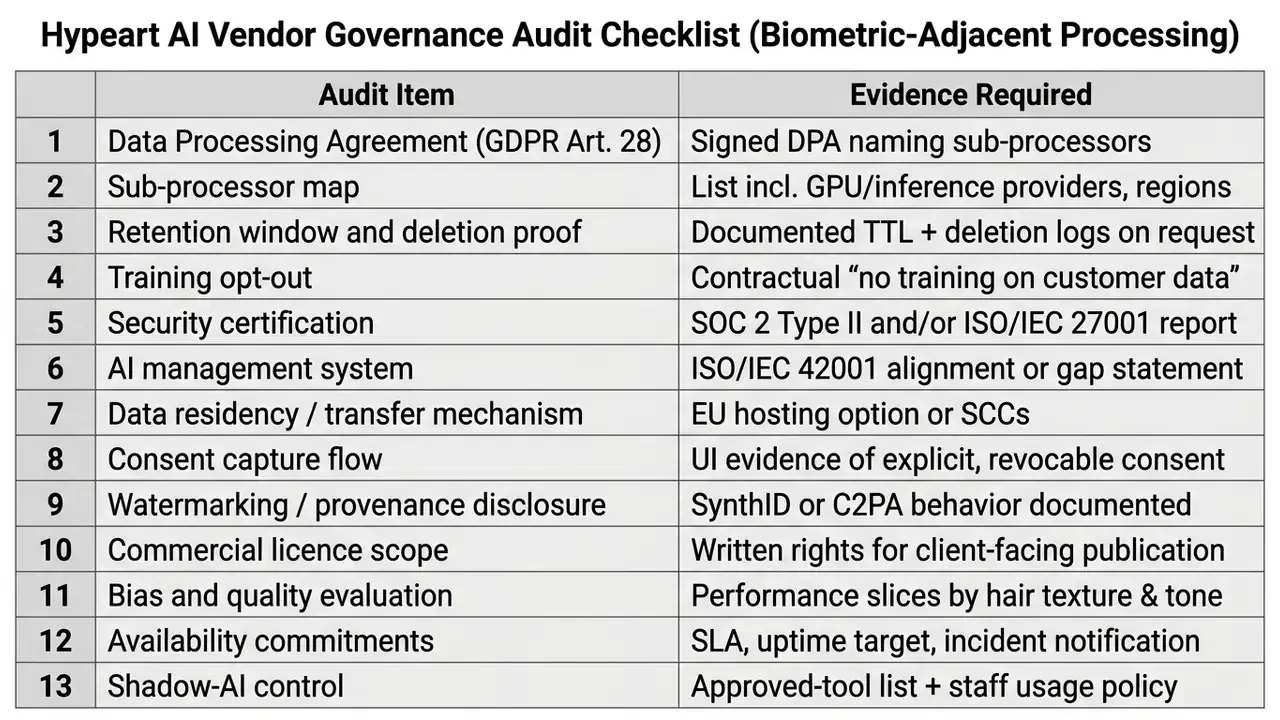
Two items get skipped almost every time. First, sub-processor mapping: several consumer hairstyle apps forward images to third-party inference platforms, which changes the transfer analysis entirely. Second, bias evaluation: multi-attribute fairness work such as Hairmony exists precisely because preview quality is not uniform across hair types, and a vendor without texture-sliced metrics cannot substantiate an equal-service-quality claim. A third, quieter risk is shadow AI: staff uploading client photos to a random free ai photo hair editor from a personal phone, outside any approved-tool list. That is a consent problem and an audit problem at the same time.
Can Salons, Creators and Brands Use AI Hairstyle Results?
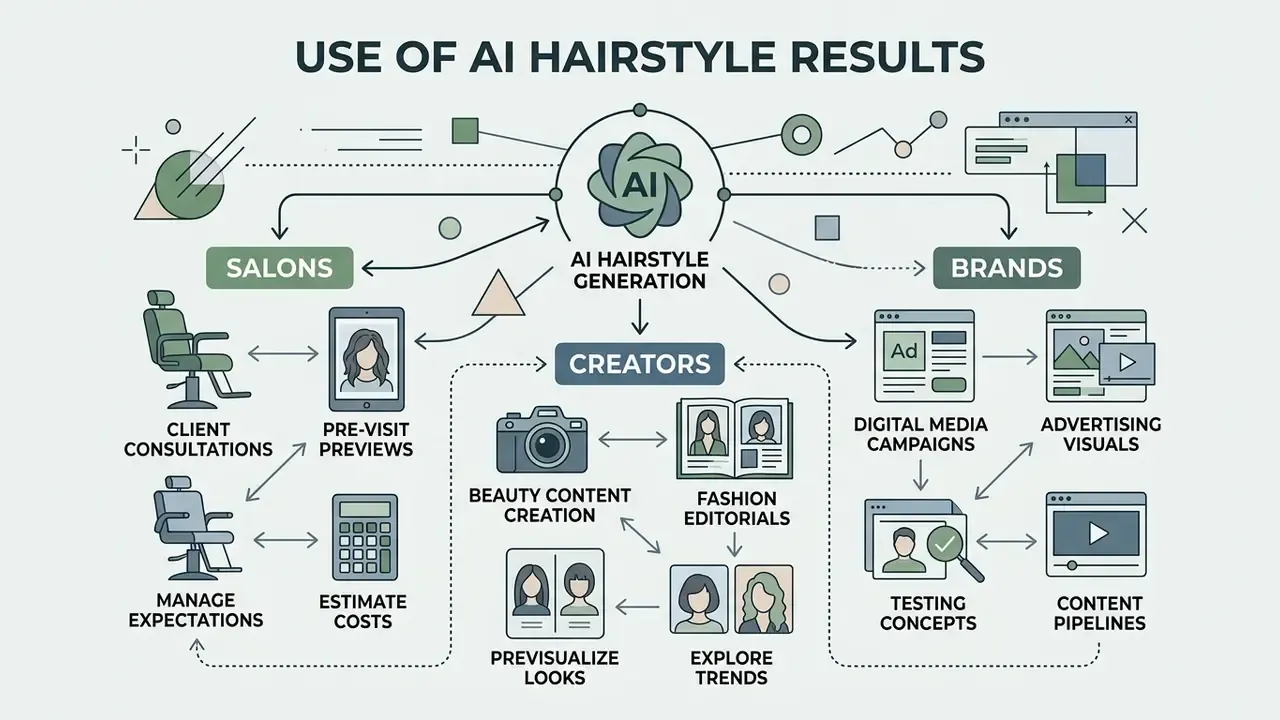
Salons, fashion creators, and digital media agencies already fold AI hairstyle generation into consultations and content pipelines. Digital previews sharpen communication between client and stylist, and they compress content production timelines.
Using AI Hairstyle Previews Before a Salon Visit
In modern salons, stylists run tablet-based try-on during the pre-cut consultation. Platforms like TheHair.App (Lumia workflow) let a stylist snap a client selfie on a tablet or smart mirror and render target haircuts and hair colors on the spot. Salon-facing vendors such as HairHunt position the same preview as an acquisition and upsell mechanism.
Showing a change on the client's actual portrait creates visual agreement before scissors or chemical dye enter the picture. Salons report that photorealistic previews increase willingness to try premium colour treatments or bold short cuts, while reducing post-service dissatisfaction. The mechanism is documented in retail research:
«High perceived quality of augmented-reality virtual try-on significantly increases consumer confidence in purchase decision-making.»
Modeling the return, including control costs. Vendor-reported conversion uplift should never drop straight into a business case. A defensible model looks like this:
Annual net benefit =
  (incremental premium services per month × average margin per service × 12)
+ (avoided redo/correction services per month × cost per redo × 12)
- (subscription or per-credit API cost)
- (staff training and consultation time)
- (governance & control cost: DPA review, consent flow build, security review)
- (residual risk provision: regulatory + reputational exposure)
Worked illustration for a three-chair salon: 8 additional premium colour services per month at €60 margin (€5,760 per year) plus 2 avoided colour corrections per month at €45 (€1,080 per year), against €600 per year in tooling, €900 one-off training and workflow build, and €1,200 of first-year governance and consent-flow cost. That yields roughly €4,140 net in year one, and materially more in year two once the one-off control costs fall away. The numbers are illustrative. The discipline is the point: control cost and residual risk belong on the same line as tooling cost. Independent verification of uplift needs a controlled pilot with a holdout group of consultations, which is data most vendors do not publish.
Creating Beauty and Fashion Content with AI Hair
Creators and beauty marketers use hair tools to build lookbooks, social assets, and promo video without booking a studio for every trend. Teams reach for Banuba AR, RauGen, or ZSky AI to generate high-resolution digital model assets; Banuba documents virtual hair colour try-on specifically for creators and stylists building lookbooks, while salon-focused platforms spin up campaign clips for Instagram, TikTok, websites, and newsletters in minutes. A haircut maker ai workflow also pairs well with distribution tooling: once the visual set exists, an ai hashtag generator speeds up the caption and discovery layer for each trend drop.
For teams running complex media asset pipelines across web and mobile, our AI Media API Guides cover integration of automated image processing. Creators checking asset licensing rules should read our AI Media Commercial-Use guidance before publishing generated imagery in paid campaigns. And if you are refreshing a professional profile after a real cut, an ai headshot generator pairs naturally with hairstyle previews.
AI Hairstyle Generator FAQ
Can I Use an AI Hairstyle Generator on My Phone?
Yes. Modern generators are responsive and run inside mobile browsers such as Safari and Chrome on iOS and Android. Capture a selfie, upload it to the web app, generate previews, no third-party install required.
Mobile web versions push the heavy neural computation to cloud servers, so processing speed barely depends on your handset. Accessibility support, on the other hand, is uneven. Several iOS listings (HairHunt, hano.ai, HairFlip, HairApp, Shear AI) state that the developer has not indicated which accessibility features the app supports, while Hairstyle Try On – Haircut AI App does declare supported accessibility features on iOS 17.0+. No retrieved vendor documents WCAG conformance for the mobile web build, so screen-reader-dependent users should test before paying.
How Long Does It Take to Generate a Hairstyle Preview?
Standard 2D preview generation usually lands between 1 and 15 seconds on cloud GPU hardware. Architecture decides the rest:
- Fast GAN transfer: HairFastGAN executes shape and colour transfer in under one second on NVIDIA V100 hardware, reported for the hardest scenario, transferring shape and colour from two different reference images.
- Diffusion models: multi-stage systems like HairDiffusion need 5 to 12 seconds for high-resolution detail.
- 3D mesh pipelines: full reconstruction pipelines such as HairPort take up to 22 seconds for strand-based geometry in the image-generation stage, while the end-to-end 3D pipeline is reported at roughly 290 to 430 seconds on H100-class hardware, dominated by about 150 seconds of 3D reconstruction.
Vendor claims of "1 to 3 seconds" are marketing response-time figures, not benchmarked measurements, and free-tier queues can stretch wall-clock time into minutes at peak load.
Can an AI Hairstyle Generator Show How Bangs Will Look on Me?
Yes. Hair photo editors read forehead height, eyebrow arch, and hairline contour to map curtain bangs, wispy air bangs, or a full blunt fringe onto your portrait without touching the underlying face shape. Because bangs compress perceived forehead height, this is one of the highest-value previews for long or oblong faces, and one of the hardest changes to reverse in real life.
How Does an AI Simulate Highlights and Balayage?
Unlike flat colour filters, neural diffusion models compute light reflection across individual rendered strands. That enables multi-tonal output: caramel balayage, money-piece highlights, ombré transitions that adapt to the ambient light in your original photo. Accuracy improves when the prompt separates base colour from technique, for example "dark brown base with caramel highlights concentrated on face-framing strands" rather than "caramel hair".
Can the AI Recommend a Hair Color for My Skin Tone?
Yes. Undertone-aware tools classify complexion as warm, cool, or neutral, then bias suggestions accordingly: honey blonde, golden brown, and warm copper for warm undertones; ash blonde, icy brown, and platinum for cool undertones; near full-spectrum freedom for neutral. Treat the output as a starting point for a colourist conversation, not a chemistry plan. Real results also depend on current pigment, porosity, and dye history.
How Will a Buzz Cut or a Shaved Head Look on Me?
Buzz cuts and skin fades are the highest-risk real transformations, because they expose skull shape, hairline recession, and scalp texture that long hair hides. Preview tools reconstruct the occluded crown and temple regions from facial landmarks, so the render is an approximation of head geometry, not a measurement. Generate at least three seeds before judging, and read scalp detail as indicative only.
Can I Show the AI Result to My Barber or Stylist?
Yes, and it is arguably the single most useful application of the tool. Download the highest resolution available and bring both the original and the generated image, so the stylist can see the intended delta: fade height, layer placement, highlight zone. Far better than a stock reference photo of someone else's hair. Confirm licensing first if the salon plans to republish the image in its own marketing.
Will the AI Change My Face?
Well-built pipelines are explicitly constrained to preserve face, pose, clothing, and background while editing only the hair region, using identity adapters and cross-attention preservation settings. Identity drift usually means edit strength is too high. Lower it, raise the self-replace value, or fix the seed and re-run, and facial fidelity normally returns.
Are My Uploaded Photos Deleted?
It depends entirely on the vendor. Documented behaviour ranges from deletion immediately after the session, to a 24-hour temporary-file window, to 14- or 30-day retention for abuse monitoring. Check the privacy policy for the exact endpoint you use, and prefer services that state in writing that uploads are never used for model training.
Verification and Operational Notes
- Editorial methodology: Marcus Hale is the editorial byline for this publication's AI governance, model risk, and controlled technology adoption desk, and is a labeled author rather than a verified individual. Commentary attributed to this byline reflects the team's review methodology, not a named practitioner's clinical or legal opinion. Regulatory statements trace back to the primary instruments cited here (GDPR, EDPB Guidelines 05/2022, EU AI Act 2024); technical claims trace to the named peer-reviewed papers (NeurIPS 2024, CVPR 2023) or to clearly labeled internal test data.
- Evidence tiers used in this guide: (1) peer-reviewed research, HairDiffusion, StyleGAN Salon, Stable-Hair, HairFastGAN, Hairmony; (2) regulatory primary sources, GDPR, EDPB, EU AI Act, GOV.UK photo standards; (3) vendor documentation, API references, pricing and privacy pages; (4) internal, non-audited test data, labeled as such. Vendor marketing claims are never presented as benchmarks.
- Company status: no verified commercial operational status, USP, or regulatory certification has been confirmed for
hypeart.aiat the time of this revision, so none is claimed. - Support and resources: for additional technical documentation you can view the guide in our support portal, open the hub of interactive calculators, compare tooling in the best AI art generator comparison, or review portrait workflows in our AI headshot generator guide. Compliance context sits in our AI litigation and compliance section, with foundational terminology indexed in the site glossary.
- Regulated-topic disclaimer: sections covering GDPR, EDPB guidance, and the EU AI Act are informational summaries of public regulatory instruments and are not legal advice.