Modern browsers removed the download step. That single change is why a live video call now starts in about ten seconds, straight from a tab, with no installer and no account. Standardized web protocols do the heavy lifting, so individuals, remote teams, and global communities can connect on desktop and mobile without touching an app store.
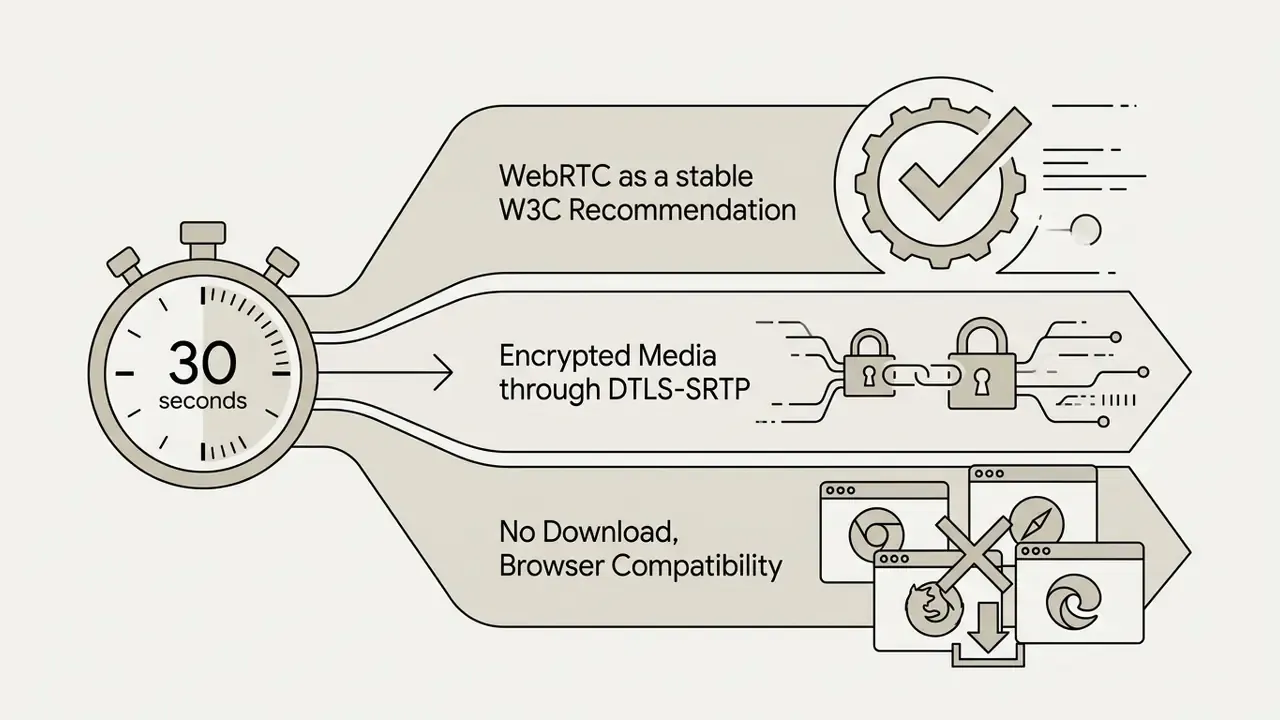
Executive summary: three takeaways in 30 seconds

Who this guide is written for
Three readers, three different questions. The first wants a free online video call with a relative abroad and needs the fastest safe path. The second is comparing random video chat services after Omegle closed and cares about moderation, not marketing. The third signs off on tools inside a regulated company and needs encryption evidence, retention terms, and an audit trail before anyone joins a client call. Each of the following sections answers one of those questions directly, and we flag where the evidence is thin rather than smoothing it over.
What is online video chat and who is it for?
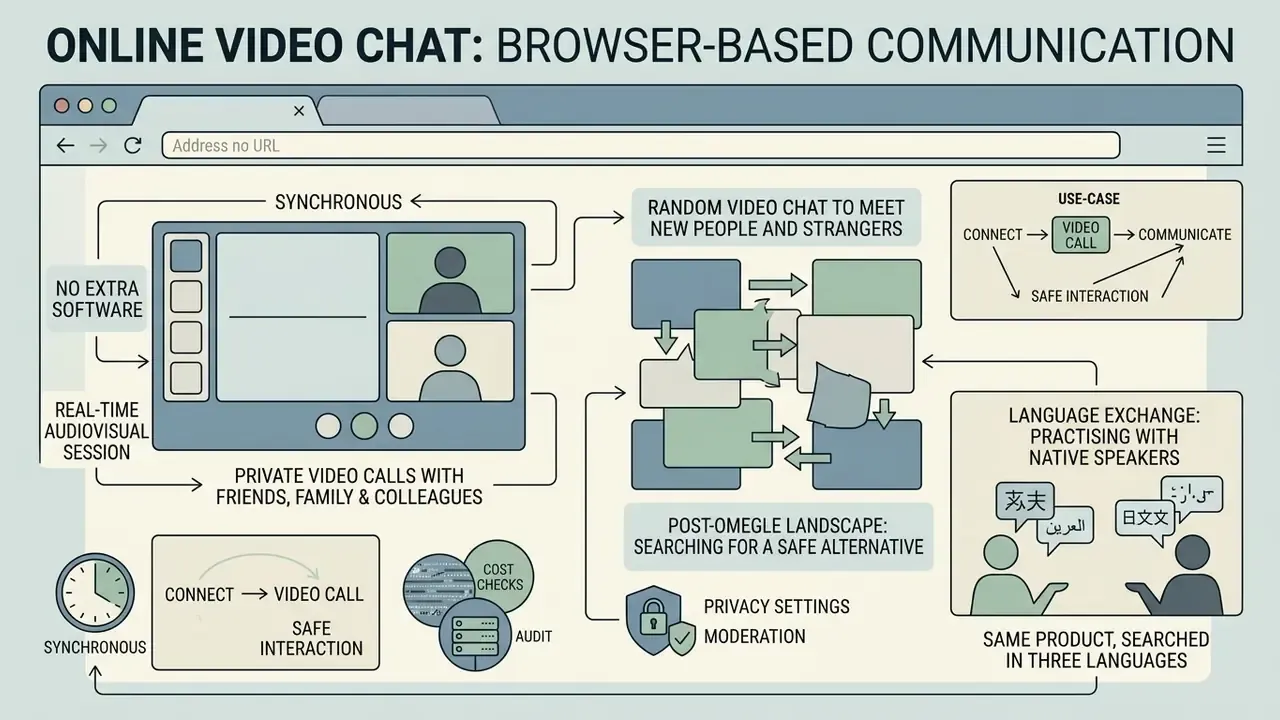
An online video chat is a synchronous, web-based audiovisual session that runs inside a browser, in real time, with no extra software. It covers both structured private meetings between known contacts and spontaneous matching with new people across the globe.
Built on Web Real-Time Communication standards (W3C WebRTC 1.0 Recommendation, https://www.w3.org/TR/webrtc/), browser video calls capture camera and microphone streams natively. The specification states that browsers always encrypt media and always apply congestion control. Research also shows that synchronous video and audio raise perceived social presence and rapport compared with text chat alone.
«Text-chat participants reported significantly lower social presence, engagement and satisfaction than participants in the audio and video conditions.»
Whether you need a quick check-in with family or a random video chat session, web-based platforms deliver low-latency communication. Creators building projects around live calls often keep media tools open in a second tab: an elevenlabs ai voice generator for narration, or a dream ai generator for background visuals used during a presentation.
Private video calls with friends, family and colleagues
Random video chat to meet new people and strangers
A random video chat pairs strangers into one-on-one live sessions for instant social discovery. Users can talk, match with real users, or skip to the next person at any moment, usually without creating a permanent account.
Platforms pairing strangers process millions of daily sessions where participants practise foreign languages or simply look for casual conversation. Academic observation of these services notes that most sessions are brief because users keep skipping until they find a partner worth a longer conversation. Matchmaking is therefore built as a continuously refilled pool of active users rather than a scheduled queue. Session churn is high by design, and platform-reported engagement figures (from roughly 3.3 million to more than 9.5 million daily active users on one avatar-based service) come from the operators themselves and require independent verification.
One more thing worth naming plainly. Queries like "chat with girls online video call" drive real search volume, and most services that advertise gender-targeted matching put that filter behind coins. Two consequences follow: paid gender filters do not verify identity, and stranger platforms marketed around dating attract more impersonation and scripted bot traffic. Treat a gender filter as a preference setting, never as an identity check.
The post-Omegle landscape: searching for a safe alternative
After Omegle shut down in November 2023, tens of millions of monthly active users, with industry estimates placing the displaced audience above 65 million, went looking for an alternative anonymous video chat platform. Browser-based random video chats evolved to fill that gap, replacing unmoderated peer-to-peer rooms with real-time AI frame inspection, one-tap reporting, and automatic bans for repeat violations. Unlike the legacy platforms, contemporary Omegle alternatives enforce strict 18+ gating and publish moderation statistics, while keeping spontaneous one-on-one matchmaking across 190+ countries. If you are searching for "sites like Omegle" or a post-Omegle video chat, the practical differentiator is no longer matching speed. It is whether the service documents its moderation pipeline and its appeal path.
Language exchange: practising with native speakers
Beyond casual discovery, random video chat has become a primary tool for conversational language learning. Millions of users connect daily with native speakers across 100+ countries to practise English, Spanish, or other languages live, without scripts or classrooms. Paired with AI speech translation and subtitle overlays (Google Meet, Zoom, and Microsoft Teams all expose "language you speak / language you prefer to hear" controls, with Teams documenting 40 languages and Cisco Webex advertising English-to-100+-language translation), language exchangers can hold a conversation with almost no shared vocabulary. For learners, the value is unscripted repetition. For platforms, it is the single most durable non-dating use case for stranger matching.
The same product, searched in three languages
Search demand for this category is multilingual, and the feature set behind it barely changes. A user typing "chat de video online" in Spanish, or "chamada de video online" in Portuguese, is looking for exactly what an English speaker means by chatting video online: a browser tab, camera permission, one link. Interfaces localize; the underlying media path does not. If you run a service with international traffic, keep the permission dialog, the safety notice, and the report button localized as well, since those are the three moments where confusion turns into risk.
Use-case diagram (text equivalent). Two routes for browser video chat.
Route 1, private video call by personal link: host opens the site, grants camera and microphone access, creates a room or claims a permanent vanity URL, sends the link, and known participants join instantly. High privacy, known participants, access controlled by possession of the URL plus knock-to-enter approval.
Route 2, random video chat with strangers: user opens the site, confirms 18+, grants camera access, is matched automatically with an anonymous stranger, then talks or skips. Anonymous entry, instant matching, safety controlled by AI screening, reporting, and bans.
How to start a free online video call
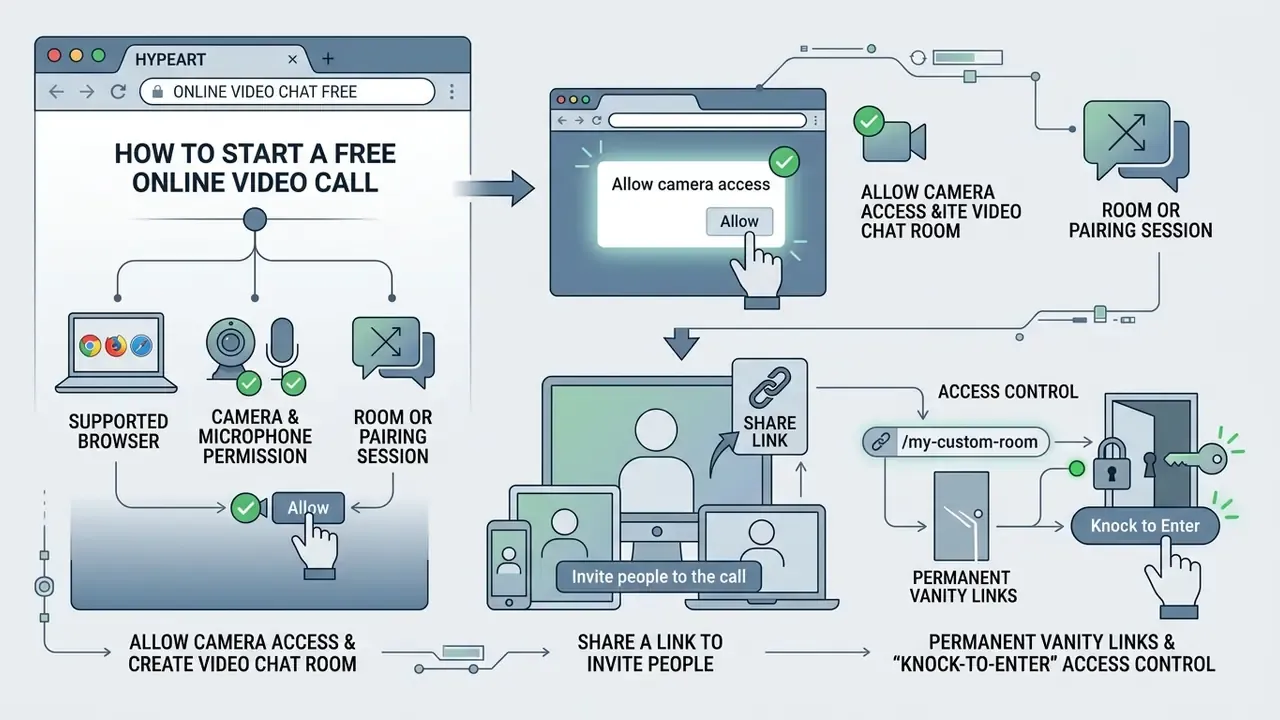
Starting a free online video call takes three things: a supported browser, camera and microphone permission, and a room or pairing session. No download, no technical setup.
Users wondering how to video chat online need an active internet connection, a webcam, and a browser such as Chrome, Safari, Firefox, or Edge. Browsers handle encryption and hardware access automatically over secure HTTPS connections, and the media path must use SRTP/SRTCP with DTLS-SRTP key exchange. Plaintext RTP is not permitted by the WebRTC security architecture (RFC 8827).
Allow camera access and create a video chat room
When someone starts a chat video call online, the browser shows a prompt requesting camera and microphone access through getUserMedia(). Granting permission generates a local video preview and opens a unique video chat room.
Browser security rules grant media permissions per domain and only within secure contexts: HTTPS, localhost, or file:/// (MDN Web Docs, Media Capture and Streams API, https://developer.mozilla.org/en-US/docs/Web/API/MediaDevices/getUserMedia). Camera and microphone are separate policy-controlled features with a default allowlist of self, so an embedded document cannot silently request devices. The user clicks "Allow" on the site dialog, and webcam streaming starts inside the room interface.
«Chrome holds roughly 66% of the global browser market and fully supports WebRTC peer-to-peer connections in all current versions.»
On iOS, every browser, Chrome and Firefox and Edge included, runs on WebKit. Behaviour there follows Safari's engine limits rather than the desktop implementations of those same brands. Worth remembering before you blame the site.
Free online video chat: what users can access without payment
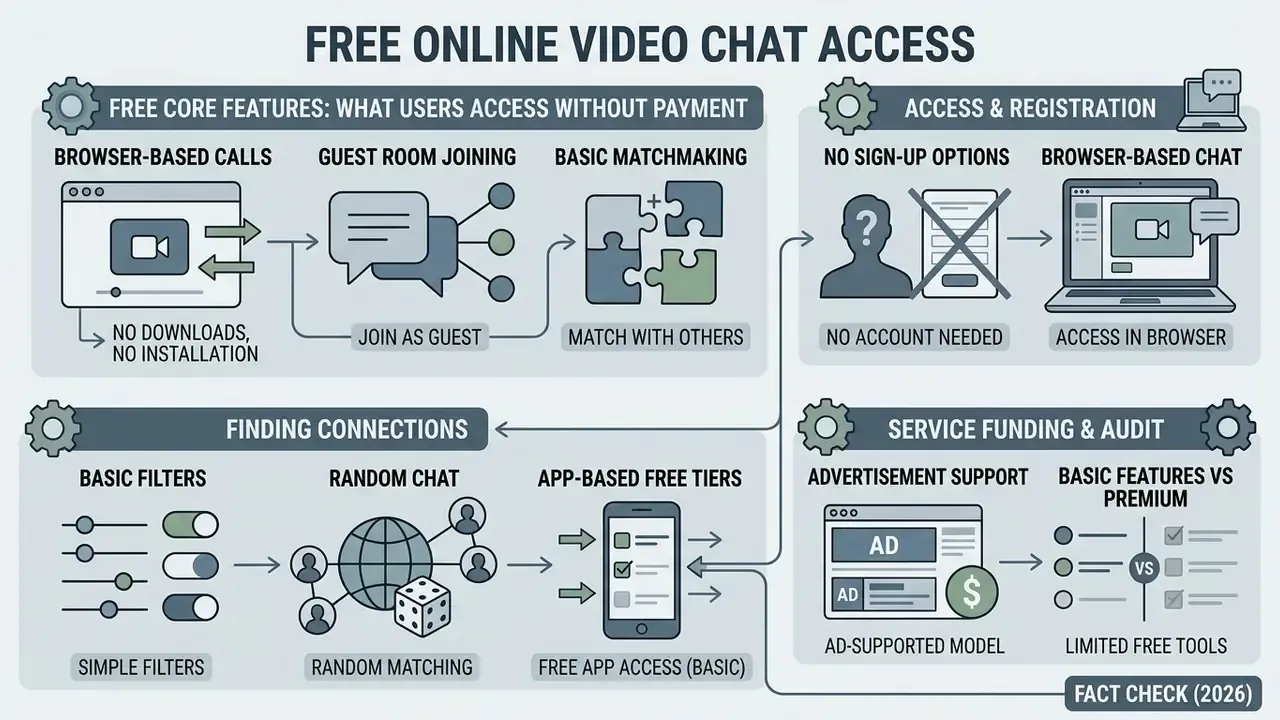
Free online video chat provides core browser-based video calling, guest room joining, and basic matchmaking with no paid subscription and no registration. Advanced filtering, extended room durations, or virtual gifts may require optional payments or in-app coins.
Most browser-based services run a freemium framework. Core WebRTC peer-to-peer connections carry negligible server media cost, so platforms can offer zero-cost guest access while monetizing optional upgrades. Zoom's Basic tier shows the same pattern from the enterprise side: free meetings capped at 40 minutes with up to 100 participants, and paid plans lifting the limits.
No-sign-up and browser-based video chat options
No-sign-up browser video chat lets a user start an instant call in Chrome, Safari, Firefox, or Edge without creating an account or handing over an email address.
Removing registration friction speeds up first-time onboarding, and the architecture is platform independent by design: no plugins, no native client, no per-OS build. Creators preparing visual media for a shared screen often use a drawing animation maker for quick explainers, sketch a concept with a doodle video creator, or edit videos online free before the call starts. If a service demands an email just to test a room, an email address generator is a common workaround for throwaway trials, though it will break any password-recovery path later.
Filters, matching features and app-based options
Basic free live online video chat matches users at random. Advanced options add gender, age, and location filters to refine who you meet. Mobile apps lean on swipe controls, while browser platforms focus on lightweight web access.
Mobile software listings frequently place gender and regional filters behind coin systems or premium subscriptions. Browser versions usually keep basic matching free, holding entry barriers low. Teams producing promotional clips for such platforms often start from a template library and compare rendering options in our AI Media Comparison Matrices.
How the money actually works. Standard browser platforms offer basic random matching for free, but many mobile applications hide gender, age, and regional filters behind coin bundles or recurring microtransactions. A 90-second free one-to-one trial followed by a paywall is a common pattern. Transparent web platforms keep free basic matchmaking and reserve paid tiers strictly for server-heavy features such as cloud recording, extended session length, or HD multi-party streaming, so core cam-to-cam functionality stays free. Before you spend anything, check three items: whether filters are free, whether call length is capped, and whether "coins" are refundable.
| Criterion | Browser private room | Mobile video chat app | Random stranger chat |
|---|---|---|---|
| Registration | Not required | Optional / phone number | Not required |
| Software download | Not required (browser) | App install required | Not required (browser) |
| How participants are paired | Direct invitation link | Algorithm / swipes | Random match |
| Gender / geo filters | Not applicable | Available (usually premium) | Basic free or premium |
| Join by link | Yes (personal or one-time URL) | Rarely | No (entry into shared pool) |
| Typical monetization | Free; paid for custom URLs or recording | Coins, subscriptions, gifts | Coins for filters and priority matching |
Features that improve an online video chat experience
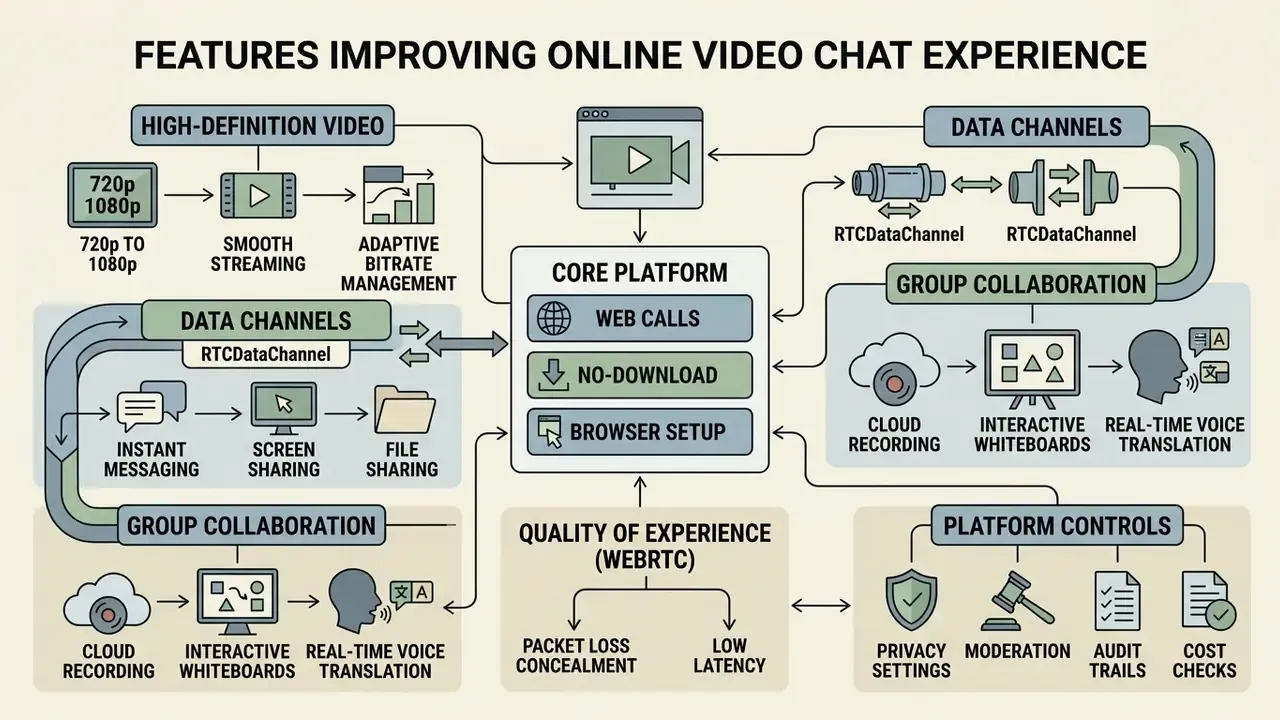
Modern platforms improve communication quality through HD resolution, integrated text messaging, screen sharing, meeting recording, interactive whiteboards, and real-time translation.
Quality of Experience in WebRTC calls depends on adaptive bitrate management, packet loss concealment, and network stability. Nothing exotic. Just the weakest upstream link in the session setting the ceiling for everyone.
«Perceived conversational quality drops sharply as packet loss and delay increase; facial and speech features allow real-time QoE modelling.»
Video quality, messaging and screen sharing during a call
High-definition video (720p to 1080p) combined with low-latency WebRTC data channels supports smooth streaming alongside instant text messaging and screen sharing in the same session.
Standard HD WebRTC video calls need roughly 1.0 to 2.0 Mbps per direction (Genesys WebRTC Deployment Guide, 2025). Avaya's network guidelines put 720p at 1,024 to 1,792 kbps and 1080p at 1,792 kbps or higher, and Nextcloud Talk caps audio and video at 1 Mbit/s per user with screen sharing at 2 Mbit/s.
«Bandwidth, jitter and latency critically affect perceived quality as the number of conference participants grows.»
Instant messaging runs over separate data channels (RTCDataChannel, standardized in RFC 8831), which keeps text traffic from disrupting video frame rates. Presenters who share visual designs usually compress heavy assets first and check upload weight against the numbers above, since a 4K screen share and a 1080p camera stream compete for the same uplink.
Tools for work meetings and group communication
Professional browser video calls support group collaboration with cloud recording, file sharing, interactive whiteboards, and AI speech translation. Teams that publish recorded sessions typically pair calls with a trimming and captioning workflow afterwards.
Enterprise videoconferencing platforms advertise real-time voice translation across up to 100 languages (Cisco Webex product documentation) and 40 languages for live translated captions (Microsoft Teams support documentation). These are vendor specifications, not independently benchmarked accuracy figures. Translation quality varies by language pair, audio conditions, and domain vocabulary. Zoom's browser client documents in-meeting chat file transfer, cloud or local recording, and whiteboard sharing; TrueConf's web client documents calls, chats, presentations, and document sharing without an installed client. Teams reviewing content rights during a call can consult the AI Media Commercial-Use Hub for licensing standards, and legal reviewers tracking disputes over generated media will find context in our AI Litigation and Case Timelines.
Safety and moderation in random video chat with strangers
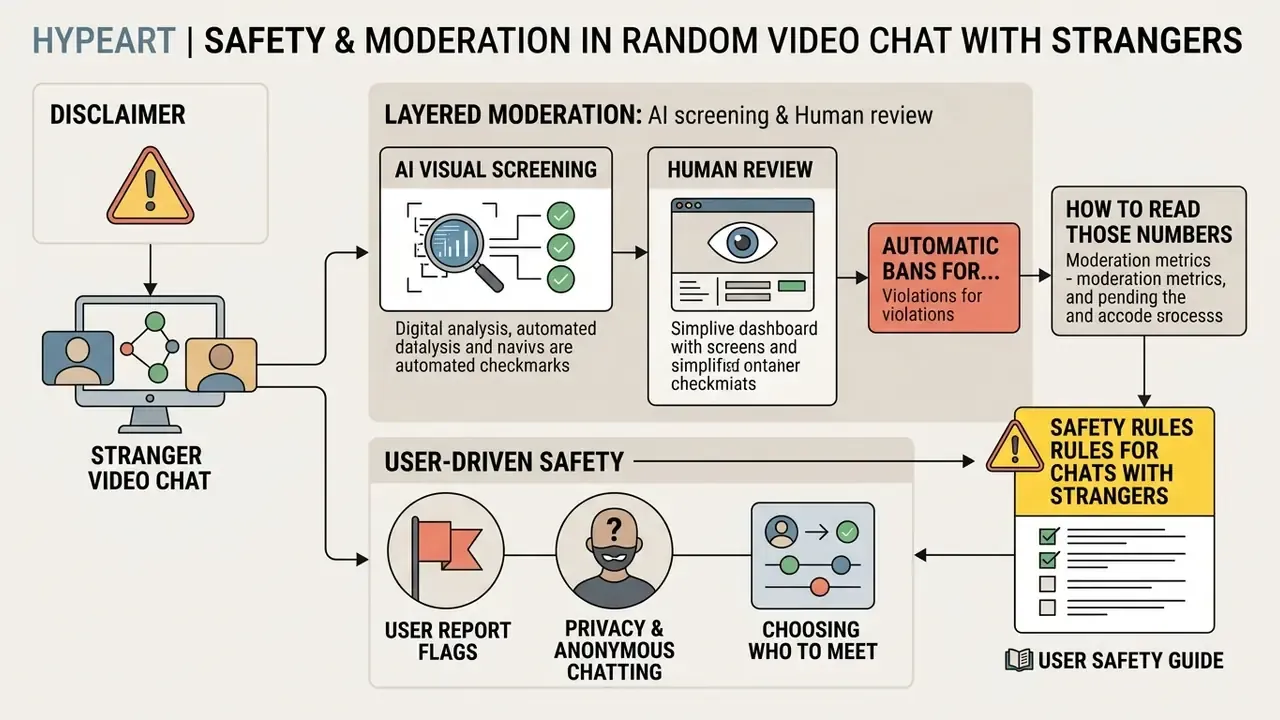
Safety in stranger video chat rests on layered moderation: real-time AI visual screening, automated hash matching, user report flags, manual human review, and immediate bans for policy violations.
Live stream moderation requires frame inspection at the Selective Forwarding Unit level, because only the current and previous frames are available for analysis. There is no post-upload window. This architectural claim is documented in vendor engineering write-ups and regulatory reviews of AI moderation rather than in peer-reviewed benchmarks, so implementation quality differs sharply between operators. Since no automated filter is error-free, platforms combine automated rules with human moderation teams (NIST AI Risk Management Framework, 2024), and NIST itself warns that neither automated filters nor human review, alone or together, catch all harmful and illegal content.
«Cyberbullying, sexual exploitation and harmful content threaten youth safety on real-time platforms.»
AI screening, human review and automatic bans
Automated filters evaluate video frames in real time for prohibited content, escalate flagged streams to human moderators, and issue automatic bans when violation thresholds are crossed. In documented SFU pipelines, hash matching handles known illegal imagery, visual classifiers address novel harms, and high-confidence detections trigger automatic blur, mute, or stream suspension.
«Llama-3.2-11B-Vision reaches F1 ≈ 0.87, while human moderators achieve F1 = 0.98 and outperform the models across every content category.»
«Automated moderation reduces exposure to harmful content but can undermine users' sense of autonomy when decisions are opaque.» Yu, Otto, Assenmacher & Wagner, systematic review, Human-Machine Communication (2024)
How to read those numbers. Benchmark F1 scores are dataset-specific and must be revalidated on your own traffic before anyone treats them as a control. A serious moderation programme therefore needs three further components: reproducible audit evidence (which model version, which threshold, which frame triggered the action), a documented false-positive path with human re-review and reinstatement, and published outcome metrics on a fixed cadence, covering removals, proactive detection share, appeals, and reinstatement rate. No evidence, no autonomy. That principle applies to a moderation model exactly as it applies to any other automated decision system.
Privacy, anonymous chatting and choosing who to meet
Anonymous video chat protects privacy by avoiding forced social-account linking, using DTLS-SRTP media encryption, and letting users apply regional or language filters to shape who they meet.
«Across two preregistered experiments (n = 2,000), AI-mediated video reduced perceived trustworthiness and judgement confidence without improving deception-detection accuracy.»
That finding lands directly on avatar filters, beautification, and AI-generated backgrounds: the more heavily a stream is mediated, the less your counterpart trusts what they see. Data protection frameworks require video platforms to minimize personal data retention (EDPB Guidelines 3/2019 on processing of personal data through video devices), and Hong Kong's PCPD guidance on video-conferencing software recommends end-to-end encryption, unique meeting IDs with passwords, identity checks before admission, meeting locking, and encrypted storage of recordings and chat logs. Users can protect themselves by masking personal identifiers during calls and by refusing to move a conversation with a stranger onto another platform.
⚠️ Safety rules for chats with strangers
- Never disclose personal data. No full name, address, financial information, or social media handles.
- Use Skip and Report. If someone behaves inappropriately, switch immediately and file a report.
- End any conversation that feels wrong. You are never obliged to keep talking.
- Do not move the chat elsewhere. U.S. DHS online-enticement guidance (2025) advises against following an unknown contact to another platform.
- Preserve evidence. If harassment occurs, do not delete messages. Save usernames and screenshots, report to the platform administrator, and where threats are involved, contact local law enforcement.
- Protect minors. Anonymous video chats are 18+ services and should not be used by minors without adult supervision.
Enterprise readiness: audit trail, standards and total cost
Consumer convenience and corporate approval are different tests. If a browser video room will touch client data, procurement and risk owners need evidence, not a feature list.
| Control area | What to require | Evidence to request |
|---|---|---|
| Transport and media security | DTLS-SRTP for all media, HTTPS-only signalling, no plaintext RTP (RFC 8827) | Architecture diagram, TLS/DTLS version policy |
| Certification | SOC 2 Type II, ISO/IEC 27001 scope covering the media path | Current report or certificate, not a "compliant" claim |
| Sector rules | HIPAA BAA, FINRA/SEC record-keeping, GDPR transfer basis | Signed agreements, sub-processor and transfer-country list |
| Audit trail | Immutable logs of room creation, joins, admissions, recordings, moderation actions | Sample log export, retention period, tamper controls |
| Data lifecycle | Guaranteed deletion of media buffers from server memory; documented retention for recordings and chat logs | Deletion attestation, DPIA support material |
| Access control | Waiting rooms, knock-to-enter, unique room IDs, PINs, host controls over sharing and recording (CISA video-conferencing guidance) | Admin console walkthrough |
| Resilience and SLA | Availability target, latency budget, incident notification window | SLA text with credits, status-page history |
| Assurance testing | Recent third-party penetration test of web client and signalling | Executive summary of findings and remediation |
| Platform independence | Standards-based WebRTC, exportable recordings, no single-vendor AI lock-in | Export formats, API documentation |
Total cost of ownership. Browser rooms look free because peer-to-peer media costs almost nothing to serve. At scale, the bill reappears in three places: TURN relay traffic for participants behind restrictive NATs and corporate firewalls, SFU capacity for groups beyond a handful of streams, and storage plus review time for recordings and moderation evidence. Model those three lines, add the internal cost of controls (log review, appeal handling, DPIA maintenance), then compare against the licence price you were quoted. You can sanity-check unit economics with our AI Media Pricing Guides and the AI Media Calculators.
Audit-readiness checklist. (1) Confirm encryption in transit for media and signalling. (2) Confirm no server-side media retention by default. (3) Capture a sample audit-log export. (4) Verify moderation and access logs are retained for your regulatory window. (5) Document the false-positive appeal path. (6) Record the vendor's sub-processors and transfer countries. (7) Re-test after every major client release.
How to choose an online video chat platform
Choosing a platform starts with naming the primary goal: private family calls, corporate team meetings, or anonymous stranger matching. Then weigh encryption standards, moderation tools, browser compatibility, and pricing tiers against that goal.
| User goal | Key features | Security requirements | Recommended service type |
|---|---|---|---|
| Private calls (family, friends) | Personal links, HD video, small group rooms | DTLS-SRTP encryption, room passwords | Browser-based private rooms |
| Work meetings | Screen sharing, recording, whiteboard, chat | Waiting rooms, access control, host permissions, audit logs | Enterprise web platforms |
| Random social discovery | Fast matching, Skip button, filters | AI moderation, Report button, anonymity, 18+ gating | Random video chat services |
| Interest-based friend search | Text chat plus video, language selection, avatars | Content moderation, no forced social login | Web platforms with filters |
Brand-level comparison
| Platform | Primary use case | Registration required | Browser access | Custom room URLs | Free gender / geo filters | Encryption standard |
|---|---|---|---|---|---|---|
| Browser private room (link-based services such as Videolink2me) | Private and work calls | No | Yes (instant) | Yes (vanity links) | Not applicable | DTLS-SRTP, peer-to-peer |
| OpenTalk | Stranger matchmaking | No | Yes | No | Basic, free | P2P WebRTC |
| ooVoo | Random cam-to-cam chat | No | Yes | No | Free gender and location filters | Standard WebRTC / TLS |
| OmeTV | Social discovery | Usually required (social login) | Yes and app | No | Paid coins | Standard SSL |
| Jitsi Meet | Group meetings | No | Yes | No (random room ID) | Not applicable | SRTP / DTLS |
| Whereby | Professional one-to-one | Yes | Yes | Paid plans only | Not applicable | TLS / DTLS-SRTP |
Comparison compiled from public product pages and documentation as of February 2026. Feature sets and pricing change often, so verify before committing. Chatroulette, Monkey, and OmeTV remain the most-searched named alternatives after the Omegle shutdown, and all trademarks belong to their respective owners.
FAQ about free online video chat
Can I use online video chat from a phone, tablet or desktop?
Yes. Free online video chat works across smartphones, tablets, and desktops through any modern browser that supports WebRTC, including Chrome, Safari, Firefox, and Edge. No native app installation is needed on iOS or Android, since mobile browsers execute WebRTC APIs for camera access and media streaming natively. On iOS, all browsers share the WebKit engine, so behaviour matches Safari; MDN lists Safari 12.1+ among supported WebRTC codec targets.
How many people can join a browser video call?
For direct peer-to-peer calls without a central media server, the practical limit is four to six participants. Beyond six, each browser must upload a separate stream to every peer, which saturates typical residential upstream connections. For larger groups, up to 100 participants on mainstream platforms, traffic is routed through a Selective Forwarding Unit, which preserves device performance at the cost of server capacity.
Can I skip a stranger and get a new match instantly?
Yes. Clicking "Skip" or "Next" ends the current random video session and routes your connection to another available stranger in the active pool. Server-side matchmaking processes online users continuously, and latency-sensitive matchmaking research targets response times below 300 ms to keep conversations fluid. There is normally no cap or cooldown on skipping.
How long does an invitation link stay valid?
It depends on the link type. One-time room links usually stay valid while the host tab is open, or until all participants leave. Permanent personal links do not expire by design, which is exactly why they should be paired with knock-to-enter approval or a password. Token-based systems can enforce hard expiry and eject participants the moment the token lapses.
Can people from different countries talk in video chat?
Yes. Video chat platforms connect real users worldwide, often with built-in speech translation, live captions, or regional country filters that ease cross-border conversation. Google Meet, Zoom, and Microsoft Teams all expose a spoken-language setting and a preferred-hearing-language setting, so participants speaking different languages can follow each other during a live call. Note that documented controls are language-based; genuine IP-level geographic filtering belongs to consumer matching services rather than standardized meeting software.
Is browser video chat actually encrypted?
Yes, at the transport level. The WebRTC specification mandates encrypted media, and RFC 8827 requires SRTP/SRTCP with DTLS-SRTP key exchange, so plaintext RTP is not allowed. Whether a call is additionally end-to-end encrypted through a server depends on the platform: peer-to-peer sessions keep media between browsers, while SFU-routed group calls decrypt and re-encrypt at the server unless the vendor implements insertable-stream E2EE.
Do free video chat apps online cost anything later?
Often, yes, and the trigger is usually a filter or a timer rather than the call itself. A free video chat online tier typically covers one-to-one calling, guest joining, and basic random matching. Charges appear at gender or geolocation filters, priority matching, cloud recording, longer sessions, and virtual gifts. Read the coin-refund policy before the first purchase, because in-app currency is frequently non-refundable once spent. For developers building web-based communication tools, technical specifications and integration guidelines live in the AI Media API documentation, backed by AI Media Support for implementation questions.