If you approve marketing assets, own brand safety, or run an AI governance program, a free browser editor is not a harmless toy. It is an unlogged processing pipeline that touches images of real people and produces published artifacts with disclosure, licensing, and reputational consequences.
«Deploying automated visual models without rigorous verification of image geometry and brand alignment introduces unmanaged compliance and reputational risk. Controlling intensity and preserving underlying data integrity remains the primary rule of digital media governance.»
Attribution: Marcus Hale, author.
Executive Summary
- What the tool does A slim photo editor online free detects human anatomy through segmentation networks, then reshapes waist, arms, legs, hips, or shoulders using geometric warping, 3D parametric meshes, or prompt-driven generative inpainting, while leaving background pixels untouched.
- Where the technical risk sits Failures cluster in three predictable places: warped background geometry at the subject seam, broken anatomical ratios (head-height canon, shoulder-to-waist balance), and cumulative JPEG generation loss from re-editing exported files.
- Where the legal risk sits Commercial deployment is regulated. Norway mandates disclosure labels on retouched body imagery, the UK ASA restricts misleading production techniques, the EU AI Act (Regulation 2024/1689) frames harmful manipulative practices, and the US Copyright Office denies protection to purely AI-generated output. Biometric standards (ICAO Doc 9303) prohibit any reshaping on passport or official ID photographs.
- Where the data-security risk sits Uploading proprietary campaign assets, employee photographs, or any image containing personally identifiable information (PII) to a free consumer web service may breach internal policy, GDPR, or CCPA obligations. Free tiers frequently retain files on third-party servers and reserve model-training rights.
- Operational rule of thumb Cap boundary shifts at 25-30%, verify at 100% zoom against the editorial quality-control checklist below, keep the uncompressed master file, and document every applied adjustment so the edit stays auditable and reproducible.
Who should read this guide, and how to use it
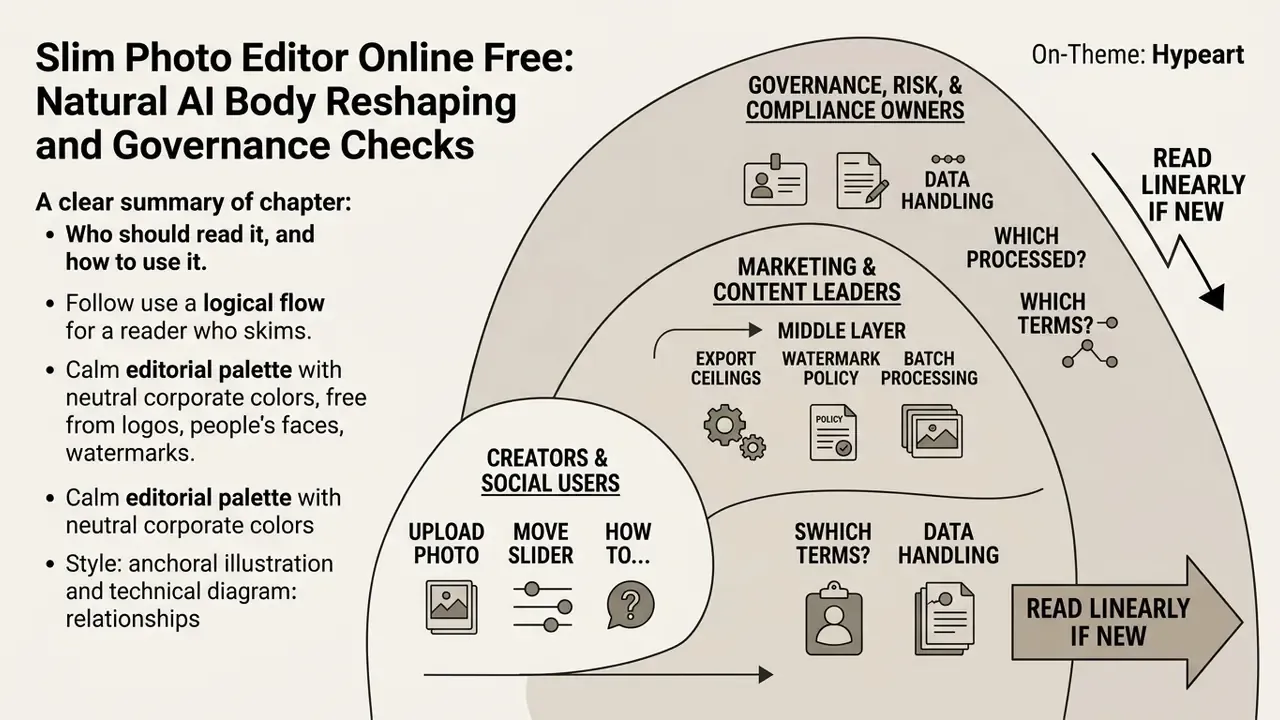
Three groups tend to land here with different questions.
Creators and social users want the practical answer: which photo to upload, which slider to move, how to keep the result believable. Sections on workflow, proportions, and photo suitability answer that directly.
Marketing and content operations leaders need the middle layer: export ceilings, watermark policy, batch behavior, and the difference between a consumer free tier and production tooling.
Governance, risk, and compliance owners need the outer layer: who processed the image, under which terms, with what evidence trail. For that audience the usable framing is simple. Treat a body editor as a small model deployment with an owner, an approved use case, an intensity limit, and a change log. If none of those exist, you have shadow AI producing brand assets. Nothing more exotic than that.
Read linearly if you are new to the topic. If you already know the tooling, jump to the free-tier data handling register and the quality-control checklist, since that is where most published mistakes originate.
What a free online slim photo editor can change
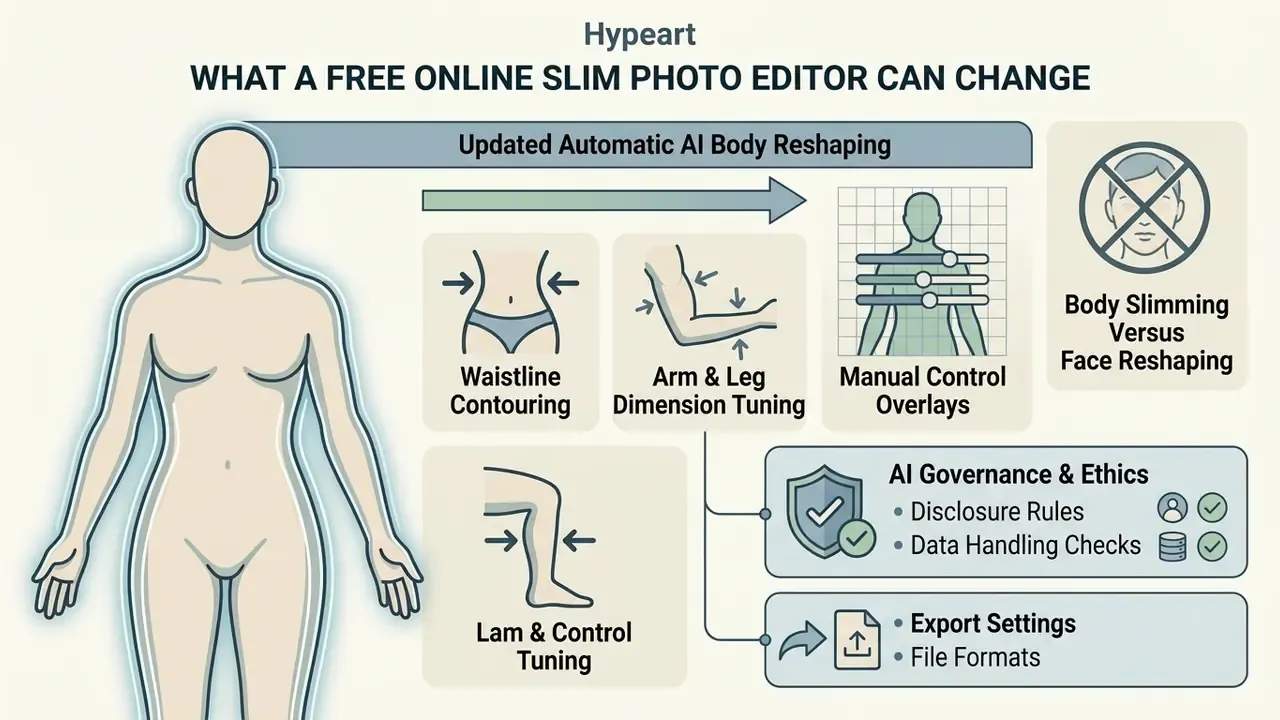
A slim photo editor online free tool uses machine learning algorithms to detect human anatomy, enabling targeted modifications to waist, arm, and leg dimensions without altering the surrounding environment. These systems apply geometric warping or generative diffusion to reshape body contours while attempting to maintain natural physical proportions.
Because such tools are trivially accessible from any corporate laptop or personal phone, media, marketing, and compliance leaders need to understand exactly what the algorithms modify. Consumer-grade body editors are a common vector for unsanctioned AI usage inside organizations. Every edit they produce becomes a published brand asset carrying disclosure, licensing, and reputational consequences.
Slim waist, arms, legs and other body parts
Automatic AI body reshaping and manual control
Modern ai body editor platforms combine automated subject segmentation with manual control parameters that govern how far the image is modified. Deep-learning segmentation networks isolate human subjects from background elements using color thresholding, edge detection, and neural feature maps.
Automated pipelines evaluate spatial alignment based on standard camera parameters. Peer-reviewed body-contour research specifies a horizontal capture axis with the camera at roughly 1.5 m height and about 2 m distance from the subject, which stabilizes segmentation input before any reshaping occurs (Connection Science, Taylor & Francis, 2024. https://www.tandfonline.com/doi/full/10.1080/09540091.2024.2445805).
Manual controls, usually implemented as interactive sliders, let the operator adjust boundary shift intensity, step size, and threshold sensitivity. Classical contour-extraction work already allowed the operator to select step size according to object scale and to interactively correct an unsatisfactory boundary, a control model that survives in today's slider interfaces (CVPR 2003, University of Illinois. https://vision.ai.illinois.edu/html-files-to-import/publications/download2003.pdf). The dual approach matters: automated feature detection provides a baseline edit, and manual fine-tuning prevents extreme distortion along subject borders.
In deep-learning pipelines, control shifts partly to training time. Random intensity shift, random zoom scaling, random blurring, and a learning rate near 2 × 10⁻⁴ determine how aggressively a model deforms boundaries long before any user touches a slider (Radiation Oncology Journal, 2023. https://www.e-roj.org/journal/view.php?number=1572).
AI prompt-based reshaping controls
Generative body editors now let users modify body contours with natural language prompts alongside geometric sliders. Neural inpainting models translate descriptive text into spatial deformations, which means the "slider" is increasingly a sentence rather than a numeric parameter.
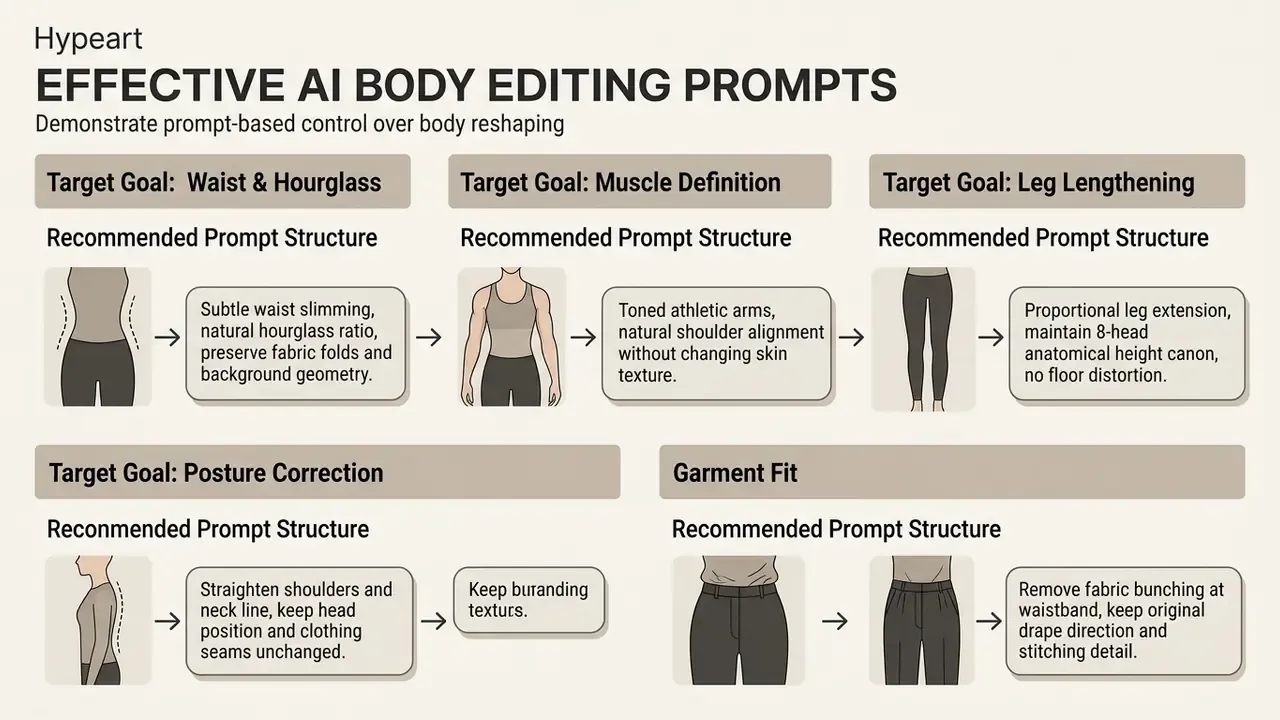
When you use prompt-based tools, specify negative parameters as well ("no background warping, no blurry textures, no skin smoothing") to keep the diffusion process bounded within safe anatomical limits. Prompt specificity is the primary quality lever. Vague instructions such as "make thinner" produce global silhouette collapse, while region-scoped instructions with explicit preservation constraints produce auditable, reversible edits.
Teams standardizing on prompt libraries should version them alongside brand guidelines, so every campaign asset traces back to an approved, documented instruction set. That is unglamorous work. It is also the only thing that makes a generative edit explainable six months later.
Body slimming versus face reshaping
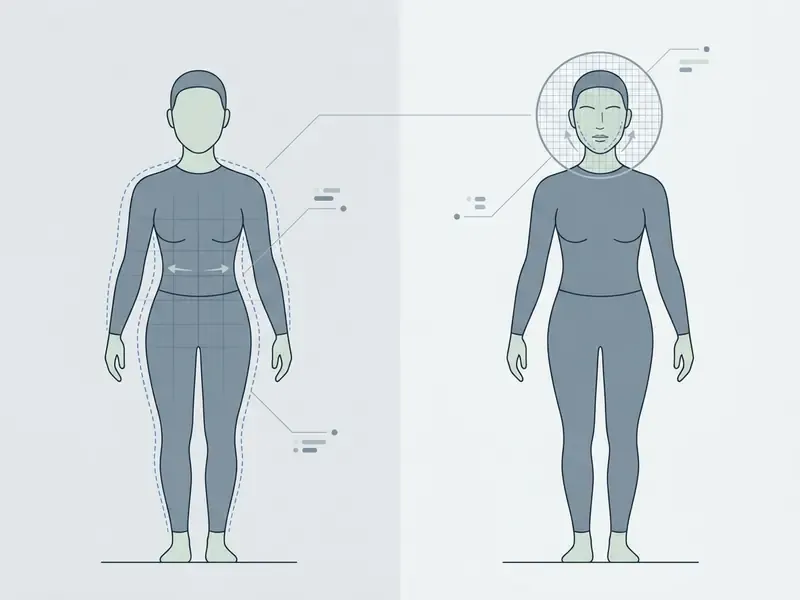
Body slimming and facial reshaping rely on fundamentally different computational models and spatial constraints. Body editing models apply 3D parametric meshes (NeuralReshaper, 2022, arXiv:2203.10496) or structural diffusion flows (DiffBody; Structure-Aware Flow Generation for Human Body Reshaping, CVPR 2022) across full body images, balancing pose, clothing drape, and limb alignment. DiffBody's published pipeline projects a 3D body model, refines the whole body through diffusion, and only then cleans up the face. Evidence that body edits need global structure first and local facial correction second.
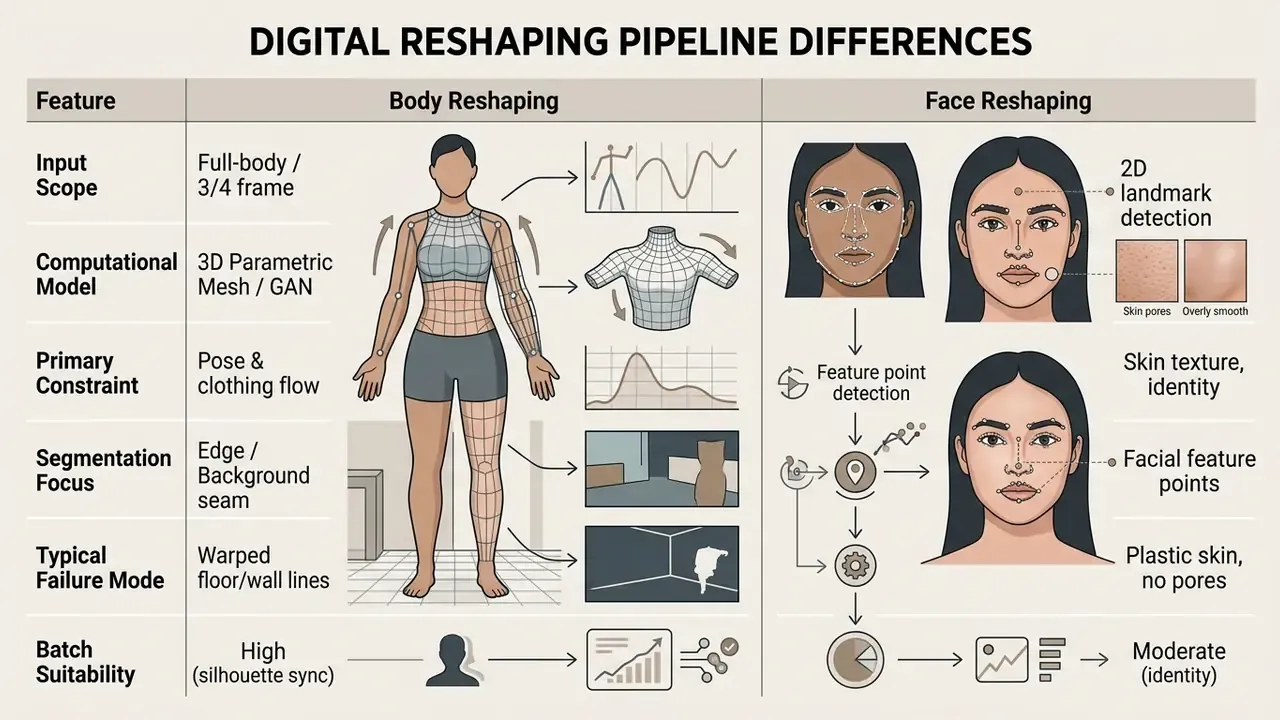
Facial reshaping targets close-up portrait photos, using dense facial landmark tracking to adjust jawlines, cheekbones, or eye spacing (Parametric Reshaping of Portrait Images for Weight-change). Facial tools prioritize fine skin texture preservation (AutoRetouch), whereas body-slimming tools manage broader geometric deformations across variable attire and background elements. Professional portrait suites extend this with 3D face-angle and rotation controls, symmetry balancing, and manual liquify brushes for granular jawline work, capabilities that sit closer to portrait retouching than to full-body geometry.
Readers evaluating adjacent tooling can compare capability sets across AI photo editors and portrait-specific pipelines such as AI headshot generators.
How to use a slim photo editor online free
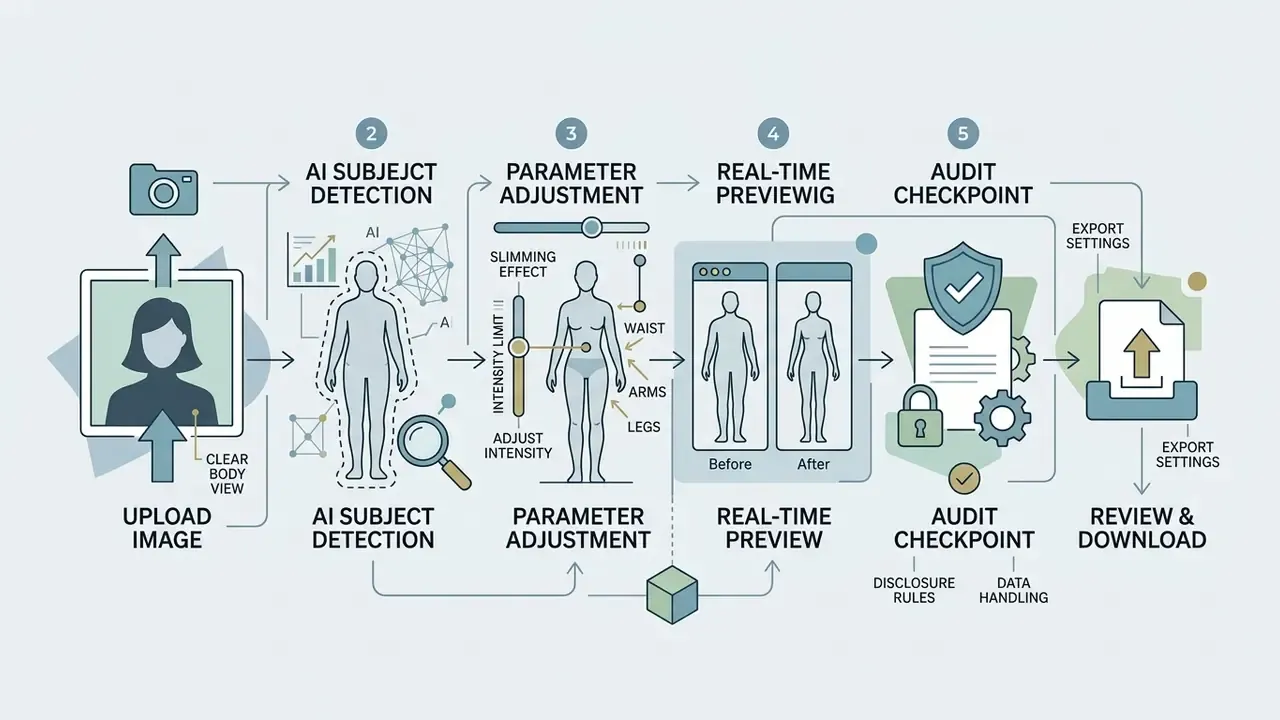
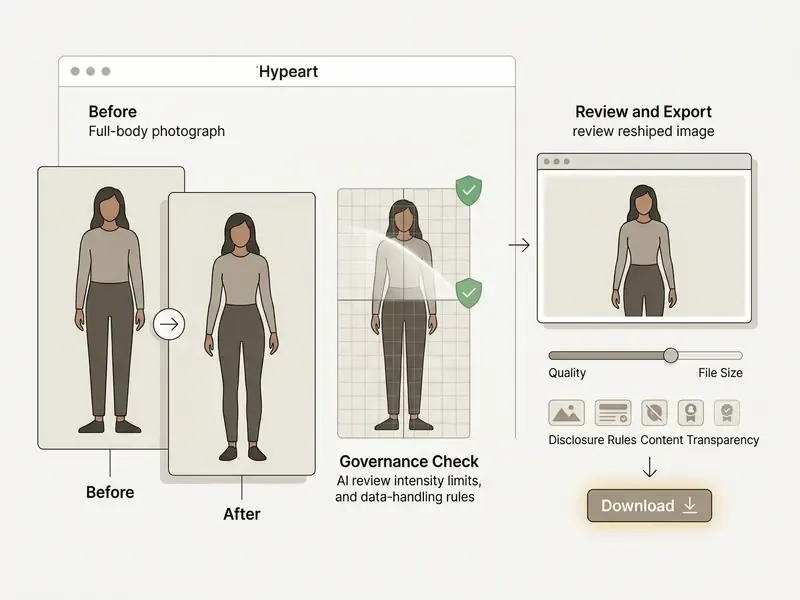
Using a slim online photo editor involves a structured workflow: image ingestion, automated subject detection, parameter adjustment, real-time previewing, and asset export. Following established image-processing steps keeps source fidelity as high as possible.
Upload an image with a clear view of the body
For accurate algorithmic segmentation, users should upload image assets that present unobstructed views of the human figure. High-contrast lighting and clean background separation measurably improve neural boundary detection.
Biometric and capture standards (NIST ANSI/NIST-ITL; ISO/IEC 39794-16:2021) recommend full-face or full-body frontal orientation with even illumination and minimal shadows across target regions. NIST guidance also requires the target region to be clearly visible and free of shadows, with evenly distributed lighting.
For optimal photo upload processing, vendor capture specifications recommend positioning the camera roughly 3.5 meters from the subject, leveled about 10 cm above the navel, with close-fitting garments, no shoes, and both front and side views showing armpit, crotch, waist, and back waist clearly (GRAFIS "Photos for capture of body measurements", specification document). This distance-and-height convention exists to remove perspective foreshortening. It is a photographic capture guideline, not a formal international standard, so treat the numbers as practical targets rather than certified thresholds. Obscured limbs, heavy shadows, or severe perspective angles degrade algorithm performance every time.
Choose a slimming effect and adjust intensity
After ingestion, users select target adjustment areas and manipulate intensity sliders to control the degree of deformation. Updated: most body editors normalize intensity on a 0-100 scale, where preset tiers commonly sit near 25 (slight), 50 (medium), and 75 (strong). The -4 EV to +4 EV notation belongs to exposure controls in raw processors such as DxO PhotoLab and should never be read as a body-deformation range.
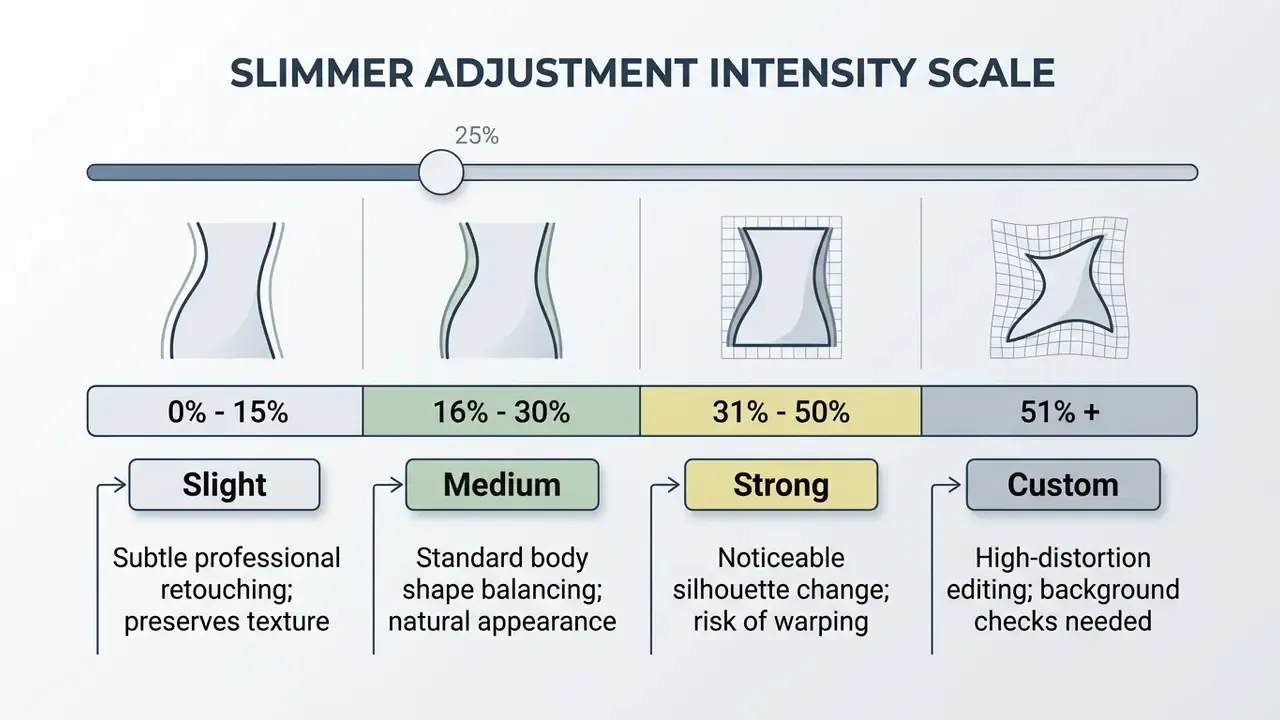
Conservative slider values prevent severe pixel warping. Moving preset thresholds to custom levels allows granular adjustments across specific body part regions without altering unselected canvas areas. One restrained change per session is the dominant recommendation across vendor documentation, because stacking regional deformations compounds boundary error. Users can evaluate different software capabilities in our detailed tool comparison guide.
Review the edit and download the image
The final stage requires reviewing the modified image at 100% zoom to verify line continuity, background geometry, and edge integrity before triggering the download action. Preflight practice from print workflows applies directly here: inspect pages at 100% or higher, read the smallest text, and check for softness, compression artifacts, and edge problems before release.
Export settings must preserve original source resolution and aspect ratio. Professional workflows disable automatic downsampling and select lossless or original-resolution export parameters. Documented export guidance describes "Original Resolution" and lossless output settings as the mechanisms that retain full-resolution image data, while "actual size" output modes prevent rescaling that would alter native dimensions (Fast Reports export guidance, https://www.fast-report.com/blogs/save-original-image-quality-pdf). Compare export ceilings and watermark policies across free photo editors before committing a campaign asset to a no-cost tier. If unexpected pixelation or distortion appears during processing, review the technical guidance on our AI Media Support and Troubleshooting page.
Audit checkpoint before export. In governed workflows, record the applied parameters (target region, intensity value or prompt text, mask boundary, export format) in asset metadata or an accompanying change log. Version-control guidance from the NIH requires keeping a list of changes from previous drafts or finals rather than overwriting a single copy. Applied to media, that habit makes each retouched asset reproducible and defensible during internal review or a regulatory inquiry.
Is a free online body reshaping photo editor enough for your task?
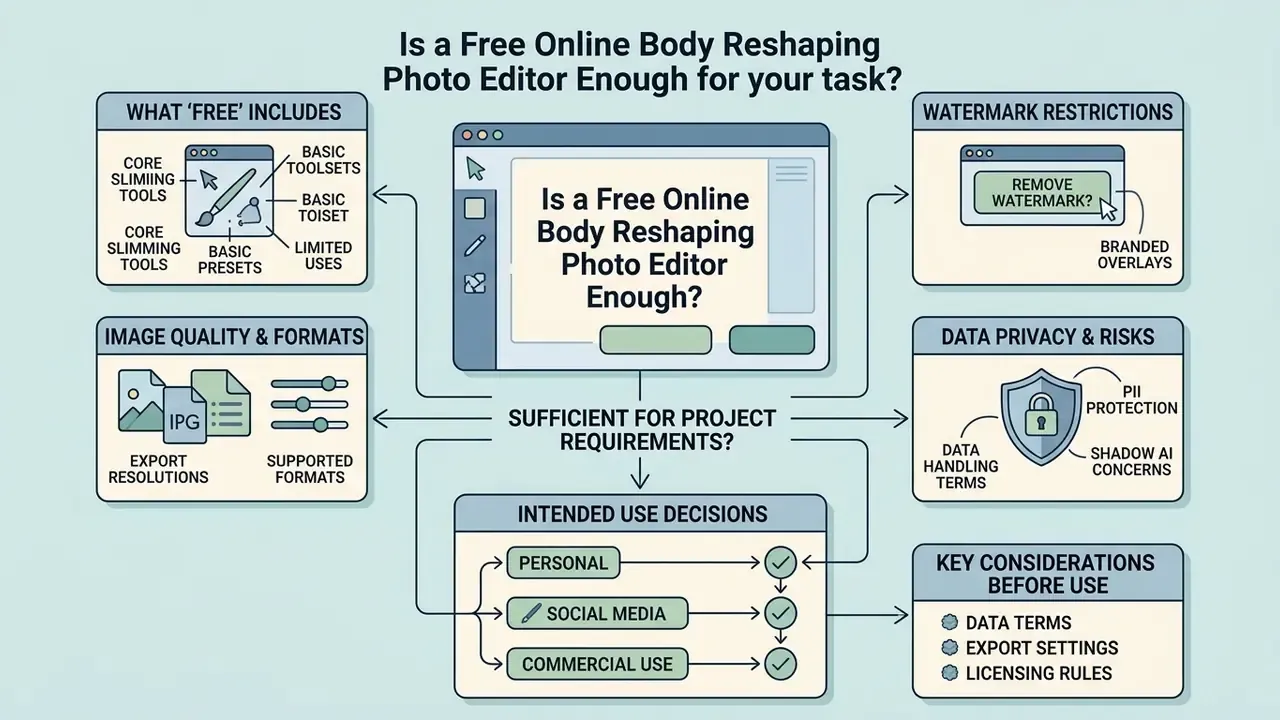
Whether a free online body slimming photo editor meets project requirements depends on export resolution demands, watermark restrictions, data-handling terms, and intended commercial distribution.
Data privacy, PII and shadow AI risk in free web editors
Free browser tools are the shortest path to an unsanctioned AI workflow. Uploading unreleased campaign photography, employee headshots, customer images, or any frame containing identifiable individuals transfers that data to a third-party processor whose retention window, sub-processor list, and training rights are defined solely by its own terms of service.
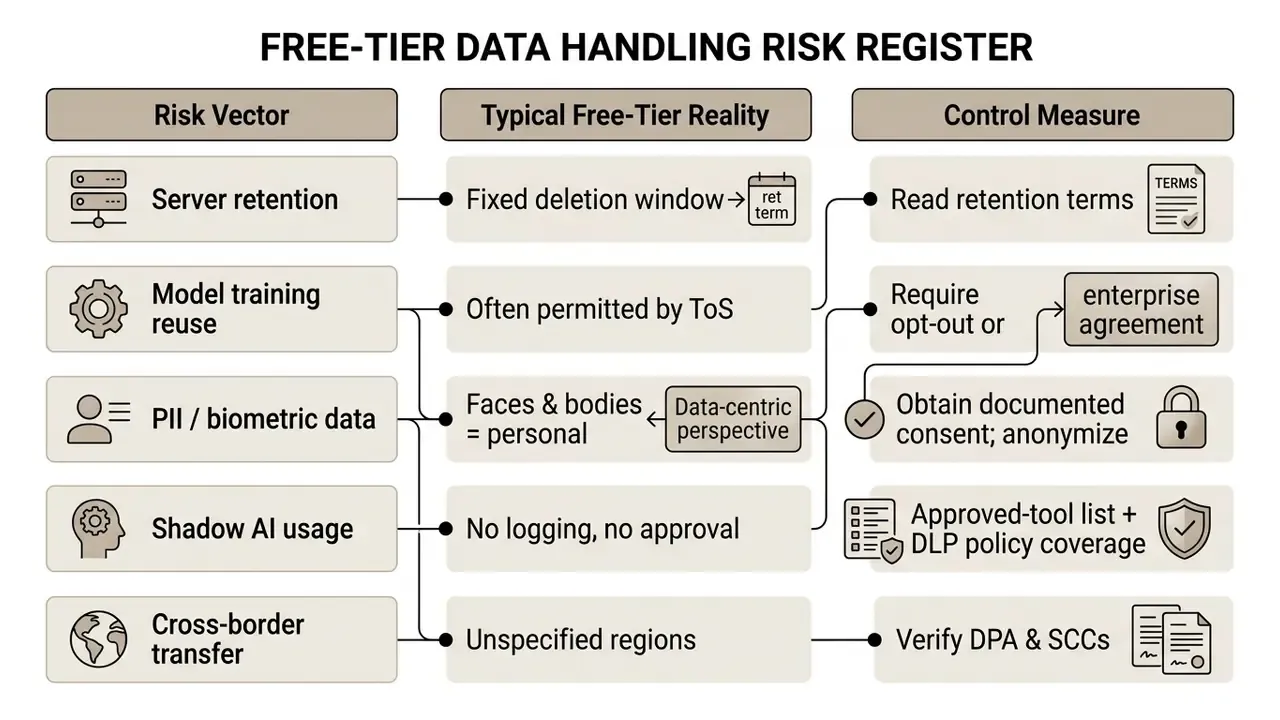
Vendor documentation confirms these conditions are contractual rather than technical. Media.io, for example, states that uploaded images are deleted after a fixed 7-day server-retention period, and tool interfaces routinely note that use implies acceptance of the Terms of Service. Under Swiss FDPIC guidance, a photograph becomes personal data as soon as a person is recognizable, a threshold that almost every body-editing source file crosses by definition.
The practical conclusion is narrow but firm. Treat free body editors as out of scope for proprietary or PII-bearing assets, and route that work to licensed, contractually governed environments with a signed data processing agreement. Cost-risk trade-offs for that decision can be modelled with our AI Media Calculators.
What "free" includes in an online photo editor
Free web-based photo editors typically provide core AI body-shaping tools, preset intensity controls, and standard web-resolution previews. Non-paid tiers, though, apply functional constraints that only become visible at export time.
Common free-tier limitations include daily processing quotas (for example, 2 to 3 tasks per day or 3 tasks per hour), file size caps (5-15 MB, occasionally 50 MB), downscaled output resolution, or visible brand watermarks (Media.io; Smallpdf; Sejda). Some vendors advertise watermark-free "HD" downloads on free plans, while others tie full-resolution, watermark-free export strictly to paid subscriptions. The divergence reflects vendor pricing policy, not a shared industry standard. In practice, file-size and page limits act as the real quality ceiling far more often than an explicit DPI cap. Removing export caps and watermark overlays generally requires a premium subscription; tier structures are summarized on our pricing page.
Image quality, formats and download options
Export quality depends on file format selection and compression parameters. Modern online editors support WebP, JPEG, and PNG, while professional desktop suites additionally export TIFF and process native RAW.
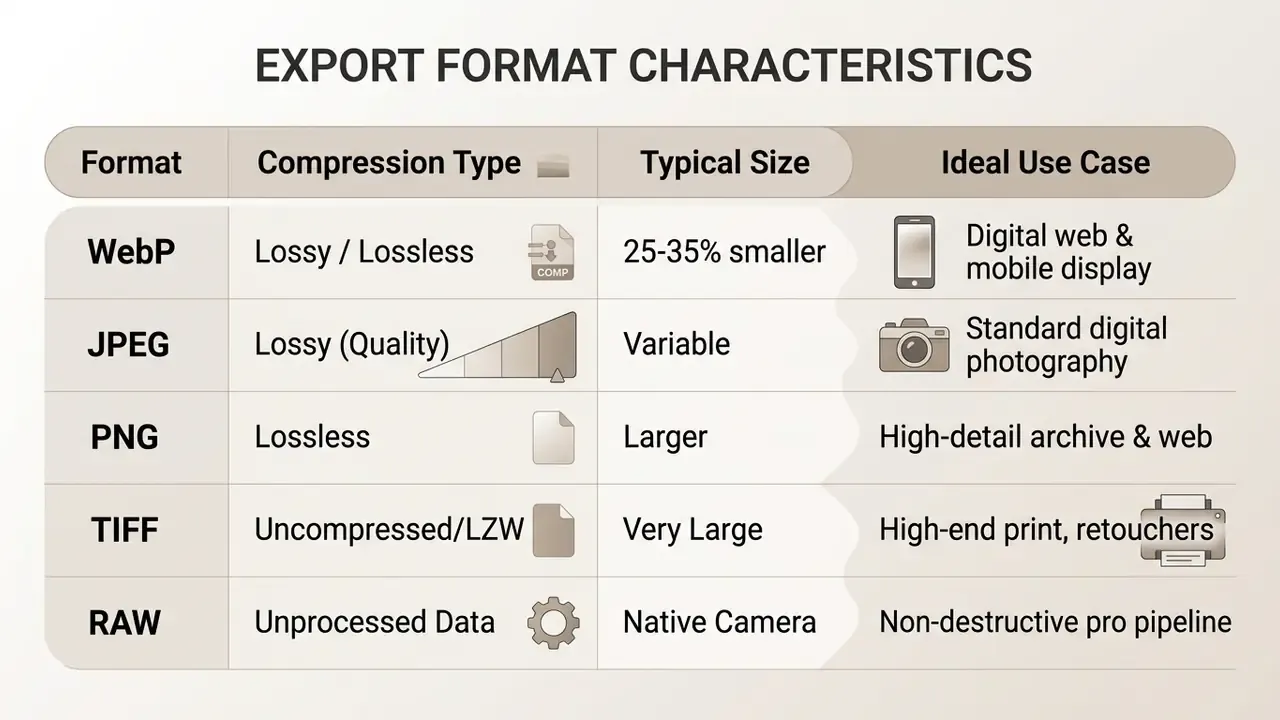
WebP lossy files are roughly 25-35% smaller than visually comparable JPEGs, and lossless WebP is typically about 26% smaller than PNG; the encoder uses a 0-100 quality scale with a default of 75 (Google Developers, https://developers.google.com/speed/webp/docs/cwebp; MDN Image file types and formats, https://developer.mozilla.org/en-US/docs/Web/Media/Guides/Formats/Image_types; IETF RFC 9649, 2024, https://datatracker.ietf.org/doc/rfc9649/). Re-editing previously compressed JPEGs causes cumulative generation loss (NIST IR 7780). Output intended for professional use should be saved as uncompressed PNG, TIFF, or maximum-quality WebP.
Professional studio workflows need non-destructive pipeline integration. Processing native RAW files before color grading prevents quantization artifacts, and exporting master copies in 16-bit TIFF preserves gradient smoothness across retouched skin and clothing contours during commercial offset printing. Batch capability matters just as much at scale: professional editors let a retoucher select which adjustments to propagate, multi-select an entire shoot with Ctrl or Cmd, and synchronize silhouette and contour settings across every frame in one action. That is the difference between a one-hour and a one-day lookbook turnaround. Free browser tiers rarely expose RAW ingestion, 16-bit export, or batch sync, which remains the clearest technical dividing line between consumer and production tooling.
Personal, social media and commercial-use decisions
The legality and ethics of deploying edited images vary across personal, social, and commercial applications. United States Copyright Office guidance states that purely AI-generated visual content lacks copyright protection, though human-authored modifications may qualify (USCO Guidance). Where an edited image contains genuine human authorship, protection attaches only to those human contributions. The right to publish or monetize the asset flows from the generator's license terms and the platform's terms of service, not from copyright law. Those two things get confused constantly, and the confusion is expensive.
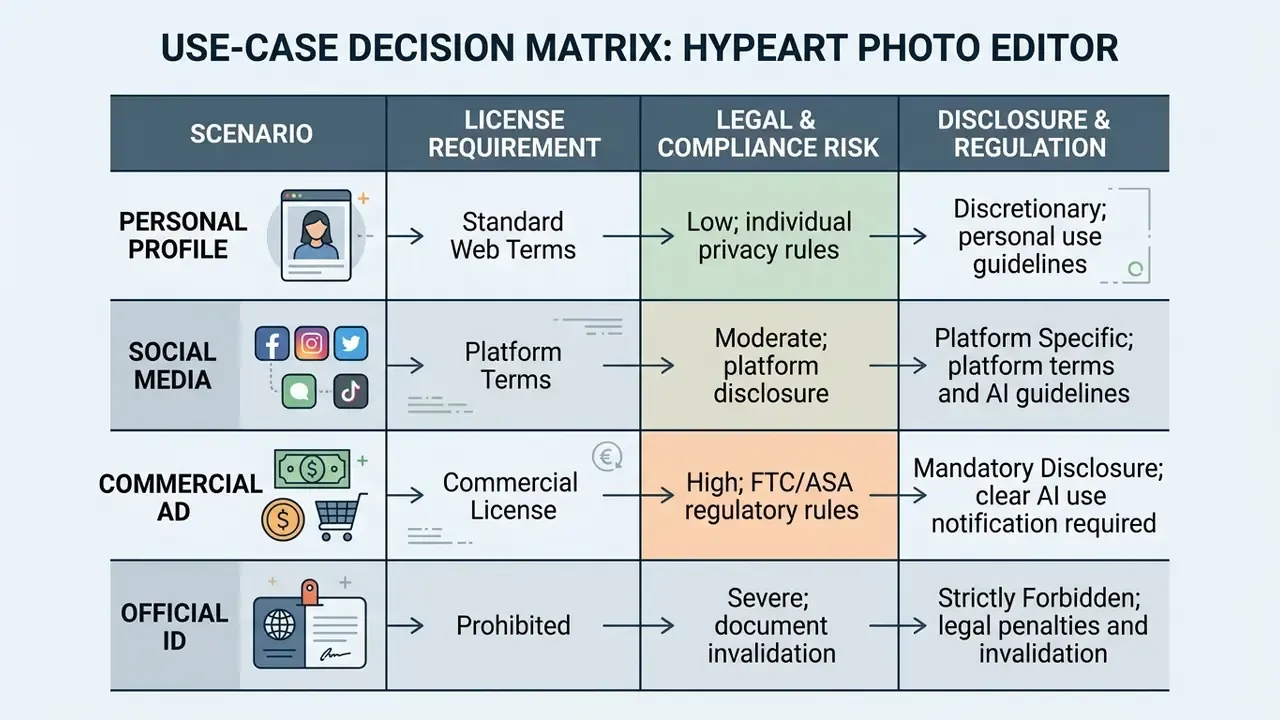
Commercial advertising featuring digitally altered body shapes must comply with regulatory transparency rules (UK ASA Guidelines; EU AI Act 2024/1689).
Verification is the mirror-image obligation of editing. Before publishing third-party imagery, teams increasingly screen assets with AI image detectors to confirm provenance. Using edited media in corporate campaigns also means tracking legal developments through our AI Litigation and Case Timelines hub.
| Use-Case Scenario | Feature Accessibility | Output Resolution & Quality | Licensing & Legal Risk | Regulatory & Disclosure Requirements |
|---|---|---|---|---|
| Personal Profile | Basic body reshaping, preset intensity tools | Standard web resolution (JPEG/WebP); potential watermark | Low risk; personal ownership | None; standard platform terms apply |
| Social Media Posting | Full adjustment sliders, filter overlays | HD export available on free or freemium tiers | Moderate risk; copyright on human edits | Regional labeling laws (for example, Norway's retouched media rule) |
| Content Marketing | Advanced selection masking, batch editing | Uncompressed HD/4K export (PNG/WebP) | High risk; requires commercial usage rights | Brand safety compliance; ASA and FTC truth-in-advertising guidance |
| Commercial Advertising | Full professional suite, API access, RAW/TIFF export | Uncompressed native resolution; no watermark | High risk; strict license verification required | Mandatory regulatory disclosure for body shape alterations |
| Official ID / Passport | Not applicable, prohibited | N/A | Severe; document rejection or invalidation | ICAO Doc 9303 biometric prohibition on geometry edits |
No matching rows Clear one or more filters to restore the matrix.
How to make a photo look slim but natural
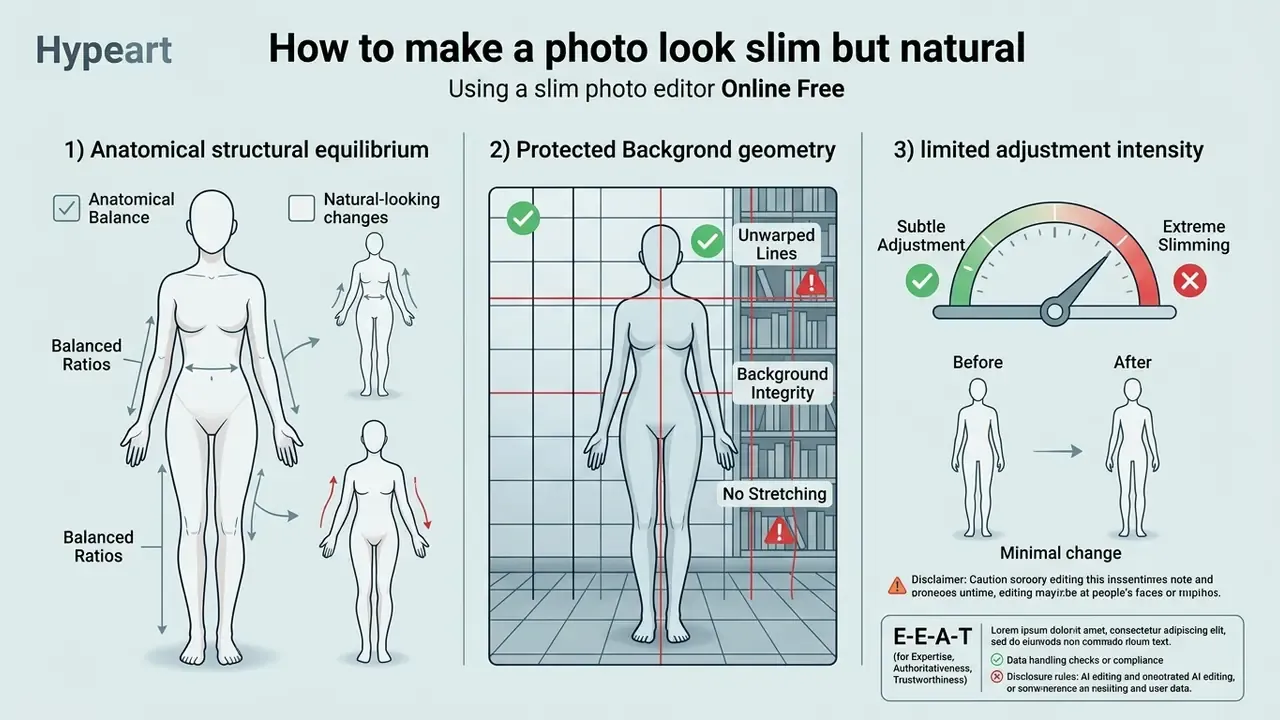
A natural-looking body edit depends on three things: anatomical structural equilibrium, protected background geometry, and limited adjustment intensity. Excessive manipulation creates visual artifacts that signal digital alteration to viewers. UK advertising guidance also treats production techniques that misrepresent reality as a compliance issue rather than a stylistic one, which turns artifact control into both an aesthetic and a regulatory objective.
Published reshaping research reinforces the same principle mathematically. NeuralReshaper fits a parametric 3D human model before applying semantic attribute edits to achieve globally coherent results. Structure-aware flow generation ties deformation directly to body structure. Perceptual retouching metrics model geometric edits as a dense, locally linear, globally smooth motion field specifically to avoid visible discontinuities (PNAS, 2011). Smoothness of the deformation field, not the magnitude of the change, is what reads as "natural."
Keep body proportions balanced
Realistic body editing follows standard human anatomical proportions. Classical artistic canons and anthropometric datasets establish that an adult figure measures roughly 7.5 to 8 head heights tall, with arm span approximately equal to overall body height (Anthropometric Reference Data, NIH).
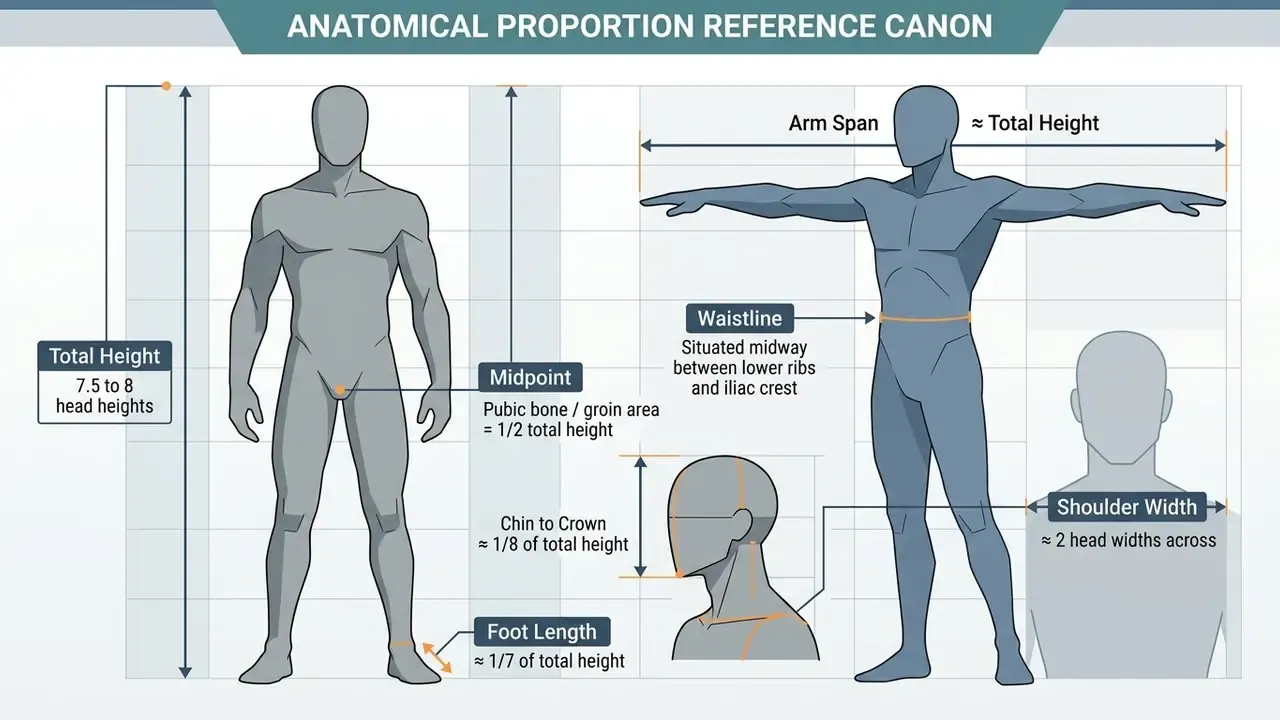
When users reshape your body in digital editors, altering one dimension (narrowing the waist, say) without adjusting adjacent structures creates visual imbalance. Keeping realistic spatial relationships between shoulders, waist, and hips prevents an artificial appearance. One caveat worth stating plainly: artistic canons describe idealized ratios, while anthropometric manuals record measured population data at centimeter precision from fixed landmarks. Use the canon as a sanity check for silhouette geometry, not as a target physique.
Camera lens compensation note: wide-angle smartphone lenses (typically 24 mm to 28 mm equivalent) used at close range create focal compression artifacts, making subjects appear 5% to 10% wider at frame edges than in real life. Applying conservative 5-8% body slimming adjustments restores true anatomical proportions rather than inventing a fake aesthetic. This is the single most defensible use case for the tool: correcting a known optical distortion instead of manufacturing an unattainable shape.
Avoid warped backgrounds and stretched details
Background warping happens when deformation algorithms extend past subject boundaries, bending straight architectural lines, door frames, or repeating patterns. That error is a reliable signature of uncalibrated pixel modification.
Advanced editing tools use AI subject masking and background-fusing sub-networks to isolate the human subject onto a distinct processing layer. Mask-Guided Portrait Editing With Conditional GANs states explicitly that a background-fusing sub-network is used "to remove the artifacts in fusion," directly targeting broken subject-background transitions (CVPR, 2019). Comparable production tooling, including Adobe Camera Raw's AI "Subject" mask and Lightroom's AI portrait masks, constrains local adjustments to the person so the backdrop stays untouched. The architecture, not the operator's discipline, is what protects background pixels.
Reviewing background handling in our AI Media Commercial-Use Hub highlights best practices for maintaining visual asset integrity. Teams that need extra scene area without stretching existing pixels should use AI outpainting tools instead of warping the frame.
Use subtle adjustments instead of extreme slimming
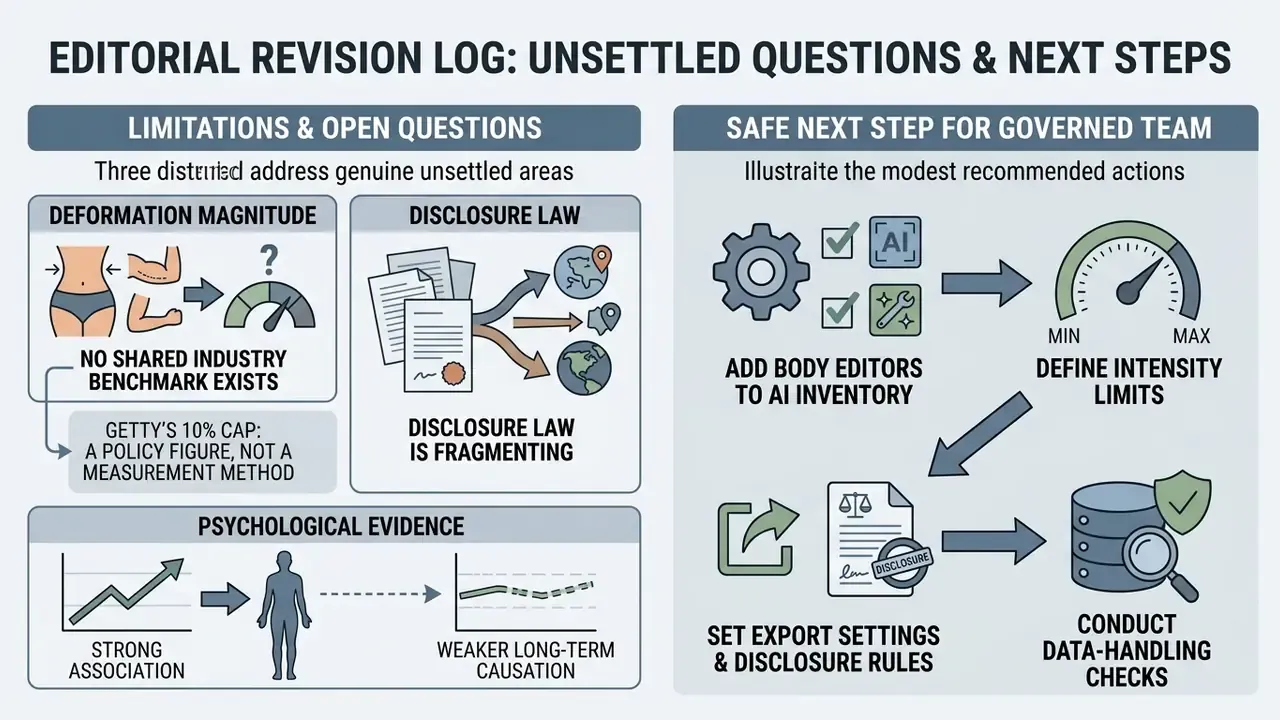
Restraining edit intensity produces higher-quality, believable results. Experimental studies indicate that severe digital body manipulation increases viewer perception of artificiality and triggers negative self-evaluation (Computers in Human Behavior, 2024).
Scientific image guidelines (HHS ORI Guideline #3; Adobe Levels and Lightroom reference documentation) advise using level adjustments in moderation and warn against truncating data at either end of the intensity range. In practice the safe boundary is the first visible pixel group at each end of the histogram. Adobe's own example limits black and white input sliders to level 5 and level 243 in an 8-bit image. Digital intensity shifts should stop before pixel clipping occurs on histogram boundaries. Subtle edits preserve fine garment details, muscle definition, and skin texture.
E-E-A-T block
Checklist0 / 8
Which photos work best for body slimming edits
Image selection directly determines the quality of automated body reshaping. Photos with clear subject separation, simple backdrops, and structured lighting yield significantly better segmentation than cluttered or poorly lit source files. Garbage in, warped floor tiles out.
Full-body photos for waist, legs and body shape edits
A full body photo captured from a straight angle gives computer vision algorithms complete anatomical context. Standing poses with visible space between arms and torso allow precise boundary detection.
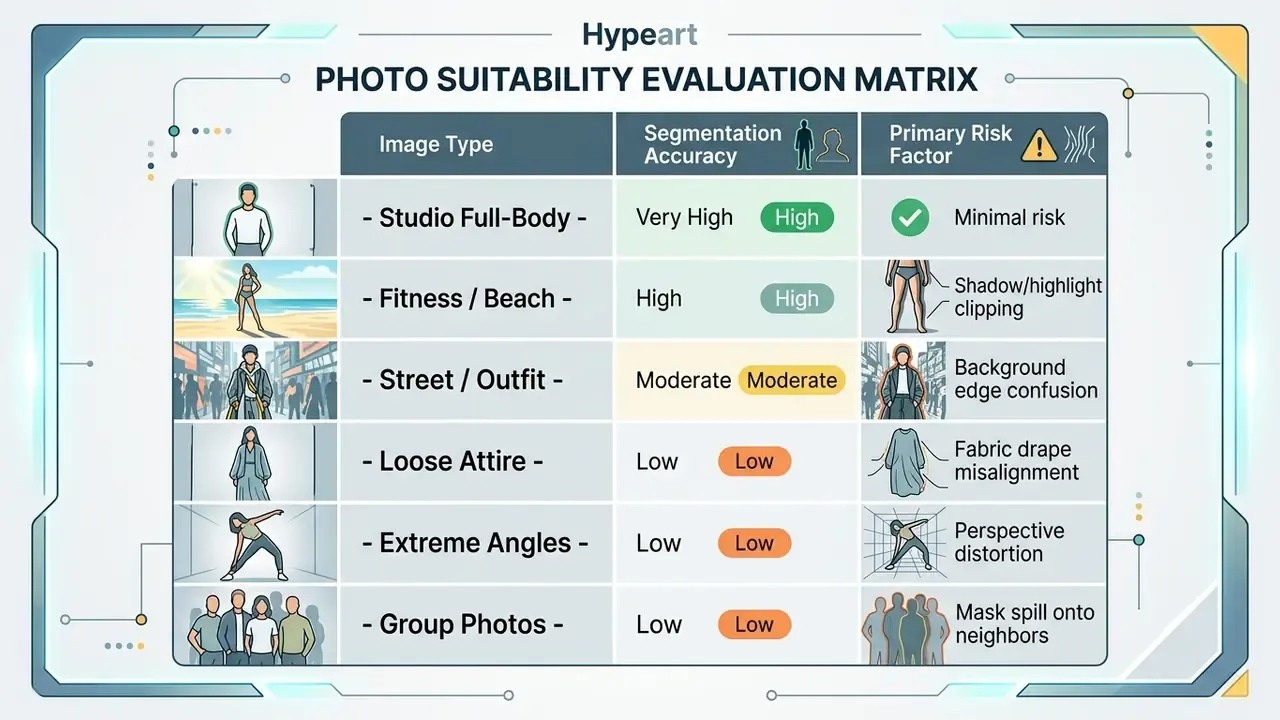
Positioning the camera approximately 3.5 meters away at navel height yields minimal perspective distortion (GRAFIS body-measurement photo specification). Full visibility of knees, ankles, waist, and shoulders enables balanced proportion scaling across all limbs. Close-cropped portraits are the weakest possible input for body work: without torso, hip, and floor reference lines, the model has no geometric anchor for proportional scaling.
Fitness, beach and fashion photos
Fitness, beach, and fashion images work well in body editors thanks to clear body contours and form-fitting clothing. Unobstructed skin surfaces and defined waistlines give neural networks explicit reference points for boundary mapping.
When processing public or commercial media assets, organizations must monitor regulatory requirements. Norwegian legislation (Consumer Authority Guidelines, in force from 1 July 2022) mandates explicit disclosure labels on commercial images where body shape, size, or skin has been altered. "Body" there includes the face and head, and the label is specified at roughly 7% of the image surface, positioned in the upper-left corner in high contrast against the background.
Editorial policy can be stricter than statute. Getty Images' Retouching & Modification policy permits only minor localized adjustments and prohibits changes to body shape altogether, covering arms, legs, hands, feet, torso, and other body parts, with modification generally capped at 10%. Contributors supplying stock libraries therefore face a categorical ban rather than a disclosure duty. Managing retouched media assets means aligning with corporate compliance standards and with the commercial use terms of AI image tooling that generated or extended the asset.
Digital tailoring and e-commerce catalog optimization
In commercial fashion photography, sample garments frequently fit models imperfectly during high-volume shoots. Rather than relying on physical binder clipping or costly studio reshoots, fashion brands use AI digital tailoring.
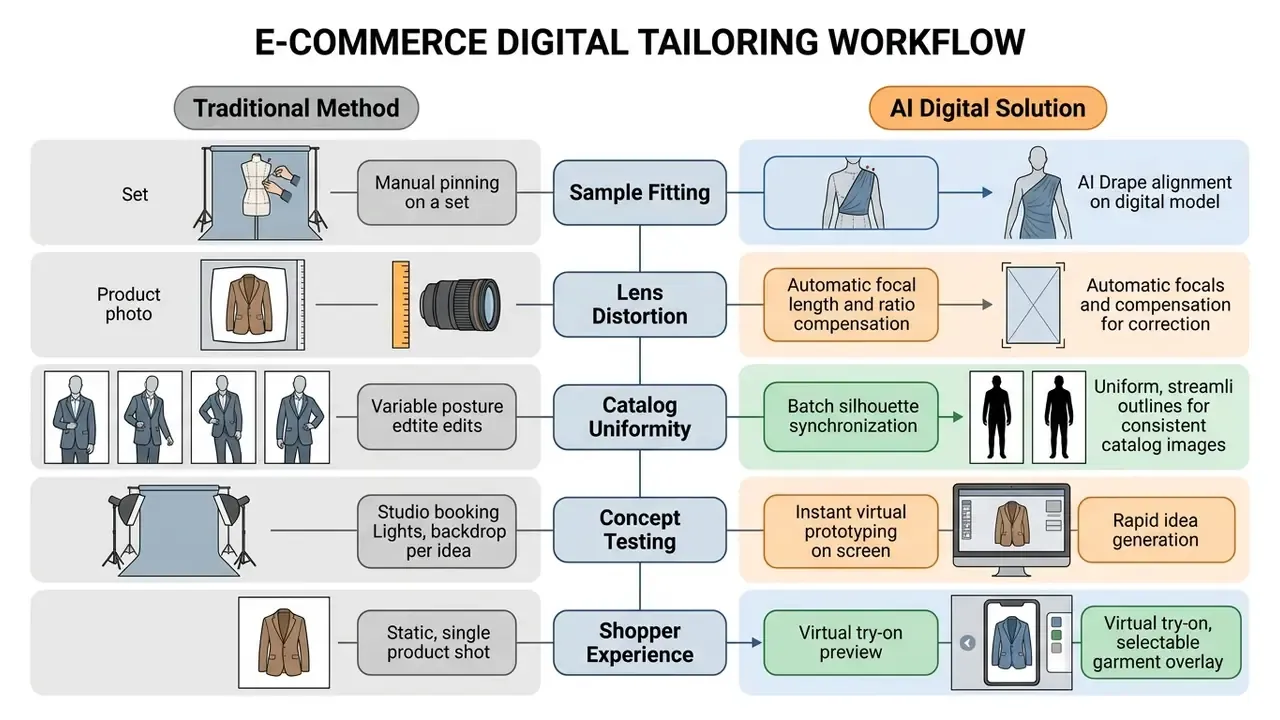
By standardizing model silhouettes across an entire 500-item seasonal catalog, e-commerce managers remove visual distraction, lower garment return rates caused by misleading drape appearance, and cut post-production cycle times substantially. Four commercial levers recur across retail deployments: production-cost reduction through fewer reshoots and reduced recurring talent fees; instant creative prototyping before a studio is ever booked; automation of repetitive retouching that previously consumed hours of specialist time per catalog; and virtual try-on experiences that let shoppers preview garments across body types. Digital pinning delivers the tailored, premium product appearance that drives add-to-cart conversion, without a tailor physically on set.
Two cautions belong in every retail brief. First, altering the drape of a garment so it looks better-fitting than it is can cross into misleading advertising under ASA and FTC principles; the product must still perform as depicted. Second, stock-library and syndication partners may prohibit body-shape edits entirely, so catalog assets destined for third-party distribution require policy verification before batch processing.
Editorial case (illustrative, composite): a media studio processed 120 fashion lookbook photographs requiring subtle silhouette adjustments. By setting strict AI mask boundaries and capping waist modifications at 12%, the technical team eliminated background distortion and passed internal governance review while meeting publishing deadlines. The same team logged every applied parameter per frame, which let the compliance reviewer approve the set in a single pass instead of re-auditing each image individually.
Photos with complex backgrounds, angles or loose clothes
Complex backdrops, high-angle perspectives, and loose clothing all challenge free photo editor slimming tools. Intricate background patterns such as tile grids, fences, or lace frequently warp when subject contours shift, and body segmentation in complex scenes remains a hard problem, especially where subject and background colors converge.
Oversized garments obscure natural anatomical landmarks, so algorithms misread fabric drape as body mass. The result: unnatural attachment points, floating cloth, warped folds. Tight stripes, checks, lace meshes, and embroidery break pattern continuity under deformation. Extreme camera tilt distorts natural proportions and reduces identity and pose consistency across side profiles and unusual viewpoints, which increases algorithmic error. Developers integrating automated editing services can review deployment options in our AI Media API Guides.
Because misfit source images push users toward heavier corrective editing, poor input quality is not only a technical problem but an amplifier of psychological risk for vulnerable users. Rejecting an unsuitable photo is almost always safer than compensating for it with aggressive intensity.
FAQ about slim photo editor online free
This section covers technical questions on group image editing, mobile browser execution, file compression risks, official document photos, and privacy obligations.
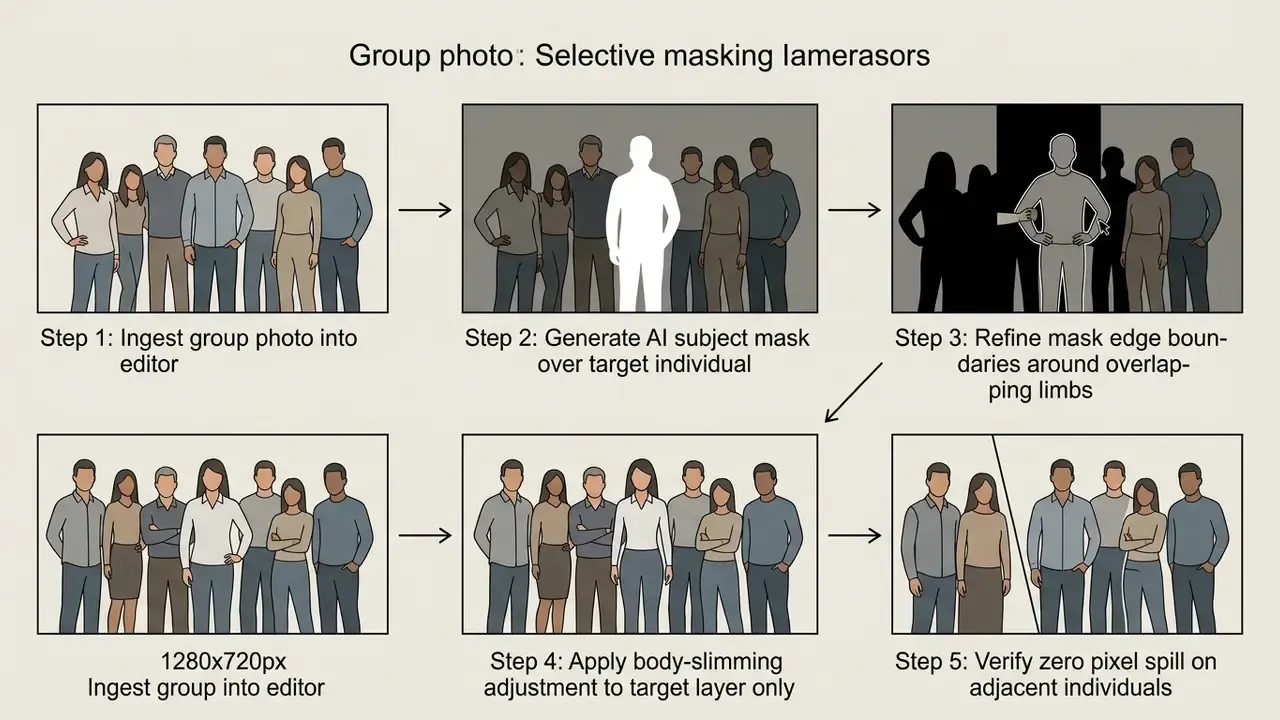
Can I reshape one person in a group photo?
Yes. Targeted body editing on a group photo is possible using localized selection masks or layer masks (Indiana University Technical Guides). Layer masks hide or reveal parts of a layer without deleting the original content, and professional practice confines an operation to specific regions with a refined, edge-following selection mask (Princeton University, "Photo Manipulation, the Easy Way", 2017). By isolating a single individual's body pixels, edits apply strictly to the selected subject without touching adjacent people or shared background space.
When editing group images containing identifiable individuals, consent and privacy considerations apply under data protection frameworks. Swiss FDPIC guidance treats a photograph as personal data as soon as a person is recognizable, group shots included. For group images it is sufficient to inform those depicted about capture and publication, and publication must stop if someone objects. Editing a third party's body shape without documented consent adds a dignity and reputation dimension on top of the data-protection question. Several vendors also recommend single-subject frames outright, because segmentation reliability drops in crowded scenes.
«Photo-filter use is associated with higher muscle dysmorphia symptomatology among adolescents, particularly boys, who showed greater drive for size and functional impairment.»
Source: Body Image (2024), Canadian study, N=912, linear regression
Can I use a skinny photo editor online on a phone?
Yes. Browser-based body editors run on mobile web browsers supporting modern HTML5 and WebGL standards (W3C Mobile Web Best Practices). Mobile web apps give immediate access without a native app installation.
Comparative performance evaluations indicate that native mobile applications optimize CPU, memory, and battery consumption more efficiently than browser-based web applications (MobileSoft Study, 2023). A 2024 comparison of progressive web apps against native builds found native slightly ahead on UI responsiveness and usability, while PWAs scored better on accessibility and data efficiency. IBM's mobile development guidance similarly notes that web apps are simpler to deploy and update but cannot match native device access or advanced graphics performance. For basic image editing tasks, though, modern mobile browsers are more than sufficient. Readers weighing browser tools against installed software can review the full capability spectrum of online photo editors.
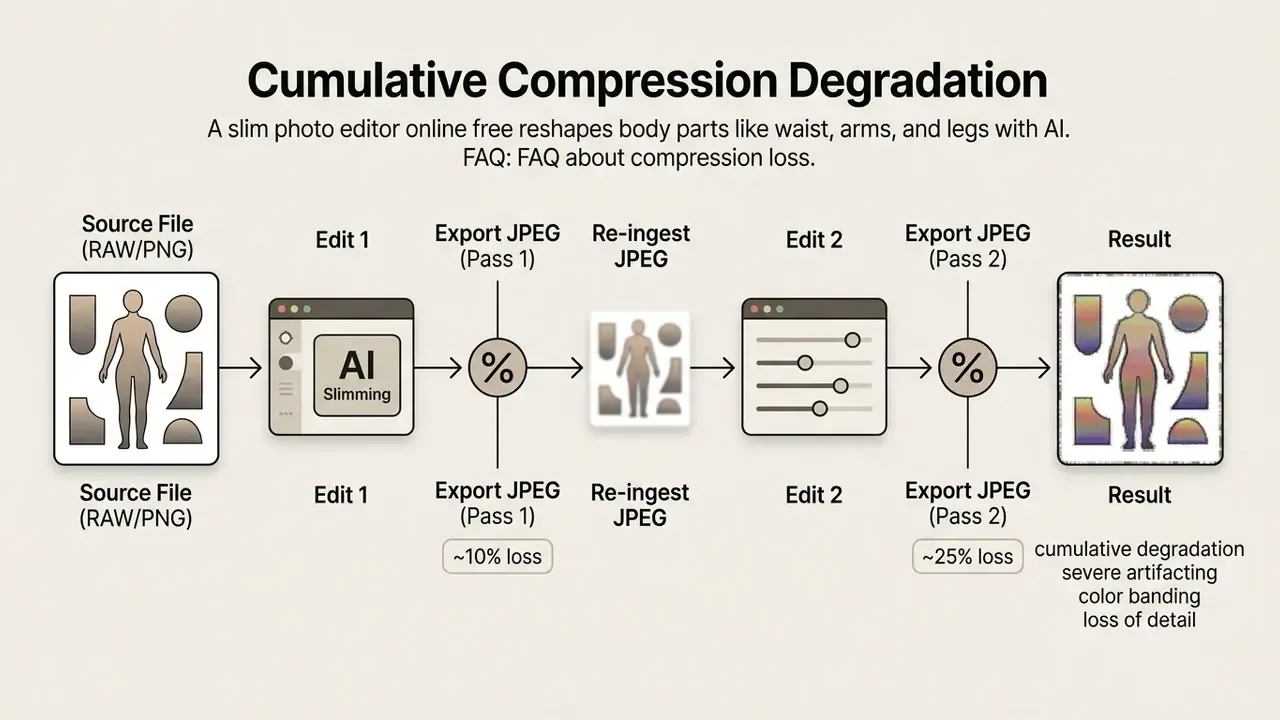
Can I edit the same photo again after downloading it?
Re-editing a previously exported JPEG causes cumulative quality loss through repeated lossy re-compression (NIST IR 7780). JPEG discards fine detail irrecoverably, altering fine structures and edges, with distortion rising at lower quality settings (University of South Carolina, JPEG compression note). Each export cycle throws away visual data and introduces blocky artifacts and edge blur. Notably, NIST observes that decompression alone does not further degrade the compressed stream; the damage comes from each new lossy encode.
To maintain fidelity, keep the uncompressed original source file and apply all adjustments in a single editing session. Following version control procedures (NIH Version Control Guidelines) prevents unrecoverable degradation. Where only a degraded copy survives, AI image upscalers can partially reconstruct edge detail, though they cannot restore genuinely discarded information.
Can I use an online slim photo editor for passport or official ID photos?
No. Official document standards, including ICAO Doc 9303 and national biometric photo rules, strictly prohibit digital alterations to facial geometry, jawlines, or body silhouette. Modifying anatomical contours in passport or visa photographs invalidates the document and can trigger rejection by automated biometric gates or by the issuing authority. Professional retouching vendors state the same restriction in their own documentation, noting that slimming features are intended for creative and portrait work, not for changing identity or bypassing document photo requirements. Use slimming editors exclusively for personal profiles, creative photography, and marketing media.
Is it safe to upload company or client photos to a free body editor?
Not by default. Free web editors process uploads on infrastructure governed only by their published terms, which commonly include a fixed retention window, broad service-improvement rights, and unspecified sub-processors. A photograph of a recognizable person is personal data under GDPR-aligned frameworks, so uploading employee, model, or customer images without a lawful basis and a data processing agreement creates exposure independent of the visual edit itself. Before any upload, confirm four things: the retention period, whether uploads are excluded from model training, where processing occurs, and whether the tool appears on your organization's approved-software list. For proprietary or PII-bearing assets, use a licensed environment with contractual guarantees rather than a consumer free tier.
Frequently Asked Questions
Can I reshape one person in a group photo without affecting others?
Yes. With localized selection masks or layer isolation, an AI body editor can target pixels belonging to a single person. Adjacent individuals and shared background elements stay unedited when mask boundaries are drawn precisely. Editing an identifiable third party still requires consent, because recognizable photographs are personal data.
Do online slim photo editors work properly on mobile web browsers?
Yes. Modern browser-based editors run on mobile devices using WebGL and HTML5 standards. Native mobile apps offer better battery optimization and performance, but web editors allow immediate access without software installation.
Does re-editing an already downloaded JPEG image reduce quality?
Yes. Re-editing and re-saving a lossy JPEG triggers second-pass compression, discarding image data and introducing visual artifacts. Always edit the original high-resolution source, ideally RAW, PNG, or TIFF.
Can I use an online slim photo editor for passport or official ID photos?
No. Biometric standards (ICAO Doc 9303) ban any digital reshaping of facial or body contours on official ID photos. Slimming adjustments belong to personal, social, or commercial creative media only.
Is it safe to upload corporate or client photos to a free online editor?
Not without checks. Free tiers store uploads on third-party servers under their own retention and training terms. Verify the retention window, training opt-out, processing location, and data processing agreement before uploading any image containing PII or unreleased commercial content.
Do I need to label a retouched image in advertising?
It depends on jurisdiction. Norway requires a visible label covering roughly 7% of the image where body shape, size, or skin has been altered in advertising. The UK ASA does not currently mandate labelling but prohibits misleading production techniques. Stock libraries such as Getty Images ban body-shape edits outright.
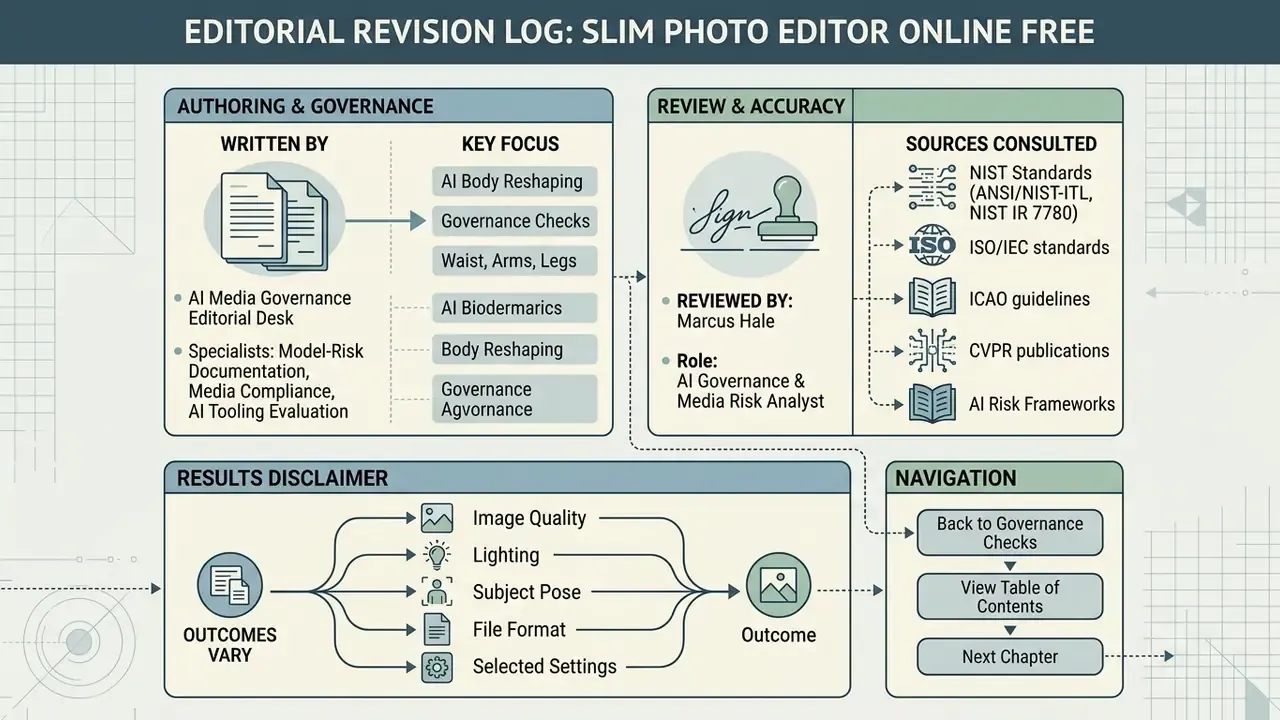
Appendix A: editorial revision log
For transparency, the following claims from an earlier draft were revised during fact-checking. The original wording is preserved alongside the reason for change.
| Original draft wording | Status | Revision rationale |
|---|---|---|
| "In non-invasive physical contouring studies, localized area adjustments typically reflect 1.5 to 4.5 cm shifts in regional circumference (Clinical, Cosmetic and Investigational Dermatology, 2021)." | Replaced | Clinical circumference reduction from laser, ultrasound, or cryolipolysis treatment is not analogous to pixel-level geometric warping. Replaced with psychological evidence on localized digital body editing (Universitas Psychologica, 2025). |
| "Intensity parameters typically map along a normalized scale from 0 to 100 or -4 EV to +4 EV (DxO PhotoLab Manual)." | Reformulated | The -4 EV to +4 EV range documented in DxO PhotoLab governs exposure intensity, not body deformation. Retained the 0-100 normalized scale with documented 25/50/75 preset tiers. |
| "The camera should be positioned approximately 3.5 meters from the subject and leveled near the waist (GRAFIS Technical Capture Standards, 2026)." | Qualified | Retained the geometry, reattributed to the GRAFIS body-measurement photo specification, and labelled as vendor capture guidance rather than a certified international standard. |
| "Professional workflows require disabling automatic downsampling and selecting lossless or high-quality export parameters (Fast Reports, 2026)." | Sourced | Retained with a direct, verifiable link to the vendor export-quality documentation. |
| Internal links to AI rap generator, rap lyrics generator, rap song generator, rapper voice generator, quiz generator, and quote generator. | Removed | Topically unrelated to body-image editing; replaced with contextually relevant links on photo editors, free photo editors, AI image detectors, upscalers, and outpainting tools. |
Limitations and open questions
About the author and review process