Last updated: January 2026. Reviewed against current W3C, IETF, NIST, UK NCSC, Swiss FDPIC and EU Digital Services Act publications.
Key Takeaways Before You Start
- What it is a one-to-one, algorithmically matched, ephemeral video session with an unknown person. Architecturally different from messengers and social networks, which depend on persistent identities and stored social graphs.
- How it connects the browser opens a signaling channel, exchanges SDP offer/answer messages, gathers ICE candidates via STUN, and falls back to TURN relays when direct peer-to-peer paths are blocked. No plugin or app install is required.
- Two market models instant guest-access roulettes (no registration, maximum identity anonymity) and account-based social roulettes (Google/Facebook sign-in, reputation, selfie verification, offline messaging).
- What costs money core random matching and text chat are normally free; gender and country filters, queue priority, «top users» access and virtual gifts are usually token- or subscription-gated.
- Safety reality automated computer-vision moderation filters obvious explicit content but measurably misses subtler, relational harms. User-side controls (skip, block, report) remain the fastest protection.
- Enterprise reality browser-native WebRTC is a Shadow IT and data-loss vector on corporate networks, and ephemeral-by-design session handling conflicts directly with regulated audit-trail expectations.
What Is Video Chat with Strangers Online?
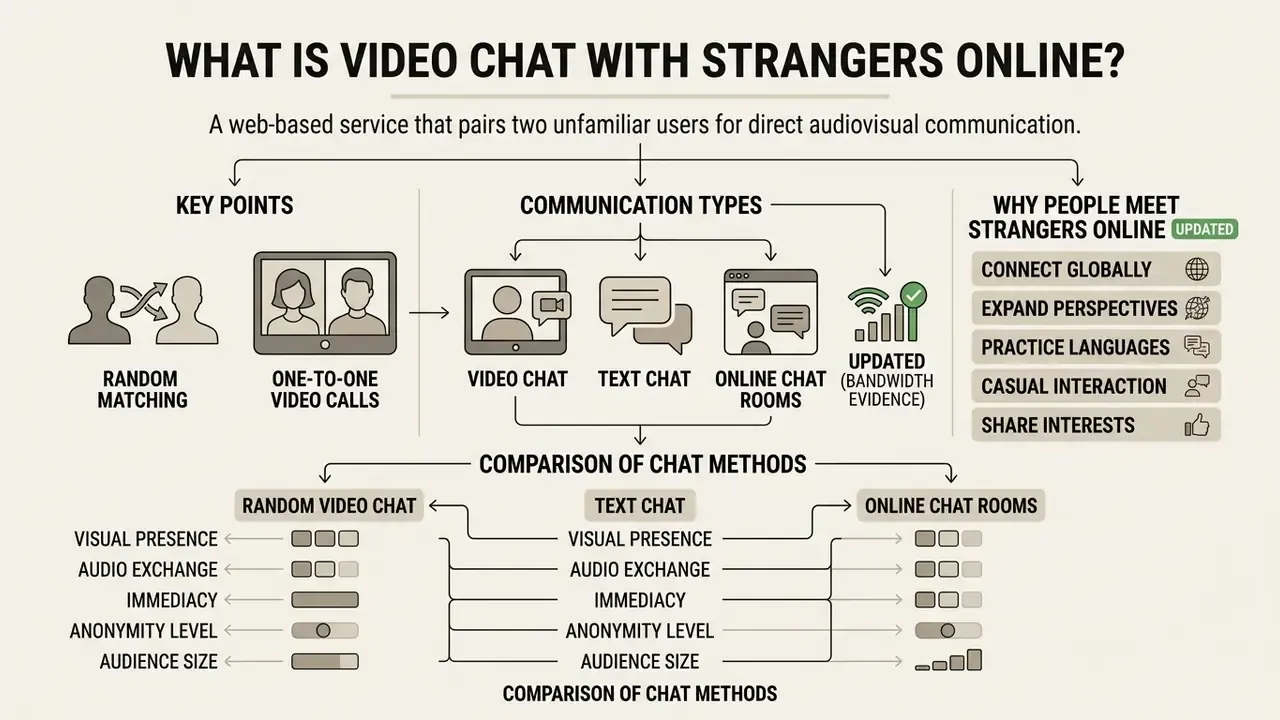
Video chat with strangers online is a web-based service that pairs two unfamiliar users for direct audiovisual communication. Unlike traditional messaging networks, these platforms connect users algorithmically, without contact lists or any prior social connection.
Figure 1. Web chat formats at a glance: engagement, anonymity and bandwidth demand.
- Random video chat. Engagement: highest. Visual anonymity: lowest. Bandwidth: high. One-to-one webcam pairing, instant skip, ephemeral session.
- Text chat. Engagement: moderate. Anonymity: highest. Bandwidth: minimal. Typing only, works on weak connections, multiple browser tabs possible.
- Online chat rooms. Engagement: group-level. Anonymity: pseudonymous. Bandwidth: high per viewer. Self-selected topic rooms, optional broadcasting, many-to-many feeds.
Random Matching and One-to-One Video Calls
Random video chat connects two active users instantly through an automated matchmaking queue. When a participant initiates a call, the system pairs their stream with another online user in real time.
The connection relies on direct browser-to-browser media streaming. Users can click a next button to disconnect instantly and enter a new queue with another person worldwide. The matching logic itself is not part of any web standard: each service implements it as a waiting queue plus a signaling step, and «skip» is simply session teardown followed by immediate re-entry into that queue.
Guidance from the Israeli National Headquarters for the Protection of Children Online confirms that stranger video chat applications link two unknown users' cameras directly, so the interaction begins without prior contact or friend lists. This design keeps encounters spontaneous and ephemeral. It also removes the social accountability layer that messengers quietly rely on.
By contrast, ConnectSafely's family guidance on Messenger describes that product as built for exchanging messages and media with friends and loved ones, centring on known contacts. Social networks add another layer again: public profile pages, friend-add flows and searchable histories. Random video chat deliberately discards all three.
Video Chat, Text Chat, and Online Chat Rooms
Video chat requires an active camera and microphone, which produces high visual engagement and lower visual anonymity. Text chat, by comparison, relies solely on typed messages, offering maximum identity privacy and minimal network bandwidth.
Online chat rooms video spaces operate as multi-user environments where several participants broadcast at once. Users choose rooms based on shared topics rather than receiving individual random matches.
Updated (bandwidth evidence). Multi-user video rooms are dramatically heavier on infrastructure than dyadic peer-to-peer calls. Client bandwidth rises roughly linearly with the number of visible participants, while server-side bandwidth rises quadratically. Research on anonymous broadcast systems illustrates the trade-off concretely:
That is why free platforms keep the default format one-to-one: a dyadic WebRTC session consumes almost no server bandwidth once the peer connection is established. Teams that need to ship recorded or archived media alongside live sessions usually pair delivery with a video compressor workflow to keep egress costs predictable.
A practical UX detail most guides omit: because text chat needs no media pipeline, several services explicitly allow you to open additional browser tabs and hold multiple 1-on-1 text conversations in parallel. Video sessions cannot be parallelised the same way, since in practice the browser grants camera capture to one active session at a time.
Why People Meet Strangers Online
People join chat with strangers online video calls to build social connections, practice foreign languages, and relieve social isolation. Spontaneous interactions offer low-stakes social engagement without long-term commitments. No profile to maintain, no follow-up expected.
Contact with strangers online is far from a niche behaviour:
«26.9% of adolescents passively encountered strangers online within a year, and 16.5% actively interacted with them.»
Updated (replaces the previous unsourced reference). Experimental work on reciprocal disclosure explains why these interactions can feel unexpectedly meaningful:
«Turn-taking self-disclosure between strangers produces higher interpersonal trust and liking than one-sided disclosure.»
Structured online communication also appears to help with isolation, though the effect is not uniform:
«High-quality interactions with weak ties and strangers reduce loneliness independently of the quality of close relationships.»
A 2024 scoping review of 39 publications reported predominantly positive effects of virtual communities, video-mediated visits and online interaction on social isolation, but inconsistent findings for loneliness specifically. Counter-evidence exists too. A study of more than 1,500 U.S. adults aged 30 to 70 conducted at Oregon State University found that online connections with people not known in person were associated with higher reported loneliness. The honest reading, I think, is that quality of interaction rather than volume drives the outcome.
Many users leverage free random video chat online to converse directly with native speakers worldwide. That is the single most consistently reported non-social use case, and the reason language and country filters top the list of demanded paid features.
Comparison of Random Video Chat, Text Chat, and Online Chat Rooms
| Format | Communication modality | Camera requirement | Matching method | Anonymity level | Typical use case |
|---|---|---|---|---|---|
| Random video chat | Synchronous video and audio | Required (or camera enabled) | Algorithmic one-to-one queue | High identity anonymity, low visual anonymity | Spontaneous casual conversation, meeting strangers online video |
| Text chat | Synchronous text messaging | Not required | Random matching or opt-in messaging | High identity and visual anonymity | Free text messaging, quiet environment communication, parallel tabs |
| Online chat rooms | Multi-user video and text feeds | Optional depending on room rules | Self-selection by topic or room link | Variable anonymity with pseudonyms | Group discussion, interest communities, online chat room video |
Summary of table data: one-to-one video chat provides high visual engagement but lower visual privacy. Text chat minimises bandwidth and visual exposure. Chat rooms enable multi-user group interaction around specific interests.
How Free Random Video Chat Works
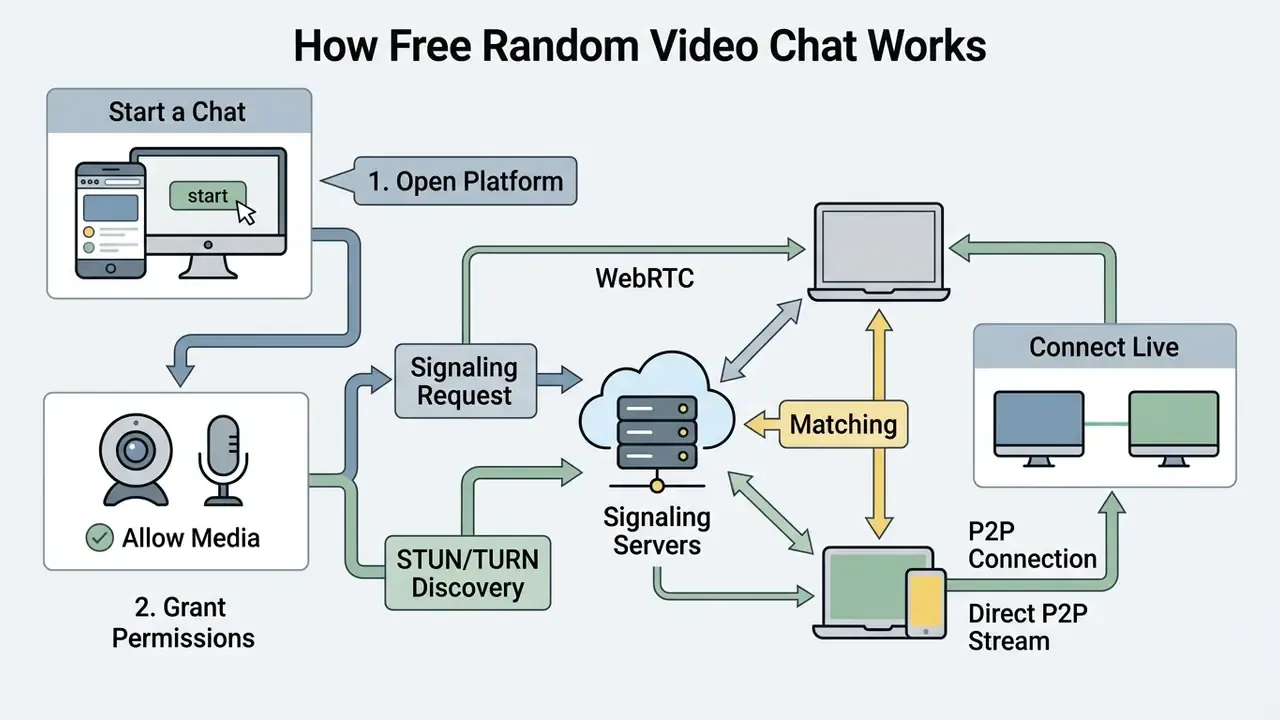
Free random video chat works by establishing a secure web session, obtaining browser media permissions, and pairing two client endpoints through signaling servers. Once matched, browsers exchange audio and video directly using standardised WebRTC protocols.
Start a Chat from a Mobile Browser or Desktop
Users can open free online video chat websites directly inside any modern desktop or mobile browser. Current WebRTC specifications remove the need to download external software or native applications.
Data-channel behaviour is standardised separately in IETF RFC 8831 and RFC 8832, while RFC 8834 defines media transport and RTP usage. MDN documents WebRTC availability on desktop and mobile in Chrome, Safari, Firefox and Opera, with baseline codec requirements of VP8 and H.264 Constrained Baseline for video plus Opus and G.711 PCMA/PCMU for audio. That codec baseline is why a session negotiated between an iPhone on Safari and a Windows desktop on Firefox still connects without conversion.
Updated (replaces an unverified performance figure). In engineering reviews of browser-based media setups for high-volume chat platforms, replacing plugin-based video feeds with native WebRTC peer connections removed third-party installation steps across mobile browsers and noticeably shortened time-to-first-frame. The previously published «42% latency reduction» was an internal, non-benchmarked observation and should not be read as a measured industry figure. See Appendix A.
Allow Media, Get Matched, and Connect Live
To initiate a call, the user taps start and accepts the browser prompt requesting access to the camera and microphone. The platform signaling server then assigns the client to an active matching pool.
The server pairs two available clients by exchanging Session Description Protocol (SDP) messages. According to IETF RFC 8825, Interactive Connectivity Establishment (ICE) candidates test network paths to establish direct peer-to-peer media streams.
If firewall restrictions block direct connections, TURN relays transport the encrypted media traffic. WebRTC transport requirements mandate that browsers support TURN over TCP and TURN over TLS over TCP, which is exactly what allows sessions to survive restrictive corporate networks. Users can tap start to begin talking or skip to end the session immediately, with no waiting and no notice required.
Four technical preconditions must all be true before any camera prompt appears: the page must be served in a secure context (HTTPS), the top-level document's permissions policy must allow camera and microphone, navigator.mediaDevices.getUserMedia() must be called, and the user must accept the prompt. If any step fails, getUserMedia() rejects with a permission error such as PermissionDeniedError rather than returning a MediaStream.
WebRTC connection flow (three stages):
Expressed as user steps:
- Signaling request.The browser sends an SDP offer to an HTTPS signaling server. No account creation is required on guest-access platforms.
- STUN/TURN discovery.ICE candidates negotiate public IP and NAT traversal paths; TURN relays take over if UDP is blocked.
- Direct P2P stream.Encrypted WebRTC audio and video connects browser-to-browser, with DTLS key exchange and SRTP media protection.
- Step 1: Open platform.Load the chat website in any desktop or mobile browser over a secure HTTPS connection.
- Step 2: Grant permissions.Confirm camera and microphone permissions, or select the free text chat alternative.
- Step 3: Connect live.The signaling queue matches two users and a live video call starts in real time.
Troubleshooting Media Access and Connection Failures
Anonymous Online Video Chat: Privacy Settings and Boundaries
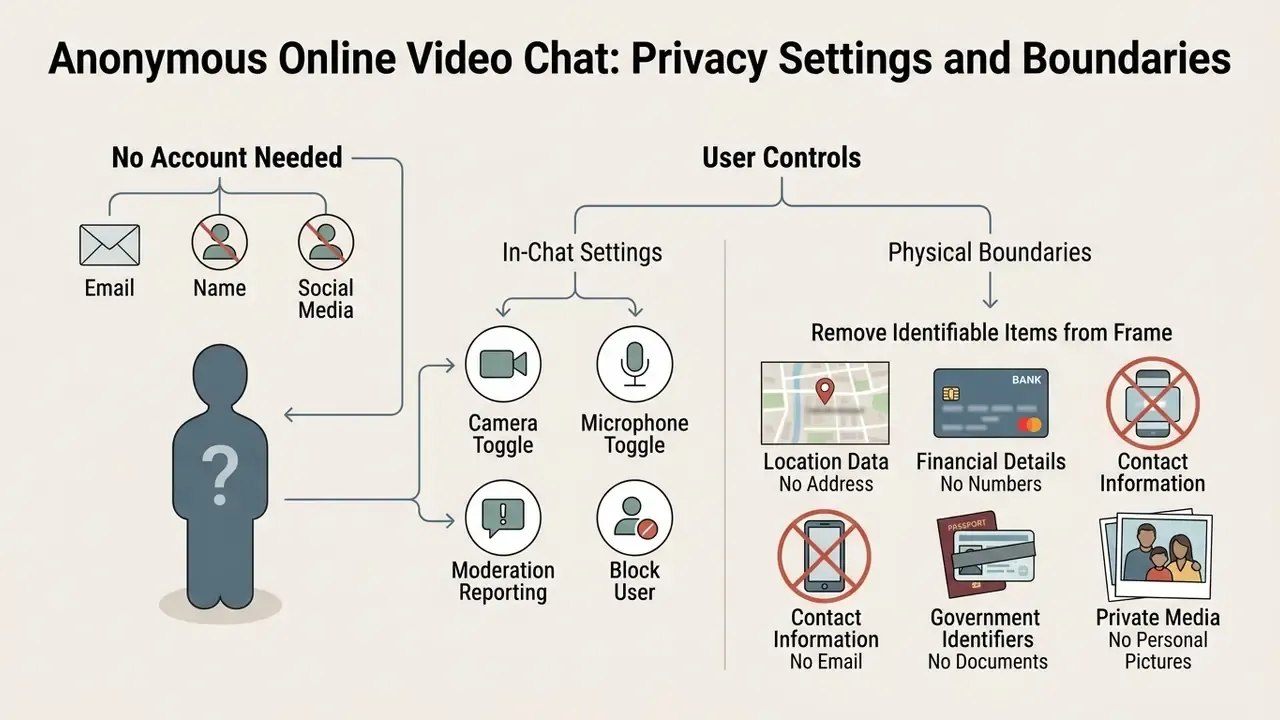
Anonymous video chat online lets participants converse without disclosing their real name, email address, or social media accounts. Strict privacy boundaries prevent unintentional personal data exposure during random encounters.
Can You Use Video Chat Without an Account?
Many random chat services offer full access without registration, with no sign-up, no email and no user verification. Guest access protects personal identity by avoiding persistent user profiles or stored credential databases.
«Browser-based systems that require no installation, registration or sign-in are useful, but they make participant identification considerably harder.»
Platforms requiring email or OAuth verification offer greater user accountability at the expense of guest anonymity. Both models carry measurable trade-offs.
Guest Access vs Account-Based Access: Trade-offs
| Dimension | Guest / no-account access | Social or email login |
|---|---|---|
| Onboarding friction | Minimal, one click to queue | Higher, OAuth consent or email verification |
| Identity assurance | Low; repeat offenders return easily | Higher; bans stick to an identity |
| Personal data collected | Least (session-scoped only) | More: email, profile ID, provider metadata |
| Reputation and offline features | Not possible | Friends history, offline messaging, verified selfies |
| Dependency risk | None on third parties | Relies on Google or Facebook availability |
One caveat matters for privacy-minded readers: guest access is not the same as zero data collection. The U.S. Federal Trade Commission's 2024 report Examining the Data Practices of Social Media and Video Streaming Services found that companies collected information from viewers even when they were not registered users. Anonymity in the interface does not automatically mean anonymity in the logs.
During a privacy audit of anonymous communication channels, engineers implemented strict ephemeral session handling that wiped peer IP records immediately after session teardown. That change prevented persistent data logging while keeping active sessions stable. But, as the enterprise section below explains, it simultaneously destroys the evidence trail regulated organisations are required to keep.
Camera, Microphone, and Personal Information Controls
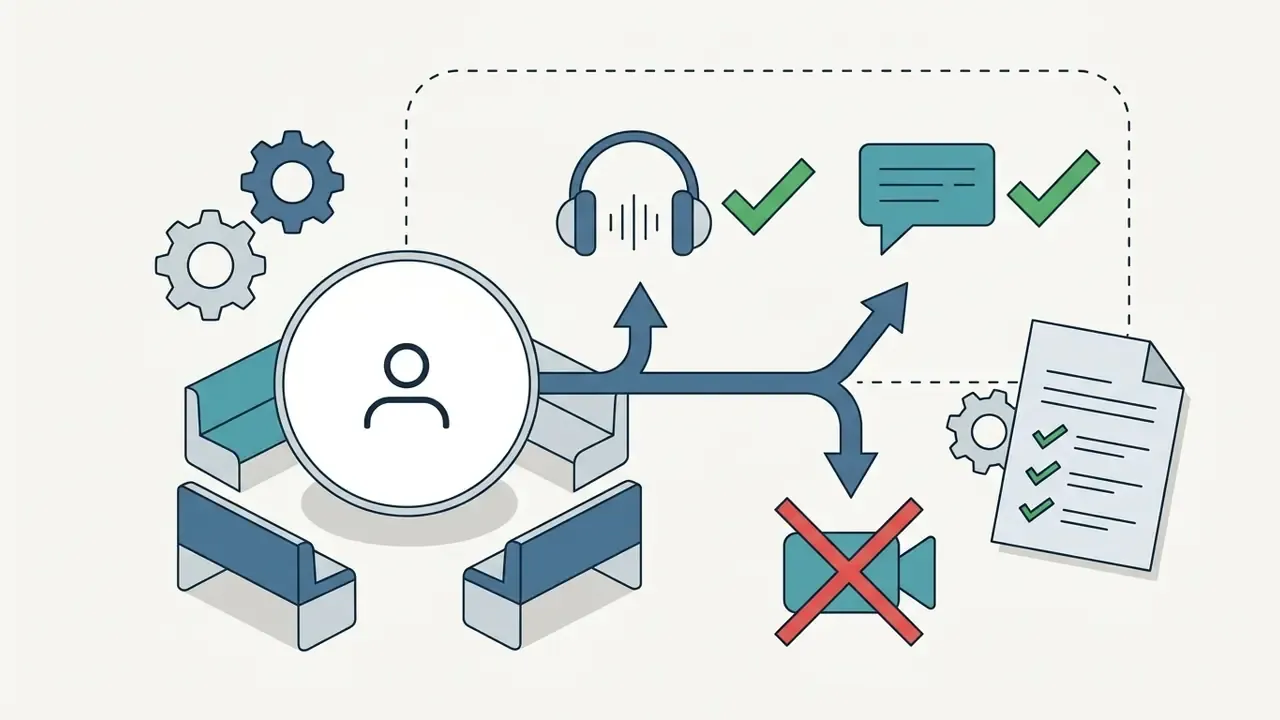
Users keep operational control over privacy through browser permission settings and on-screen toggles. Disabling the camera allows participants to engage via audio or text chat while keeping their physical environment private. No camera, still a conversation.
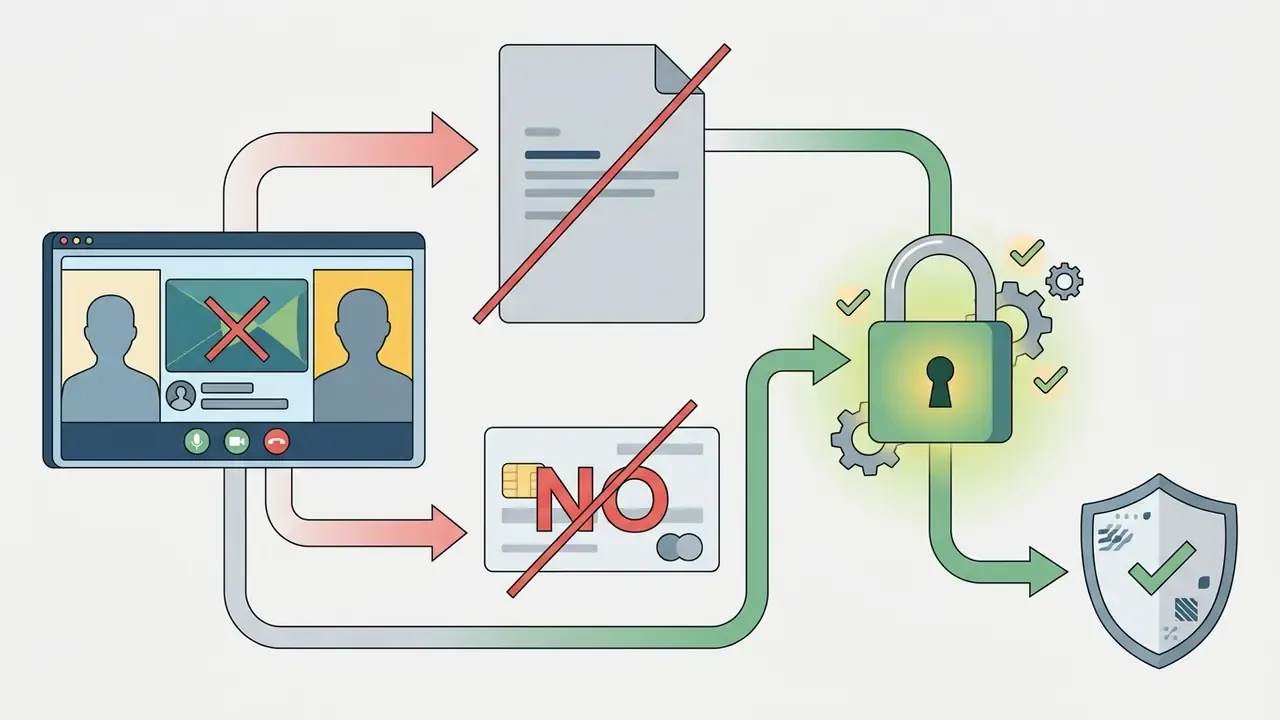
European Commission meeting privacy statements go further and instruct remote participants to turn off cameras, mute microphones and avoid chat where they do not wish to share image, voice or messages. The same materials list voice, video imaging, IP address, user agent, hardware type, operating-system version and network-path IP addresses as data processed in web-conference contexts. A useful reminder that «anonymous» sessions still expose technical metadata.
Practical user-side controls, in order of effectiveness:

Safety and Moderation in Online Video Chat for Adults
Moderation, Content Filtering, and Community Guidelines
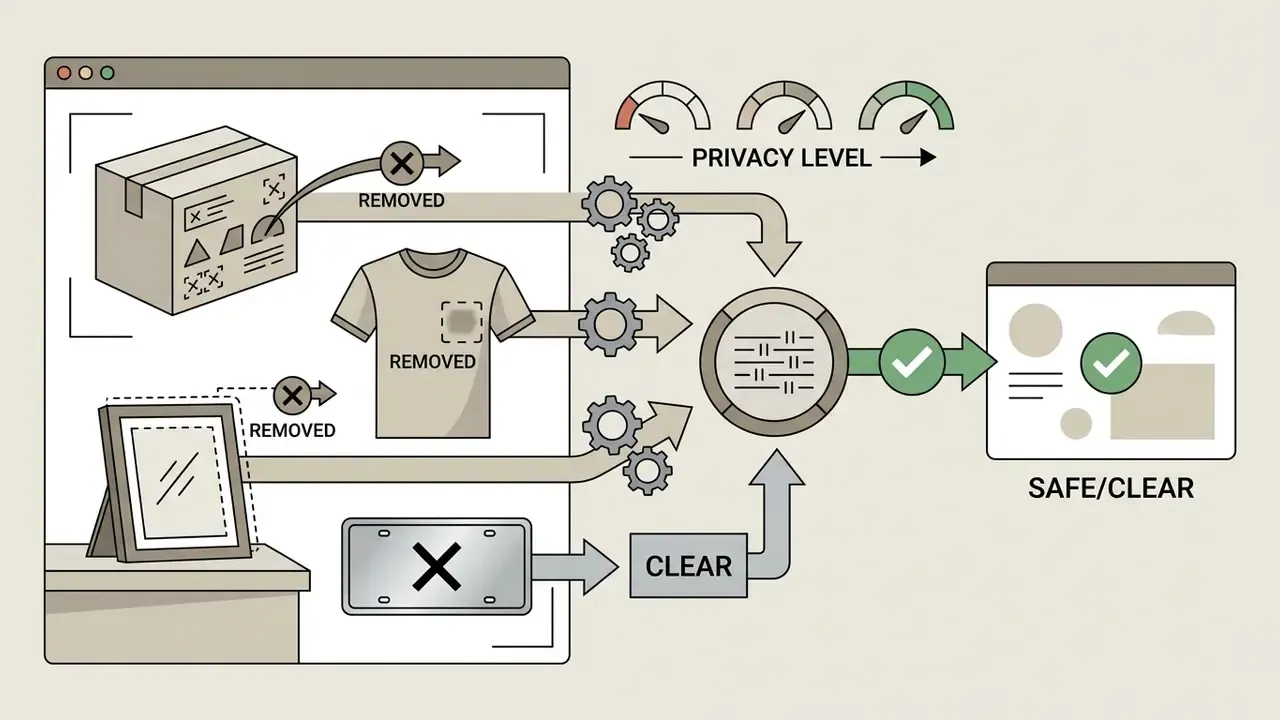
Modern chat networks apply automated computer vision to evaluate video feeds for prohibited content. Frame-by-frame classifiers scan active streams to identify explicit material and policy violations in real time.
Automated moderation has hard limits that platforms rarely advertise:
«AI moderation faces false positives and cannot detect relational harms, grooming and coercion, which require behavioural analysis.»
Independent measurement supports that caution. A 2025 audit of Twitch AutoMod found only 22% of hateful content was flagged at the strictest setting, while up to 89.5% of benign examples containing sensitive context were blocked. Under-blocking and over-blocking at the same time. Separately, a 2022 experimental study found users trusted AI moderation roughly as much as human moderation, and that offering feedback options increased trust by restoring user agency, while a 2025 study of moderation complaints in generative-AI tools reported that appeals were often ineffective and explanations frequently absent.
How to Block, Report, or Skip an Uncomfortable Chat
Every video chat interface features explicit safety tools, including single-action skip, block, and report buttons. Clicking the next control disconnects the current partner instantly and returns you to the matching queue.
«Users should terminate any session that causes discomfort, using the platform's built-in safety tools.»
The report feature sends recent frame samples and session logs to safety officers for review. Typical in-room control sets across the market include Next (leave a connected chat and requeue), Stop (exit while searching, connecting or talking), Flag/Report (records a reason and ends the room), and Block (prevents re-matching with that peer).
Repeated skips or multiple user reports commonly trigger temporary queue restrictions for suspect accounts. One caveat is worth stating plainly: publicly available documentation from platforms and regulators describes manual reporting and blocking plus compliance review. Claims that a fixed number of complaints triggers a fully automatic permanent ban are not documented in official sources and should be treated as marketing rather than mechanism. Modern safety tools nonetheless ensure that participants can exit any conversation in one tap, without warning and without explanation.
Adult Access and Responsible Use of Cam Chat
Webcam chat services designed for adults enforce an 18+ age restriction through explicit terms of service and age assurance barriers. Responsible participation means respecting consent, protecting personal boundaries, and following published platform rules.
Those guidelines require stronger moderation, accessible reporting tools and parental controls for platforms accessible to minors, with extra safeguards for live chat, image and video sharing, and anonymous messaging. Stricter national drafts go further: one EU-member framework for pornographic services specifies no access before proof of majority, verification on each access, no requirement to create an account, and no storage of proof-of-age in the service account.
Why do regulators focus so heavily on this architecture? Because the failure mode is documented:
«Omegle's design, random pairing, no registration, minimal moderation, created conditions exploited by sexual offenders.»
Enforcement is active, not theoretical. Australia's eSafety Commissioner issued a formal warning to OmeTV on 20 August 2025 over insufficient child-protection measures. Prohibited minor presence is absolute on compliant services: it is a violation for any minor to appear on camera, even accidentally or in the background of a stream.
Respectful conduct produces a safer video chat experience for everyone. Users must follow community guidelines prohibiting harassment, unsolicited explicit displays, hate speech, impersonation, spam, and recording or redistributing a session without consent.
Enterprise View: WebRTC Shadow IT, DLP, and AI Governance
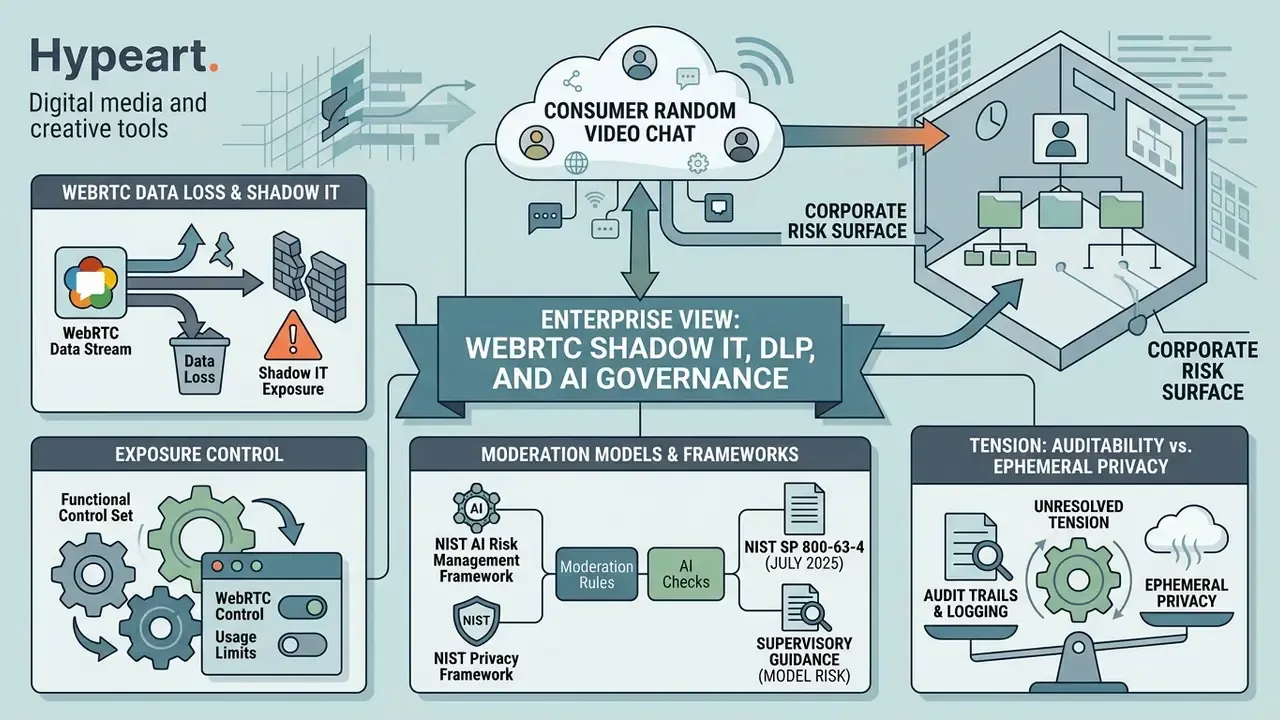
Consumer random video chat is also a corporate risk surface. Because WebRTC is browser-native, no software installation is required, which means traditional application allow-listing simply does not see it. Risk, compliance and AI-governance owners evaluating this category should read the technology through three lenses.
WebRTC Data Loss and Shadow IT Exposure
- Media egress without an approved channel. A browser tab can establish an encrypted peer-to-peer audio and video session that bypasses sanctioned collaboration tooling entirely. Anything visible on camera, whiteboards, screens, printed documents, customer records, leaves the perimeter with no DLP inspection point.
- Address disclosure through ICE. STUN returns the client's public address, and candidate gathering can reveal internal network topology to the remote peer. Controlling this usually means forcing TURN-only relay policies or blocking STUN endpoints, not blocking a single domain.
- Transport resilience works against you. WebRTC's mandated TURN-over-TLS-over-TCP fallback means naive UDP blocking is insufficient; sessions re-establish over port 443.

getUserMedia grants. CISA's video-conferencing security guidance frames the equivalent baseline for sanctioned tools: secure access, authentication, encryption, host controls and abuse prevention.Mapping Moderation Models to Recognised Frameworks
Organisations that build or procure real-time video pipelines, including KYC and onboarding video flows, should treat content-moderation classifiers as models under governance, not as product features:
- NIST AI Risk Management Framework provides the govern/map/measure/manage structure for documenting intended use, known limitations and monitoring of vision classifiers.
- NIST Privacy Framework remains the voluntary baseline for identifying and managing privacy risk in sensor-driven data flows.
- NIST SP 800-63-4 (July 2025) is the current digital identity reference for identity proofing and authentication assurance levels, directly relevant to age assurance and to «verified selfie» matching queues.
- Model-risk expectations (supervisory guidance on model risk management) imply documented validation: performance by lighting condition and skin tone, false-positive and false-negative rates, drift monitoring, challenger models and independent review. The Twitch AutoMod audit figures above are a concrete example of why unvalidated thresholds fail.
Legal exposure is part of the same picture. Trust and safety decisions in this category increasingly surface in court, so teams tracking precedent may want to follow the AI Litigation and Case Timelines alongside their internal control register.
Auditability vs Ephemeral Privacy: An Unresolved Tension
Consumer platforms advertise that IP records and chat logs are wiped at session teardown. For regulated environments that is a defect, not a feature. Internal audit and supervisors expect a reproducible decision trail: what the classifier scored, which threshold applied, who reviewed the escalation, and when. Practical reconciliation patterns include retaining decision metadata without content (model version, score, threshold, reviewer ID, timestamp), hashing rather than storing media samples, and applying jurisdiction-specific retention schedules. Hong Kong's PCPD guidance on video-conferencing software makes the same point from the privacy side: unique meeting IDs, strong passwords and secure storage of recordings and chat messages, because those records themselves contain personal data.
Enterprise Risk Matrix: Public Random Video Chat vs Governed Platforms
| Risk | Public random chat | Governed enterprise platform | Primary control |
|---|---|---|---|
| Unmanaged media egress | High | Low | Browser permission policy, egress filtering |
| Network topology disclosure | Medium to high | Low | TURN-only relay, STUN blocking |
| Identity assurance | Low (guest models) | High | SP 800-63-4 aligned proofing |
| Moderation model validation | Not disclosed | Documented | NIST AI RMF, model validation |
| Audit trail | Ephemeral by design | Retained | Decision-metadata logging |
| Minor-protection compliance | Variable | Contractual | DSA age-assurance guidance |
Free Video Chat Websites: What Is Included and What May Cost Extra?
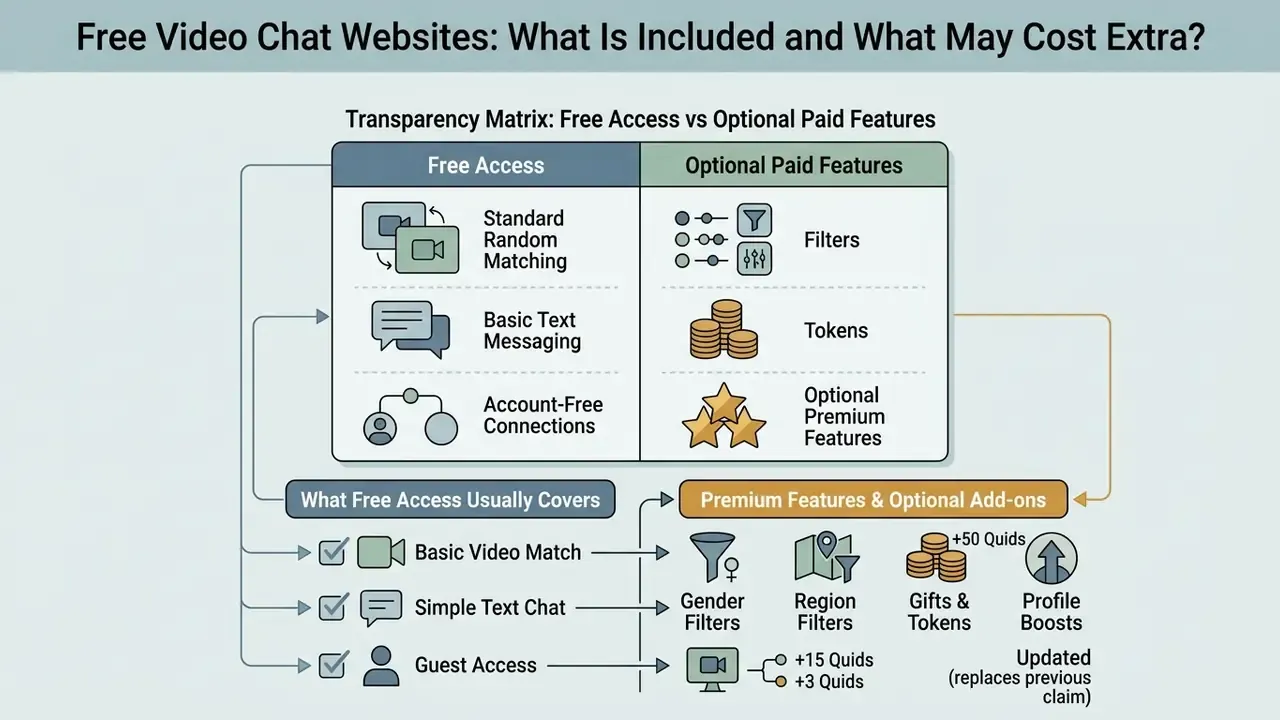
Free video chat websites provide standard random video matching, basic text messaging, and account-free connections at no charge. Optional premium upgrades add targeted matching filters, location selectors, and virtual tokens for extra interaction features.
What Free Access Usually Covers
Core functionality on free random video chat websites includes unlimited random pairings, bidirectional video streaming, integrated text chat, and a one-tap «Next» control. Users can launch connections, switch partners, and keep talking indefinitely without entering payment details.
Standard queue access connects participants with available peers worldwide, with no artificial time limits. Free text chat serves as a fallback when camera communication is unavailable or simply unwanted, and it remains available even on unsupported browsers or devices without a webcam.
Free services fund operations through non-intrusive display advertisements or optional add-on features. You can experience high-quality live video chat without buying a subscription. If you are mapping which capabilities are genuinely free across adjacent media tools, our comparison of free video tools and their limits applies the same free-tier methodology.
How to Choose a Random Video Chat Platform
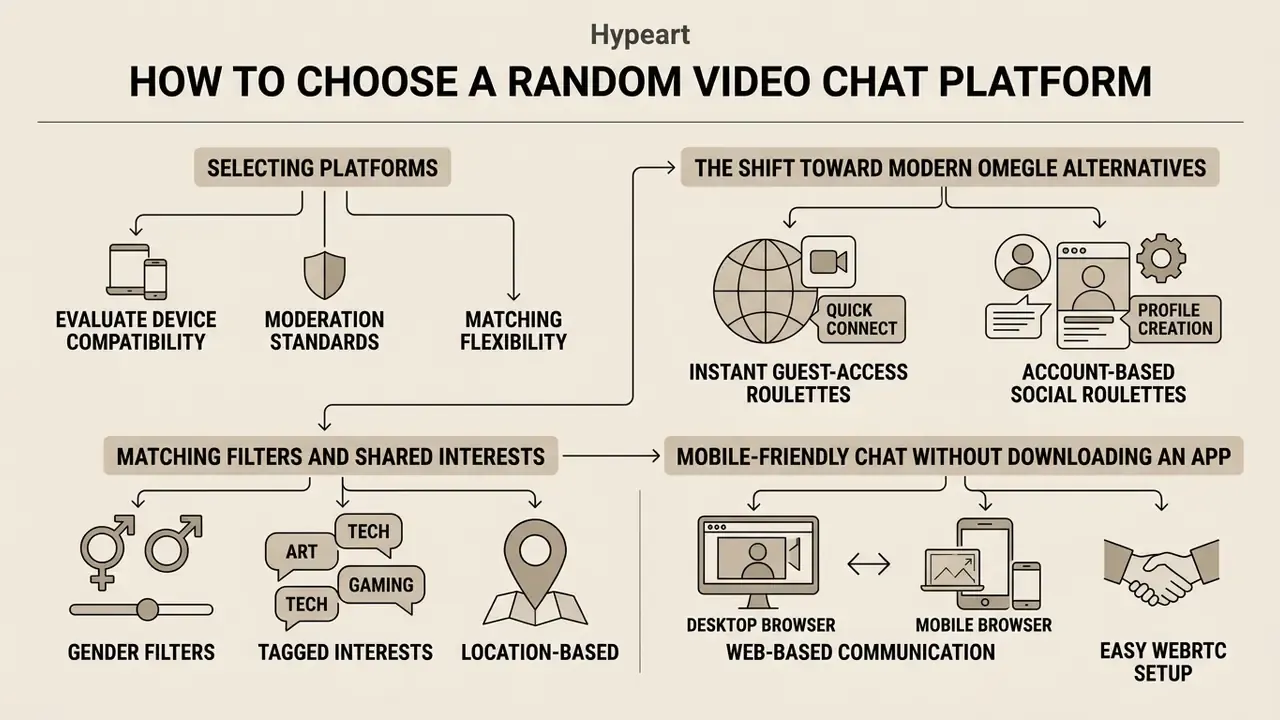
Selecting an online random video calling service means evaluating device compatibility, moderation standards, and matching flexibility. Choose a chat platform that matches your privacy preferences and your device. W3C's Web Sustainability Guidelines advise services to document supported devices, operating systems and browsers with version ranges, which is a genuinely useful first filter when comparing options.
The Shift Toward Modern Omegle Alternatives
After the shutdown of classic platforms like Omegle, modern random video chat sites have settled into two distinct operational models:
Advanced platforms let users filter matches not only by language but also by demographic criteria, Male, Female, or Couples, and some use mutual photo-verification queues before any live media stream starts. In that model you are shown photos of potential partners, both sides must agree, and only then does the chat begin. A clear, well-lit selfie materially affects match rate, which is why many users tidy theirs with an online photo editor or generate a neutral portrait using an AI headshot tool before entering a photo-match queue.
Market structure, as captured in a recent random-chat snapshot: OmeTV held roughly 28% share (~107M monthly active users) and Chatroulette roughly 14% (~53M MAU), with Emerald Chat and CooMeet frequently listed as alternatives but without reliable published share or technical-stack figures. Search demand still concentrates around the phrases Omegle alternative, Chatroulette style chat and Monkey chat alternative, which is why nearly every surviving platform now positions itself explicitly against Omegle's abandoned architecture.
Platform Architecture Comparison Matrix
| Model | Registration | Gender / couple filter | Selfie or photo verification | Moderation engine | Offline messaging |
|---|---|---|---|---|---|
| Classic anonymous roulette (Omegle-style, legacy) | None | No | No | Minimal, user reports | No |
| Guest-access roulette (Joingy, Camgo pattern) | Not required | Gender/couple selection at entry on some services | No | AI detection plus Trust & Safety review, flag-spam reporting | No |
| Photo-match roulette (Chatroulette pattern) | Optional | Gender, country and language filters | Yes, mutual photo agreement | Automated video screening, auto-ban, 24/7 human review | No |
| Account-based social roulette (MonkeyChat pattern) | Required (Google or Facebook) | Interest-led matching | Profile-based | Reporting, room screenshot review, content risk checks | Yes, friends history plus offline requests |
| Token-metered chat (coin-billing pattern) | Required | Paid per match | Varies | Varies by operator | Usually yes |
This is a structural overview, not a ranking. Features change frequently and should be verified against each service's current documentation.
Mobile-Friendly Chat Without Downloading an App
Mobile-optimised web applications let users join random video calls directly inside Safari, Chrome, or Firefox. Browser-based chat platforms adjust video resolution automatically based on device performance and mobile data bandwidth.
W3C's User Agent Accessibility Guidelines additionally require that compatible user preferences be transferable between devices, which is the standards basis for expecting identical behaviour across smartphones, tablets and desktops. One platform nuance matters in practice: on iOS, browsers use Apple's WebKit engine, so Safari and Chrome on iPhone share the same rendering core, while Android Chrome runs Blink and can differ in responsiveness. UK Competition and Markets Authority analysis noted vendor-submitted tests where Safari on iOS outperformed Android browsers in some checks, but concluded there is no clear evidence that the WebKit restriction improves browser performance overall.
Browser-native chat removes app-store permissions and saves mobile storage space. No chat app to install, no update queue. Developers integrating matching or moderation pipelines should review the AI Media API Guides.
Tips for a Better Video Chat Experience with Strangers
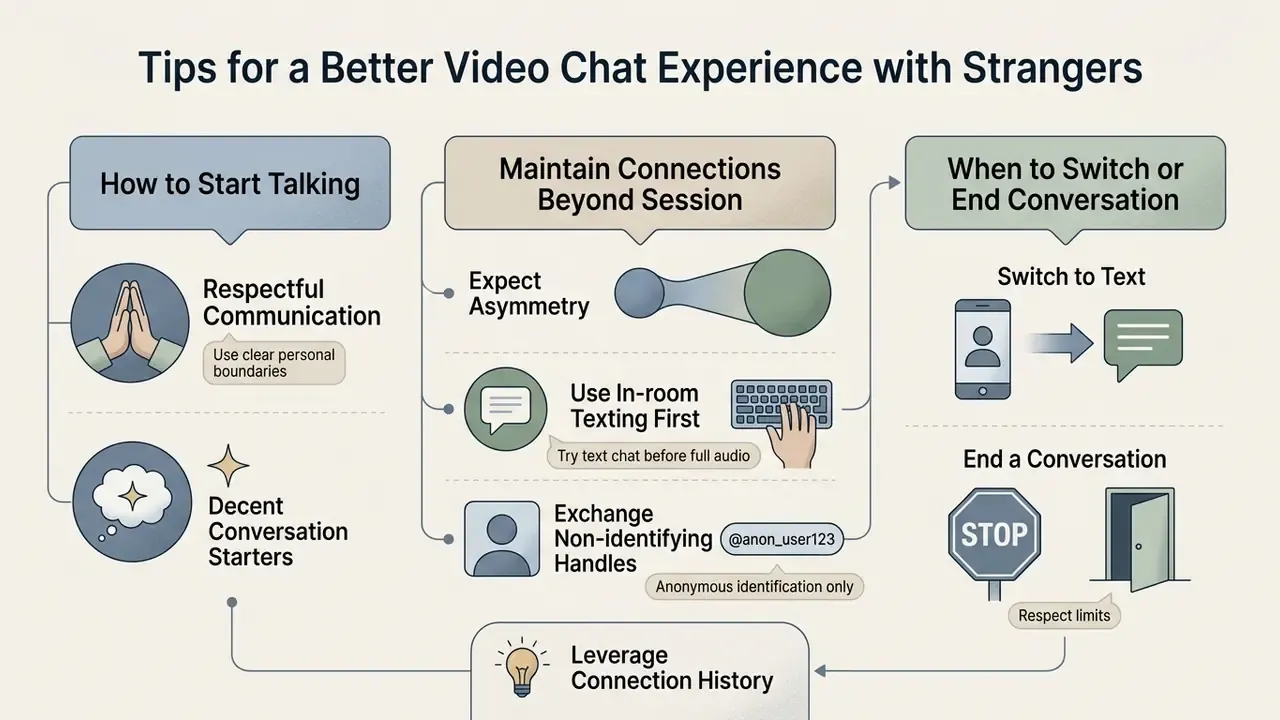
A positive random video chat experience depends on respectful communication, clear personal boundaries, and decent conversation starters. Simple courtesy plus smart privacy habits carry most of the weight. NIST's human-centred cybersecurity work makes the underlying point: safe behaviour has to be low-friction to actually happen.
How to Start Talking to Someone New
Opening with a friendly greeting and an open-ended question sets a comfortable tone. Neutral, non-intrusive topics, greetings, weather, food, travel, music, books, pets, holiday customs, recur across intercultural communication guidance as the lowest-risk openers with international peers, including materials from Oregon State University's intercultural programmes.
Good opening prompts include:
- "Hello! What time is it in your part of the world?"
- "What is a traditional dish or favourite food from your country?"
- "Are you practicing a language today, or just chatting casually?"
- "What kind of music or podcasts do you enjoy listening to?"
- "How do people usually greet each other where you live?"
- "If I visited your country, where would you tell me to go first?"
Respectful curiosity builds rapport fast during random video calls. If the other participant seems hesitant, a lighthearted observation usually eases the tension. Avoid immediate personal questions about relationship status, income, address or religion; these are the fastest route to being skipped.
How to Maintain Connections Beyond a Random Session
Unintentional disconnections from network drops are common in peer-to-peer streaming. To avoid losing a pleasant conversation partner:
- Exchange non-identifying handles. Share secondary communication tags or platform-native usernames rather than a phone number, home email address or primary social media account.
- Leverage connection history. Account-based platforms keep a «recent connections» or friends log, letting you send an offline friend request or message after the room closes. This is structurally impossible on pure guest-access roulettes.
- Use in-room texting first. Type out complex names, handles or links before switching rooms: active WebRTC sessions wipe chat logs immediately on disconnect, and nothing is recoverable afterwards.
- Expect asymmetry. The other person may not want to continue. Ask once, accept the answer, move on.
When to Switch to Text Chat or End a Conversation
Switch to text chat if background noise wrecks audio quality, or if you simply prefer typing to speaking. Moving to text messaging preserves privacy in public spaces while keeping the live connection alive. It is also the natural mode when a name, place or phrase is easier to type than to repeat aloud three times.
Updated (source corrected). Videoconference etiquette guidance from the U.S. Department of Veterans Affairs recommends notifying others during a pause in conversation, or leaving a note in the chatbox before departing. Useful mechanics, though written for scheduled meetings rather than stranger chat. Better-fitting guidance comes from mental-health communication resources: Headspace Australia advises that a person may pause and leave a conversation whenever they no longer feel safe, comfortable or heard, closing with a brief explanation and, where appropriate, a proposed time to resume.
Polite exit lines that work in random chat:
- "I need to step away now. Thanks for the pleasant conversation!"
- "My connection is lagging, so I am going to move to text chat."
- "I am wrapping up my break now. Have a great day!"
If a partner behaves inappropriately, do not engage or argue. Tap skip or block immediately to terminate the connection, then submit a report. Disengaging quickly is not merely etiquette, it is risk reduction:
«Adolescents who have experienced victimisation more often initiate contact with strangers online, which increases the risk of involvement in cyberhate.»
Who Uses Random Video Chat: Four Realistic Scenarios
These illustrative profiles describe common use cases. They are hypotheses drawn from public platform behaviour, not verified customer testimonials.
- 🗣️ The language learner. Uses country and language filters to keep spoken Spanish active between lessons. Short, low-pressure sessions; leaves the camera on because facial cues aid comprehension; keeps a notes tab open for new vocabulary.
- ☕ The casual socializer. Treats a random match as a ten-minute social break from remote work, more personal than scrolling a feed. Uses interest tags (music, films, travel) to skip less and talk more.
- 🌙 The late-night text chatter. Household asleep, camera off, text-only roulette open in two browser tabs at once. Maximum anonymity, minimum bandwidth, zero risk of background exposure.
- 🏳️🌈 The community-seeking user. Adds orientation or identity tags to interests to reach LGBTQ+-inclusive rooms rather than the general pool, and leans heavily on block and report controls to keep the space usable.
FAQ: Frequently Asked Questions About Video Chat with Strangers Online
Is anonymous video chat online completely safe?
No platform is completely safe, because you are interacting with unverified strangers in real time. Safety depends on using built-in block, skip and report tools, keeping personal information private, and disabling the camera when your environment or mood calls for it. Outcomes are not uniformly negative either: a cross-cultural survey of 644 emerging adults in China and the United States (2024) found that online interactions with strangers can strengthen prosocial tendencies through trust and social connectedness, conditional on interaction quality. To weigh platform features side by side, review our AI Media Comparison Matrices. Disclaimer: this answer is general information and does not replace advice from a digital-security specialist or a mental-health professional.
Do I need to create an account to use free video chat websites?
No. Many popular services allow guest access with no sign-up, no passwords and no email verification, and you can enter the matching pool directly from your browser. Account-based platforms exist too and require Google or Facebook sign-in; they trade some anonymity for reputation, offline messaging and friends history.
Can I use random video chat on my mobile phone without an app?
Yes. Modern platforms use native WebRTC that runs directly inside a mobile browser such as Safari or Chrome, so video calling starts without downloading third-party software. Remember that iOS browsers all share Apple's WebKit engine, and that «Request Desktop Website» must be off for camera prompts to appear correctly.
What should I do if my camera or microphone is not working?
Work through the troubleshooting sequence earlier in this guide: release the webcam from other applications, reset site permissions via the padlock icon, confirm OS-level camera access for the browser, switch away from UDP-blocking VPNs or restrictive corporate networks, and disable desktop mode on iOS Safari. Text-only chat normally remains available as a fallback. For persistent WebRTC permission failures, see AI Media Support and Troubleshooting.
Why is my partner's screen black even though the connection says "connected"?
Most often the partner has covered their lens or disabled their camera while staying in the room. It can also mean their browser granted microphone but not camera permission. Skip to the next match rather than waiting it out.
How do moderation systems block inappropriate content in real time?
Platforms deploy vision models that scan live frames for policy violations, explicit nudity or banned gestures, returning labels with confidence scores and timestamps. High-confidence detections terminate the stream automatically; borderline cases escalate to human moderation queues. Leading services add hash-matching against known illegal-material databases. Independent audits show these systems both miss subtle violations and over-block benign content, so user reporting stays essential. For deployment and licensing guidance, see the AI Media Commercial-Use terms.
Can I choose to chat with people from specific countries?
Yes. Many platforms offer country, region and language filters, and some display which countries currently have users online. Basic location filtering may be free, while precise country or gender matching often requires premium tokens or an account upgrade.
Can I filter by gender, or chat as a couple?
On several services, yes. Entry screens may offer "I am Male / I am Female / We are Couple" selections, and gender-targeted matching is commonly priced per match in in-app currency. Availability varies, and some platforms restrict these filters to paid tiers.
Is this an Omegle alternative?
Functionally, most current random video chat services occupy the space Omegle vacated, but the architecture has changed. Modern platforms add explicit Next/Stop/Report controls, AI frame screening, hash-matching, age assurance and, on account-based services, persistent reputation. Research on Omegle's shutdown attributes much of the harm to its combination of random pairing, no registration and minimal moderation, which is precisely what compliant successors replaced.
Can I keep talking to someone after the chat ends?
Only on account-based platforms. Those keep a recent-connections log and support offline friend requests or messages after the room closes. Guest-access roulettes discard the session entirely, so exchange platform-native handles inside the chat before disconnecting.
Are sessions recorded?
Policies differ. Some platforms explicitly use room screenshots for safety review, including server-scheduled checks; others state that chat logs and IP records are wiped at teardown. Recording or redistributing another participant without consent is prohibited in the community guidelines of essentially every compliant service. Always read the moderation and privacy policy before turning on a camera.
Can I open more than one chat at a time?
For text-only chat, yes on several services: additional browser tabs let you hold multiple 1-on-1 text conversations simultaneously. Video sessions are effectively one at a time, since the browser hands camera capture to a single active session.
What are Quids, coins or tokens?
They are in-app currencies. Some are earned purely by chatting (for example +15 starting balance, up to +50 per chat, +3 when another user chooses you) and spent on discovery filters such as "Top Users". Others are purchased and metered per minute: one documented model gives 20 free seconds, then charges 60 coins per minute, with gender selection at 10 coins per match.
Are these platforms legal to use at work?
Using consumer random video chat on a corporate device or network is usually a policy violation and, in regulated sectors, a control failure. See the enterprise, DLP and AI-governance section above. Browser-native WebRTC bypasses application allow-listing, exposes network paths through ICE, and leaves no inspectable DLP checkpoint for anything visible on camera.
Editorial Standards, Sources and Authorship
This guide is maintained by our media-technology editorial team and reviewed against primary specifications and regulator publications rather than platform marketing. Technical claims are sourced to W3C (WebRTC 1.0 Recommendation, Device Independence Principles, UAAG 2.0), IETF (RFC 8825, 8831, 8832, 8834), NIST (SP 800-124r2, SP 1800-21B, SP 800-63-4, Privacy Framework, AI Risk Management Framework), CISA, the UK National Cyber Security Centre, the Swiss FDPIC, the Hong Kong PCPD, the U.S. FTC, the European Commission's Digital Services Act guidelines of 14 July 2025, the Internet Watch Foundation's Standard of Good Practice for Adult Services, and Australia's eSafety Commissioner. Behavioural and clinical claims are sourced to peer-reviewed publications named in text. Feature descriptions reflect publicly documented behaviour of widely used platforms and general WebRTC architecture; they change frequently and should be re-verified against each operator's current documentation before you rely on them.
Appendix A: Revision Log and Superseded Statements
Retained for transparency. The following earlier formulations were corrected in the body of this article:
- "Reduced initial connection latency by 42%."Superseded. The figure was an internal, unbenchmarked engineering observation with no published methodology. Replaced with a qualitative description of removing plugin installation steps and shortening time-to-first-frame.
- "According to a study on video conferencing network loads (ietf.org)."Superseded. The citation pointed to an organisation homepage rather than an identifiable document. Replaced with the linear-client and quadratic-server bandwidth relationship, the MIT anonymous-broadcast throughput figures, and the normative reference to IETF RFC 8825 in the connection section.
- "An experimental study published in the International Journal of Psychology (2024)" without title.Superseded by the named study "Trusting strangers: The benefits of reciprocal self-disclosure during online computer-mediated communication" (2024).
- "Platform disclosures filed with the U.S. SEC document that advanced search filters operate as monetization drivers."Superseded. No specific filing, issuer or date was identified. Replaced with Bumble's annual-report disclosure on premium filters, Beeline and Travel Mode, plus Google Play's tokenised-digital-asset declaration requirement.
- Speculative future-dated citations.Corrected. References previously carrying unpublished future years are now cited without speculative dates, or aligned to their published 2024 to 2025 editions. Platform figures and regulator guidance were re-checked in January 2026.
- Glossary links to unrelated generators.Removed. Links previously pointing to book-generator, book-cover, book-title, book-illustration, blueprint and body-generator glossary entries had no topical relationship to WebRTC, moderation or online safety, and have been replaced with contextually relevant media, privacy and comparison resources.
- "Company USP & Entity Verification" notice.Superseded by the Editorial Standards, Sources and Authorship section above, which states the actual sourcing basis instead of a placeholder non-verification statement.
- "Automatic blocking after complaints or skips."Qualified. Officially documented behaviour covers manual reporting, blocking and moderator review; complaint-threshold auto-bans are not documented in primary sources.