An AI avatar training video workflow structures the end-to-end creation of instructional content by separating pedagogical design from physical media production. Modern learning and development (L&D) teams in regulated sectors use synthetic presenters to turn static documentation into modular, updatable video courses without cameras, actors, or studio overhead.
Why should a Chief Compliance Officer care about a training video pipeline? Because in a bank, a compliance module is a control artifact. If nobody can show who approved the script, the video is a finding waiting to happen.
Executive Summary for Decision-Makers
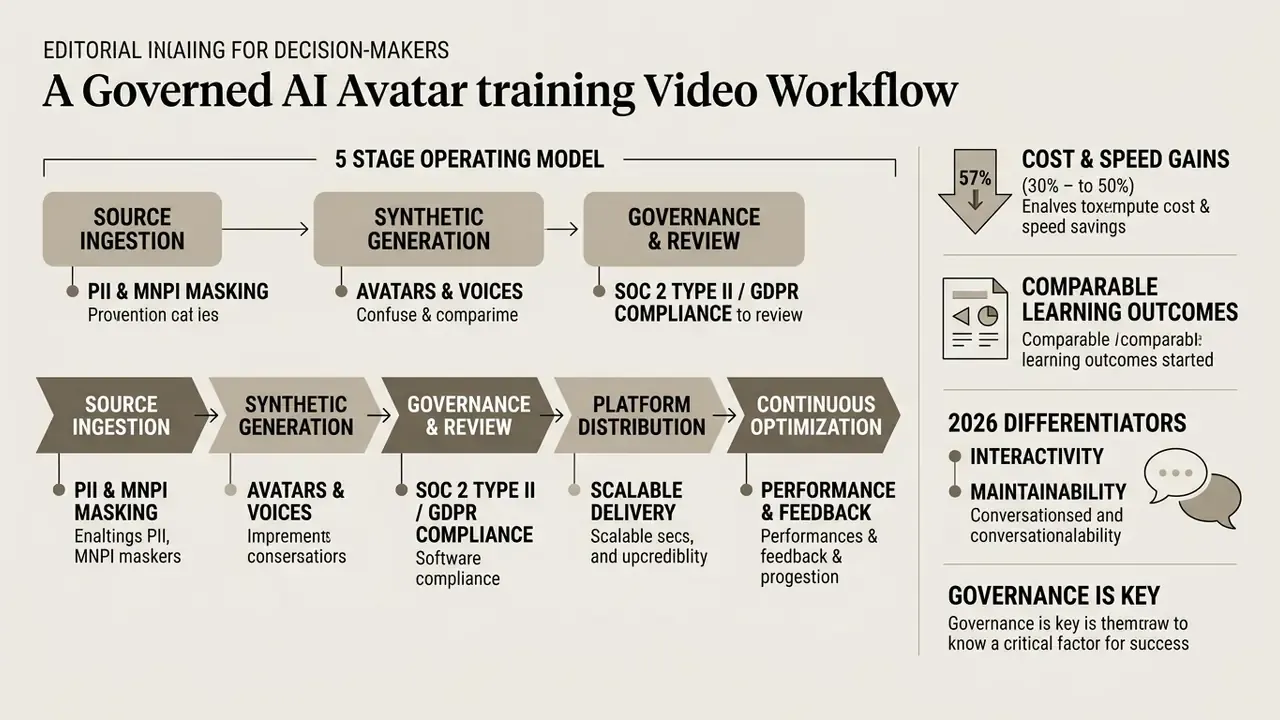
- The workflow is a five-stage operating model: source ingestion, synthetic generation, governance and quality review, platform distribution, continuous optimization. Every stage has an owner, an artifact, and an audit trail.
- Cost and speed gains are large but must be risk-adjusted: vendor and comparative data show 90 to 96% cost reduction and up to 98% faster turnaround per module. Internal SME hours, legal review, and model-risk validation still have to be added to any total cost of ownership (TCO) calculation before the numbers reach a steering committee.
- Learning outcomes are statistically comparable to human delivery: controlled studies (Netland et al., 2025; Winslow, 2024) found no significant difference in exam performance between AI-presented and human-presented instruction when script quality and instructional design were held constant.
- 2026 differentiators are interactivity and maintainability: "Chat with Video" conversational layers, in-app live assistants, layered slide editing without full re-rendering, and scene-level regeneration for compliance updates.
- Governance is the gating factor, not creativity: PII and MNPI masking at ingestion, SOC 2 Type II and GDPR DPA vendor evidence, zero-training clauses, synthetic media disclosure, and retained prompt-to-sign-off logs decide whether a pilot ever scales.
Who Owns What: A One-Page Ownership Map
Before the tactics, one governance question. Who signs?
Most stalled pilots we see described in the market are not blocked by rendering quality. They stall because ownership was never written down, so the compliance team refuses to approve content it did not commission. The map below is a starting hypothesis, to be adapted to your own three-lines-of-defence model.
| Workflow stage | Primary owner | Artifact produced | Typical failure mode |
|---|---|---|---|
| Source ingestion | L&D content owner plus data protection lead | Redacted source pack, DLP scan record | Live client data pasted into a public tenant |
| Synthetic generation | AI video producer | Script version, avatar and voice IDs, render log | Untracked prompt edits, no version history |
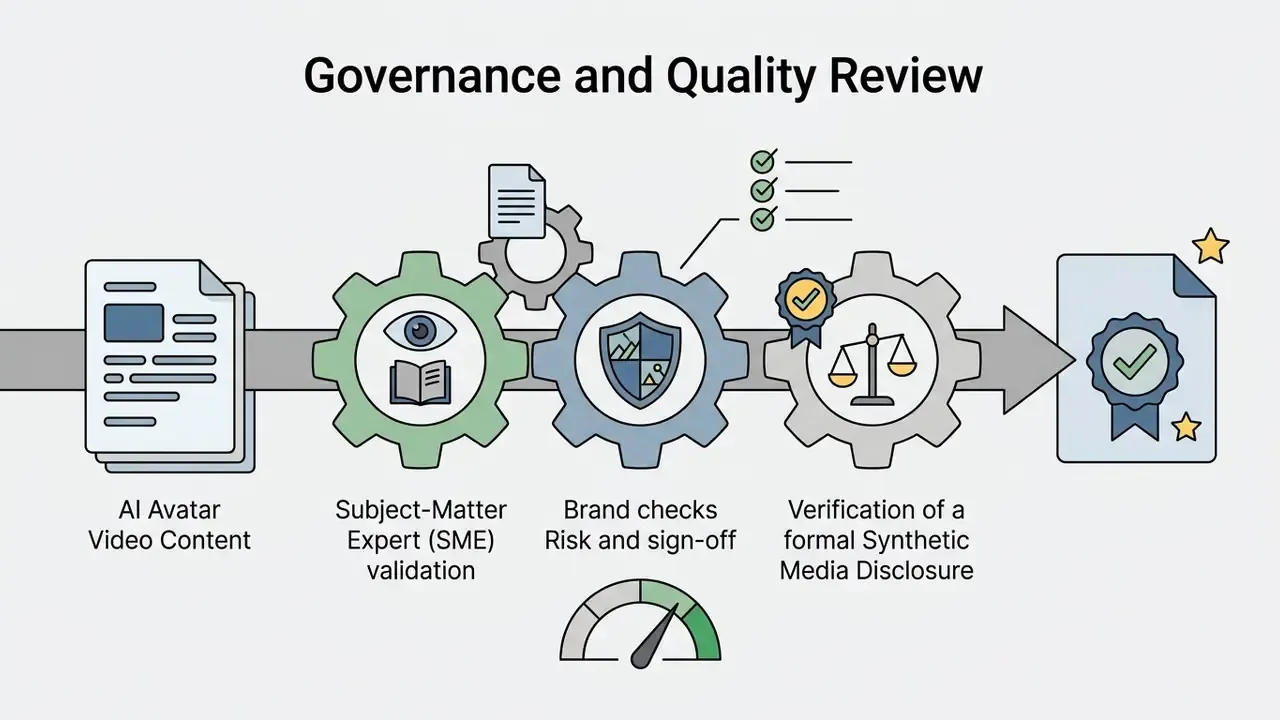
| Governance review | SME, compliance, risk | Named sign-off with date, disclosure check | Verbal approval, nothing retained |
| Distribution | LMS administrator | SCORM or xAPI package, access matrix | Modules published outside role-based access |
| Optimization | L&D analytics owner | Engagement report, change log | Content drifts from the current policy version |
Keep this table in the pilot charter. It answers three of the four questions an AI governance committee always asks: who owned it, what was produced, and what could go wrong.
What an AI Avatar Training Video Workflow Includes
An AI avatar training video workflow is a structured operating model comprising script composition, speech synthesis, scene rendering, governance review, and platform publishing. Traditional production cycles depend on physical recording sessions. This digital pipeline ingests raw text, slide decks, or system manuals instead, and generates avatar-led instructional modules from them.
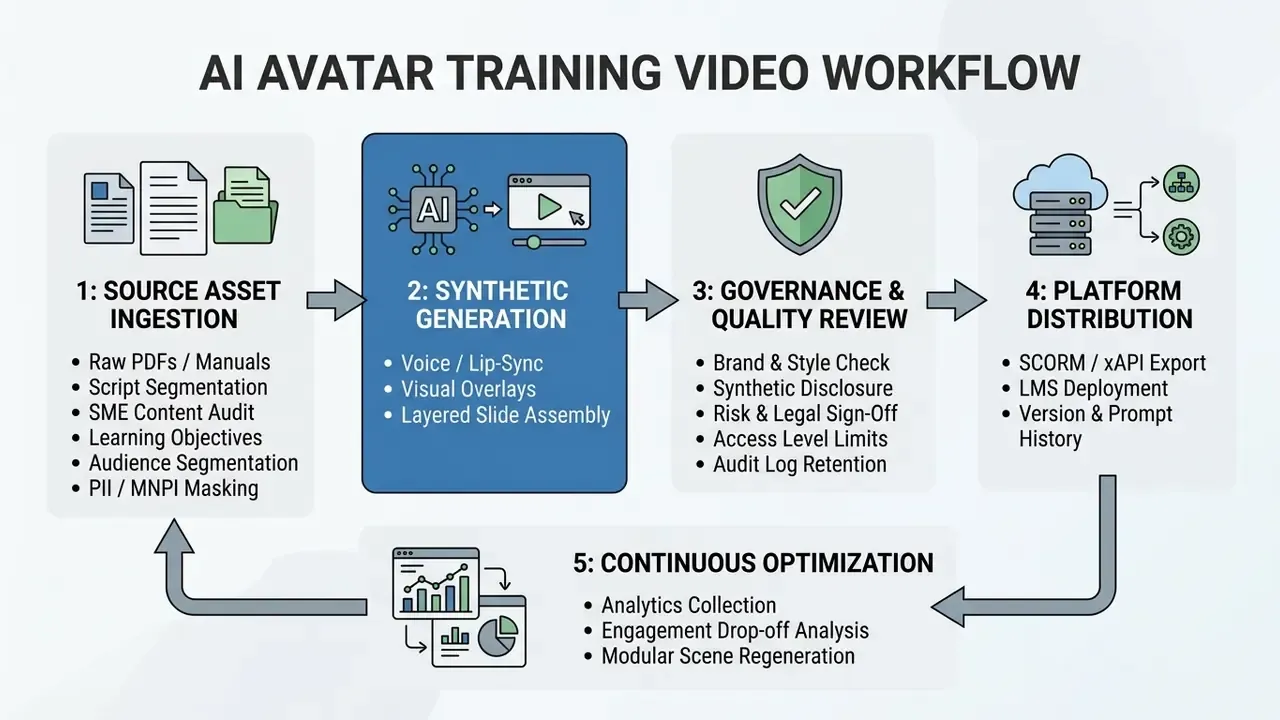
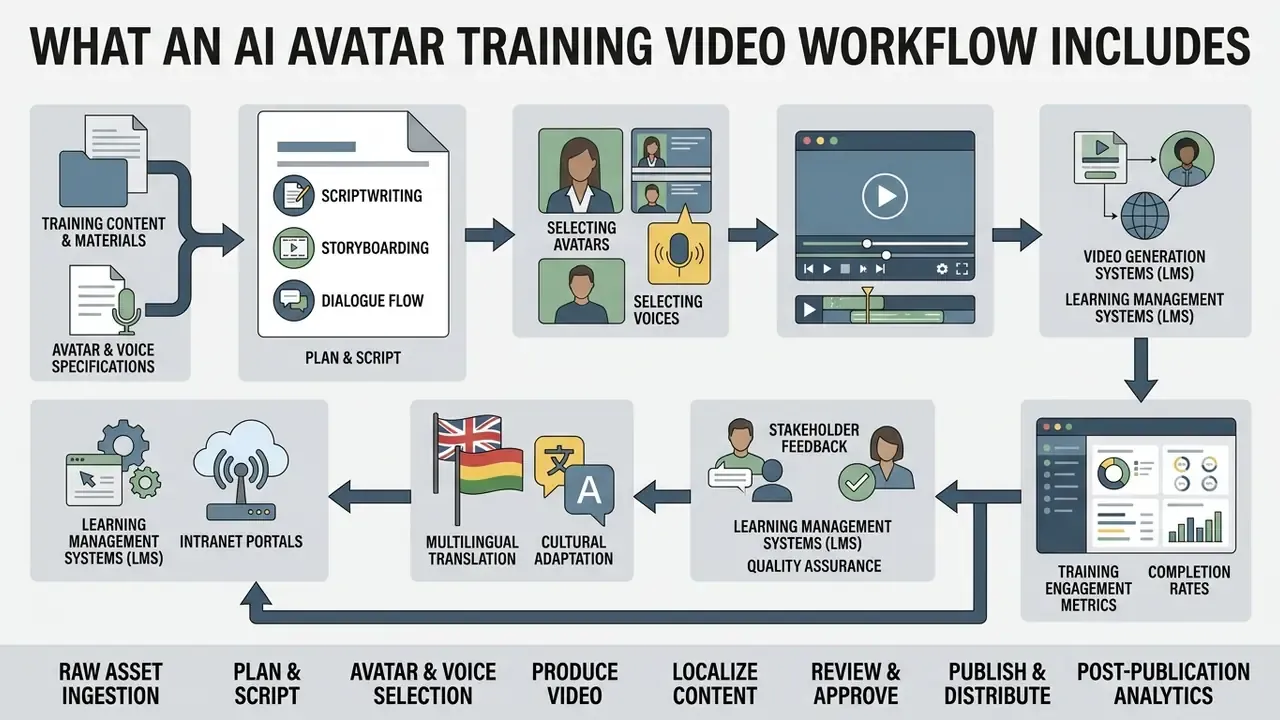
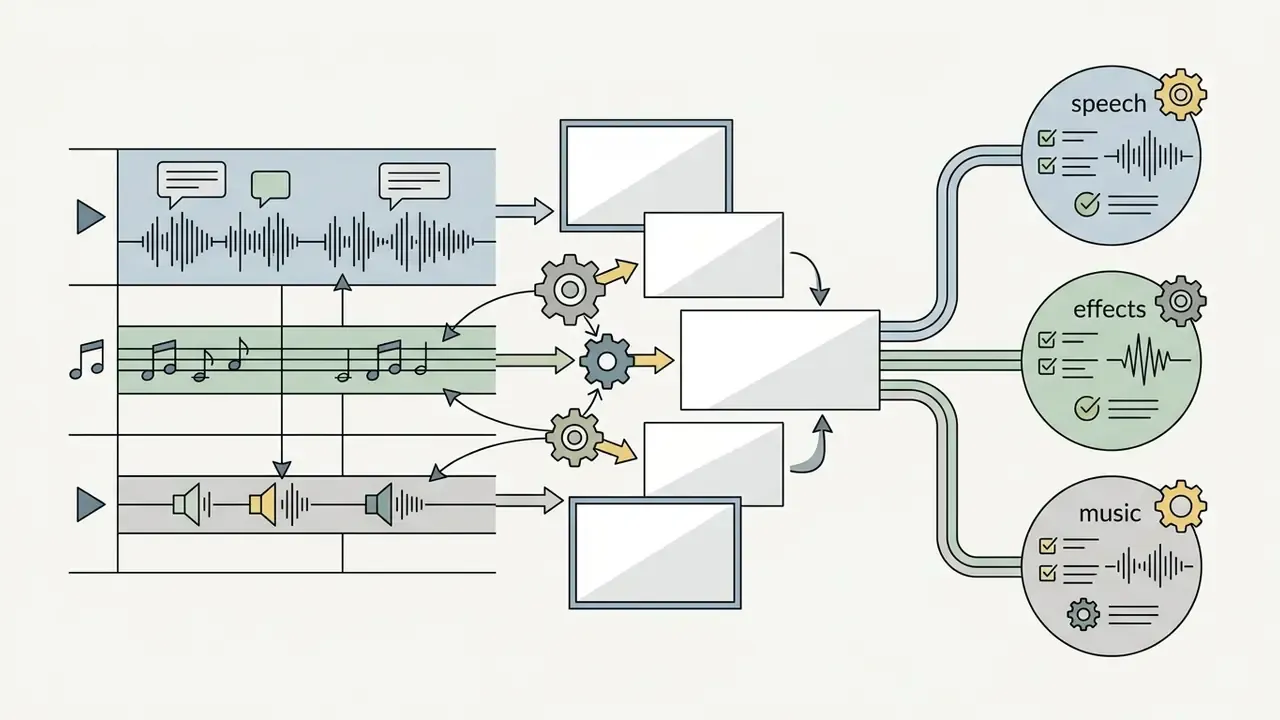
The architecture consists of five sequential operational steps:
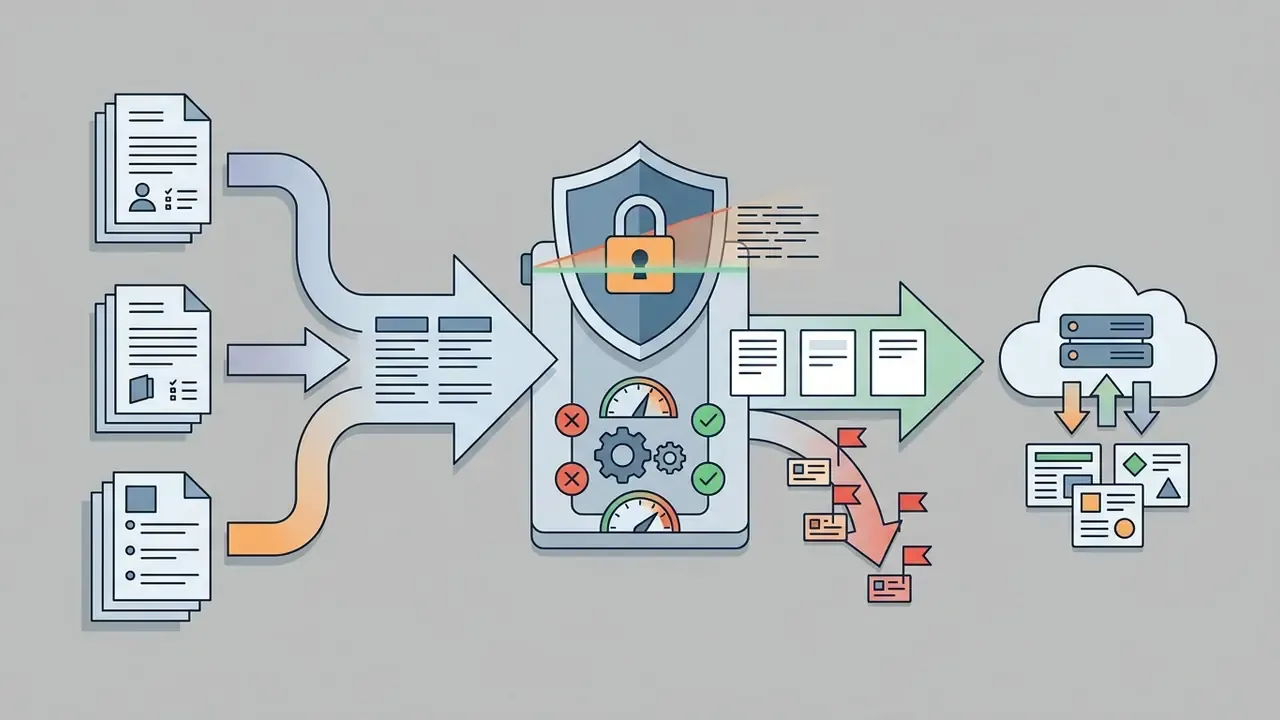
CUST-000123), blurring or re-shooting UI screenshots inside a sandbox populated with dummy data, and routing any document above an internal confidentiality tier through an on-premise or private-tenant rendering pipeline only. Record the redaction decision in the ingestion ticket so auditors can reconstruct exactly what left the perimeter.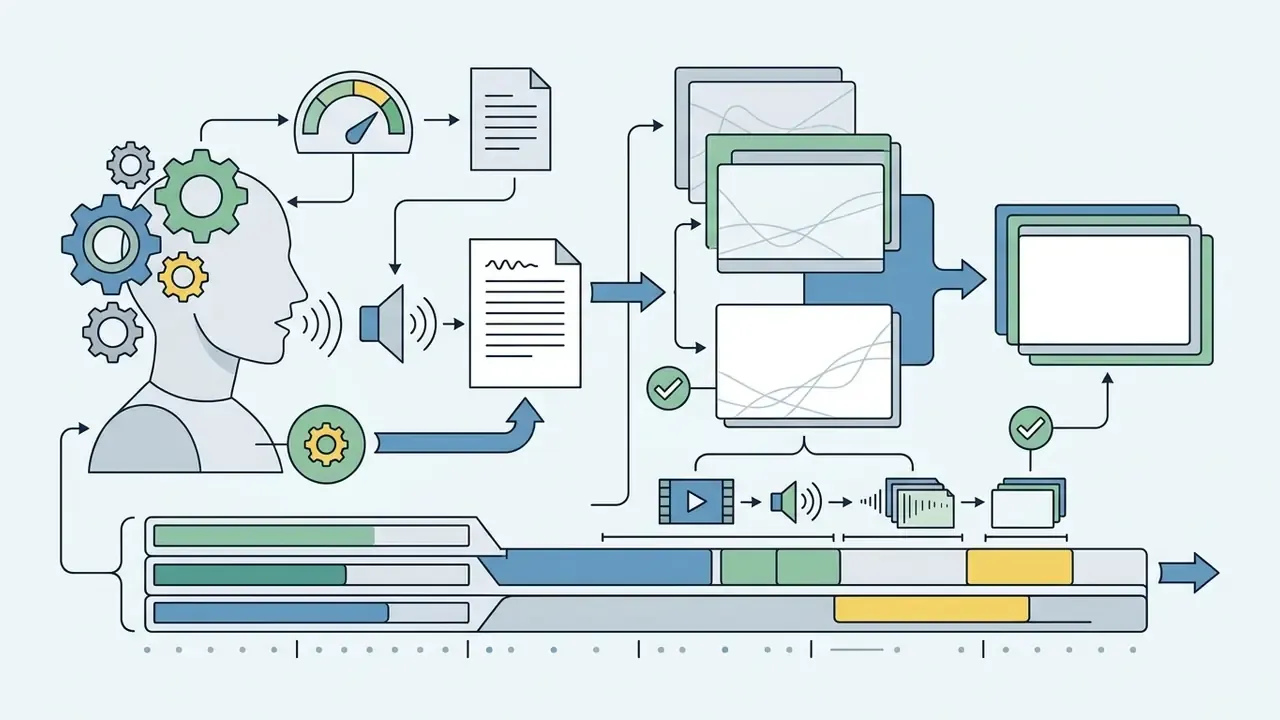

Where AI Avatars Fit in Corporate Training
AI avatars work best as scalable presenter layers for routine, high-frequency, highly standardized corporate training. Enterprise L&D operations deploy digital presenters across five primary domains:
- Employee Onboarding welcome modules, corporate history, organizational structure orientation.
- Regulatory Compliance anti-money laundering (AML), Know Your Customer (KYC), and cybersecurity policy updates.
- Technical Training system navigation walkthroughs, manufacturing work instructions, software operational procedures.
- Sales Enablement and Interactive Role-Play product launch overviews, pitch structures, competitive positioning updates, and AI-driven role-play simulations. Trainees practise objection handling against a conversational AI avatar persona, record their own sessions, receive timestamped automated feedback on tone, pacing, and factual accuracy, then compare their attempt against a benchmark recording from a top performer. Because the counterpart is synthetic, a rep can run the same difficult-buyer scenario ten times without booking a manager's calendar.
- Internal Communications executive policy announcements, change-management notices, cross-departmental operational updates.
Organizations usually split delivery formats into presenter-led videos for cultural or policy orientation and screen-based tutorials for software operations. Teams evaluating the underlying technology stack can start with an overview of text-to-video AI tools before committing to a pipeline. Presenter-led formats use medium-shot avatars to establish visual authority. Screen-based tutorials place the avatar in a picture-in-picture window to guide software navigation.
When AI Video Improves the Training Process
Synthetic video workflows compress production timelines and reduce cost while preserving knowledge transfer. A 2025 study in management education by Netland et al. showed that AI-generated teaching videos achieved exam scores statistically equivalent to human-recorded videos across 1,788 video treatments (p > .05). Participants rated the human-recorded versions as slightly more enjoyable. Exam results, though, showed no significant difference between the two delivery formats.
«AI-generated teaching videos produced exam scores statistically equivalent to human-recorded videos across 1,788 video treatments.»
| Metric / Parameter | Traditional Studio Production | AI Avatar Video Workflow | Performance Delta |
|---|---|---|---|
| Production Time (1-Min Video) | 13 Days (Average) | 27 Minutes | ~98% Reduction |
| Average Cost per Module | $5,000 to $10,000 | $200 to $500 | 90 to 96% Cost Savings |
| Script Update Friction | Full Reshoot Required | Text Edit and Scene Render | Hours vs. Weeks |
| Multilingual Scaling | Separate Actors and Studios | Single-Click Voice Dubbing | Instant Global Reach |
| Governance Overhead | Embedded in agency retainer | Internal SME, risk, and legal hours | Must be added to TCO |
«Achievement scores showed no statistically significant difference (p = .78, d = -0.064); 72% of learners did not recognize the synthetic instructor.»
Plan Learning Content Before Video Creation
Effective video training requires rigorous pedagogical structuring before any avatar is generated. Raw corporate manuals cannot be pasted straight into a voice synthesizer. Do that, and you get cognitive overload with perfect lip-sync.
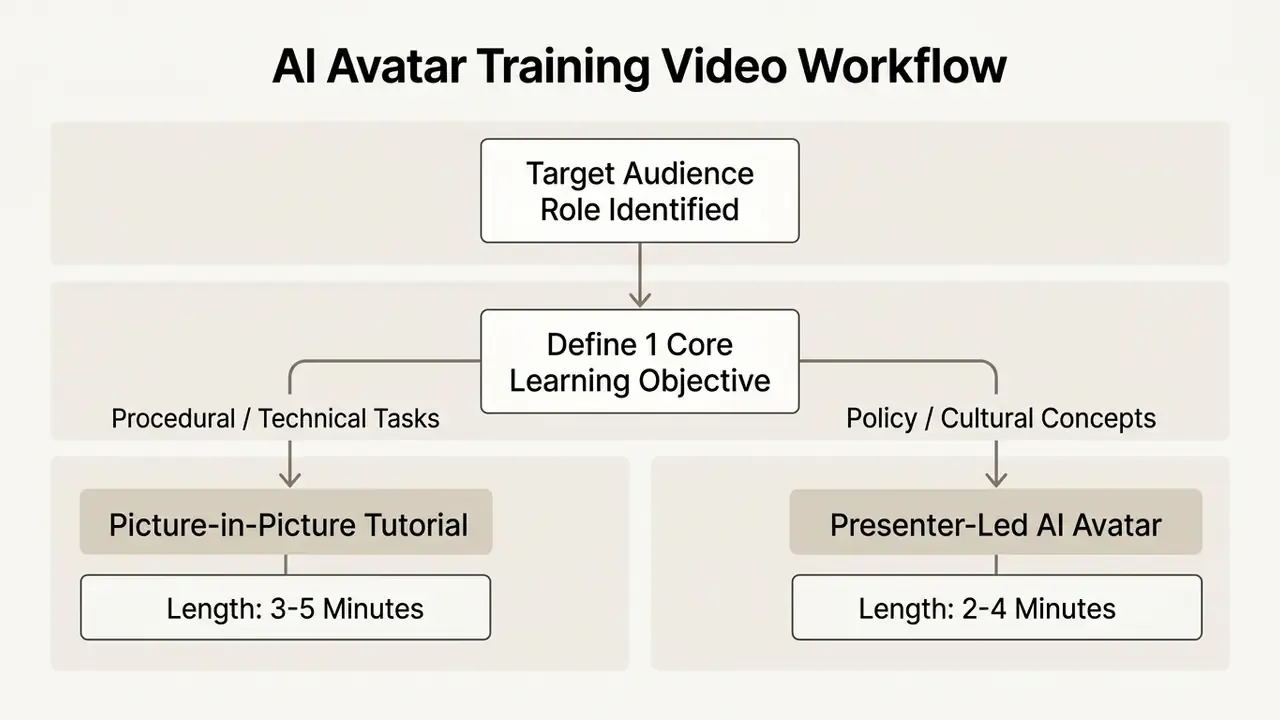
Define the Learner, Outcome, and Video Format
Instructional designers segment target audiences by operational role and map specific learning objectives to concrete video durations. Microlearning data compiled from Wistia and TechSmith completion benchmarks shows that videos under two minutes hold 85 to 90% completion, modules under five minutes typically land in the 75 to 90% band, and completion collapses below 30% once a video passes twenty minutes.
«Videos under two minutes reach 85 to 90% completion; videos longer than twenty minutes fall below 30%.»
Format selection follows the instructional outcome you need:
- Linear Microlearning: short 3 to 5 minute modules built around a single procedural action.
- Interactive Tutorials: branching video pathways with embedded knowledge checks for complex decision-making.
- Presenter-Led Briefings: focused 2 to 4 minute executive overviews that establish policy intent.
- Interactive Conversational AI and Live Assistants: avatar-led modules paired with a real-time question-and-answer layer, or embedded directly into the software being taught.
A meta-analysis of ten controlled studies (n = 743) found that microlearning outperformed traditional lecture delivery with a standardized mean difference of 1.43 (95% CI: 1.27 to 1.59). That is the argument for segmenting long policy documents rather than re-recording them verbatim.
«Microlearning outperformed traditional lectures with a standardized mean difference of 1.43 (95% CI: 1.27 to 1.59).»
Segmentation should be paired with spacing. A meta-analysis of 87 studies across corporate, educational, and clinical settings found that spaced practice improves long-term retention by 20 to 30%. That is the empirical case for releasing an AI-generated series as scheduled modules instead of one continuous course.
«Spaced practice improves long-term retention by 20 to 30% across corporate, educational, and clinical contexts.»
Industry benchmarking points the same way. LinkedIn Learning's 2024 Workplace Learning Report puts the average completion rate of AI avatar training videos at 78%, comfortably above the long-form recorded-webinar baseline.
Next-Gen Interactive Format: Chat with Video and In-App Assistants
Modern L&D workflows in 2026 reach past linear MP4 playback. Leading teams integrate real-time "Chat with Video" layers and in-app live assistants. Instead of rigid branching logic, synthetic avatars paired with conversational LLMs let a learner pause at any timestamp and ask an open question by voice or text, for example "why does this control apply to omnibus accounts?", and get an answer grounded in the underlying SOP or knowledge base. In enterprise software adoption, avatars are also embedded straight into application sidebars as live guides. They explain complex fields in real time, welcome first-time users, or narrate a single walkthrough step at the exact moment the user needs it.
| Feature | Traditional Branching Scenarios | Next-Gen "Chat with Video" AI |
|---|---|---|
| Path Flexibility | Pre-scripted, rigid decision trees | Unlimited, contextual Q&A |
| Learner Role | Passive clicker choosing Option A/B | Active conversational inquirer |
| Maintenance | High (re-map every decision branch) | Low (LLM queries underlying KB/SOP) |
| Analytics Signal | Which branch was clicked | Which concepts learners actually ask about |
One caution. Conversational layers must inherit the same governance as the video itself: the retrieval corpus is restricted to approved, versioned source documents, answers are logged, and out-of-scope questions are routed to a human channel rather than improvised by the model. An unlogged assistant answering AML questions is a control gap, not a feature.
Turn Existing Materials into Structured Lessons
Converting dense technical documentation into structured lessons means extracting core tasks from the administrative text wrapped around them. In one illustrative trade reconciliation deployment, an L&D unit turned a 90-page operational manual into fifteen 3-minute video lessons.
Instructional designers pull out procedural steps, rewrite passive legal phrasing as active instructional speech, and pair each step with a visual proof point. Formatting source material into Markdown headers also helps: natural language processing (NLP) ingest engines parse document hierarchies far more accurately during automated script generation.
A repeatable ingestion recipe for heavy documentation:
Modern document-to-video platforms accept PDF, PowerPoint, and Word input directly and auto-generate an outline, scene list, and draft narration. Which is precisely why steps 1 through 5 determine the quality of everything downstream. Garbage in, confidently narrated garbage out.
- Normalize the file.Strip boilerplate headers, footers, and revision tables. Run OCR on scanned PDFs. Extract tables separately so numeric thresholds are not fused into narrative sentences.
- Convert to Markdown and split by heading level.Splitting on H1, H2, and H3 while carrying a breadcrumb path ("AML Policy > High-Risk Accounts > Escalation") preserves document structure through generation.
- Choose chunking by content type.Section-based chunking for structured procedures, fixed-size chunks with overlap for dense policy language, semantic chunking for narrative background.
- Attach metadata.Source document, owner, audience, jurisdiction, effective date, and last-reviewed date travel with every chunk, so any resulting scene traces back to an authoritative paragraph.
- Replace screenshots with sandbox captures.Any UI image containing real client or transaction data is re-captured in a test environment before it touches the video timeline.
Write a Script and Storyboard for an Engaging Training Video
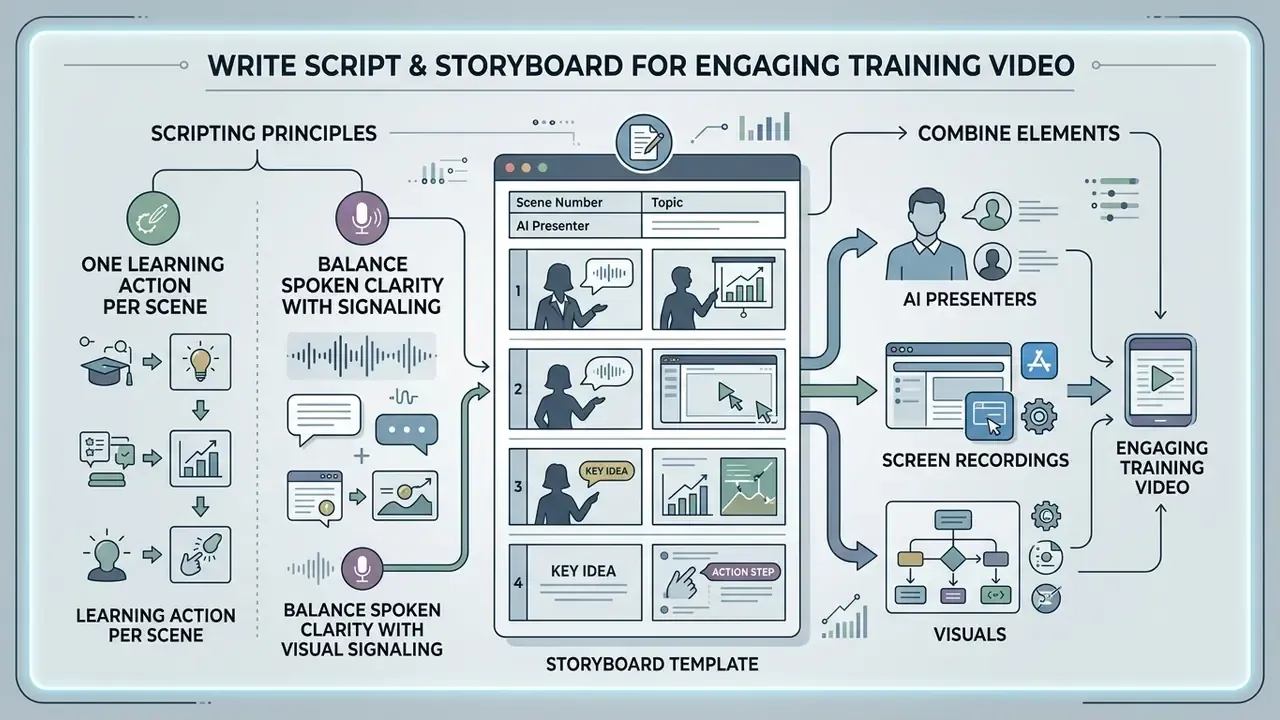
A training video script has to balance spoken clarity with explicit visual signaling if you want learners to stay with it.
Structure the Script Around One Learning Action per Scene
Each scene should carry exactly one learning action. Following Mayer's Multimedia Learning principles, simultaneous competing visual and auditory cues exhaust working memory capacity. A study of micro-video delivery in a database course (n = 27) recorded a normalized N-gain of 0.59, with mean scores rising from 44.97 to 81.09 (p = 0.000). Direct empirical support for short, single-action scenes over continuous lecture capture.
«Micro-video delivery produced a normalized N-gain of 0.59, with mean scores rising from 44.97 to 81.09 (p = 0.000).»
Scripts should hold a conversational tempo of 130 to 150 spoken words per minute. A five-minute narrated training video therefore contains no more than 750 spoken words. Short sentences averaging 10 to 18 words prevent monotone voice synthesis and keep lip-sync alignment natural. Write the script frame by frame, one idea per frame, and mark intended emphasis, pauses, and phonetic overrides for domain terminology inside the script itself rather than patching them in post-production. Fixing pronunciation of "beneficial owner" once in the script beats fixing it in eleven renders.
Combine AI Presenters with Screen Recordings and Visuals
Pairing an AI avatar with dynamic visual overlays beats static talking-head footage on retention. Multi-country research conducted by TechSmith in 2024 found that picture-in-picture avatar formats achieved average comprehension quiz scores of 76%, against 66% for formats without a visible presenter face.
A randomized 2x2 study with more than 250 professionals reinforced the point: over half of participants failed to identify the presenter as synthetic, and knowledge transfer, perceived effectiveness, and brand impression showed no statistically significant differences between synthetic and human speakers.
«More than half of participants did not detect the synthetic speaker; knowledge transfer, perceived effectiveness, and brand impression did not differ significantly.»
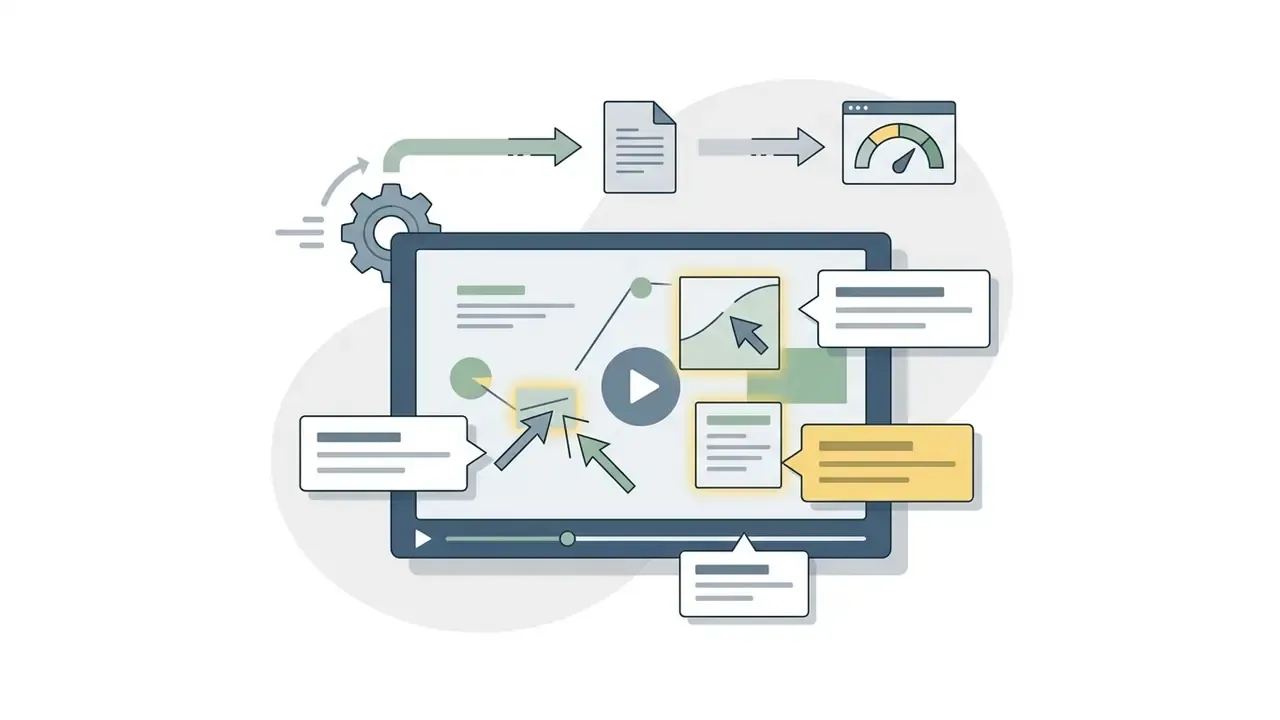
The dominant production pattern is hybrid: a picture-in-picture avatar for the hook and the outro, a full-screen screen recording for the core walkthrough, and motion-graphic callouts (arrows, zoom boxes, step numbers) for actions and non-UI concepts. Overlays must never obscure the interface element being taught, and never interfere with assistive technology.
Storyboard template (copy and adapt for your own modules):
| Scene # | Learning Objective | Spoken Script (Narration) | Avatar Positioning | Screen / Visual Layer | Interactive Element |
|---|---|---|---|---|---|
| 01 | Introduce AML verification steps. | "This module covers the three required checks for high-risk accounts." | Center Frame (Medium Shot) | Title Card and Compliance Badge | None |
| 02 | Demonstrate database query execution. | "First, enter the customer ID into the verification search bar." | Picture-in-Picture (Bottom-Right) | Full-Screen Application UI (sandbox data) | Highlighted Click Callout |
| 03 | Identify discrepancy red flags. | "If the risk score exceeds 75, escalate the file immediately." | Picture-in-Picture (Bottom-Right) | Split Screen: UI and Escalation Matrix | Multiple-Choice Knowledge Check |
| 04 | Summarize escalation path. | "You are now ready to process high-risk verification queues." | Center Frame (Close-Up Shot) | Summary Checklist and Resource Link | Final Module Quiz |
| 05 | Resolve residual learner questions. | "Ask me anything about escalation thresholds before you continue." | Center Frame (Medium Shot) | Chat panel over static summary slide | Chat with Video Q&A (KB-grounded) |
Add a sixth column in your working copy: review status, with the SME name and date. That single field converts a storyboard into an audit artifact.
Choose the Right AI Avatar, Voice, and Video Tool
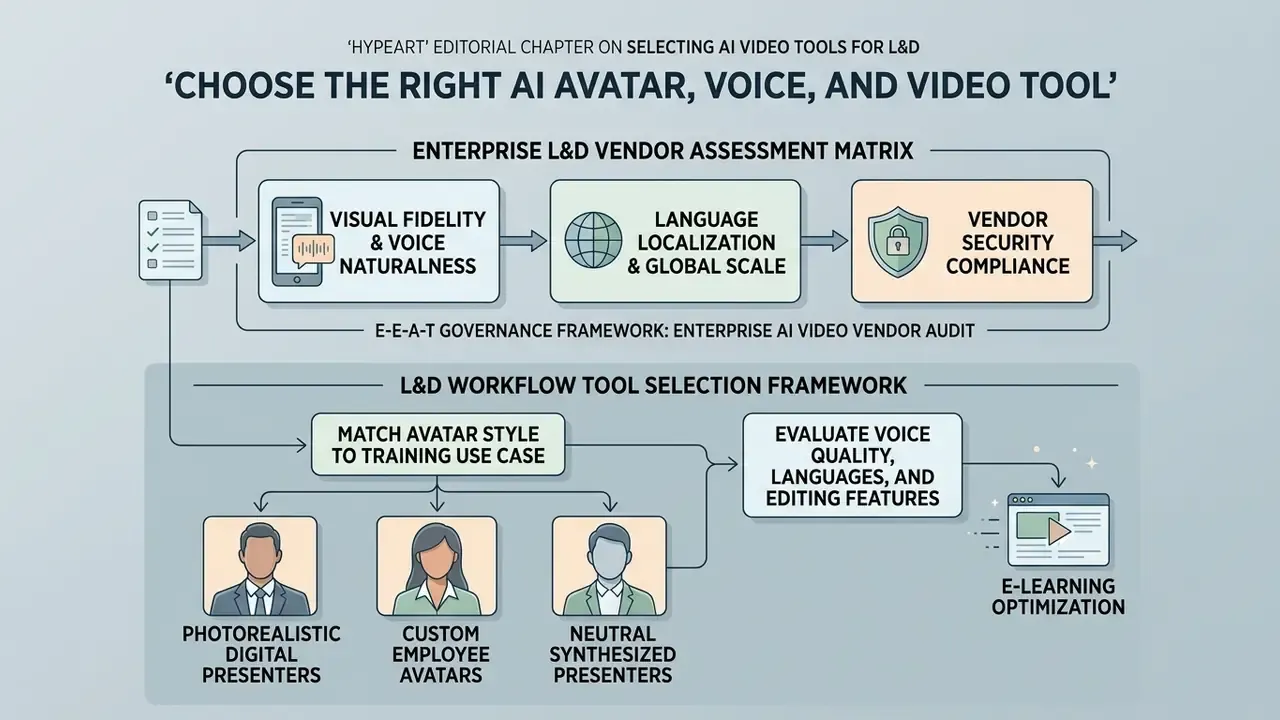
Selecting an enterprise-grade AI video platform means evaluating visual fidelity, voice synthesis naturalness, language localization, and vendor security compliance. Teams new to the category can begin with a primer on AI video generators before scoring specific vendors. Enterprise teams assessing the market should also review Enterprise-Ready AI Media Alternatives to confirm that candidate systems support the API integrations and data-protection standards you actually need.
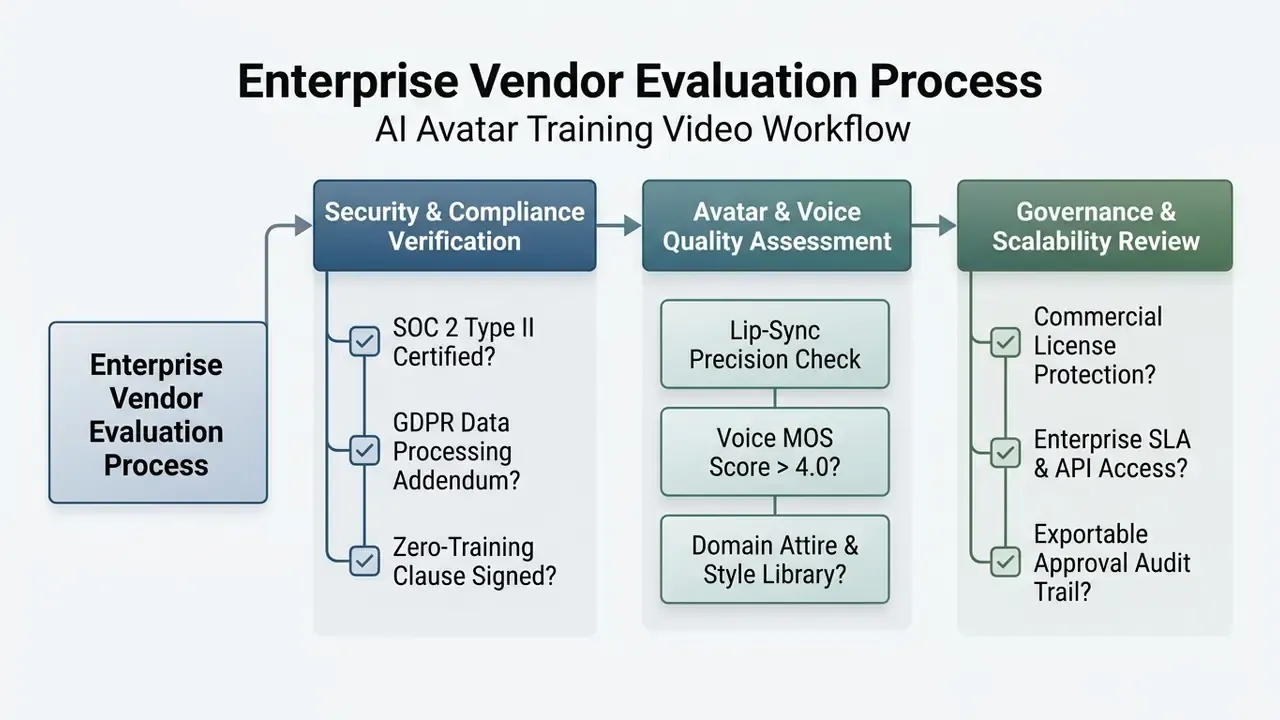
In regulated environments, security screening comes first. Run the vendor assessment matrix below as a hard filter, and only then argue about avatar appearance, voice, and editing ergonomics. Yes, that order feels backwards to the creative team. It saves months.
Enterprise L&D Vendor Assessment Matrix
E-E-A-T governance framework: enterprise AI video vendor audit
- SECURITY & COMPLIANCE [ ] SOC 2 Type II certification valid for active media rendering pipeline. [ ] Signed GDPR Data Processing Addendum (DPA) with defined data residency. [ ] Explicit contractual clause guaranteeing zero customer data usage for LLM/TTS model training. [ ] Documented retention and deletion terms for uploaded source documents and rendered assets. [ ] Cross-border transfer mechanism identified and approved by privacy counsel.
- LICENSING & ETHICAL AI [ ] Full commercial usage rights granted for generated voice models and synthetic actors. [ ] Documented actor consent protocols and likeness compensation policies. [ ] Integrated synthetic media disclosure and digital watermarking capabilities. [ ] Written vendor AI development/use policy plus regulatory monitoring commitment.
- OPERATIONAL RELIABILITY [ ] Enterprise Service Level Agreement (SLA) promising >= 99.9% rendering uptime. [ ] Role-based access control (RBAC) supporting multi-tier L&D approval workflows. [ ] API support for automated SCORM/xAPI packaging and LMS integration. [ ] Incident response, business continuity, and disaster recovery commitments in writing.
- MODEL RISK & AUDITABILITY [ ] Exportable version history: prompt, script revision, approver identity, timestamp. [ ] Ability to retain generation logs for the institution's audit period (commonly 5-7 years in banking). [ ] Human-in-the-loop controls consistent with internal model risk management standards (for example, principles in the spirit of SR 11-7 / OCC 2011-12 applied to generative content).
Regulatory note: the checklist above is general guidance. It does not replace consultation with your information security team or legal counsel when assessing GDPR, SOC 2, or sector-specific obligations. Cost, retention, and compliance assumptions should be validated on a controlled internal pilot.
L&D Workflow Tool Selection Framework
Choosing an AI avatar engine depends on your core instructional format and asset pipeline, not on feature count. The matrix below maps the four dominant architectures on the market to the L&D job each one genuinely does best:
| Training Use Case | Dominant Tool Architecture | Core Selection Criteria | Market Benchmark Examples |
|---|---|---|---|
| Regulatory and Corporate Compliance | Template-Based Standard Engines | Strict brand control, large avatar library, multi-seat governance, standardized output | Synthesia |
| Software Walkthroughs and Technical SOPs | Document-Driven Automation Platforms | Direct PPT/PDF/Word ingestion, layered timeline editing, screen-recording overlays | Leadde, ClickLearn |
| Soft Skills, Sales, and Role-Playing | Dialogue and Multi-Avatar Engines | Interactive conversational trees, multi-speaker scenes, timestamped trainee feedback | Colossyan, VEED |
| Rapid Executive and Communication Clips | High-Speed Express Generators | Avatar and voice cloning, eye-contact correction, mobile-first rendering, fast turnaround | HeyGen |
Two decision rules matter more than any feature list: do you need interactivity or just video, and how often will this content change. Teams that select on workflow fit report materially better ROI, because the recurring cost of a training library sits in updates, not in the first render. Where a shortlist already exists, cross-check candidates against a broader review of the best AI video generators to confirm that the pricing model matches your update frequency.
Reported capability ranges also differ by vendor and tier, so verify current numbers during procurement rather than trusting any blog table, including this one. Published vendor documentation spans roughly 119 to 175+ languages and dialects, while voice cloning is often supported on a narrower set, around 30 languages on some platforms. Discrepancies between marketing pages and technical docs usually reflect tier, product line, and publication date.
Match Avatar Style to the Training Use Case
Avatar selection should reflect organizational context and audience expectations:
- Photorealistic Digital Presenters suited to formal compliance, executive communications, and external partner certification.
- Custom Employee Avatars created via studio scans of internal trainers, to keep a familiar face across global offices.
- Neutral Synthesized Presenters minimalist digital characters for high-volume technical documentation and software walkthroughs.
Practical criteria drawn from applied e-learning practice: match the presenter to the audience and the subject's dress code (a CISO in a suit for board-level security policy, a team lead in a hoodie for developer tooling), maintain diversity across gender, age, and ethnicity in a course series, keep expressions friendly rather than theatrical, and use a real employee's likeness only with documented written consent. That last point is not optional in the EU or in most US employment contexts.
A rapid review of fifteen studies on AI-generated instructional video published in Frontiers in Computer Science highlights two recurring ethical requirements that belong in the selection criteria themselves: transparency of synthetic identity, and data protection.
«Transparency of synthetic identity and data protection emerge as core requirements for AI-generated instructional video platforms.»
Evaluate Voice Quality, Languages, and Editing Features
Speech synthesis should be assessed with Mean Opinion Score (MOS) metrics, where naturalness is rated on a 1 to 5 scale. Buyers who want a deeper primer on synthesis quality can review how AI voice generators are benchmarked before running listening tests. Enterprise platforms must offer:
- Multilingual Supportover 100 languages and regional accents, with consistent Voice Encoder Cosine Similarity (SECS) across translations.
- Granular SSML Controlpacing, pitch adjustment, and phonetic spelling overrides for industry terminology.
- Non-Destructive Script Editingthe ability to change text lines and re-render individual scenes without disturbing existing timeline assets.
- Emotion and Prosody Controlhuman-rated evidence that pitch, loudness, and rhythm shift appropriately for cautionary, instructional, and welcoming passages.
- Turnaround Latency for Text Editsno formal standard defines this, so measure it yourself. Time a one-sentence correction from edit to approved re-render during the pilot.
Technical constraints note: standard TTS engines often impose character batch limits, commonly around 5,000 characters per synthesis call. Align script segmentation with scene boundaries so automated batch rendering through an API never truncates a sentence mid-clause, and validate the first and last two seconds of every generated chunk during QC. Truncated audio is the single most common defect teams report on their first batch.
AI Avatar Training Video Workflow: Production Steps
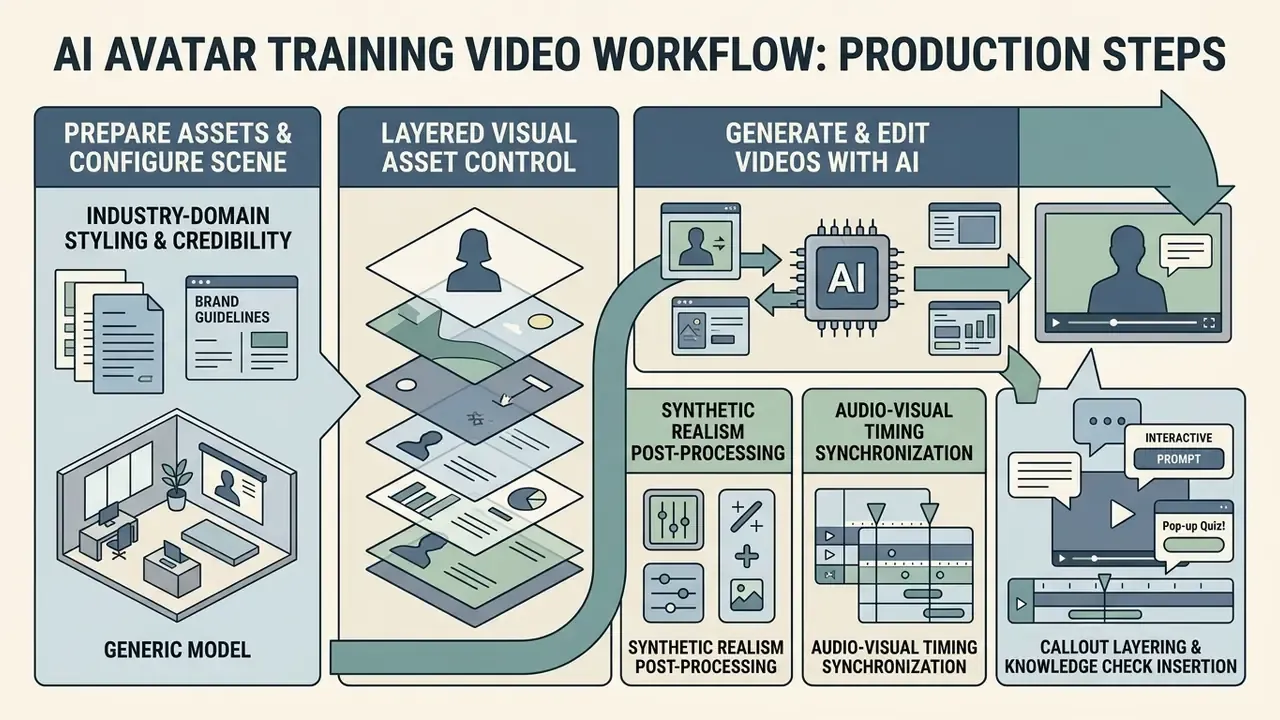
This is the tutorial part of the workflow. Production converts written scripts and visual assets into compiled video files through a controlled sequence of configuration, generation, and review tasks.
Prepare Assets and Configure the Video Scene
Production starts with uploading high-resolution visual assets into the video creation platform. L&D teams configure brand templates by setting primary color palettes, loading vector corporate logos, establishing title-safe margin boundaries, and uploading 1080p background footage. Check platform constraints before batch uploads: background stills commonly require PNG or JPG at 640x360 minimum, and background video is often limited to MP4 or MOV with H.264 or H.265 encoding, with a maximum duration around ten minutes.
Voice profiles are assigned per scene, and script text is pasted into scene segments. Designers position the avatar in frame so that lower-third graphics and screen-capture callouts never overlap the presenter's visual footprint. Three further configuration decisions separate a credible module from an obviously templated one:
- Industry-Domain Styling and Credibilityselect avatar attire that matches the workplace, whether that is medical scrubs, a pharma lab coat, construction safety gear, engineering field wear, business casual, or full corporate dress. Matching the dress code to the operational context measurably increases learner trust and message retention. It also avoids the jarring mismatch of a suited presenter narrating a shop-floor lockout and tagout procedure.
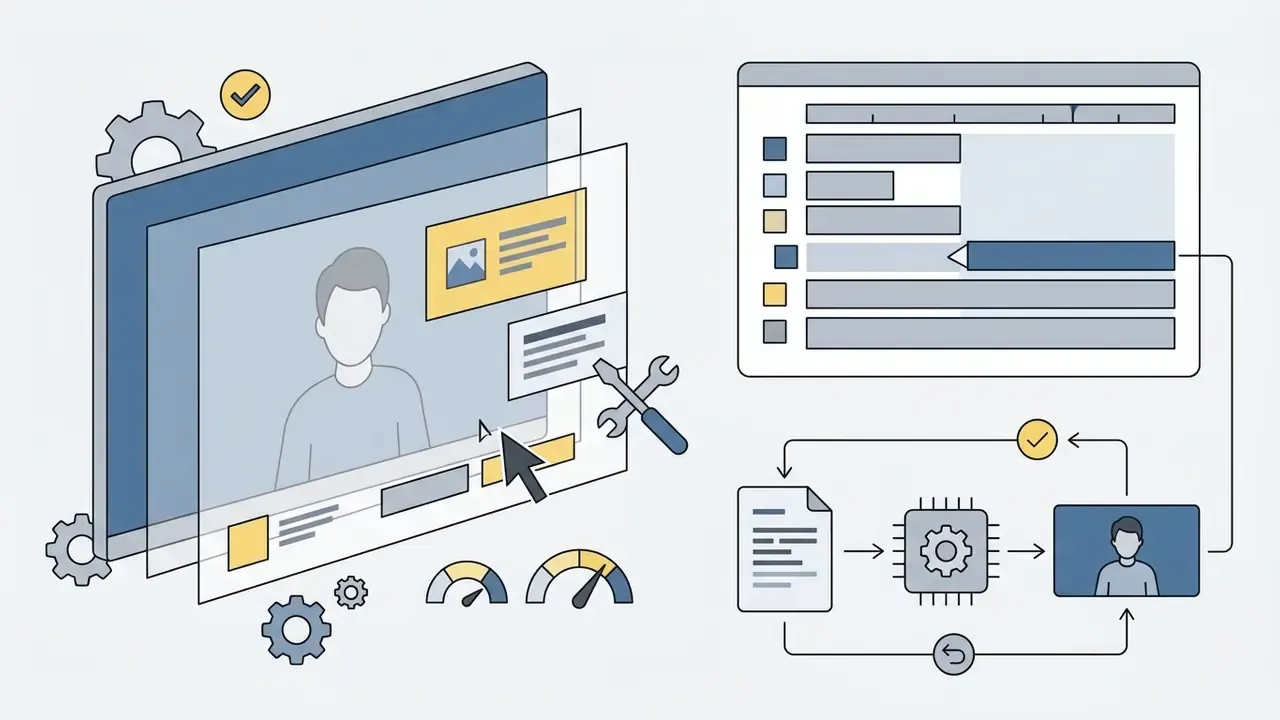
- Layered Visual Asset Controlmodern engines let designers manipulate individual slide layers, text boxes, icons, UI cutouts, diagrams, directly on the video timeline, instead of treating an imported slide as a flat image. When an operational step changes, designers update only the affected text or image layer without re-rendering the avatar or the audio track. That can save up to 80% in rendering credits and turns a "new version" into a five-minute edit. Reusable slide structures also enforce visual consistency across a long course series.
- Synthetic Realism Post-Processinguse advanced correction features where available. Eye-contact correction keeps the avatar's gaze on camera even when reading a secondary prompt; background noise suppression cleans cloned voice tracks; self-serve face and voice cloning lets a key internal SME lend authority to the message. Cloning must be gated by written consent and a documented likeness policy. No exceptions, and no verbal approvals.
Generate and Edit Videos with AI
During generation, text-to-speech engines synthesize the narration track while deep-learning models calculate lip-sync motion for the avatar model. Keeping the character description, framing, and voice profile constant across scenes preserves continuity when individual scenes are regenerated later.
After the initial render, producers execute precise timeline edits using standard video editing tools:
Review, Approve, Export, and Publish
Completed drafts go through multi-tier evaluation before LMS deployment:
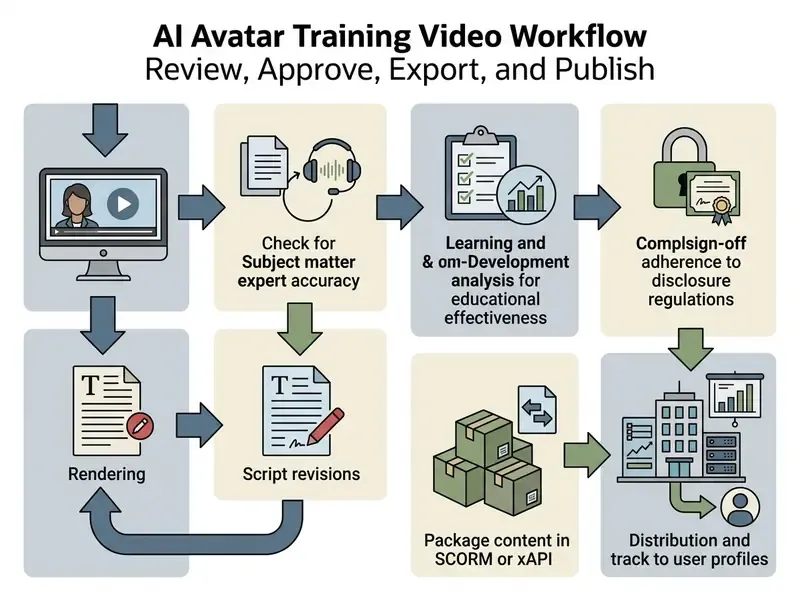
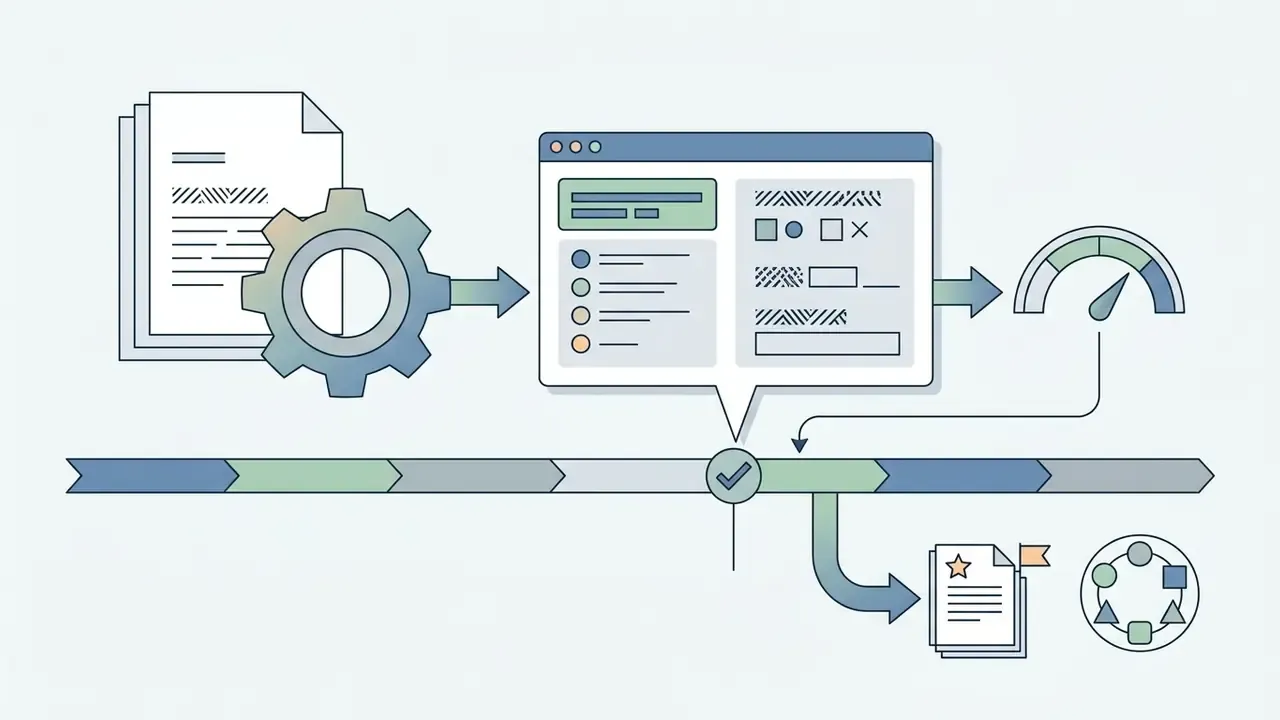
The review regime works best when it is mechanical rather than social. SMEs receive a time-coded review link, comment against specific timestamps, and are notified when comments are resolved. The L&D owner revises. The SME sign-off is recorded as a named approval with a date. Final assets are exported in SCORM 1.2, SCORM 2004, AICC, or xAPI (Tin Can) formats with a defined completion threshold, producing a .zip package for LMS upload and capturing granular completion, watch-time, and quiz-score analytics inside the enterprise LMS.
Audit trail requirement: retain the full chain, meaning source document version, generation prompt or ingestion job ID, script revision, avatar and voice IDs, SME signature, compliance approval, and publication timestamp, for the institution's audit retention period. That is commonly five to seven years in banking and insurance. This artifact set is exactly what an internal auditor or regulator will request when asking how a synthetic compliance module was validated.
Maintain Quality, Accessibility, and Brand Consistency at Scale
Scaling AI video production across an enterprise brings its own risks: brand fragmentation, visual monotony, and accessibility non-compliance.
Prevent Talking-Head Fatigue and Distracting Avatar Use
Continuous full-screen avatar presentation tires learners and dulls instructional effect. The failure mode learners report most often is not weak realism. It is monotonous delivery, no visual variation, and zero learner control. To keep engagement up:
- Limit full-screen avatar presence to module intros, structural transitions, and closing summaries.
- Shift the avatar to a secondary picture-in-picture window during software demonstrations.
- Cut away entirely to full-screen graphics, workflow diagrams, or UI captures when presenting dense operational data.
- Insert an interaction point, a knowledge check, a chat prompt, a "try it now" step, roughly every seven to nine minutes of continuous content, or at every segment boundary in a microlearning series.
- Vary prosody deliberately with SSML instead of accepting one flat delivery across an entire course.
Avoid the uncanny-valley trap by leaning on visual-first slides and shorter avatar screen time rather than chasing maximum photorealism. Clarity of content beats fidelity of face. Every time.
Create a Reusable Review Standard for L&D Teams
L&D organizations need unified quality standards across every production node. Before publishing, teams should verify compliance against a formal b2b trust checklist so operational standards stay consistent across departments and vendors.
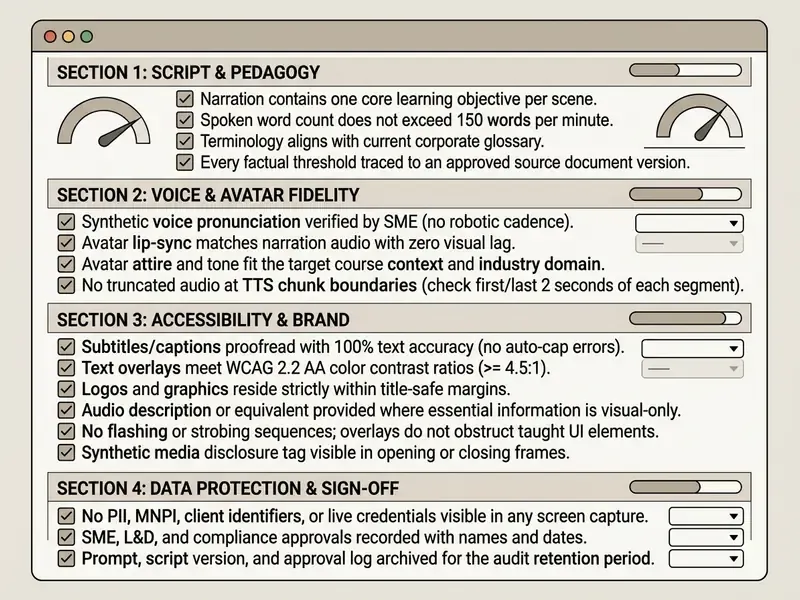
Keep the checklist printable and copyable, and store the completed version alongside the module. A checklist that lives only in someone's browser tab is not evidence.
Localize, Update, and Scale Training Videos for Global Teams
AI video workflows let global enterprises run multi-region training programmes without multiplying production budgets.
Adapt Voice and Language for Regional Audiences
Global deployments need scripts adapted for cultural and linguistic relevance, not word-for-word machine translation. Enterprise AI platforms synthesize localized voices that hold a consistent tone across more than 100 languages. Survey data indicates that organizations localize roughly 73% of their learning content, and 62% of respondents associate localization with higher learner satisfaction.
«Organizations localize about 73% of learning content; 62% link localization to higher learner satisfaction.»
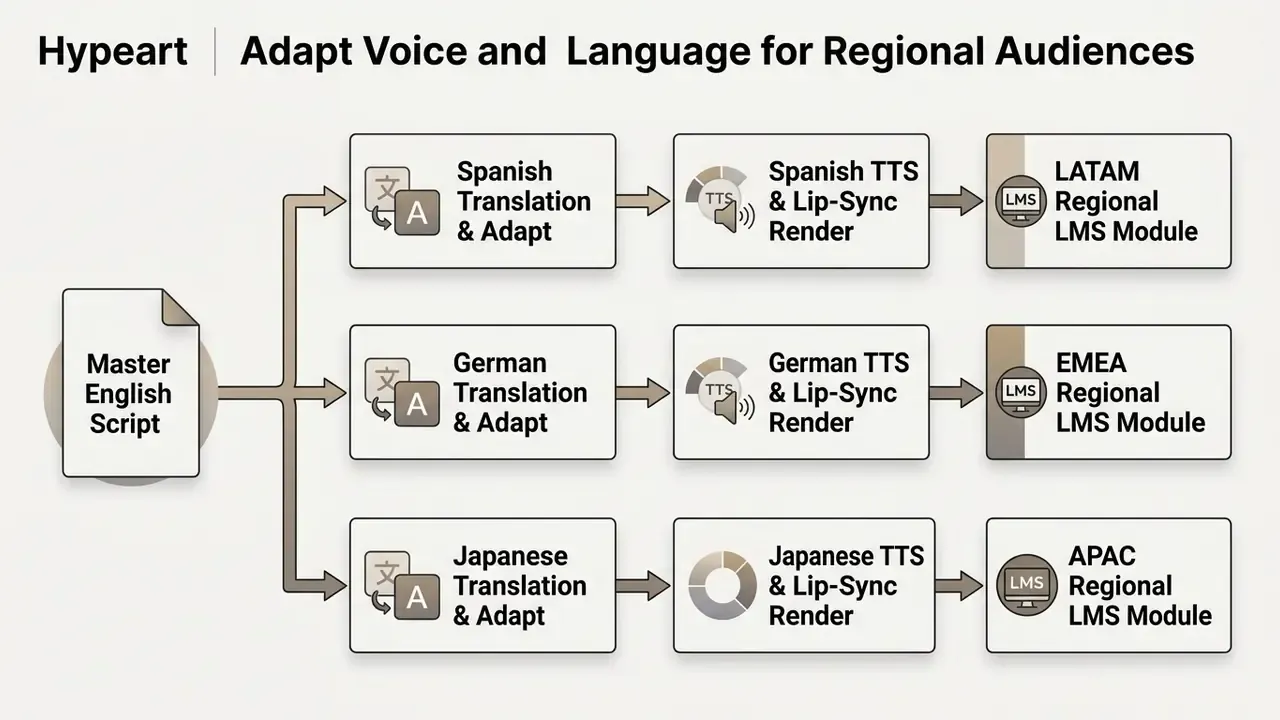
Localization workflows preserve visual character continuity by applying identical avatar models across language variants. The same avatar ID and voice profile family is reused per language, so international workforces experience uniform corporate branding and recognize "the same teacher" in every module of a series. The practical pipeline runs transcript, machine translation, per-speaker synthetic voice generation, lip-sync and timing adjustment, then human post-edit and QC by a native reviewer, with on-screen text and cultural references normalized to regional norms instead of translated literally. Keep translations of visual elements in separate accessibility text files rather than burning them into the frame. That is what makes a language variant updatable in hours rather than weeks.
Update Product and Compliance Content Without Reshoots
Regulatory shifts and software UI changes make traditional video libraries obsolete fast. AI workflows answer this with scene-level partial regeneration.
What to Do Next: 4-Step Pilot Implementation Plan
A defensible pilot answers three questions for an AI governance committee: what data left the perimeter, who approved the content, and what the risk-adjusted cost per published minute actually was. Open questions worth naming in the pilot report: how your model-risk function classifies a generative content pipeline, whether synthetic disclosure obligations shift under emerging state and EU rules, and how long learners tolerate avatar delivery before novelty fades. We do not have durable longitudinal evidence on that last one yet.
- Scope one low-risk, high-frequency module (Week 1).Pick a 3 to 5 minute software walkthrough or a policy refresher with no client data. Define one learning objective, the target role, and the baseline metrics you will compare against: historical completion rate, comprehension score, production hours. Teams testing the concept before procurement can prototype with free AI video generators inside a sandbox tenant.
- Clear the governance gate before the first render (Week 1 to 2).Run the vendor assessment matrix, sign the DPA and the zero-training clause, confirm DLP and redaction rules for ingestion, and pre-agree the approval chain: SME, then L&D, then compliance, then publication. Decide now which logs you retain, and for how long.
- Produce, review, and publish with full instrumentation (Week 3 to 4).Draft the script, generate the module on standard enterprise templates, insert one knowledge check and one conversational Q&A layer, then push it through the recorded approval chain and export a SCORM 2004 or xAPI package. Track every hour spent, by role.
- Report risk-adjusted results and decide on scale (Week 5 to 6).Compare completion, comprehension, and time-to-competence against the baseline. Publish the TCO including SME, compliance, and risk hours. Document the failure modes you hit, whether pronunciation, truncation, or overlay conflicts, and the controls that caught them. Only then extend to a second department, and prioritize content that changes often. That is where the update economics compound.
FAQ: AI Avatar Training Video Workflow Best Practices
Should L&D teams replace all human presenters with AI avatars?
No. AI avatars should handle high-volume, procedural, frequently updated material such as software walkthroughs, compliance updates, and operational onboarding. Human presenters stay essential for high-stakes leadership development, nuanced interpersonal coaching, sensitive HR cases, and executive messages where personal accountability and emotional connection carry the meaning. The practical rule: when identity, lived experience, or accountability drives how the message lands, use a human; when consistency, speed, and update frequency dominate, use an avatar. Hybrid formats, a human executive intro followed by avatar-led procedural modules, tend to outperform either extreme.
How do synthetic training videos impact knowledge retention compared to human-led courses?
Empirical research shows retention depends on instructional design, microlearning segmentation, and visual alignment rather than the presenter's organic status. Controlled trials find no statistically significant difference in exam performance between human and AI avatar delivery when script quality and pedagogical structure are held constant. Interactivity changes the experience even when scores match: a generative-lecture system produced comparable learning outcomes (p = 0.79) while reducing learner frustration and increasing engagement relative to linear video.
«Learning outcomes were comparable (p = 0.79), while learner frustration decreased and engagement increased versus linear video.» — Generative Lecture project, single-session experiment (2024 to 2025)
What team roles are required to operate an AI avatar video workflow?
This workflow replaces camera crews, lighting technicians, and video editors with three lean L&D roles, plus one governance role in regulated sectors:
- Instructional Designer or Scriptwriter: authors microlearning scripts and structures scene storyboards.
- AI Video Producer: configures avatar assets, aligns visual overlays, executes timeline generation.
- Subject-Matter Expert (SME): validates technical accuracy and signs off on compliance verification before publication.
- AI Governance or Compliance Owner: approves the vendor, enforces data-masking rules at ingestion, verifies synthetic media disclosure, and owns retention of the approval audit trail.
How should an organization start its first AI avatar training video pilot?
Start with a single high-frequency, low-risk module, for instance a 3-minute software feature walkthrough or a policy update. Draft a concise script, generate the video on standard enterprise templates, run it with a sample user group, and measure completion and comprehension against historical baselines before scaling to other departments. Follow the four-step plan above so the pilot produces a governance artifact, not just a video file.
How do we prevent confidential data from leaking into a generative video platform?
Treat ingestion as the control point. Apply DLP scanning to every uploaded document, redact PII, MNPI, account numbers, and credentials, re-capture all UI screenshots inside a sandbox filled with synthetic data, and restrict high-confidentiality material to private-tenant or on-premise rendering. Contractually, require a signed DPA, defined data residency, documented deletion terms, and an explicit clause stating that customer content is never used to train the vendor's LLM or TTS models. Log the redaction decision per asset.
Can content be updated without spending a full production budget again?
Yes, and this is where the economics of the workflow actually live. Scene-level regeneration and layer-level slide editing let you change a threshold, a screenshot, or a single sentence without re-rendering the avatar or audio for the rest of the module. Because credit-based pricing charges per render, choose a platform whose update path does not force full regeneration, and confirm that a language variant can be refreshed independently of the master.
What are the limits we should plan around?
Three practical ones. TTS synthesis calls commonly cap near 5,000 characters, so segment scripts on scene boundaries. Background video assets are often limited to roughly ten minutes in H.264 or H.265. And avatar realism degrades most visibly during long uninterrupted monologues, which is a design constraint rather than a defect. Long-form lectures, high-emotion communication, and live interactive workshops remain outside the sweet spot for synthetic presenters.
Disclaimer: this guide is general informational content for L&D, security, and governance practitioners. It does not constitute legal, compliance, or information-security advice. Vendor certifications, data-protection obligations, and cost outcomes must be verified with your own counsel, security team, and a controlled internal pilot before enterprise-wide deployment. Audience assumptions and benchmark figures should be treated as hypotheses until confirmed by your own analytics and interviews.