Why should a risk or compliance lead care about a photo text editor? Because screenshots travel. A single capture of an internal dashboard, pasted into a consumer web tool to fix one typo, becomes an external data transfer. The editing mechanics below are practical. The governance questions attached to them are not optional.
Key Takeaways in 30 Seconds
- Two different operations, two different engines. Adding text creates a non-destructive vector layer. Editing embedded text requires OCR detection, inpainting of the original pixels, and synthesis of replacement glyphs.
- AI beats overlays on raster text. Canva-style overlays cannot remove baked-in characters. Photoshop can, but demands manual cloning, font identification, and perspective correction. Neural inpainting automates all three.
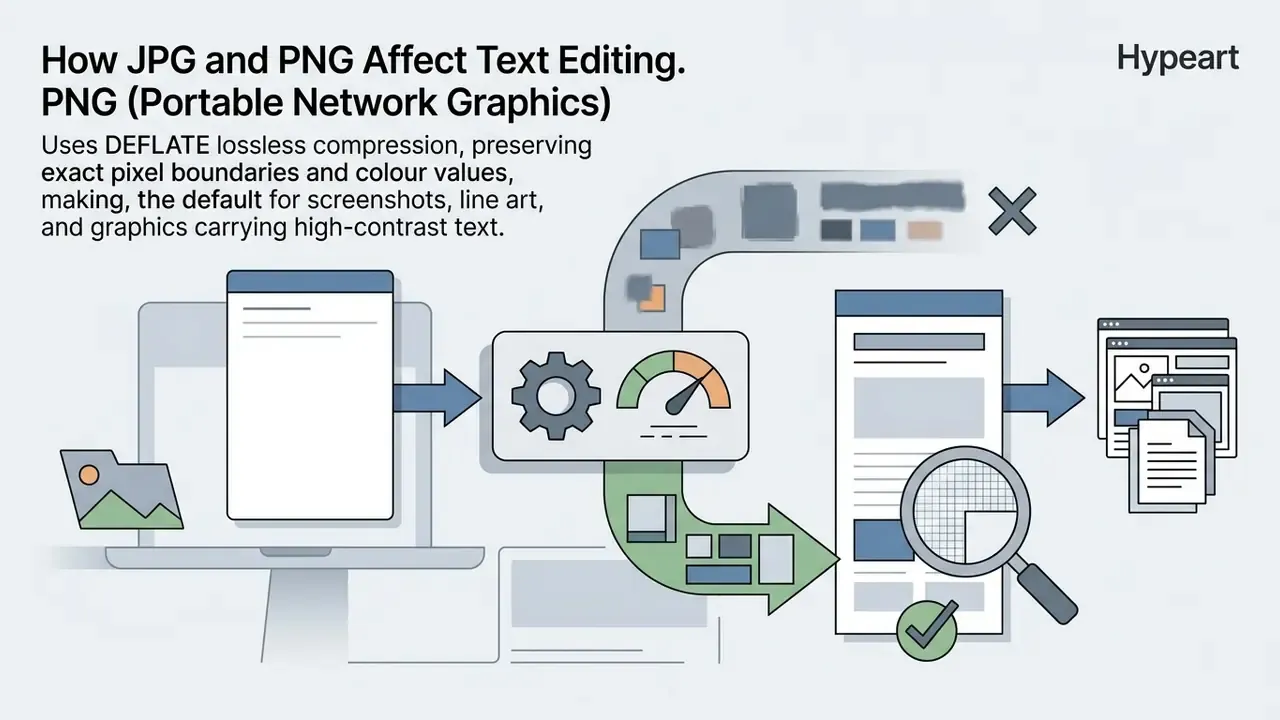
- Format matters more than filters. PNG (DEFLATE, lossless) preserves crisp letterforms. JPG (Discrete Cosine Transform, lossy) introduces ringing and mosquito noise along high-contrast type.
- Contrast is a requirement, not a preference. WCAG 2.2 SC 1.4.5 mandates 4.5:1 for standard text and 3:1 for large text.
- Keep replacement strings close in length. A character-count mismatch beyond roughly ±20% forces font downscaling or bounding-box expansion, degrading kerning and background fidelity.
- Security is the enterprise blocker. Before uploading screenshots containing PII, MNPI, or client data into a public SaaS editor, confirm client-side processing, retention windows, and model-training opt-outs.
- Never edit legal or financial evidence. Text replacement on IDs, passports, bank statements, receipts, or notarized documents is prohibited and, in most jurisdictions, illegal.
What Is a Photo Text Editor and What Can It Do?
A photo text editor is a desktop application or browser utility that adds, alters, reformats, or erases typographic elements inside raster graphics such as JPG and PNG files. These tools range from basic annotation overlays to artificial intelligence systems that detect optical character boundaries and reconstruct the underlying image background.
Academic work on scene-text pipelines narrows the feature set into a compact operational taxonomy. That taxonomy helps buyers evaluate an image editor without marketing noise.
«Editing text in images spans three atomic operations - text removal, text generation and text replacement - which can be combined for complex workflows.»
Three verbs. That is the whole product category, stripped of branding.
Edit Existing Text or Add New Text to a Photo
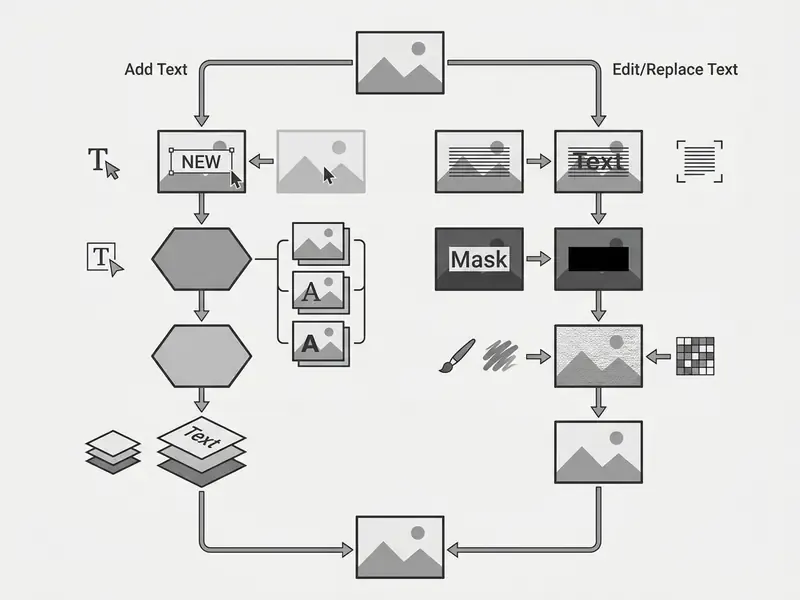
Adding new text introduces an independent vector layer above the existing image and leaves the background pixels untouched. Editing existing text changes the raster content itself. When you use a photo editor change text feature, the system must first recognize the characters on screen, erase them through inpainting or patch generation, then render replacement glyphs that match the original typography, perspective, and lighting.
«Content editing modifies the text itself while preserving style and background; style editing changes visual attributes while leaving the words unchanged.»
Conversely, when you add text to a graphic, the software drops a customizable text frame on top of the visual stack. The new typography stays fully editable until export, which is why template-driven online photo editors default to this mode for social posts and banners. Teams reviewing asset creation workflows can examine broader tool classifications in our AI Media Glossary.
Adobe documents the same split inside its own tooling: "Add Text" inserts a new object into empty canvas space, while "Edit/Replace Text" selects existing characters and overwrites them. Knowing which of the two modes a service actually implements is the single most useful filter when comparing products. Most free tools advertise "text editing" and ship an overlay.
Images and Tasks a Text Editor Can Handle
Modern software to edit text in image workflows process a broad range of digital collateral: software screenshots, promotional banners, e-commerce product listings, digital scans, and generative outputs from an ai image generator.
«TextWand-72K contains 72,000 poster image pairs with diverse layouts, languages and complex background textures, including advertising material with curved text.»
Published OCR guidance from the U.S. Department of Education, applied to scanned PDFs and technical captures, instructs operators to set recognition output to "Editable Text and Images" and then verify reading order and image preservation after conversion. That structural validation step prevents scrambled layout geometry during character extraction. University OCR guides extend the same procedure to screenshots, which can be made selectable automatically and therefore belong to the same editable-text class as scans. Readers who need raw character output rather than visual edits can review dedicated image-to-text conversion tools.
For visual production teams, modifying raster text matters when updating seasonal pricing on promotional graphics, translating copy on marketing posters, or redacting sensitive fields inside technical screenshots. Each task demands control over character spacing, kerning, and background texture restoration. Workflows built on early generative visuals can also be reviewed through our analysis of the first ai generated assets.
Real-World Image Text Editing Workflows
| Task Category | Challenge | Traditional Workflow (Photoshop/Canva) | AI Text Replacement Workflow |
|---|---|---|---|
| App Store Screenshots | Localizing UI into 10+ languages | Rebuild vector layouts from scratch (~2 hrs/screen) | Detect UI text, apply auto-translation, synthesize background (<30 sec) |
| Invoices & Receipts | Fixing typos or date misprints | Manual stamp/clone tool plus matching a missing font | Inpaint target digits, match noise grain and baseline alignment automatically |
| E-commerce Banners | Updating promo discounts (e.g., 40% to 55%) | Requires the original PSD/Figma source file | Select price box, rewrite string, auto-fill original gradient background |
| Meme & Social Templates | Swapping text on raster images | Erasing old text leaves smudges and blur | Pixel-level reconstruction preserving background texture and typography |
Four additional scenarios recur constantly in production teams:
- Chat and interface screenshots. Correcting a typo, updating a reported metric, or masking a personal name inside a capture without re-shooting the screen. The engine has to rebuild subtle UI gradients and antialiasing so the patch reads as native to the capture.
- Posters, flyers and event collateral. When a date shifts, a speaker withdraws, or a venue changes and the source design file has gone missing, editing text directly on the exported JPG avoids a full redesign cycle.
- Product labels and packaging photography. Weight, ingredient, or branding updates can be applied to existing product photos instead of commissioning another shoot.
- Ad creative A/B testing. Headline and CTA variants can be generated from one approved master visual, so copy tests stop waiting on designer availability. Teams that also need canvas resizing for these tests can pair the workflow with AI outpainting tools.
How to Edit Text in an Image Online
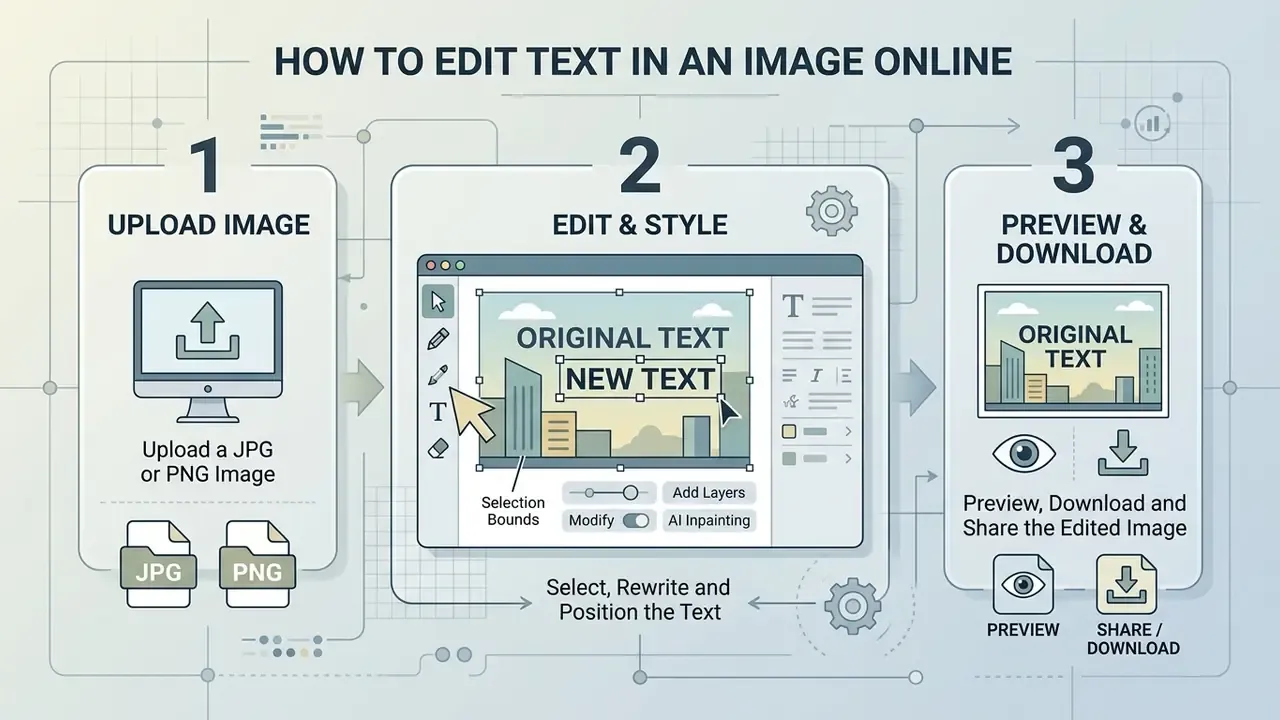
To edit text in an image with an online photo editor, you upload a raster file, select the target region using selection bounds or automated text recognition, modify or add the typographic content, then export the result. Web-based engines run these operations either through client-side WebAssembly scripts or through cloud-hosted neural networks. That difference sounds technical. It is actually the whole privacy story, and we return to it below.
Quick 3-Step Online Text Editing Workflow
Checklist0 / 3
Browser-based recognition flows documented by university OCR tools follow a slightly longer five-step sequence: activate the toolbar, select the region, choose the source language, choose an accuracy mode, then review and copy or edit the extracted result. The same documentation warns that the first run feels slow because the engine downloads its training data into the browser cache. A latency artifact, not a processing failure.
Upload a JPG or PNG Image
Uploading requires a high-resolution JPG or PNG file supplied through a web interface, with enough pixel density for the character recognition algorithms to work with.
Archival digitization standards published by the Arizona State Library set 300 DPI as the working minimum for textual items and 24-bit color depth where color accuracy matters, listing GIF, PNG, JPEG, TIFF, and PDF/A as accepted formats. The U.S. National Archives chose the same 300 dpi scanning baseline specifically for compatibility with OCR software, while Yale's stricter master-image standard requires 400 PPI, 24-bit RGB, and at least 4,000 pixels on the longest edge. Treat 300 DPI as the OCR floor and 400 PPI as the archival target.
«Scene text editing models assume sufficiently high-resolution raster inputs; low resolution reduces recognition accuracy and editing quality.»
Clean source files let edge-detection routines separate letterforms from background noise. When using a free photo text editor service, check that your file size fits the platform transfer limit, or the tool will downsample silently on the client side. Typical browser caps sit between 8 MB and 10 MB per file for PNG, JPEG, and WebP inputs. Oversized print masters should therefore be downscaled deliberately, not handed to an automatic resampler.
Select, Rewrite and Position the Text
Modifying existing text means identifying the character boundaries, isolating that region, supplying new alphanumeric strings, and establishing precise alignment.
NIST guidance on OCR form design specifies alignment marks to assure proper registration of the scanned field, and recommends preprinted comparison characters in the correct typeface so font mismatch can be detected during processing. NIST's OCR evaluation materials add a second mechanism: dynamic string alignment between OCR output and ground-truth text. That is the conceptual ancestor of modern bounding-box verification in browser editors. Both principles still prevent typographic mismatch during digital text replacement.
«GlyphMastero improved sentence accuracy by 18.02 percentage points over the baseline multilingual editor and reduced text-region FID by 53.28%.»
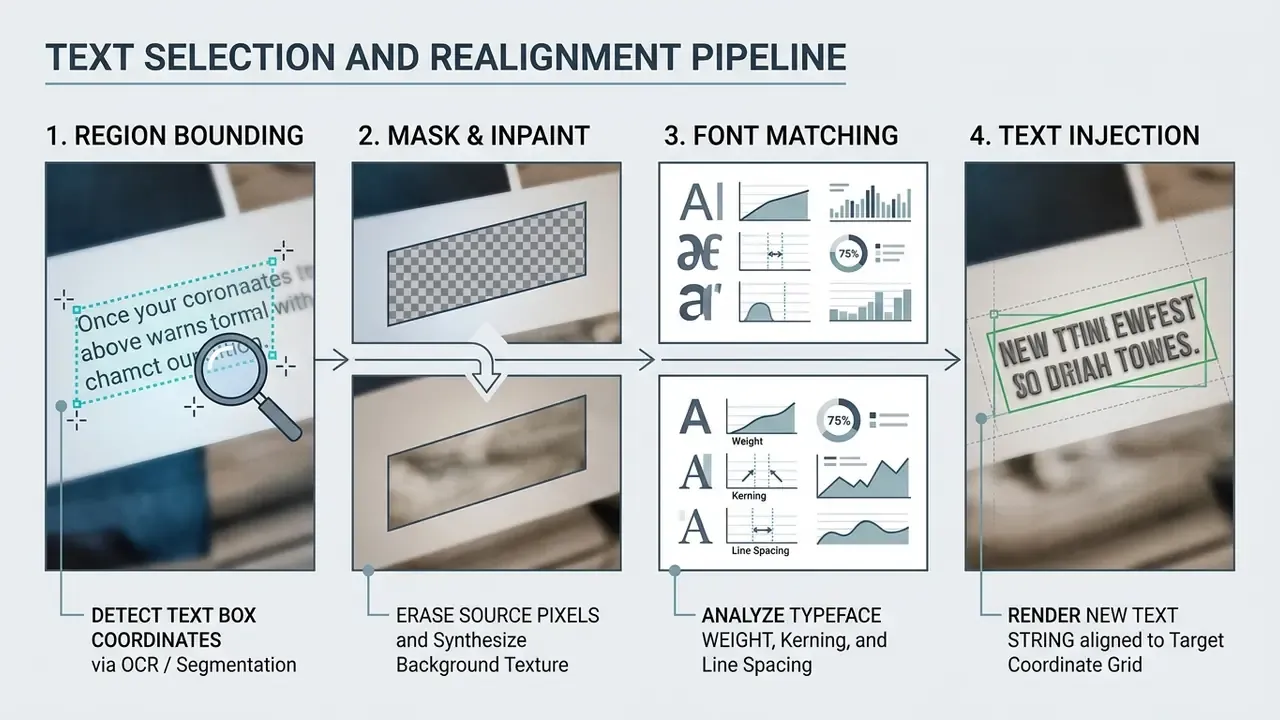
Users working through how to edit text on image online or how to edit image text online rely on bounding box handles or vector transform tools to place replacement copy. Consistent baseline orientation, leading, and tracking keep the edited block visually married to the surrounding graphics.
One practical detail separates reliable tools from frustrating ones: OCR misreads. If the detector returns "He11o" instead of "Hello," the inpainting mask is computed against the wrong glyph shapes and the erase step leaves residue behind. Correct the detected source string before you submit the replacement, and correct it only when detection is genuinely wrong. Rewriting an accurate detection shifts the mask boundary, which is its own small disaster.
Tools for Adding and Styling Text on Photos
A full styling suite inside a text editor gives granular control over typographic parameters. That control is what produces visual hierarchy, legibility, and stable contrast against complex image backgrounds.
Fonts, Font Color and Text Effects
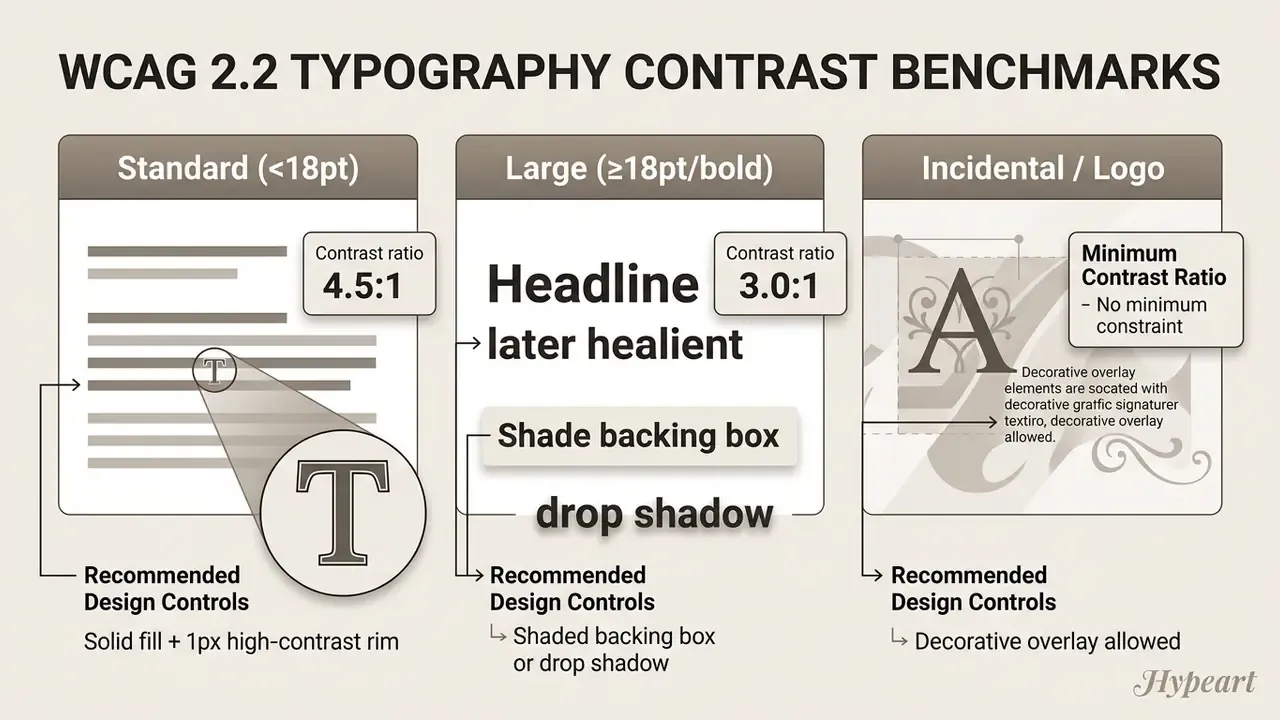
Choosing a typeface and a font color means balancing creative intent against a measurable requirement. The W3C Web Content Accessibility Guidelines (WCAG 2.2, Success Criterion 1.4.5) set a minimum contrast ratio of 4.5:1 for standard text and 3:1 for large text against background pixels, so the copy stays readable across varied display devices.
«AnyText2 extracts fonts and colors from scene images and encodes these attributes separately, improving text accuracy by 3.3% for Chinese and 9.3% for English.»
Resize, Rotate and Reposition Text Layers
Manipulating type layers requires control over coordinate translation, rotation angles, and scale factors across the canvas. Document-rendering specifications make the mechanics explicit: translation moves the origin by the offsets , scaling applies the matrix , and rotation applies , with transformations accumulating incrementally. In plain terms: every nudge, spin, and resize compounds, so a layer rotated twice is not the same as a layer rotated once at double the angle.
«TextWand uses an ORPE module for precise layout control, reproducing curved and slanted text across diverse languages and background textures.»
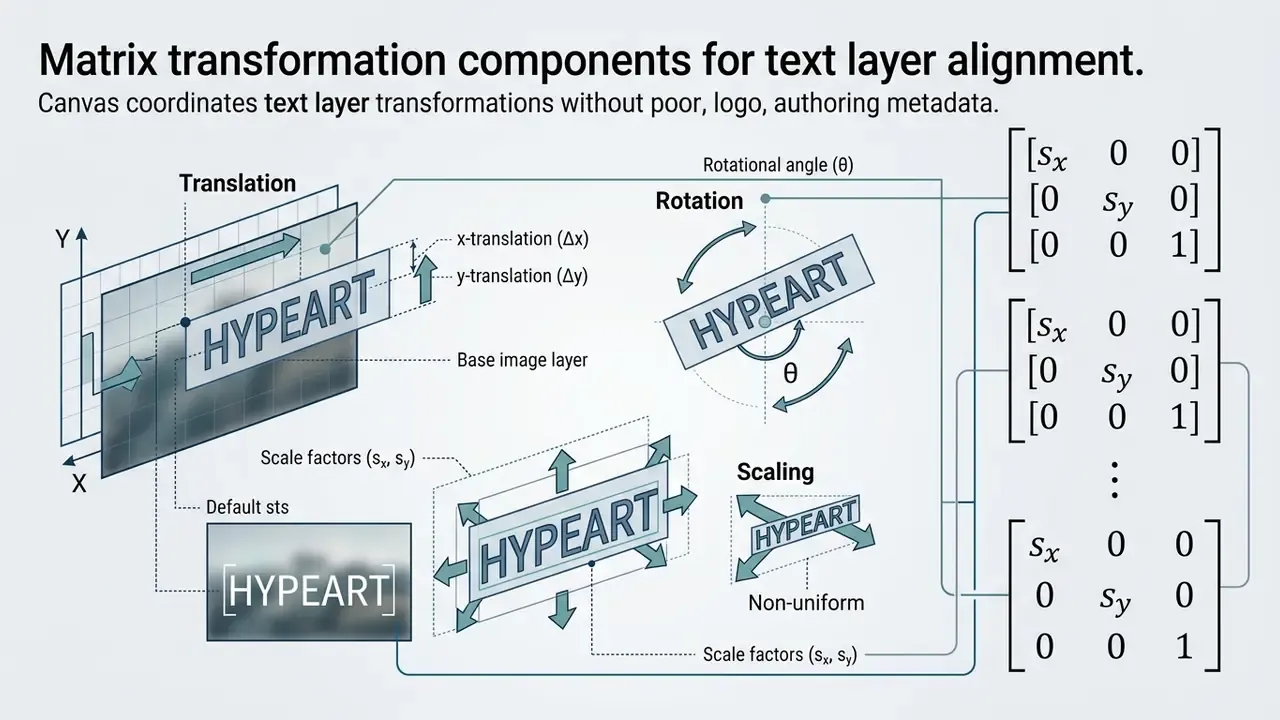
Online photo editor platforms add "Snap to Grid" behaviour to align text boxes with structural margins, focal points, or neighbouring design objects. Adobe's documentation describes grids as alignment aids for text and objects, with snapping locking an element to the nearest grid line as you move it. Small feature, large effect on a multi-asset campaign.
Opacity, Layering and Visual Balance
Opacity and blend modes govern how text pixels composite with what sits beneath them. The W3C CSS Compositing and Blending Level 1 Specification defines alpha values from 0 (completely transparent) to 1 (completely opaque), describing how foreground colour values combine with background light values. The same specification enumerates the practical mode set: normal, multiply, screen, darken, lighten, overlay, soft-light, hard-light, difference, and exclusion. SVG specifications define group and object opacity for multi-layer rendering.
«QuadNet restores the background first, then overlays new text, avoiding shadows from the source text and generating a photorealistic foreground in real-world scenes.»
Multiply, Screen, and Overlay each shift the visual weight of type inside a composition. Calibrate layer order carefully, so the words stay readable without burying the subject of the photo. Teams evaluating production software can compare options across modern editing suites, or narrow the shortlist to free photo editors when budget rather than depth is the binding constraint.
AI Tools for Replacing Text in Images
Artificial intelligence frameworks combine Optical Character Recognition (OCR), diffusion-based inpainting, and automated font matching to replace embedded text inside raster images without manual pixel work.
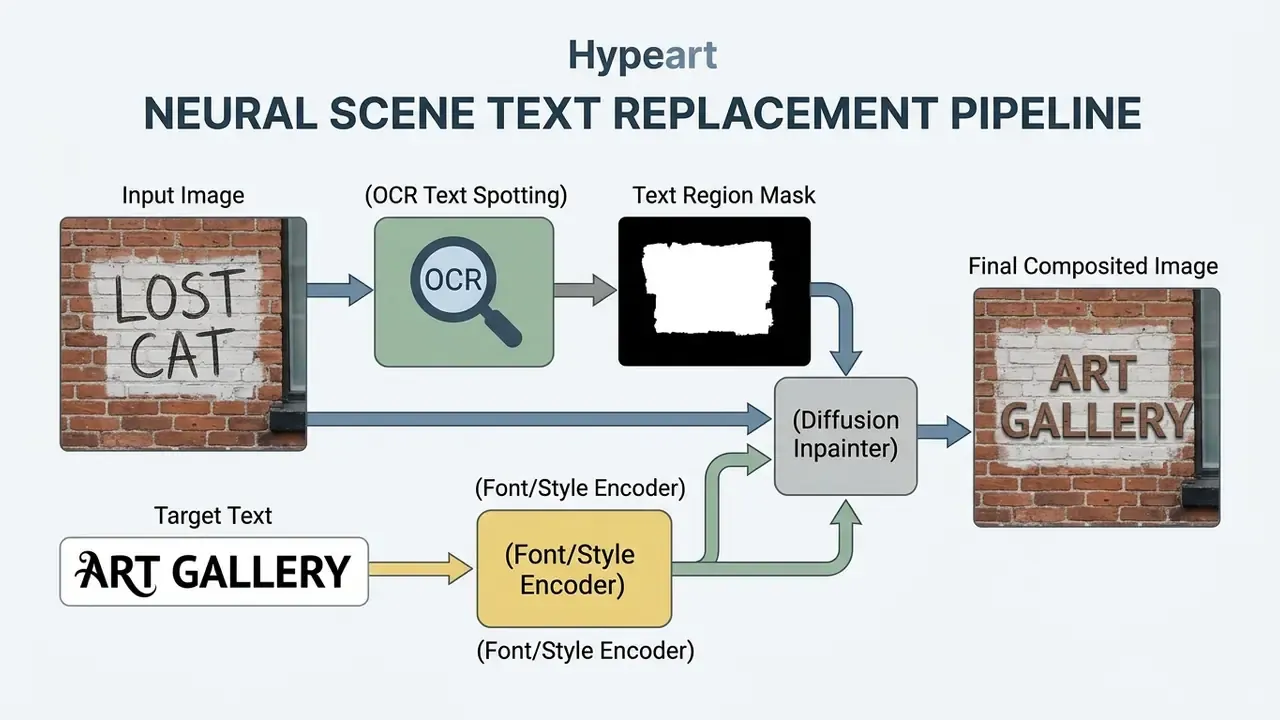
Comparing Image Text Editing Technologies
| Feature / Metric | Vector Text Overlay (Canva / CapCut) | Manual Raster Editing (Photoshop) | AI Neural Inpainting (Photo Text Editors) |
|---|---|---|---|
| Primary Mechanism | Adds non-destructive layer over pixels | Manual cloning, content-aware fill, layer masks | Neural text-spotting plus latent diffusion synthesis |
| Existing Text Erasure | ❌ No (requires manual blocking) | ⚠️ Manual (slow and tedious) | ✅ Automatic background reconstruction |
| Font Matching | ❌ Manual selection from menu | ❌ Manual identification and install | ✅ Automated glyph structure encoding |
| Perspective & Lighting | ❌ Flat 2D vector placement | ⚠️ Manual distortion transformations | ✅ Preserves environmental shadows and angles |
| Ideal For | New banners, social media posts | Complex graphic design projects | Quick edits, screenshots, labels, localization |
The decision rule is straightforward. If the pixels behind the type do not need to survive, say a new banner or a fresh social template, an overlay is faster and fully reversible. If the type is already baked into a photograph, a label, or a screenshot, an overlay only covers the problem: the original word stays underneath, the covering plate breaks the background texture, and the result reads as an edit. Manual raster retouching solves it, at the cost of identifying the exact typeface, rebuilding the background by hand, and matching lighting and perspective yourself. Neural inpainting attacks those three steps at once.
When AI Text Editing Is Better Than a Text Overlay
AI-driven replacement outperforms vector overlays when the target is embedded raster text in complex natural scenes, street signage, textured promotional graphics, or angled product packaging. Models such as AnyText and TextWand use latent glyph encoders and spatial masks to remove image text, restore background texture, and render new strings with matching lighting, perspective distortion, and grain structure.
«PSGText combines a text-replacement network with a background-restoration network, producing edited images where the new text appears part of the original scene.»
For commercial asset modification at volume, online ai tooling removes the tedium of manual cloning and retipping. Organizations exploring adjacent generative workflows can evaluate dedicated platforms such as the flux ai image generator, community-driven interfaces like the discord ai image generator, or template-first alternatives through the Canva AI Generator overview.
Limits of AI Image Text Editing
Automated ai image text modification still breaks in predictable places: non-Latin scripts, intricate perspective warps, multi-stop gradient backgrounds, and low-resolution sources. Research published in the MULTITEXTEDIT evaluation framework shows that diffusion editing models hold global layout fidelity while degrading measurably across languages, largely through diacritic distortion and directional rendering errors.
«MULTITEXTEDIT reveals pronounced cross-lingual degradation: the largest errors appear for Hebrew and Arabic, the smallest for Dutch and Spanish.»
«The OSTF benchmark contains 1,980 altered images and 5,018 altered texts; existing forensic models struggle to identify unseen forgery types.»
That last finding cuts both ways. Detection of altered images is imperfect, which is precisely why internal logging of edits matters more than external forensics. Enterprise teams running automated visual pipelines should document failure modes for critical assets. Rights management and regulatory exposure around generated content are covered in our analysis of litigation risk, and provenance verification can be reviewed alongside AI reverse-image-search tools.
Handling Character Length Mismatch Artifacts
Replace a short string with a much longer one, for example changing "Sale" to "Discounts Available," and the model runs into spatial boundary constraints.
To prevent visual degradation:
- Font DownscalingThe system reduces font size automatically, which can misalign the baseline against neighbouring, unedited lines of type.
- Bounding Box StretchingExpanding the target box forces reconstruction of a larger background area, raising the risk of noise artifacts, smeared gradients, and duplicated texture patterns.
- RecommendationKeep replacement text within ±20% of the original character count to protect font weight and kerning. If the copy must grow substantially, split it across two edits or rebuild the block as a vector overlay instead.
Additional Known Failure Modes
| Failure Mode | Typical Trigger | Mitigation |
|---|---|---|
| OCR hallucination | Decorative, handwritten, or low-contrast type | Manually correct the detected source string before generating |
| Residual ghosting | Heavy drop shadows or embossed lettering behind the mask | Expand the mask slightly beyond the glyph bounds |
| Numeric substitution error | Dense tabular data, financial figures, dashboards | Verify every digit at 100% zoom; never rely on the model for accuracy-critical numbers |
| Gradient banding | Multi-stop gradients or film grain behind the text | Export lossless PNG; avoid re-compressing the result |
| Rare typeface drift | Custom brand fonts, game UI lettering | Supply the original font file and use an overlay for brand-critical wordmarks |
How to Choose the Best Free Photo Text Editor Online
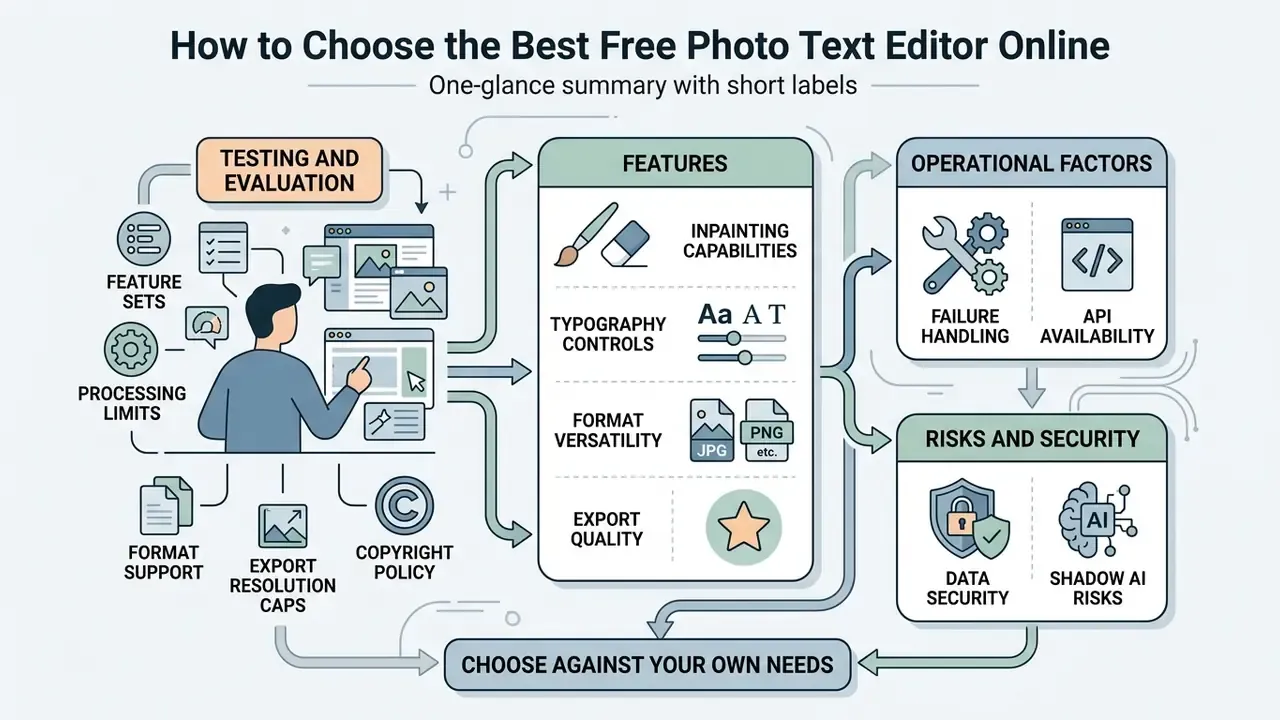
Picking the best free photo text editor online means testing feature sets, processing limits, format support, export resolution caps, and copyright policy against your own operational requirements. Not against a feature grid on a landing page.
«TextWand-Bench provides 1,500 test cases evenly distributed across text removal, generation and replacement, enabling standardized comparison of accuracy, style and quality.»
| Selection Criterion | Free Online Tier | Premium / Enterprise Tier | Operational Impact |
|---|---|---|---|
| Text Modification Mode | Basic vector overlay | AI inpainting and text removal | Determines ability to edit embedded vs. new text |
| Supported Formats | Standard JPG, PNG | WebP, TIFF, layered PDF, SVG | Controls input/export flexibility |
| Export Resolution | Capped at 1080px / 72 DPI | Native / 4K / 300+ DPI | Impacts print viability and crispness |
| Watermark Policy | May apply on export | 100% watermark-free | Critical for commercial brand collateral |
| AI Generation Credits | 5–10 per day or week | High allowance or unlimited | Defines automated workflow throughput |
| Processing Location | Cloud upload (third-party servers) | Client-side WebAssembly or private deployment | Governs exposure of confidential image content |
| Model-Training Opt-Out | Often absent or opt-in by default | Contractual opt-out, documented retention window | Determines whether uploads can train third-party models |
| Compliance Artifacts | None | SOC 2 / ISO 27001 / GDPR DPA, SLA, audit logs | Required for regulated-industry approval |
No matching rows Clear one or more filters to restore the matrix.
Buyers comparing adjacent generative tooling can also review the shortlist of best AI art generators to see where text editing ends and full image synthesis begins.
Features to Compare Before Choosing an Editor
When judging which tool is the best photo text editor for a specific workflow, compare six things:
Teams mapping asset creation pipelines end to end can also compare options across automated media production systems.
Data Security and Shadow AI Risks
Before a screenshot leaves the corporate device, the processing model matters more than the feature list. Two architectures dominate.
- Client-side processing (WebAssembly / in-browser inference). The image never leaves the machine. Recognition and compositing run locally. Slower on large files and usually weaker in model quality, yet the lowest-exposure option for confidential captures.
- Cloud inference. The file is uploaded to a third-party endpoint, queued, processed by a hosted model, then stored for download. Faster and more capable. The upload itself is a data transfer event, and most internal policies must classify it as one.
Practical pre-upload checklist for regulated teams:
- Classify the content first. Does the screenshot contain PII, MNPI, client identifiers, account numbers, internal pricing, or unreleased financials? If yes, cloud upload to a consumer tool is a policy breach at most institutions.
- Read the retention clause. Responsible vendors state that images are processed temporarily, held briefly to enable downloads, then permanently deleted. Vague or missing retention language is a red flag.
- Confirm the training opt-out. Look for an explicit statement that uploads never feed model training and are not shared with third parties.
- Check transport and storage. TLS in transit, encryption at rest, access controls on shared assets.
- Prefer deterministic edits for sensitive text. Redaction with an opaque block plus a flattened re-export beats generative inpainting when the goal is to remove information rather than replace it.
- Log the edit. Keep the original file, the edited file, and a note of what changed. Unlogged image edits are indistinguishable from tampering during an audit.
- Route through approved tooling. Shadow AI usually starts with one "quick fix" in a personal browser tab. An approved-vendor list with a single sanctioned editor prevents most of it.
Quality, Speed and Ease of Use
Editing Text in JPG and PNG Images Without Losing Quality
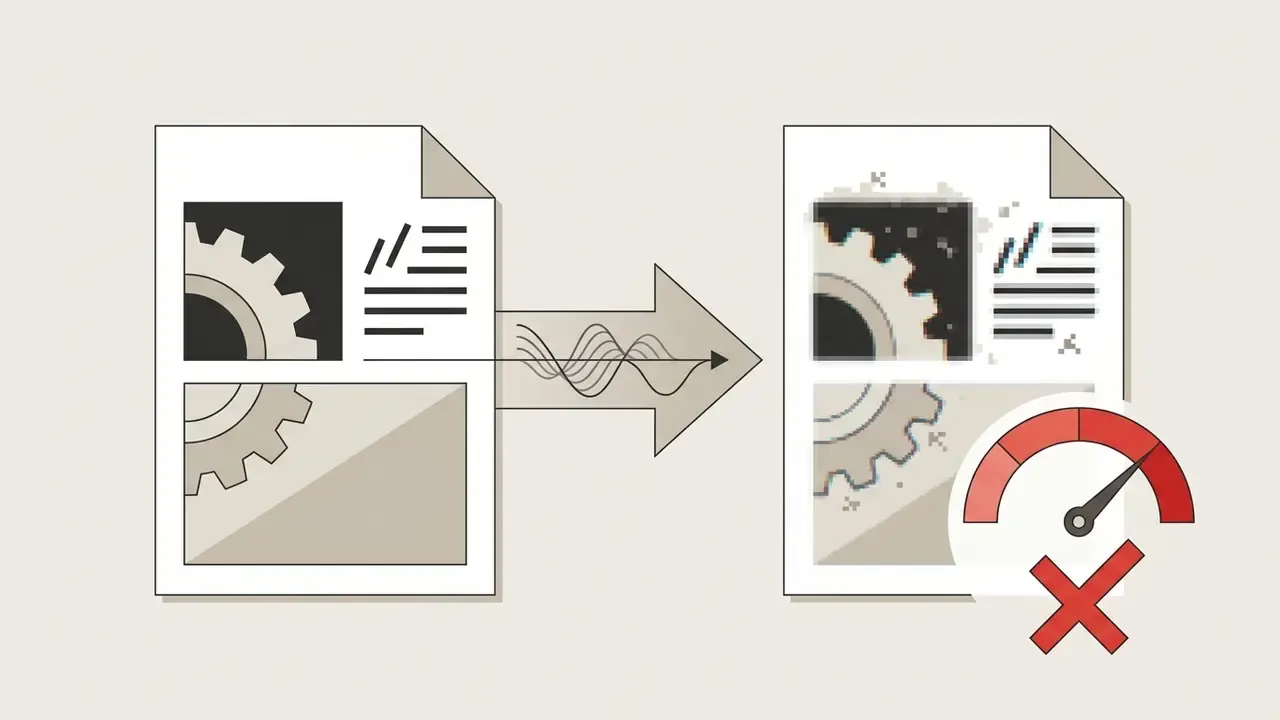
Holding visual fidelity through raster text modification comes down to two choices: the right file format, and export settings that suppress compression artifacts around sharp character edges.
How JPG and PNG Affect Text Editing
The structural differences between the two compression algorithms hit text legibility directly:
«TextZoom provides 8,746 scene-text images for super-resolution; Real-CE adds 300 real-world images with English and Chinese text to evaluate character clarity.»
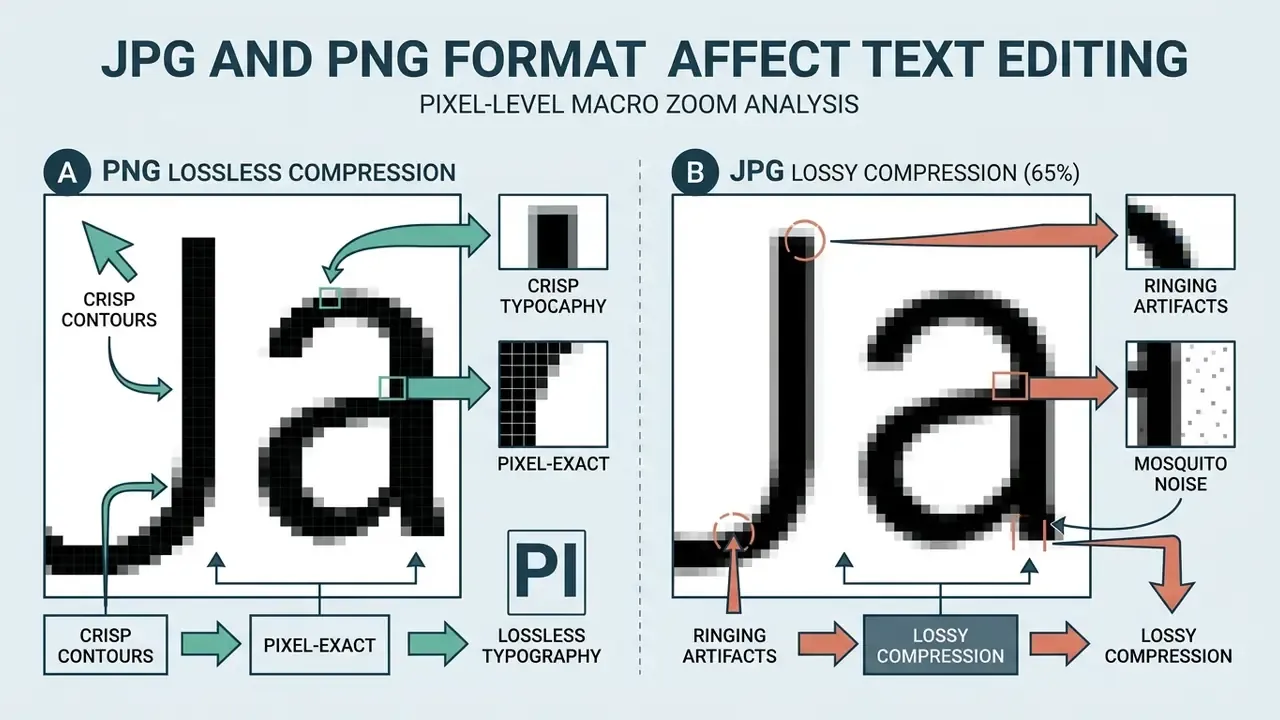
When you work through how to edit text in png image online free, keeping the native PNG format protects character boundaries from a second round of degradation. Where the type must stay genuinely editable rather than merely sharp, Adobe's community guidance recommends exporting to PDF instead of any raster format at all.
Frequently Asked Questions About Photo Text Editors
Can I Edit Text in an Image Online for Free?
Yes. Plenty of browser utilities let you edit text in images online at no cost and without local installation. Canva, Adobe Express, and CapCut all provide free online interfaces to upload an image, overlay new text layers, customize typography, and export the result. Basic text addition and simple vector layer management work fine in a standard browser, and several fully free editors advertise no installation, no sign-up, and no subscription. A curated shortlist of free photo editors helps compare where each tier stops.
For replacing text already embedded in a raster image, free platforms usually hand you limited trial credits or a basic brush to mask and repaint. Advanced AI inpainting that matches the underlying font and complex background texture tends to sit behind daily usage limits or a paid tier. Typical pattern: 1K output on a free credit, 2K on a paid pack. So yes, how to edit image text online free is a solved problem for simple cases, and a metered one for hard ones.
Can I Use a Photo Text Editor for Social Media Images?
Yes, and this is the highest-volume use case in most marketing teams. Web editors ship canvas presets matched to platform aspect ratios, such as 1:1 square posts or 9:16 vertical stories, plus formatting tools that keep visual hierarchy intact. The Canva AI Generator is a common starting point for template-based work.
«MULTITEXTEDIT confirms that text-editing models preserve global layout and background during cross-lingual updates, though script-specific letterforms may distort.» - MULTITEXTEDIT: Multilingual Text-in-Image Editing Benchmark, arXiv preprint (2024)
For public channels, accessibility standards apply. Guidance issued under U.S. Section 508 and CDC accessibility directives requires text on images to hold a minimum 4.5:1 colour contrast ratio, with 3:1 permitted for large text, and some state checklists applying a stricter 7:1 internal standard. Any operational detail baked into the image, dates, event titles, phone numbers, contact information, must also appear in the caption or post body for screen-reader users. Decorative images may carry empty alt text. Meaningful images need concise, context-based descriptions that do not simply repeat the caption.
Can I Edit Text in Images in Bulk or on Mobile Devices?
Yes. Modern browser editors use WebAssembly and cloud APIs, so full functionality works on mobile browsers across iOS and Android with no app store download. For enterprise workflows, bulk replacement across hundreds of promotional graphics runs through batch scripts or a dedicated REST API that accepts image payloads and character arrays together. One caveat worth confirming in the sales call: several document-centric platforms still lack true bulk text rewriting and instead suggest saving edited assets as reusable templates.
How Do I Verify That an Edited Image Looks Authentic?
Run a four-point inspection at 100% zoom before export. Check the baseline of the replaced string against neighbouring lines. Look for residual ghosting or halo remnants where the original glyphs sat. Compare background grain and gradient continuity inside versus outside the edited bounding box. Confirm that stroke weight and letter spacing match the surrounding typography. Perceptual studies such as IE-Bench show automated quality metrics do not fully track human judgement, so the manual pass is not optional.
Is It Safe to Upload Corporate Screenshots to a Free Editor?
Only after classification. If the capture holds personal data, material non-public information, client identifiers, or internal financials, treat the upload as an external data transfer governed by your third-party policy. Prefer client-side in-browser processing, require a documented retention window and a model-training opt-out, and log both the original and the edited file. When the objective is removing information rather than replacing it, opaque redaction followed by a flattened re-export is the safer control.
Which Workflow Should I Use for Regulated Marketing Assets?
Split the decision by asset class. Brand-critical wordmarks and anything carrying a regulated disclosure should be rebuilt from the source design file, not inpainted. Seasonal price changes, localization variants, and internal documentation screenshots are reasonable candidates for AI replacement, provided a named owner reviews the output and the edit is logged. That review step is the whole control. Without it, you have automation without accountability.
Can I Use the Results Commercially?
Most dedicated text-replacement services grant full commercial rights to generated output, covering ads, packaging, websites, and print. That licence, though, covers the output only. It grants nothing regarding the input. You remain responsible for owning or licensing the source image, and for ensuring the edit is not deceptive.
Navigation & Related Resources
- Main Resource Center: explore the hub
- Commercial Use Hub: explore the hub
- Photo editor fundamentals: online photo editor guide
- Free-tier limits and privacy: free photo editor guide
- Canvas expansion and background generation: AI expand image
Appendix A: Approval Checklist for Image Text Editing Tools
A short artifact for governance teams that need to document why a given editor was approved or refused. Adapt the thresholds to your own risk appetite; the questions themselves travel well.
| Control Question | Evidence to Request | Refuse If |
|---|---|---|
| Where does inference run? | Architecture note stating client-side or cloud processing | Vendor cannot answer precisely |
| How long are uploads retained? | Written retention window in the DPA or terms | Language is vague or absent |
| Are uploads used for training? | Explicit contractual opt-out | Opt-out is opt-in by default |
| Who owns the output licence? | Commercial-use clause covering ads, print, packaging | Licence excludes commercial distribution |
| Is the edit auditable? | Export logs, version history, or local file retention procedure | No record of what changed |
| What happens on failure? | Refund or credit policy for failed generations | Credits burn on failed output |
| Which formats survive intact? | Documented JPG, PNG, WebP, TIFF support and export caps | Forced conversion or resolution cap below delivery need |
Two closing notes. First, approval should name an owner, not a department. Second, revisit the record when the vendor changes its model provider, because processing location and training terms often change with it. Evidence first. Autonomy later.