Executive summary for decision-makers
- What it is: an ai chatbot maker is a no-code platform that ingests your website, documents, and knowledge base, then generates grounded answers with a large language model instead of matching hardcoded keywords.
- What it replaces: rigid decision trees. Modern builders combine three layers: a Retrieval-Augmented Generation (RAG) knowledge layer, a drag-and-drop visual canvas for deterministic steps, and plain-language "skills" that trigger actions.
- Measured impact: automated chat contains 73.8% of sessions and fully resolves 45.8% without staff intervention (Comm100, 2025). Cost per contact drops from $6.00 to $12.00 (human) down to $0.08 to $0.15 (autonomous AI), with hybrid resolutions at $1.50 to $3.50.
- The quality trade-off is real but manageable: standalone AI CSAT sits at 69% versus 81% for humans; AI-assisted hybrid models close the gap to 79% (Zendesk benchmark data, 2024).
- Where governance matters most: shadow AI inventory, data residency, BYOK (bring your own key), private model endpoints, prompt-injection testing, escalation circuit breakers, and validation evidence aligned with NIST AI 600-1 and banking model-risk expectations (SR 11-7 and OCC Bulletin 2011-12).
- Budget reality: free tiers run 100 to 600 chats per month and suit sandbox proof-of-concept work only. Production and regulated deployments require paid or enterprise tiers with SSO, audit logs, SLAs, and SOC 2 evidence, plus a risk-adjusted TCO that includes validation and monitoring labor.
How to read this guide
The structure follows the sequence most procurement committees actually use. First, definitions and architecture, because vendors sell three different products under one label. Then capabilities and the support economics. Then the build path: goals, data, instructions, testing. Then deployment across the website and messaging channels, including the integration pattern for core banking and ERP systems. Then money: free tiers, paid features, risk-adjusted total cost of ownership. Finally, the controls, the shadow AI register, a twenty-question vendor checklist, and answers to the questions that come up in every review meeting.
One caution before the detail. Every benchmark in this article is directional. Your containment rate depends on your documentation quality, your channel mix, and your customers' patience, not on a vendor's slide.
What an AI chatbot maker is and how it differs from a classic chatbot builder
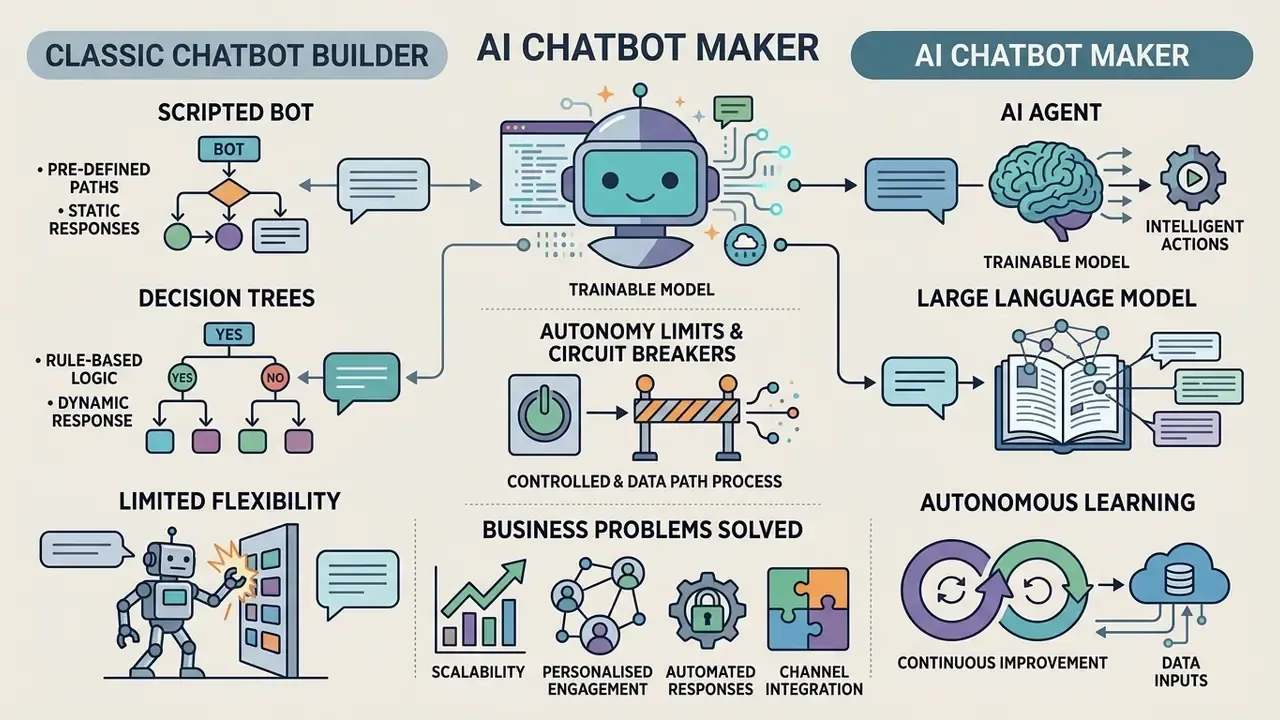
An ai chatbot maker is a software platform that lets organizations construct, train, and deploy conversational interfaces using large language models and natural language understanding without manual programming. Unlike a standard chatbot builder that relies on rigid decision trees and predefined rules, an ai chatbot maker ingests enterprise data to generate dynamic, context-aware responses for a website or a business system.
Modern conversational architectures represent a shift from static scripts to custom ai chatbots. Traditional platforms map exact keyword inputs to fixed outputs. An ai chatbot generator, by contrast, leverages vector embeddings and semantic search to interpret user intent across messy, multi-clause queries. That reduces the rule-maintenance burden on technical teams, which in most banks is the real bottleneck rather than model quality.
«A meta-analysis of 64 studies covering 34,302 respondents found perceived usefulness, ease of use, and trust consistently determine user adoption of conversational bots.»
That finding has a direct design consequence. Adoption is not won by model size. It is won by usefulness, low friction, and visible trust signals. A platform that answers fast but cannot cite a source, or that hides the fact a user is talking to software, quietly undermines the exact variables that drive usage.
Large financial institutions and enterprise operators classify these solutions by operational autonomy. Early tools handled basic navigation. Today's ai chatbots act as conversational interfaces and, increasingly, as autonomous agents with tool access. Implementing an ai-powered bot therefore requires evaluating data governance, security guardrails, and decision ownership across every operational channel.
One practical warning for procurement. Vendors market identical technology under several names: chatbot maker, chatbot ai creator, chat ai maker, AI agent builder. Evaluate the underlying method, scripted flows versus taught knowledge versus tool-calling autonomy, rather than the product label on the pricing page.
AI chatbot, AI agent, or scripted bot: which to choose
Choosing between a scenario-based bot, an AI chatbot, and an AI agent depends on required decision autonomy and integration depth. A rule-based bot maker ai suits fixed decision trees. An ai chatbot creator and an agent handle variable phrasing and multi-step actions.
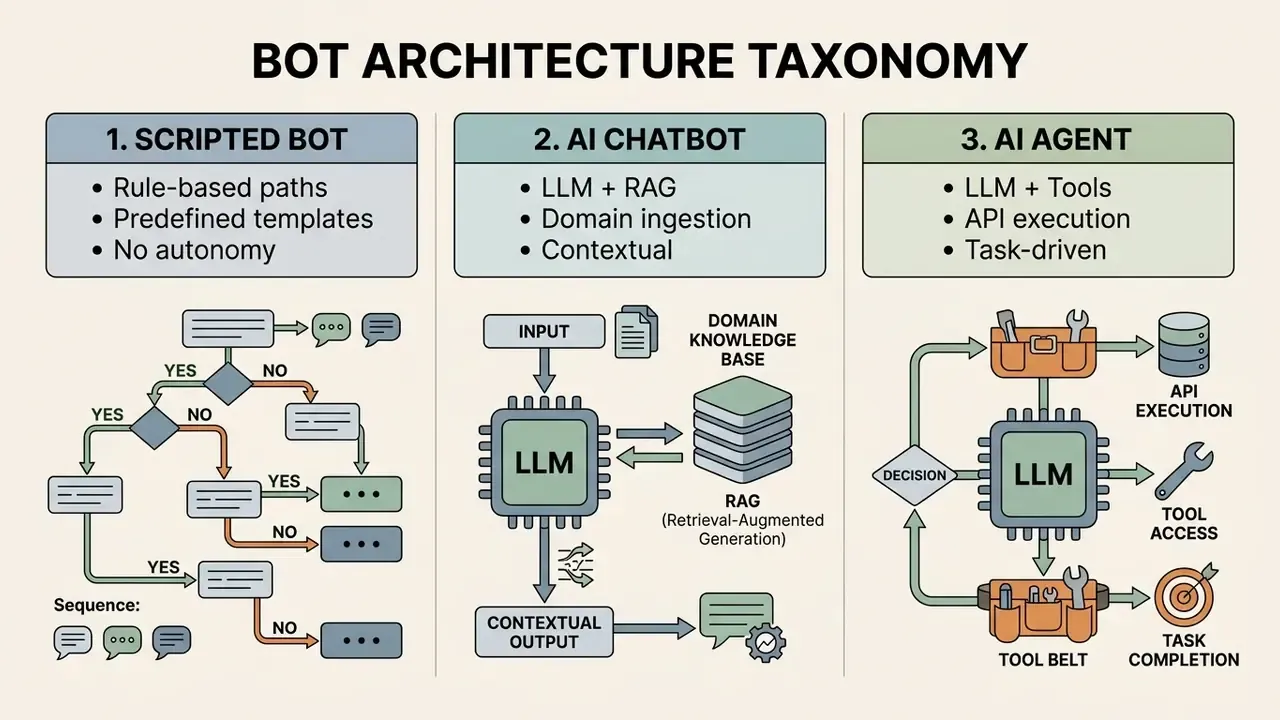
Scripted bots operate on explicit IF-THEN conditions and decision trees. They do not learn from interaction, and their dialogue flow is static. That determinism is an asset in strict compliance journeys, such as disclosure sequences, identity verification prompts, and regulated disclaimers. It becomes a liability the second a customer rephrases the request. Generative ai chatbots use machine learning models to synthesize contextual answers from attached knowledge bases, holding a coherent multi-turn conversation.
Autonomous agents sit at the top of the complexity ladder. An agent architecture has three functional components: the reasoning model, the tools it may call, and the instructions that constrain it. Agents evaluate goals, plan multi-step workflows, and trigger external APIs, looping until the objective is satisfied. So the rule of thumb: script-based systems for strict compliance flows, AI chatbots for knowledge retrieval, agents for end-to-end task automation.
«A meta-analysis of 943 effect sizes across 327 studies found automated agents elicit slightly less positive customer responses than humans (r̄ = −0.127, p < 0.001).»
The effect size is small but statistically robust, and it should shape autonomy decisions. Default to automation for volume and speed. Never default to it in moments where a small perceived-quality penalty turns into churn, a complaint escalation, or a regulatory finding.
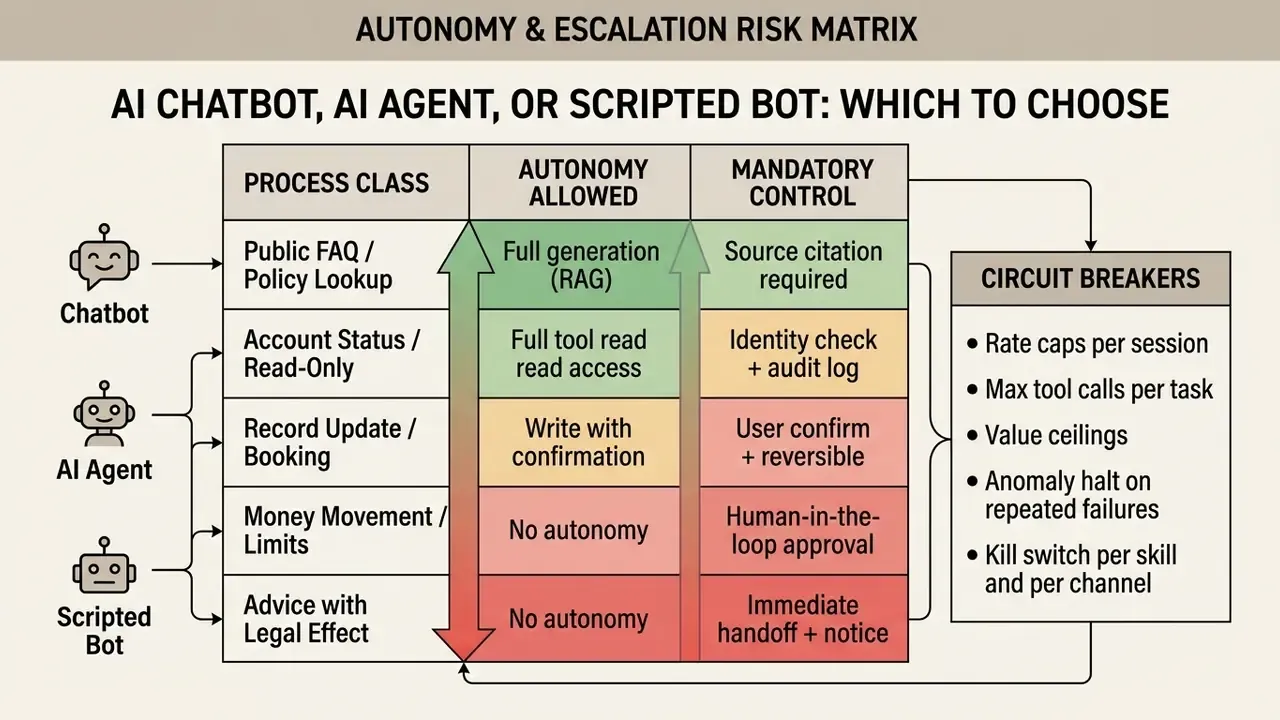
Autonomy limits and circuit breakers. For any agent that writes to a system of record, define the hard stops before launch, not after the first incident.
What business problems an AI chat bot maker solves
An ai chat bot maker addresses a narrow but expensive set of problems: routine customer support volume, cost per contact, and the delay between a question and its answer. Automated systems resolve front-line questions, qualify inbound leads, and route complex cases to specialists.
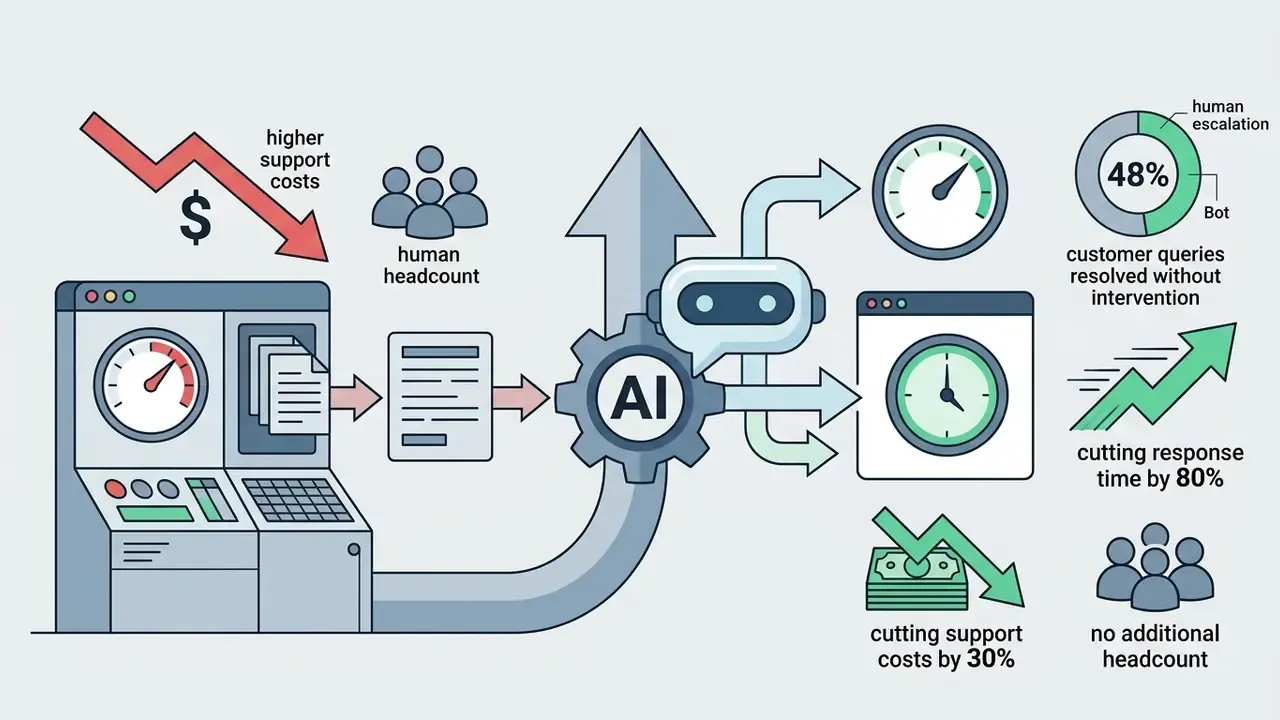
In high-volume operations, the top inquiries cluster around account access, status tracking, and standard service guidelines. According to Comm100's 2025 Live Chat Benchmark Report, covering more than 220 million interactions, automated chat systems handle 73.8% of incoming sessions and fully resolve 45.8% without staff intervention. That containment rate takes real weight off core service teams.
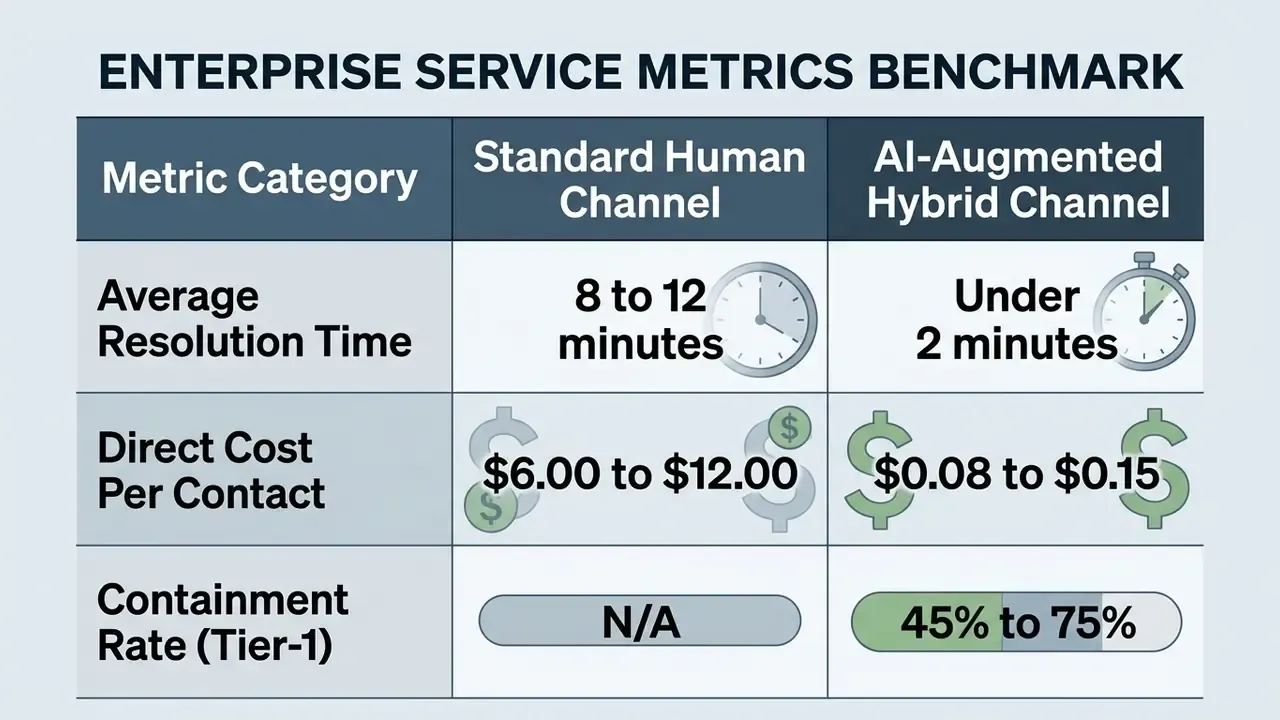
This information is general in nature and does not replace professional advice. Actual ROI metrics depend on industry, data volume, channel mix, and system configuration.
Integrating an ai chat maker into commercial workflows lowers operating expense while keeping service available overnight and across time zones. Availability, not eloquence, is usually the first win.
«An experiment with 714 participants showed post-interaction satisfaction was significantly lower with a chatbot than with a human, but the gap disappeared entirely when the bot communicated empathetically.»
Deploying automated chat also gives you immediate engagement on commercial pages, which preserves staff attention for high-value cases. For a broader view of software selection economics across AI tooling categories, compare options before committing to a platform.
| Dimension | Scripted Chatbot Builder | AI Chatbot Maker | AI Agent |
|---|---|---|---|
| Principle of operation | Predefined rule flows and intent trees. Static response templates. | Generative language models with Retrieval-Augmented Generation (RAG). | Reasoning model paired with external tool execution and multi-step planning. |
| Data sources | Hardcoded script paths and manual keyword maps. | Website URLs, uploaded files, and internal knowledge bases. | Transactional databases, live APIs, CRM systems, enterprise tools. |
| Automation level | Low. Linear FAQ paths and simple form navigation. | Moderate. Varied conversational questions and contextual inquiries. | High. Multi-step workflows, API writes, database updates. |
| Supported channels | Single web widget or basic messaging connectors. | Multi-channel widgets, messaging platforms, email endpoints. | Cross-platform deployment embedded inside business core systems. |
| Coding required | None for basic visual rule construction. | None for basic knowledge ingestion and prompt design. | Low to moderate for custom API tool integrations. |
| Governance burden | Low. Deterministic outputs are trivially reproducible. | Medium. Grounding checks, source traceability, drift review. | High. Action logging, approval gates, rollback procedures. |
No matching rows Clear one or more filters to restore the matrix.
The table highlights the trade-off that most shortlists miss. Scripted builders offer strict control at the cost of flexibility. AI agents offer autonomy at the cost of integration work and a much heavier control burden.
AI chatbot generator capabilities: answers, automation, and customer support
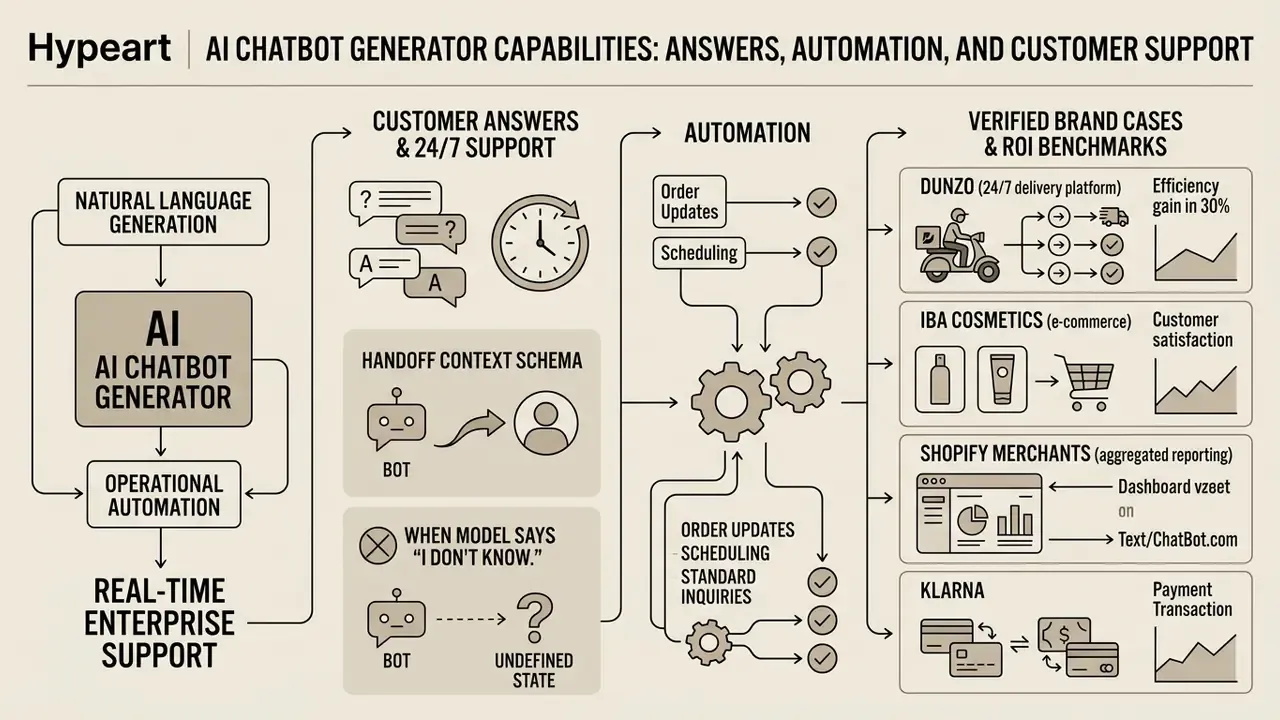
An ai chatbot generator combines natural language generation with operational automation to deliver real-time enterprise support. The core capabilities: contextual answer generation, clean human handoff, multilingual processing, and continuous interaction analytics.
Modern platforms must support precise retrieval-augmented generation to prevent ungrounded outputs. The NIST AI Risk Management Framework Generative AI Profile (NIST AI 600-1) sets the baseline expectation of verifiable content provenance and documented risk controls. Regulated deployments layer sector rules on top. Banks and financial institutions typically map chatbot validation evidence onto existing model risk management expectations (Federal Reserve SR 11-7 and OCC Bulletin 2011-12), which demand documented conceptual soundness, ongoing monitoring, and independent review. An enterprise chatbot ai generator needs guardrails that hold policy compliance across every client-facing interaction, not just the demo path.
Procurement requirements from recent public-sector tenders show what a complete feature baseline looks like in practice: multilingual response handling with language detection and per-language tuning, NLU intents and entities with dialog state and slot filling, hybrid knowledge retrieval, graceful handoff to live agents with full context transfer, and bot KPI reporting covering containment, deflection, CSAT, ESAT, and false-positive rate.
Effectiveness comes from pairing automated information delivery with structured system actions. When an ai chatbot creator connects directly to enterprise infrastructure, the platform stops being a passive Q&A widget and becomes an active operational node. That shift raises the auditability bar across customer service workflows: every action needs a log line, an owner, and a reversal path. Multilingual and voice-adjacent channels add their own quality dimension, and teams evaluating spoken interfaces alongside chat often benchmark AI voice generation quality and licensing in the same procurement cycle.
Customer answers and 24/7 support
Automating customer support through an ai chatbot enables round-the-clock inquiry handling without continuous staffing. The system processes routine questions, verifies user account context, and answers instantly across time zones.
Automated support compresses waiting from hours to seconds.
«Average email response time runs 8 to 12 hours, while AI chatbots reduce response latency by up to 99% in high-wait scenarios.»
Front-line automated resolution reaches roughly 60% to 80% for standardized inquiries such as order status checks, password resets, and account unlocks, with narrow high-volume tasks reported as high as 85%. Immediate handling improves first response time and abandonment rate more visibly than any other metric.
Complex or high-risk interactions require automated escalation paths. In a hybrid architecture, the bot collects preliminary details, evaluates sentiment, and executes a structured transfer to a live representative. Preserving session context during that transfer removes the single most irritating experience in digital service: repeating yourself to the second responder.
That divergence explains most failed rollouts. The same deployment gets scored as a success by cost owners and a failure by the agents absorbing its escalations. Fix the incentive gap by reporting containment and post-handoff handle time in one view.
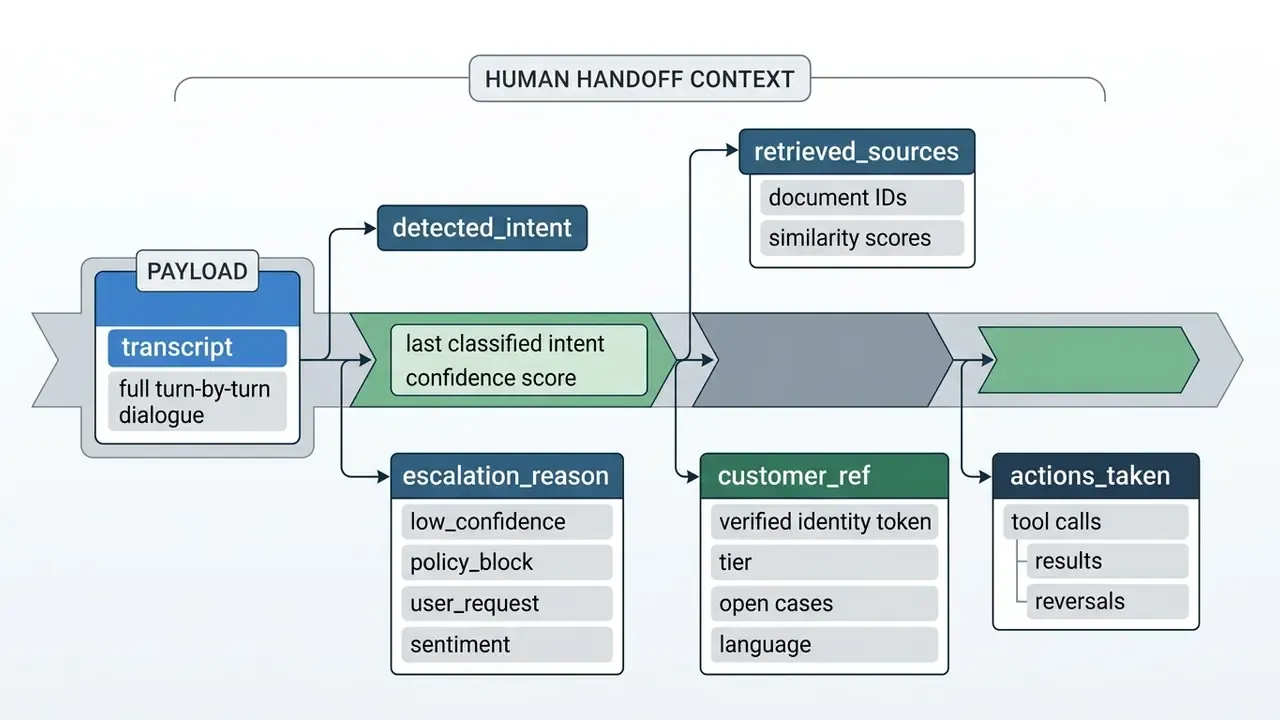
Handoff context schema. A safe transfer into a contact-center platform (Genesys, Cisco, Salesforce Service Cloud, Zendesk) should carry, at minimum:
When the model must say "I don't know." A refusal is a UX event, not an error. The correct pattern states the limitation, avoids speculation, offers the next best action, and transfers the transcript: "I don't have verified information on that. I'm connecting you to a specialist and passing along everything we discussed." Silent guessing remains the single most expensive failure mode in regulated support.
Verified brand cases and ROI benchmarks:
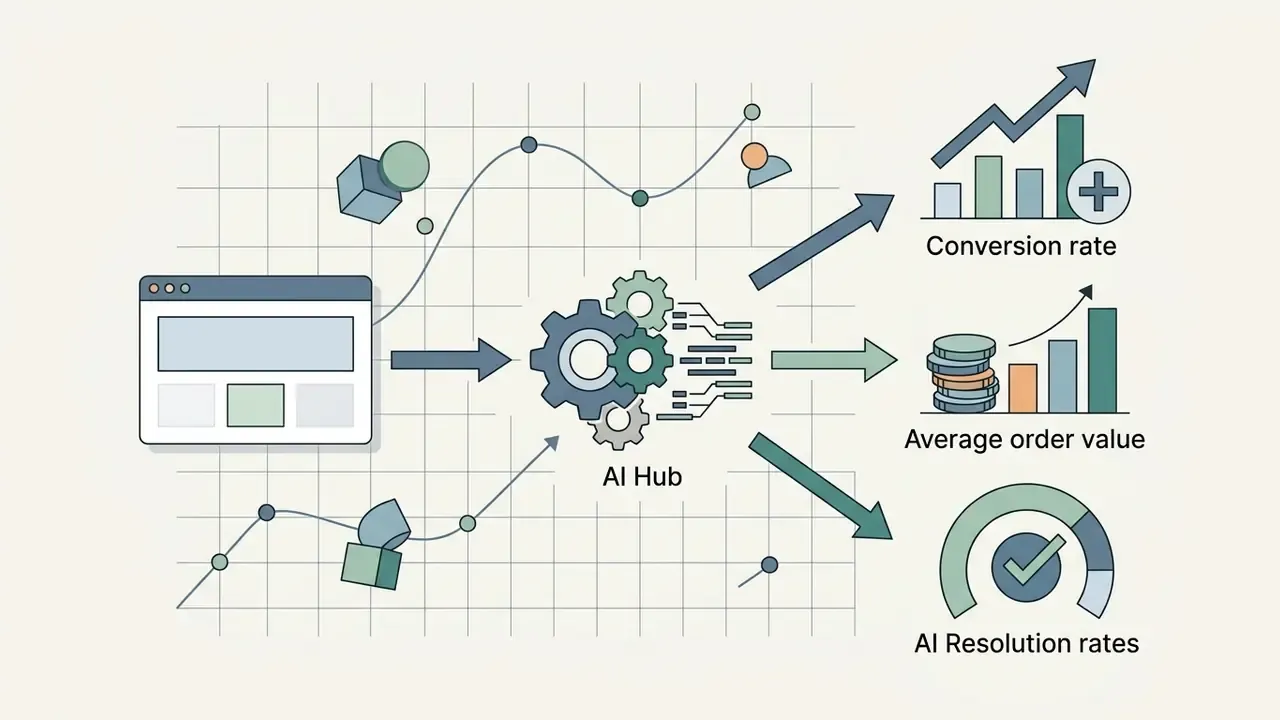
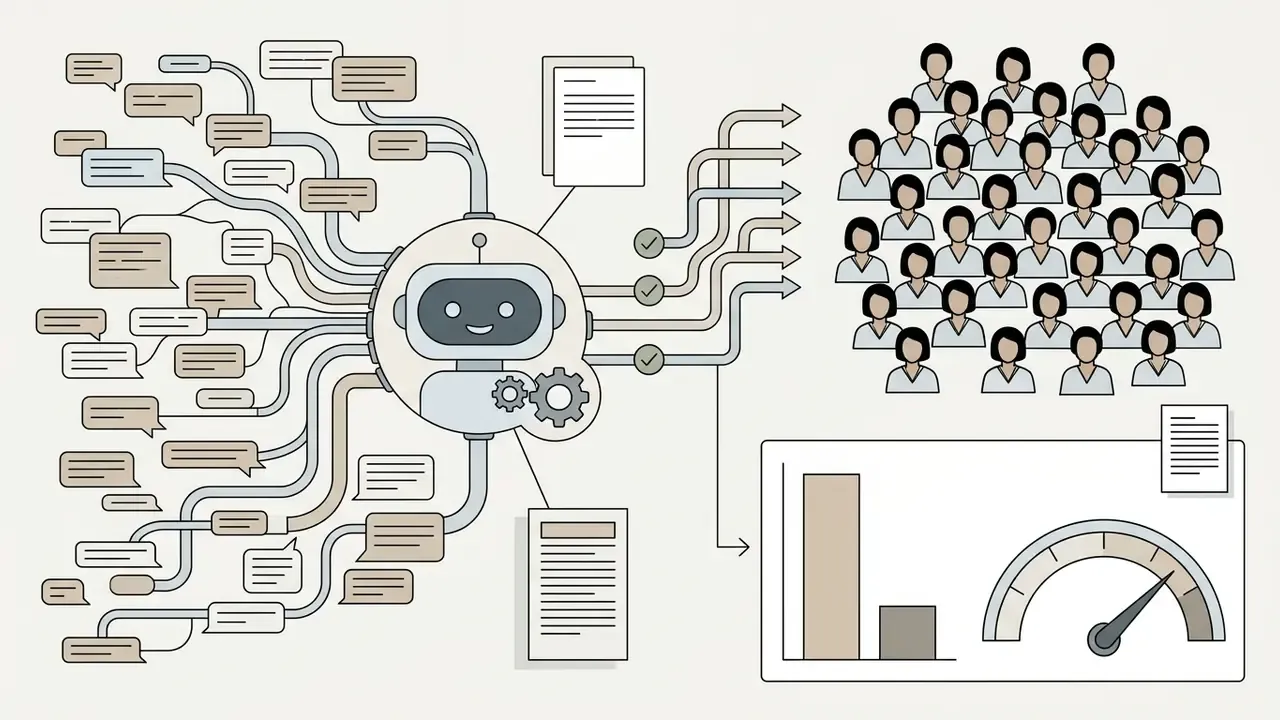
Anonymized internal deployment (updated 2026). A regional financial services team faced severe backlogs during peak inquiry periods and long response delays. The team implemented an ai chatbot maker to process standard service inquiries and capture preliminary verification context ahead of agent pickup. Self-reported results: a 35% reduction in ticket handling time and stabilized Tier-1 containment across primary digital channels. These figures are client-reported, were not independently audited, and should be treated as directional rather than as a benchmark.
This information is general in nature and does not replace professional advice. Generative chatbots should not issue binding financial, legal, or investment recommendations without review by an authorized representative.
Actions and automation: when a chatbot should execute tasks
Actions and automation let an ai chat maker execute tasks inside business infrastructure. Instead of only generating text, an ai chatbot creator uses API triggers to update records, schedule appointments, and query live backend databases.
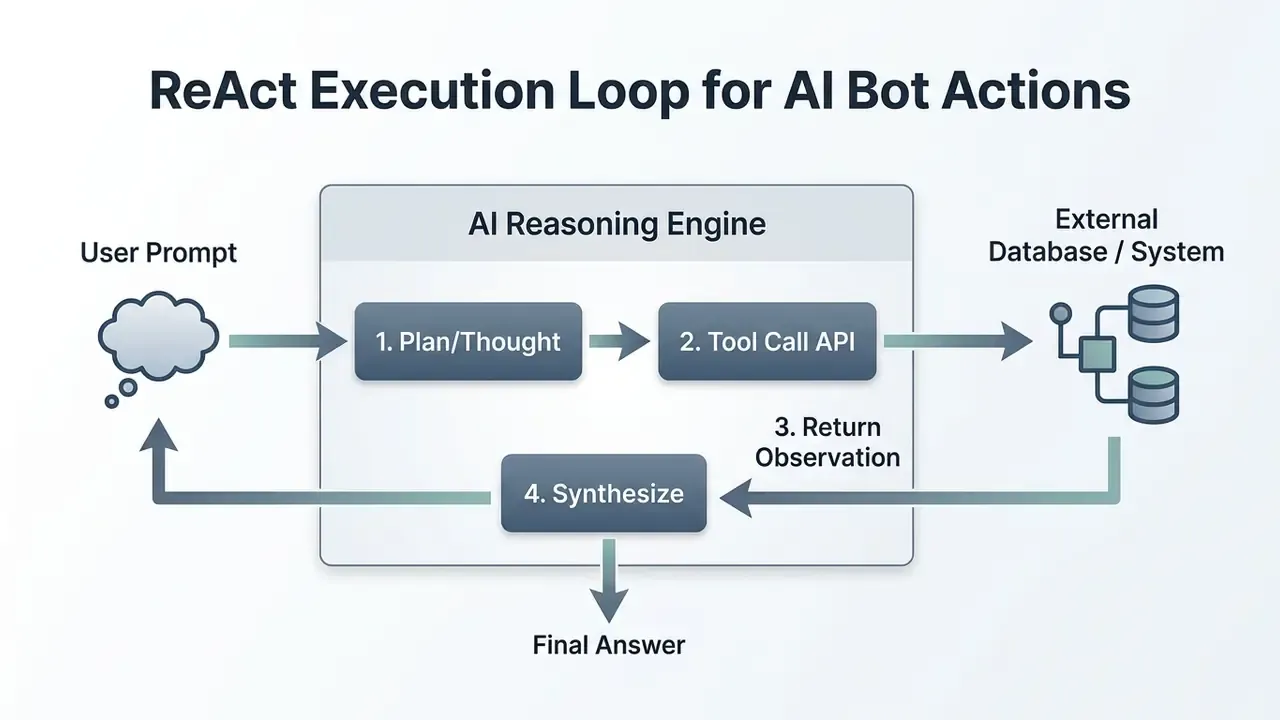
Multi-step automation relies on structured execution loops. In the widely used ReAct pattern, the model produces a thought, emits a structured action (a tool call to an API or database), receives an observation, and repeats until the goal is met. The cycle enables complex task completion while keeping every step individually loggable, which is exactly what an auditor will ask for.
Connecting conversational systems to enterprise software demands strict security management: OAuth authentication, role-based access control, scoped API tokens, and rate-limited webhooks. To evaluate API integration standards and deployment models, open the hub for enterprise implementation guides.
Hybrid architecture: RAG, a visual canvas, and AI skills
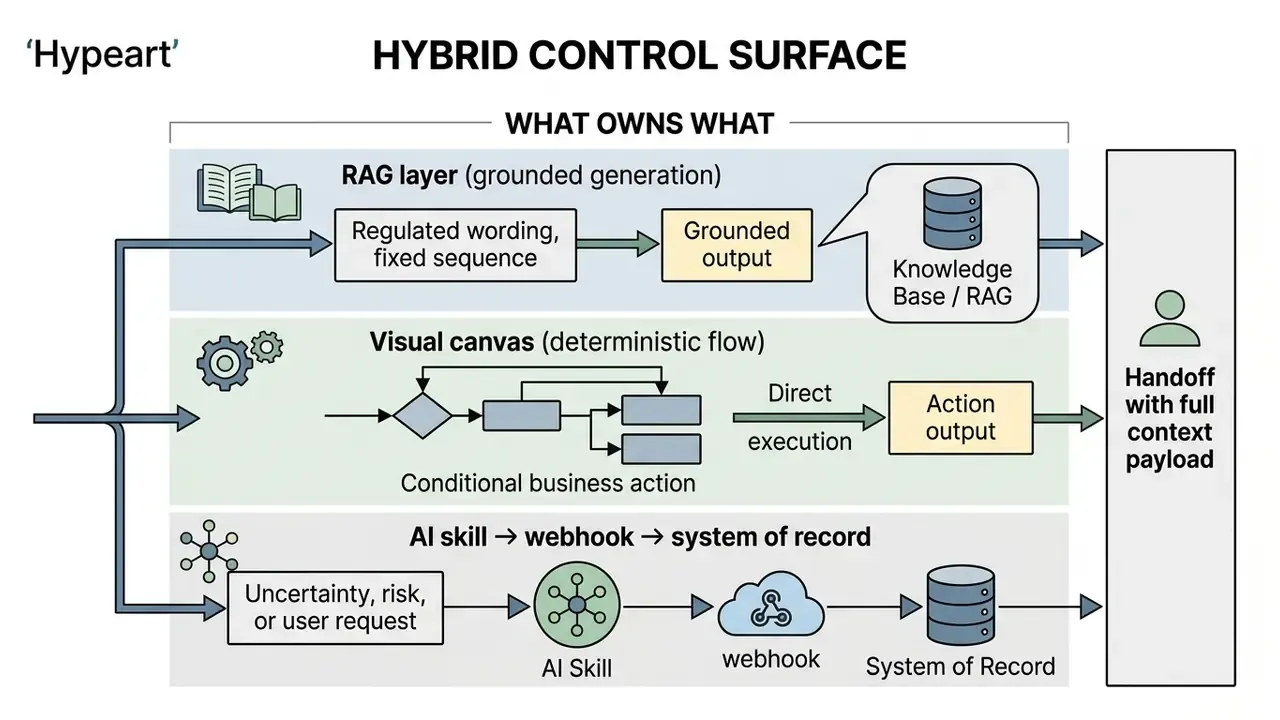
A modern ai chatbot maker does not force a choice between rigid buttons and free-form generation. The strongest 2026 implementations run a hybrid model across three cooperating layers:
- RAG layer (generative AI)answers open-ended questions from indexed knowledge, including FAQs, policies, product documentation, and procedures.
- Visual canvas (drag-and-drop flows)owns predictable, high-stakes steps such as identity verification, payment capture, date selection, consent collection, and disclosure text. A flow starts from an event (chat ended, keyword detected, ticket created, schedule fired), branches on data in view, and executes actions across the stack.
- AI skillsplain-language instructions that fire on intent, keyword, page URL, location, or time, and may call a webhook mid-conversation.
Example skill configuration:
"If the user asks about pricing or requests a demo, ask for their work email, qualify the lead with AI, create it in the CRM, and notify the sales team in Slack via webhook."
Other skills teams deploy within minutes: summarize the conversation before human takeover so the agent reads three lines instead of thirty; sync a contact into the CRM at chat end and create it if missing; add new contacts to a marketing audience; open a follow-up ticket automatically when a conversation receives a low rating.
How to build an AI chatbot without coding: from idea to launch
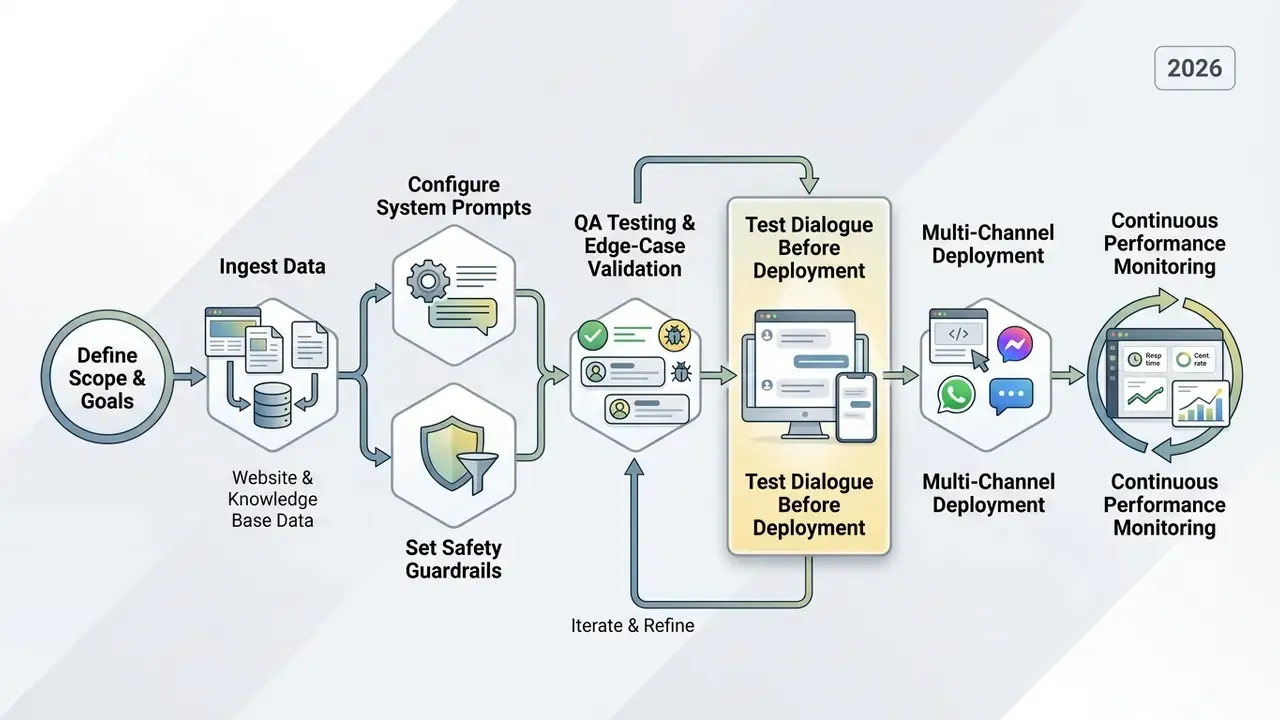
Creating a custom conversational bot with a no-code ai chat bot creator follows a structured, multi-step framework: define business objectives, prepare data sources, configure model instructions, run rigorous testing, then deploy.
No-code platforms remove manual software coding from the critical path. Teams configure complex behaviors through visual interfaces, prompt declarations, and drag-and-drop workflow nodes. Fast, yes. But speed without a testing gate is how shadow bots reach production.
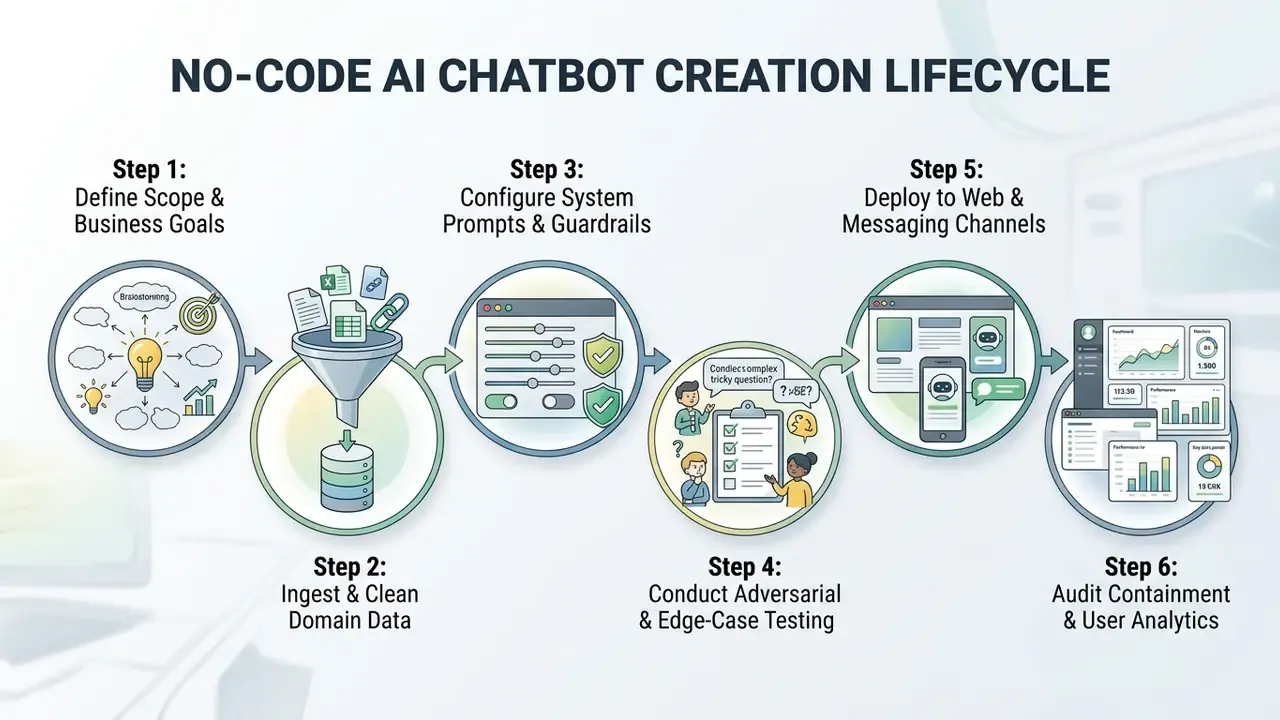
Validate outputs against agreed operational criteria before enabling public access. Following the lifecycle in order mitigates operational risk and keeps performance consistent between releases. Most teams reach a working first version in minutes, because website ingestion handles the bulk of setup, then spend the first week tuning instructions against real transcripts.
Define the goal, audience, and role of the chatbot
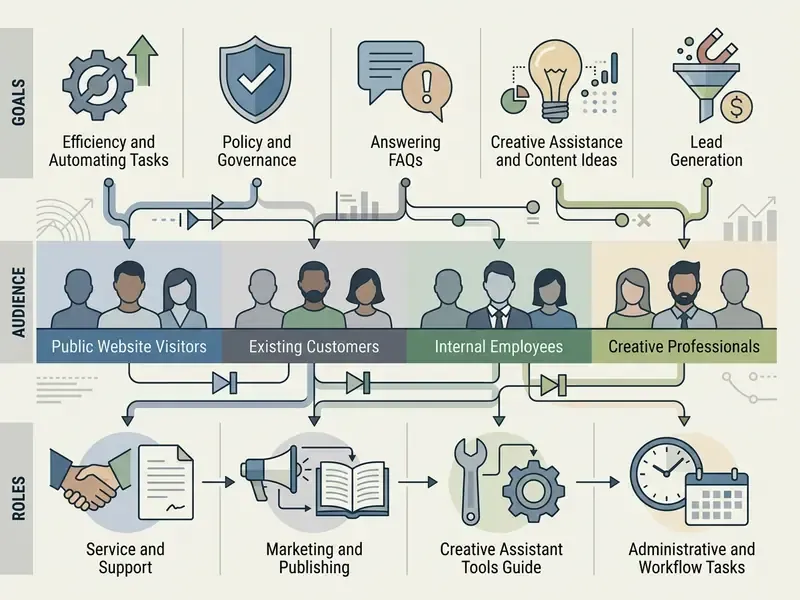
Clear operational goals come first when configuring an ai chatbot maker. Management defines performance indicators, target audience segments, and the primary role of the interface. Tie each bot objective to one measurable KPI, such as reduced contact-center cost, shorter ticket resolution time, or higher direct conversion. Then segment users by expertise and recurring intents pulled from historical transcripts, not from assumptions.
Business goals vary by domain:
Audience expectations shape the conversation strategy. Segmenting by technical expertise and intent produces appropriate response formatting, and clear boundaries prevent scope creep away from institutional risk tolerance.
- E-commerce
- conversion rate optimization, order tracking, cart recovery.
- SaaS
- onboarding guidance, documentation retrieval, support deflection.
- Professional services
- lead qualification, appointment scheduling, preliminary inquiry capture.
| Industry | Connected data sources | Automated AI actions | Business outcome |
|---|---|---|---|
| E-commerce and retail | Product catalog, FAQ base, returns and shipping policy, loyalty rules | Attribute-based product selection, order status lookup via carrier API, return initiation, post-purchase feedback capture | Reported visit-to-order lift up to +266%; deflection of roughly 75% of shipping inquiries |
| SaaS and IT | Swagger/OpenAPI docs, Notion and Confluence spaces, release notes | Step-by-step onboarding, cURL request generation, feature explanation, automatic Jira ticket creation on errors | Tier-1 support load reduced by 60% to 80%; faster time-to-first-value |
| Healthcare | Clinician schedules, test preparation protocols, insurance coverage rules | Appointment booking in the medical record system, reminder dispatch, insurance verification and claims guidance, protocol-based pre-screening | Round-the-clock scheduling without front-desk staffing; fewer no-shows |
| Banking and fintech | Product terms, rate and cashback tables, fee schedules, application status systems | Loan and deposit parameter calculation, balance and transaction lookup, card block on request, statement issuance via webhook, application status tracking | Standard service interactions compressed from roughly 10 minutes to under 30 seconds, with mandatory handoff for advice-bearing cases |
| Hospitality | Availability calendars, rate plans, dining and spa menus, loyalty tiers | Reservation assistance, personalized room and dining recommendations, in-stay requests, loyalty enrollment | Higher direct booking share and 24/7 multilingual guest response |
| Internal HR and IT helpdesk | Policy handbooks, benefits documentation, access-request procedures | Policy Q&A, leave-balance lookup, access request routing, equipment request tickets | Lower repetitive internal ticket volume; consistent policy answers with source citation |
The matrix also clarifies scope boundaries. Any row that touches money movement, medical judgment, or a legally binding statement belongs in the "confirmation or human approval required" column of the autonomy matrix, not in full generative autonomy.
Configure behavior and custom answers for AI chat
Model instructions establish persona, tone, and operational boundaries for an ai chat creator. System prompts define how the ai chat engine responds to ambiguous or out-of-scope inputs, which is where most reputational damage originates.
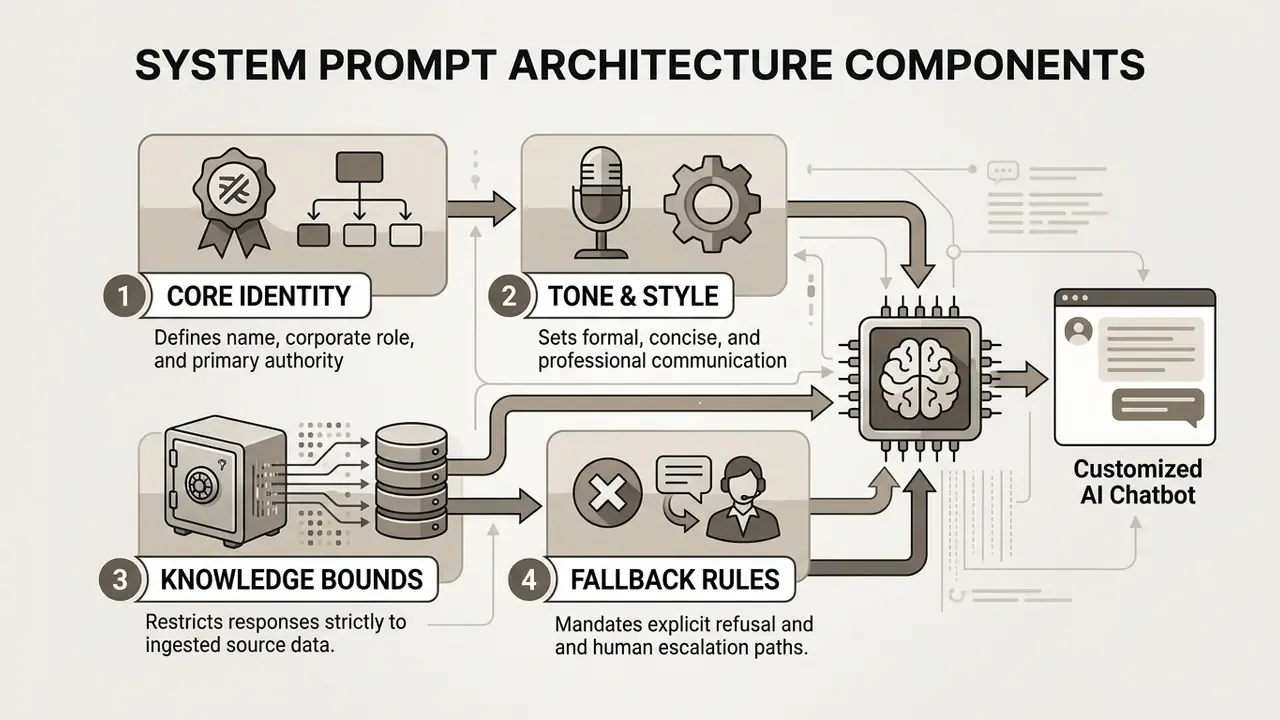
Publicly available generative AI reference guidance from the U.S. Department of Energy (Generative AI Reference Guide, 2024) is widely cited for the same first principle: instructions must be clear and specific, and identity definitions should stay separate from security guardrails to keep outputs predictable. Treat that as practitioner best practice rather than a peer-reviewed finding.
Tone is not cosmetic. It moves the numbers.
«As chatbot communication style became more empathetic, satisfaction and repurchase-intention scores converged with those of live agents. Perceived empathy fully mediated the effect.»
Behavioral guardrails prevent unauthorized outputs, but prompts alone will not hold. Security-oriented guidance, including vendor guardrail documentation such as AWS guidance on building safe generative AI applications (2024), consistently pairs prompt shaping with external controls: input filtering, output validation, domain boundary constraints, and monitoring. Refusal rules need detective controls sitting outside the model.
Copy-paste system prompt templates
Template 1: e-commerce support (hallucination containment)
You are the official AI assistant for [Store Name]. Answer customer questions strictly from the loaded knowledge sources.
RULES:
1. Use only information from the knowledge base. If the answer is not there, reply: "I don't have verified information on that. I'm connecting you with a specialist."
2. Never invent discounts, promo codes, delivery windows, or stock levels.
3. Cite the source document title for policy answers (returns, shipping, warranty).
4. Tone: polite, concise, help-focused. Maximum 120 words per answer.
5. Escalate immediately on: chargeback disputes, damaged goods claims, legal threats, or three consecutive failed answers.
Template 2: regulated financial services (advice boundary)
You are a service assistant for [Institution]. You explain published product terms and account processes. You are not an adviser.
RULES:
1. Answer only from approved product documentation. Quote figures exactly; never estimate or recalculate rates.
2. Never provide investment, tax, credit-approval, or suitability advice. On any such request, state the limitation and hand off to a licensed representative with full transcript.
3. Never request or repeat full card numbers, passwords, one-time codes, or government ID numbers.
4. For account-specific actions, confirm the verified customer token exists; if absent, route to authentication.
5. Append the standard disclosure: information is general and not a personal recommendation.
6. Log the retrieved source IDs for every answer.
Template 3: SaaS onboarding and technical support
You are the technical assistant for [Product]. You help users configure, integrate, and troubleshoot.
RULES:
1. Ground every answer in the product documentation, API reference, and release notes provided.
2. Provide steps as numbered lists; include exact endpoint names, parameters, and code snippets when documented.
3. If the user reports an error you cannot match to documentation, collect: product version, environment, exact error string, reproduction steps, then create a ticket and confirm the ticket ID.
4. Never speculate about unreleased features or roadmap timing.
5. Ask one clarifying question maximum before attempting an answer.
Test the dialogue before deployment
Testing is mandatory before a bot generator ai touches production. QA evaluates answer accuracy, behavior under adversarial input, and hallucination rate.
Methods worth running every cycle:
- Regression benchmarking evaluate responses against a fixed set of 20 to 50 domain-specific test questions, re-run after every prompt or knowledge-base change.
- Adversarial prompting test prompt injection resistance and boundary enforcement, including instructions hidden inside uploaded documents.
- Perturbation testing verify consistency across semantically equivalent rephrasings. NIST AI 600-1 specifies that the same prompt, perturbed while preserving meaning, should yield similar responses.
- Handoff verification test fallback triggers, escalation reasons, and completeness of the context payload delivered to human agents.
- Flow and skill dry runs trigger each automation manually and read the run log, noting what fired, what succeeded, what failed, before any real conversation touches it.
Simulating edge cases exposes gaps in ingestion and instructions. Catching odd behavior pre-launch protects institutional reputation and, frankly, saves the project sponsor an uncomfortable meeting. Nothing should reach production by accident: preview the conversation, fire a test run, audit every execution log.
How to train a custom AI chatbot on your website, files, and knowledge
Training a custom ai chatbot means indexing proprietary domain data so answers stay contextually accurate. Modern architecture relies on Retrieval-Augmented Generation rather than full model retraining, querying connected documents at run time.
Connecting enterprise knowledge turns a generic chatbot maker ai into a specialized domain assistant. The system indexes website URLs, internal files, and knowledge repositories into a vector database, then retrieves relevant snippets to ground each answer. Basic RAG has three steps: search the knowledge base, compose a grounded prompt, generate the output.
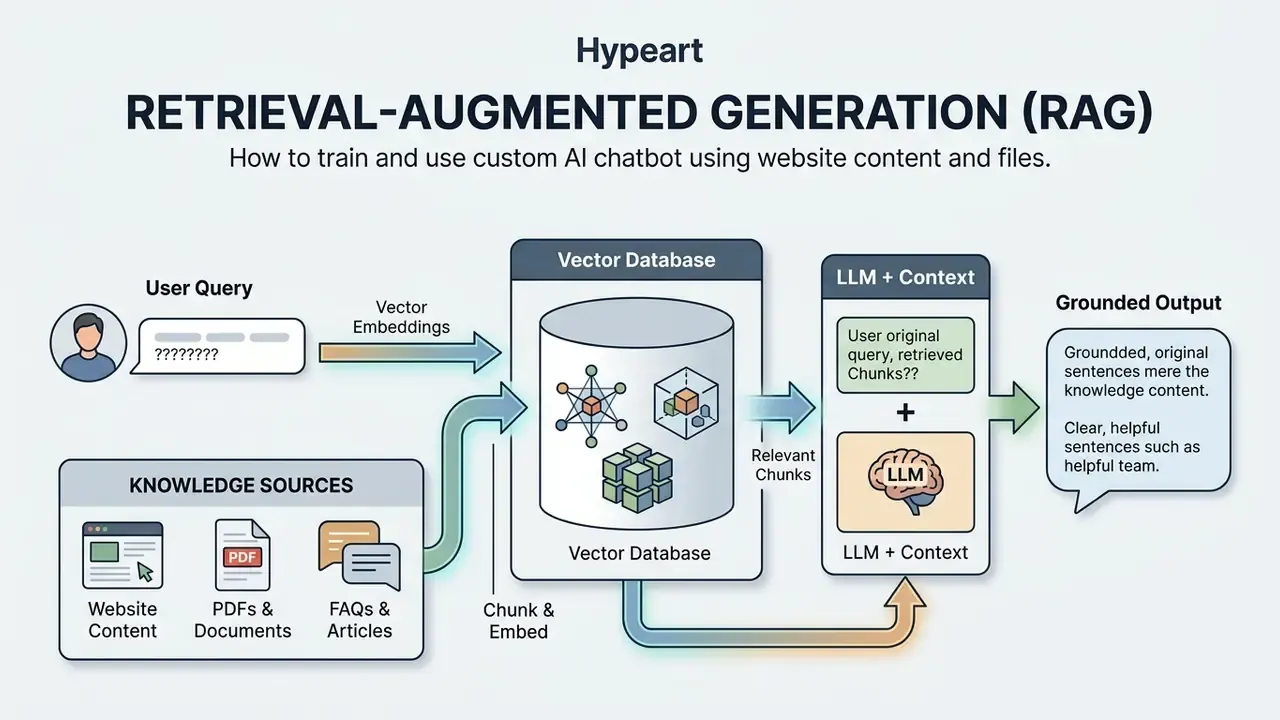
Dynamic synchronization prevents stale answers. When a source repository changes, the vector index should update, so responses reflect current policy rather than last quarter's fee schedule. For detailed licensing and asset documentation, explore the hub for enterprise usage standards.
Data sources: website, files, and knowledge base
A modern ai chatbot generator free tier or enterprise edition ingests data across many file types and platforms. Broad coverage of operational documentation is what separates a useful assistant from a polite deflection machine.
Common ingestion targets:
- Web content
- automated crawling of sitemaps, help center URLs, and product documentation pages, whether a full site, a single section, or individual pages, with scheduled refresh.
- Document formats
- structured and unstructured files including PDF, DOCX, CSV, and TXT.
- Enterprise connectors
- native API synchronization with Notion, Zendesk, Confluence, Google Drive, SharePoint, Dropbox, Box, GitBook, and Freshdesk. Platform limits matter here: some help-center products cap external content sources (for example, 50 external sources), which constrains how many repositories one bot can serve.
NIST's chatbot development publication (NIST IR 8579, Developing the NCCoE Chatbot, 2025) describes the practical preprocessing pipeline: extract metadata and cleaned text from each source document, convert it to JSON, store it as JSONL, then chunk and index it for retrieval. Chunks become vector representations that enable fast semantic search. The same publication names the matching risks: hallucinations not grounded in provided data, prompt injection, and data exposure.
Chunking strategy determines answer quality more than model choice does. Splitting on semantic boundaries such as headings, clauses, and table rows preserves meaning. Splitting on fixed character counts fragments policies mid-sentence and produces confidently wrong answers. Retain document title, version, effective date, and access level as chunk metadata, so retrieval can filter by permission and recency.
How to control AI chatbot answer accuracy
Accuracy control requires continuous output monitoring, evaluation metrics, and disciplined knowledge base maintenance. Mitigating hallucination risk protects data integrity at every customer touchpoint.
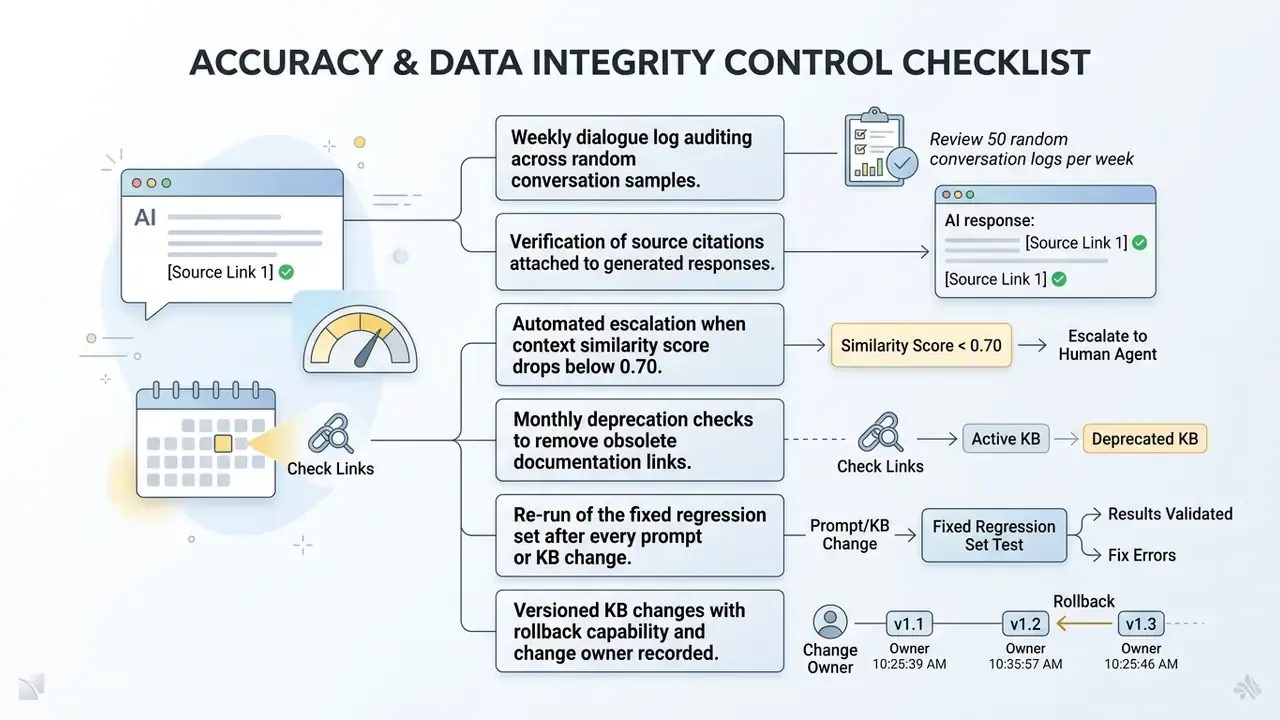
Quantitative tracking evaluates correctness, relevance, and context alignment. NIST's generative AI risk guidance defines confabulation as false content presented confidently, which reframes accuracy control as an output-evaluation discipline rather than a prompt-writing exercise. Maintain test question sets and measure response quality before and after knowledge updates. When confidence falls below the threshold, the system escalates instead of improvising.
Scheduled content review keeps obsolete product specs, expired pricing tables, and retired policies out of the vector index. In regulated environments, retain evaluation artifacts, including test sets, scored outputs, adversarial results, and sign-off records, inside the same repository your model risk or GRC function already uses. That is what makes validation evidence reproducible for internal audit and supervisory review under SR 11-7 and OCC Bulletin 2011-12 expectations.
Fact check and audit protocol for AI data verification
Where to deploy an AI chatbot: website, channels, and integrations
Deploying an ai chatbot maker means publishing the interface across corporate website pages, messaging channels, and core business applications. Omnichannel availability keeps the experience consistent regardless of entry point.
«By 2024, 38% of enterprise customer service leaders had deployed conversational AI as a primary contact channel, nearly double the 2020 figure.»
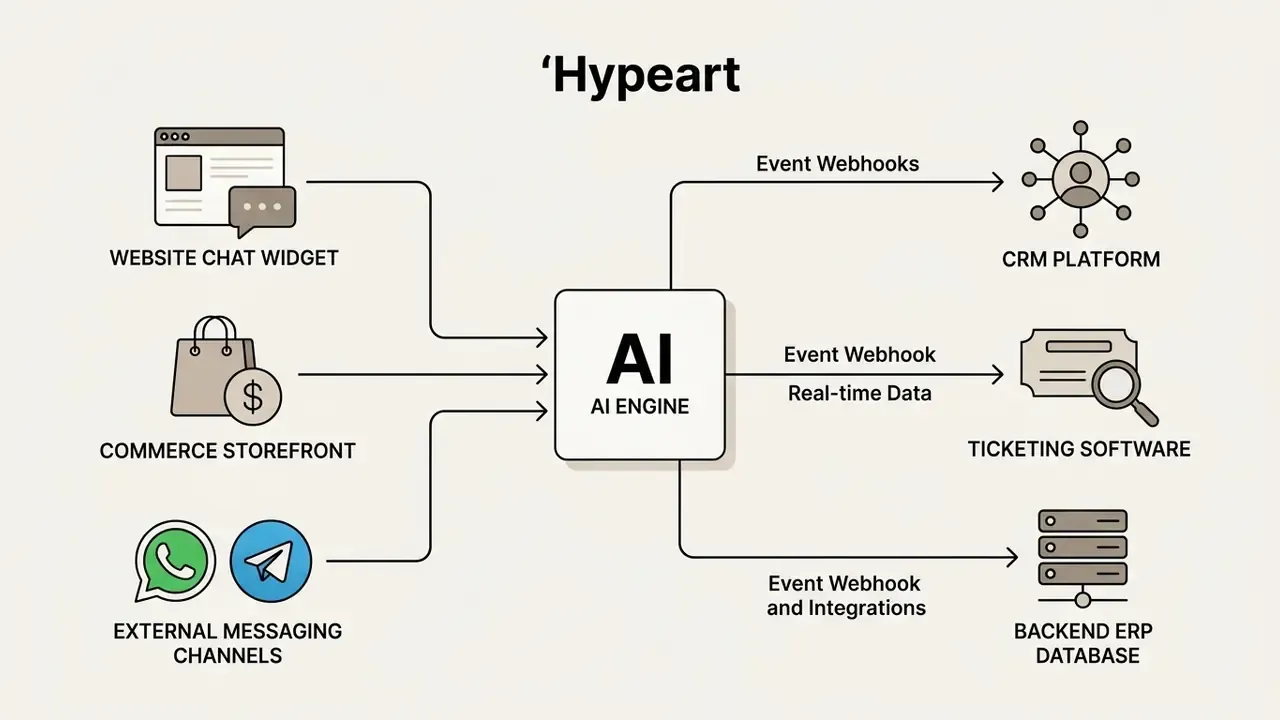
Modern deployment models connect one conversational engine to multiple front ends. Whether embedded as a web widget or wired via API to messaging platforms, the system maintains unified conversation history and user state. One build, one queue, many channels.
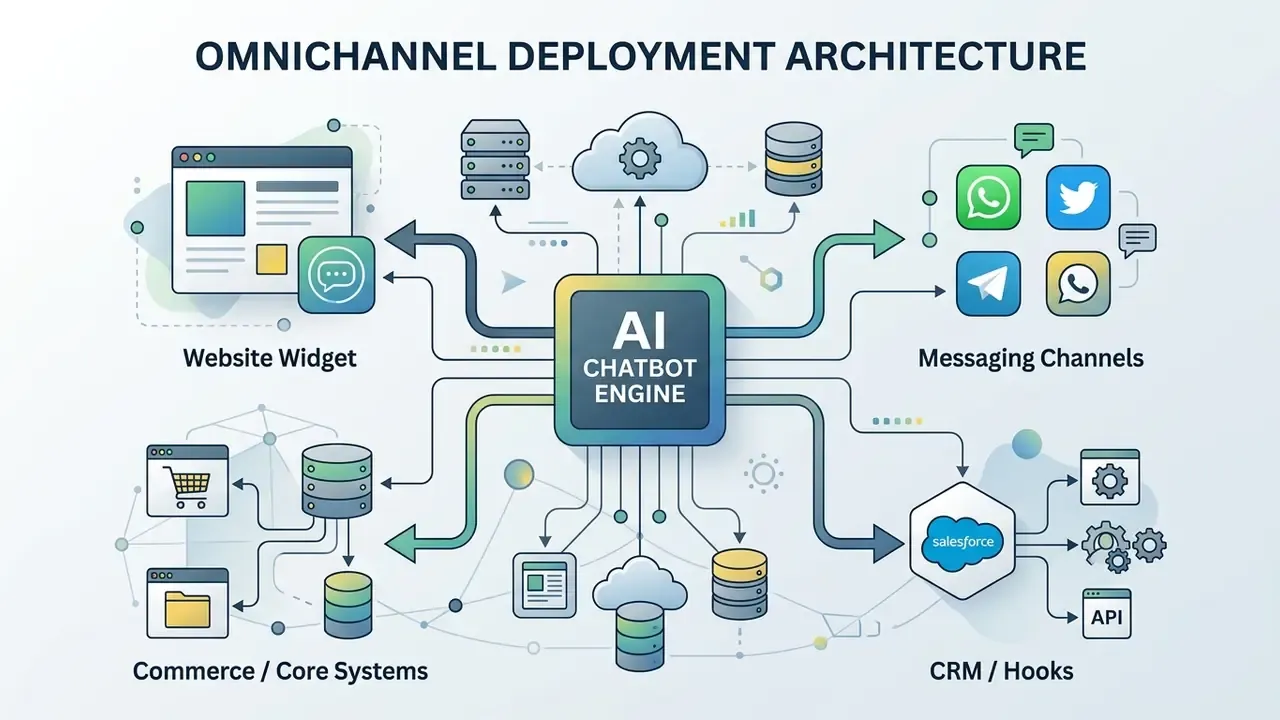
Integrating conversational endpoints into core platforms enables event-driven processing. Webhook architectures move transaction events between chatbots, CRM repositories, and ERP databases in near real time. Note the constraint most teams discover late: webhook endpoints must be publicly reachable HTTPS URLs, since localhost and internal-only addresses are rejected by major platforms. Align with network security early, not the week before launch.
Website chat widget, commerce, and core business system integration
Installing a web chat widget means embedding a lightweight JavaScript snippet into target HTML templates or a CMS, or installing a platform plugin for WordPress, Webflow, or a storefront app. Most teams go live the same day.
Commerce platform integration (Shopify example). According to Shopify developer documentation, deeper catalog and order access requires a custom app with scoped Admin API permissions plus an app proxy for storefront-side data delivery:
- Script embedding: place widget embed code within
theme.liquidbefore the closing - App proxies: load dynamic app content onto storefront pages while authenticating proxy requests before querying Shopify APIs. The proxy URL is configured in admin app settings.
- GraphQL Admin API: query product catalogs, inventory availability, and customer account details. Shopify has marked the Admin REST order resource as legacy and requires new public apps to use the GraphQL Admin API.
- Customer Account API and order status page extensions: enable authenticated order lookup, with pre-authenticated access restricted to fields explicitly marked as pre-auth accessible.
- Minimum scopes:
read_productsandread_ordersfor catalog and order lookup. Nothing broader.
Messaging channels, webhooks, and tool integration
Connecting an ai chatbot generator to external messaging platforms extends reach past the website widget. Primary targets: WhatsApp Business API, Telegram Bot API, Meta Messenger, SMS through a telephony provider, and forwarded support email that lands as tickets in the same shared inbox.
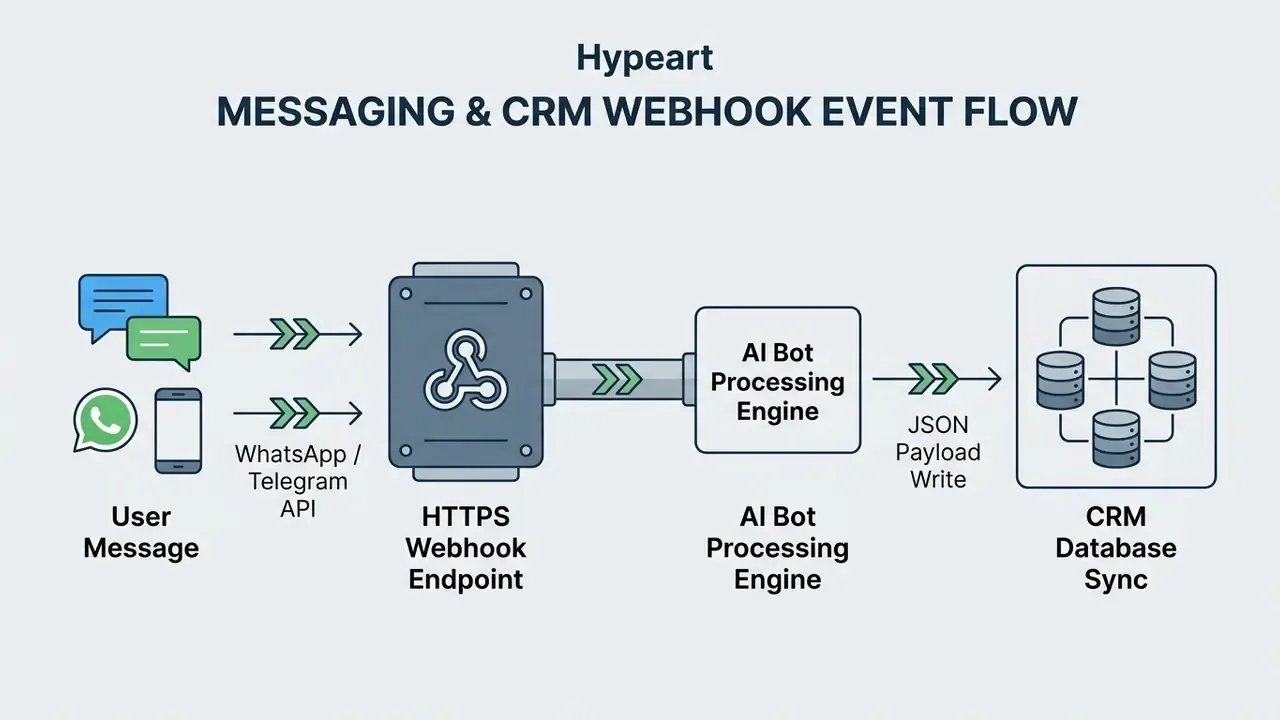
External integrations run on HTTP webhooks. When a user sends a message on WhatsApp or Telegram, the platform transmits an HTTPS POST payload to the chatbot endpoint. The bot processes the input, executes logic, and returns a JSON response. Meta's WhatsApp Business Platform documentation covers webhook subscriptions for inbound messages, delivery and status events, and customer profile updates across both Cloud API and On-Premises API. Legitimate platform webhooks are signed, so the receiving endpoint must verify signatures before acting on any event. Skip that step and you have built an open door.
Synchronizing conversation logs with CRM tools such as HubSpot or Salesforce preserves customer context across touchpoints. Webhook triggers create support tickets, update contact fields, and alert account managers during high-priority escalations. Integration platforms extend this further, with workflow connectors advertising thousands of downstream apps, but every additional connector widens the audit surface. Inventory them. Do not accumulate them silently.
How to choose an AI chatbot builder: free plans, pricing, and required features
Evaluating an ai chatbot builder means analyzing pricing models, usage limits, custom branding options, and long-term scaling overhead. Decide early whether a free ai chatbot maker tier covers your first phase or whether paid plans are mandatory from day one.
Commercial offerings follow multi-tiered pricing. Entry plans carry lower usage caps suited to proof-of-concept work, while enterprise plans add white-labeling, custom SLAs, and dedicated security controls. Published 2026 snapshots place many entry tiers between roughly $15 and $60 per month, with usage-based options starting at $0 and white-label enterprise packages running into the thousands per month.
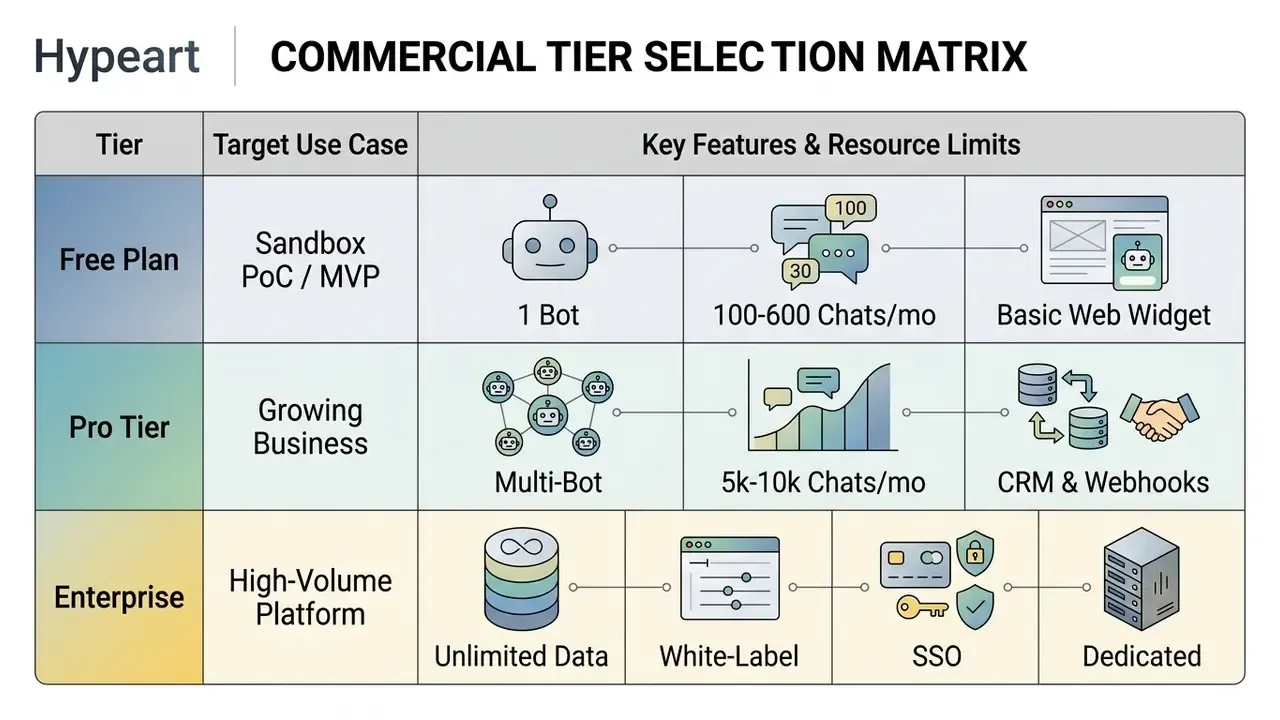
Tier choice follows monthly conversation volume, storage needs, and required integrations. Reading the technical limits carefully prevents mid-quarter service disruption when a campaign triples chat volume. To evaluate software pricing models across tools, review AI Media Pricing guidance.
Risk-adjusted TCO: the number that actually matters
Subscription price is the smallest line in an enterprise chatbot budget. Model the full cost before you compare vendors.
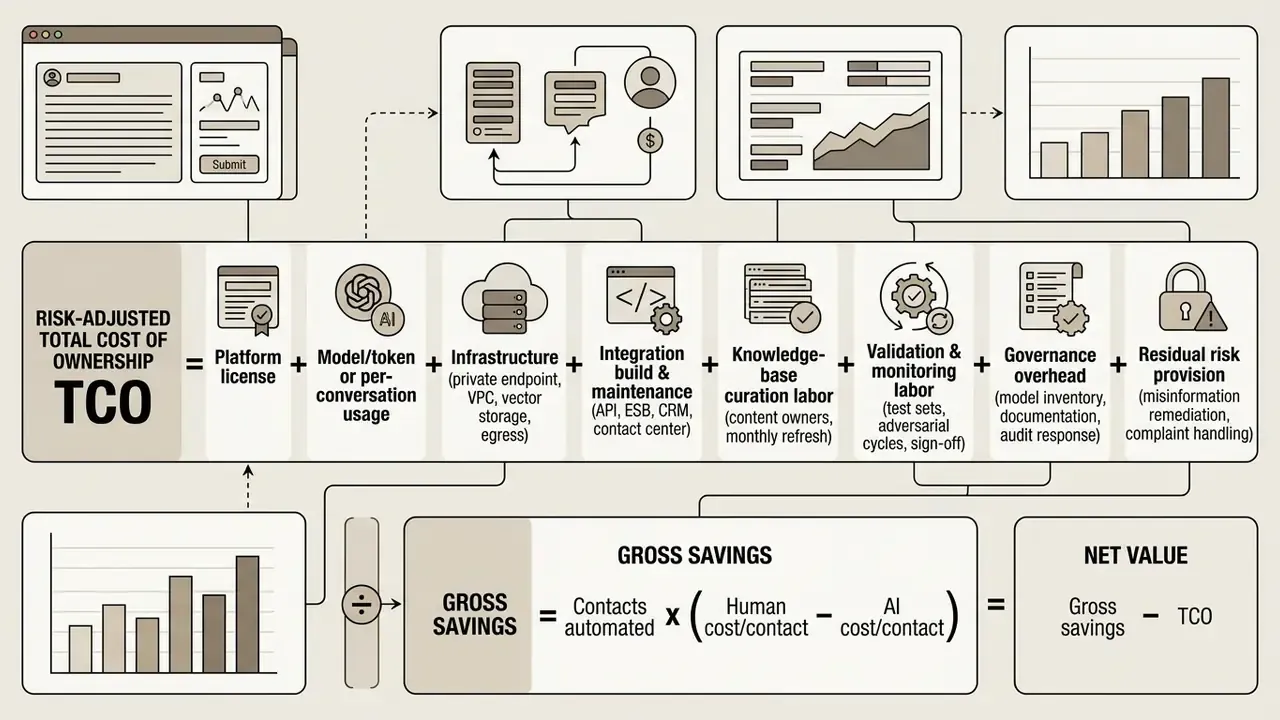
Worked example. 20,000 monthly contacts, 60% containment, human cost $8.00, AI cost $0.10:
20,000 × 0.60 × ($8.00 − $0.10) = $94,800 gross monthly savings. Subtract platform fees, usage, integration amortization, curation, and validation labor to reach net value. Teams that omit the validation line item routinely overstate first-year ROI by 20% to 40%. For scenario modeling across AI tooling budgets, view the guide in the calculators hub.
Interactive savings estimator (specification for implementation). Two sliders, monthly contact volume from 500 to 50,000 and current support headcount, feeding the formula above, with editable assumptions for containment rate, human cost per contact, and AI cost per conversation, plus a toggle for hybrid resolution cost ($1.50 to $3.50) so the output reflects assisted rather than fully autonomous handling.
When a free AI chatbot maker is enough, and how to design a sandbox PoC
A free ai chatbot maker or ai chat maker free plan gives you a functional baseline for an MVP, a low-volume small business website, or, for larger organizations, an isolated proof of concept ahead of procurement. Free tiers let teams evaluate capability without a commitment.
Typical free plan parameters:
- Bot count one active bot instance.
- Monthly allowance 100 to 600 chat sessions per month. Landbot offers 100 chats with one seat and full builder access, Conferbot 600 conversations with AI responses and basic analytics, Chatonbo 250 conversations with three knowledge sources.
- Storage limits three to five document uploads, or a 50 MB file cap.
- Widget features standard web widget with vendor branding displayed.
- AI availability vendors differ on whether generative replies are included at all. Some free plans are rule-based only, which makes them useless for testing RAG quality.
Free options suit simple FAQ routing, lead capture forms, and preliminary workflow testing. Nothing more.
«Zendesk benchmark data records CSAT of 81% for human agents, 69% for standalone AI chatbots, and 79% for AI-assisted hybrid handling, a gap of only 2 percentage points between hybrid and human.»
The practical reading: a free, standalone bot with no escalation path will cost you satisfaction points. Budget for the assisted model, not the unattended one.
Sandbox PoC design for regulated and enterprise teams. Never pilot on live customer data by default. A defensible PoC includes synthetic or de-identified documents only, a closed tester group behind authentication, no write access to any system of record, a fixed 20 to 50 question evaluation set with scored results, logged adversarial and prompt-injection attempts, an explicit end date with a data deletion request, and a decision memo comparing measured containment and accuracy against the target service level. Only after that memo should procurement engage on enterprise terms.
What AI chatbot builder features usually require payment
Paid tiers unlock the capabilities production environments actually need. They also remove the vendor logo from a customer-facing widget, which matters more to brand teams than to engineers.
Advanced features typically behind a paywall:
- White-labelingremoving platform logos and applying corporate styling.
- Expanded usage allowancehigher monthly session limits, larger token caps (some vendors publish bundled allowances in the millions), and multi-gigabyte vector storage.
- Advanced integrationsnative connectors for CRM software, commerce app proxies, workflow automation, and custom API access.
- Custom API keys (BYOK)connecting your own OpenAI or Anthropic credentials to control usage cost and keep inference under your contractual terms.
- Analytics and securityexportable interaction analytics, audit trail logs, SSO, and SOC 2 evidence.
«Klarna's AI assistant handled 2.3 million conversations in its first month, equivalent to roughly 700 full-time agents, and cut average resolution time from 11 minutes to under 2 minutes.»
Enterprise procurement criteria beyond feature lists. For regulated deployments, evaluate SOC 2 Type II and ISO 27001 attestation; a contractual SLA (99.9% or 99.99%) with credits; data residency and sub-processor disclosure; explicit contractual prohibition on training foundation models with your data; private VPC or dedicated model endpoint options; BYOK and customer-managed encryption keys; role-based access control with SSO and SCIM; immutable audit logs exportable to SIEM; per-skill and per-channel kill switches; documented incident disclosure timelines; and exit terms covering data export and deletion. If a vendor hesitates on the training-data clause, that answer alone is informative. Questions about onboarding support paths belong in the same conversation, and you can open the hub to see how support tiers are usually documented.
| Feature and limit criteria | Free tier | Pro tier | Enterprise tier |
|---|---|---|---|
| Monthly interaction volume | 100 to 600 sessions per month | 2,500 to 10,000 sessions per month | Custom volume or unlimited capacity |
| Data and knowledge storage | 3 to 5 files (up to 50 MB) | 100+ files, 2 GB vector storage | Unlimited document storage, custom RAG |
| Supported channels | Single web widget only | Web widget, WhatsApp, Telegram, SMS, email | Omnichannel plus custom API endpoints |
| Integration capabilities | Basic automation connector or standard forms | CRM connectors, commerce apps, webhooks | Full REST/GraphQL API, ESB, private connectors |
| Branding and customization | Vendor branding enforced | Custom color palette and styling | Full white-labeling, no vendor logos |
| Security and governance | Standard encryption only | Audit logs, role permissions, BYOK on some plans | SSO/SCIM, SOC 2 evidence, private endpoints, DPA |
| Support and SLAs | Community forum or email support | Priority ticketing and live chat | Dedicated account manager, 99.9%+ SLA |
Verified documentation and tariff sources
For transparency on service conditions, user agreements, and commercial tiers, consult official platform documentation:
- Landbot pricing documentation
- tiered structures from €0 per month, 100 chats on the free seat, with published overage rates. (Landbot Official Pricing, 2026)
- ChatBot.com developer terms
- entry tiers from $19 per month with a 14-day trial and no credit card required. (ChatBot.com Help Center, 2026)
- ChatbotBuilder.ai commercial terms
- plans from $49 per month to $2,499 per month white-label enterprise, including OpenAI API access, trial, and refund terms. (ChatbotBuilder.ai Pricing, 2026)
- Conferbot free plan terms
- one chatbot, 600 conversations per month, AI responses, website widget. (Conferbot Free Plan, 2026)
- NIST AI Risk Management Framework
- reference guidance for enterprise AI testing and governance (NIST AI 600-1), plus NIST IR 8579 for chatbot-specific development and risk. (NIST Publications, 2024 to 2025)
- Model risk management baseline
- Federal Reserve SR 11-7 and OCC Bulletin 2011-12 for validation, documentation, and independent review expectations in financial institutions.
Vendor comparison: six popular AI chatbot makers
| Platform | Free access | Key AI capabilities | Integrations | Best fit |
|---|---|---|---|---|
| ChatBot.com (Text) | 14-day trial, no credit card | Hybrid RAG agent taught from website and files, drag-and-drop flow canvas, plain-language skills, resolution reporting | Shopify, WordPress, Webflow, WhatsApp, Messenger, SMS, Slack, Salesforce, HubSpot, Mailchimp, webhooks | E-commerce and sales teams needing revenue attribution |
| Freshchat (Freshworks) | Limited free tier | Generative AI-assisted bot building, intent detection, knowledge-source learning, small talk, multilingual | WhatsApp, Facebook Messenger, Apple Business Chat, Freshdesk, agent transfer | Large multichannel support organizations |
| Thinkstack | Free forever tier, no credit card | GPT-family models, training on URLs, files, CSV, Q&A and Notion, sentiment analysis, agentic multi-step actions, AI-tagged topics | Zapier, Salesforce, HubSpot, Google Drive, Notion, APIs, webhooks, 90+ languages | Startups, SaaS, and service businesses |
| Landbot.io | Free plan: 1 seat, 100 chats per month | Lightweight visual builder, templates, lead-capture forms; AI chats metered separately | WhatsApp API, Stripe, Airtable, third-party connectors | Small business and lead generation |
| Chatfuel | Limited trial | Fast generative response setup for social channels, sales and support templates, triggered messages | Instagram Direct, Facebook Messenger, website widget | Social-first commerce and DM sales |
| Intercom / Drift | Trial-based | Code-free bot builder, proactive support, lead qualification, meeting booking, A/B bot testing | CRM and sales stack connectors, help desk, marketing automation | Sales-led B2B pipelines and proactive support |
Two structural notes for shortlisting. First, most free bot builders remain rules-based: they ask predefined questions, search a knowledge base, route to humans, and collect data, then hit a hard ceiling the moment you need extra messaging channels or help-desk and CRM integration. Second, category labels are converging. Tools that once called themselves chatbot builders now market the same engine as an AI agent builder. Score the method, the governance controls, and the integration depth, not the naming.
Shadow AI inventory and the 20-question vendor checklist
Self-service platforms get adopted by marketing, product, and support teams faster than security can inventory them. That is the shadow AI problem: unregistered bots trained on unreviewed documents, answering customers under your brand, with no owner and no audit trail. It rarely surfaces during a project review. It surfaces during an incident.
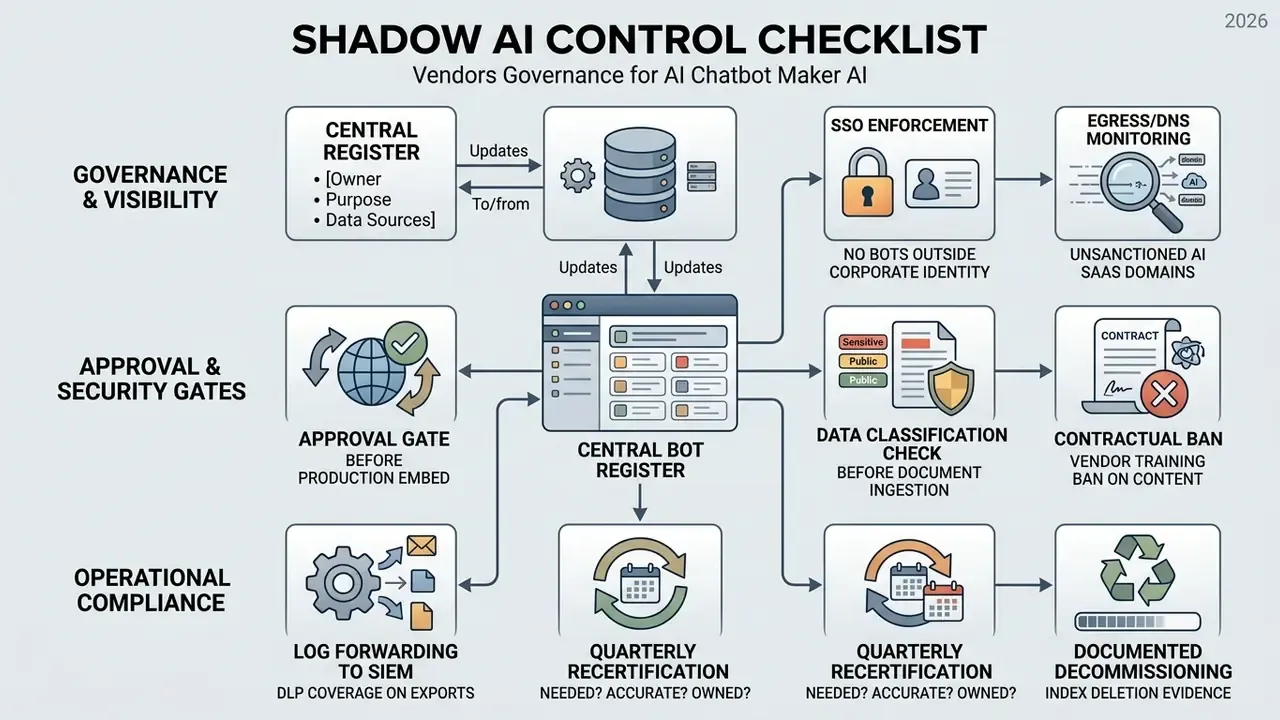
FAQ: common questions about AI chat bot makers
This section covers the technical and operational questions that surface repeatedly during deployment, scaling, and oversight of no-code conversational AI platforms.
Scaling is its own discipline. Recent security guidance for AI systems calls for limiting superfluous functionality, enforcing version control and strict access control, logging activity, and encrypting data at rest and in transit before a pilot becomes production.
Do you need code to use an AI bot generator?
No programming or coding experience is required to build and deploy a basic conversational bot with a modern bot generator ai. Platform interfaces provide guided setup, drag-and-drop node builders, and visual configuration panels. Non-technical teams get there in three steps:
- Content upload: ingest URLs, PDF files, and knowledge base articles through standard upload forms.
- Prompt configuration: define persona and fallback behavior in visual text editors.
- Widget embedding: copy a generated JavaScript snippet into a website template, or install a CMS plugin. Basic deployment needs no code. Advanced customization, such as building custom API webhooks or multi-system database integrations, usually requires developer help. That split is healthy: business teams own the content and tone, engineering owns the integration surface.
How long does it take to build an AI chatbot?
Minutes for a first working version, because website ingestion performs most of the configuration and a preview widget lets you test immediately. Plan the first week for instruction tuning and knowledge-source expansion driven by real transcripts, then a second cycle for adversarial testing before you enable any write actions. Regulated deployments should add validation and sign-off time to that schedule rather than compressing it.
Can you create and run several specialized custom AI chatbots at once?
Yes. Organizations routinely operate multiple specialized custom ai chatbots across departments inside one platform account, each with tailored instructions, knowledge bases, and integration hooks. Common multi-bot configurations:
- Customer support bot: trained on user manuals and troubleshooting guides, wired into ticketing software.
- Sales qualification bot: trained on pricing tables and case studies, connected to CRM lead routing.
- Internal HR or helpdesk bot: ingests internal policy documents, restricted to internal channels. Narrow-scope bots outperform one generic bot on accuracy, because retrieval competes against a smaller and cleaner corpus. Distinct system prompts, permissions, and knowledge bases keep each bot inside its intended domain. One caveat: every parallel system needs its own entry in the model register, its own documentation, and its own transparency notice. Governance does not scale automatically with bot count. For terminology used across this guide, see the AI Media Glossary.
Can the chatbot hand off to a human agent?
Yes. The bot creates a handoff event and transfers the conversation with the full transcript, detected intent, escalation reason, retrieved sources, and any actions already executed. FAQ deflection runs first, then escalation triggers on low confidence, policy blocks, negative sentiment, or an explicit user request. Structured context transfer is what stops the customer from repeating themselves and what makes agent takeover fast.
Is a free chatbot builder enough for production?
For a low-traffic FAQ site, sometimes. For anything customer-critical, no. Free tiers cap at 100 to 600 chats per month, restrict knowledge sources, enforce vendor branding, and often exclude generative replies entirely. Standalone AI without assisted escalation also measures 12 CSAT points below human handling. Treat free plans as evaluation instruments, then move to a paid tier with audit logs, integrations, and an SLA.
Which channels can the chatbot work on?
Website chat widget, WhatsApp, Facebook Messenger, Telegram, and SMS through a telephony provider, with forwarded support email arriving as tickets in the same queue. The build happens once, and every channel shares one conversation history and one reporting surface.
Can the chatbot actually sell?
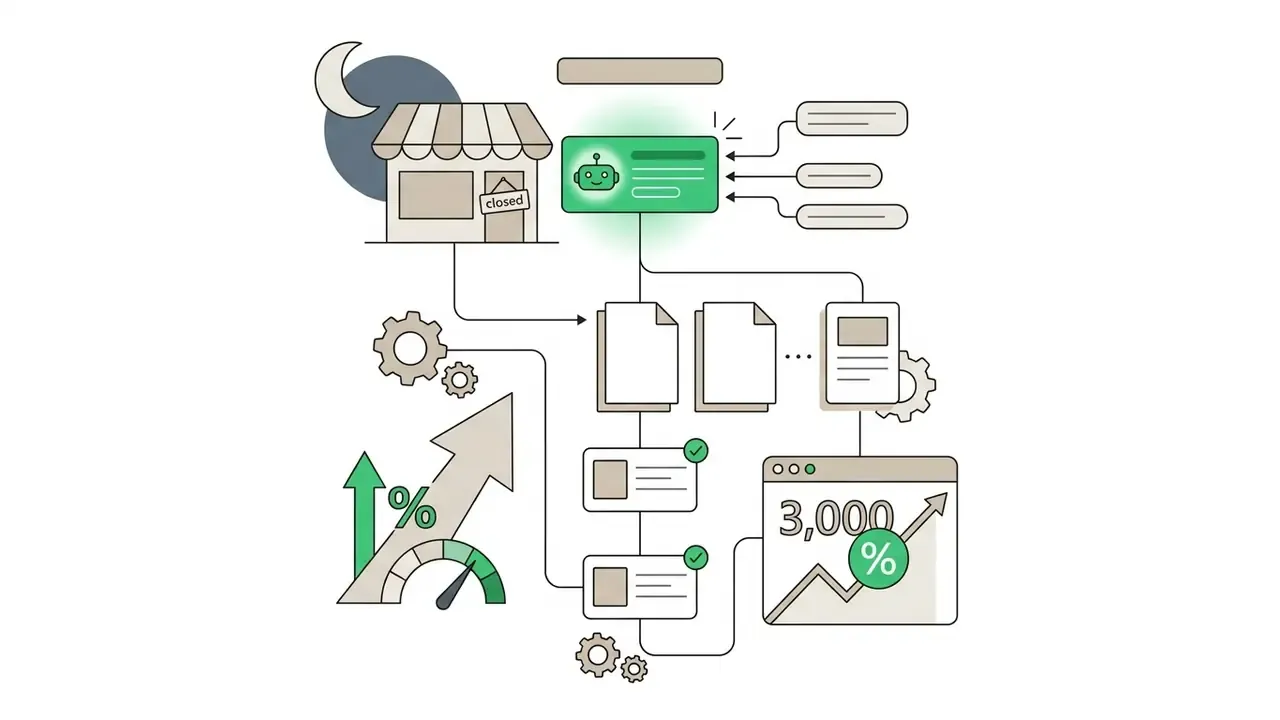
Yes, when it is connected to the catalog and the order record. It recommends products from live inventory, answers with the order in view, captures leads while the team is offline, and attributes conversation-originated revenue in reporting. Aggregated merchant reporting cites a 266% average visit-to-order lift and a 25% increase in average order value, with individual deployments reporting $1.5M in attributed revenue over eight months and an 80% AI resolution rate. Validate against your own baseline before you budget on those figures.
What is the safest next step for a regulated institution?
Register the intent, not the tool. Write a one-page scope note naming the owner, the customer journeys in play, the data classes involved, and the autonomy ceiling. Then run a closed sandbox PoC on synthetic content with a fixed evaluation set. If the measured containment and accuracy clear your service threshold, take the artifacts to model risk and internal audit before you sign anything. Slow at the start, faster at the end. Regulatory and professional notice: this guide is general information about conversational AI tooling and does not constitute legal, financial, medical, or compliance advice. Chatbot deployments in regulated sectors must be reviewed by qualified internal counsel, risk, and compliance functions, and must satisfy applicable disclosure, validation, and record-keeping obligations in the relevant jurisdiction.