On this page: what an AI question generator is, supported inputs (text, PDF, image, video, YouTube URL, live news), question types and Bloom's levels, a step-by-step workflow with ready-to-use prompts, export and LMS or gamified-platform compatibility, use cases for teachers, students and enterprise teams, pricing, free limits, data safety, FAQ.
What Is an AI Question Generator?
An AI question generator is a software system powered by natural language processing (NLP) and large language models (LLMs) that converts input text, documents, or multimedia into structured assessment items. These tools read the underlying semantic structure of a source and produce quizzes, practice tests, and answer keys without manual item authoring.
Think of it as an AI question creator sitting between your content library and your gradebook. You feed it a chapter; it hands back stems, keys, and distractors. The judgement call stays yours.
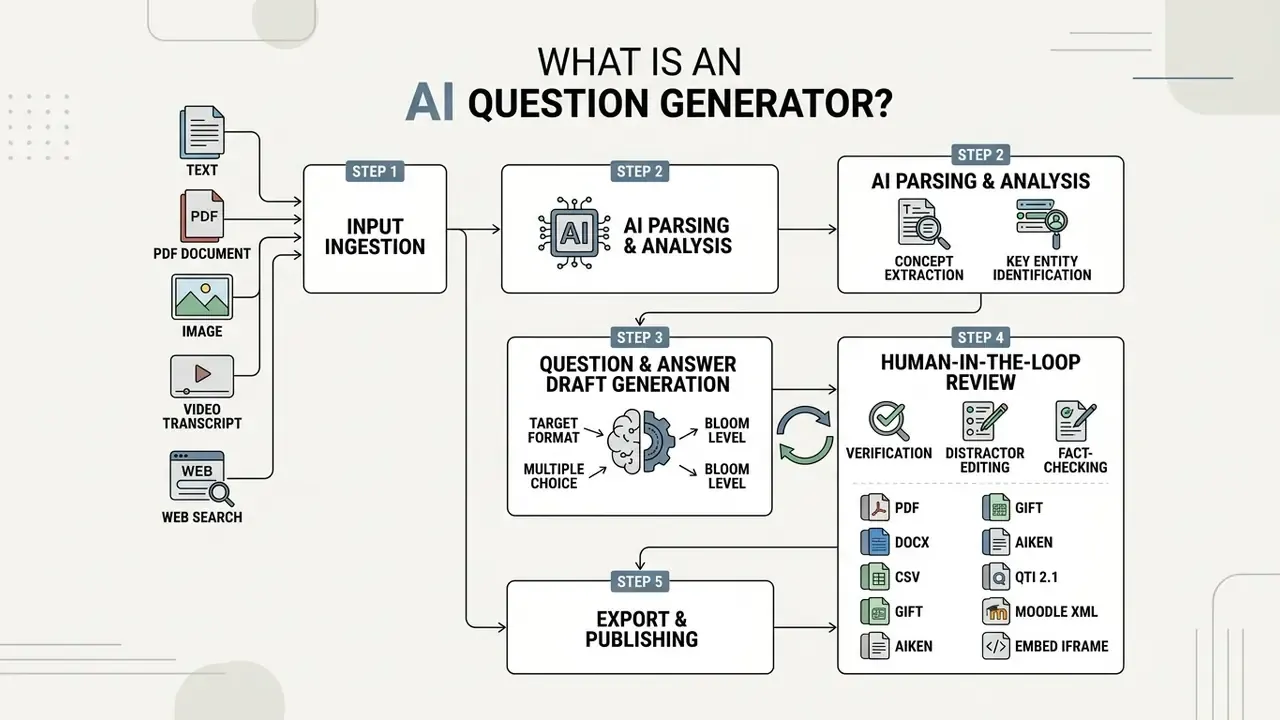
From Content to AI-Generated Questions and Answers
Modern AI-powered generators parse the source through multi-stage neural pipelines so that output stays grounded in the input. In two-stage architectures, a first language model extracts key answer phrases or target concepts from the source text (), while a second model conditions on those spans and writes the matching question stems (). Single-pass pipelines skip that split: a zero-shot or few-shot prompt pulls testable propositions and generates question and answer pairs in one go.
These systems lean on encoder-decoder or transformer-based autoregressive architectures to keep context coverage intact. Standard neural pipelines compute attention weights across passage tokens so that generated questions reflect explicit facts rather than parametric hallucinations. Extractive components often borrow span-prediction logic from reading-comprehension models: the passage and the question are encoded separately, relevance is computed through attention, and start and end answer positions are predicted inside the context window. Reported validation filtering pipelines reach up to 93% accuracy in isolating valid question-answer pairs before human review (Automated Q&A Generation from PDF Files, 2025). Document-summarisation-plus-question-generation systems apply the same principle to full PDFs, producing multiple choice and short-answer items straight from chunked context (Document Summariser & Question Generator Using LLMs, IEEE, 2025).
One caveat worth repeating. Benchmark numbers are not directly comparable across studies: extractive question answering reports exact-match and F1 on datasets such as SQuAD, whereas question-pair generation research usually reports filtering accuracy or ROUGE-based similarity. Treat vendor accuracy claims as directional, not absolute.
When an AI Quiz Generator Is Useful
An AI quiz generator earns its keep when you need volume: knowledge checks, self-study modules, formal assessments, corporate evaluations. Traditional item authoring burns significant domain-expert hours per item. A cost-benefit analysis published by Wiley (2024) puts financial breakeven against manual item writing somewhere between 173 and 247 items inside a single content domain.
Instructors draft formative quizzes straight from lecture slides, which trims preparation time before first period. Students turn dense reading into flashcards and practice exams for active recall, effectively using the tool as an ai practice question generator. In corporate settings, risk and compliance teams convert freshly revised policy documents into mandatory staff verification assessments. Four scenarios dominate documented usage: formal knowledge testing, self-study with instant feedback, interactive classroom practice with explanations, and personnel assessment tied to training mastery.
What Content Can the AI Question Generator Use?
An AI question generator can process raw text fragments, public web pages, office documents, PDF files, images, audio and video transcripts, YouTube links, and live web-search results. Item quality tracks the optical quality, structural layout, and semantic density of whatever you feed in. Garbage in, ambiguous distractors out.
| Input Format | Processing Technology | Best-Fit Generated Question Types | Primary Limitation / Consideration |
|---|---|---|---|
| Direct Text / URL | Text Tokenization & DOM Parsing | Multiple Choice, Short Answer, Open-Ended | Dynamic web content or paywalled URLs require raw text extraction. |
| Office Docs (DOCX/PPTX/XLSX) | XML Structure Extraction | Fill-in-the-Blank, Matching, True/False | Complex multi-column layouts may disrupt concept sequence parsing. |
| PDF Documents | Text Extraction & Vision OCR | Comprehensive Question Banks, Practice Exams | Scanned PDFs depend on OCR resolution to prevent character misinterpretation. |
| Images (JPG/PNG/TIFF/HEIF) | Multimodal Vision OCR | Visual QA, Diagram-Based Recall | Low-resolution image text produces incomplete question stems. |
| Video / Audio (MP4, MOV, MP3) | Automatic Speech Recognition (ASR) | Timestamp-Anchored Quizzes, Concept Checks | Background noise or inaccurate transcriptions degrade item quality. |
| YouTube URL | Audio Stream Extraction & ASR Parsing | Timestamp-Anchored Quizzes, Video-Based Comprehension | Age-restricted or uncaptioned videos require manually provided transcripts. |
| Web Search / Live News | Real-Time Web Retrieval & DOM Parsing | Current-Events Trivia, Daily News Verification | Dynamic paywalled articles require pasting raw text copy. |
Read the table as a routing map: clean text and DOCX for speed, PDF and image for archives, video and live search when the source never existed as a document in the first place.
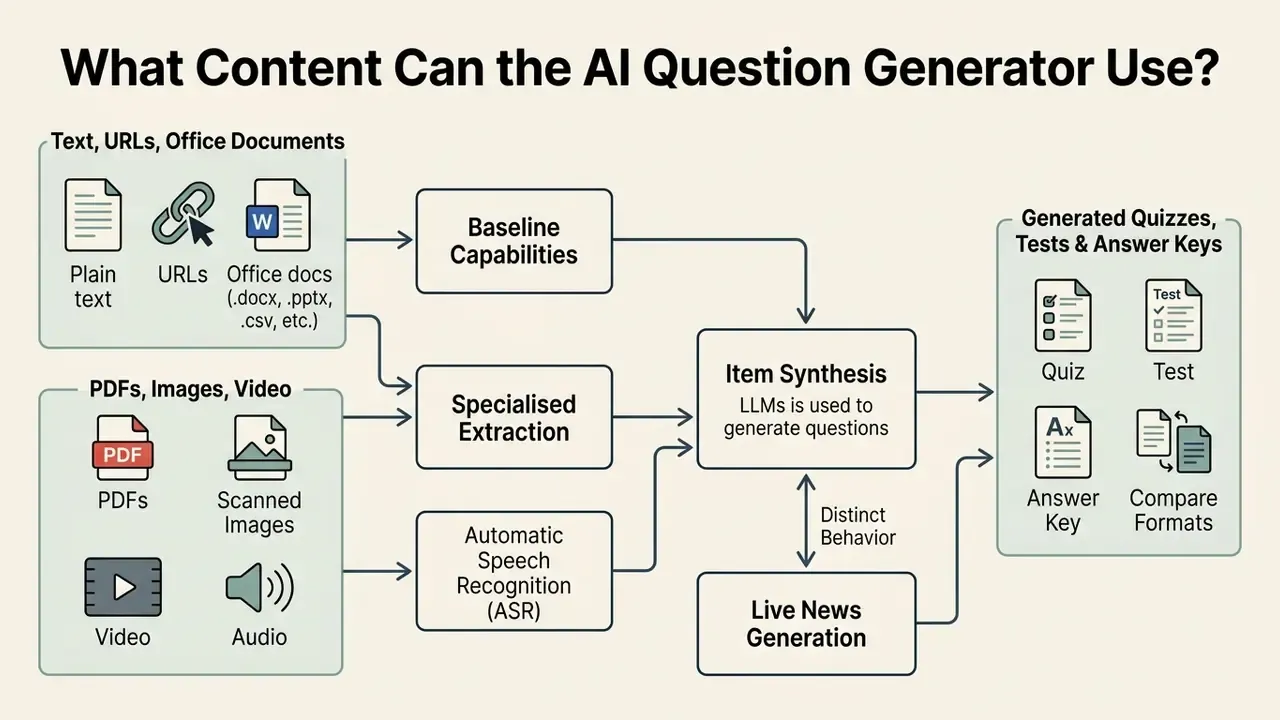
Create Questions From Text, URLs and Documents
Plain text, public URLs, and office documents form the baseline capability of any online question generator. Text pasted directly into the interface bypasses layout parsing, so you get items out of raw notes or an article in seconds. When parsing a URL, the system extracts HTML text nodes, strips scripts and navigation, and converts the primary body copy into clean text or Markdown before generation starts. Website-to-quiz features live or die on that conversion step, which explains why single-page applications and cookie-walled pages so often return half a page.
Document parsers handle .docx, .pptx, .txt, .csv, .rtf, and .odt by reading the underlying XML or plain-text layer directly. Systems such as docAnalyzer and Azure AI Content Understanding preserve structural metadata, letting the model segment topics by heading level; Azure publishes ingestion ceilings such as PDFs up to 200 MB and 300 pages, plus video files up to four hours. Before generation, pick your source and output languages explicitly so translation happens during parsing rather than after. High-volume tools accept single runs of 80,000 to 100,000 words, enough to convert a full set of textbook chapters in one pass and build the skeleton of an ai question bank generator workflow.
Generate Quiz Questions From PDFs, Images and Video
PDFs, scanned images, and media files need specialised extraction before the LLM sees anything. Digital PDFs give up their text streams cleanly. Scanned PDFs depend on Optical Character Recognition (OCR). Per W3C accessibility specifications, a scanned PDF is nothing but an image container. OCR quality follows scan DPI and layout simplicity, and unrecognised text produces truncated stems and hollow distractors (W3C, 2024). National Archives and Records Administration (NARA) guidance goes further: OCR interpretation errors can change factual meaning when lossy compression is applied, so OCR-derived searchable text is acceptable only when the original bitmap stays unchanged (NARA, 2025). Complex PDFs full of diagrams, tables, and charts need vision-capable models that read the page image alongside the text layer. Skip that, and numerical questions inherit half a table.
Video and audio go through Automatic Speech Recognition (ASR) before item synthesis. Multimodal frameworks for video-based question generation combine transcript text with visual keyframe selection at chosen timestamps, so a question can point at a specific demonstration rather than a vague concept. For platforms like YouTube, advanced generators pull the audio stream straight from the URL, run recognition, and align stems with timecodes without any manual download or file conversion. Legacy workflows still ask you to export a lecture as MP3 and upload it by hand; URL-native ingestion drops that step and keeps timestamps available for review. Teams cutting lecture footage into study assets may also want the mechanics behind long video to short-form repurposing, since shorter clips generate tighter, better-anchored items. If your source is a recorded seminar rather than a broadcast lecture, the capture rules described in this guide to live video call free online sessions matter more than transcription settings, because bad room audio ruins ASR before any model gets involved.
Live-news generation behaves differently. Instead of a static file, the tool fires a web-search query on a topic, fetches recent articles, and converts retrieved text into multiple choice, true or false, or fill-in-the-blank items. Fastest route to a daily current-events quiz, no question. It also inherits the reliability of whatever it found, so fact-checking against a primary outlet stays mandatory before classroom use.
Which Question Types Can AI Create?
AI question generators produce closed-ended formats built for automated grading and open-ended formats built for qualitative judgement. Five core formats recur across documented tools: multiple choice (including multi-select), true or false, open-ended, fill-in-the-blank, and matching. Which question type fits depends on target learning depth, the assessment environment, and your grading infrastructure.
Multiple Choice, True or False and Fill-in-the-Blank
Closed formats, specifically multiple choice (MCQ), true or false, and fill-in-the-blank (cloze), give you objective scoring and instant feedback. A multiple choice item is a stem, a correct key, and several plausible wrong options called distractors. Generation engines analyse context semantics to build distractors that mirror common learner misconceptions.
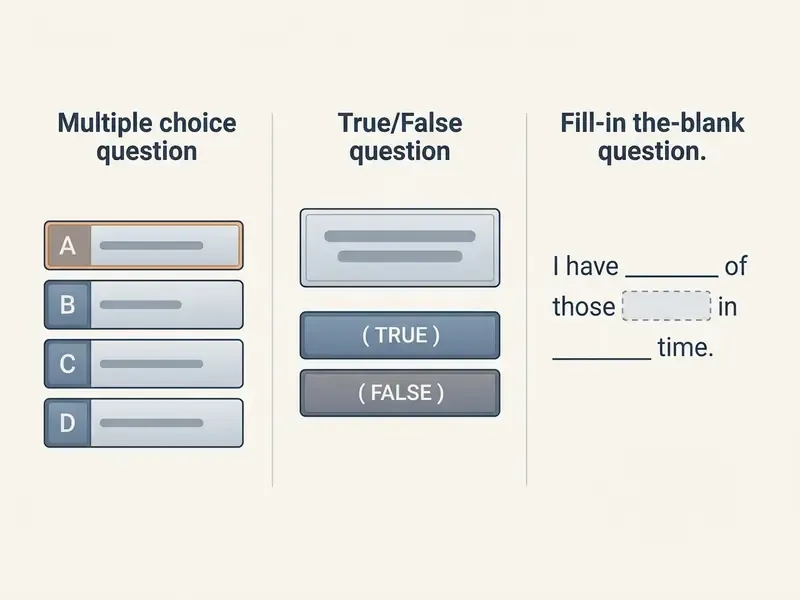
Docimological research shows that zero-shot LLMs frequently produce flawed MCQs when left unconstrained.
The usual structural defects: an overly long correct key, a grammar hint that betrays the answer, a missing key, or two defensible options. True or false and cloze items give you high-volume factual recall cheaply, though stems need editing so a single-word answer cannot be read two ways. Because these formats are machine-scorable, most platforms attach answer keys and auto-grading metadata at export, which is exactly why they remain the default for large classrooms and compliance rollouts.
Open Questions, Matching and Question-and-Answer Sets
Open-ended items, matching tasks, and complete question-and-answer sets probe analytical depth and conceptual synthesis. Open questions force learners to construct extended responses instead of picking an option. Evaluators score them against AI-generated rubrics, usually calibrated on 0-1, 0-2, or 0-3 point bands, where the top band means "full and complete understanding."
Matching items pair terms, definitions, causes, or visual elements drawn from homogeneous lists. Measurement guidelines recommend unambiguous directions that state the basis for matching and whether responses may be reused, logically ordered response lists, premises and responses on one page or screen, and more options than premises so elimination stops being a strategy. Recommended list length varies by level: some guides suggest 10 to 15 stimuli, others fewer than 7 items for primary grades and fewer than 16 for secondary. Extended matching questions (EMQ) add a shared context statement, a pooled option list, and several linked questions, which suits clinical and case-based testing. Full Q&A sets, the classic output of an ai q&a generator, double as structured study guides or reference databases for enterprise knowledge management.
Equivalent & Similar Question Generation
Practice Questions by Learning Level
Generators tune complexity by mapping prompts to cognitive frameworks, most often Bloom's Taxonomy, which structures demand across six levels: Remember, Understand, Apply, Analyze, Evaluate, Create.
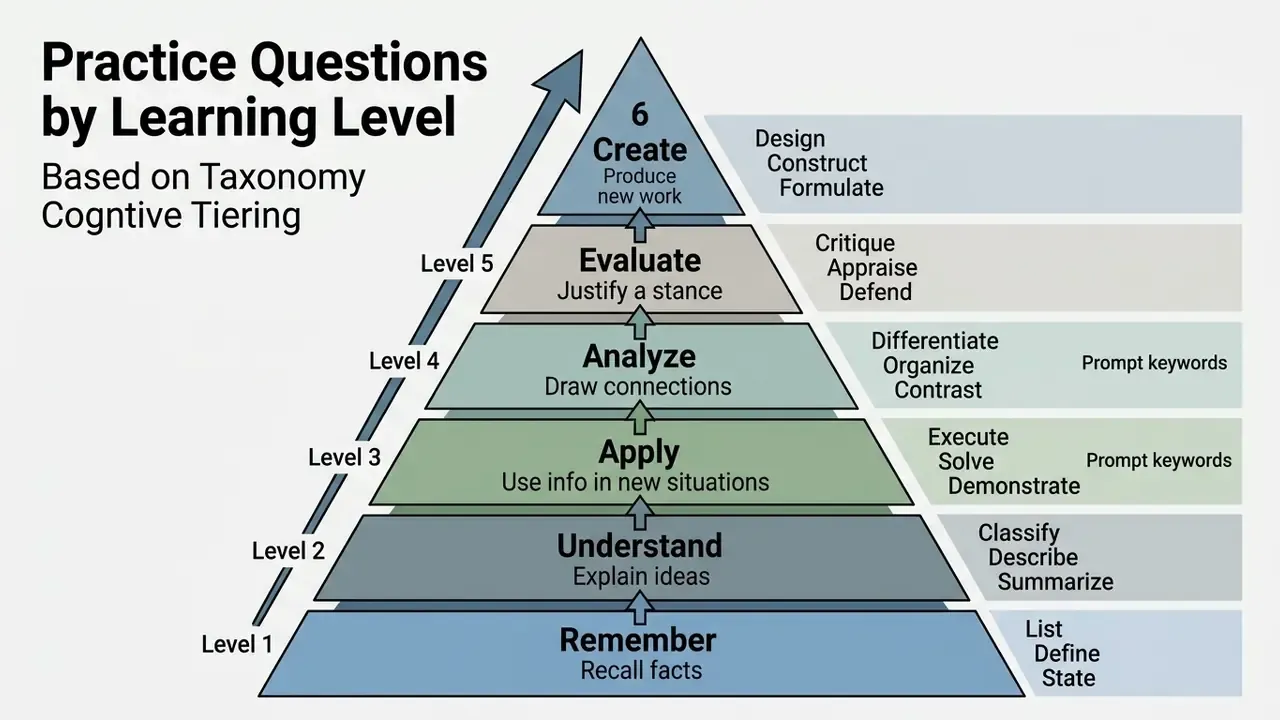
Research evaluating LLM performance across Bloom's levels shows dependable output at the Remember and Understand tiers.
Higher-order tiers, Evaluate and Create, scatter far more, which is where explicit prompt constraints and domain-expert validation stop being optional.
Level choice should follow learner preparedness, not just subject depth. Less-prepared cohorts get Remember and Understand items (identify, define, list, summarize). Mid-level cohorts get Apply and Analyze items (solve, classify, differentiate). Advanced cohorts get Evaluate and Create items (justify, critique, design). Teaching guides suggest picking the complexity target first, then the action verbs, then the format. In that order, ideally.
How to Use an AI Question Generator Online
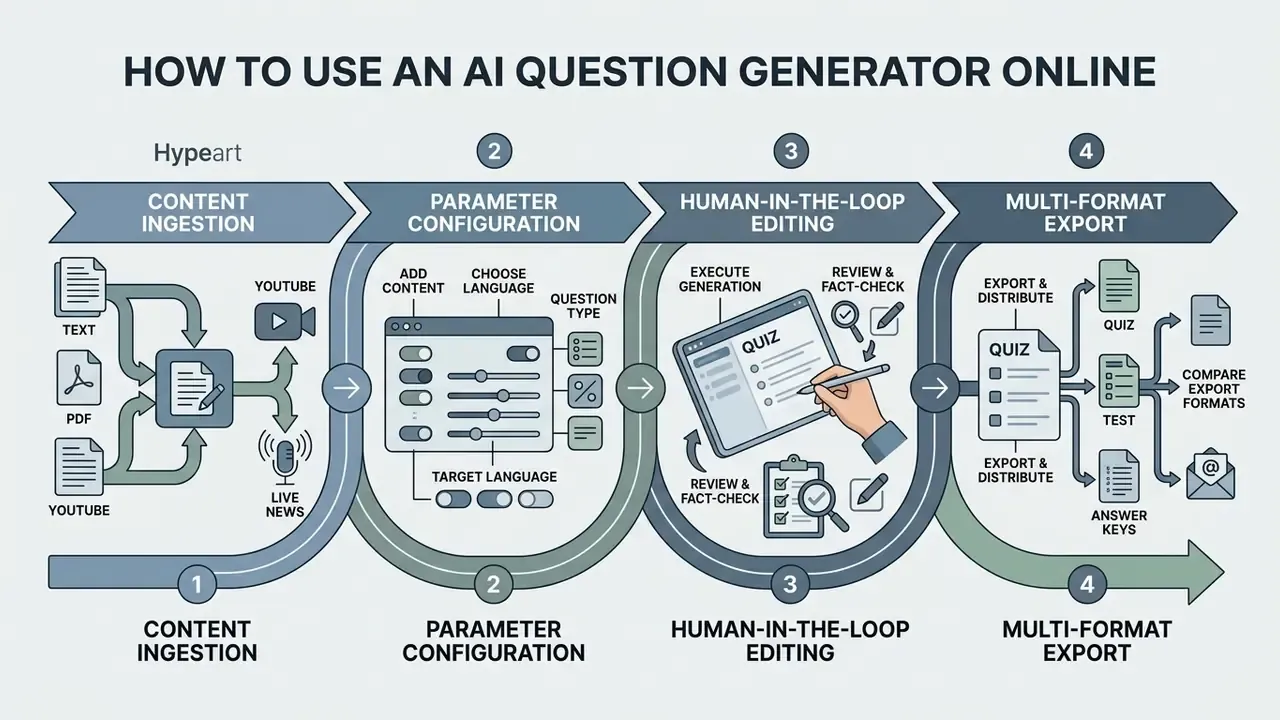
A working online session has four phases: content ingestion, parameter configuration, human-in-the-loop editing, and multi-format export. Nothing exotic, but skipping phase three is how flawed items reach a graded exam.
Online Quiz Generation Workflow
Checklist0 / 5
Add Content and Choose Language and Question Type
Start by loading source content into the workspace. Upload documents, link a public URL, paste a text block, or attach a video link. Then set the parameters:
Fixing these constraints up front aligns generation parameters with institutional requirements (Harvard HUIT, 2026). Google Cloud's prompt-engineering guidance distinguishes open-ended, specific, multiple-choice, hypothetical, and opinion-based prompt types, so naming the type inside the prompt visibly improves format fidelity.
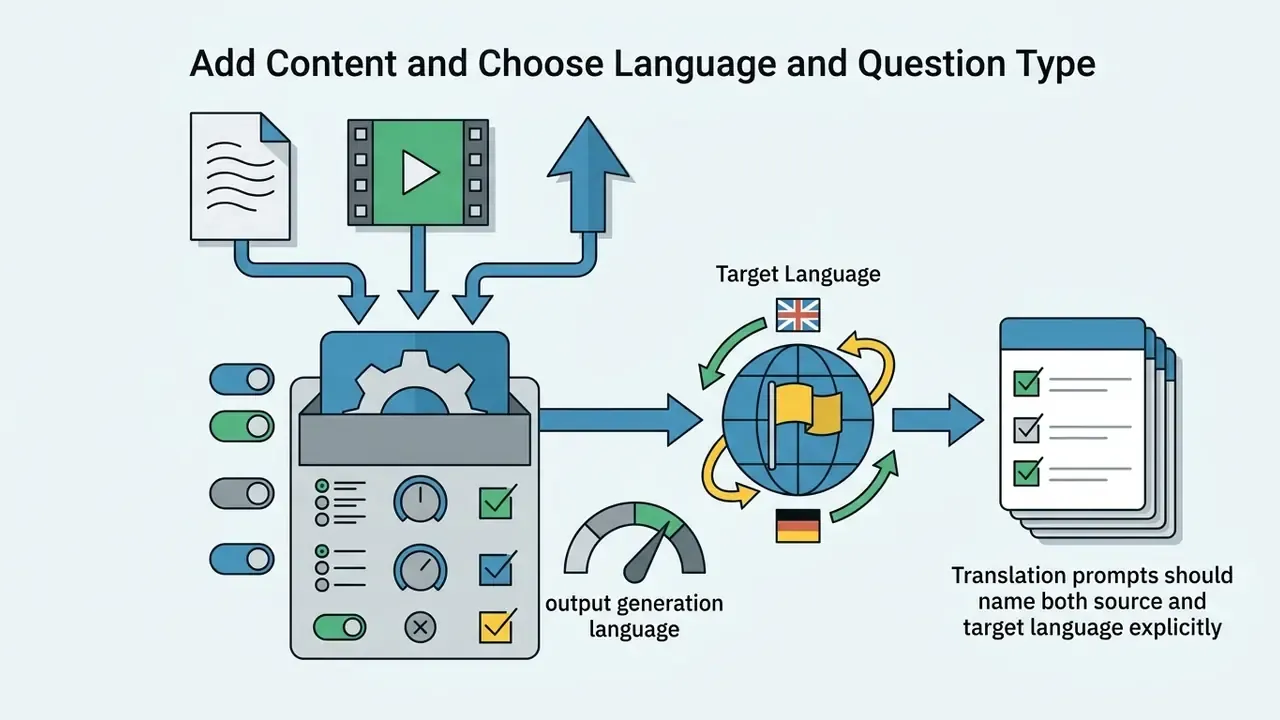
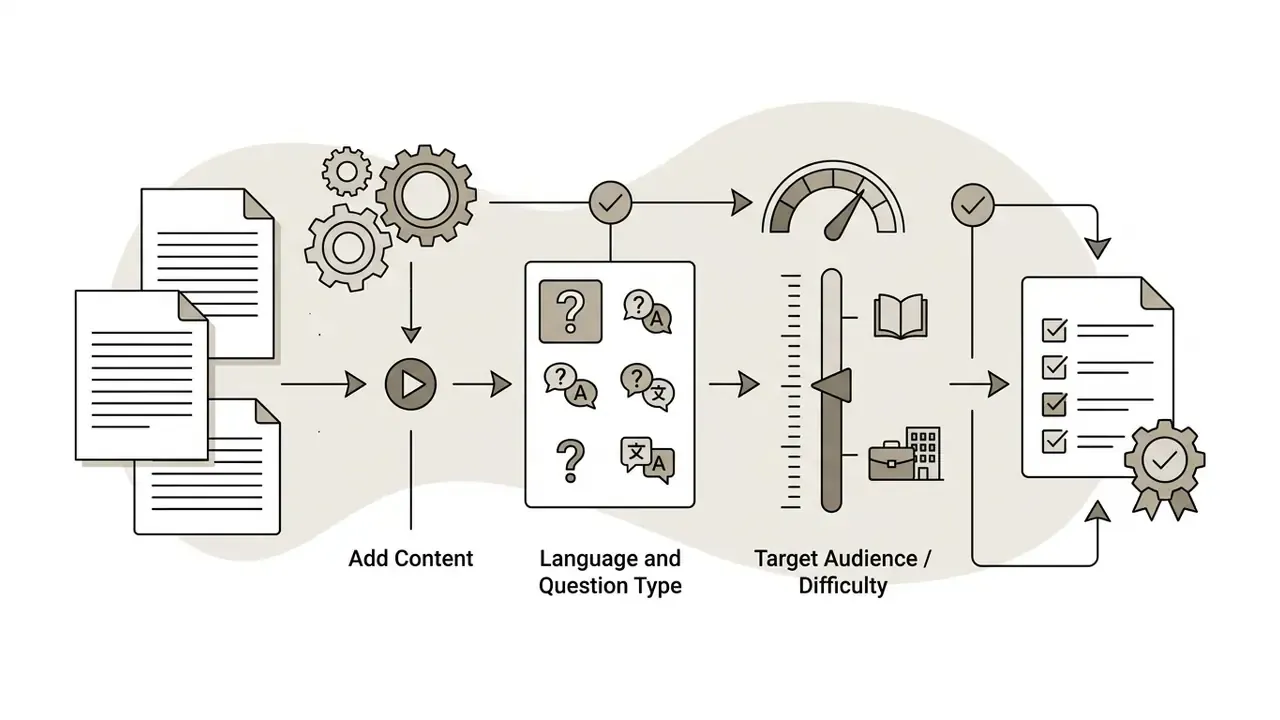
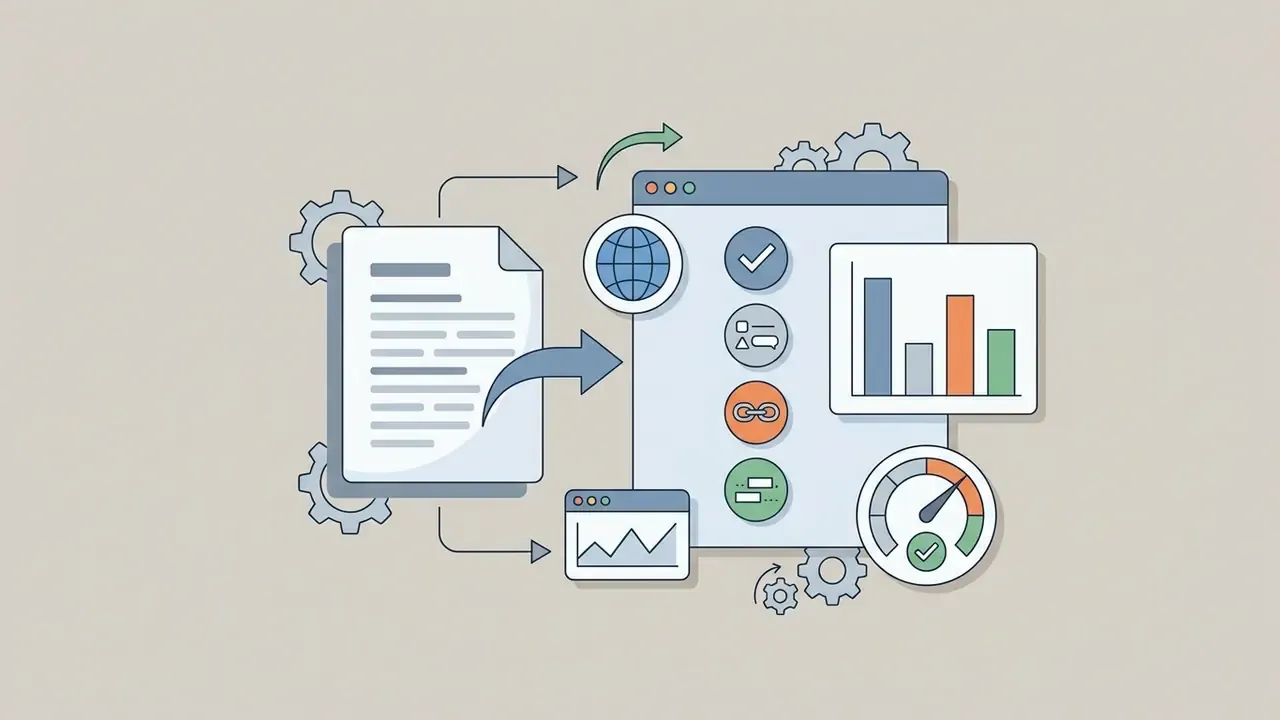
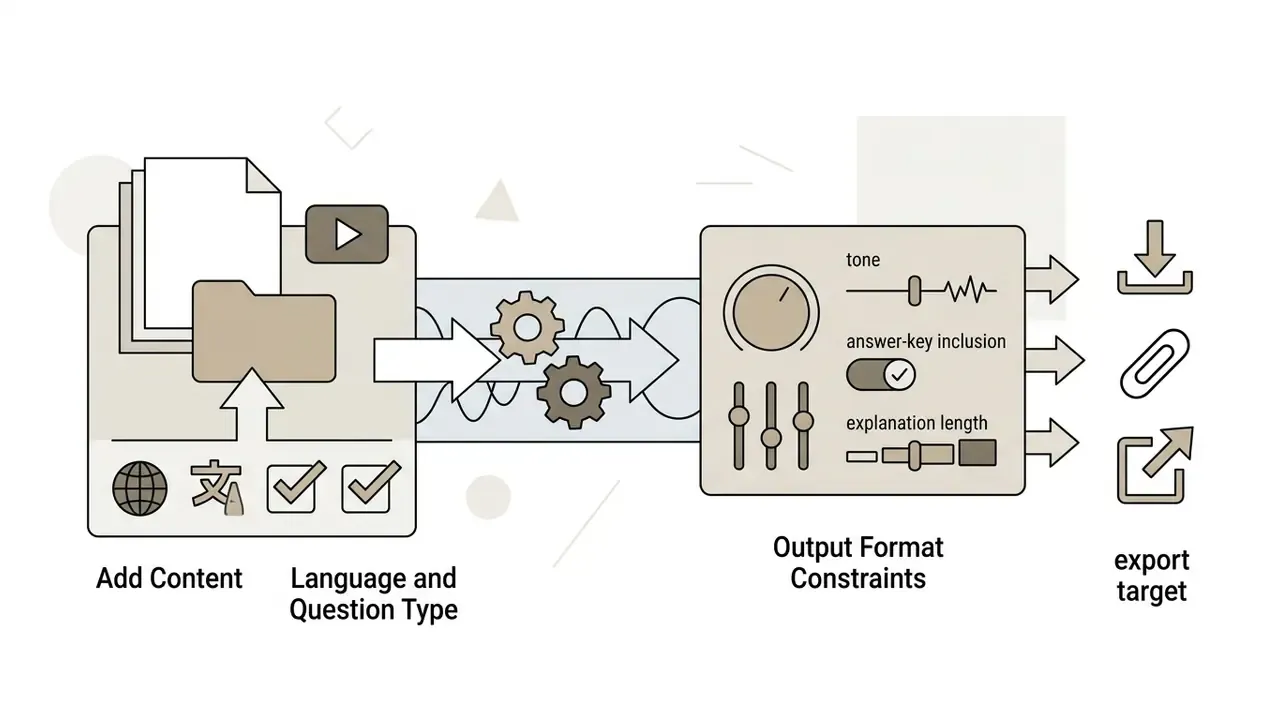
If the tool keeps a chat panel open after generation, iterate there instead of re-uploading the file. Ask for simpler wording, a different question type, or a narrower chapter range, exactly as you would refine any conversational prompt.
Generate, Review and Edit Questions and Answers
Hit generate and the engine drafts stems, keys, and distractors from the parsed text. What lands on screen is a draft, not an exam.
Post-processing needs systematic verification. Frameworks such as Verify-and-Edit, Chain-of-Verification (CoVe), and PAVE formalise a verify, edit, re-validate loop: the system drafts a baseline answer, plans verification questions, checks the draft against retrieved evidence, then revises only the poorly supported statements (Verify-and-Edit, ACL, 2023). Instructors should rewrite distractor language that gives the game away and confirm each stem maps to an instructional objective.
A practical editorial pass covers five checks: the key is factually supported by the source paragraph; exactly one option is defensible; distractors are plausible and grammatically parallel; no stem leaks the answer to a later item; terminology matches the curriculum or policy wording your learners were actually taught. Five minutes per ten items, roughly. Cheaper than a contested grade appeal.
Save, Share or Export the Finished Quiz
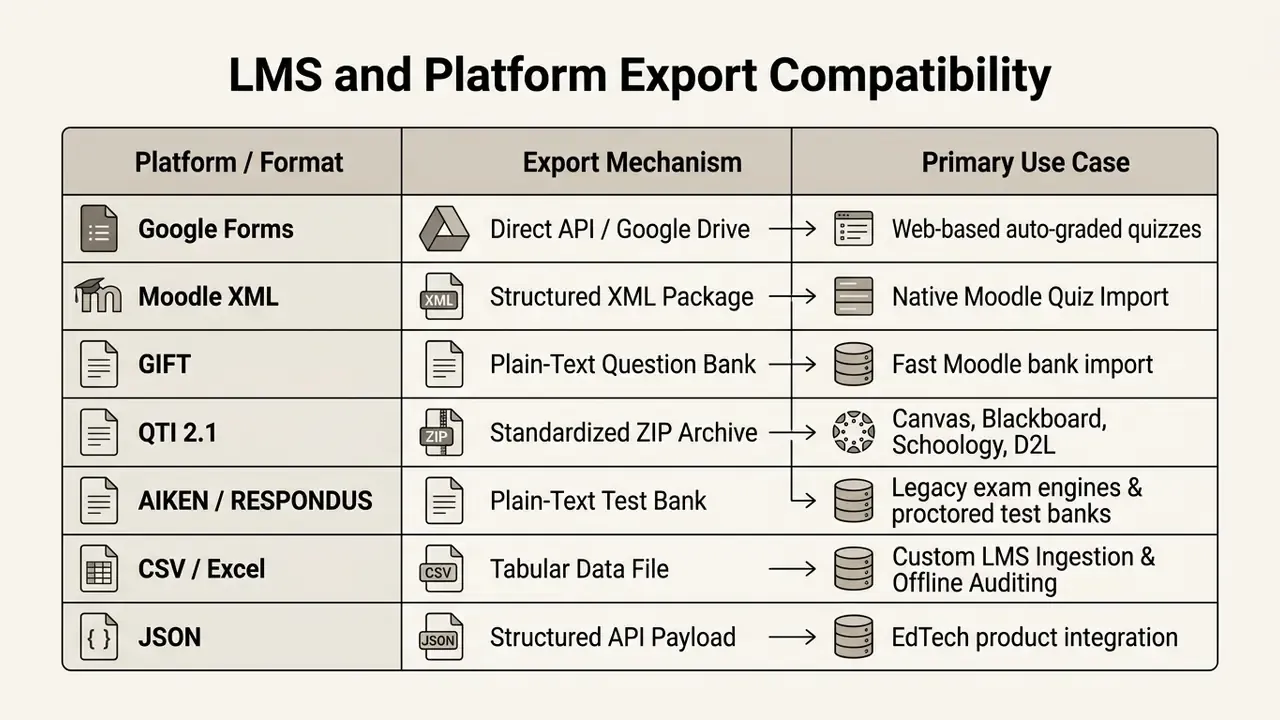
Once the set is validated, store it, share it, or push it into an external platform. Most tools export to PDF (questions only, answers only, or combined), Microsoft Word (.docx), and structured spreadsheets (.csv).
AI Question Generator for Teachers, Students and Teams
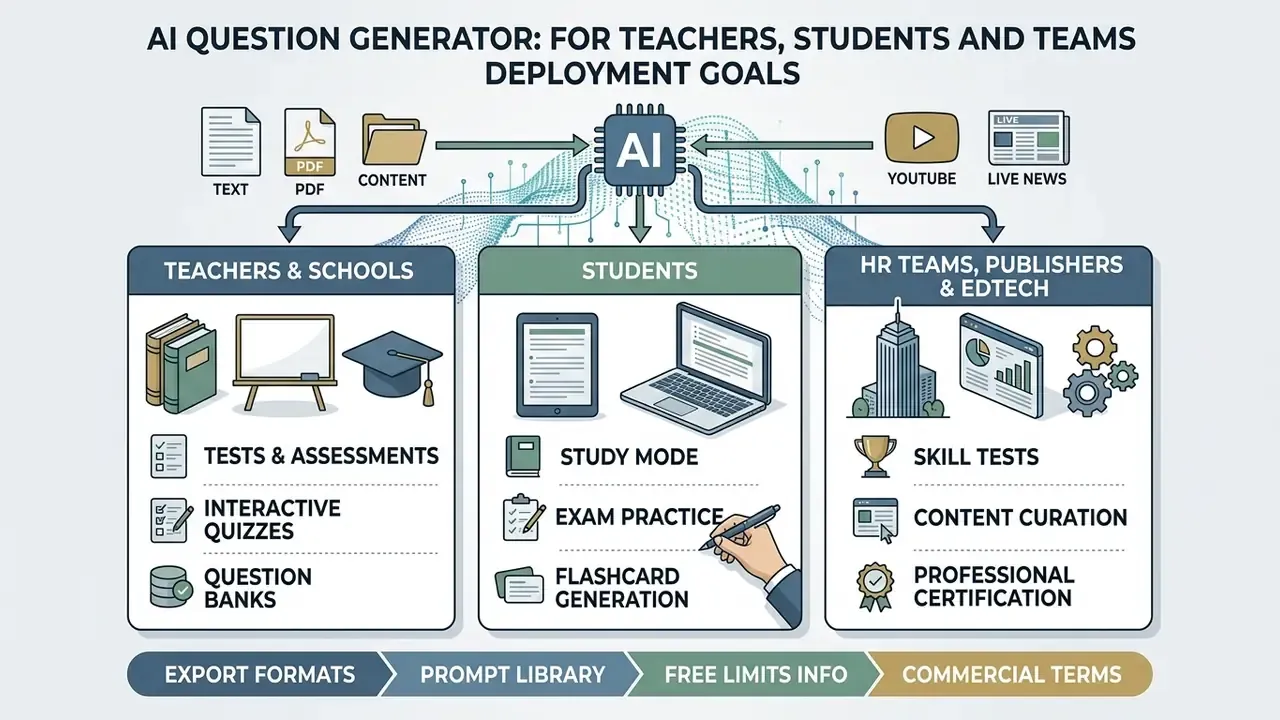
Deployment goals split cleanly by environment. Teachers streamline classroom testing, students run self-directed active recall, and enterprise teams scale compliance assessments.
Teachers and Schools: Tests, Assessments and Interactive Quizzes
Teachers convert curriculum material into daily warm-ups, unit assessments, and printable finals. Platforms such as PanQuiz, PDFQuiz, and Exam.net turn lesson plans into live interactive quizzes or paper tests with key answer guides; PanQuiz also imports existing banks from PDF, Word, Excel, Moodle, and Google Forms, while Exam.net exports completed exams to PDF, Word, Google Drive, or OneDrive for grading. Standards-aligned assistants built over curated curricula (Khanmigo across Khan Academy content, for instance) generate items straight from videos, articles, and exercises, then export to Google Forms or a gamified set. Several vendors position free tiers explicitly as an ai question generator for teachers free of charge up to a monthly cap, which is usually enough for weekly formative checks and not enough for a full exam cycle.
In a suburban school district, a social studies department needed 300 unique formative review items from a newly adopted 400-page digital history textbook. The team uploaded chapter PDFs, constrained output to Bloom's Understand and Analyze levels, and exported QTI packages into Canvas. Item creation time fell by roughly 70% while curriculum alignment held across 12 classrooms. Time-tracking figures of that kind are self-reported and swing with content complexity. Independent classroom research adds a caution about the engagement curve:
Practical implication: rotate item variants each term (see Equivalent & Similar Question Generation) and read low quiz scores as an early academic-risk signal rather than a scoring artefact. Departments producing their own lesson clips can also keep asset weight down using the compression trade-offs covered in this low quality video maker guide, since a bandwidth-friendly clip still transcribes fine for quiz generation.
Students: Study Mode and Exam Practice
Students turn class notes, lecture recordings, and syllabus slides into adaptive practice exams. Open-ended systems such as ChatGPT's Study Mode (launched 29 July 2025) use Socratic questioning to walk a learner through a concept instead of handing over the answer (OpenAI, 2025). Dedicated quiz tools add a Study toggle that hides answers until revealed and scores auto-gradable formats at session end, converting any uploaded chapter into a retakeable mock exam. Most of these run in the browser or as an ai question generator app on mobile, which matters more than it sounds for commuting revision.
Adaptive study frameworks cycle missed questions back into later sessions, so practice concentrates on the gaps rather than the comfortable material.
Tools like RemNote build study decks directly from uploaded PDFs, supporting spaced-repetition recall before a formal exam, with explanations and repeated questioning until each weak objective is mastered. Students who record their own revision walkthroughs sometimes loop video online segments while drilling the matching item set, which is a small trick, but it keeps the audio-visual cue tied to the question.
HR Teams, Publishers and Edtech Companies
Enterprise teams automate professional development, compliance tracking, and commercial content publishing. HR departments convert policy manuals into mandatory employee assessments, and every policy revision triggers a fresh assessment that verifies staff actually read the update. For regulated functions such as KYC or AML refreshers, that audit trail is the whole point: an attestation without evidence of comprehension does not survive an examiner's question.
Commercial publishers use enterprise tools such as Questgen to produce supplementary comprehension checks alongside digital textbooks instead of outsourcing item authoring. Exporting banks in JSON, CSV, QTI, or Moodle XML lets EdTech companies wire automated question generation into proprietary learning platforms. Organisations reviewing deployment strategy can explore the AI Media Commercial-Use Hub for integration frameworks, teams budgeting API-driven generation can review comparable developer cost and rate-limit modelling in this implementation guide, and product teams estimating throughput before signing anything can model volumes with our AI Media Calculators. Where item banks sit next to synthetic media production, for example a course that pairs quizzes with generated explainer clips, the licensing questions raised by luma ai video pipelines apply to the same content package. Institutions with data-residency constraints sometimes prefer a local ai video or on-premise inference setup for the same reason they self-host quiz banks: nothing sensitive leaves the perimeter.
Free Plans, Pricing, Data Safety and Commercial Use
Choosing a tool means weighing four things at once: cost, generation quota, usage rights, and data protection. Platforms run freemium, subscription, and pay-as-you-go models, and the fine print moves faster than any review article.
| Service Tier | Typical Generation Limits | Credit Card Needed | Commercial Usage Rights | Data Privacy Handling |
|---|---|---|---|---|
| Free / Freemium | 5-50 questions per month (up to ~80,000-100,000 words per ingestion run on high-volume tools) | No | Non-commercial / educational only | Uploaded content may be used for model training. |
| Trial (time-boxed) | Unlimited generations for 7 days, then downgrade | Sometimes | Evaluation only | Vendor-specific retention during trial. |
| Basic Paid | 150-1,000 questions per month (some tools count 150 quizzes or 1,000 questions) | Yes | Permitted (standard licence) | Content stored privately, no model training. |
| Enterprise / Unlimited | Custom / unlimited API | Yes | Full commercial / IP ownership | Zero data retention, SOC 2 and FERPA compliant. |
Disclaimer: this information is general and does not replace professional legal, procurement, or data-protection advice. Vendor pricing, privacy policies, and commercial licences change frequently. Verify current terms directly with the provider before making institutional or commercial decisions.
Service Terms and Verification (E-E-A-T Compliance)
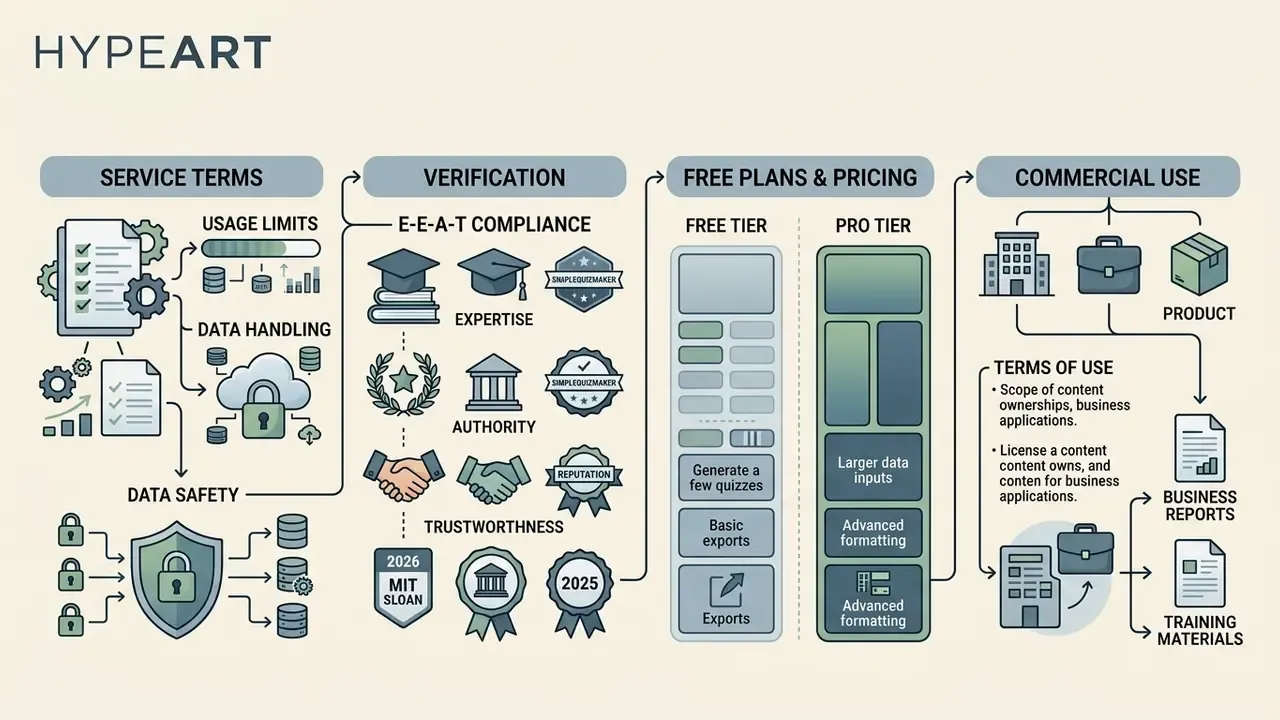
Comparing free against paid features means reading the terms of service, the privacy policy, and the commercial licensing page. Three areas repay the effort:
- Free-Tier Restrictions: free plans cap generation counts, upload size, questions per test, and export options. Many commercial tools allow 3 to 5 AI test generations per month with roughly 10 questions each; others meter total free session completions, for example a 300-completion ceiling before an upgrade; some publish question-based caps such as 50 free questions rising to 1,000 or 5,000 on paid plans. A widely cited example is SimpleQuizMaker, whose documentation lists 5 free test generations per month scaling to 150 and 600 on paid tiers (SimpleQuizMaker, 2026). Anyone searching for an ai question generator free online should treat every one of these figures as volatile and re-check the pricing page before procurement.
- Data Safety Policies: institutional guidance warns plainly against pasting confidential, proprietary, or personally identifiable information (PII) into unverified public models (MIT Sloan, 2025). Enterprise plans guarantee zero retention and exclude uploads from future training; some consumer tools state that uploaded PDFs and notes are never used for training and that generated tests stay private unless shared. There is an evidence gap here worth naming:
- Commercial Use Terms: items generated for resale, monetised courses, or paid corporate training need explicit commercial licensing. Check whether output ownership stays with the user or depends on a paid subscription (OpenAI Business Terms, 2026), and check where the provider actually keeps its rules. Some publish a dedicated commerce policies page; others scatter commercial conditions across terms of service, API addenda, and business terms. For broader licensing models, view the guide on software pricing, compare how free-tier feature limits, export restrictions and paid upgrades work in adjacent AI tool categories, and for disputes over generated output, read about AI Litigation and intellectual property standards.
FAQ About AI Question Generators
How Long Does It Take to Generate Questions?
A standard 10-question quiz from clean plain text usually lands in 7 to 15 seconds. A 2025 review of web-based question-generation tools reported roughly 7 seconds for inputs of 50 to 500 words, about 60 seconds for 500-word inputs on slower pipelines, and around 75 seconds for dense 1,000-character prompts. Larger documents, multi-page PDFs, or scanned images needing OCR take 30 to 90 seconds, since visual extraction and token parsing add overhead. Large local models on the same workload can take considerably longer.
Do I Need an Account to Use an AI Question Generator?
Many web tools produce a first quiz with no signup at all, using only the uploaded file. Accounts unlock saved history, higher limits, LMS export, and time-boxed trials, commonly 7 days of unlimited generation. Institutional deployments generally require accounts anyway, for audit trails and licence compliance.
Can I Generate Questions From Scanned PDFs and Images?
Yes. Scanned pages and image files (JPG, PNG, TIFF, HEIF) run through OCR before generation, including images embedded inside a PDF. Accuracy tracks scan resolution and layout simplicity: faint print, handwriting, multi-column layouts, and heavy compression all raise the risk of misread numbers and truncated stems. Verify keys against the source page. Tools advertised as an ai question generator from pdf free of charge often apply the tightest page limits precisely because OCR is the expensive part.
Can AI Generate Questions in Different Languages?
Yes. Modern generators parse and output across English, Spanish, French, German, Chinese, Russian, Arabic, and more. Models use cross-lingual transfer architectures to preserve interrogative structure and semantic meaning without dropping factual accuracy.
«QuIST classifies questions into eight types and uses exemplar prompts, letting smaller multilingual models generate questions without target-language training data.» Source: QuIST, EMNLP Findings (2023). https://aclanthology.org/ Multilingual quality is measured with BERTScore, GLEU, COMETKiwi, BLEU, METEOR, and ROUGE-L. One 2024 study reported COMETKiwi question-translation scores of 79.61 to 86.64 across languages, with 79.85 for Russian on response translation. For high-stakes assessment in a second language, add a native-speaker pass focused on semantic equivalence, grammar, and fluency.
Can I Customize the Questions After They Are Generated?
Yes. Items are editable inline: rewrite stems, swap weak distractors, change the question type, adjust difficulty, add your own items, or re-prompt for a simpler or harder set. A common two-step pattern is generating a broad draft bank, then filtering down to the strongest verified items before export.
Can I Use an AI Question Generator for Interview Preparation?
Yes. Feed it a job description, a competency framework, or a candidate resume, and it will draft targeted interview questions. Prompts that name the role, the seniority level, and the question style (technical, situational, behavioural) get realistic practice sets back. Official prompt-design guidance recommends stating the task, background context, input data, output format, and constraints, the same five elements that turn a vacancy text into a structured interview bank exportable to PDF or DOCX. Human review still applies, since relevance depends entirely on how well the supplied role information was prioritised.
Is AI-Generated Assessment Content Safe to Use Without Review?
No. Every documented pipeline, including the highest-scoring validation filters, assumes a human in the loop. Keep unreviewed output for low-stakes self-study. For graded exams, compliance attestations, or certification, verify keys, distractors, and cognitive level before release. No evidence, no autonomy.
Internal Hub Navigation
- To explore additional media manipulation capabilities, visit the main directory and compare options across tools.
- For enterprise media integration and developer access, compare options in our API documentation.
- To evaluate specialised financial and media calculation tools, check our AI Media Calculators.
- For integration issues and failed imports, visit AI Media Support and Troubleshooting.
- To review legal frameworks around generative outputs, read about AI Litigation and intellectual property standards.
- For adjacent voice-based learning workflows, see this guide to AI voice generators, language support, pricing and commercial licensing.