A local AI video generator is a self-hosted software stack that runs text-to-video, image-to-video, and video-editing models directly on a local GPU or workstation, without transmitting frames or prompts to external cloud servers. By executing the full diffusion transformer pipeline on-device, organizations and individual creators keep control over data security, system memory, workflow orchestration, and intellectual property.
Why does that matter beyond the creative team? Because generative media is now a data-movement question. The moment a marketing analyst uploads an unreleased product still to a hosted video API, an unlogged transfer of confidential material has occurred. Local execution is the simplest technical answer to that governance problem.
Author note: Marcus Hale writes about AI governance and model risk for this publication.
Local AI Video Generation in One Screen
| Decision Point | 2026 Baseline Answer |
|---|---|
| Default interface | ComfyUI (node graph plus REST API on port 8188); Pinokio for one-click, non-technical installs |
| Minimum viable GPU | 8 GB VRAM (480p I2V, quantized GGUF, heavy CPU offload) |
| Production sweet spot | 24 GB VRAM (RTX 3090 / 4090) for FP16 720p pipelines |
| Top open-weight models | Wan 2.2 (Apache 2.0), HunyuanVideo 1.5 (Tencent Community), LTX-2.3 (Apache 2.0 / Open Weights) |
| Unified memory option | Apple Silicon M-series Ultra / AMD Ryzen AI Halo with up to 128 GB LPDDR5X shared memory |
| Commercial rights | Apache 2.0 = unrestricted; Tencent Community = under 100M MAU plus territorial limits; SVD = non-commercial only |
| Energy per short clip | About 90 Wh on a high-TDP consumer GPU (WAN2.1-class workload) |
| Governance requirement | Log seed, sampler, CFG, prompt, workflow JSON, and SHA-256 weight hashes for every render |
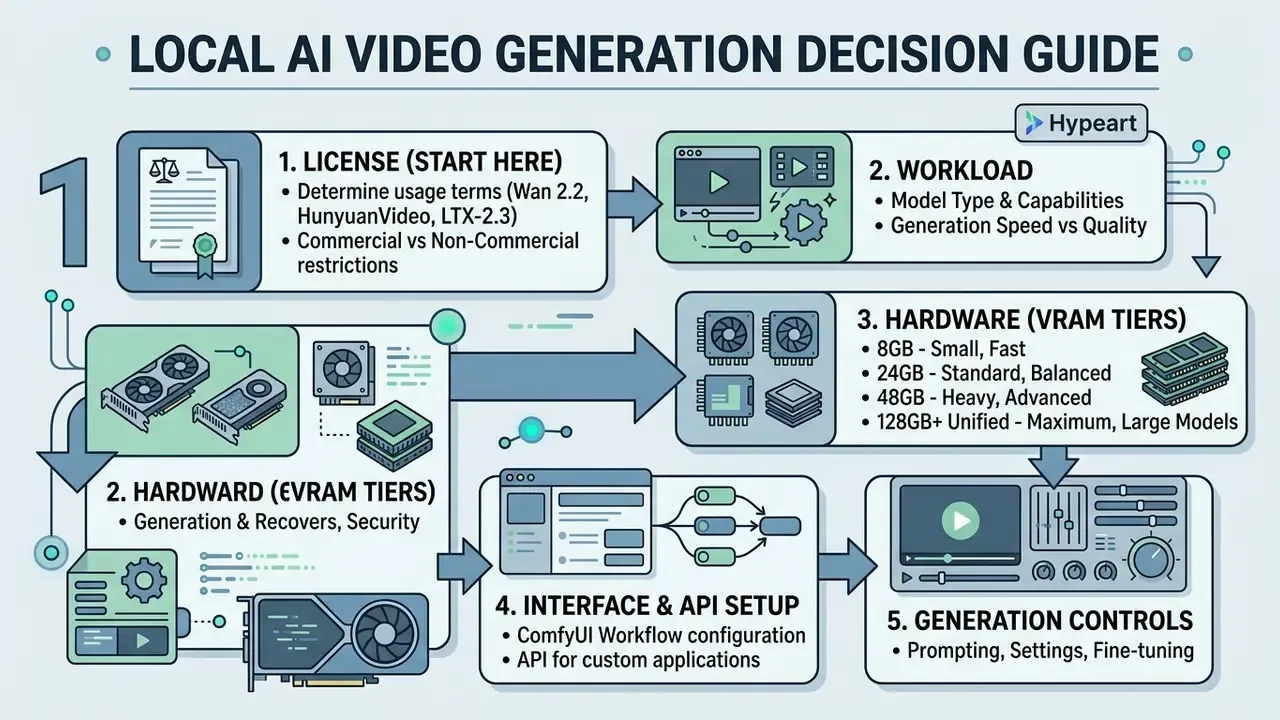
How to Read This Guide (Decision Order, Not Reading Order)
Most teams approach local video generation backwards. They pick a model they saw on social media, buy a GPU for it, then discover the license forbids commercial use. Reverse that order.
- License first. Clear commercial rights before any procurement request leaves your desk.
- Workload second. Define resolution, clip length, and monthly volume. Those three numbers set your hardware tier.
- Hardware third. Buy for the workload, not for the largest checkpoint on Hugging Face.
- Interface fourth. ComfyUI for control, Pinokio for a fast feasibility test.
- Controls last, but never optional. Metadata logging, weight hashes, and pinned dependencies are what make the pipeline defensible.
That sequence is the spine of everything below.
Understanding Local AI Video Generators and Core Architecture
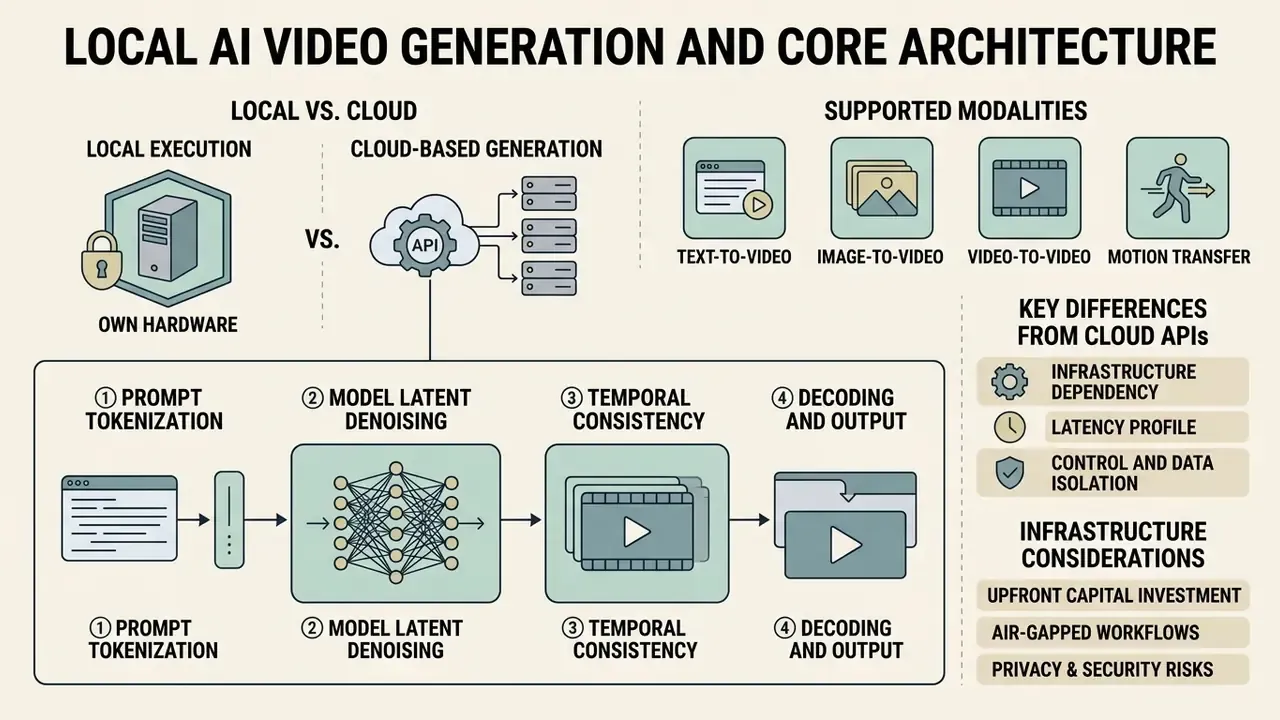
A local AI video generator executes generative video foundation models entirely inside your hardware perimeter. The generative process relies on latent diffusion transformers (DiTs) and 3D variational autoencoders (3D VAEs) to compress spatiotemporal data, perform iterative denoising, and decode high-resolution video frames locally.
In architectural terms, the pipeline has four stages that all remain on-device: (1) prompt tokenization through a local text encoder such as T5-XXL or CLIP, (2) latent noise initialization seeded by a deterministic integer, (3) iterative denoising inside the diffusion transformer across spatial and temporal attention windows, and (4) decoding of latents into RGB frames by a 3D causal VAE, followed by container muxing into MP4 or WebM.
Nothing exotic happens here. It is a fixed sequence of tensor operations, which is precisely why it can be reproduced and audited.
Local Execution vs. Cloud-Based Generation Platforms
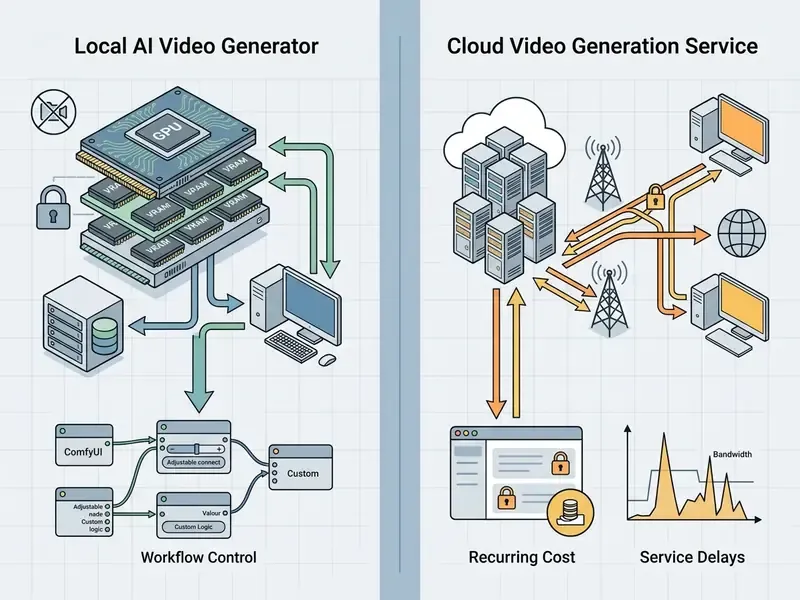
Local video generation differs from cloud APIs in three ways: infrastructure dependency, latency profile, and data governance. Cloud services process prompts on vendor-managed GPU clusters. Local systems run inference on your own workstations, which prevents data egress and removes per-generation API fees.
"Processing data at edge nodes significantly reduces latency and removes the security exposure inherent to centralized cloud architectures."
Supported Modalities: T2V, I2V, V2V, and Motion Transfer
Local video architectures support text-to-video (T2V), image-to-video (I2V), video-to-video (V2V), and motion transfer workflows. Modern models handle continuous motion synthesis, camera trajectory conditioning, and frame interpolation across a range of resolutions. Survey literature from 2024 to 2025 formalizes these as five distinct control scenarios: T2V as the base task, image-conditioned temporal control (I2V), one-shot motion transfer (V2V), stylization as appearance transfer, and explicit camera-trajectory conditioning as a separate controllable class.
Creators expanding their toolchain often pair local video engines with image-to-video AI tools and specialized asset generators such as a text animation generator or a text art generator. Workflows that convert raw textual prompts into animated graphics also benefit from dedicated text to animation setups and standard animation makers that streamline pre-rendering stages.
Licensing Gatekeeping: Auditing Open-Weight Licenses for Commercial Monetization
For governance leaders, legal status is a blocker that must be cleared before hardware procurement or model selection. Open weights do not equal open source. Open source does not automatically equal unrestricted commercial rights.
Commercial usage rights are governed strictly by the license attached to each model checkpoint:
- Apache 2.0 (Wan 2.2, LTX-Video, Mochi 1) Grants full commercial rights, modification, and distribution without royalty fees. The Wan 2.2 repository additionally states that generated content is not claimed by the repository owners.
- Tencent Hunyuan Community License (HunyuanVideo) Free commercial deployment allowed for organizations with under 100 million monthly active users (MAU). Specific territorial restrictions apply, and community documentation for recent releases cites exclusions covering the EU, UK, South Korea, and the US.
- CogVideoX License A custom vendor license that is neither Apache 2.0 nor MIT. Terms must be read per checkpoint version.
- Stability AI Community License Permits research, non-commercial, and commercial use only for entities generating under $1M annual revenue. Stable Diffusion 3.5 license text limits use to "Research or Non-Commercial Purpose."
- Non-Commercial / Research (Stable Video Diffusion, early SD3 variants) SVD's own license text grants a "non-exclusive, limited license … for purposes other than commercial or production use," explicitly prohibiting commercial exploitation or production deployment.
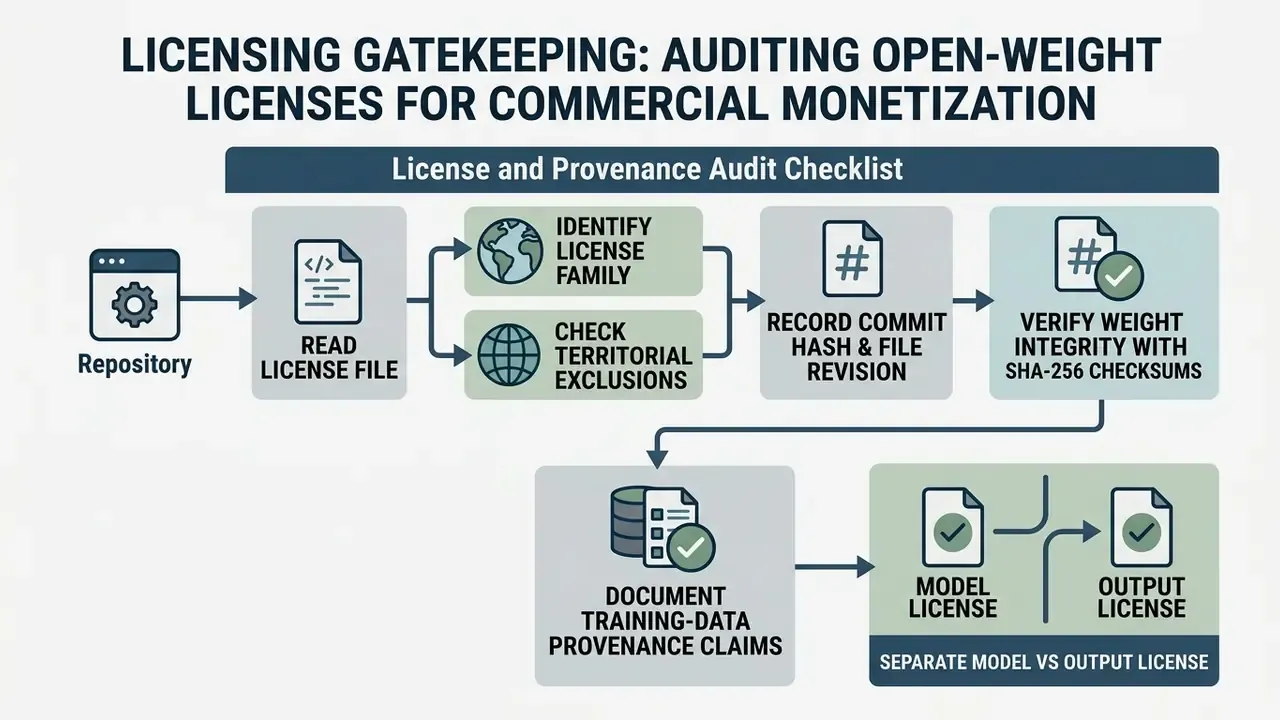
License and Provenance Audit Checklist
- Read the
LICENSEfile in the official repository, not the marketing page. Vendor umbrella licensing pages frequently contradict older model-specific agreements. The SVD case is the canonical example. - Identify the license familypermissive OSS (Apache-2.0, MIT), community license with MAU or revenue caps, RAIL-style use restrictions, or research-only.
- Check territorial exclusionsfor community licenses before deploying in EU, UK, US, or KR jurisdictions.
- Record the exact commit hash and file revisionof the weights and license text you audited.
- Verify weight integrity with SHA-256 checksumspublished on the model card. This mitigates supply-chain risk from tampered or poisoned checkpoints hosted on mirrors.
- Document training-data provenance claimsmade by the vendor, and log residual copyright risk in your model inventory.
- Separate the model license from the output license.Some vendor terms assign output rights to the customer, while preview-tier products prohibit commercial or production use entirely.
- Route non-standard licenses to legal counselbefore monetizing rendered assets.
Teams comparing output rights across generative modalities can cross-reference the commercial use of AI image generators and the broader AI Media Commercial-Use Hub for license checklists across commercial frameworks. Organizations tracking intellectual property policy and legal precedent also follow AI Litigation and Case Timelines and the industry aggregator text to video ai news today.
Key Benefits of Running Generative Video Architecture Locally
Running AI video generation locally provides complete privacy, removes SaaS subscription caps, and unlocks customization over model weights, sampling algorithms, and custom nodes. Local deployment protects sensitive intellectual property and keeps operations running in air-gapped environments.
"Generating a single short video consumes roughly 90 Wh, about 30x more than image generation and 2,000x more than text generation."
That figure explains why hardware planning, not model curiosity, dominates local deployment decisions. Video diffusion is the most energy-intensive and memory-intensive consumer-facing generative workload in production today.
Who Benefits: ROI by Business Role
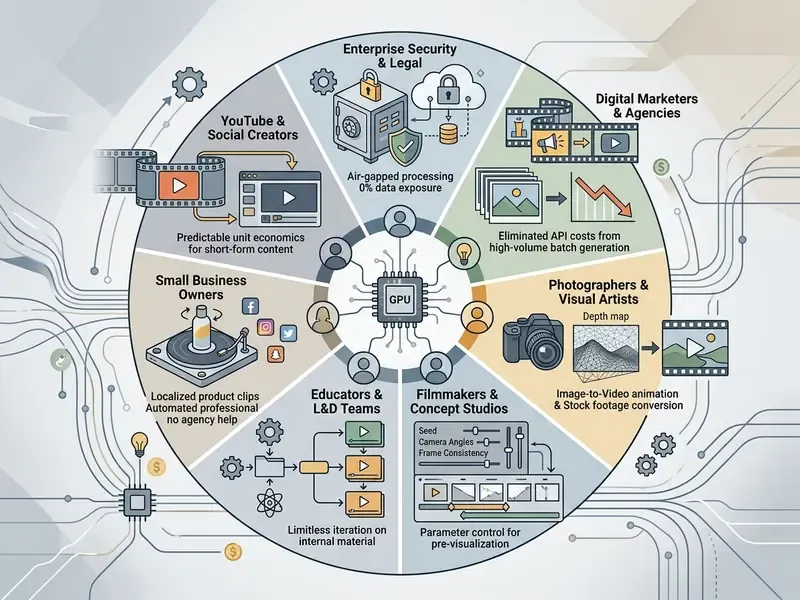
To model total cost of ownership across hardware depreciation, power draw, and throughput against SaaS subscriptions, teams use AI Media Calculators and benchmark against free AI video generators before committing capital to GPU hardware. If your team only needs occasional clips, a zero-install option such as text to video ai free online without login may be the honest answer instead of a workstation purchase.
Selecting the Optimal Local Video Foundation Model
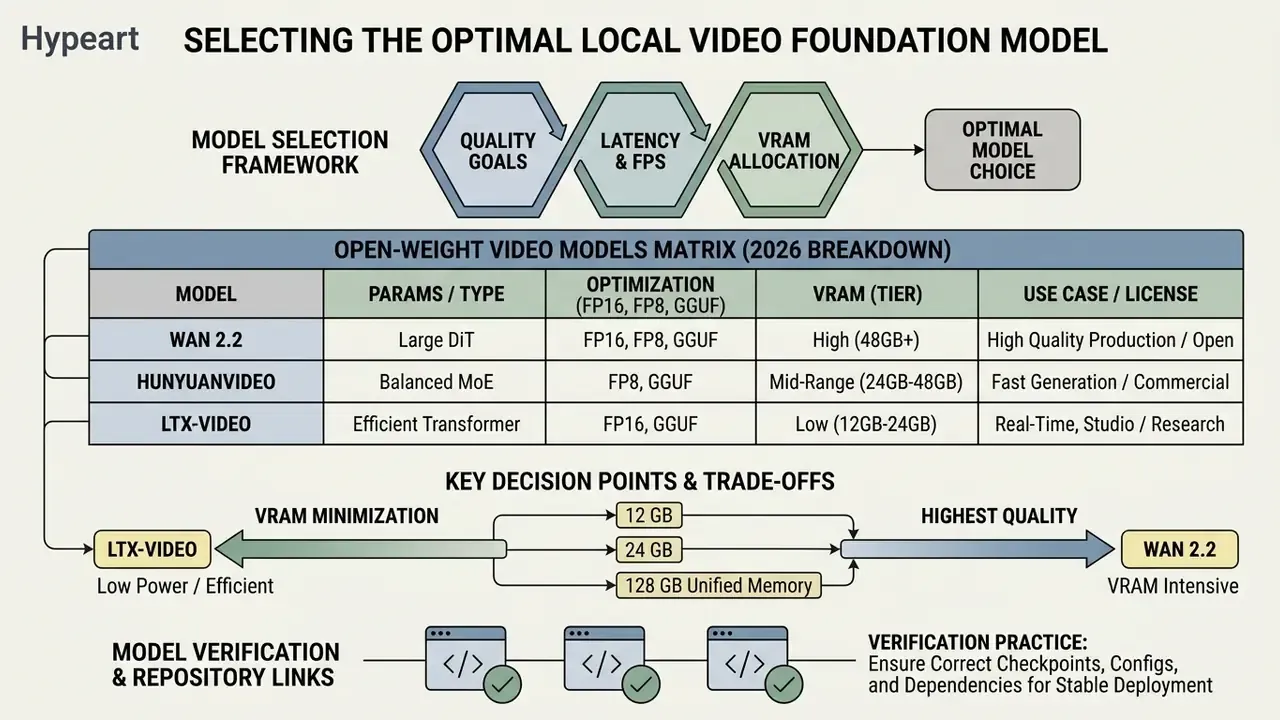
Choosing the best local AI video generator means aligning model parameter size, precision (FP16, FP8, GGUF), and VRAM requirements with your GPU hardware and licensing needs. Get one of those three wrong and the pipeline stalls.
Model Selection Framework: Quality, VRAM Footprint, and Latency
Model selection hinges on three hardware metrics: VRAM footprint, temporal motion quality, and generation latency per frame. Compact quantized checkpoints enable low-VRAM execution, while full-precision 13B+ models require 24 GB to 40 GB VRAM for unconstrained rendering.
"HunyuanVideo 1.5 reaches state-of-the-art quality at 8.3 billion parameters, running from 14 GB of VRAM with model offloading enabled."
Motion quality should be scored, not eyeballed. VBench-style evaluation decomposes video output into motion smoothness, temporal flickering, subject identity consistency, dynamic degree, and imaging quality. Those five axes determine whether a local checkpoint is production-viable or only demo-viable.
For teams comparing commercial SaaS plans with self-hosted deployments, reviewing AI Media Pricing Guides gives a clear view of break-even thresholds based on rendering volume.
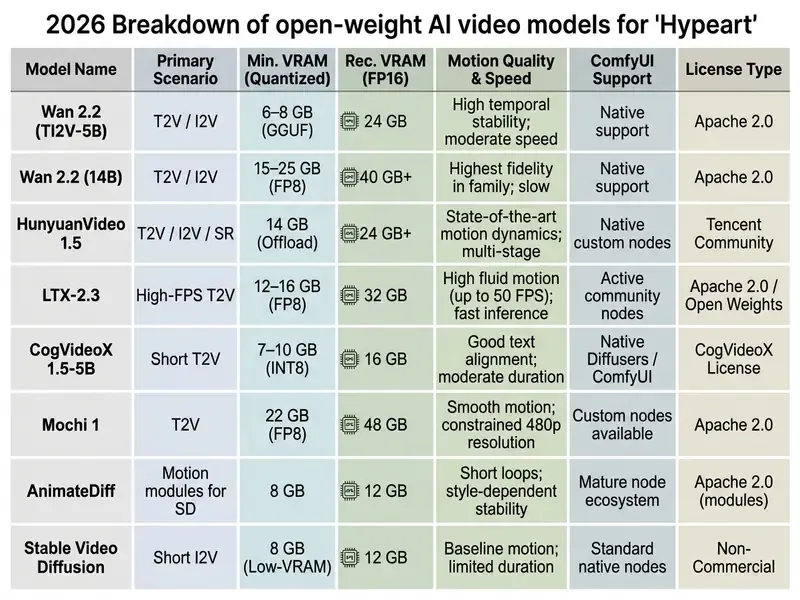
Open-Weight Video Models Matrix (2026 Breakdown)
Open-weight video architectures in 2026 cover a wide spectrum of parameter sizes, license terms, and operational capabilities. Readers new to the category can start with the broader landscape of text-to-video AI tools before drilling into local checkpoints:
- Wan 2.2: Released under the Apache 2.0 license, offering TI2V-5B and 14B parameter variants. The 5B variant operates within 6 to 8 GB VRAM via GGUF and offload workflows, while native 720p FP16 execution requires 24 GB VRAM. Official reference documentation for the 14B model cites 15 to 25 GB depending on precision.
- HunyuanVideo and HunyuanVideo 1.5: Open-weight foundation models (13B and 8.3B parameters). HunyuanVideo 1.5 supports unified T2V and I2V at 720p or 1080p across 121 frames, using model offloading and tiling to run at roughly 13.6 GB peak memory (14 GB VRAM practical minimum), with 24 GB recommended. The original 13B release peaks at 60 GB for 720x1280x129f. Licensed under the Tencent Hunyuan Community License.
- LTX-Video / LTX-2.3: Efficient video diffusion transformers supporting up to 4K resolution at 50 FPS under Apache 2.0 or Open Weights licenses, optimized for ComfyUI and GGUF quantization (16 GB to 32 GB VRAM). Full bf16 inference is documented at 32 GB VRAM minimum, with quantized variants required below that.
- CogVideoX 1.5-5B: Operates in the 7 to 10 GB VRAM range using FP8 or INT8 at 1360x768, using a 3D causal VAE under the CogVideoX custom license.
- Mochi 1: A 480p/720p open-weight model requiring roughly 22 GB VRAM in low-precision modes under the Apache 2.0 license.
- Stable Video Diffusion (SVD): Legacy image-to-video baseline requiring 8 to 12 GB VRAM, restricted to non-commercial research use.
- Pyramid Flow: A flow-matching video model positioned for efficient training and inference; verify checkpoint-level license terms, since community mirrors vary.
- AnimateDiff: Motion-module approach that animates existing Stable Diffusion checkpoints. Still the lightest entry point for 8 GB cards, and the most widely forked motion stack in the community.
Which GPU and How Much VRAM You Need for Local AI Video Generation
Video generation is compute-bound and VRAM-intensive. Spatial resolution, frame counts, and attention mechanisms scale VRAM requirements quadratically, which makes dedicated video memory the primary bottleneck for local execution.
"Latency and energy consumption scale quadratically with resolution and linearly with frame count and denoising steps."
That scaling law is the practical planning tool. Doubling output resolution is roughly a 4x cost event, whereas doubling clip length or sampler steps is a 2x event. Memory bandwidth matters as much as capacity: the higher the bandwidth, the faster each diffusion pass completes and the less time compute units spend idle.
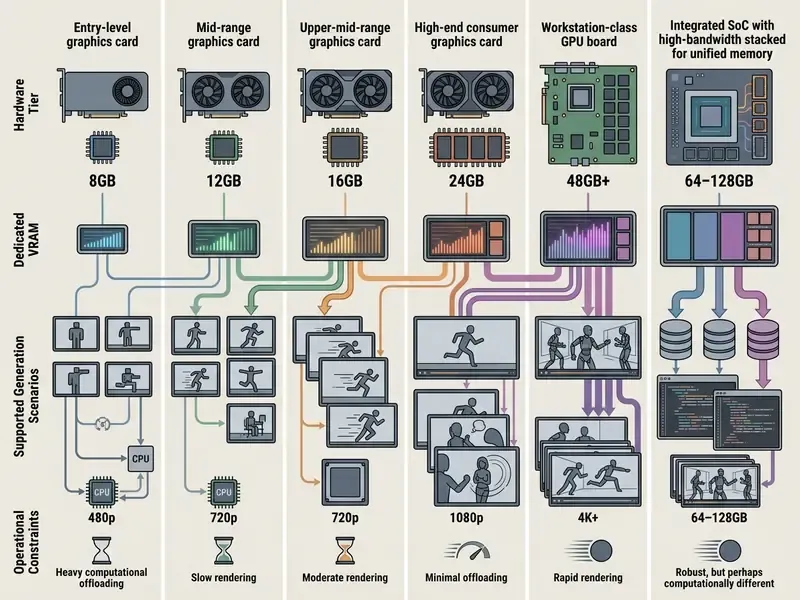
Note that these tiers are guidance, not absolutes. Peak memory depends on the specific model, precision, frame count, and node graph, so validate on your own machine before signing off on a hardware order.
VRAM Optimization Techniques for Budget GPUs (8 to 12 GB)
Running an AI video generator locally on GPUs with 8 GB to 12 GB VRAM requires memory optimization: GGUF or FP8 quantization, CPU offloading, sequential unloader scripts, and tiled VAE decoding. These methods reduce peak VRAM usage by shifting text encoders and VAE processing to system RAM.
Four levers dominate low-VRAM deployment:
- Move the text encoder to CPU.T5-XXL alone can occupy several gigabytes. Relocating it removes an entire VRAM component before diffusion even begins.
- Switch precision.FP8 roughly halves the backbone footprint versus FP16. GGUF Q4_K_S variants target 12 to 16 GB cards, with Q3/Q4 or pruned INT4/INT8 mixes recommended for the 16 GB tier.
- Enable sequential CPU offload.Diffusers exposes
enable_sequential_cpu_offload()andenable_xformers_memory_efficient_attention()for exactly this scenario, streaming submodules to the GPU only when needed. - Tile the VAE.Tiled decoding keeps only one spatial tile resident in VRAM at a time. That is usually the difference between a successful 720p decode and an out-of-memory crash on a 12 GB card.
"SnapGen-V generates a five-second video on an iPhone 16 Pro Max in about 4.12 seconds using a 0.6B-parameter model."
That result defines the current floor of local generation. Mobile-class silicon can already run constrained video diffusion, which makes 8 GB desktop GPUs a legitimate, if slow, entry point rather than a dead end. Teams that need to benchmark this local floor against zero-install web tools can review the comparison of free AI video generators to set accessibility expectations for non-technical end users.
System Memory, Storage Bandwidth, and Cooling Constraints
System RAM (32 GB minimum, 64 GB recommended for CPU offloading), high-speed NVMe PCIe 4.0/5.0 storage for rapid checkpoint swapping, and adequate cooling dictate sustained generation stability.
- RAM 32 GB is enough for single-model inference. 64 GB becomes necessary once CPU offload, multi-process queues, or simultaneous LLM prompt generation enter the pipeline. The failure mode of insufficient RAM is swapping, which collapses throughput.
- Storage NVMe reduces checkpoint load time from minutes to seconds compared with SATA or spinning disks. PCIe 5.0 adds transfer headroom, but once weights are resident, generation speed is GPU-bound. Budget 1 TB or more if you keep several video models plus rendered output on the same machine.
- CPU Core count affects frame decode and encode, preprocessing, and pipeline orchestration rather than the diffusion loop itself. An Intel Core i7 or AMD Ryzen 7 class chip is the practical baseline.
- Cooling Sustained renders push GPUs to thermal limits. Once clocks drop, long batch jobs slow measurably. Undervolting plus an aggressive fan curve typically preserves 5 to 10% of sustained throughput.
Once the pipeline is stable, the finishing stage matters as much as generation. Most teams pair local rendering with conventional video editing software for trimming, sequencing, and audio alignment.
Generative Execution on Unified Memory Architectures (Apple Silicon and AMD Ryzen AI)
Discrete NVIDIA GPUs rely on dedicated VRAM. Unified Memory Architectures (UMA), such as Apple Silicon Mac Studio and MacBook Pro (M2/M3/M4 Max and Ultra) or AMD Ryzen AI Halo workstations, draw compute and tensor loading from a single high-bandwidth LPDDR5X system memory pool.
Key engineering trade-offs of unified memory for local AI video:
- Bypassing the VRAM ceiling.A workstation with 128 GB of unified memory can allocate up to 96 GB (roughly 75% of the pool) to the GPU context. This enables unquantized FP16 execution of 13B+ parameter models such as HunyuanVideo or Wan 2.2 14B without a $10,000+ enterprise server GPU. Discrete cards hit a hard wall the moment a model does not fit and must offload layers to system RAM, at which point speeds drop sharply.
- Model parallelism and concurrent pipelines.Large memory overhead lets you keep an LLM prompt generator (for example Qwen 2.5 72B), an image creation model, and a video diffusion transformer loaded at the same time. That is the pattern behind fully local pipelines where an LLM writes prompts, an image model renders stills, and a video model animates them.
- Bandwidth limitations.Discrete GPUs offer 1,000+ GB/s memory bandwidth (GDDR6X or HBM), while unified memory bus widths typically peak between 400 and 800 GB/s. Per-frame rendering latency may therefore be 30 to 50% slower than on dedicated RTX 4090 hardware, despite fitting far larger model weights.
- Driver ergonomics.Apple Silicon runs through PyTorch MPS. AMD paths use ROCm builds, and vendor developer images such as the Ryzen AI Halo image ship with ComfyUI preinstalled, removing ROCm driver wrangling before the first render. For Apple hardware, 64 GB or more unified memory is the realistic entry point, because the shared pool must hold model, cache, and decoded frames simultaneously.
How to Install and Run an AI Video Generator Locally
Setting up a local AI video generator involves preparing a Python environment, installing a node-based interface such as ComfyUI, downloading model checkpoints into the correct directory paths, and executing node graphs. No code is required for the last step, which is why ComfyUI became the default for non-programmers with strong visual instincts.
ComfyUI Directory Layout and Node Environment Setup
ComfyUI serves as the primary open-source visual interface for local video pipelines. Models are loaded by placing weights into ComfyUI/models/diffusion_models/ or checkpoints/, with text encoders in text_encoders/, CLIP vision weights in clip_vision/, and VAE files in vae/.
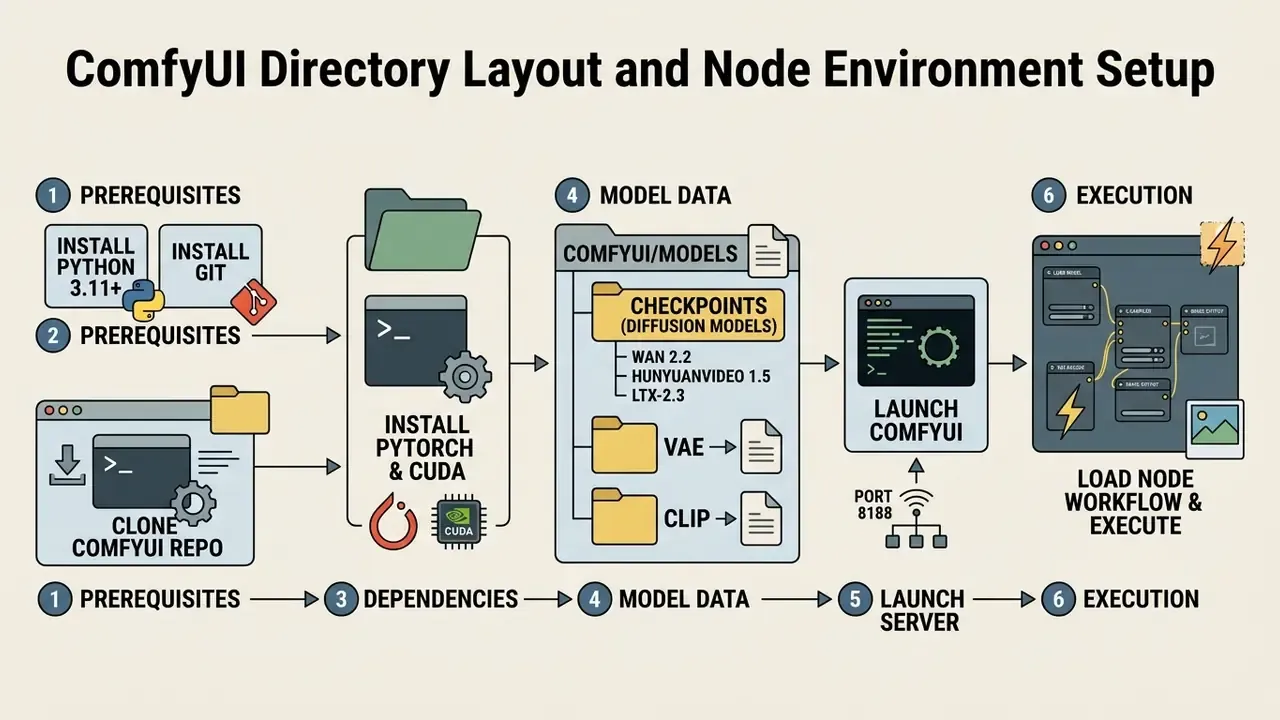
Canonical manual installation follows four documented steps: create a virtual environment (python3 -m venv comfy-env or conda create -n comfy-env python=3.11), clone the repository, install dependencies, and start the app, which then serves its browser UI on port 8188. For a Wan 2.2 graph, the required files are wan2.2_ti2v_5B_fp16.safetensors (diffusion model), umt5_xxl_fp8_e4m3fn_scaled.safetensors (text encoder), and wan2.2_vae.safetensors (VAE). HunyuanVideo 1.5 graphs instead require DualCLIPLoader, Load Diffusion Model, and Load VAE nodes wired to hunyuanvideo1.5_720p_t2v_fp16.safetensors and hunyuanvideo15_vae_fp16.safetensors. Video utility nodes such as ComfyUI-VideoHelperSuite are installed through ComfyUI Manager or the Comfy Registry. The built-in SaveVideo node handles MP4 (Auto/H.264) and WebM (AV1) export.
Alternative One-Click Installation: Pinokio Ecosystem
For non-technical creators, or environments where Git and CLI setup is prohibitive, Pinokio (https://pinokio.computer/) acts as an autonomous browser that automates environment isolation, Python dependency matching, Git cloning, and CUDA binary links in one click.
- Install the Pinokio executable for Windows, macOS, or Linux (download the archive, extract, and run the application).
- Open the Discover tab and select HunyuanVideo, LTX-Video, or Stable Video Diffusion.
- Click Download, then Install. Pinokio sets up virtual environments and creates desktop launch shortcuts without command-line intervention.
- Open the installed app, upload your source image or prompt, adjust settings, and press the generate button.
This path trades fine-grained control for speed. Pinokio is ideal for validating whether your hardware can run a model at all, before you invest hours in a hand-built ComfyUI environment.
Automating Render Pipelines via ComfyUI API (Headless Execution)
To scale production without manually queuing prompts in the browser UI, developers use ComfyUI's Developer/API Mode to execute batch generations programmatically.
import json
import urllib.request
def queue_video_generation(prompt_workflow):
    payload = json.dumps({"prompt": prompt_workflow}).encode('utf-8')
    req = urllib.request.Request("http://127.0.0.1:8188/prompt", data=payload)
    req.add_header('Content-Type', 'application/json')
    with urllib.request.urlopen(req) as response:
        return json.loads(response.read().decode('utf-8'))
# Load exported API JSON payload
with open("workflow_api.json", "r") as f:
    workflow = json.load(f)
# Programmatically override seed and positive prompt text node
workflow["6"]["inputs"]["text"] = "Cinematic slow-motion shot, cybernetic tiger walking in snow, 4k"
workflow["3"]["inputs"]["seed"] = 89432095834
prompt_id = queue_video_generation(workflow)
print(f"Queued execution task ID: {prompt_id['prompt_id']}")
In practice, teams chain a local LLM in front of this loop. The language model analyzes a reference still, writes a base prompt, then emits pose or style variations ("disco point," "spin," "hip hop") that the script feeds sequentially into the render queue. Because there is no metering and no rate limit, batch jobs designed for overnight execution frequently finish hours ahead of schedule. Reported per-image render times of 19 to 20 seconds on a 128 GB unified-memory workstation illustrate the throughput available once the model is resident in memory. Developers integrating scheduled batch rendering into larger services should review the AI Media API Guides and, for hybrid architectures, the Google Veo API implementation guide.
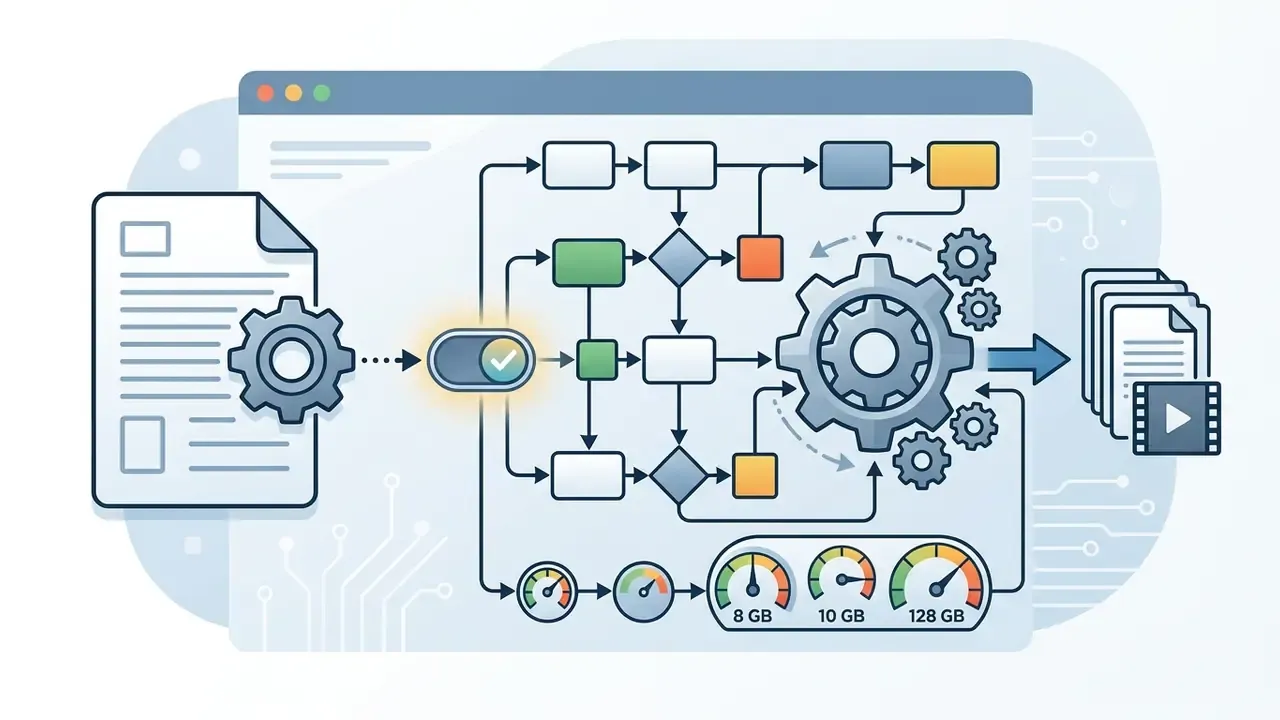

workflow_api.json).
Enterprise Deployment: Docker, Air-Gapped Installation, and Multi-User Queues
Single-workstation installs do not survive contact with corporate IT. For regulated or multi-user environments, three additional patterns apply:
- Containerization. Package ComfyUI, PyTorch, CUDA runtime, and pinned custom-node versions into a Docker image with model weights mounted as a read-only volume. This makes the render environment reproducible and version-auditable.
- Air-gapped bootstrap. In networks without PyPI or Hugging Face access, pre-fetch all wheels into a local wheelhouse (
pip download -r requirements.txt) and mirror the weight files onto internal storage. The documented offline startup order is: create the Python environment, install pre-fetched dependencies, preload text encoders (T5/CLIP), VAE, and transformer weights into their model directories, then launch inference. Wan-family workflows additionally require copying VAE, T5, and CLIP checkpoints into the target checkpoint directory before the first run. - Queue orchestration. Front the ComfyUI API with a task queue (Celery and Redis, or an equivalent broker) so multiple analysts submit jobs without competing for the same GPU context. Serialize execution per device and expose job status through the queue rather than the browser UI.
First-Run Validation and Troubleshooting Common Execution Errors
First-run failures usually come from five sources:
CUDA Out of Memory Error(torch.cuda.OutOfMemoryError)Resolved by enabling--lowvramor--medvramlaunch flags, using FP8 or GGUF models, turning on sequential CPU offload, or settingPYTORCH_CUDA_ALLOC_CONF=expandable_segments:True.Missing Custom NodesComfyUI reports this when a workflow references third-party nodes that are not installed. Resolve by installingComfyUI-Managerand running "Install Missing Custom Nodes" for suites likeComfyUI-VideoHelperSuite.Mismatched Tensor ShapesOccurs when VAE or text encoder models are paired with incompatible diffusion backbones. Verify that every loader points at files from the same model family and release version.PyTorch / xFormers IncompatibilityResolved by aligning CUDA toolkit versions with PyTorch build binaries. LTX local inference, for example, documents CUDA 13.2+ as a requirement.- Unstable custom-node stackComfyUI's own troubleshooting guidance is to disable all custom nodes, then binary-search to isolate the offending node before updating, replacing, or removing it.
A small but common trap: the render completes and nothing appears. Check the output directory path in the save node before assuming the generation failed. When troubleshooting setup issues, developers use the AI Media Support and Troubleshooting portal for configuration patterns and environment validation scripts.
Image-to-Video (I2V) Local Pipeline Guide
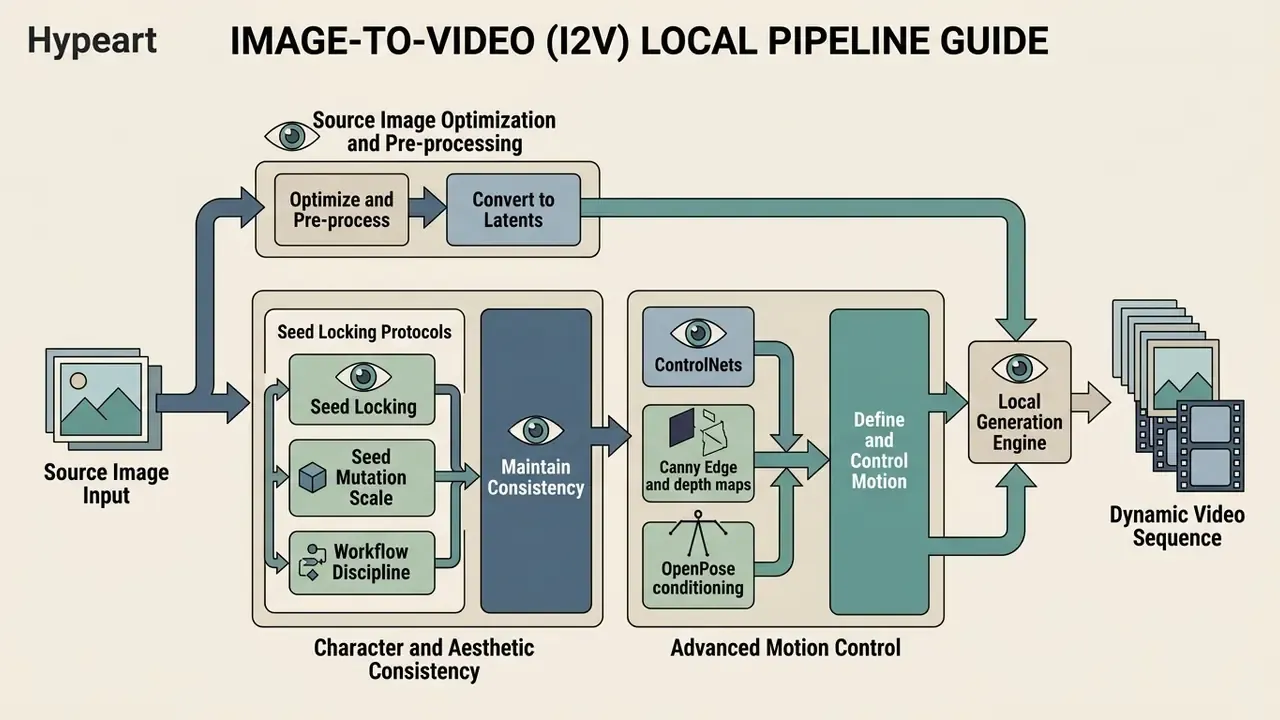
Image-to-video (I2V) workflows transform a single static frame into a dynamic sequence. The source image acts as the first-frame structural anchor, while text prompts define camera motion and object dynamics. This is where local AI image to video setups deliver the fastest visible return, because you already own the input asset.
Source Image Optimization and Pre-processing Latents
Input images must match target output aspect ratios (16:9, 9:16, 1:1, 4:3, 3:4, 21:9) and stay visually sharp. Video dimensions in most local pipelines must be divisible by 32, and SDXL-class preprocessing works best at 1024x1024 (768x768 acceptable; below 512x512 is not recommended). Pre-processing source files with dedicated AI image upscalers and diffusion upscalers keeps latents clean during initial VAE encoding.
"CamI2V improves camera controllability by 25.64% on the RealEstate10K dataset, requiring 12 GB of VRAM for 16-frame inference."
Prompt structure for I2V follows a documented four-beat pattern: first-frame anchor (style, subject, composition, scene), then action onset, then continuous development, then result or reaction. The input image supplies composition, subject matter, lighting, and style. The prompt supplies motion and trajectory.
In professional editing workflows, operators refine facial subjects and product stills before animation using an AI headshot generator or a conventional photo editor to correct exposure, remove sensor noise, and lock composition. Consumer-grade retouch utilities such as a teeth whitening app sit in the same pre-processing stage for portrait work. All of it reduces VAE reconstruction artifacts downstream.
Character and Aesthetic Consistency: Seed Locking Protocols
Generative video diffusion relies on an initial numerical noise matrix defined by a Seed value:
- Seed locking Retaining the exact integer seed across multiple prompt changes forces the model to reuse the same structural layout, character features, and lighting setup. This is the foundation of episodic or series content.
- Seed mutation scale To alter specific movements without breaking temporal identity, adjust sub-seed weight vectors (values between 0.01 and 0.05) rather than randomizing the global seed.
- Workflow discipline Lock the seed while iterating on prompt wording. Unlock it only when you deliberately want a new style, character interpretation, or composition.
Advanced Motion Control: ControlNets, Canny Edge, and OpenPose
Exact subject dynamics require constraining spatial latents with structural guides, not text prompts alone.
- OpenPose conditioning Extracts frame-by-frame skeletal keypoints from a source dance or movement video and maps them onto the generated subject, maintaining physical structural fidelity. This is the mechanism behind "same pose, different character" trends.
- Canny Edge and depth maps Preserve spatial boundaries and background depth cues across latents, preventing morphing background elements during fast camera motion. A Canny edge map extracted from a single reference still transfers composition onto a newly generated subject.
- AnimateDiff and IP-Adapter integration Combines structural motion modules with image-prompt adapters, letting creators lock character key features (face, attire) while applying motion vectors from external clip sources.
- Camera trajectory conditioning Explicit pan, zoom, and rotation guidance plus camera-extrinsic control (as implemented in CamI2V-class methods) replaces vague phrasing such as "slow dolly in" with deterministic camera paths.
Sampling Parameters, Motion Scaling, and Asset Export
During execution, sampler algorithms such as Euler or UniPC process latents across defined step counts (20 to 50 steps). UniPC is the documented default multistep solver in several local runtimes, while Euler is preferred for Lightning and Distill checkpoints. Adjusted motion_bucket_id or motion scale parameters govern kinetic intensity, with higher values yielding more motion, while frame count and fps control output duration and playback smoothness independently. A min_cfg value can ramp guidance linearly across frames so later frames adhere more tightly to the prompt.
Output nodes export rendered frames as MP4 (H.264/HEVC) or WebM (AV1) files. ProRes availability depends on the host encoder pipeline. Before publishing or archiving large batches, teams pass exports through video compressors to reduce storage overhead without visible generation-loss artifacts.
Cost Analysis and Total Cost of Ownership
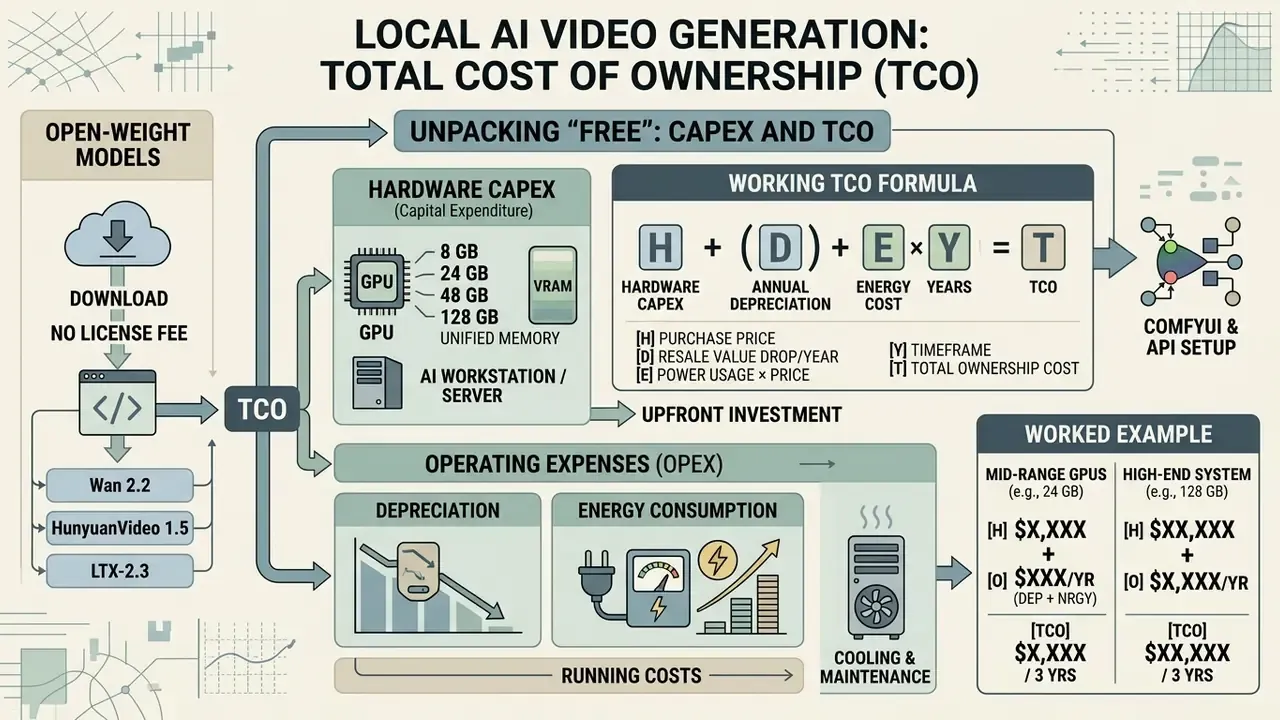
Open-weight model code and parameters can be downloaded without a license fee. Local generation still incurs hardware investment, system depreciation, and power consumption cost.
Unpacking "Free": Hardware CAPEX, Depreciation, and Energy TCO
"Free" in local AI video generation means no per-video API usage fee and no recurring software subscription. Total cost of ownership includes hardware acquisition (GPU CAPEX), monthly depreciation, and measurable energy consumption. A free local AI video generator is free at the software layer, not at the electricity meter.
"Generating a short video with WAN2.1-T2V-1.3B consumes roughly 90 Wh, about 45,000x more energy than a text classification task."
A working TCO formula for local deployment:
Monthly local cost = (GPU + workstation CAPEX ÷ amortization months)
                   + (kWh consumed × utility rate)
                   + (administration hours × loaded hourly cost)
Break-even volume  = Local monthly cost ÷ (Cloud cost per clip − Local energy cost per clip)
Published 2026 comparisons illustrate the scale. A used RTX 3090 build under heavy daily use was modeled at roughly $76 per month all-in (amortization plus electricity), against approximately $285 per month for the equivalent cloud workload, giving a payback period near five months. On the rental side, H100-class inference was reported at roughly $1.50 to $4 per GPU-hour on specialist clouds and $6 to $7 per GPU-hour on hyperscaler on-demand p5-class instances. Cloud GPU pricing is all-inclusive (GPU, chassis, power, cooling, networking, data-center overhead), which is exactly why it looks cheaper at low utilization and more expensive at high utilization.
Worked example. A four-GPU RTX 4090 render node at roughly $12,000 CAPEX amortized over 36 months costs about $333 per month in depreciation. At 6 hours of daily rendering and 1.6 kW sustained draw at $0.15/kWh, energy adds roughly $43 per month, plus administration overhead. Against a SaaS plan billed per second of output, break-even typically lands somewhere between 2,000 and 6,000 rendered clips per month depending on resolution. That is why marketing teams running mass A/B variation batches reach payback fastest, while occasional single-hero-shot users rarely do.
One cost line that spreadsheets usually miss: control cost. Metadata logging, license review, container maintenance, and audit evidence collection consume staff hours. Include them, or your ROI number is fiction.
To assess commercial terms for generated assets, creative teams refer to the AI Media Commercial-Use Hub for license checklists, and benchmark against free AI video generator comparisons before committing to hardware.
Model Governance, Reproducibility, and Audit Trail
In regulated environments, a render is only defensible if it can be reproduced. Local execution is an advantage here, because every variable is under your control. But only if it is captured.
Metadata to persist for every generation:
| Field | Purpose |
|---|---|
seed (integer) | Deterministic reproduction of the initial noise matrix |
sampler / scheduler | Reproduction of the denoising trajectory |
steps, cfg, min_cfg, motion_bucket_id | Parameter-level reproducibility |
| Full prompt and negative prompt text | Input provenance |
workflow_api.json (hashed) | Complete graph topology, including custom nodes and versions |
| Model file names plus SHA-256 hashes | Weight integrity and supply-chain verification |
| Custom node versions / commit hashes | Environment reproducibility |
| Timestamp, operator ID, GPU device | Attribution and capacity accounting |
Implementation notes. ComfyUI's API format export already contains the full graph, so store it alongside every output file and hash it. Record model checksums at load time rather than at download time, so tampering after installation is detectable. Register each deployed checkpoint in your model inventory with its license family, territorial restrictions, and audit date. Where deterministic reproduction is mandatory, pin PyTorch, CUDA, and custom-node versions in the container image, because sampler kernels can change output across minor releases even with an identical seed.
Ownership matters as much as logging. Each local render node should have a named owner, an approved use scope, an access limit, an escalation path for policy questions, and a documented shutdown procedure. No evidence, no autonomy.
For organizations aligning generative media with formal risk frameworks (NIST AI RMF, model-risk governance expectations of the SR 11-7 type, or EU AI Act transparency obligations), local execution plus complete metadata logging is the shortest path to an auditable control narrative. Inputs, weights, parameters, and outputs never leave the perimeter and are all versioned.
Eliminating Artifacts: Temporal Stability and Motion Loss Controls
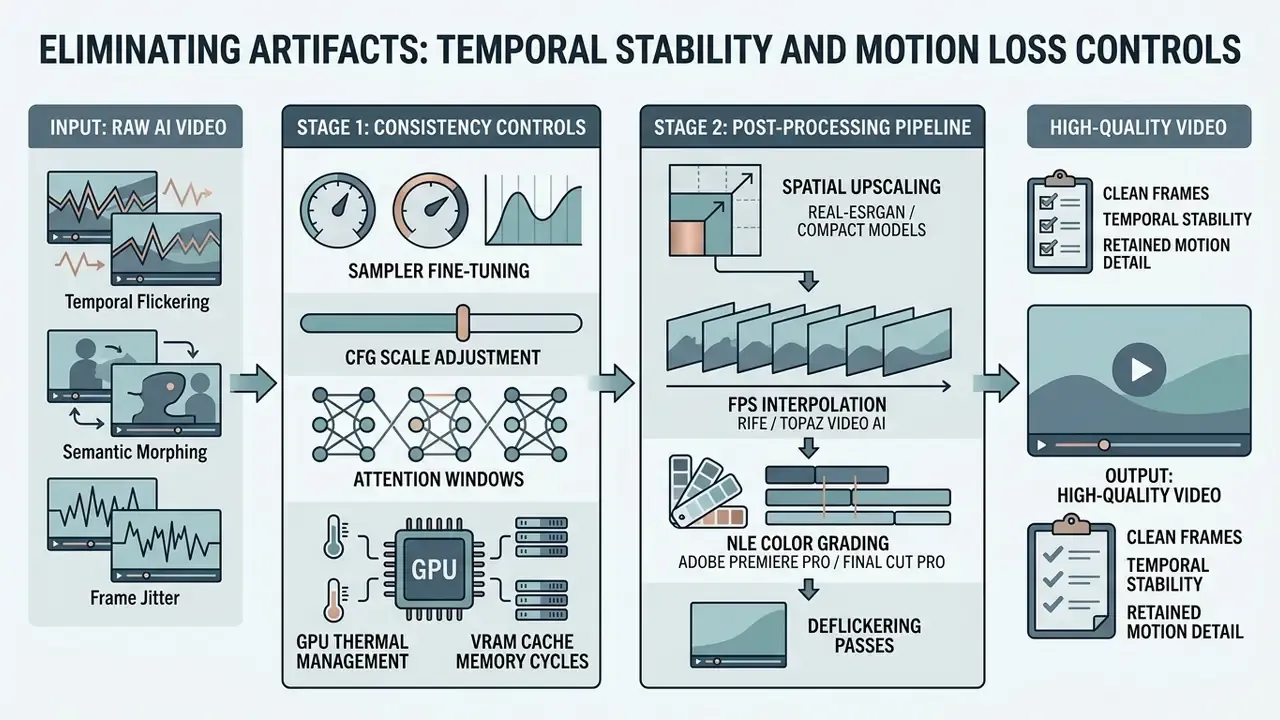
Removing visual artifacts such as temporal flickering, semantic morphing, and frame jitter requires combining temporal consistency controls with spatial upscaling in post.
Fine-Tuning Samplers, CFG Scales, and Attention Windows
Temporal stability improves with optical-flow temporal loss parameters, sliding-window attention mechanisms, and lower CFG guidance scales (typically 3.0 to 6.0 for video diffusion). High-resolution reference images minimize VAE reconstruction noise. Research on per-frame generation confirms the failure mode directly: frame-independent sampling causes temporal flickering and semantic flipping, mitigated by recurrence streams, flow-warping loss, and explicit temporal-consistency terms.
"DEVIL metrics correlate with human judgments at a Pearson coefficient above 0.90, covering dynamics range, controllability, and motion-based quality."
"Snap Video trains 3.31x faster than U-Net architectures and infers roughly 4.5x faster, while achieving higher quality and greater motion complexity." Source: Snap Video: Scaled Spatiotemporal Transformers for Text-to-Video Synthesis, arXiv:2402.14797 (2024). https://arxiv.org/abs/2402.14797
The practical takeaway from both papers: transformer-based spatiotemporal backbones are why 2026-era local models fit on consumer hardware at acceptable speeds, and dynamics-aware metrics, not static frame aesthetics, should decide which checkpoint you standardize on.
Post-Processing Pipeline: Upscaling, FPS Interpolation, and NLE Export
Raw outputs from local generative models typically render at 16 to 30 FPS at 480p or 720p. Broadcast quality requires a post-generation refinement workflow:
- Temporal frame interpolation (RIFE / Topaz Video AI)Local execution often uses 16-frame or 24-frame batches to conserve VRAM. Running output through RIFE (Real-Time Intermediate Flow Estimation) interpolates intermediate frames, lifting raw output to smooth 60 FPS sequences without extra generative GPU compute. RIFE's original paper reports arbitrary-timestep interpolation at 4 to 27x the speed of SuperSlomo and DAIN. Topaz Video AI bundles upscaling and interpolation in preset workflows targeting 4K at 60 FPS.
- Spatial upscaling (Real-ESRGAN and compact models)Pass decoded frames through spatial upscalers to scale native 720p clips to crisp 4K output. Documented upscaling ranges of 1.5x to 3x relative to source resolution preserve aspect ratio while avoiding hallucinated detail.
- NLE color grading (Adobe Premiere Pro / Final Cut Pro)Generative diffusion often introduces slight contrast shifts across temporal windows. Importing clips into an NLE to apply Lumetri color wheels, mid-tone adjustments, and subtle film grain masks lingering diffusion artifacts. Export at 1080p or 4K with a 30 to 60 FPS frame rate for most delivery targets.
- Deflickering passesBlind video deflickering methods, including neural-atlas approaches from CVPR 2023 and recurrent post-processing networks from NeurIPS 2020, remove residual frame-to-frame instability while preserving style. Useful when regenerating costs more than repairing.
GPU Thermal Management and VRAM Cache Memory Cycles
Sustained GPU rendering risks driver crashes if thermal or VRAM thresholds are exceeded. Memory management strategies include invoking torch.cuda.empty_cache() between queue items, using tiled VAE decoding, and enforcing strict cooling profiles on rendering hosts.
"HunyuanVideo outperforms Runway Gen-3 Alpha and Luma 1.6 on motion dynamics and text alignment in professional evaluations."
Note the documented limits of cache clearing. PyTorch specifies that empty_cache() releases only unoccupied cached memory so it becomes visible to other GPU applications in nvidia-smi. It does not increase usable VRAM for PyTorch itself and is not a fix for fragmentation. Monitor with memory_allocated() and max_memory_allocated() for tensor memory, and memory_reserved() and max_memory_reserved() for allocator-managed memory. Operationally: close unnecessary applications to free CPU and RAM, split very large projects into smaller batches, and give the machine cooldown intervals during multi-hour render sessions.
Limitations and Open Questions
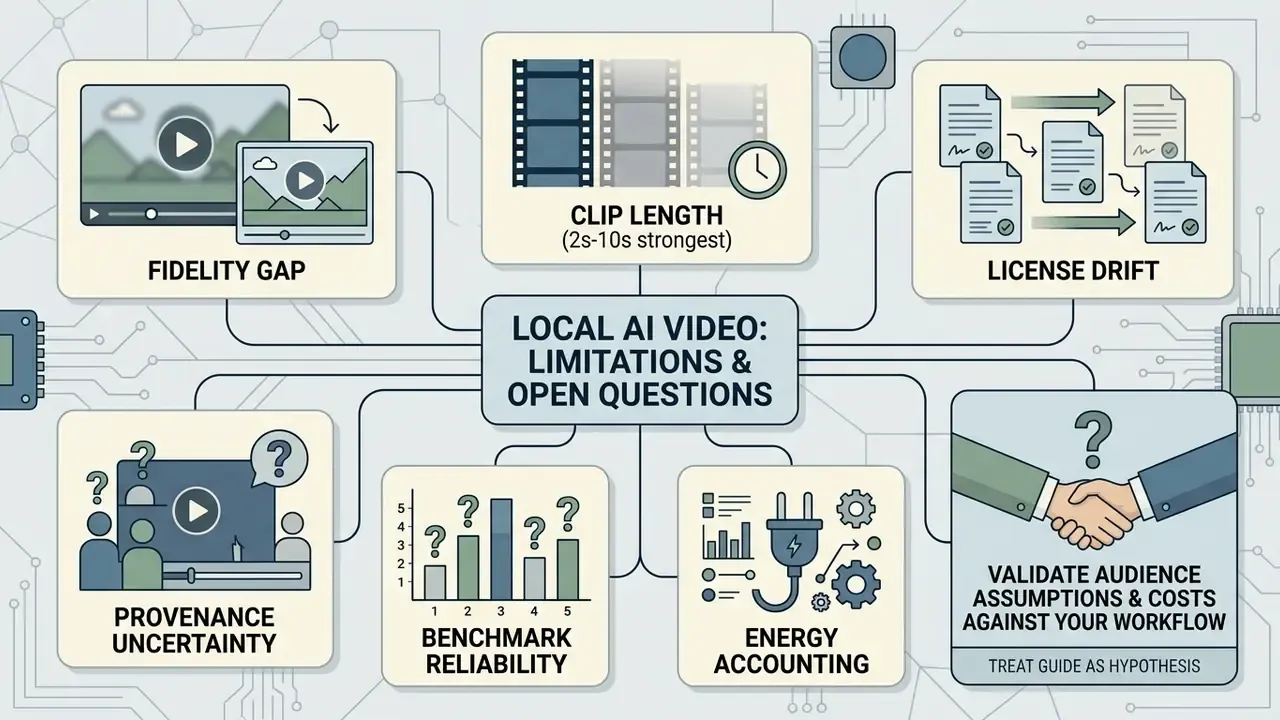
Honest scope statement, because local generation is often oversold:
- Fidelity gap. Open-weight checkpoints have closed much of the distance to hosted flagship models, but not all of it. For a single high-stakes hero shot, a hosted model may still win.
- Clip length. Most local models remain strongest at 2 to 10 seconds. Long-form narrative continuity still requires stitching, conditioning, and manual editorial work.
- License drift. Community licenses change between releases. A checkpoint cleared in Q1 may carry different terms in Q3, so re-audit on every version bump.
- Provenance uncertainty. Training-data disclosures for most video models are incomplete. Residual copyright exposure cannot be fully quantified today, only documented and monitored.
- Benchmark reliability. VBench and DEVIL scores correlate well with human judgment but do not predict performance on your specific subject matter. Run an internal evaluation set.
- Energy accounting. Published per-clip energy figures come from specific model and resolution configurations. Measure your own draw before quoting sustainability numbers to a board.
Treat every audience assumption and cost model in this guide as a hypothesis until validated against your own render logs, utility bills, and legal review.
Production Readiness Checklist
Run this before any local render pipeline is declared production-ready:
Checklist0 / 10
A reasonable next step, and a low-risk one: install one Apache 2.0 checkpoint on a single non-production workstation, run twenty renders with full metadata logging, and review the evidence pack with legal and security before anyone talks about scaling.
Frequently Asked Questions (FAQ)
Can local AI video generators run fully offline?
Yes. Local AI video generators operate completely offline once application dependencies, Python libraries, text encoders (T5, CLIP), VAE checkpoints, and diffusion transformer weights are on local disk. Execution needs no active network connection, which is what makes data containment absolute. Documented offline pipelines extend this to the whole production chain: local script generation via a self-hosted LLM, local TTS voiceover, local subtitle alignment with Whisper or whisper.cpp, and local MP4 assembly. Readers weighing this against hosted options can review the comparison of free AI video generators to see where offline control outweighs convenience.
Do I need a 128 GB unified-memory machine to run ComfyUI locally?
No. ComfyUI runs on far smaller configurations, including 8 GB discrete GPUs with quantized checkpoints and offloading. Large unified-memory pools simply remove the VRAM ceiling, which allows unquantized 13B+ models and concurrent multi-model pipelines that would otherwise need enterprise GPUs.
How long does a 5-second 720p clip take locally?
Measured ranges: roughly 3 to 6 minutes on an RTX 4090 at 30 steps, 9 to 14 minutes on a 12 GB card requiring tiled VAE decoding, and 30 to 50% slower per frame on unified-memory workstations than on a 4090 despite their larger capacity. Still-image renders in the same environments complete in roughly 19 to 20 seconds, which is why LLM-driven batch curation pipelines are so effective.
Is local video generation as good as proprietary cloud models?
Not uniformly. Open-weight models such as LTX, Wan 2.2, and HunyuanVideo 1.5 have improved substantially and can be fine-tuned for specific styles, but they generally still trail top hosted models in out-of-the-box fidelity and consistency. Local execution wins decisively on high-volume experimentation, cost per iteration, and data control. A single polished hero shot may still favor a hosted model.
How do I keep the same character across multiple clips?
Lock the seed, reuse the same reference image as the first-frame anchor, and add an IP-Adapter or a LoRA trained on the character. Use sub-seed mutation in the 0.01 to 0.05 range to vary motion without breaking identity, and apply OpenPose conditioning when the pose must change but the subject must not.
Can I automate ComfyUI instead of clicking through the interface?
Yes. Enable Dev mode, export the graph in API format, and POST payloads to http://127.0.0.1:8188/prompt. This supports scripted seed sweeps, prompt variation loops, unattended overnight batches, and integration into larger pipelines where an LLM writes the prompts.
What does a ControlNet actually do in video generation?
A ControlNet constrains model output using a structural reference: an edge map (Canny), a depth map, or a pose skeleton (OpenPose). It transfers composition or motion from a reference clip onto a newly generated subject, which is the mechanism behind "same pose, different character" content.
How is audio synchronized with locally generated video?
Two paths exist. Some models generate synchronized audio natively in a single pass. Otherwise, post-processing sync aligns locally generated TTS or music to video duration in an NLE or via sync parameters. Offline pipelines commonly use Coqui TTS for voiceover and Whisper for subtitle alignment, then mux everything at the render stage.
Which hardware platforms are supported?
Windows and Linux with NVIDIA GPUs via CUDA is the best-supported path. AMD works through ROCm builds on Linux, and Apple Silicon through PyTorch MPS with 64 GB or more unified memory recommended. Reported minimums for a comfortable general setup include an Intel Core i7 or AMD Ryzen 7 CPU, 16 to 32 GB system RAM, and a 512 GB+ NVMe SSD.
Where should a first-time user start?
Install Pinokio, run one image-to-video model on your existing GPU, and measure render time at 480p. If the result is usable and the volume justifies it, rebuild the same workflow in ComfyUI with pinned dependencies and metadata logging. Feasibility first, governance second, scale third.