Key takeaways (executive summary)
- What it is
- a cloud video synthesis workspace covering text-to-video, image-to-video, video-to-video (Modify Video) and Reframe, powered by the Ray model family. Dream Machine is the original 2024 product name; Ray 3.2 is the current video model.
- Multi-model hub
- beyond Luma's own engines, the workspace provides access to Veo, Kling, Seed Dance and ElevenLabs voice/SFX generation without switching tools.
- Cost
- entry tiers start around $9.99 (Lite) and $29.99/month (Plus, 10,000 credits). A 5-second clip consumes 20 to 400 credits depending on resolution, and API video-to-video is metered from $0.72 per 5-second job.
- The main commercial risk
- commercial rights attach only to outputs generated while a Plus, Unlimited or Enterprise plan is active. Retroactive upgrades do not license or de-watermark earlier Free/Lite outputs.
- The main governance gap to close internally
- confirm data-retention and model-training terms, generation logging and reference-asset ownership before allowing marketing or L&D teams to upload brand assets.
What Luma AI Video Generator Is and Which Jobs It Solves
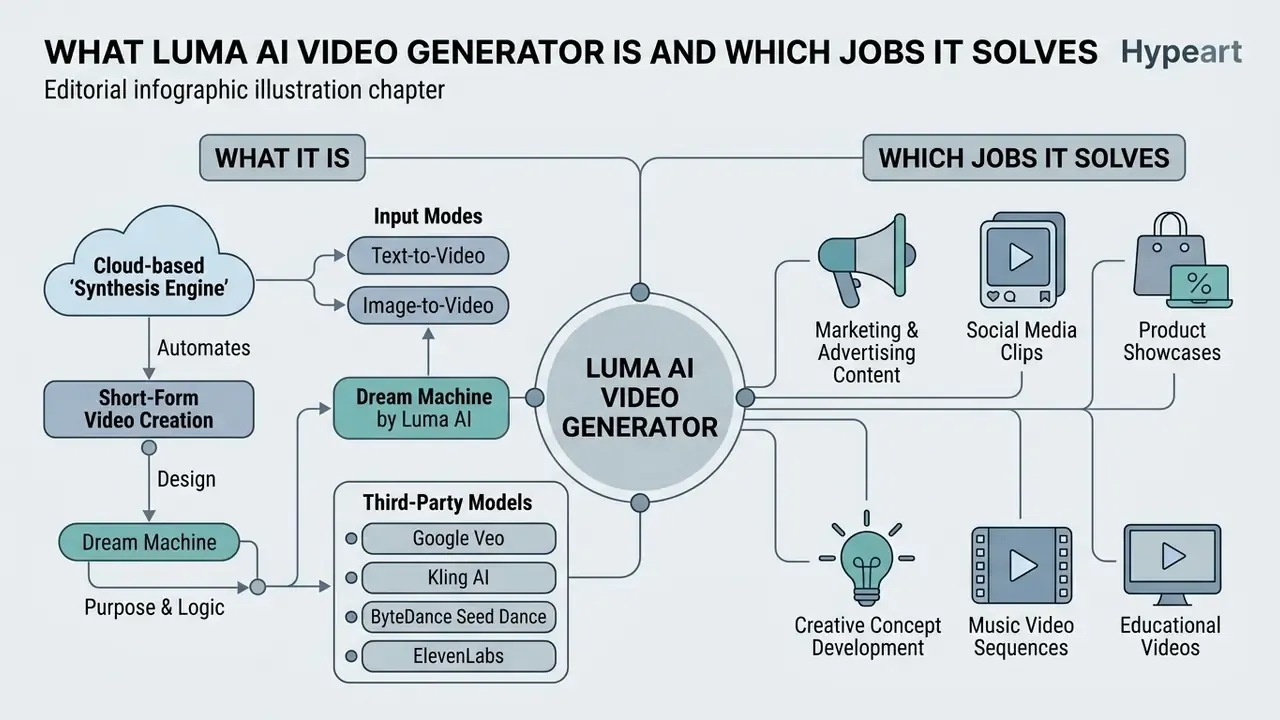
Luma AI Video Generator is a cloud-based media synthesis engine designed to automate short-form video creation through text-to-video and image-to-video transformations. Organizations use the platform to produce social media marketing assets, product hero animations, visual mood boards and rapid creative prototypes from descriptive prompts or reference photography. Teams evaluating the broader category can compare capability tiers across AI video generators before committing credits to a single vendor.
One practical note before the feature tour: the tool is a production accelerator, not a narrative studio. Clips are short by design, and the value shows up in iteration volume rather than in single-take perfection.
Dream Machine by Luma AI: Purpose and Generation Logic
Dream Machine is Luma Labs' core generative pipeline, engineered around a multimodal transformer trained directly on video representations rather than on static image sequences alone. The model interprets natural language instructions, reasons through scene composition, and computes frame-by-frame temporal continuity to hold camera movement and spatial physics together.
Historically, Dream Machine launched publicly on 12 June 2024 as a text-to-video system trained directly on video data. Luma Labs now labels Ray 3.2 as the current production video model, while the Dream Machine name persists as the consumer-facing workspace brand. Reasoning happens before rendering: the model resolves composition, motion vectors and scene logic first, then renders frames. That sequence explains a repeatable finding in practice, that explicit camera and action language moves the output far more than adjectival styling ever does.
What Kinds of Videos You Can Create in Luma AI
Users can generate realistic camera pans over product renders, stylized character motion, photorealistic natural landscapes and animated still photography for digital campaigns. The software supports both photorealistic cinematography and stylized artistic outputs across diverse aspect ratios.
Documented output categories include: image-to-video animation of a single still; social media video ads assembled from product photography with hooks, captions and audio; short-form vertical content for creators; product-launch and marketing campaign clips; character-driven narrative scenes; and cinematic dynamic scenes with pronounced camera motion.
Third-Party Models Inside the Luma Workspace
The Luma workspace has evolved from a single-model generator into a multi-model production hub. Operators are not limited to the proprietary Ray series (Ray 3.2, Ray 3.14 drafts, Ray 2 for 4K API workflows). Third-party engines are callable inside the same board without exporting assets or switching interfaces:
- Google Veo an alternative renderer for complex dynamic scenes and shots demanding stronger human physics. Developers benchmarking cost-per-second can review the Google Veo AI video generator implementation notes.
- Kling AI useful for longer motion arcs and character performance where Ray drifts on secondary movement.
- ByteDance Seed Dance specialized character animation and dance or choreography motion synthesis.
- ElevenLabs in-workspace voiceover and sound-effect (SFX) generation, applied during clip assembly rather than in a separate audio pass.
For governance teams, multi-model routing is a material fact, not a convenience feature. Each embedded vendor introduces its own terms, data handling and licensing surface, so an approved-tool register should list models, not just the Luma workspace. One vendor row in the inventory, five sub-processors in reality. That mismatch is exactly where shadow AI grows.
Generation Modes in Luma AI: Text-to-Video and Image-to-Video
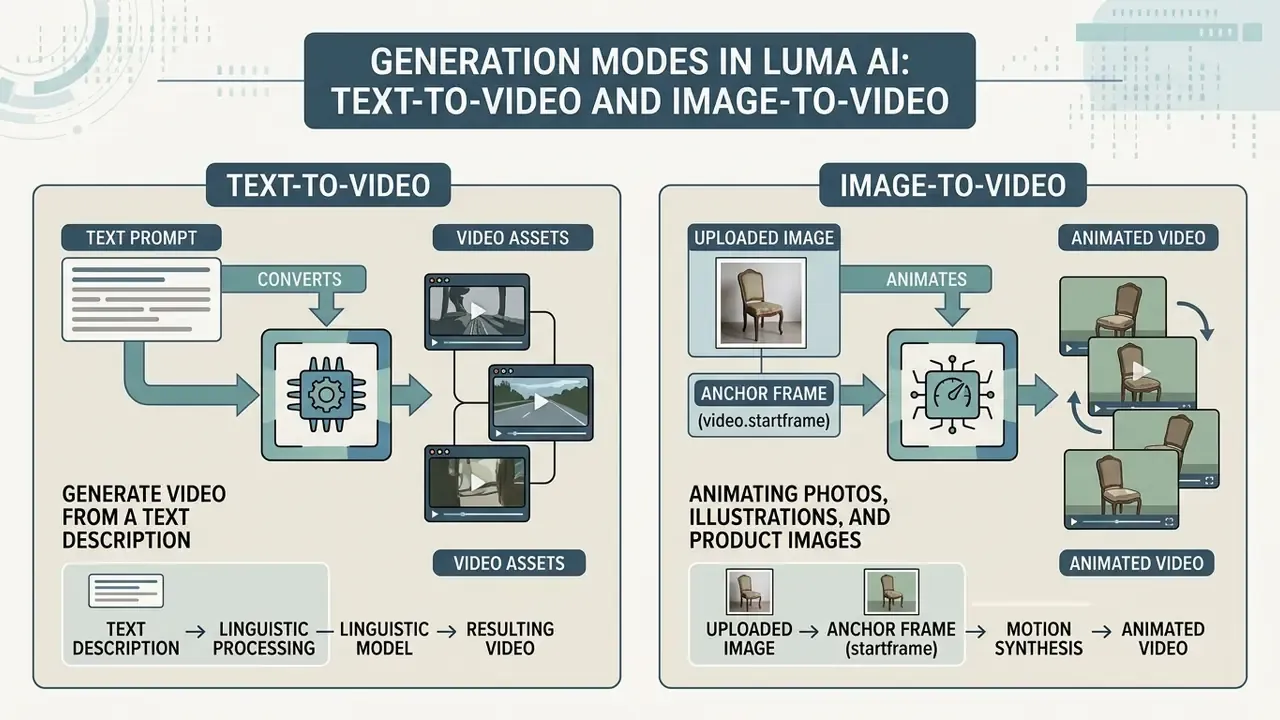
Luma AI operates through two distinct generation modes. Text-to-video builds entire visual scenes from language descriptions; image-to-video uses an uploaded photo as a structural visual seed. Choosing between them depends on whether a project needs unconstrained visual exploration or strict adherence to existing brand assets.
Generating Video From a Text Description
Text-to-video generation converts descriptive prompts into video assets by leveraging internal language processing to interpret scene physics, lighting and camera tracking. Operators specify subject actions, ambient conditions and camera directions inside a single text prompt to steer the generated sequence. Readers mapping the category can also review adjacent text-to-video AI tools to understand how prompt syntax differs between engines.
Luma AI Image to Video: Animating Photos, Illustrations and Product Images
The luma ai image to video feature uses an uploaded image as an anchor frame (video.start_frame), generating consistent motion vectors around the source asset. This lets e-commerce brands animate product stills, convert portrait photography into dynamic clips, and hold exact visual identity across generated outputs using ai image to video luma controls. The API additionally accepts video.end_frame, enabling controlled A to B transitions between two fixed compositions. Comparable anchoring behavior across vendors is catalogued in our overview of image-to-video AI tools.
| Feature / Dimension | Text-to-Video Mode | Image-to-Video Mode (luma ai photo to video) |
|---|---|---|
| Primary input | Text prompt describing scene, motion and mood | Source image (photo, render) plus optional text prompt |
| Visual determinism | Low to moderate (model interprets composition) | High (anchored to source image detail) |
| Primary use cases | Ideation, conceptual scenes, background visuals | Product animation, brand asset continuity, photo animation |
| Control parameter | Prompt language, camera descriptors | Start frame (video.start_frame), end frame, prompt |
| Output consistency | Subject to prompt interpretation drift | High retention of original image attributes |
| Prompt load | Heavy, since wording defines everything | Lighter, because the image carries part of the instruction |
How to Use Luma AI Dream Machine for Video Creation
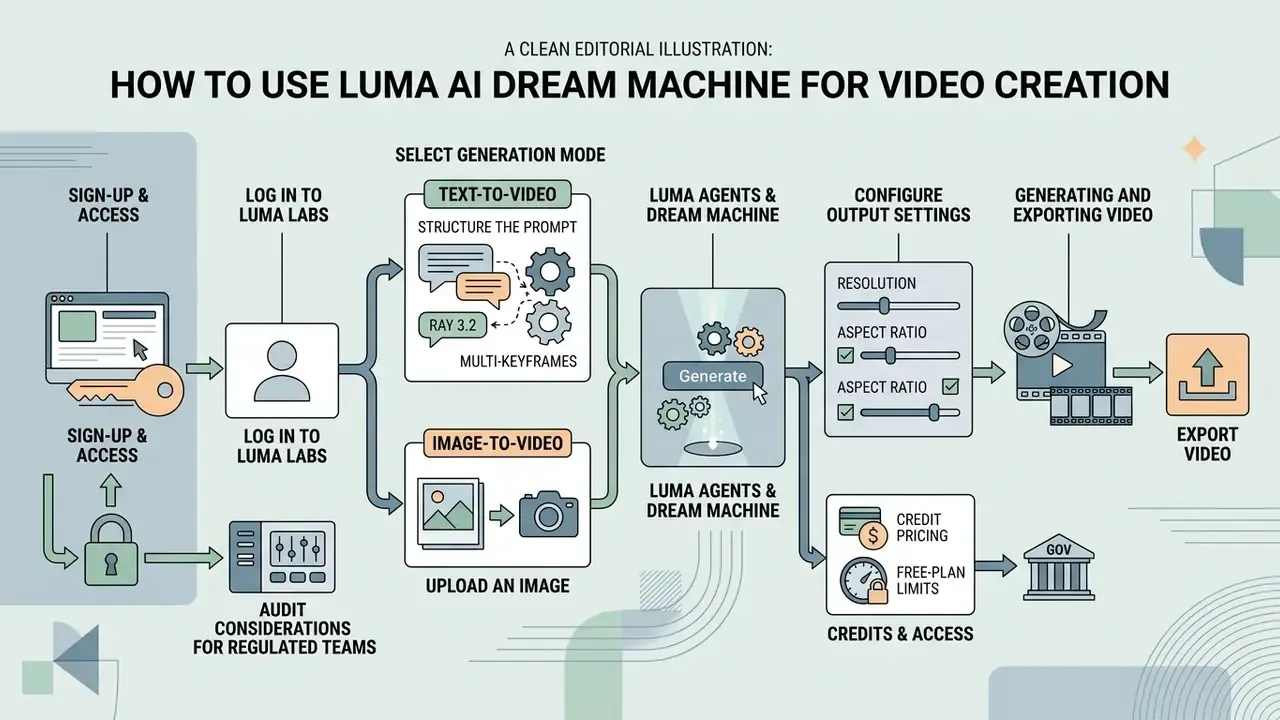
To generate video content with Luma AI Dream Machine, users authenticate through Luma Labs, construct a descriptive prompt or upload a keyframe image, select resolution and duration parameters, then execute the generation job. Completed files can be previewed, refined through text instructions and exported for post-production editing.
Sign-Up and Access to Luma Labs Dream Machine
Access requires creating an account at Luma Labs using Google, Apple or Enterprise Single Sign-On (SSO) credentials. After logging in, operators enter the web workspace where boards, creation histories and generation credits live.
The identity binding is strict. The email used at signup becomes the fixed account identifier, and returning users must reauthenticate with the same Google or Apple identity. Enterprise teams sign in through SSO with a corporate domain, which is the only configuration that lets an internal administrator centralize provisioning and deprovisioning. On iOS, the post-login home screen exposes three surfaces: Ideas, Boards and Profile Settings.
Access and audit considerations for regulated teams. Boards retain generation history, prompts and reference uploads, which functions as a practical first-order audit trail for reconstructing who generated what, from which asset. Before onboarding a controlled department, request written confirmation from the vendor on four points: (1) retention windows for prompts, uploads and outputs; (2) whether inputs are excluded from model training on your tier; (3) availability of API-level generation logs exportable to SIEM or GRC systems; (4) deterministic reproducibility parameters, meaning seed handling and model-version pinning, needed for model-risk documentation. These are contract-level facts that vary by plan, so verify them against your executed agreement rather than a public marketing page.
How to Write a Prompt for Luma AI Video Generation
Effective prompts for dream machine luma ai video generator follow a structured hierarchy: Subject + Action + Setting + Camera Movement + Lighting + Style. Front-loading the first 20 to 30 words with primary action verbs, then explicitly defining camera behavior ("slow dolly forward", "orbit left"), yields the highest prompt adherence. Practical guidance from Luma's own field notes adds three constraints: keep prompts near 100 words, write in present tense, and use only one camera movement per clip.
«Existing models remain highly sensitive to prompt quality; before VidProM no public dataset existed for systematic analysis of text-to-video requests.»
Camera vocabulary that maps to documented motion primitives includes pan left/right, tilt up/down, zoom in/out, push in / pull out, orbit left/right, crane up/down, truck left/right, roll and move up/down. Pacing modifiers ("slowly", "smoothly", "measured") stabilize interpolation between frames. Two camera moves in one prompt usually produce neither.
Uploading an Image, Generating and Exporting Video
Operators upload reference photography into the workspace, configure parameters such as resolution (720p or 1080p) and duration (5s or 10s), then submit the task. Generated MP4 outputs can be reviewed directly in the browser and downloaded via presigned URLs for further refinement in an animated video production suite, or in a conventional video editing suite for trimming, captioning and color work.
- Log in to Luma Labs: access the web dashboard using single sign-on credentials.
- Select the generation mode: choose text-to-video, or upload a reference file for
luma ai dream machine image to video. - Structure the prompt: input scene parameters emphasizing subject action, camera movement and lighting.
- Configure output settings: set target resolution (540p, 720p, 1080p) and clip duration (5s or 10s).
- Execute generation: submit the request against your account credit balance.
- Review and iterate: inspect output quality, apply text modifications if needed, export the finalized file.
Supported aspect ratios. Framing is selected before generation and cannot be recovered losslessly afterwards without the Reframe tool, so pick the target platform format up front:
- 16:9 for YouTube, connected TV, website hero video and presentations.
- 9:16 for vertical delivery to Reels, TikTok, YouTube Shorts and Stories.
- 1:1 for square feed placements, marketplace product cards and retargeting units.
- 4:3 for classic broadcast or presentation framing and legacy slide decks.
- 3:4 for portrait mobile banners and in-app promotional cards.
Resolution, duration and framerate limits (Ray 3.2 / Ray 2, per current documentation). Ray 3.2 supports 360p, 540p, 720p and 1080p, defaulting to 720p and 5 seconds; Ray 2 exposes up to 4K through the API. Ten-second output is not supported in combination with HDR, start_frame or end_frame. Maximum clip length depends on framerate: up to 20s at 24fps, up to 15s at 30fps, up to 7s at 60fps, while Modify Video (V2V) can reach 20s depending on framerate. API delivery follows a POST /v1/generations request, then status polling, then presigned-URL download, with 16-bit EXR and native HDR export available for grading and compositing in Resolve or Nuke.
How to Improve Video Quality in Luma AI
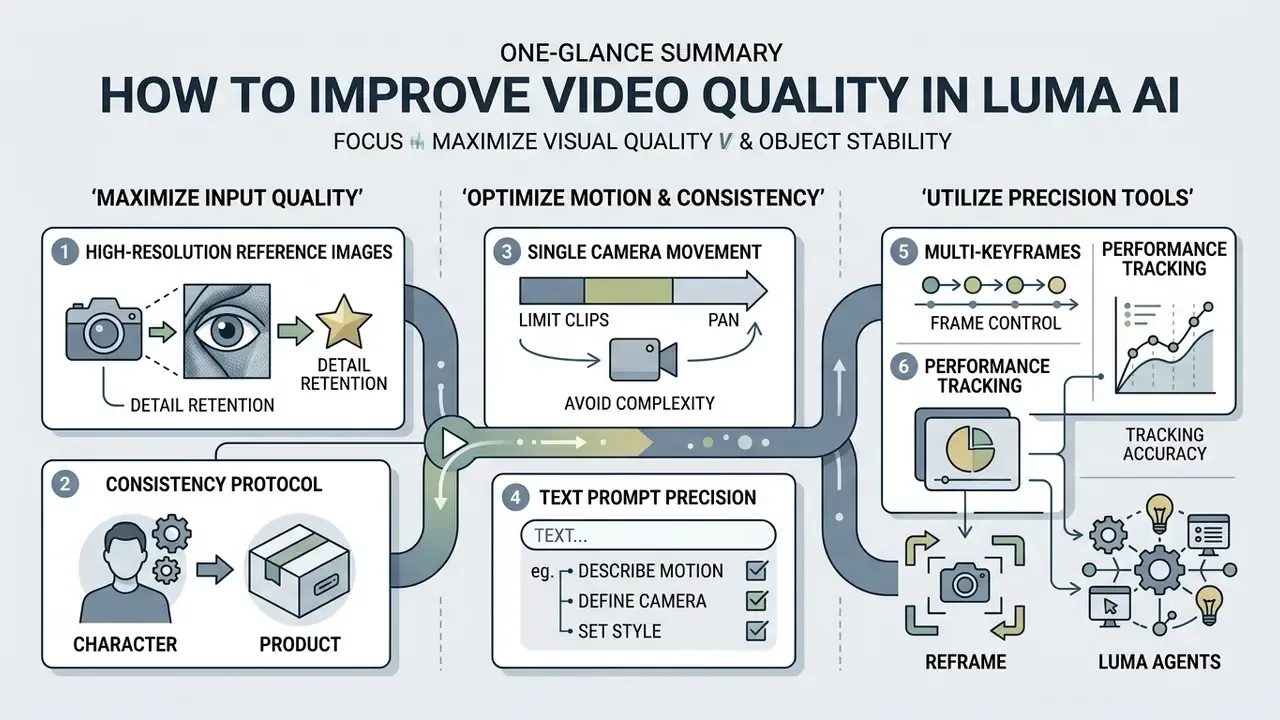
Maximizing visual quality and object stability in Luma AI comes down to three habits: submit high-resolution reference images, limit clips to a single camera movement, and use structured prompt frameworks. Holding subject consistency across multiple scenes depends on establishing master reference assets instead of mixing disparate image angles.
Source Image and Detail Retention in Image-to-Video
Consistency protocol for characters and products. Build one master reference asset and re-anchor every iteration to it. Produce clean single-angle references rather than multi-angle contact sheets, which provoke hallucinated geometry. Lock the features that must never change (logo placement, colorway, facial structure) in every prompt. Vary only camera angle and pose to create controlled alternates. Then batch generations by shot type, all close-ups together, then all three-quarter angles, then all wides, to reduce drift between clips.
Describing Motion, Camera and Style in the Text Prompt
Camera motion in dream machine luma labs ai video generator is governed by explicit terminology. Incorporating specific cinematography directives such as "truck left", "crane up" or "push in" prevents random camera drift, while pacing keywords like "smoothly" or "measured" stabilize frame-to-frame temporal coherence.
«Commercial video generators show joint semantic and physical correctness in fewer than 40% of complex physical scenarios.»
In the same benchmark, Luma Dream Machine recorded an average score of 41.5 in automated physical evaluation. The practical implication is procedural rather than aesthetic: scenes involving collisions, fluid dynamics, load-bearing contact or precise mechanical cause-and-effect need human review before publication, because footage that looks plausible can still encode physically invalid behavior.
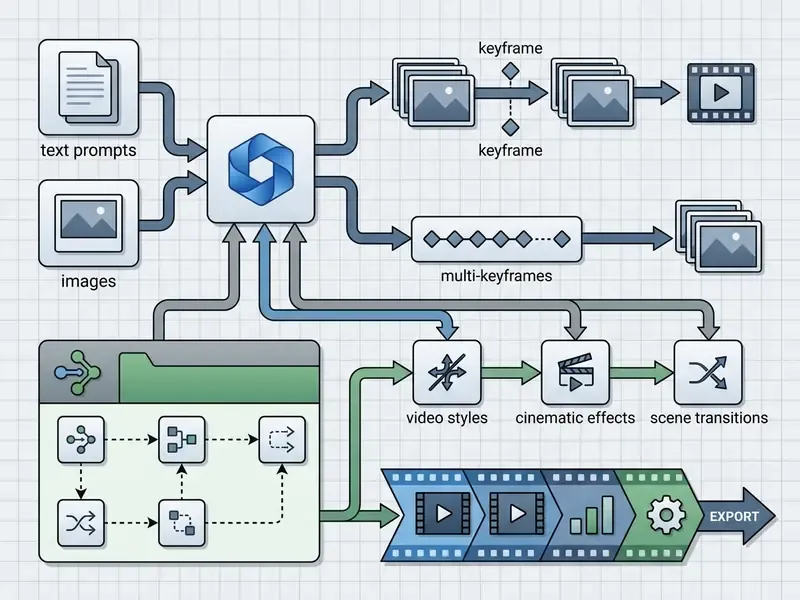
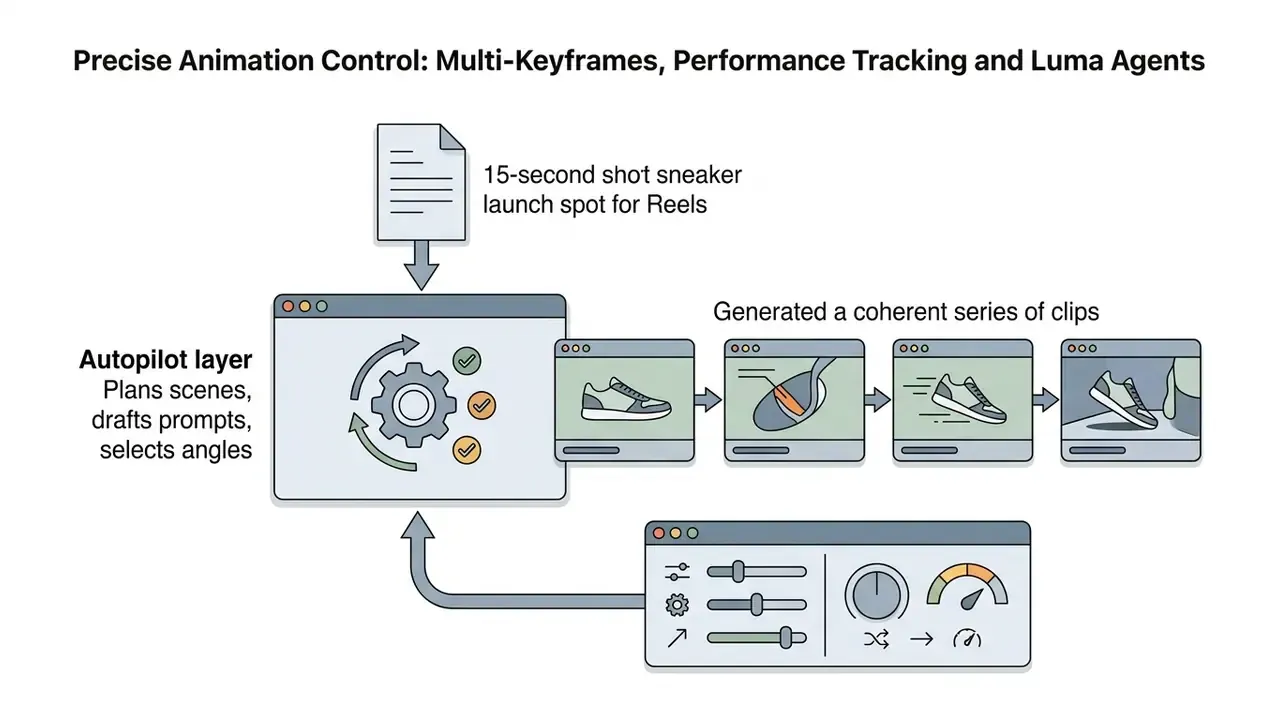
Precise Animation Control: Multi-Keyframes, Performance Tracking and Luma Agents
To eliminate chaotic motion and object decay during longer generations, move from single-prompt requests to structured direction:
Bridging quality to budget. Every quality lever above, whether higher resolution, longer duration, keyframed direction or a batch consistency pass, consumes credits. Iteration is where budgets actually go. That makes the credit model, not the feature list, the practical constraint on production volume, which is the subject of the next section.
Luma AI Dream Machine for Free: Plans, Limits and Subscriptions
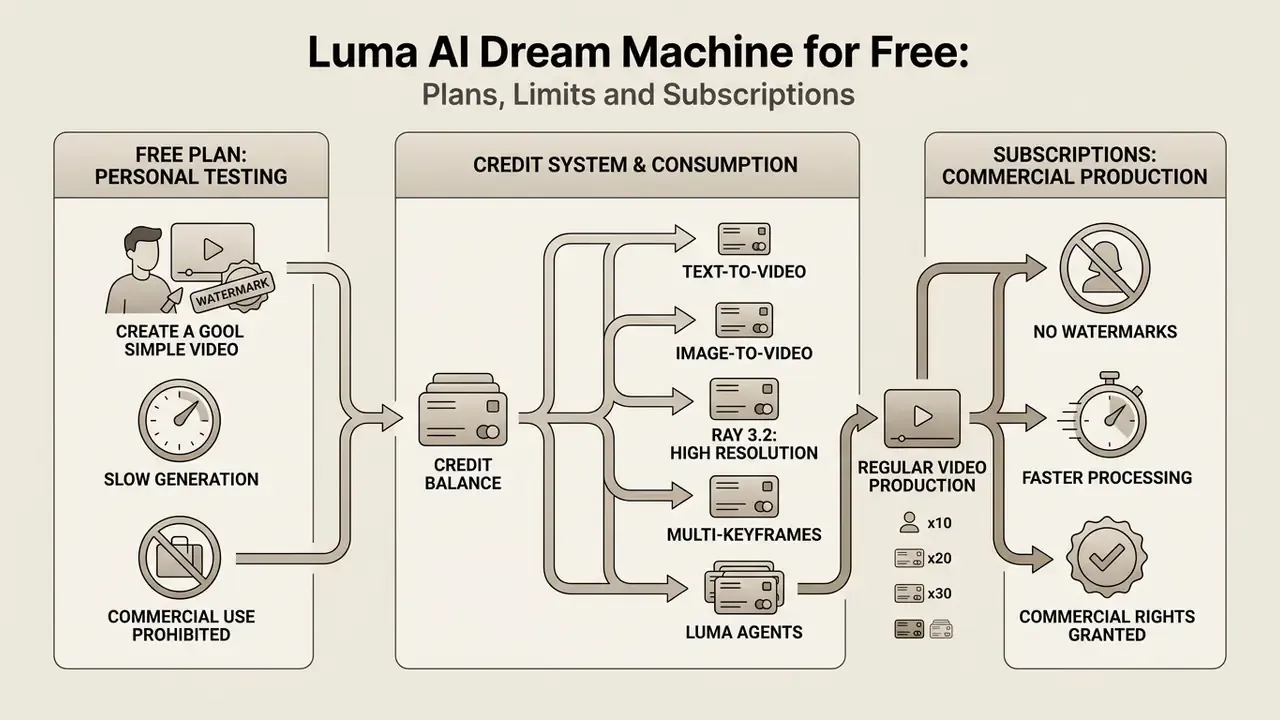
Luma AI runs a tiered credit model that provides limited watermarked access for personal testing alongside paid subscription plans intended for commercial video production. Unpaid users receive restricted monthly credits for draft-resolution previews, while paid tiers unlock high-definition exports, priority queue processing and commercial licensing rights.
What the Free Plan Covers
The free tier lets users test basic video generation and image synthesis using draft-resolution models, for example Ray 3.14 draft mode. Outputs created under the free plan carry mandatory watermarks, operate under personal non-commercial usage terms, and queue at standard processing priority. Reported free allowances cluster around 30 generations per month, with watermarks that cannot be removed and shared processing that waits behind paid traffic during demand peaks. So luma ai free video generation is genuinely useful for evaluation, and genuinely unusable for a client deliverable. Searches for luma ai image to video free or luma ai photo to video free land on the same constraint set. For a like-for-like view of limits elsewhere, compare against other free AI video generators.
When a Subscription Becomes Necessary for Regular Video Production
Commercial operations require Plus, Unlimited or Enterprise plans to remove output watermarks, secure commercial usage rights and access 1080p native rendering. Scaling content creation for client deliverables or multi-channel marketing campaigns pushes you toward higher credit allowances and higher queue priority.
| Plan Tier | Billed Price (USD) | Credit Allowance | Resolution & Quality | Commercial Usage Rights |
|---|---|---|---|---|
| Free / Trial | $0 | Limited trial credits (~30 generations/mo reported) | 720p draft, watermarked | No (personal use only) |
| Lite | ~$9.99 / week (also listed at $9.99/mo on some surfaces) | ~3,200 credits / mo | 720p to 1080p, watermarked | No (personal use only) |
| Plus | ~$29.99 / month | 10,000 credits / mo | Native 1080p, no watermark | Yes (full commercial rights) |
| Unlimited | ~$94.99 / month | 10,000 fast plus unlimited relaxed | Native 1080p, no watermark | Yes (full commercial rights) |
| Pro / Ultra (higher tiers, where surfaced) | ~$90 / ~$300 per month | 40,000 / 150,000 credits / mo | Native 1080p and above, no watermark | Yes (full commercial rights) |
Credit consumption model. Cost scales with resolution and duration rather than with a flat monthly video quota. Published credit tables show a 5-second clip at 20 credits (draft), 50 (540p), 100 (720p) or 400 (1080p); a 10-second clip costs 60, 150, 300 or 1,200 credits respectively. API video-to-video is metered separately, listed at $0.72, $1.44 or $2.16 for 5 seconds and $1.08, $2.16 or $4.32 for 10 seconds depending on quality tier.
On pricing discrepancies. Luma publishes multiple pricing surfaces, including consumer web plans, iOS in-app pricing, help-center documentation and metered API rates, so plan names and amounts differ by entry point and output type. Some third-party tables still circulate deprecated tier names such as Standard and Premier. Verify the exact figure on the checkout surface you will actually bill through, and treat the numbers above as a planning baseline rather than a quotation.
Commercial Use of Luma AI Video: Rights, Brands and Source Images
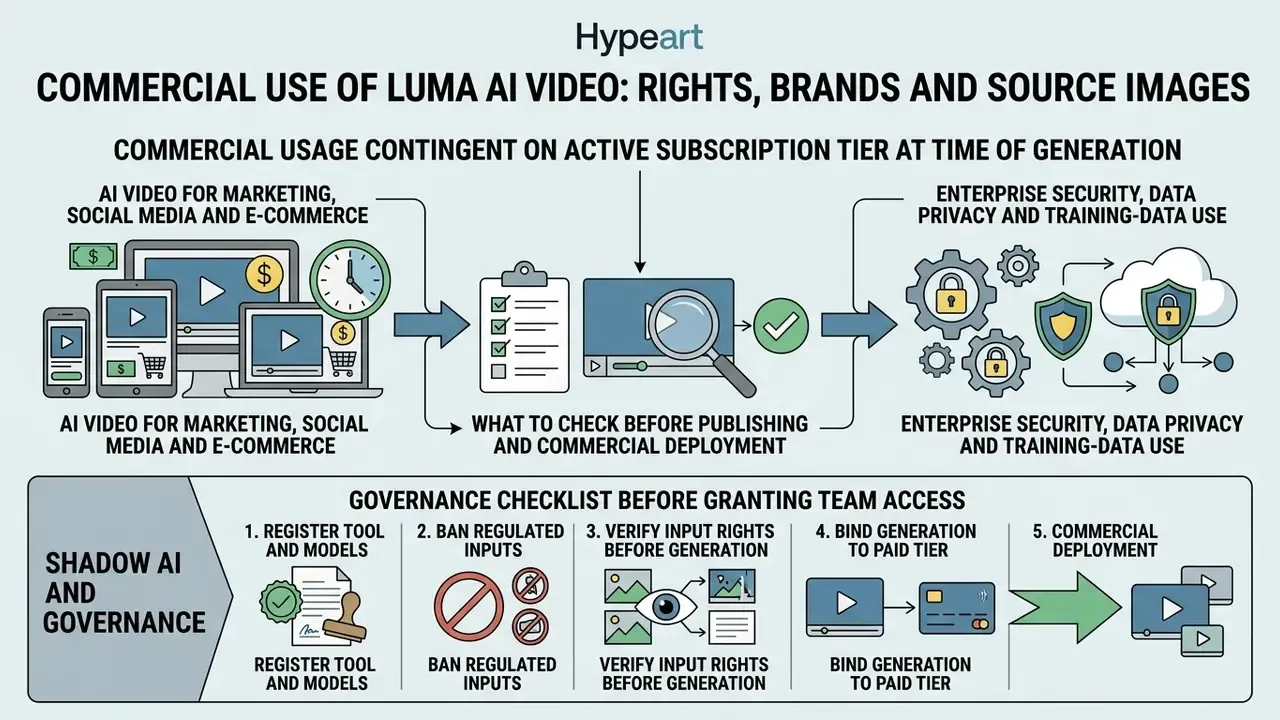
Commercial usage of video generated by Luma AI is strictly contingent on the subscription tier active at the exact moment of generation. Material created under Free or Lite accounts stays legally restricted to personal non-commercial use, whereas content rendered during an active Plus, Unlimited or Enterprise plan carries full commercial exploitation rights.
What to Check Before Publishing and Commercial Deployment
Before publishing generated media, operators must verify that all source images, logos and likenesses uploaded to the generator are fully owned or licensed. Under US copyright regulations (US Copyright Office Guidance 2024), purely AI-generated video outputs lack human authorship protection, which means commercial risk hinges on avoiding third-party trademark or publicity-right infringement in the input assets. Registration covers only human-authored contributions, and AI-generated material must be disclaimed. Separately, copyright alone does not prevent unauthorized replication of a person's image or voice, so using a real identifiable face in a commercial clip can trigger publicity- and privacy-rights claims independent of copyright. Third-party brand identifiers raise trademark and unfair-competition exposure rather than copyright exposure. Luma's own terms further state that outputs are not guaranteed to be original or free from resemblance to third-party material, and that the user is solely responsible for commercialization, publication and distribution.
Enterprise Security, Data Privacy and Training-Data Use
Shadow AI and Governance Checklist Before Granting Team Access
- Register the tool and the models.Add the Luma workspace and its embedded third-party engines to the approved-software inventory; restrict access to SSO-provisioned corporate identities only.
- Ban regulated inputs.Prohibit uploading PII, customer records, non-public financial data, unreleased product designs or third-party licensed imagery as reference assets.
- Verify input rights before generation.Require documented ownership or license for every source image, logo, font and likeness; require signed releases for identifiable people.
- Bind generation to the paid tier.Confirm the account is on Plus, Unlimited or Enterprise before rendering any asset destined for commercial use, and archive the generation timestamp with the asset.
- Log and review.Store prompt text, model and version, reference assets and output hash with each deliverable; require named human review for scenes involving physical claims, safety procedures or regulated messaging.
- Disclose where required.Apply your internal synthetic-media labeling policy and check platform-specific AI disclosure rules for each publication channel.
Which Jobs Luma AI Video Generator Actually Fits
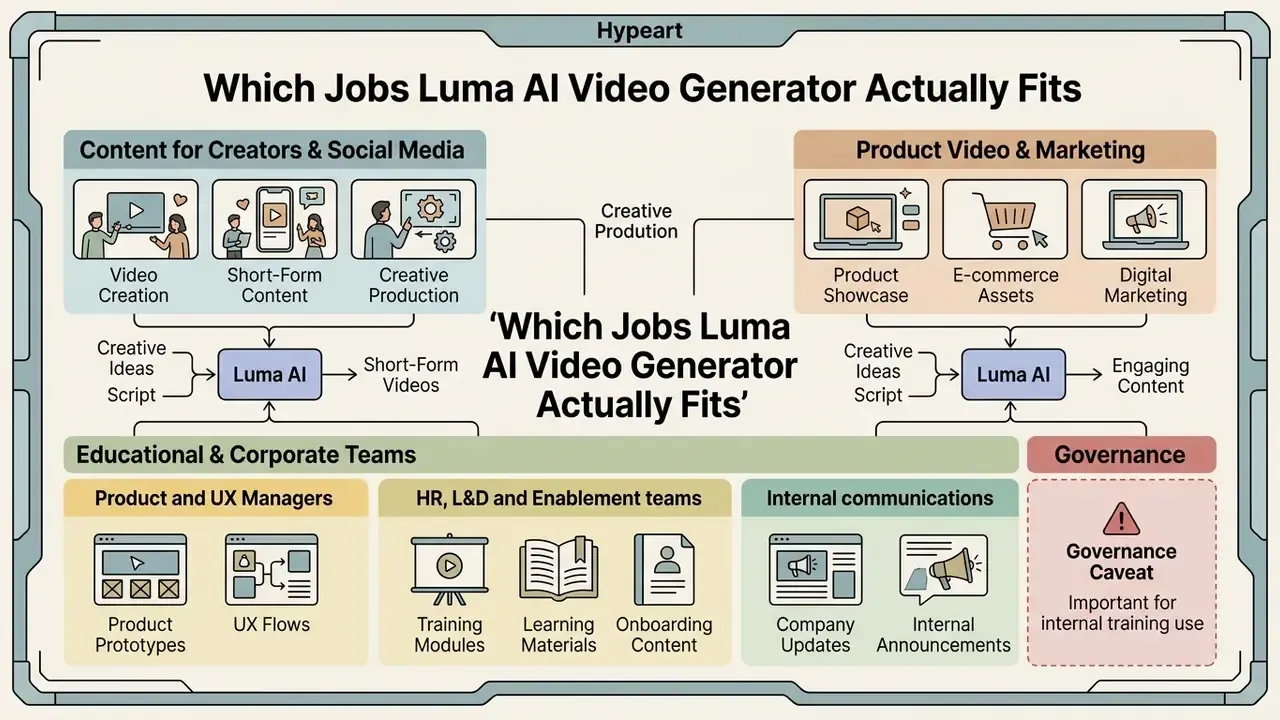
Luma AI Video Generator serves content creators, digital marketing agencies, e-commerce brands and media production teams that need efficient short-form video generation. Its feature set suits creative workflows where production speed, visual quality and rapid iteration matter more than long-form narrative structure. The previous section covered licensing eligibility by channel; this one maps roles and jobs to be done.
Product Video, Marketing and Educational Content
E-commerce businesses lean on image-to-video capabilities to build 360-degree product showcases and dynamic ad variations from catalog photography. Educational publishers use synthetic clips for visual aids and conceptual animations inside online learning modules. Marketing leads sizing alternatives can weigh cost per finished asset across free AI video generators for marketing before locking a paid tier.
«Even the best model, CogVideoX-5B, adheres to physical laws in only 39.6% of cases, so all generators remain far from accurate physical simulation.»
For instructional content that benchmark is a hard constraint. Synthetic clips work well for conceptual illustration, atmosphere and engagement. But any sequence teaching a procedure with physical consequences, whether laboratory handling, machinery operation, medical technique or workplace safety, requires subject-matter review, because a fluent-looking animation can demonstrate an incorrect physical outcome.
Luma AI for L&D, HR Teams and Product Managers
- Product and UX managers visualize user journeys, onboarding screens and feature walkthroughs without booking motion designers. Turning a product description or a PRD excerpt into a watchable explainer compresses a multi-day scripting-and-editing cycle into one working session. Share the link, collect comments, regenerate the affected scene instead of re-editing a timeline.
- HR, L&D and enablement teams convert existing knowledge-base articles, SOPs and safety regulations into instructional videos, walkthroughs and onboarding modules. The operational advantage is maintenance. When a process changes, the prompt is edited and the clip regenerated, with no studio or presenter to rebook. A shared prompt library keeps tone and branding consistent across departments and locales.
- Internal communications localized variants of the same announcement can be produced from one master board, with ElevenLabs voiceover applied per language.
- Governance caveat for internal training training content can carry compliance weight, so HR and L&D outputs should pass the same review checklist as external creative, meaning rights verification on reference assets, named human sign-off and archived generation logs.
To gauge workflow integration in enterprise environments, our team reviewed synthetic media implementations across mid-market digital marketing workflows. By standardizing input photo framing and using ai video generator luma ai tools, marketing teams cut product asset animation cycle times from 72 hours to roughly 15 minutes per SKU, while keeping brand asset compliance intact across external channels. A caveat, and it is not a small one: this observation comes from a small, non-randomized internal review of mid-market teams and reflects render-and-approval time for single-shot product animations only. It excludes creative direction, legal review and reshoot-equivalent iterations, and should be read as directional rather than as a benchmark. Independently verifiable cycle-time data across a statistically meaningful sample is not currently published, so measure your own baseline before modeling savings.
Organizations that want to benchmark generation costs against alternative production methods can consult our AI Media Calculators and AI Media Pricing Guides for granular financial modeling.
Luma AI Dream Machine and Sora: What to Compare Before Choosing
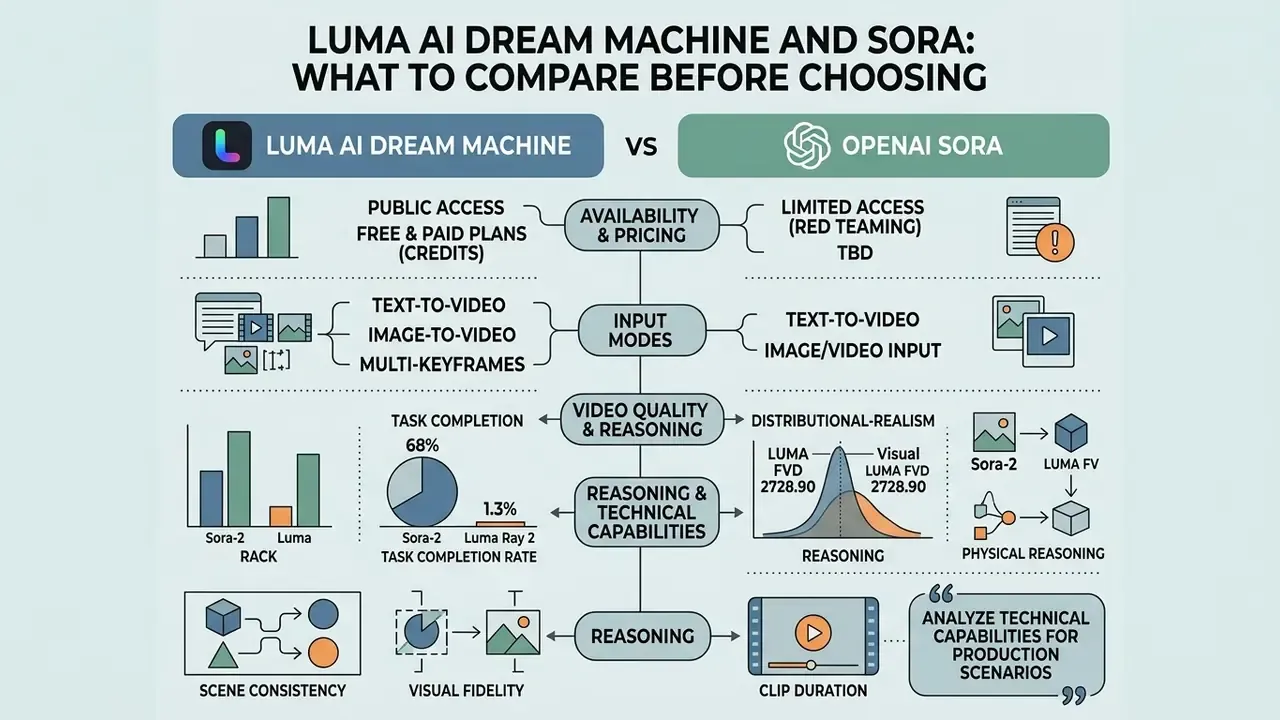
Comparing Luma AI Dream Machine with OpenAI Sora means evaluating public availability, pricing structure, input flexibility, clip duration and reasoning capability. Luma offers immediate commercial web and API access with flexible credit plans, while systems like Sora emphasize higher physical reasoning performance over longer clip durations.
| Evaluation Metric | Luma AI Dream Machine (Ray 3.2) | OpenAI Sora (Sora 2) |
|---|---|---|
| Public accessibility | Public web workspace and commercial API | Restricted or tiered platform access; consumer Sora web and app experiences were discontinued 26 April 2026 |
| Primary input modes | Text-to-video, image-to-video, V2V (Modify Video), Reframe | Text-to-video, image-to-video |
| Third-party model access | Yes: Veo, Kling, Seed Dance, ElevenLabs in one workspace | No, single-vendor model |
| Standard clip duration | 5 to 10 seconds (up to 20s via V2V at 24fps) | 15 to 20 seconds (tier-dependent) |
| Maximum resolution | 1080p native (4K via Ray 2 API) | 1080p native |
| Directional control | Up to 16 keyframes, performance tracking, camera-motion library | Prompt and storyboard controls |
| Reasoning benchmark (VMEvalKit) | 1.3% task success rate (Ray 2) | 68.0% task success rate |
| Commercial pricing | Subscription credits (Lite / Plus / Unlimited / Pro) | Bundled tier access or enterprise pricing |
Developers weighing Veo as a substitute or a complement can review capability and cost detail in the Google Veo AI video generator implementation guide; broader head-to-head methodology sits in our roundup of the best AI video generators.
Read that alongside the distributional-realism figures cited earlier, Luma at FVD 2728.90 versus Runway Gen-2 at FVD 3463.46 (August 2024 comparative preprint, https://arxiv.org/abs/2408.00000), and a pattern appears. Luma competes strongly on perceptual realism, while abstract-reasoning benchmarks separate model architectures sharply. Practically: Luma is the stronger fit for visually driven brand, product and social output, whereas reasoning-heavy sequences requiring correct multi-step logic or precise physical causality remain unreliable across the whole category. Worth stressing that neither benchmark measures enterprise safety, red-teaming maturity or auditability, which have to be assessed separately during procurement.
Operators comparing tools for specific production scenarios can analyze technical capabilities in our AI Media Comparison Matrices and review developer integration guidance via the AI Media API Guides.
Limitations, Open Questions and a Safe Next Step
Some things in this article are documented; others are not, and it is worth separating them plainly.
- Documented: generation modes, keyframe limits, aspect ratios, resolution and framerate ceilings, the credit-consumption table, and the rule that commercial rights follow the plan active at render time.
- Partly documented and tier-dependent: training-data exclusion, retention windows, log export, seed exposure, model-version pinning, indemnification. These belong in a contract, not in a blog post.
- Not publicly established: artifact rates by input resolution, enterprise red-teaming maturity, and any cycle-time saving that would survive a statistically sound study.
A cautious sequence works better than a broad rollout. Start with one department and one use case, for example product animation from owned catalog photography. Run it on a paid tier from day one so licensing is never ambiguous. Log prompts, model versions and reference assets for every deliverable. Then review 30 to 60 days of evidence before extending access, and treat any agentic workflow as a change that needs its own approval rather than an incremental feature.
FAQ: Common Questions About Luma AI Video Generator
Is Luma AI Video Generator free to use?
Luma AI provides a trial tier with limited credits for testing image creation and draft video rendering. Free outputs include watermarks and are restricted to personal, non-commercial use.
Can I use Luma AI for free and without registration?
No. The official Luma Labs service requires authentication through Google, Apple or Enterprise SSO, both to prevent abuse and to allocate free credit limits to a specific account. Sites advertising "Luma AI without sign-up" are either third-party wrappers with reduced functionality and unclear data handling, or unauthorized services, and they cannot grant the commercial rights that attach only to outputs generated on an eligible paid Luma subscription. Treat such pages as a phishing and licensing risk.
Does Luma use my prompts and uploaded images to train its models?
Training-data usage, retention windows and opt-out availability depend on the plan you are on and, for enterprises, on your executed agreement. Because these terms differ between consumer and enterprise tiers and change over time, confirm them in the current Terms of Service and Privacy Policy, and in writing for enterprise deals, before uploading brand assets, unreleased products or any regulated data.
Can I generate video from photos using Luma AI?
Yes. The luma ai photo to video feature lets users upload a photo as a start frame (video.start_frame), adding natural camera movement and object motion to a static image. An end_frame can also be supplied to control the closing composition.
How do multi-keyframes and Luma Agents change the workflow?
Multi-keyframes let you pin up to 16 fixed compositions across a clip, so motion follows a defined trajectory instead of an interpreted one. Luma Agents operate one level higher: you state the creative goal and the agent plans scenes, drafts prompts and generates a coherent series of clips. Throughput rises, and so does the volume of output requiring human review.
Can Luma generate romantic or intimate scenes?
Queries such as luma ai kissing generator point to content-policy limits rather than to a feature. Platform usage rules restrict sexual, explicit and non-consensual depictions, and generating an identifiable real person in an intimate scene also raises publicity-, privacy- and defamation-related exposure independent of platform terms. For corporate use, prohibit that category outright in your internal policy.
Does Luma AI support commercial licensing?
Commercial usage rights are included exclusively in Plus, Unlimited and Enterprise subscription plans. Content generated on Free or Lite plans cannot be used for commercial projects, and upgrading later does not retroactively license earlier outputs.
What aspect ratios and resolutions are available?
Supported framing includes 16:9, 9:16, 1:1, 4:3 and 3:4. Ray 3.2 outputs 360p, 540p, 720p and 1080p (default 720p and 5s), while Ray 2 supports up to 4K through the API. Ten-second generations are unavailable in combination with HDR, start_frame or end_frame.
What export formats and resolutions are supported?
Luma AI exports completed generations as standard MP4 files at 540p, 720p and native 1080p, with high-tier API workflows supporting 16-bit EXR frame sequences and native HDR for professional color grading, compositing and VFX.
Is there an API for large-scale video production?
Yes. The API supports text-to-video, image-to-video, Modify Video (V2V), multi-keyframe direction and Reframe, using a submit-and-poll pattern: POST /v1/generations, status check, presigned download URL. V2V is metered separately from subscription credits.
Is there an official mobile app or APK for Luma AI?
Luma AI works through standard mobile web browsers and an official iOS app. There is no official standalone Android APK download page, so Android users access the platform through a browser, and third-party APK mirrors should be treated as untrusted.
How does Luma AI handle legal disputes and copyright compliance?
Platform compliance, intellectual property guidelines and active legal developments around synthetic media are tracked in the AI Litigation and Case Timelines center. For additional platform troubleshooting and technical help, visit AI Media Support and Troubleshooting. To explore adjacent generative software topics, consult our 3D animation maker guide, browse online animation tools, review anime AI generators, or examine animation maker software.
Footer Navigation
- Resource Directory: AI Media Glossary