Generative audio systems convert natural-language text prompts, temporal control signals, or visual assets into synthetic audio waveforms. In modern media production, and increasingly in enterprise brand-media workflows inside banks and fintechs, an ai sound generator replaces static stock audio retrieval with dynamic, parameter-controlled audio synthesis.
Why should a risk or finance leader care about a sound effect? Because the prompt is business content, the output enters a distribution channel, and the license sits in a contract nobody read.
Executive Summary
- What it is: An ai sound generator synthesizes new audio from text, control curves, images, or video frames instead of retrieving fixed stock files. Core architectures include Meta AudioCraft/AudioGen (EnCodec tokenization), latent-consistency systems such as AudioLCM, and flow/diffusion models like SoundCTM-DiT.
- Speed: Latent consistency distillation reduces diffusion from hundreds of steps to two, enabling inference up to 333x faster than real time on a single consumer GPU.
- Control surface: Duration typically ranges from 0.1 s to 30 s per pass (some web tools cap at 1 to 10 s, others extend to 60 s), with timed multi-layer prompt syntax (
{Sound & }), Smart Mode prompt rewriting, and lossless export. - Formats: WAV (uncompressed PCM), FLAC (IETF RFC 9639), MP3 (lossy web preview), and M4A/AAC (mobile and Web Audio delivery).
- Legal: Fully AI-generated audio without meaningful human authorship is not eligible for U.S. federal copyright; commercial rights come from platform contracts, not from copyright ownership.
- Enterprise risk: Confidential prompts sent to third-party APIs are a data-exfiltration surface. Self-hosted or VPC-isolated inference, prompt logging, and data lineage are prerequisites for regulated deployment.
- Cost: Free tiers usually forbid commercial use; paid tiers run $9.99 to $79 per month plus credit burn. True total cost of ownership also includes validation, legal review, and monitoring.
Governance Snapshot for Regulated Buyers
Five questions decide whether generative audio is a tool or an incident waiting to happen:
- Where does the prompt go?SaaS endpoint, private VPC, or on-premise GPU.
- What is logged?Prompt (original and rewritten), seed, model version, requester, timestamp.
- Who owns the output?Contract terms, not copyright, define commercial rights.
- Who validated the model?Named owner, intended-use statement, independent review record.
- What breaks silently?Vendor weight updates that change output without notice.
Everything below expands those five points, then adds the practical production detail: prompt syntax, duration control, export formats, pricing, and where teams actually use synthetic sound.
What Is an AI Sound Generator and What Problems It Solves
An ai sound generator is a generative neural network model that synthesizes novel audio assets from descriptive text inputs, visual scenes, or structured signal parameters. Unlike traditional stock sound libraries that store fixed pre-recorded files, an ai audio sound generator produces custom audio on demand while enabling granular control over temporal structure, acoustic space, and sonic characteristics.
Enterprise teams use an ai sound creator to automate audio post-production, remove licensing friction, and shorten content release cycles. Foundational architectures like Meta's AudioCraft and AudioGen process discrete tokenized audio representations via EnCodec to reconstruct high-fidelity sound clips from simple natural-language descriptions (Meta AI, 2023). These models fold several workflows, including ai sound creation and automated spot-effect rendering, into single-pass inference pipelines.
«AudioLCM synthesizes high-quality audio in just two iterations, reaching generation speeds 333x faster than real time on a single NVIDIA 4090Ti GPU».
That latency profile is what makes generative audio viable for production rather than research demos. A designer can audition a dozen candidate variations of the same impact sound in the time a stock library search takes to return its first page of results. Small thing. It changes the whole rhythm of a session.
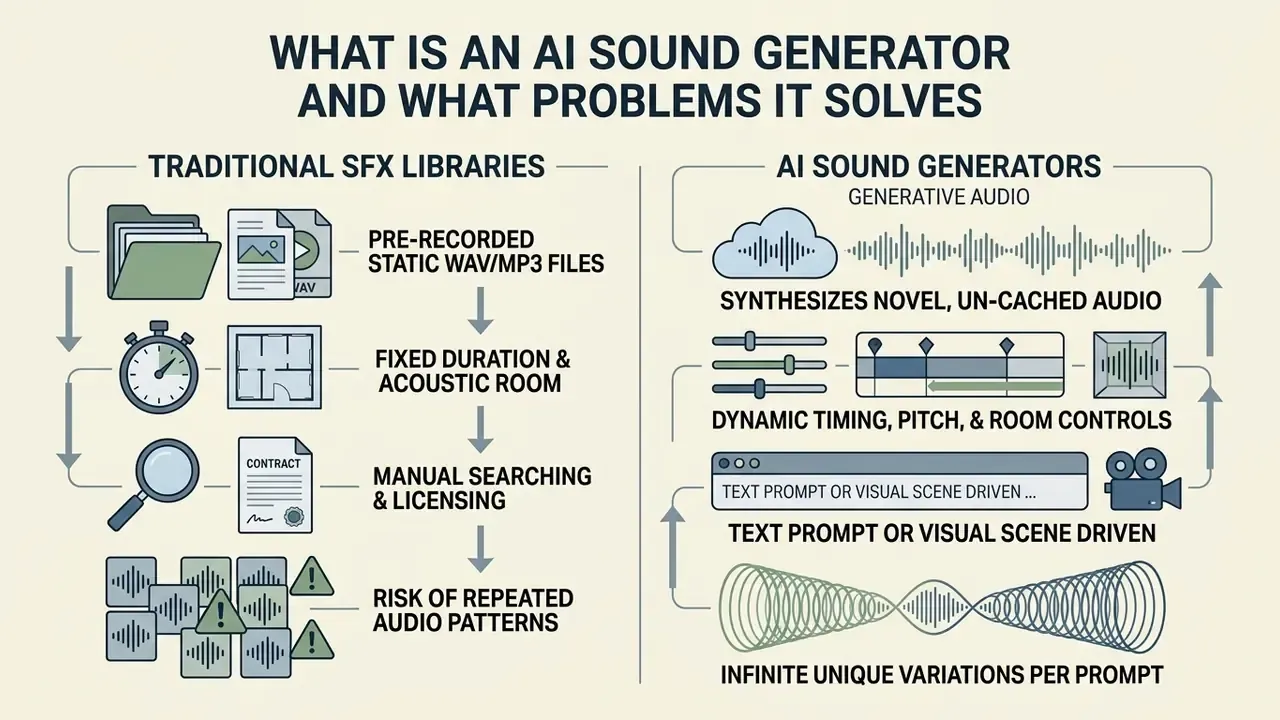
When evaluating model risk during media automation pilots, risk managers observed that manual searching across unindexed sound libraries created bottlenecks for high-volume video pipelines. After deploying a self-hosted ai audio sound effect generator backed by strict data-lineage logging, production teams cut audio sourcing latency by roughly three quarters (internal pilot telemetry; an operational observation from a single deployment, not an independently published benchmark) while preserving traceability. Because audio and picture come out of the same pipeline, evaluation committees usually assess generative sound alongside AI video generators rather than as a standalone tool.
AI Sound Effect Generator, Noise Maker, and Frequency Generator
An ai sound effect generator uses deep generative networks to model complex acoustic environments, physical interactions, and spatial acoustics from learned audio representations. A conventional ai noise maker, by contrast, generates continuous broad-spectrum random signals such as white or pink noise, while an ai frequency generator produces discrete periodic waveforms through digital tone synthesis algorithms.
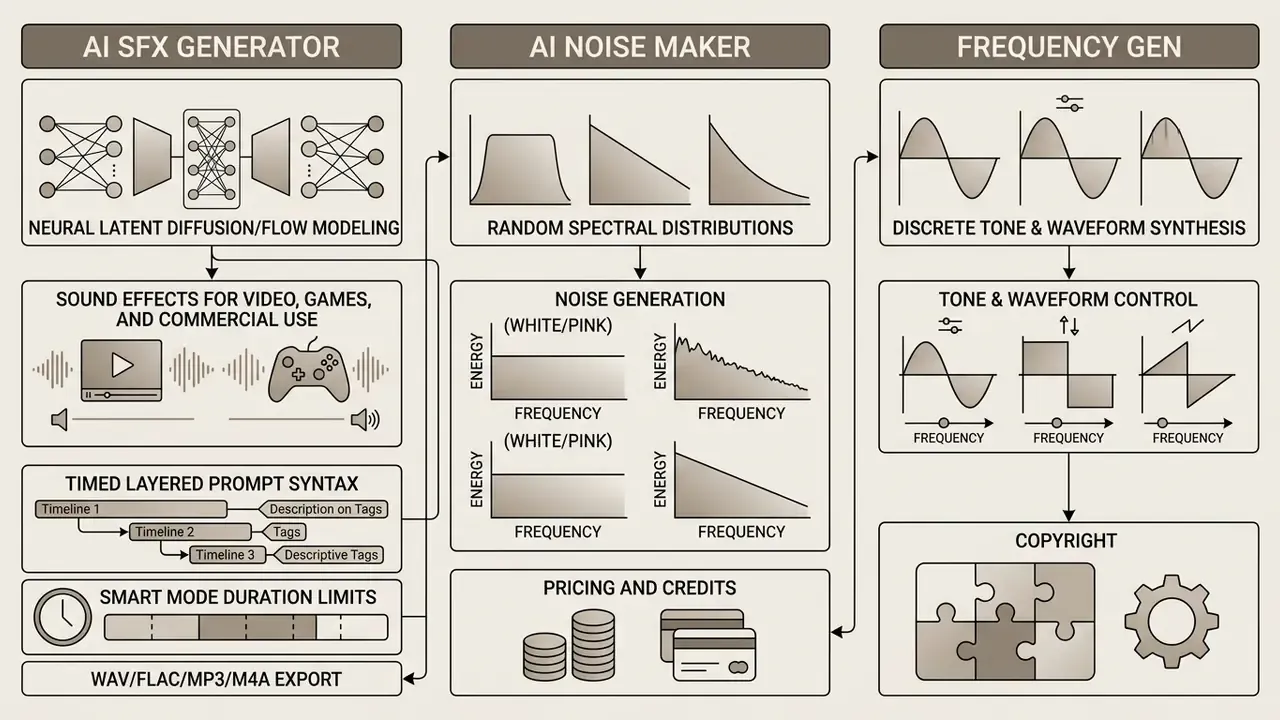
Traditional signal generators control basic parameters like clock dividers or noise periods; the classic AY-3-8910 programmable sound generator is the textbook example. Modern generative architectures instead map multi-band frequency distributions into realistic acoustic events. White noise carries equal amplitude per equal bandwidth; pink noise carries equal amplitude per octave. Specialized models act as an ai noise generator for diffuse environmental backdrops, while an ai sfx maker builds discrete physical impacts, Foley actions, and cinematic transitions.
«A multiple-conditional diffusion model provides precise control over timestamps, pitch contours, and energy envelopes in generated audio».
That conditioning capability is the technical dividing line. A frequency generator sets a period register. A generative SFX model accepts semantic, temporal, and dynamic conditions at the same time, which is also why it needs validation: more inputs, more failure modes.
Input Modalities Used in AI Sound Generation
Generative sound systems accept four primary input modalities: descriptive text prompts, timing control curves, static images, and video frames. Multimodal architectures extract temporal and semantic features from these inputs to condition the latent audio diffusion process (GAO-24-106946, 2024).
- Text prompts Plain-language descriptions specifying source object, action, acoustic environment, and emotional intensity.
- Control curves Envelope tracks for loudness, pitch contours, and spectral brightness (Sketch2Sound-style controls).
- Static images Visual features mapped to acoustic room properties and environmental atmospheres.
- Video sequences Frame-by-frame visual motion vectors used for frame-accurate event timing and alignment.
- Audio references Existing recordings used as style or timbre conditioning for audio-to-audio transfer and variation generation.
Most production teams combine a text prompt with structural timeline markers rather than relying on prose alone. For broader asset automation across text and imagery, creative directors cross-reference tools in the AI Media Glossary to standardize prompt engineering across audio and visual generation pipelines, and align spoken elements through the AI voice generator reference.
One caution on reference audio uploads: a voice sample is not just an input file. It may qualify as biometric-adjacent personal data, and consent needs to exist before, not after, the upload.
What Sound Effects You Can Create with AI
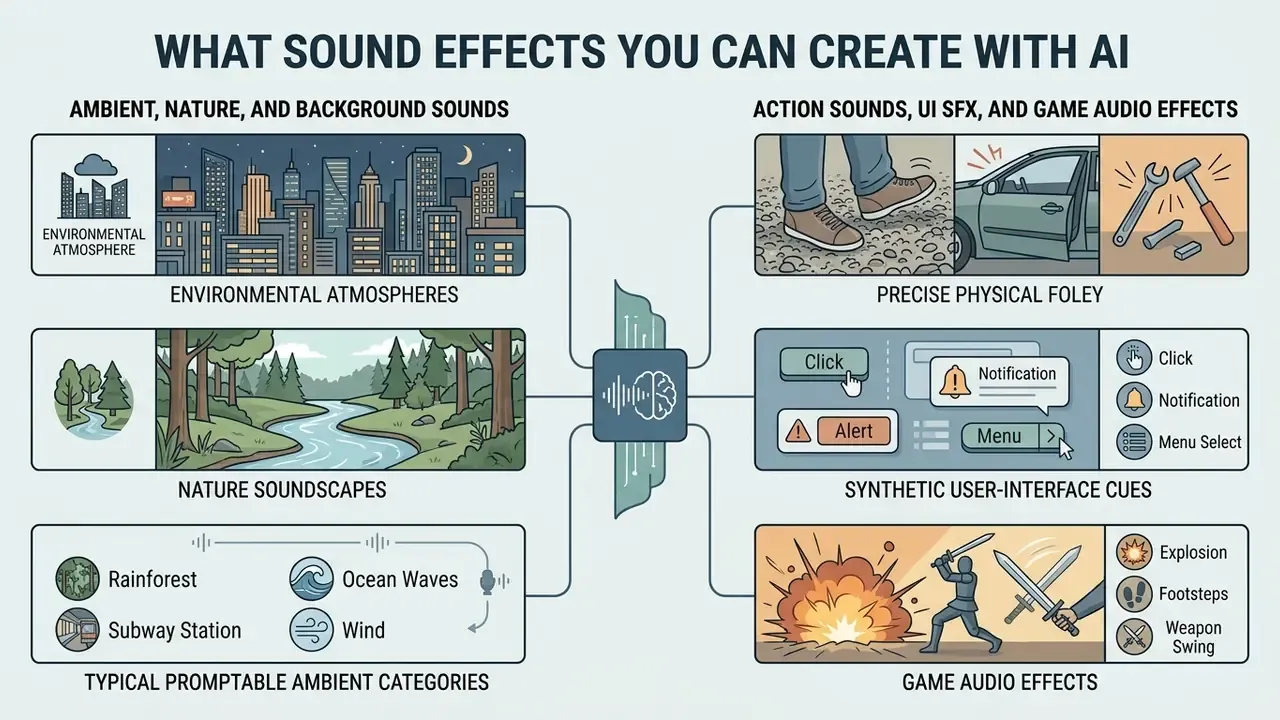
An ai sound generator can synthesize a broad spectrum of audio classes, from environmental atmospheres to precise physical Foley interactions and synthetic user-interface cues. Current foundation models categorize promptable audio into ambient background layers, physical action impacts, UI SFX, and cinematic special effects.
By leveraging learned acoustic features, an ai sound creator produces tailored audio assets without a physical recording environment or a Foley stage.
Ambient, Nature, and Background Sounds
Ambient generation creates continuous acoustic backdrops (rainstorms, forest soundscapes, city rumble) that establish environmental context for a scene. Neural systems structure these soundscapes by layering a base background noise bed with discrete environmental events over time.
«AudioScape-TTA contains 2,258 instances and 25,707 semantic rubrics for evaluating event density and structural complexity in generated soundscapes».
«SoundscapeAgent converts a user request into an executable scene plan, generates assets, and exports aligned scene metadata together with the final audio».
That planning step prevents spectral mud and keeps natural separation between constant weather noise and intermittent events. Creators comparing zero-cost options for ambient work tend to start with the same criteria used for free AI video generators: credit caps, watermark policy, export quality.
Typical promptable ambient categories: rain and thunder, ocean waves with gulls, flowing water, insect chirping, forest wind, busy restaurant chatter, street traffic, a television playing in another room, keyboard typing, kitchen cooking noise, doorbell rings.
Action Sounds, UI SFX, and Game Audio Effects
Interactive media production needs targeted action sounds (footsteps, sword swings, metal impacts) alongside clean user-interface clicks and feedback tones. A specialized ai game sound generator synthesizes parameterized UI cues and dynamic combat SFX optimized for real-time engine triggers.
«The DCASE 2023 Task 7 dataset contains 5,550 labeled sound clips across seven categories, including dog bark, footstep, gunshot, keyboard, and rain, standardized to 4-second mono clips».
Using tools like SFX Engine or Meta AudioCraft, game developers generate action audio directly from character animation metadata; engine-side integration is normally wired through FMOD, Wwise, Unity, Unreal, or Godot event hooks. Teams managing assets for commercial titles review the licensing conditions detailed in the AI Media Commercial-Use Hub before engine integration, and they frequently benchmark audio tooling next to the best AI art generators when budgeting a full asset pipeline.
A practical note from shipped projects: UI SFX are the easiest category to generate and the hardest to get right. A click that is 6 dB too bright will be described by testers as "cheap" without them knowing why.
How to Create a Sound Effect with AI: From Prompt to Download
To generate sound effects with an ai sound effect creator, creators follow a four-stage workflow: prompt construction, parameter configuration, candidate generation with preview, and format export. That structure improves semantic alignment and prevents clipping or temporal misalignment.
Quick start in web generators (no signup, instant generation):
- Enter the descriptionpaste a text prompt of up to 250 to 800 characters into the generator field (UI limits differ by vendor).
- Activate Smart Modeswitch on prompt optimization if the tool offers it.
- Set durationchoose a clip length inside the supported range (commonly 1 to 10 s, 0.1 to 30 s, or 10 to 60 s).
- Generate and previewpress Generate and audition candidates in the browser player; most engines return three to four variants per request.
- Choose a formatMP3 or M4A for fast social publishing, lossless WAV or FLAC for editorial and engine integration.
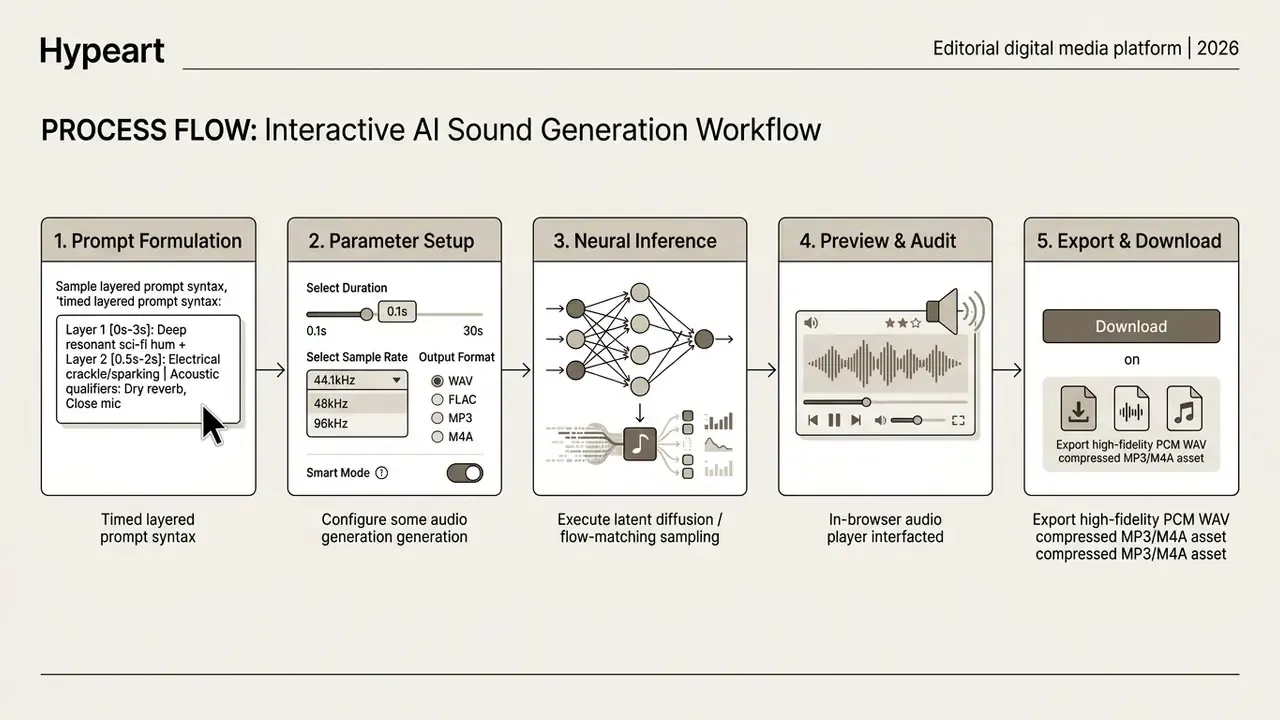
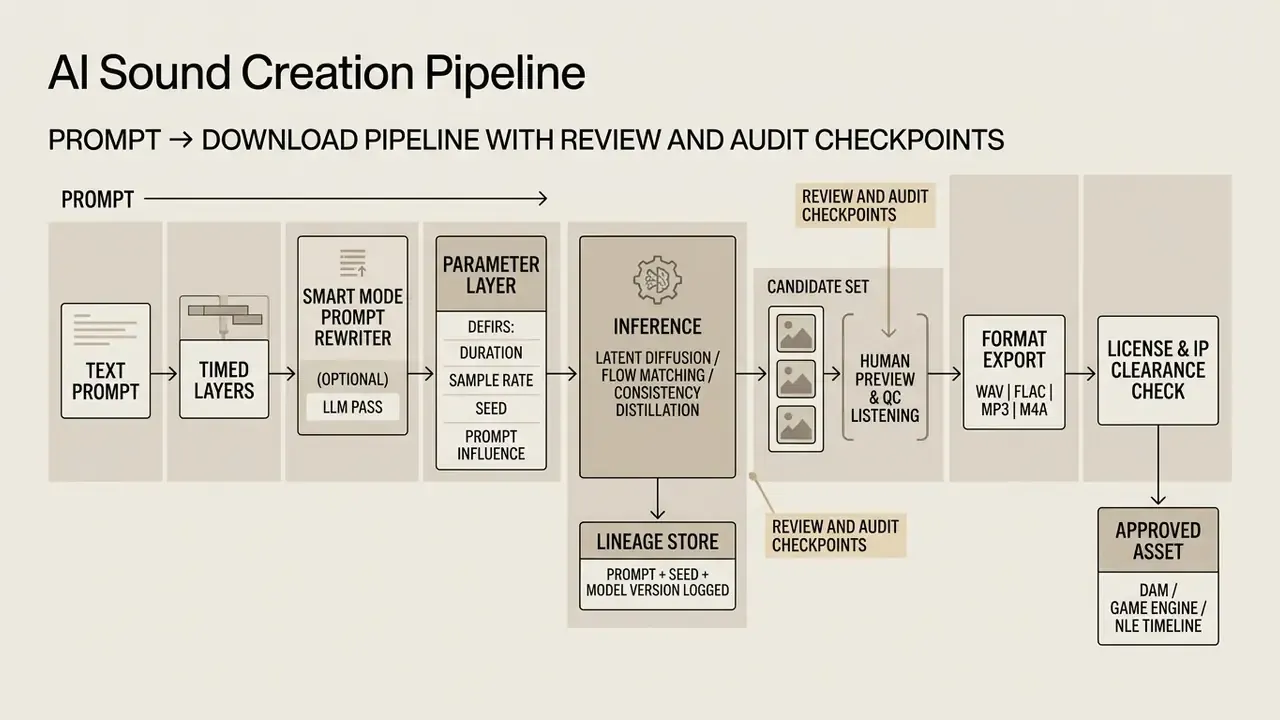
When an enterprise risk committee audited third-party web tools, it required that every generated file pass an internal review stage before landing in the asset library. By routing prompt parameters through the specifications documented in the AI Media Support and Troubleshooting portal, the firm standardized rendering quality and kept data isolation intact.
How to Describe a Sound Effect in a Text Prompt
An effective prompt names the source object, the primary action, the environmental acoustics, and the dynamic intensity. An ai sfx generator interprets explicit physical adjectives far more accurately than generic descriptive terms. "Scary sound" gets you noise. "Wet rope snapping under tension in a cargo hold" gets you a cue.
- Primary subject and action the exact physical interaction, for example "heavy iron door slamming shut".
- Acoustic environment room reverberation and spatial context, for example "inside a hollow stone cathedral with a long reverb tail".
- Dynamic modifiers impact force, distance, and tone, for example "close-up, sharp transient, heavy sub-bass impact".
- Material and distance the material (oak, sheet metal, wet gravel) and the microphone perspective (close, mid, distant).
- Exclusions negative weighting to suppress unwanted noise or background hiss.
Prompt guidelines published by Adobe Firefly recommend splitting prompts into literal sound, environment context, and intensity level (Adobe Firefly, 2025). Research on attribute-based prompting adds five explicit control axes: pitch, pattern, intensity, acoustic characteristics, and location.
«TTA-Bench covers 2,999 diverse prompts and more than 118,000 human annotations for evaluating text-audio semantic alignment accuracy».
Detailed prompts measurably improve CLAP text-audio alignment scores during automated evaluation, which matters if your QC process is partly machine-scored rather than fully manual.
Timed and Layered Prompt Syntax
To orchestrate several acoustic events on one timeline, modern multimodal models accept layer markup with explicit <start, end> intervals plus global context parameters.
{
  "prompt_structure": "{Roaring fire & <0.00,10.00>} {Trees falling & <1.00,4.00>} {Ember rain & <3.00,10.00>}",
  "parameters": {
    "start_second": 0,
    "total_seconds": 10.0,
    "sample_rate": "48kHz"
  }
}
Further examples that translate directly to editorial timelines:
{Typing on a keyboard & <0.00,8.00>} {Printer noise & <2.00,3.00>} {Coffee machine & <4.50,5.50>}
"start_second": 0, "total_seconds": 8.0
{Cricket chirping & <0.00,8.00>} {Owl hoot & <2.50,3.50>}
"start_second": 0, "total_seconds": 8.0
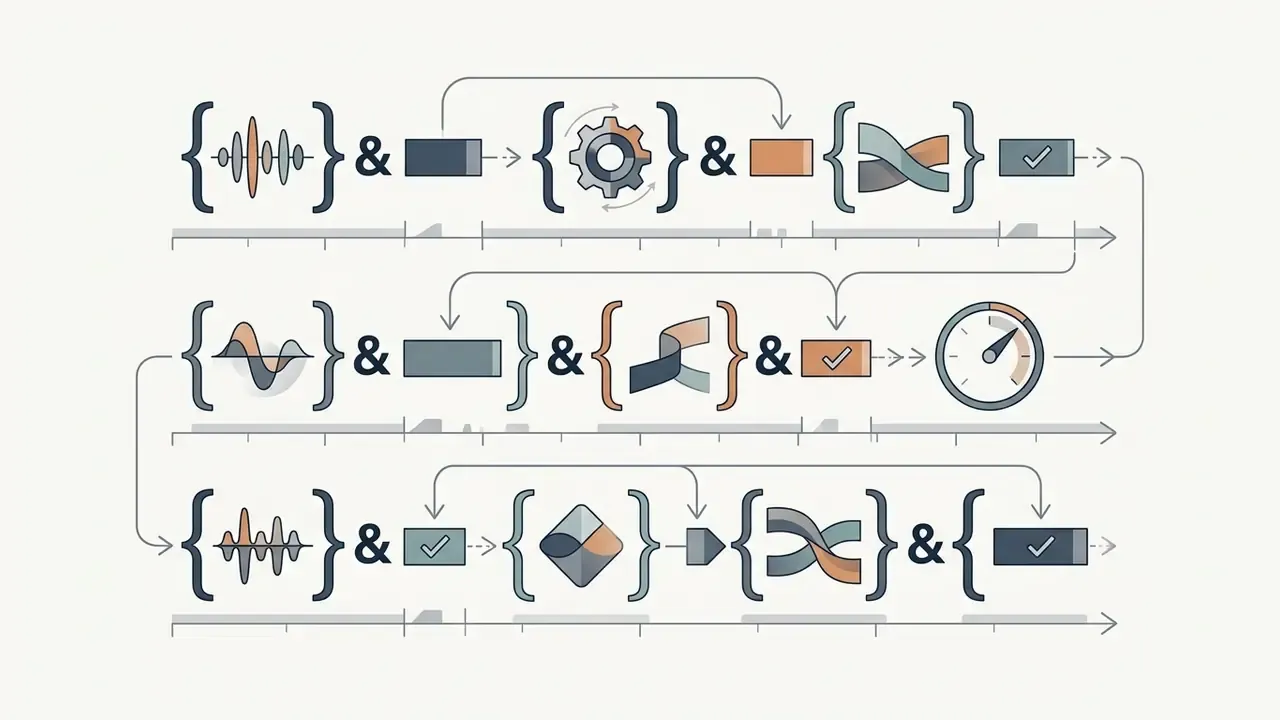
{...} and joined to its interval with an ampersand &.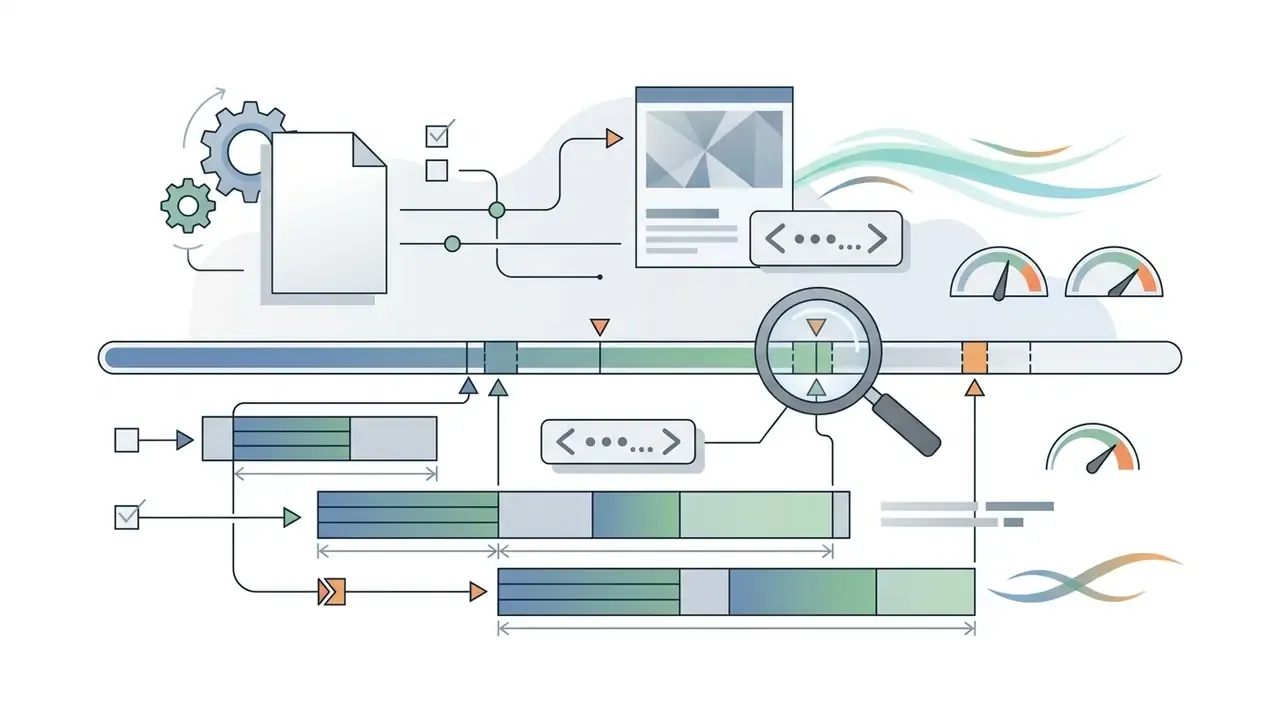
<start_second, end_second> with two-decimal precision.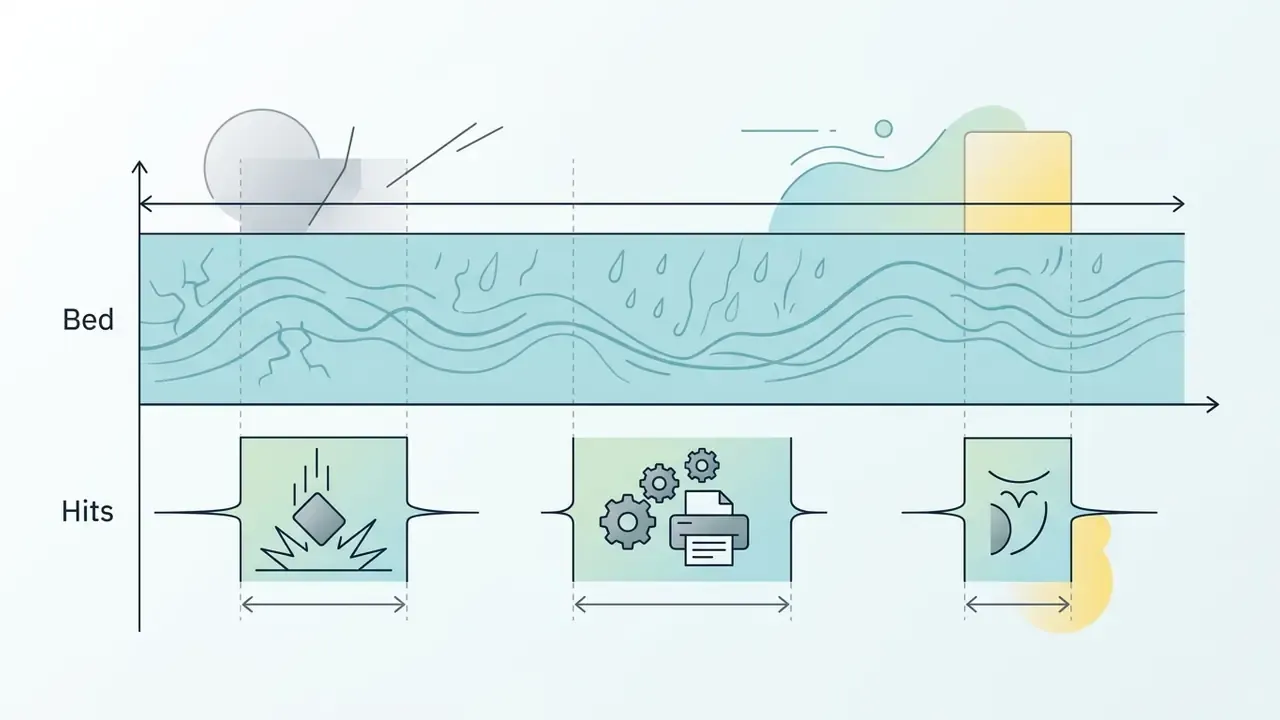
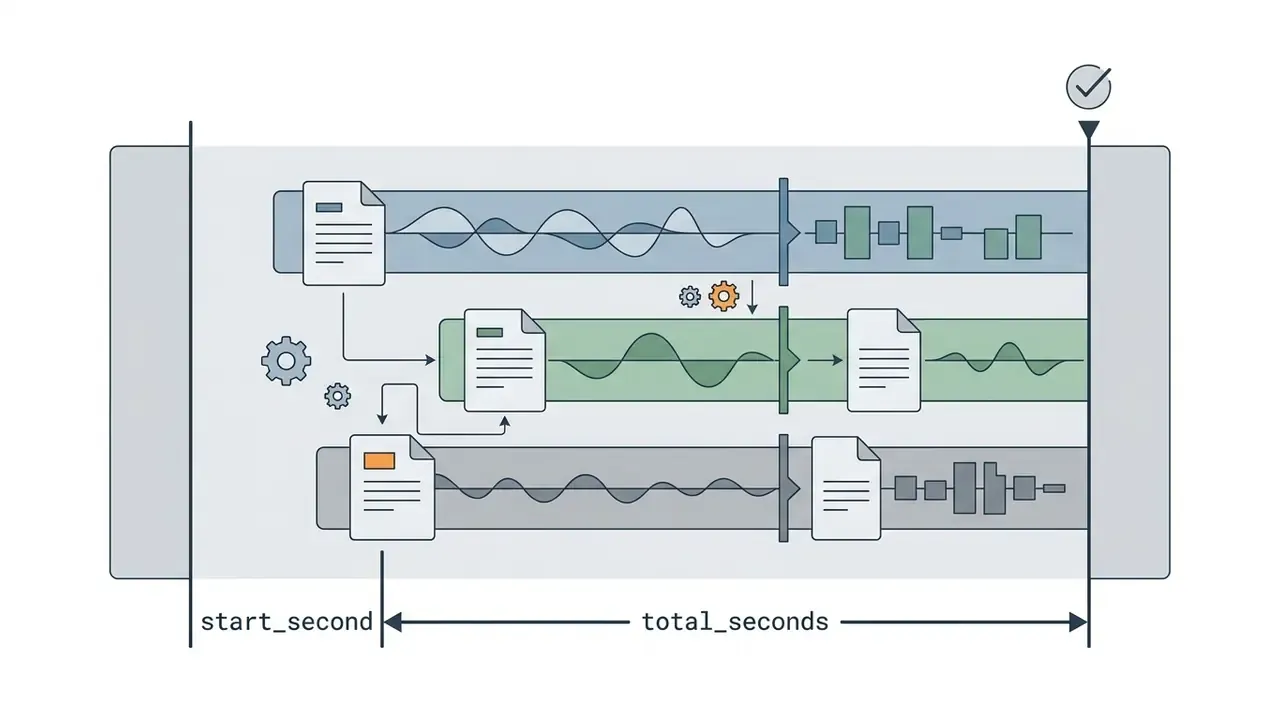
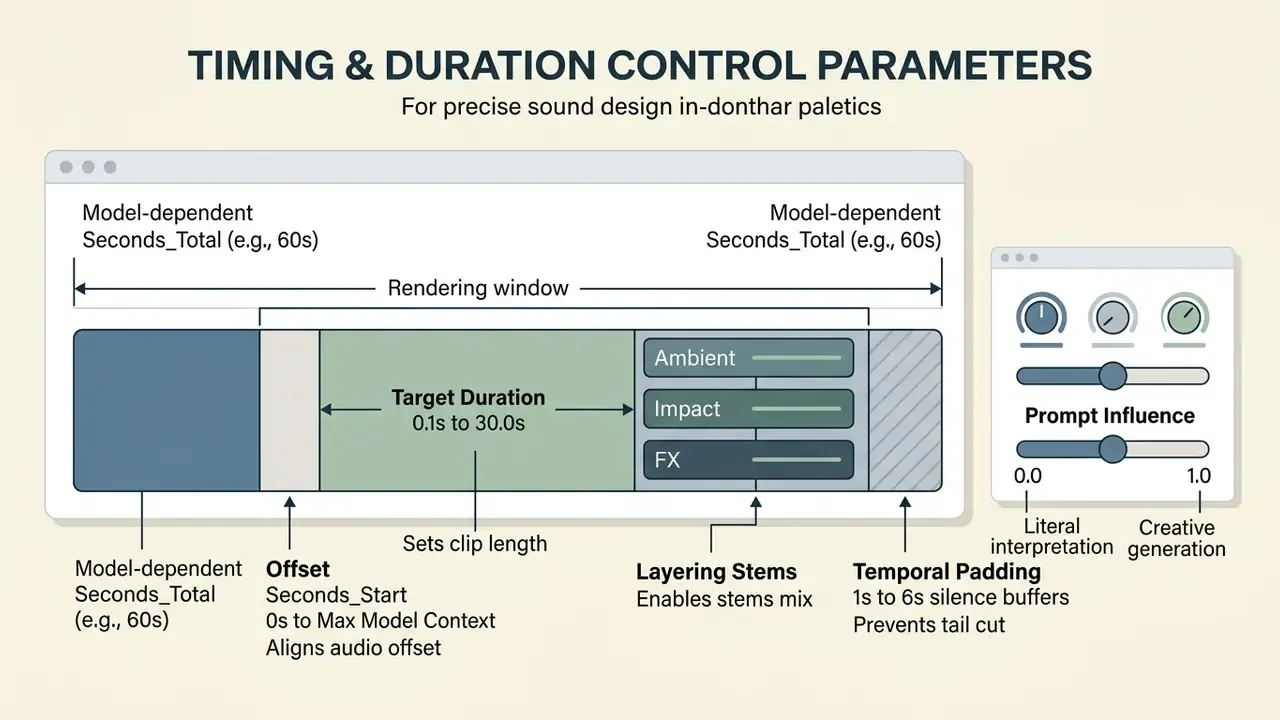
start_second sets the offset inside the model context, and total_seconds fixes the rendered length so the decoder does not trim tails.Automatic Prompt Enrichment (Smart Mode)
When the input request is too short (say, "door closed"), Smart Mode (an LLM rewriter that runs before the diffusion pass) expands the base text into a detailed acoustic description.
- User prompt:
"Wooden door slams" - Rewritten prompt after Smart Mode:
"Heavy oak door violently slamming shut in an empty concrete room, high transient impact, long natural reverb tail, 48kHz spatial stereo"
Smart Mode also neutralizes the hard character limits in generator interfaces, which usually sit between 250 and 800 characters per request. The trade-off is auditability. Because the rewriter alters the effective conditioning text, governed deployments must log both the original and the rewritten prompt in the lineage store. Skip that, and reproducibility of an approved asset is simply gone.
Preview, Output, and Download of Generated Audio
Once generation completes, creators preview generated sounds in the browser before finalizing the export. The rendering system returns candidates in standardized web containers or uncompressed audio files.
At export time, file parameters follow the intended deployment. Production systems support direct download options from compressed MP3 for quick web preview up to 48 kHz 24-bit uncompressed WAV for professional video timelines. Vendor documentation typically exposes three output controls: container (raw, wav, mp3), encoding (pcm_f32le, pcm_s16le, pcm_mulaw, pcm_alaw), and sample rate (8,000 to 48,000 Hz). Teams shipping web builds compress the picture side in parallel, which is why export policy usually lives next to the video compressor guide.
API Request Structure for Isolated Pipelines
For batch generation inside a private network segment, the request contract stays minimal: a prompt, a duration, a format, and an audit identifier.
POST /v1/sound-generation HTTP/1.1
Host: sfx.internal.audio-gateway.local
Content-Type: application/json
Authorization: Bearer <scoped-service-token>
{
  "text": "{Metal hatch slamming & <0.00,1.20>} {Distant hull groan & <0.00,4.00>}",
  "duration_seconds": 4.0,
  "prompt_influence": 0.4,
  "output_format": { "container": "wav", "encoding": "pcm_s24le", "sample_rate": 48000 },
  "seed": 90210,
  "audit": {
    "request_id": "sfx-2026-04-118",
    "requester": "post-production.svc",
    "data_classification": "internal-non-pii",
    "model_version": "sfx-foundation-2026.03"
  }
}
Logging seed, model_version, and the pre and post Smart Mode prompt is what turns a creative call into a reproducible, auditable artifact. Developer teams standardizing request contracts across modalities can reuse the patterns documented in the Google Veo implementation guide and the AI Media API Guides.
How AI Generates Sound from Video and Images
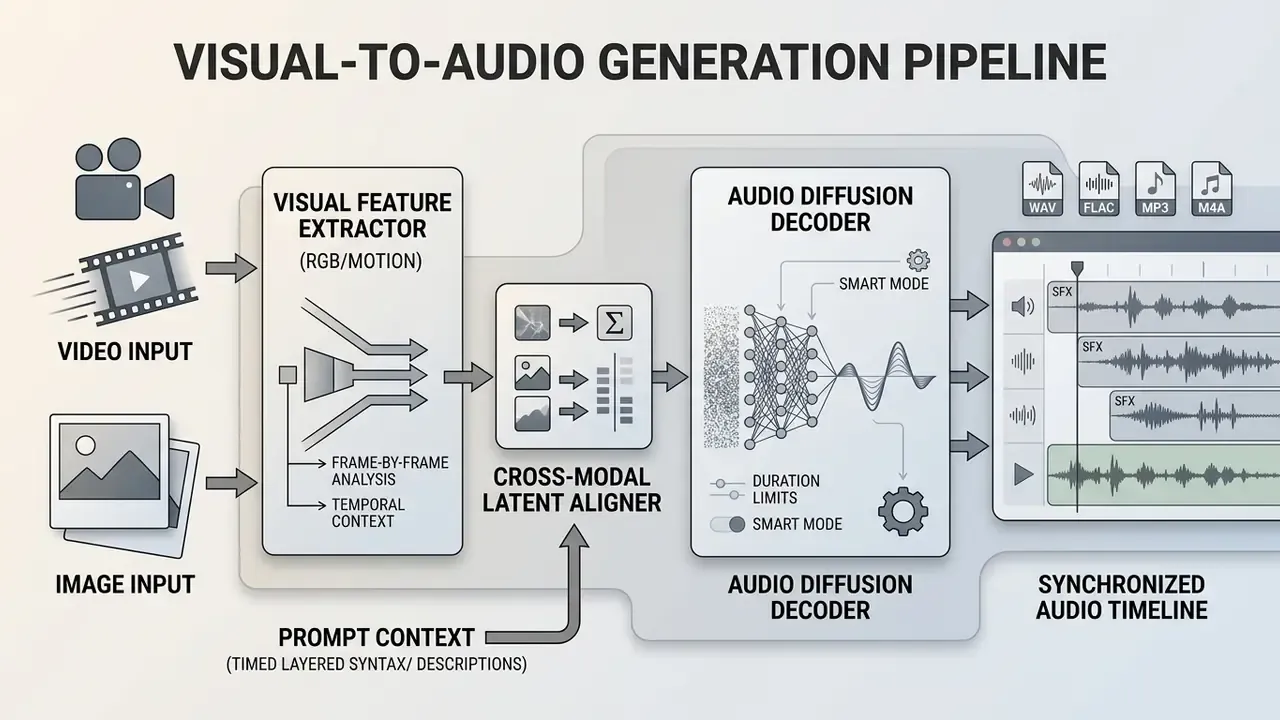
Advanced multimodal architectures can ai generate sound from video assets or static images by analyzing visual motion dynamics, material textures, and scene geometry. Cross-modal diffusion frameworks align visual feature embeddings with audio latent spaces to synthesize matching environmental backdrops and synchronized action effects.
«Systems such as STA-V2A and Google DeepMind V2A extract visual features frame by frame to determine the exact onset of audio events on the video timeline».
This is what makes automated Foley plausible for video editors and interactive VR developers, at least for simple contact events.
Sound Effects Matched to the Scene in Video
https://arxiv.org/abs/2501.00000
Image-Generated Sound Effects and Background Noise
With static visuals, ai image generation sound effects models analyze scene geometry, lighting, and ambient objects to reconstruct plausible soundscapes. The algorithm maps visual cues to acoustic room properties and projects the matching spatial reverberation.
«SonoWorld analyzes visual scene representations to synthesize background audio matching the identified environment, from a quiet office to a rain-slicked street».
This turns static artwork into an immersive audio-visual presentation, and it pairs naturally with the motion tooling described in the animation maker guide. Related research grounds the same problem in 3D: AV-NeRF ties audio synthesis to scene geometry and material properties to render spatial audio along novel camera paths. Expect the failure mode to be plausibility without accuracy, meaning the room sounds convincing but is not the room in the picture.
Controlling Quality, Duration, and Variations of AI Sound
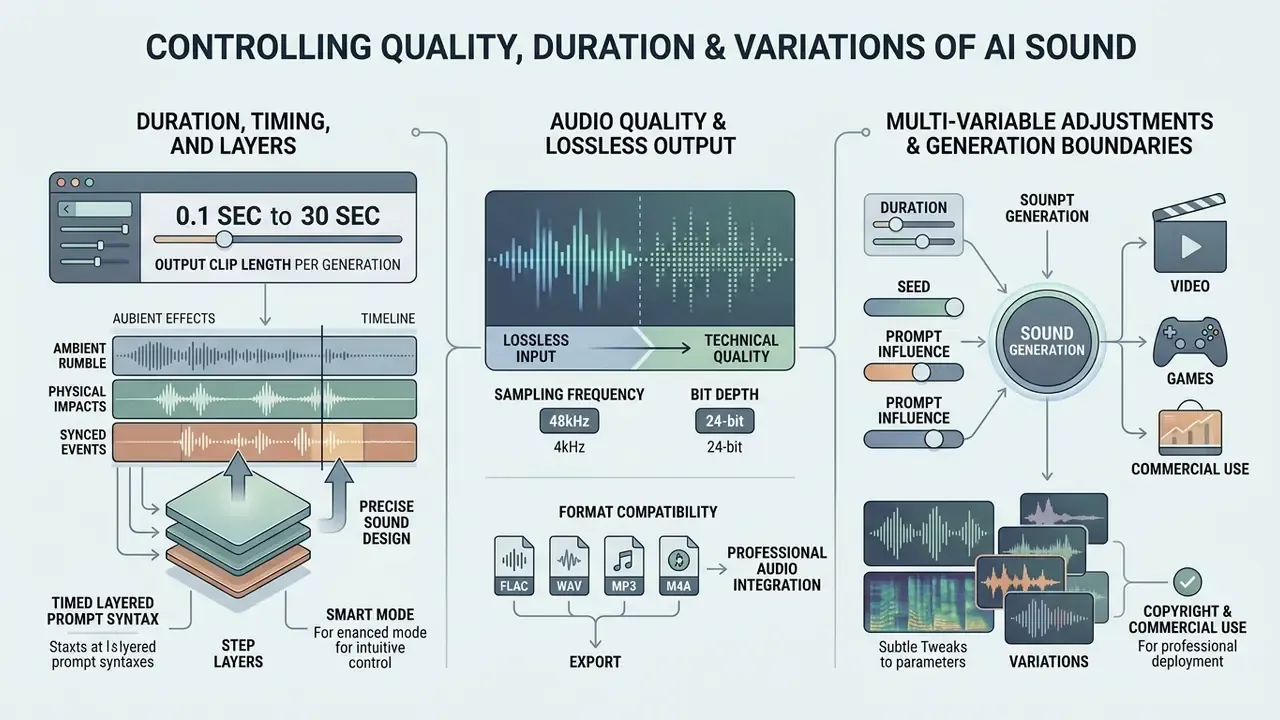
Professional audio integration needs precise control over duration, sample rate, stem layers, and export encoding. An ai sound design generator exposes those parameters so synthetic assets fit strict timeline specifications instead of the other way around.
«AudioLCM applies Guided Latent Consistency Distillation and a multi-step ODE solver, cutting diffusion steps from hundreds to two while preserving quality».
Duration, Timing, and Layers for Precise Sound Design
Duration controls let creators set output clip length anywhere from 0.1 seconds to 30 seconds per generation pass. Models like Stable Audio use explicit start-second and total-second embeddings to avoid boundary trimming artifacts and loop clicks; recent versions pad with several seconds of silence before trimming to the requested length.
Audio Quality, Lossless Output, and Format Compatibility
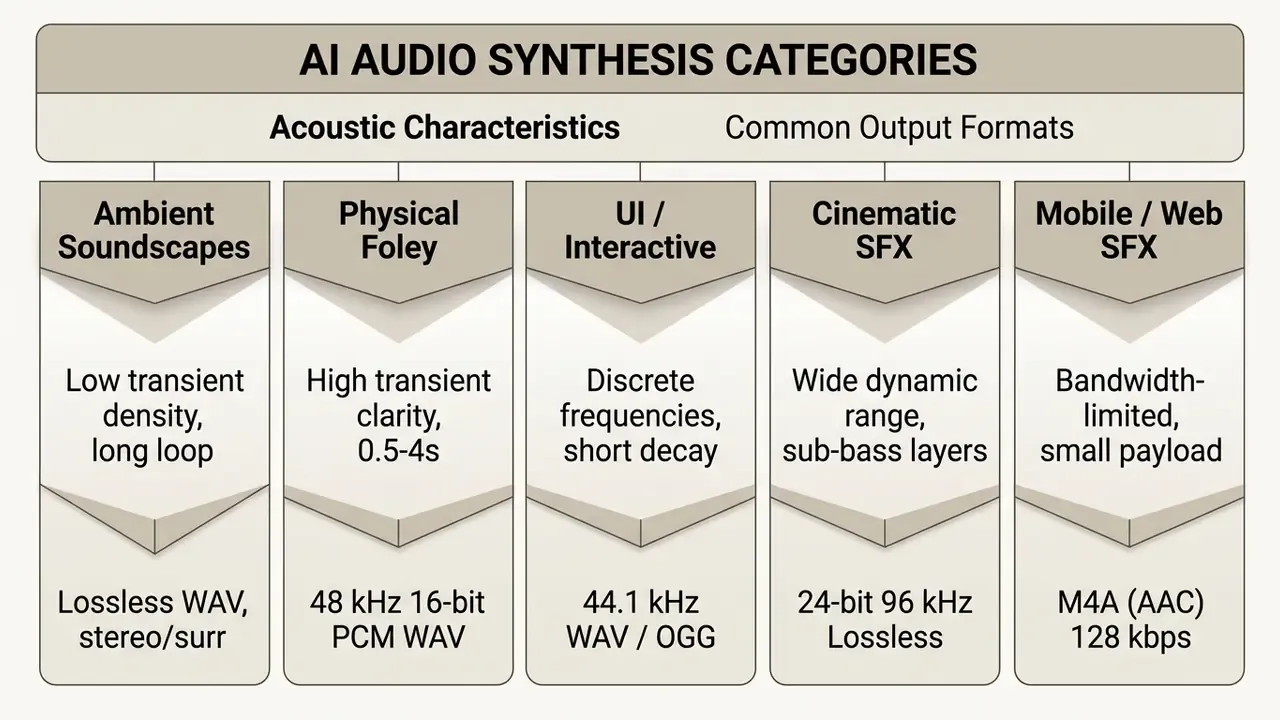
Technical quality depends on output bit depth, sampling frequency, and container encoding. Enterprise workflows need uncompressed PCM WAV or FLAC export to prevent compression degradation during multi-track mixing.
| Generator System | Max Duration | Layering Support | Native Lossless Output | Standard Sample Rates |
|---|---|---|---|---|
| ElevenLabs SFX | 30 seconds | Single track export | WAV (48 kHz / 16-bit) | 44.1 kHz / 48 kHz |
| Meta AudioCraft | 30 seconds | Multitrack token synthesis | WAV (uncompressed) | 32 kHz / 48 kHz |
| AudioLCM | Variable | Single / Layered pass | Raw PCM / WAV | 22.05 kHz to 44.1 kHz |
| SoundCTM-DiT | 30 seconds | Full-band landscape synthesis | Lossless WAV / FLAC | 44.1 kHz (Full-band) |
| Adobe Firefly | Timeline length | Multi-track timeline layers | Lossless WAV | 48 kHz |
| Vidu SFX | 10 seconds | Timed multi-layer prompts | WAV | 48 kHz |
«UniSonate reaches FAD 4.21 and a CLAP score of 0.156 on text-to-audio tasks, comparable to AudioLDM-L (FAD 4.32) and Stable Audio (FAD 4.19)».
Objective metrics matter because subjective "studio quality" claims on vendor landing pages are unfalsifiable. FAD and CLAP at least give procurement a comparable number to argue about.
Export format matrix (updated):
| Format | Compression | Bit depth / bitrate | Primary use case | Compatibility |
|---|---|---|---|---|
| WAV | Uncompressed PCM | 16/24-bit, 44.1 to 96 kHz | Professional editing, DAWs, game engines | Universal (PC, Mac, Linux) |
| FLAC | Lossless compressed | 4 to 32-bit (IETF RFC 9639) | Archiving, HD sound libraries | High (Web, Android, iOS 11+) |
| MP3 | Lossy | 128 to 320 kbps, 44.1 kHz | Fast web preview, rough cuts | Absolute (all devices) |
| M4A (AAC) | Lossy, high efficiency | 64 to 256 kbps, 44.1/48 kHz | Mobile games, iOS apps, Web Audio | Native on iOS/macOS, Chrome |
| OGG / Opus | Lossy, low latency | 48 to 192 kbps | Game engine streaming, VoIP-adjacent SFX | Broad on Android, desktop browsers |
Professional tools follow standards like IETF RFC 9639 for FLAC encoding, which formally covers 1 to 8 channels, sample rates from 1 Hz to 1,048,575 Hz, and bit depths from 4 to 32 bits (RFC 9639, 2024). That keeps generated assets compatible with professional digital audio workstations and with the export chains documented for online photo and media editors used alongside audio in mixed-media teams.
Enterprise Risk, Copyright, and Compliance Governance
Regulated organizations cannot evaluate an ai sound generator on audio fidelity alone. The controlling questions are narrower and less glamorous: where does the prompt travel, what is logged, who owns the output, and how was the model validated before release.
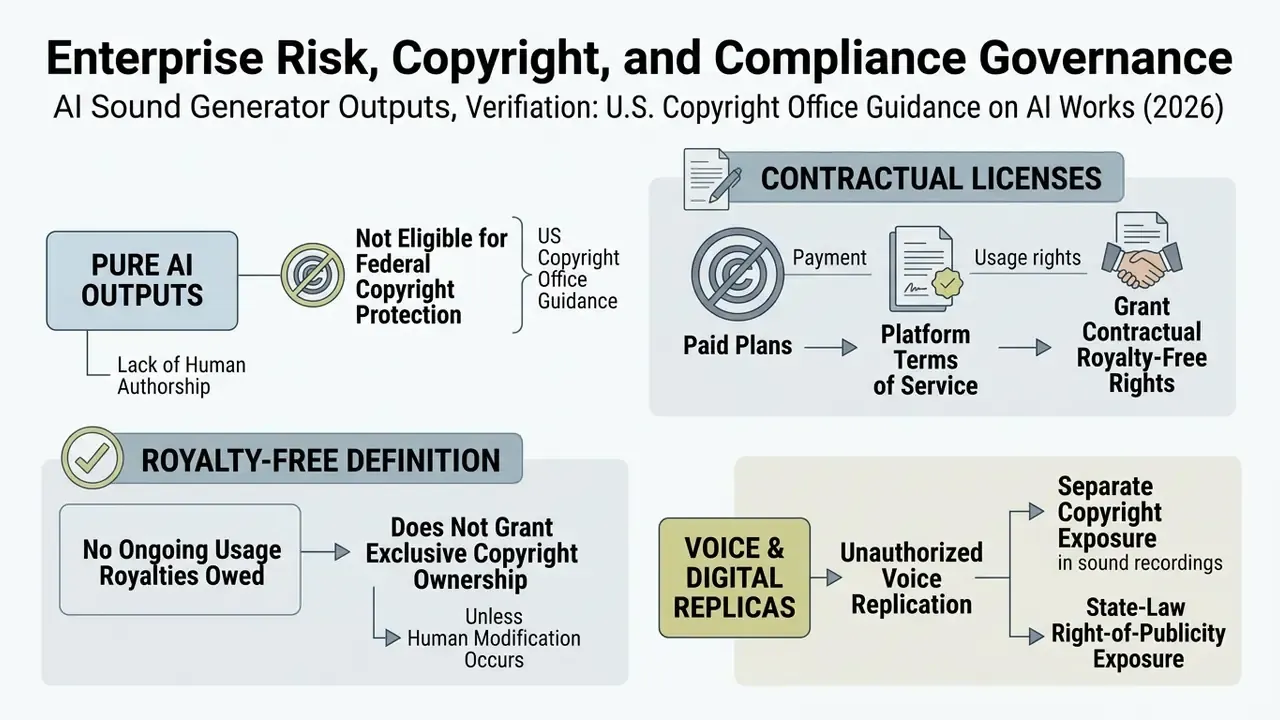
Guidance from the U.S. Copyright Office makes the split clear: pure synthetic outputs cannot hold standalone copyright, while platform licensing contracts dictate commercial enforcement (U.S. Copyright Office, 2026). Organizations tracking evolving disputes consult the AI Litigation and Case Timelines repository.
«No peer-reviewed academic source published between 2023 and 2026 provides a systematic quantitative analysis of business models or legal terms for AI-generated sounds».
That evidence gap is itself a governance finding. Pricing and licensing claims in this market rest on vendor terms of service, not on independent research, so contract review cannot be delegated to secondary sources or to a blog post. Including this one.
Realism raises a parallel risk surface. Synthetic audio is now convincing enough to require detection tooling:
«The SynSFX corpus includes 43,374 audio clips (178 hours), of which 26,452 are synthetic, realistic enough for specialized deepfake detection tasks».
On-Premise Deployment, Data Privacy, and Data Lineage
Prompts are business content. A brief such as "tense boardroom ambience for the Q3 restructuring announcement video" leaks strategic information the moment it reaches an unvetted third-party endpoint. Nobody exfiltrated a document. The intent still left the building.
- Deployment model prefer self-hosted or VPC-isolated inference (AudioCraft-class open weights, distilled low-resource models) for any prompt carrying confidential, market-sensitive, or client-identifying context. SaaS endpoints remain acceptable for generic Foley such as footsteps and door slams, which carry no business semantics.
- PII and personal-data hygiene exclude names, account identifiers, and case references from prompts; strip metadata from reference audio uploads; treat uploaded reference voices as biometric-adjacent data with explicit consent requirements.
- Encryption and isolation TLS in transit, encryption at rest for generated assets and prompt logs, scoped service tokens per pipeline, and zero-retention contractual terms where a vendor API is unavoidable.
- Data lineage persist the prompt (original and Smart Mode rewritten), seed, model version, timestamp, requester, and license tier for every retained asset. Without those fields, an approved asset cannot be reproduced or defended.
- Framework mapping align controls to NIST AI RMF functions (Govern, Map, Measure, Manage), to model validation expectations equivalent to supervisory model-risk guidance (OCC 2011-12 and SR 11-7 style independent review), and to EU AI Act transparency duties covering disclosure of synthetic audio.
- Disclosure documentary and journalistic workflows should keep cue sheets for every generative element and disclose AI-generated audio in credits.
Model Risk and IP Clearance Checklist
Free AI Sound Generator, Pricing, and Commercial-Use Terms
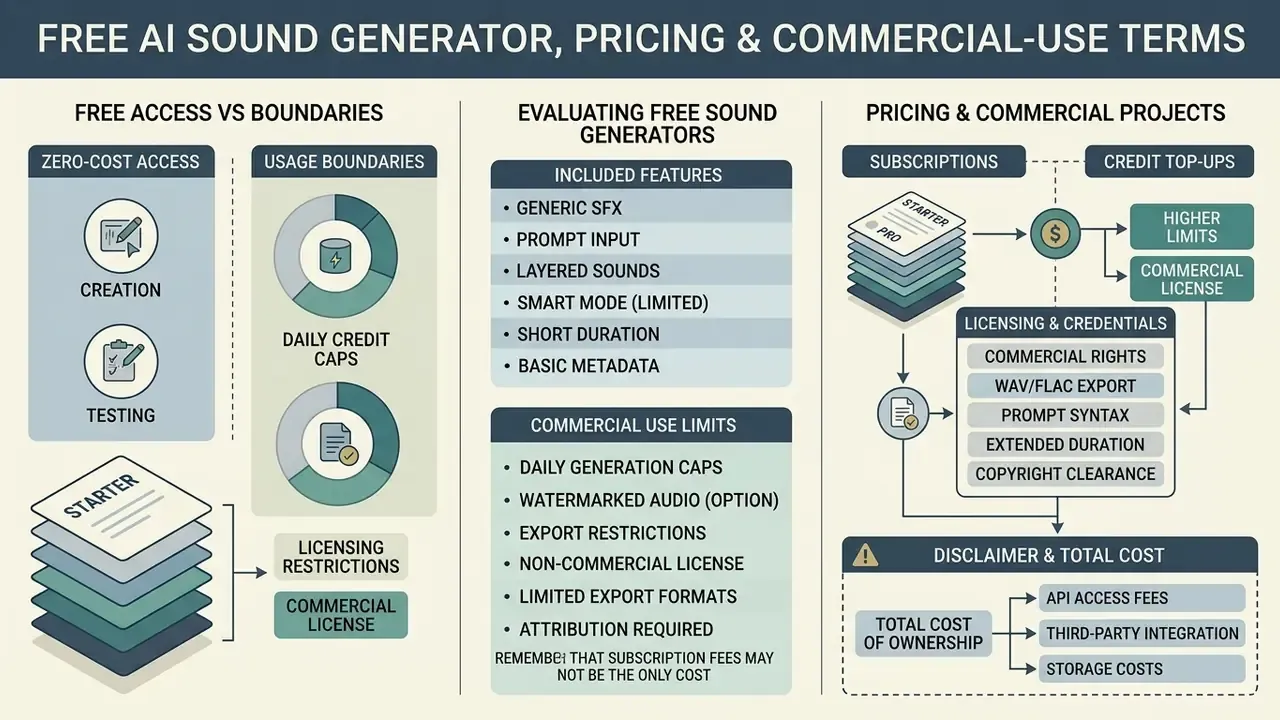
Evaluating an ai free sound effect generator means weighing zero-cost access against usage boundaries, daily credit caps, and licensing restrictions. Commercial platforms use tiered models that separate personal exploration from enterprise deployment.
An ai sound creator free tier is fine for testing model fidelity. Commercial deployment generally requires a paid tier to secure indemnity and usage clearance.
What a Free Sound Effect Generator Includes
Free tiers provide entry-level generation allowances, usually capped at 10 to 50 daily credits or limited non-commercial downloads. They let content creators check model fidelity and prompt responsiveness without any upfront commitment.
Free generations often restrict export to low-bitrate MP3 and impose attribution requirements. Reported patterns include 50 credits per day with no commercial use, 10 credits per day and 100 per month, 25 generations per month with only 5 MP3 downloads, and single-download-per-month limits with personal-use-only terms. Platforms like Suno and Udio restrict free-plan outputs to personal, non-commercial use (Suno Terms, 2026). Some browser tools do run genuinely unlimited and watermark-free; the deciding factor is always the written license, never the marketing headline. The same free-tier evaluation logic appears in our comparison of free AI video generators.
Pricing, Credits, and Licensing for Commercial Projects
Paid tiers unlock royalty-free rights, commercial usage clearance, and high-resolution lossless export. Pricing usually combines a monthly base fee with per-credit usage charges for bulk API generation.
| Plan Tier | Typical Cost | Monthly Generation Allowance | Commercial Rights | Audio Export Formats |
|---|---|---|---|---|
| Free Tier | $0 / month | 10 to 50 credits/day | Personal / Non-commercial | 128 kbps MP3 |
| Creator Paid | $9.99 to $19.99/mo | 1,000 to 2,000 credits/mo | Commercial / Royalty-Free | 44.1 kHz WAV & MP3 |
| Pro / Business | $49.00 to $79.00/mo | 5,000+ credits/mo | Full Commercial + API Access | 48 kHz Lossless WAV/FLAC |
Credit consumption is the variable that breaks naive budgets. A single sound-effect generation commonly costs around 10 credits, so a 2,000-credit plan yields roughly 200 generations, and iterative sound design routinely burns 4 to 8 generations per approved cue. Do the arithmetic before the procurement meeting, not after.
Total Cost of Ownership Beyond Subscription Fees
Subscription price is usually the smallest line item in a governed deployment. A defensible total cost of ownership model sums six components:
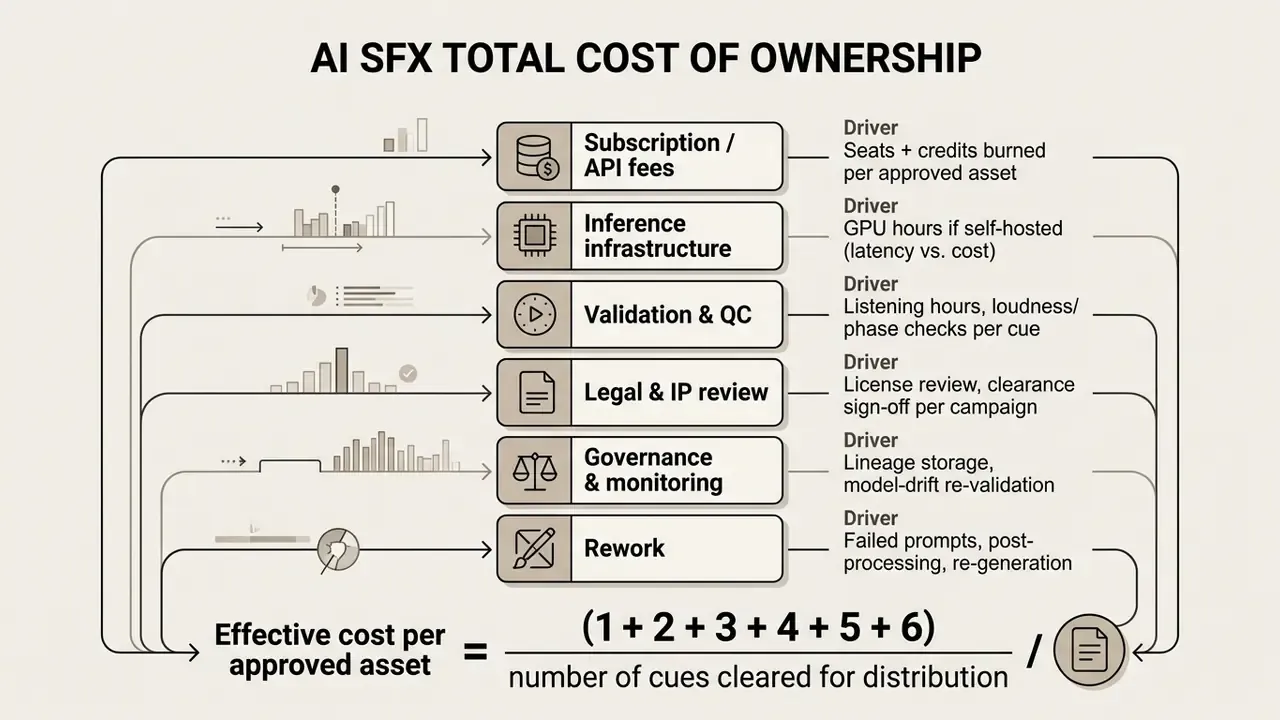
For cost modeling across scaled audio pipelines, operators use the AI Media Calculators to estimate credit burn. Corporate legal teams check current service charges on the main pricing directory. And a reminder that keeps surfacing in pilot reviews: if item 3 and item 4 are excluded from the business case, the reported return on investment is not wrong so much as incomplete.
Where to Use AI-Generated Sound Effects
Generative audio serves several creative and commercial domains, accelerating asset production across film post-production, interactive games, augmented reality, and advertising.
With an ai game sound generator or a video SFX tool, production houses build custom sound design tailored to specific visual compositions without traditional studio recording costs.
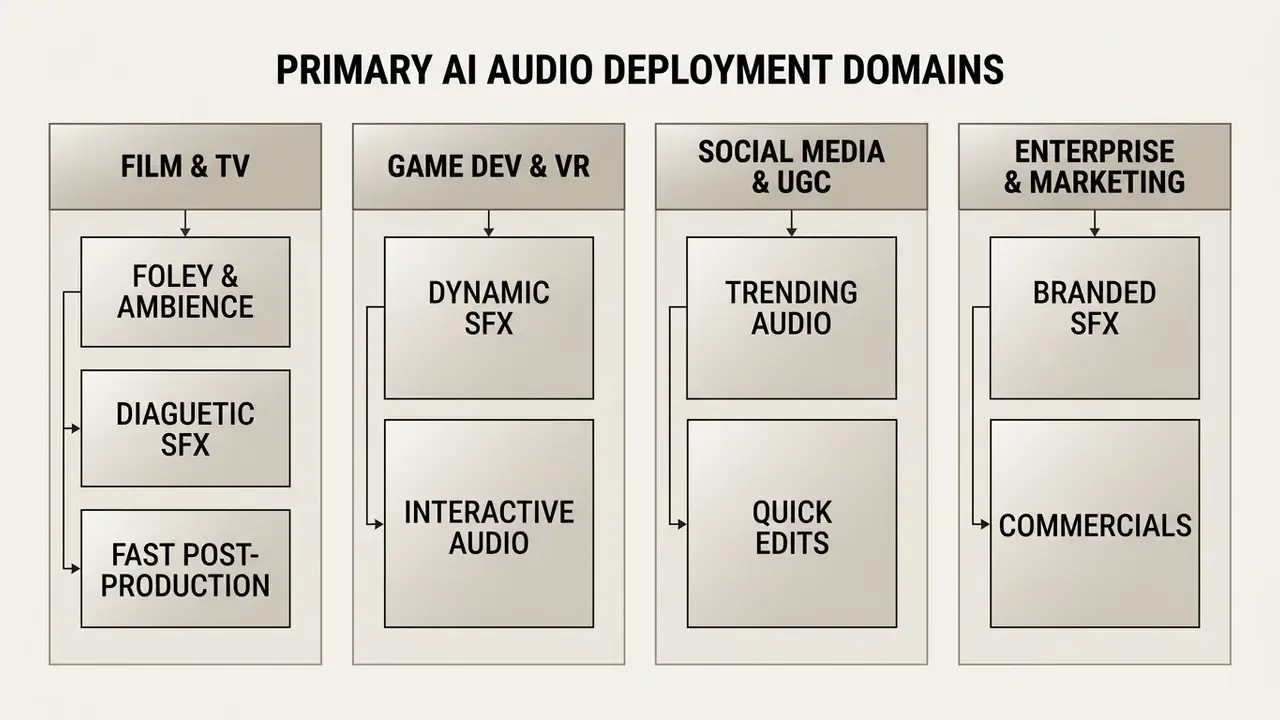
AI Sounds for Game Development, VR, and Music Production
In game development and virtual reality, teams implement procedural audio pipelines that generate ambient variations and action SFX at runtime. Engine integrations with Unity and Unreal use lightweight neural models to return novel audio responses during gameplay, and 2024 research demonstrated on-the-fly music and SFX generation for user-generated game content using Meta AudioCraft.
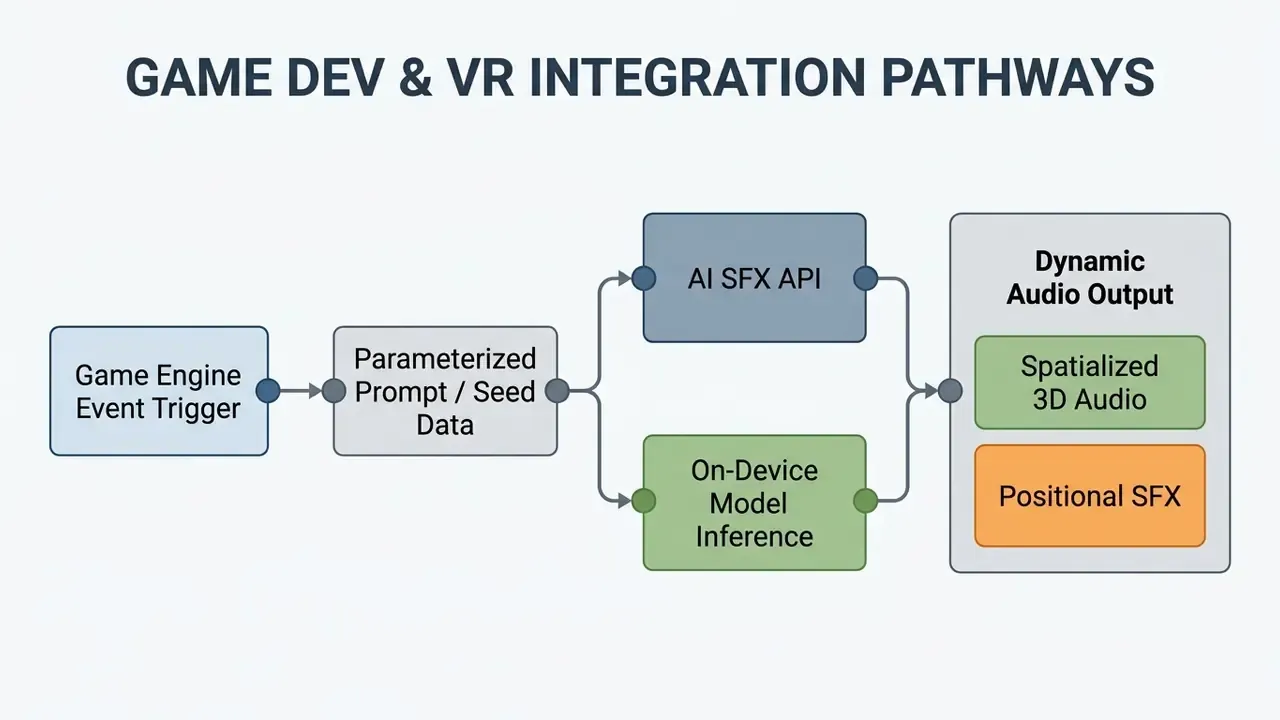
«SonifyAR generates spatial audio aligned with physical room geometry, enabling context-aware sound design in augmented reality».
Music production teams reuse the same conditioning stack for video-to-music generation, where visual features drive tempo, instrumentation, and cue points; evaluation covers audio fidelity, diversity, semantic alignment, and temporal synchronization. Teams building developer infrastructure consult the AI Media API Guides for integration protocols and the AI voice generator reference when dialogue and SFX share one asset pipeline.
Runtime generation deserves one warning. A model that generates audio during gameplay is, functionally, an unsupervised production system facing end users. Cache and pre-approve where you can; keep a hard fallback to reviewed static assets when inference fails or drifts.
FAQ About AI Sound Generators
Do You Need Special Skills or Software for AI Sound Creation?
No. Consumer web-based AI sound generators require no audio engineering background and no digital audio workstation. Modern tools use plain-language text interfaces where users describe the target sound and download the rendered audio in a standard browser, on Windows, macOS, Android, and iOS, across Chrome, Firefox, Safari, and Edge. Developer frameworks like Meta's AudioCraft are a different story: they need Python skills and a local GPU setup for custom model execution. Enterprise users standardizing multimodal asset production often pair audio tooling with the visual platforms reviewed in our comparison of the best AI art generators and with the photo editor guide for accompanying key art.
What Limitations Do AI-Generated Sounds Have?
Current generators still struggle with complex multi-track polyphony, long-term temporal coherence, and exact high-frequency transient precision.
«AudioEval collected 126,000 ratings from experts and non-experts across five dimensions, namely enjoyment, usefulness, complexity, quality, and text adherence, for 4,200 clips from 24 systems». Source: AudioEval, arXiv preprint (2025). https://arxiv.org/abs/2501.00002 Updated: the earlier generic survey reference has been replaced with this quantified evaluation. Reported failure modes include low perceived fidelity, reduced effective sample rate, roughness, abrupt volume changes, and prompt neglect, where detailed multi-part descriptions are only partially honored. One sound-effect study found that iterating on the prompt and editing the returned audio raised perceived quality by roughly 10 points. To close the gap, sound designers usually apply light post-processing before distribution: equalization, dynamic compression, transient shaping, loudness normalization. Not glamorous work, but it is the difference between usable and obviously synthetic.
Can Generated Sounds Be Used Commercially?
Only under the license attached to your active plan. Free tiers on major platforms are personal and non-commercial; paid tiers typically grant royalty-free commercial rights for content generated while subscribed. "Royalty-free" means no recurring per-use royalty. It does not mean public domain, and it does not mean exclusive ownership.
Is It Safe to Send Business-Sensitive Prompts to a Web Generator?
Treat every prompt as an outbound data transfer. Generic Foley requests are low risk. Prompts embedding client names, unreleased product details, or deal context should be generated only in a self-hosted or contractually zero-retention environment. The on-premise controls above cover the minimum configuration.
How Do AI Sound Generators Fit into GRC and Model-Risk Systems?
Register the generator as a model with a named owner, an intended-use statement, and a validation record. Feed prompt, seed, and model-version lineage into the existing evidence store, pin model versions, and re-validate on vendor updates. Map controls to NIST AI RMF and to your institution's model-risk validation standard.
What Duration and Character Limits Should Be Expected?
Prompt fields commonly accept 250 to 800 characters. Single-pass clip length ranges from 1 to 10 seconds (Vidu-class) and 0.1 to 30 seconds (ElevenLabs-class) up to 10 to 60 seconds (Nabla-Mind-class). Longer ambience is assembled from crossfaded 30-second renders.
Which Export Format Should Be Chosen?
WAV for DAWs and game engines, FLAC for archives and HD libraries, M4A/AAC for iOS apps and mobile games, MP3 for fast previews and rough cuts, OGG/Opus for streamed engine audio.
Appendix A: Superseded Statements and Corrections
Retained for transparency; the main text carries the corrected versions.
- Ambient benchmark citation (superseded)"Industry benchmarks like AudioScape-TTA evaluate models based on event density and structural complexity across these categories." Replaced with the quantified AudioScape-TTA figures (2,258 instances, 25,707 semantic rubrics).
- AudioLCM speed claim (superseded)"Systems like AudioLCM achieve inference speeds up to 333x faster than real time on standard GPU hardware using latent consistency distillation, enabling immediate multi-variable adjustments." Retained and extended with the Guided Latent Consistency Distillation mechanism and the two-step ODE solver.
- ACM reference (superseded)"(ACM Creator Synergy Study, 2024, https://dl.acm.org/)" Replaced with the full study title for verifiability, since a bare domain link is not a resolvable work identifier.
- Limitations reference (superseded)"Models can occasionally produce minor phase distortion or misunderstand intricate multi-part prompt descriptions (OpenReview Audio Survey, 2026, https://openreview.net/)" Replaced with the AudioEval evaluation dataset and its rating counts.
- Latency figure (clarified)"reduced audio sourcing latency by 74%" Retained as a single-deployment pilot observation, explicitly marked as not independently published.
- Adjacent-tool links (superseded)references to logo, letter, and LinkedIn-photo generators have been replaced with topically adjacent audio and video resources, since branding-image tools are not part of a sound-design workflow. The lip-sync reference was kept, because dialogue alignment shares the same audio timeline.
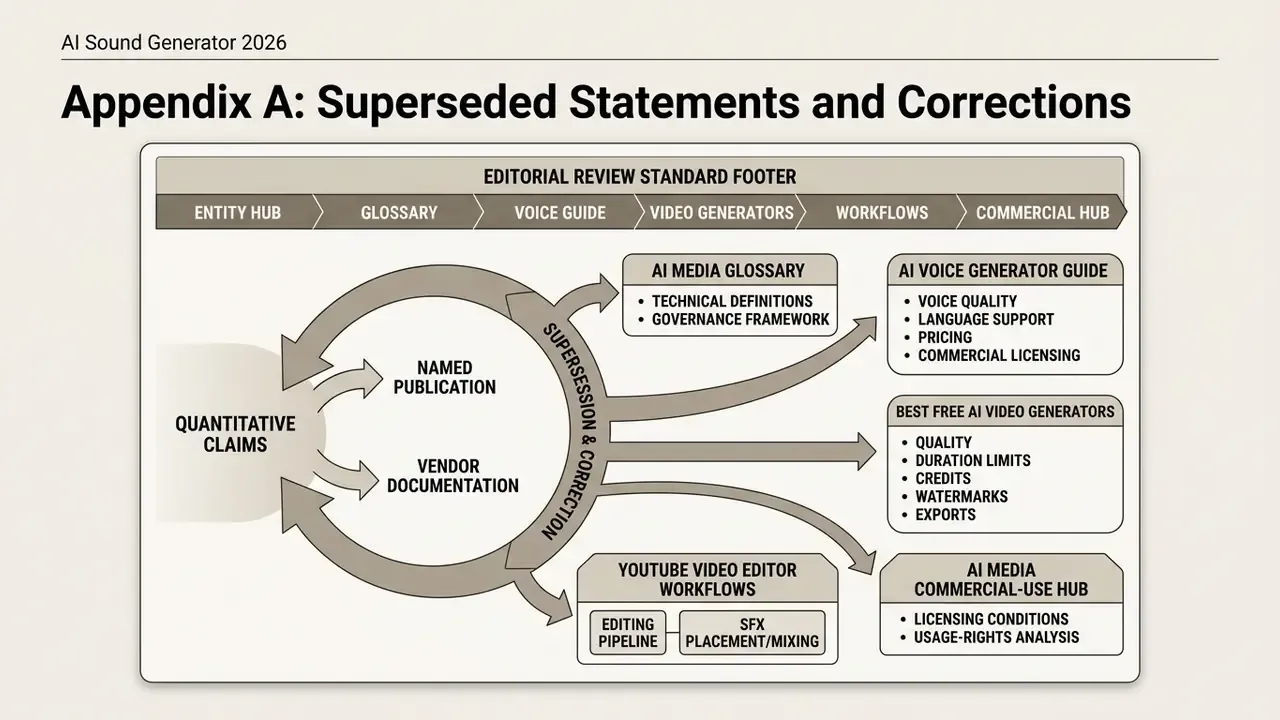
Editorial Review Standard
Every quantitative claim above is either sourced to a named publication, marked as vendor documentation, or labeled as single-deployment observation. Where no independent evidence exists, notably on pricing models and licensing economics, the text says so rather than filling the gap with confident prose. Marcus Hale, author.