On this page: what an AI tattoo generator actually produces, how to choose a tool, tattoo styles (including Cyber Sigilism, Trash Polka, New School, Dotwork), lettering and typography, prompt engineering with ready-made formulas, refinement, extraction and virtual try-on, free versus paid plans, commercial rights and copyright, FAQ.
What is an AI tattoo generator and what can it create?
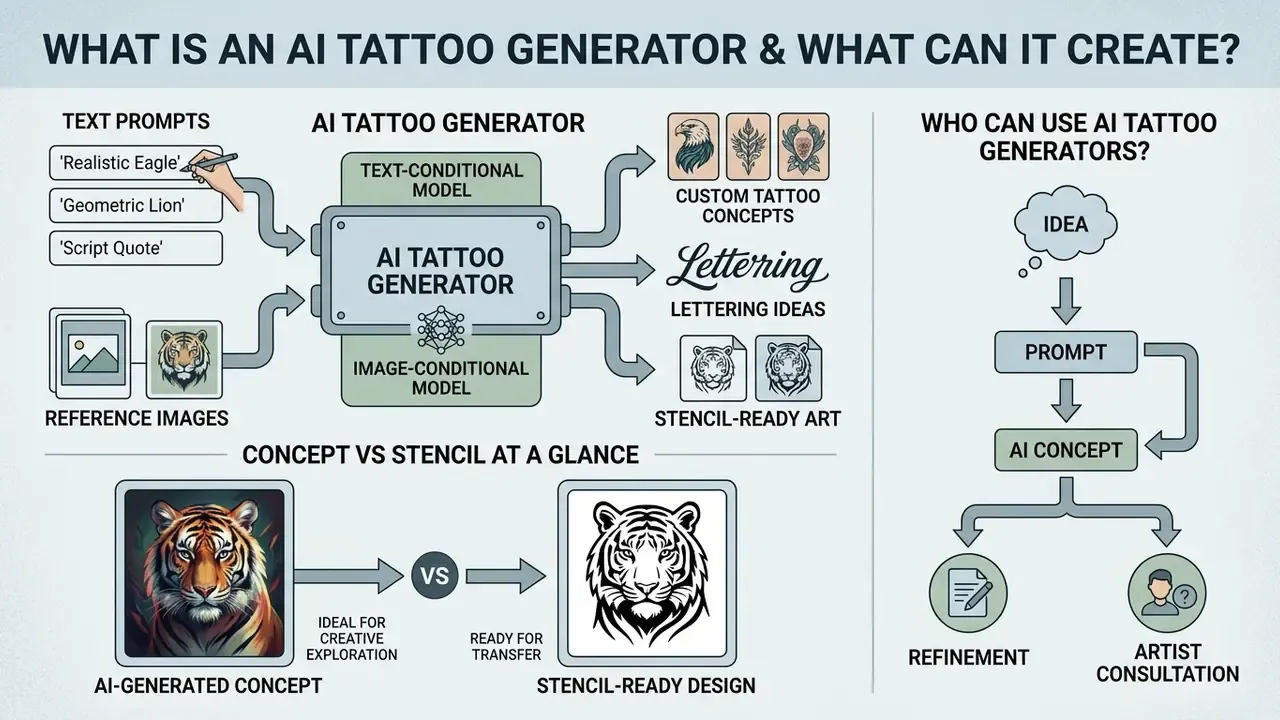
An AI tattoo generator is a text-conditional or image-conditional generative model that synthesizes custom tattoo concepts from prompts or reference images. Deep neural networks trained on visual art interpret your descriptors: subject matter, line weight, shading style, anatomical placement. The ai tattoo generator then outputs high-resolution image concepts in seconds. Not stencils. Concepts.
These systems work as ideation engines rather than automated stencil machines. You can explore a broad portfolio of tattoo ideas, test contrasting visual directions, and generate an ai generated tattoo reference that finally communicates what you actually mean. Readers comparing platforms before spending credits can review our benchmark of AI image generators for output quality, control depth and licensing terms.
Empirical work on human-AI co-creation quantifies the benefit of this early stage instead of describing it vaguely:
«In a mixed-methods experiment with 24 participants, cognitive load fell 22.4% on average, while ideation fluency rose 1.8×.»
The software still produces raw digital images. Every output remains a visual reference that has to be judged against physical execution on human skin, where ink spreads and lines soften.
When working with an ai generator tattoo design, mix subject categories deliberately: geometric figures, organic motifs, lettering. That is how you build the first tattoo design flash sheets and see how elements sit together before booking a consultation. An ai create tattoo generator is at its best when you treat each render as a question, not an answer.
AI-generated tattoo concepts versus a tattoo-ready design
An ai generated tattoo concept is a raster image optimized for a backlit screen. A tattoo-ready design is a high-contrast, scaled stencil engineered for thermal transfer and needle work. Renders produced by artificial intelligence often carry micro-gradients, hairline details and dense stipple shading that degrade as ink migrates within the dermal layer.
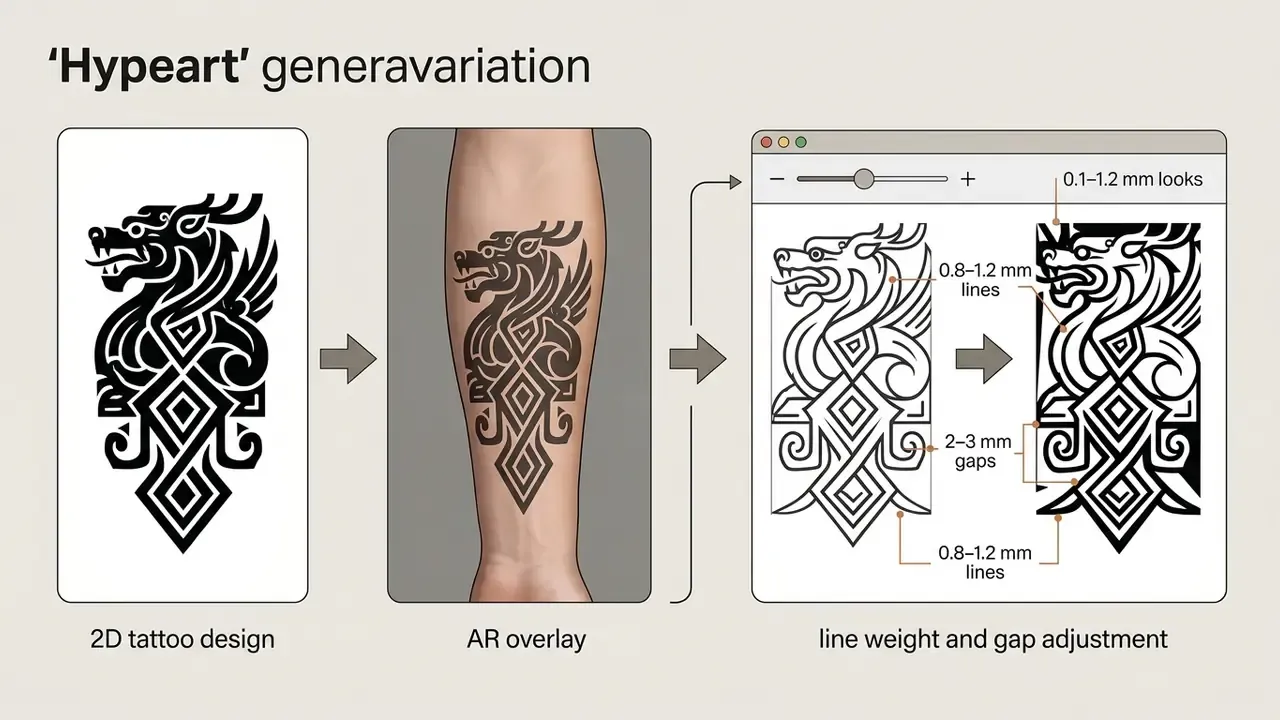
In professional practice, a tattoo artist converts ai generated images tattoo output into functional tattoo art by simplifying line work, opening negative space and raising contrast. A model can produce a compelling custom tattoo image, yet a practitioner must redraw the outline so primary contours measure between 0.6 mm and 1.0 mm, secondary details stay above 0.3 mm, and adjacent line gaps keep a minimum 1.0 to 2.0 mm distance. On high-movement zones such as the elbow ditch, knee, ribs and hands, experienced artists widen those tolerances: primary lines to 0.8 to 1.2 mm, gaps to 2 to 3 mm, so the piece survives stretch and healing.
Concept versus stencil at a glance:
| Parameter | Raw AI concept (raster render) | Tattoo-ready design (stencil) |
|---|---|---|
| Purpose | Style exploration, client communication | Thermal transfer, needle guidance |
| Contrast | Micro-gradients, soft edges, ambient shadows | Pure black and white separation, closed contours |
| Line logic | Decorative hairlines, unmeasured strokes | Primary 0.6–1.0 mm, secondary 0.3–0.5 mm |
| Scale | Undefined, screen-relative | 1:1 physical dimensions, 300+ DPI print |
| File type | JPG/PNG, 72–96 DPI | Vector SVG/PDF or high-DPI PNG |
| Durability logic | None, renders «as seen on screen» | Accounts for dermal ink spread over 5 to 10 years |
Who can use AI tattoo generators?
Four user groups get real value from these tools across the design lifecycle: first-time clients, seasoned collectors, digital tattoo designers and working artists. First-time clients use an ai art generator tattoo to turn an abstract idea into a tangible reference, closing the gap between intent and execution. Collectors use an ai art tattoo generator to prototype multi-element compositions across placement zones: arm and forearm panels, thigh pieces, spine columns, hand and finger accents.
Designers and studio artists fold an ai create a tattoo tool into their preliminary brief workflow. During intake, an artist can run rapid prompt iterations to lock subject agreement, test alternative shading techniques and produce mockups while the client is still in the chair. Requests like «ai create a tattoo for me» or «ai create me a tattoo» usually arrive without any visual vocabulary attached, and a fast batch of ai generator tattoo ideas gives the conversation something concrete to react to. Qualitative research on professional design workflows clarifies where that value really sits:
«Designers use AI mainly at early stages: it accelerates work and widens exploration, yet final decisions stay with the human.»
How to choose an AI tattoo generator for your idea
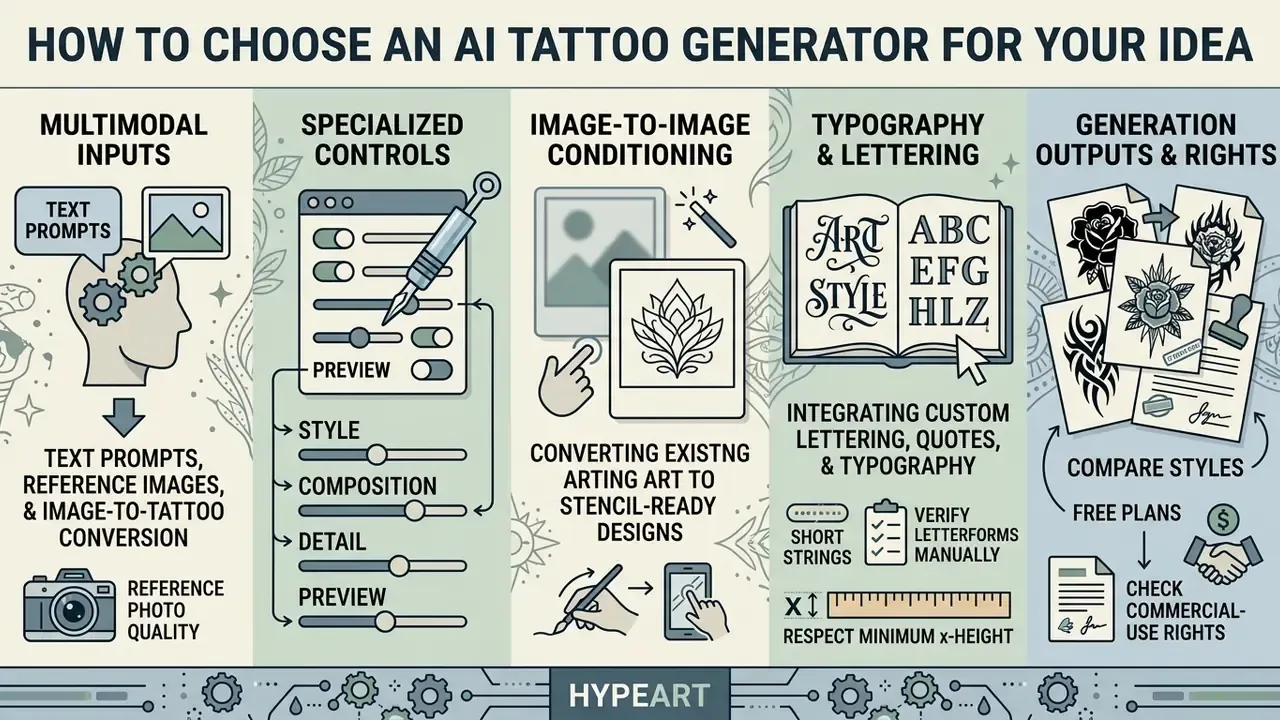
Choosing an ai generator for tattoos comes down to five functional pillars: multimodal prompt processing, specialized style controls, image-to-image conditioning, typography handling and export options. Strong tools let you move between text prompts and reference uploads without losing control over composition, contrast and aspect ratio. Our ranking of the best AI image generators breaks these control sets down platform by platform.
When testing an ai image generator for tattoos, look past raw rendering speed. Check for explicit controls over line density, black-and-grey contrast thresholds, negative space preservation and body overlay previews. Granular controls are what keep a flash concept structurally clear once it becomes a physical stencil. Speed without control just gives you prettier dead ends.
To weigh visual generation tools and licensing models side by side, explore our AI Media Comparison Matrices for cross-platform benchmarks. If you are budgeting credits for a large project, the AI Media Calculators help estimate generation volume against subscription cost before you commit.
Text prompts, reference images, and image-to-tattoo conversion
Text-to-image modes build new tattoo concepts from structured natural language. Image-to-image and sketch conditioning work differently: you upload a photograph, an artwork or a rough hand sketch, and the model transforms it into a chosen ink aesthetic. That second path is where an ai image generator for tattoo ideas stops feeling like a slot machine.
Advanced sketch-conditioned models keep the structural geometry of the source, a portrait or a pet photo, while applying dotwork or fine line rendering. The peer-reviewed basis is explicit:
«Fine-grained sketch-photo correspondence is preserved through a discriminative loss and sketch-abstraction-aware timestep sampling.»
«Cross-domain constraints and classifier guidance improve image synthesis from sketches.» — DiffSketching (2023)
Reference photo quality. Forensic tattoo-imaging practice (NIST Tatt-BP, 2016) requires at least two photographs at 5 megapixels or higher under diffuse lighting. Those capture conditions, diffuse light, no hard specular glare, 5 MP or more, also produce the cleanest image-to-tattoo conversions, because low-noise inputs give the conditioning encoder more usable edge information. This is an operational transfer of an identification standard, not a formal requirement for generative tools. Readers converting personal photos can compare dedicated image-to-image generators before uploading source material.
Controls that matter: style, composition, detail, and preview
The parameters that count in an ai art generator for tattoos: style presets, value-first grayscale planning, composition framing, negative space sliders. Without explicit style parameters the model drifts toward generic digital painting, with colour blending that translates badly to needle work.
Detail density governs readability on skin. When generating a custom tattoo, capping micro-detail prevents line migration and blur as the piece ages. Real-time try-on previews add a second check, mapping a flat design onto a 3D body model so you can see how the artwork follows muscle contours and joints. Small thing, big payoff.
Integrating custom lettering, quotes, and typography
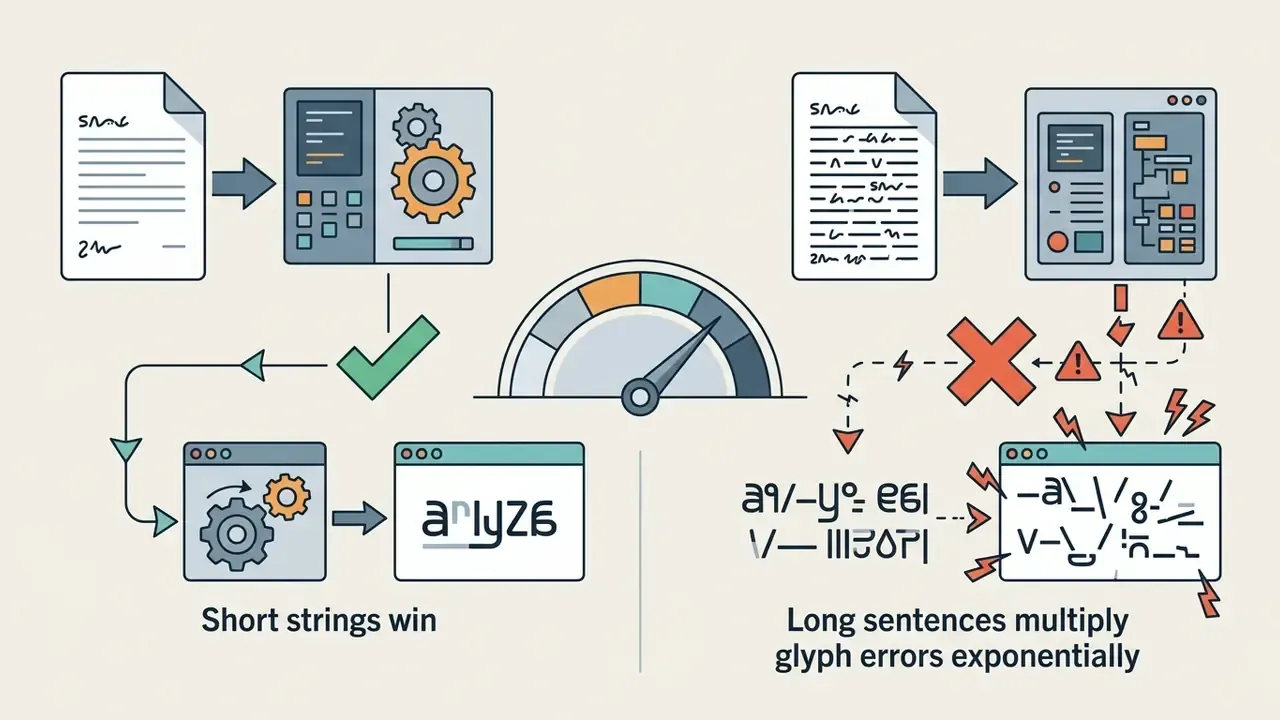
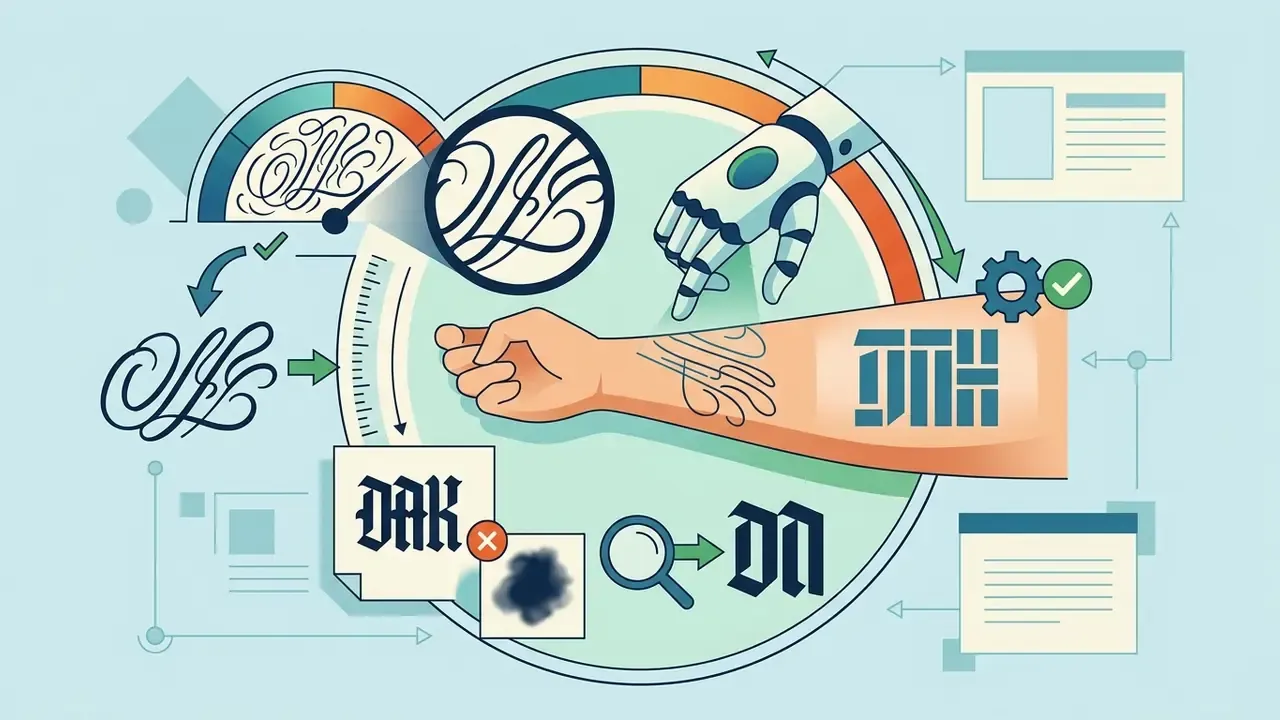
Names, dates, Roman numerals and quotes need specialized typography handling. Standard diffusion models distort text: unreadable glyphs, doubled serifs, invented characters. To get clean tattoo lettering, use platforms with dedicated text-rendering modules or text-layer editing, or state precise typographic parameters in the prompt itself.
Define the font family and kerning rules explicitly: «Gothic blackletter lettering», «delicate cursive script», «Roman capitals with chiselled serifs», «minimalist typewriter font». Add «isolated text, legible character spacing, crisp high-contrast linework, plain white background» so the network stops melting letters into surrounding ornament.
Three practical rules keep lettering usable on skin:
For pieces combining imagery and text (banners, memorial dates, sigil captions), generate the illustration and the lettering as separate layers, then compose them in an editor. Typographic accuracy survives, and the artist can reposition text along the anatomical axis without re-rendering the whole design.
| Feature category | Basic text-to-image AI | Dedicated AI tattoo generator | Professional design suite |
|---|---|---|---|
| Input modalities | Text prompt only | Text prompt plus reference photo upload | Text, vector sketch, layer masking |
| Style control | General keywords | Preset tattoo styles (fine line, blackwork, Japanese, Trash Polka) | Custom LoRA and style fine-tuning |
| Typography / lettering | Unreliable glyph rendering | Dedicated text layer, font presets | Full vector type control, kerning |
| Refinement tools | Global inpainting, prompt rewrite | Target eraser, line weight adjustment, remix | Vector tracing, stencil separation |
| Extraction from photos | Not available | Skin and background removal, ink isolation | Manual plus AI-assisted channel separation |
| Placement preview | Flat 2D canvas | 3D body template, AR photo overlay | High-resolution anatomical mockup |
| Output formats | Standard JPG/PNG (72–96 DPI) | High-resolution PNG, stencil line art | Vector SVG/PDF, high-DPI print |
| Commercial license | Varies by subscription tier | Personal use by default, commercial tier available | Full commercial ownership |
No matching rows Clear one or more filters to restore the matrix.
Read the table as a shortlist filter: if a tool offers no line-weight control and no stencil export, it belongs in the ideation column only.
Tattoo styles you can generate with AI
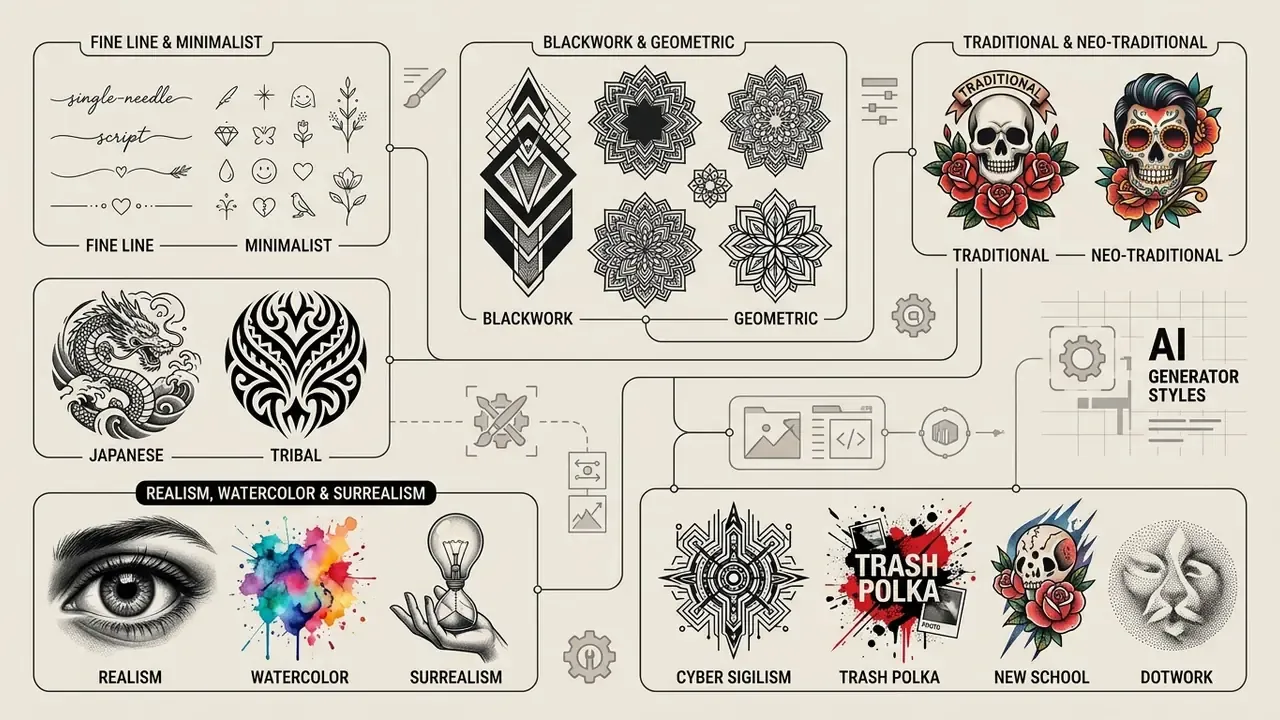
Modern models reproduce a wide spectrum of established tattoo styles by conditioning output on historical flash datasets and style-specific parameters. Whether you want a single-needle mark or a bold traditional composition, naming the exact style taxonomy in the prompt governs how the model calculates edge sharpness, shading gradients and palette. To compare platforms by stylistic range and licensing, see our review of AI art generators.
Choosing a tattoo style also means thinking about skin tone, placement and ageing. Generative tools handle black and grey, japanese, watercolor and traditional motifs well, giving artists a clear conceptual base to adapt. What they cannot do is predict how your specific skin holds pigment.
Fine line, minimalist, blackwork, and geometric tattoo designs
An ai fine line tattoo generator specialises in single-needle aesthetics, delicate scripts and restrained geometry. These styles live or die on negative space, so prompts must actively restrict dense shading, otherwise the model fills open areas with solid tone.
Blackwork, dotwork and geometric styles need high contrast and structural symmetry. Blackwork uses heavy fills and sharp boundaries, which makes it the easiest candidate for stencil-ready vector conversion. Geometric designs demand mathematical balance: specify symmetrical alignment, clean polygon facets and crisp dotwork gradients to hold impact on skin.
Traditional, neo-traditional, Japanese, and tribal styles
American Traditional (Old School) and Neo-Traditional rely on bold outer contours, saturated primaries and iconic imagery: daggers, roses, eagles. Prompts should emphasise heavy black outlines and solid colour fills, which translate directly into durable, high-readability tattoos. Neo-Traditional keeps the bold outline, widens the palette and adds deeper illustrative shading.
Japanese Irezumi brings dynamic flow, large-scale composition and culturally rooted motifs: koi, dragons, tigers, waves, clouds, peonies, cherry blossoms. Define the structural flow explicitly, an S-curve or a wrapping arm composition, so the artwork matches anatomical movement. Tribal styles focus on solid black repeating patterns and cultural symmetry, requiring high-contrast fills separated by clean skin gaps. A note of respect here: several tribal traditions carry lineage-specific meaning, and an ai generator tattoos batch cannot grant permission to wear them.
Realism, watercolor, surrealism, and black-and-grey concepts
Realism and black-and-grey realism depend on smooth tonal transitions and precise value control rather than hard outlines. For portraits or animal concepts, request continuous greyscale values, directional lighting and defined contrast zones so the output does not read flat. Black-and-grey work uses one black pigment in multiple dilutions, so tonal precision matters more than palette variety.
Watercolor and surrealist concepts add soft colour bleeds, splatter textures and dreamlike combinations. Striking on screen, harder in the dermis: the practitioner has to build underlying black support lines or anchor edges so pigment keeps a visual boundary over time. Surrealism in practice is almost always hybridised with realism or symbolic imagery, which means the artist must translate an odd composite into a legible layout that still respects placement.
Modern sub-genres: Cyber Sigilism, Trash Polka, New School, and Dotwork
Emerging trends lean on digital aesthetics that models render with real precision. Cyber Sigilism combines sharp bio-mechanical line art, digital glyphs and futuristic web-like structures, all of which need clean vector output and zero colour bleed. Prompt with «sharp vector linework, chrome highlights, abstract digital symmetry, crisp edge isolation», and explicitly forbid soft glow or ambient blur, which destroys the razor-thin tapering that defines the style.
Trash Polka blends photorealistic black-and-grey elements with chaotic red graphic brushstrokes, abstract lettering and geometric overlays. Mandate a strict dual-colour restriction: «monochrome black and grey realism juxtaposed with solid crimson red splashes, collage composition, high-contrast graphic elements». Because the style depends on deliberate visual noise, artists usually re-anchor the red elements by hand so they read as intentional accents rather than random spatter.
New School designs use exaggerated cartoon proportions, heavy outlines and vivid palettes. Prompt with «exaggerated cartoon proportions, thick black outlines, saturated candy colors, playful dynamic pose». Dotwork builds depth and sacred geometry through stippling instead of continuous fills; the critical control is dot spacing, since dots set too close merge into a flat grey patch after healing. Request «wide-spaced stippling, graduated dot density, sacred geometry framework, no solid fills».
Next, how to lock a chosen style into a structured, reproducible prompt.
How to write prompts that generate better tattoo ideas
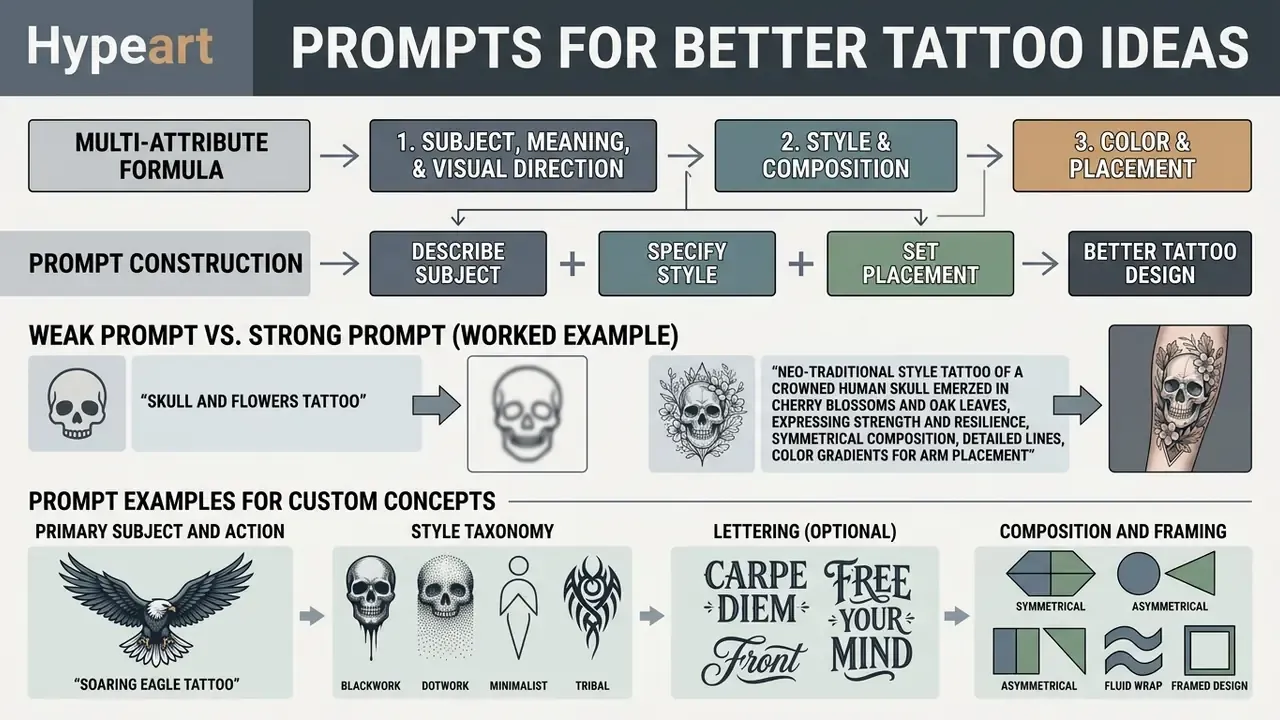
Effective tattoo prompts follow a multi-attribute formula that translates creative vision into instructions a network can act on. Unstructured prompts invite background clutter, photographic skin textures and line density that kills flash readability. Research on prompt authoring pinpoints where non-specialists get stuck:
«Participants composed descriptive prompts successfully but lacked the style-specific vocabulary required for effective prompt engineering.»
To reliably generate tattoo concepts that stay clear and scalable, structure inputs around six parameters: central subject, symbolic meaning, style taxonomy, compositional layout, colour palette, anatomical placement. For deeper guidance on visual prompt composition and asset parameters, use our AI Media Glossary and the explainer on how AI art generators handle style conditioning and pricing.
Describe the subject, meaning, and visual direction
Open every prompt with the focal subject and its intended mood. Skip vague descriptors like «cool tattoo». Name the entity and its action: «a raven perched on a skull holding an hourglass».
Framing and camera angle guide composition. Stating «centered flash design, front-facing view, white background» stops the generator from rendering surrounding skin, clothing or environmental shadow, all of which complicate stencil extraction later.
Specify style, composition, color, and placement
After the subject, state style, line characteristics, colour limits and placement boundaries. Controlled experimentation suggests where prompt effort actually pays:
«Goal-oriented prompting, targeting novelty, aesthetics or feasibility, affected design ratings more than time spent editing prompts.»
Precise technical terminology, «fine line blackwork», «bold black outlines», «monochrome black and grey», pushes the model toward appropriate line weights. And do not let colour carry meaning alone: accessibility guidance from the W3C (WCAG 2.2) states that information must not depend on colour as the only visual channel. The same principle governs tattoo legibility. Shape, line weight and position should carry the hierarchy so the design still reads in pure greyscale.
Anatomical descriptors shape spatial layout. Phrases such as «vertical forearm placement», «flowing s-curve composition» or «symmetrical chest piece layout» tell the model to fit specific dimensions.
Weak prompt versus strong prompt (worked example):
| Weak prompt | Strong prompt | |
|---|---|---|
| Input | «cool wolf tattoo» | «A geometric wolf head tattoo design, symmetrical composition, bold black outlines, dotwork shading, triangular facets, sharp negative space, isolated on plain white background, forearm placement, high contrast, no realistic skin, no background clutter, no blur» |
| Typical output | Soft-focus digital painting on photographic skin, ambient shadows, unclear contours | Centered flash sheet, closed contours, readable at 1:1 scale |
| Stencil viability | Requires full manual redraw | Traceable with minor line-weight correction |
Prompt examples for custom tattoo concepts
Tattoo prompt builder checklist (text version):
- Primary subject and actionfor example, a lone wolf howling under a crescent moon.
- Style taxonomyfine line, geometric blackwork, dotwork, American Traditional, neo-traditional, Japanese Irezumi, black and grey realism, watercolor, cyber sigilism, Trash Polka, New School.
- Lettering (optional)«Amor Fati» in delicate cursive script, clean kerning, spelled out in plain text.
- Composition and framingcentered flash layout, isolated on plain white background, strong negative space.
- Palette and shadingmonochrome black ink, high contrast, smooth grey values, or a restricted two to four ink palette.
- Anatomical placement targetforearm, outer thigh, sternum, upper arm wrapping.
- Exclusions (negative prompt)no realistic human skin, no background clutter, no blur, no watermarks, no complex colour gradients, no illegible text.
Copy those seven lines into a notes file and reuse them. Reproducibility beats inspiration on a deadline.
How to create, refine, and preview a tattoo design with AI
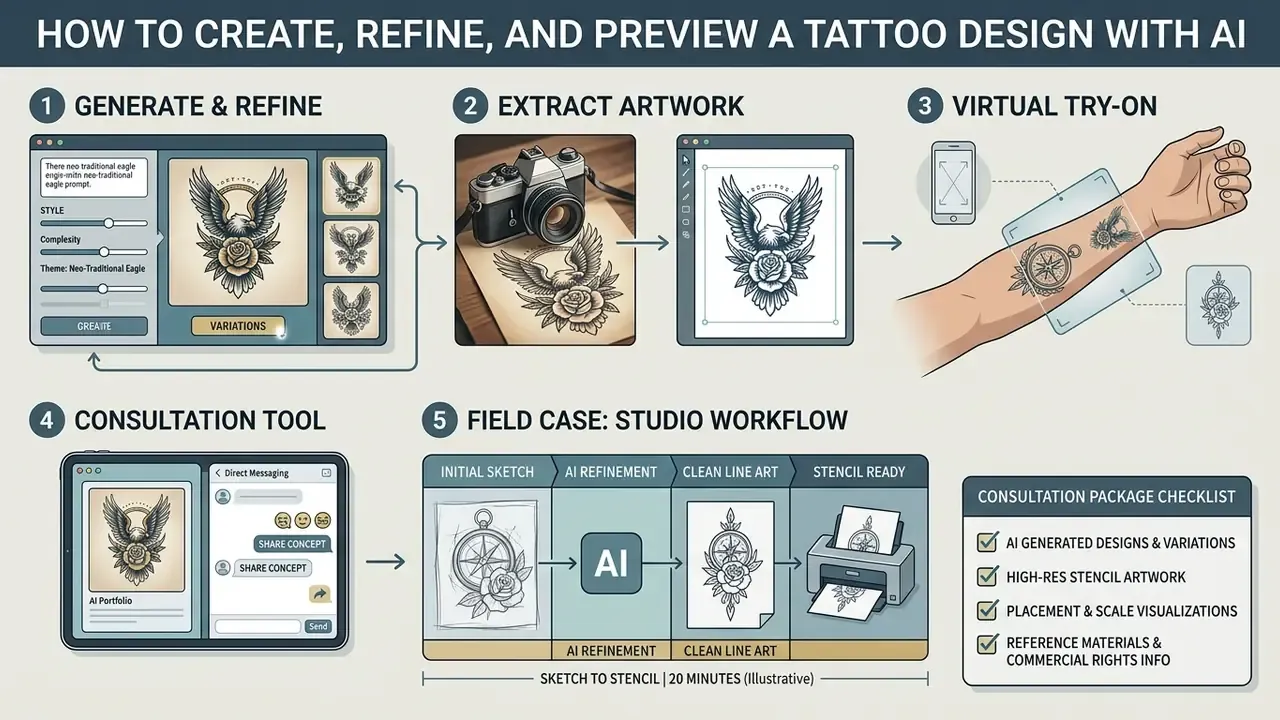
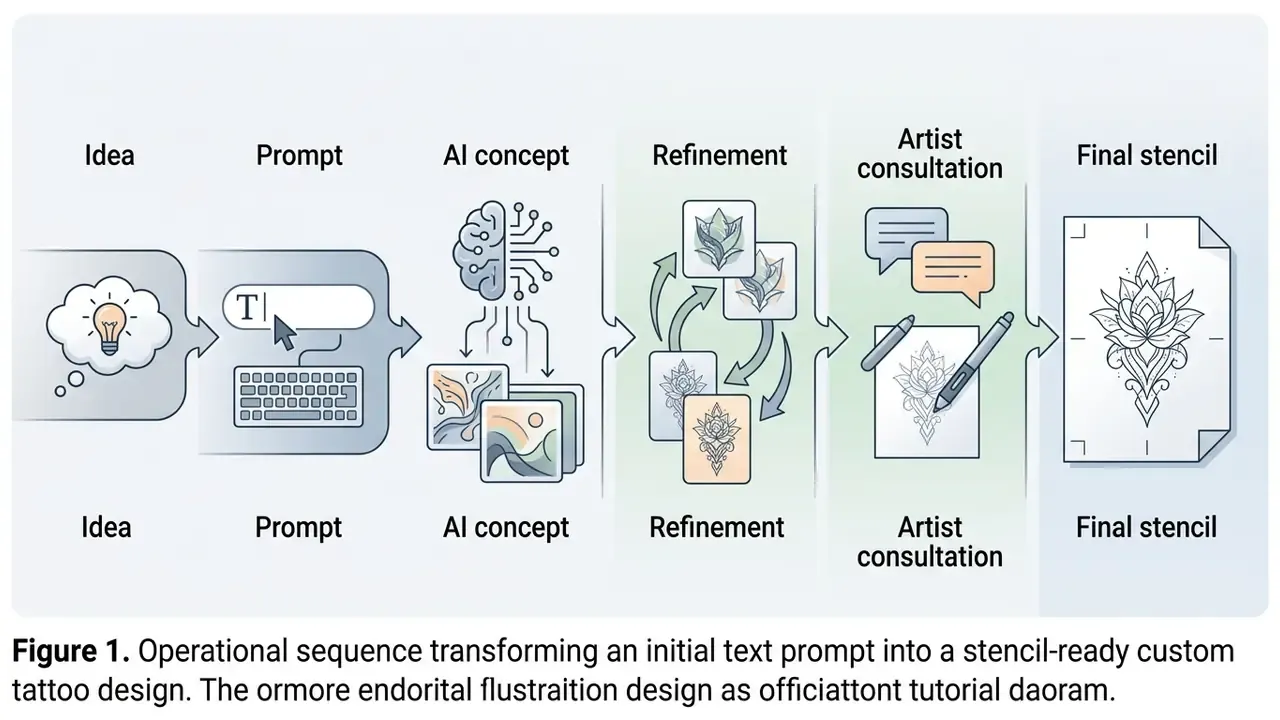
Getting from a first concept to a usable reference is an iterative pipeline. Do not accept the first output. Run variations, adjust parameters, test placement, then build an organised reference package for the consultation.
In an ai create my tattoo workflow, iterative prompt edits fix compositional defects, tune shading density and isolate individual elements. Testing on a virtual model confirms scale and orientation before you meet the artist. If budget constrains the iteration stage, compare free AI image generators before moving to a paid tier.
Our AI Media Support and Troubleshooting guide covers step-by-step fixes for visual artifacts and generation errors.
Generate variations and refine the selected tattoo design
Start broad: 15 to 20 candidate variations from one structured prompt. Controlled research explains why this stage behaves differently for novices and professionals:
«AI removed cognitive fixation during ideation, but experienced specialists lost efficiency during implementation due to expert fixation.»
Shortlist the three strongest compositions, then apply targeted refinement: inpainting, localized re-prompting, remix. General-purpose AI photo editors handle contrast normalisation and background cleanup after generation.
If an output shows excessive shading or clutter, revise the prompt toward «cleaner linework», «reduced dotwork» or «expanded negative space». Change one variable at a time, and keep a short prompt log so results stay reproducible between sessions. I used to skip the log, honestly, and then spent an hour trying to recreate a render I had already made.
Extraction: isolating artwork from real-world photographs. For legacy photos or physical reference sheets, use tattoo extraction tools. Computer vision separates embedded pigment from background noise, skin texture and directional glare. The pipeline removes skin undertones, normalises lighting gradients and converts low-contrast ink marks into clean black-and-white contours. That gives studio artists usable stencil line art without a manual redraw: practical for cover-up planning, restoring an old piece, enlarging a healed motif, or reusing one element from a larger composition.
Use virtual try-on to check tattoo placement on the body
Is an AI tattoo generator free, and what do paid plans add?
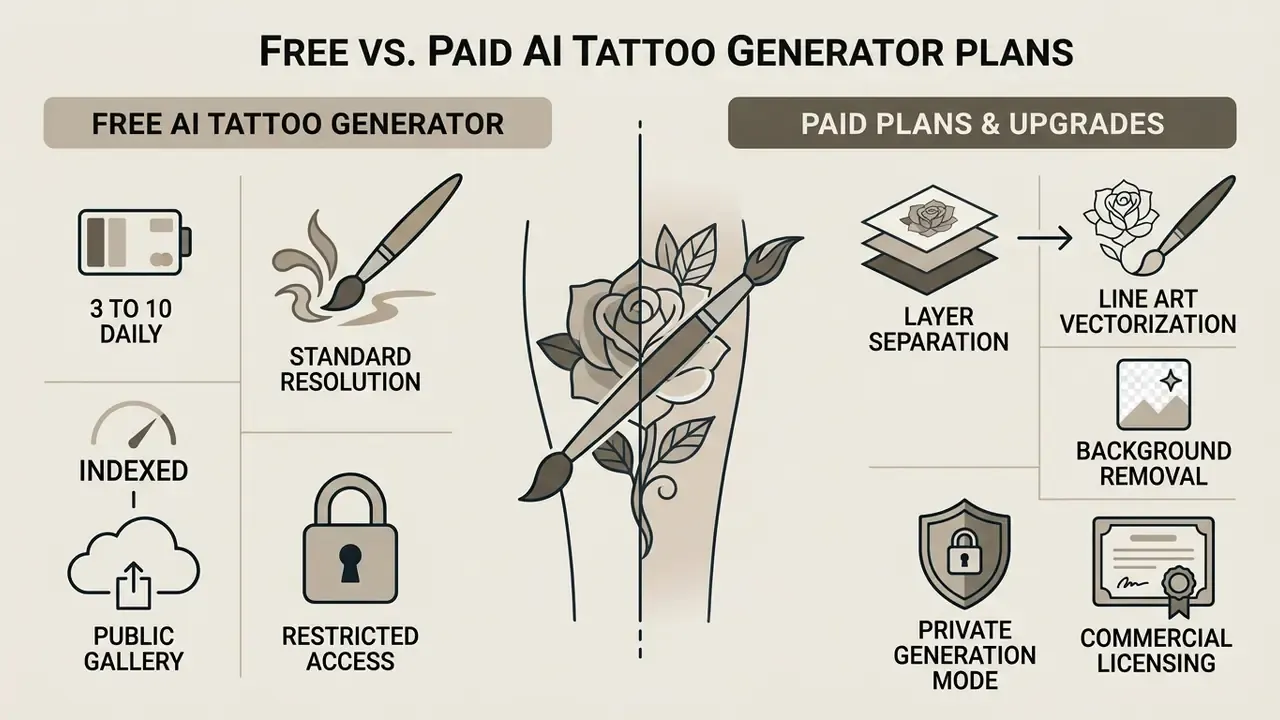
Most generative platforms run a freemium model. A free ai tattoo generator typically grants basic access for testing prompts and exploring directions, while paid subscriptions unlock high-resolution exports, advanced editing, commercial usage rights and private generation queues.
Whether an ai free tattoo generator covers your needs depends on scope. Free tiers handle ideation fine. Searches for ai generator tattoo free, ai create tattoo free or ai image generator free tattoo usually end at that boundary: paid plans provide the resolution, vector tooling and licensing that studio production and merchandise require.
To analyse subscription models, credit packs and commercial licensing tiers across major media platforms, consult our AI Media Pricing Guides.
What a free AI tattoo generator usually includes
Free platforms commonly offer daily credit allocations, roughly 3 to 10 generations, at standard resolutions of 512×512 or 1024×1024 pixels. Our side-by-side review of free AI art generators documents how caps, watermarks and licences differ in practice. These plans let you test prompts, sample style presets and export low-resolution references.
The trade-offs are consistent: visible watermarks, public gallery indexing, and restricted access to refinement features like target inpainting or AR try-on. Some tattoo-specific services also limit the style library or allow try-on only on template bodies rather than uploaded photos. Free-tier resolution suits brainstorming and fails at stencil printing.
When paid features are useful for tattoo design creation
Upgrade when you are preparing flash for actual tattooing or commercial distribution. If you prefer to test anonymously first, see our overview of no-sign-up AI image generators and their privacy trade-offs. Paid tiers unlock 2K, 4K or vector exports, which prevent pixelation when a stencil scales up to a large body area.
Paid plans also add background removal, layer separation, line art vectorization and private generation modes. Artists and designers use these to extract clean line art without tracing by hand, which is where the subscription usually pays for itself within two or three client projects.
| Plan feature | Free tier | Paid / Pro tier |
|---|---|---|
| Daily generation limit | Restricted (1–5 images per day or trial credits) | High or unlimited generations |
| Export resolution | Standard (512–1024 px) | High resolution (2K, 4K, vector SVG/PDF) |
| Print readiness | Screen-oriented, 72–96 DPI | 300–1200 DPI at 1:1 scale |
| Watermark status | Watermarked exports common | Watermark-free downloads |
| Privacy and storage | Public gallery indexing | Private generations, personal folders |
| Refinement and inpainting | Basic re-prompting only | Advanced eraser, inpainting, remix |
| Extraction / stencil tools | Usually unavailable | Skin removal, ink isolation, stencil export |
| Virtual try-on (AR) | Restricted or template-only | Custom photo upload, 3D fitting |
| Commercial licence | Personal or educational use only | Commercial rights granted |
No matching rows Clear one or more filters to restore the matrix.
Can you use AI-generated tattoo designs commercially or for real ink?
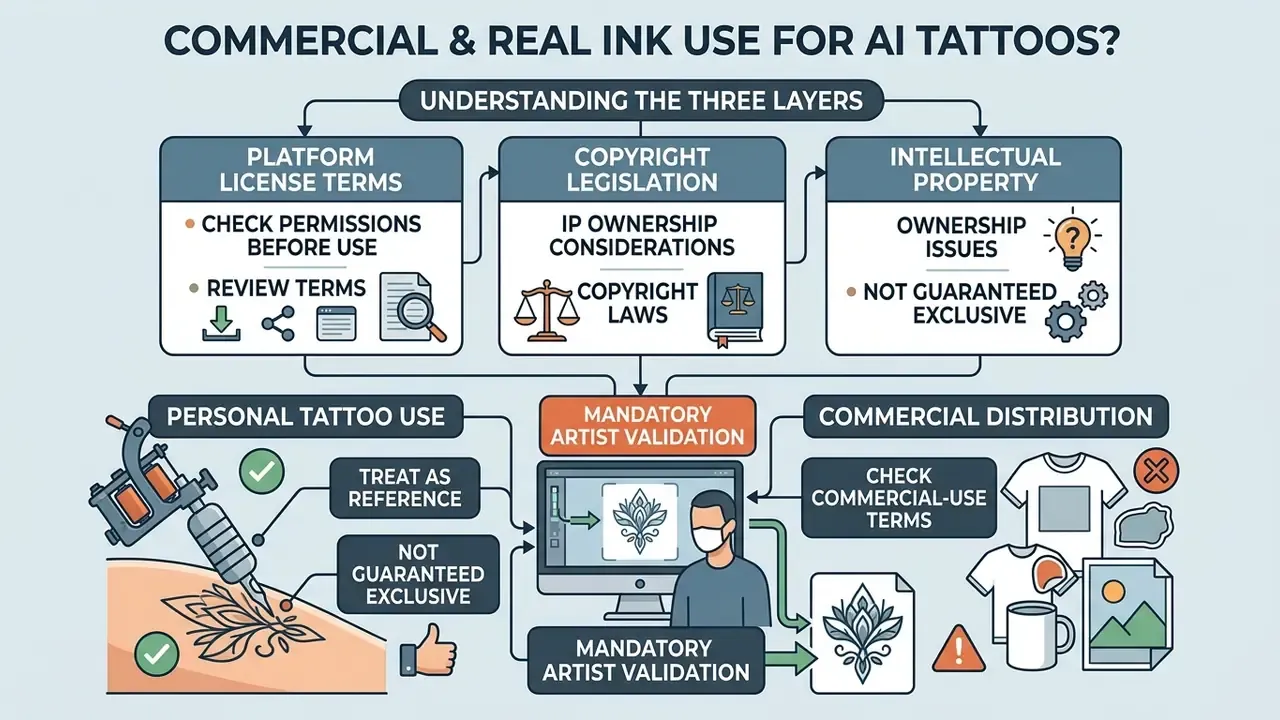
Using AI artwork for commercial products or physical tattooing means understanding three layers: platform licence terms, copyright legislation and the intellectual property rights tied to human authorship. Applying an AI design to your own body for personal reasons is generally unrestricted under user agreements. Selling flash sheets is a different question, and our deep dive on the commercial use of AI image generators breaks licence tiers down by platform.
Current legal frameworks hold that purely machine-generated outputs, without human creative intervention, cannot be registered for copyright protection (US Copyright Office guidance, 2023; WIPO frameworks). Turning an AI reference into protectable intellectual property therefore requires substantial human modification and artistic reinterpretation.
To review API integration rules, image generation endpoints and developer usage parameters, see our AI Media API Guides.
Check commercial-use terms before downloading or sharing a design
Before publishing flash sets, selling stencil downloads or using generated images in marketing, read the platform's Terms of Service. Public perception of ownership does not match the legal position:
«Participants most often attributed authorship of AI art to the user and to artists whose works trained the model.»
Some platforms grant full commercial ownership on paid plans while prohibiting commercial use on free tiers. Others allow commercial use by default under general output-ownership clauses. Claims that «you can always use AI tattoo designs commercially for free» are misleading: rights follow the licence attached to your plan, not the subject matter of the image.
For broader legal frameworks, licensing policies and copyright guidance, consult our AI Media Commercial-Use Hub. The AI Litigation and Case Timelines tracker follows generative IP court rulings as they develop.
Treat AI tattoo art as a reference, not a guaranteed exclusive design
Because diffusion models synthesize images from statistical patterns in training data, similar prompts produce similar outputs across different users. No ai generator tattoo output guarantees visual exclusivity, and mitigation research quantifies the replication risk:
«Prompt rewriting plus genericization (PREGen) more than halves reproduction of protected characters when a name is stated explicitly in the prompt.»
To create a genuinely unique, protectable artwork, the practitioner must substantially redraw the concept. Custom linework, personal symbolism and original compositional adjustments establish human authorship, which delivers both legal protection and technical viability for real ink. Practically, this also means avoiding prompts that name copyrighted characters, corporate logos or living artists' styles when the output is headed for commercial flash.
FAQ: AI tattoo generator questions
Can an AI tattoo generator create stencil-ready line art?
Yes, within limits. Specialized AI tattoo generators produce high-contrast blackwork and fine-line output that converts into thermal transfer stencils. A professional artist still has to review line weights, keeping primary outlines at 0.6 to 1.0 mm, and check gap spacing before application.
Are AI-generated tattoo designs free to use commercially?
Commercial rights depend on the platform's subscription terms. Generating concepts for personal body application is generally unrestricted, while commercialising raw AI flash sheets requires a paid commercial licence. Under US Copyright Office guidance, purely machine-generated images lack copyright protection unless substantially modified through human authorship.
How do I make AI render text and lettering correctly in a tattoo design?
Specify exact typography in the prompt, for example «gothic blackletter» or «delicate script», and mandate «isolated text, clean kerning, no background clutter». Generate one short string at a time, verify every character manually, and keep x-height at roughly 8 to 10 mm or above. Platforms with dedicated text-layer editing are more reliable than pure diffusion.
Can I generate full-color tattoo designs with AI?
Yes, but plan values first. Evaluate the design in greyscale to confirm the silhouette and contrast read clearly, then add a restricted palette of two to four inks. Watercolor and New School concepts need the artist to add anchor lines or bolder outlines so colour boundaries survive healing.
Why does AI struggle with fingers, small text, and dense stippling?
Diffusion models optimise for perceptual plausibility rather than structural accuracy, so repeated thin elements, digits, glyphs and closely spaced dots, get merged or duplicated. Reduce detail density, generate elements separately, and raise the minimum stroke width in your prompt.
Will a tattoo artist remove the watermark from a free AI render?
No reputable artist will trace a watermarked file as-is, and stripping a platform watermark can breach the Terms of Service. Either re-export on a watermark-free paid tier, or supply the watermarked image purely as a discussion reference for a hand-drawn redraw.
How accurate is AR tattoo try-on for judging size?
AR overlays are reliable for composition, orientation and flow, not for measurement. Digital fitting performance protocols (ISO/DIS 20947-1) require validation against measured body dimensions, and consumer tattoo try-on tools publish no scale-error figures. Confirm final size with a printed 1:1 test sheet on the actual placement.
How many generations does a usable tattoo concept usually take?
In practice, expect 15 to 20 broad renders, three shortlisted candidates and two or three refinement rounds per candidate. That is roughly 30 to 40 generations for one solid reference package, which matters when a free tier caps you at five images per day.
Appendix: common AI tattoo artifacts and how to fix them
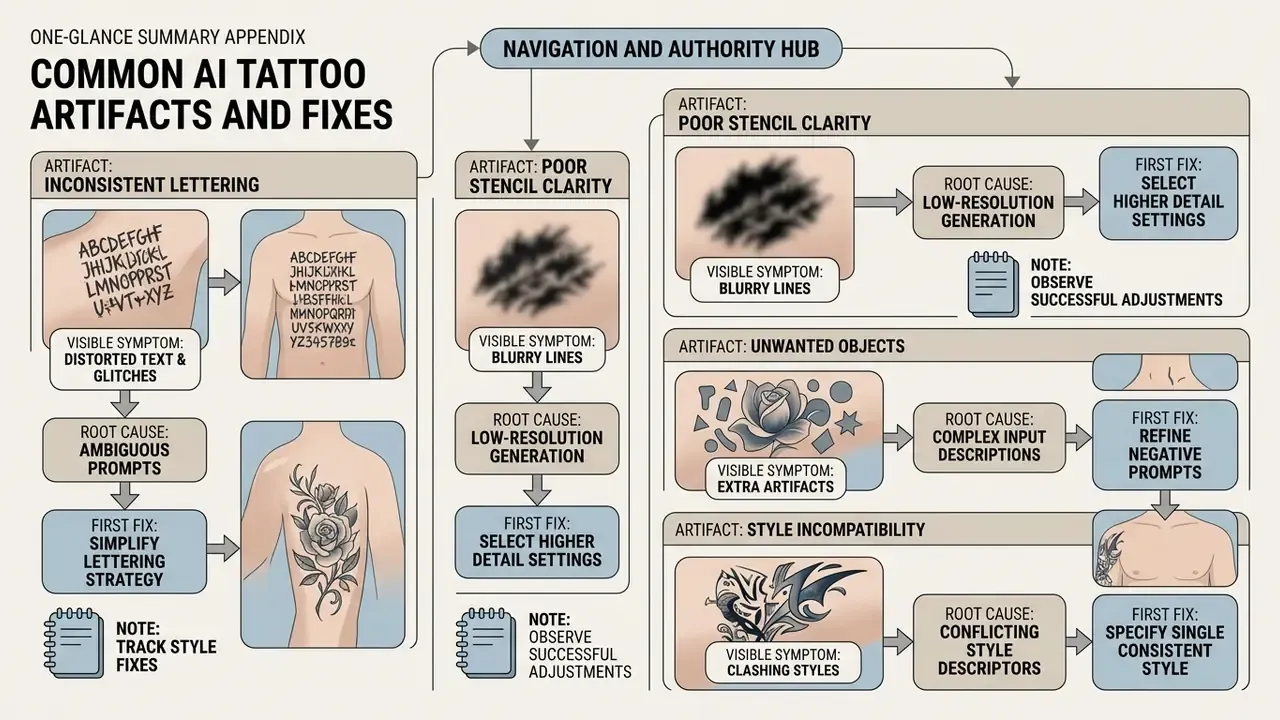
Most failed renders fail in predictable ways. This diagnostic table replaces guesswork with a first corrective action.
| Artifact | Visible symptom | Root cause | First fix |
|---|---|---|---|
| Skin bleed | Design rendered on photographic arm with shadows | No isolation instruction | Add «isolated on plain white background, flash sheet, no human skin» |
| Line mush | Contours dissolve when zoomed to 1:1 | Detail density too high for scale | Cut element count, request «thicker primary linework, minimum 1 mm strokes» |
| Grey mud | Stippling reads as a flat grey patch | Dot spacing too tight | Request «wide-spaced stippling, graduated dot density, no solid fills» |
| Glyph mutation | Invented letters, doubled serifs | Long text strings in a diffusion prompt | Generate one word per render, or use a text-layer editor |
| Palette creep | Ten colours where you wanted three | Unbounded colour instruction | Cap explicitly: «restricted palette, three inks maximum» |
| Broken symmetry | Mandala halves do not match | No symmetry constraint | Add «perfect bilateral symmetry, radial geometry, centred composition» |
| Joint break | Composition splits across the elbow or knee | Placement not stated | Name the zone and flow: «vertical forearm placement, s-curve composition» |
Keep a running note of which fix worked for which style. Over a dozen projects, that note becomes more valuable than any prompt library you can download, because it reflects your subjects, your placements and the tools you actually pay for.