Editorial note and safety compliance: according to European Union Digital Services Act (DSA) standards for real-time communication services, platform transparency requires explicit user consent before media streaming begins, verifiable 24/7 moderation workflows, a documented statement of reasons when content or accounts are restricted, and zero-friction options for instant reporting and session termination. Every recommendation below is measured against those baseline requirements, not against marketing copy.
Last updated: January 2026. Pricing verified against public app-store disclosures at the time of writing.
Five things to know before your first call
- Matching is queue-based, not catalogue-based.A signaling server pairs two waiting users, then a peer-to-peer WebRTC stream carries audio and video. There is no browsable list of women waiting for a call; every pairing is live and random.
- "Free" almost always means metered.Guest entry, basic random matching and short trial calls are typically free. Gender filters, country filters, direct 1v1 calls and messaging are paid via coins or subscriptions.
- Real market pricing sits between $0.41 and $0.70 per minute.Typical coin packs convert to roughly $7 for 10 minutes, $40 for 60 minutes and $150 for 360 minutes. App-store subscriptions run from $5.49 per week to $29.99 per month.
- Network quality decides whether the conversation works at all.HD 720p needs about 1.5 Mbps, 1080p needs 2.5 to 3.0 Mbps, and conversational latency above roughly 200 ms measurably degrades dialogue.
- Safety depends on enforcement, not policy pages.Prioritise services with real-user verification, in-call block and report controls, no-recording policies and transparent billing. Strictly 18+.
Who this guide is for and the vocabulary it uses
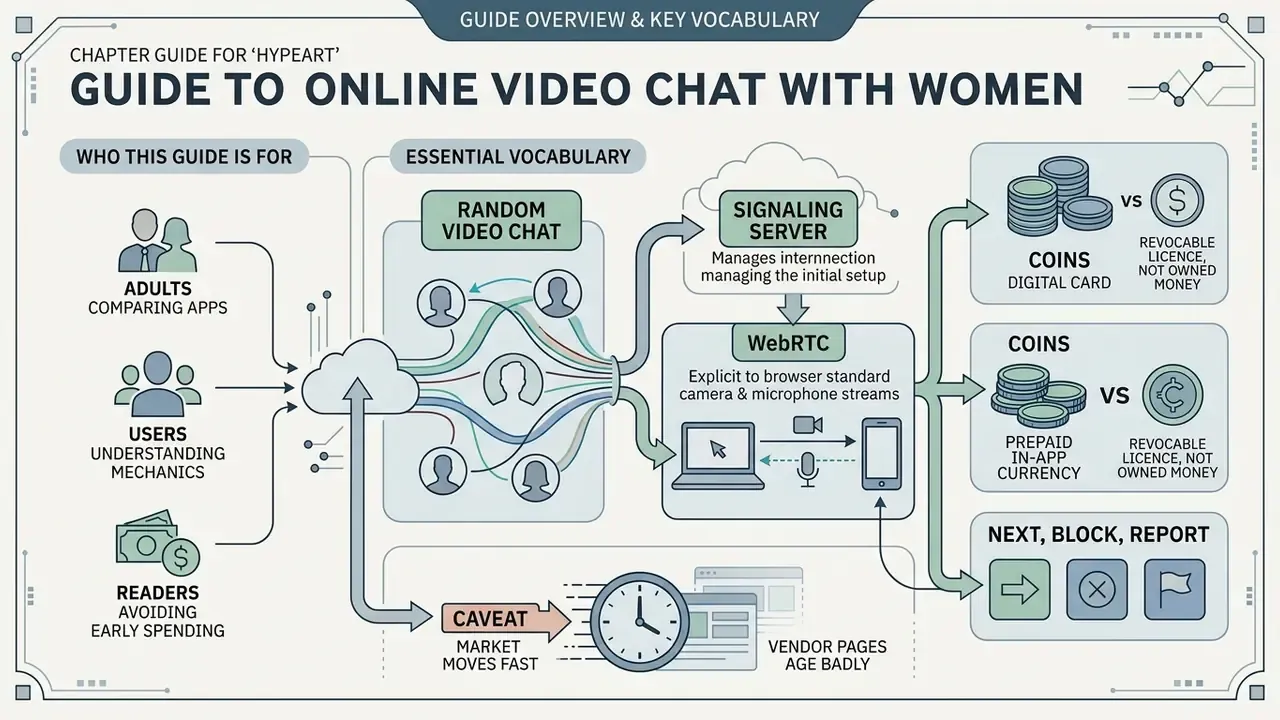
This guide is written for adults comparing free online video call apps with girls, and for readers who want to understand the mechanics before spending a cent. It is informational. It is not a ranking, and it does not promote any single service.
A handful of terms recur, so it is worth pinning them down once:
- Random video chat. A live 1v1 pairing produced by a matching queue rather than by mutual selection.
- Signaling server. The intermediary that introduces two clients to each other before media flows.
- WebRTC. The browser standard that carries the camera and microphone stream, ideally device to device.
- Coins. Prepaid in-app currency, usually a revocable licence rather than money you own.
- Next, block, report. Three separate actions with three separate consequences. Confusing them is the most common user mistake in this niche.
One honest caveat before we go further: this market moves fast, and vendor pages age badly. Where evidence is thin, I say so rather than filling the gap with confident prose.
What is online video chat with girls and how does it work?
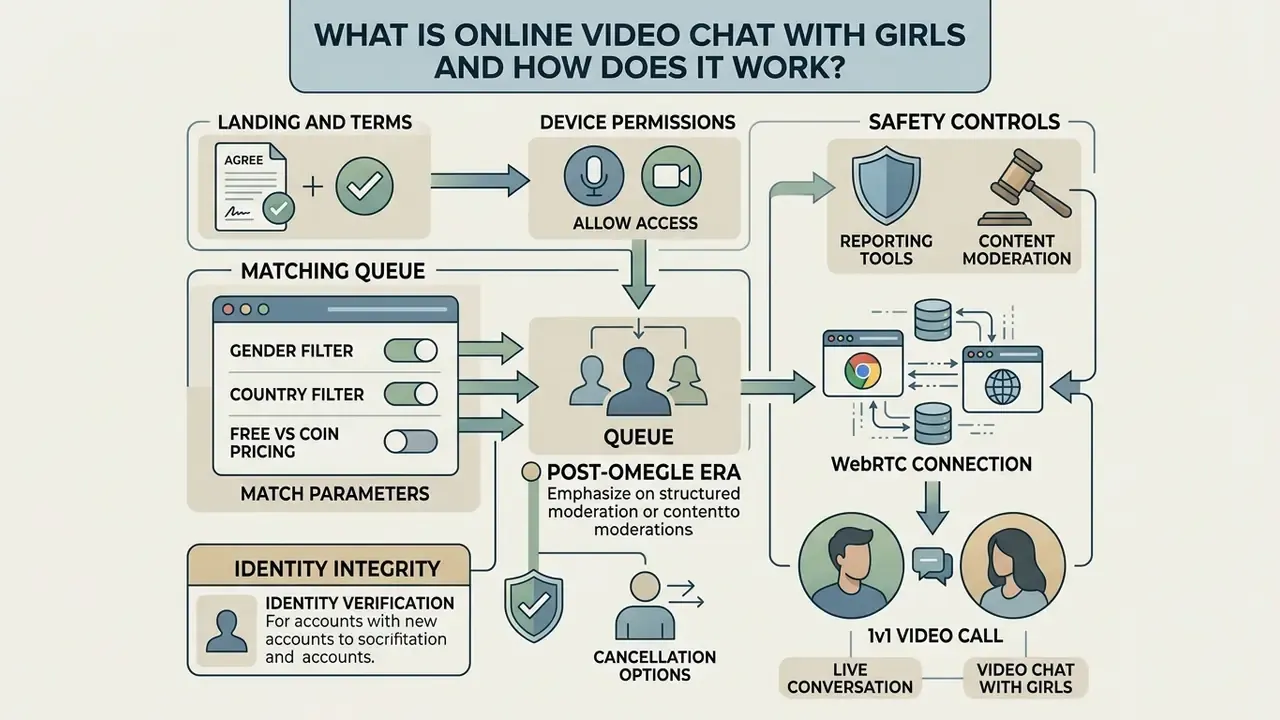
Online video chat with girls is a web or app based service that pairs users for live, one-on-one video conversations using browser media protocols. These platforms route camera feeds between two devices and expose controls to switch participants immediately.
The format differs sharply from dating apps. There is no profile to build, no swiping deck, no asynchronous inbox. You open a page, grant camera access, and the platform drops you into a pool of people doing exactly the same thing at the same moment. Conversations therefore begin with zero context and end just as abruptly when either side presses "next".
That abruptness is the defining feature of girl online video chat as a genre. It is also why the experience feels closer to channel surfing than to matchmaking.
Random matching and one-on-one video calls
Instant random matching connects two available users by placing them into an automated server queue that exchanges signaling data for direct media streaming. Once paired, a peer-to-peer WebRTC connection handles real-time audio and video transfer.
Technically, the sequence is almost identical across every platform in the niche:
Tapping "next" triggers a deliberate session teardown. The server drops the active peer link, notifies signaling, and returns you to the matching queue without a page reload. This is functionally different from blocking. Skipping ends the current pairing; blocking also stops that account from ever being matched with you again.
Modern platforms surface match parameters in the interface instead of burying them in settings. Common toggles include age-range filters (typically 18 to 70+), gender selection, geographical or language targeting, and a facial-detection requirement, often labelled something like "prefer users with face enabled". That last one filters out blank screens, static images and unattended cameras. Some services describe matching as a pure FIFO queue, while others apply filters before pairing, which lengthens wait times in exchange for relevance.
Wait, one correction worth making: filters do not "find" a person. They only shrink the pool the server draws from. Nobody is being selected for you.
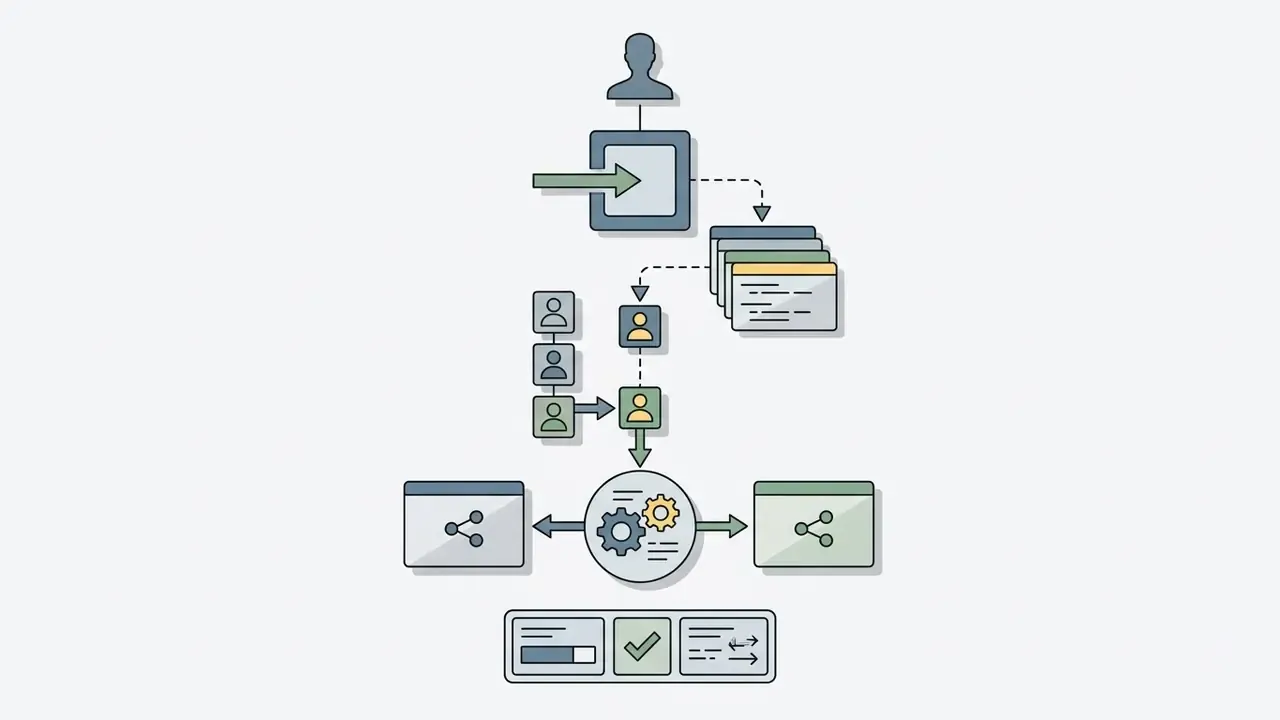
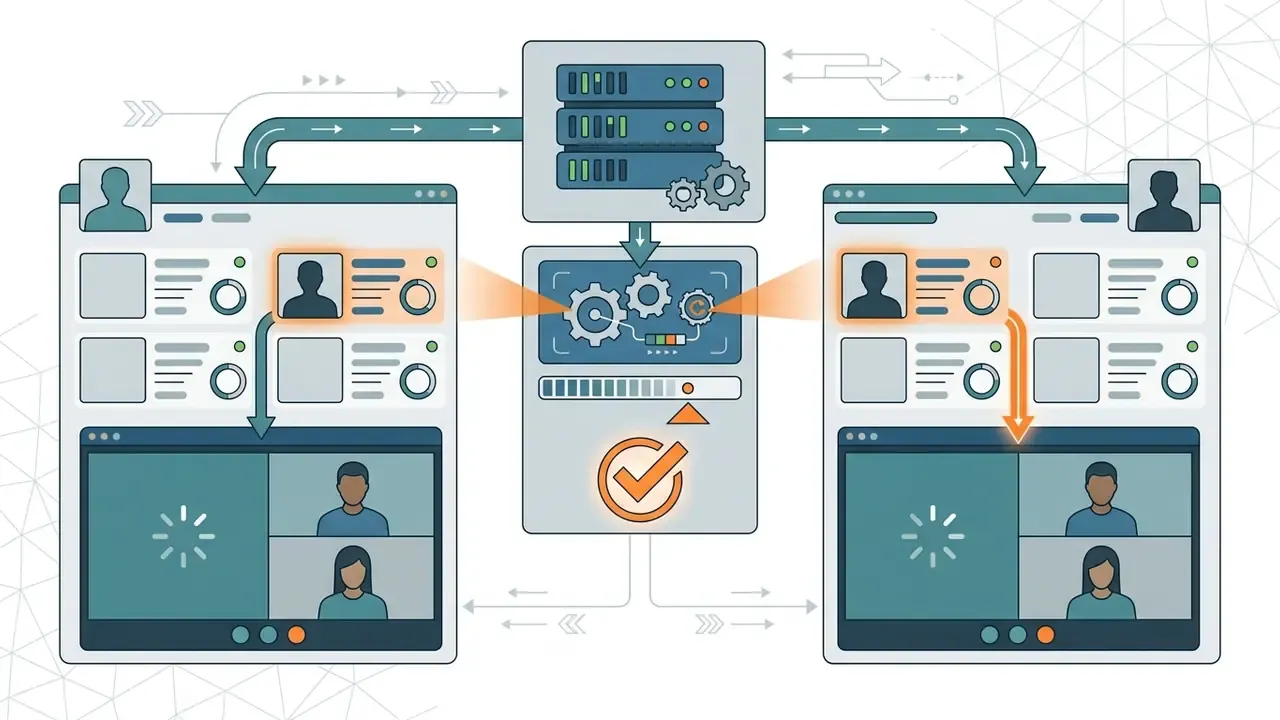
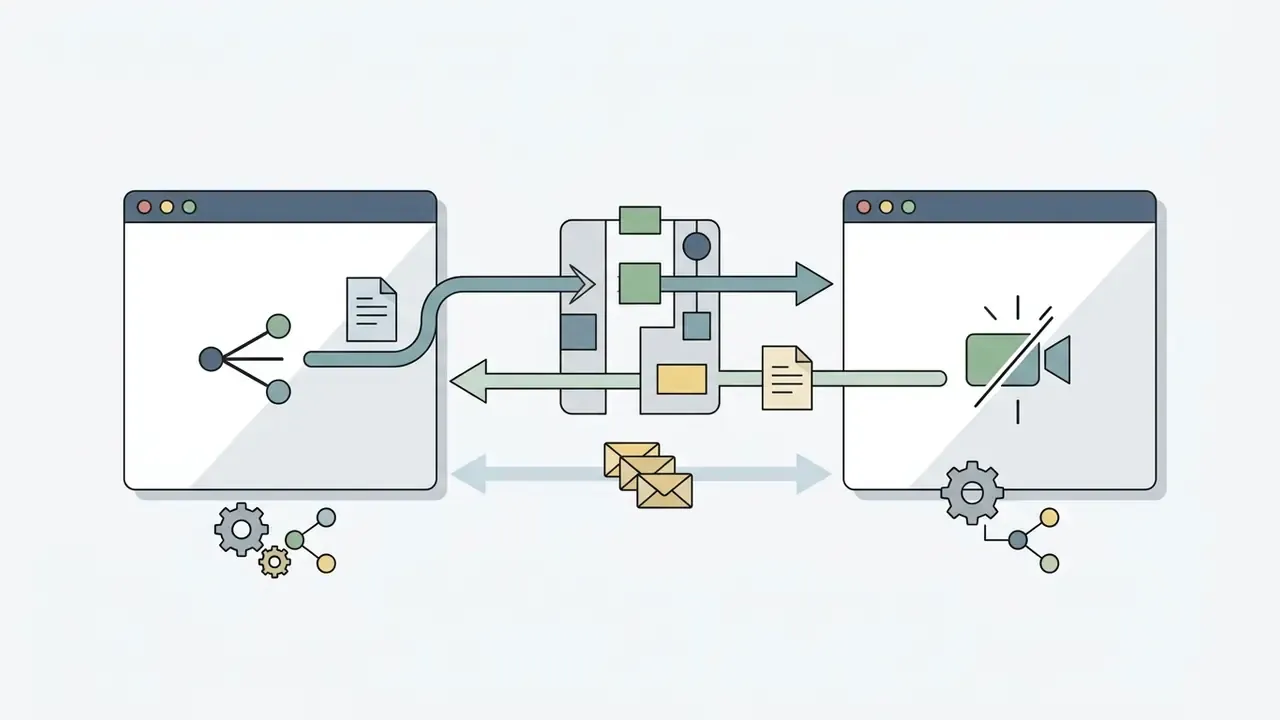
RTCPeerConnection and exchanges an SDP offer and answer plus ICE candidates through the signaling channel.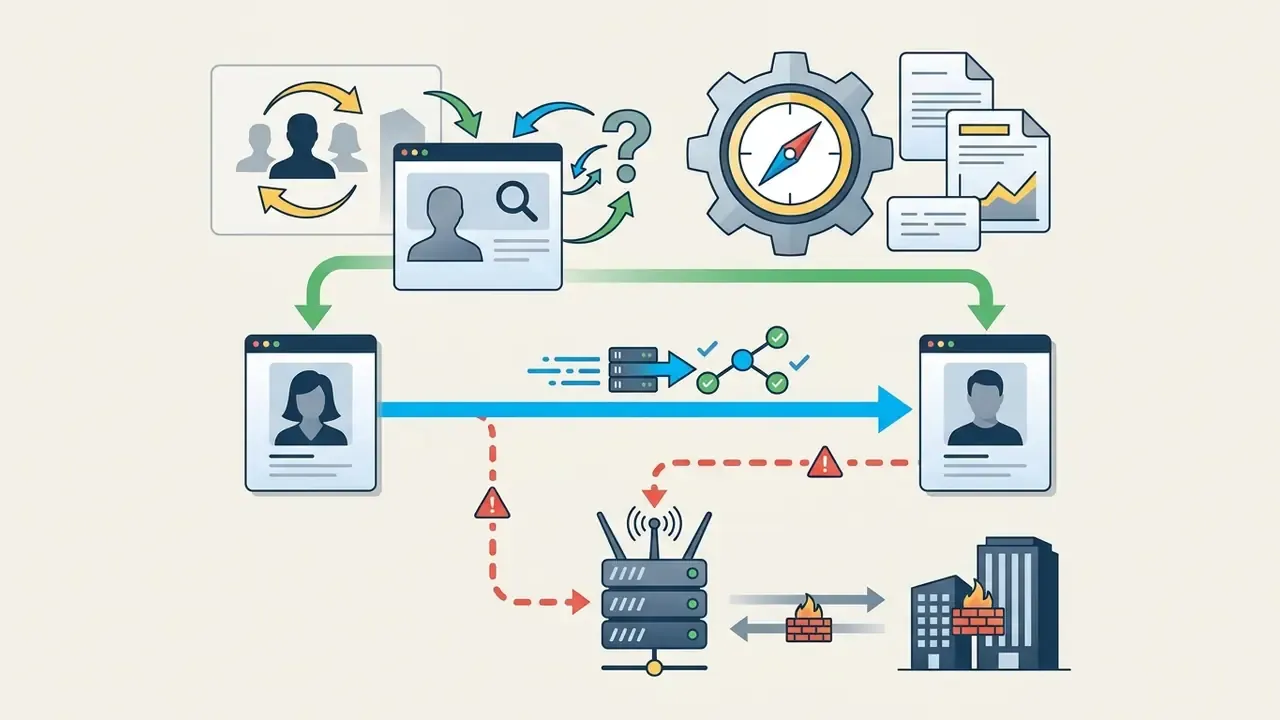
Video chat with girls, women and people worldwide
International video chat services connect users across global jurisdictions, though host availability stays heavily concentrated in a few regions. Industry dataset analyses estimate that 71.47% of registered webcam host accounts originate from just three countries, commonly Colombia, the Russian Federation and Romania, with the top ten countries accounting for 89.65% of roughly 714,000 registered host accounts recorded in August 2023 (industry analytics dataset, camCensus, 2023). A parallel dataset notes that 112 countries generated chat time in the same month, yet the top ten produced 96.30% of total online minutes. Supply, in other words, is far less "global" than the marketing suggests.
The commercial scale behind that concentration is substantial:
«In 2023 the global e-commerce live-streaming market reached approximately USD 1.35 trillion, with projections of USD 3.53 trillion by 2032.»
The post-Omegle era: why modern video chats require identity integrity
After the shutdown of Omegle in November 2023, following fourteen years online, the landscape of peer-to-peer video streaming shifted fast. In his closing letter, founder Leif K-Brooks stated that some people had misused the site to commit serious crimes and that operating it was no longer sustainable, financially or psychologically. A very large casual audience was left without an obvious replacement, and dozens of clones copied the interface while skipping the trust layer underneath it.
The structural failure was not anonymity itself. It was anonymity without accountability:
«Omegle identified users only as "You" and "Stranger", and that anonymity made activity monitoring and offender identification practically impossible.»
Current 1v1 video chat services answer those historical weaknesses with four mechanisms: mandatory real-user verification queues (presence and liveness checks rather than passport uploads), automated frame-analysis moderation paired with human review, encrypted WebRTC transport, and no-recording policies for call media. The target is session-level anonymity, meaning no public profile and no obligation to reveal who you are, without giving up enforceability when someone crosses a line.
- Landing and termsthe user reaches the platform and accepts age and privacy rules.
- Device permissionsthe browser requests explicit access to camera and microphone.
- Match parametersthe user optionally sets gender, age range (18 to 70+), region and face-detection filters.
- Matching queuethe server pairs the user with an available online partner through signaling.
- WebRTC connectiona direct 1v1 peer-to-peer video stream is established.
- In-call actionthe user talks, or selects Next, Block, Report or Disconnect.
Can you video call girls online without paying?
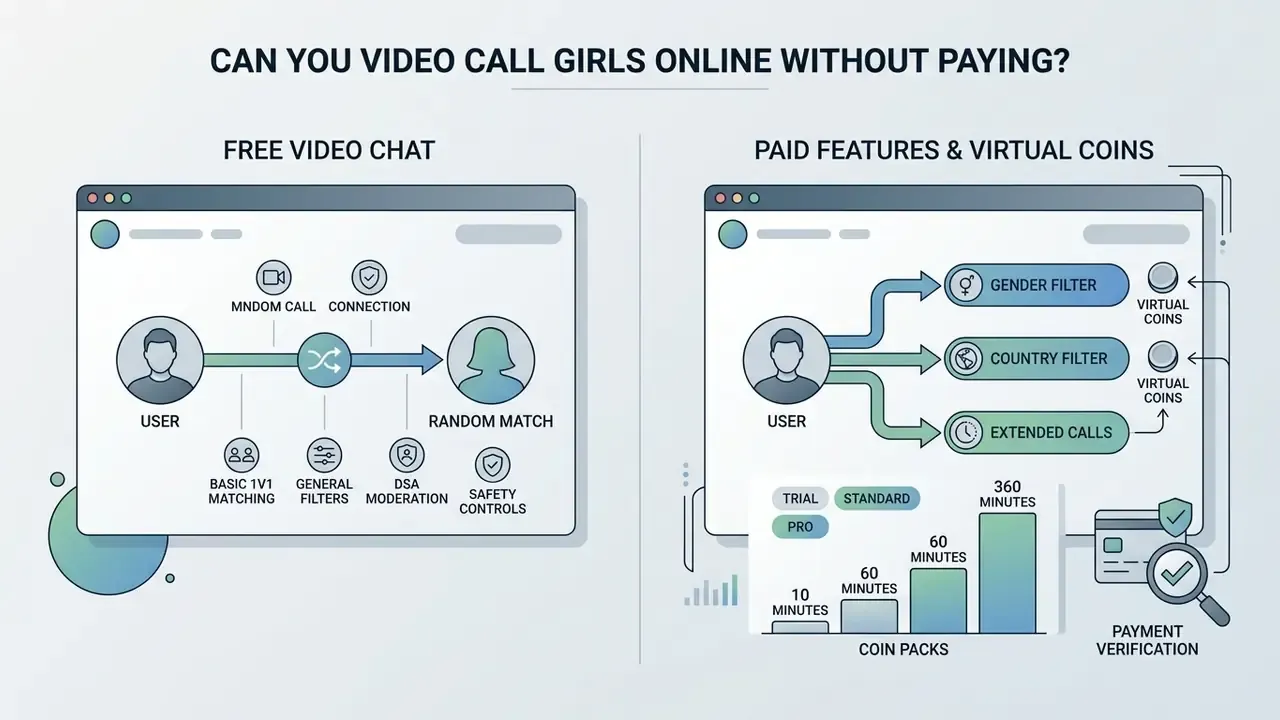
Most platforms let you open basic random video calls without paying anything upfront, but advanced filters and extended features require virtual coins or a subscription. Discovery is frequently free. Sustained direct interaction usually runs on a freemium structure.
So the honest answer to "can I video call girls online without paying?" is: yes for random matching, rarely for targeted matching.
What "free video chat" usually includes
Free tiers generally cover guest entry without registration, basic random matching, and short trial video calls. You can test the camera connection and hold brief general-pool conversations without entering payment details.
«Omegle offered text and video chat with strangers free of charge and without registration, and precisely that openness made the platform vulnerable to abuse.»
Current platforms shape the free tier more carefully. Documented examples include a 90-second free trial call before any charge applies, free browsing of feeds, live streams and party rooms with paid tiers marked optional, or a free batch of starter coins granted at sign-up so premium features can be tried without a card. Free-to-use positioning is genuine on some services, with unlimited random 1v1 matching and no daily cap, and payment limited strictly to who you are matched with rather than what the call delivers.
No universal standard defines a "fully free" bundle. Security guidance for video conferencing from public agencies covers controls, not commercial tiers, and vendor comparison tables show free versions differing substantially between services. Treat every free-tier promise as service-specific and verify it in the Terms of Service before you pay.
Coins, paid features and pricing transparency
Platforms monetize extra features through virtual coins, which unlock gender filters, direct calls and virtual gifts. Subscriptions remove recurring usage limits, while pay-per-minute coin deductions apply to private one-on-one sessions. Three monetization architectures dominate:
- Female-free, male-paid minutes. Women apply and pass manual photo review; men pay for time spent in 1v1 chat. The classic LuckyCrush-style model.
- Dual-currency host economies. Chamet documents Diamonds for buying gifts and Beans for host payouts, converting at 10,000 Beans = $1, with 1v1 calls as a monetized core feature.
- Freemium control unlocks. Monkey-style platforms keep matching free and charge for gender filters, ad removal, profile boosts and messaging past matches. HOLLA sells coins for video filters and country matching, while a "Plus" subscription removes some limits but not the coin-gated features. General-pool matching stays free on most services. Direct 1v1 video calls with specific gender or location filters run on minute-based coin deductions. Standard market pricing looks like this:



«Engagement, hedonic motivation and social acceptance are consistently associated with virtual-gift sending; a "killing time" motive is negatively associated.»
Billing transparency is the practical filter. A trustworthy listing states the coin-to-currency rate, the per-use cost of each feature, expiry rules for unused balances, and the cancellation path before checkout. Dostt's terms, for example, define coins as a limited, revocable licence for in-app features usable on audio or video calls, with unused coins expiring after six months, a clause that is very easy to miss. Google Play's subscription policy separately requires apps to disclose price, billing cycle, auto-renewal terms, and whether a subscription is needed to use the app at all. For a broader view of how digital media services structure their tiers, see our pricing overview, and if you are budgeting minutes against bitrate cost, our calculators section covers the arithmetic. Access tier comparison for online video chat platforms
| Access feature | Free tier | Coin-based access | Premium subscription |
|---|---|---|---|
| Account creation | Guest or optional | Registered account required | Registered account required |
| Random matching | Standard general pool | Priority queue | Filtered queue |
| Gender and location filters | Disabled or restricted | Deducted per match or use | Included or discounted |
| Call duration limits | Time-capped or trial (e.g. 90 s) | Pay-per-minute via coins (about $0.41 to $0.70) | Extended or uncapped |
| Direct messaging | Disabled | Costs coins per message | Unlimited or high limit |
| Automatic translation | Rarely included | Sometimes bundled per session | Usually included |
Pricing disclaimer: all figures above are indicative market ranges, not offers. Current rates, auto-renewal conditions, coin expiry schedules and refund policies must be confirmed in each platform's official Terms of Service and store listing before purchase. This material is informational and does not constitute financial advice.
Pricing and access table
Comparison of free and paid access parameters.
How to choose the best video call app for chatting with girls
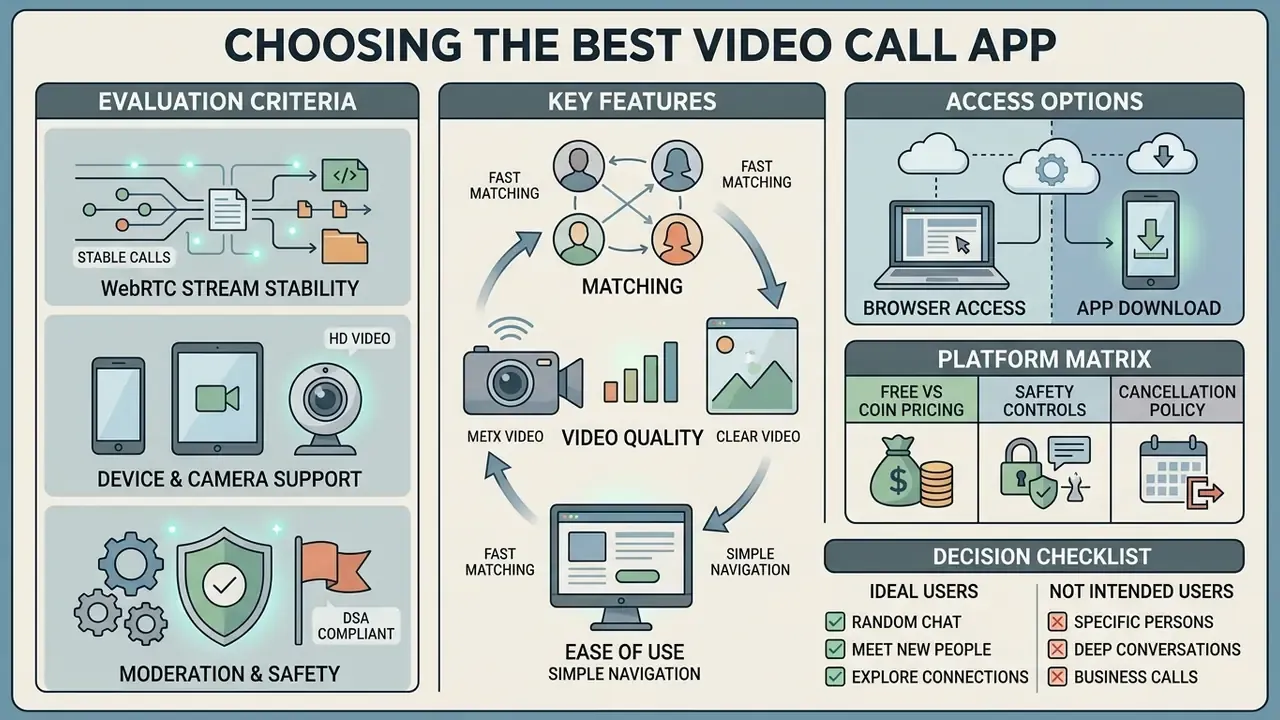
Choosing the best free online video call app with girls means evaluating four things: WebRTC stream stability, device camera support, moderation controls and bandwidth requirements. HD video streams demand real throughput and low latency, and no interface trick compensates for a weak connection.
Matching, video quality and ease of use
Smooth calls depend heavily on network stability and minimal delay. Conversational latency above roughly 200 milliseconds noticeably impairs real-time dialogue, consistent with ITU-T G.114 delay recommendations for interactive voice and video, while acceptance limits for audiovisual conversation sit closer to 500 ms.
«A WebRTC-QoE dataset covering 20 participants across 15 network conditions confirms that delay, jitter and packet loss systematically reduce subjective conversation-quality scores.»
Bandwidth requirements are equally concrete. Holding HD video needs sustained throughput of roughly 1.5 Mbps for 720p and 2.5 Mbps to receive with 3.0 Mbps to send for 1080p, per Zoom's published technical requirements. Public-sector videoconferencing standards set slightly stricter figures: 720p at 2.6 Mbps down and 1.8 Mbps up, 1080p at 3.8 Mbps down and 3.0 Mbps up. Independent network analysis recommends targeting about 5 Mbps down and 3 Mbps up per single-user conference to avoid bandwidth-driven degradation entirely.
Quality is not merely cosmetic. It changes social outcomes:
«First impressions formed over Zoom were as accurate as those formed in person, but poor audio and video quality reduced how much participants liked each other.»
Readers who care about compression trade-offs and bitrate behaviour in browser-delivered media may find our guide to video compressors and our comparison of free AI video generators useful adjacent reading on how bitrate ceilings shape perceived quality.
Browser access or app download on a phone
Browser access removes installation friction by running directly on WebRTC standards, which makes it ideal for a quick trial session.
«WebRTC improves browser performance compared with plugin-based delivery, yet WebRTC session QoE remains vulnerable to delay, jitter and packet loss regardless of device class.»
Native mobile applications on iOS and Android offer better camera optimization, push notifications and integrated mobile wallet billing. Browser sessions win on speed and disposability: nothing installed, no email confirmation loop, camera permission revocable at browser level in one click.
Both mobile apps and browser interfaces are expected to follow accessibility standards such as WCAG 2.1 AA. U.S. Department of Justice guidance (2024) treats downloaded smartphone and tablet software as a distinct but equally regulated form of "web content", with compliance deadlines extending into 2027 and 2028, and W3C mobile accessibility mapping confirms that WCAG principles apply to mobile web content, web apps, native apps and hybrid apps alike.
Head-to-head reliability evidence for browser versus native random-chat clients is thin. The available WebRTC reliability research covers web conferencing platforms, not random-match services, so treat any confident claim here with suspicion. Choosing between a phone download and a desktop browser therefore comes down to connection reliability, billing preference and screen-size comfort. If you also edit or publish media you record elsewhere, our YouTube video editor workflow guide covers the downstream steps, and licensing questions belong in the AI Media Commercial-Use Hub.
Platform selection matrix for online video calling
| Platform format | Free access level | Camera and HD video | Privacy and moderation | Account required | Device support |
|---|---|---|---|---|---|
| Browser-based random chat | High (free general pool) | 720p, WebRTC standard | Basic report, cookie-based | No | Desktop and mobile browsers |
| Native mobile app (iOS/Android) | Freemium (coins or trial) | Up to 1080p mobile HD | In-app block and AI moderation | Yes | Smartphones and tablets |
| Web-based video hubs | Freemium or subscription | Adaptive HD bitrate | Account verification, moderated | Yes | Cross-platform browser |
No matching rows Clear one or more filters to restore the matrix.
Read plainly: browser chat is the cheapest way to test a service and the weakest on accountability. Native apps trade anonymity for stronger moderation and better camera handling. Web hubs sit in between, with verification gates and adaptive bitrate but a mandatory account. For additional analytical tools on media quality metrics, see our AI Media Comparison Matrices.
Is random video chat right for you?
Ideal for users who:
- Want instant 1v1 live conversations without filling out a lengthy dating profile.
- Seek native-language practice with international speakers in real time. Language learners consistently report that speaking, not vocabulary, is the wall, and unscripted calls attack it directly.
- Have short pockets of free time and no patience for onboarding flows.
- Value privacy and instant session-teardown controls, meaning the "next" button.
Not intended for users who:
- Want text-only messaging, offline forums or asynchronous match browsing.
- Expect curated long-term matching algorithms, detailed profiles or social-media integration.
- Prefer group rooms and an audience rather than a private two-person call.
- Are under 18 years of age. Adult-only access is enforced without exception.
Privacy and safety in random video chat
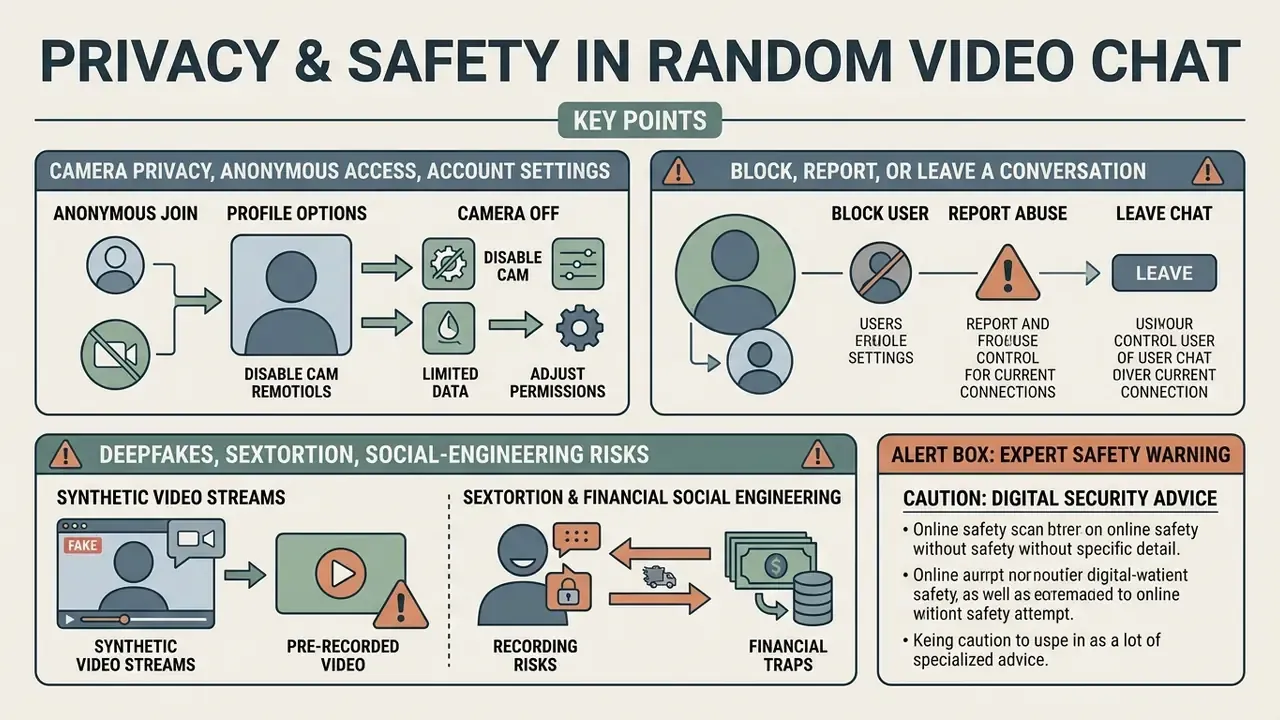
Safety disclaimer: this section is general in nature and does not replace consultation with a digital-security specialist or a legal adviser in your jurisdiction. Platform obligations under the DSA, GDPR and national child-protection law vary by country.
Protecting privacy during random video calls comes down to limiting personal data exposure, managing hardware camera permissions, and using the reporting tools that exist. Anonymous matching lowers entry friction, and it raises exposure risk whenever moderation is weak.
Reported safety layers across the niche include age gating, profile verification, report and block tools, AI moderation, HTTPS and WebRTC encryption, plus background blur. The weak link deserves blunt naming: several platforms still rely on a self-declared birthday field instead of robust identity or liveness verification. That is why independent reviews keep flagging impersonation, explicit content and payment abuse even where vendor pages emphasise moderation.
Camera privacy, anonymous access and account settings
Camera access should be granted explicitly, per session, through operating system and browser privacy toggles. On Windows, three separate switches govern this: device-level Camera access, Let apps access your camera, and Let desktop apps access your camera. Revoking site permission in the browser address bar is the fastest hard stop for a live stream.
Regulatory guidance is unambiguous about defaults for younger users, and about why those defaults matter:
«The digital environment opens broad opportunities for children while simultaneously exposing them to risks: cyberbullying, harmful content and inappropriate contact with strangers.»
Consistent with that, current EU privacy guidance for minors requires geolocation, microphone, photo access, camera, contact synchronisation and non-essential tracking to be off by default, with profile photo and content visibility restrictable. UK good-practice guidance for chat-service providers adds that registration details must not automatically propagate into public profiles or open member directories.
Users should avoid showing identifying background details during live camera calls with strangers: residential addresses, workplace logos, delivery labels, school uniforms, full names on paperwork. Encryption protects the call in transit. It cannot protect information you volunteer.
How to block, report or leave a conversation
To end an uncomfortable interaction, tap "next" immediately or close the active call window. Most platforms provide an in-call safety menu with direct "Block" and "Report" buttons for flagging offensive behaviour.
- Open the call options or participant menu in the video overlay.
- Select Block to cut the connection and prevent future matching with that account.
- Choose Report to submit media logs or user IDs to the moderation team.
- Confirm the submission, mirroring the standard three-step pattern documented by Google Chat ("Block and report", optional "Also report", confirm) and WhatsApp ("Block", optional "Report", or "Report group" then "Exit group and clear chat").
Why do these buttons actually produce consequences on regulated services? Partly because of who sits behind the payment rail:
«Payment intermediaries effectively regulate the industry: platforms that fail to act on complaints about illegal content risk losing access to payment processing.»
Regulatory pressure pushes the same way. Under the DSA, platforms must issue a statement of reasons whenever content or an account is restricted, and those statements are collected in a public transparency database. UNESCO guidance separately expects platforms to publish understandable, auditable moderation policies and to explain automated tooling and personal-data use in moderation. Germany's BSI minimum standard for video conferencing goes further: moderators must be able to disable chat, and chat messages must be deleted automatically at session end unless archived with prior notice.
How to start a video call and make the first conversation easier
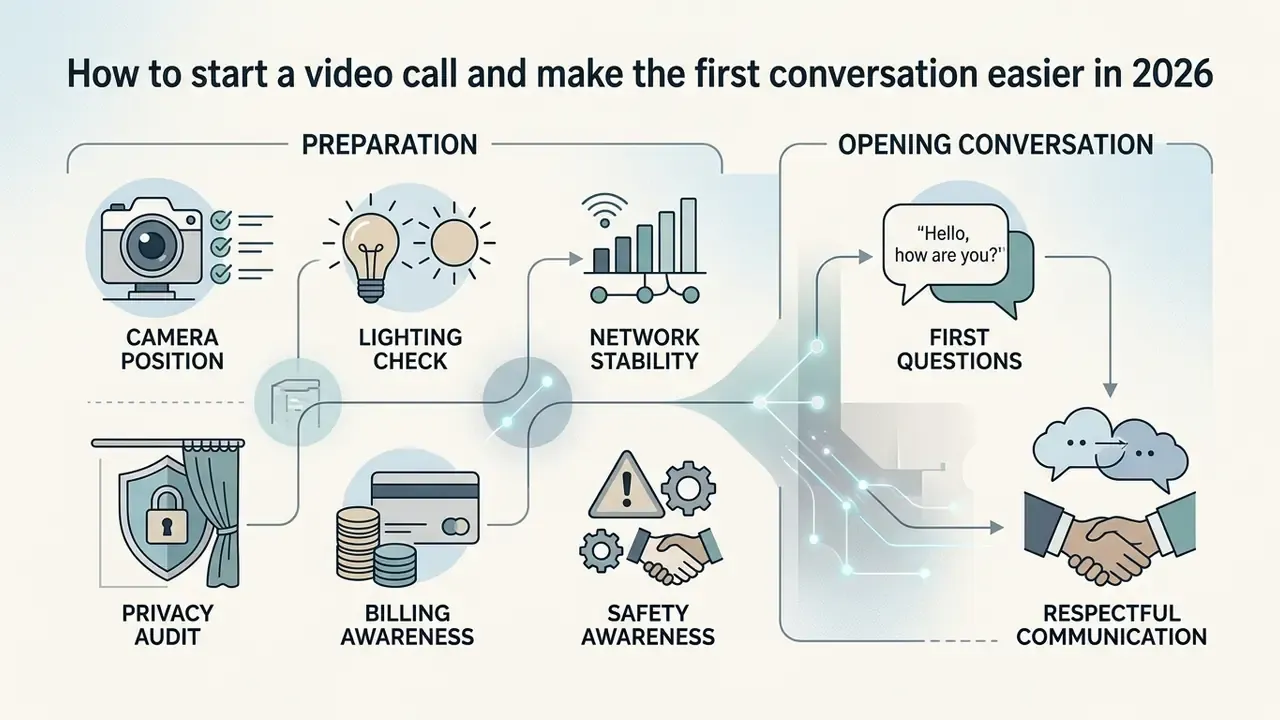
Starting a live video call well takes two things: a quick technical check and a polite opening line. Testing hardware before you enter the queue removes most awkward pauses.
Preparing your camera and connection before the call
Before joining, position the camera at eye level roughly 60 to 100 centimetres away, following videoconferencing placement guidance that recommends a top-centre mount at that distance. Avoid swivel chairs. They turn small movements into distracting motion on a compressed stream.
Set front-facing, neutral lighting, with 4500K to 5000K LED as the recommended range, and make sure the light faces you rather than sitting behind you. Backlighting silhouettes the subject and forces the encoder to waste bitrate on noise. Verify that upload speed meets minimum HD thresholds, 1.5 Mbps for 720p and 3.0 Mbps to send 1080p, prefer wired Ethernet where available, and close other bandwidth-heavy applications.
Then borrow the pre-call reset used in professional guidance: take a five-minute break, close unrelated tabs, move your phone out of reach, join a couple of minutes early. Research on video-mediated social talk found that remote conversation demands measurably more planning than an in-person chat. That is precisely why a prepared opener reduces awkwardness.
First questions and respectful communication with strangers
Open with low-pressure, open-ended questions rather than personal ones. Respectful etiquette means greeting your partner by name, asking before shifting a topic, speaking clearly and slightly slower for non-native speakers, and accepting a partner's decision to press "next" without frustration.
- "What has been the best part of your day so far?"
- "Where in the world are you tuning in from right now?"
- "What hobby are you currently most passionate about?"
- "What's something you're weirdly good at?"
- "If you could be doing anything else right now, what would it be?"
Openers work best when they are specific rather than a bare "hi", when they ask one open question instead of running an interrogation checklist, and when they stay away from NSFW or highly personal territory in the first minutes. Comment on something visible, a hobby or a location, then actually respond to the answer. That second part is where most people fail.
The payoff for getting the basics right is measurable:
«Participants formed first impressions over Zoom that were as accurate and as positive as impressions formed in person, provided connection quality remained stable.»
Audio clarity carries a disproportionate share of that impression. If you want to understand how speech quality is measured and reproduced in digital media pipelines, see our reference on ai voice generator technology, the practical notes on an ai voice maker workflow, and the walkthrough of ai voice over production. Two narrower cases are worth a look for anyone testing microphone chains: ai voice generator hindi text to speech for multilingual output, and an ai voicemail generator for short-form recording quality. Zero-registration tooling is covered in our ai voice generator free, no sign-up guide.
- Camera positionhardware mounted at eye level, 60 to 100 cm away.
- Lighting checkfront-facing neutral light source (4500K to 5000K), no heavy backlighting.
- Network stabilitybandwidth verified at 1.5 Mbps or more up and down, Ethernet preferred.
- Privacy auditbackground clear of personal documents, address labels and identifying location signs.
- Billing awarenesscoin balance, per-minute rate and auto-renewal status confirmed before the session.
- Safety awarenessNext, Block and Report controls located on screen before matching starts.
FAQ about free online video calls with girls
Is random video chat with girls actually free?
Basic random matching is usually free, and many services grant starter coins or a short trial call so premium features can be tested without a payment method. Once those run out, filtered matching, extended 1v1 calls and direct messaging are charged per minute or per action. Free access is genuine at the matching layer. It is metered at the targeting layer.
How does matching work, and can I choose who I talk to?
No browsable list exists. One click puts you in a live queue, and the server pairs you with the next available user. Paid filters narrow the pool by gender, age band (18 to 70+), country or language, but they never let you pick a specific individual. Tapping "next" abandons the current pairing instantly.
Why is the camera unavailable or the screen blank?
A blank screen or missing camera feed usually comes from blocked browser permissions, operating-system privacy restrictions, another application holding the camera, or a faulty driver.
- Check browser permissions: click the lock icon in the address bar, set Camera access to Allow, then reload.
- Close conflicting apps: make sure no other application (Zoom, Skype, OBS, a virtual-camera tool) is holding the webcam. A crossed-out camera icon usually signals this.
- Check OS-level access: on Windows, verify both device-level and per-app camera toggles. Antivirus suites can block camera access outright.
- Update or reinstall video drivers: download the webcam driver from the manufacturer's official site and reinstall.
- Clear cache and cookies: then reload the page. This resolves a surprising share of purely visual glitches. Network conditions can imitate a hardware fault:
«High packet loss and jitter cause freezing or blank video frames; participants in WebRTC-QoE experiments consistently rated such conditions as unacceptable.» Bingöl et al., WebRTC-QoE Dataset (2024) If technical issues persist while integrating voice or video software, consult our dedicated support resources or review the technical specifications in our AI Media API documentation.
How do I cancel auto-renewal or delete my video chat account?
To stop recurring billing and remove your data:
- In-app cancellation: tap your profile photo, open the three-dot or settings menu, then Subscription and Cancel subscription.
- Mobile store billing: on iOS, manage through Apple ID Settings and Subscriptions. On Android, open Google Play Store, then Payments and subscriptions, then Subscriptions. Cancelling in-app does not always cancel a store-level subscription, so check both.
- Timing: cancel at least 24 hours before the period ends, since renewals are billed within the final 24 hours of the cycle.
- Account deletion: go to Account settings and Close my account, often behind the same three-dot menu. This purges active coin balances, ends matching eligibility, and unlinks stored media logs.
- Keep evidence: screenshot the confirmation screen and keep the cancellation email in case of a disputed charge.
Where can users get help with account or billing issues?
Contact platform support through the in-app help centre or the official portal form, including username, device model, timestamps and a short description of the problem. Subscription and coin purchase disputes can also be escalated through Apple App Store or Google Play billing channels, depending on the device. Apple's flow is sign in, review purchases, request a refund. Many services offer 24/7 messaging support; phone support in this niche is rare.
Is random video chat legal and age-restricted?
These platforms are strictly 18+. Entering confirms you are an adult, and platforms operating in the EU carry DSA obligations covering notice-and-action mechanisms, transparency reporting and protection of minors. Local law may add restrictions on adult-oriented streaming. Verify the rules that apply where you live.
Related resources
- Guide to video compressors: bitrate, file size and quality-loss trade-offs relevant to HD streaming.
- Comparison of free AI video generators: quality limits, credits and export constraints in browser-based video tools.
- Guide to AI voice generators: how speech quality and clarity are measured in digital media.
- Privacy policy · Safety rules · WebRTC security guide · Terms of service · Support AI Media Glossary | Platform documentation and governance guides