What this guide covers: what an AI voice over generator is, the features that decide quality (prosody, emotion tags, stability sliders), a step-by-step production workflow (script generation, synthesis, audio cleanup, sync, export), platform-specific narration settings, multilingual dubbing and accessibility, free-plan limits and commercial rights, enterprise governance with privacy and audit trails, selection criteria, and a closing FAQ.
Why should a risk or finance leader care about a voice tool at all? Because the moment synthetic narration appears in a compliance module or an investor update, it stops being a creative asset and starts behaving like a model in production.
What Is an AI Voice Over Generator for Video?
An AI voice over generator for video is a specialized software tool that converts written text scripts into synthetic audio narration designed to synchronize with video timelines. These systems replace traditional voice actor recordings by using deep neural networks to produce realistic human-like speech across multiple languages, accents, and emotional tones.
In practice, three capabilities separate a modern generator from a legacy text-to-speech engine: prompt-level control over emotion and pacing, zero-shot voice cloning from short reference samples, and native export of time-aligned subtitle files alongside the audio track. Microsoft AI's MAI-Voice-2 (released 2 June 2026) illustrates the current baseline, a prompted text-to-speech model producing expressive speech across 15 languages at 24 kHz output. Google Cloud Text-to-Speech and Azure Speech expose equivalent synthesis through SSML and REST APIs for production pipelines.
From Script to AI Video Narration
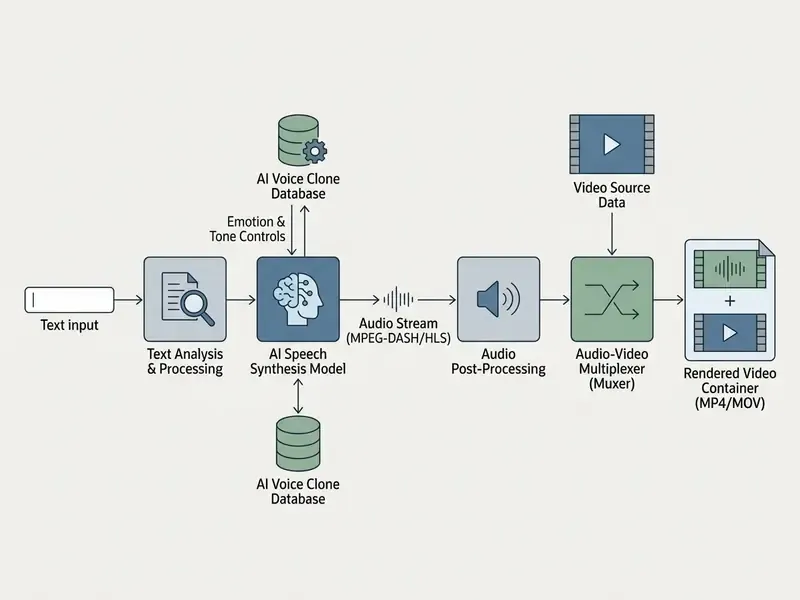
Converting a text script into AI video narration means processing raw text through a natural language processing pipeline to synthesize timed audio tracks for media editors. The process extracts semantic structure, applies phonetic text normalization, assigns prosodic timing markers, and renders playable audio files such as MP3 or WAV for visual alignment.
Modern text-to-speech architectures rely on two-stage generative pipelines: neural models convert text into discrete acoustic tokens, and a neural vocoder decodes those tokens into raw waveforms. The practical trade-off of this architecture is documented in benchmark work on large discrete token-based speech language models.
"The SLM generates highly variable prosody and spontaneous speech, surpassing conventional TTS in naturalness while lagging in intelligibility and speaker consistency."
That asymmetry matters for video. Token-based models deliver the spontaneous, slightly breathy delivery audiences associate with human narration, yet they need pronunciation dictionaries and per-sentence retakes when brand names, tickers, or regulatory terminology must sound identical across a series. In video workflows, this narration pipeline lets creators turn written documents into structured voiceovers, cutting audio production timelines from days to minutes while keeping speech clarity intact. Teams assembling the final cut usually pair the generator with dedicated video editors for post-production rather than mixing inside the synthesis tool itself.
AI Voiceover, Text to Speech, and Video Voice Generation
The foundation layer of AI narration is Text to Speech (TTS), which provides raw speech synthesis, while an AI voiceover configures that engine for formal media presentation. AI video voice generators wrap synthesis tools inside a video production environment with timeline editing, visual syncing, and multi-track rendering.
Basic cloud TTS platforms (Google Cloud Text-to-Speech, Azure Speech) expose raw APIs for developers. Dedicated video voice generators, by contrast, package synthesis into creator-facing workspaces. Enterprise organizations often reach these underlying models through an AI Media API to automate localized video output at scale; teams still choosing between an engine-level integration and a packaged workspace can review our ranking of the best AI video generators before committing to a vendor.
The distinction is functional, not cosmetic. Google Cloud documents TTS as producing playable audio that can augment video, whereas OpenAI's TTS model documentation explicitly notes that video is not supported, confirming that the video layer is always a separate product decision. That separation explains why standalone engines publish measurable speech metrics (MOS, WER, speaker similarity) while bundled generators advertise workflow speed instead.
AI Voice Generator Features That Affect Voiceover Quality
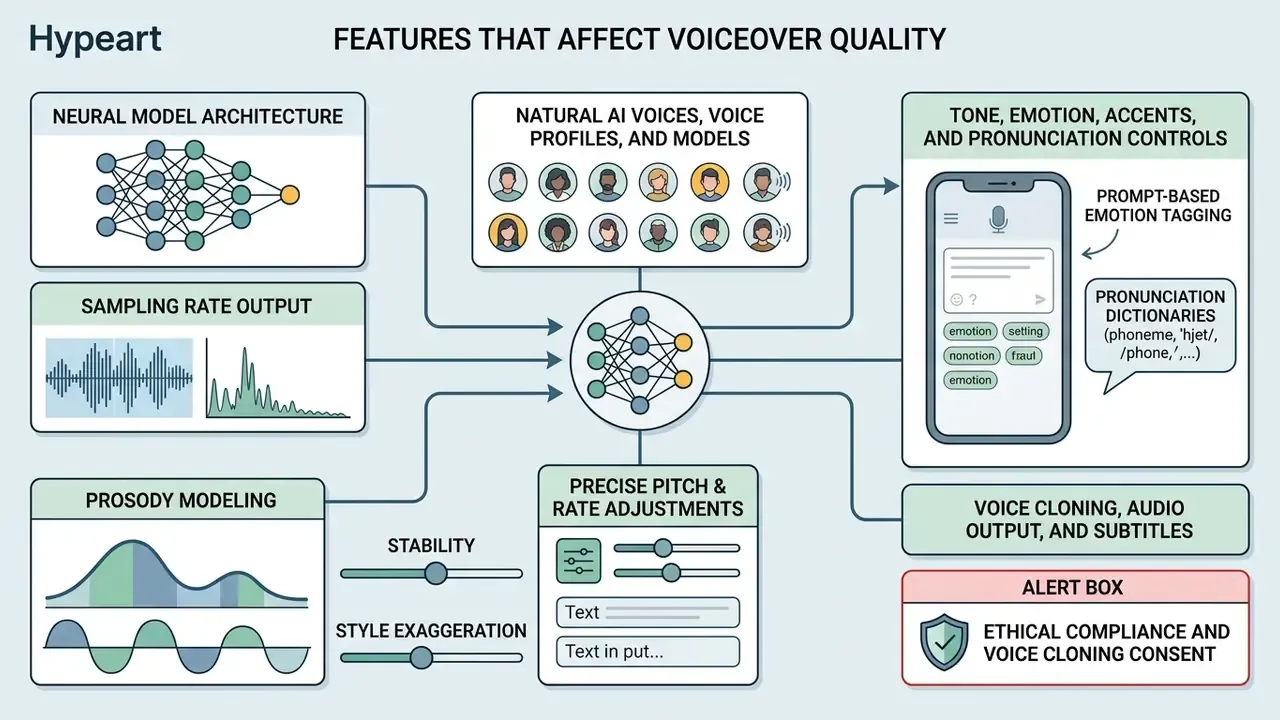
Voiceover quality depends on neural model architecture, sampling rate output, prosody modeling, and precise pitch and rate adjustment controls. High-fidelity systems hold high Mean Opinion Scores (MOS) and low Word Error Rates (WER) while preserving realistic vocal warmth across long script inputs.
Natural AI Voices, Voice Profiles, and Models
Natural AI voices rely on large-scale zero-shot neural speech models trained on tens of thousands of hours of multi-speaker audio. These models capture breathing patterns, vocal inflection, and micro-pauses, the details that separate robotic synthesis from lifelike narration.
Benchmark evaluations show that leading models now approach human performance. The NaturalSpeech 3 architecture (2024) reported a Word Error Rate of 1.81% on LibriSpeech benchmarks against 1.94% for ground-truth human recordings.
"NaturalSpeech 3 achieves CMOS comparable to human recordings and improves speaker-similarity (Sim-O) from 0.64 to 0.67 against baseline systems."
Similarly, MaskGCT (2025) used discrete masked generative transformers trained on 100,000 hours of speech to deliver a Similarity Mean Opinion Score (SMOS) of 4.27 out of 5.0.
"MaskGCT reaches a CMOS of roughly 0.10, indicating that listeners generally prefer its output over baselines and perceive it as highly similar to reference voices."
Creators evaluating systems can inspect standardized performance metrics in AI Media Comparison Matrices to match model capacity with production requirements. One caveat worth stating plainly: MOS alone is no longer accepted as sufficient. Evaluation literature from 2023 to 2025 recommends pairing scalar naturalness ratings with AB preference tests, speaker-similarity scores, and listening-effort measurements, because a voice can score highly on clarity while drifting in identity across a long series.
Tone, Emotion, Accents, and Pronunciation Controls
Fine-tuning synthetic narration requires prosodic control levers: pitch adjustment, speaking-rate modification, pause insertion, and explicit emotion conditioning. Standardized markup languages such as Speech Synthesis Markup Language (SSML) give developers and creators direct access to those acoustic parameters.
Under W3C SSML 1.1 specifications, creators use tags such as <prosody rate="fast" pitch="+5Hz"> and <break time="500ms"> to alter pacing. Vendor implementations extend the base standard with hard limits: Google Cloud supports <break strength> values from x-weak to x-strong, Amazon's <emphasis> makes speech louder and slower, and Microsoft Azure caps <break time> at 20,000 ms while exposing pitch, contour, range, rate, and volume attributes.
Research by Luo et al. (2024) showed that combining Speech Emotion Recognizers (SER) with prosodic factor generators achieved 51% emotion-distinguishability accuracy and linear controllability scores of 0.95 across prosodic attributes.
"The model reported MOS values between 3.5 and 3.9 for audio quality across control configurations, acceptable, but below the level of leading general-purpose systems."
These granular settings prevent monotone delivery in corporate training presentations and direct-response marketing videos. Small lever, large perceived difference.
Prompt-based emotion tagging (no-code control). Beyond formal SSML, modern creator-facing AI voice editors accept inline emotional tags placed directly inside the text script. Insert bracketed syntax such as [excited] before a product announcement, [whisper] for a confidential reveal, [serious] before a compliance disclaimer, or [thoughtful pause] between key points, and the generative model shifts vocal tension and breathing dynamics without manual parameter coding. Tags operate at phrase level: a 60-second ad script can move from [energetic] in the hook to [calm] in the risk disclosure without splitting the render into several audio clips. For creators who will never open an SSML document, this is the fastest route to expressive narration.
Stability and style exaggeration sliders. Modern generative voice interfaces also expose Voice Stability (controlling random pitch and timing variation between generations, where low stability yields more dramatic, less repeatable takes) and Clarity / Style Exaggeration (amplifying emotional expression at the risk of artifacts, sibilance, or clipped consonants). A practical production rule: raise stability for multi-episode course narration where consistency across 40 modules matters more than drama, and lower it for single-shot ads where expressiveness drives retention. Leave volume normalization sliders at default until the final mix pass, since per-clip gain changes complicate loudness matching later.
Pronunciation dictionaries. Brand names, drug names, tickers, and localized place names belong in a project-level lexicon (phoneme or IPA overrides) before bulk generation begins. Retrofitting pronunciation after 100 modules are rendered remains the single most common cause of full re-renders in enterprise localization projects. Expensive, and entirely avoidable.
Voice Cloning, Audio Output, and Subtitles
Voice cloning creates a digital vocal replica from a brief reference audio file, letting organizations maintain a consistent narrator identity across video campaigns. Modern zero-shot models need as little as 6 to 10 seconds of clear source audio to generate functional speaker embeddings, a threshold documented in 2025 zero-shot cloning studies using XTTS-v2 with SECS, MCD, MOS-N, and S-MOS scoring. Vendor APIs typically accept MP3, M4A, WAV, or raw PCM reference files, with source-length windows from roughly 10 seconds up to five minutes and upload caps around 7.5 MB.
Output pipelines export raw audio in uncompressed WAV or compressed MP3 while simultaneously generating time-stamped WebVTT or SRT subtitle files. The effect of those subtitles on ad performance has been measured experimentally.
"Across four experiments, human voice-overs reduced cognitive load more effectively than AI voice-overs; when subtitles were present, that effectiveness gap narrowed substantially."
The operational takeaway is blunt: if you deploy synthetic narration in paid social or short-form advertising, treat burned-in or auto-synced captions as a mandatory component of the creative, not an accessibility afterthought.
ALERT BOX: Ethical compliance and voice cloning consent
"Cloned voices are perceived as warmer, more authoritative and more 'human-like' than the originals, and listeners show greater willingness to disclose personal information to a cloned voice."
For regulated communications, think investor updates, insurance disclosures, patient guidance, that persuasion delta is a compliance consideration rather than a feature. Document which voice profile was used for which asset, and keep disclosure language consistent across the series.
How to Create an AI Voice Over for Videos
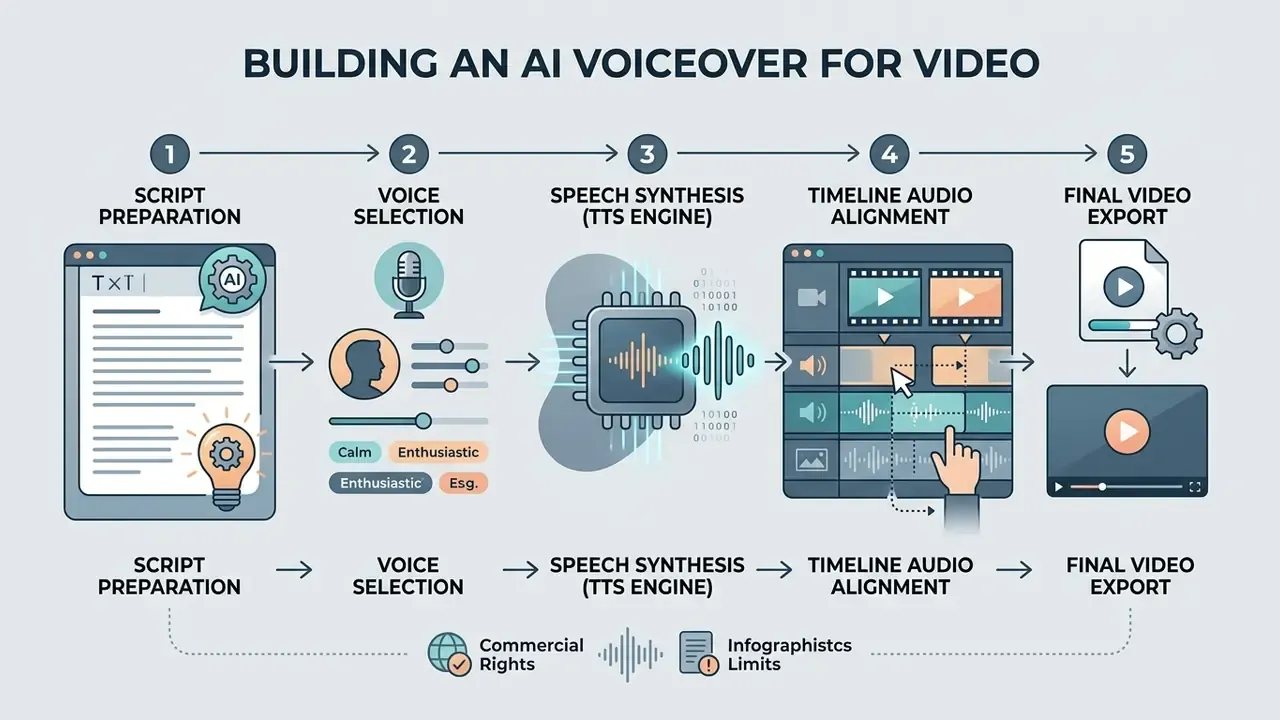
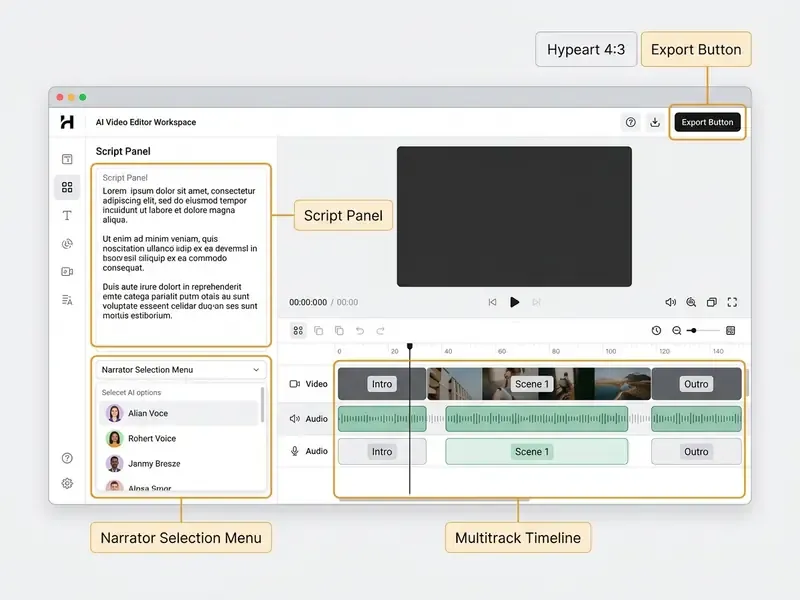
Creating an AI voiceover involves uploading source assets or starting a blank canvas, inserting script text (or generating it with an AI scriptwriter), selecting a target voice profile, cleaning any hybrid human recordings, aligning audio clips on a multitrack timeline, and rendering the final file.
Upload a Video or Start With a Blank Project
Video editors support two project initiation paths: importing existing raw footage or opening a blank canvas project. Importing footage lets creators overlay narration directly onto pre-edited visuals, whereas starting blank suits script-first visual creation workflows. Documentation patterns confirm both entry points are standard: ElevenLabs Studio exposes a New video voiceover upload flow alongside a separate New blank project, Video project path, Captions supports both file upload and URL import, and Google Vids separates Blank Vid from opening an existing video.
In a recent media enterprise project, a regional financial firm moved from manual voice recordings to automated web-based narration pipelines. The production team uploaded raw product demonstration clips into an online editor workspace and standardized a reusable media track layout (locked track order, pre-set ducking, fixed export preset), which removed most of the repetitive per-project setup work. Note: the setup-time reduction is an internal production estimate from a single deployment and has not been independently audited; treat it as directional rather than a benchmark. Detailed setup strategies live in the YouTube video editor workflow guide.
One-click audio enhancement for hybrid voice tracks. When you mix synthetic AI narration with user-recorded voice tracks or raw microphone takes, background hum, wind noise, and room reverb destroy clarity. No amount of prosody tuning on the synthetic track will hide a noisy human track sitting next to it. Modern AI production suites offer single-click noise cancellation (spectral de-noising and isolation transformers) that strips room reflections, equalizes frequencies, and lifts vocal presence before timeline synchronization. Run cleanup before alignment, not after: de-noising can shift transient onsets by a few milliseconds, which desynchronizes markers you placed earlier. If your recording environment is uncontrollable, a cleaned human take plus AI narration for pickup lines is usually cheaper than re-recording the whole script.
Add a Script and Generate AI Speech
Generating or refining scripts with AI assisting tools. If you have no finalized script, integrated AI scriptwriters (powered by LLMs such as ChatGPT or Claude, or a native "AI scripter" inside the editor) can draft video outlines from raw prompts. Enter your target format (for example, 60-second TikTok product review, 5-minute corporate training module, or 90-second compliance explainer), select a tone (authoritative, humorous, energetic, neutral), and let the engine produce formatted voiceover text with auto-inserted visual cues and natural audio break tags. Three practical rules: cap sentences at about 15 words so synthesis does not run out of breath, mark every acronym for the pronunciation dictionary in the first draft, and require the model to output a word count so you can predict runtime (150 WPM is roughly 150 words per minute of finished narration).
Once project assets and text are ready, paste the script into the script editor field, choose target voice profiles, and generate a preview synthesis for review. Fine-tuning pronunciation dictionaries at this point ensures complex industry jargon and brand names are enunciated correctly before final audio rendering.
During script preparation, creators test voice tone using interactive preview controls before running full synthesis. Preview is a documented, discrete step in production TTS tooling: Google AI Studio exposes type-and-play voice trials, and Cognigy's Voice Preview lets teams test text or SSML with a selected language and voice without running the full flow. Modern voice generation tools also allow fine adjustments to individual sentence pauses and emphasis tags. Creators exploring dedicated speech tools can reference our comprehensive guide to AI voice generators.
Sync Voiceover With Video and Export Audio
The rendered AI narration track is dropped onto the multitrack editing timeline, where visual transitions are adjusted to match speech pauses and sentence boundaries. A repeatable method: import narration first, place markers at sentence starts and intentional pauses, rough-sync visuals to those markers, then tighten with slip edits and frame nudges.
Loudness and music balance. Background music stems are usually ducked well below dialogue. Practitioner guidance recommends starting background music around -18 dB to -25 dB under voice (Juno School mixing guidance, 2026), and the BBC's best-practice guide advises reducing music by a further 4 dB at final mix. These are working targets from production guidance rather than a binding technical standard, so verify against your delivery specification.
Engineers then apply final mixing passes to eliminate clipping and keep loudness normalization consistent. A -14 LUFS integrated target is the de-facto convention for web and streaming delivery, because major platforms normalize playback toward that region; broadcast deliverables use different specifications (commonly -23 or -24 LUFS), so confirm the current requirement in the destination platform's own delivery documentation before locking your master. On completion, the video editor renders combined MP4 containers or exports standalone audio tracks for external distribution. Teams finishing the cut outside the generator can compare options in our roundup of free video editing software.
Export checklist: confirm sample rate (24 kHz or higher for narration, 48 kHz for broadcast), export WAV for archival and MP3 for review copies, deliver subtitles as a separate SRT or VTT sidecar rather than burning them in at master stage, and keep the un-ducked narration stem so localization teams can remix music without re-synthesizing speech.
AI Voice for YouTube, Instagram, TikTok, Ads, and Courses
Synthetic narration serves distinct requirements across digital platforms, from fast-paced, highly expressive delivery in short-form social videos to measured, authoritative tones in corporate training courses and commercial advertisements. Creators building visuals from prompts rather than footage often pair narration with text-to-video AI tools so that script, imagery, and voice all originate from a single brief.
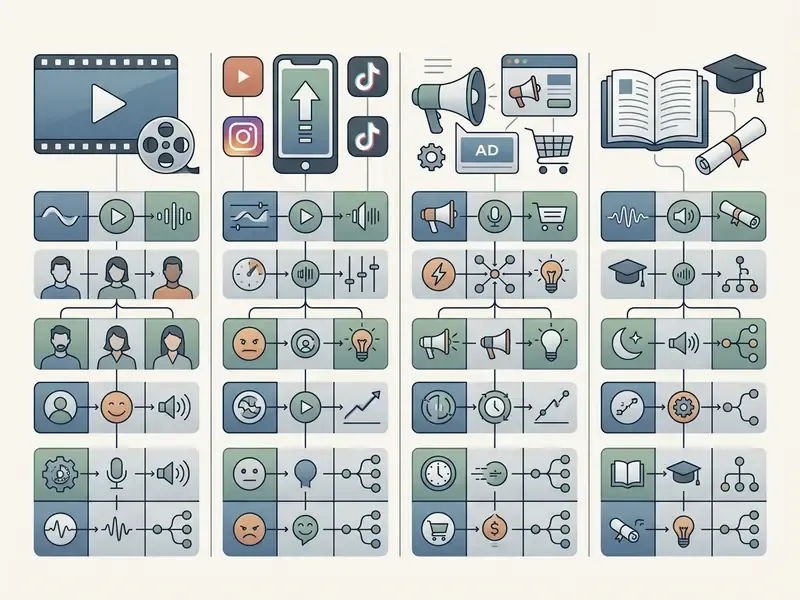
| Content channel | Target pace (words/min) | Emotional tone | Key synthesis requirements |
|---|---|---|---|
| YouTube Shorts / TikTok | 160 to 190 WPM | High energy, dynamic | Expressive prosody, auto-captions |
| Corporate training | 130 to 150 WPM | Calm, academic | Clear articulation, pauses between blocks |
| Advertising promos | 140 to 170 WPM | Persuasive, trustworthy | Precise emphasis tuning, SSML highlighting |
| Documentary / faceless | 120 to 140 WPM | Narrative, deep | High naturalness (MOS above 4.0), variation |
| IVR / phone scripts | 120 to 140 WPM | Neutral, instructional | 8 kHz compatibility, fixed pitch, stability |
Marketing, Product, Educational, and Business Videos
Commercial marketing and educational presentations demand precise vocal clarity, steady cadence, and professional voice profiles that mirror institutional brand guidelines.
"Disclosure can be verbal at the start of a video or presented as a watermark; contracts should cover duration of use, ownership and licence, deletion of the voice model, and access control."
The earlier claim that "Microsoft AI's synthetic voice transparency guidelines recommend explicit disclosure when commercial software uses synthetic voices for public-facing corporate communications" is now sourced directly to the Azure transparency note above, which adds two contractual requirements most teams overlook: voice-model deletion terms and access control.
For enterprise compliance leaders, consistent vocal representation across product tutorials and customer onboarding videos reduces brand risk. Concrete regulated-industry patterns where AI narration is already standard include multi-jurisdiction compliance training modules that must be re-issued whenever a rule changes; IVR and call-centre prompt libraries where a single voice identity must persist across thousands of short utterances; internal policy briefings distributed across language markets; and customer-facing product explainers where legal review requires narration to match approved copy word-for-word. In each case, the value is not "cheaper voice talent". It is that the audio asset becomes a versionable artifact tied to an approved script revision.
Organizations calculating software license overhead across departments often use AI Media Calculators to estimate per-minute voice synthesis costs. Under WCAG 2.2, business video still requires captions, text equivalents, and keyboard-accessible playback controls, whether narration is human or synthetic.
Languages, Dubbing, and Accessibility for AI Video Narration
AI voice generators enable rapid global content distribution through automated translation, multi-accent dubbing, and standardized accessibility compliance across geographical markets.
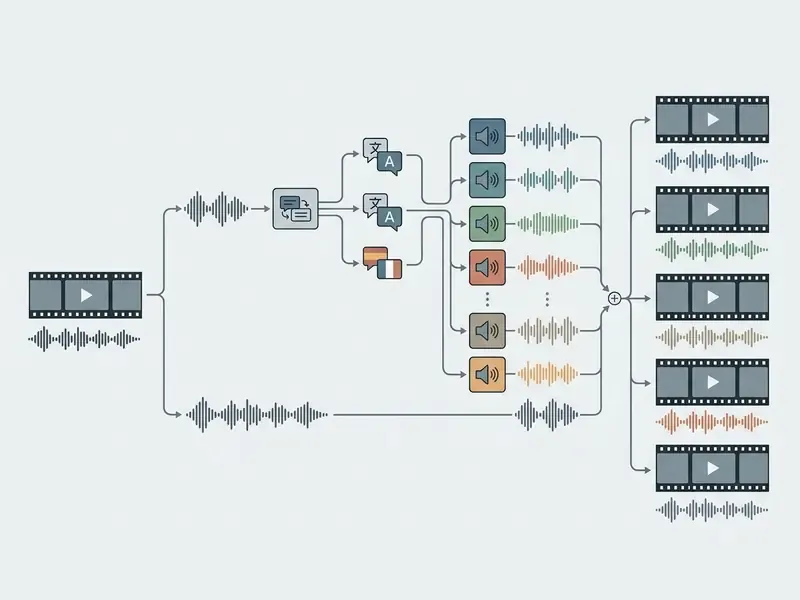
Generate Voiceovers in Multiple Languages and Accents
"In intralingual cloning, Confucius4-TTS reaches WER 1.49 with speaker similarity 0.700 for English; for Japanese-to-Chinese dubbing it reports WER 4.87 against 48.10 for prior systems."
This architecture lets brands deploy localized marketing videos across European, Asian, and Latin American markets using a single voice identity. Reliability, however, is not uniform.
"RVCBench, evaluating 11 cloning models on 14,370 utterances from 225 speakers, found sharp quality degradation under long-context input, cross-lingual scenarios and audio post-processing."
Practical mitigation: chunk long localized scripts into paragraph-level renders with a fixed reference sample, and QA the last 20% of every long module, since that is where drift concentrates.
Dubbing, Translation Subtitles, and Accessible Video Content
Automated AI dubbing aligns translated synthetic voice tracks with visual cues and subtitle markers. Under the W3C Web Content Accessibility Guidelines (WCAG 2.2), accessible video workflows require accurate closed captions, structured transcript alternatives, and audio descriptions for visually impaired viewers. W3C's translation guidance permits a dubbed version only where the translation is accurate and captions plus a translated audio description are supplied. Dubbing alone does not satisfy the requirement.
Integrating timed text specifications such as TTML DAPT keeps translated voiceovers synchronized with closed captions; DAPT is explicitly designed as the exchange format for dubbing scripts, audio description, translation subtitles, and closed captions. Note also the terminology distinction used by the European Commission and UN accessibility guidance: captions serve deaf and hard-of-hearing viewers and include speaker identification plus non-speech audio, while subtitles serve viewers who do not understand the spoken language. Automatically generated captions only meet accessibility requirements when they are fully accurate and human-edited.
Accent handling introduces a measurable trade-off worth flagging to localization stakeholders.
"Cloned speech from accented speakers is rated by listeners as more intelligible than the original, yet perceived as less similar to the source speaker's identity."
To explore commercial tools for visual asset support alongside audio translation, teams inspect the Canva AI Generator commercial guide.
Free AI Voice Over Generator Plans, Limits, and Commercial Use
Free AI voice generator tiers give evaluation access subject to monthly character caps, limited voice libraries, watermarked output, or explicit non-commercial licensing restrictions. Enterprise deployments require paid subscriptions to secure legal commercial usage rights and API access.
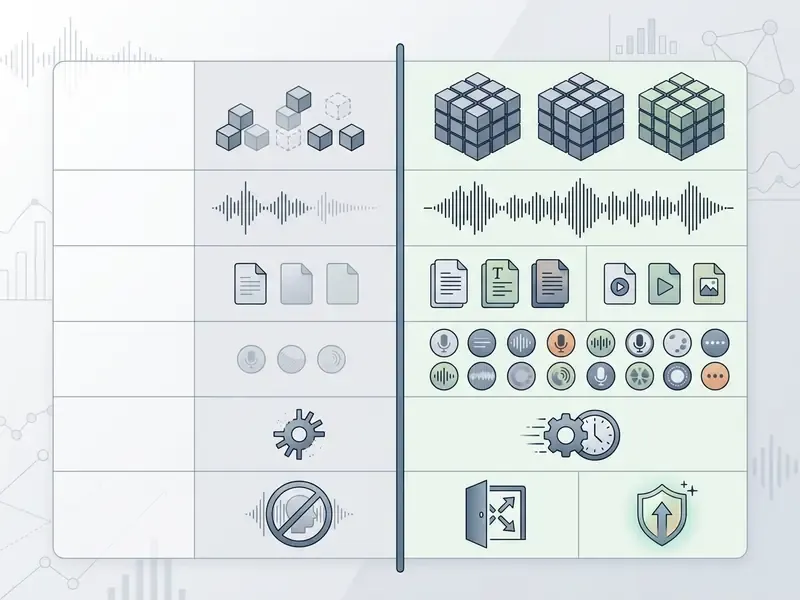
| Parameter | Free tier | Paid / Enterprise tier |
|---|---|---|
| Generation limits | 2,000 to 10,000 characters per month. Market reference points: up to 5,000 characters per video project (VEED, TTS) and up to 2,000 characters per cloned voice; up to 20 generations per day at 2,000 characters (OpusClip free trial); 10,000 credits/month (ElevenLabs), 20,000 credits/month (Cartesia), roughly 10 minutes of audio in total (Murf); 20,000 characters/day on Lite voices (NaturalReader) | From 100,000 characters up to unlimited (no session-length ceiling); unlimited voiceovers on Pro plans |
| Voice selection | Basic narrators (Standard TTS), 20 or more voices in bundles | Premium neural voices plus cloning, 300 or more voices |
| Commercial rights | Usually prohibited (personal use only), attribution may be mandatory | Full commercial licence |
| Export quality | 128 kbps MP3, watermark, export may be blocked | 320 kbps MP3, uncompressed WAV, 24 kHz or higher |
| API and integrations | Not available | Full REST / webhook API |
| Voice cloning | Blocked or demo mode (sometimes a one-time unlock fee) | Instant and custom HD cloning |
| Concurrent requests | 1 to 2 concurrent TTS requests | Configurable rate limits plus SLA |
What a Free AI Voice Generator Usually Includes
Free plans typically provide entry-level access capped at 2,000 to 10,000 characters per month, roughly 2 to 10 minutes of finished audio narration. Platforms restrict free accounts to standard voice models and may block direct MP3 or WAV downloads, or apply audio watermarks.
When you are testing, the concrete daily and per-project ceilings matter more than the monthly headline number. Current market patterns: video editors commonly allow up to 5,000 characters of text-to-speech per video project and up to 2,000 characters when using your own cloned voice profile; short-form clipping tools offer trials of up to 20 AI voiceovers per day at 2,000 characters each; character-metered engines run on 10,000 credits/month (ElevenLabs free) or 20,000 credits/month (Cartesia free); minute-metered tools cap at roughly 10 minutes total with no download (Murf free); and reader-style tools split allowances by voice class (for example 20,000 characters/day on Lite voices, 4,000 shared characters/day on Plus and cloned voices, with MP3 conversion disabled).
Platforms often enforce non-commercial terms on free tiers. ElevenLabs restricts its free plan to personal, non-commercial evaluation and requires attribution in published output; FreeTTS's free plan is personal-only, applies an audio watermark, and forbids revenue-generating use including monetized video, paid courses, podcasts, and client work. Microsoft Azure Speech is the notable exception in structure: its free tier is a pricing allowance for evaluation, with commercial permissions determined by product terms rather than by the free-versus-paid boundary. For creators looking for budget-friendly visual production tools alongside free voice trials, our comparison of free AI video tools and reference page on free AI video generators outline output limitations across current platforms.
When a Paid Plan Is Needed for Video Production
Upgrading to a commercial paid plan becomes necessary when teams need high-definition audio formats (24 kHz or higher WAV), unlimited export rendering, automated voice cloning, or API pipeline integration. Paid plans lift character caps and grant legal protections for monetized media distribution. Some vendors gate cloning behind a one-time unlock fee (for example, a CNY 9.9 first-use charge on MiniMax cloned-voice synthesis) and bill HD models per 10,000 characters, so cost modelling should separate one-off unlocks from recurring throughput.
Teams planning software infrastructure budgets review transparent platform options within our AI Media Pricing Guides.
How to Check Commercial-Use Rights Before Publishing
Verifying commercial rights means inspecting platform Terms of Service (ToS) for explicit grants covering advertising, social media monetization, broadcast, and product integration. Licenses must explicitly permit commercial derivative works generated by neural synthesis models. Where a real person's voice is involved, license scope alone is not enough: the CRS note on the right of publicity confirms that unauthorized commercial use can cover a person's voice, not only name or image, and Tennessee's ELVIS Act requires additional written consent when advertiser use extends beyond the originally described purpose.
Technical anti-cloning protections should not be treated as a control.
"De-AntiFake shows that a two-stage purification pipeline with phoneme-level refinement defeats most protective perturbations and synthesizes speech that deceives speaker-verification systems."
Enterprise AI Voice Governance: Model Risk, Privacy, and Audit Trails
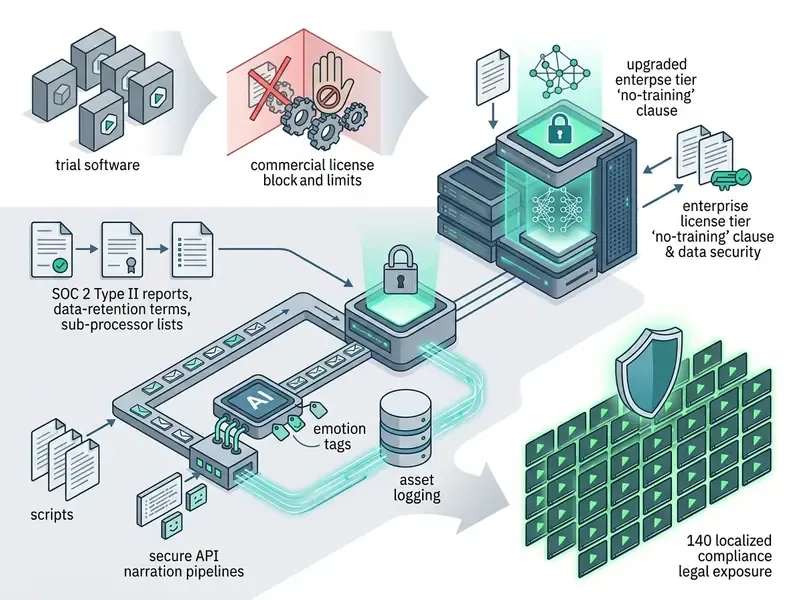
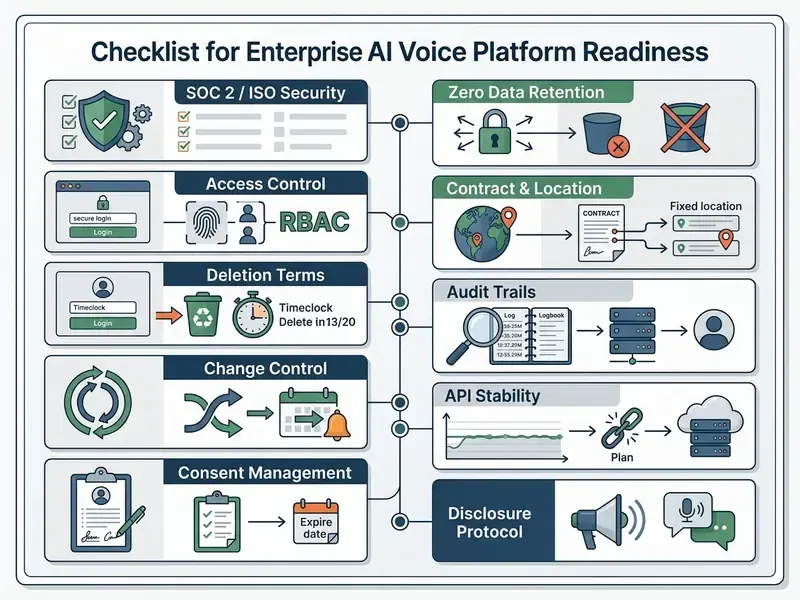
Beyond creator convenience, deploying synthetic narration inside a regulated organization converts a content tool into a model in production, which means it inherits model-risk, privacy, and audit obligations. Governance for AI voice therefore covers four control domains: model validation, data protection, consent management, and evidentiary logging.
Model risk management. U.S. supervisory guidance on model risk (Federal Reserve SR 11-7 and OCC 2011-12) frames a model as any quantitative method whose output informs business decisions, and requires effective challenge, documented validation, and ongoing monitoring. Applied to voice synthesis, that translates into a documented intended-use statement per voice profile, a benchmark set (fixed test script, target WER and MOS thresholds, pronunciation lexicon), a re-validation trigger whenever the vendor changes model version, and named ownership for the control. Baseline measurement dimensions can be drawn from published TTS standards: semantic intelligibility, intonational intelligibility, naturalness, SSML control fidelity, and text-normalization quality (GOST R 59880-2021), supplemented by noisy-audio and multi-turn stress testing (OpenAI Realtime Eval Guide, 2026). No evidence, no autonomy.
Data protection and shadow AI. The primary leakage vector is not the audio output but the input. Scripts pasted into consumer tiers may contain unreleased product names, client identifiers, or material non-public information. Controls to require contractually: a written no-training and zero-retention clause, regional data-residency options, SOC 2 Type II and ISO 27001 attestation, a current sub-processor list, deletion terms for uploaded reference audio and derived voice models, GDPR and CCPA processing terms where personal data is involved, plus SSO and role-based access control (RBAC) so that cloned executive voices cannot be triggered by an unprivileged account.
Consent management architecture. A defensible consent record contains, per voice: identity of the speaker, written and signed authorization, project and platform scope, permitted reuse window and expiry, compensation terms where applicable, storage location of the reference audio, and the deletion date for the voice model. Because SAG-AFTRA guidance requires separate consent for different projects or uses, consent should be stored as a record per use case, not as one blanket file.
Audit trail. For each published asset, log the script revision ID and approver, voice profile ID and model version, generation timestamp, parameter set (stability, style, rate, SSML), consent record reference, disclosure method used, and export and loudness specification. That is what makes a synthetic asset reproducible under review, and what turns "we generated a voiceover" into an auditable artifact.
Risk-adjusted cost of ownership. Per-minute synthesis pricing is a minority of true cost. A workable model:
Total Cost of Ownership = Licence & API spend
                        + Validation cost (benchmark build + per-version re-testing)
                        + Legal/IP clearance cost (consent drafting, ToS review per market)
                        + Review cost (compliance QA per published minute)
                        + Localization QA cost (per language pair)
                        + Residual risk provision (takedown, re-render, disclosure remediation)
Two line items dominate in regulated deployments: compliance review per published minute, and re-render cost triggered by a vendor model update that changes pronunciation or timbre mid-series. Budget for both before the first pilot, and standardize the export preset so a forced re-render is a batch job rather than a project.
How to Choose the Best AI Voice Generator for Your Video Workflow
Selecting an optimal AI voice generator means evaluating speech synthesis fidelity, prosody controls, language availability, legal license terms, and workflow integration options across standalone TTS engines and integrated video creation bundles.
Selection Criteria for Creators, Teams, and Marketers
Creators prioritize expressive natural speech and low setup friction. Corporate marketing and compliance teams weigh model security, multi-user workspace management, and auditable consent tracking instead. Technical benchmarking protocols (GOST R 59880-2021; OpenAI Realtime Eval Guide, 2026) recommend testing models under noisy real-world acoustic conditions and evaluating word error rates alongside human MOS scores. Recent voice-AI testing research adds scenario adherence, human naturalness, and persona adherence as separate measurement dimensions.
Enterprise evaluation checklists incorporate the following decision criteria:
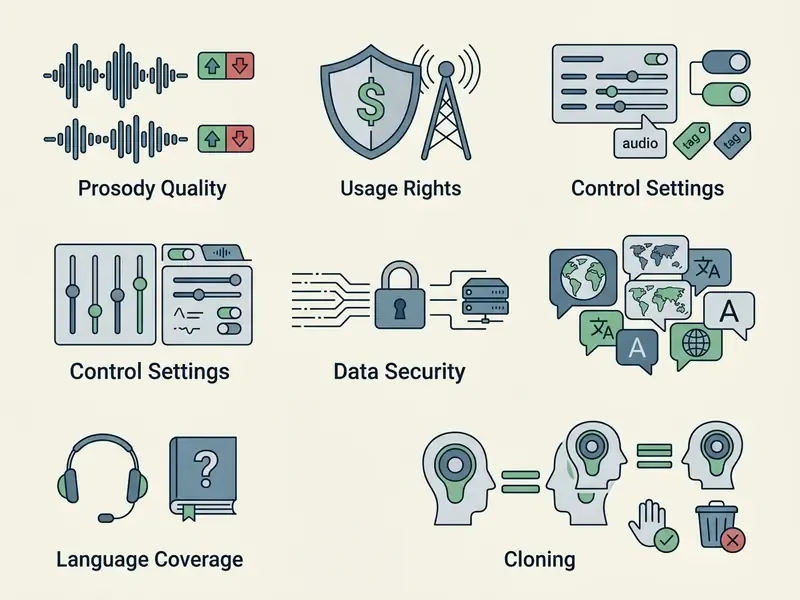
Cloning quality needs its own metric set.
"ClonEval uses WavLM-TDNN embeddings for similarity scoring and stresses that WER measures intelligibility, not cloning quality; speaker-similarity and emotion-transfer metrics are required."
When technical issues arise during platform integration, production staff use resources in the AI Media Support and Troubleshooting portal.
AI Voice Generator or AI Voice and Video Generator?
Choosing between specialized standalone TTS platforms (ElevenLabs, Azure Speech, Cartesia) and integrated AI voice-and-video bundles (Clipchamp, VEED, Synthesia, OpusClip) depends on your existing production architecture. Standalone generators offer deeper model control, developer API access, and higher audio output quality, whereas integrated tools streamline drag-and-drop timeline video creation. Our reference entry on AI video generators covers that distinction in more depth.
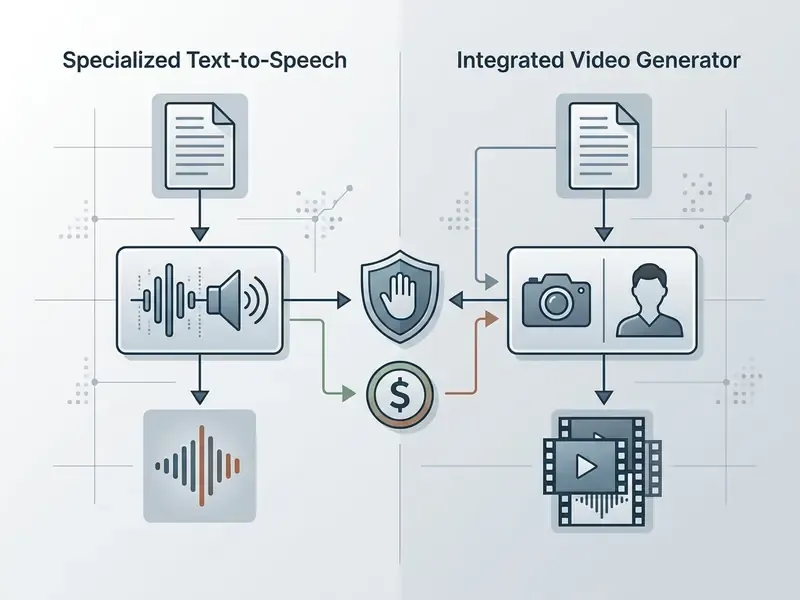
| Functional aspect | Specialized AI voice generator | Integrated AI voice plus video bundle |
|---|---|---|
| Primary focus | Deep speech synthesis, prosody flexibility | Fast all-in-one video editing |
| Speech control | Precise SSML, pitch, emotion, stability control | Basic narrator and pace selection, inline audio tags |
| Workflow integration | Audio file export and API integration | Built-in timeline, visual asset editing, lip-sync avatars |
| Export flexibility | Multichannel WAV, MP3, separate SRT | Final MP4 container with embedded audio |
| Quality measurability | Direct metrics: MOS, WER, speaker similarity | Metrics hidden inside the product |
| Enterprise controls | SSO, RBAC, zero retention, rate limits, SLA | Plan-dependent, often workspace roles only |
| Best suited for | Professional sound engineers, developers, regulated industries | Marketers, social media managers, fast Shorts creators |
Creators seeking specialized visual creation engines alongside audio software can consult our guide to animation makers; teams preparing large localized libraries for delivery also reference our guide to video compressors to control file size without degrading the narration track.
FAQ: AI Voice Over Generators for Video
What is the best online text-to-voice generator for video?
There is no single winner. The right choice depends on whether you need measurable speech quality or workflow speed. Pick a standalone engine when you need SSML control, API automation, and reportable MOS, WER, and speaker-similarity metrics. Pick an integrated video bundle when narration is only one step inside editing, captioning, and export.
How do I convert text to speech with AI, step by step?
Open the audio panel in your editor, select Text to Speech, paste the script, choose a voice and language, preview a short passage, then add the generated clip to the timeline. Fine-tune with inline tags or SSML before generating the full script to avoid re-rendering.
How do I add emotion to an AI voice without coding?
Use inline audio tags such as [excited], [whisper], [serious], or [thoughtful pause] at phrase level, then move the stability slider down for more expressive variation. Reserve SSML and for cases that need exact millisecond timing.
Is AI text-to-speech free, and what are the real limits?
Most platforms offer a free tier for evaluation: commonly 10,000 characters or credits per month, roughly 10 minutes of audio, up to 5,000 characters per video project, or trials of up to 20 generations per day at 2,000 characters each. Free tiers frequently block downloads, add watermarks or attribution requirements, and prohibit commercial use.
Can I use free AI voiceovers in monetized videos or ads?
Usually not. Free plans are typically personal, non-commercial evaluation licences. Commercial rights normally require a paid plan, and any use of a real person's voice requires separate written consent covering the exact project, platform, and reuse scope.
Can AI write the script as well as the voiceover?
Yes. Integrated AI scripters or general LLMs can draft narration from a format-plus-tone prompt (for example, "60-second product review, energetic"), returning a formatted script with visual cues and pause markers. Review it for factual accuracy, sentence length, and pronunciation edge cases before synthesis.
How do I make my own recorded voice sound better next to AI narration?
Run one-click noise reduction or vocal isolation before you align anything, then match loudness between the human and synthetic stems. Cleanup applied after alignment can shift transients and desynchronize markers.
What equipment do I need for voiceovers if I use AI?
For fully synthetic narration, nothing beyond a browser. For voice cloning, you need one clean reference recording, typically 6 to 10 seconds minimum for zero-shot models, or up to several minutes for higher-fidelity custom cloning, captured in a quiet room with any decent microphone.
Is there a character limit per project?
Yes, and it differs by metering model: per-project caps (commonly 5,000 characters of TTS and 2,000 characters for cloned voices), monthly character or credit caps, daily generation caps, or minute-based caps. Paid tiers raise or remove these limits.
Does AI voiceover work for every video type?
It works well for tutorials, explainers, ads, faceless channels, course modules, IVR prompts, and localized corporate video. Long-form documentary narration is the hardest case, because listener detection accuracy rises sharply above 30 seconds and voice-consistency drift becomes audible.
Can I turn a still image into a talking presenter?
Yes. Lip-sync frameworks map phonemes from the generated audio onto facial keypoints of a photo or 3D avatar. Likeness rights require the same written consent as voice cloning.
Do I still need subtitles if the narration is clear?
Yes. Experimental advertising research shows subtitles narrow the effectiveness gap between synthetic and human narration, and WCAG 2.2 requires captions for prerecorded synchronized media regardless of voice source.
Appendix A: Superseded and Revised Statements
For transparency, the following statements from the previous revision of this guide have been revised in the text above and are retained here for reference:
- "…and reduced initial project setup overhead by 65%." Retained as an unaudited single-deployment internal estimate; replaced in the main text with a qualitative description of standardized track layouts.
- "Background music stems are ducked to approximately -18 dB to -25 dB relative to dialogue tracks." Retained, now attributed to practitioner mixing guidance (Juno School, 2026) and paired with the BBC final-mix recommendation of a further 4 dB reduction.
- "Engineers apply final audio mixing passes… (typically target -14 LUFS for web streaming)." Retained, now framed as a de-facto web and streaming convention requiring confirmation against the destination platform's delivery specification; broadcast targets differ.
- "Microsoft AI's synthetic voice transparency guidelines recommend explicit disclosure…" Retained, now sourced to the Azure AI Services Text to speech transparency note and Disclosure design guidelines for synthetic voices (2026).
- "OmniVoice (2026) spans over 600 regional language variants" and "Confucius4-TTS (2026) achieved cross-lingual WER of 3.73%". Retained, now labelled as 2026 model benchmarks pending independent verification.
- Previous outbound references to unrelated novelty generators (lyrics, love letter, manga, and randomized-sequence tools) have been removed from the navigation block and replaced with production-relevant resources: video editors, free video editing software, video compressors, animation makers, and the text-to-video and AI video generator guides.
Social Media Videos, YouTube Shorts, and Faceless Content
Short-form social clips need energetic voice profiles paired with fast visual pacing to hold audience retention on TikTok and YouTube Shorts. Faceless video channels use continuous AI narration to publish high-volume automated content without camera operators or on-screen presenters.
Empirical studies on short video advertising (ScienceDirect, 2024) indicate that synthetic voices perform adequately in brief formats when accompanied by bold, centered captions. Perceptual research explains why the short format is forgiving.
In other words, the shorter the clip, the smaller the perceptual penalty for synthetic delivery, and the larger the penalty for long-form documentary narration built on an unstable, low-consistency voice profile. Creators managing automated content channels regularly consult the AI Media Glossary to standardize terminology across remote content generation teams.
Visualizing narration with AI talking avatars. Beyond traditional faceless B-roll, narration engines pair directly with generative lip-sync frameworks to build talking-avatar videos. By mapping the generated audio file's phoneme output to visual facial keypoints on a static photo or a 3D avatar, creators turn flat audio narration into presenter-style video without hiring on-camera talent. This is the standard pattern for onboarding decks, multilingual product explainers, and spokesperson ads where a face increases trust but filming does not scale. Two constraints apply: avatar likeness requires the same written consent regime as voice cloning, and lip-sync accuracy degrades on fast delivery above roughly 180 WPM, so slow the narration slightly compared with faceless voiceover. Teams evaluating avatar-capable platforms can start from our overview of AI video generators.