Three Parameters That Control File Size
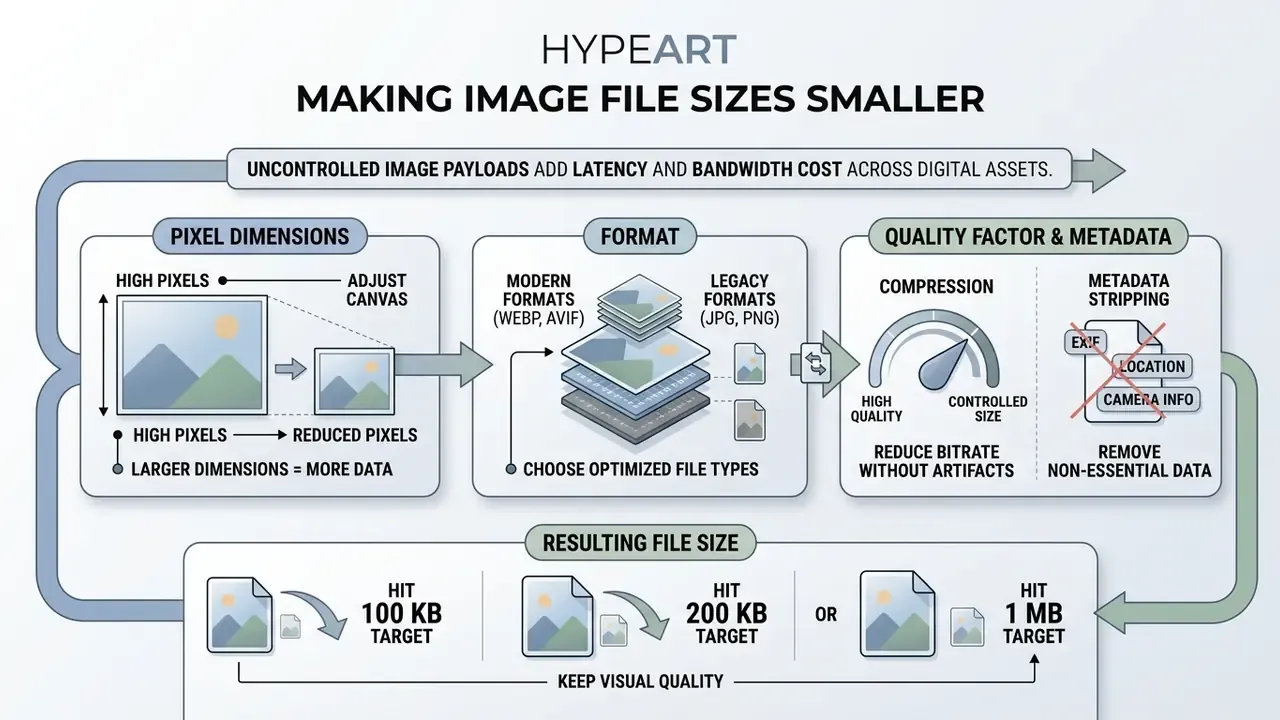
- Pixel dimensions first. Byte count scales quadratically with width and height. Halving both removes roughly 75 percent of the raw pixel payload before any codec touches the file.
- Format second. Lossy WebP is typically 25 to 34 percent smaller than JPEG at equivalent SSIM quality, and lossless WebP is about 26 percent smaller than PNG. AVIF can add up to another 20 percent at comparable visual quality.
- Quality factor and metadata last. JPEG and WebP quality 75 to 82 covers most web and portal use cases. Stripping EXIF, GPS tags and embedded thumbnails removes 10 KB to over 100 KB of non-visual overhead per file.
Why does this matter to a risk or operations leader in a US bank? Because image handling sits quietly inside KYC onboarding, claims intake, dispute evidence, vendor due diligence and internal audit packs. A teller-captured ID photo, a 9 MB branch inspection scan, a screenshot inside a model validation report: each of those becomes storage cost, portal rejection, or a shadow-IT incident when an employee pastes a customer document into a random compressor found on Google.
An uncompressed digital image consists of a pixel grid where every pixel stores color data. Understanding how to make an image file size smaller lets digital and operations teams optimize assets for storage efficiency, fast transmission, and predictable web performance, without inventing a new workaround each time.
On this page
- What makes an image file size smaller
- How to make an image file smaller online
- How to reduce an image to a specific KB or MB size
- How to reduce image file size without losing quality
- How to choose an image compressor or resizer
- Optimize images for websites, email and social media
- Limitations, open questions and a safe next step
- FAQ
- Appendix A: enterprise upload security checklist
What Makes an Image File Size Smaller
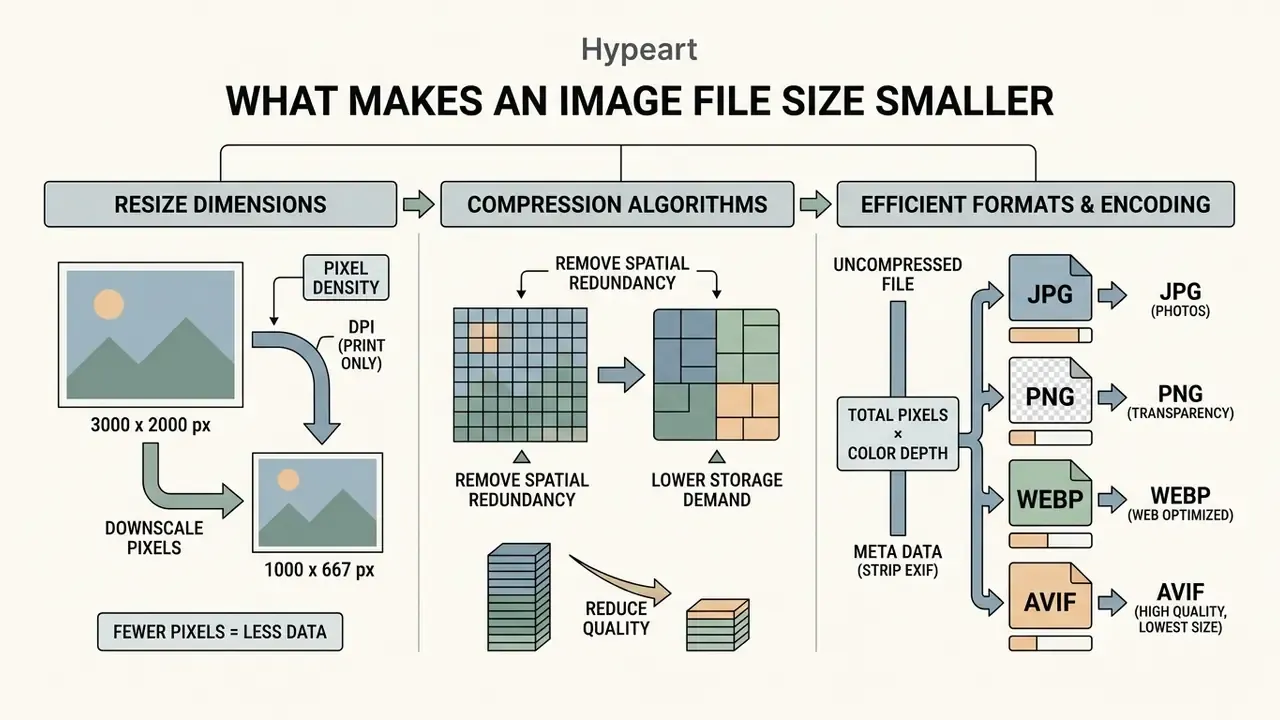
Image file size rests on three mechanics: physical pixel dimensions, the compression algorithm, and the structural encoding of the file format. Reduce any one of these variables and the total byte count of the asset falls.
Uncompressed file size equals total pixels multiplied by color depth per channel. Modify the raw pixel count, or apply lossy quantization that discards redundant data, and the byte size shrinks. Embedded metadata and color-management profiles add a fourth, often forgotten layer of payload, one that carries no visual information whatsoever.
Three levers. Different costs.
Resize Images by Reducing Dimensions and Resolution
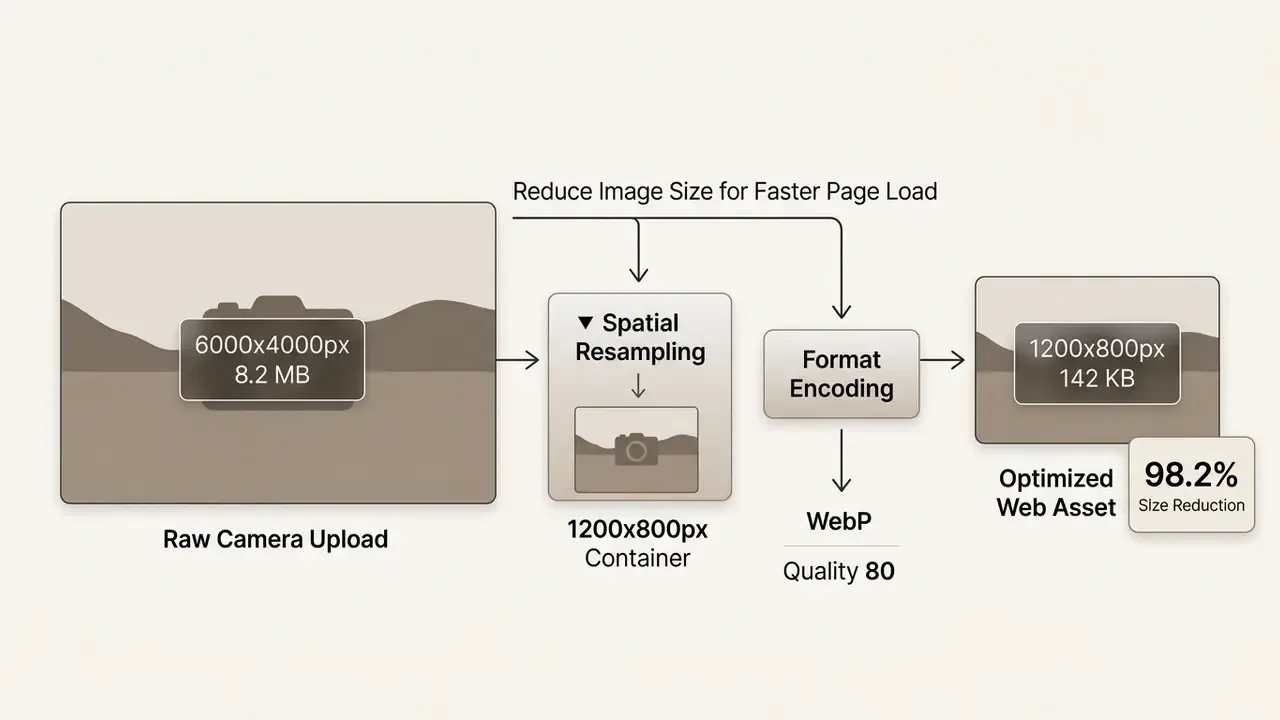
Downscaling pixel dimensions is the fastest way to reduce image size, because pixel count scales quadratically with height and width. Halve both the width and the height and you drop roughly 75 percent of the raw pixel data before compression even begins.
Resolution expressed as dots per inch (DPI) dictates print density. It does not change byte count for digital displays. So to make an image smaller file size, an operator has to resample the pixel grid rather than edit a DPI tag and hope.
There is no universal kilobyte-per-pixel constant, because the final byte count always depends on codec and quality factor. The table below gives working planning estimates for photographic JPEG and WebP content encoded at quality 78 to 80, the range most submission portals accept without visible degradation.
| Long-Edge Dimension | Total Pixels (16:9 approx.) | Typical JPEG @ Q78 | Typical WebP @ Q80 | Practical Use Case |
|---|---|---|---|---|
| 6000 px (RAW/DSLR native) | ~24 MP | 5 to 9 MB | 3 to 6 MB | Master archive only |
| 2560 px | ~3.7 MP | 700 KB to 1.2 MB | 450 to 800 KB | Document scans, email attachments under 1 MB |
| 1920 px | ~2.1 MP | 350 to 500 KB | 220 to 350 KB | Full-width web hero images |
| 1200 px | ~0.8 MP | 130 to 220 KB | 80 to 150 KB | Content images, social previews, e-commerce grids |
| 800 px | ~0.36 MP | 60 to 110 KB | 40 to 80 KB | Thumbnails, inline email graphics |
| 320 px | ~0.06 MP | 12 to 25 KB | 8 to 18 KB | Avatars, icons, strict web form uploads |
Read the cheat sheet in reverse when a portal enforces a hard cap. Pick the row closest to your limit, resample the long edge to that value, then fine-tune the quality factor. It is crude, and it works on the first attempt more often than a pure trial-and-error slider.
Use Compression and a More Efficient File Format
Compression algorithms remove spatial redundancy across neighbouring pixels to lower storage demand. Lossless compression preserves the exact source bits. Lossy compression throws away visual data that human perception is unlikely to miss.
Modern image formats simply compress better than legacy codecs. The Google Developers WebP Compression Study reports lossy WebP files 25 to 34 percent smaller than comparable JPEG files at equivalent SSIM quality, and lossless WebP roughly 26 percent smaller than PNG (https://developers.google.com/speed/webp/docs/webp_study). WebP is now formally documented by the IETF in RFC 9649, which removes the earlier ambiguity about its standardization status. Converting to WebP or AVIF shrinks the footprint without changing visible layout dimensions, a step that pairs naturally with AI image enhancers when source assets need cleanup before optimization.
«WebP improved page load times by 21 percent and AVIF by 15 percent compared with JPEG at comparable visual quality.»
«WebP showed the lowest distribution overhead: PNG was 4.7 percent higher, JPEG 9.1 percent higher and SVG 29.3 percent higher under median conditions.» CDPlane: A Dynamic Content Distribution Plane (2023 to 2024).
Format capability matrix. Format choice is never only a size decision. Transparency, animation and reversibility decide whether a conversion is even permissible for a given asset class, which matters when the asset is evidence.
| Image Format | Lossy Support | Lossless Support | Transparency | Animation | Primary Use Case |
|---|---|---|---|---|---|
| JPEG / JPG | Yes | No | No | No | Standard web photography |
| PNG | No | Yes | Yes | No | UI graphics, logos, transparent overlays |
| WebP | Yes | Yes | Yes | Yes | Universal modern web optimization |
| AVIF | Yes | Yes | Yes | Yes | Next-gen web optimization (maximum compression) |
| GIF | No | Yes | Yes | Yes | Simple legacy animations |
| HEIC | Yes | Yes | Yes | No | Mobile capture container (iOS default) |
| TIFF | No | Yes | Yes | No | High-fidelity print and archival media |
Two caveats follow from the matrix. AVIF supports up to 12-bit depth but encodes slowly, which becomes a real scheduling problem on large batch jobs. HEIC is handled natively inside Apple's Image I/O stack, yet browser support outside the Apple ecosystem stays limited, so treat HEIC as a capture container you convert from, not a delivery format you publish.
| Optimization Method | Size Reduction Potential | Visual Quality Impact | Artifact Characteristics | Primary Use Case |
|---|---|---|---|---|
| Dimension Resizing | 50% to 85% | Preserves pixel sharpness, reduces display dimensions | None (clean spatial resampling) | Oversized digital photos scaled down for web display |
| Lossy JPEG Compression | 30% to 70% | Minor degradation at quality 75 to 85, severe below 50 | Blocking, ringing around sharp edges | Complex photographic content on web pages |
| PNG to WebP Conversion | 26% to 35% | Visually imperceptible loss at standard settings | Minimal perceptual shift | UI graphics, transparent web assets, product photos |
| AVIF Conversion | 40% to 80% | High structural fidelity at low bitrates | Slight smoothing on fine textures | Modern web applications prioritizing minimum byte load |
| Metadata / ICC Stripping | 1% to 15% | Zero pixel change | None | Privacy-sensitive uploads and bulk web delivery |
How to Make an Image File Smaller Online
Online compression tools run optimization pipelines inside the browser itself or through cloud server endpoints. You can make an image file smaller without installing local software, using client-side web APIs or a vetted upload tool.
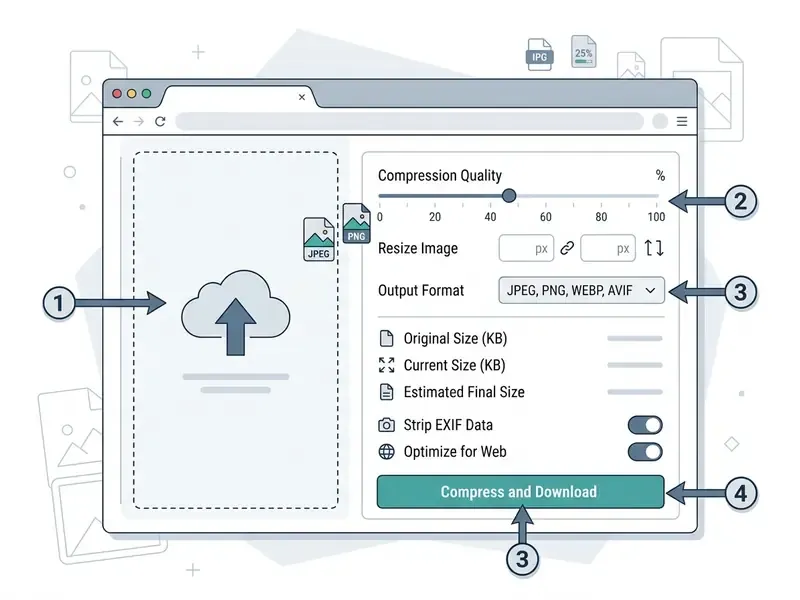
Browser-based workflows process files through Canvas or WebAssembly modules. The interface accepts drag-and-drop assets, exposes compression sliders, and returns a smaller file in seconds. Convenient, yes. Approved for customer data? That depends entirely on your asset-handling standard, and we come back to it below.
Upload, Compress and Download the Smaller File
To run an online optimization pass, select the source asset, set target parameters, and export the processed file.
1. Upload Asset: Drag and drop the original image file into the interface drop zone.
2. Select Parameters: Adjust the compression level slider or choose an output format (JPG, PNG, WebP).
3. Review Output: Inspect the live before-and-after preview to confirm visual quality standards.
4. Download File: Export the optimized asset with its reduced KB or MB footprint.
When media assets flow through automated pipelines, engineering teams usually consult AI Media API Guides to wire programmatic conversion endpoints into core systems rather than asking staff to open a browser tab per file.
Offline and On-Premise Alternatives for Restricted Environments
Security policy in banking, insurance and healthcare frequently forbids uploading customer-bearing imagery to third-party SaaS endpoints. The reduction mathematics does not change locally:
- ImageMagick CLI, scriptable resampling and quality control (
magick input.jpg -resize 1920x -quality 78 -strip output.jpg), suitable for on-premise batch jobs and CI pipelines. - Squoosh (offline or self-hosted build), WebAssembly codecs for MozJPEG, WebP and AVIF that run entirely in local browser memory with no outbound request.
- Adobe Photoshop or Lightroom export presets, controlled downsampling plus metadata exclusion for design teams already inside a licensed suite.
- Operating-system utilities, macOS Preview export and Windows Photos resize for one-off, non-repeatable tasks.
Record the approved local tool in your asset-handling standard. Otherwise employees improvise with public web services, and improvisation is exactly what your shadow-AI register is meant to catch.
How to Reduce an Image to a Specific KB or MB Size
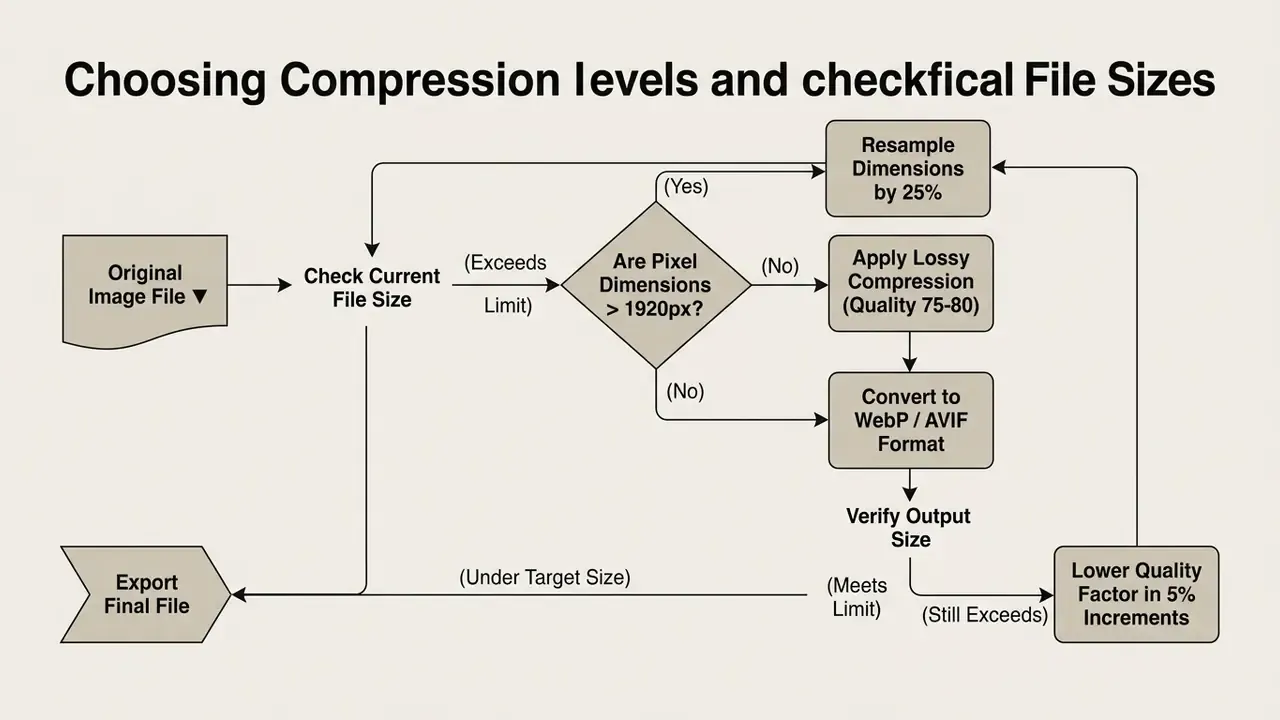
Hitting a defined target in kilobytes or megabytes takes an iterative balance between pixel downsampling and quantization level. There is no single button, although some tools hide the loop behind one.
When a submission portal enforces a strict cap, the operator has to judge whether spatial resizing or bit-rate compression reaches the target without destroying legibility. For a marketing photo, either path works. For a signed loan document, only one does.
Choose a Compression Level and Check the Final File Size
Start with the quality factor in your compressor. If the file is still oversized at quality 70, downscale pixel dimensions by about 20 percent and re-test the output.
In automated workflows, teams lean on specialized calculators to estimate pixel reduction steps before launching a batch job. If an asset was already compressed too aggressively in an earlier cycle, recovering usable detail means reprocessing the master rather than re-encoding the derivative. Where no master survives, AI image upscalers can partially reconstruct resolution, with the honest caveat that reconstruction is inference, not recovery.
The two-step sequence recommended in production documentation, downsample to the target output resolution first (72 to 96 DPI for screen, 150 DPI for general digital distribution, 300 DPI for print), then recompress at quality 70 to 85, typically cuts 40 to 60 percent of the payload with no visible difference at normal display size.
«A hybrid DCT-DWT-SVD algorithm outperformed baseline methods by 48 percent in compression ratio at equivalent distortion levels.»
How to Compress an Image to Exactly 100 KB, 200 KB, or 1 MB
For the hard limits enforced by submission portals and web forms, use target-specific recipes:
- Target 100 KB (strict web forms and avatars): convert to WebP, cap width at 1200 px, apply lossy compression at quality 70 to 75, strip all EXIF metadata.
- Target 200 KB (e-commerce listings and mobile web): keep native resolution up to 1920 px, convert PNG graphics to WebP or AVIF, set the JPEG quality factor to 78 to 82.
- Target 1 MB (email attachments and document scans): if a RAW or TIFF photo exceeds 10 MB, resize the long edge to 2560 px, then apply visually lossless WebP conversion or JPEG quality 85.
- Target 5 MB (multi-page scan bundles and portal submissions): keep 300 DPI only where OCR is required, downsample decorative pages to 150 DPI, and encode monochrome text pages with JBIG2.
Tools that expose a dedicated "target file size" field automate this search internally. They iterate the quality factor until the encoded output falls under the entered value, which is functionally the same loop as the decision diagram above, just faster and less annoying.
Internal operations test (not third-party verified). An engineering team processed 1,200 photographic assets averaging 6.5 MB each for a regulatory portal submission. Standardizing canvas dimensions to 1920 by 1080 pixels and setting JPEG encoding quality to 78 brought the average down to 380 KB per file, a measured payload reduction of roughly 94 percent across the batch. Reviewers confirmed that embedded document labels stayed legible on calibrated displays. One dataset, one asset mix. Re-test against your own material before treating that ratio as a promise.
Multilingual document intake adds a wrinkle worth flagging. Teams that need to read a compressed scan in another language should check legibility after compression, not before, and the sequence for how to translate image text into english works best on a clean, high-DPI source rather than a twice-compressed derivative.
How to Reduce Image File Size Without Losing Quality
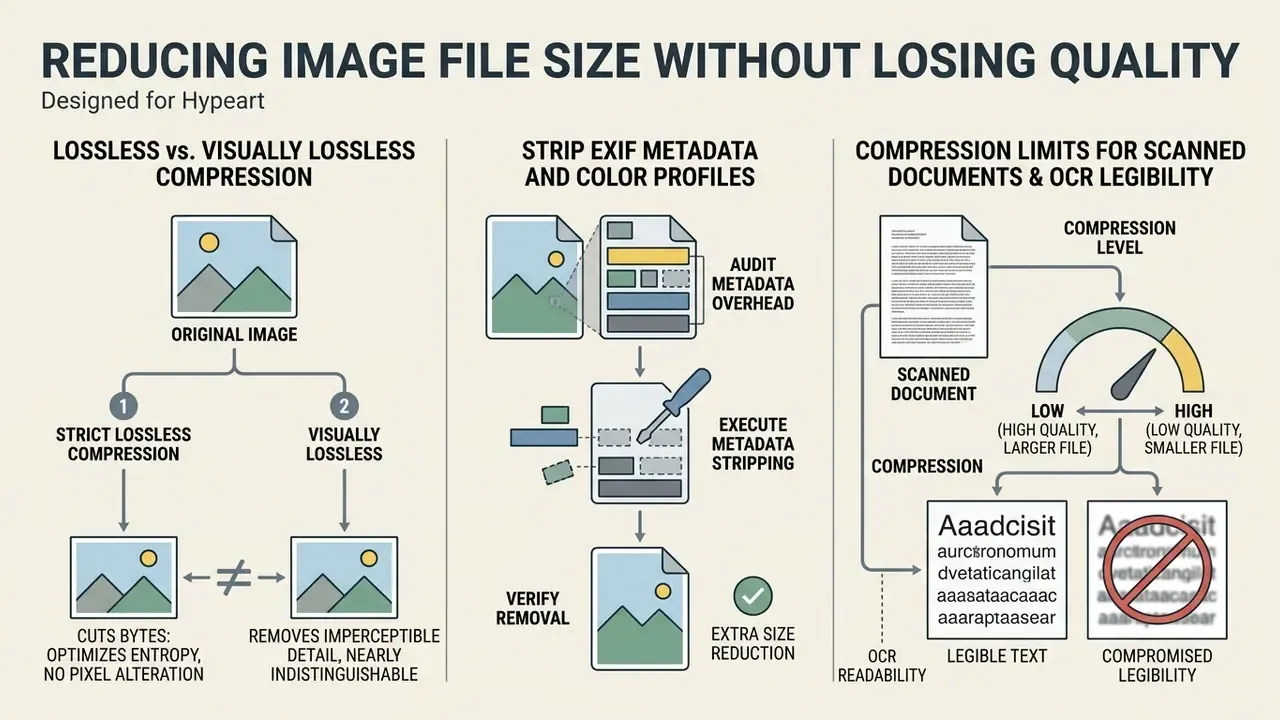
Strict lossless compression cuts bytes by removing metadata and optimizing entropy tables, without altering a single pixel value. That is the narrow, technically accurate version of the promise.
Marketing claims about how to reduce image file size without losing quality usually describe visually lossless compression instead of bit-preserving compression. In a visually lossless process, a lossy algorithm discards data that human eyes struggle to perceive under standard display conditions. Formal standards draw the line plainly: lossless output is bit-identical to the source, while "visually lossless" is a perceptual judgement about a lossy result.
E-E-A-T Fact Check: Lossless vs. Visually Lossless Compression
- Lossless Compression: fully reversible, governed by bit-preservation standards (ISO/IEC 15444-1:2024). Decompressed output stays mathematically identical to the source (NIST IR 7779).
- Visually Lossless Compression: a lossy process in which discarded data is imperceptible to normal human vision under standard viewing conditions (IETF WebP standards work; RFC 9649). It delivers substantial byte reduction and permanently alters underlying pixel values.
- Verdict: zero-quality-loss claims are technically valid only for true lossless algorithms such as PNG optimization or lossless WebP, never for lossy JPEG or AVIF re-encoding. Tool marketing that says "reduce image file size up to 90% without losing quality" conflates the two categories.
«The benchmark processed over one million images and evaluated twenty codecs across thirteen image-quality metrics.» MSU Learning-based Image Compression Benchmark (2024).
«Optimage reached 100 percent visual indistinguishability for PNG and JPEG in a flip test on a calibrated Retina display.» Optimage Compression Benchmark.
Read together, those benchmarks mark the practical boundary. Visually lossless results are achievable and measurable, but they depend on codec, metric and viewing conditions, not on a percentage printed on a landing page. Teams that need to inspect gradients or edge artifacts before publishing usually pair the compressor with one of the mainstream online photo editors for side-by-side review at 100 percent zoom.
Strip EXIF Metadata and Color Profiles for Extra Size Reduction
Embedded metadata, including GPS location tags, camera exposure settings, preview thumbnails and ICC color profiles, can add 10 KB to over 100 KB of non-visual overhead to a single image file. Free bytes, in a sense. You give up nothing visible.
This step doubles as a privacy control. GPS coordinates inside a smartphone capture disclose where a document or property was photographed, and that is a genuine disclosure risk in KYC, claims and HR workflows. Small field, real exposure.
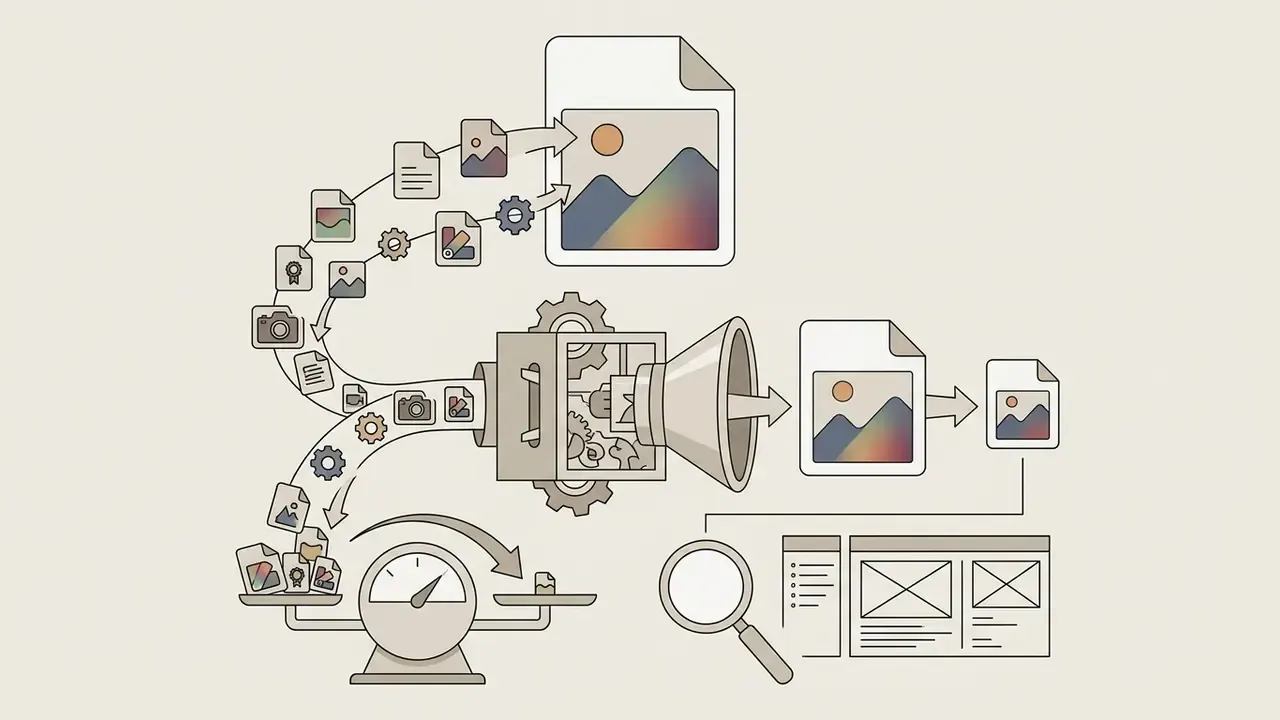
exiftool) and measure their byte share.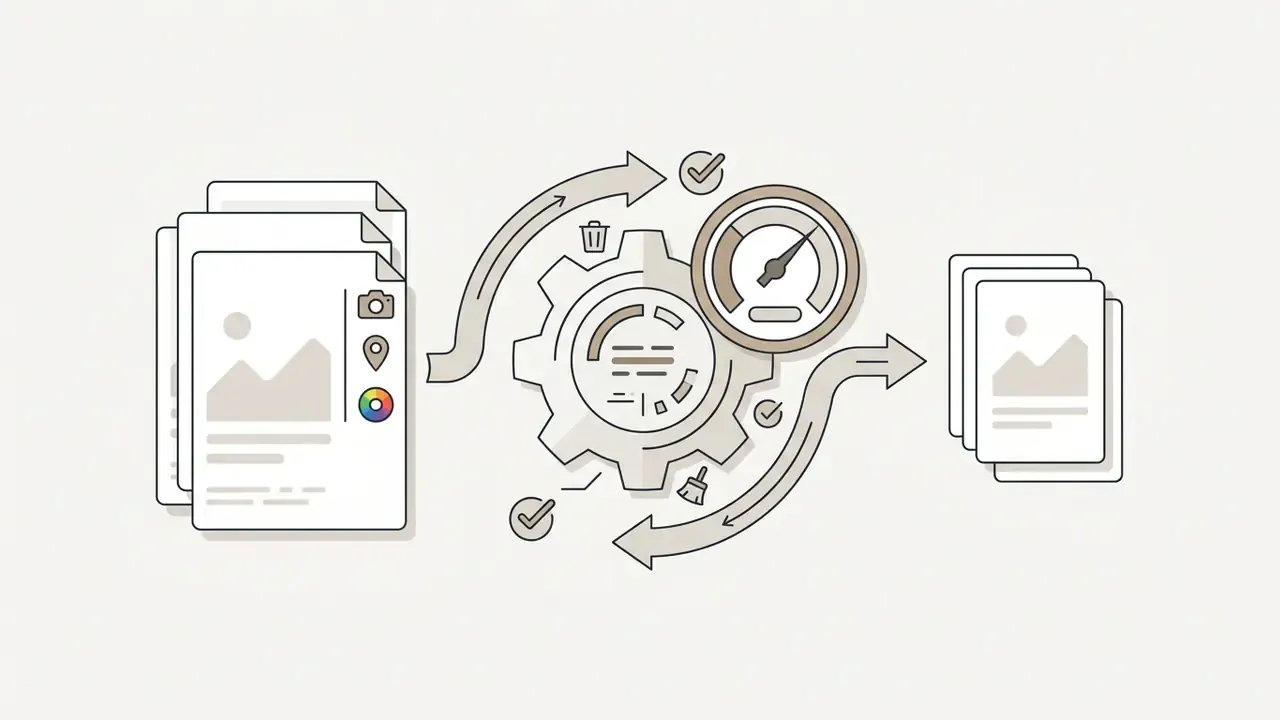
-strip in ImageMagick.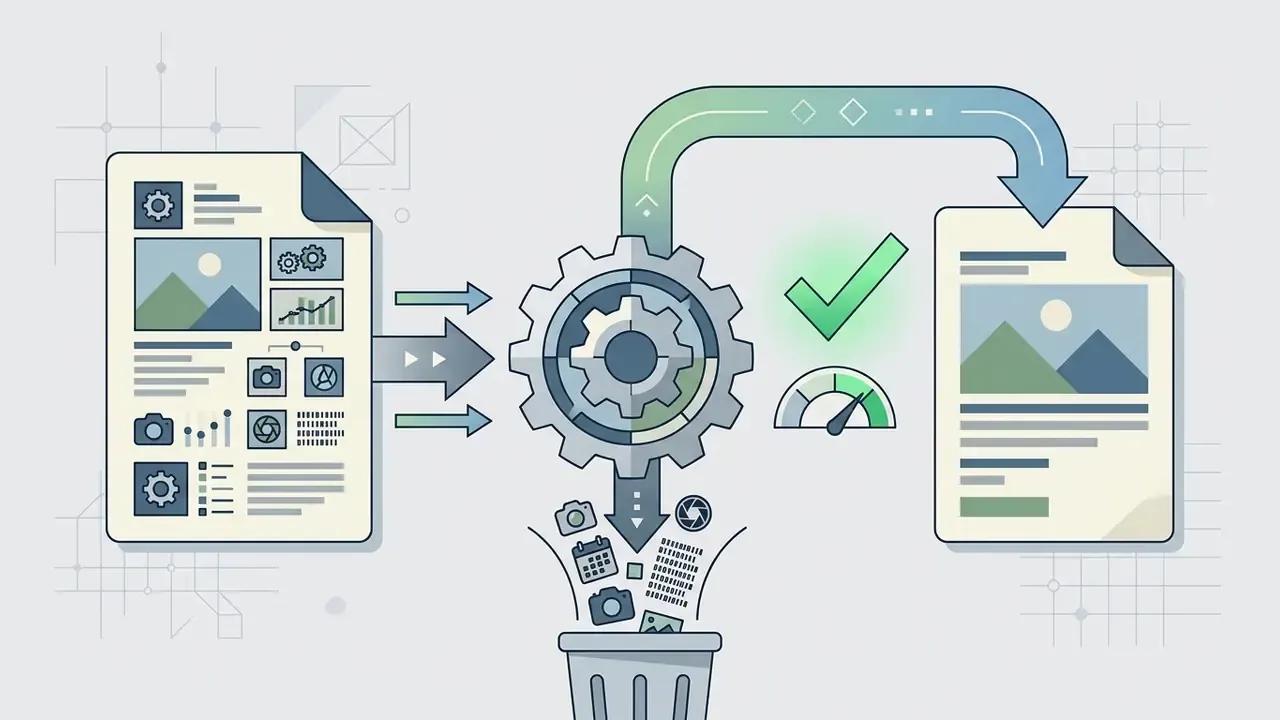
Compression Limits for Scanned Documents and OCR Legibility
Aggressive quantization damages high-frequency edges first, and text strokes are high-frequency content. NIST research on compressed imagery notes that edges degrade faster than flat regions, and that perceived quality falls as compression rises at content-dependent rates. That is why a landscape photo tolerates quality 70 while a scanned bank statement may not.
- Keep scanned text at 300 DPI wherever downstream OCR or machine-readable extraction matters. 150 DPI is acceptable only for human screen reading.
- Do not encode document scans below JPEG quality 80. Ringing around glyph edges raises OCR character-error rates well before the damage becomes obvious to the eye.
- Prefer lossless PNG or TIFF LZW for evidentiary and archival captures. WIPO guidance treats TIFF LZW and PNG as non-lossy while noting that JPEG introduces visual and color-space distortion.
- Validate a sample OCR pass on compressed output before promoting any preset into a regulated document flow.
When teams need to establish whether media has been synthetically generated or merely re-encoded, digital forensics analysts study structural characteristics to judge how to tell whether artifacts come from generative models or from a compression pass. The same discipline applies to motion assets: the mechanics behind how to turn a live photo into a video also introduce re-encoding steps that leave their own fingerprints.
How to Choose an Image Compressor or Resizer
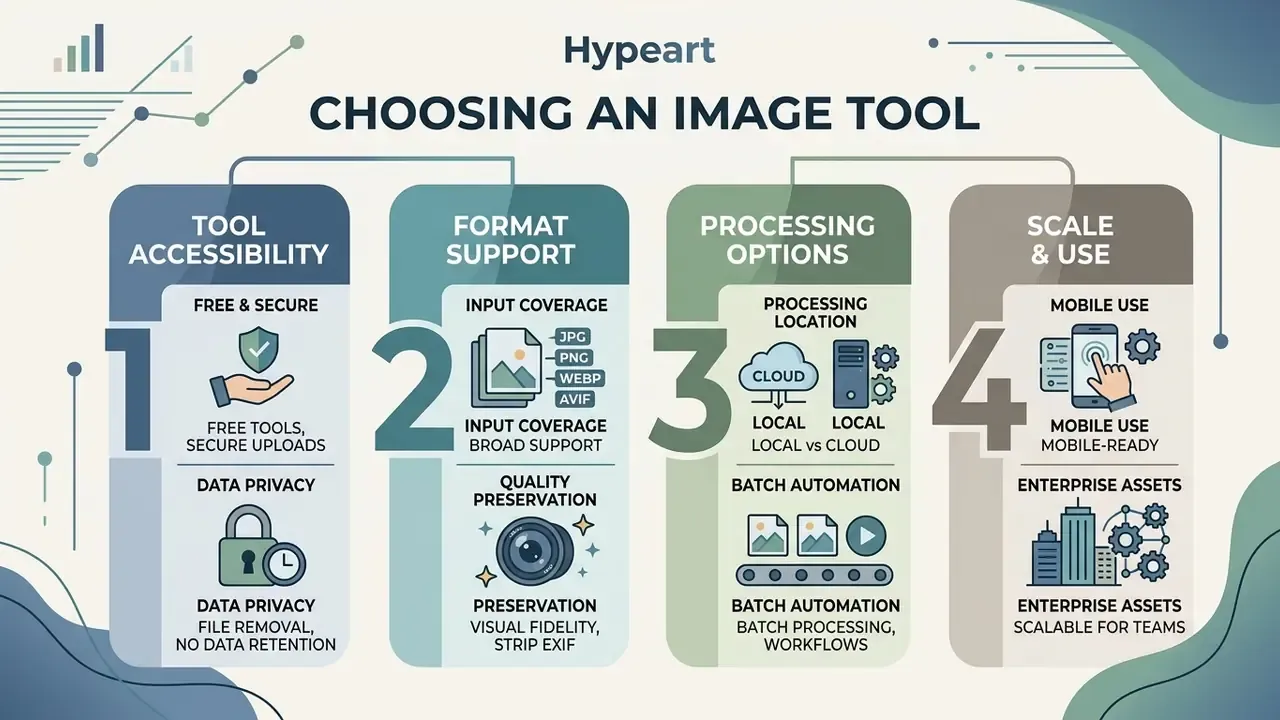
Tool selection comes down to input format coverage, processing location, batch automation, and privacy assurances. In that order, usually, once a compliance function joins the conversation.
Enterprise privacy mandates decide whether optimization may run on remote servers, or must execute locally inside browser memory using WebAssembly. Everything else is convenience.
Free Tools, Secure Uploads and File Removal
Free online compression services need secure TLS transport and an explicit data retention policy that covers server-side deletion. If the policy is vague, treat that as your answer.
Client-side tools work in local browser memory, which eliminates server upload risk entirely for sensitive documents. ImgSmaller, for instance, offers a zero-upload mode where compression runs locally and image data is never transmitted to an external server (ImgSmaller tool documentation). Worth noting: WebAssembly itself provides no integrity or privacy guarantee. The W3C WebAssembly Web API draft states that such protection «must be provided externally, e.g., through the use of HTTPS», so TLS stays mandatory even for client-side pipelines.
E-E-A-T Alert Box: Data Security and Retention
Format Support, Batch Processing and Mobile Use
A dependable image compressor handles the standard set, JPG, PNG, WebP and AVIF, alongside mobile container formats such as HEIC. An image resizer without HEIC support will frustrate every iPhone-carrying employee in the building.
Batch processing lets teams compress images in bulk and cuts manual handling time sharply. Mobile compatibility ensures resizing works on tablet and smartphone browsers without UI breakage, which matters for field staff capturing property or inspection photos.
Batch Processing Workflows for Enterprise Assets
For bulk media catalogs:
- Standardize canvas aspect ratios across source inputs before batch execution.
- Apply uniform quantization levels, for example WebP quality 80, within identical content categories such as all product photography.
- Use ZIP archive downloads or direct cloud bucket exports (S3, GCS) to streamline retrieval.
- Enable "optimize only if file size decreases" where offered, so already-compressed JPEGs are not re-encoded into something larger.
- Log input and output byte counts per asset, and build a reusable preset library per channel from that log.
To compare tool parameters and feature tiers across services, technical leads review AI Media Comparison matrix summaries before deployment. Configuration choices deserve the same scrutiny as tool choice: a default that quietly re-encodes masters is a data-integrity problem, much like knowing how to turn off character ai filter style settings matters mainly because defaults shape output more than users expect.
Optimize Images for Websites, Email and Social Media
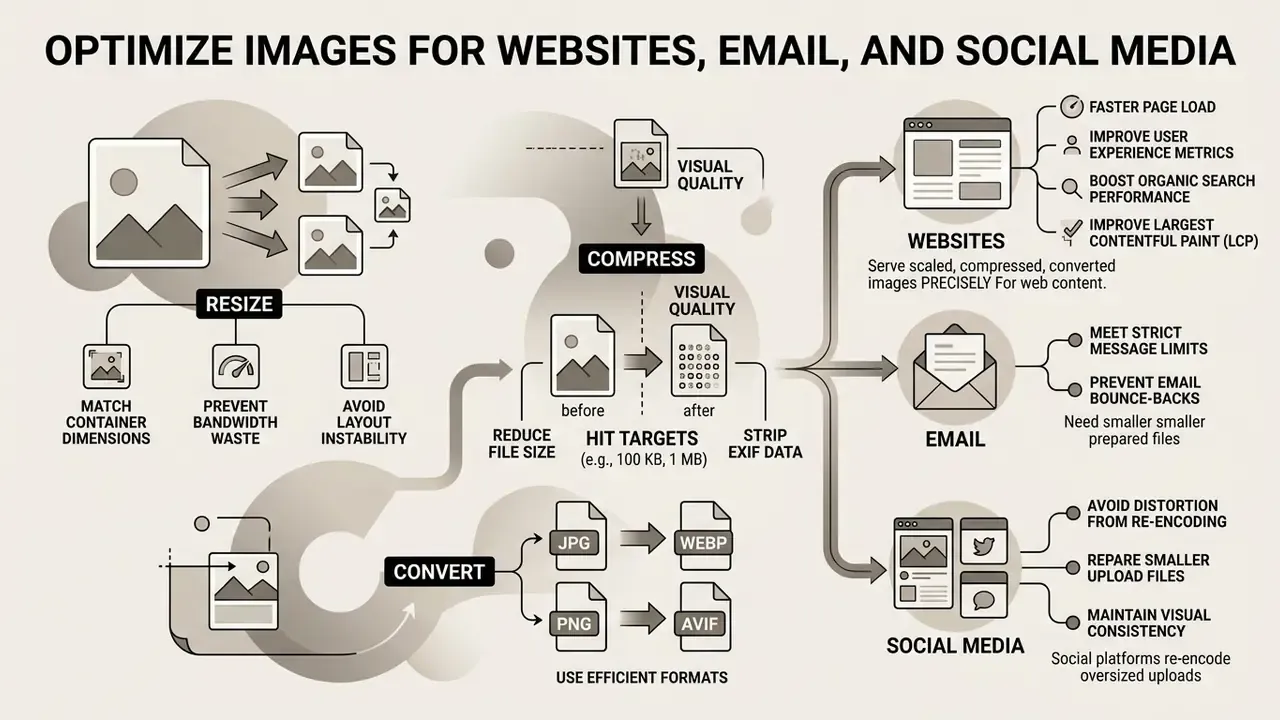
Matching image size to the distribution channel prevents page load delays, email bounce-backs, and the distortion that social platforms introduce when they re-encode oversized uploads.
Unoptimized media drives page weight, degrades user experience metrics, and drags organic search performance. Images represented 41 percent of transferred web data in 2023, making them the single largest lever on front-end performance.
Reduce Image Size for Faster Page Load
Optimizing web images improves Largest Contentful Paint (LCP) directly. Google's Core Web Vitals documentation defines a good LCP as 2.5 seconds or less at the 75th percentile of page loads (Google web.dev, Largest Contentful Paint, https://web.dev/articles/lcp), which demands a lightweight media payload. On more than 70 percent of web pages the LCP element is an image, and LCP load duration scales roughly with transferred bytes.
«Images accounted for 41 percent of transferred web data in 2023, materially affecting web application performance.»
Serving WebP or AVIF scaled precisely to container dimensions prevents bandwidth waste and layout instability. Declaring explicit width and height attributes also blocks cumulative layout shift from unsized images, a cheap fix that many teams still skip.
Limitations, Open Questions and a Safe Next Step
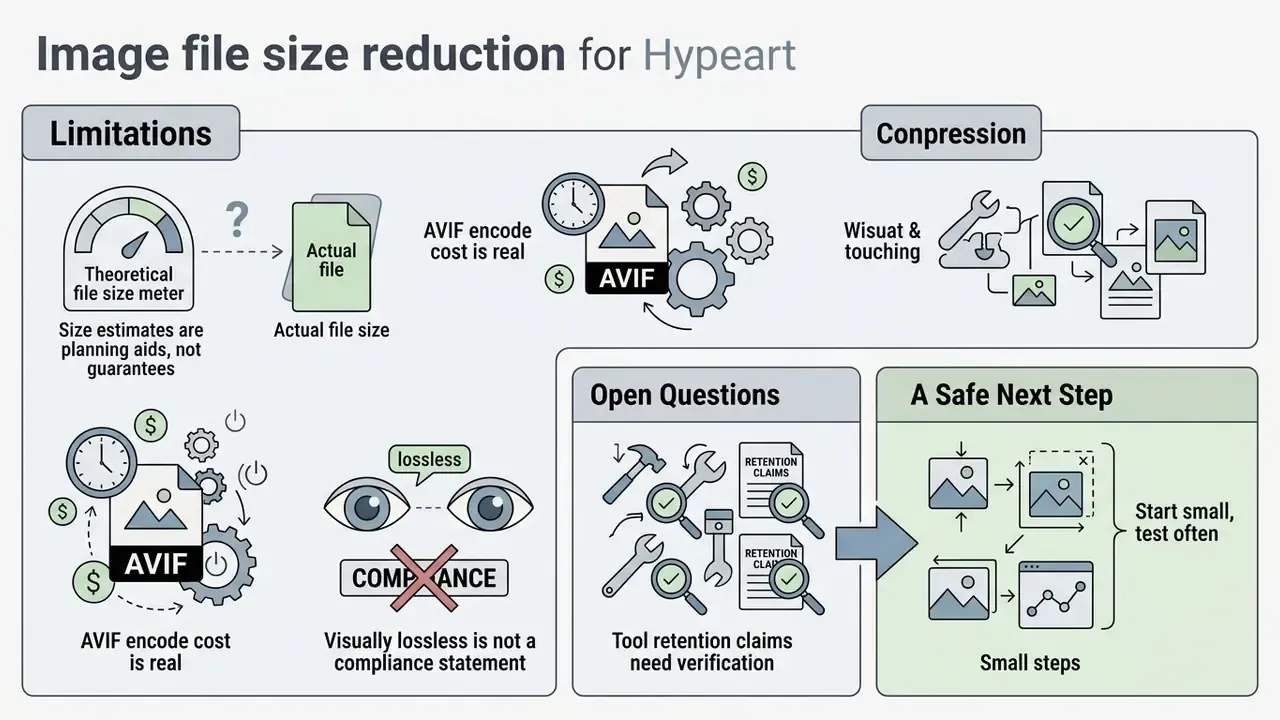
A few honest boundaries, because compression guidance ages quickly and every asset mix behaves differently.
- Size estimates are planning aids, not guarantees. Noise levels, texture density and encoder build all shift the outcome by tens of percent. Measure your own corpus.
- AVIF encode cost is real. On a large nightly batch, the CPU time saved in bandwidth may reappear as compute spend. Test both sides of that trade.
- Visually lossless is not a compliance statement. If an image serves as evidence in a dispute, a claim, or a regulatory response, reversibility beats file size. Keep the master.
- Tool retention claims need verification. A privacy policy is a statement of intent, not an audited control. Vendor due diligence still applies.
The safe next step is small. Pick one high-volume flow, document the preset (long edge, format, quality factor, metadata policy), run 50 files through it, and check legibility plus OCR accuracy. Then write the preset into your asset-handling standard so nobody has to guess next quarter.
FAQ: Making Image Files Smaller
How do I compress an image to 100 KB or 200 KB?
Use a tool with a target-file-size field, or run the loop manually: resample the long edge to 1200 px, convert to WebP, set quality to 70 to 75, strip metadata, then verify the output. Each 5-point quality reduction typically removes a further 8 to 15 percent of the payload.
Does compressing an image always reduce quality?
No. Lossless PNG optimization and lossless WebP encoding remove redundancy and metadata without changing a pixel. Quality shifts only when a lossy codec re-quantizes the image, and at quality 75 to 85 the change is usually imperceptible at normal viewing distance.
Which format gives the smallest file?
AVIF generally produces the smallest files at a given visual quality. WebP offers the best balance of size and practical compatibility. JPEG remains the baseline for photographs, and PNG stays necessary for transparency and crisp UI graphics.
Can I compress multiple images at once?
Yes. Batch modes apply one preset across an uploaded set and return files individually or as a ZIP archive. Group assets by content type first, because product photography and text screenshots need different quality factors.
Is it safe to upload confidential documents to a free online compressor?
Not by default. Use zero-upload client-side tools or local software for PII, PHI, financial scans and internal documents, and confirm HTTPS, retention rules and AI-training exclusions before any transfer.
Does changing DPI make my file smaller?
Not on its own. DPI is print metadata. Byte count drops only when you resample the pixel grid or re-encode the image.
How do I make an image take up less space in cloud storage without losing the master?
Keep one untouched master, ideally TIFF LZW or lossless WebP, in a separate archive bucket, and publish only optimized derivatives. Storage cost falls on the delivery side while the evidentiary copy stays intact.
Appendix A: Enterprise Upload Security Checklist
Hand this checklist to operations staff before approving any browser-based compressor:
- Connection is HTTPS/TLS end to end, with no mixed-content warnings.
- Privacy policy names an explicit retention window and an automatic deletion mechanism.
- Terms confirm that uploads are excluded from model-training datasets.
- The tool offers a documented client-side mode (WebAssembly or Canvas) for sensitive files.
- No watermarking and no third-party sharing of processed assets.
- The asset class is cleared for external processing: no PII, PHI, card data, banking documents or unreleased material.
- An approved on-premise fallback (ImageMagick, self-hosted Squoosh, licensed desktop suite) is documented for restricted assets.
- EXIF and GPS stripping is applied before any external transfer.
- Output is spot-checked for OCR legibility whenever documents are involved.
- The approved preset (dimensions, format, quality, metadata policy) is recorded in the asset-handling standard.