Why Image Translation Belongs in Your Control Inventory
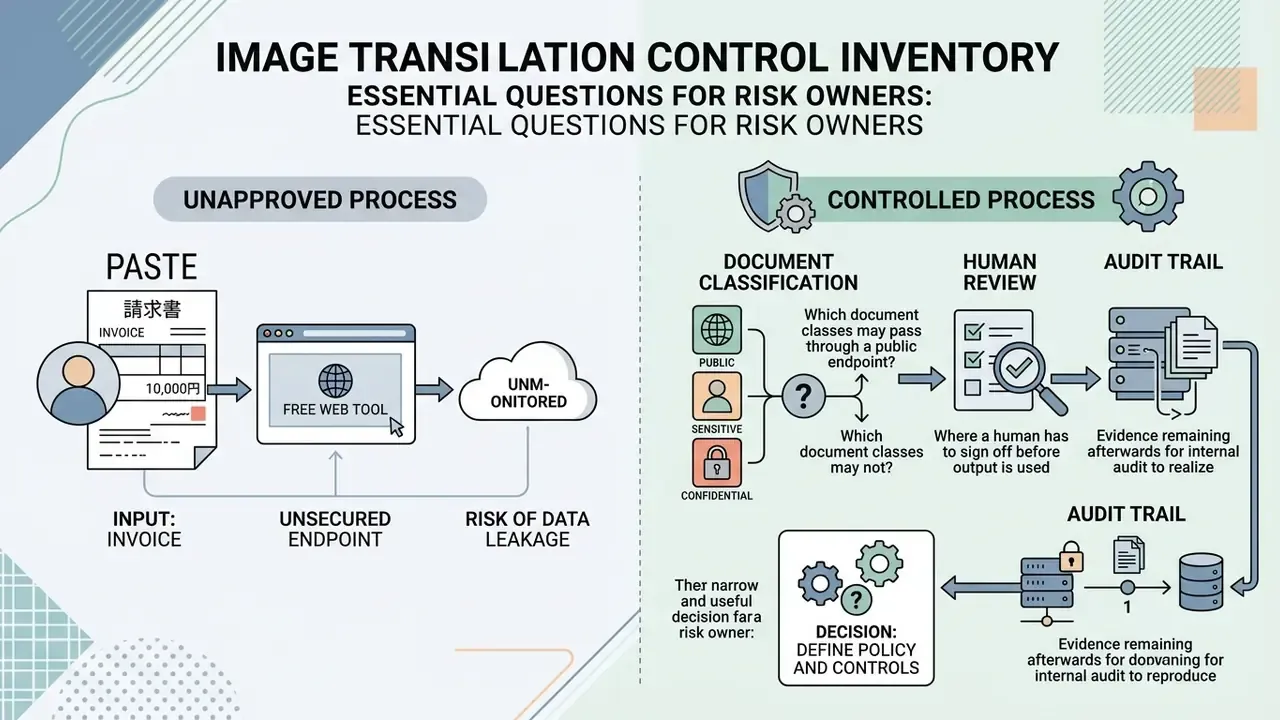
Most banks and fintechs did not approve an image translator. They inherited one.
Someone in accounts payable pastes a Japanese invoice into a free web tool. A KYC analyst photographs an Arabic residency permit and uploads it for a quick read. Neither action appears in the model inventory, and neither leaves an audit trail. That is Shadow AI in its plainest form, and it usually arrives through the browser rather than through procurement.
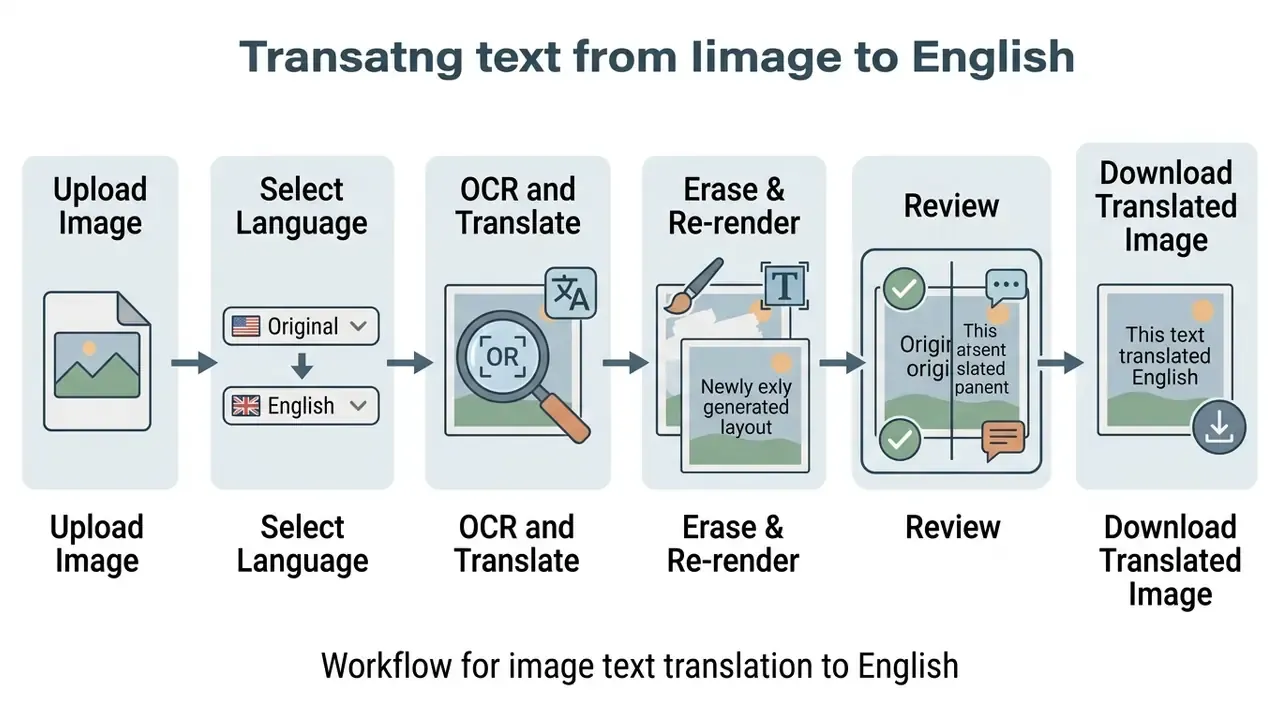
The mechanics are not exotic. An image translator runs optical character recognition (OCR) to extract text, sends that text through machine translation, then re-renders the English string back onto the picture. Four stages, two of them invisible. Each one can corrupt a number, invert a clause, or silently drop a diacritic that changes a name on a sanctions screen.
So the decision in front of a risk owner is not “which tool is fastest.” It is narrower and more useful:
- Which document classes may pass through a public endpoint, and which may not?
- Where does a human have to sign off before output is used downstream?
- What evidence remains afterwards, and can internal audit reproduce it?
The rest of this guide answers the practical question (how to translate text in an image online) and then attaches the controls that make the output defensible. Governance first, convenience second. Both are achievable.
How to Translate Image Text into English in 3 Steps
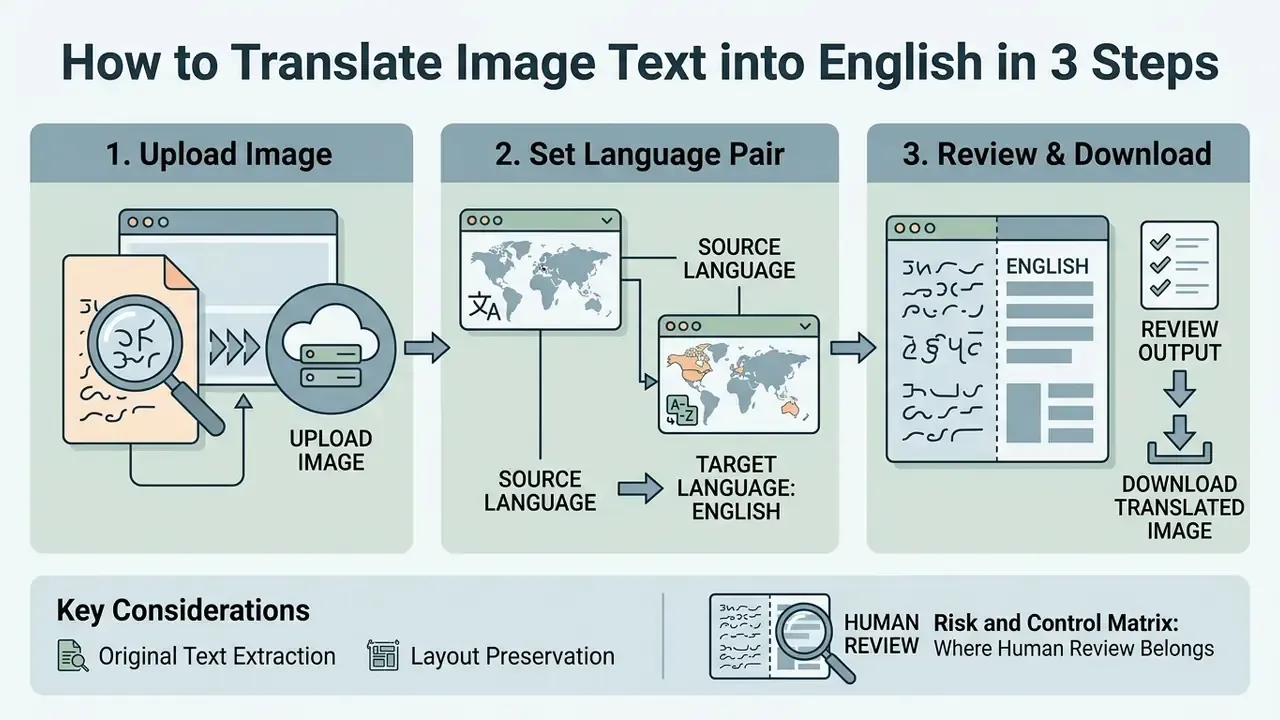
Translating text from an image into English online involves three core operational steps: uploading the image file, selecting the source and target language pair, and reviewing the recognized text before downloading the final file. Modern browser-based translation tools use optical character recognition (OCR) and machine translation (MT) to extract, translate, and re-render visual text within seconds.
«Researchers describe a four-stage process: OCR text recognition, NMT translation, removal of the original text, and rendering the translation back into its source positions.»
In practice, the visible three-step interface hides a fourth, invisible stage, text erasure and re-rendering, which is exactly where layout damage and mistranslation risk concentrate.
Upload an Image or Photo with Text
To begin image translation, upload a high-contrast image file in standard formats such as JPG, JPEG, PNG, or WebP. The input quality directly affects character recognition accuracy. Scanning or photographing documents at a minimum resolution of 300 DPI ensures that the underlying OCR engine can distinguish subtle letter shapes and diacritics without character distortion.
«MIT-10M filtered out roughly 50% of images, retaining only those above 800×800 pixels with meaningful recognized text.»
If your source file falls below that threshold, say a compressed chat screenshot or a low-light phone photo, pre-processing with AI image enhancers is usually more effective than re-running OCR and hoping for a better outcome. I have watched teams burn an afternoon on the second approach. It rarely pays.
Select the Source Language and English Target Language
Select the specific source language or enable the auto detect feature, then explicitly set English as your target language. Automated detection mechanisms, such as AWS Comprehend or Azure AI Document Intelligence, analyze script patterns to identify the source text automatically. Amazon Translate supports automatic detection by setting the source language parameter to auto, while Azure Translator and DeepL expose detection as an integrated translation feature. Specifying the exact language pair manually remains best practice when processing non-Latin scripts or mixed-language media, and it is the only sensible default when different languages appear on the same page.
«AnyTrans merges OCR-recognized texts into a sequence with HTML positioning tags, preserving coordinate anchoring for precise translation re-insertion.»
Review the Translation and Download the Result
Review the generated accurate translation against the source photo to correct any character misrecognitions before downloading the final output. Most platforms allow manual editing of suspect words in a side-by-side text converter editor. Adobe Acrobat, for example, documents a per-error workflow: enable “Review recognized text,” click each highlighted box, compare the image against the OCR output, edit the Recognized as field, then accept. Once verified, users can preserve the original layout and click to download translated images, searchable PDFs, or raw text files.
University digitization guidance adds a second safeguard: review at least a representative sample of every batch and store corrected text as a separate file rather than overwriting the raw OCR output, so that the original extraction remains reproducible for audit. That single habit turns a convenience tool into something an examiner can follow.
Experience note (internal audit case, illustrative and composite). During an internal audit of foreign vendor invoices, a financial compliance team processed 400 scanned Japanese receipts using an OCR-NMT pipeline. By enforcing a 300 DPI pre-processing threshold and manually reviewing every character flagged below the engine’s confidence threshold, the team materially reduced misclassification on line-item amounts and closed the audit within two working days. Updated: the reduction figure is self-reported operational reporting from a single engagement, was not measured against a public benchmark, and should not be read as a vendor-independent accuracy claim; teams needing defensible numbers should run a controlled WER/CER test on their own sample.
Risk and Control Matrix: Where Human Review Belongs
| Pipeline Stage | Primary Failure Mode | Automated Control | Human-in-the-Loop Trigger |
|---|---|---|---|
| Upload / ingestion | PII or NPI leaves the controlled perimeter | DLP scan, redaction, private endpoint | Any document containing KYC, health, or payment data |
| OCR extraction | Character misrecognition, dropped diacritics | Per-character confidence scoring | Any token below the engine confidence threshold |
| Machine translation | Terminology drift, idiom inversion | Glossary / termbase enforcement | Contractual, regulatory, or numeric fields |
| Text erasure & re-render | Layout collapse, truncated strings | Bounding-box overflow detection | Tables, stamps, seals, financial totals |
| Export / retention | Residual cache on third-party servers | Automatic purge, retention policy | Any file retained beyond the documented window |
One column deserves emphasis. The trigger, not the tool, is what auditors test. A named owner, a documented threshold, and a logged approval convert an unsupervised script into a supervised control.
How to Choose an Image to Text Translation Tool
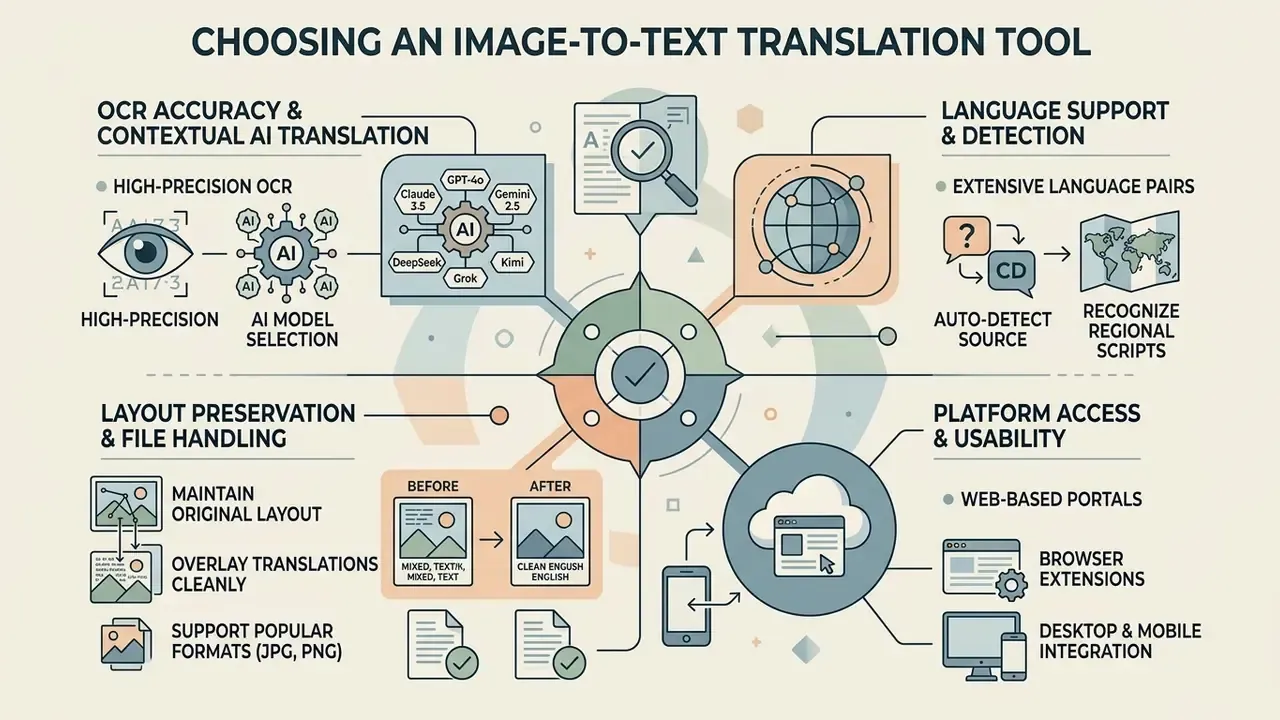
Selecting an optimal image to text translation tool requires evaluating optical character recognition (OCR) accuracy, AI model context handling, layout preservation, file support capabilities, deployment mode, and data-retention posture. Institutions evaluating enterprise platforms must balance extraction speed against the risk of mistranslation in critical operational workflows. Why choose one engine over another? Because the failure modes differ, and so do the controls you need around them.
OCR Accuracy and Contextual AI Translation
High-performing image to text translation tools combine advanced OCR engines with multimodal AI language models that evaluate visual context.
«A 2026 comparative evaluation found docTR consistently outperforms EasyOCR across all languages, cutting Word Error Rate by up to 13.9 percentage points.»
Multimodal models further improve translation fidelity by interpreting surrounding visual cues, such as table headers or diagram labels. Smart text detection helps here too: knowing that a string sits inside a total row changes how it should be read.
«Gemini-2.5-pro achieves the best translation quality among all tested systems, outperforming traditional NMT and text-only LLMs on BLEU, chrF, and TER.»
Readers comparing extraction accuracy against price can benchmark image-to-text tools for commercial use before committing to a tier, and review vendor claims against measured results in AI Media Benchmarks and Review Proof.
Multi-model engine selection (model switching). Modern translation portals increasingly let users choose the underlying large language model according to task parameters, rather than locking every job to one engine:
- GPT-4o / Claude 3.5 Sonnet are strongest on complex document layouts, technical nomenclature, legal phrasing, and highly contextual nuance where an idiom must survive translation.
- Gemini 2.5 Pro is optimized for spatial vision reasoning and multimodal structural extraction; best when column order, table geometry, or diagram labels must be reconstructed.
- DeepSeek / Grok / Kimi are cost-efficient options for high-volume extraction jobs where graphic formatting demands are light and throughput matters more than stylistic polish.
Independent architecture research explains why this choice matters. Classical OCR pipelines are cascaded: extraction first, translation second. Vision-language models read and translate in a single pass. NVIDIA’s 2025 PDF-extraction testing reported that OCR pipelines delivered substantially higher throughput and lower latency than a larger VLM, with stronger retrieval recall on the tested datasets, whereas end-to-end VLMs remove pipeline complexity but still degrade on dense tables and formulas. For governance purposes, the cascaded pipeline also has an audit advantage: the intermediate extracted text is inspectable. Cutting edge AI is useful; inspectable AI is bankable.
Language Support and Source-Language Detection
Enterprise tools must support a broad array of languages including English, Arabic, French, German, Chinese, Japanese, and Korean. Azure documents more than 110 languages and dialects for document translation, with internal routing for scanned PDFs. Where an image translator supports automated source-language detection, systems can route scanned media through script-specific recognition models without manual configuration; OCR.space, for instance, added a language="auto" parameter in 2025 capable of detecting several languages inside a single image.
«MIT-10M covers 14 languages: 840,000 images in eight source languages translated into 13 targets, including English, with 99.4% accuracy in human evaluation.»
A caveat that surfaces in archival work: historical and Old English typography, blackletter fonts, and long-s forms still confuse general-purpose engines, so specialist models remain necessary for pre-modern sources.
Browser Extensions vs. Web-Based Portals
For instant context switching, browser extensions (Chrome, Edge, or Firefox image translators) perform one-click DOM inspection to locate image elements, send them to a cloud OCR endpoint, and dynamically swap the rendered source image for a translated version, with no manual download or re-upload required. This is the fastest route for reading foreign-language e-commerce listings, marketplace product shots, forum screenshots, and digital media while scrolling. An image to text translator online in the browser feels almost frictionless, which is precisely the problem.
Web portals remain the better choice when you need batch control, editable side-by-side proofing, export format selection, glossary enforcement, or an audit trail. A practical split most teams adopt:
- Use an extension for live browsing, competitor research, and disposable reading tasks on public pages.
- Use a portal or API for anything that will be stored, published, invoiced, or reviewed, because extensions typically transmit whole page assets to a third-party endpoint without document-level logging.
Developers standardizing this split can wire the second path through a documented AI Media API instead of leaving each team to pick its own endpoint.
Layout Preservation, Export, and Batch Processing
For complex business documents, preserving the original layout, including column structures, text alignment, and embedded tables, is essential. Advanced tools utilize positional encoding tags or layout analysis pipelines like Docling, whose standard PDF pipeline chains preprocessing, OCR, layout analysis, and table-structure parsing, and exposes a layout_batch_size parameter for batched layout inference. Enterprise-grade platforms also offer batch translate functionality, allowing teams to process multiple images or folder queues simultaneously through dedicated cloud storage connectors and seamless integration with existing document stores.
«IMTBench evaluates 2,500 instances across four scenarios: documents, web pages, scenes, and slides, including a cross-modal text–image alignment metric.»
| Tool Category | Core OCR Technology | Language Support | Layout Preservation | Batch Processing | Max Pixel Dimensions | Data Retention / Compliance | Deployment | Primary Supported Formats |
|---|---|---|---|---|---|---|---|---|
| Enterprise AI Translators | Multimodal Vision-LLMs / docTR | 110+ languages (auto-detect) | Full (tables, columns, page breaks) | Yes (API & cloud batch) | Up to 10,000 × 10,000 px | Zero-data-retention options, SOC 2 / ISO 27001 claims, contractual deletion SLAs | Public cloud, private cloud, or on-premise | PDF, JPEG, PNG, WebP, BMP, TIFF |
| Document OCR Converters | Tesseract / standard OCR | 80+ languages | Partial (structured document) | Yes (local queue) | 4,096–10,000 px depending on engine | Often local-only processing; no upload required | Desktop / self-hosted | PDF, TIFF, JPG, PNG |
| Browser Consumer Tools & Extensions | Basic OCR + web MT | 30–130 languages | Basic (text overlay / plain text) | Limited (5–30 files) | Commonly 4,096 × 4,096 px | Public endpoints; cache windows often undisclosed; model-training reuse possible | Public web / browser add-on | JPG, JPEG, PNG, WebP |
Free vs Paid Image Translator: What to Check Before Uploading
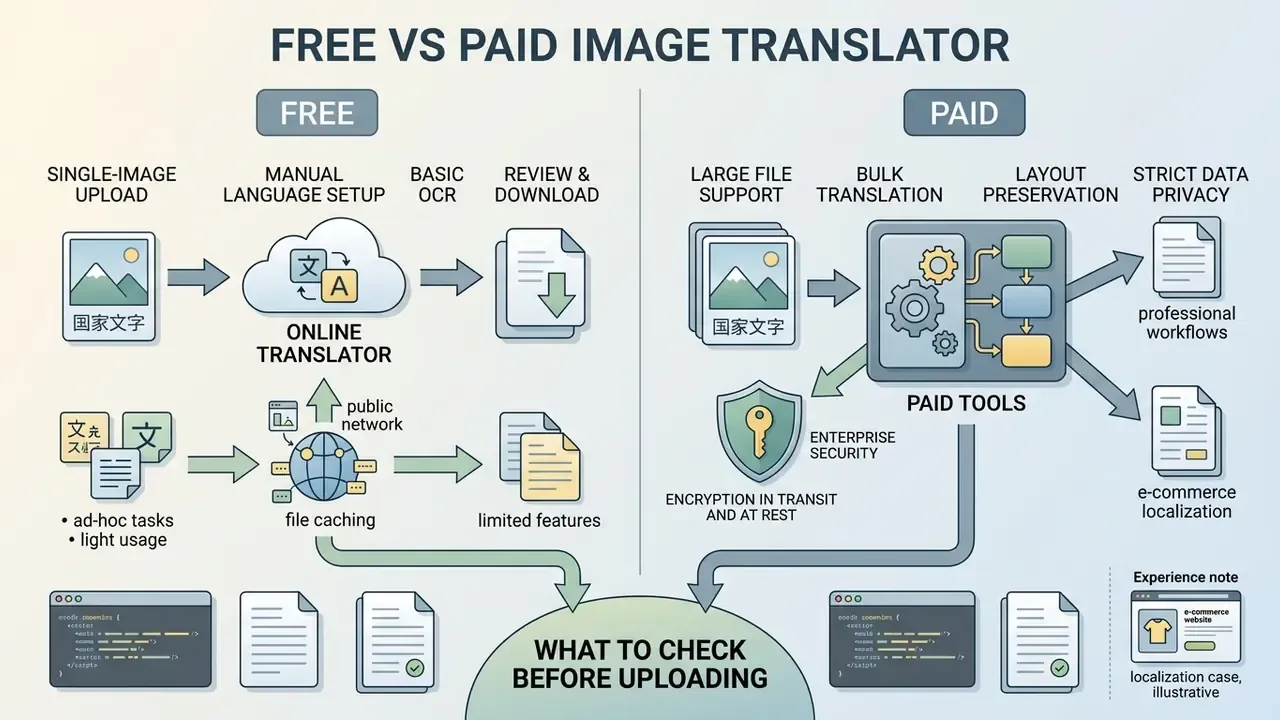
Free online image translators are well-suited for ad-hoc, single-image tasks, whereas paid enterprise tools provide large file support, bulk translation, strict data privacy, easy export, and higher processing speed. Organizations must evaluate file size limits, pixel ceilings, and security policies prior to uploading sensitive media to public endpoints. Where a source file is simply too small or too soft for reliable recognition, AI image upscalers can raise effective resolution before OCR rather than after a failed extraction.
When a Free Online Image Translator Is Enough
A free online image translator is sufficient for one-off tasks where a user needs to translate text on image files within seconds. Typical ad-hoc scenarios include translating foreign street signs, travel screenshots, or single-page product labels. These quick tasks rely on a simple one click workflow and basic text translator engines without requiring user registration or paid subscriptions. Free tiers commonly cap usage by file count rather than quality, for example a handful of guest uploads per hour, or a single image per month on consumer plans.
«A 2024 study identified statistically significant adequacy and fluency errors in Google Lens translations from Arabic, although the tool remains effective for everyday use.»
The practical boundary is therefore not speed but consequence: free tools are appropriate where a misread character costs nothing, and inappropriate where it changes a number, a dosage, a clause, or a compliance attestation.
Features That Matter for Professional Translation Workflows
Professional translation workflows demand enterprise features such as batch translate queues, high quality layout preservation, API integration, and large file support. Official documentation reveals distinct functional boundaries:
- DeepL documents image uploads at 3 MB per file for both Free and Pro API tiers, with character ceilings of 500,000 (Free) and 1 million (Pro). DeepL Documentation (2026). https://developers.deepl.com/docs/resources/usage-limits
- Google Cloud Vision enforces an absolute 20 MB per-image limit and returns an error above it rather than resizing. Google Cloud Documentation (2026). https://docs.cloud.google.com/vision/docs/supported-files
- Google Cloud Translation Advanced accepts up to 100 files and 1 GB total per batch document request, writing output to Cloud Storage. Google Cloud Documentation (2026).
- Microsoft Azure Translator lists image file size at ≤ 5 MB in its published batch service limits. Microsoft Learn (2026). https://learn.microsoft.com/en-us/azure/ai-services/translator/service-limits
- Commercial image-translation platforms tier limits by plan, commonly 10 MB (free) to 50 MB (enterprise) per image.
Organizations reviewing operational choices can evaluate tool metrics through an AI Media Comparison to align system capacity with institutional volume requirements, and model per-page processing cost with the relevant calculators before signing an annual tier.
Experience note (e-commerce localization case, illustrative). An e-commerce team expanding into cross-border markets needed to translate 1,500 Chinese product packaging images into English without distorting graphic geometry. They deployed a batch-translation API with automated text erasure and layout preservation, converting the entire catalog in under three hours while maintaining brand compliance and passing each rendered file through an overflow check on bounding boxes.
Data Privacy, File Caching, and Enterprise Security
Processing enterprise media requires verifying data-retention policy before the first upload, not after an incident. Standard free tools frequently cache uploaded images on public servers and may reuse submitted content for model retraining. That is the single most common vector for Shadow AI exposure in finance, insurance, and healthcare operations, because a well-intentioned analyst translating one invoice can move customer NPI outside the controlled perimeter in a single click.
Enterprise-grade services should be assessed against concrete, contractual controls:
- Encryption in transit and at rest. TLS 1.3 for transport, managed keys or customer-managed keys for storage.
- Zero data retention (ZDR) or bounded caching. Automatic cache purge within a documented window (often 24 hours), with the window stated in the contract rather than the marketing page.
- No training on customer content. An explicit prohibition on using uploaded images or extracted text for model improvement.
- Independent attestation. SOC 2 Type II, ISO/IEC 27001, and, where relevant, HIPAA or GLBA-aligned safeguards for consumer financial information.
- Right-to-be-forgotten APIs. A programmatic or documented request channel that triggers immediate server-side deletion, together with a confirmation record you can file as audit evidence.
- Data residency and deployment mode. Knowledge of the processing jurisdiction (many public tools store on dedicated servers in the United States) plus the option of private cloud or on-premise deployment for regulated workloads.
- PII redaction before upload. Masking account numbers, national IDs, signatures, and health data at the source, which remains the only control that works regardless of vendor behavior.
A related cleanup question comes up once translated or generated assets are already indexed. Guidance on how to remove ai images from google search is worth reading before an incident, not during one, since de-indexing is slower than publishing.
Prepare an Image for More Accurate English Translation
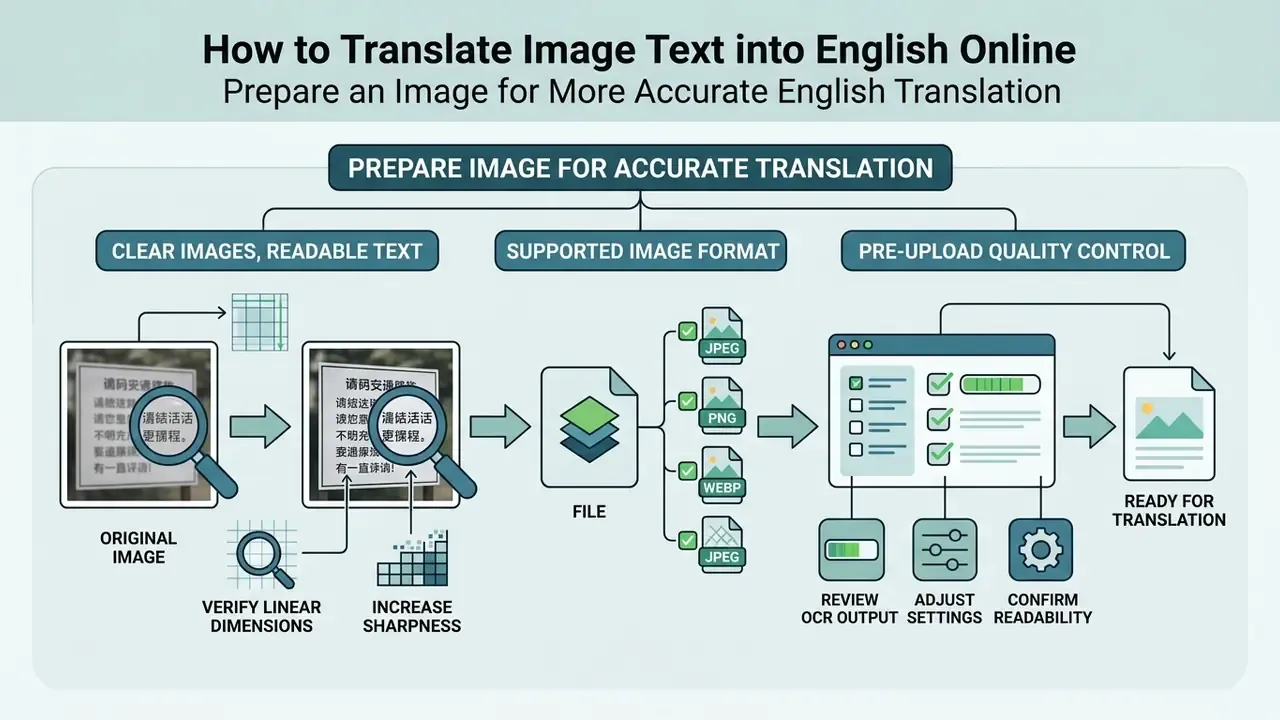
Preparing an image prior to processing significantly improves OCR text extraction and subsequent translation quality. Ensuring visual clarity, correct pixel density, proper geometry, and appropriate file formatting minimizes character misidentification at the source, and every error eliminated here is an error that never reaches the translation model.
Use Clear Images with Readable Text
To maximize advanced OCR accuracy, capture or scan documents at 300 to 400 DPI with minimal geometric skew. Guidelines from the National Archives and Records Administration (NARA) specify that keeping page alignment within ±3° and eliminating shadows, blur, or glare drastically reduces character error rates; Library of Congress NDNP technical notes similarly require deskewing above 3° and specify TIFF masters at 300–400 DPI. NARA’s digitization specifications use 400 DPI for color and grayscale and 600 DPI for bitonal documents to maximize OCR accuracy, while Tesseract guidance notes that small type may need 400–600 DPI with strokes roughly two pixels wide. High-contrast images featuring dark text on a clean, light background yield the best results for smart text detection algorithms.
«Real-CE (ICCV 2023) contains 1,935 LR–HR image pairs: 2× and 4× super-resolution significantly improves the legibility of structurally complex Chinese characters.»
Beyond DPI density, verify linear dimensions as well. Most enterprise OCR pipelines cap processing at 10,000 × 10,000 pixels per single frame to prevent spatial coordinate distortion during text-mask reconstruction, while consumer-grade tools frequently stop at 4,096 × 4,096 pixels and silently downscale anything larger. This matters for long site screenshots, stitched web comics, engineering drawings, and large-format posters: if the frame exceeds the engine ceiling, the service either rejects the file or resamples it, and the resampling, not the OCR model, becomes the dominant source of error. Where a document is genuinely oversized, tiling it into overlapping segments under the ceiling preserves character geometry better than a single downscaled pass.
Choose a Supported Image Format
Select widely accepted image formats like JPEG, PNG, or WebP. Cloud vendors treat these as functionally equivalent inputs: Google Cloud Document AI lists PNG, JPEG/JPG, and WebP among supported MIME types and states that accuracy depends on resolution, minimum font size, and document quality rather than container choice. While raster formats like PNG preserve sharp edges around text characters due to lossless compression, lossy JPG files are acceptable provided compression artifacts do not distort letter borders. For bitonal archival scans, TIFF Group IV remains the recommended lossless option, and color or grayscale originals generally outperform dithered black-and-white conversions.
«OCR pipelines apply post-processing, including lowercasing, stop-word removal, and lemmatization, to reduce noise before feeding text into the translation model.»
Pre-Upload Quality Control
Checklist0 / 9
Translate Arabic, Chinese, and Japanese Image Text to English
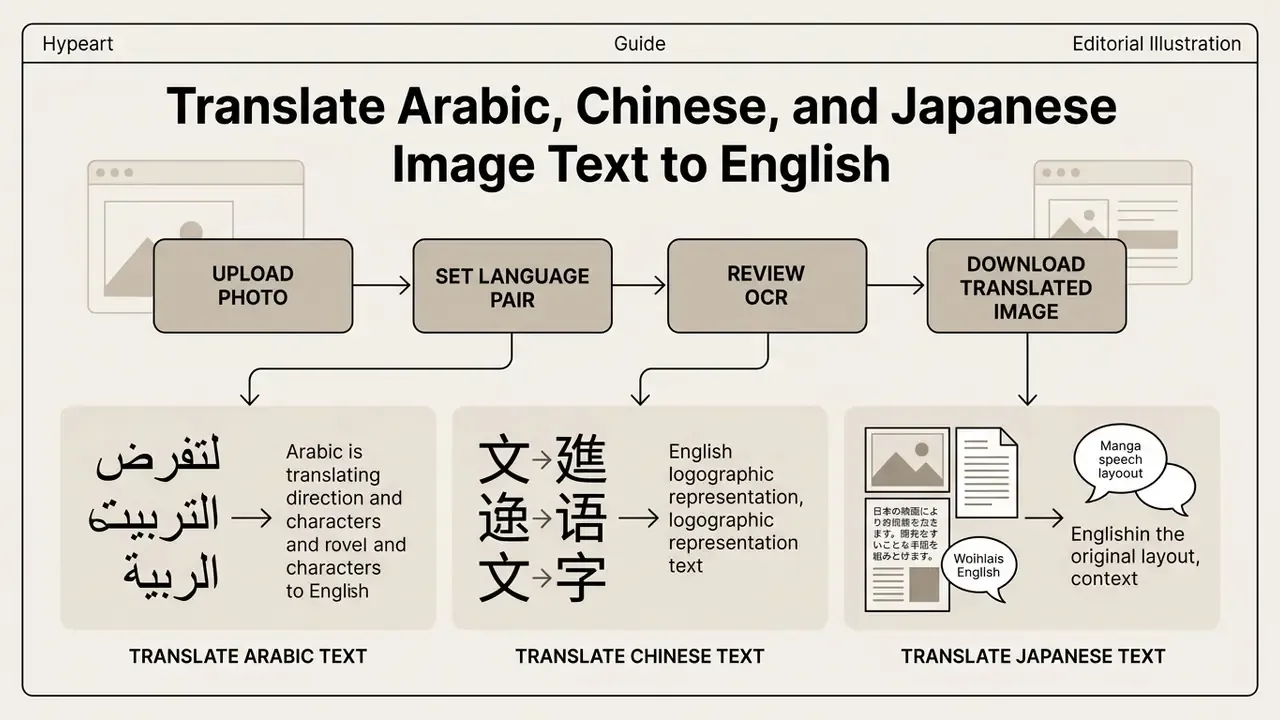
Translating Arabic, Chinese, and Japanese image text into English involves navigating unique script characteristics, including right-to-left orientation, complex logographic characters, and vertical typesetting. Adobe’s documentation is explicit on the prerequisite: for non-Latin text such as Japanese, Chinese, or Korean, the correct OCR language must be selected first, otherwise recognition degrades or fails outright.
Translate Arabic Text from an Image to English
Translating Arabic text from image to English requires an OCR engine designed to handle connected script cursive forms, diacritics (tashkeel), and right-to-left (RTL) reading order. A 2023 survey of Arabic script recognition reports right-to-left flow, connected script, ligatures, and diacritics as the core recognition challenges, and a 2025 Arabic OCR paper adds that high-fidelity recognition requires explicit support for contextual letter forms and marks such as fathah, kasrah, dammah, sukun, shadda, and tanwin. Retaining paragraph layout structure during extraction is necessary to maintain contextual continuity before applying neural machine translation models.
«Translation specialists recorded statistically significant adequacy and fluency errors in Google Lens when translating Arabic medical signs, storefront signage, and handwritten text.»
For an English Arabic pair in a KYC or trade-finance file, treat machine output as a draft. Names, dates, and amounts carry the risk; the prose around them rarely does.
Translate Chinese Text from an Image to English
Chinese-to-English image translation relies on logographic character extraction and context-aware language models. According to the Real-CE benchmark study (ICCV 2023), low-resolution Chinese scene text severely degrades OCR accuracy; applying super-resolution preprocessing improves character recognition.
«Real-CE (ICCV 2023) provides 783 test LR–HR pairs with 33,789 annotated text lines for evaluating super-resolution of Chinese scene characters.»
Utilizing specialized datasets allows AI translation models to resolve ambiguous characters based on surrounding visual context rather than glyph shape alone.
«OCRMT30K contains roughly 30,000 Chinese-text image pairs with English translations; a multimodal codebook links visual features to textual ones to improve translation.»
Script-specific pipelines matter here as well: PaddleOCR ships dedicated Chinese-English detection and recognition model families rather than routing Chinese text through generic Latin OCR, and academic sign-translation work shows that font variation and uneven lighting affect extraction directly.
Translate Japanese Images, Documents, and Manga to English
Translating Japanese media requires handling multi-script text (Kanji, Hiragana, Katakana) and vertical typesetting (tategaki). In enterprise contexts this is the dominant constraint: vertical ledgers, tax filings, shipping manifests, and contract annexes often mix tategaki columns with horizontal tables, and hanko seal impressions overlap printed text in ways that confuse both detection and inpainting. Any image text translator japanese to english that claims tategaki detection with preserved reading order should be tested on your own document class before rollout, because reading-order inversion silently reorders line items without producing an error.
For graphic media, specialized manga translator frameworks combine vertical OCR, text erasure via generative inpainting, and localized relettering. This pipeline removes original Japanese characters from speech bubbles, restores the underlying background artwork, and renders translated English text within the original layout boundaries. Public implementations such as Manga Image Translator and Koharu document the full chain, from text detection and OCR through translation to generative inpainting that reconstructs artwork beneath text blocks, with some products bundling all stages end-to-end and others exposing each module separately.
«STELLAR assembles the STIPLAR dataset: roughly 10,460 Japanese, 8,010 Arabic, and 9,497 Korean image pairs for style-consistent text editing without altering the background.»
Use Cases for Translating Text in an Image to English
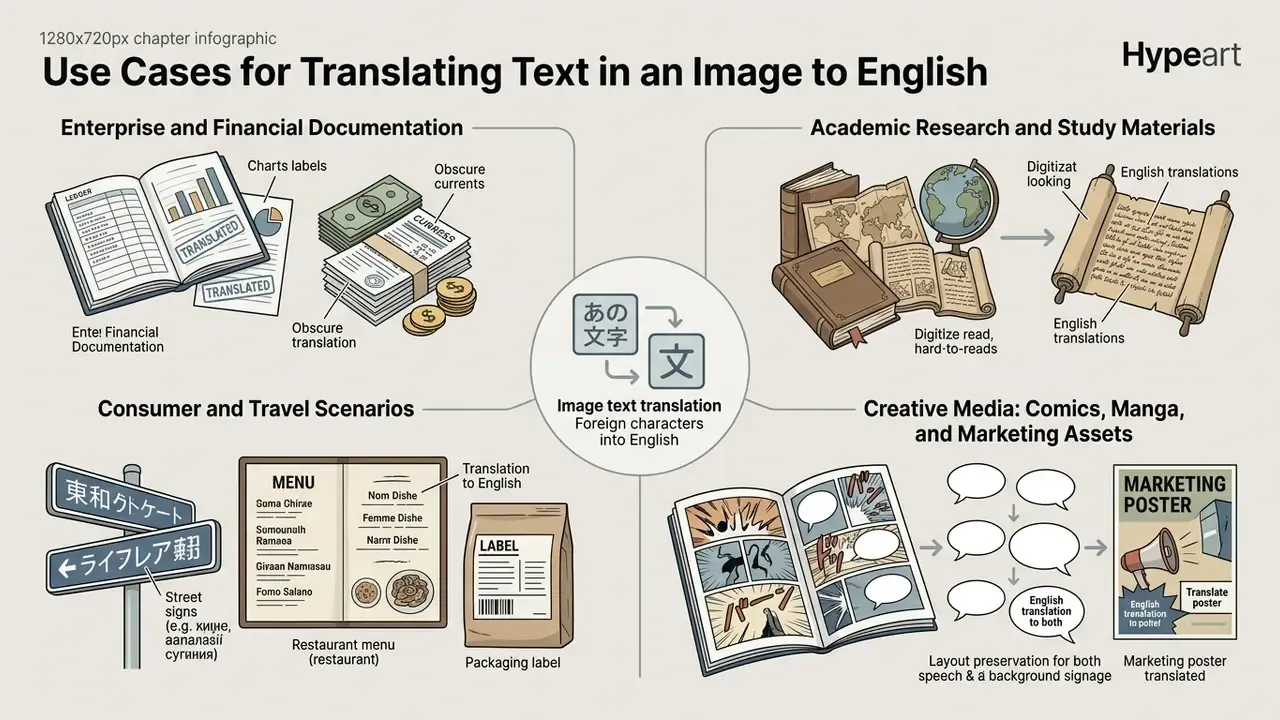
Image text translation serves diverse practical applications across global business operations, academic research, travel navigation, and creative media localization. The scenarios below are grouped by governance profile, because enterprise documentation and consumer media demand very different controls.
Enterprise and Financial Documentation
Enterprise teams frequently process scanned contracts, financial audit filings, customs paperwork, and e-commerce product images. Converting foreign-language product descriptions into English ensures compliance with international catalog standards, while translated invoices and vendor attestations feed directly into reconciliation and audit evidence. PDF translations of fixed-layout corporate records should target PDF/A (ISO 19005) as the baseline preservation format, because it is designed to keep static visual appearance stable over time. GS1’s product image specification sets concrete storage rules for catalog assets: 900×900 to 2400×2400 pixels, 300 ppi, RGB, LZW-compressed TIFF for storage, with JPEG and PNG for distribution.
Organizations managing digital assets can assess licensing and usage parameters using AI Media Commercial-Use frameworks to protect proprietary media assets during automated transformation, and can benchmark extraction accuracy across vendors with image-to-text tools before standardizing a pipeline.
Academic Research and Study Materials
Researchers and students use image translation for textbook pages, archival scans, conference posters, and infographics where the source text is locked inside a raster file. Here the operative risk is quiet paraphrase rather than data leakage: a translated figure caption that drifts from the original changes the claim being cited. Retaining the raw OCR output alongside the translation gives reviewers a way to verify the chain from image to quotation.
Consumer and Travel Scenarios
Travelers rely on mobile image translation for real time interpretation of foreign street signs, transit maps, receipts, and restaurant menus. Lightweight mobile apps offer a lightning fast, one click workflow that overlays translated English text directly onto the smartphone camera feed, bypassing the need for manual typing. Published app documentation for these tools typically combines camera OCR, document edge detection, automatic language identification, on-screen overlay, and text-to-speech playback across 90 to 110+ languages. Language barriers fall away for a menu; they do not fall away for a rental contract.
«VISTRA (WMT 2024) includes 772 real-world images containing English text, covering signage, storefronts, and public displays, with word-level annotations and bounding-box coordinates.»
Creative Media: Comics, Manga, and Marketing Assets
Publishers and localization teams use automated manga translator tools to process graphic novels efficiently. These systems isolate text regions, remove foreign lettering, restore background textures, and insert translated English dialogue. Inpainting is the stage that makes this possible: the original lettering is removed and the resulting hole is filled from surrounding pixels and context, so that reconstructed artwork reads as original rather than patched.
Social teams run the same loop in reverse when localizing campaign assets, which is where text to image translation meets distribution strategy: translated captions, burned-in subtitles, and localized thumbnails all affect reach. Creators planning that step alongside monetization can read how to monetize instagram reels and the broader guide on how to monetize short-form output. Creative teams handling final cleanup can compare AI photo editing tools for post-production, and anyone modifying published image assets online can follow guidance on how to remove text from image online to streamline visual post-production.
FAQ: Frequently Asked Questions About Image Text Translation
This section addresses common technical questions regarding the performance limits and operational capabilities of modern AI image translators. Readers evaluating adjacent tooling can also compare the best AI image generators when a workflow requires generation as well as translation.
Can an AI Image Translator Translate Handwritten Text to English?
Yes, modern AI image translators can process handwritten text, but recognition accuracy is substantially lower than for printed typography. Published 2026 benchmarks on Handwritten Text Recognition (HTR) show that specialized HTR models reach Character Error Rates between roughly 4.6% and 6.4% on clean, curated datasets, figures reported for models such as VAN, OrigamiNet, and MsDocTr-Lite in Handwritten Text Recognition: A Survey (2026). Generic OCR engines applied to messy or unconstrained handwriting perform far worse. The KITAB-Bench evaluation (2025), for example, reports handwritten-text CER values of 0.66 for Tesseract and 0.87 for Surya, and a 2026 study on crossed-out words found that cross-outs raise CER by 12 to 72 percentage points depending on model and writing style.
«DTrOCR (2023) demonstrates substantial gains over existing methods on handwritten English and Chinese text across multiple benchmarks.» DTrOCR paper, arXiv (2023). https://arxiv.org/abs/2308.09690
Manual human review therefore remains necessary for handwritten historical, legal, or medical records.
«A study of handwritten Marathi legal documents compares Tesseract, EasyOCR, and PaddleOCR against three vision-language models, showing vLLM advantages for direct translation.» Handwritten Legal Document Translation study, arXiv (2025). https://arxiv.org/abs/2504.09813
This information is general in nature and does not replace professional consultation. Handwritten medical and legal records carry legal and clinical consequences if misread; machine output in these domains should be treated as a draft requiring qualified human verification.
What Is the Maximum Number of Images I Can Batch Translate at Once?
Public web interfaces typically cap free batch processing at 5 to 30 images simultaneously, and some providers additionally limit uploads per hour for unauthenticated guests. Enterprise API connections allow far larger queues: Google Cloud Translation Advanced documents up to 100 files and 1 GB of total archive volume per batch request, with output written directly to cloud storage, while self-hosted layout pipelines expose batch-size parameters that scale with available GPU memory. For recurring work, folder-level or connector-based ingestion is more reliable than repeated manual multi-select.
What Is the Largest Image an Online Translator Can Process?
Two separate ceilings apply. The first is file weight, commonly 3 MB (DeepL), 5 MB (Azure Translator image files), 20 MB (Google Cloud Vision), or 10 to 50 MB depending on a commercial plan tier. The second is linear resolution, where enterprise pipelines generally accept up to 10,000 × 10,000 pixels and consumer tools often stop near 4,096 × 4,096 pixels. A file can satisfy the megabyte limit and still be rejected or downscaled on dimensions, so check both before a large batch run.
Are My Uploaded Images Used to Train Public AI Models?
It depends entirely on the provider’s terms, and the default on free consumer tiers is frequently less protective than users assume. Before uploading regulated content, confirm four things in writing: whether submitted images and extracted text are excluded from model training; how long files remain in cache; where processing physically occurs; and whether a deletion request can be executed on demand with a confirmation record. Providers that publish dedicated-server locations, continuous third-party audits, and an explicit deletion channel are verifiable; providers that describe security only in adjectives are not.
Does Image Translation Preserve the Original Layout and Image Quality?
High-end pipelines preserve layout by reconstructing text masks and re-rendering translated strings inside the original bounding boxes, which keeps columns, tables, and speech bubbles intact. Quality loss typically originates upstream: from downscaling an oversized frame, from lossy re-encoding on export, or from font substitution when the translated string is longer than the source. English translations of Chinese or Japanese source text frequently expand in character count, so checking for truncation and overflow after rendering is a necessary final step rather than an optional one.
Who Should Own This Workflow Inside a Bank?
One named owner, not a committee. In practice the pattern that survives audit assigns the business process owner accountability for output accuracy, model risk for engine validation, and information security for the data path. Escalation belongs in writing: which document classes stop and wait for a human, and who signs. Without that, image translation stays a personal convenience rather than a controlled capability, and it will not appear in any inventory until something goes wrong.
Limitations and Open Questions
Honest caveats matter more than a tidy conclusion. Benchmark scores cited above come from public datasets that rarely resemble a bank’s own scanned population, so external accuracy figures should be treated as directional. Vendor retention language changes between contract renewals. Agentic setups that chain translation into downstream posting or approval remain the least mature part of this stack, and we have not seen enough independent evidence to recommend unsupervised end-to-end automation for regulated document classes. A controlled sample test on your own files remains the only reliable answer.
Company Positioning Disclaimer
Hypeart.ai positioning status: No verified information available. No company USP has been verified, so none is claimed here.
General Disclaimer
This article is informational and does not constitute legal, financial, medical, or compliance advice. Vendor specifications, API limits, retention policies, and certification statuses change over time; verify current terms with each provider and with your own legal, privacy, and information-security functions before processing regulated or personally identifiable data.
Internal Hub Navigation
- Explore AI Media Workflows for enterprise integration guides.
- Review performance metrics via AI Media Benchmarks and Review Proof.
- Examine developer options using the AI Media API.
- Estimate operational processing fees with specialized calculators.
- Compare extraction accuracy and pricing across image-to-text tools.
- Improve source files before OCR with AI image enhancers and AI image upscalers.
- Handle post-translation cleanup with AI photo editors and how to remove text from image online.