Last updated: 2026. Prices, endpoints, and deprecation dates are reconciled against OpenAI and Microsoft Azure primary documentation at the date of publication. Forward-looking dates, including the 24 September 2026 shutdown, are official vendor notices rather than our forecasts.
Executive summary for product, risk, and finance owners
Decision map: what this guide answers
Rather than a list of anchors, here is the practical order in which most teams hit these questions. Skim the line that matches your current blocker.
- What does the Sora AI video generator actually produce, and where does it still break?
- Which access route is legitimate, and how do I spot a reseller wrapper?
- What drives the invoice, and how do I model cost per shipped clip instead of cost per second?
- How do I wire an asynchronous job flow that survives a 120-second render and a failed webhook?
- Which controls does second line need before publication?
- When is Sora the wrong model, and what does the exit plan look like?
One extra note for procurement: generative video is a classic shadow-AI entry point. Marketing teams can buy a $20 consumer plan with a corporate card in four minutes. If the sanctioned path is slower than that, you will find unsanctioned clips in production before you find them in your inventory. For a broader view of adjacent media APIs and their governance posture, see the overview on our main hub and the model pages in the API section.
What the Sora AI Video Generator is and what videos it creates
The Sora AI video generator is a diffusion transformer model from OpenAI that produces physically coherent clips from text prompts, static images, or existing video fragments. Research materials historically described durations up to 60 seconds; current product documentation caps roughly 20 seconds per API job. The model treats visual data as spacetime patches in a latent space, which is what yields cinematic quality, complex lighting dynamics, and stable camera movement.
«Sora is trained jointly on videos and images of variable duration, resolution and aspect ratio; the transformer operates on spacetime patches of latent codes.»
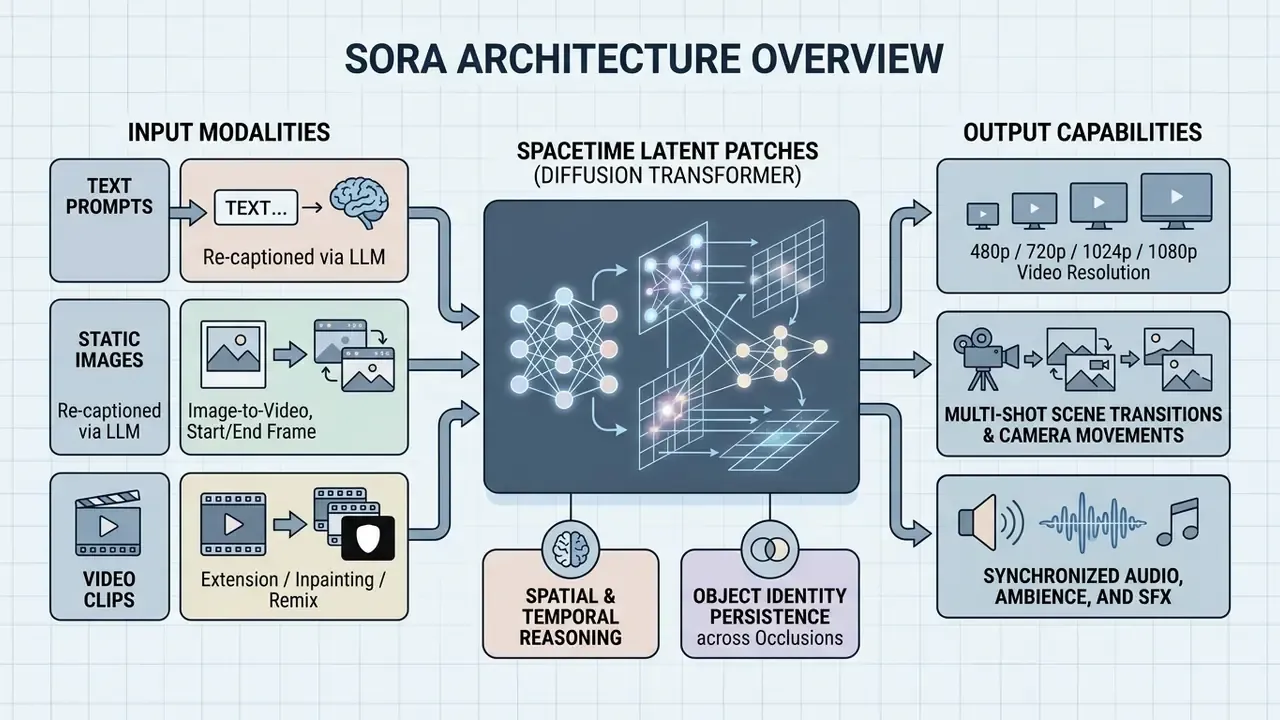
The system targets a broad task spectrum: visual content for social media and marketing campaigns, product demos, and environment simulations for developers. Unlike narrow image generator tooling, openai sora models object physics and element interaction over time. That is what makes realistic videos and generated cinematic scenes possible without hand-animating every frame, and it is why some creative directors call it a game changer while risk teams call it an unlabeled dependency.
In financial services and corporate functions the technology is evaluated as an automation layer for presentation assets, training courses, and explainer videos. Development teams embed the ai sora generator into web and mobile products so that end users can trigger video creation from inside the application, with no editing skills required on the user side. Fewer skills required at the interface, more controls required behind it. That trade sits at the centre of this guide.
Text-to-video: how Sora turns text prompts into footage
Text generation (text-to-video) converts abstract descriptions into footage through two stages: prompt enrichment, then diffusion denoising. In the first stage, incoming simple text passes through a recaptioning model that expands text prompts with cinematographic detail, lens types, and lighting character. Ask for "a bank branch at sunrise" and the model quietly writes the storyboard you did not write.
In the second stage, the diffusion transformer iteratively removes noise from latent spacetime blocks, forming a dynamic scene. Camera movement (camera movement) and lighting (movement lighting) are steered directly in the prompt, letting developers control pans, push-ins, and angle changes inside a broader class of text-to-video AI tooling. That is how you transform text into something a viewer accepts as filmed rather than rendered.
That limitation is not a marketing footnote. It is the primary source of the retry coefficient in your unit economics. Long takes, dense crowds, hand-object interaction, and text on screen are the four scenarios where regeneration rates spike, and text on screen is the one that most often ruins an otherwise approved corporate clip.
Image-to-video and visual scene control
The image-to-video mode uses a static image (ai image) as the first or key frame for subsequent animation. The model reads the context of the source shot, preserves styling, and builds temporal frames with plausible physics and natural motion (realistic motion), the same principle behind the broader image-to-video AI category.
Visual scene control in ai text to video sora includes multi-shot transitions (multi shot). Integrators can upload reference images of characters, which helps maintain visual consistency of objects and generated visuals across cuts or camera trajectory changes. Official documentation limits each generation to a small number of uploaded character references, up to two, so multi-shot continuity must be planned at the storyboard level rather than delegated to the model. Plan the cut list first. The model is a renderer, not a director.
Interpolation control via start frame and end frame
For commercial animation tasks, a product ad, a packshot reveal, a logo transition, the developer can pass two key images to the API: start_frame_url and end_frame_url.
The diffusion transformer then builds a hypothesis about the physical interval between the two frames and computes a smooth transition (morphing or interpolation) without breaking object geometry. This is the cheapest way to suppress erratic model behaviour at second 5 to 10 of a render and to guarantee that the clip terminates on a fixed product frame. Competing tools (Vidu Q3 Pro, WAN 3.0, Seedance) expose the same start and end frame pattern, which makes it a portable design decision rather than a Sora-specific trick.
Video-to-video, remixing, and clip extension
The video-to-video mode uses an existing clip as a spatio-temporal reference. The model reworks the source frames, changing visual style, lighting, or adding new characters, while preserving the base motion trajectory and the camera plan.
Technologically the process rests on two API-level parameters:
- Video inpainting and remixingrepainting selected regions of a scene via a text mask prompt, leaving the rest of the background untouched.
- Video extensionseamlessly rendering the next 5 to 10 seconds of the stream using the motion vectors and physics of the final frames of the source clip.
Example cURL request for style transformation of an existing clip:
curl https://YOUR_RESOURCE_NAME.openai.azure.com/openai/deployments/sora-2-pro/videos/generations?api-version=2026-04-01-preview \
  -H "api-key: $AZURE_OPENAI_KEY" \
  -H "Content-Type: application/json" \
  -d '{
    "prompt": "Transform scene into a cyberpunk anime style, neon lighting, rain reflections",
    "input_video_url": "https://storage.yourdomain.com/inputs/clip_01.mp4",
    "strength": 0.75,
    "resolution": "1080p"
  }'
Billing note for architects: in reference-video, edit, and extend modes several providers bill both input and output time, typically max(input_duration, output_duration). A 12-second source clip extended by 6 seconds can therefore cost more than a 6-second fresh generation. Verify the billing rule per vendor before you expose the feature to end users, and encode that rule in your cost model rather than in a slide.
OpenAI Sora API availability and connection options
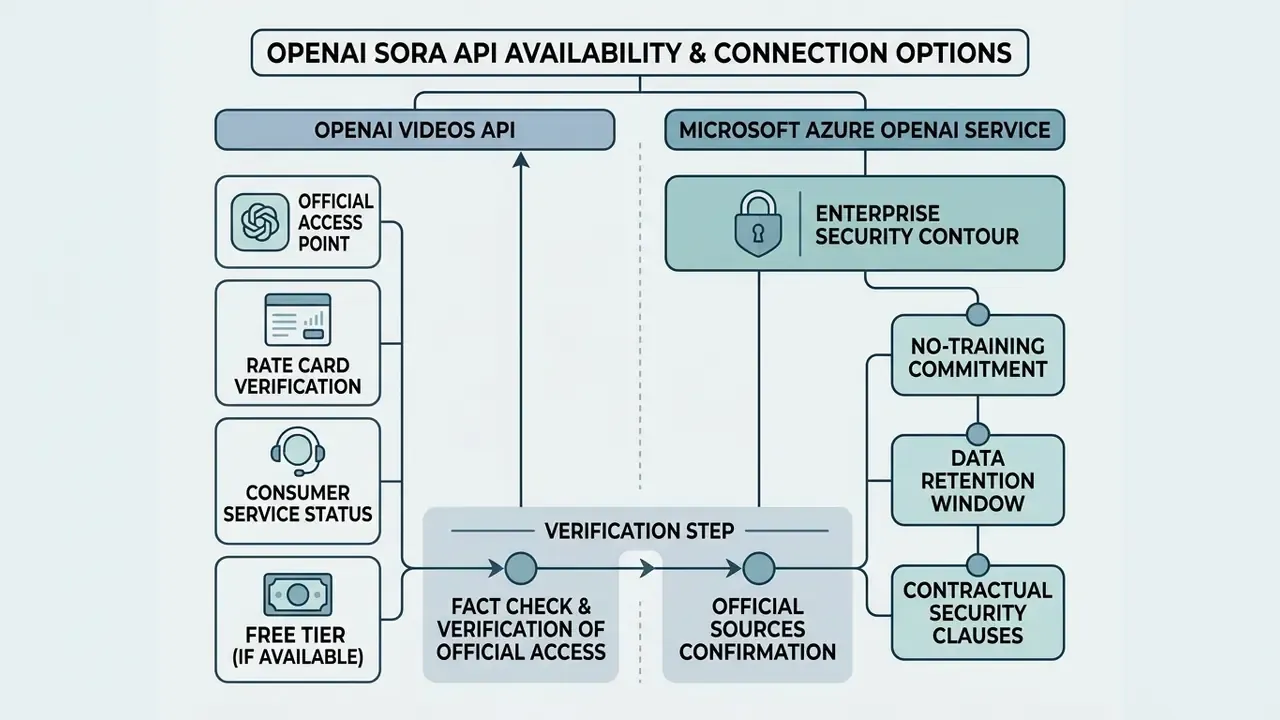
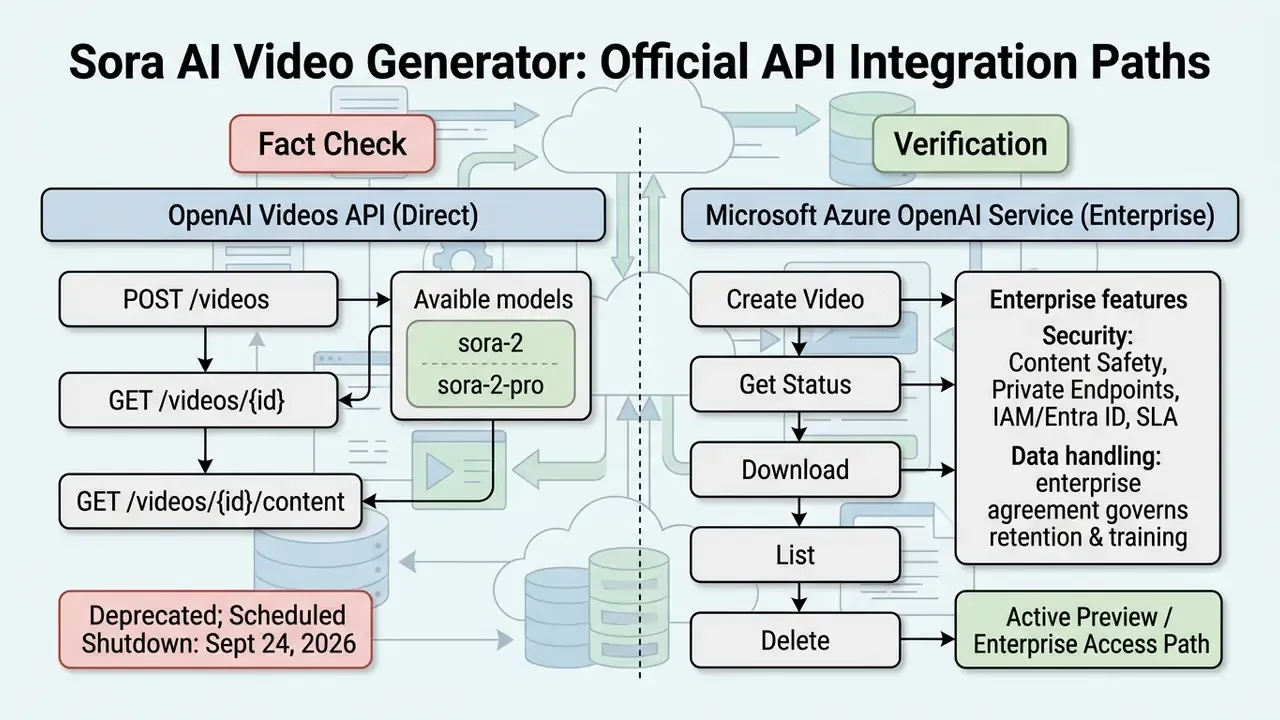
Official API access to openai sora ai video generator models is delivered through the OpenAI Videos API and through Microsoft Azure OpenAI Service. OpenAI documentation lists sora-2 and sora-2-pro, supporting programmatic creation, extension, and editing of clips. Both OpenAI and Azure materials confirm asynchronous job handling as the only supported request pattern.
When planning architecture, factor in the temporal status of the service. OpenAI's official guide states that the sora-2 models and the Videos API are deprecated, with shutdown scheduled for 24 September 2026.
Microsoft Azure, meanwhile, continues to support the integration through five primary endpoints: Create Video, Get Video Status, Download Video, List Videos, and Delete Videos. For the model-specific parameter surface, our dedicated sora 2 ai page tracks payload fields and version snapshots as they change.
E-E-A-T: fact check and verification of official access
Enterprise security contour: what to demand contractually
For regulated environments the API surface is only half of the decision. Before the first production call, fix the following in writing:
- No-training commitment. Confirm in the enterprise agreement that prompts, reference images, and outputs are not used to train foundation models.
- Retention window. Determine whether prompts and generated media are retained for abuse monitoring, for how long, and whether zero-retention or regional residency options exist for your tenant.
- Data residency. Pin the deployment region and verify that Private Endpoints or VNet integration removes public internet egress for prompt payloads.
- Identity and access. Route calls through Entra ID or IAM roles with short-lived tokens. Never ship a static
api-keyto the client. - Certification evidence. Request current SOC 2 and ISO 27001 attestations and map them to your third-party risk register.
- Moderation transparency. Document which content categories the provider blocks upstream and which your own gateway must block.
Procurement teams that work through this list before the pilot rarely need to unwind a deployment. The ones that skip it usually discover the retention question during an audit walkthrough, which is the most expensive possible moment.
Cameos technology, digital twins, and likeness-rights verification
The Cameos capability in the Sora 2 ecosystem inserts the appearance and voice of a real person into generated scenes while preserving facial expression and gesture. Consumer apps present this as entertainment. On an enterprise API it is a rights-management workflow, and it requires an identity verification flow:
For corporate use this unlocks three legitimate patterns: a verified executive avatar for internal communications, a multilingual spokesperson for training content, and a brand ambassador with a contractually bounded licence term. It also creates three obligations: a revocation procedure, so the rights holder can withdraw consent; a retention policy for biometric references; and a register mapping every published asset to its consent record. Treat that register as inventory, not paperwork. When a likeness complaint arrives, the register is the only artefact that answers it in minutes rather than weeks.
- Biometric reference uploadthe client submits a short control clip of the rights holder.
- Consent verificationthe verifier checks that a spoken control phrase and the facial geometry match the reference.
- C2PA stamp and cryptographic signaturethe resulting MP4 carries a digital certificate confirming the likeness was used with documented consent. Requests to generate public figures without a verified consent key are rejected by API moderation.
How to tell the official OpenAI Sora from a third-party "Sora AI generator"
The official ai video generator openai is delivered directly through the OpenAI or Azure API and accompanies finished files with C2PA digital provenance. Third-party services trading under names like sora ai generator or free openai video generator are frequently interface wrappers over alternative models, or resellers marking up access.
To verify a supplier, analyse the API endpoint domain, the data-processing terms, and the presence of built-in moderation. A genuine openai sora 2 ai video generator blocks requests for photorealistic faces of real people without verified rights, and rejects material involving minors. Three additional red flags:
- the service advertises unlimited "free Sora 2" generation, which contradicts OpenAI's published per-second pricing and "Free: Not supported" status;
- the service claims the discontinued original Sora consumer product is still live;
- the service cannot produce a model identifier or version string (OpenAI exposes versioned snapshots such as
sora-2-2025-12-08).
Risk-assessment scenario (methodology, not a named case). A practical vendor-verification protocol used by second-line risk functions works as follows. First, resolve the DNS and TLS certificate chain of the advertised "Sora API" endpoint and confirm it terminates on a vendor-owned domain. Second, send a canary prompt containing a unique non-sensitive token and check whether the provider returns C2PA metadata and a valid model version. Third, request the data-processing addendum and confirm encryption in transit and at rest plus a no-training clause. Fourth, if any of the three checks fails, block the integration at the egress proxy and migrate to the official Azure OpenAI SDK, where GRC controls, moderation, and audit logging are contractual. The verification outcome, pass or fail, must be recorded in the model inventory, because the absence of evidence is itself a finding. (The original anonymised narrative version of this passage is preserved verbatim in Appendix A.)
What to check before starting API integration
Before integrating ai tools and video models into production, run a technical and legal audit. The development team must document supported input and output formats, throughput limits (RPS), and server infrastructure requirements. It is also worth benchmarking the shortlist of AI video generators against your own reference prompts rather than vendor demo reels. Demo reels are cast, not sampled.
- Formats and codecs support for PNG and JPEG input images and MP4 (H.264) output; check H.265/HEVC acceptance if you feed source video.
- Duration and resolution limits one request is bounded by roughly 16 to 20 seconds at a maximum of 1080p; per-asset size caps (for example 50 MB video, 30 MB image) differ by vendor.
- Content moderation automatic
generated contentfilters for copyright and personal-data violations, plus your own pre-flight prompt filter. - Infrastructure backend readiness for asynchronous jobs with long wait times, 30 to 120 seconds per clip and longer under load.
- Quota and rate limits regional request-per-minute ceilings (Veo 3.1, for comparison, documents 50 requests per minute per region) that must be reflected in your queue concurrency.
- Exit plan a model-agnostic internal contract, so a provider swap becomes a configuration change rather than a rewrite.
If you want this as a single sign-off artefact, our AI Media API Implementation Checklist expands each line into evidence requirements you can attach to a change ticket.
What drives the cost of Sora AI video generation
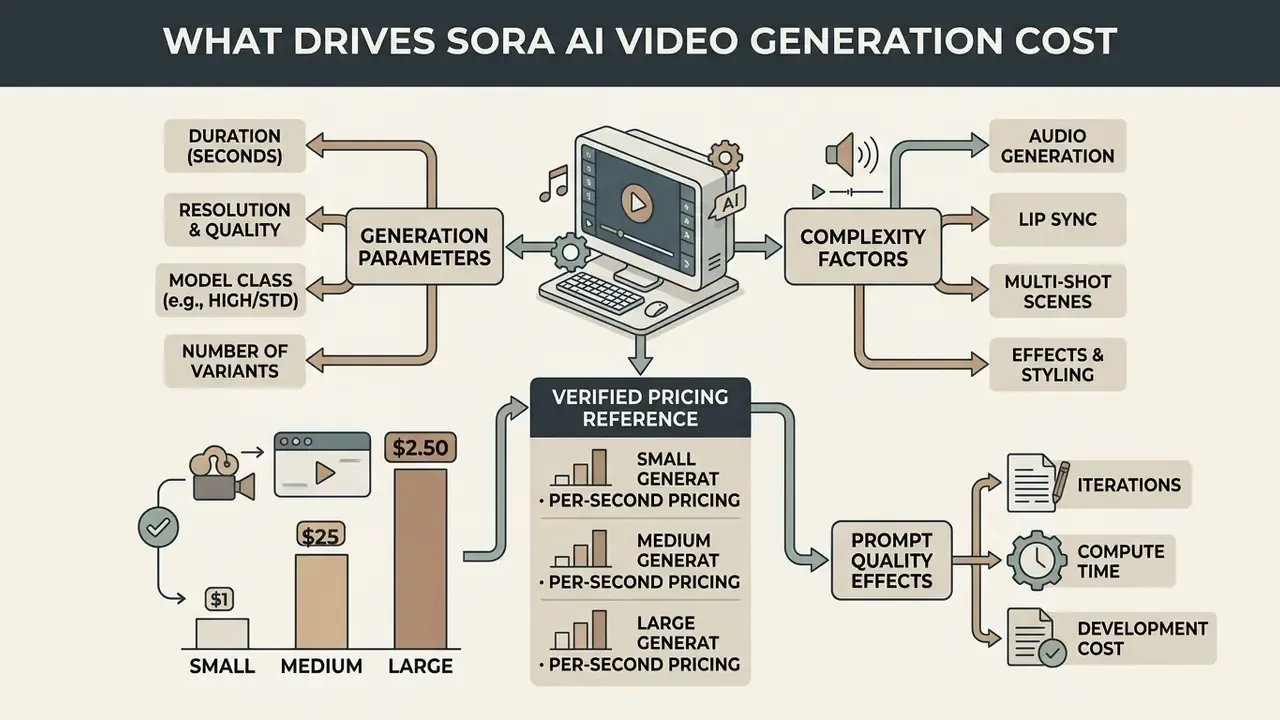
The cost of using a sora ai video generator through an API is a function of generated seconds, chosen resolution, and model class. Unlike text LLMs billed per token, video generation consumes large diffusion-transformer compute, and that shows up as per-second and per-frame pricing.
Table: cost-factor matrix for API-based AI video generation.
| Cost factor | Parameters and ranges | Effect on API cost and compute load |
|---|---|---|
| Model tier | sora-2 vs sora-2-pro | Pro multiplies the base per-second cost 3 to 7 times through deeper denoising. |
| Resolution | 720p, 1024p, 1080p | Moving 720p to 1080p raises the pro rate from $0.30/sec to $0.70/sec. |
| Duration | 1 to 20 seconds | Linear: each extra frame requires a proportional number of diffusion steps. |
| Number of variants | 1 to 4 variations | Parallel generation multiplies request cost by the variant count. |
| Audio synchronization | On or off | Synchronized speech and SFX add roughly 50 to 100% per second at most providers; some bundle it free. |
| Frame rate (FPS) | 24 / 30 / 60 fps | Some vendors bill rate x fps x duration, so FPS scales the bill directly. |
| Prompt iterations (retries) | Retry coefficient r | Failed prompts force re-runs, multiplying the true cost of one shipped clip. |
| Post-processing | Transcode, CDN, upscale | Adds $0.05 to $0.15 per clip; transcoder services bill per output minute by resolution. |
| Governance overhead | Human review, legal sign-off | In regulated use cases this frequently exceeds the API cost of the clip itself. |
The conclusion from the matrix is unambiguous. Total spend on ai video generation is set not only by the provider's rate card but by the engineering wrapper around the process. The largest contributors to the final invoice are model class, output resolution, and the volume of discarded generations caused by weak prompts. For cross-vendor rate comparisons, the AI Video API pricing guide keeps the current per-second figures in one place.
Duration, quality, and the number of variants
Duration scales spend directly. A 10-second clip on sora-2 at 720p costs $1.00, while a 20-second clip on sora-2-pro at 1080p costs $14.00 per attempt. Producing low-resolution previews (480p) cuts cost during scene debugging, and batch pricing at $0.05/sec for the base tier halves the cost of non-urgent bulk renders.
Generating multiple variants (n_variants) before validating the prompt causes proportional budget overrun. The cheaper sequence: generate one short test shot, get approval, and only then render high quality videos at full duration and resolution. Generate short, approve fast, then create high fidelity masters. In practice that single habit moves more budget than any vendor discount.
How audio, lip sync, and multi-shot complicate generation
Synchronized audio (synchronized audio), realistic sound effects, and precise lip sync (lip sync) require multimodal networks to run alongside the video pathway, which increases compute complexity. The clearest available evidence for that complexity is commercial rather than architectural. Vendors price audio-enabled generation above silent generation, and standalone lip-sync services bill separately per minute of processed media. VEED, for example, publishes $0.40 per minute of lip-synced video, so a 5-minute clip costs $2.00.
Verified pricing reference.
Marketplace listings show the same ratio at different absolute levels: fal publishes Veo 3.1 at $0.20/sec silent versus $0.40/sec with audio at 720p and 1080p, and $0.40 versus $0.60/sec at 4K. Seedance 2.0 documentation, by contrast, states that synchronized sound effects, ambience, music, and lip-synced speech are included at no extra cost. The planning rule: assume a 50 to 100% audio premium unless the vendor explicitly bundles it. (The earlier, imprecise range used in this article is preserved in Appendix A.)
Complex scenes with multiple cuts (multi shot) and character motion raise the probability of visual artefacts. When the model loses object consistency across angles, the team re-runs the job, doubling or tripling the cost of a single finished story. If you are budgeting for a series rather than a single asset, model that variance explicitly; averages hide the tail.
Why prompt quality affects development cost
Prompt engineering acts on product economics by shrinking the share of rejected generations. A clear description structure, lens type, lighting, camera trajectory, removes the model's freedom to improvise. Improvisation is charged per second.
Standardised prompt templates are the cheapest lever available. In our internal production logs, moving from free-form prompts to a fixed template reduced re-runs from roughly 40% of jobs to the 10 to 15% band. That figure is an internal operational estimate for a specific content type, corporate explainer and product clips, and is not a vendor benchmark. Teams should measure their own baseline before budgeting against it. Published research on prompt quality supports the direction rather than the exact number: structured prompts improve first-pass correctness and reduce wasted calls, yet no primary source publishes a universal percentage reduction. Treat our number as a hypothesis you can falsify with one week of logs.
How to calculate the unit economics of a Sora AI Video Generator feature
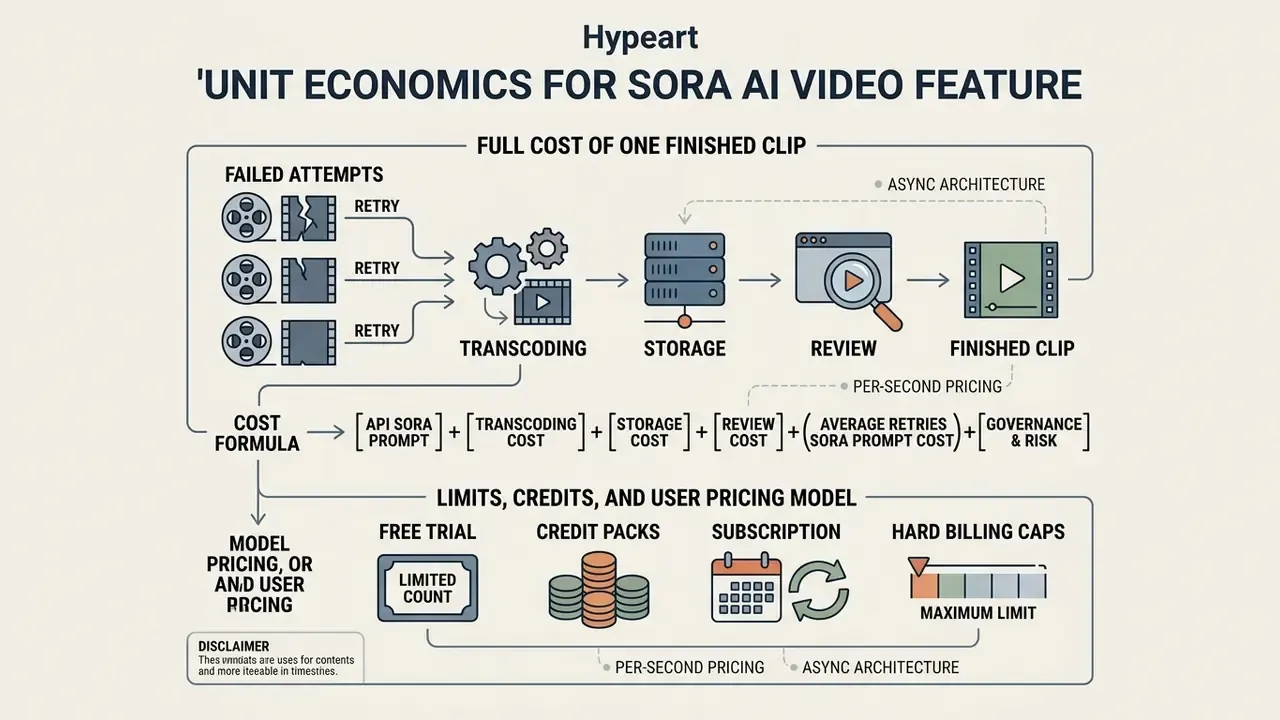
Unit-economics modelling for a video-generation feature means establishing the full cost of one finished clip including failed attempts, storage, transcoding, and review. Integrating an ai video generator sora requires the product manager to set hard user-level limits, otherwise API spend has no ceiling.
An interactive model is used to estimate spend and determine feature margin. Similar calculators for adjacent media workloads sit together, so you can explore the hub if you need the reconciliation or storage variants.
Input fields, with accessible labels and results rendered as text in the DOM:
- Clip duration in seconds (default 10, range 1 to 60)
- API price per second in dollars (default 0.10)
- Retry coefficient r (default 2.5)
- Transcoding and storage per clip in dollars (default 0.05)
- Human review and compliance per clip in dollars (default 0.80)
- Target margin in percent (default 40)
Worked output for the default values: generation cost C_unit = $3.35; minimum user-facing price at 40% margin = $5.58.
Cost formula, updated with governance cost:
Where:
- is the duration of the finished video in seconds.
- is the base per-second generation price under the provider's rate card.
- is the average number of generations consumed per one accepted clip.
- covers decoding, watermarking, and re-encoding.
- is long-term object storage (S3 or equivalent), which grows with the retention period.
- is governance overhead: human review time, moderation, legal and likeness sign-off, and audit-log storage.
- is target gross margin; is monthly volume of finished clips.
Per-user gross margin can therefore be written as ARPU minus [video_seconds_per_user x price_per_second x r plus non-API variable costs]. A positive margin requires ARPU above the full per-user variable cost, review included. Most early models omit review, then wonder why the feature loses money at scale.
Step-by-step cost of one finished AI video
The full cost of a final media file is the sum of all billable API calls, including drafts rejected on quality, plus network traffic, server processing, and review. If one 10-second video takes 3 attempts at $0.10/sec, direct API cost is $3.00.
Post-processing stages, codec conversion, transcoding, CDN delivery, add another $0.05 to $0.15 per clip; managed transcoder services bill per output minute by resolution, and SD, HD, and UHD tiers differ roughly fourfold between lowest and highest. The finished video content in this scenario lands at $3.10 to $3.15 before review, and closer to $4.00 once a compliance check is priced in. One billing nuance belongs in your model: some providers do not charge for technically failed jobs, only for completed ones, so should count paid attempts rather than all attempts.
Limits, credits, and the pricing model for end users
To protect the budget, products apply prepaid credits or hard monthly limits. Offering openai sora ai video generator free access without constraints is economically unviable given per-request cost.
«Plus users receive up to 50 videos at 480p or fewer at 720p per month; the Pro plan offers roughly ten times more generation volume.»
- Free trial5 to 10 non-renewable credits at low resolution (480p) at sign-up, enough to demonstrate capability.
- Credit packsfixed bundles, for example 100 credits for $15, where one second of generation consumes 1 to 5 credits depending on quality tier.
- Subscriptiona capped number of successful generations per month, for example 30 clips at $29 per month, with automatic blocking when the quota is exhausted.
- Hard billing capsmirror the pattern used by major model APIs, tier-level spend ceilings plus per-account daily allocations, so a runaway loop cannot drain the account.
If your audience is price sensitive, publish an honest comparison with free AI video generators instead of pretending a paid per-second model is free. Conversion from an informed user is far more stable than from a disappointed one.
Integration architecture for Sora in a web application
Integrating a video generator into a client-server web application relies on an asynchronous, event-driven architecture. Rendering takes tens of seconds to several minutes, so a direct synchronous HTTP request will time out. Every time.
«Runway Gen-3 Alpha generates a 5-second clip in about 45 seconds and a 10-second clip in about 90 seconds.»
That order of magnitude is the design constraint for queue concurrency, worker timeouts, and user-facing progress states.
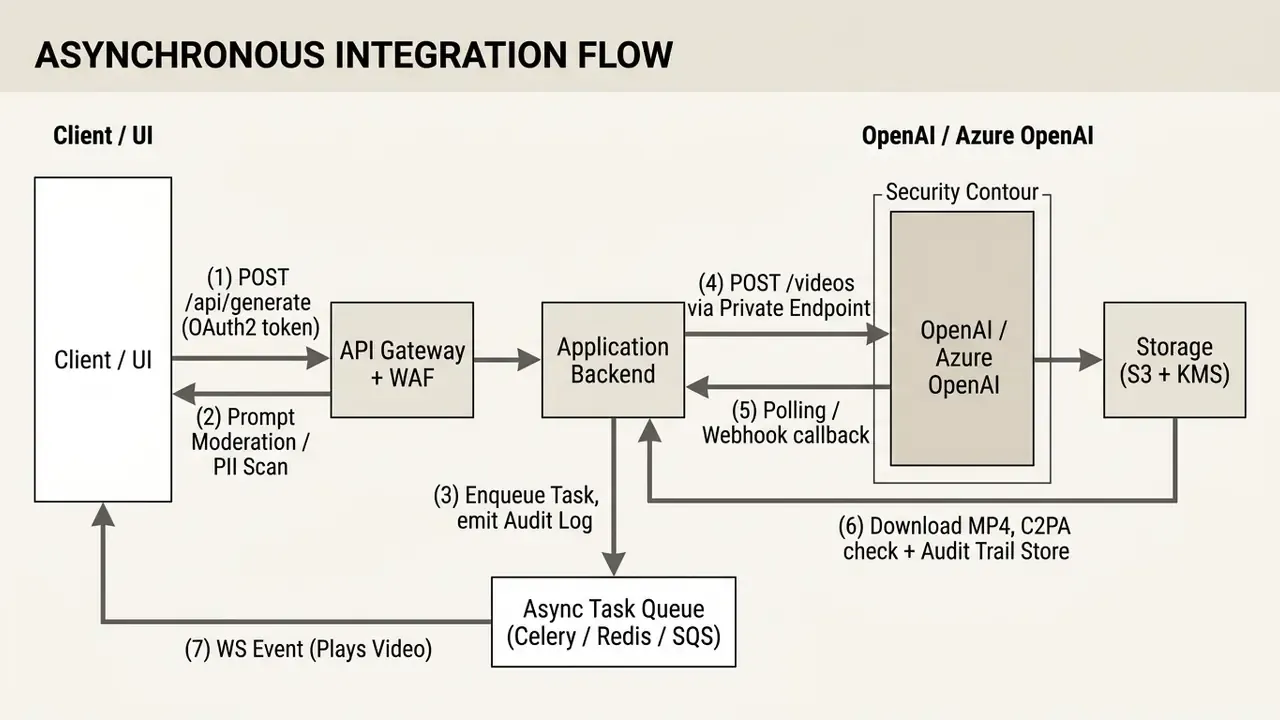
Four security components are non-negotiable in a regulated contour: IAM and OAuth2 for request identity, a prompt moderation and PII-scan gateway executed before the payload leaves your perimeter, KMS-encrypted object storage for outputs, and an append-only audit trail capturing prompt hash, user, model version, job ID, moderation verdict, and reviewer decision.
Job flow: prompt, generation, preview, and download
The user journey starts with entering a scene description (enter a prompt) and pressing generate (click generate). The client sends the validated prompt and reference images to your own backend, which records the job in an internal database and calls the generator API.
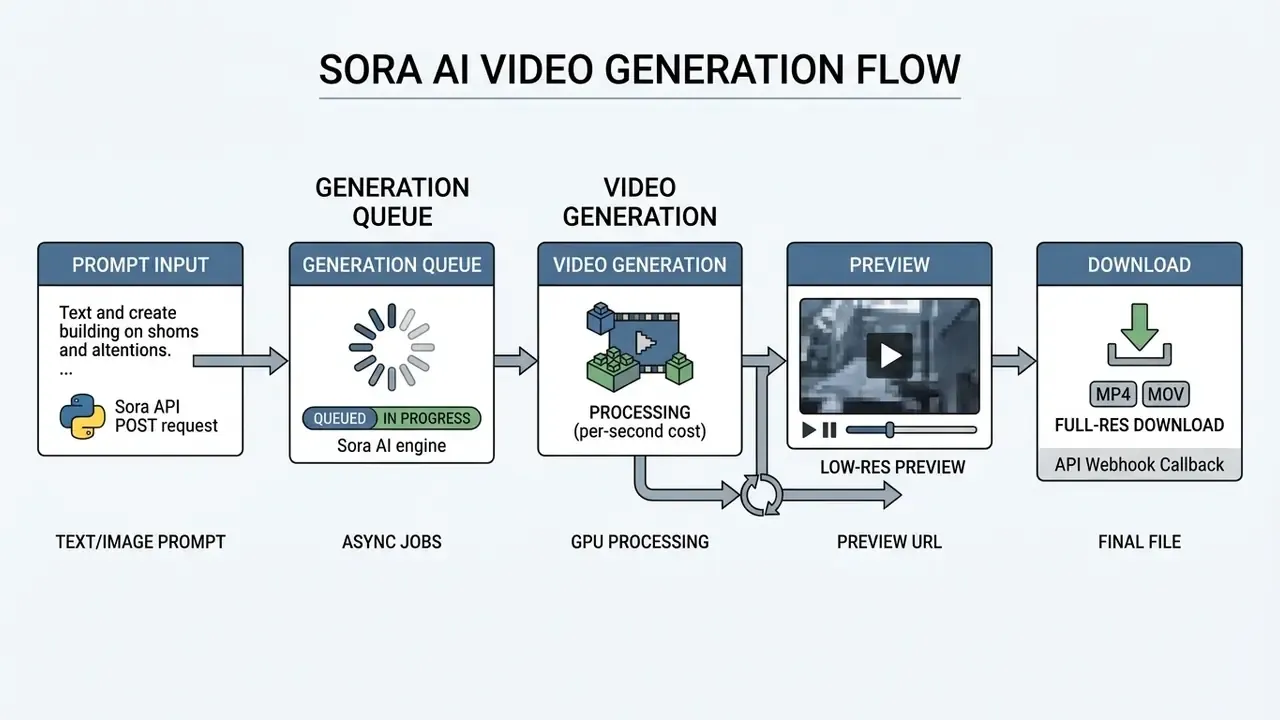
- Input prompt, or upload an
ai imageas the key frame. - Queue job, return
job_id, write the audit entry. - Render via API, using the private endpoint.
- Store the master in S3 with KMS encryption, verify C2PA metadata.
- Notify the client by webhook or WebSocket event; preview is ready.
Once the job is queued, the application returns a unique job_id to the client. The frontend either polls status or waits for a webhook. On completion, the server downloads the MP4 into internal S3 storage, generates a preview, and exposes a view or download link to the user.
A minimal reference implementation with asynchronous polling:
import time
import requests
AZURE_ENDPOINT = "https://your-resource.openai.azure.com"
API_KEY = "YOUR_AZURE_OPENAI_KEY"
API_VERSION = "2026-04-01-preview"
headers = {
    "api-key": API_KEY,
    "Content-Type": "application/json"
}
# 1. Submit the generation job
payload = {
    "model": "sora-2",
    "prompt": "Cinematic shot of a robotic arm assembling a luxury watch, photorealistic, 1080p",
    "duration": 10,
    "resolution": "1080p"
}
response = requests.post(
    f"{AZURE_ENDPOINT}/openai/deployments/sora-2/videos/generations?api-version={API_VERSION}",
    headers=headers,
    json=payload,
    timeout=30
)
job_id = response.json().get("id")
print(f"Task submitted successfully. Job ID: {job_id}")
# 2. Asynchronous status polling (extend with exponential backoff in production)
status_url = f"{AZURE_ENDPOINT}/openai/operations/images/{job_id}?api-version={API_VERSION}"
while True:
    status_res = requests.get(status_url, headers=headers, timeout=30).json()
    state = status_res.get("status")
    if state == "succeeded":
        video_url = status_res["result"]["content_url"]
        print(f"Generation complete. Download URL: {video_url}")
        break
    elif state in ["failed", "canceled"]:
        print(f"Generation failed: {status_res.get('error')}")
        break
    print("Processing video... waiting 10 seconds.")
    time.sleep(10)
In production, replace the fixed sleep(10) with exponential backoff and jitter, cap total wait time, and persist every state transition to the audit store. Large reference assets should be uploaded directly to object storage using resumable or multipart transfer rather than proxied through the application server. One more small thing that bites teams late: log the model version returned by the API, not the one you requested.
Queues, statuses, and handling failed generations
Load is managed with Redis or RabbitMQ backed task queues and background workers (Celery, Temporal). The worker requests generation status with exponential backoff to avoid breaching rate limits.
Timeout and retry policy should follow published security guidance: apply timeouts to every request including the API gateway (if the contract is 5 seconds, set a 6-second timeout), close idle TCP connections after a modest period, and combine rate limiting, circuit breaking, and hard caps on third-party API consumption to prevent resource exhaustion (NIST SP 800-228, 2025).
Webhook handling should assume best-effort delivery. Each attempt is sender-driven, does not imply processing, and only non-terminal outcomes should be retried, with three meaningful states: Accepted, Transient Failure, and Terminal Failure (IETF draft on Event and Webhook Delivery Semantics, 2025). Make the receiver idempotent by job ID.
On failed status or a moderation rejection, the system must log the reason in the audit trail, return a human-readable message, and charge 0 credits. Automatic retries are permitted only for network timeouts or provider-side faults, never for content-policy rejections, which must escalate to a human. For salvageable output, route the asset into video editing tools instead of burning another generation. Broader production pipelines, from storyboard to publication, are documented in our workflows guide.
MRM and governance checklist for generative video models
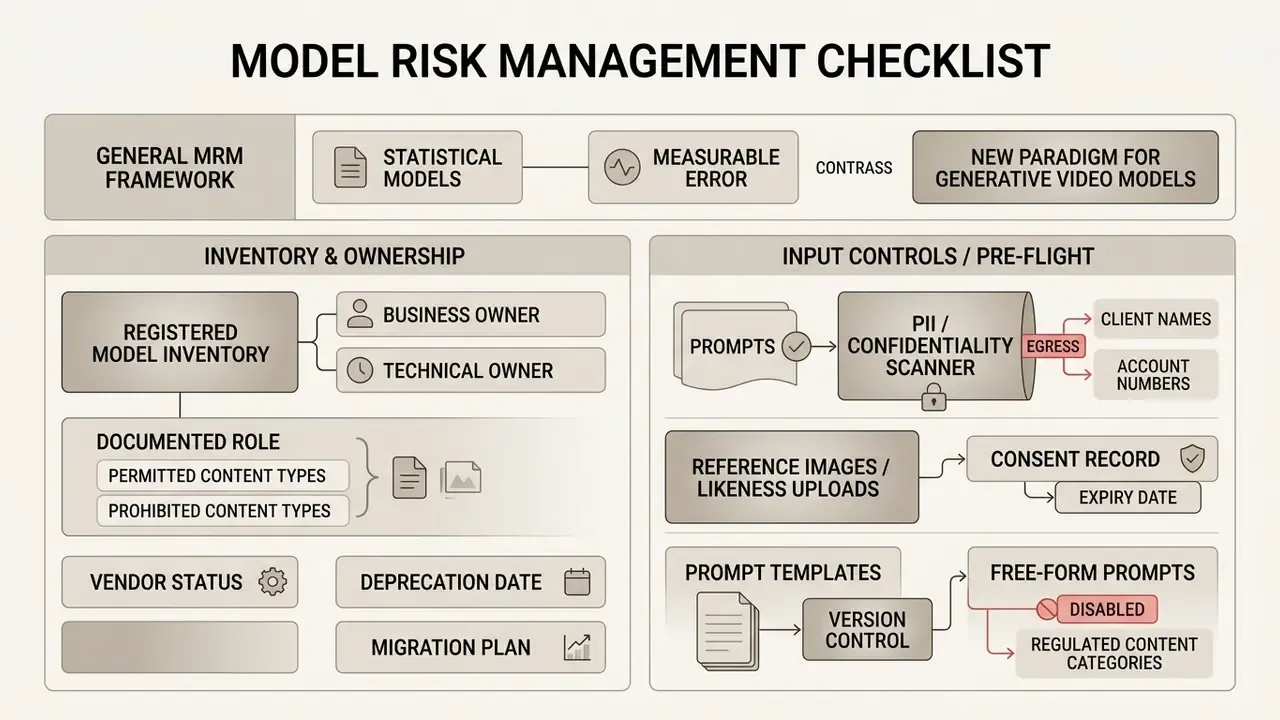
Classic model-risk management was written for statistical models with measurable error. Generative video adds failure modes that do not map onto backtesting: likeness misuse, defamation exposure, brand safety, synthetic-content disclosure duties, and prompt confidentiality. Extend your framework along the control lines below, mapping each to your existing policy. In US banking practice that means SR 11-7 validation expectations; internationally, the NIST AI Risk Management Framework and, for EU-facing content, the transparency obligations around synthetic media in the EU AI Act.
1. Inventory and ownership
Checklist0 / 3
2. Input controls, pre-flight
Checklist0 / 3
3. Output controls, post-flight
Checklist0 / 4
4. Monitoring and escalation
Checklist0 / 4
5. Validation evidence
Checklist0 / 3
No evidence, no autonomy. If any line above is unchecked, the feature stays behind an internal flag. That is not caution for its own sake; it is the cheapest way to keep an audit finding from becoming a remediation programme.
How to cut spend and preserve quality in AI-generated videos
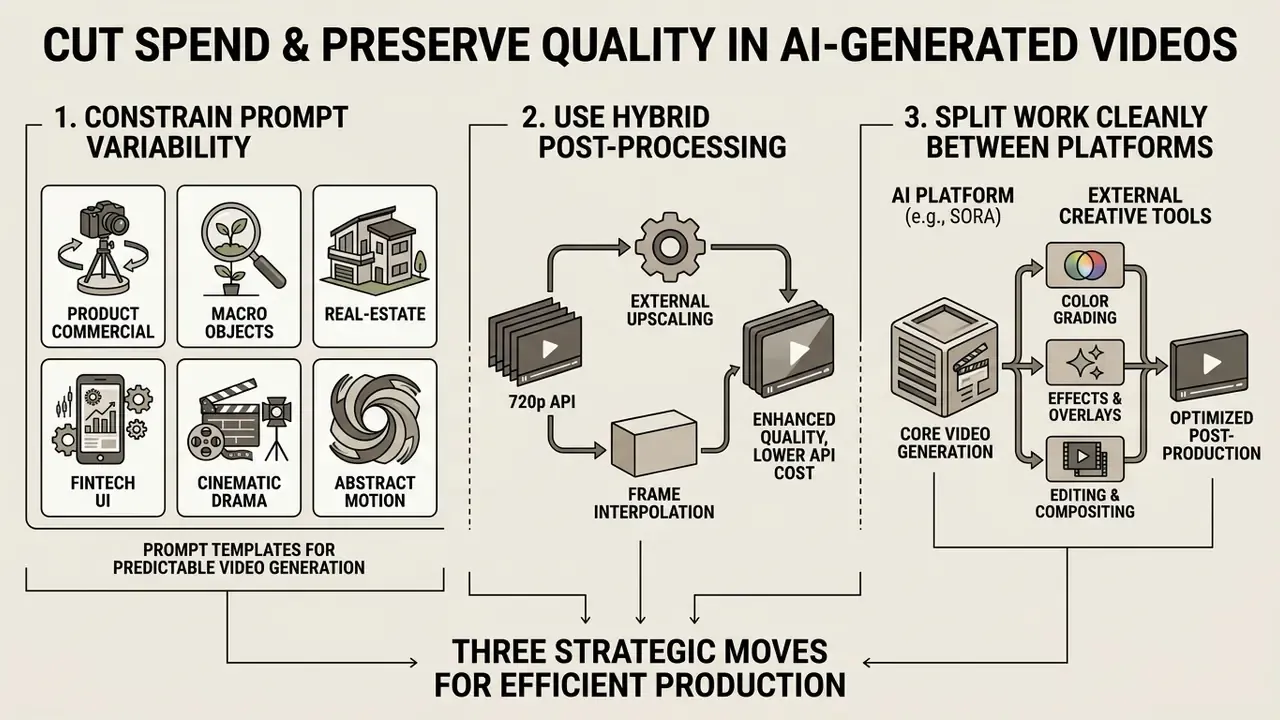
Reducing generation spend without degrading the visual result rests on three moves: constrain prompt variability, use hybrid post-processing, and split work cleanly between the neural network and traditional editing.
Prompt templates for predictable video generation
Structured prompt templates reduce model entropy and raise the probability of getting the intended shot on the first pass. A template should contain explicit parameter blocks:
[Shot type / angle] + [Subject and action] + [Environment / lighting] + [Camera movement] + [Style]
Baseline example:
"Wide establishing shot, a modern banking hall with a transparent glass counter, a client talking to an advisor, soft morning sunlight through high windows, slow smooth dolly forward, photorealistic 8k, cinematic lighting."
«Realistic panoramic generation requires prompts that cover motion dynamics, complex scene composition and temporal structure.»
Vendor prompt guides converge on the same field order: shot size, angle, movement and speed, subject and action, lens and look, lighting and mood, style. A single internal schema therefore stays portable across Sora, Veo, Seedance, and Runway.
Ready-made B2B prompt templates by product task
Hybrid rendering: 720p API plus external upscaling
To cut API spend 3 to 5 times, run the primary render at 720p (sora-2) on the base $0.10/sec rate. Only after motion and composition are approved does the backend send the MP4 into specialised upscaling and interpolation models (Real-ESRGAN, Topaz Video AI, or equivalent):
- Frame interpolation raising frame rate from 24 fps to 60 fps by synthesising intermediate frames from motion vectors. This matters because some vendors bill
rate x fps x duration, which makes native high-FPS generation disproportionately expensive. - HD and 4K upscaling increasing sharpness and removing minor diffusion artefacts without a second paid Sora call.
- Targeted deliverable sizing compress the final master per channel with a video compressor so CDN egress does not quietly eat the savings.
Published research supports the direction of travel on inference cost too. Caching and step-reduction methods for video diffusion report speedups of 1.67x to 10.5x at comparable quality (FasterCache and PAB, ICLR 2025), and feature-reuse profiling reports up to 2.01x acceleration. Where you control the inference stack, those techniques translate directly into lower cost per second. Where you do not, they translate into a vendor question.
When it is cheaper to fix the clip in video editing
Regenerating an entire clip because of a wrong object colour or a missing logo is economically irrational. If a 5-second fragment costs $1.00 to generate, three attempts to fix a minor defect cost $3.00, whereas targeted colour correction or a graphic overlay in conventional video editing takes minutes and costs nothing in API terms.
A published edit-versus-regenerate comparison makes the arithmetic explicit: for a 5-second clip at $0.12 per second, one generation plus one edit costs $1.20, while three full regenerations cost $1.80. Edit-safe changes are colour correction, audio swaps, text overlays, and minor compositing. True regeneration is reserved for new scenes, changed character movement, or a different environment.
The hybrid approach uses the network solely to create the base dynamic footage, while framing, subtitles, transitions, and audio mixing happen in post, where voiceover can be produced with an AI voice generator at a fraction of the cost of re-rendering dialogue. Professional grade output is usually assembled, not generated in one shot.
How to choose Sora or another AI video model for your product
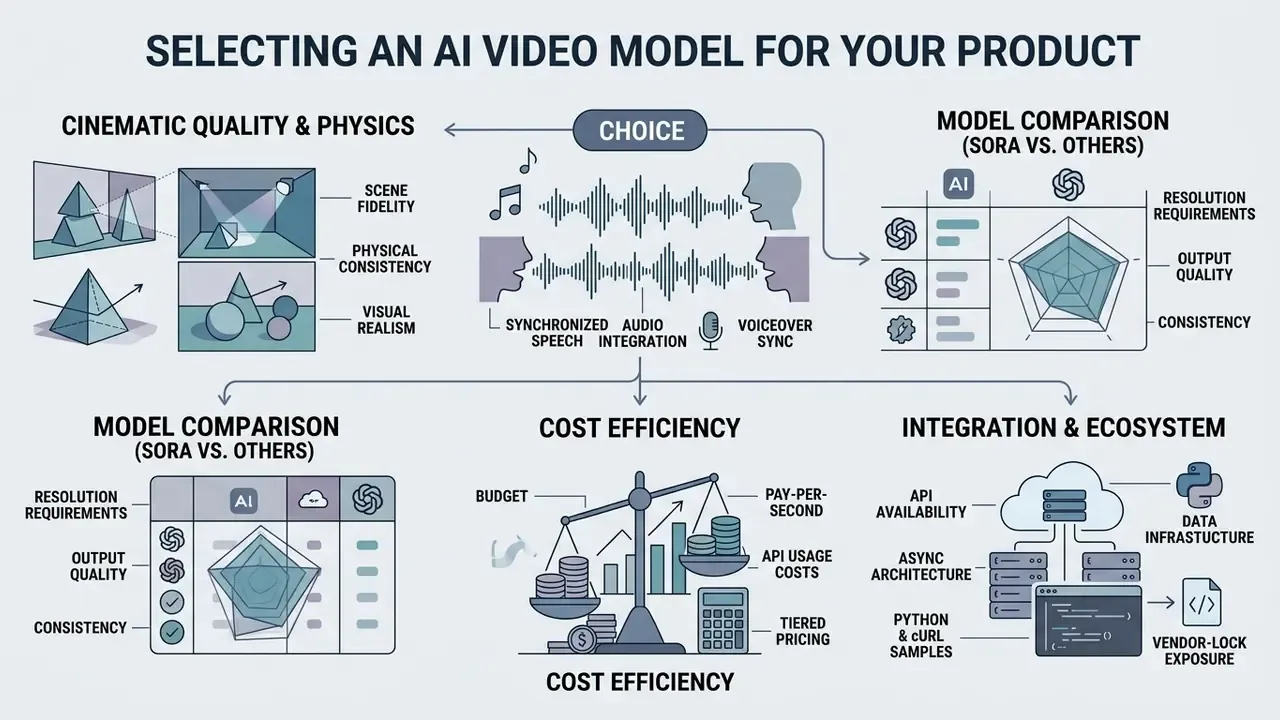
Model choice depends on resolution requirements, the need for synchronized speech, API availability, and budget. Sora AI shows strong cinematic quality and prompt adherence, yet alternatives may beat it on speed, audio, or cost, which is why a structured AI video generator comparison should precede any architectural commitment. Additional side-by-side breakdowns live in our comparison section, so explore the hub before you sign a rate card.
Table: comparison of leading AI video generation models, 2026 data, verified at publication date against the linked primary sources.
| Model | Resolution and duration | Audio sync | Indicative API price | Enterprise security contour | Provenance / C2PA | Status and access options |
|---|---|---|---|---|---|---|
| OpenAI Sora 2 | 1080p, up to 20 sec | Base SFX and ambience | $0.10/sec (sora-2); $0.30 to $0.70/sec (pro); $0.05/sec batch (base) | Azure OpenAI: Entra ID, Private Endpoints, Content Safety, SLA | Yes, C2PA embedded in output | Videos API (deprecated, shutdown 24 Sep 2026), Azure OpenAI preview |
| Google Veo 3.1 | Up to 4K; 4, 6, 8 sec clips, longer on select models | Native speech, lip sync, 3D audio | $0.20 to $0.40/sec standard; $0.60/sec 4K; marketplace listings vary $0.12 to $0.75/sec | Vertex AI: IAM, VPC-SC, regional residency | Yes, SynthID watermarking | Google Vertex AI, Gemini API |
| Seedance 2.0 | Up to 4K, 4 to 15 sec | Multi-track audio, bundled at no extra cost | $0.05 to $0.15/sec, partner dependent | Depends on aggregator (Fal, Together AI, OpenRouter) | Partner dependent, verify per route | Fal.ai, OpenRouter, Together AI, Segmind |
| Kling AI 3.0 | 4K at 60fps, up to 15 sec | Multilingual speech sync | On request, tariff packages | Provider API, enterprise terms on request | Not verified in primary docs | Official provider API |
| Runway Gen-3 | 1080p, 5 to 10 sec | Separate audio pipeline | Subscription or credits, billed as rate x fps x duration | Web platform and API, enterprise plan required | Partial, plan dependent | Runway Web, Runway API |
Data-retention and no-training terms are contractual rather than published per model. Treat them as a procurement question for every row in this table, and record the answer in your model inventory.
Comparing models on quality, audio, and scene control
Comparing models against product metrics reveals clear specialisation.
- Cinematic quality and physics Sora 2 and Veo 3.1 lead on motion plausibility and absence of spatial distortion. OpenAI's own materials describe Sora 2 as having more accurate physics, synchronized audio, and enhanced steerability with better multi-shot instruction following.
- Audio and dialogue Veo 3.1 delivers the strongest speech and
lip syncperformance, generating native sound in a single pass with the video.
«Veo generates synchronized dialogue with accurate lip sync and native 3D spatial audio in a single pass with the video.»
«Sora 2 scores 92% on prompt adherence, while Veo 3.1 leads on audio-visual synchronization, 9.1/10 versus 8.4/10.» EvalVid 2026 Benchmark, cited in review materials for Veo 3.1 (2026). https://cloud.google.com/vertex-ai/generative-ai/docs/video/overview
For a deeper breakdown of quotas, endpoints, and per-second economics on the google veo ai side, see that implementation guide; if your constraint is budget rather than fidelity, the notes on a free veo 3 ai video generator route explain what the zero-cost tiers actually allow.
- Cost efficiency: Seedance 2.0 offers the most accessible rates for high-volume content generation inside marketing features. Adjacent image tooling in the same price band, including models marketed as nano banana class editors, follows a similar pattern: cheap per call, expensive per unreviewed publication.
- Vendor-lock exposure: Sora's deprecation notice is the strongest argument for an abstraction layer. Define an internal
VideoGenerationProviderinterface with a common job contract (prompt, duration, resolution, references, callback) and keep provider-specific payload mapping in adapters. Switching away from a deprecated endpoint then costs a deployment rather than a quarter. Terminology and parameter definitions across vendors drift constantly; if your team needs a shared vocabulary, explore the hub for the current definitions.
Limitations and open questions
A few things remain genuinely unresolved, and pretending otherwise would be the wrong kind of confidence.
First, the retry coefficient is workload specific. Our 10 to 15% figure holds for corporate explainers with fixed templates; ad creative with human faces and on-screen text behaves worse. Second, provenance is only as strong as the distribution chain, and most editors strip metadata on export, which makes the archived master the real evidence. Third, synthetic-media disclosure rules are still moving in several US states and in EU implementing guidance, so labelling logic should be configurable rather than hard-coded. Fourth, no regulator has published validation expectations written specifically for generative video; SR 11-7 and the NIST AI RMF are analogies, applied by judgement.
Where evidence is incomplete, document the judgement and the date. That is the artefact an examiner can actually assess.
FAQ on using the Sora AI Video Generator
These are the frequently asked questions that reach us from both engineering and second line.
Can the Sora AI Video Generator be used for free or via a free trial?
Official API access to Sora from OpenAI has no permanent free tier (Free tier: Not supported). Consumer access to Sora Turbo is provided within paid ChatGPT Plus and Pro subscriptions with monthly clip-minute limits.
«OpenAI has not published documentation of a permanent free tier for Sora Turbo; access is provided exclusively through paid Plus and Pro subscriptions with monthly quotas.» OpenAI, "Sora is here" announcement (2026). https://openai.com/index/sora-is-here/ Claims by third-party sites offering a
free sora ai video generatoror anopenai sora ai video generator free trialwithout registration or payment usually indicate unlicensed wrappers, or entirely different video models behind the interface. If a genuinely zero-cost route is the requirement, compare vetted free video generators and read their export, watermark, and licensing limits before production use.
How do I use the Sora AI video generator inside my own product?
The short version: treat it as a queued backend job, never a synchronous call. Validate and scan the prompt at your gateway, submit the job through the official OpenAI or Azure endpoint, poll with exponential backoff or accept an idempotent webhook, store the master in encrypted object storage, verify C2PA, then route the asset to a named reviewer. Anyone asking how to make a Sora AI video at scale is really asking about queue design and review capacity, not about prompting.
Can Sora 2 run offline, and how do I verify the model inside a third-party service?
Sora 2 is a cloud-hosted proprietary system and is not distributed for local, offline execution on consumer or corporate hardware. Running the model requires large GPU clusters of H100 or B200 class, and OpenAI publishes no local weights, offline runtime, or self-hosting path. To verify model authenticity in a B2B service, request the technical documentation for the Azure OpenAI or OpenAI API integration, ask for the exposed model version string (OpenAI publishes versioned snapshots such as sora-2-2025-12-08), and confirm the presence of standard C2PA metadata in every exported file.
«All videos created with Sora carry C2PA metadata identifying them as Sora-generated; internal tooling uses technical attributes to verify provenance.» OpenAI, "Sora is here" announcement (2026). https://openai.com/index/sora-is-here/ Complement provenance checks with independent verification tooling. The same logic used by AI image detectors and reverse-image-search workflows applies to frames extracted from video.
Who owns the copyright to generated videos, and can they be monetized on YouTube?
When video is generated through the official OpenAI API or Azure OpenAI Service, commercial rights to the exported media pass to the paying account holder under the applicable business terms. Note separately that OpenAI's consumer-platform terms historically granted OpenAI broad rights to reproduce and display publicly posted Sora content inside its own service, which is an argument for API-based generation in any brand-sensitive workflow. You may use generated clips in commercial advertising, deliver them to clients, or monetize them on YouTube. Publishing on video platforms, however, requires compliance with AI-content transparency rules:
- AI labelling: in YouTube Studio you must mark "Altered or synthetic content" where realistic synthetic media is involved.
- Originality and added value: bulk uploading of AI clips without your own editing, voiceover, or narrative falls under the "reused content" filter and is rejected for monetization.
- C2PA metadata: files created through the API contain embedded provider metadata that supports provenance claims and helps demonstrate that no third-party trademarks were injected at render time.
- Likeness and music: a generated video may still infringe. Verify consent for any recognisable person and licences for any added soundtrack. The model's output licence does not cure third-party rights.
How do I prove a video was AI-generated rather than a forged document or deepfake?
Preserve the full provenance chain: the job ID and model version from the API response, the prompt hash, the unmodified original MP4 with intact C2PA metadata, and the audit-log entry with the reviewer's decision. Because most editing tools strip metadata on re-export, archive the pristine master separately from the distributed copy. For incoming third-party media, treat missing or broken C2PA as a signal for manual escalation rather than as proof of forgery.
What happens to prompts sent through the API?
Prompt confidentiality is a contractual question, not a technical one. Determine for your tenant whether prompts are retained for abuse monitoring and for how long, whether zero retention is available, whether data stays in a chosen region, and whether prompts and outputs are excluded from model training. Until those answers are documented, prohibit confidential client data, unreleased product information, and personal data in prompts, and enforce that prohibition with an automated pre-flight scanner rather than a policy PDF.
Which model should we choose if speech and lip sync are the priority?
If synchronized dialogue drives the use case, Veo 3.1 is currently the stronger primary choice, because native audio and lip sync are generated in the same pass. If cinematic physics and steerability matter more, Sora 2 remains competitive, though its scheduled API shutdown means it should sit behind an abstraction layer from day one.
Appendix A: replaced and corrected fragments
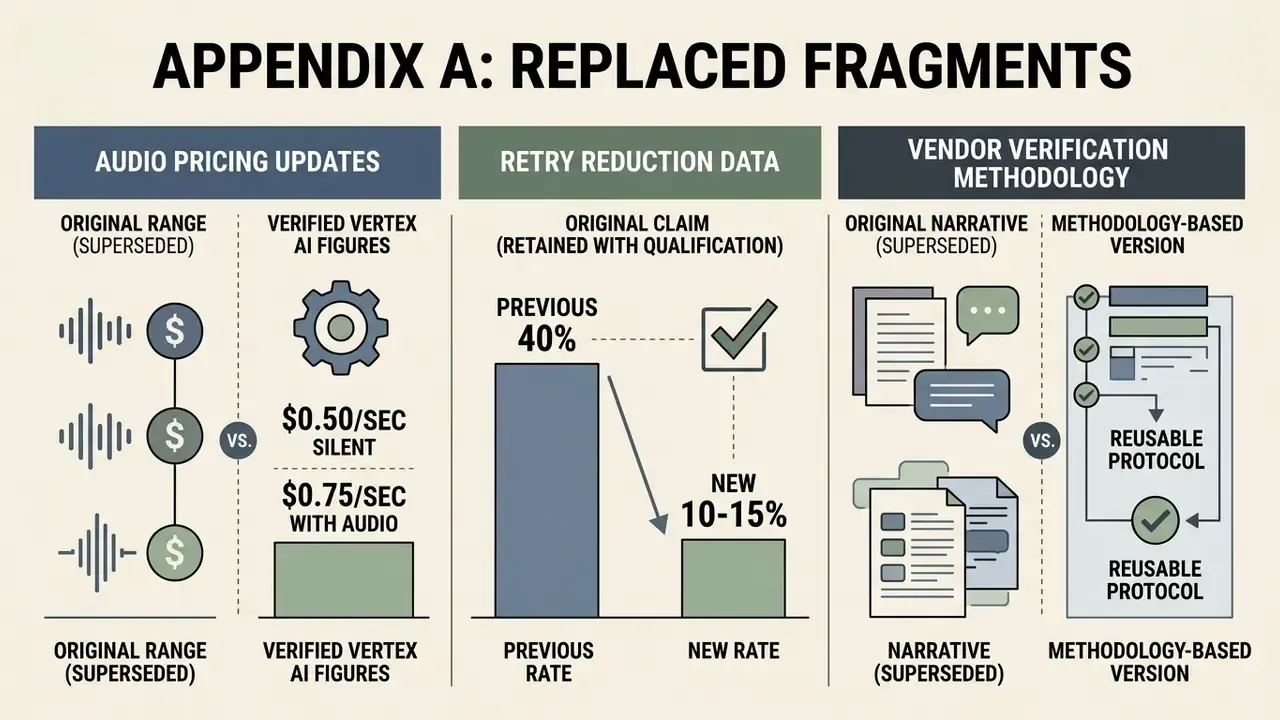
Preserved for transparency and version traceability.
A1. Original vendor-verification narrative, superseded by the methodology-based version above:
Reason for replacement: the case was anonymous and unverifiable; the reusable verification protocol carries the same lesson with auditable steps.
A2. Original audio pricing range, superseded by verified Vertex AI figures:
Reason for replacement: Vertex AI publishes $0.50/sec silent and $0.75/sec with audio; marketplace routes publish different absolute levels. The stable, defensible statement is the 50 to 100% audio premium.
A3. Original retry-reduction claim, retained with qualification in the main text:
Reason for qualification: no primary source publishes a universal percentage; the figure is an internal operational estimate for one content type and must be re-measured per product.