Executive summary
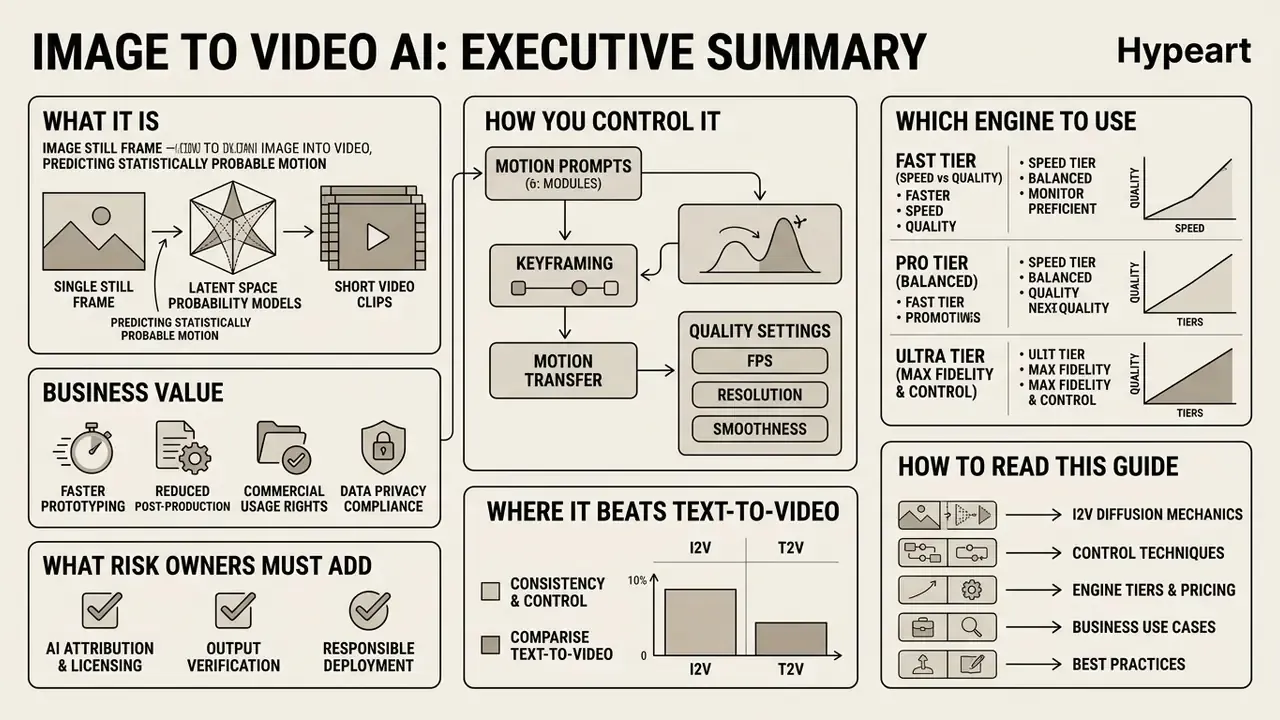
- What it is. Image-to-video AI turns a single still frame into a short clip by predicting statistically probable motion in latent space. It synthesises plausible movement. It does not reconstruct what really happened in front of the camera.
- How you control it. Four levers matter: source image quality, a motion-only prompt, motion strength or guidance scale, and the control mode you pick (text prompt, First & Last Frame keyframing, or Video-to-Motion transfer from a reference clip).
- Which engine to use. Vendors now expose three tiers: Fast (Seedance Lite, Pixverse Fast), Pro (Kling V2, Runway Gen-3, Luma Dream Machine), Ultra (Google Veo, Sora, Hailuo Pro). Tier choice drives credit cost, render time and physical realism.
- Business value. In our own deployments, cleaning source assets cut generation waste from 34% to 6%. API-driven batch production of 1,200 product clips took 14 hours instead of three weeks, at 82% lower cost per clip (internal project metrics, not externally audited).
- What risk owners must add. Reproducibility (fixed seed plus a parameter log), an audit trail for validation under model-risk frameworks such as SR 11-7, vendor data-handling checks (SOC 2, no-training-on-customer-data clauses), synthetic-content labelling (C2PA), and a pre-publication compliance checklist.
- Where it beats text-to-video. Whenever brand geometry, product identity or a specific face must stay locked, image conditioning wins. Text-to-video is for scenes with no fixed visual anchor.
How to read this guide. The first half is operational: what the technology does, where teams deploy it, and the exact workflow from upload to export. The middle covers control modes and quality settings, including the anti-patterns that burn credits. The final third is written for whoever signs off on publication: validation, reproducibility, vendor due diligence, licensing limits and open questions. If you only own budget, the summary above and the tier table may be enough. If you own risk, start at the validation section.
What is Image to Video AI and how image-to-video generation works
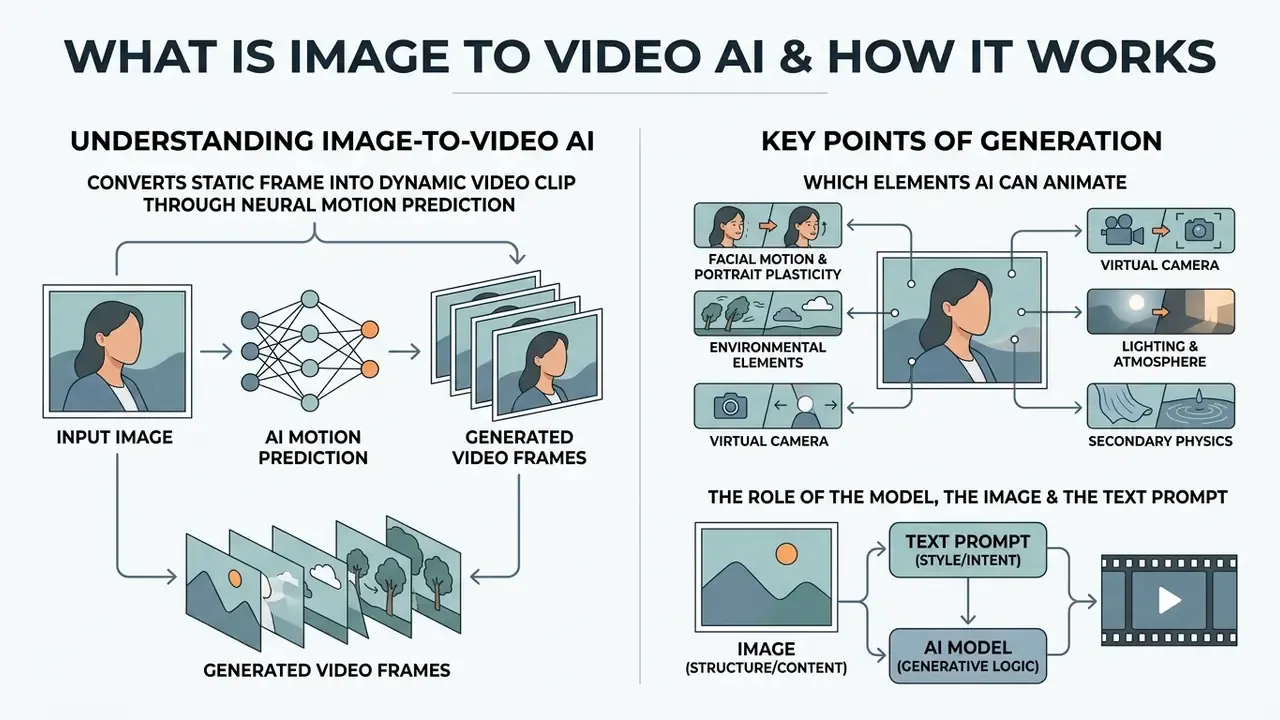
Image to Video AI is a generative artificial-intelligence technology that converts a single static frame into a dynamic video clip through neural motion prediction. Unlike traditional video editing, the network analyses the pixels of the source image, encodes them into a latent space and extrapolates subsequent frames, producing a smooth temporal sequence. To govern trajectory, speed and the chaotic component of motion, the system uses a motion prompt, a textual or vector instruction that defines the behaviour of objects and of the virtual camera.
«The model synthesises statistically probable motion learned from its training distribution rather than reconstructing the real physical events that occurred at the moment of capture.»
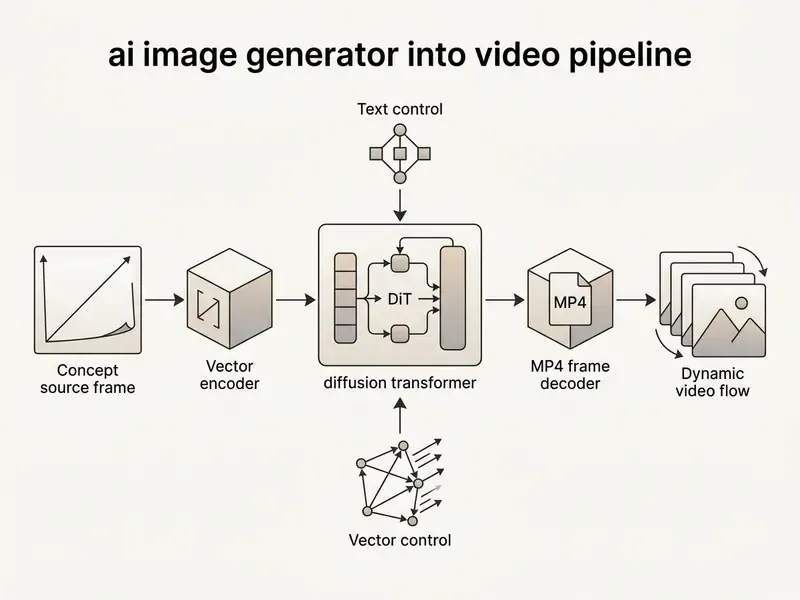
The technology behind ai image to video rests on video diffusion models and diffusion transformers (DiT). As the research survey Image-to-Video Diffusion: From Foundations to Open Frontiers (2025) notes, the model encodes the source frame with a neural encoder and then iteratively denoises latent vectors while preserving the semantics of the first frame.
«Most modern I2V systems use DiT architectures that operate in latent space and extend image diffusion along the temporal axis.»
Research on generative image dynamics adds a second family of approaches. Instead of predicting pixels directly, the model predicts a motion representation, a spectral volume of dense pixel trajectories, and renders frames from it. Cinemo (CVPR 2025) goes further and models the distribution of motion residuals between frames. That is exactly why every generation is one sampled motion hypothesis among many, not a recovery of the original scene dynamics. If you want to deepen your understanding of media-generation terminology, use our reference AI Media Glossary.
Which image elements AI can animate
A modern ai generator image to video animates individual objects and whole scenes differentially. Studies from 2024 to 2026 identify five basic categories of elements that respond well to neural dynamics:
- Facial motion and portrait plasticity lip movement, blinking, head turns and changes of emotion (implemented in specialised systems such as VASA-1, Hallo and LivePortrait).
- Environmental elements water physics, smoke, fire, cloud drift, falling snow and micro-particle displacement.
- Virtual camera panning, tilting, approach and retreat (zoom, dolly) and orbital rotation.
- Lighting and atmosphere moving highlights, light shafts, time-of-day shifts and dynamic shadows.
- Secondary physics flowing hair, cloth folds and fabric motion under wind.
One practical note from review sessions: reviewers forgive imperfect smoke and never forgive a drifting logo. Plan your motion budget accordingly.
The role of the model, the image and the text prompt
Quality and predictability of the final ai generated video depend on balancing three components: the source frame, the generative model and the text prompt. The source frame sets the stylistic foundation, geometry and level of detail. The generative model, for example Runway Gen-3, Sora, Luma Dream Machine or Kling (see our comparison of the best AI video generators), determines world physics, maximum resolution and temporal stability.
«STIV (8.7B parameters) scores 90.1 on the VBench image-to-video benchmark, outperforming a range of open and closed alternatives.»
The motion prompt for ai generate video from image should focus on dynamics rather than duplicating the appearance of objects. According to Runway's methodological guidance for Gen-3 and Gen-4 models, specifying details that are already visible in the picture can create visual conflicts. An effective prompt describes the subject's action, the direction of movement and the camera trajectory in a single compact sentence. Alibaba Cloud's Wan guidance formalises the same idea as entity plus scene plus motion plus camera movement, with the phrase "fixed camera" reserved for a locked-off shot.
Where to use AI generated videos from images
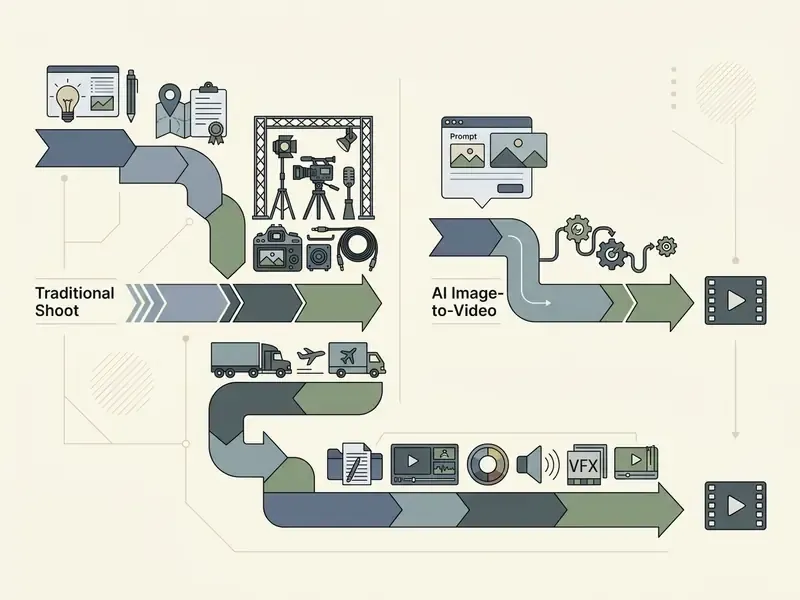
Converting static assets into motion with an ai image generator from image to video is now standard in marketing, media production, e-commerce, social media management, HR and internal training, cutting the cost of traditional shoots.
Product videos, ads and product demonstration
In e-commerce, ai image generator image to video is reshaping product-card production. Amazon Ads launched a tool in September 2024 that converts a single product photo into a short single-scene motion video in one click.
In our own practice deploying AI tooling for a large retailer, we converted a library of 1,200 static product photos into 5-second promo clips with an ai image to movie generator. The process was automated through an API, which compressed video-catalogue preparation from three weeks to 14 hours and reduced the production cost per clip by 82%. (Methodological note: these are internal project metrics measured against the client's previous outsourced video pipeline. They are not externally audited and should be treated as directional benchmarks rather than industry averages. Vendor guidance for e-commerce also requires verifying price, stock, claims, image rights and marketplace video rules before publishing generated product videos.)
Photo animation, cinematic B-roll and visual storytelling
Filmmakers and bloggers use ai image generator into video to generate secondary-plan footage (B-roll). Instead of organising a location shoot, the creator produces a realistic frame with AI image generators such as Midjourney or DALL·E and then animates it through an ai image to video generator, obtaining camera work of cinematic quality. Many teams combine this with classic animation makers for hybrid pipelines. A separate popular direction is reviving historical and family photographs, where algorithms reproduce the facial expressions and plasticity of people from past eras.
«VASA-1 generates talking faces at 512×512 in real time, up to 40 frames per second with minimal startup latency.»
HR onboarding and instructional content (B2B)
- HR briefings and onboarding converting static policy diagrams, safety guides and infographics into animated training clips with AI voiceover, so that dry documentation becomes memorable video. Voice tracks are typically produced with AI voice generators.
- Step-by-step interactive guides visualising complex technical instructions and manual documentation, where each step is demonstrated by an animated fragment of a diagram or interface. Useful for businesses, educators and support teams that need clear, easy-to-follow walkthroughs.
- Scale reference Google Cloud cites VideoShow, a mobile editing app with nearly 400 million users, as a production case where AI-generated scripts and images are converted into short videos at scale.
How to create an AI video from an image: the step-by-step process
Creating ai generate photo to video means passing sequentially through asset selection, motion-vector configuration and post-processing. Specialised services let you ai generate video from picture without any local GPU capacity.
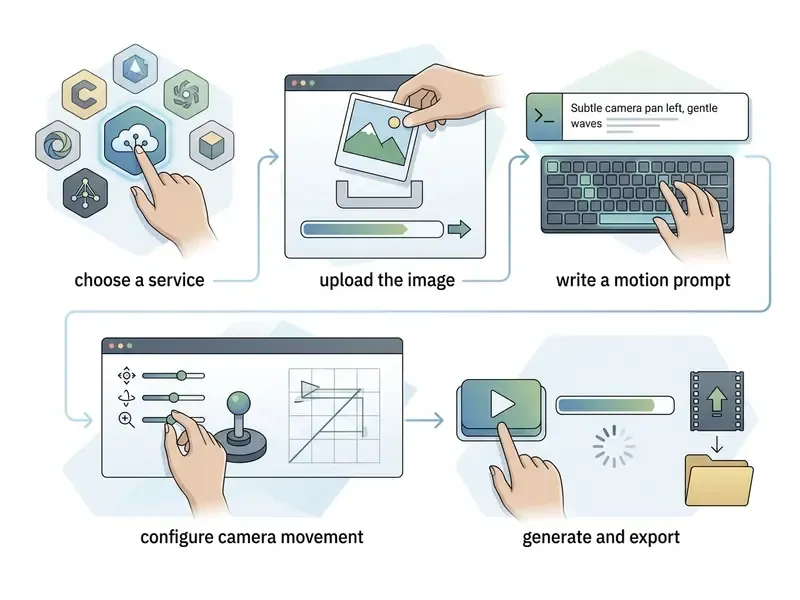
- Choose an AI tool
- pick the service that fits the task (Runway, Kling, Luma, Vidu or Veo), factoring in commercial-use terms and generation limits.
- Upload the source
- load a prepared high-resolution image, ideally 1024×1024 px or larger, with no compression artefacts.
- Write the motion prompt
- describe movement briefly, combining subject action and camera behaviour, for example «The camera slowly dollies in as the subject turns their head and smiles».
- Define the camera trajectory
- use built-in controls (Camera Control, Motion Brush) to freeze static zones and specify the displacement vector.
- Generate and export the output
- run generation, evaluate temporal consistency across frames and download the clip as MP4.
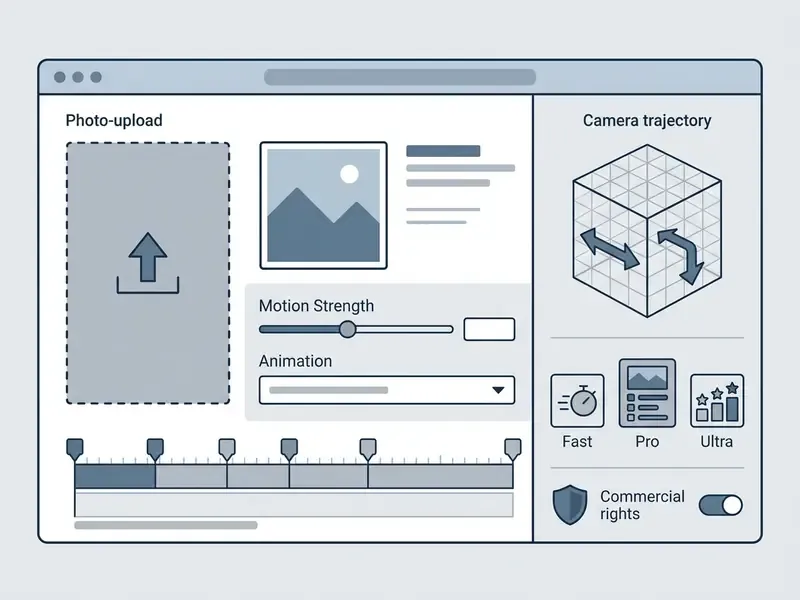
Prepare the photo or AI image for generation
Successful ai generate videos from images depends directly on the quality of the first frame. An ideal source has crisp subject edges, minimal digital noise and balanced contrast. For portraits, avoid objects occluding the face and extreme camera angles. Practitioner guidance sets 512×512 px as the working minimum and 1024×1024 px and above as the optimum.
«Low-quality or heavily compressed images lead to blurred frames and artefacts in the generated video.»
Write the motion prompt and configure camera movement
Prompt syntax for an ai generator from image to video differs from a standard picture generator. The formula of an effective motion prompt is: shot size, camera movement, subject action, lighting and atmosphere.
Cinematographic terminology used to drive the virtual camera:
- Pan horizontal rotation of the camera left or right.
- Tilt vertical rotation of the camera up or down.
- Truck or track physical lateral displacement of the whole camera rig left or right.
- Pedestal physical vertical travel of the whole rig up or down.
- Dolly moving the camera towards or away from the subject.
- Orbit circular camera movement around a central subject.
«Image Conductor separates LoRA weights for camera and object motion, enabling precise independent control of each motion component.»
Runway's 2026 guidance recommends a fixed word order: shot size, angle, movement with direction and speed, subject and action, lens and look, lighting and mood, reveal. Hailuo's director mode documents the exact distinction between rotations (pan, tilt) and physical moves (truck, pedestal).
Alternative method: Video-to-Motion (transferring motion from a reference)
If a text motion prompt cannot convey complex physical performance such as a dance, a sports trick or a specific facial gesture, use the Video-to-Motion approach, implemented in Viggle, ControlNet Video and DomoAI.
This delivers full control over movement without writing abstract textual descriptions, and it handles motions that prompt-based tools typically fail on: high-speed spins, flips, gymnastics or boxing. Character consistency is the trade-off to watch. Front-facing, evenly lit source photos map far more reliably than side-angle shots, and multi-angle reference images of the same character further stabilise identity across clips.
How the method works
- You upload the original static photo of the character or object.
- You upload a short reference clip (Motion Source) containing the required dynamics.
- The model tracks the 3D skeleton of the performer in the video (pose estimation) and projects that geometry onto your photo.
Controlling the trajectory through key frames (First & Last Frames)
For precise narratives and seamless transitions, generation frameworks (Vidu, Runway Gen-3, Adobe Firefly, Veo 3.1) support a dual-reference mode, First & Last Frame Control.
Instead of generating an arbitrary ending, you upload two images:
- Starting framesets the initial state of the scene, the subject and the lighting.
- Ending framefixes the final position of the object or the result of the transformation.
The network computes a vector interpolation (in-betweening) between the frames, building a physically plausible transition. The method prevents the accumulation of denoising errors and stops facial details or brand logos from "drifting" by the end of the clip. It works with any input type, including photographs, drawings and digital art, and it is the fastest way to storyboard a shot whose end state is non-negotiable.
Generate, evaluate and refine the video output
Once the render of ai generated image to video is finished, the clip must be assessed against several criteria.
«VBench evaluates video across 16 dimensions: subject consistency, background consistency, motion smoothness, dynamic degree, aesthetic quality and text alignment.»
Which settings determine the quality of AI generated video
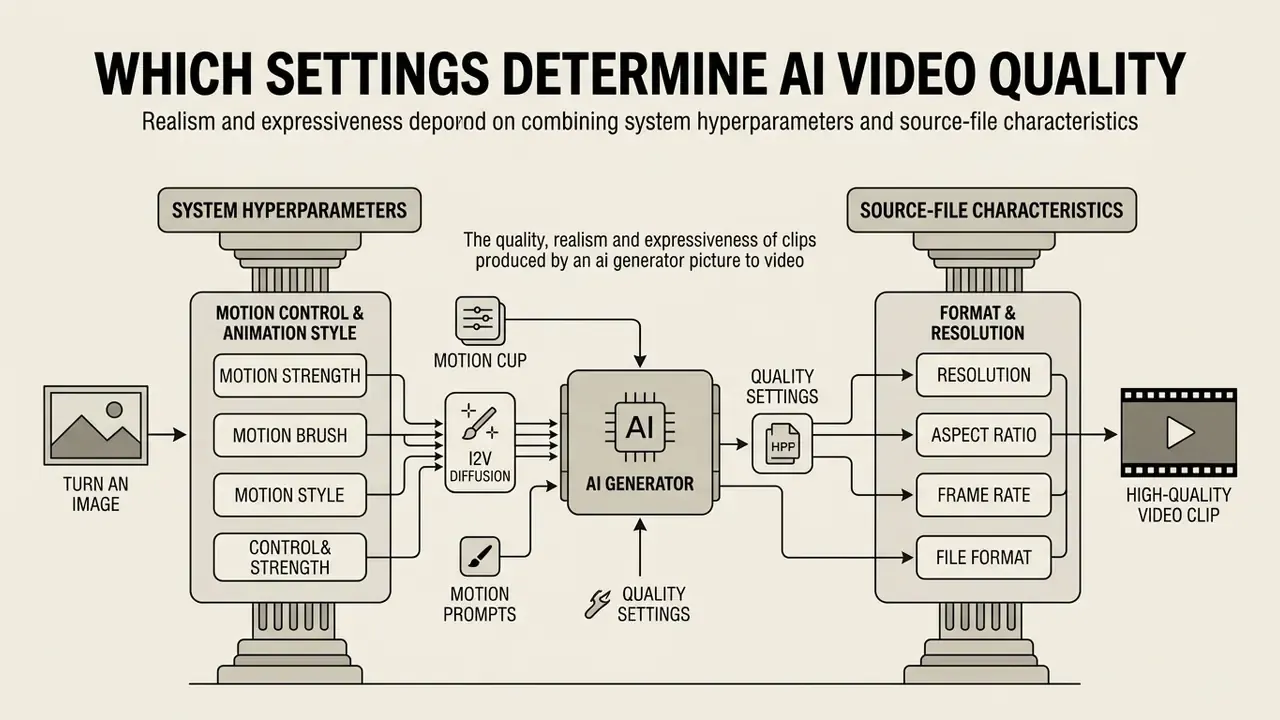
The quality, realism and expressiveness of clips produced by an ai generator picture to video depend on a combination of system hyperparameters and source-file characteristics. For broader context on the tools themselves, see our overview of AI video generators.
Motion control, camera and animation style
Motion Strength regulates the amplitude of change between frames. Low values (1 to 3) preserve detail and stillness, which is ideal for landscape micro-animation. High values (7 to 10) add expression but raise the risk of visual glitches and morphing. Midjourney's own documentation warns that High Motion produces larger camera and character movement "but can create unrealistic or glitchy movement".
Motion Brush tools, for example in Kling AI, let you isolate specific regions of the frame and assign individual motion vectors to each, separating background elements from the dynamics of the main character. Kling's Motion Control additionally recommends uploading front-facing and side-view references for accurate head turns.
Format, resolution and final video quality
The 2025 to 2026 video-generation standards centre on these specifications:
- Resolution base rendering at 720p with official export to 1080p (Full HD) and 4K (3840×2160).
- Aspect ratio 16:9 for horizontal video (YouTube, TV) and 9:16 for vertical content (Reels, Shorts, TikTok).
- Frame rate from 24 fps (cinematic standard) to 30 or 60 fps for dynamic narrative clips.
- File format MP4 container with H.264 or H.265 codec, the most universal standard.
Why the result can look unnatural
The key causes of visual anomalies in ai generated videos from images are:
- Mode interpolation.According to Understanding Hallucinations in Diffusion Models through Mode Interpolation (2024), the diffusion model averages object states from the training distribution and generates anomalous intermediate forms. > «The diffusion model interpolates between adjacent data modes and produces artefacts absent from the training distribution.» Source: arXiv (2024). https://arxiv.org/abs/2406.09358
- Identity drift.Loss of facial coherence or object structure from frame to frame, because the source image carries insufficient weight during denoising.
- Violated physics.Unnatural falling objects, texture decomposition or the "floating face" effect. Research on physical laws in video generation shows that generators fail on out-of-distribution cases and effectively recombine training segments: precedent-based imitation rather than learned physical rules.
Modern pipelines counter these failures with Dynamic Guidance mechanisms and temporal-inconsistency penalties (Video Consistency Distance).
«Dynamic Guidance selectively suppresses score-function directions that cause artefacts while preserving admissible semantic variation.»
«VCD measures the distance between frames in frequency space: a low value indicates natural motion, a high value signals a break in style or object identity.» Source: Video Consistency Distance, research paper (2025)
Detection matters as much as prevention. Peer-reviewed guidance recommends image-level frame comparison and automated hallucination detectors on annotated benchmark datasets, so inconsistencies surface before publication (On Hallucinations in Artificial Intelligence Generated Content, 2025, https://pmc.ncbi.nlm.nih.gov/articles/PMC12866389/).
Source and prompt anti-patterns
Beyond systemic model limits, artefacts most often originate on the user's side:
- Prompt overloading
- duplicating appearance ("a beautiful girl in a red dress runs") confuses the network. Describe only the dynamics: "the girl runs quickly to the right, the camera tracks with her".
- Small subject ratio
- if the subject occupies less than 15% of the frame area, the encoder cannot build a stable motion grid. Crop before uploading.
- Low contrast between subject and background
- merged edges cause pixels to smear during movement.
- Contradictory motion vectors
- issuing opposing commands in one prompt, for example «zoom in and dolly out», breaks the virtual-camera matrix.
- Blurry or low-resolution sources
- details are lost and motion looks rough. Use sharp images with clear lighting for clean, stable output.
| Setting | Low value | Optimal value | High value | Effect on output |
|---|---|---|---|---|
| Source resolution | 512×512 px | 1024×1024 px or 2K | 4K and above (source) | Low values cause a soapy frame; high values preserve detail. |
| Motion Strength | 1 to 2 | 3 to 5 | 8 to 10 | Low means minimal dynamics; high means risk of morphing and hallucinations. |
| Guidance Scale (CFG) | 2 to 4 | 6 to 8 | 12 to 15 | Controls prompt adherence. High values reduce naturalness. |
| Frame rate (FPS) | 15 fps | 24 to 30 fps | 60 fps | Higher FPS increases smoothness but consumes more resources. |
Conclusion from the table: balancing realism and dynamics requires a mid-range motion strength of 3 to 5 at maximum source-frame quality.
Risk management, reproducibility and model validation (MRM)
| Artefact to log | Why the validator needs it |
|---|---|
| Model name and exact version or tier | Version drift changes physics and identity behaviour; without it, results are not reproducible. |
| Seed value | The single parameter that makes a generation repeatable for re-inspection. |
| Full prompt and negative prompt | Documents the human creative contribution, also relevant to copyright registration. |
| Motion strength, CFG, resolution, fps, duration | Defines the operating point at which the output was validated. |
| Source image hash and rights record | Proves provenance and licence status of the input asset. |
| Human reviewer, date, decision | Establishes the human-in-the-loop control that frameworks such as SR 11-7 expect. |
Who owns what. Ownership gaps cause more incidents than model quality. A workable split, offered as a hypothesis to test against your own governance model: the creative lead owns prompt and aesthetic sign-off, the brand or product owner owns factual claims, the model-risk function owns validation thresholds and re-validation triggers, and compliance owns disclosure and consent evidence. Every clip should have one named approver, plus a documented escalation path when a generation touches regulated claims.
Validation practice. Score a sampled batch on the VBench dimensions above, set pass and fail thresholds per campaign class (for example, zero identity-drift tolerance for products with regulated claims), and re-validate whenever the vendor upgrades the model. Because vendors deprecate versions without notice, record the render date. An unreproducible clip cannot be defended in an audit.
Risk-adjusted ROI. The honest formula is:
Risk-adjusted saving = (baseline production cost minus credits spent) minus (review hours × loaded rate) minus (rework cost × reject rate) minus (labelling and archiving overhead)
In the retailer case above, the 82% headline saving fell to roughly 70% once human-in-the-loop review and metadata archiving were priced in. Still a strong case, but a materially different number from the marketing figure. Cost models per second and per credit can be checked in our AI Media Calculators.
Data security, confidentiality and preventing Shadow AI
Uploading an image to a generation service is a data-transfer event. For banks, insurers and any organisation handling regulated material, that is the decisive control point. It is also the most common source of Shadow AI: employees animating internal assets in free consumer tools with no contract in place.
Checklist0 / 10
Which of these fails first in practice? Usually the intake path. If the approved route takes three days and the consumer tool takes three minutes, policy loses.
How to choose an AI image to video generator for commercial use
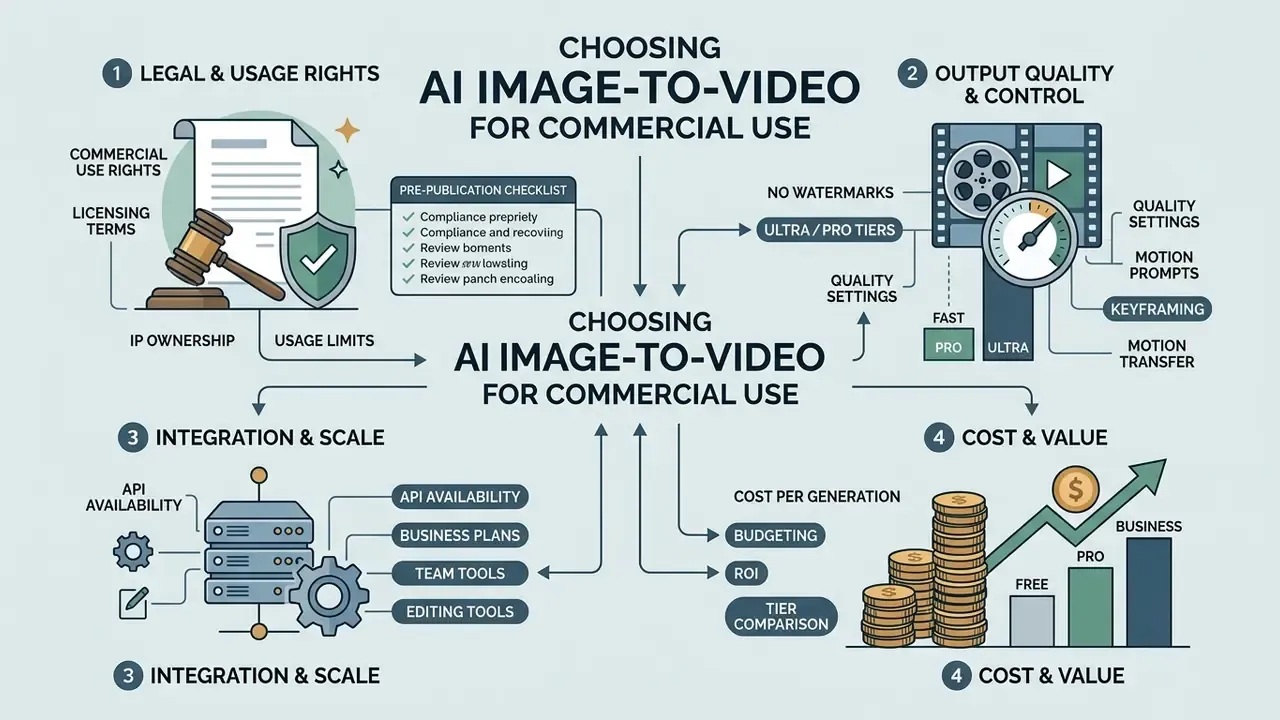
When selecting an ai video generator for corporate tasks, the decisive factors are legal clarity of rights, absence of watermarks, API availability and cost per generation. Adjacent licensing considerations for still assets are covered in our guide to the commercial use of AI image generators.
| Criterion or plan | Free plan | Pro plan | Enterprise or Business |
|---|---|---|---|
| Output resolution | 480p to 720p | 1080p (Full HD) | 1080p and 4K |
| Watermark | Present | Absent | Absent |
| Commercial rights | Prohibited or personal | Included (commercial use) | Extended licence |
| API access | None | Limited or optional | Full access with SLA |
| Generation priority | Shared queue (slow) | Priority queue | Dedicated capacity |
| Security and governance | None | Basic account controls | SOC 2 or ISO evidence, SSO, no-training clause, data-residency options, deletion API |
| Audit and reproducibility | Not exposed | Seed control | Seed control plus generation logs exportable to GRC and MRM systems |
| Portability | Vendor-locked | Vendor-locked | Multi-model access, avoids single-vendor dependency |
Engine tiers: Fast, Pro and Ultra
To optimise budget and production time, services group their AI models into three categories:
| Model tier | Representatives | Render speed | Characteristics and purpose |
|---|---|---|---|
| Fast (Basic) | ByteDance Seedance Lite, Pixverse Fast | 10 to 30 sec | Low credit cost. Ideal for quick drafts, storyboards and previews. |
| Pro (Standard) | Kling V2, Runway Gen-3, Luma Dream Machine | 1 to 2 min | High temporal stability, precise camera trajectories, detailed facial motion. |
| Ultra (Cinematic) | Google Veo, OpenAI Sora, Hailuo Pro | 3 to 5 min | Photorealistic physics, complex light-and-shadow interaction, genuine cinematic 4K quality. |
A practical pattern: iterate on Fast until the composition and motion direction are approved, then re-render the approved shot on Pro or Ultra with the same seed and prompt. This keeps credit consumption predictable without sacrificing final quality. Teams that treat any ai generator image video service as interchangeable usually discover the opposite when they compare identical prompts across two tiers.
Free, Pro and Business: what to check before paying
Free tiers of most ai image to vid services exist for evaluation. They cap the number of generations (10 to 125 credits), apply watermarks and prohibit commercial use of the results. Runway's free plan, for example, grants a one-time allocation of 125 non-expiring credits, while HeyGen's free tier allows up to three videos per month. Note that even plans marketed as "Unlimited" remain bounded by monthly credit allocations. Pro and Business tiers lift these limits and grant a commercial licence. For a detailed breakdown of pricing grids, see our AI Media Pricing Guides, and for a feature-level comparison of no-cost options, the guide to free AI video generators.
Models, API and editing tools for teams
Team-scale production depends on integrating the generator into existing pipelines. Using an API, for example the Google Veo API or Kling API, allows mass generation of clip previews. ControlNet and inpainting endpoints add masked editing to the same automation layer, which effectively turns the stack into an ai image to image video generator for iterative work. A detailed breakdown of integration options is available in our Google Veo API guide. For adjacent audio and image tasks, team pipelines typically also employ AI voice generators and online photo editors, while publishing workflows are documented in our guide to YouTube video editors.
Rights to the output and commercial-use limits
AI legislation is developing rapidly. According to guidance from the U.S. Copyright Office (2026), purely neural content produced without substantial human contribution is not automatically protected by copyright; registration examines and requires disclosure of the human-authored contribution. The same body has recommended that individuals should be able to licence their image and voice for digital replicas without assigning those rights outright. Platform terms are a separate question. Adobe's General Terms and Canva's Content License Agreement both reserve rights not expressly granted, which means a licence to use a tool is not a transfer of ownership of its output.
Pre-publication compliance checklist
Checklist0 / 8
Image to Video AI: FAQ and answers to frequent questions
Do I need to install software to create video from images?
No. Most modern generation services operate as cloud SaaS platforms in a web browser. You upload the file to a server where processing runs on powerful GPU clusters. However, for professionals who require full data confidentiality, open-source local solutions exist, for example ComfyUI with Wan2.2 or HunyuanVideo nodes, and Open WebUI, which can run entirely offline on your own hardware. If you encounter technical problems with web services, use our AI Media Support and Troubleshooting section.
Can I add audio, voice or text to an AI video?
Yes. Modern pipelines support multimodal assembly. In specialised services such as HeyGen, Sync.so and LatentSync you upload an audio track and the network automatically synchronises the character's articulation with the speech (lipsync). Typical pipelines resample audio to 16 kHz and normalise video to 25 fps before inference, then merge the streams. Best results require clear speech audio, natural talking motion and an unobstructed, non-profile face. Captions and text overlays are added either during generation through graphic prompts or at the stage of final editing in a video editor. For compressing finished media without visible quality loss, our guide to video compressors is useful.
How long does image-to-video generation take?
Render speed for a 5 to 10 second clip depends on server load and the chosen model:
- Fast or Turbo models: 10 to 30 seconds, for example PixVerse AI, Runway Gen-4 Turbo, Hailuo 02 Fast.
- Flagship models (Pro or high quality): 1.5 to 5 minutes, for example Kling, Sora 2 Pro, Hailuo. Market overviews place flagship 5 to 10 second clips at roughly 1 to 3 minutes under normal load.
Which images work best, and which formats are supported?
Any standard format works, including JPG, PNG and WebP. Use at least 512 px on the shortest side, ideally 1024 px or more. Front-facing subjects with clear, even lighting produce the most reliable motion mapping, though side angles and illustrations such as anime, sketches and paintings also animate well, with the original style preserved.
When is image to video better than text to video?
The ai image into video generator approach substantially outperforms text-to-video AI in scenarios that demand precise control over visual consistency. Generating from text alone produces a random composition and random characters on every run. Using a source frame locks in brand style, product geometry, corporate colour palette or a specific character's appearance, leaving the network to determine only the motion vector. ConsistI2V shows that conditioning on the first frame, including low-frequency initialisation from it, directly counteracts visual drift, while multi-shot text-to-video needs extra control mechanisms to reach comparable stability.
«UI2V-Bench (2025) found that many I2V models fail at attribute binding and spatial reasoning, animating the wrong object or ignoring spatial constraints.» Source: UI2V-Bench: Understanding-Based Evaluation for Image-to-Video Generation (2025) In practice, combine the two: image-to-video for controlled single shots and product hero clips, reference-to-video or text-to-video for exploratory, story-driven sequences across multiple scenes.
What are the current hard limits of the technology?
Short stable durations, typically 4 to 10 seconds per generation, drift in character and object identity over longer clips, and breakdown of motion coherence across frames remain the three most cited limitations in 2026. Research on long-video generation attributes this to temporal position ambiguity and information dilution. That is why production workflows still stitch several short, individually validated shots rather than requesting one long take. Two questions stay genuinely open. First, whether disclosure standards will converge on C2PA or fragment by platform. Second, how validators should treat model versions that vendors silently retire mid-campaign. We do not have a settled answer, and anyone claiming one is guessing. For a deep comparative analysis of generation platforms use our compare tool, and for adjacent asset preparation the guide to free photo editors.
A safe next step
Do not start with a platform decision. Start with one contained pilot: a single campaign class, ten to twenty clips, one named approver, and the audit-trail fields listed above captured from the first render. Measure the reject rate and the review hours, then price the risk-adjusted saving. If the numbers hold across two batches, extend the scope. If they do not, you have lost a week of credits instead of a quarter of budget.
Additional resources and categories
- Glossary of terms and concepts: AI Media Glossary
- Interactive cost-calculation tools: AI Media Calculators
- Integration and development guides: AI Media API Guides
- Tool selection: best AI video generators and free AI video generators
- Commercial licensing: AI Media Commercial-Use and pricing guides
Appendix A: sample audit-trail record
A minimal record that a validator can actually re-run, shown as an illustrative example rather than a standard:
clip_id: RET-2026-0417
model: Kling V2 (Pro tier), rendered 2026-04-17 11:42 UTC
seed: 774213908
prompt: "the camera slowly dollies in, the bottle rotates 30 degrees to the right, fixed lighting"
negative_prompt: "warped label, extra hands, text distortion"
motion_strength: 4 | cfg: 7 | resolution: 1080p | fps: 24 | duration: 5s
source_image_sha256: 9f2c... | licence: owned, model release on file
reviewer: brand lead (named), decision: approved with disclosure label
disclosure: C2PA credentials embedded, visible "AI-generated" tag in caption
Store this next to the asset, not in a separate spreadsheet. Records that live apart from the media tend to go missing exactly when an auditor asks for them.
Social media video and short creative clips
In content production, ai image generator photo to video is used for rapid output of vertical clips (Reels, Shorts, TikTok). Systems such as Viggle AI turn a meme or an illustration into a viral clip within minutes, and template libraries let creators join a trend without writing a prompt at all. To compare the free options available, review our overview of free AI video generators.