Last updated: March 2026 · Reviewed by: Marcus Hale, AI Governance & Model Risk Specialist
Executive summary
- Mechanism: An AI diagram generator is, in practice, an LLM-to-DSL compiler. It parses your prompt into entities, decision nodes, and relationships, emits diagram code (Mermaid.js, PlantUML, Graphviz DOT, draw.io XML), then renders it through a layout engine into SVG, PNG, or PDF.
- Reliability: Models draft node hierarchies and primary process flows reliably. Dense topologies, activation bars, error-handling paths, and edge labels remain error-prone and need human-in-the-loop (HITL) validation.
- Coverage: Beyond flowcharts and UML, current platforms generate ERDs, BPMN 2.0 swimlanes, cloud network topologies, Gantt charts, user journeys, and strategy matrices such as SWOT and PESTLE.
- Inputs: Prompts are only one entry point. Enterprise-grade tools ingest PDF, DOCX, TXT (commonly up to 40 MB), SQL DDL dumps, source code files, and live web URLs.
- Workflow integration: Model Context Protocol (MCP) servers let agents in Claude, Cursor, VS Code, and ChatGPT create, read, update, and export diagrams directly inside the development loop.
- Commercial risk: Purely AI-generated graphics without meaningful human authorship are not copyrightable in the United States. Free tiers frequently permit model training on your inputs, which is a direct Shadow AI exposure for regulated data.
- Selection rule: Match the tier to data sensitivity. Free for personal sketches; Professional for vector export and non-training clauses; Enterprise for SSO/SAML, SOC 2 Type II, zero-data retention, and VSDX/PPTX/Draw.io XML export.
How to use this guide
Read it as a procurement and control document, not as a tool ranking. Three questions decide most outcomes.
First: what data will actually be pasted or uploaded? A prompt describing a generic login flow is low risk. A 12 MB PDF of an internal AML escalation procedure is not.
Second: who signs off on the diagram? If the artifact enters a model inventory, a control library, or an audit file, it needs a named reviewer and a timestamp.
Third: what happens if you drop the vendor next year? Diagrams stored as portable DSL source survive. Diagrams locked in a proprietary canvas do not. If you want to sanity-check adjacent categories and licence terms before shortlisting, see the overview of comparable AI tooling reviews.
What is an AI diagram generator and how does it work?
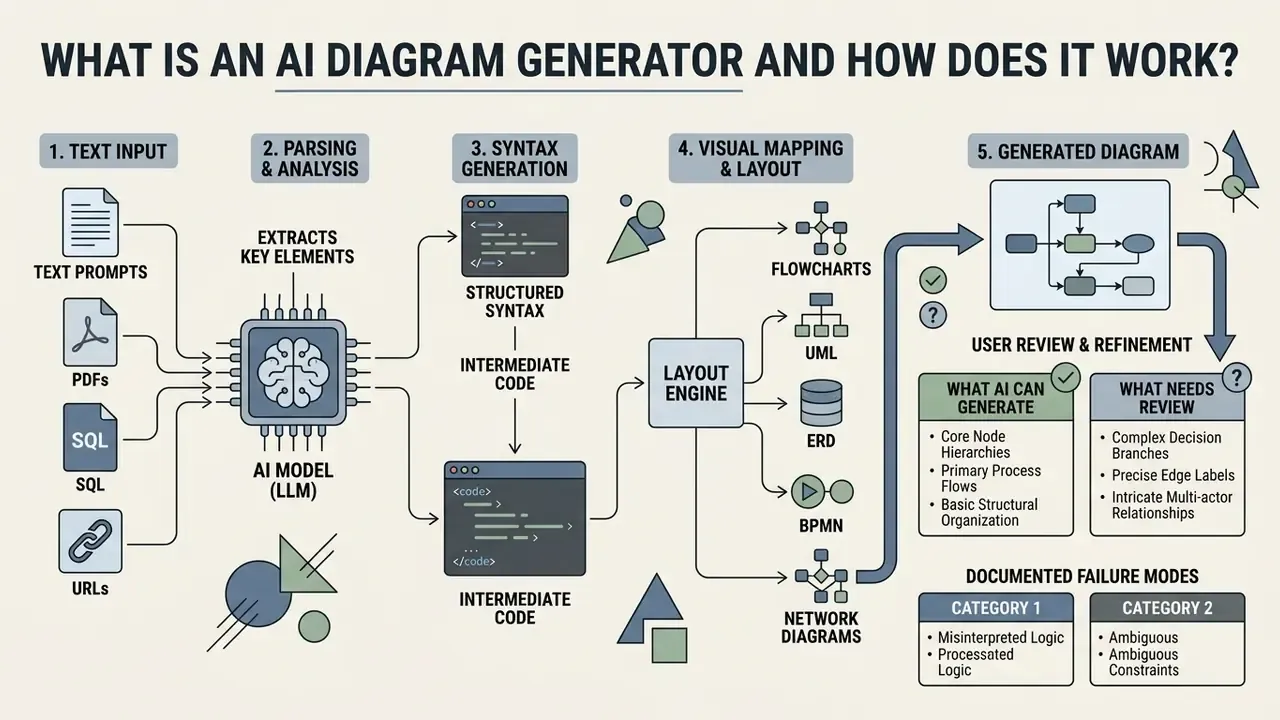
An ai diagram generator is a software system that uses large language models (LLMs) and layout engines to transform plain text descriptions into visual node-and-edge graphs. Rather than drawing shapes manually, users input natural language prompts, which the system compiles into Domain-Specific Languages (DSLs) such as Mermaid.js, PlantUML, or Graphviz DOT before rendering the final visual layout.
From text prompt to generated diagram
The conversion from a text description to a visual output runs through a structured multi-stage compilation pipeline. First, an ai based diagram generator parses the user's prompt to identify key domain entities, action steps, decision points, and relational dependencies (Wei et al., DiagramAgent, 2024).
«DiagramAgent employs a four-agent architecture, Plan Agent, Code Agent, Check Agent and Diagram-to-Code Agent, to improve accuracy and structural consistency.»
Second, the model converts these identified elements into structured syntax or intermediate code representations. Finally, layout algorithms execute automatic placement, path routing, and edge labeling to output generated diagrams that keep logical readability and spatial alignment. Classic Sugiyama-style layout pipelines run through cycle breaking, layer assignment, crossing minimization, node placement, and edge routing. That is why the same prompt can render with very different visual density depending on the engine.
An ai diagram creation tool abstracts the complexity of manual spatial arrangement. By decoupling structural logic from visual presentation, these platforms let technical teams maintain visual documentation as code. The practical gain is speed plus continuity: continuous integration pipelines can refresh system diagrams whenever the underlying text specification changes. Rendering services such as Kroki expose an HTTP API that turns textual descriptions into diagrams on demand, which makes the whole pipeline scriptable inside build systems.
What AI can generate and what needs review
Generative models reliably draft core node hierarchies, primary process flows, and basic structural relationships from text descriptions. Syntax fluency, though, is not semantic correctness. Those are two different things, and the gap is where audit findings live.
«MermaidSeqBench (132 verified samples) exposes significant gaps: many models fail to handle activation bars and error handling in sequence diagrams.»
Complex decision branches, precise edge labels, and intricate multi-actor relationships therefore require manual verification. Automated tools can misread subtle relational boundaries or introduce structural inaccuracies in densely connected topologies (DiagrammerGPT, Zala et al., 2023).
«An evaluation of 150 diagrams by instructors showed that RST-guided prompts reduce hallucinations, yet quality remains unstable due to model stochasticity.»
Documented failure modes cluster into two categories. Diagram structure understanding errors occur when the model misses hierarchical or relational structure, producing incorrect placements or connections. Diagram content understanding errors affect labels and numeric data, which means text on nodes and edges can be wrong even when the graph shape looks perfectly valid. The second type is nastier, because the picture passes a visual glance test.
Human operators must therefore review outputs to verify logical correctness, validate conditional branching, and fix layout alignment before a diagram enters formal compliance or engineering documentation. Teams that already run review protocols for AI image generators can reuse the same acceptance-criteria discipline for structural graphics.
What types of diagrams can AI create?
Modern diagramming platforms support a wide range of visual structures adapted to specific operational, architectural, and analytical tasks. An ai diagram creator can generate procedural flowcharts, formal software engineering models, conceptual mind maps, and infrastructure network topographies from natural language inputs.
«DiagramGenBenchmark spans eight diagram categories, including flowcharts, mind maps and architectural models, enabling comparative evaluation of AI systems.»
Flowcharts, process maps and block diagrams
Flowcharts and process maps articulate sequential operational workflows, decision trees, and system handoffs. An ai block diagram generator parses operational procedures and constructs functional component blocks linked by directional data flows. Business analysts use these tools to map customer onboarding flows, credit decisioning paths, KYC exception queues, and regulatory escalation trees. When the source material exists only as screenshots or scanned SOPs, image-to-text conversion tools supply the textual layer that the diagram engine then structures.
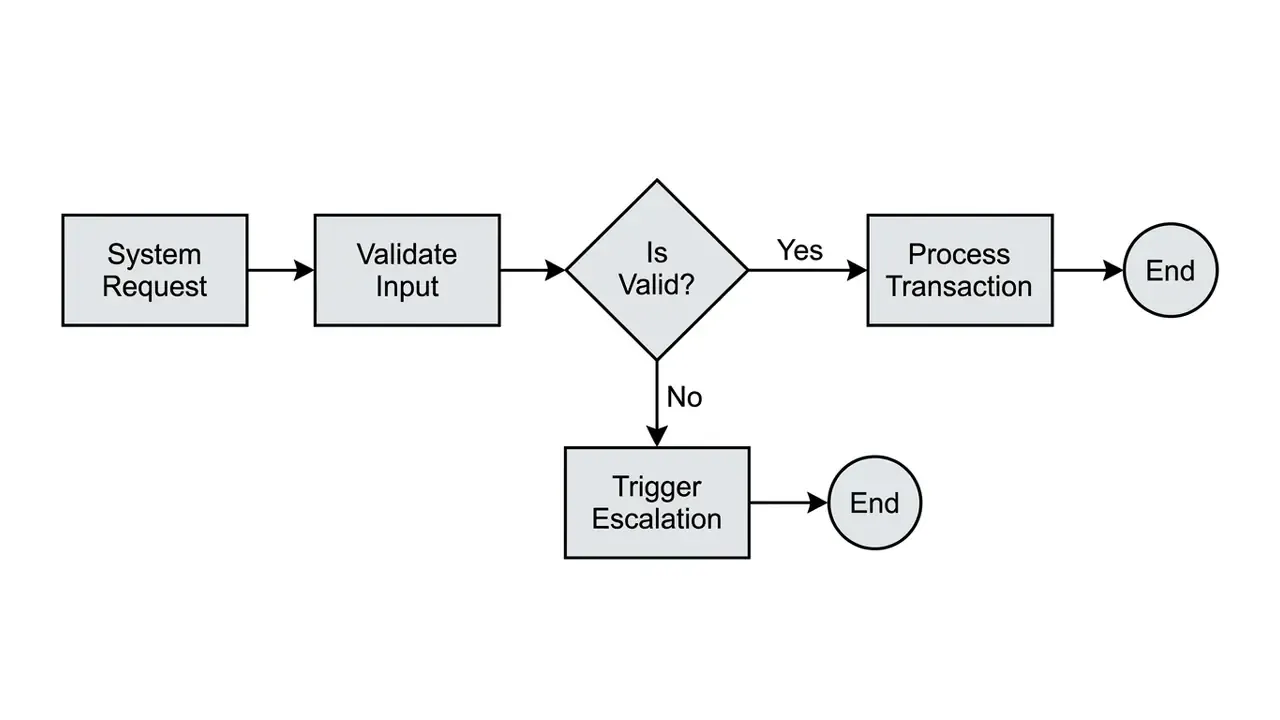
Specifying decision thresholds and conditional loops in the prompt lets an ai create diagrams engine organize complex multi-stage business processes without manual shape alignment. Strong process-map prompts for business analysis go one step further: they name actors, order the steps, mark decision points, declare start and end nodes, and optionally attach metadata such as RACI ownership, cycle time, handoffs, and error paths.
UML, sequence and activity diagrams
Technical architects need formal modeling notations to represent software behavior, object hierarchies, and distributed system interactions. An ai activity diagram generator models parallel execution paths, system states, and task concurrency across operational processes.
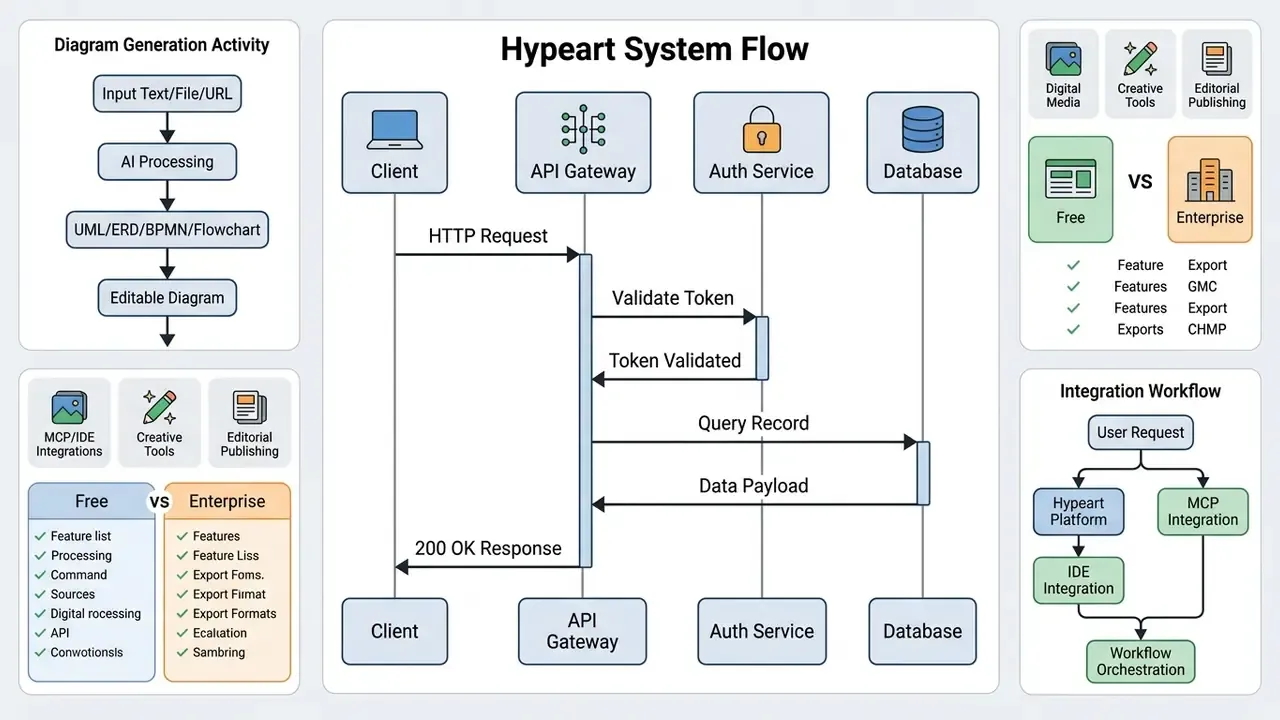
Sequence diagrams illustrate chronological message exchanges between software components. Standardizing inputs with UML vocabulary (synchronous versus asynchronous messages, actors placed outside the system boundary, fork/join for concurrency) materially increases the probability that generated interfaces follow recognized architectural patterns, although the notation alone guarantees nothing (OMG UML 2.5.1 Specification, 2017).
«A systematic review of 64 studies (2023-2025) found that LLM tools do generate UML diagrams, but frequently violate the grammatical and semantic rules of the notation.»
So treat UML output as a reviewable draft. Asynchronous call semantics, lifeline activation, and actor placement are the three checks that fail most often in automated generation.
Mind maps, network diagrams and charts
Mind maps organize unstructured brainstorming notes and domain concepts into hierarchical tree structures. Network diagrams map cloud infrastructure components, firewalls, load balancers, and subnet connections from textual configuration files or architecture notes.
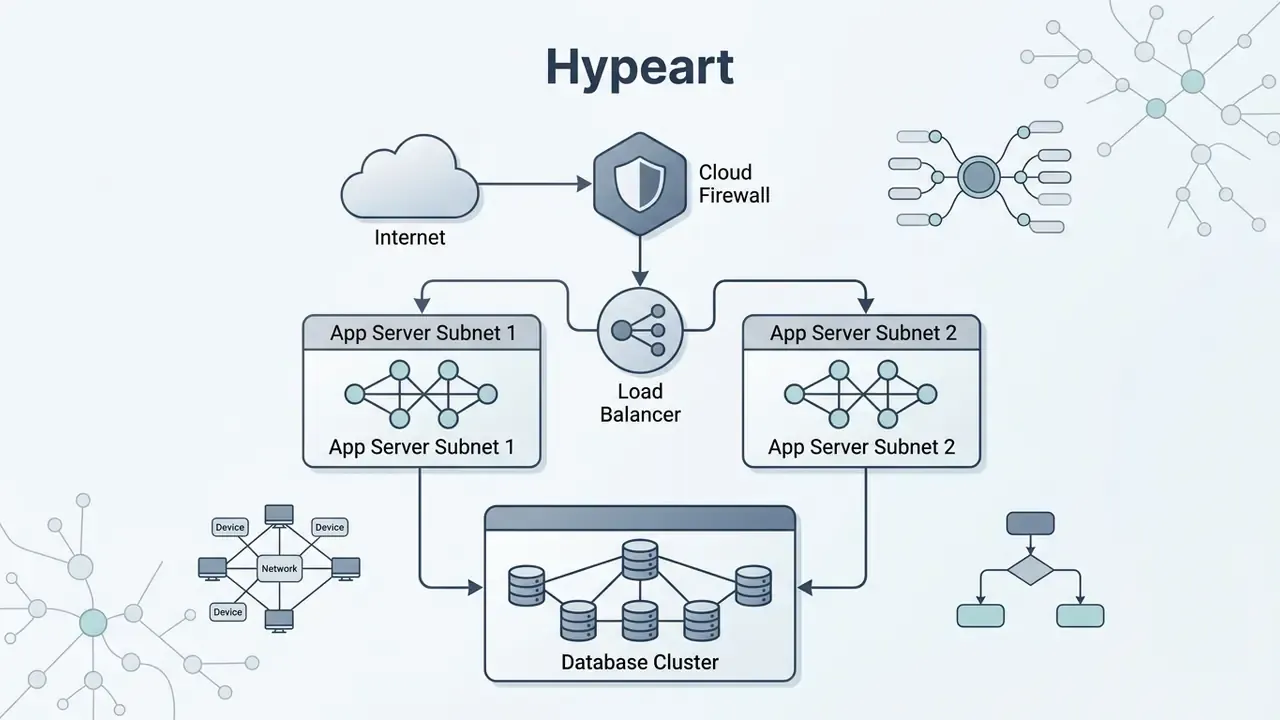
When generating infrastructure topologies, prompt-driven tools convert ordered connection statements into structured node networks, which gives immediate visibility into system boundaries and security zones.
«A mind map generation system for Arabic text (2023) reported good accuracy in covering headings and subheadings compared with manually built maps.»
ERD, BPMN and enterprise process modeling
Data architects and process engineers need formal notations such as Entity-Relationship Diagrams (ERDs) and Business Process Model and Notation (BPMN 2.0). AI diagram generators interpret SQL DDL scripts, JSON schemas, or standard operating procedures to construct normalized ERDs, showing primary and foreign key relationships with explicit cardinality, plus auditable BPMN swimlane workflows that separate responsibilities across departments. For regulated institutions, BPMN output is often the artifact that lands in the control library, so gateway logic, escalation timers, and lane ownership must be validated line by line. No shortcuts there.
Business strategy visuals: SWOT, PEST, and value stream maps
Beyond technical infrastructure, AI diagram engines translate unstructured strategic notes into business frameworks such as SWOT analyses, PESTLE matrices, user journey maps, value stream maps, Lean Canvas boards, and Gantt schedules. The model structures qualitative input into standardized quadrants, chronological timelines, or funnel stages. Consultants and product teams can move from interview transcripts to a defensible visual artifact in a single pass, then spend their time arguing about content rather than alignment guides.
| Diagram Type | Primary Enterprise Purpose | Example Prompt Specification |
|---|---|---|
| Flowchart | Mapping sequential business logic and decision branches. | "Create a flowchart for loan approval: start at application submission, branch at credit score check (>=700 auto-approve, <700 manual review), end at notification." |
| Sequence Diagram | Modeling chronological API calls and inter-system messaging. | "Generate a sequence diagram showing Client sending POST /login to Gateway, Gateway calling Auth Service, and returning JWT token." |
| Class / UML | Object-oriented software domain and data model structure. | "Draw a UML class diagram for an E-commerce system with Customer, Order, and Item classes, showing 1-to-many relationships." |
| Activity Diagram | Visualizing concurrent tasks, system states, and workflows. | "Create an activity diagram for transaction processing with parallel checks for fraud detection and account balance verification." |
| Mind Map | Hierarchical decomposition of complex operational domains. | "Build a mind map centered on AI Model Governance, with main branches for Risk Assessment, Audit Trail, Data Lineage, and Monitoring." |
| Network Diagram | Visualizing cloud topology and infrastructure security zones. | "Generate a network diagram showing AWS VPC with Public Subnet (ALB), Private Subnet (EC2 instances), and Isolated Subnet (RDS)." |
| Block Diagram | High-level functional architecture and hardware component connections. | "Create a block diagram of a payment processor showing Ingestion Engine, Ledger Service, Fraud API, and Settlement Database." |
| ERD (Entity-Relationship) | Database schema structure and key relationships. | "Generate an ERD from this SQL DDL: Users table linked 1-to-many with Orders, Orders linked 1-to-many with OrderItems." |
| BPMN 2.0 | Formal business process and cross-functional swimlanes. | "Create a BPMN workflow for invoice processing across Accounting and Approval Managers with escalation timers." |
| SWOT / Strategic Matrix | Qualitative business and risk assessment mapping. | "Build a SWOT matrix for adopting Generative AI in banking: Strengths (speed), Weaknesses (hallucinations), Opportunities (automation), Threats (compliance)." |
How to write prompts for better AI diagrams
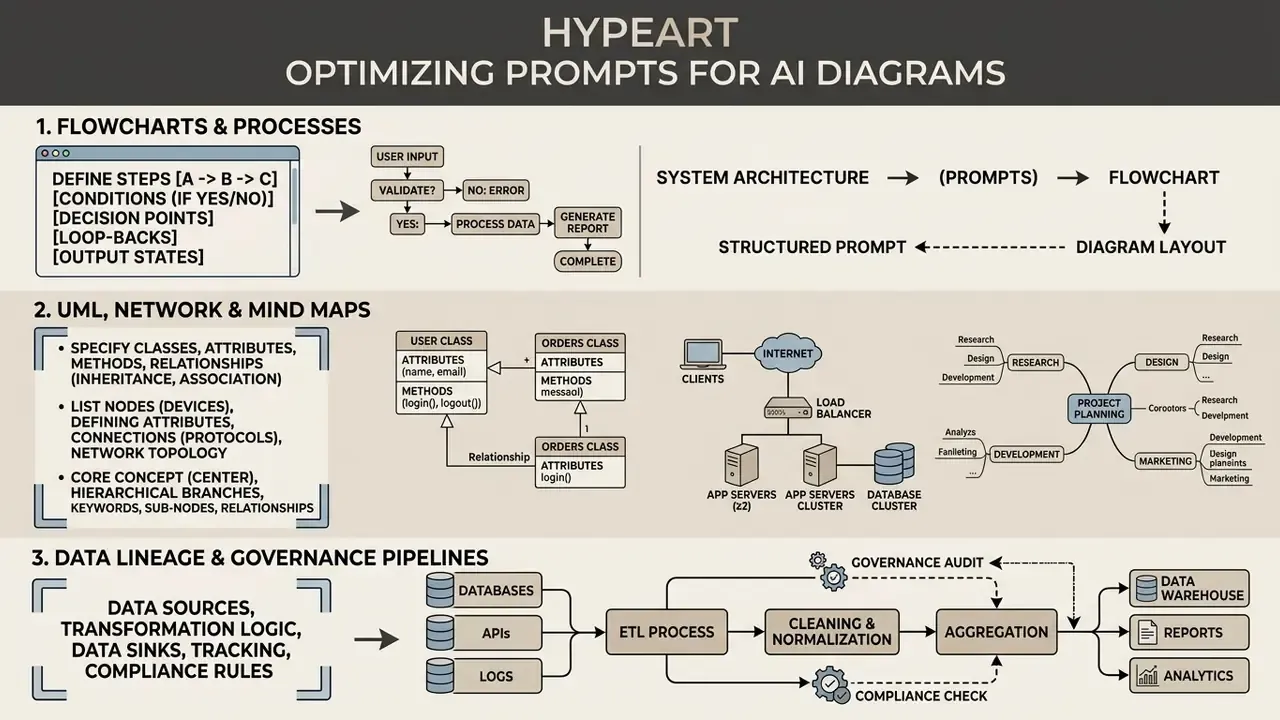
Prompt engineering for visual generation asks for explicit structural constraints, not conversational text. Structured syntax lets an ai diagram generator from text prompt output predictable, near-deterministic visual topologies.
«RST analysis of the source text combined with retrieval of relevant examples reduces hallucinations and improves the logical coherence of generated diagrams, as rated by CS instructors.»
Two conventions carry over from general prompt engineering practice. Keep prompt sections in a fixed order (goal, entities, relationships, constraints, output format), and state exclusions explicitly ("no decorative icons", "no untyped edges"). Structured markup such as Markdown lists, XML tags, or a JSON schema parses more cleanly than prose. Not glamorous, but it works.
Prompt structure for a process or flowchart
To generate procedural flowcharts, use explicit sequential ordering and formal conditional statements. Specify start and end nodes, define action steps clearly, and write IF/THEN/ELSE branching in full.
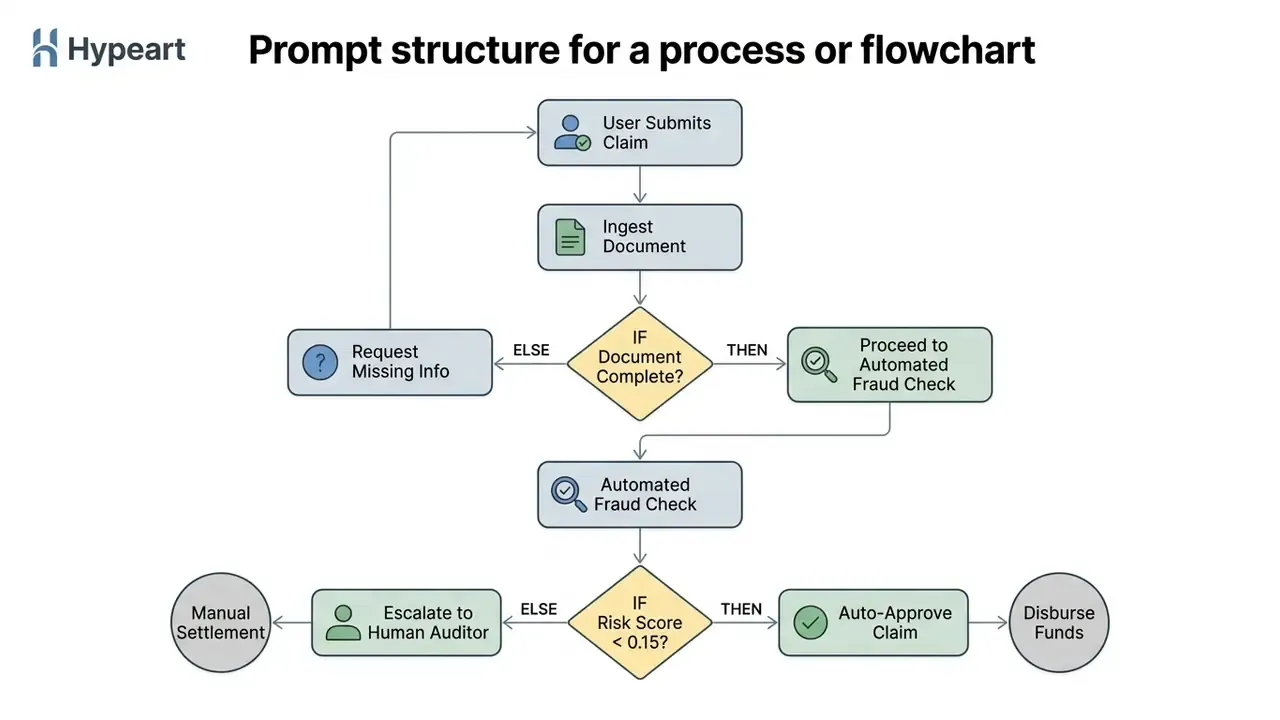
Stating orientation explicitly (Left-to-Right or Top-to-Bottom) controls visual density and prevents overlapping in complex process maps. A small instruction with an outsized effect on readability.
Prompt structure for UML, network and mind maps
Technical architectures require precise declarations of entity attributes, interface connections, and structural containment. For UML or network diagrams, declare entities first, then explicit relational links and cardinality.
«AbsCon generates multiple candidate graphs, aggregates them into a probabilistic model, and refines the result until it satisfies all specified constraints and the metamodel.»
Diagram Type: AWS Cloud Network Topology
Scope: US-East-1 Region
Components:
  - Component A: Internet Gateway
  - Component B: Application Load Balancer (Public Subnet)
  - Component C: ECS Cluster (Private Subnet)
  - Component D: Multi-AZ Aurora Database (Database Subnet)
Connections:
  - Internet Gateway -> Application Load Balancer (HTTP/HTTPS)
  - Application Load Balancer -> ECS Cluster (Port 8080)
  - ECS Cluster -> Multi-AZ Aurora Database (Port 5432)
Constraints: Enclose ECS and Database within Private VPC boundary.
Clear structural boundaries stop the layout engine from parking internal data infrastructure outside a secure network zone. For hierarchical mind maps, encode the tree explicitly: central topic, then level-1 branches, then level-2 children, one relation per line, so the parser never has to infer depth from indentation alone.
Prompt structure for data lineage and model governance pipelines
Model risk and data governance teams need diagrams that show where data originates, which transformations touch it, where a model makes a decision, and where a human overrides it. These graphs must separate data flow from decision authority. Mixing the two is the most common defect I see in submitted architecture packs.
Diagram Type: Data Lineage & Model Decision Pipeline (Left-to-Right, swimlanes)
Lanes: [Source Systems] | [Data Platform] | [Model Layer] | [Human Control]
Nodes:
  - S1: Core Banking Ledger (system of record)
  - S2: KYC Vendor Feed (external, contractual data)
  - T1: Ingestion & PII Tokenization (Data Platform)
  - T2: Feature Store (versioned, lineage-tagged)
  - M1: Credit Risk Model v4.2 (challenger: v4.3)
  - M2: Decision Threshold Engine (cutoff 0.15)
  - H1: Model Risk Reviewer (override authority)
  - H2: Audit Log Sink (immutable, retention 7 years)
Edges (typed):
  - S1 -> T1 [data flow, batch nightly]
  - S2 -> T1 [data flow, API, PII present]
  - T1 -> T2 [data flow, tokenized]
  - T2 -> M1 [feature vector, version pinned]
  - M1 -> M2 [score]
  - M2 -> H1 [escalation IF score in grey zone 0.10-0.20]
  - H1 -> H2 [decision + rationale]
  - M2 -> H2 [automated decision record]
Constraints:
  - Mark every edge crossing a lane boundary as a control point.
  - Label all PII-bearing edges explicitly.
  - Do not merge model inference and threshold logic into one node.
Typed edges and declared control points turn the output into an artifact you can drop into a model inventory or a lineage review, rather than a decorative architecture picture for a steering deck.
How to create a diagram from text with AI
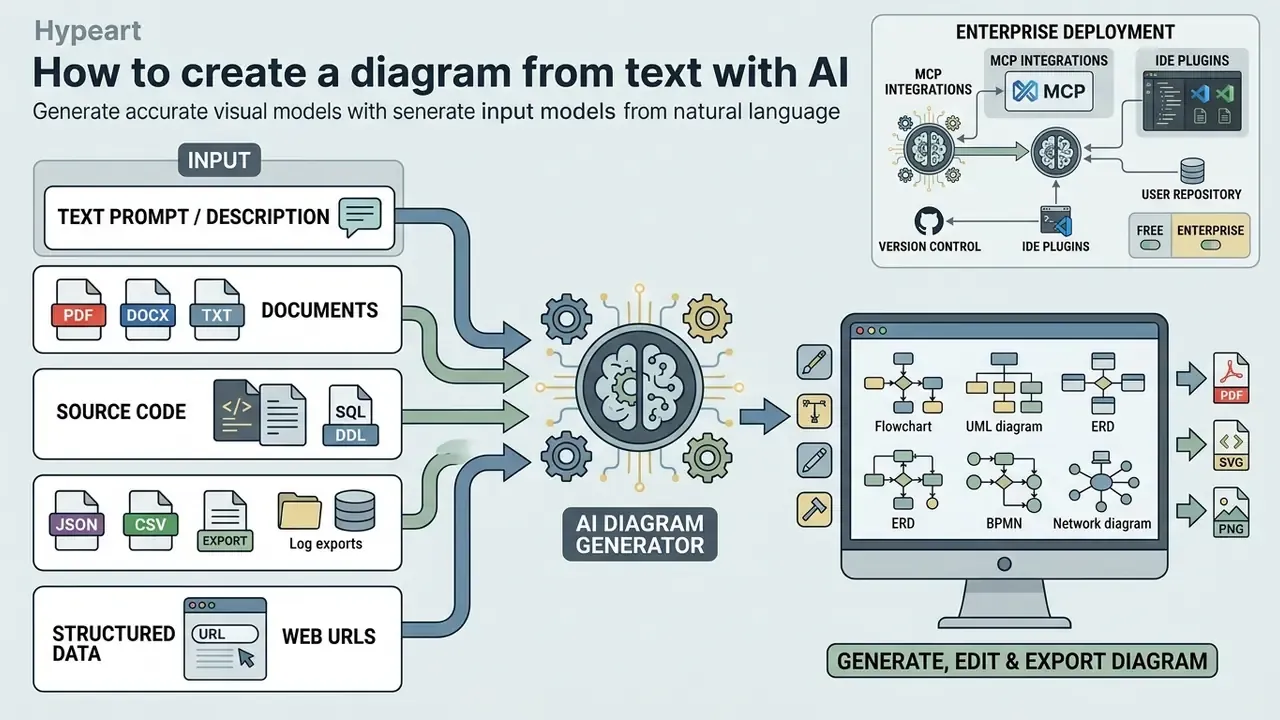
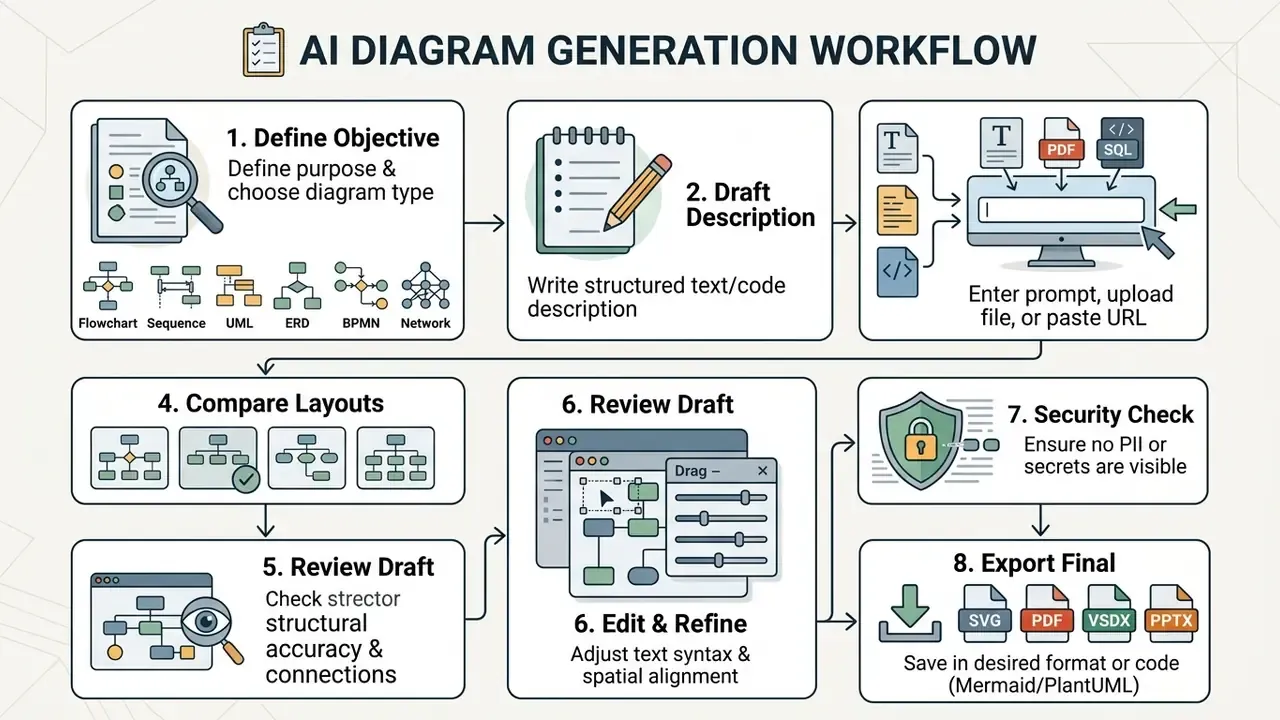
Generating accurate visual models from natural language needs a structured input methodology. When teams use an ai diagram creation tool, a systematic sequence prevents layout distortion and keeps logic consistent.
Write a clear text description or prompt
Successful generation depends on unambiguous input. When planning to ai create diagram from text, authors should define the diagram type, list all participating entities, state directional relationships, and specify conditional criteria. That is also the fastest way to ai create a diagram that survives peer review.
Boundary conditions and explicit naming conventions remove ambiguity. Instead of requesting "a diagram of our login process", a structured prompt lists the exact components, chronological steps, and error handling paths. The difference in output quality is not subtle.
Generating diagrams from documents, code files, and web URLs
Modern enterprise tools reach beyond manual prompts and accept multi-modal inputs:
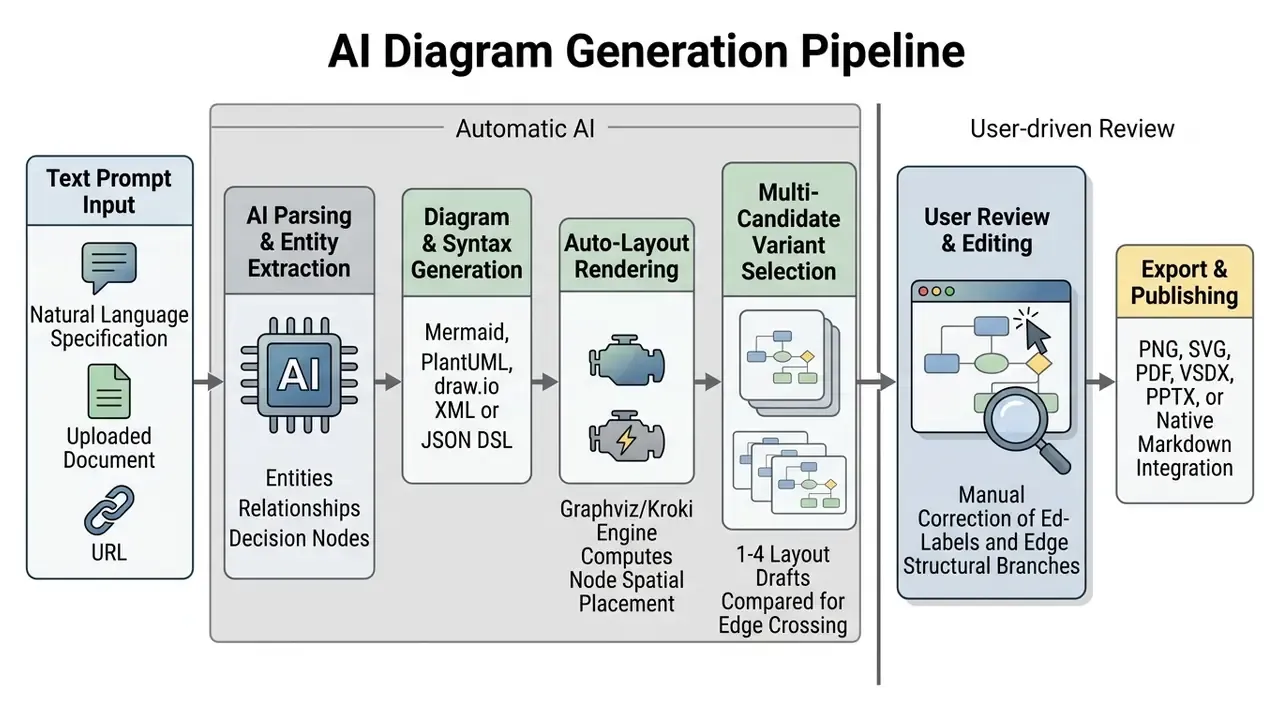
- Document ingestion (PDF, DOCX, TXT) uploading technical specifications, compliance guidelines, or system audit logs (commonly up to 40 MB per file) lets the LLM extract operational entities automatically.
- Source code and SQL DDL dumps ingesting raw
.py,.ts, or.sqlfiles enables instant generation of UML class models and database ER schemas with keys and cardinality preserved. - Structured data files (JSON, CSV, log exports) parsers convert tabular or event data into data-flow diagrams, funnels, and telemetry dashboards without manual transcription.
- Live web page parsing entering a URL lets the engine read API documentation or a process page and render a structural architecture graph automatically.
For regulated inputs, ingestion is the highest-risk step. A single document upload can transfer far more sensitive context than a hand-written prompt, so file-based generation belongs on tiers with contractual non-training and retention terms. If pricing tiers gate that clause, compare options before letting anyone upload a live procedure.
Generate, edit and export the diagram
After the AI compiles the prompt into a layout, operators run structural validation. Review node connections, verify edge labels, adjust spacing inside the platform editor.
To improve layout efficiency, leading platforms generate multi-candidate variants, typically one to four visual options, from a single prompt. Operators pick the arrangement with the fewest edge crossings before spending generation tokens or manual edits. Credit-based platforms usually count each attempt, so choosing from parallel drafts costs less than re-prompting five times in a row.
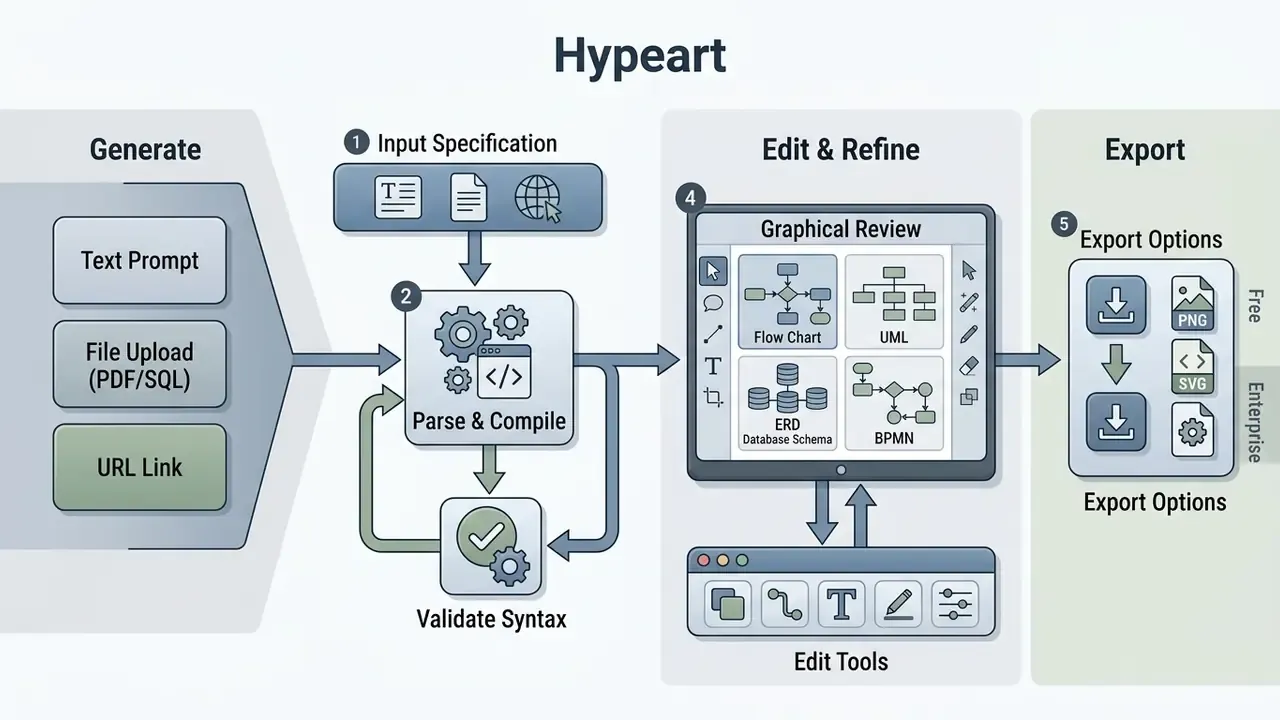
Once verified, export the visual into vector formats such as SVG or PDF for high-resolution documentation, or as native code blocks (Mermaid/PlantUML) for version-controlled repositories. Hybrid editing is now standard: the diagram exists simultaneously as DSL source and as an editable canvas, so a text instruction can add, delete, rewire, or restyle nodes on an existing template instead of regenerating the whole graph. Peer-reviewed work on live-synchronized hybrid editors (HyLiMo, ICSE 2024) formalizes this DSL-plus-GUI model.
AI Diagram Generation Workflow
Checklist0 / 8
«Agentic workflows for educational diagram generation (2026) use VLM models for automated QA checks before a diagram is handed to a human reviewer.»
Illustrative enterprise deployment (case pattern 1 of 2). A tier-1 fintech engineering team struggled with inconsistent manual architecture reviews during cloud migrations. In this illustrative deployment, standardizing text-based PlantUML prompts inside the CI/CD pipeline and requiring automated structural validation checks reduced design review iterations by up to 40% and shortened governance review cycles from days to hours. The figures describe an observed pattern in a single anonymized programme, not a benchmark. Measure your own baseline before and after standardization, otherwise the number means nothing.
Free AI diagram generator: limits, pricing and commercial use
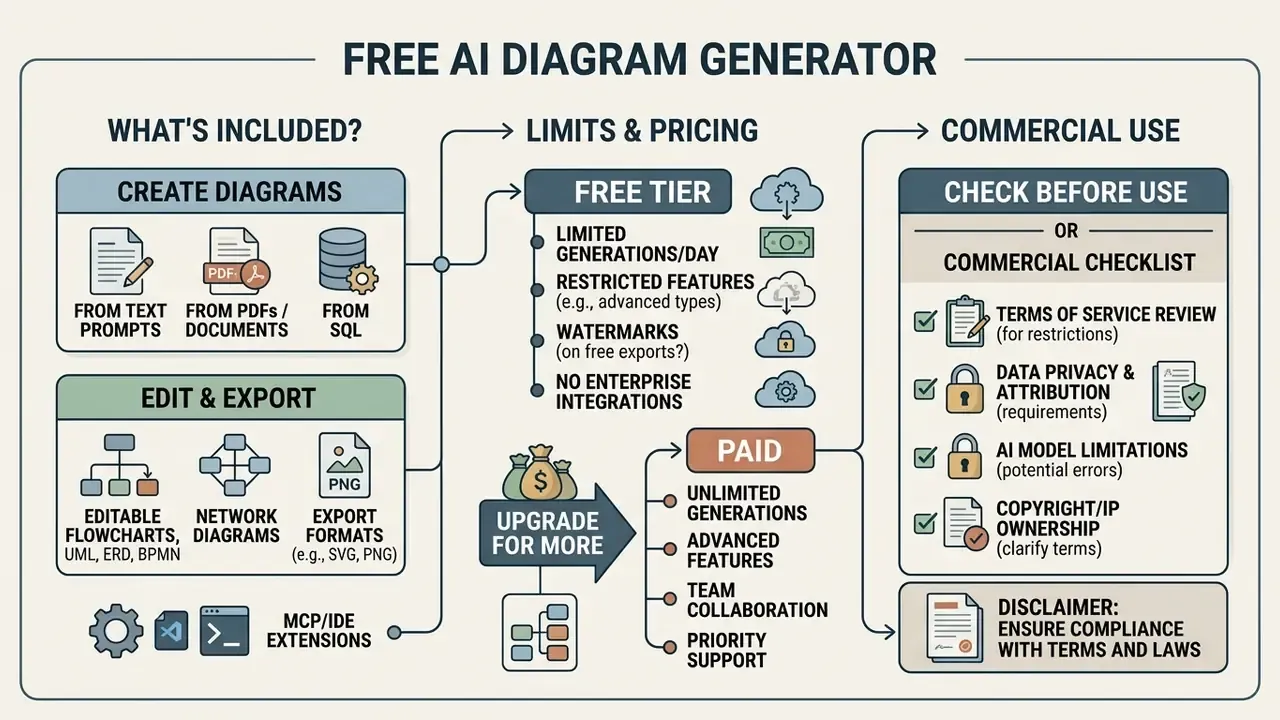
Evaluating enterprise software means understanding free-tier constraints, subscription structures, and intellectual property rights. Organizations using an ai diagram generator free online platform must assess operational limits and legal data boundaries before deployment, not after the first incident report.
What is included in a free AI diagram generator?
Free tiers typically offer entry-level generation models, standard templates, and raster exports (PNG/JPG). An ai diagram generator free service usually imposes functional restrictions: monthly credit caps, watermarked exports, 1x export resolution, public board visibility, element limits per board, and disabled collaboration. Some vendors count credits per month, others per lifetime account, and a few restrict free output to personal, non-commercial use in their terms. So "free ai diagram" is not a comparable unit across providers, and an ai diagram generator online free promise deserves a careful read of the fine print. Some searches for an ai diagram generator from text free land on tools that watermark every export, which quietly rules them out for client deliverables.
| Platform Tier | Typical Monthly Generations | Available Diagram Types | Export Formats | Data Privacy & Governance |
|---|---|---|---|---|
| Free Tier | 10 - 30 credits / month | Flowcharts, Basic Mind Maps | PNG, JPG (Watermarked, Low-Res) | Data may be used for model training; Public by default |
| Professional Tier | 200 - Unlimited | All types (UML, Sequence, ERD, BPMN, Network) | High-Res PNG, SVG, PDF, PPTX, Native Code (Mermaid/PlantUML) | Enforced non-training clause; Private workspaces |
| Enterprise Tier | Unlimited / Dedicated API | Custom DSL & Corporate Schemas | SVG, PDF, VSDX, PPTX, DOCX, Draw.io XML, HTML, CI/CD & MCP Agent Protocol | SSO/SAML, SOC2 Type II, Custom Data Retention |
Professional tiers remove watermarks, unlock vector formats (SVG/PDF) and editable office formats, and commit to zero data retention for model training. Enterprise plans add single sign-on (SSO), administrative access controls, data residency options, and auditable API endpoints. Verification date matters here: tier limits and pricing pages change quietly, so re-check vendor terms at each renewal cycle rather than trusting a screenshot from last year.
What to check before using generated diagrams commercially
Commercial usage rights depend on contract terms and on legal precedent about machine-generated content.
«The U.S. Copyright Office confirmed that AI-generated images lacking sufficient human contribution are not protected by copyright.»
Under this guidance, only the human-authored contributions to a work containing AI-generated material may be registered, and more than de minimis AI-generated portions must be excluded. The operative test is human creative control over expressive elements, not the length or ingenuity of the prompt. Paid subscriptions can grant contractual usage rights to outputs, yet a subscription does not turn a purely machine-made diagram into a copyrighted work.
Legal Ownership Verification Checklist:
1. Review Vendor Terms: Does the plan grant commercial distribution rights?
2. Human Authorship Threshold: Have human operators modified, edited, or combined the visual graph?
3. Data Privacy Agreement: Is input data excluded from public model retraining?
4. Regulatory Compliance: Are system architectures scrubbed of internal IP and credentials?
5. Free-Tier Restriction: Does the free plan limit output to personal, non-commercial use?
6. Attribution & Provenance: Is AI involvement documented for audit and disclosure purposes?
Teams building broader creative pipelines can apply the same verification logic used for AI image generators for commercial use, where authorship thresholds and licence scope follow comparable rules. The same authorship questions surface in adjacent categories too, from an ai voice generator to synthetic video, so one policy usually covers the lot. For live disputes and case tracking on AI output rights, open the hub.
Organizations must confirm that vendor terms grant full commercial rights to generated outputs. Security teams, in parallel, must ensure operational prompts do not expose non-public personal information (NPI) or proprietary infrastructure configurations to external LLM providers (NIST AI 600-1 Framework).
How to choose an AI diagram generator tool
Selecting an ai diagram generator tool means matching platform features against real workflow requirements. Technical teams, business analysts, and compliance officers evaluate platforms on different criteria, using the same comparative discipline applied when shortlisting the best AI image generators. Vendor shortlists written in 2025 age fast; the 2026 crop of ai diagram generator tools ships MCP servers and validation hooks that simply did not exist eighteen months earlier.
Features that matter for diagram creation
A capable ai diagram generator website should support dual-mode editing, so users can modify content through natural language prompts or through manual drag-and-drop.
Key technical capabilities to evaluate:
- Native rendering support for established code formats (Mermaid.js, PlantUML, Graphviz DOT, D2).
- High-fidelity export options including vector graphics (SVG, PDF) and standard XML integrations (draw.io, Visio VSDX).
- Editable office output for stakeholder communication (PPTX, DOCX, XLSX, HTML).
- Direct documentation platform integrations (Confluence, GitHub, GitLab, Azure DevOps, Notion).
- Version control linking visual outputs to git commits.
- Structural validation of generated code: valid XML, unique element IDs, correct vertex and edge semantics.
«GenAI-DrawIO-Creator (Claude 3.7) demonstrates that enforced XML output validation and dialogue-based refinement are critical for the structural accuracy of diagrams.»
Developer tooling and IDE integrations (MCP protocol)
- Vector and enterprise native
- SVG, PDF, Microsoft Visio (.vsd/.vsdx), and draw.io XML.
- Presentation and documentation
- editable PowerPoint (.pptx), Microsoft Word (.docx), and native Markdown/Mermaid code blocks.
- Automation surface
- REST API access (often gated to paid tiers) plus MCP server availability for agent-driven documentation.
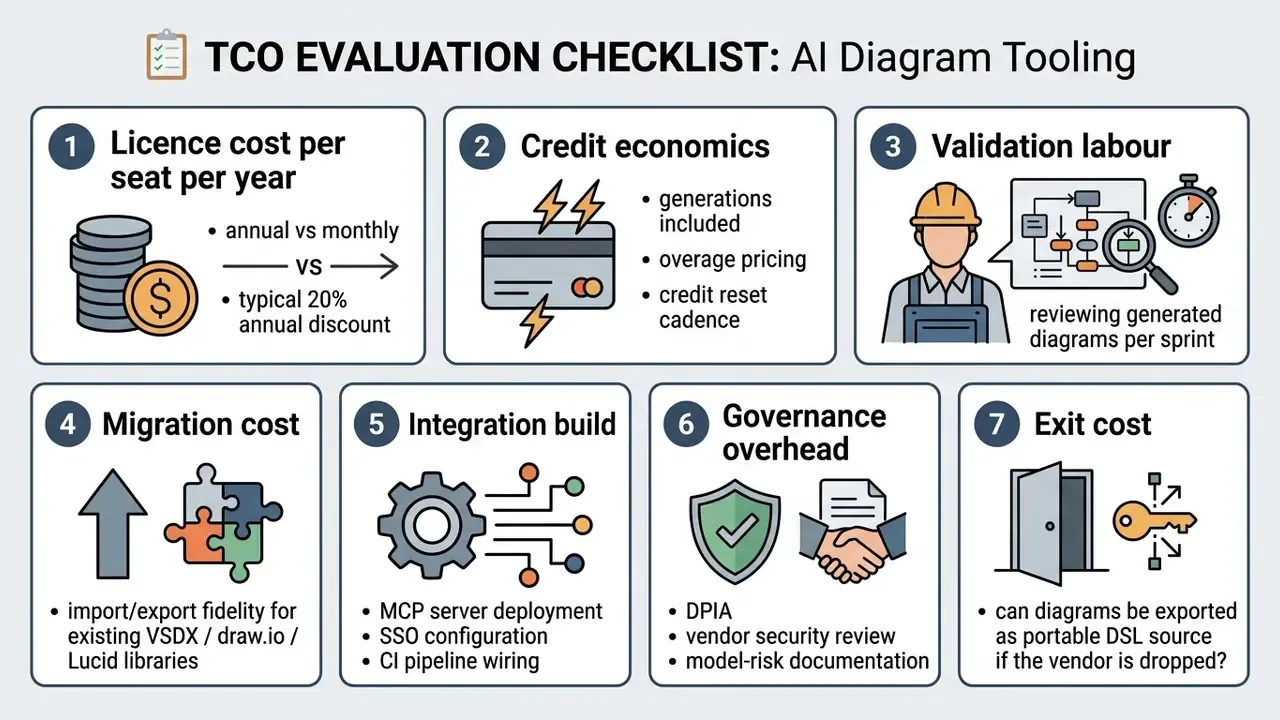
Run those seven lines through a spreadsheet before the demo call. Licence cost is rarely the dominant term; validation labour usually is.
Choose a tool for personal, educational or team work
Different organizational profiles need different deployment models:
- Individual developers prioritize browser-native tools with zero sign-up friction, local code compilation, and simple Markdown export.
- Academic and educational users need solid template libraries, conceptual mind-mapping, transparency about AI involvement, and an accessible free tier or a lightweight diagram maker.
- Distributed enterprise teams need real-time multi-user collaboration, administrative access controls, audited security compliance (SOC 2, ISO 27001), data residency choices, and SAML-based single sign-on.
| Role / Persona | Target Diagram Workflow | Recommended Input Strategy |
|---|---|---|
| Software & Systems Engineers | Architecture topologies, sequence calls, UML models | Feed raw code/DDL; use PlantUML/Mermaid DSL via MCP or IDE plugins. |
| Product Managers & BAs | User journey maps, BPMN flows, product roadmaps | Input user stories or feature specs to generate structured process steps. |
| Business Consultants | SWOT, PESTLE, value stream and escalation trees | Upload client interview transcripts or strategy briefs in PDF/DOCX format. |
| Marketers & Analysts | Funnels, campaign flows, Sankey and radar charts | Supply CSV/JSON performance data plus the target chart type. |
| Educators & Researchers | Concept mind maps, educational tree diagrams | Provide textbook summaries to generate intuitive hierarchical study graphs. |
| Risk, Audit & Compliance | Data lineage, control maps, model governance pipelines | Use typed-edge prompts with explicit control points and PII labels. |
Illustrative enterprise deployment (case pattern 2 of 2). A US regional bank reviewed shadow AI usage across business units and found employees feeding unencrypted transaction logs into public diagram generators. The model risk team stood up centralized web-based tools with zero-data-retention agreements and explicit schema controls. The deployment removed unapproved data exposure while enabling more than 200 analysts to generate compliant process maps. Figures describe an anonymized programme and are illustrative rather than benchmarked.
«NIST AI 600-1 requires that operational prompts do not disclose non-public personal information or proprietary configurations to external LLM providers.»
Complementary controls come from accessibility and provenance guidance. WCAG 2.1 requires text alternatives for non-text content, so every exported diagram needs a meaningful alt description. NIST AI 100-4 frames synthetic-content transparency and provenance as an explicit control area. Both apply to diagrams, even though most teams think of them as image-generation problems only. For sizing control effort against licence spend, compare options with your own volume assumptions.
FAQ about AI diagram generators
Can an AI diagram generator work online without installation?
Yes. Most modern ai diagram generator online tools run entirely in the browser through WebAssembly or cloud-based compilation engines. Users get full visual editing without local software or browser extensions. Some services still require a free account before AI generation or download unlocks.
Can AI create diagrams from data as well as text?
Yes. Advanced engines parse structured datasets (JSON schemas, CSV tables, SQL DDL dumps) alongside unstructured text. The system extracts entity relationships and foreign keys to auto-generate Entity-Relationship Diagrams (ERDs) or data flow charts. Log-parsing pipelines can also turn raw event streams into chart-ready telemetry views.
Can I upload a PDF, Word document, or website URL instead of typing a prompt?
Yes. Document-to-diagram ingestion typically accepts PDF, DOCX, and TXT files (commonly capped around 40 MB), while URL parsing lets the engine read a live process or API page. Treat uploads as a higher data-sensitivity path than manual prompts, and restrict them to tiers with contractual non-training terms.
Does AI support BPMN and ERD, or only flowcharts?
Both. Current generators produce BPMN 2.0 swimlane workflows with gateways and escalation timers, plus normalized ERDs with primary and foreign key relationships. These notations are formal, so gateway logic, lane ownership, and cardinality should be validated manually before the diagram enters a control library.
Can diagrams be generated directly from my IDE or an AI agent?
Yes. Through Model Context Protocol (MCP) servers, agents running in Claude, Cursor, VS Code, or ChatGPT can create, search, read, update, and export diagrams programmatically, keeping architecture documentation synchronized with each commit. API access and MCP availability are usually limited to paid tiers.
Can I start from templates and refine them with AI?
Yes. Hybrid diagramming platforms let users pick pre-built architectural templates, then run text prompts to change node connections, add infrastructure components, or restyle layouts. The diagram stays editable as both DSL source and canvas, so refinement does not require regeneration from scratch.
Why do I get several diagram variants for one prompt?
Layout is probabilistic. Platforms commonly return one to four candidate arrangements so the operator can pick the version with the fewest edge crossings and the clearest hierarchy before spending more credits or tokens on regeneration.
Are AI-generated diagrams copyrightable and safe for commercial use?
Purely AI-generated graphics without meaningful human authorship are not protected by copyright in the United States; only human-authored contributions may be registered. Commercial usage rights come from the vendor contract, not from copyright, and free tiers sometimes restrict output to personal use. Similar rules apply across synthetic media: an ai voice generator free download page carries the same licence questions, and a tool marketed as an ai voice generator free no sign up option often has the loosest terms of all. If you plan multilingual narration alongside diagrams, check the licence for ai voice over output and for any ai voice maker or ai voice generator service before publishing client-facing material.
Limitations and unresolved questions
Three gaps deserve honest acknowledgement.
Benchmarks are thin. MermaidSeqBench uses 132 verified samples, DiagramGenBenchmark spans eight categories, and neither maps cleanly to bank-grade BPMN or lineage artifacts. We do not yet have a public benchmark for control-map fidelity. Anyone who claims otherwise is extrapolating.
Reproducibility is partial. Same prompt, same model, different layout: acceptable for a whiteboard sketch, awkward for an audit exhibit that a regulator may compare across two quarters. Pinning the DSL source, not the rendered image, is the current workaround.
Copyright and provenance remain in motion. The 2024 US Copyright Office guidance answers registration questions but not disclosure practice inside regulated documentation. Whether a diagram in a model validation report needs an explicit AI-involvement label is, at present, a matter of internal policy rather than settled rule. My own view, and it is a view rather than a requirement: label it anyway.
What to do next
Need broader licence context across AI output categories? Explore the hub and see the overview of comparable tooling assessments before you sign anything. For account or contract questions, compare options with the vendor in writing.
Appendix A: revision notes and verification status