What this guide covers: what an AI flashcard maker is, step-by-step generation, supported source materials, card types, quality verification, spaced repetition and export, printable decks, enterprise deployment and Shadow AI, model risk, free tiers and billing, plus a FAQ.
An AI flashcard maker is an automated software tool that converts unstructured learning materials, including PDFs, lecture notes, text files, images, and slides, into structured question-and-answer pairs built for memory retention. By parsing source content with natural language processing, an AI flashcard generator automates card creation so learners move straight into active recall instead of spending an evening retyping definitions.
Why should a risk or compliance leader care about a study tool? Because employees already use them. Compliance refreshers, AML typology quizzes, and credit-policy revision decks get built on consumer sites with internal documents attached. That is a governance question, not a learning question.
What Is an AI Flashcard Maker and What Problems Does It Solve
An AI flashcard maker is an automated application that parses unstructured study documents and produces digital flashcards for active recall and spaced repetition. Flashcards are two-sided study prompts: the front presents a question or cue, the reverse reveals the answer. That structure forces deliberate memory retrieval during learning and review sessions rather than passive skimming.
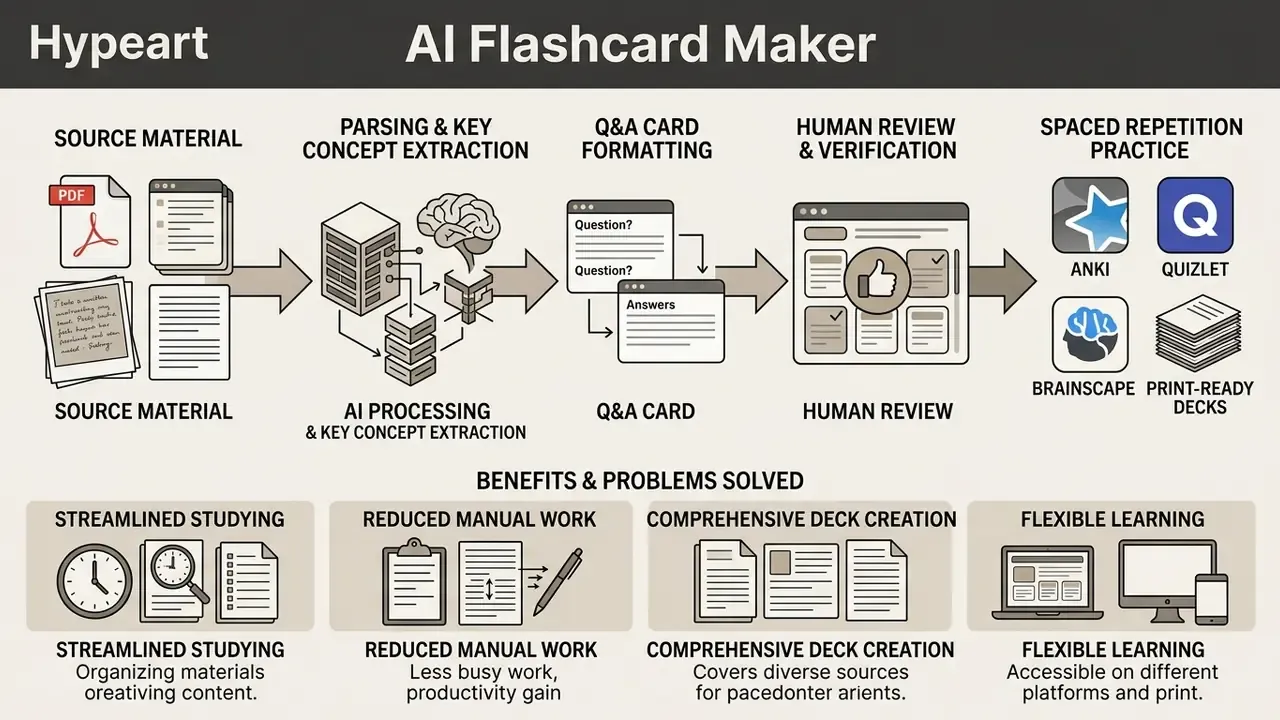
How AI Turns Study Material into Questions and Answers
A card-generation pipeline extracts semantic entities, key definitions, and core relationships from raw text, then formulates targeted test questions. Under the hood, question generation combines named entity recognition, syntactic parsing, predicate-argument (semantic role) analysis, keyword extraction, and expected-answer-type classification. The model picks out high-value concepts and converts declarative assertions into atomic cards with concise answers.
Because the engine works on probability rather than comprehension, output quality is bounded by input structure. Clean headings, explicit bold terms, and short bullet points produce sharper prompts than dense, unformatted paragraphs. Consistently. Readers evaluating adjacent generative tooling can review our comparison of AI content generators to see how similar extraction and prompt-control patterns behave across product categories, or open the hub for the full set of side-by-side reviews.
When AI Flashcards Beat Manual Card Writing
Automated card generation earns its keep on high-volume or dense technical material, the kind where manual authoring eats hours of study time.
The practical conclusion is not "AI or manual." It is sequencing. Generate a baseline deck in seconds, then spend the saved time on editing and retrieval instead of transcription. For a 40-page lecture PDF, drafting usually finishes in under two minutes, while a manual pass on the same material commonly consumes 45 to 90 minutes. That gap is the whole business case, and also the whole trap.
Where AI Card Generation Fails
Reviewing failure modes early beats discovering them the night before an exam. Generative language models operate on probabilistic pattern matching, not absolute factual reasoning, which makes confabulation a recognized operational risk rather than a rare glitch.
«Confabulation: confidently stated erroneous or false content generated by a model.»
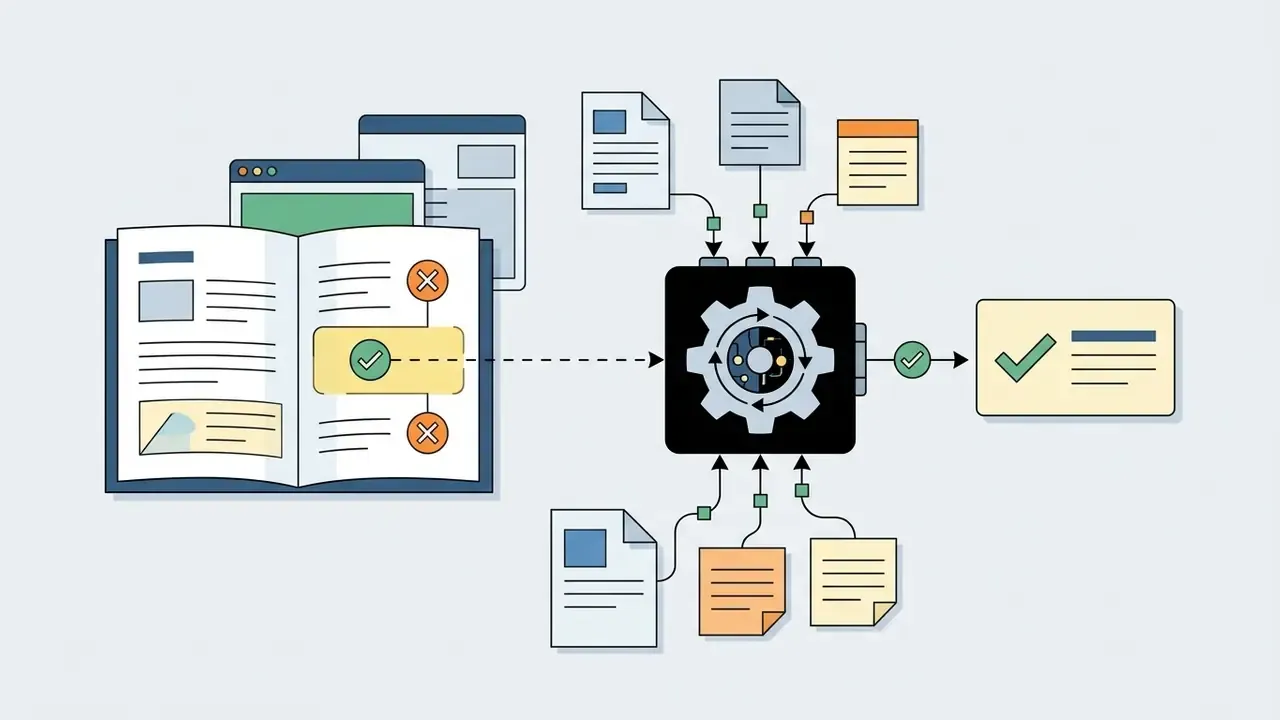
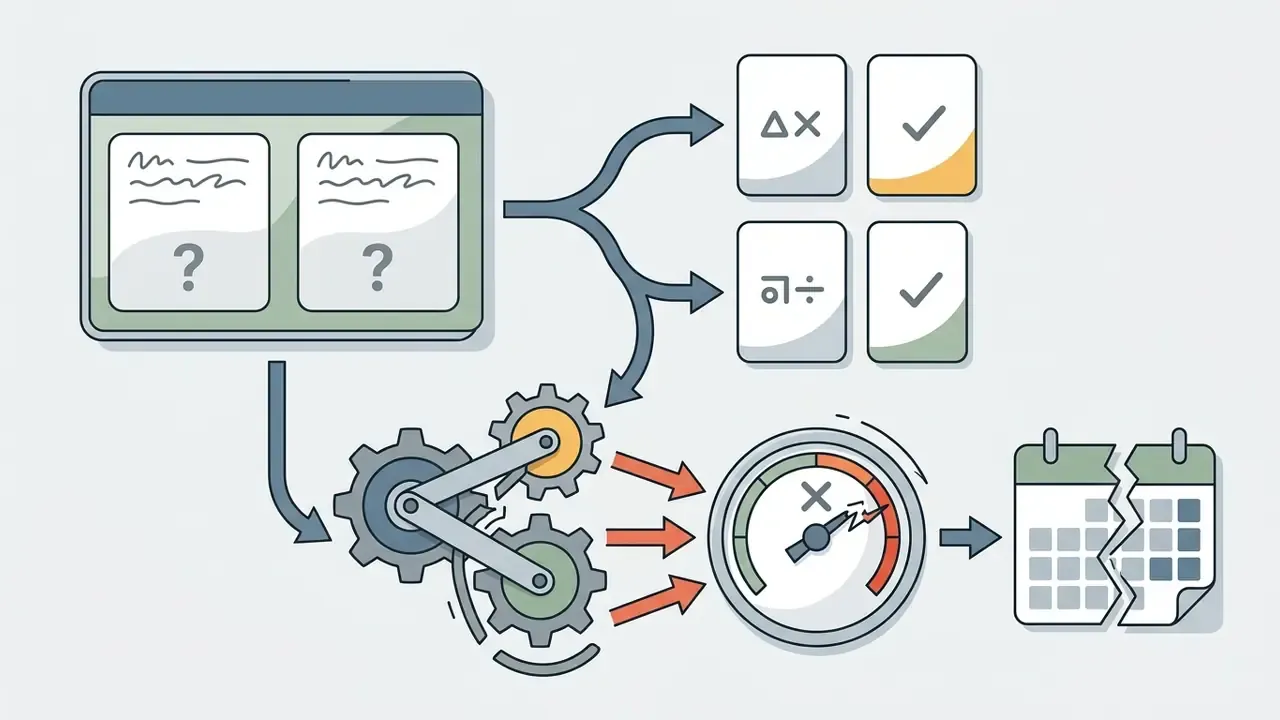
Three recurring error classes matter for flashcards:
«ChatGPT feedback on complex clinical reasoning cases performed significantly worse than expert feedback (P < 0.001).»
«Unedited AI decks produced an 18.6 percentage-point self-assessment error: students systematically overestimated mastery.» Industry pilot study, 212 graduate students, AI versus Anki workflows.
Overestimating mastery is the quiet failure. A wrong card you notice is cheap; a wrong card you believe is expensive.
How to Create Flashcards with AI: Step-by-Step
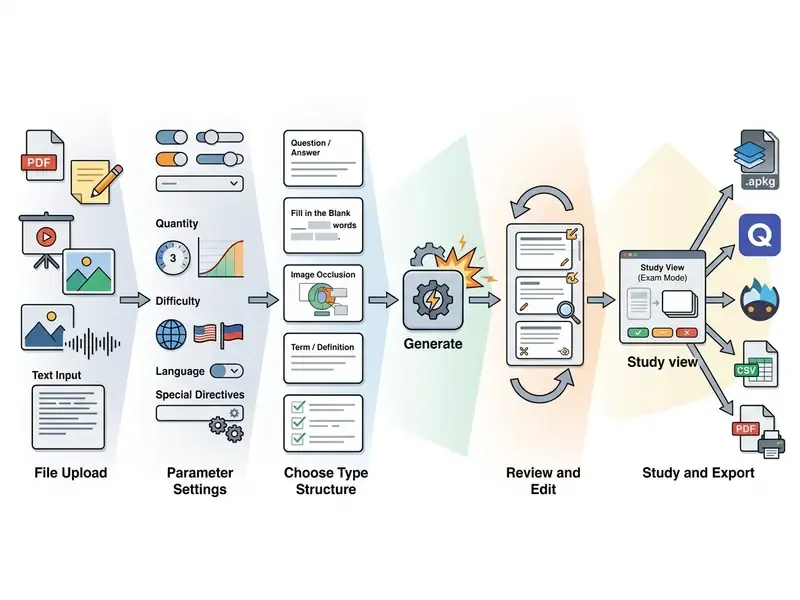
To create flashcards with AI, you supply source content, set generation parameters, run automated extraction, verify statement accuracy, and export the deck into a study tool. A fixed sequence keeps factual fidelity high before active recall begins.
Steps to Generate AI Flashcards
Checklist0 / 6
Upload a File, Notes, or Paste Text
The workflow starts with raw learning content, delivered by direct file upload, camera capture, or text insertion. Modern AI flashcard generator online services accept structured documents, plain text notes, slide presentations, screenshots, and in several products audio and video. Character and page ceilings vary sharply by plan. Entry tiers commonly cap text input around 25,000 characters and 5 pages per document, paid tiers extend to roughly 150,000 characters and 200 pages, and some upload widgets accept files up to 50 MB. Check the specific ceiling before you split a textbook chapter into pieces you will later forget to merge.
Customizing Generation via AI Prompt Settings
Fine-tuning happens before you press Generate, not after. Leading generators expose explicit formatting boundaries:
- Difficulty scaling. Set output complexity (Beginner, Intermediate, Advanced) to control vocabulary depth and how much inference each prompt demands.
- Card count and length caps. Fixing card count (10, 25, or 50, for example) plus a maximum answer length prevents bloated, paragraph-length answers.
- Custom directives. Inject rules such as "focus strictly on medical terminology," "one atomic question per concept," "exclude analogies," or "limit answers to under 15 words."
- Language overrides. Force generation in 50+ target languages regardless of the source document's language, which helps with bilingual coursework and cross-border policy training.
A workable prompt structure follows the CO-STAR pattern: Context, Objective, Style, Tone, Audience, and required Response format. Explicit structural instructions measurably reduce ambiguous output.
Choose the Format and Generate
Before running the flashcard generator, specify the target format: standard question-and-answer pairs, cloze fill-in-the-blanks, term-definition pairs, or multiple-choice items. Word-count and card-count boundaries keep prompts from turning into paragraphs. The engine then executes semantic extraction to generate flashcards in seconds. Optional hints, a partial cue revealed on request, help with early-stage vocabulary work without collapsing the card into pure recognition.
Review, Edit, and Start Practicing
Post-generation verification corrects ambiguous wording and filters hallucinated statements before practice begins. Reviewing cards confirms that each prompt tests exactly one atomic concept. Once refined, learners study inside the app's practice engine or push the deck to an external spaced repetition application. Budget roughly 30 seconds of review per generated card. On a 50-card deck that is 25 minutes, still far below manual authoring time, and it is the cheapest quality control you will ever buy.
Interactive Exam Mode with Instant AI Feedback
Card generation is only half the product. Embedded study modes simulate test conditions and close the feedback loop:
- Exam Mode presents prompts sequentially, evaluates typed answers with semantic text matching rather than exact string comparison, and returns instant qualitative feedback on whether an answer was complete, partial, or incorrect, and why.
- Swipe grading lets learners mark each card Easy, Medium, or Hard with one click or gesture; the scheduler consumes those ratings to lengthen, shorten, or reset intervals.
- Answer quotas. Free plans often limit Exam Mode to a fixed number of graded answers, commonly around 25, while paid plans remove the cap.
Treat AI-graded feedback as a study aid, not an authority. It is strongest on definitional recall and weakest on nuanced reasoning, exactly as the clinical-reasoning trial cited above suggests.
Which Source Materials an AI Flashcard Generator Supports
An AI flashcard generator from PDF, notes, photos, or raw text converts varied document structures into standardized retrieval items. Multi-format input lets students and professionals turn scattered materials into study-ready decks without retyping a single definition.
| Input Source | Supported Formats | Parsing Requirements | Output Card Type |
|---|---|---|---|
| Academic documents | PDF, DOCX | 200–300 DPI for scanned pages, clear heading hierarchy, no password protection | Q&A, Cloze deletion |
| Lecture notes | TXT, Markdown | Explicit bullet points, structured headings, bold key terms | Atomic Q&A, definitions |
| Handwritten notes & photos | JPG, PNG, HEIF, camera capture | High ink/paper contrast, perpendicular framing, legible line spacing | Q&A, term-definition |
| Presentations, video & audio | PPTX, MP4, M4A, YouTube URLs | Clean slide layouts, verified transcripts, audible speech | Q&A, Image Occlusion |
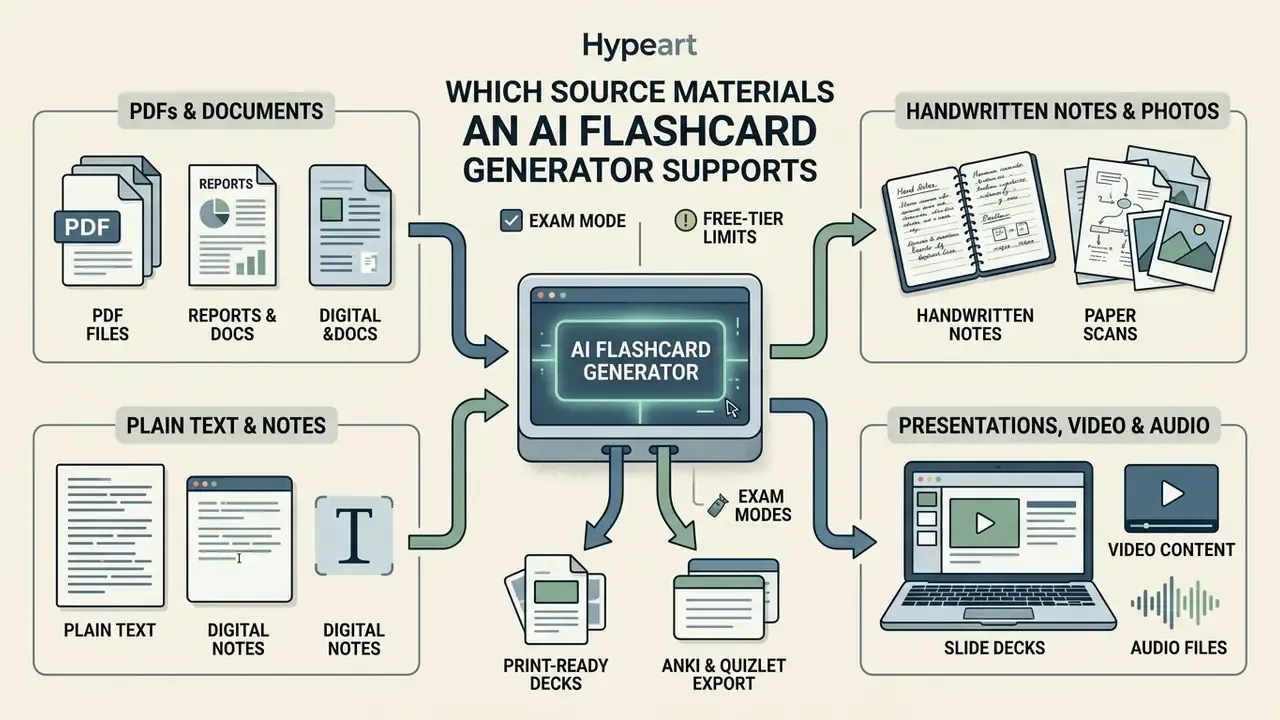
Creating Flashcards from PDFs and Documents
Generating cards with an AI flashcard generator from PDF free utility requires parsing document layout, headings, and body text, not just raw character streams. Reading order, table structure, captions, lists, and footers all influence where one concept ends and the next begins. Document-AI OCR guidance from major cloud providers recommends scanning at a minimum of 200 DPI, with 300 DPI or higher producing the best results; minimum extracted text height is typically around 12 pixels, roughly 8-point text at 150 DPI. Stripping extraneous headers, footers, and page numbers before processing reduces extraction errors noticeably.
If a scanned chapter refuses to parse, run it through a dedicated OCR or image preparation and photo-editing workflow first: de-skew, crop, raise contrast. For camera raw scans of archival material, a free raw photo editor handles exposure and sharpening before OCR sees the page. Nine times out of ten that fixes it.
Generating Cards from Handwritten Notes and Photos
Modern generators use OCR vision models to convert handwritten lecture notes, whiteboard photos, and scanned paper into clean active recall prompts. It works. Accuracy, though, is almost entirely a function of capture quality. To get usable results from images of handwriting:
- Keep high contrast between ink and paper under even lighting, and avoid hard shadows across the page.
- Shoot perpendicular to the page to avoid perspective distortion and keystoning.
- Keep consistent line spacing and leave margins intact; the OCR engine parses distinct paragraphs and bullet lists into logical Q&A blocks on its own.
- Photograph one page per image rather than two-page spreads, and re-shoot instead of cropping aggressively.
- Spot-check numerals, chemical formulas, and abbreviations first. These are the highest-risk zones for handwriting misreads, and a misread digit on a formula card is worse than no card at all.
Generating Cards from Notes and Plain Text
Using an AI flashcard generator from notes or an AI flashcard generator from text lets learners convert concise lecture outlines into recall prompts. Direct text input rewards clear formatting: bold terms for definitions, one idea per bullet, no repeated trailer text. Before pasting, strip duplicated headers, stray tabs, and double spacing. Normalizing whitespace reduces ambiguity in the input and therefore in the output. Clean source text yields measurably higher statement accuracy during automated extraction, which is not a glamorous insight, just a reliable one.
Working with PowerPoint, Video, and Audio Formats
An AI flashcard creator processes slide decks and media streams by extracting embedded text or parsing audio transcripts. Slide presentations (.pptx) are read as layout blocks; PowerPoint can also export embedded narration as separate .mp4 or .m4a files for downstream extraction. Video and audio sources need automated speech-to-text transcription before card generation happens. Some tools transcribe in the background, others expect you to supply the transcript.
Source media quality dictates card accuracy directly: muffled audio yields garbled cards. For long lecture recordings that exceed upload ceilings, trimming or compressing the video file beats splitting the deck, and a free video editing app is enough for basic cuts. Visual material pulled from slides can be cleaned with AI image editing tools before it becomes an occlusion card. If your slides came from a free template video pack, expect decorative text layers that the parser will happily turn into nonsense prompts; delete those slides first.
Types of AI Flashcards for Study
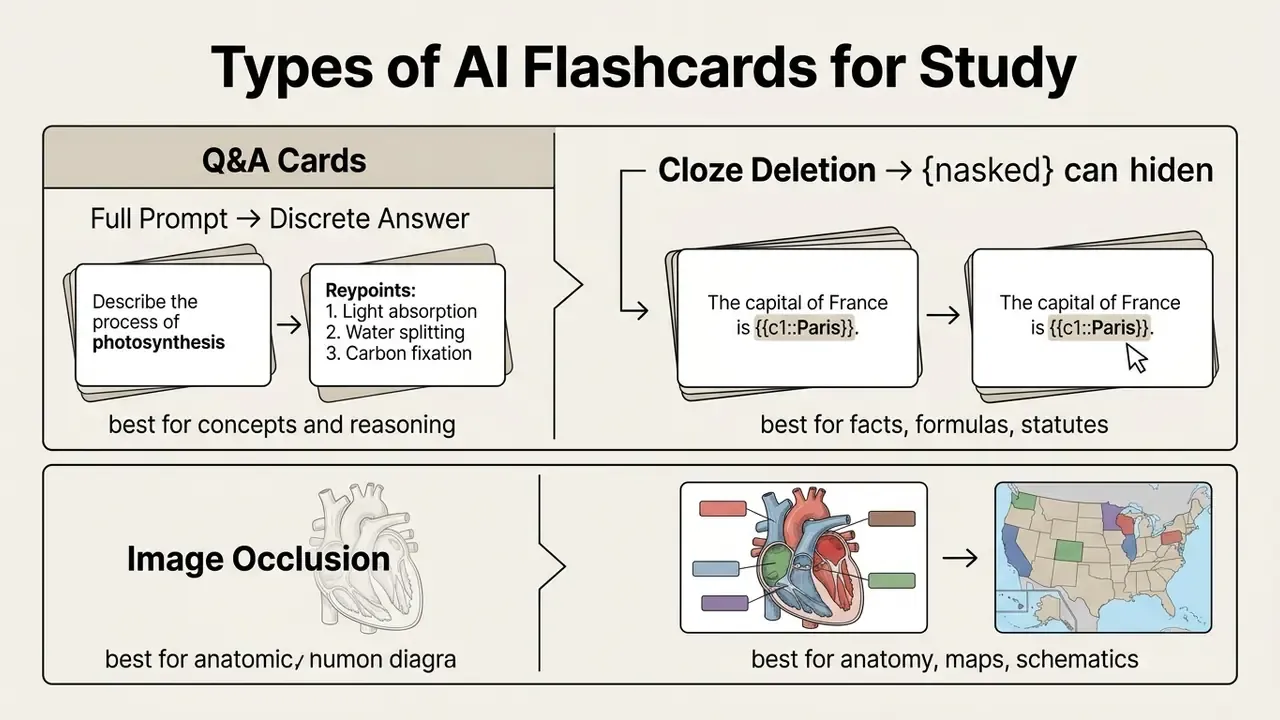
Modern AI flashcard creation tools produce specialized card structures tailored to specific subjects and memory demands. Matching card format to material improves long-term retention and reduces cognitive overload during study sessions.
Question-and-Answer Cards for Active Recall
Standard question-and-answer cards remain the primary format for active recall. The front presents a clear question, the back gives a short unambiguous response. That structure forces retrieval from memory rather than recognition of familiar phrasing.
«Well-designed single-concept cards with open-ended prompts produced 47% higher retention than standard cards at equal study time.»
Retrieval practice of this kind yields up to 50% stronger long-term retention than passive re-reading. The operational loop is almost boringly simple: read the prompt, answer from memory aloud or in writing, reveal the answer, correct the gap immediately.
Cloze and Image Occlusion for Detail-Level Memory
Cloze deletion cards replace key terms inside a sentence with blank markers, demanding recall of missing details in context. Anki encodes these with {{c1::text}} syntax. Image occlusion cards hide labeled regions of a diagram behind opaque boxes, which makes them essential for anatomy, geography, process maps, and schematics.
AI tooling accelerates this by detecting diagram labels automatically and overlaying masks, producing one occlusion card per label without manual boxing. Rule of thumb: cloze for facts and formulas, Q&A for reasoning, image occlusion for structures.
Templates and Discipline-Specific Customization
Customizable templates let users adjust layouts, add context tags, set reading level, and enforce field structures. A vocabulary template, for instance, might carry fields for word, definition, example sentence, mnemonic, and part of speech. Template libraries usually ship subject-specific sets for science, mathematics, languages, and exam prep, and they combine with concept maps, summaries, and quizzes generated from the same source.
Format parameters worth checking before export include orientation, padding, corner radius, minimum and maximum card dimensions, and image aspect ratio. Those settings decide whether the deck also prints cleanly, which matters more than it sounds when you discover the answers landed on the wrong side of the sheet. A team building signage or printed handouts alongside decks may find a free sign maker useful for the layout side of the job. Custom parameters keep generated decks aligned with domain-specific examination requirements.
How to Verify AI-Generated Flashcard Quality Before Studying
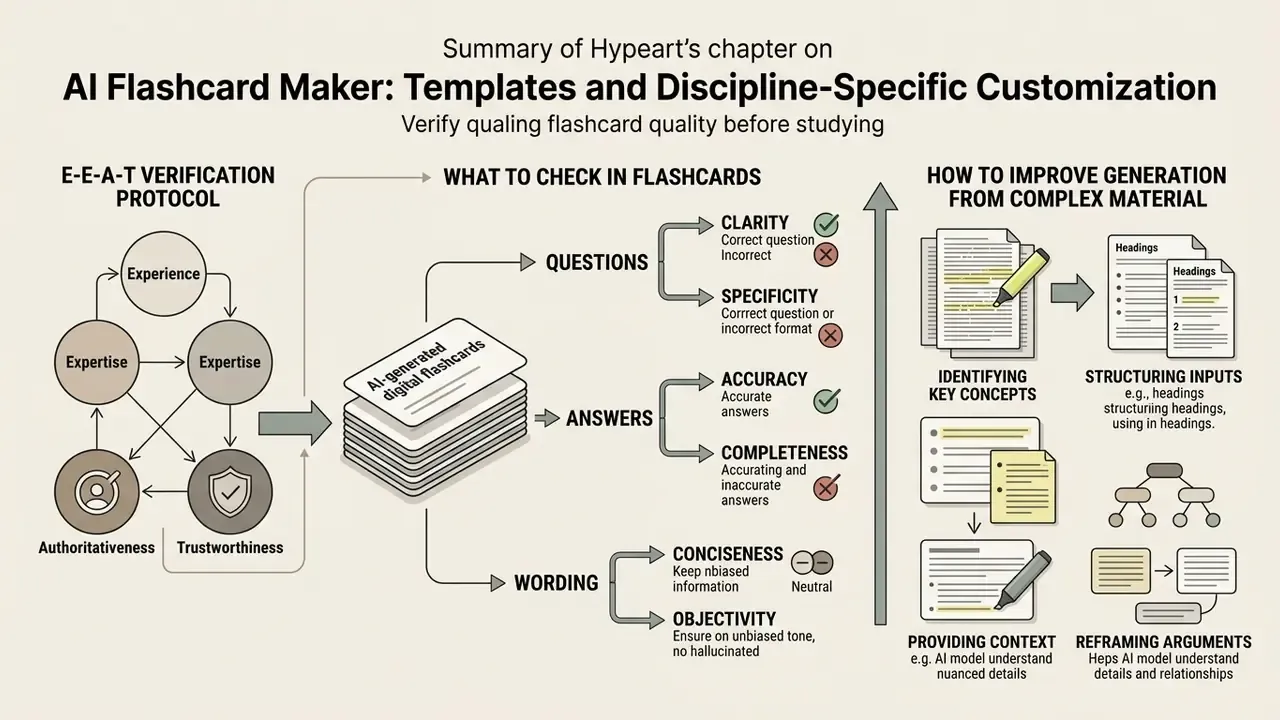
E-E-A-T Verification Protocol:
- Atomic fact check. Verify each card tests exactly one concept, which prevents double-barreled questions.
- Source traceability. Confirm answers match original notes or official textbooks with no hallucinated details; check verifiable claims against at least two independent references.
- Ambiguity removal. Rewrite prompts that can be satisfied with vague or multi-meaning responses.
- Answer-leakage check. Ensure the question does not contain the answer's distinguishing keyword.
- Card autopsy. Delete or rewrite any card that repeatedly causes self-assessment confusion during practice.
- Disclosure. If a shared or published deck was AI-assisted, make that self-evident to users.
What to Check in Questions, Answers, and Wording
Reviewing individual cards means confirming that prompts are concise, self-contained, and testable. Questions must demand genuine recall, not recognition. Keep answers short, one prompt, one answer, one learning objective per card, so the answer is immediately recognizable at review time. University study-skills guidance from the University of Toronto Scarborough and the University of Southern Maine converges on that single-objective rule.
Three review lenses catch most defects: precision (no vagueness, overgeneralization, or pseudo-precision), logic (no self-contradiction, no conclusion that fails to follow from the premise), and completeness (no missing element that leaves a coverage gap in the topic). I used to skip the third lens. That was a mistake, because coverage gaps only surface on exam day.
How to Improve Generation from Complex Material
When parsing dense or technical material, refining the input prompt beats editing 60 broken cards. Effective refinement is an iterative loop: run an initial prompt, inspect the output, mark which elements are preferred and which are not, feed those preferences back as explicit constraints, repeat. Two techniques do most of the work: domain anchoring (naming the discipline and required terminology) and constraint refinement (narrowing format, length, and scope). A directive such as "generate one atomic question per concept, exclude analogies, use exact source terminology, answers under 20 words" sharply reduces generation errors.
Practice, Spaced Repetition, and Export to Anki, Quizlet, or Brainscape
Pairing AI-generated decks with spaced repetition scheduling is what converts a fast draft into durable memory. Exporting cards into dedicated platforms automates review intervals based on individual performance rather than on a calendar.
| Platform | Supported Formats | Scheduling Mechanism | Target Use Case |
|---|---|---|---|
| Anki | .apkg, UTF-8 CSV/TXT | FSRS / SM-2 algorithm (dynamic cross-day spacing) | Long-term retention & high-stakes exam prep |
| Quizlet | Delimited text, web/paste import | Session-based adaptive review (resets per session) | Short-term review & collaborative study sets |
| Brainscape | CSV / web import | Confidence-Based Repetition (CBR) | Adaptive web and mobile study decks |
| Print (PDF) | Single- or double-sided PDF | Manual Leitner boxes | Offline, screen-free, tactile review |
| Local web app | In-app storage | Fixed Leitner box / basic interval counter | Quick self-testing & immediate verification |
In short: Anki for depth, Quizlet for shared sets, Brainscape for confidence-weighted mobile review, print for exam halls with no devices, and the in-app engine for a quick sanity check right after generation.
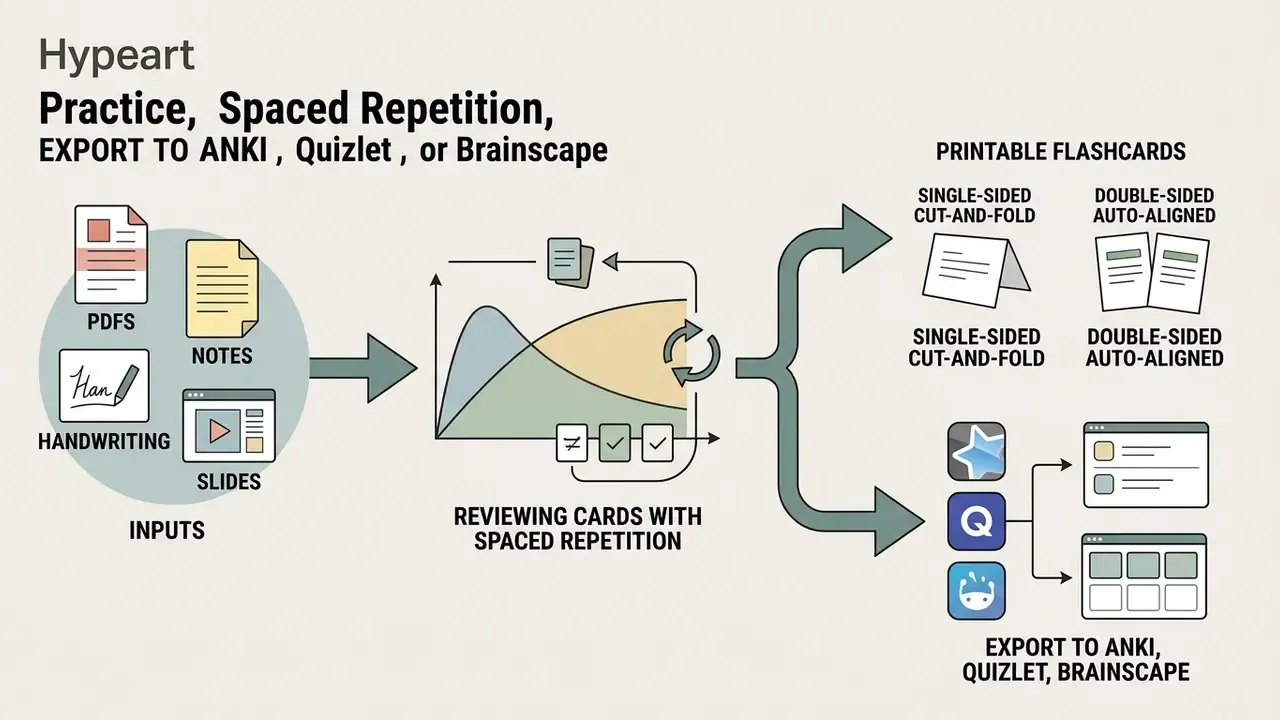
Reviewing Cards with Spaced Repetition
Spaced repetition algorithms schedule reviews at expanding intervals based on user-reported difficulty. In Anki's model, rating a card Good extends the next interval, Again resets it to minutes, and Hard or Easy nudges it down or up. Classic Leitner boxes apply fixed schedules (daily, every three days, weekly, monthly) with promotion on correct answers and demotion on failures.
Evidence on outcomes is fairly consistent across cohorts. Observational studies of medical students using daily spaced repetition report exam scores 6 to 13% higher on basic science assessments.
«Each additional 100 theory cards raised exam scores by 0.44–0.75 points on a 0–20 scale.»
«Daily Anki use was statistically associated with higher USMLE Step 1 scores (P = 0.039) among 165 medical students.» Retrospective survey, Anki use and USMLE performance (2023).
Association, not proof of causation. Students who review daily also tend to do a lot of other things right.
Exporting and Using Cards in Anki, Quizlet, and Brainscape
An AI flash card maker typically exports decks as .apkg packages for Anki, delimited text for Quizlet, and CSV for Brainscape. Anki's text import accepts UTF-8 files with comma, semicolon, or tab separators, infers field count from the first non-comment line, and uses the first field to detect note uniqueness. The .apkg format additionally carries deck structure, media, and optionally scheduling state. Quizlet imports term and definition pairs separated by commas, tabs, dashes, semicolons, or new lines, pasted straight into the browser import field. Brainscape ingests CSV and applies Confidence-Based Repetition, where your self-rated confidence drives the next interval. Anki also supports native image occlusion and multi-field note types, which Quizlet does not.
Teams pushing decks into an LMS on a schedule usually skip manual export and wire the generator up programmatically; if that is your route, view the guide on API access and rate limits first.
Exporting Printable Flashcards (Single- and Double-Sided)
For learners who prefer tactile routines, or exam halls without devices, generators produce print-ready PDF layouts in two paper-friendly formats:
- Double-sided, auto-aligned.Front prompts and rear answers align on alternating grid templates for duplex printing. Cut once, and every card matches.
- Single-sided cut-and-fold.Questions and answers print side by side on one sheet, so users fold along a centre line and glue the halves together.
Print layouts pair naturally with physical Leitner boxes: five compartments, promotion on recall, demotion on failure. Note that many free tiers disable export entirely, so verify print rights before you build a 300-card deck and discover it is trapped behind a paywall.
Enterprise Deployment: Shadow AI, Data Security, and Model Risk
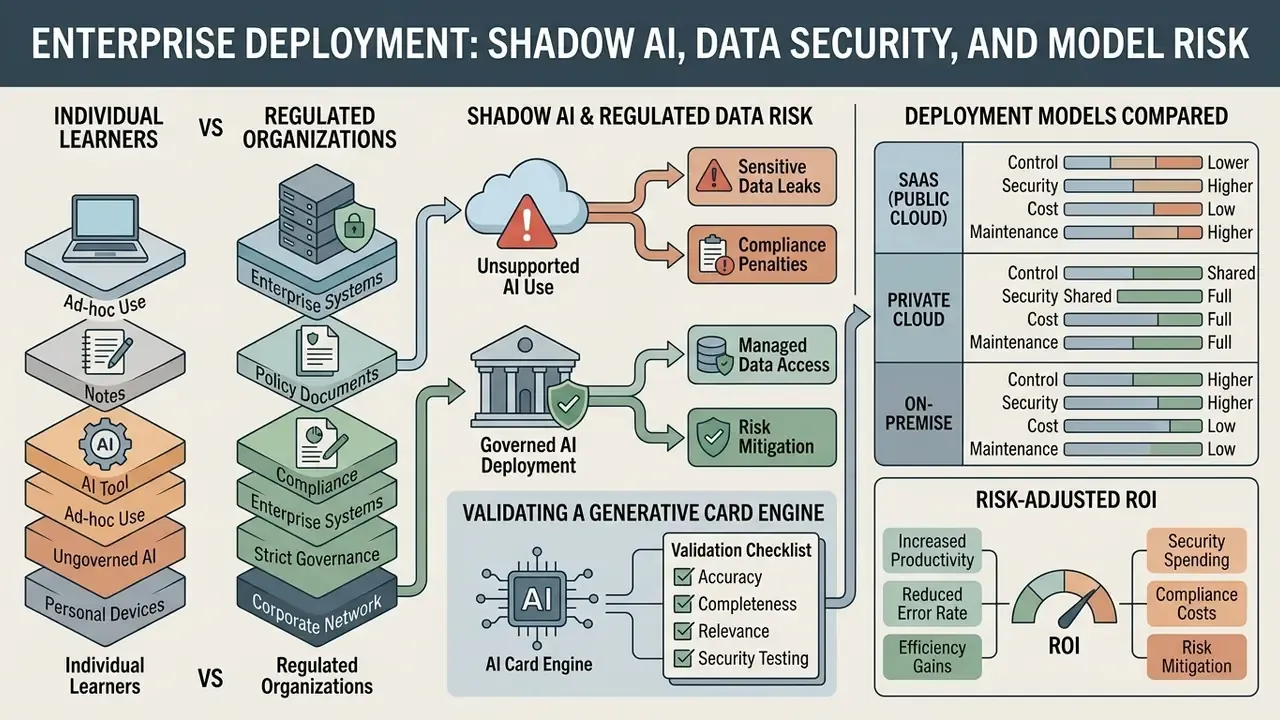
Individual learners and regulated organizations face different problems. When an analyst pastes an internal policy document, a credit-risk memo, or a customer file into a consumer flashcard site to build compliance training, the study benefit is real. So is the data-governance exposure. Treat any public AI flashcard generator website as third-party data processing, not as a harmless productivity toy.
Shadow AI and Regulated Data Risk
Unsanctioned SaaS use is the primary failure mode, and it rarely announces itself. Before uploading, confirm four things: whether uploaded documents train models, where data is stored and for how long, whether deletion is user-initiated and verifiable, and which security attestations exist (SOC 2 Type II, ISO 27001).
Consumer tools generally state that documents and generated cards are stored securely, never shared, and deletable at any time. That is a reasonable baseline for coursework. It is not a substitute for a vendor review when non-public personal information, privileged material, or trade secrets are involved. Practical controls that hold up in an audit walkthrough: mask identifiers before upload, restrict uploads to approved tenants, keep an allow-list of sanctioned AI flashcard generator tools, and log who uploaded what. Where the content itself is contested or subject to a hold, coordinate with counsel; our note on preservation duties and disputed material is here, view the guide.
Validating a Generative Card Engine
Deployment Models Compared
| Deployment | Data Exposure | Integration Depth | Typical Fit |
|---|---|---|---|
| Public SaaS (free/consumer) | Highest, third-party processing | Manual export only | Personal study, non-sensitive material |
| Business SaaS with DPA | Moderate, contractual controls and attestations | API, SSO, LMS connectors | Internal upskilling, non-regulated content |
| Private tenant / VPC | Low, isolated tenant, no training on customer data | API into LMS and GRC systems | Compliance training in regulated firms |
| On-premise / self-hosted model | Lowest, data never leaves the perimeter | Full control, highest engineering cost | Privileged, confidential, or regulated data |
If decks will be published externally or bundled into paid training, licence terms deserve a read before launch; see the overview on commercial use rights for generated content. Implementation questions from admins tend to cluster around SSO and retention settings, so explore the hub for those configuration notes.
Risk-Adjusted ROI
The honest ROI equation subtracts control costs from time saved: (hours saved on authoring × loaded hourly rate) − (verification hours × reviewer rate) − licensing − vendor-review and monitoring overhead. Using the pilot figures above, a 70 to 90% drafting reduction with a 30-second-per-card review pass still nets a large positive, but only when verification is budgeted rather than quietly skipped.
Decks that skip review do not merely underperform. They encode confident errors into long-term memory, and a control tester who learned the wrong threshold is a more expensive problem than a slow deck. To model study-time and licensing costs across tools, see the overview in our calculators hub.
Free AI Flashcard Generator, Unlimited Generation, and Subscription Terms
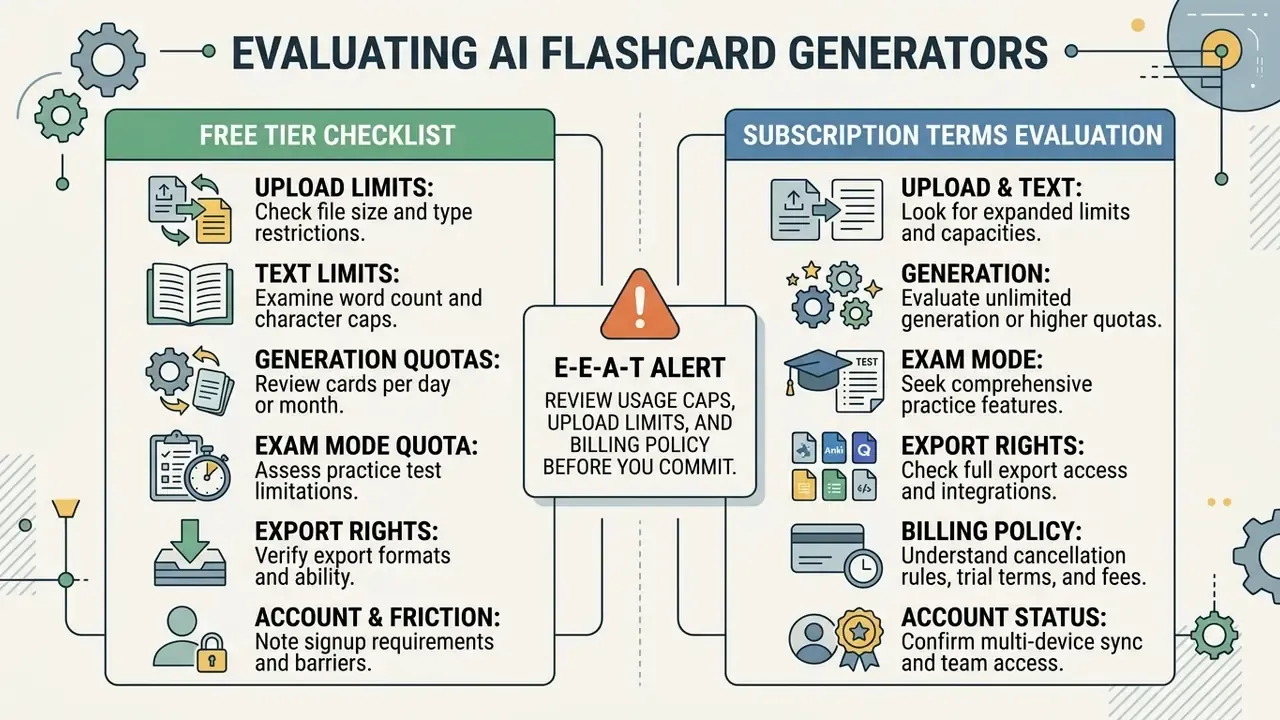
Evaluating an AI flashcard generator free app or web service means reading usage caps, upload limits, and billing policy before you commit. Freemium products place structural constraints on non-paid tiers, and "unlimited" is almost always a paid-tier word. Anyone hunting for an AI flashcard generator free unlimited plan should assume the cap has simply moved somewhere less visible: exports, credits, or Exam Mode answers.
What to Check in the Free Version and Before Subscribing
Before adopting an AI flashcard maker free tier or an AI flashcard maker app on mobile, verify these parameters:
- Upload limits. Maximum file size in MB, pages per document, files per day.
- Text limits. Characters per generation, commonly 25,000 free versus 150,000 paid.
- Generation quotas. Decks or cards per day, or a lifetime credit pool.
- Exam Mode quota. Number of AI-graded answers included.
- Export rights. Whether
.apkg, PDF, and CSV downloads are enabled, watermarked, or locked. - Account and payment friction. Whether signup or a stored card is required for the free tier.
- Billing mechanics. Auto-renewal, trial-to-paid conversion, and whether credits roll over.
- Data handling. Retention period, deletion controls, and training-use policy.
Published pricing at the value end of the market sits around €2.49 per month billed annually versus €5.99 billed monthly, with free tiers offering unlimited non-AI cards but no export. To compare plans and total study cost across tools, browse the hub. The same free-tier trade-offs, quotas, watermarks, and export locks, mirror what we documented in our guide to free tools and their export restrictions; the pattern also shows up in adjacent media utilities such as a free video background remover.
Limitations and Open Questions
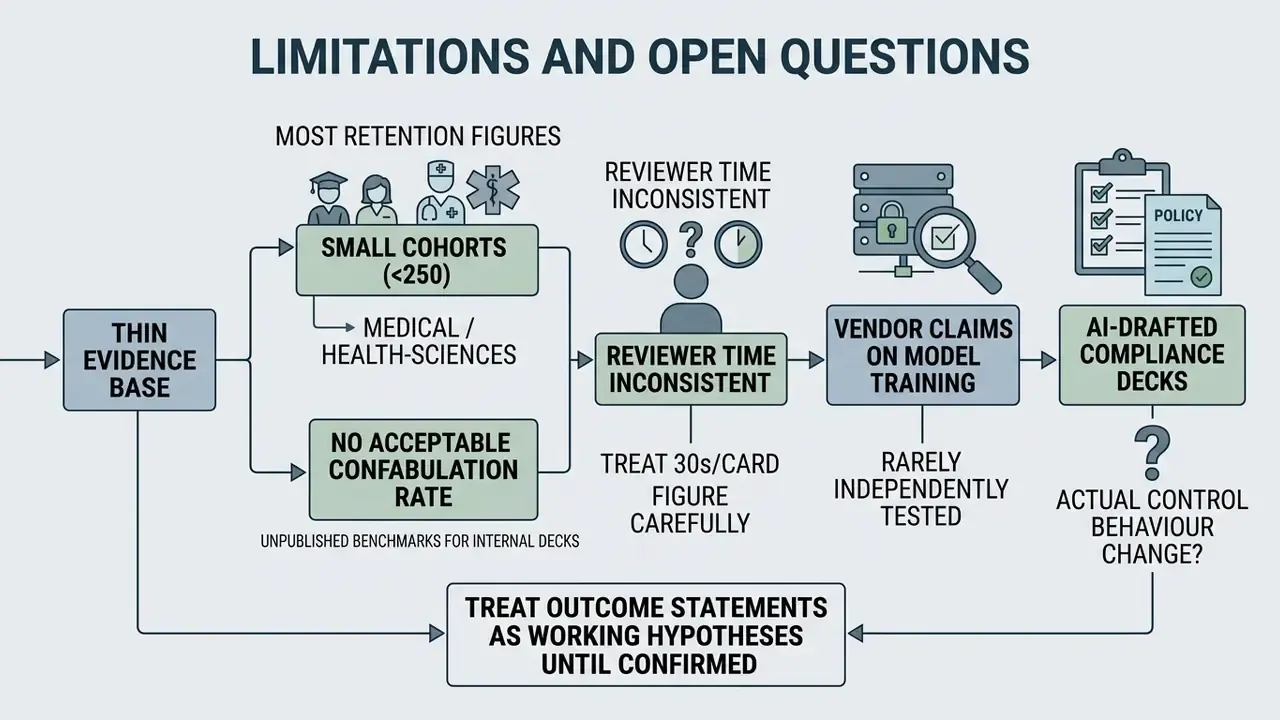
A short honest list, because the evidence base here is thinner than the marketing suggests.
- Most retention figures come from small cohorts, often under 250 students, in medical or health-sciences programmes. Generalizing to corporate compliance training is a hypothesis, not a finding.
- No published benchmark defines an acceptable confabulation rate for internal training decks.
- Reviewer time is measured inconsistently across studies, so the 30-second-per-card figure should be treated as an order of magnitude, not a standard.
- Vendor claims about excluding uploads from model training are rarely independently tested. Ask for the contractual clause, not the marketing page.
- Nobody has published good data on whether AI-drafted compliance decks change actual control behaviour, which is the outcome that matters to a bank.
Treat all audience and outcome statements in this guide as working hypotheses until confirmed by your own analytics, interviews, or pilot results.
FAQ
What is an AI flashcard maker?
A tool that uses NLP models to extract key concepts from documents, notes, images, or media and automatically build question-and-answer study cards. Some products market themselves as an AI flashcard creator, others as an AI flash card generator; the underlying pipeline is broadly the same.
Which file formats are supported?
Commonly PDF, DOCX, PPTX, TXT and Markdown, image formats including camera captures, and in some products MP4 or M4A audio and video plus YouTube links processed via transcript.
Does it work with handwritten notes?
Yes. OCR vision models read handwritten pages and whiteboard photos, provided contrast is high, framing is perpendicular, and one page is captured per image. Always spot-check numbers and formulas.
Can I print the flashcards?
Yes. Print-ready PDFs come in single-sided cut-and-stick and auto-aligned double-sided layouts for duplex printing.
Where can I export the deck?
Anki (.apkg or UTF-8 CSV/TXT), Quizlet (delimited text or paste import), Brainscape (CSV or web import), plus generic CSV and printable PDF.
Is Exam Mode the same as spaced repetition?
No. Exam Mode is a test simulation with AI feedback on typed answers. Spaced repetition is the scheduling algorithm that decides when each card reappears. Use both.
Are AI-generated cards accurate enough for exams?
Not without review. Unedited decks showed 51% 30-day retention and an 18.6 percentage-point self-assessment error, while the hybrid AI-plus-editing workflow reached 76%.
Is my uploaded data private?
Mainstream tools state that documents and generated cards are stored securely, are not shared, and can be deleted at any time. For proprietary, privileged, or regulated material, require a data-processing agreement, SOC 2 or ISO 27001 attestation, and written confirmation that uploads are excluded from model training.
Is any tool truly unlimited for free?
Rarely. Free tiers cap decks, credits, pages, characters, Exam Mode answers, or exports. "Unlimited" generally applies to paid plans, and sometimes only to the non-AI card editor.
Can we use AI-generated decks for paid or client-facing training?
Sometimes, and it depends on the licence. Check output ownership, attribution requirements, and whether the plan permits redistribution before you bundle decks into a commercial programme.
Governance Checklist Before Rolling Out AI Flashcards at Scale
Checklist0 / 11
Disclaimer: this material is general information about learning tools and does not constitute medical, legal, financial, or compliance advice. Verify every AI-generated card against primary sources before relying on it for professional examinations, and consult your own risk, privacy, and compliance functions before uploading regulated or confidential material to third-party services.