The short version for decision-makers
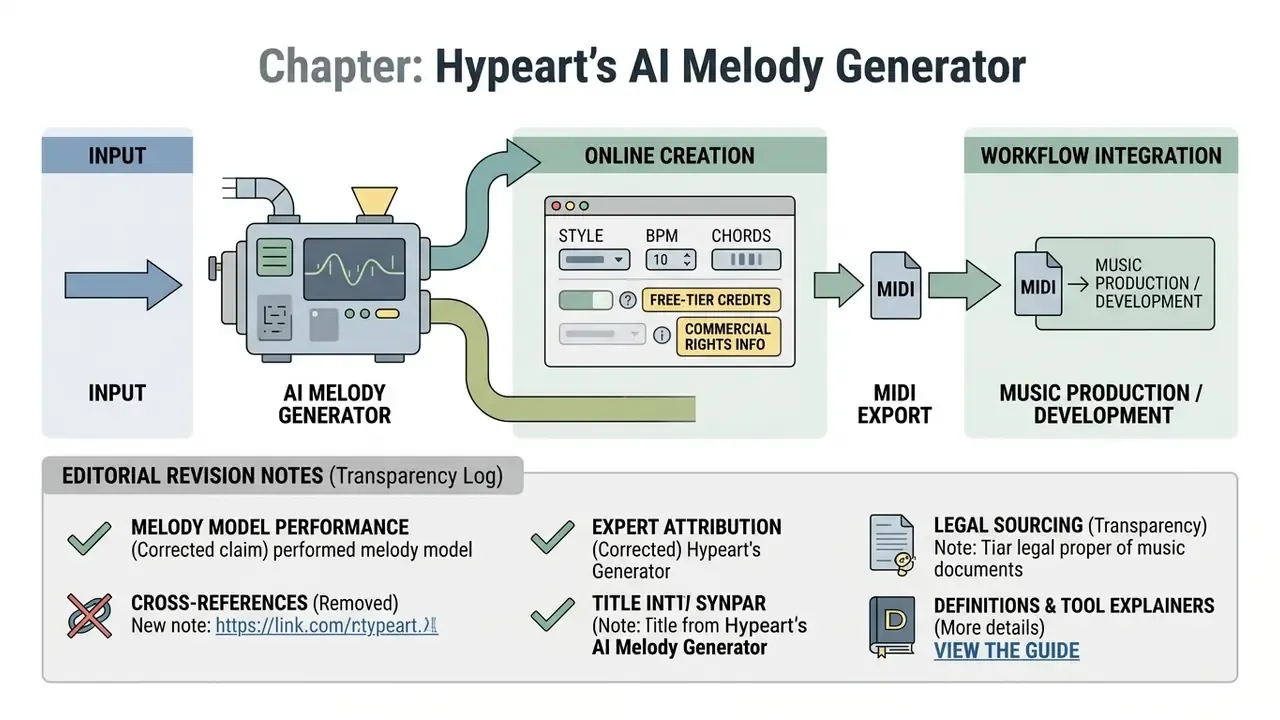
- An AI melody generator produces a melodic line (symbolic notes, usually MIDI), not a fully arranged, mastered track. A full AI music generator synthesizes finished audio with vocals, drums and mixing.
- Symbolic (MIDI) output stays fully editable in a DAW. Audio output (WAV/MP3) is final but instantly usable.
- Generation speed ranges from roughly 200 ms of control latency in real-time streaming models to 10 to 47 seconds for text-to-MIDI inference.
- Free tiers are almost always non-commercial. Typical limits: about 20 credits per day (2 to 4 generations), MP3-only export, no MIDI.
- Purely AI-generated works are not protected by copyright in the U.S. without meaningful human authorship. «Royalty-free» is a payment model, not proof of ownership.
Quick glossary of the terms used on this page
Before the workflow details, a small vocabulary. It saves confusion later, because vendors use these words loosely.
- Melody (topline) a single line of notes, the part a listener hums. One instrument, one voice.
- Symbolic generation the model outputs note events (pitch, start, length, velocity), not sound. That is what makes MIDI editable.
- Audio generation the model outputs a waveform at 24 to 48 kHz. Immediate, but frozen.
- Chord conditioning the harmony is fed to the model as a constraint, so the melody sits inside the progression instead of wandering.
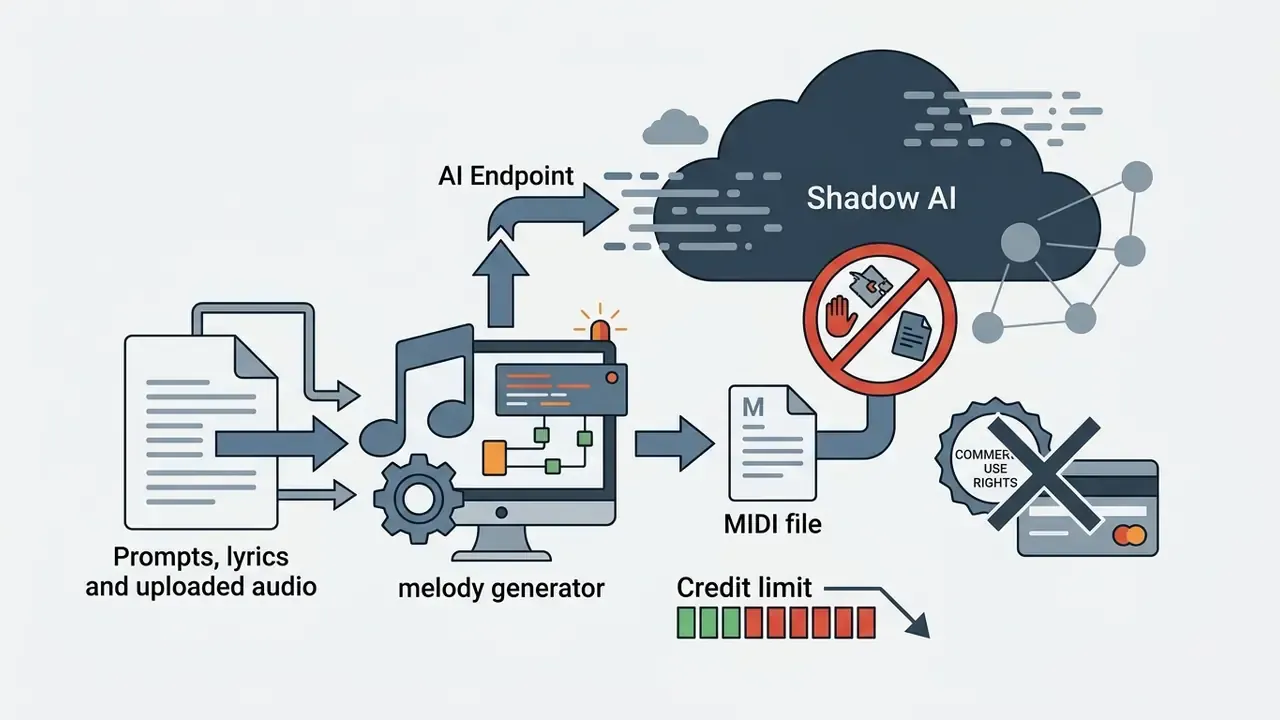
- Credit the billing unit of most online tools. One generation usually costs several credits, and free plans reset daily.
- Royalty-free no recurring per-play fee. It says nothing about who owns the work.
- Provenance record the file plus prompt, plan, date, seed and edits. Boring to keep. Priceless in a dispute.
What an AI Melody Generator is and how it differs from an AI music generator
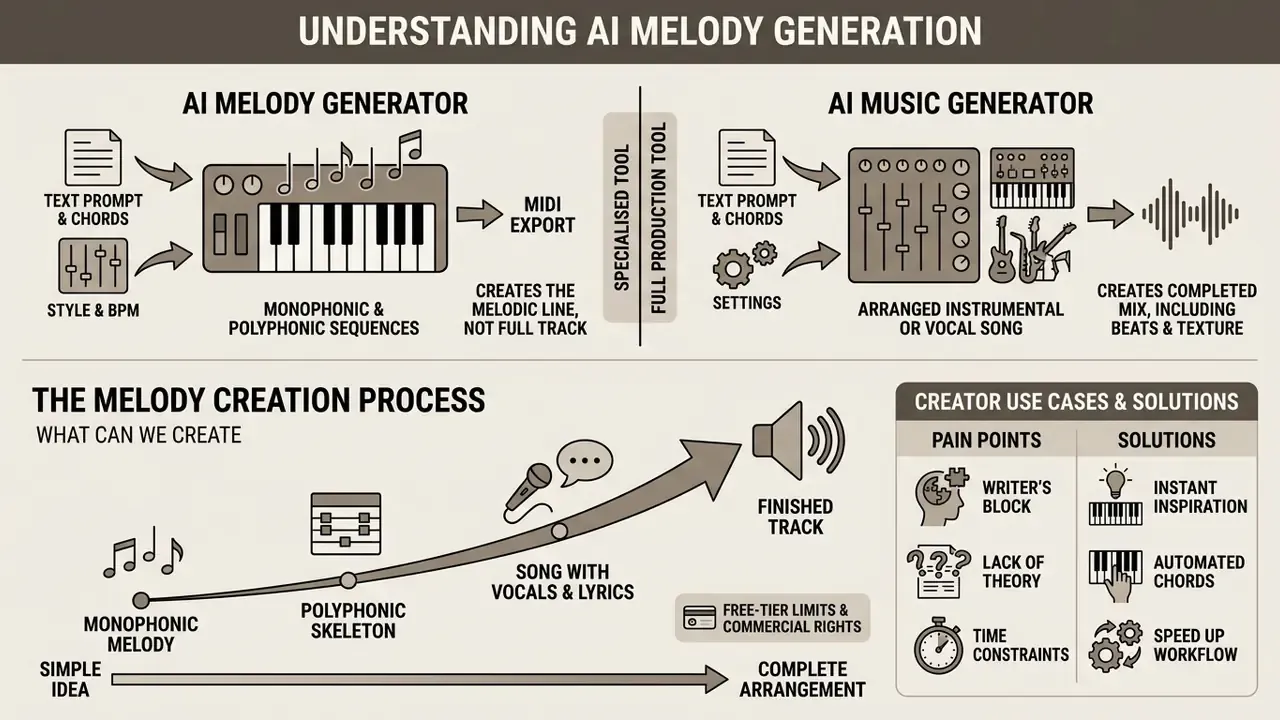
An AI melody generator is a specialised neural-network tool that generates monophonic or polyphonic note sequences (melodic lines) rather than a finished, arranged track. Unlike a complex AI music generator, which synthesizes an entire composition with vocals, drums and mastering, a melody generator focuses exclusively on the harmonic and rhythmic contour of the main motif.
«Symbolic models are particularly well suited to melody generation, motif development and chord-driven composition, unlike audio models that synthesize complete tracks.»
The algorithmic difference lies in the level of data representation. Services in the AI music and melodies generator class can operate either in the audio domain (rendering finished 24 to 48 kHz audio) or in the symbolic domain (MIDI events). When the task is to create a new musical idea for an AI song, focusing purely on the melodic line prevents the arrangement from becoming overloaded. Our practical experience shows that isolated motif generators give producers far more flexibility during orchestration.
When evaluating tools, authors often choose between generating complete music and obtaining a flexible note skeleton. To explore adjacent generative tooling, for example AI voice generators for vocals and narration, start with our reference hub.
Our experience. In one content-prototyping project our team needed 15 unique thematic hooks in two hours. By using a symbolic melody generator to create base MIDI patterns instead of full audio synthesis, we shortlisted the five strongest contours and imported them into a DAW for custom orchestration. That cut initial theme development time by roughly 60%, mainly because rejected ideas cost seconds rather than full render cycles.
Melody, song and finished track: what AI can actually create
«MelodyGLM, trained on a corpus of more than 400,000 note-level fragments, achieved an average improvement of 0.94 points in overall melody quality over standard pre-training methods.»
The practical takeaway: a model built for symbolic melody does not spend capacity on timbre, mixing or vocal realism. So it produces more coherent motifs, cleaner phrase repetition and real cadences, rather than a generic language model politely guessing at notes.
Who an AI melody maker is for: use cases, pain points and solutions
An AI melody maker serves several distinct groups, and each one has a different bottleneck. Below are the concrete pains and how symbolic melody generation resolves them.
YouTubers and content creators
- Pain: copyright strikes on background music, blocked videos, lost monetization.
- AI solution: generate unique 15 to 30 second hooks, intros and outros as MIDI/WAV that do not exist in Content ID databases. Because the MIDI is re-orchestrated with your own instruments, the rendered audio is unique at the waveform level too.
- Workflow tip: keep a small library of 4 to 8 bar loops per channel format (shorts, long-form, sponsor read). See our YouTube editing workflow guide for placement and ducking practice, and pair it with an ai caption generator so music beds and subtitles land on the same timeline.
Indie game developers
- Pain a custom soundtrack from a composer can cost from about $200 per minute. Unrealistic for a small budget with dozens of scenes.
- AI solution create adaptive, loopable MIDI motifs per location (RPG town, dungeon, platformer level) with instant tempo and key changes, so the same theme can be re-voiced for calm and combat states.
- Workflow tip export MIDI, not audio. Adaptive middleware (FMOD, Wwise) benefits from stem-level and tempo-level control.
Podcasters and voice-over producers
- Pain generic free stock stingers make every show sound identical and weaken brand recall.
- AI solution generate a unique 5 to 10 second brand jingle, plus 2 to 5 second transition stings and a low-energy bed that sits under speech without competing with it. Typical vendor guidance: 10 to 30 s themes, 2 to 5 s stings.
Fitness trainers and class instructors
- Pain the music must lock precisely to the exercise tempo (usually 120 to 140 BPM), and stock tracks drift or change feel mid-track.
- AI solution generate energetic rhythmic patterns with a hard-fixed BPM, then loop them for the exact duration of the interval block.
Music producers
- Pain blank-page syndrome, plus time lost on routine variations of one hook.
- AI solution fast generation of original hooks, demo guitar or keyboard parts, and alternative topline variants for A/B testing before arrangement.
«A study with 17 music producers of varying experience levels showed that text-driven models integrate into professional workflows, although experienced producers extract more value from them.»
Beginners and hobbyists
How an AI melody generator works: from idea to finished melody
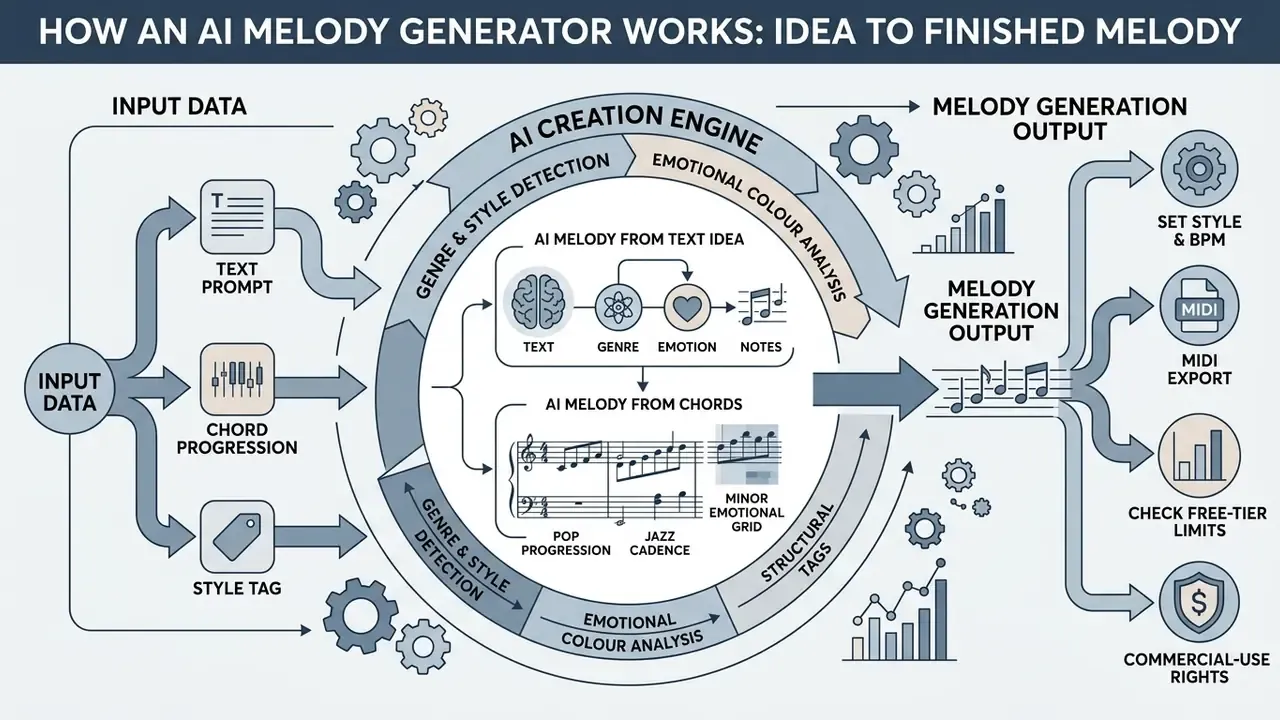
A modern AI melody creator turns input data (a text prompt, a chord progression or a style tag) into a note sequence using diffusion models or autoregressive transformers. The algorithm parses the request structure, maps it onto learned musical regularities, and generates both the rhythmic and the pitch contour.
The architecture of a melody creator AI relies on two key technologies: symbolic generation (creating Note On / Note Off, Velocity and Duration events) and audio synthesis. When you use the AI melody generator from chords function, the network hard-restricts the admissible pitches to the degrees of the current chord, which prevents atonality.
Generating a melody from a text idea
Text-to-Melody generation depends on how the network interprets natural language. Prompts are processed in several stages:
- Genre and style detectionmarker words (
lo-fi,cinematic,pop) set the base instrument palette and timbre. - Emotional colour analysisterms such as
uplifting,melancholic,darkinfluence the mode (major or minor) and the size of melodic intervals. - Structural tagsspecifying
intro,verse,chorushelps the AI vary note density and prevents monotonous looping of a single section.
Research on melody-conditioned editing shows that fine-grained melody prompts, for example top-k constant-Q transform contours, give tighter control and less ambiguity than coarse chroma conditioning. That is exactly why serious tools let you supply both text and a musical constraint.
AI melody generator from chords: creating a melody over a progression
When working from a chord progression, the AI uses the harmonic grid as a hard or soft constraint. Chord-conditioned melody research highlights several popular grids:
- Pop progression I, V, vi, IV (for example C, G, Am, F).
- Jazz cadence ii, V, I (for example Dm7, G7, Cmaj7).
- Minor emotional grid i, VI, III, VII (for example Am, F, C, G).
- Blues frame I, IV, V, still the default in guitar-oriented tools.
The algorithm maps each bar to the current chord, prioritising stable chord tones (root, third, fifth) on strong beats and using passing notes on weak beats.
«Chord-conditioned models outperform chord-free baselines on chord-tone usage and stylistic pitch distribution, especially in hierarchical “bass to melody” schemes.»
A practical detail vendors rarely mention: some chord engines support very large chord vocabularies (AutoHarmonizer reports 1,462 chord types) with controllable harmonic density. That is what allows jazz-grade reharmonisation instead of triad-only output.
How to create a melody in an AI melody generator online
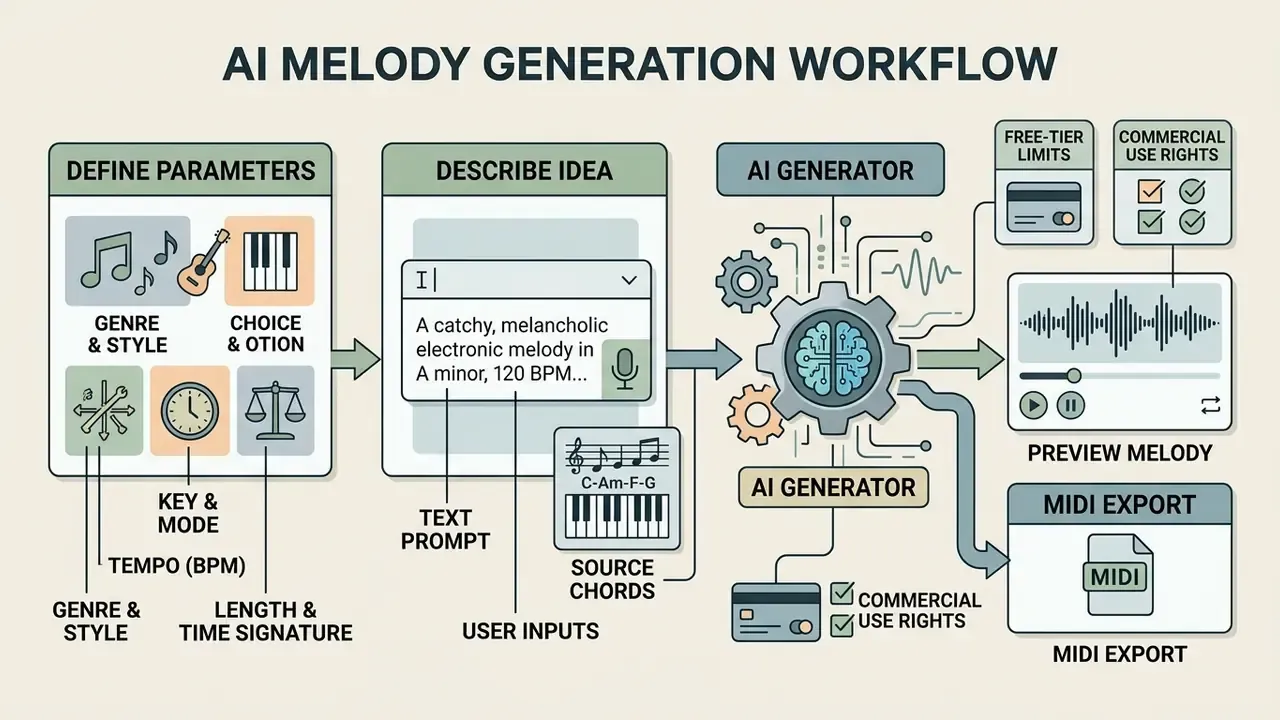
The workflow in an AI melody generator online is designed so a user can move from idea to finished file in a few clicks. Using an AI melody maker requires no third-party software installation and runs directly in the browser.
Choose style, genre and parameters for your future melody
At the starting stage you set the fundamental parameters of the composition:
- Genre and style Pop, Rock, EDM, Cinematic, Lo-Fi, Jazz.
- Key and mode for example C Major, A Minor, D Dorian.
- Tempo (BPM) from 60 BPM for slow ballads to 140 and above for EDM. Production models typically expose a 60 to 180 BPM range.
- Length and time signature usually 4/4 or 3/4 across 8 to 16 bars.
- Advanced controls (where available) scale lock, intensity, vocalization mode, exclude-styles field.
Describe your idea or add source input
In the input field, describe your concept in detail. An effective prompt covers mood, lead instrument and dynamics.
If you already have written material or lyrics, paste them into the corresponding field so the AI aligns note rhythm with word stress. Uploading a reference track or a hummed voice memo is supported by several platforms and acts as a melodic seed.
Generate, preview and download MIDI
Once parameters are set, press generate. Processing takes between 2 and 30 seconds. You can audition results in the built-in web player and then download the final file. Most tools also let you lock one part, for example the chords, and regenerate only the melody.
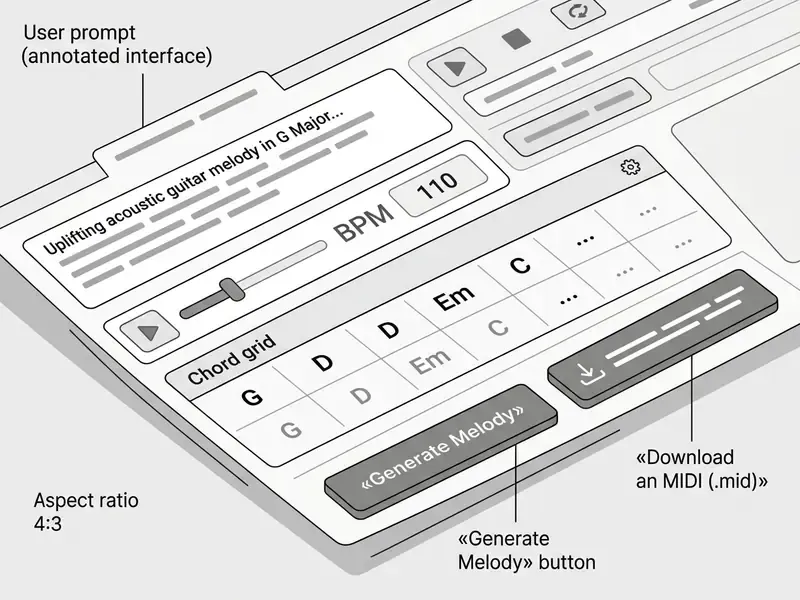
Showcase: examples of generated AI melodies (each exportable as .mid)
| Example | Key and tempo | Typical use |
|---|---|---|
| Lo-Fi chill piano hook | Am, 85 BPM | Study streams, calm background beds |
| Synthwave lead arpeggio | Em, 120 BPM | Game menus, retro intros |
| Cinematic strings topline | C Major, 110 BPM | Trailers, brand films |
| Fitness interval loop | F Major, 132 BPM, hard-locked | Class blocks, timed intervals |
Types of AI melody generators for guitar, piano and vocals
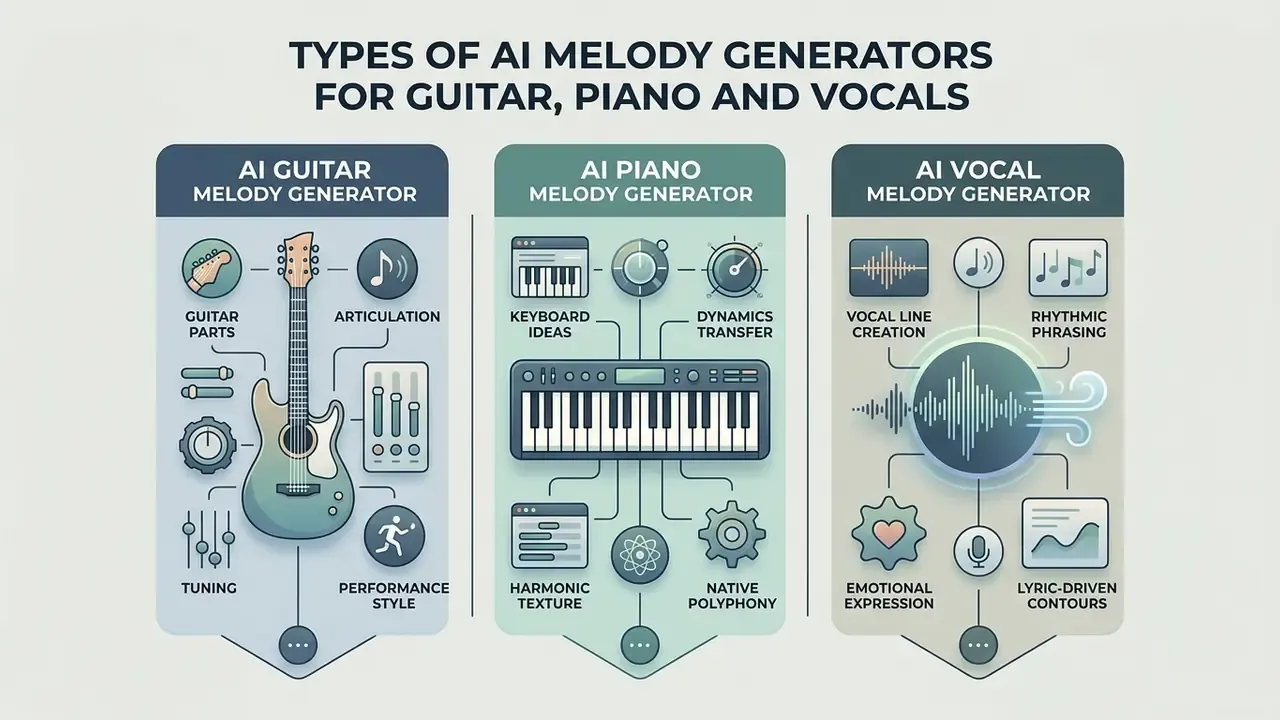
Specialised generators adapt their algorithms to the physics and playing technique of a specific instrument. A generic model does not always respect fingering constraints, which is why the industry offers narrow solutions: AI guitar melody generator, AI piano melody generator, AI vocal melody generator, and hybrid AI song melody generator tools that combine a topline with a harmonic bed.
AI guitar melody generator for guitar parts
Guitar generators are trained on large corpora of GuitarPro files and account for guitar-specific articulation:
- Articulation bends, slides, hammer-ons and pull-offs.
- Tuning standard E, Drop D, DADGAD and other alternate tunings, plus capo position in transcription-oriented tools.
- Performance style from acoustic fingerpicking to heavy rock solo riffing, with difficulty-aware phrasing in academic systems such as Song2Guitar and AutoLeadGuitar.
«ShredGP, a transformer trained on GuitarPro files, reproduces the stylistic nuances of four iconic guitarists, including bends, slides and picking patterns.»
Recent tablature work also enriches plain MIDI melodies with fingerings, articulations and expressive techniques. That is what turns a raw note line into something a guitarist can actually play without swearing at the screen.
AI piano melody generator for keyboard ideas
The piano generator focuses on correct dynamics (velocity) and polyphonic separation of right- and left-hand parts:
- Dynamics transfer each key press receives a velocity value from 1 to 127, creating natural human expression.
- Harmonic texture splitting material into a lead motif in the upper register and accompanying chords or arpeggios in the lower register.
- Native polyphony diffusion models such as Polyffusion generate polyphonic scores directly rather than harmonising a monophonic line afterwards. Transcription research reports onset plus velocity F1 of 94.50% on MAESTRO, which suggests expression can be modelled, not just guessed.
AI vocal melody generator for the vocal line
A vocal melody generator (topline generator) creates monophonic parts that respect human breathing and vocal range (soprano, tenor, baritone):
- Syllable fitting note lengths are automatically matched to lyric syllables, often with forced alignment plus DTW for note-to-word matching.
- Range the algorithm keeps the vocal line within roughly 1.5 to 2 octaves, avoiding unsingable leaps.
«The CSG system synthesizes songs with vocals and accompaniment from lyrics and chords, outperforming Jukebox in musical quality and harmonic control accuracy.»
If you need synthetic voices for narration rather than singing, compare capabilities in our guide to AI voice generators.
| AI generation scenario | Typical input | Suitable styles | Role of chords | Output format |
|---|---|---|---|---|
| AI guitar melody generator | Tablature, guitarist style text, tuning | Rock, Metal, Acoustic, Blues | Drive riff and solo phrase construction | Tab (GuitarPro), MIDI, WAV |
| AI piano melody generator | Chord grid, tempo, text prompt | Classical, Pop ballads, Jazz, Lo-Fi | Provide the harmonic frame for polyphony | MIDI, WAV |
| AI vocal melody generator | Lyrics, key, vocal range | Pop, R&B, EDM, Indietronica | Anchor the topline to the harmony | MIDI, vocal audio |
Reading the table in one line: guitar tools care about playability, piano tools care about expression, vocal tools care about singability. Pick the constraint you cannot fake by hand.
AI editing and post-processing tools for generated melodies
Creating the first motif is only step one. Modern platforms ship advanced AI tools for transforming and finishing the material you received:
- AI music extension (Extend): if the generated motif lasts 15 seconds, the algorithm analyses the harmonic context and builds a logical continuation (chorus, bridge or outro) up to the required length without losing coherence. This is the fastest way to fit music to a fixed video duration.
- Inpainting / Replace section: select a weak bar in the virtual piano roll and regenerate only that segment, keeping the surrounding parts, rhythm and tone. Useful for fixing one awkward leap in an otherwise strong topline.
- Audio-to-MIDI extraction: the «hum it» tool. Upload a voice memo or a rough played phrase, and the AI detects pitch and timing, producing a clean MIDI file you can re-orchestrate.
- Vocal remover and stem splitting: separate an existing render into vocals, drums, bass and other stems to build karaoke versions, instrumentals, or to re-use only the melodic layer.
- Remix and style transfer: re-render the same note data in another genre, for example turning a lo-fi hook into an electro-swing arrangement, while keeping the melodic identity.
- Mastering and tempo control: loudness normalisation and precise BPM adjustment before export, so the file matches broadcast or platform targets.
For teams handling large volumes of exported audio and video, file-weight management matters as much as creativity. See our practical guide to video compressors and file-size control, and, if the music is part of a wider campaign kit, the notes on building printed assets with an ai brochure maker.
Output formats: MIDI, melodies and finished AI music tracks
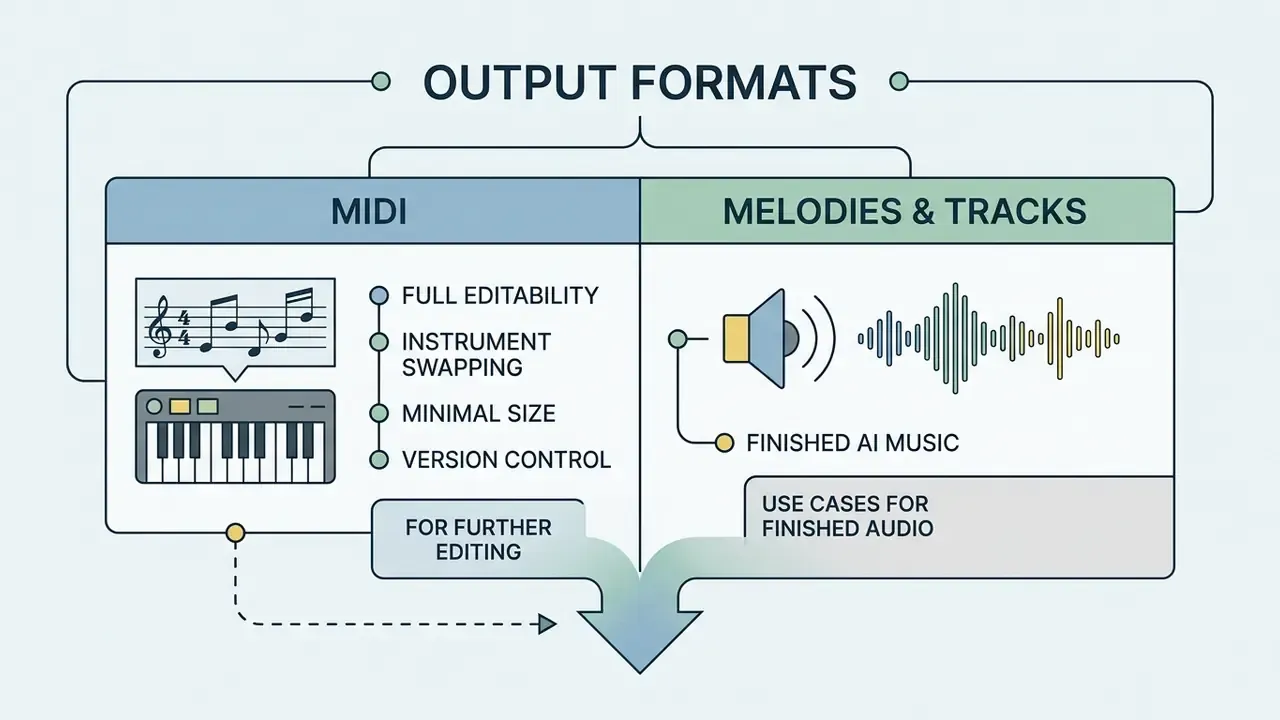
When working with an AI music melody generator, the result can be saved either as note data or as a rendered audio file. Understanding the difference defines your whole downstream workflow: MIDI stores instructions, audio stores sound.
When to choose MIDI for further editing
The MIDI format (Standard MIDI File, .mid) contains only digital commands: which note to play, how hard, when to release it, which controller to apply.
Advantages of MIDI:
- Full editability change any note, tempo, key or duration inside a DAW (Ableton, Logic, FL Studio, Cubase, Reaper).
- Instrument swapping assign the melody to any virtual plugin (VSTi), from symphonic strings to analogue synthesizers, without regenerating anything.
- Minimal size a MIDI sequence can occupy under 10 KB per minute, whereas high-quality stereo audio is roughly 10 MB per minute.
- Version control small text-like payloads are easy to archive, diff and attach to a project's provenance record.
Producers working across media projects can also review adjacent post-production tooling in our overview of online photo editors when assembling full campaign assets.
When a finished AI music melody is enough
Rendered audio files (WAV or MP3) are already-synthesized sound. Choose this option when you need an immediate result for media content without touching a music editor.
Use cases for finished audio:
- Background music for YouTube and social-media videos.
- Intro and outro stingers for podcasts.
- Prototyping background music in mobile games and applications.
- Low-energy instrumental beds placed under narration, where minimal melodic movement is a feature, not a limitation.
One caveat worth repeating. Audio output cannot be repitched or reinstrumented cleanly. If there is any chance a client will ask for «the same theme, but softer», keep the MIDI.
Free AI melody generator and commercial use of music
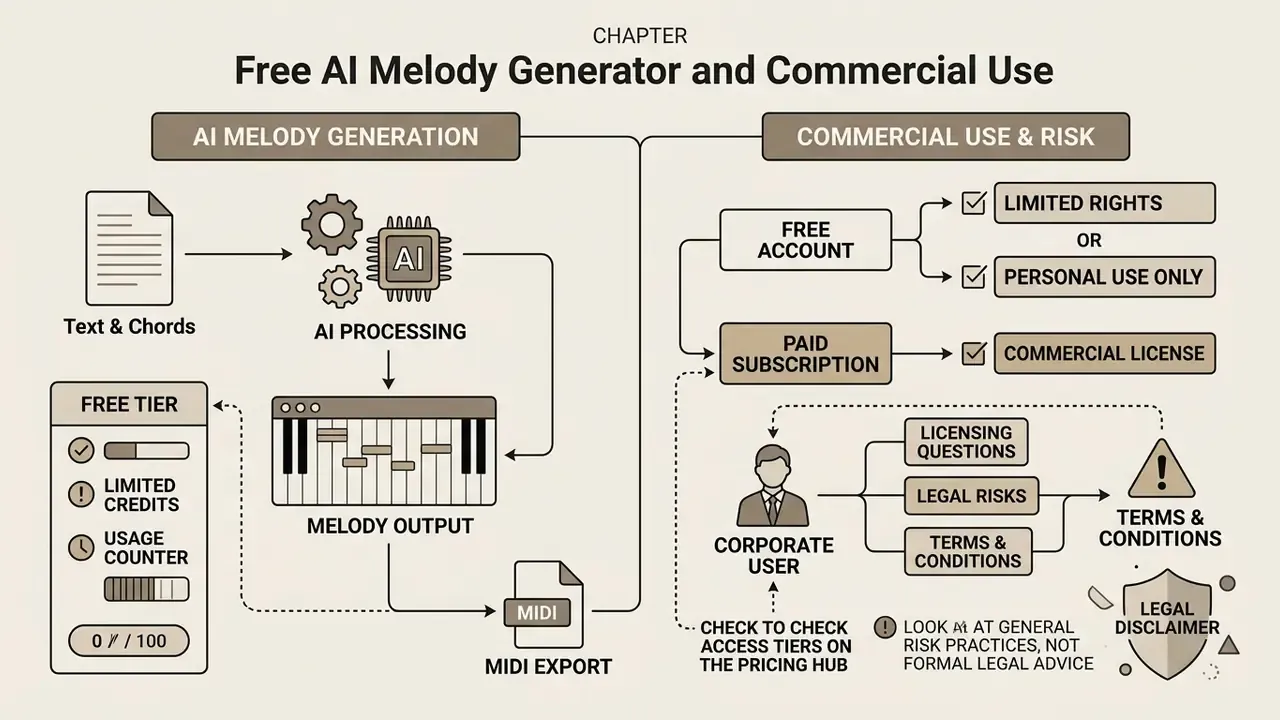
Marketing claims about «free AI music» frequently mislead users. Access to a free AI melody generator does not grant the right to monetize the generated content. The general licensing logic mirrors what we documented for images. See commercial use of AI-generated images for a side-by-side comparison of vendor grants.
You can review access tiers and plans on our pricing page: open the hub.
What to check in the terms of a free AI melody generator
| Access tier | Price | Daily / monthly limit | Available formats | License |
|---|---|---|---|---|
| Free tier | $0 | ~20 credits/day (about 2 to 4 generations, often 2 songs per generation) | MP3 (lower quality) | Personal, non-commercial only |
| Basic / Creator | $9 to $15 per month | 1,000 to 1,200 credits/mo (about 12,000/yr on annual plans) | MP3 plus MIDI (.mid) | Commercial while the subscription is active |
| Pro / Studio | $29 to $60 per month | Unlimited or 5,000+ credits | WAV (uncompressed), MIDI, stems | Full commercial rights plus sublicensing |
When using free tiers (AI melody generator free, or what vendors market as an ai music melody generator free), read the Terms of Service carefully:
- Generation limits: commonly 3 to 5 tracks per day, or 5 generations per day with 1 export per month. Some vendors cap lifetime trial downloads, for example at 7.
- Ban on commercial use: most services, including Suno, Udio and AIVA on their free levels, permit results for personal, non-commercial purposes only.
«Songs made on the free plan cannot be monetized; commercial use rights are granted for songs created on paid plans.» Suno, Terms of Service and Help Center (2026). https://suno.com/terms
- MIDI export restrictions: free versions often limit you to a low-quality MP3, reserving MIDI and WAV export for paid subscribers. AIVA is a counter-example: its free tier includes MP3 and MIDI but caps downloads at 3 per month and tracks at 3 minutes.
- Attribution requirement: an obligation to credit the service in your project description.
- Storage expiry: free clouds are often purged after about 30 days, which can quietly destroy your provenance evidence.
To model subscription and compute costs before you commit, compare options with our calculators.
Data privacy, Shadow AI and enterprise controls
Royalty-free and commercial-ready: how to assess rights to generated music
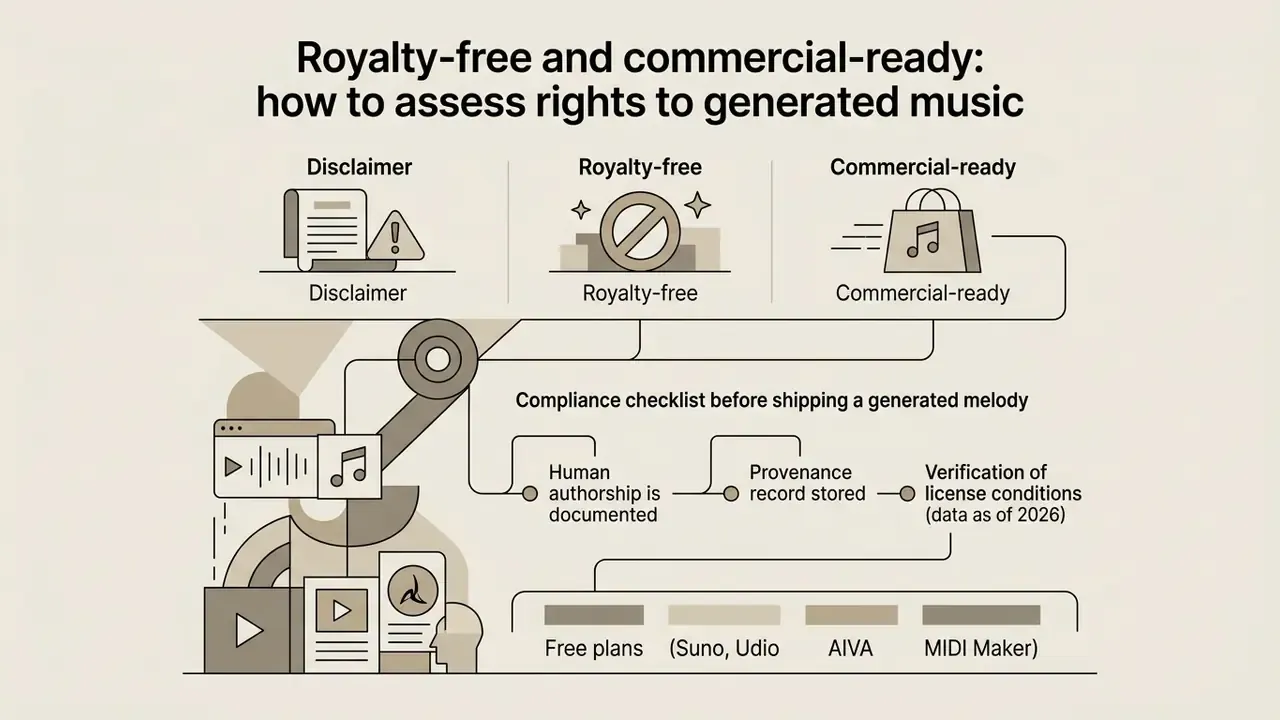
The terms royalty-free and commercial-ready have completely different legal meanings:
According to official guidance from the United States Copyright Office, works generated by AI entirely without human authorship are not protected by copyright.
- Royalty-free
- you do not pay recurring royalties for each view or listen. It does not confirm any transfer of copyright.
- Commercial-ready
- the platform grants you an explicit license to monetize the track on commercial platforms (Spotify, YouTube, TV, ads).
The Office has also confirmed a downstream consequence: owners of a musical work that is not protected by copyright are not entitled to royalty payments from a collective. A clean MIDI file substantially reworked by a human in a DAW, however, may receive partial copyright protection covering the human-authored changes.
Platform terms can be even stricter than the law:
«Under Udio's terms, generated works remain with the platform; users may use them only for personal, non-commercial purposes.»
For disputes over rights to media content, see our litigation section. To evaluate commercial conditions for generated media across formats, review the AI Media Commercial-Use hub and the worked example in Canva AI generator licensing.
Compliance checklist before shipping a generated melody
Checklist0 / 9
E-E-A-T fact check: verification of license conditions (data as of 2026)
FAQ about AI melody generators
Users starting out with a melody AI generator typically ask about speed, required skills, uniqueness and DAW integration. Our support team can help with technical questions: explore the hub.
How long does melody generation take?
Generating a symbolic melody or a short audio fragment in a modern melody generator AI takes from a few seconds to about half a minute.
- Symbolic export (MIDI): 2 to 10 seconds in consumer tools. Research benchmarks report about 10 s for efficient text-to-MIDI models and up to roughly 47 s for heavier baselines on a single GPU.
- Low-latency audio streaming (Google Lyria RealTime): a maximum of 2 seconds between a control change and the audible effect, with continuous 48 kHz stereo output.
- Real-time control models (Magenta RealTime 2): control latency around 200 ms with 40 ms frames.
- Full audio synthesis of a track (30 s at 32 kHz): 15 to 45 seconds depending on server load.
Do I need musical experience to use a melody AI maker?
No formal musical education, sight-reading ability or DAW mastery is required to work with a melody maker AI.
Most interfaces are built on natural language, visual presets and ready harmonic templates. Vendor documentation for beginner-oriented tools states plainly that no sheet-music knowledge, no theory and no DAW are required, with generation typically completing in 30 to 60 seconds. For newcomers, AI is a fast launchpad for creative ideas. For professionals it is an accelerator of routine work, and theory knowledge simply unlocks deeper control over key, mode and voice leading.
Are two generations from the same prompt identical?
Usually not. Generation is probabilistic, so identical prompts normally yield different melodies unless the service exposes and fixes a seed. Helpful for exploration, awkward for reproducibility: save the exact file you approved, because you may not be able to recreate it. Recent symbolic-melody research also adds novelty-aware mechanisms specifically to reduce memorisation of training material.
How do I import a generated MIDI file into a DAW?
A downloaded .mid file is compatible with all modern digital audio workstations (Ableton Live, FL Studio, Logic Pro, Cubase, Reaper):
- Drag and drop the file onto a new MIDI or instrument track.
- Assign any VST instrument to that track (synth, piano, guitar sampler).
- Set the project tempo (BPM) and key to match the values used during generation.
- Open the piano roll to edit pitch, note length and velocity (1 to 127), then quantise or humanise as needed.
- Render to WAV or MP3 only at the end. Keep the MIDI as your editable master.
Can I sell a melody generated by AI?
You can sell the product you build around it, provided your plan grants commercial rights. Your human contribution (arrangement, performance, mixing, lyrics) is what carries protectable authorship. Selling raw, unedited AI output as an original composition is legally weak: without human authorship there is nothing to license exclusively.
Summary and integration into development workflows
A melody generator is best understood as an idea engine: symbolic output, fast iteration, full downstream control. Audio generators, by contrast, are delivery engines, with instant results and less flexibility. Choose MIDI when the melody will be produced further. Choose WAV or MP3 when the melody is the final asset.
Governance sits on top of both. Document the plan, the prompt and the human edits, and a generated hook stops being an unexplained file in a shared folder.
To integrate neural technologies into your own software products, developers can browse the hub, including implementation notes for adjacent generative media models such as Google Veo.
Appendix A. Editorial revision notes (transparency log)