That sounds tidy. Procurement rarely is.
If you sit in a bank, a credit union, or a regulated fintech, the question is not «which tool has the nicest gallery view». It is narrower and harder: which online video communication stack survives an audit, keeps client conversations inside your perimeter, and does not quietly triple in cost once recording retention arrives on the invoice.
Executive Summary: Key Takeaways
- Free tiers are commercial funnels, not technical constraints. Zoom Basic cuts group sessions at 40 minutes; Microsoft Teams Free and Google Meet free personal accounts stop at 60. Bandwidth and compute costs do not reset at minute 41. The cutoff exists to drive paid conversion.
- Genuinely unlimited free options exist. TrueConf Server Free (self-hosted, up to 1,000 registered users), Jitsi Meet (open-source WebRTC), BigBlueButton (education), 3CX (PBX plus video) and Discord (community huddles) impose no session timers on their free tiers.
- Technical baselines matter more than feature lists. Keep one-way latency under 150 to 200 ms, end-to-end conferencing delay under 250 ms, and budget 600 kbps to 3.0 Mbps per endpoint depending on resolution and layout.
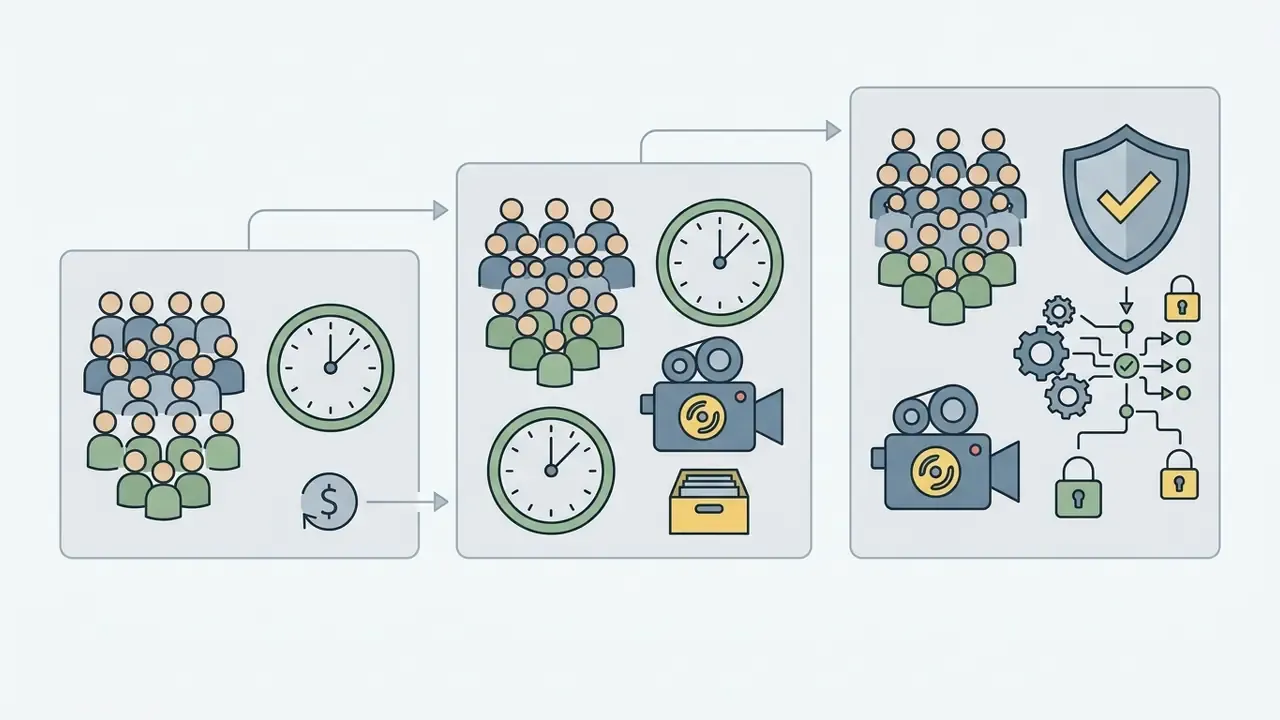
- Cost escalates in predictable steps. $0 (free), then $4.00 to $8.40 (entry business), then $12.00 to $16.80 (cloud recording, transcription), then $22.50 to $26.40+ per user per month (enterprise governance and AI features). A 20-person team on Google Workspace Business Starter pays $2,016 annually before add-ons.
- Deployment model, not participant count, is the first selection criterion. Data residency, directory integration (LDAP / Active Directory), audit-log export to SIEM and GRC systems, and encryption key ownership decide whether a platform survives an 18-month compliance review.
How to read this guide. The first three sections define formats and free-tier mechanics. The middle sections cover features, a 12-platform comparison and the selection logic itself. The last sections handle hosting practice, frequent questions, and an appendix for teams embedding rooms into their own portals. If you already know the formats, start at the free-tier limits.
What Is Online Video Conferencing and When to Use It
Online video conferencing is synchronous, interactive visual and audible communication between remote endpoints over data networks, using standardized real-time transport protocols. Organizations deploy live video conferencing online to bridge distributed teams, speed up decisions, retire voice-only bridges, and keep governance intact across remote operations.
Under the definitions established by the National Institute of Standards and Technology (NIST IR 5485), videoconferencing requires real-time processing: capturing, encoding, transmitting, decoding and displaying media with minimal latency. At the protocol layer, platforms rely on the Real-time Transport Protocol (RTP) and its control counterpart RTCP, defined in IETF RFC 3550, for sequence numbering, timestamping and payload identification across packet-switched networks.
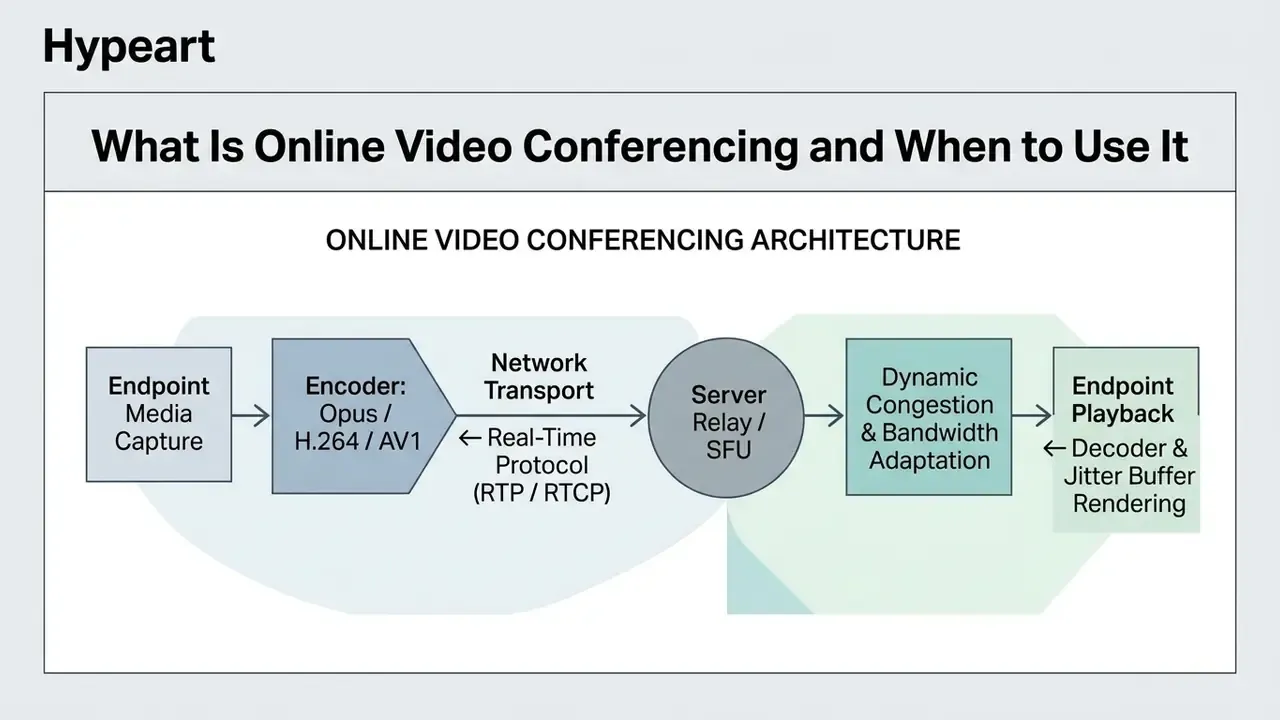
Conferencing online video behaves nothing like asynchronous media streaming. Streaming buffers content for one-way playback; an online conference video path needs end-to-end delivery delay below roughly 250 milliseconds to keep conversational turn-taking natural. Compared with email or chat, online video communication adds visual context, non-verbal cues and live document co-review. That combination is why complex negotiation, credit committee discussion and risk assessment still default to video rather than a thread.
One-on-One Calls, Group Meetings and Virtual Events
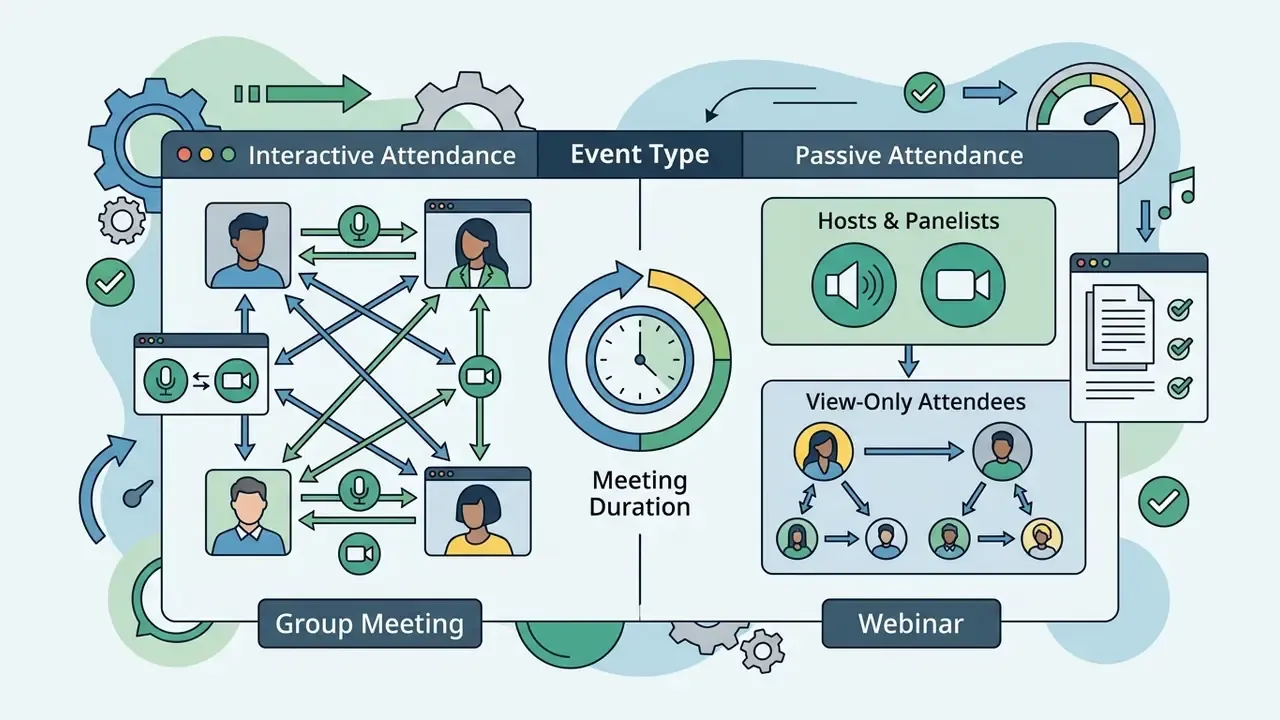
Video meeting configurations fall into three architecture and operational tiers: one-on-one calls, multi-party group sessions, and large-scale virtual events or webinars.
- One-on-One Calls Typically connect two endpoints, often using peer-to-peer routing or direct media paths. State networking benchmarks (for instance the Texas Department of Information Resources Videoconferencing Standards) put baseline bandwidth at 600 kbps symmetric for standard definition, 1.2 Mbps for 720p HD, and up to 3.83 Mbps for 1080p streams.
- Group Meetings Involve three to several hundred active participants routed through Selective Forwarding Units (SFUs) or Multipoint Control Units (MCUs). An online group video conference scales to 1.5 to 3.0 Mbps per participant once you add multi-stream gallery views, active-speaker switching and simultaneous screen sharing.
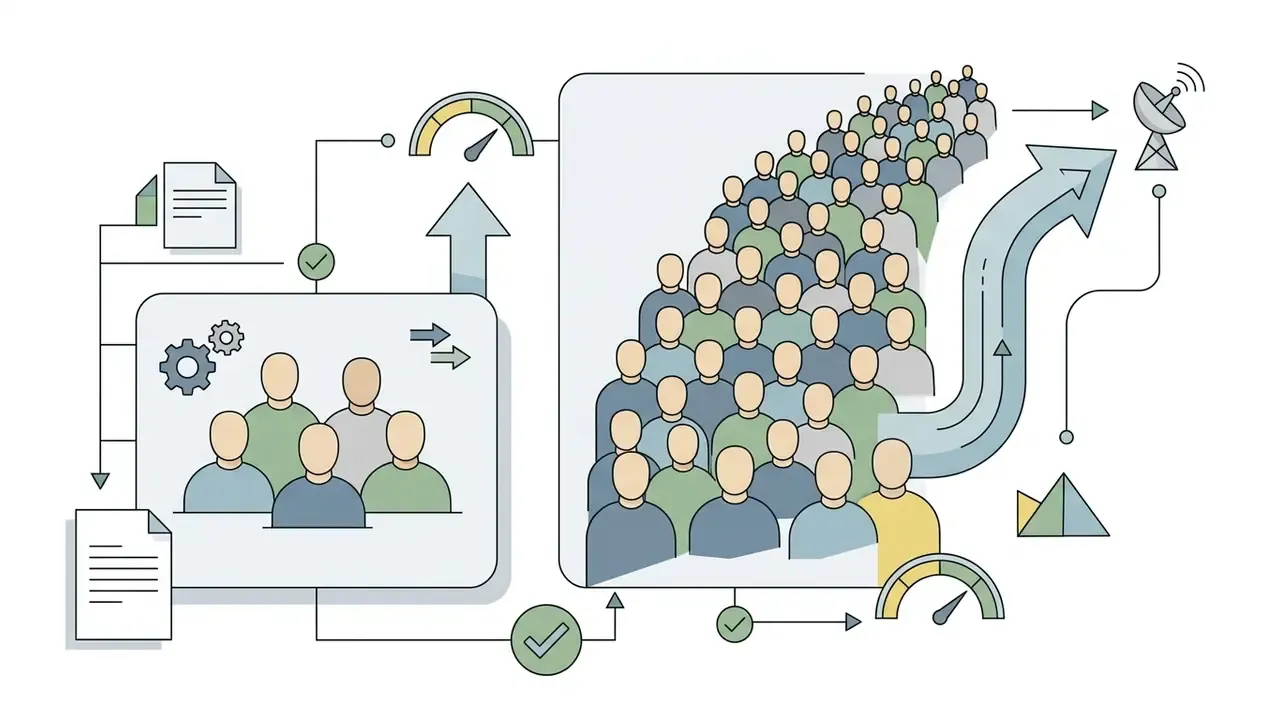
- Virtual Events and Webinars Support thousands of passive attendees over one-to-many broadcast distribution. Interaction narrows to text Q&A, polls and moderated chat, which protects network stability and host CPU load. Vendor documentation shows role separation is capacity-critical here: Webex, for example, documents webinar modes scaling to 100,000 attendees while capping host, co-host and panelist roles separately.
| Meeting Format | Participant Scale | Primary Network Architecture | Bandwidth Benchmark (Per User) | Primary Interaction Model |
|---|---|---|---|---|
| One-on-One | 2 endpoints | Peer-to-Peer / Direct SFU | 600 kbps to 1.2 Mbps | Unconstrained bi-directional |
| Group Meeting | 3 to 300 active users | Multi-stream SFU Relay | 1.5 Mbps to 3.0 Mbps | Open turn-taking, screen share |
| Virtual Event / Webinar | 100 to 10,000+ attendees | Broadcast CDN / MCU Relay | 1.0 Mbps to 2.5 Mbps (down) | Moderated Q&A, chat, polls |
Observational research on workplace communication published by Hosseinkashi et al., analyzing more than 100,000 telemetry-linked meeting evaluations, indicates that meeting effectiveness tracks closely with matching session scale to structural goals. Small groups with focused agendas scored highest for collaborative problem-solving. Large sessions needed strict facilitation roles to avoid cognitive drift.
Practical facilitation guidance from adult-learning frameworks lands on similar thresholds: 2 to 6 participants operate as a genuine workshop, 7 to 19 make open discussion measurably harder, and groups above 20 need scripted interaction windows. Worth remembering before you book a 45-person «working session».
Video Conferencing for Remote Teams and Business Communication
Enterprise video communication is the operational backbone for distributed workforces: daily stand-ups, project governance, onboarding, training, client engagement.
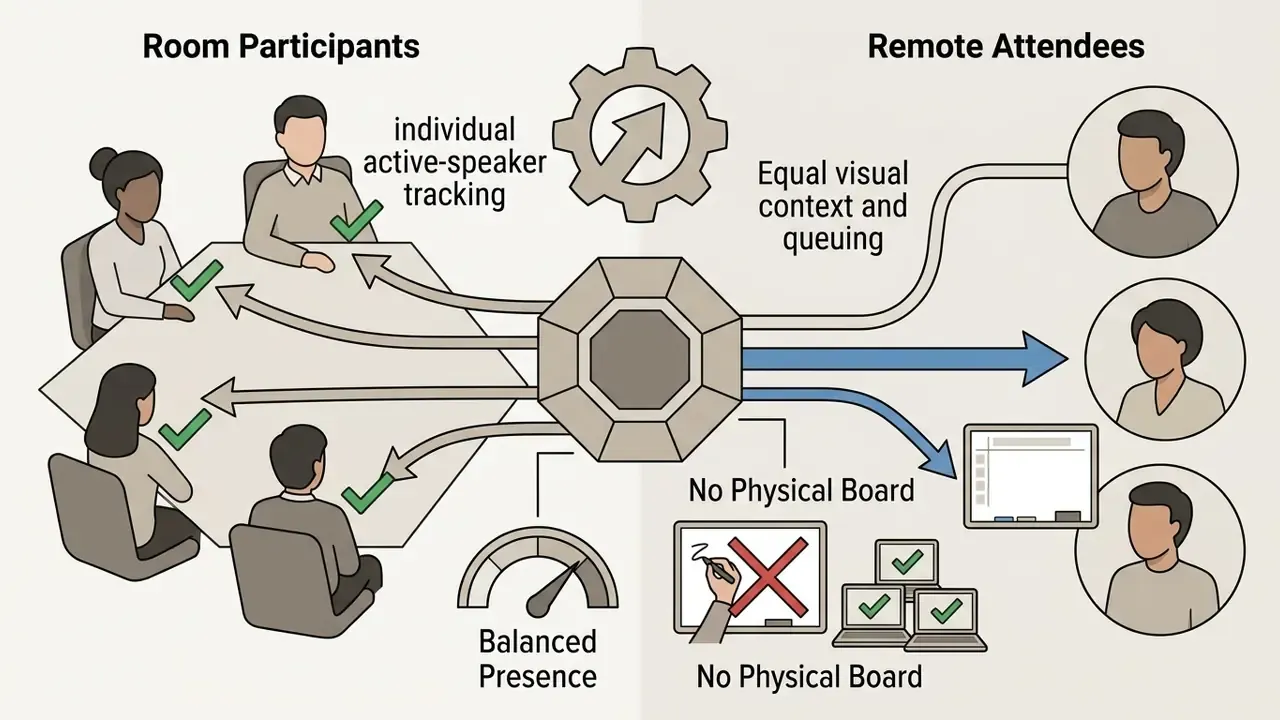
Field research on hybrid versus fully remote interactions (Yarmand et al., 2023 to 2024) found that fully remote video meetings were rated more inclusive and effective by 55.1% of surveyed workers compared with mixed hybrid formats. Hybrid meetings often suffered from asymmetric presence, where in-room side conversations excluded remote attendees.
Standardized tooling narrows that gap. Shared meeting links, one central chat channel, and virtual whiteboards opened from every participant's own device give equal access regardless of location.
There is a trade-off, though, between coordination speed and focus time. A UK parliamentary evidence report noted an 8% to 19% decrease in individual output after abrupt transitions to full remote work, driven mostly by fragmented calendars and constant video check-ins. (The figure comes from a written evidence submission summarizing a controlled work-from-home comparison. Readers who need an auditable citation should request the primary committee document, since the underlying dataset has not been published under a stable DOI.) Mature organizations answer this with a written communication policy: which decisions require live video, and which belong in an asynchronous update.
One more governance detail that gets skipped. Define who owns the meeting inventory. In banks with 40 or more recurring standing calls, nobody can say which sessions record, which retain transcripts, and which touch client data. That gap looks small until an examiner asks.
Hybrid Meeting Architecture: Bridging Hardware Rooms and Remote Endpoints
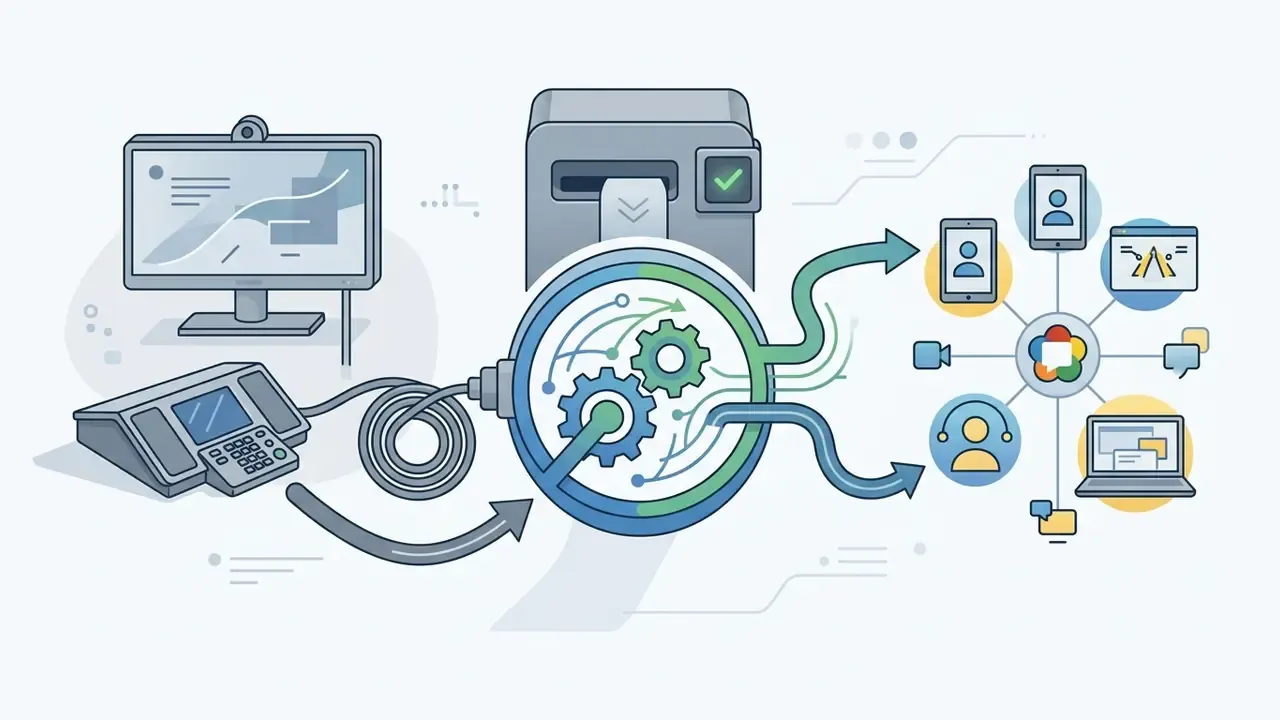
Hybrid deployment introduces technical asymmetry between remote individual callers and physical conference room participants. Enterprise hybrid architecture leans on dedicated room systems (Microsoft Teams Rooms, Zoom Rooms, Cisco Webex Devices) paired with room-scale microphone arrays, PTZ auto-framing cameras and dual displays.
To connect legacy telepresence hardware with cloud conferencing SaaS, platforms deploy SIP (Session Initiation Protocol) and H.323 gateways:
Free Online Video Conferencing: What Is Included and What Is Limited
Free online video conferencing tools are functional entry points for small teams: core audio, video, screen sharing. Providers then enforce strategic constraints, session duration caps, participant caps, locked administrative controls, to guide commercial organizations toward paid tiers.
Organizations evaluating free video conferencing online options balance immediate cost savings against operational limits. Standard free plans handle routine team huddles fine. They also strip the governance layer: cloud recording retention, Single Sign-On, advanced security logging, admin audit trails.
Meeting Time Limits, Participant Limits and Unlimited Calls
The primary restrictions on a free video conference online come down to two numbers: session duration and maximum participants.
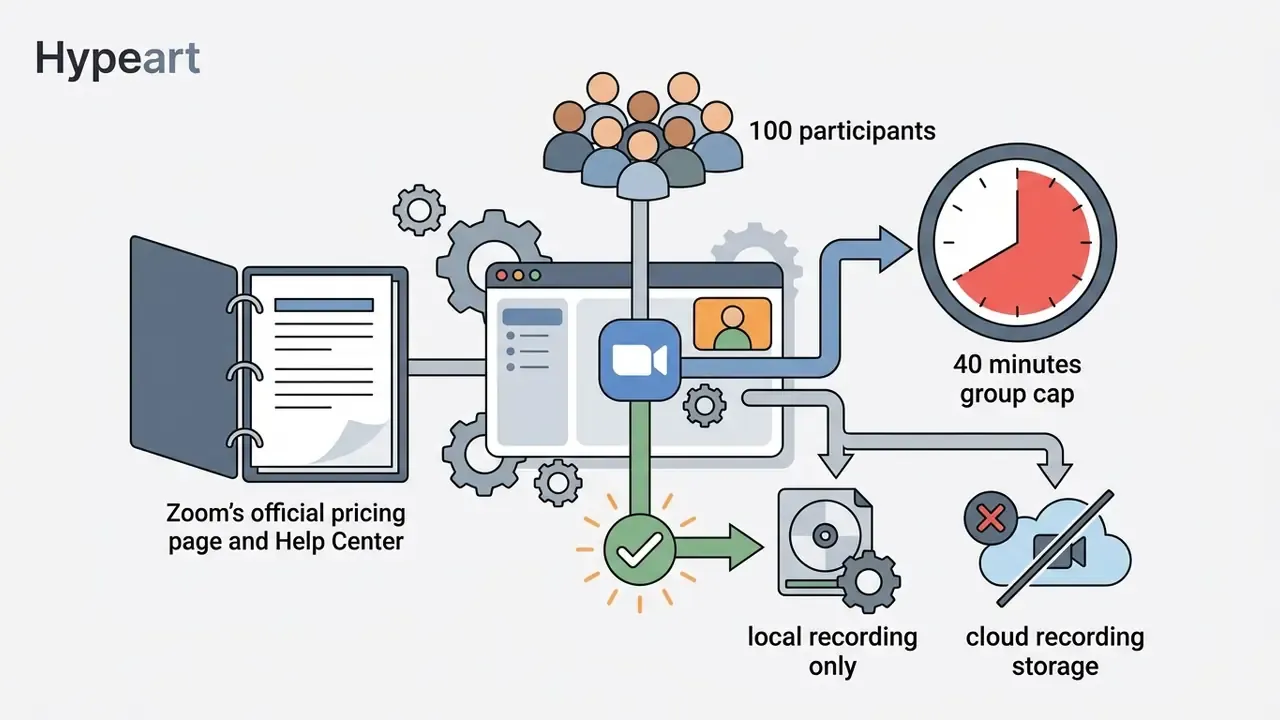
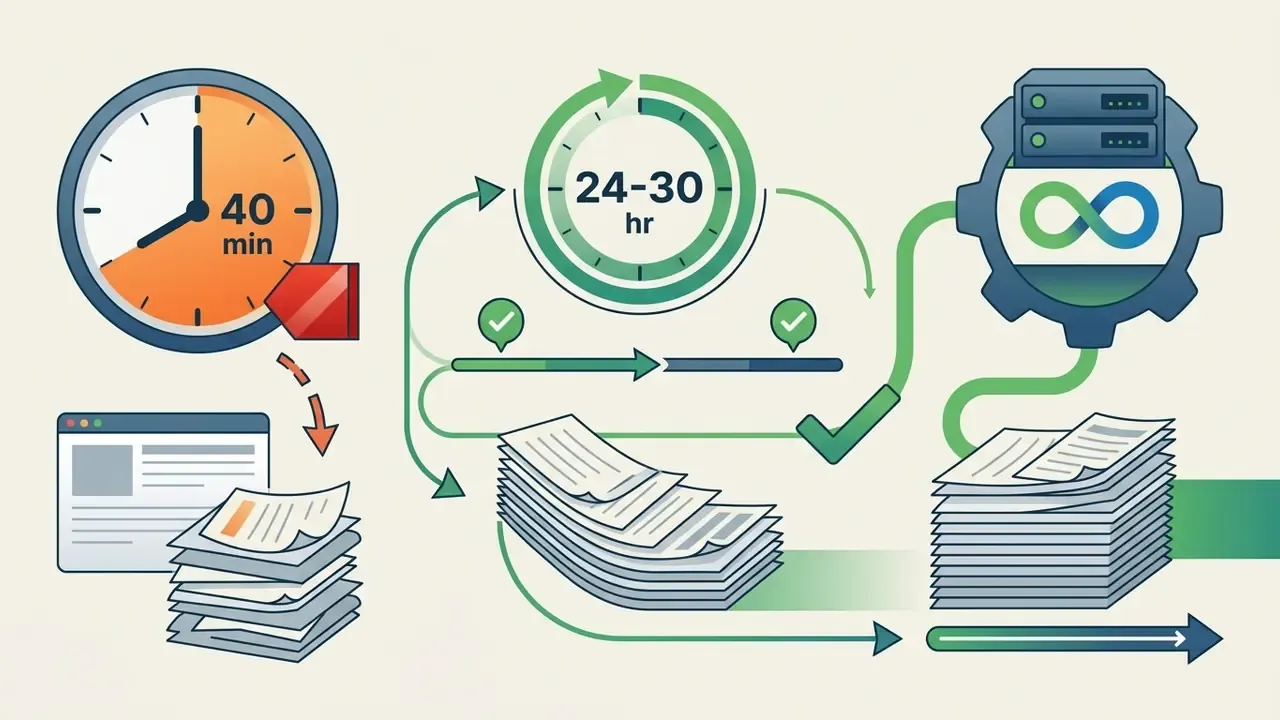
- Zoom Basic A strict 40-minute limit on group meetings (3 to 100 participants). Zoom's Help Center documents that the 40-minute cutoff applies to free meetings generally, including sessions with a single host plus one participant.
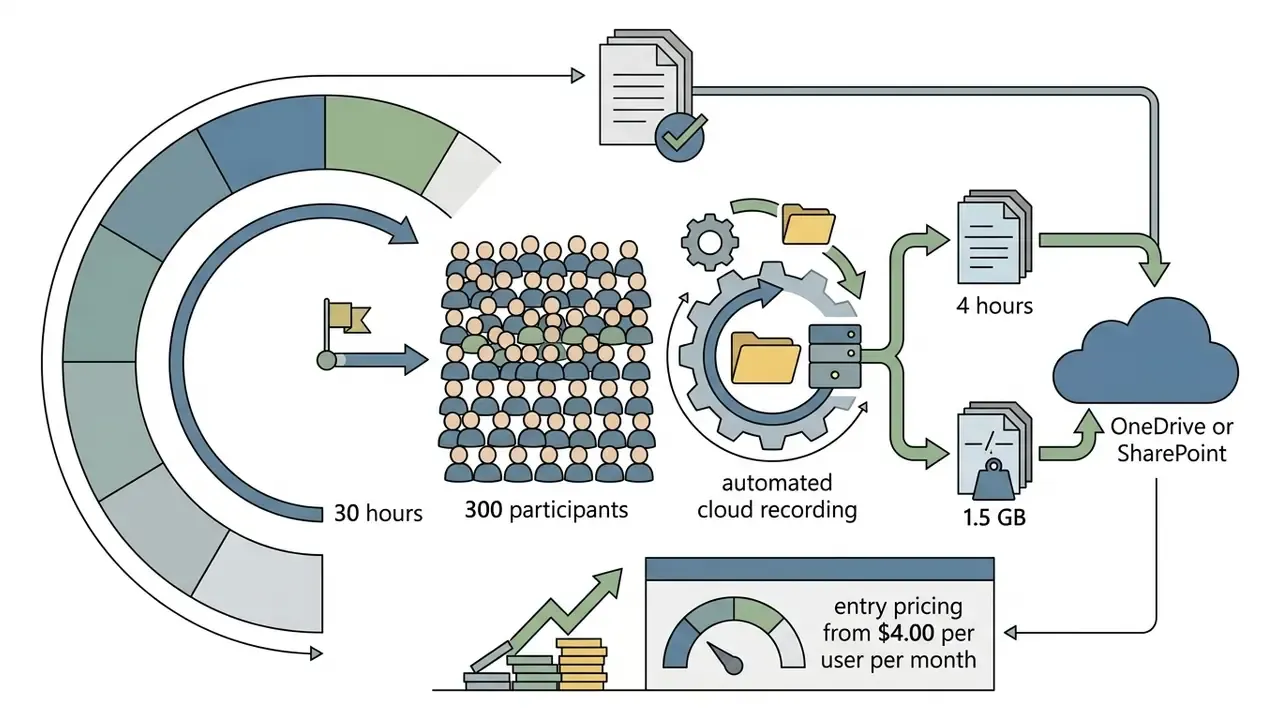
- Microsoft Teams Free 60 minutes for group meetings, 100 participants maximum. One-on-one sessions extend up to 30 hours.
- Google Meet (free personal accounts) 60 minutes for group meetings of three or more, 100-participant limit. One-on-one calls run continuously up to 24 hours.
- Cisco Webex Free Webex support documentation lists 100 participants with a 40-minute cap. Some regional promotions and third-party comparisons advertise a 50-minute free session; check the limit shown in your own account panel before scheduling a client call.
- Whereby Free Browser-native rooms, 45-minute group sessions, unlimited one-on-one meetings.
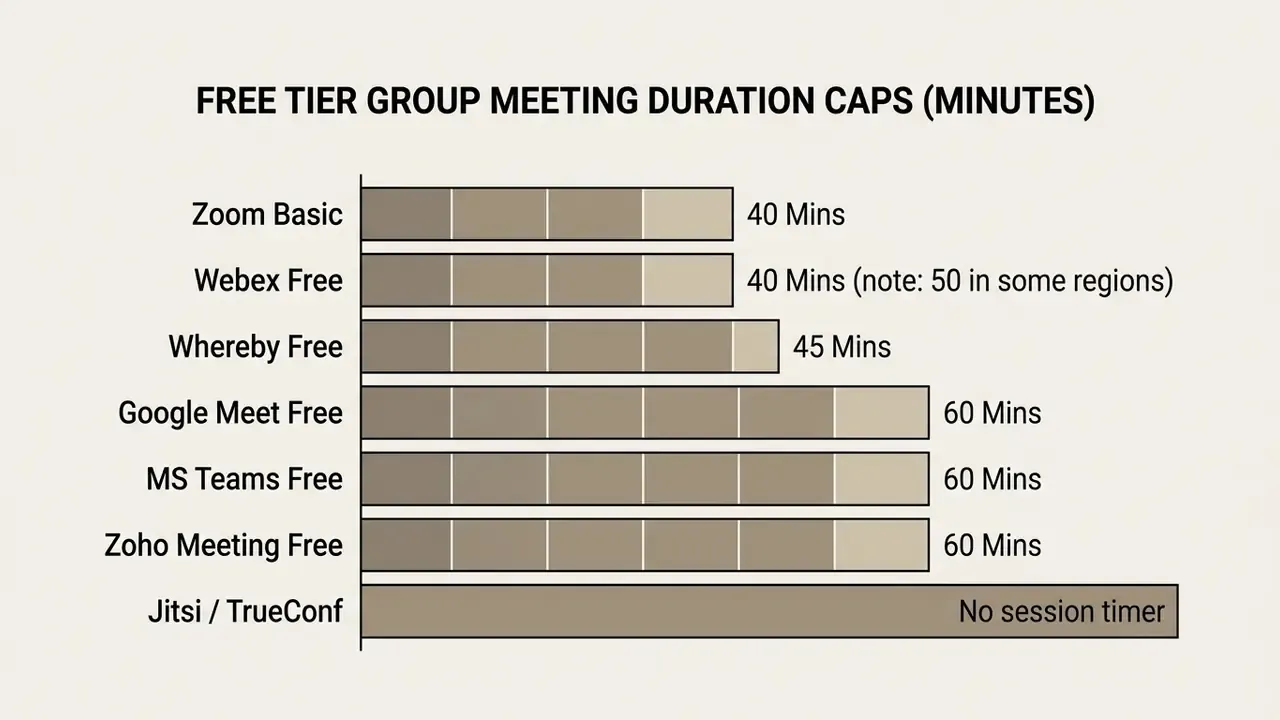
When you compare free online video conferencing services, count the restarts. Hosts can launch an unlimited number of free online video meetings per day, sure. Forcing 30 people to rejoin every 40 or 60 minutes still wrecks a multi-hour workshop or a client presentation.
So the conclusion is nuanced rather than absolute. Daily stand-ups and short syncs fit comfortably inside free caps. Training days, design sprints, client workshops and incident bridges do not. Duration caps bite hardest in exactly the sessions that carry the highest business value, which is, of course, the point of the design.
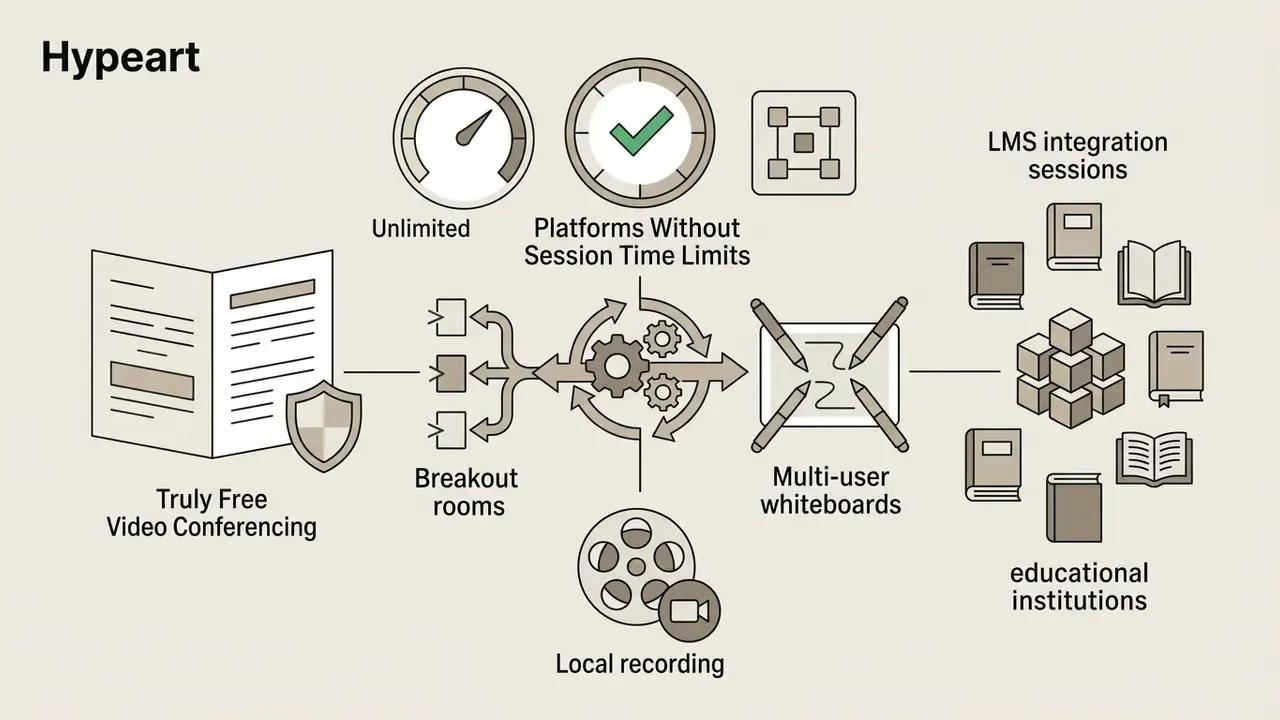
Truly Free Video Conferencing: Platforms Without Session Time Limits
Commercial SaaS vendors enforce 40 to 60-minute cutoffs to drive conversion. A handful of platforms simply do not. Unlimited duration is a business decision, not an engineering one, and these free online video meeting platforms prove it. You can run them as cloud instances or on your own infrastructure:
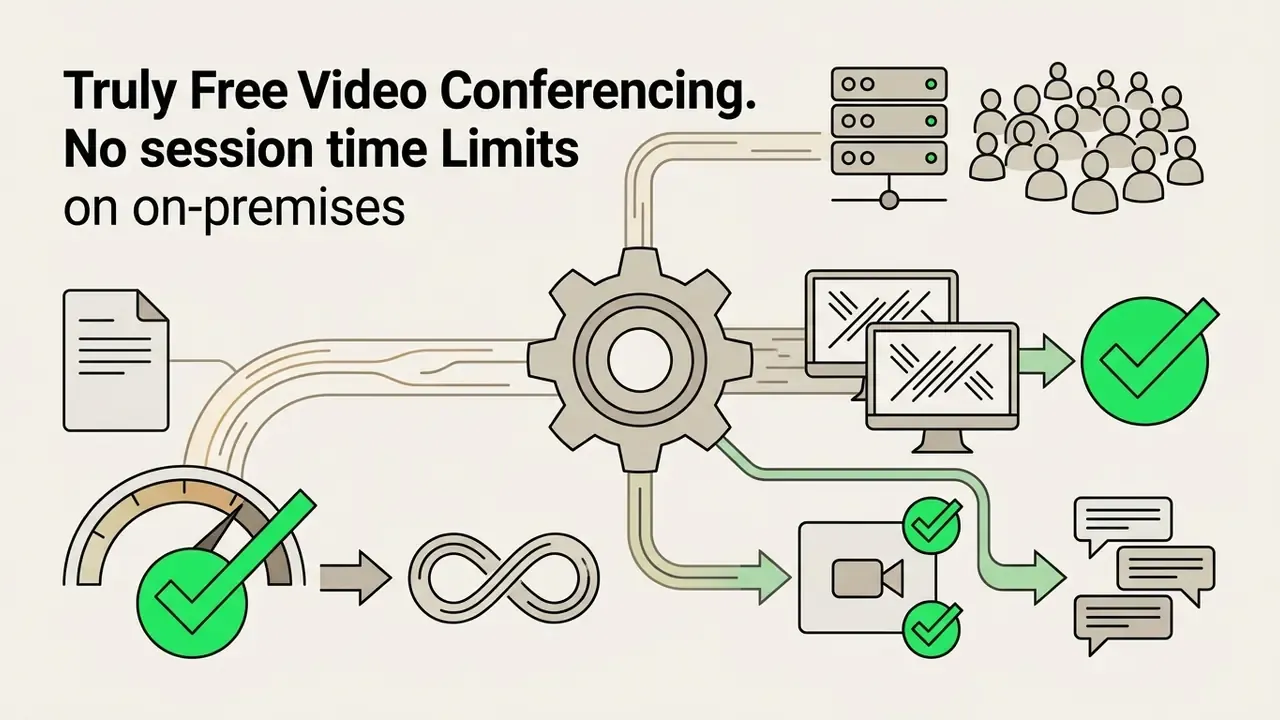
meet.jit.si). Self-hosted instances scale with host CPU and bandwidth; the public instance degrades noticeably past roughly 30 to 35 concurrent participants without tuning.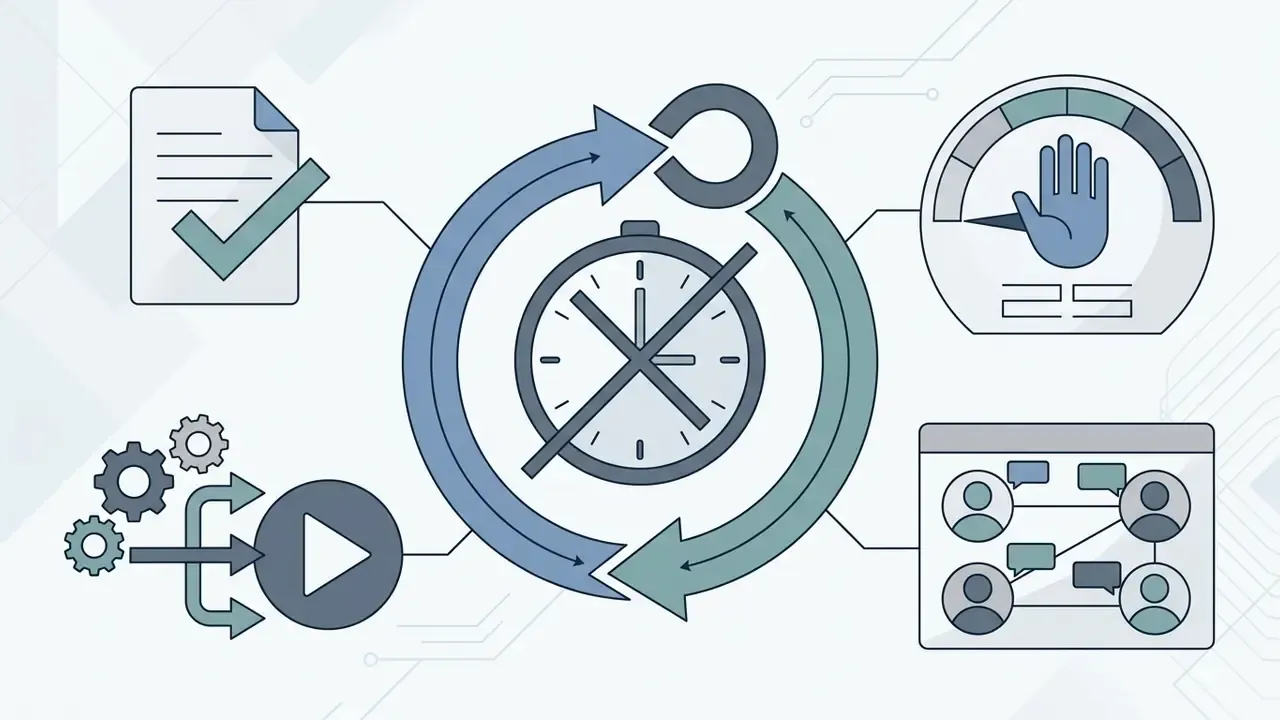
A note on conflicting «unlimited» claims. Several vendor-adjacent listings describe Google Meet's free tier as having no time limit. Google's own documentation for free personal accounts still specifies a 60-minute cap on group calls of three or more, and 24 hours for one-on-one. Treat «no time limit» as three separate categories:
- True no time limit
- sessions run for hours without disconnection (TrueConf, Jitsi, BigBlueButton, 3CX, self-hosted Rocket.Chat).
- Conditional no time limit
- no timer, but hard participant caps or feature lockouts make professional use impractical past a certain scale (Whereby's 3-participant legacy free tier, Zoho's feature-limited free plan).
- Hidden time limits
- marketing implies continuity, documentation defines a cutoff (Zoom Free at 40 minutes, Microsoft Teams Free at 60 minutes for group calls).
Free Plan vs Paid Plan: When a Team Needs More
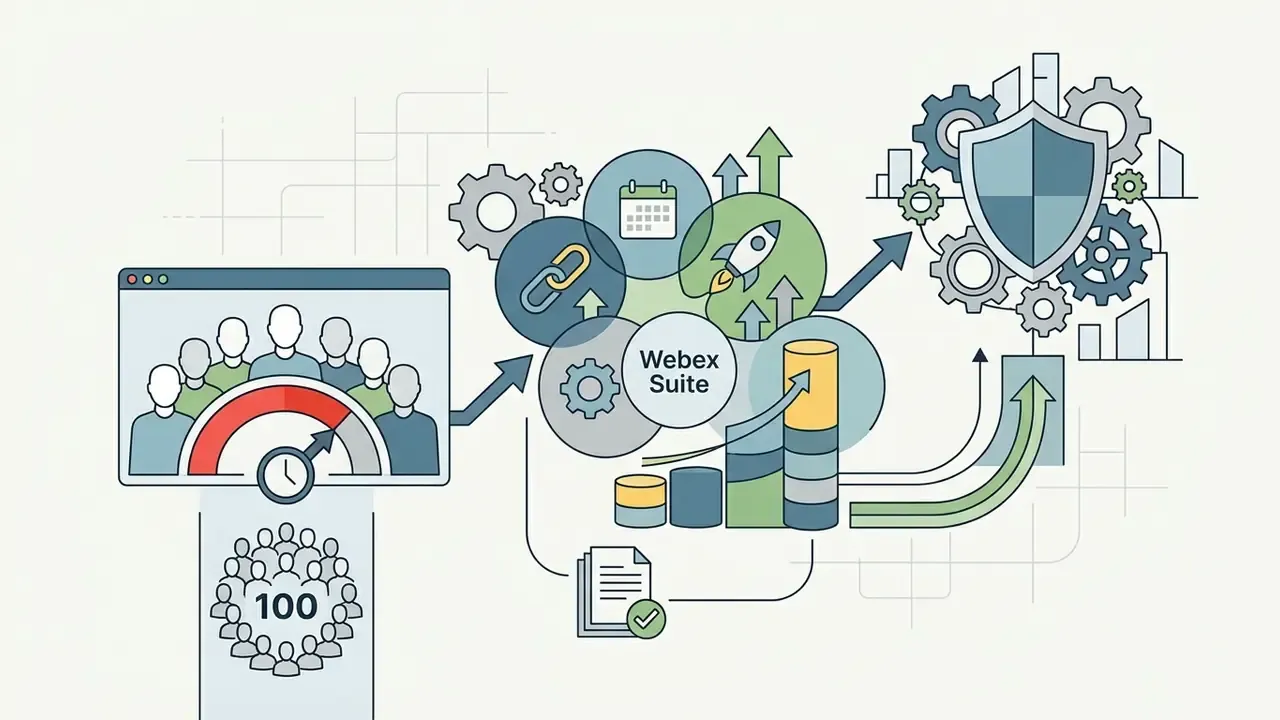
Moving off free online video conference platforms becomes necessary when operations require uninterrupted execution, persistent meeting records and centralized user management. Three triggers, in practice.
Free tiers restrict access to infrastructure controls. Cloud recording is disabled or heavily restricted everywhere, pushing users toward local device storage, which is where the compliance problem starts. Zoom's support documentation confirms cloud recording is a paid capability, and that downgrading to a free account removes access to existing cloud recordings until you resubscribe. Usage overviews, cloud-storage dashboards and 12-month recording reports are likewise scoped to Pro, Business and Enterprise owners and admins. Free host controls also lack automated user provisioning, central audit logging and domain-level security enforcement.
A hypothetical but familiar pattern: an enterprise in a regulated sector evaluated free online video conferencing software against internal compliance requirements. The compliance team found no centralized audit logging and no automated recording encryption, and discovered client discussions saved to personal laptops. The organization moved to a managed enterprise plan, consolidated accounts under SSO, and enforced cloud recording retention to remove the shadow-IT exposure.
«Evidence-based recording-policy guidance notes that recording increases transparency but can suppress candid discussion and create confidentiality exposure.»
The governance conclusion is not «record everything». It is to define, per meeting category, whether recording is mandatory (regulated advisory calls), optional (training) or prohibited (HR and legal matters), then enforce that through platform-level admin settings rather than individual host discretion.
Verified pricing and feature parameters follow. All figures reflect published vendor pricing and support documentation at the time of publication; confirm current terms in your own billing console before procurement, since regional pricing and promotional tiers differ.

The Real Cost of Moving Beyond a Free Version
Total cost of ownership for video conferencing software is per-seat licensing plus everything adjacent to it. The adjacent part is where budgets break.
Commercial licensing generally follows a host-based per-user, per-month structure. Upgrading a 20-person team to Google Workspace Business Starter at $8.40 per user costs $168 monthly, or $2,016 annually. Stepping up to Business Standard at $16.80 for cloud recording storage and larger capacity raises the baseline to $4,032 annually.
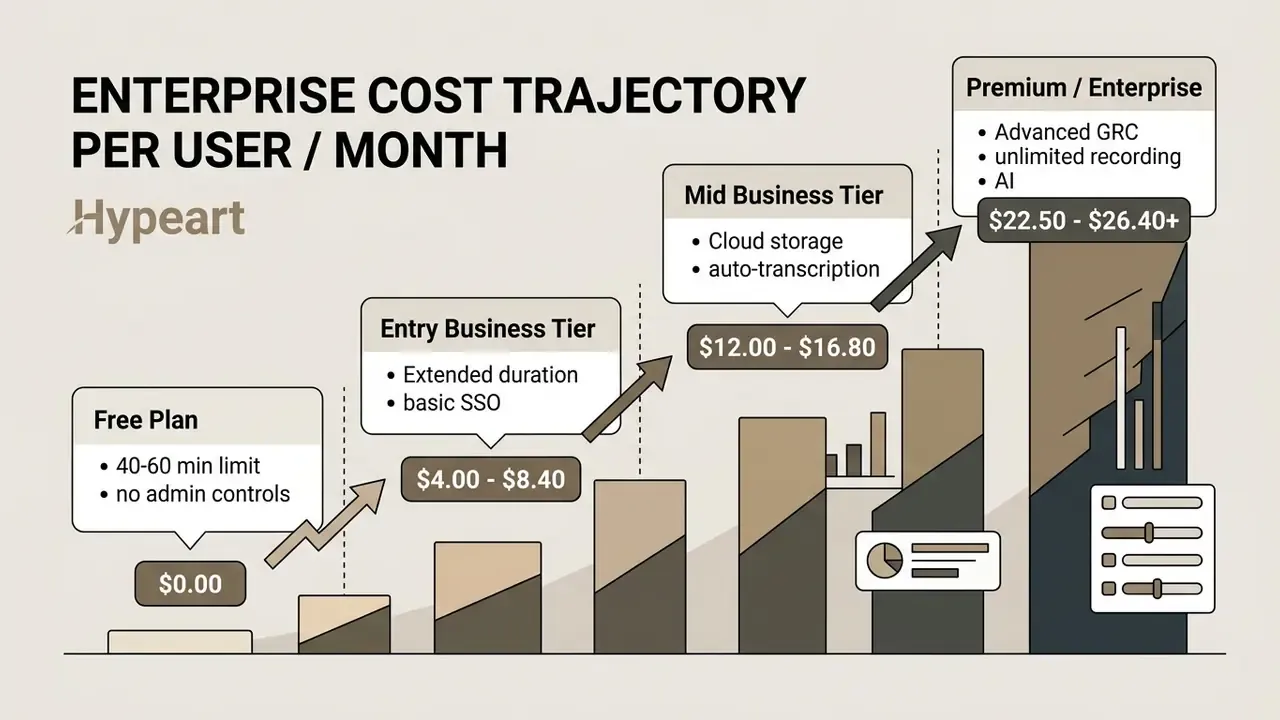
Secondary costs commonly include identity management add-ons (Cloud Identity Premium at $8.40 per user per month, for example), dedicated webinar licenses, hardware room kits and compliance archiving tools. Project user scaling deliberately, so license allocation matches actual hosting need rather than headcount.
Hidden-cost checklist for a defensible TCO model. Apply this before signing:
Annual TCO = (Licensed hosts x seat price x 12)
           + (Identity / SSO add-on x users x 12)
           + (Webinar or large-event licenses)
           + (Cloud recording overage + archiving/eDiscovery retention)
           + (Room hardware amortization: cameras, mic arrays, displays, consoles)
           + (Network uplift: dedicated bandwidth, QoS, SD-WAN)
           + (Self-hosted only: server, virtualization, TLS certs, backups)
           + (Internal labor: admin FTE %, helpdesk tickets, onboarding/training)
           - (Retired legacy telephony / audio-bridge spend)
Self-hosting zeroes the license line and raises the infrastructure and labor lines: provisioning, patching, certificate renewal, monitoring, on-call troubleshooting. All of it consumes internal IT capacity that rarely appears in the business case. The costliest mistake, though, is choosing on the wrong primary criterion. Selecting for the largest free participant cap while ignoring data governance and directory integration typically forces a full migration inside 18 months, and migrations cost more than licenses.
For a wider view of how vendors gate features on entry tiers, compare our analysis of free video editing software and platform cost structures in our review of pricing options. Teams modeling spend across tools can also cross-check assumptions with our AI Media Calculators.
Essential Features of Video Conferencing Software
Picking an enterprise video conferencing platform means verifying the functional modules that actually determine call stability, secure data handling and participant engagement. Feature lists are long; the load-bearing ones are few.
| Functional Feature | Technical Benchmark / Standard | Operational Business Value | Impact on Meeting Governance |
|---|---|---|---|
| Audio Quality | Opus codec; packet loss concealment; dynamic jitter buffering | Ensures speech clarity over degraded or constrained networks | Reduces cognitive fatigue and communication errors |
| Video Quality | H.264 / AV1 adaptive encoding; dynamic resolution scaling | Provides visual context and non-verbal engagement cues | Adjusts resolution automatically to hold the connection |
| Screen Sharing | Hardware-accelerated frame capture; desktop / window isolation | Enables live review of documents, code and slides | Requires host permissions to prevent data exposure |
| Cloud Recording | AES-256 encryption at rest; automated lifecycle deletion | Creates searchable documentation for absent colleagues | Subject to strict retention and compliance policy |
| Digital Whiteboard | Real-time multi-user vector canvas | Supports collaborative brainstorming and planning | Generates persistent artifacts for follow-up |
| In-Session Chat | Parallel text channel; encrypted data transfer | Enables side questions without interrupting speakers | Requires moderation and retention logging when regulated |
| Moderator Controls | Host lock, mute-all, waiting room management | Maintains session order and blocks unauthorized entry | Essential for sensitive internal discussions |
| Accessibility | WCAG 2.1 AA; ARIA-compliant controls; live captions | Enables equal participation for users with impairments | Often a procurement prerequisite under ADA / Section 508 |
| Interoperability | SIP / H.323 gateways; standards-based room endpoints | Connects legacy telepresence hardware to cloud sessions | Prevents stranded capital in room systems |
Video, Audio, Chat and Reliable Call Quality
High-fidelity audio transport is the single most critical factor in online video meetings. Speech intelligibility drives decision accuracy; degraded video can be tolerated, or switched off entirely, during congestion.
Under IETF RFC 7874 guidelines for WebRTC implementations, systems must support the Opus audio codec alongside legacy G.711. Opus adjusts bitrate from 6 kbps up to 510 kbps as network conditions shift. RFC 7874 also notes that RFC 3389 comfort noise is not recommended alongside Opus, since Opus carries its own comfort-noise mechanism. Research by He et al. (2024) on interactive QoE models shows conversational turn-taking degrades sharply once one-way latency passes 150 to 200 milliseconds, or round-trip time passes 300.
«Traffic measurements of Zoom and Webex confirm that once latency thresholds are exceeded, congestion-control algorithms reduce video resolution while prioritizing audio packets.»
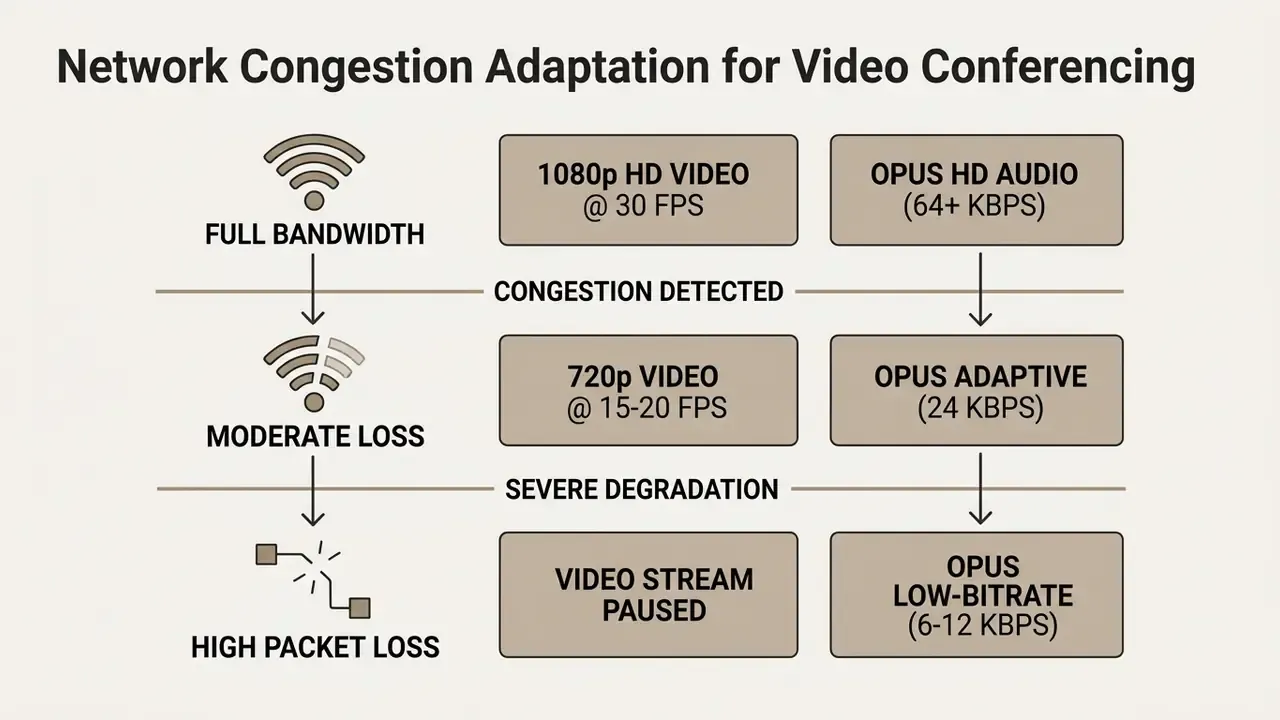
For reference, the U.S. National Science Foundation's virtual meeting checklist sets an operational floor of at least 10 MB/s upload and download, latency under 50 ms and jitter under 100 ms, and tells participants to switch to audio-only beyond that band.
Modern platforms run machine-learning noise suppression to isolate speech from ambient noise. For enterprise deployment, evaluate adaptive packet loss concealment and congestion control over low-bandwidth links, since IETF RTCWEB guidance requires implementations to cap maximum send rate where congestion control is absent.
Practically: assign a co-host to voice chat questions aloud, instead of letting chat run as an unmoderated second channel. Cheap fix. Rarely done.
Screen Sharing, Whiteboard and File Collaboration
Interactive co-creation tools turn a static presentation into a working session.
For managing commercial visual content inside collaborative design workflows, consult the AI Media Commercial-Use Hub. Teams producing assets during sessions may also want our reference on video editing tools, plus practical notes on the canva photo editor for quick diagram cleanup after a whiteboard session.
Recording, Captions and Meeting Management Controls
Recording and automated transcription convert an ephemeral discussion into an audit-ready knowledge asset. They also create a retention obligation, so treat them as paired decisions.
Platforms use automatic speech recognition for live captions and post-meeting transcripts, and they differ sharply in how artifacts are handled. Zoom separates live captions, which are in-session only and not retained or downloadable by participants afterward, from admin-enabled transcripts with configurable retention windows. Microsoft Teams stores transcripts alongside recordings in the organizer's OneDrive or in SharePoint, while automatic captions are explicitly not saved for later review.
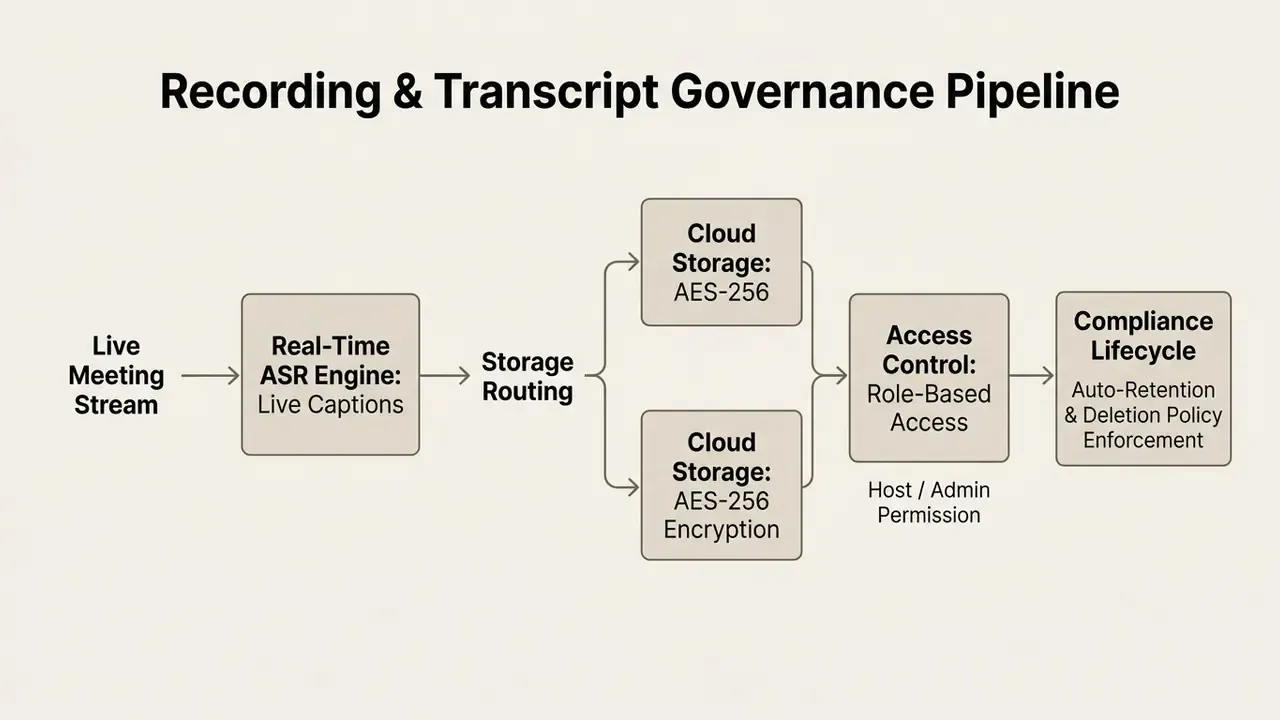
Host management controls (forced muting, waiting rooms, attendee removal, meeting lock) prevent unauthorized entry. Administrative dashboards need visibility into participation, encryption status and data storage location to satisfy corporate governance standards. Explore specific feature limits in our AI Media Comparison overview.
Accessibility and Inclusivity Standards (WCAG and Assistive Tech)
Enterprise governance requires video conferencing applications to meet WCAG 2.1 AA so users with sensory, motor or visual impairments can participate. In public-sector and education procurement, accessibility conformance is usually pass or fail, not a scored nice-to-have.
- Closed Captions and Live TranscriptionReal-time speech-to-text needs adjustable font sizes, high-contrast rendering and multi-language caption streams. Check whether captions are session-only or retained, because deaf and hard-of-hearing participants often depend on the post-meeting transcript.
- Keyboard Navigation and Screen Reader SupportEvery in-session control (mute, share screen, raise hand, chat) must be reachable via standard keyboard shortcuts (
Tab,Space,AltorCmdcombinations) and compatible with ARIA-compliant screen readers such as NVDA and JAWS. - Visual Contrast and Motion ControlInterfaces should enforce a minimum 4.5:1 contrast ratio for UI text and let participants disable non-essential animations or background effects. Germany's BSI minimum standard for videoconferencing additionally requires persistently visible camera and microphone status indicators, plus the option to join with audio and video disabled.
- Self-View ManagementGive participants a documented way to hide their own video preview.
Best Online Video Conferencing Platforms to Compare
| Platform | Free Group Time Limit | Free Participant Limit | Cloud Recording (Free) | Deployment Model | Baseline Paid Tier |
|---|---|---|---|---|---|
| Zoom Workplace | 40 mins | 100 participants | Local only | SaaS app / web | Pro: $13.33 to $15.00 per user/mo |
| Google Meet | 60 mins (group) / 24 h (1:1) | 100 participants | No | Browser-native SaaS | Starter: $8.40 per user/mo |
| Microsoft Teams | 60 mins (group) / 30 h (1:1) | 100 participants | No | Desktop / web SaaS | Essentials: $4.00 per user/mo |
| TrueConf Server | Unlimited | 1,000 registered (10 in group video) | Local server | On-premises / private cloud | Custom enterprise license |
| Jitsi Meet | Unlimited | Unlimited (server-dependent) | Via Dropbox | Open-source / self-hosted | Free / infrastructure cost |
| Cisco Webex | 40 to 50 mins (region-dependent) | 100 participants | No | SaaS app / web | Suite: ~$12.00 to $14.50 per user/mo |
| Whereby | 45 mins | Up to 100 (room-dependent) | No | Browser-native | Pro: ~$8.99 per user/mo |
| Zoho Meeting | 60 mins | 100 participants | No | SaaS / Zoho suite | Standard: $1.00 to $3.00 per user/mo |
| Discord | Unlimited | 25 video participants | No | Cloud app / web | Free / Nitro add-ons |
| BigBlueButton | Unlimited | Server-dependent | Yes (local server) | Self-hosted EdTech | Free / open-source |
| 3CX | Unlimited | 25 participants | No | Self-hosted / hosted PBX | Free / PBX license tiers |
| Livestorm | 20 mins | 5 participants | Yes | Web SaaS | Pro: ~$99.00 per month |
Readers comparing adjacent media tooling can also review our matrix of AI video generators for context on how free-tier gating works across the wider video software market.
Zoom, Google Meet and Microsoft Teams for Everyday Meetings
Three vendors dominate the commercial market, each with a different ecosystem logic:
- Zoom Holds a substantial share of measured usage. Third-party analytics place it near 55.9% of users, with Microsoft Teams around 32.3% and Google Meet around 17%. (Market-share figures vary widely by methodology. User-share surveys, revenue estimates and installed-base counts produce different rankings, and the underlying panel data is proprietary. Treat these as directional only.) Zoom's strengths: cross-platform accessibility, dedicated breakout rooms, granular host controls, broad third-party integration.
- Google Meet Embedded directly in Google Workspace, with no desktop client required. It runs natively in modern browsers, integrates with Google Calendar and Google Docs, and lets users start calls from inside a document. Paid Workspace tiers add recording, attendance tracking, noise cancellation and breakout rooms.
- Microsoft Teams Integrated into Microsoft 365 as a hub for channel messaging, file collaboration and structured meetings. Paid plans support up to 300 interactive participants as standard, scaling to 1,000 for enterprise interactive events, with Teams Premium layering on advanced security and meeting-protection features.
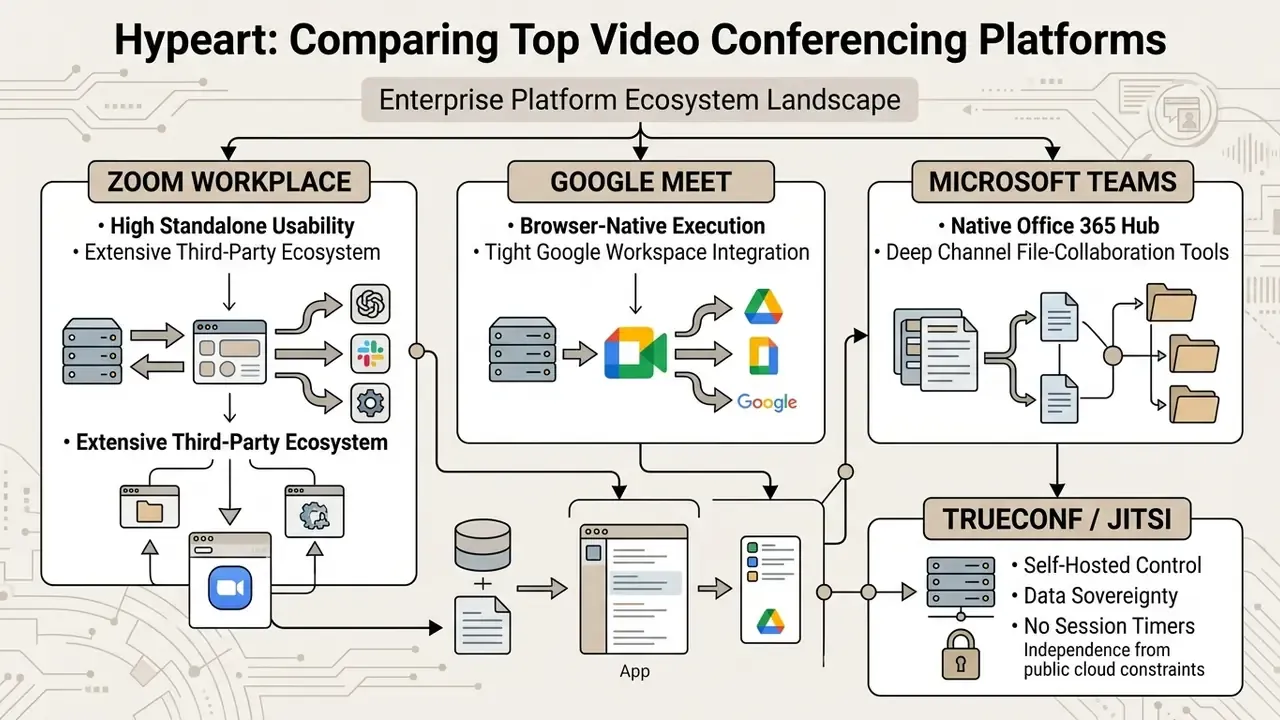
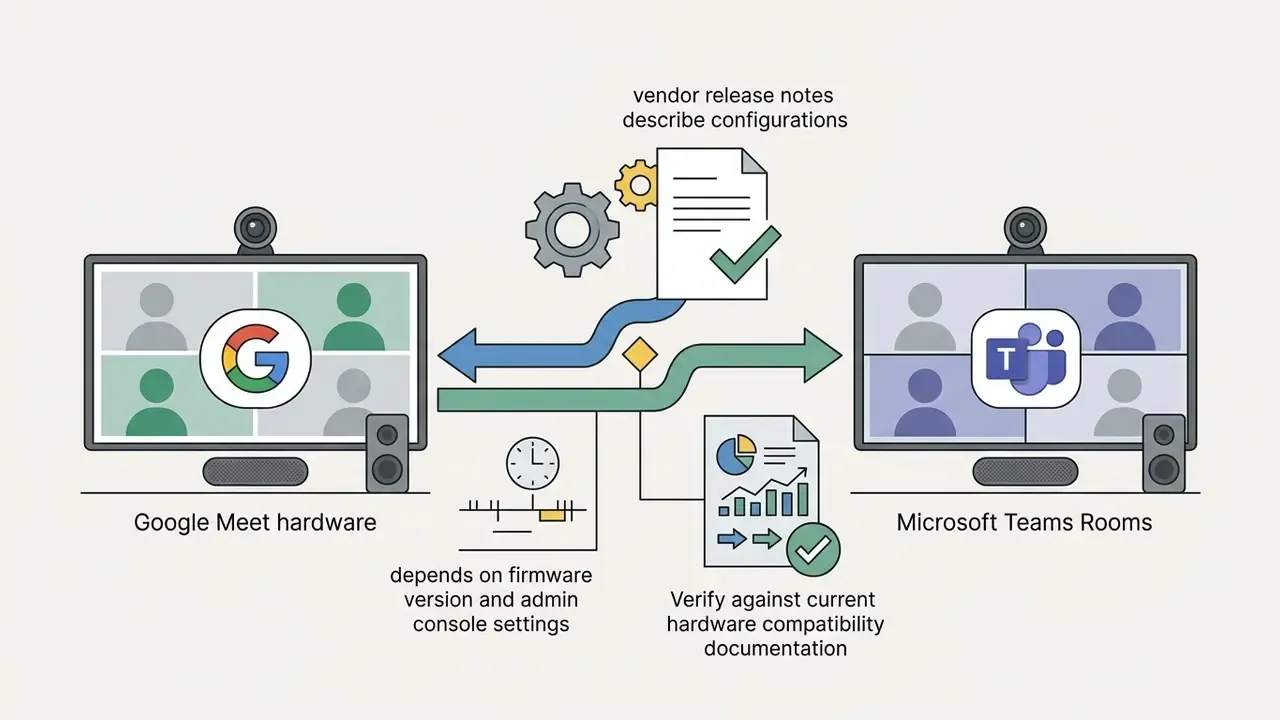
Cross-platform interoperability has improved. Google Workspace and Microsoft both document configurations allowing direct cross-joining between Google Meet hardware and Microsoft Teams Rooms without external gateway hardware, and each publishes a calendar add-on for scheduling the other's meetings. Confirm supported firmware and admin-console prerequisites in current release notes before you rely on it in production.
Jitsi and Zoho Meeting for Free Calls and Ecosystem Use
For teams that want a different deployment model or a cheaper ecosystem fit, these two are the practical shortlist:
- Jitsi Meet Fully open-source WebRTC under Apache 2.0. No account needed on public instances (
meet.jit.si), and meeting names double as persistent, password-protectable room names. Organizations can self-host the complete stack (web client, Prosody XMPP signaling, Jicofo conference manager, Jitsi Videobridge) on private servers using the documented Debian or Ubuntu path with ports 80, 443 and 10000, keeping full data sovereignty. Trade-offs are real: no native user management, no directory integration, community-only support. - Zoho Meeting Aimed at small and mid-sized businesses inside the Zoho ecosystem. The forever-free plan supports 60-minute group sessions for up to 100 participants and includes digital whiteboards and moderator controls. Paid upgrades tie into Zoho CRM, Zoho Bigin and Zoho WorkDrive. One caveat: browser-only joining is not universal, since Zoho documents mobile-browser joining without the app as an Enterprise-tier webinar capability.
How to Choose the Right Video Conferencing Platform
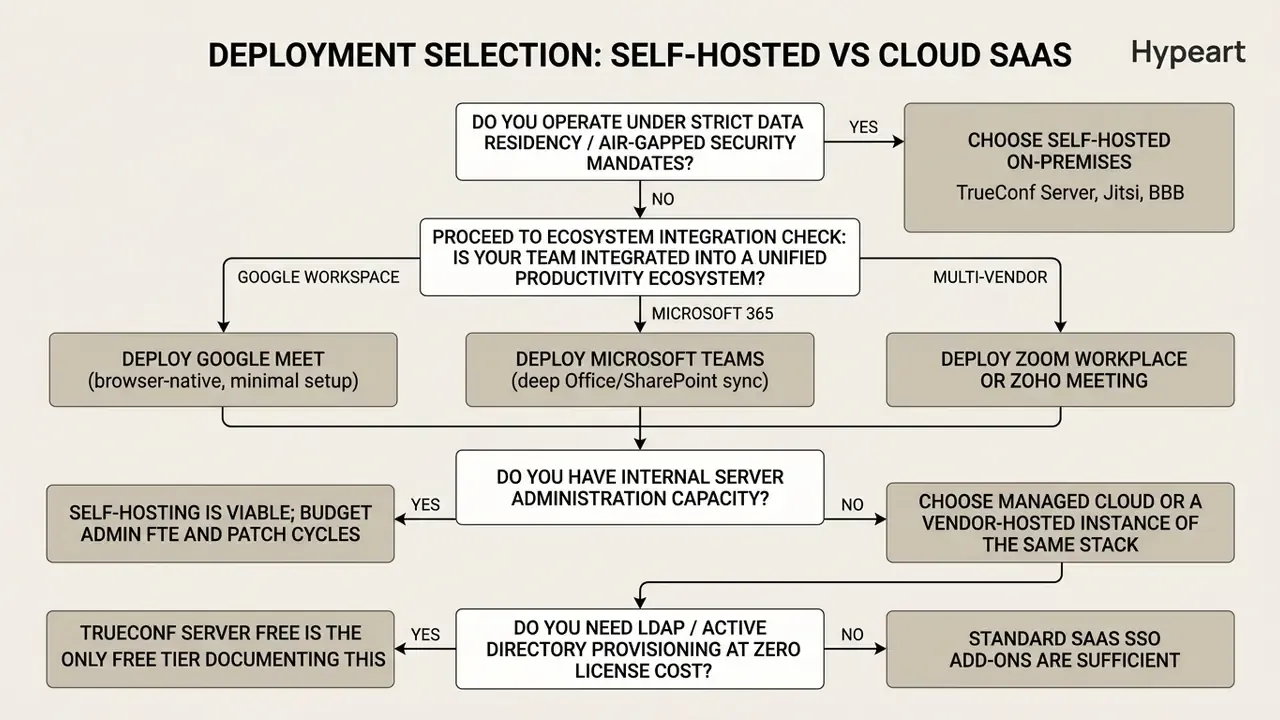
Choosing an online platform for video conference deployment means weighing four parameters: meeting size, security requirements, hardware compatibility and workflow integration. NIST IR 5485 frames procurement as a sequence: evaluate requirements, partition the organization for staggered rollout, define a schedule, implement in stages. The UK NCSC adds a security risk assessment across a provider shortlist, with organization-wide defaults set before rollout.
Follow the decision tree below:
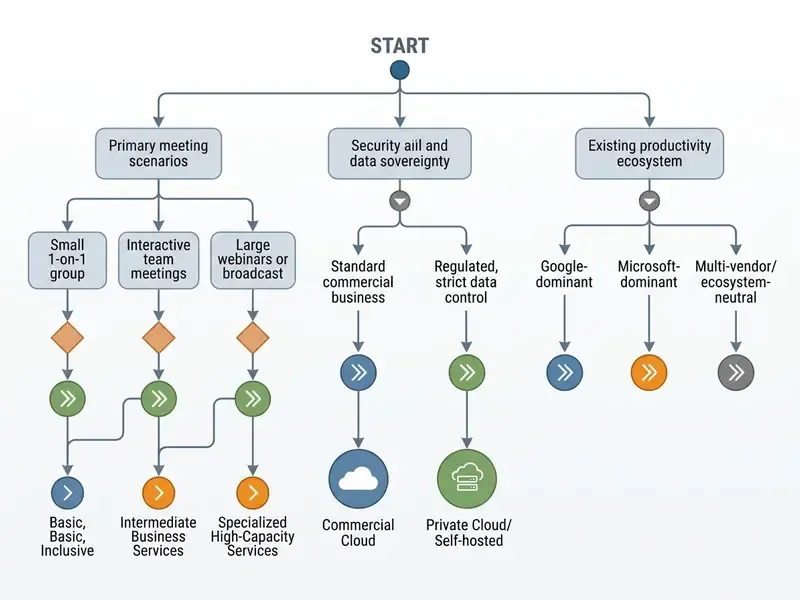
Participants, Meeting Duration and Event Format
Start by defining capacity limits and session structures across your real operational scenarios:
An illustrative case: an engineering firm moved design reviews from a free video conferencing platform to a self-hosted instance. Removing 40-minute resets and creating permanent virtual design rooms let the team run continuous multi-hour reviews while proprietary schematics stayed on internal servers. Two problems solved with one decision, which is rarer than vendors imply.
Security, Privacy and Host Controls
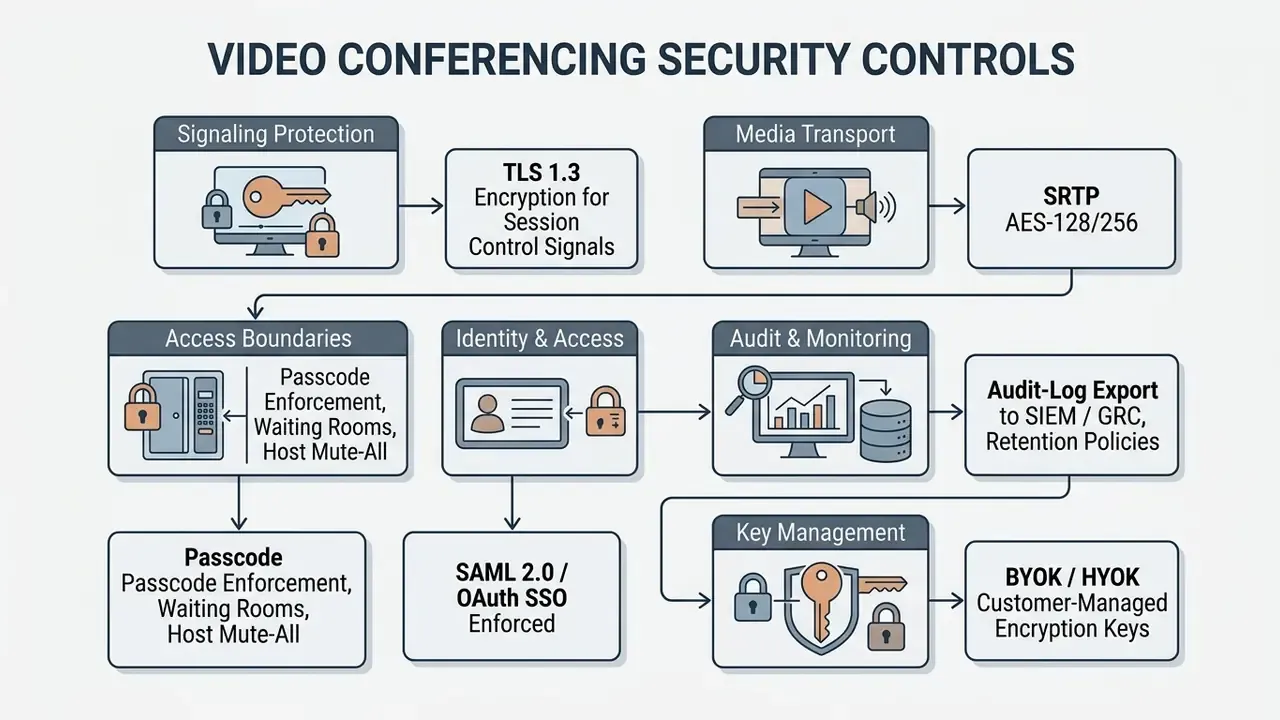
Security evaluation should prioritize end-to-end data protection, access control and compliance attestations, in that order.
Security selection should also weigh human-factor risk, which almost never appears in vendor whitepapers:
«Videoconference fatigue is defined as somatic and cognitive exhaustion caused by intensive use of conferencing tools, with symptoms including anxiety, stress and headaches.»
«Raised-hand queues and chat moderation features can reinforce racial and gender hierarchies when applied without attention to equity.» Pendse et al., «All of the White People Went First», analysis of bias in video meetings (2023 to 2024)
The operational implication is simple enough: document facilitation norms next to technical controls. Rotate who speaks first, surface chat questions verbally, and audit whether the same people are consistently muted, skipped or interrupted. Controls without norms produce compliant meetings that still exclude half the room.
For additional information on media compliance standards and regulatory frameworks, consult our AI Litigation and Case Timelines resource.
Integrations, Browser Access and Team Workflows
Workflow efficiency depends on how cleanly the tool fits your existing stack and endpoints:
- Browser-Based Access WebRTC-compliant platforms (Google Meet, Whereby, Jitsi) let guests join from Chrome, Edge or Firefox without downloading an executable. The W3C WebRTC Recommendation defines the browser-native APIs behind plugin-free joining, which removes friction for external clients and non-technical stakeholders.
- Calendar and Task Sync Direct integration with Google Calendar, Outlook and project management tools automates link generation, invite distribution and task tracking. Cross-vendor add-ons now allow scheduling Teams meetings from Google Calendar and Zoom meetings from Gmail.
- CRM Connectors CRM-linked conferencing (Zoho Meeting with Zoho CRM and Bigin, Zoom and Teams with Salesforce and Dynamics) writes call history, recordings and follow-up tasks back into the customer record. Verify whether the connector is native or needs a middleware subscription, because that line item surprises people.
- API and Developer Access Enterprises embedding video inside custom portals or mobile apps should evaluate platform WebRTC SDKs and REST APIs. Review integration options in our api section.
Deployment Selection Checklist: Self-Hosted vs Cloud SaaS
How to Host an Online Video Meeting
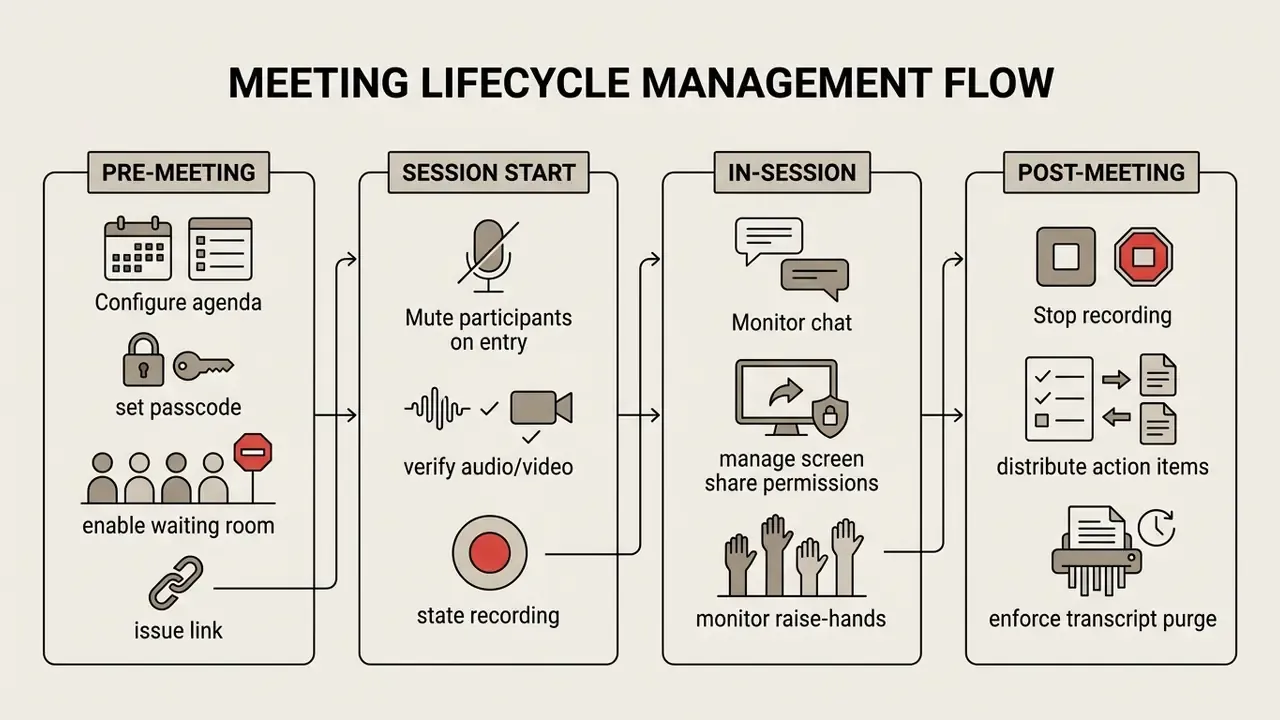
Hosting an online video call meeting well is three things at once: technical preparation, access management and structured in-session moderation. IETF RFC 9400 (2023) recommends planning fully online meetings around agenda structure, session count, session length and participant composition. ITU remote-participation guidelines (2025) add explicit governance rules for hybrid sessions with remote attendees.
Instant Meetings, Scheduled Calls and Meeting Rooms
Hosts launch sessions through three distinct workflows:
- Instant Meetings Generated on demand for ad-hoc discussion. The host starts the meeting, opens the Participants panel, and copies or sends the temporary invitation link through a messaging channel. The link expires when the session ends.
- Scheduled Calls Created in a calendar interface for a fixed date and time. The host adds attendees, sets the window, enables the Teams or Zoom toggle, and selects Send. Invites carry structured access credentials (link, meeting ID, passcode, dial-in numbers) and automatically reserve calendar time.
- Persistent Meeting Rooms Dedicated spaces tied to a fixed meeting ID or custom URL, created by enabling Recurrence or «Make Recurring» and choosing a repeat pattern. In Zoom, recurring meeting IDs stay valid for 365 days after the last occurrence starts. These rooms work well as team hubs or office hours, running continuously under host waiting-room supervision. For hardware rooms, the organizer adds the room itself as an attendee or location, so the invite generates the room's access details.
Hosting Controls for Productive Group Video Conferences
Active facilitation keeps a large group video call usable. Run this checklist:
For handling recordings after the session, trimming, captioning and publishing internal training assets, see our guide to post-meeting video workflows. Teams assembling recap clips at speed sometimes use the capcut online video editor or a canva video maker template for lightweight edits.
FAQ About Online Video Conferencing
Can Guests Join an Online Video Meeting Without an Account or App?
Yes. Leading platforms let external guests join through browser-based video tools with no account and no download. Platform specifics for guest access:
- Microsoft Teams: External users click the link, select «Continue on this browser», type a display name, and wait for host admission. Supported browsers include Microsoft Edge and Google Chrome. Admins control guest video availability in the Teams admin center.
- Zoom: Guests open the invitation URL, select «Join from your Browser», grant camera and microphone permissions, enter a screen name and join. No Zoom account required.
- Google Meet: Guests open the link, enter a display name, and click «Ask to join». Without a Google account, an in-domain host must approve entry manually.
- Jitsi Meet / Whereby / TrueConf: All three support link-based guest entry straight from a browser. TrueConf's free server license includes one concurrent unauthenticated guest connection.
Why Do Free Plans Cut Meetings Off at 40 or 60 Minutes?
The cutoff is commercial, not technical. Server compute and bandwidth accrue linearly and do not reset at minute 40. The timer exists because it gives you enough time to evaluate a product, and not enough to depend on it for free. Self-hosted platforms make the point plainly: the same server that hosts a 15-minute stand-up hosts a six-hour planning session with no extra configuration and no license fee.
Which Free Online Video Conference Platforms Offer No Time Limit?
TrueConf Server Free (self-hosted, 1,000 registered users, 10 in group video), Jitsi Meet (open-source, server-dependent capacity), BigBlueButton (self-hosted, education-focused), 3CX (25 participants with integrated PBX), Discord (25 video feeds) and self-hosted Rocket.Chat all run sessions without a timer. Check participant caps carefully, because several are low enough to make them impractical above small-team scale.
Do Free Plans Include Cloud Recording?
Generally no. Zoom Basic allows local recording only, and Zoom documents that downgrading to free revokes access to previously stored cloud recordings. Google Meet and Microsoft Teams free tiers exclude cloud recording outright. Self-hosted BigBlueButton and TrueConf are the exceptions, since recordings write to your own server instead of a vendor cloud.
Can a Free Video Meeting Online Handle Client-Facing Calls?
It depends on your regulator, not your preference. For a short prospect call, a free video conference online is fine. For regulated advisory conversations, you need recording retention, audit logging and SSO, none of which appear on free tiers. A one-hour free session that ends mid-discussion also costs credibility, which never shows up in a TCO model.
Can an Online Video Conference Be Embedded on a Website?
Yes. Meetings and persistent rooms can be embedded into external websites and custom applications using iframe elements or WebRTC Software Development Kits. See the appendix below for implementation details and browser-policy constraints.
Technical and Commercial Recommendations Summary
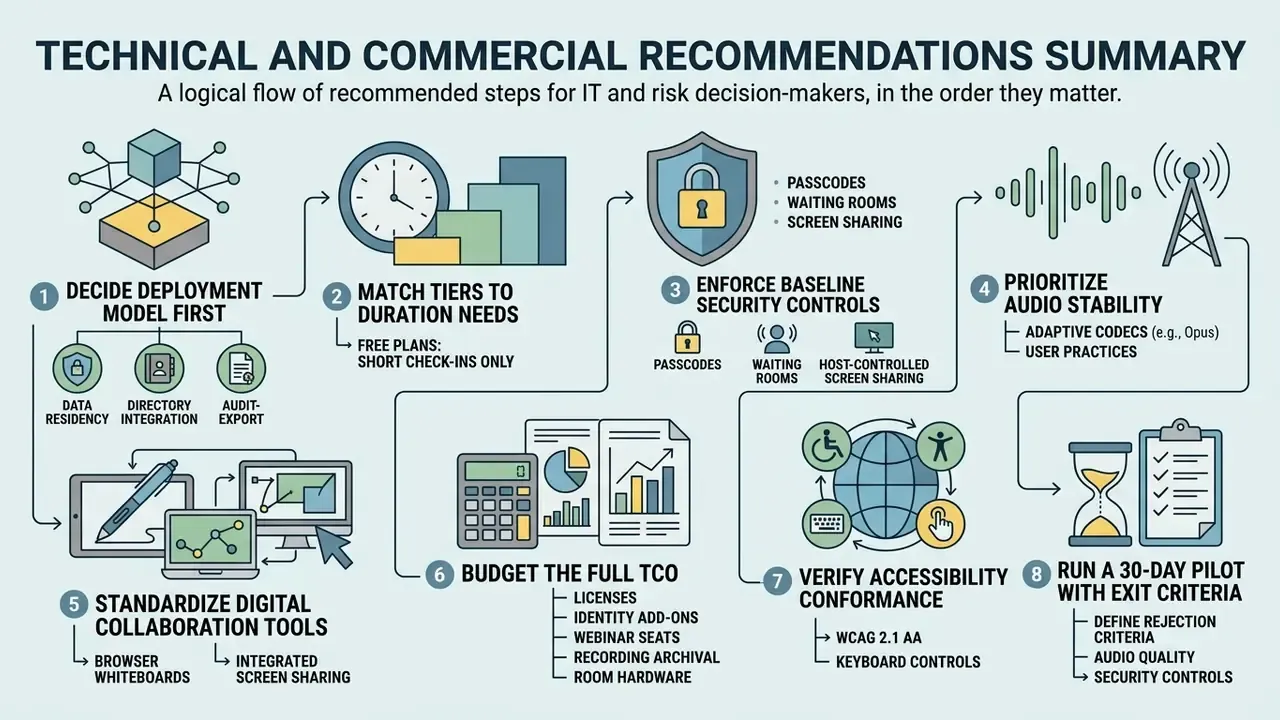
Practical next steps for IT and risk decision-makers, in the order they usually matter:
- Decide Deployment Model First: Establish data residency, directory integration and audit-export requirements before you compare feature checklists. Choosing on free participant caps alone is the most common cause of forced migration within 18 months.
- Match Tiers to Duration Needs: Use free plans for short check-ins only. Move to entry business tiers, or an unlimited-duration self-hosted platform, when you need uninterrupted sessions, cloud recording and centralized user management.
- Enforce Baseline Security Controls: Mandate passcodes, waiting rooms, host-controlled screen sharing, disabled in-meeting file transfer and SSO across corporate accounts. Route audit logs to your SIEM from day one, not after the first incident.
- Prioritize Audio Stability: Choose platforms with adaptive codecs such as Opus, and instruct users to drop to audio-only past 200 ms latency.
- Standardize Digital Collaboration Tools: Browser-accessible whiteboards, integrated screen sharing and automated transcription keep remote and in-room participants on equal footing.
- Budget the Full TCO: Model licenses, identity add-ons, webinar seats, recording archival, room hardware, network uplift and internal admin labor, not just the seat price.
- Verify Accessibility Conformance: Require WCAG 2.1 AA documentation, keyboard-navigable controls, ARIA-compatible screen reader support and adjustable captions before procurement sign-off.
- Run a 30-Day Pilot With Exit Criteria: Define in advance what would make you reject the platform: audio failure rate, guest-join friction, missing log fields. Pilots without rejection criteria always end in a purchase.
Developer and Integration Appendix: Embedding Video Rooms
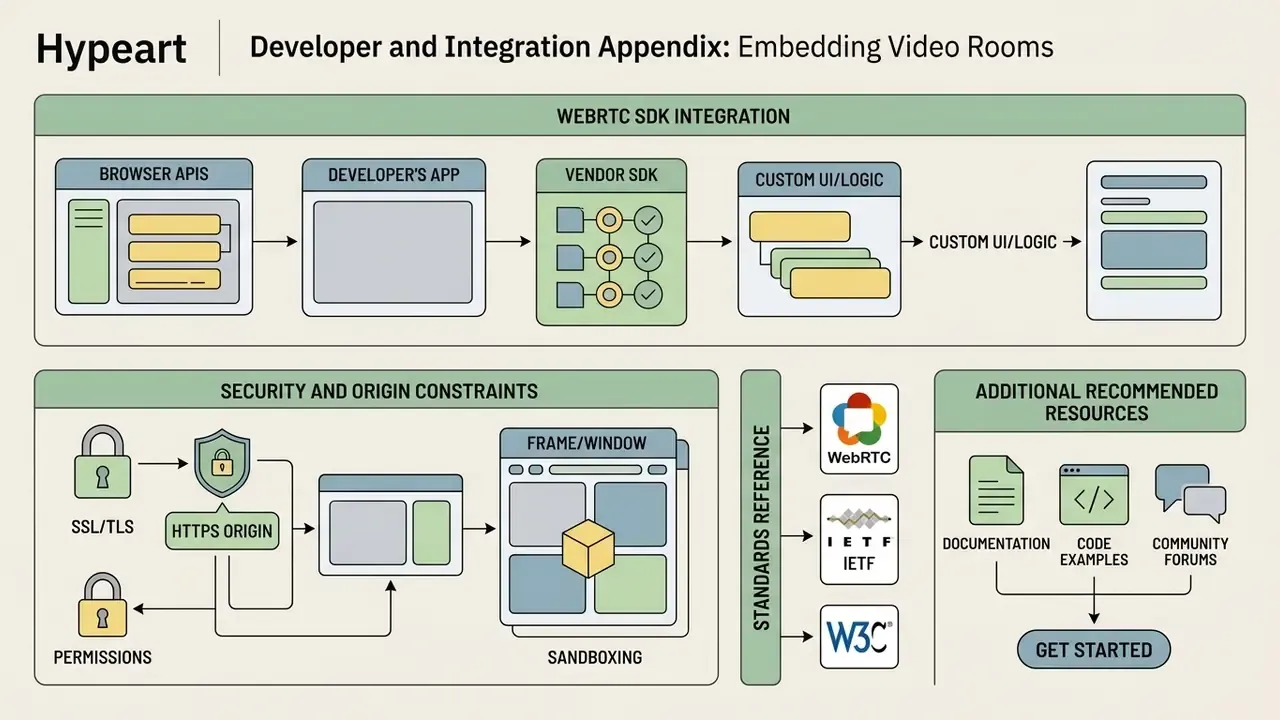
Embedded conferencing is a separate technical workload from vendor selection, with its own browser-policy constraints.
iframe source: https://meet.jit.si/YourCustomRoom
allow list:    camera; microphone; display-capture; autoplay
requirement:   parent page served over HTTPS (secure context)
- Iframe Embedding
- Platforms such as Jitsi Meet and TrueConf publish direct iframe embed scripts. The host page must be served over HTTPS, and the iframe container needs explicit feature permissions, since cross-origin frames receive no capture permissions by default. In practice the container references the room URL and declares an allow list covering camera, microphone, display capture and autoplay:
- WebRTC SDK Integration
- Enterprise solutions use client-side JavaScript SDKs to render video frames inside a custom application, keeping full control of styling, layout and authentication. SDK embedding keeps the room inside the host application but stays bound by
script-src,connect-srcand secure-context rules. - Security and Origin Constraints
- Embedded rooms must satisfy browser security policies (
script-src,connect-src,X-Frame-Options). Framing usually fails for one of two reasons: the vendor disables iframe embedding by default, or the response carriesX-Frame-Options: DENY. Custom domain configuration keeps the embedded room on an instance-specific hostname and simplifies origin policy handling. - Standards Reference
- The W3C WebRTC Recommendation defines the browser APIs. IETF RFC 8827 specifies the WebRTC security architecture, and RFC 7478 documents interoperability use cases for browser-based real-time communication.
Additional Recommended Resources
- Compare browser-based and desktop editing options in our guide to video editing tools.
- Review free-tier limits across adjacent video software in our comparison of free video editing software.
- Plan recording follow-up and publishing steps with our guide to post-meeting video workflows.
- Generate quick session promos with a capcut ai video generator workflow.
- Model licensing and infrastructure spend with our AI Media Calculators.
- Review platform-by-platform feature gating in our AI Media Comparison hub.
- Evaluate embedded and programmatic integration options in our api section.
- Access customer assistance options in our AI Media Support and Troubleshooting hub.
- Consult the complete reference index in our AI Media Glossary.