Last updated: for 2026 operations (CapCut Terms of Service revision dated April 15, 2026).
Key Takeaways
- What it is CapCut AI Video Generator converts text prompts, full scripts, or uploaded images into editable multi-track video drafts using the Seedance 2.5 engine, with cinematic style presets rendered through the Seedream 4.0 pipeline.
- Two script pipelines
Narrationmode auto-writes and voices talking-head content;Commercialmode accepts manually entered product selling points for marketing and ad creatives. - Pricing and storage (2026) Free ($0), Standard (~$9.99/month, ~100GB cloud storage), Pro ($19.99/month or $179.99/year, up to 1TB cloud storage, 4K/HDR export, full advanced AI suite). CapCut Teams adds shared workspaces and per-seat billing for agencies.
- Commercial rights are asset-level, not subscription-level only media explicitly labeled "Commercial Use" or "Dual Use" is cleared for business promotion, and built-in Commercial Sounds are restricted to CapCut, TikTok, and TikTok for Business.
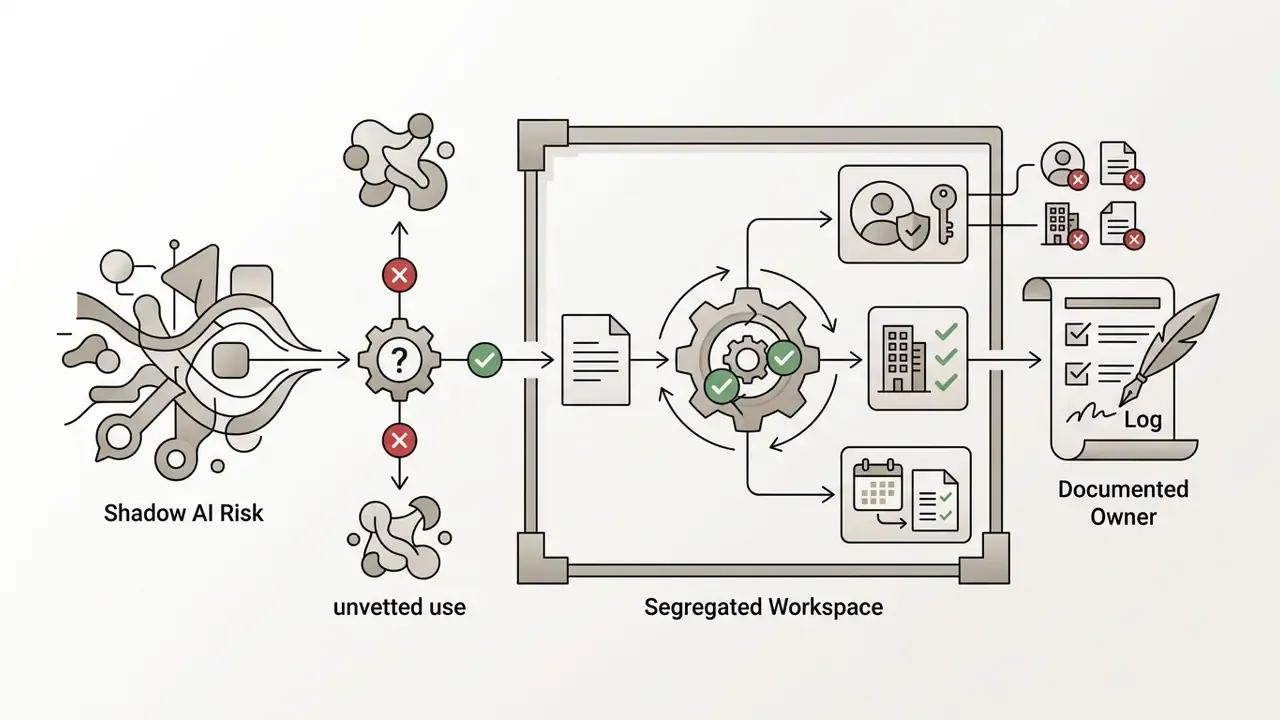
- Governance gap to plan for CapCut is a consumer/SMB product without full enterprise SSO/SAML or a documented model-training opt-out for prompts, so risk, security, and compliance teams should treat unmanaged use as Shadow AI.
What is CapCut AI Video Generator and What Videos Does It Create
CapCut AI Video Generator is an automated video creation system powered by the Seedance 2.5 engine and the Video Studio workspace. It transforms written prompts and multi-scene scripts into editable video drafts complete with digital avatars, AI voiceovers, visual scenes, background music, and synced captions.
The system belongs to the emerging class of AI-powered short-form video generators (ASVGs) built to compress digital content production. Rather than producing a fixed, uneditable file, the tool generates multi-layer project drafts. Creators can inspect each scene on a multi-track timeline, substitute visual elements, alter voice synthesis parameters, and adjust typography before final rendering.
That distinction matters more than it sounds. An editable draft can be corrected; a sealed render can only be regenerated.
Video Generation from Text, Script, and Ideas
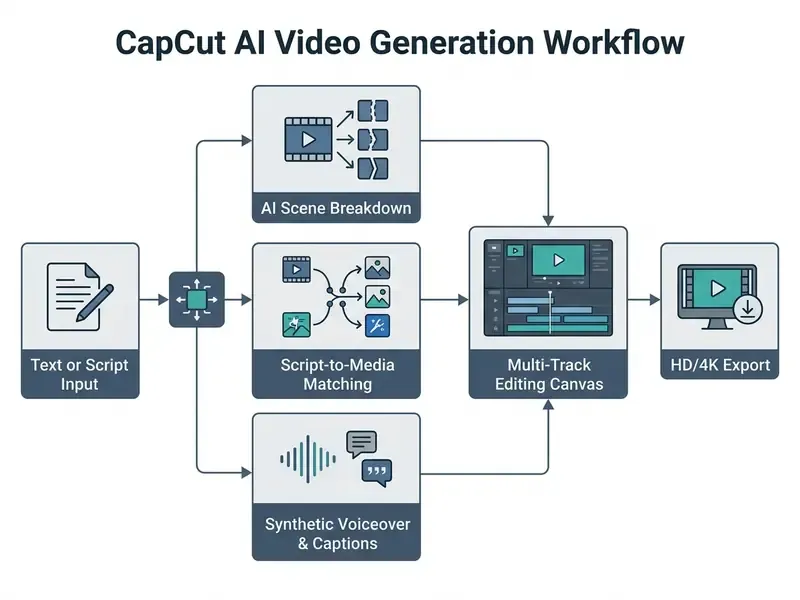
CapCut's text-to-video pipeline converts written concepts into structured video sequences using natural language parsing and visual asset mapping. Users can drop a brief prompt into the capcut ai text to video interface, see our reference explainer on text-to-video AI for the underlying model mechanics, or lean on the integrated AI Writer to draft a multi-scene script from a broad topic.
Peer-reviewed analysis of generative AI adoption inside video production supports this workflow pattern.
Prompt-driven workflows automate scene breakdown while leaving narration pacing under human control. For complex multi-slide presentations, teams often combine script tools with solutions like the tome ai presentation generator to outline structured visual storyboards before video production starts.
When processing an input prompt, the ai video generator capcut breaks the text into logical scene beats. It assigns corresponding background stock clips or generated visual elements, aligns synthesized text-to-speech audio, and produces synchronized auto-captions. This end-to-end handling turns raw text into complete draft videos in minutes, which accelerates capcut ai video creation for digital teams evaluating capcut ai generated videos.
One quirk that wastes evaluation time: CapCut exposes the same underlying capability through several differently labeled entry points. "AI Video Generator," "AI video maker," "Instant AI video," "Script to video," and "Free AI video maker" are surfaced from separate product screens on web, desktop, and mobile. Knowing that all of these labels resolve to the same generation stack prevents an hour of arguing over screenshots taken on different devices.
Where to Access CapCut AI Video Generator: Official Site, Web, Desktop, and App
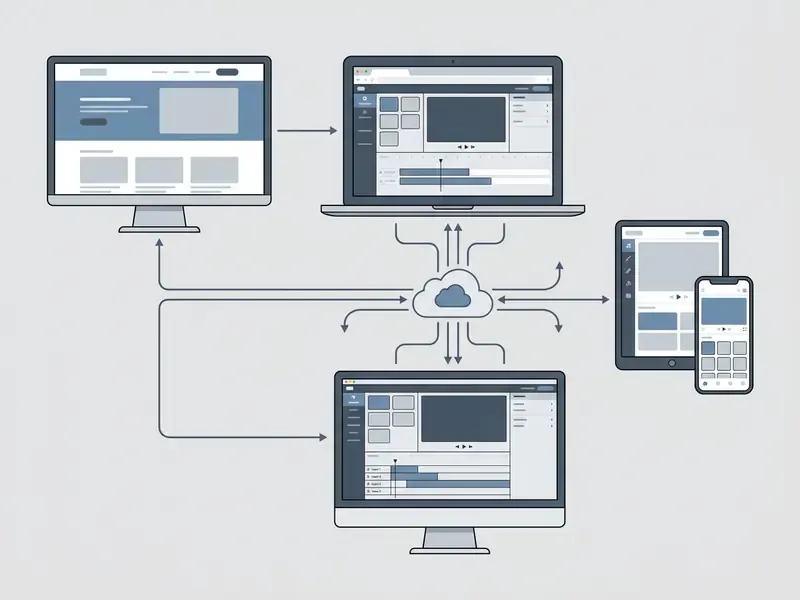
CapCut AI Video Generator is available online through CapCut Web in any standard desktop browser, or through dedicated desktop and mobile applications. Users can enter the platform via the official AI tools hub, the Video Studio interface, or platform-specific apps for Windows, macOS, iOS, and Android.
CapCut Web: Launching AI Video Generator Online in the Browser
CapCut Web provides browser-based access to the AI video generator with no local software installation. Creators navigate to the capcut ai video generator official site, select the AI Video Maker entry point, and launch the Instant AI Video workspace directly inside Chrome, Safari, or Edge.
The online environment connects to CapCut cloud servers, so users can enter text prompts, configure visual styles, choose voiceovers, and run generation entirely in the browser. Teams evaluating browser-based creation tools can compare workflow speeds across platforms and product categories using our reference guide to AI video generators, our comprehensive AI Media Comparison Matrices, or our benchmarks in the guide to the best free ai video generator, alongside the export and watermark limits documented for free AI video generators.
Opening the official capcut ai video generator link on the capcut ai video generator site grants immediate access to browser generation. That makes capcut ai video generator online convenient for rapid testing on managed corporate devices where local app installation is blocked. Convenience cuts both ways, though: zero-install access is exactly what turns unmanaged CapCut usage into a Shadow AI vector inside a regulated organisation. See the data-governance section below.
CapCut Desktop and Mobile Video Maker
CapCut Desktop provides a local editing workspace for Windows (Windows 7 or above) and macOS (macOS 10.14 or above). The desktop build wires the AI Video Maker into its primary homepage launcher and unlocks multi-track timeline editing with local hardware acceleration.
The mobile app on iOS and Android surfaces AI video tools through the internal menu under AI Lab or Tools, where flows such as "AI story maker" and "AI Video" accept a prompt, a visual style, and a duration before one-tap generation. Mobile workflows favour quick short-form output; the desktop app gives full timeline control for complex multi-layer projects. CapCut's own help documentation notes that the Desktop AI Video Maker rolled out in phases and may not appear for every account or region, so a missing panel is often a rollout artefact rather than a licensing fault. Using the capcut ai video generator app or the desktop executable keeps video creation available whether the editor sits at an office workstation or works on the move with the capcut ai maker and capcut ai video creator.
How to Create an AI Video in CapCut: Step-by-Step Workflow
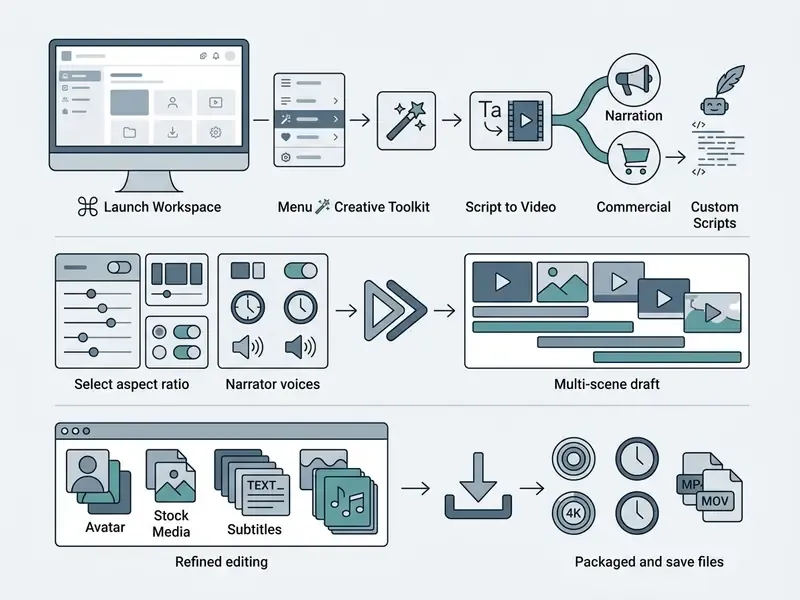
Creating an AI video in CapCut means entering a text prompt or script, selecting a visual style and aspect ratio, generating automated scenes with voiceover, then refining the draft in the multi-track editor before export.
Prepare Your Prompt or Script and Select a Video Style
Generation starts with the core message inside the script interface. Creators can paste a pre-written script or use CapCut's AI Writer to draft script ideas by specifying topic, audience tone, and target duration. CapCut's own prompt guidance recommends naming concrete aesthetics such as "vintage film," "neon lights," or "3D animation," and stating audience, tone, and brand constraints inside the prompt rather than fixing them later on the canvas.
Choosing between the two script pipelines. Inside Script to video (located under Magic Tools), creators pick one of two distinct modes:
- Narration Modeis designed for prompt-based talking videos. You enter a prompt or pick a preset from the drop-down list, and CapCut writes the wording plus synthesized text-to-speech narration automatically. The AI writer usually returns several script variants, commonly five, so you can select the strongest option before committing to generation.
- Commercial Modeis tailored for product and service marketing. Instead of asking the model to invent claims, you manually enter exact selling points, product features, offers, and brand guidelines, and CapCut assembles the advertising script around those inputs. For regulated industries, Commercial Mode is the safer default because it constrains hallucinated product claims at the source.
Once a script is approved, CapCut offers "Smart generation" using stock materials or "Local materials" using your own uploads. That single choice decides whether the first draft is built from library footage or from owned brand assets, and it is the cheapest control point in the whole pipeline.
When configuring visual parameters, users select artistic styles such as realistic film, 3D animation, or cinematic render. Prompt engineering guidance in corporate AI licensing documentation is blunt about limits: avoid trademarked brand terms, protected imaginary characters, and celebrity likenesses. For projects requiring custom synthetic music, creators often pair script development with tools like the topmediai ai music generator, or explore novelty voice paradigms using a trump ai generator.
Using capcut ai text to video free entry points lets creators test script-to-visual alignment quickly before committing to a final render inside the main capcut ai video maker.
Generate Scenes, Voiceover, and Visuals
With script and style parameters locked, clicking Generate (or Create) starts automated scene synthesis through the Seedance 2.5 engine. The AI splits the text into individual scene cards, synthesizes matching text-to-speech voiceovers, applies auto-captions, and drops stock background media into the timeline track. Selecting the cinematic style presets routes rendering through the Seedream 4.0 pipeline, which CapCut positions for stronger frame-to-frame cohesion in filmic sequences. Useful when a brand needs continuity across a multi-scene ad instead of a montage of visually unrelated shots.
Technical text-to-video research clarifies how such systems are actually measured.
Complementary architecture work on diffusion transformers (Vidu Diffusion Architecture Paper) shows why temporal consistency, quantified through Fréchet Video Distance (FVD), remains the binding constraint for longer generated sequences. CapCut pairs generated narration with matching visual cues automatically and hands back a complete structural draft in minutes. Model risk teams should still note that visual hallucination (malformed hands, drifting text, invented logos) scales with clip length and prompt ambiguity. Frame-level review stays mandatory before publication.
Review the Result, Edit, and Export the Finished Video
After the first generation pass, the user moves into the Video Studio multi-track editor to review and refine. Automated text-to-speech systems still trip over technical jargon and proper nouns, so manual review of generated subtitles and audio timing is not optional. Say a script mentions "SOFR" or a product name with an unusual spelling; expect to fix the pronunciation.
Inside the timeline editor, refinement is organised across three named panels. The Scenes panel assigns digital avatars, voices, and replacement media per scene. The Elements tab applies synced subtitle and text templates. The Music library lets you drag royalty-free background tracks straight onto the timeline. Creators can swap individual background clips, adjust avatar placement, restyle caption fonts, and layer music beds. When technical issues surface during export, the AI Media Support and Troubleshooting portal helps resolve rendering bottlenecks, while our YouTube video editor workflow guide outlines publishing optimisation steps.
Once manual editing is done, the final video is exported by selecting output resolution (720p, 1080p, or 4K, with CapCut AI pages advertising ceilings up to 8K on premium tiers), frame rate (24fps, 30fps, or 60fps), and container format (MP4 or MOV). Subtitle tracks can be exported separately as SRT or TXT for localisation pipelines. One gating rule from CapCut's own help documentation deserves attention: free accounts can preview many advanced features, yet exporting a project that uses Pro-locked assets or effects requires an active subscription. Testing the tool through capcut ai video maker free workflows ensures creators understand timeline mechanics before running commercial exports.
CapCut AI Video Maker Features for Video Generation and Editing
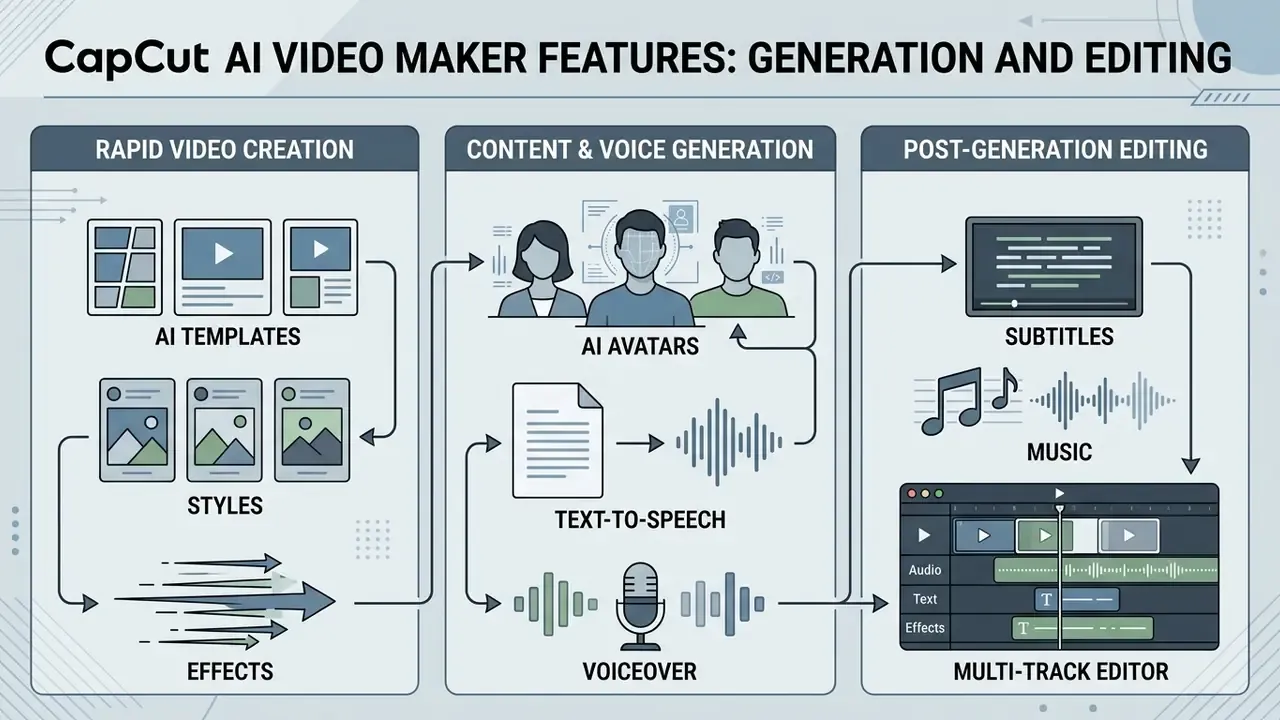
The CapCut AI Video Maker combines automated video synthesis with conventional editing tools: over 1,000 ready-made templates, digital AI avatars, text-to-speech voiceovers, auto-captions, background removal, vocal isolation, camera tracking, and a multi-track timeline editor.
| Feature Category | Free Plan Capability | CapCut Standard (~$9.99/mo) | CapCut Pro Capability | Enterprise / Business Impact |
|---|---|---|---|---|
| AI Video Generation | Standard generation limits; basic render priority | Broader access to AI-assisted editing | Extended generation limits; priority rendering (subject to credits/rollout) | Accelerated draft creation; reduced initial production cycle time |
| AI Avatars & Voices | Basic digital avatars and standard TTS voices | Expanded voice and avatar library | 200+ realistic avatars; advanced voice cloning and tones | Scalable multi-language localization without physical filming |
| Advanced AI Editing | Auto-captions and basic background removal | Partial access to advanced tools | Vocal isolation, camera tracking, auto reframe, speaker-aware captions, voice effects | Faster post-production on noisy or multi-speaker footage |
| Export Quality | Up to 1080p HD export; standard bitrate | Expanded export workflow | 4K/HDR UHD export (up to 8K on supported tools); custom bitrate and codec controls | High-fidelity output suitable for broadcast and corporate marketing |
| Asset Library | 1,000+ free visual presets and standard audio tracks | Expanded paid template and effects selection | 10,000+ premium templates; commercial music library | Wider creative range; built-in commercial licensing flags (see licensing section) |
| Cloud Storage | Local storage only (free cloud sync retired Aug 2024) | Around 100GB cloud storage | Up to 1TB secure cloud storage and cross-device sync | Centralized project backup and multi-device collaboration |
Teams weighing CapCut against traditional non-linear editors can review our structured comparison of free video editing software to see where a template-and-AI workflow beats a manual timeline, and where it clearly does not.
A practical caveat CapCut itself states in-product: feature labels and quotas change by app version and country, and paid tools carry Pro or credit indicators inside the editor. That in-product label, not a global price table, is the authoritative answer for a specific account.
AI Templates, Styles, and Effects for Rapid Video Creation
CapCut ships an extensive library of pre-designed AI video templates and visual effects that let creators skip manual timeline assembly. Templates encapsulate predefined typography, motion transitions, colour grades, and audio sync cues, so a generated draft can be restyled with one click. Official CapCut collections include "Free AI Templates," "AI Style Templates," "Style Effects Templates," and "AI Effect Templates," with more than 30 ready-made AI templates spanning news updates, education, motivation, and storytelling formats.
Template availability varies by interface. Official CapCut Help Center documentation clarifies that full template search works on CapCut Web and Mobile, whereas Desktop builds surface a select built-in library without search. Template publishing is narrower still: CapCut enables it only in selected countries and regions, and changing app-store region or IP can disable the option. When producing memorial or legacy content, creators frequently reach for a specialized tribute video maker, or turn photo into sketch-style stills before video integration.
Current capcut ai video generation tools, including template packs still indexed under capcut ai video generator 2025 labels and refreshed for the 2026 cycle, give marketing teams an agile pipeline for continuous content delivery.
AI Avatars, Text-to-Speech, and Voiceover
The platform offers over 100 photorealistic digital AI avatars that narrate scripts without live on-camera talent, plus AI Character Generator styles for more expressive or stylised presenters. Users can also clone their own avatar by uploading a short reference video. Paired with a text-to-speech engine supporting 200+ synthetic voices across multiple languages and regional accents, creators can tune pitch, speed, and vocal tone.
Academic evaluation of synthetic presenters is consistent on outcomes and cautious on experience.
Audience trust still peaks when voice cadence and lip-sync accuracy line up precisely, a pattern smaller crossover studies also register.
The practical reading for content teams: avatars are defensible for factual transfer such as policy updates, product walkthroughs, and compliance refreshers. They are weaker wherever perceived warmth drives conversion, for example executive messaging or customer testimonials.
For localized character voiceovers or novelty media testing, creators often compare standard avatars against customized tools such as a trump ai voice generator, or consult our complete AI voice generator guide to analyse licensing nuances.
Combining capcut ai video generation free capabilities with an enterprise-grade ai video maker lets organisations roll out multi-lingual training modules quickly, provided the review step survives the schedule pressure.
Post-Generation Editing: Subtitles, Music, and Multi-Track Editor
The real strength of CapCut's environment sits in its multi-track timeline video editor, which bridges automated GenAI output and professional post-production. Automatically generated speech-to-text subtitles land as editable text blocks on an independent timeline track, so spelling and punctuation fixes take seconds.
Advanced Pro editing tools reach well beyond captions. Vocal Isolation separates speech from noisy or music-heavy backgrounds, which rescues field-recorded footage without a reshoot. Camera Tracking attaches text, logos, or graphic elements to moving subjects so overlays follow the action instead of floating statically. Speaker-Aware Auto-Captions identify individual speakers and colour-code subtitles accordingly, cutting manual cleanup on panel discussions, interviews, and multi-presenter training content. Auto Reframe re-crops a single master edit into 9:16, 1:1, and 16:9 variants for cross-platform distribution. Additional AI utilities documented by CapCut include AI Clipper, transcript tools, AI Video Translator, Lipsync, Mimic Motion, AI Dialogue Scene, AI Remove, Auto Styles, Auto Enhance, and Smart Search.
An internal communications team used AI avatars plus automated speech-to-text captions to adapt quarterly operational updates into four regional languages. Short manual caption reviews before export kept quality acceptable, and the team produced localized training modules within a single sprint without booking extra voice talent. Turnaround figures come from the team's own project log rather than an audited benchmark, so read the timeline as the workflow's ceiling, not a guaranteed outcome.
The multi-track canvas allows simultaneous layering of video tracks, text overlays, sound effects, and background music, each element movable on its own lane. Built-in background removal and auto-reframe keep exported assets aligned with target device specifications.
One scoping note before the money question: the "Commercial Use" flags visible in the asset browser are metadata, not a licence in themselves. The rules that govern how far those flags extend, and exactly where they stop, appear in the licensing section below.
CapCut AI Video Generator: Free Features, Standard and Pro Plans, and Pricing
CapCut provides a free tier covering standard editing, basic AI generation credits, auto-captions, and 1080p watermark-free export. CapCut Standard widens the asset and editing library with roughly 100GB of cloud storage, while CapCut Pro unlocks the full advanced AI suite, 4K/HDR export, up to 1TB of cloud storage, and access to commercially labeled assets for $19.99/month or $179.99/year.
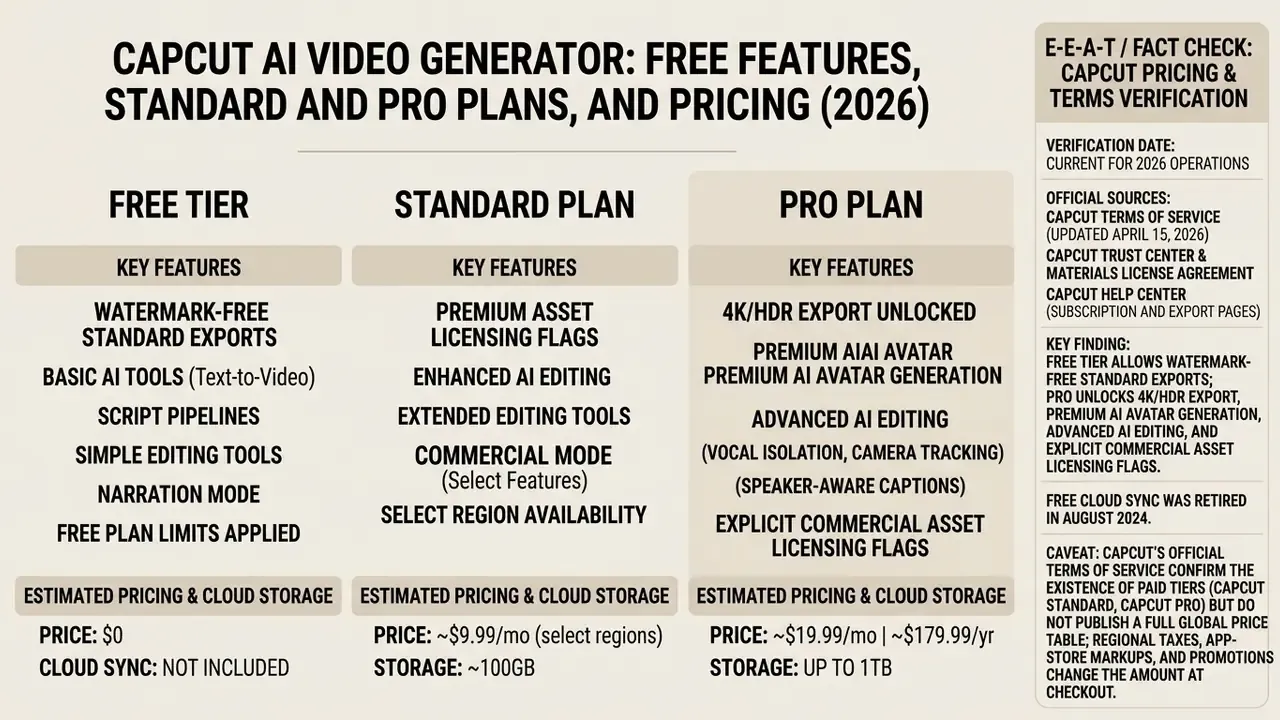
Which AI Features Are Available in CapCut Free
What CapCut Pro Adds for AI Video Generation
CapCut Pro unlocks the AI utilities aimed at commercial production. Pro subscribers get photorealistic AI avatars, high-fidelity voice cloning, text-to-video generation, unlimited auto-captions, camera tracking, vocal isolation, speaker-aware captions, priority cloud rendering, up to 1TB of secure cloud storage, and 4K/HDR export ceilings (with up to 8K advertised on selected AI tools).
Evaluating capcut ai video generator free or paid options usually turns on two questions: does the business need high-resolution output, and does it need verified commercial asset access? Pro also removes export watermarks when premium visual effects are used and opens access to over 10,000 commercial templates. Creators comparing Pro-only generation quality against dedicated video models can benchmark it against PixVerse AI before consolidating spend on one vendor.
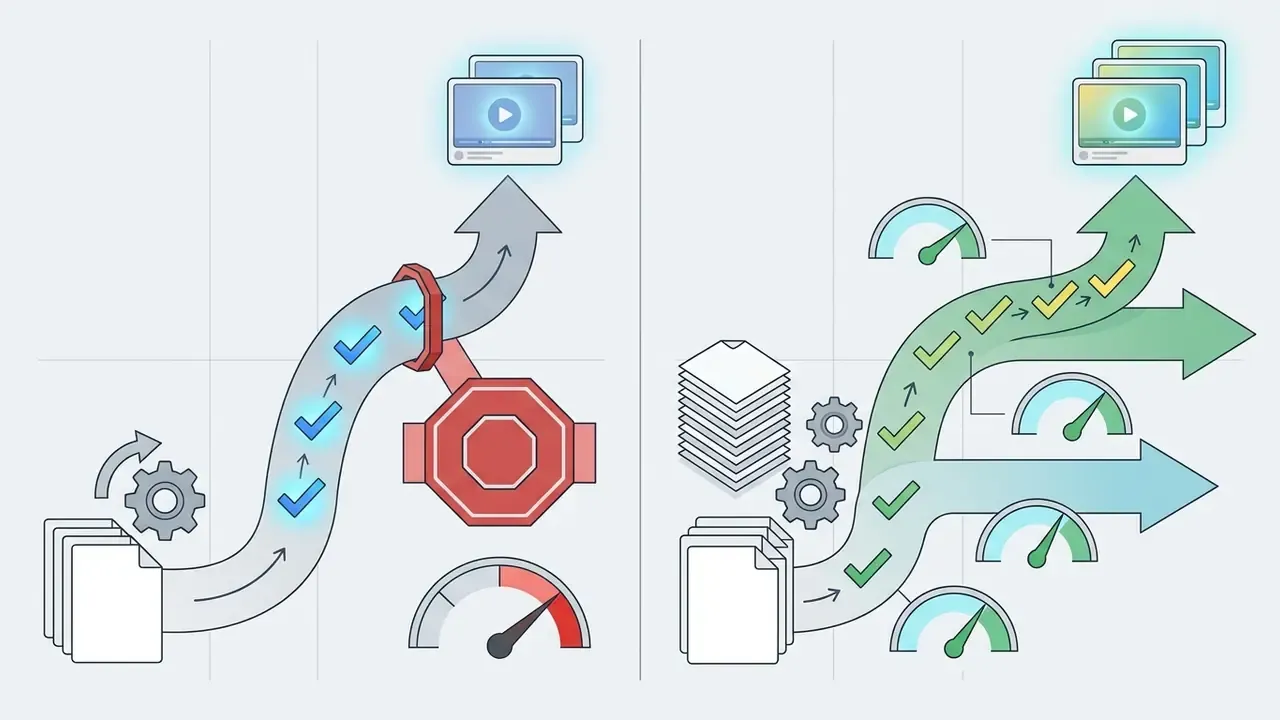
A budgeting warning worth internalising: an active Pro subscription does not make every AI action unlimited. CapCut can meter generation through credits or points, and newly released or third-party models may consume more per render. Before locking a production budget, record the credit charge for the exact tool, duration, and output quality your pipeline will use. That one number prevents most mid-quarter overruns.
CapCut Standard vs Pro: Which Tier Fits Which Workflow
CapCut Standard is the middle option for creators who want a wider asset library and fewer paywalls without the full advanced AI suite. The practical dividing lines are storage (about 100GB on Standard versus up to 1TB on Pro), depth of generative AI access (partial versus full, subject to credits and rollout), and export ceiling (expanded workflow versus 4K/HDR where the device and feature support it).
Because Standard pricing and availability differ by market, compare the live upgrade screen rather than an older global price table.
CapCut Teams & Enterprise Workspaces
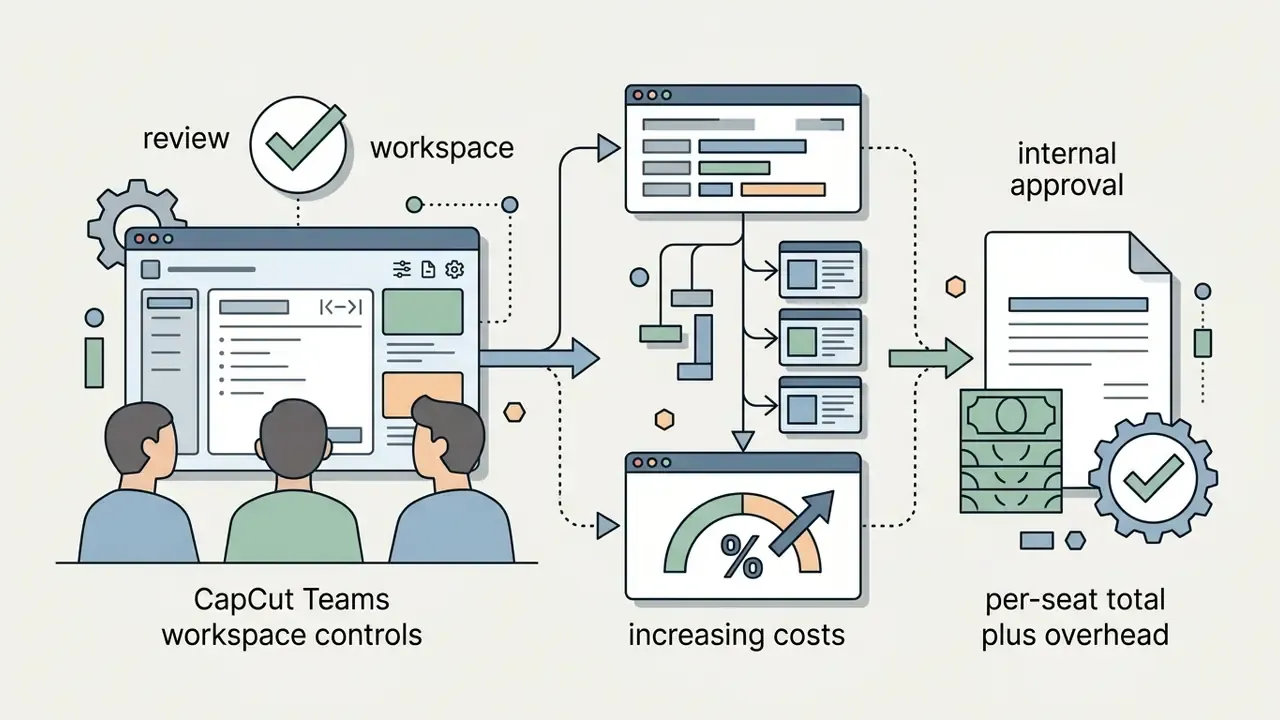
For agencies and multi-user environments, CapCut offers CapCut Teams workspace controls: centralized asset sharing, per-seat licence management, shared cloud folders drawing on collective Pro cloud pools, and consolidated billing that simplifies internal approvals. For an agency finance lead, the decision usually reduces to arithmetic: multiply the seat price by active editors, then subtract the cost of the approval steps a shared workspace removes.
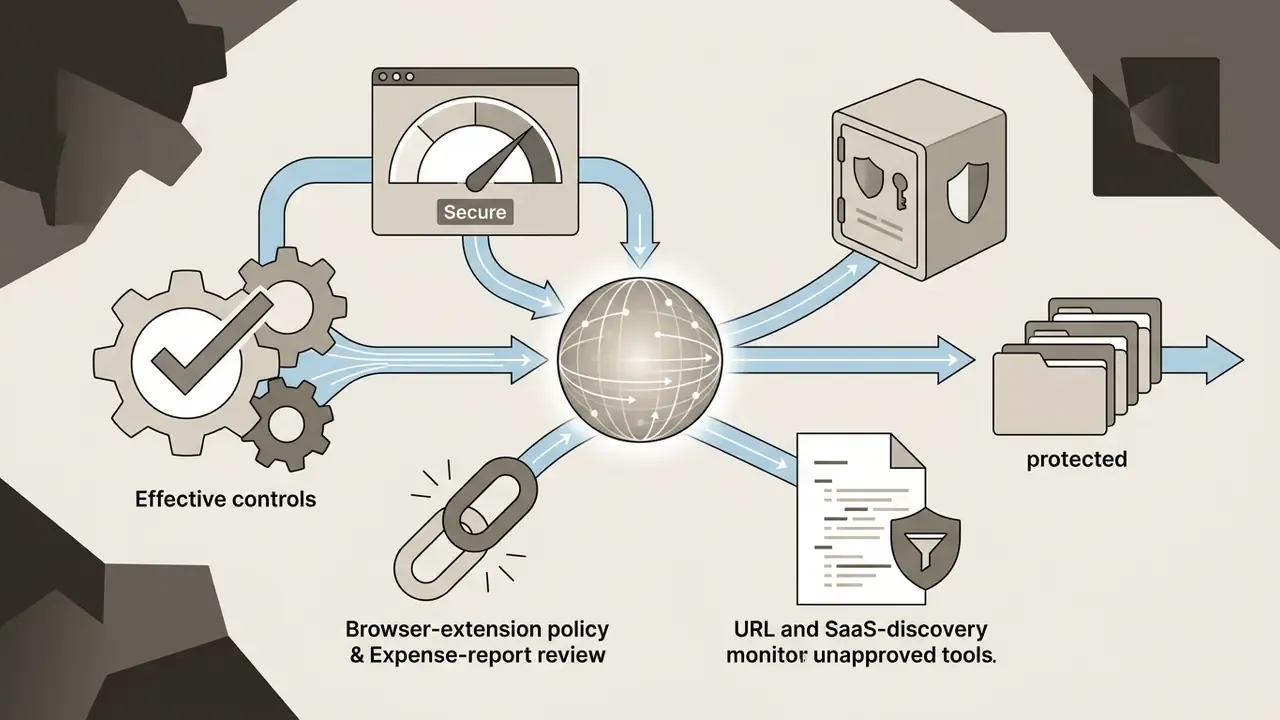
It matters just as much to state what CapCut Teams is not. CapCut remains architected primarily for consumer and SMB creators. Publicly documented tiers do not advertise a full enterprise identity stack with SSO/SAML federation, granular role-based access control, or a customer-managed audit log of prompts and generations. Organisations that need those controls for regulatory reasons should treat CapCut as an unmanaged SaaS surface and compensate through device policy, network controls, and written usage standards.
How to Check Current Pricing and Limits Before Upgrading
Can You Use CapCut AI Generated Videos in Commercial Projects?
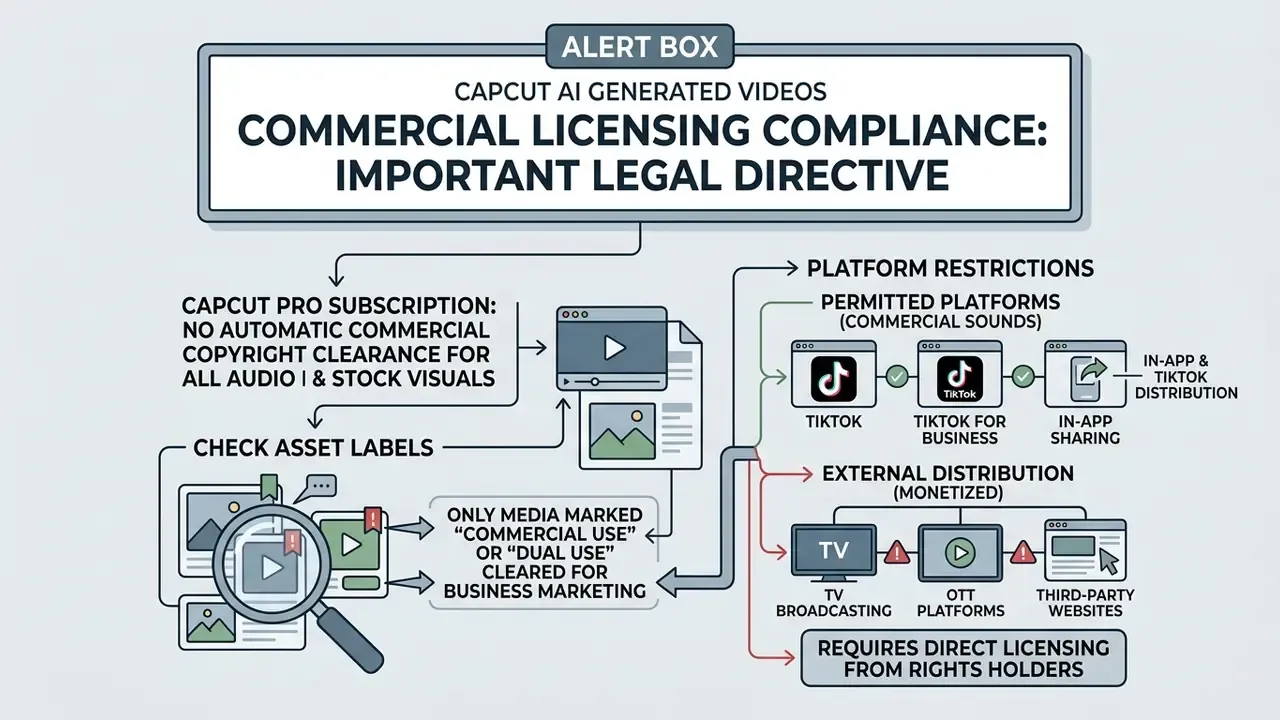
Commercial use of CapCut AI-generated videos is not blanket-permitted by a standard subscription. Usage rights depend on whether the templates, audio tracks, and stock media inside the project are explicitly labeled for commercial use under the CapCut Materials License Agreement.
Reviewing Commercial Use Terms for AI Videos and Media Assets
CapCut's legal framework (Terms of Service, updated April 15, 2026, plus the Materials License Agreement) distinguishes Non-commercial Use Materials from Dual Use Materials. Non-commercial assets are restricted to personal social accounts, non-monetized profile content, and personal projects. Company Content, meaning templates, video clips, images, stickers, fonts, sound effects, effects, filters, canvases, and animations, is licensed on a limited, non-exclusive, revocable basis.
Dual Use Materials, identified by explicit "Commercial Use" badges in the asset browser, are cleared for corporate marketing, social media ads, and brand promotions. Built-in Commercial Sounds, however, are legally restricted to distribution on Permitted Platforms: TikTok, TikTok for Business, and CapCut. Exporting videos containing proprietary Commercial Sounds for broadcast television, external ad networks, or standalone resale requires direct third-party licensing. CapCut's Trust Center reinforces the same principle from the other direction: users retain rights to content they create, but only templates and materials expressly labeled "Commercial Use" may be used commercially.
CapCut's guidance for its Seedance commercial-use flows adds a clearance checklist for AI inputs: verify rights for music and sound taken from reference clips, recorded dialogue, narration and voice samples, recognisable voices, and any audio containing third-party content. Uploading a reference asset does not launder its licence.
Creators comparing commercial licensing frameworks across GenAI tools can consult our AI Media Commercial-Use portal, review asset rights in our Canva AI Generator review, or compare the parallel rules for commercial use of AI image generators.
Understanding copyright boundaries around ai generated videos and generated videos keeps corporate teams running content creation for marketing ads shielded from avoidable intellectual property claims.
Enterprise Data Privacy, Prompt Confidentiality, and Shadow AI Risk
For risk, security, and AI-governance leaders in regulated sectors, licensing covers only half the exposure. The other half is what happens to the inputs.
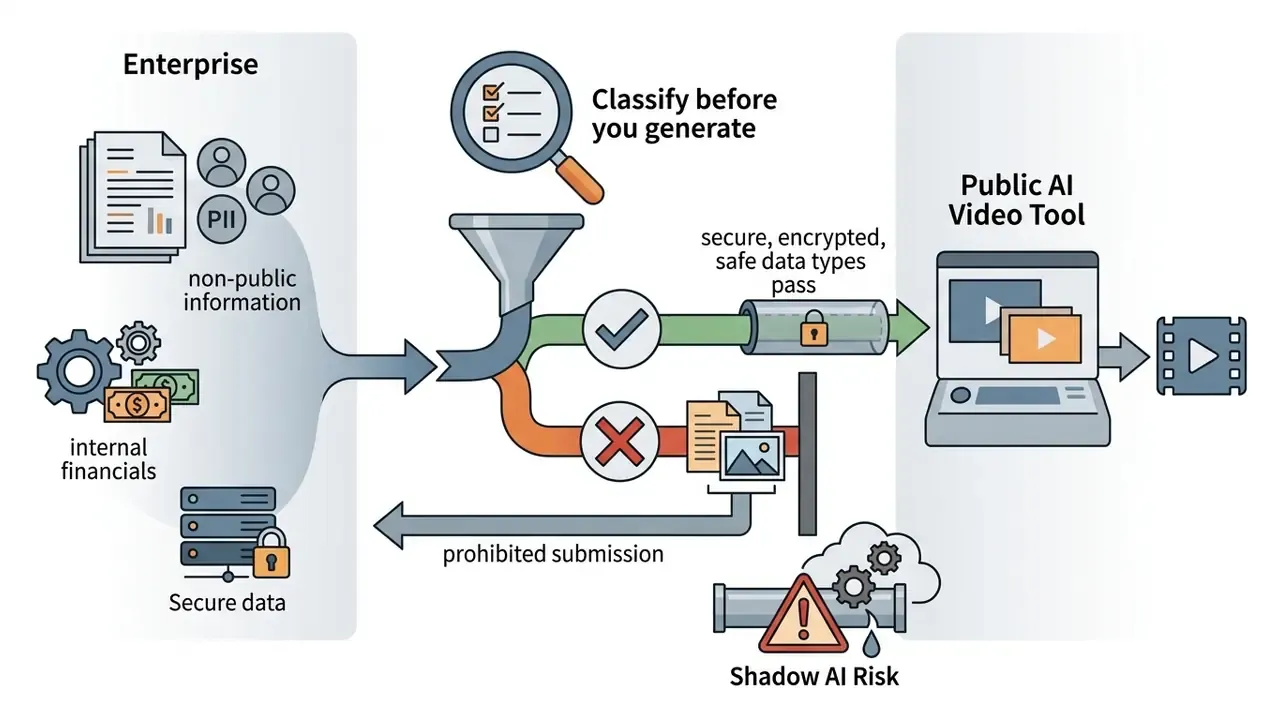
Every prompt, script, brand guideline, uploaded product photo, unreleased campaign asset, and reference recording submitted to a browser-based generator leaves the corporate perimeter and is processed on vendor cloud infrastructure. CapCut operates within the ByteDance ecosystem, and its Terms of Service grant the platform a broad operational licence over user-submitted content for running and improving the service; independent 2025 legal commentary highlighted the breadth of those upload provisions. CapCut's published consumer terms do not advertise a customer-configurable opt-out from model improvement, a contractual data-residency commitment, a documented retention clock for prompts and generated drafts, or public SOC 2 / ISO 27001 attestations scoped to the AI generation pipeline. Absent those artefacts, the defensible assumption for a bank or fintech is simple: anything entered into CapCut has been disclosed to a third party and cannot be treated as confidential.
That assumption yields three concrete control recommendations.
Record CapCut's own volatility as a governance input as well. Quotas, availability, and feature labels shift by platform, app version, and region, and the in-product label is authoritative for a given account. A control that assumes a static feature set will drift out of date inside one release cycle.
What to Check Before Exporting a Video for a Brand or Advertisement
Before publishing or selling an AI-generated video built in CapCut, run a pre-export compliance audit:
A financial-services marketing team preparing promotional ad reels shows how the audit works in practice. Before launch, the team swapped unlicensed background audio for explicitly labeled Dual Use Commercial Sounds, re-checked font licensing on every text layer, and re-reviewed generated frames for accidental logo synthesis. The scenario is composed to demonstrate the control sequence rather than to report an audited engagement. The sequence itself maps directly to CapCut's published licence conditions and is the order of operations we recommend to regulated advertisers.
Organisations facing copyright inquiries or building risk frameworks can review our synthesis of AI Litigation and Case Timelines, or evaluate developer economics using the Google Veo AI video generator API guide.
FAQ About CapCut AI Video Generator
Frequently asked questions about CapCut AI Video Generator cover regional feature availability, device compatibility, image-to-video generation, visual style presets, synthetic-media disclosure, and data handling.
Is CapCut AI Text-to-Video Available in All Regions and Devices?
CapCut AI text-to-video works across major global regions and is reachable via browser-based CapCut Web, Desktop applications (Windows 7+ / macOS 10.14+), and mobile apps for iOS and Android. Even so, CapCut's own documentation states that the text-to-video feature ships only in specific regions, and individual feature deployments, template search, and AI credit packages vary by user region, IP localization, and app store compliance rules. Language coverage is similarly uneven. CapCut's AI video maker help documentation lists supported generation and interface languages including English, Deutsch, Español, Français, Italiano, Português, Tiếng Việt, Türkçe, ภาษาไทย, 日本語, and Bahasa Indonesia. Localized CapCut pages exist in additional languages and expose the same AI Lab feature set, yet not every language is consistently enumerated on the public text-to-video support list. Multilingual teams should test their target language in-product before scheduling a localisation batch. The web-based Video Studio workspace gives uniform access to generative tools without local hardware installation. Technical teams integrating automated media pipelines can explore architectures via our AI Media API Guides. Cross-platform clarity means creators searching for capcut ai video generator tools can deploy text to video workflows with an enterprise-grade ai video generator regardless of operating system.
Can You Create an AI Video from an Uploaded Image and Adjust Style Before Generation?
CapCut supports image-to-video AI workflows where creators upload static files (PNG or JPG) as visual anchors for AI video synthesis. Upload a keyframe, add a descriptive text prompt, and the model animates the source image while following the prompt instructions. Published documentation across the wider text-to-video field describes the same mechanic: the uploaded image supplies the opening frame, later frames follow the prompt, and style is steered through explicit style keywords, reference images, or style-conditioned tuning. Before generation starts, aesthetic parameters can be fine-tuned in the setup panel. Settings include artistic rendering style (cinematic film, 3D render, anime vector), output aspect ratio, target duration, AI video model selection, and narrator voice profile. That granularity keeps synthesized output aligned with campaign requirements before the final generated videos leave the video generator.
How Should Teams Handle AI Disclosure and Data Protection When Publishing CapCut Output?
Two obligations run in parallel. First, disclosure. Major distribution platforms require creators to flag realistic synthetic media, and advertising regulators have signalled growing scrutiny of undisclosed AI presenters and voices. CapCut does not guarantee embedded content-provenance metadata on consumer exports, so the labelling duty sits with the publisher: apply the platform's own AI-content toggle at upload and keep an internal record of which assets were generated. Second, data protection. Prompts, uploads, and reference audio are transmitted to and processed by the vendor's cloud. Because CapCut's consumer terms publish neither a training opt-out nor a contractual retention window, the safe operating rule is that nothing confidential enters the tool. Pair that rule with the Shadow AI controls described earlier: discovery monitoring, an approved-tool list, and a named owner responsible for reviewing the terms after each major release.
Educational Resources & Internal Directory
For deeper technical documentation, pricing matrices, and legal compliance guides across the GenAI media landscape, explore our resource hub:
- Central Knowledge Base Our complete AI Media Glossary holds authoritative definitions of generative terminology, model risk frameworks, and commercial licensing standards.
- Voice & Audio Tools Review specialized voice synthesis workflows in our AI voice generator guide or evaluate enterprise voice cloning frameworks.
- Comparative Analysis Compare free video creation solutions in our structured evaluation of the best free ai video generator, or weigh full toolchains in our roundup of the best AI video generators.
- Commercial Frameworks Analyse corporate usage terms across design suites through our Canva AI Generator review and our directory of AI Media Commercial-Use guidelines.
- Adjacent Workflows Optimise distribution with our YouTube video editor workflow guide, reduce delivery weight using our video compressor guide, and evaluate motion formats via our animation maker guide.
Appendix A: Superseded Figures and Retained Source Wording
Retained for transparency, because earlier revisions of this guide and several competing summaries circulate different numbers:
Regulatory, licensing, and pricing details in this article reflect publicly available CapCut documentation as of the 2026 update cycle and are provided for informational purposes only. They do not constitute legal, financial, or security advice.
- Superseded storage figure
- an earlier revision stated that "CapCut Pro unlocks 100GB secure cloud storage and cross-device sync." Updated: roughly 100GB corresponds to the CapCut Standard tier; CapCut Pro provides up to 1TB, per CapCut's own Free/Standard/Pro comparison as summarised in 2026 plan analyses.
- Superseded efficiency claim
- an earlier revision stated that an automated text-to-video workflow "reduced draft assembly time by 65%." Updated: that figure came from an unaudited internal baseline and is now described qualitatively as a shift from a multi-day to a same-day drafting cycle.
- Superseded citation link
- the arXiv identifier previously attached to the YouTube GenAI content-creation study did not resolve to a valid record. Updated: the study is now cited by title, publisher, and year without a hyperlink, pending DOI verification.
- Retained caveat on quotas
- reported free-tier AI allowances, for example a small monthly number of AI auto-edits and custom AI effects, originate from third-party 2026 summaries and conflict with CapCut's region-dependent framing. The in-product export screen remains authoritative.