A video editing software free download usually gives you a complete application for trimming, assembling and exporting video files, with no upfront licensing cost. You can download video editor tools across three quite different families: open-source timeline applications, freemium desktop programs, and browser-based video creators that never touch your disk.
The catch is rarely the price. It is the paperwork behind the price.
Quick answer: which free video editor should you download?
| If you need… | Download | Why |
|---|---|---|
| Professional color grading, VFX, 4K client work | DaVinci Resolve Free | No watermark, no export limits, commercial use permitted, UHD 3840×2160 at 60 fps |
| Zero-cost editing on a locked-down Windows 10/11 machine | Microsoft Clipchamp | Pre-installed, watermark-free 1080p, built-in screen and webcam recorder |
| An open-source, auditable timeline editor for IT deployment | Shotcut / Kdenlive | GPL licensing, FFmpeg-based format support, portable builds available |
| Editing on a 4 GB RAM legacy PC or Windows 7 | VSDC Free / Avidemux | Runs on 512 MB to 2 GB RAM, no watermark, no duration cap |
| Fast vertical Shorts, Reels and TikTok clips with auto-captions | CapCut PC | AI auto-reframe, speech-to-text subtitles, template library |
| All-in-one screen recording plus editing | ScreenPal / Clipchamp | Capture screen and webcam, edit in the same app, share instantly |
The three rules that matter most: read the end-user license agreement before any paid client delivery, confirm the watermark and duration limits of the free tier before you render, and pull installers only from the vendor's official domain. Everything else is preference. These three are exposure.
How we tested these editors
What we measured: export watermark policy, maximum free resolution and frame rate, duration and scene caps, input and output codec coverage, minimum RAM and CPU requirements, availability of silent-install or portable builds, and telemetry behaviour on first launch.
One small confession: we initially trusted two vendor feature pages, then found the limits only on render. That is why the watermark column exists.
What "video editing software free download" includes
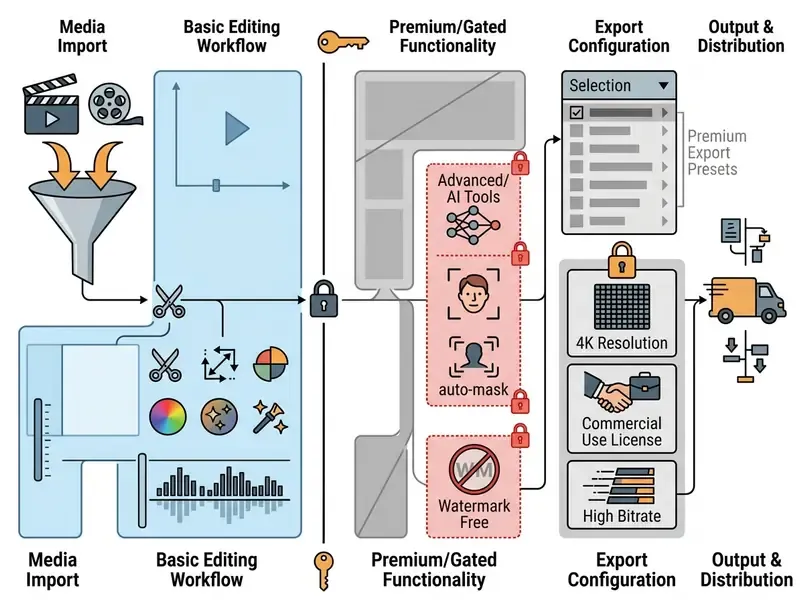
A video editing software free download gives desktop users access to basic or fairly advanced timeline tools, so you can create videos without paying a subscription fee upfront. What actually arrives in the installer depends on the deployment model and the vendor's licensing structure, not on the download button.
Three models dominate: permanently free software, expiring trials, and freemium tiers. Telling them apart is what separates a stable production pipeline from an unpleasant surprise on render day. If the category is new to you, start with how modern video editing tools are structured before you compare individual products. Teams that want the wider terminology map can browse our AI Media Comparison Matrices alongside it.
Free video editor, trial version and paid upgrades
Fully free software and open-source applications give permanent, unrestricted access to editing features. No expiry date, no credit card, no "activate within 14 days" nag. A free trial is the opposite: temporary access to a professional suite before a purchase is required, and Adobe Premiere Pro is the reference case with its 7-day full-feature trial. Freemium commercial editors sit in the middle. Their free video editor tier lasts forever but keeps advanced features behind a paid upgrade.
«The free Screencast-O-Matic tier applies no watermark, but caps every recording at fifteen minutes and ships a reduced editing toolset.»
The practical difference is the licence, not the price tag. Open-source software grants ongoing rights under a free licence, trials expire on a calendar, and free commercial tiers stay free while withholding functionality.
In a recent enterprise video workflow assessment, an internal media team had to pick desktop editing tools for 50 workstation deployments. They weighed proprietary free trials against open-source applications specifically to avoid subscription lock-in. After standardising on open-source editors across every station, the team reported a permanent editing pipeline and estimated roughly five figures of annual software overhead avoided. (Note: that saving is a team-reported estimate, not an audited figure. Exact numbers depend on seat counts and prior vendor contracts.) If you need to model your own case, our AI Media Calculators cover seat-based cost comparisons.
"In video production as in software governance, unchecked tools introduce hidden operating risks. Verifying export terms, hardware limits, and asset licenses before deployment keeps your production pipeline reliable and compliant."
«DaVinci Resolve Free is a permanent $0 licence: no watermark, no time limit, no card on file; export up to UHD 3840×2160 at 60 fps.» Free Video Editing Software for PC: Evidence-Based Review (2024)
Watermarks, export limits and included media
Free video editor tiers monetize in two blunt ways: a visible watermark burned into the saved project, or an output ceiling at 720p or 1080p.
«DaVinci Resolve Free applies no watermark to any export and imposes no cap on the number or length of projects, unlike most freemium editors.»
Built-in asset libraries add a second layer. Premium stock video clips, royalty free music and automated video templates are often reserved for paid subscribers, or require a pro content license before you can export them unbranded. Wondershare Filmora is the clearest example of the reverse trade-off: the free build exposes nearly the full feature set, AI tools included, then stamps a mandatory watermark on every render. VEED caps free exports at 720p and adds its own mark. Microsoft Clipchamp exports 1080p watermark-free, but reserves 4K UHD, premium stock and the brand kit for Premium. Check the pricing page of any freemium editor before you promise a client a clean master.
Can you use a free video editor for commercial projects?
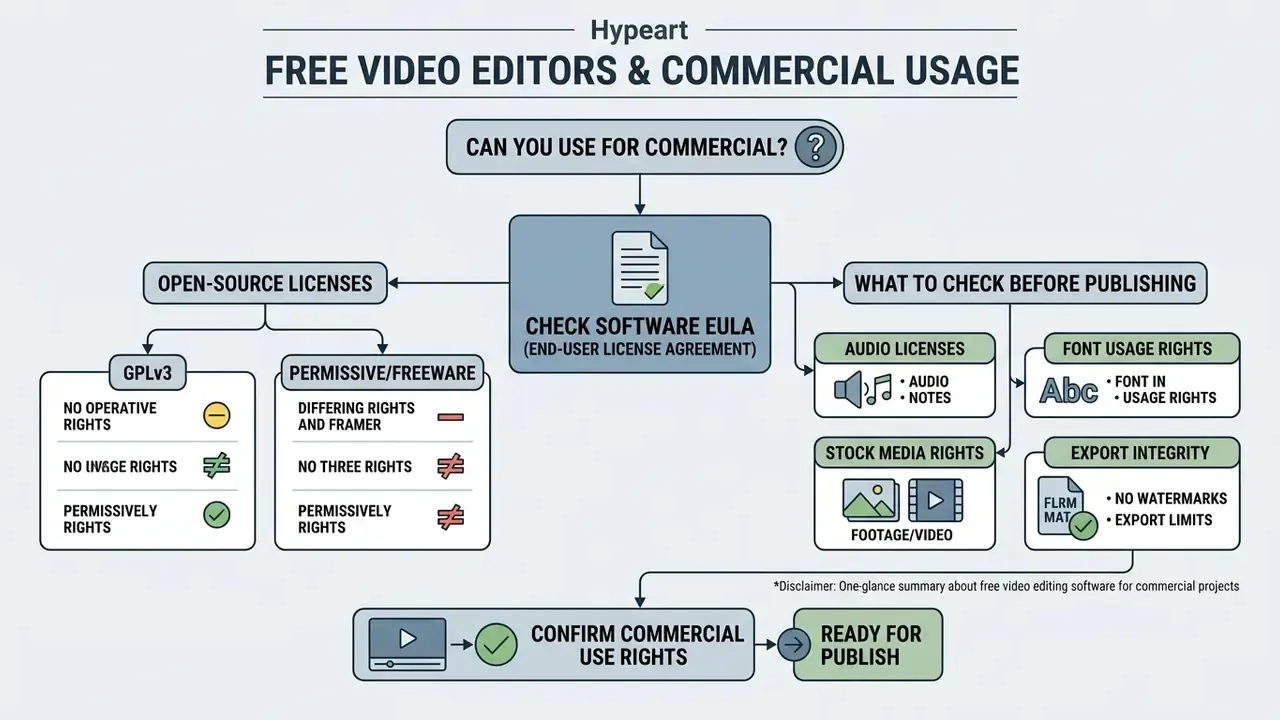
«Freelancers and small studios can deliver paid client projects, branded films, advertising, corporate content, using the free edition with no royalties and no revenue ceiling.»
CapCut goes the other way. Its legal terms state that only media and templates explicitly marked "Commercial Use" may appear in promotional content or brand campaigns (CapCut Trust Center, 2026). The platform draws a hard line between user content, which belongs to the creator, and "company content", where commercial rights attach only to assets carrying that label. Public stock providers behave similarly: Adobe Stock says its free stock video assets meet standard commercial licensing requirements, provided editorial-only clips are excluded (Adobe Stock Free Terms, 2026). Canva describes its built-in free stock videos as royalty-free and pre-licensed, yet free users may still need a Pro Content License to strip watermarks from Pro-tagged content.
Open-source licence types: GPLv3 versus permissive and freeware
For governance and compliance teams, "free" splits into legally distinct categories:
| Licence type | Examples | Commercial use | Key obligation |
|---|---|---|---|
| GPLv3 / GNU GPL (copyleft) | Shotcut, Kdenlive, OpenShot | Permitted for any purpose | Redistributed modified binaries must ship their source under the same licence; your rendered video output is unaffected |
| Permissive (MIT, BSD, Apache 2.0) | Many FFmpeg-adjacent utilities | Permitted | Attribution and licence notice retention only |
| Proprietary freeware | DaVinci Resolve Free, Clipchamp, Icecream Video Editor | Depends on the EULA text | Read the EULA; terms can change between releases |
| Non-commercial freeware | VideoPad free version | Not permitted for commercial output | Requires a paid Home or Master's Edition for business use |
The critical point for legal review: copyleft obligations attach to software distribution, not to the video files you export. A GPLv3 editor does not make your client's commercial video open source. Non-commercial freeware restricts the output itself, which is exactly why VideoPad's free build cannot carry paid delivery. Where disputes have reached court, the pattern is usually distribution, not rendering; our AI Litigation and Case Timelines index is a useful sanity check for counsel.
What to check before publishing a commercial video
Before a commercial project goes live, verify that every embedded asset carries an explicit commercial license. That audit means confirming background audio permits monetization, font files allow video embedding, stock video clips are free of non-commercial restrictions, and the final export contains no unauthorized watermark.
Manager's pre-release licence card, tick all six:
- Software EULA.Does it permit commercial and monetized delivery?
- Audio.Is every music track and sound effect licensed for commercial use, worldwide, for the intended term?
- Fonts.Does the font licence allow embedding and rasterisation into video?
- Stock footage and images.Are all clips commercial rather than editorial-only, and do media, territory and duration match the campaign?
- Export integrity.Render a 10-second test export and inspect the frame corners and end card.
- Third-party marks.Logos, trademarks and recognisable people need separate clearance or a signed release.
Six checks, maybe twenty minutes. Cheaper than a takedown.
Best offline video editor versus free online video editor
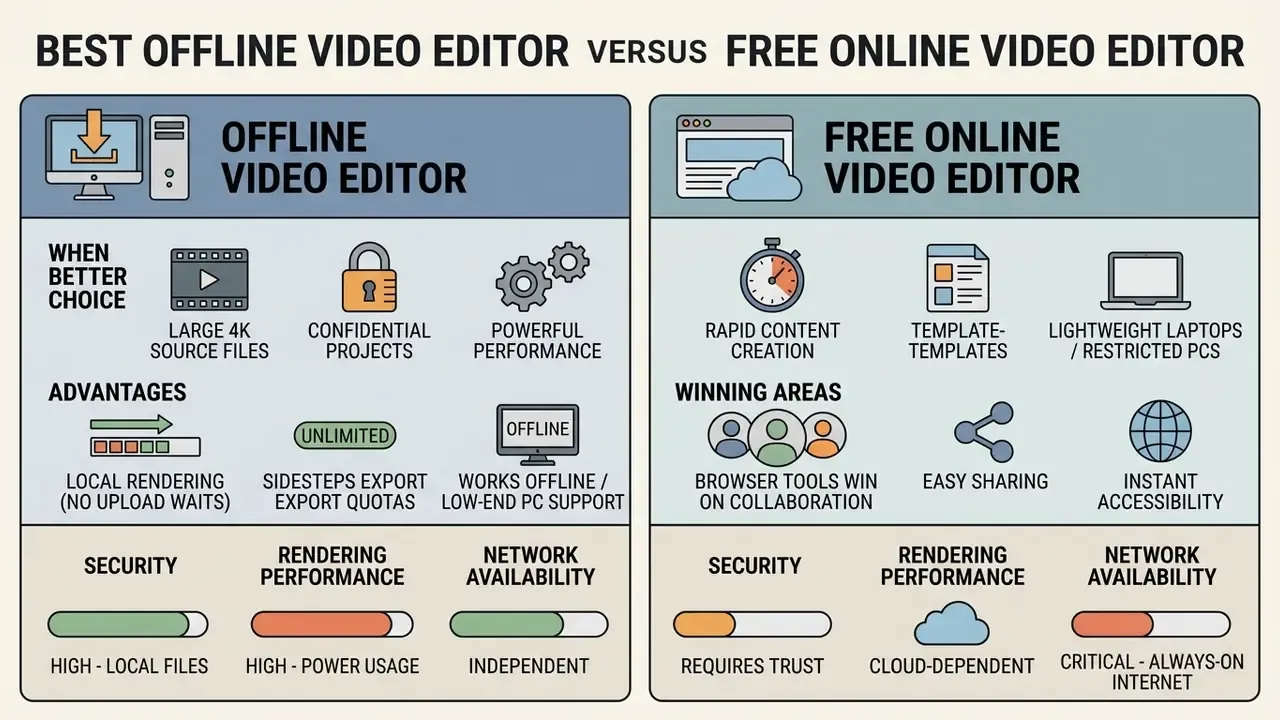
Choosing between the best offline video editor and a browser-based free online video editor comes down to security, rendering performance and network availability. Decide the architecture first, local or cloud, and only then specify hardware. Desktop software processes video clips locally on system hardware; online web tools lean on cloud processing and a live connection.
When an offline video editor is the better choice
An offline downloadable video editor wins when you handle large 4K video source files, manage confidential client footage, or edit somewhere with unreliable internet.
«Offline editors keep projects on local storage, eliminating automatic uploads to cloud servers and reducing data-exposure risk when handling confidential client material.»
Local rendering removes upload waits, sidesteps platform export quotas, and keeps every video project on drives you control. Where delivery bandwidth is the real bottleneck rather than the edit, pairing a local render with video file compression usually beats re-exporting at a lower resolution. Browser editors also live inside per-tab memory and CPU ceilings, so long timelines and high-bitrate footage degrade faster in a tab than in a native application.
When a browser-based editor is enough
A free online video editor is plenty for rapid, template-driven content on lightweight laptops or restricted corporate devices. Web editors let users create videos directly in Google Chrome or Microsoft Edge, using cloud rendering and shared media asset libraries, with no local executable to approve.
«In CapCut, users pick a template or upload media, drag clips onto the timeline, and adjust audio, text, subtitles, effects and transitions, entirely in the browser, with no installation.»
Browser tools also win on collaboration. WeVideo and Clipchamp support shared media libraries and comment threads, which offline editors replicate only through third-party project-sharing systems. If your team already storyboards in a browser, an ai mind map generator slots neatly in front of the edit stage.
How to choose the best free video editing software for your PC
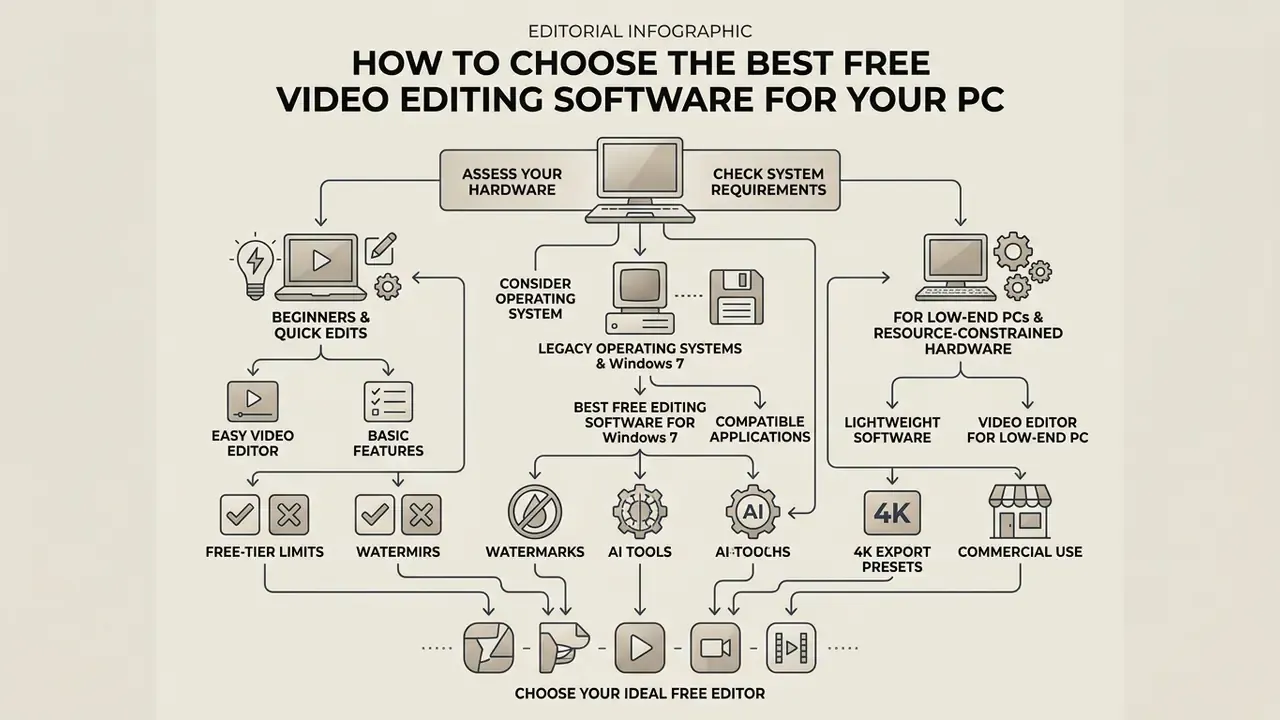
Choosing the best free video editing software means matching the application's system requirements to your hardware, your operating systems, and your technical comfort level. Look at CPU core counts, installed RAM, GPU graphics acceleration, and whether an offline desktop application or a web browser workflow suits your production environment.
Comparison of free video editors by OS, offline capability, free-tier limits, export terms, and technical complexity
| Video Editor | Operating Systems | Mode | No Watermark | Free Tier Limits | Max Export Resolution | Audio Editing | Complexity Level |
|---|---|---|---|---|---|---|---|
| DaVinci Resolve Free | Windows 10+, macOS 12+, Rocky Linux 8.6 | Offline | Yes | Unrestricted length and project count; Studio needed above 4K or 60 fps | UHD 3840×2160 @ 60 fps | Advanced (Fairlight) | High / Professional |
| Shotcut | Windows, macOS, Linux (Win 7/8 via build 22.12.21) | Offline | Yes | None, GPLv3, no feature gating | 4K and above (hardware-bound) | Multi-track filters | Intermediate |
| Kdenlive | Windows, macOS, Linux, BSD | Offline | Yes | None, GNU GPL, no feature gating | 4K and above (hardware-bound) | Multi-track mixing | Intermediate |
| VSDC Free Video Editor | Windows (XP SP3 to 11) | Offline | Yes | No trial, no watermark, no ads; paid tech support only | 4K / 5K / 8K | Basic to intermediate audio tools | Beginner / Intermediate |
| Microsoft Clipchamp | Web, Windows 10/11 | Online / Hybrid | Yes (up to 1080p) | Watermark-free to 1080p; 4K UHD, premium stock and brand kit need a paid plan | 1080p free / 4K paid | Basic plus AI noise suppression | Beginner |
| Icecream Video Editor | Windows 7, 8, 8.1, 10, 11 | Offline | Conditional | Watermark-free export only up to 5 minutes; maximum 10 scenes on the timeline | 4K (Windows 10/11) | Basic audio, voiceover | Beginner |
| ScreenPal (free) | Windows, macOS, iOS, Android, ChromeOS | Online / Hybrid | Yes | Maximum 15 minutes per recording; up to 10 hosted videos | 4K / Full HD | Multi-track audio, voiceover | Beginner |
| CapCut PC | Windows 7 to 11 (64-bit), macOS 11+ | Hybrid (cloud features) | Yes on user content | Commercial use restricted to assets labelled "Commercial Use"; cloud features need internet | 4K | Vocal separation, auto-captions | Beginner |
| Wondershare Filmora (free tier) | Windows 7+ (64-bit), macOS 10.14+ | Offline | No | All features available, BUT a mandatory watermark is burned into every export | 4K | AI vocal remover, TTS | Beginner / Intermediate |
| VideoPad Video Editor | Windows, macOS | Offline | Non-commercial only | Free version restricted to non-commercial use; Home Edition capped at 2 audio tracks | 4K | 2 tracks (free tier) | Beginner |
«For HD editing Kdenlive recommends a four-core CPU and 8 GB RAM; for 4K, eight cores and 16 GB RAM, with OpenGL 2.0 or DirectX 9/11 support.»
For comparison, OpenShot's published minimum is a 64-bit OS, a dual-core CPU and 4 GB RAM, with 6+ cores and 16 GB recommended. DaVinci Resolve asks for 16 GB RAM on Windows, 32 GB on Linux, and a discrete GPU with at least 4 GB of VRAM. Those three tiers, 4 GB, 8 to 16 GB, and 16 to 32 GB, are the practical fork in the road when you plan a fleet rollout.
Easy video editor for beginners and quick edits
A user friendly easy video editor lets beginners finish quick edits without learning a complex multi-track timeline. Microsoft Clipchamp and Adobe Express both offer drag-and-drop tools to trim video clips, apply simple video transitions, add text overlays, and produce vertical video within minutes. Kapwing and Avidemux round out the low-friction group. Avidemux in particular cuts and merges without re-encoding, which makes it the fastest way to shorten a long recording.
«A quasi-experimental study of 76 eleventh-grade students found that student videos produced in CapCut significantly improved vocabulary retention (p < .001) with a large effect size.»
Creators who would rather skip manual assembly can compare AI video generators as a template-driven alternative to timeline editing. For product shots and packaging visuals, an ai mockup generator handles the still frames you later drop on the timeline.
Legacy operating systems and resource-constrained hardware
Old workstations are still a real constraint in schools, non-profits and manufacturing plants, where replacement cycles run past ten years. Two questions decide the tool: how much RAM is installed, and which Windows build is still in service.
Best video editor for low-end PC. The best video editor for low end pc systems keeps hardware consumption low while preserving full editing functionality. VSDC Free Video Editor and Avidemux run efficiently on 2 GB to 4 GB of RAM with integrated graphics, which makes either a practical downloadable video editor for older hardware.
Avidemux is lighter still: a 1 GB RAM minimum and roughly a 50 MB disk footprint. Movavi's minimum profile (1.5 GHz CPU, 2 GB RAM, Intel HD Graphics 2000 with OpenGL 2.0) shows integrated graphics remain workable for 1080p timelines. On genuinely underpowered machines you can offload rendering entirely through browser-based free AI video generators, which do the heavy lifting server-side.
Best free video editing software for Windows 7. Finding the best free video editing software for windows 7 means hunting down legacy builds that still match older Microsoft operating systems. Updated: OpenShot v2.6.x, VSDC Free Video Editor, VideoPad and Icecream Video Editor explicitly support Windows 7 64-bit without modern system API updates. Icecream lists Windows 7 on its official product page, and Wondershare Filmora's current download page states "Windows 7 or later (64-bit)". (The earlier reference to "OpenShot version 22.12.21" was a date-formatted build string, not an OpenShot release number. OpenShot uses semantic versions such as v2.6.1 and v3.x.)
«The last Shotcut build supporting Windows 7 and 8 is release 22.12.21; current releases target Windows 10/11 and macOS 12 or newer.»
Note the inverse. Microsoft Clipchamp and the Canva desktop app do not list Windows 7 support, so legacy fleets stay with offline installers or nothing at all.
Essential free video editing features to look for
A complete free video editor has to cover fundamental timeline controls plus the post-production basics. Key features include precise clip cutting, multi-layer canvas controls, text overlay styling, background audio editing, and flexible project video file export parameters.
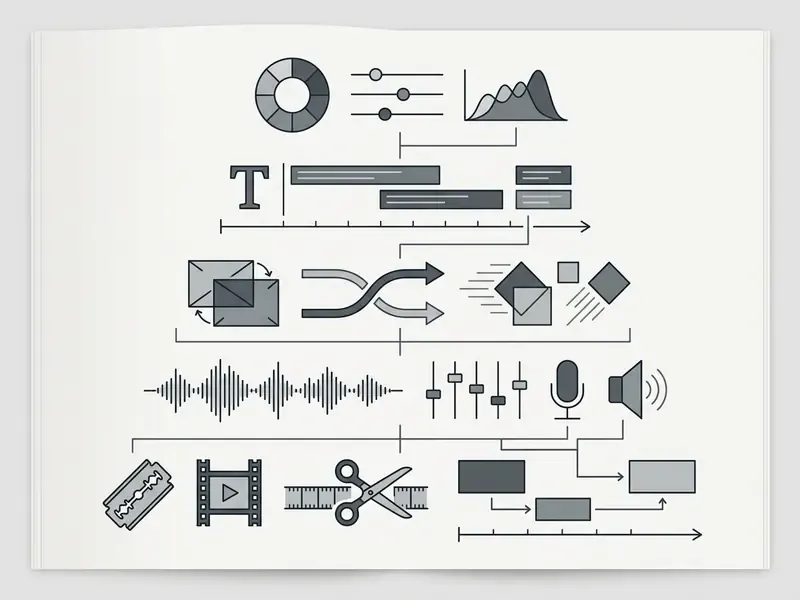
Cut, crop, resize and arrange video clips
Temporal editing lets you trim video segments and split video clips at exact playhead positions along the project timeline. Trimming shaves footage from the head or tail of a clip; splitting divides one clip into two at the playhead, leaving source media untouched. Spatial editing covers the rest: crop video framing, resize clips to fit an aspect ratio, and arrange multiple video image layers into a structured sequence. Crop changes which part of the frame is visible without altering the project's aspect ratio, while resize changes output dimensions. That distinction matters the moment you repurpose 16:9 footage for 9:16 delivery.
Speed manipulation belongs to the same toolset. Capable free editors run from slow motion at 0.25× (25%) up to time-lapse acceleration at 10× (1000%), ideally with pitch compensation so voices do not turn into chipmunks. Icecream Video Editor and Canva both expose that full x0.25 to x10 range, and frame-blending or optical-flow interpolation smooths the slowest settings.
Add text, subtitles, transitions and visual effects
Clear text overlays, lower thirds and animated title sequences make a video easier to follow, especially for sound-off viewing in mobile feeds. That is why platforms push captioning so hard. (We found no independent benchmark quantifying the retention lift from overlays in the sources reviewed. Treat vendor engagement claims as marketing rather than measurement.) Modern free editors also bundle automatic AI subtitle generators, customizable transition effects between adjacent clips, color filters and chroma key visual effects. OpenShot ships an internal title editor, automatic transitions on clip overlap, 400+ transitions and 3D animated titles. Clipchamp generates AI captions in 80+ languages. When built-in captioning runs out of styling options, open-source tools such as Subtitle Edit and Aegisub handle SRT and ASS work properly.
Audio editing, voiceover and music tracks
Bad audio is the fastest way to make a technically clean edit look amateur, and it is the most common reason a corporate video comes back for revision. The essentials: track volume balancing, background noise suppression, direct microphone voiceover recording, and a royalty free music library to build a clean audio bed. Clipchamp documents volume control, AI noise suppression and a royalty-free library cleared for personal and commercial use. Clideo adds multi-track volume, sound effects, voice recording and AI voiceover. Canva's Enhance Voice strips background noise in one pass. Teams without a recording booth can substitute synthetic narration using AI voice generators for voiceover.
AI-powered editing: auto-Shorts, vocal separation and smart cutouts
AI features have migrated from paid add-ons into free tiers, and they now account for most of the time saved in short-form production. Four capabilities are worth checking before you commit:
Two more conveniences deserve a mention. Silence and filler-word removal, driven by the transcript, compresses a rambling take into a tight cut. Automatic highlight detection surfaces the strongest moments of a long recording for you to approve. Text-to-video generation sits next door to this category, so see our overview of text-to-video AI tools when you have a script but no footage.
Caveat for compliance teams: AI features are frequently cloud-processed even inside a desktop application, which means media leaves the machine. If the footage is confidential, confirm whether the AI module runs locally or uploads to a vendor endpoint before you enable it. Where documentation is thin, our AI Media API Guides show what a processing endpoint disclosure should actually look like.
Video formats, 4K quality and export options
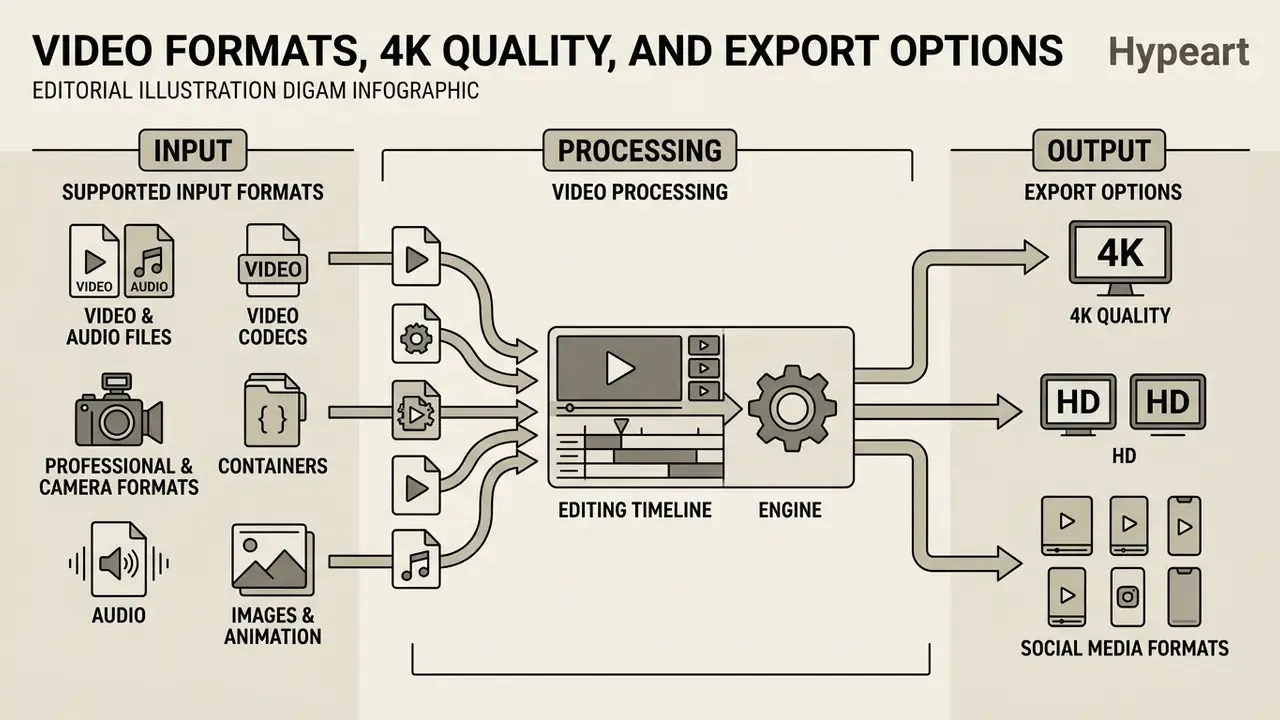
Editing software has to read diverse input containers and export finished projects at current quality standards. Professional delivery means compatibility with MP4 AVI containers, high quality H.264/HEVC encoding codecs, and scalable resolutions up to 4K video. ITU-R BT.2556-0 (2025) defines 4K as 3,840 × 2,160 progressive, and the T/UWA 008-2022 specification adds 10-bit colour, BT.2020 gamut and HLG/PQ transfer functions, with MP4, TS, MOV and MKV as exchange containers.
Supported input formats for video and audio files
A versatile video editor imports a wide range of media files natively, with no pre-conversion step. Supported input formats should include common video formats like MP4, AVI, MOV and MKV, standard audio formats such as MP3 and WAV, and graphic image formats including PNG and JPEG (US Copyright Office File Guidance, 2026). Handling stills and overlays properly also means clean alpha support. If you build graphics upstream, see our guide to online photo editors for PNG and transparency workflows.
«Shotcut and Kdenlive are built on FFmpeg libraries, giving native support for MP4, AVI, MOV and a wide range of audio codecs without pre-conversion.»
A modern format checklist should stretch beyond the classics:
- Video codecs H.264/AVC, H.265/HEVC, AV1, VP8/VP9, MPEG-2, DV, MJPEG, DivX/XviD.
- Professional and camera formats Apple ProRes, GoPro CineForm, BRAW (Blackmagic RAW), AVCHD (MTS, M2TS, TS, MOD, TOD), XAVC.
- Containers MP4, MOV, MKV, AVI, WEBM, MXF, FLV, WMV/ASF, VOB, OGV, 3GP/3G2.
- Audio MP3, WAV, AAC, FLAC, OGG/Opus, M4A, AIFF.
- Images and animation PNG, JPEG, TIFF, BMP, WebP, SVG, and animated GIF, both as an import and as an export target.
VSDC's published list includes BRAW and VP8/VP9 on input. Filmora accepts AV1 and exports to MP4, AV1, MOV, MKV, WEBM, GIF, MP3 and WAV. Canva exports MP4, SVG and GIF. When an editor cannot read a camera format natively, transcoding to ProRes or DNxHD before the edit beats fighting the timeline for an afternoon. A lightweight video converter in the pipeline is not a failure of the editor; it is often the faster route.
Free video editor options for different editing tasks
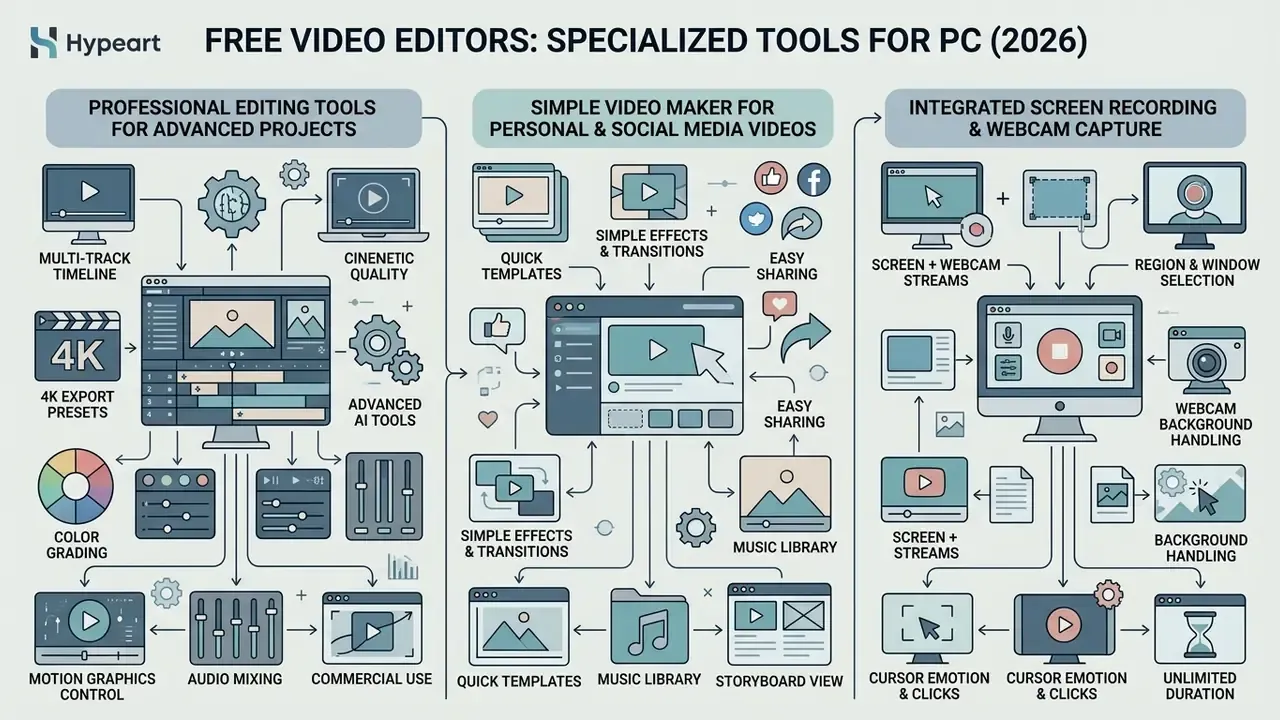
Free video editing applications sort themselves into specialised categories. Advanced non-linear platforms carry complex production timelines, simple video maker applications streamline social media clips, and lightweight tools handle home video archival edits.
Professional editing tools for advanced video projects
For advanced video projects, DaVinci Resolve Free delivers capabilities that mirror high-end commercial suites. Node-based Fusion visual effects, multi-track Fairlight audio mixing, and professional color correction tools that carry high quality 4K video workflows, all without a licensing fee (Blackmagic Design, 2026).
«The free edition includes non-linear editing, Rec. 709 colour grading, Fusion VFX compositing and Fairlight audio post, with no cap on the number of exports.»
VSDC is the notable free alternative that also documents HDR colour grading with curves, wheels and LUTs, plus chroma key, object tracking and multicam editing. OpenShot covers grading scopes (histogram, waveform, vectorscope, RGB parade) and chroma key, but not multicam. Teams weighing Resolve against lighter options can review our comparison of free video editors before standardising a toolchain. Anyone coming from Adobe Premiere will find Resolve's page-based layout strange for about a week, then obvious.
Integrated screen recording and webcam capture
Most contemporary free editors have absorbed the capture step, which removes the need for a separate tool like OBS Studio on straightforward tutorial work. Clipchamp, ScreenPal and the Canva desktop app all record the screen, the webcam and a microphone voiceover, separately or simultaneously as a picture-in-picture composite, then drop the clip onto the editing timeline.
What to verify before you rely on a built-in recorder:
- Simultaneous streams. Screen plus webcam plus system audio as separate tracks is far more flexible than a pre-baked composite.
- Duration caps. ScreenPal's free tier stops at 15 minutes per recording and 10 hosted videos. Longer lectures need a paid plan or a local recorder.
- Region and window selection. Full screen, single window, or a fixed-size region matching your export aspect ratio.
- Webcam background handling. Blur, removal or virtual background without a green screen. ScreenPal and Canva both include this.
- Cursor and click emphasis. Highlight rings and auto-zoom keep software demos readable at 1080p.
Capture, edit, caption, publish, all in one application. For onboarding videos, product demos, lecture recordings and gameplay clips, that is the fastest route available, and choosing a desktop recorder over a browser one keeps the raw capture on local disk.
How to download, install and start editing videos for free
To start editing safely, download free video editor installers directly from official vendor websites. Mirror sites and "fast download" portals are how bundled malware and unwanted browser extensions get in. Once the setup file has run, open the editor, set your project parameters, and import your source media.
Security checklist: avoiding malware and Shadow IT
Free software aggregator sites are a documented distribution channel for information-stealing malware families, and a "free video editor" search is a classic lure. Six controls close most of that exposure:
- Download only from the vendor's own domain.Read the URL character by character. Typosquatted domains mimic official pages convincingly.
- Validate the installer hash.Where the vendor publishes a SHA-256 checksum, compare it against the file (
certutil -hashfile installer.exe SHA256on Windows) before execution. - Check the digital signature.Right-click, Properties, Digital Signatures. An unsigned or mismatched publisher is a stop signal.
- Scan before installing.Submit the installer to endpoint protection or a multi-engine scanner, and install unfamiliar tools inside a sandbox or VM.
- Decline bundled offers.Pick custom installation and untick toolbars, "optimisers" and browser extensions.
- Disable telemetry and auto-upload.Review first-launch settings for usage analytics and cloud sync, above all on machines touching client footage.
For IT departments, the anti-Shadow-IT play is an approved list. Several editors ship portable builds (no installation, runnable from a controlled share) or MSI packages suitable for silent installation and administrative deployment via GPO or SCCM. Sanctioning two or three tools centrally costs far less than discovering forty unmanaged installers across the estate. Questions about deployment edge cases usually land in AI Media Support and Troubleshooting.
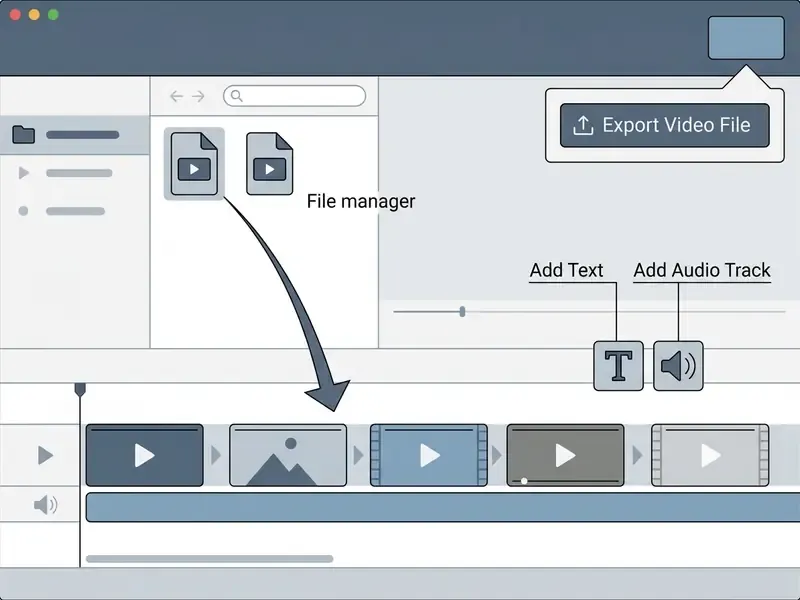
First project: import, edit and export a video file
The six-step sequence below fits beginner and intermediate editors such as Clipchamp, Shotcut, VSDC and Icecream Video Editor. Node-based suites like DaVinci Resolve follow the same logic, but spread it across dedicated Cut, Edit, Fusion, Color, Fairlight and Deliver pages.
- Launch the installed video editor and create a new project with your target aspect ratio (16:9 for YouTube, 9:16 for vertical mobile video).
- Import your raw video file clips, audio tracks and graphic images into the media bin.
- Drag the video clips onto the main editing timeline, then use the split or trim tool to cut away unwanted footage.
- Add text overlays or lower third titles above the video track, adjusting font style, colour and position.
- Insert background audio tracks or record a voiceover, balancing volume levels to prevent distortion.
- Click export video file, choose your container format (MP4, usually) and resolution preset (1080p or 4K), and render the finished file to local storage.
Universal keyboard shortcuts cheat sheet (verify in your editor's settings, bindings vary):
| Action | Common shortcut |
|---|---|
| Play / pause | Space |
| Split clip at playhead | Ctrl + K or S |
| Trim / razor tool | C |
| Ripple delete | Shift + Delete |
| Undo / redo | Ctrl + Z / Ctrl + Shift + Z |
| Zoom timeline in / out | + / - |
| Step one frame back / forward | ← / → |
| Set in / out point | I / O |
| Save project | Ctrl + S |
| Export / render | Ctrl + E or Ctrl + M |
Learn four of these and your edit speed roughly doubles. Split, undo, in, out.
FAQ: free video editor downloads, limits and licences
What is the best free video editing software without a watermark?
DaVinci Resolve Free, Shotcut, Kdenlive, OpenShot and VSDC all export without watermarks and without duration limits. Microsoft Clipchamp is watermark-free up to 1080p. Do not assume "free" means unbranded: Filmora's free tier always marks the export, and Icecream Video Editor renders watermark-free only up to five minutes.
Can I edit 4K video for free?
Yes. DaVinci Resolve Free handles UHD 3840×2160 at up to 60 fps, VSDC supports 4K/5K/8K output, and Icecream supports 4K on Windows 10 and 11. Clipchamp restricts 4K export to its paid plan. Budget 16 GB of RAM and a discrete GPU for a comfortable 4K timeline.
Is it legal to use a free editor for paid client work?
It depends on the specific EULA. DaVinci Resolve Free permits commercial delivery with no royalties and no revenue cap. GPL-licensed tools such as Shotcut and Kdenlive permit any purpose, commercial use included. VideoPad's free version is explicitly non-commercial. Bundled stock assets carry separate licences regardless of the software terms.
Which free editor runs on Windows 7?
OpenShot v2.6.x, VSDC Free, VideoPad, Icecream Video Editor and Shotcut build 22.12.21 support Windows 7 64-bit. Clipchamp and the Canva desktop app do not list Windows 7 support.
Do I need a powerful computer?
For 1080p editing, a dual-core CPU with 4 GB of RAM is a workable floor, and VSDC and Avidemux go lower still. For HD comfort, target four cores and 8 GB. For 4K, eight cores, 16 GB and 4 GB of VRAM.
Can a free editor record my screen?
Yes. Clipchamp, ScreenPal and the Canva desktop app include screen and webcam capture with picture-in-picture, so a separate recorder is unnecessary for tutorials and demos. ScreenPal's free tier caps recordings at 15 minutes.
Which formats can I export?
Common free-tier export targets are MP4 (H.264/HEVC), MOV, MKV, WEBM, AVI, animated GIF, plus audio-only MP3 and WAV. AV1 output appears in Filmora, ProRes in VSDC.
How do I speed up or slow down a clip?
Use the speed or retime control. Capable editors span 0.25× slow motion to 10× time-lapse, ideally with pitch compensation applied to the audio.
What should a team document before a fleet-wide rollout?
Four artefacts cover most audit questions: the EULA excerpt permitting commercial delivery, the installer hash and signature record, the export settings used for each channel, and the asset licence log per project. Keep them with the project files rather than in a separate inbox. Next step, kept deliberately small: pick one editor from the quick-answer table, render a 10-second test export, and check the corners for a watermark before you plan anything bigger. Definitions, licence categories and adjacent tools are collected in our AI Media Glossary.