"Evaluating generative model risk requires looking beyond visual appeal. Verify the exact technical asset format, the licensing rights, and the privacy controls before deployment."
An ai minecraft skin generator is a narrow machine learning tool. It converts text prompts or source images into engine-ready 64×64 PNG texture maps for Minecraft. Nothing more glamorous than that. Evaluating an ai minecraft skin generator website therefore comes down to one question: does the platform output a valid texture atlas, or does it hand you concept art that no launcher will accept?
Three Things to Verify Before You Generate
| Checkpoint | What matters | Fast verdict |
|---|---|---|
| Technical format | Output must be a flat, unwrapped 64×64 PNG UV atlas, not a stylized illustration. Legacy 64×32 files still load but lack modern overlay zones. | If the tool exports "character art," you cannot import it into Java or Bedrock without rebuilding the texture. |
| Risk surface | Uploading a face means processing biometric data; purely machine-generated art has no copyright protection in the U.S. | Read the retention policy and the ToS commercial clause before you publish or monetize. |
| Unit economics | Market pricing for hosted generators runs roughly $0.03–$0.05 per skin, with free tiers capped at 1–5 generations per day. | Budget by generation count, not by monthly "unlimited" marketing claims. |
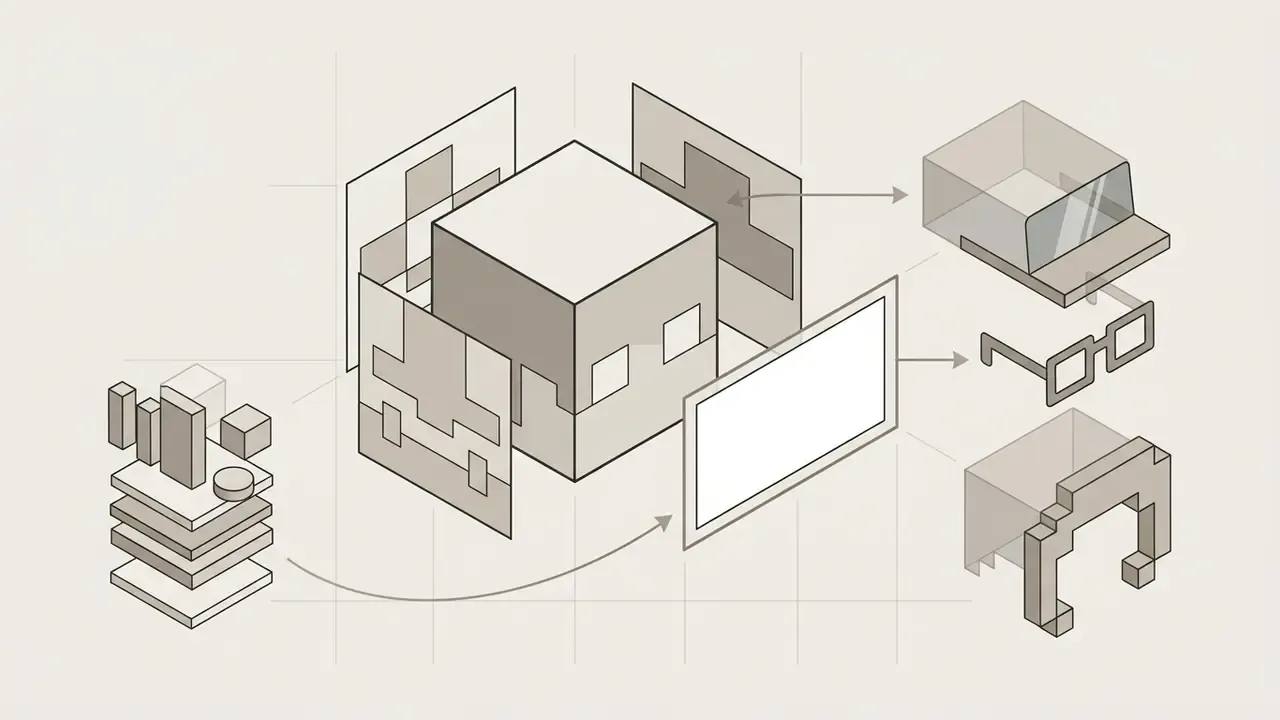
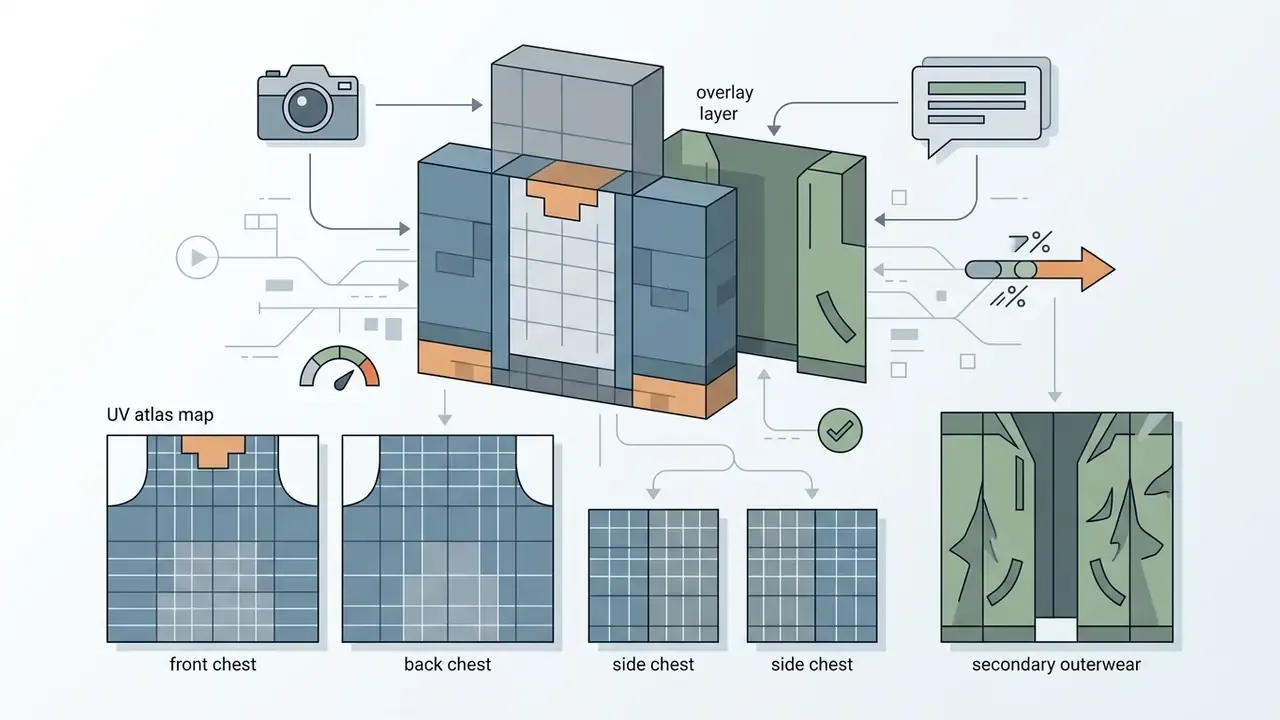
Also critical: most AI generators paint only the inner body layer. If your character looks flat or "bald" in-game, toggle the overlay layers in Minecraft's Skin Customization menu. Full fix below.
How to Read This Guide (and What to Check First)
This page is written as a decision path, not a tour. Three fast triage rules before you spend a credit: Everything after this point expands those three checks: format, workflow, prompt design, pricing, privacy, and licensing.
- Check the export claim first. Open the tool's FAQ and search for "64x64". If the phrase never appears, treat the product as an illustrator, not a skin maker.
- Check the model toggle second. Classic (4-pixel arms) versus Slim (3-pixel arms) decides whether shoulders render cleanly. A generator without that switch will eventually break somebody's arms.
- Check the license third, before your first upload. Personal-use tiers are common. Monetized streams, merch, and server stores are the cases that go wrong later.
What an AI Minecraft Skin Generator Is and What It Outputs
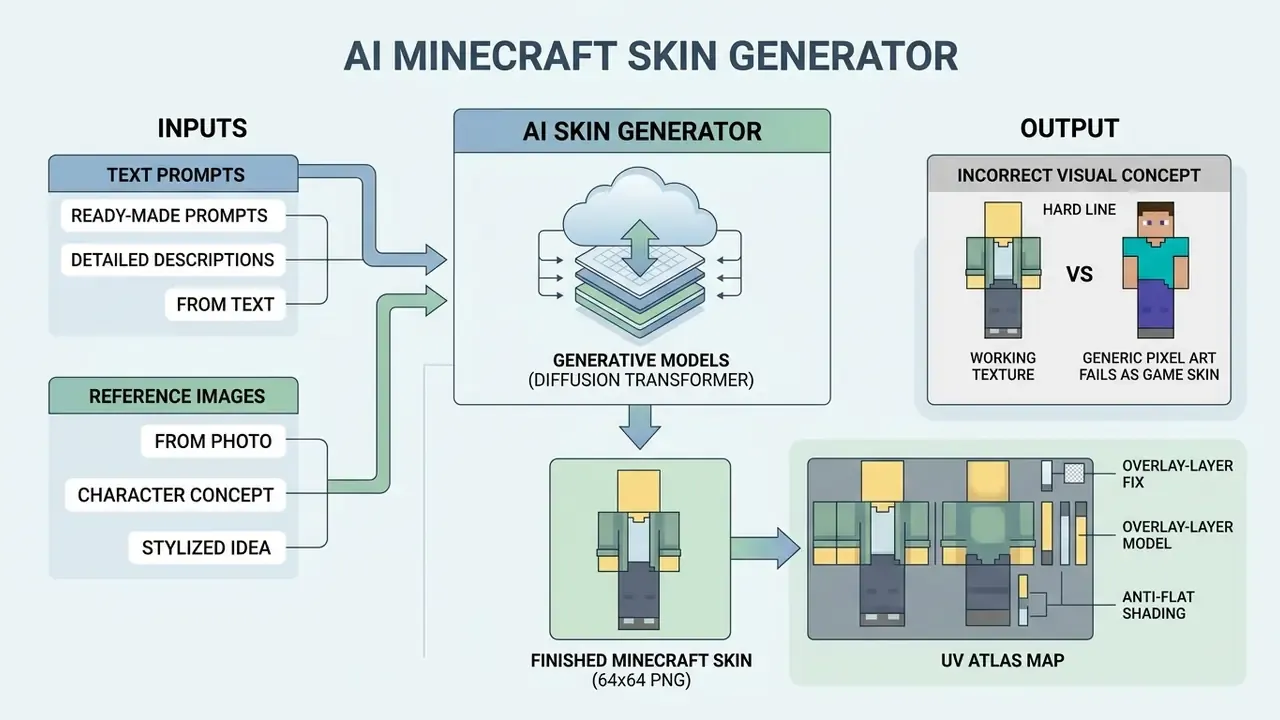
An ai skin generator minecraft workflow transforms human descriptions or reference photos into a functional game texture. In two sentences: the model reads your prompt or photo, then writes pixels into fixed rectangular zones of a 64×64 atlas. Everything else, style, palette, accessories, is conditioning layered on top of that rigid spatial contract.
Modern platforms use generative models such as template-aware diffusion transformers, trained on structured datasets like neurlang/Minecraft-Skins-Captioned-1M to map visual traits directly onto 3D character UV coordinates.
«The dataset contains 981,079 unique 64×64 PNG skins, each paired with a text caption and a hash used for deduplication.»
That scale explains why prompt-driven skin models converge on recognizable Minecraft conventions. The training distribution is almost entirely legitimate, in-game-valid texture atlases rather than free-form pixel illustrations. Bias in, convention out.
AI Skin Generator: Finished Skin vs. Visual Concept
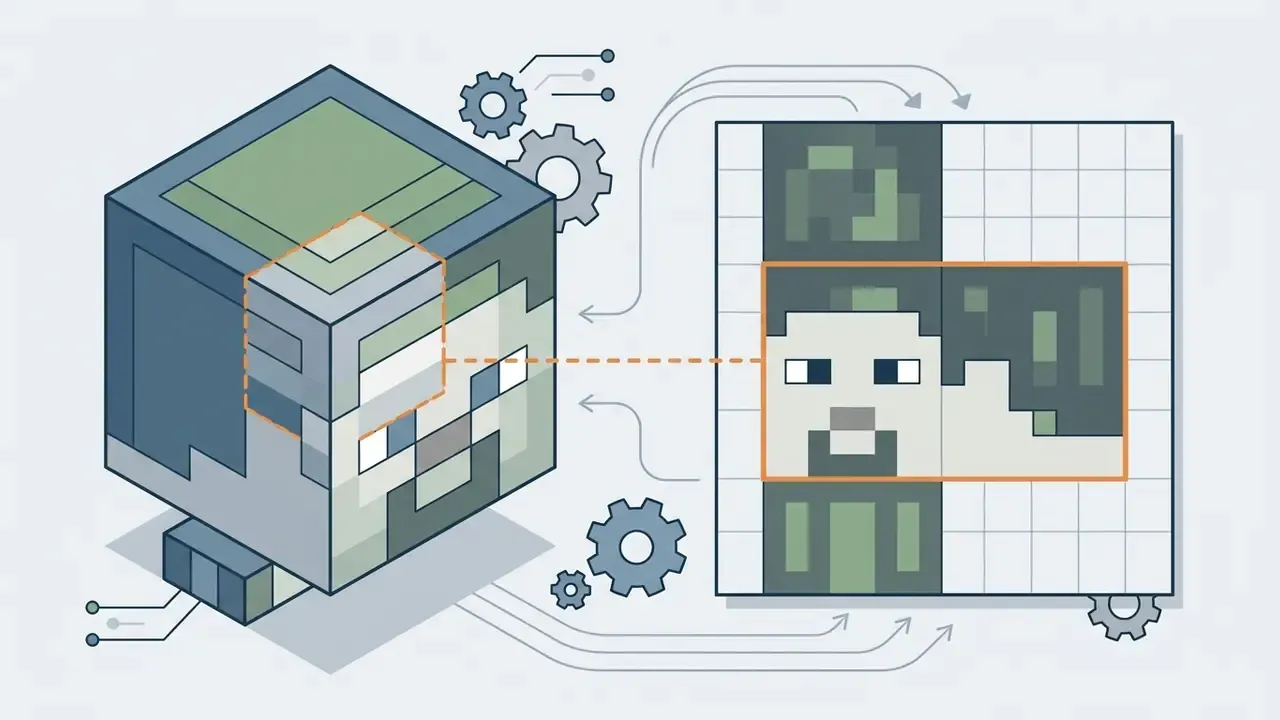
There is a hard line between a generic pixel-art character concept and a working minecraft skin. A concept image is a flat, single-perspective illustration; the engine cannot load it. A true ai skin generator produces an unwrapped 2D texture map where discrete pixel zones correspond to the head, torso, arms, and legs of the player model.
«Generators must be "template-aware," otherwise they produce visually appealing but technically invalid assets.»
This is the single most common failure mode in the category. Several popular tools openly say their output is a Minecraft-style character render, not a paintable 64×64 skin map. Which means the design must be manually rebuilt in a dedicated editor before it can enter the game. Annoying, and avoidable if you read the export spec first.
Creating a Minecraft Skin From Text and From an Image
A modern ai minecraft skin creator works through two input pathways: text descriptions and reference images. Text-to-skin models parse prompt tokens describing outfit, helmet, or color theme. Image-to-skin architectures extract facial features, hair structure, and color palettes from an uploaded photograph. If you want to expand source art beyond its original frame before generating texture details, compare AI image generators for commercial use alongside our AI Media Commercial-Use Hub. Both routes should end in the same artifact: a structured 64×64 PNG texture file ready for profile import.
How to Generate a Minecraft Skin From an Image or Photo
To ai generate minecraft skin from image input, the platform extracts visual feature vectors and maps them onto the standard UV coordinate map. The process translates continuous facial landmarks, hair contours, and clothing colors into discrete pixel blocks while trying to preserve recognizable identity traits.
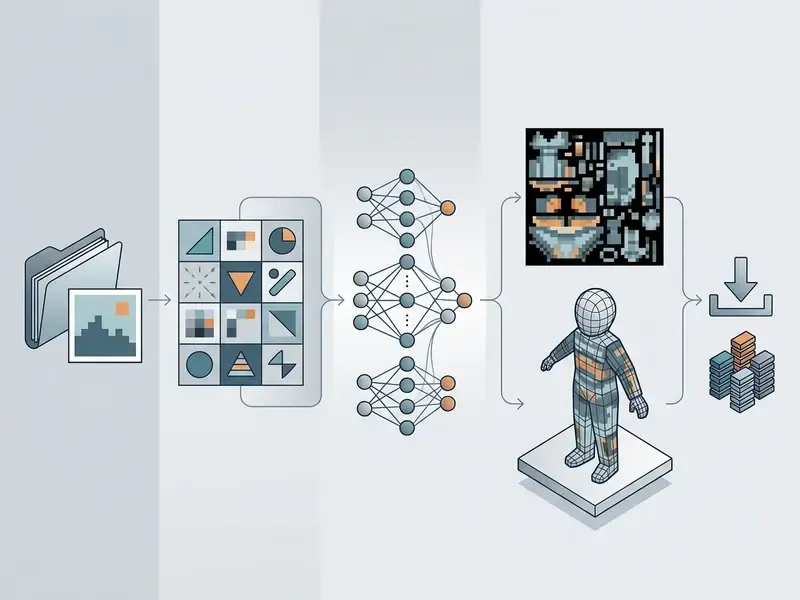
Photo-to-Skin Generation Pipeline (4 stages):
- Upload image.Front-facing portrait, one clear subject, even lighting, minimal background clutter.
- Style and grid selection.Pick the aesthetic preset, pixel density, and target model: Classic (4px arms) or Slim (3px arms).
- AI inference.The conditioning network maps facial landmarks and palette onto the fixed UV atlas.
- 2D / 3D preview, then download PNG.Inspect the flat atlas, rotate the WebGL model, export the 64×64 file.
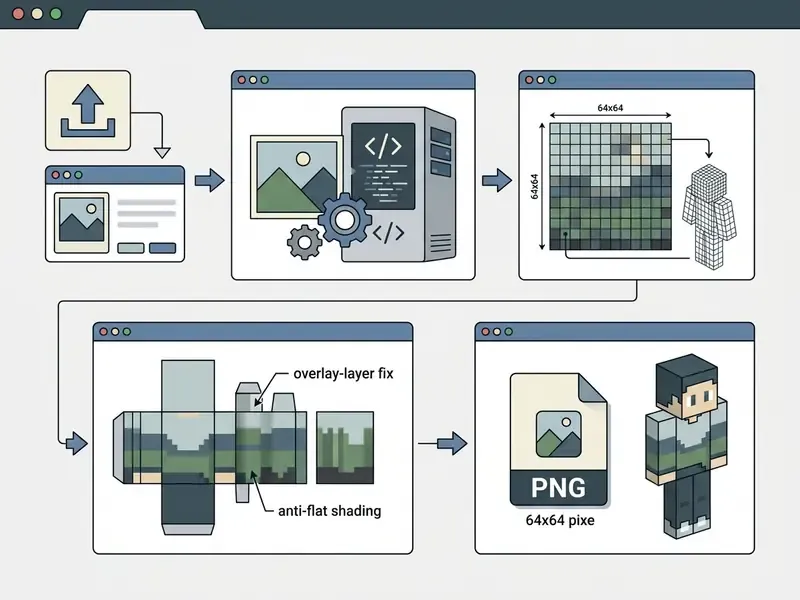
How to Prepare an Image for Conversion Into a Minecraft Skin
An optimal source photo for an ai minecraft skin generator from photo system has clear forward lighting and distinct facial boundaries. High-contrast input lets conditioning modules such as InstantID or control nets isolate key features accurately.
Avoid heavy background clutter and extreme angles. Non-standard poses raise spatial mapping errors across a canvas that is only 64 pixels wide. Identity-preserving research leans consistently on sharp face crops with visible landmarks; when pose and expression drift, identity similarity and style consistency degrade together.
One practical observation from testing: a hoodie photographed in shadow almost always converts into a single muddy brown block. Shoot the reference in daylight, or accept the repaint work later.
Choosing Style, Image Size, and Character Detail
With an ai minecraft skin generator from image, the generation parameters decide final pixel density. Aesthetic presets such as 8-bit retro, cyberpunk, or medieval fantasy set the target palette and noise threshold. Adjusting the pixel grid balances broad retro shapes against detailed clothing accents: a smaller grid yields chunky silhouettes, a larger grid preserves finer trim. Capping the maximum color count produces a cleaner pixel-art read. Creators comparing render engines can review the best AI image generators, try turn photo into sketch, or push realistic features into stylized 8-bit blocks.
Generate, Preview, and Download the Result
Running the image to minecraft skin ai transformation starts neural inference, usually finishing in three to ten seconds. The platform returns an unwrapped 2D texture plus an interactive 3D WebGL preview. You can rotate the character through 360 degrees and download the finished PNG straight to local storage. Better viewers add walk, run, idle, and fly states, which expose seam errors a static atlas view politely hides.
How to Create a Minecraft Skin With a Text Prompt
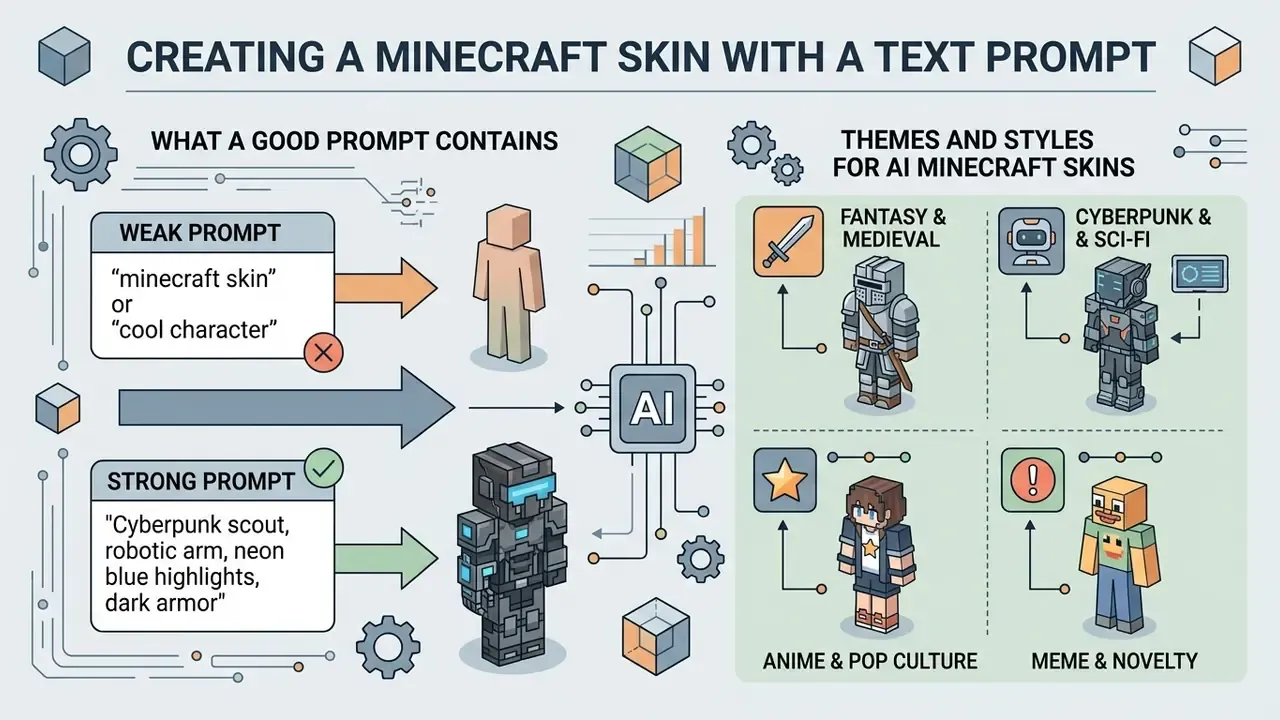
A text-driven ai minecraft skin generator online lets users build custom player textures from natural language, with no reference photo at all. The text encoder translates prompt tokens into armor, clothing, hair, and accessory patterns distributed across the UV atlas.
What a Good Prompt for a Skin Creator Contains
An effective prompt for an ai minecraft skin maker combines four structural elements in one descriptive sentence: subject type, clothing details, color palette, visual style. For example, "a medieval paladin in polished silver armor with blue cloth trim, glowing yellow eyes, pixel art style" produces noticeably cleaner texture mapping than a vague description.
«The dataset contains 854,116 skins after filtering; the average caption length is 132.5 words, enabling detailed style control during generation.»
Weak prompt vs. strong prompt. A one-word prompt such as snowman gives the model no palette, no layer instruction, no silhouette anchor. The atlas typically returns a monochrome torso and an empty overlay quadrant. The corrected version, snowman with a black top hat, red knitted scarf, coal-button torso, 64x64 skin layout, defined overlay hat layer, constrains four zones at once and cuts stray-pixel artifacts sharply. Prompt-refinement research supports the pattern: iterative rewriting to maximize prompt-image consistency improved DSG consistency by up to 24.9% on benchmark prompt sets, while coarse-to-fine prompt decomposition delivered up to +4% VQA alignment.
Small correction to my own advice above: longer is not automatically better. Past roughly forty tokens, most minecraft skin ai maker models start ignoring the tail of the prompt.
Themes and Styles for AI Minecraft Skins
Popular prompt templates for a minecraft ai skin creator cluster into a few established gaming genres:
«The minecraft-skins-captioned-900k dataset spans medieval, fantasy, sci-fi, modern, horror, and anime themes, with characters ranging from knights to robots.»
- Fantasy and Medieval golden armor knights, cloaked shadow mages, ancient elven archers.
- Cyberpunk and Sci-Fi neon-accented cyborgs, space suit pilots, futuristic street wear.
- Anime and Pop Culture chibi characters with vibrant hair, themed hoodies, stylized mask overlays.
- Meme and Novelty blocky food suits, tuxedoed animals, retro arcade avatars.
Feeding an ai skin maker minecraft pipeline with established genre keywords produces more consistent texture output, and it helps outer jacket and helmet layers render where they should.
Ready-Made Prompt Library by Genre
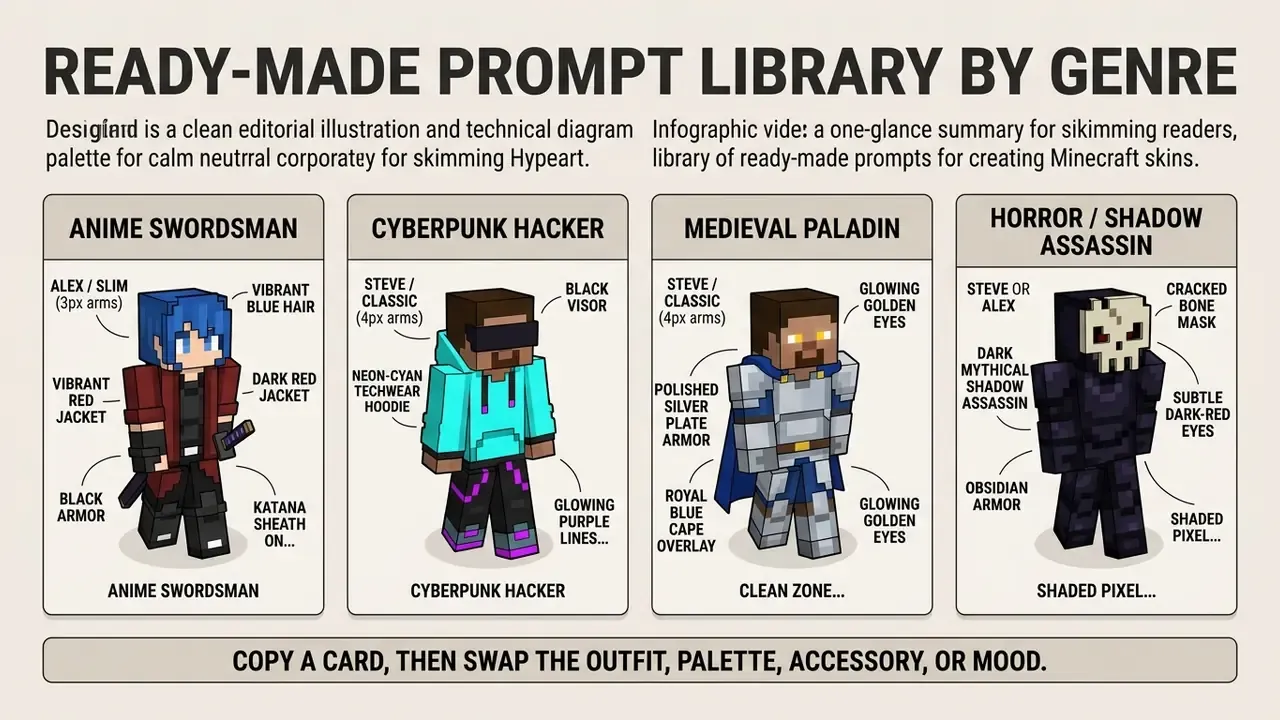
Copy a card, then swap the outfit, palette, accessory, or mood. Each prompt names the target arm geometry so the generator does not blend 3-pixel and 4-pixel limb regions.
Anime Swordsman, Alex / Slim (3px arms)
Minecraft-style anime swordsman skin, vibrant blue hair, dark red jacket over black armor, katana sheath on belt, 64x64 texture format, clean pixel mapping, high-contrast face details, 3-pixel slim arms.
Cyberpunk Hacker, Steve / Classic (4px arms)
Cyberpunk mercenary minecraft skin, neon-cyan techwear hoodie, black visor with glowing purple lines, utility belt, 8-bit blocky aesthetics, dual-layer outerwear, 4-pixel classic arms.
Medieval Paladin, Steve / Classic (4px arms)
Medieval knight skin, polished silver plate armor, royal blue cape overlay, glowing golden eyes, clean zone boundaries, full 2D texture map layout, no stray pixels.
Horror / Shadow Assassin, Steve or Alex
Dark mythical shadow assassin, obsidian armor, cracked bone mask, subtle dark-red eyes, shaded pixel details, fine noise texture on cloth, restrained cold palette.
Forest Ranger, Alex / Slim (3px arms)
Minecraft skin of a forest ranger, moss-green hooded cloak overlay, leather bracers, silver bow strap across chest, autumn brown-and-green palette, readable blocky silhouette.
Kawaii Cat Explorer, Alex / Slim (3px arms)
Kawaii minecraft skin, pink hoodie with cat-ear hat overlay, white skirt, pastel sneakers, soft pastel palette, cheerful face, crisp 64x64 pixel edges.
Steampunk Inventor, Steve / Classic (4px arms)
Minecraft-style steampunk inventor, leather vest, brass monocle on head overlay, tool straps, bronze gear accents, warm copper palette, workshop-ready character.
Cozy Winter Villager, Steve or Alex
Cozy minecraft winter villager skin, oversized knitted sweater with visible stitch noise, long scarf on jacket overlay layer, warm boots, soft blue-and-white palette.
Need budgeting help before you queue fifty of these? Our cost tools sit in the calculators section, explore the hub.
Skin Format: 64×64 PNG, 2D Texture, and 3D Preview
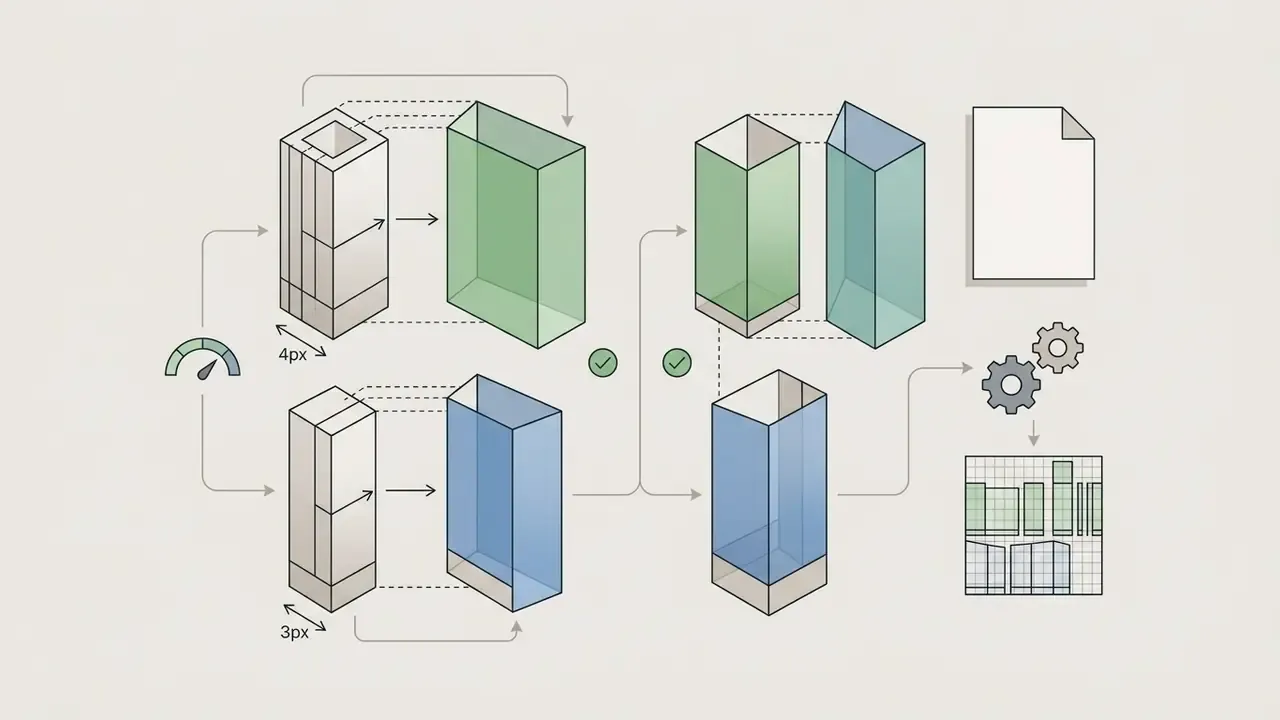
Every player file produced by a minecraft skin generator must match exact structural rules. Modern Java and Bedrock editions use a 64×64 pixel canvas with dedicated rectangular zones for base body parts and second-layer overlays. Readers new to generative pipelines can start with our primer on AI art generators before mapping prompts to UV atlases.
64×64 Texture Map and 3D Model Mapping Scheme:
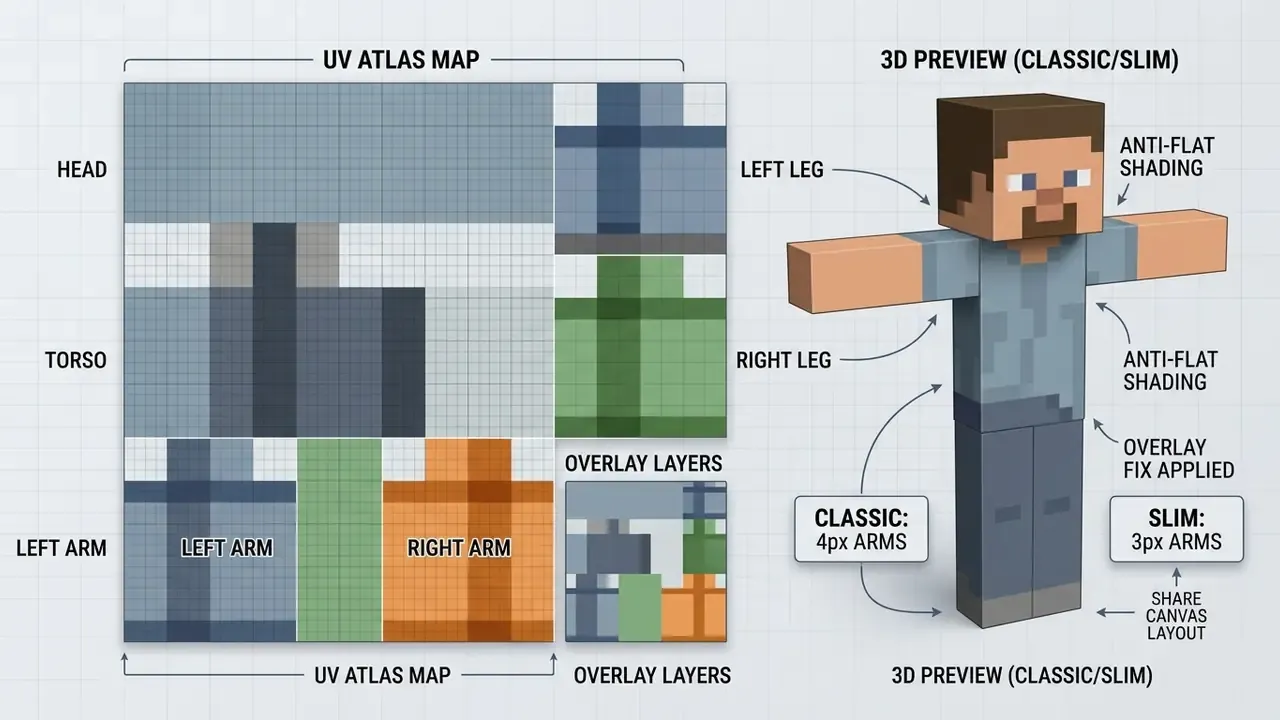
How to Inspect the 2D Texture Before Downloading
Before saving a file from an mc skin maker ai platform, inspect the flat 2D atlas for generation artifacts. Look for stray uncolored pixels, blurred boundaries between limbs, and misaligned facial features. Checking color consistency across adjacent body panels prevents visible breaks when the texture wraps onto the 3D mesh.
«A systematic review of 239 works finds that asset evaluation must include technical validity, conformance to resolution, topology, and UV mapping.»
Practical QA borrows from image-artifact detection. Compare the generated atlas against a clean template, flag pixels whose luminance deviates sharply from their neighbors, then treat isolated outlier clusters as bad pixels to repaint before export. Two minutes of this saves a re-upload.
3D Preview and Character Model Selection
An integrated 3D preview lets creators judge the character in a real-time WebGL viewer before export. The viewer should support model selection between Classic (Steve), with 4-pixel wide arms, and Slim (Alex), with 3-pixel wide arms. Pick the wrong geometry and you get black fill lines or stretched shoulder pixels along the inner arm seams.
«The minecraft-skins-captioned-900k dataset is restricted to the Steve model (4-pixel arms), standardizing UV topology and reducing mapping errors during training.»
That is the technical reason many text-to-skin models default to Classic proportions. Their training corpus never held slim-arm topology, so slim requests are re-projected rather than natively generated.
Downloading the PNG
After verifying the 3D model, download the 64×64 PNG to your device. Java Edition accepts a flat, unwrapped .png texture; the legacy 64×32 layout still loads but omits modern overlay regions. Step-by-step launcher instructions live in the player appendix at the end of this guide, so the analytical workflow above stays uninterrupted.
How to Improve AI Skin Generator Results
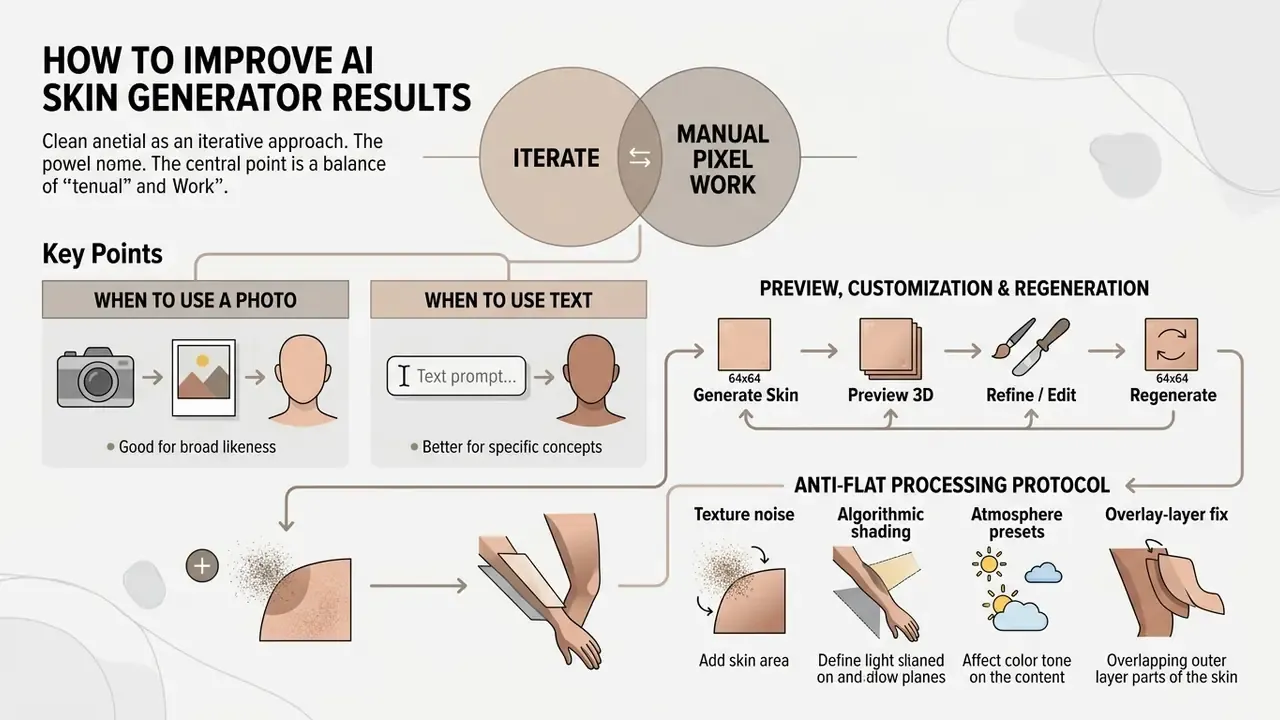
Getting high-precision output from a minecraft ai skin generator usually takes iteration plus a little manual pixel work. Generative first pass, human polish second. That combination still wins.
When to Use a Photo and When to Use Text
Choose an ai skin generator photo workflow when you need real-world identity traits, a specific face, or a recognizable uniform. Use text prompts when you are inventing abstract fantasy concepts, non-humanoid characters, or complex sci-fi suits. Hybrid workflows, meaning a base texture from a photo reference refined by text prompts for accessories, tend to win for branded avatars.
«SmartAvatar (2025) shows that a hybrid image-plus-text approach outperforms text-only and image-only pipelines on attribute accuracy and mesh quality.»
Style-control research points the same way. Reference images reproduce an existing look better; text conditions invent a described style better; hybrid tokenizers keep reference fidelity and prompt adherence at the same time.
Preview, Customization, and Regeneration
Free AI Minecraft Skin Generators, Pricing Tiers, Unit Economics, and Commercial Use
Picking a free ai minecraft skin generator means reading three things: daily quota, export resolution, and commercial rights. Basic generations are widely free. Monetizing the output is where the terms tighten.
| Feature / Tier | Free tier (typical limits) | Hobbyist / credit packs | Paid / Pro subscription |
|---|---|---|---|
| Generation credits | 1 to 5 per day, or a sign-up bonus | 50–125 per pack | Unlimited or high monthly allocations (300+) |
| Average unit cost | $0.00 (queued, rate-limited) | ~$0.04–$0.05 per skin ($2.49–$4.99 packs) | ~$0.03 per skin ($9.99+ tiers) |
| Input options | Basic text prompts, standard photo upload | Text plus reference image, style presets | Advanced control nets, high-res face models |
| Texture format | Standard 64×64 PNG export | 64×64 PNG, model choice (Classic/Slim) | 64×64 PNG plus HD skin variants |
| 3D preview access | Full 360-degree interactive WebGL preview | Preview plus animation states | Full preview plus custom animation pose tests |
| Commercial usage rights | Personal, non-commercial only (e.g., MCSkin) | Varies by vendor, check ToS per pack | Commercial rights for streams, merch, server branding |
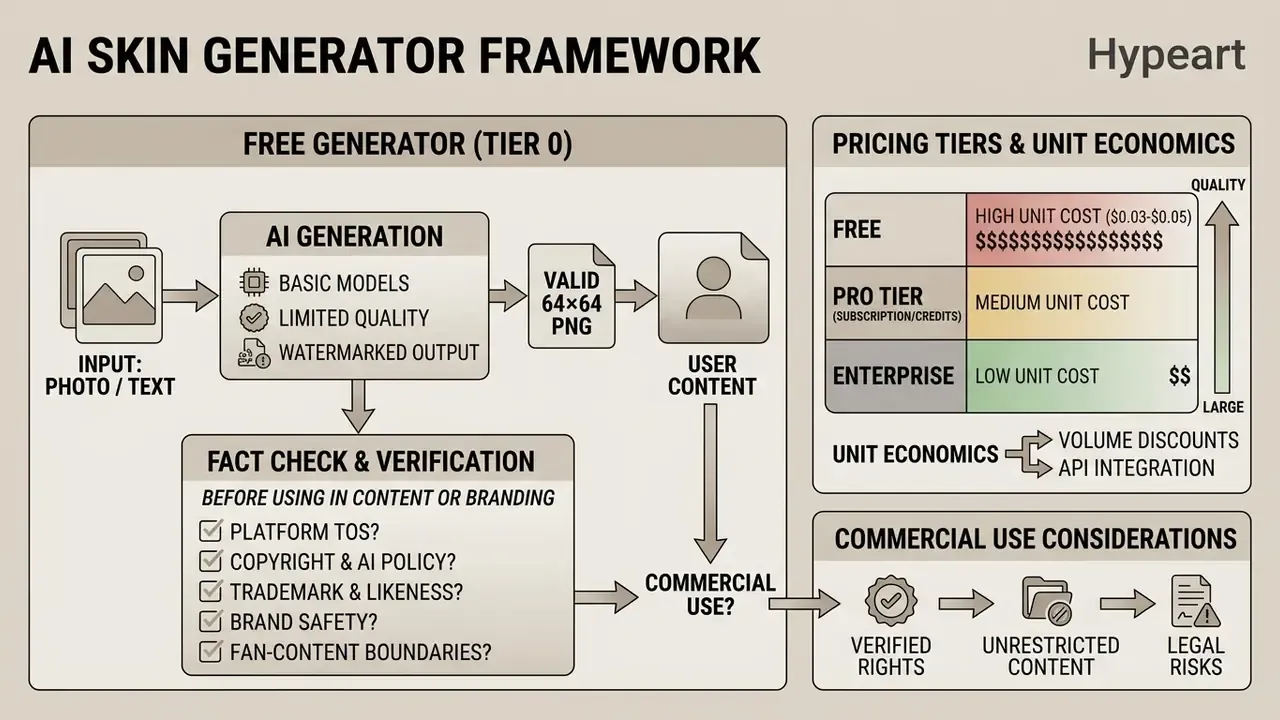
Observed market pricing clusters tightly: 50 generations for $2.49 ($0.05 each), 125 for $4.99 ($0.04 each), 333 for $9.99 ($0.03 each), often with five free generations on signup. Model a server-wide NPC skin set by multiplying planned iterations, not final assets, by that unit rate. Most designs need two to four regeneration passes. Compare plan structures across vendors in our pricing section, explore the hub.
«Midjourney's Terms of Service explicitly prohibit automated access, resale, and building competing services from its outputs.»
Fact check and licensing verification
What a Free AI Minecraft Skin Generator Usually Includes
A standard ai minecraft skin generator free plan offers browser access to basic text-to-skin generation, flat 2D texture inspection, and single PNG downloads, comparable to the limits documented across free AI image generators. The same pattern holds for a minecraft ai skin generator free tier: queue waits during peak hours, capped daily attempts, restricted conditioning features, and the newest model versions gated behind paid plans. Watermarking is rare for skin atlases specifically, since a watermark would corrupt the UV map, but resolution ceilings and model-version gating are routine.
What to Check Before Using a Skin in Content or Branding
Before shipping generated textures into commercial projects, weigh four legal criteria:
- Platform Terms of Service. Confirm the ai minecraft skin generator website explicitly assigns commercial exploitation rights over generated output.
- Copyright and AI policy. Under U.S. Copyright Office guidance, purely machine-generated art lacks copyright protection unless modified by substantial human authorship. Prompts alone are not enough; creative human arrangement or modification of AI output can be claimed. See Copyright and Artificial Intelligence, Part 2: Copyrightability, U.S. Copyright Office (2025): https://www.copyright.gov/ai/Copyright-and-Artificial-Intelligence-Part-2-Copyrightability-Report.pdf and the office's AI policy hub: https://www.copyright.gov/ai/
- Trademark, likeness, and brand safety. Confirm the generated skin does not infringe third-party trademarks, logos, or protected character designs. Prompting a sportswear logo, a comic-book costume, or a studio character creates trademark and publicity exposure even when the pixel art itself is unprotectable. The same caution applies to public-figure likeness tools, whether that is a trump ai generator for imagery or a trump ai voice generator for audio: identity rights sit outside copyright and are enforced separately. Conversely, a skin used in commerce as a source identifier, say a server mascot printed on merchandise, can itself function as a trademark. That is a different legal track from copyright.
- Fan-content boundaries. Minecraft's Usage Guidelines permit non-commercial fan content but forbid commercial entities from using Minecraft gameplay or IP to promote unrelated products without prior written approval.
For teams planning broader digital asset expansion, evaluate image-to-image generators for commercial use and API integrations to compare options across enterprise media tools. Case summaries and dispute patterns are collected in our legal section, explore the hub.
Disclaimer: general information, not legal advice. Consult qualified counsel before commercializing AI-generated assets.
Privacy: What Happens to Uploaded Images and Photos
General information only. It does not replace consultation with a data-protection specialist or legal advisor.
Uploading personal portraits into an ai minecraft skin generator from photo engine raises real operational privacy questions about facial data processing. A cartoon output does not make the input any less biometric.
Privacy alert
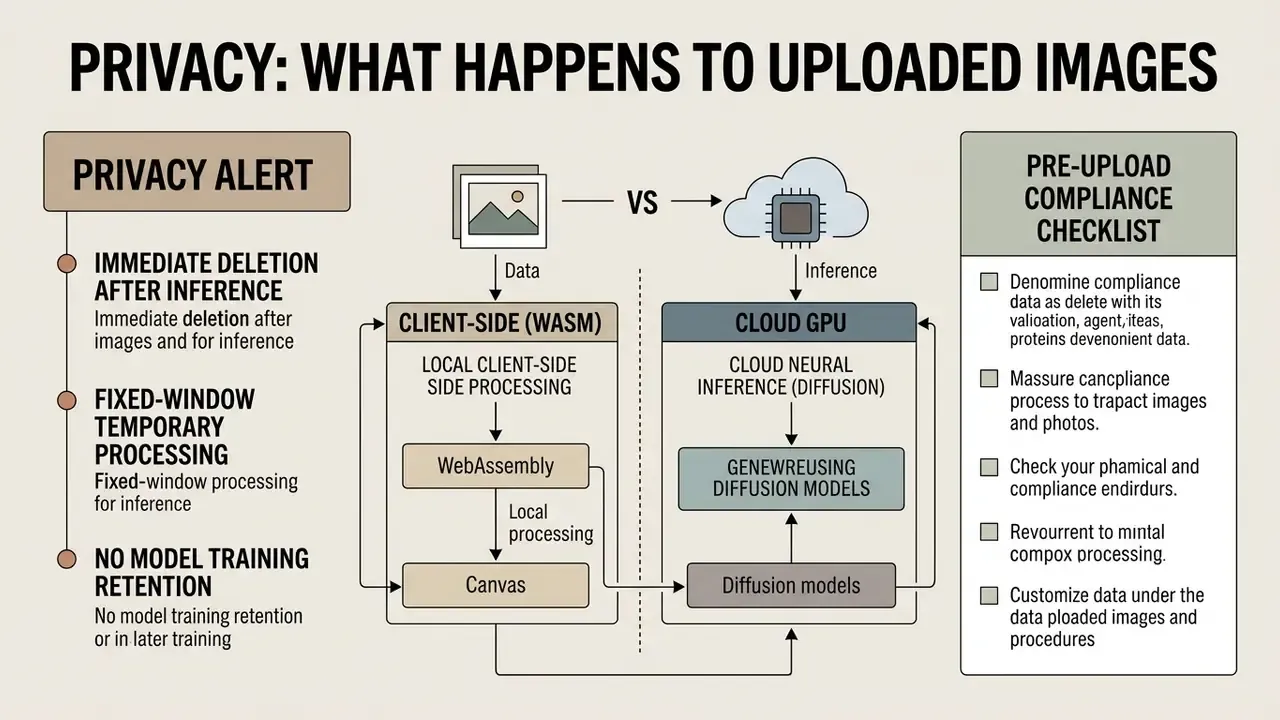
Before uploading personal photographs to any online generative service, read the vendor's Privacy Policy. Confirm whether facial images are purged immediately after generation or retained for model re-training. Under NIST AI Safety guidance (NIST AI 600-1), processing personal biometric data requires strict consent controls and transparent retention limits; the framework specifically names non-consensual intimate imagery as a concrete generative-AI harm.
«Participants failed to detect content replacement in 60% of images; generative anonymization was visually indistinguishable from the original.» "Examining Human Perception of Generative Content Replacement in Image Privacy Protection", ACM (2024). https://doi.org/10.1145/3613904.3642406
Data handling varies widely across platforms:
- Immediate deletion after inference. Some services state that uploaded photos and videos are processed only to produce the requested output, then deleted promptly, with no retention beyond generation.
- Fixed-window temporary processing. Other privacy-oriented vendors publish an explicit window, commonly automatic purge 30 days after the generated gallery is delivered, with earlier deletion on request. Windows in this category run from immediate purge to 90 days for persona-training images, so read the specific policy rather than assuming a standard.
- Model training retention. Some providers use uploaded datasets to train their underlying generative models unless users opt out in account settings. Others train only a private, user-specific model and state that shared models never see your uploads.
Always verify that your chosen platform supports manual deletion requests and enforces HTTPS uploads. If the policy is silent on retention, treat the silence as the answer.
«Provenance and watermarking should be easily accessible to users and, where possible, interoperable across platforms.»
Generation Architectures: Client-Side (WASM) vs. Cloud GPU
- Local client-side (WebAssembly / Canvas). Browser-only converters run color mapping and downsampling on your own device. The source photo never leaves the machine, which maximizes biometric privacy and removes retention risk entirely. The trade-off is capability: these tools mostly perform deterministic pixelation and head-template cropping rather than true diffusion synthesis, and first-run model loading can crawl on weak hardware.
- Cloud neural inference (diffusion models). Hosted services send your image to remote GPUs and return far richer detail, style transfer, and prompt adherence. In exchange, verify the ToS for training-data reuse, retention windows, and sub-processor disclosure before uploading a real face.
Pre-Upload Compliance Checklist
Checklist0 / 7
Questions about a specific vendor response you received? Our team documentation and contact paths sit under support.
Use-Case Matrix by Audience
| Audience | Primary use of an AI skin generator | What to prioritize |
|---|---|---|
| Streamers and YouTubers | Branded mascot skins for channel recognition in thumbnails and overlays | Commercial license, 3D render poses, consistent palette across episodes |
| Server owners | Unique skins for NPC merchants, quest characters, staff ranks | Batch generation, unit cost per skin, uniform shading presets |
| Education (Minecraft Education) | Fast reconstruction of historical figures: Roman legionaries, scientists, explorers | Free-tier limits, classroom privacy rules, no personal photo uploads |
| Mod and texture developers | Prototype libraries and mob texture drafts before manual polish | Noise generator, Classic/Slim topology control, PNG export fidelity |
| Brands and e-commerce | Interactive campaign avatars and youth-facing activations | Trademark clearance, Minecraft Usage Guidelines compliance, written approvals |
| Casual players | Frequent look changes and avatar experiments | Speed, free daily generations, one-click download |
Comparing platform shortlists side by side? Open the hub for feature and licensing breakdowns.
FAQ About AI Minecraft Skin Generators
Is an AI skin generator affiliated with Minecraft, Mojang, or Microsoft?
No. Third-party ai mc skin generator web apps operate independently of Mojang Studios and Microsoft, and reputable tools say so in their own FAQ. If you also need portrait tooling for channel branding, see our overview of AI headshot generators. Official Minecraft Usage Guidelines permit fan-created content and community tools, provided platforms do not claim official sponsorship or misuse protected trademarks. The Minecraft EULA adds that original user-created content, skins included, stays the creator's own.
«Minecraft Marketplace has paid creators more than $500 million since launch; third-party AI skin generators are not part of that official ecosystem.» ShaneTheGamer, "Minecraft Statistics 2026" (2026). https://shanethegamer.com/minecraft-statistics/
Why can generation take time?
Server-side speed depends on GPU queue depth, model parameter size, and the number of diffusion denoising steps. Simple text prompts often finish in seconds; complex image-conditioning runs can take considerably longer under peak load. Ranked by impact: inference steps, model size and target resolution, request batching and queue depth, GPU memory bandwidth, cold-start latency on autoscaled pools, network round-trip time. Browser-side models trade queue time for first-run download and compile time. Per-request latency varies by vendor and hardware; treat published figures as vendor-reported rather than benchmarked.
Why does my skin look "bald," flat, or blurry at the edges?
Three distinct causes:
- Wrong layer. The model painted the inner body layer only; the empty overlay renders as a bald or blank surface. Fix it in Settings → Skin Customization, per the overlay note above.
- Blurry edges. The generator upscaled or resampled the atlas instead of writing exact 64×64 pixels. Re-export with nearest-neighbor scaling, never bilinear, and confirm the file really is 64×64.
- Flat monotone fills. Run the Anti-Flat Processing Protocol, noise, edge shading, palette caps, before uploading.
Which shader-style presets improve AI skins?
Vibrance, texture, and shading presets are the fastest quality lever on a flat output from any minecraft skin ai generator. Cold, low-contrast, desaturated presets give the cinematic From the Fog horror look; warm high-vibrance presets suit kawaii and arcade themes; mid-contrast metallic presets read best on plate armor. Apply presets after noise and shading, not before, so the grain survives.
Does a wrong model choice really break the skin?
Yes. A 4-pixel Classic texture loaded onto a 3-pixel Slim model stretches shoulder pixels and can render black fill lines along the inner arm seams. Both models share the same 64×64 canvas; only arm width differs. Confirm the target model before export, every time.
Can I run an ai generator minecraft skin workflow on mobile?
Mostly yes. Browser-based tools work on modern mobile Safari and Chrome, and the download step saves a normal PNG to your device. Two caveats: WebGL previews drain battery quickly, and Bedrock's Dressing Room import is easier from a file manager than from a browser download folder.
Appendix: Applying the Skin in the Minecraft Launcher (Player Guide)
To apply the new skin in official Java Edition:
- Open the Minecraft Launcher, select Java Edition, then the Skins tab.
- Click New Skin and choose your model type (Classic or Slim).
- Click Browse, select the downloaded 64×64 PNG, then click Save & Use.
- Launch the game and open Settings → Skin Customization to enable or disable overlay layers as needed.
The uploaded skin is tied to your account profile, so it updates across your global Mojang identity and appears on every public multiplayer and third-party Java server you join. Bedrock players import the same PNG through the in-game Dressing Room and select the matching Classic or Slim body type.
Appendix A: Superseded Fragments (Retained for Transparency)
- Original ASCII pipeline diagram, replaced above with an accessible ordered list for mobile rendering:
- Original phrasing "commercial commercial exploitation rights" corrected to "commercial exploitation rights."
- Original uncited research reference
- "Research in game asset generation (IEEE Transactions on Games, 2024) emphasizes that template-aware models prevent visual distortion by respecting fixed spatial boundaries during inference." Now cited with quotation and URL.
- Original unquantified dataset reference
- "Detailed captions in large datasets, such as summykai/minecraft-skins-captioned-900k, demonstrate that descriptive text prompts directly improve feature alignment across individual body regions." Now supplemented with dataset metrics and URL.
- Original retention claim
- "Privacy-focused services retain uploaded photos only for the duration of the inference session (under 30 days) before automated deletion (e.g., HeadshotPro policy standards)." Reformulated as a vendor-range statement, because the original citation was not independently verifiable.