- An ai mockup generator is a controlled synthesis engine. It converts vectors, flat logos, garment graphics and UI screens into lighting-matched, perspective-correct previews in seconds. It does not replace creative governance.
- Six production categories dominate 2026 workflows: apparel and print-on-demand, packaging, logo and brand collateral, mobile app or web UI, advertising creatives, and 3D or video product renders.
- A newer capability tier has arrived: video and animated mockups (5-second MP4 exports), multi-shot angle sets, and prompt-to-UI generation from a text brief or a style reference image.
- Export decisions matter more than generation speed. Transparent PNG at 300+ DPI for compositing, JPG up to 2400×2400 px or 4K (3840×2160) for e-commerce and ads, layered PSD or Smart Objects for local retouching.
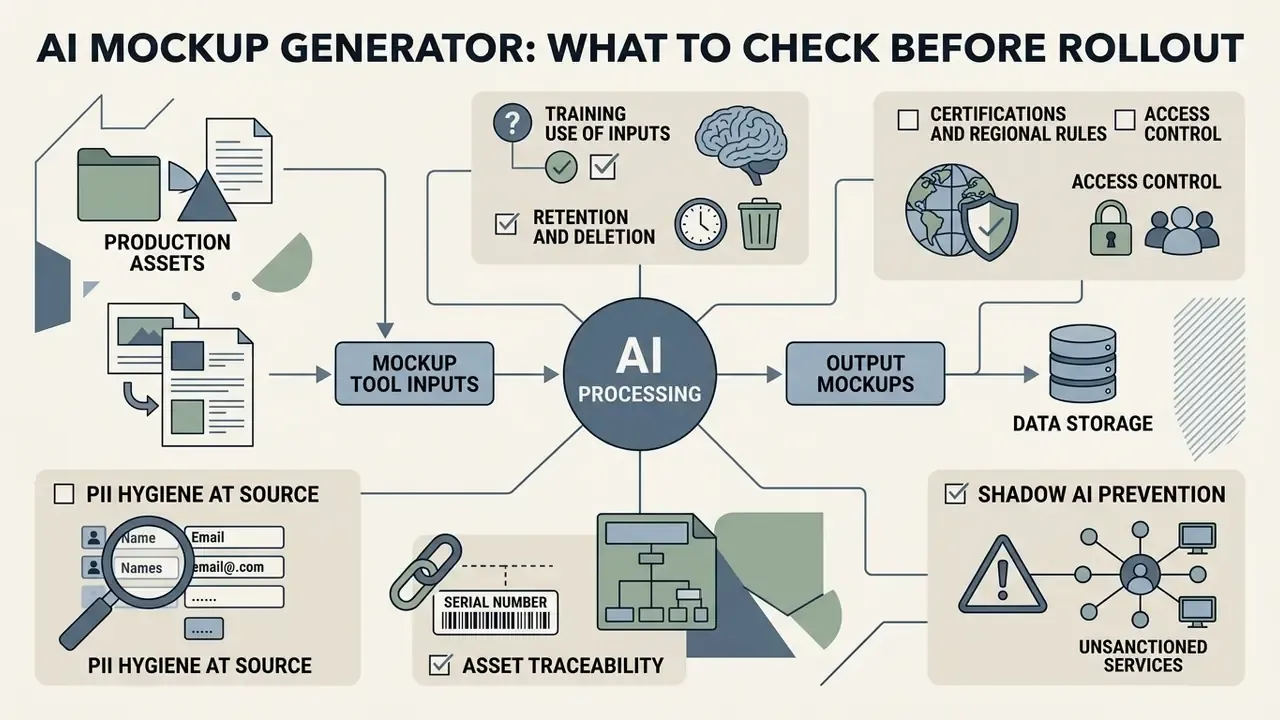
- Before any enterprise rollout, verify three things: data handling (are your uploaded screens used for model training?), commercial licence scope (marketing display versus print-on-demand resale), and human authorship of the underlying design assets.
- Legal baseline: purely AI-generated visual output is not copyrightable in the US, while the human-authored vector logos and patterns you upload stay fully protected.
In enterprise visual asset management and digital product design, generation speed delivers zero commercial value without contextual control and structural precision. That is the whole argument in one sentence. An ai mockup generator is not a substitute for creative governance; it works as a controlled synthesis engine that turns raw vectors, flat logos and interface wireframes into lighting-matched, scene-adaptive previews in seconds.
«In high-velocity commercial workflows, relying on static layer templates creates operational friction and asset inconsistency. Generative mockup systems let design teams enforce brand standards while dynamically placing assets into photorealistic, context-aware scenes, provided the export, licensing and data-handling rules are defined before the first render.»
What an AI mockup generator is and what it solves
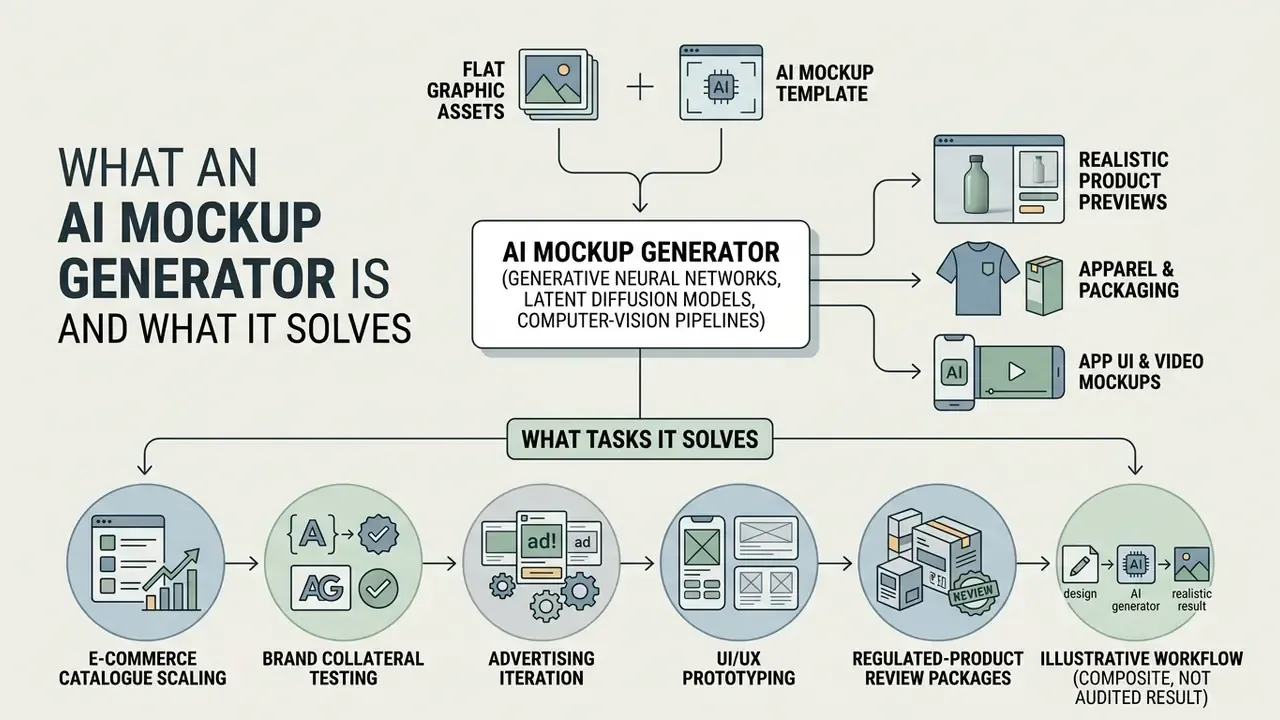
An ai mockup generator is an automated tool that uses generative neural networks, primarily latent diffusion models and computer-vision pipelines, to place flat graphic assets (logos, product labels, UI screens) into photorealistic, multi-dimensional previews. Unlike a manual graphic editor, an ai generator mockup infers ambient scene geometry, camera perspective, surface texture warping and shadow fall directly from the input asset or the text prompt.
AI mockup, template and a ready-made design preview
A traditional raster or vector template relies on pre-built layers and static Photoshop Smart Objects. That constrains the final graphic to one fixed camera angle and one preset background. A product preview produced by standard template platforms applies artwork onto a static product surface without adapting to environmental variables at all.
Generative ai mockup output behaves differently. Research on product background synthesis shows that neural systems use mask-guided cross-attention layers to isolate the product foreground while synthesising lighting- and depth-consistent environments.
«Neural systems apply mask-guided cross-attention to isolate the product foreground and synthesize lighting and background depth consistently.»
So when designers create a mockup with generative tooling, the render shows realistic surface highlights, fabric drape and physical shadows instead of a flat overlay. The distinction is threefold and worth memorising: a PSD template is preset, a product preview is template-applied, an AI mockup is generative and scene-adaptive.
What tasks AI mockup generator tools solve
Modern ai mockup generator tools clear structural bottlenecks across e-commerce merchandising, brand identity work, digital advertising, financial-product marketing and software interface design. The recurring jobs:
- E-commerce catalogue scaling. Marketplace-ready lifestyle imagery across thousands of SKUs, with no physical shoot to schedule.
- Brand collateral testing. Projecting brand assets onto packaging, signage, print collateral, card art and promotional items for stakeholder review.
- Advertising iteration. Synthesising campaign creatives and lifestyle backgrounds for multi-variant A/B testing in retargeting pipelines.
- UI/UX prototyping. Turning low-fidelity sketches or wireframes into high-fidelity app and website previews for client, compliance and executive presentations.
- Regulated-product review packages. Producing consistent device-framed screen sets for accessibility, disclosure and brand-standard sign-off before engineering effort is committed.
Illustrative workflow (composite, not an audited result). A digital product team needs to validate roughly 30 mobile interface screens against internal accessibility and brand guidelines ahead of an executive review. Rather than composing each frame by hand in PSD, the team feeds sketch layouts and component tokens into an ai mobile app mockup generator, which projects them onto realistic device frames with matched ambient illumination. The documented benefit pattern is compression of the composition stage: multi-day manual assembly collapses into a single working session. Actual savings depend on screen complexity, review depth and how many revision cycles stakeholders request. Teams that need defensible numbers should measure their own baseline (designer hours per frame × frames × revision rounds) before and after adoption, instead of trusting vendor-published multipliers.
A simple ROI frame. Net value = (baseline production cost + photography and retouch cost avoided) − (subscription cost + prompt-iteration time + quality-control review time + legal or licence review time). Control costs are the line item people forget. Every generated asset still needs a human check for label legibility, colour fidelity and brand-mark integrity, and that review time belongs in the model. If you prefer to build the arithmetic rather than argue about it, our calculators hub is the faster starting point.
Data security, PII and shadow AI: what to check before rollout
Which mockups you can create with AI
Generative platforms now cover a wide spectrum of physical and digital asset categories, so teams can generate a mockup shaped to a specific industry requirement rather than a generic showcase.
Table 1. Comparative specifications for AI mockup generator categories
| Mockup category | Primary input asset type | Target AI render output | Core technical feature |
|---|---|---|---|
| Apparel & clothing | PNG / vector logo, flat garment graphic | Photorealistic model or flat-lay garment render | Dual-scale texture preservation and fold warping |
| Product packaging | PDF / vector dieline, label graphic | 3D box, bottle or pouch lifestyle scene | Mask-guided identity preservation |
| Logo & brand assets | SVG / high-DPI vector mark | Signage, stationery or embossed material preview | Surface material and reflection mapping |
| Mobile app & web UI | UI wireframe, sketch, screen PNG or text prompt | Device-framed interface preview | Perspective correction and screen glare synthesis |
| Advertising media | Product cutout plus copy prompt | Full campaign banner or social ad graphic | Decoupled product and background styling |
| Financial & marketing creatives | Card art / vector mark / masked app screen | Card-in-hand, device-in-context or banner scene | Trademark colour locking, PII-free screen input |
| 3D product objects | 2D multi-angle photo or prompt | Synthesised 3D spatial product view | Implicit depth and specular highlight modelling |
| Video & motion mockups | Flat design or static mockup plus motion prompt | 5-second MP4 with camera or model movement | Temporal consistency and animated light behaviour |
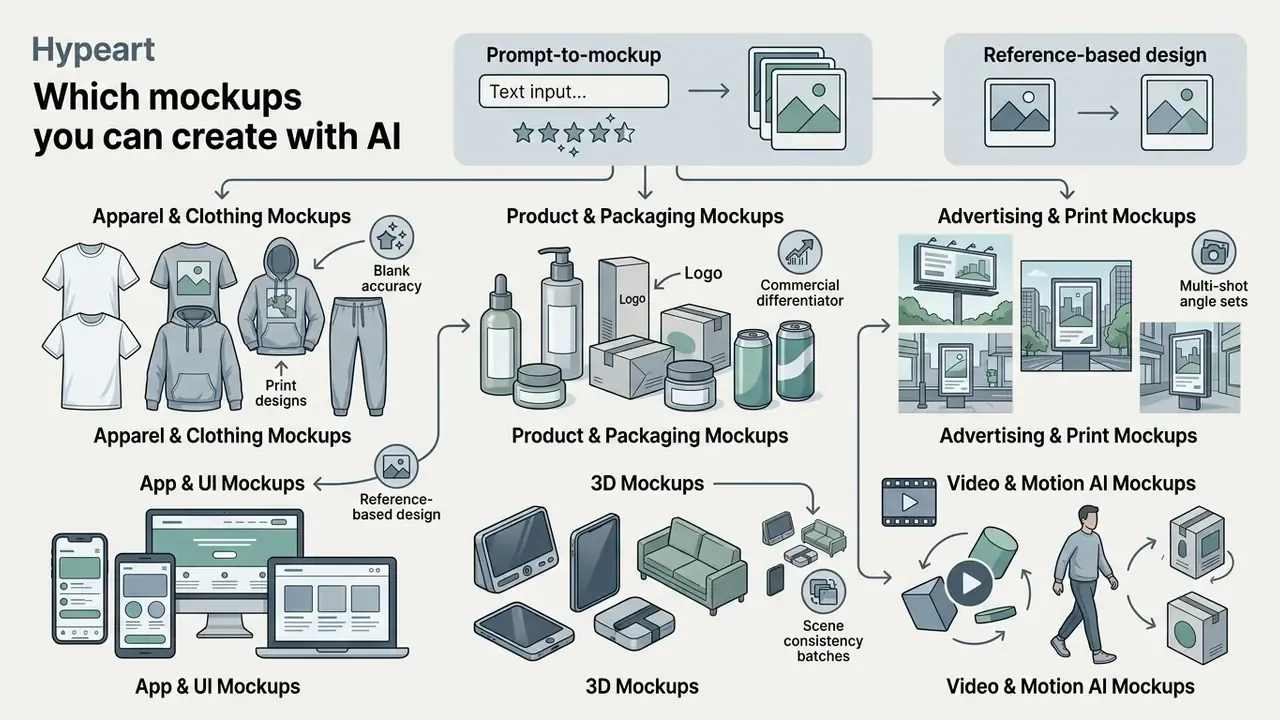
Apparel and clothing mockups for garments and print designs
An ai apparel mockup generator or ai clothing mockup generator uses specialised image-to-image pipelines to map artwork onto textiles. For T-shirts, hoodies and accessories, generic overlay tools fail for one physical reason: flat graphics do not follow fabric movement.
Advanced try-on models disentangle structural alignment from fine-grained texture preservation. The system runs the garment image through a two-stage denoising pipeline. Low-resolution steps capture body pose and drape geometry; high-resolution residual steps restore fabric weave, seam stitching and natural wrinkles.
«A two-stage diffusion pipeline: low-resolution steps fix pose and drape geometry, high-resolution steps restore fabric weave and seam detail.»
When running an ai fashion mockup generator, parameters such as «soft daylighting», «heavyweight cotton weave» and «natural seam shadows» keep the output from reading as synthetic.
Blank accuracy is the commercial differentiator. For print-on-demand sellers and fashion brands, the decisive factor is not scene beauty but fit accuracy on a specific pattern. Leading generators integrate digital twins of real garment blanks, including Bella + Canvas, Gildan, Next Level, Champion and Shaka Wear, so a print sits on a documented cut rather than a generic T-shirt silhouette. The generative layer then accounts for fabric weight and composition (100% combed ring-spun cotton versus a cotton/poly fleece, for example) and for the real seam and collar geometry of that manufacturer's model. Vendor-reported libraries in this segment reach 45+ blank brands and 5,000+ templates, usually shipped as sets of six views (three front, three back), so a marketplace listing can be built from a single upload without re-editing artwork.
Three practical checks before you commit. Does the tool expose the full manufacturer colour library? Does it keep the print anchored to the collar rather than the image frame when you switch views? Does it preserve halftone and fine-line detail at export size? A mockup that drifts 8 mm downward between front and side views quietly misrepresents the product you will actually ship.
Product, packaging, logo and advertising mockups
For physical goods, an ai brand mockup generator or ai ad mockup generator synthesises contextual environments while keeping the brand mark intact. Research on advertisement image generation uses decoupled architectures, where product-fidelity modules prevent distortion of label text while scene-styling modules render the surrounding environment.
«RefAdGen, trained on the 100,000-image AdProd-100K dataset, separates product-fidelity and scene-styling modules and reports the strongest visual-quality scores in its comparison set.»
When generating a brand mockup or packaging preview (cosmetics containers, beverage cans, corrugated boxes), the model applies specular highlights, glass refraction and embossing based on the uploaded vector mark. Packaging platforms usually want the artwork as a print-ready PDF built on a dieline, then return both a 3D model and flat 2D previews from the same file. Marketers can therefore review print-ready assets on textured materials before committing to a production run. That evaluation logic sits close to how AI image generators for commercial use are assessed for licensing and output rights.
Mobile app, website and 3D mockups
Digital product teams lean on an ai app mockup generator to show software interfaces inside realistic hardware. Whether the concept is iOS or Android, an ai 3d mockup generator accepts screen captures or hand-drawn layout sketches and projects them onto 3D device frames: smartphones, tablets, desktop displays.
Systems wired into component frameworks let designers connect UI elements directly to generative prompts, producing semi-functional previews that show both visual styling and dynamic content behaviour. Worth benchmarking that against general-purpose best AI image generators before you standardise on a single tool.
Input modality measurably affects perceived quality:
«In a 13-participant study, sketch input scored 2.75 on average for quality versus 1.50 for semantic drawings, with accuracy at 3.60 versus 3.38.»
Prompt-to-mockup and reference-based design. Beyond projecting finished screenshots onto device frames, advanced AI UI tools support prompt-to-UI generation and reference-based design. A designer supplies a brief («dark-mode crypto wallet dashboard with segmented balance cards») or uploads a reference image carrying the company's visual language. The model extracts palette, typographic scale, spacing rhythm and component styling from that reference, then produces an adapted layout already framed inside the target device. Vendors in this segment also advertise element-level refinement, regenerating a single card, nav bar or chart without redrawing the full screen, plus responsive variants for phone, tablet and desktop and export of implementation-ready layouts. For regulated interfaces, push generated screens back through your own accessibility check: contrast ratios, touch-target size, state coverage. Generative styling optimises for visual appeal, not for WCAG conformance.
Video, motion and 3D AI mockups
Generation has moved past the still frame. Diffusion-based video models now produce video mockups: short dynamic clips, typically exported as a 5-second MP4, showing the product rotating, the camera drifting, the lighting animating, or a model moving while wearing the printed garment. Vendor-reported catalogues already span 50+ product types in video form, from T-shirts and caps to jewellery and books, and 3D generators can preview ten or more animation presets from one template before export.
The commercial driver is placement. Social ad platforms and marketplace listing modules reward motion, and a static flat-lay under-performs against a clip in the same slot. The workflow mirrors static generation: upload a flat vector logo or artwork, select a motion template, describe the movement in a prompt. The model synthesises temporally consistent fabric movement, package reflections and highlight travel across frames. Teams that already run a post-production stack often route these clips onward through an ai auto video editor for trimming and captioning, and audio-led variants overlap with ai audio to video tooling.
Two adjacent capabilities belong in the same tier:
- Multi-shot angle sets. Instead of one hero frame, the tool renders front, back, side, close-up and detail views in a single pass with consistent lighting and background, which is what marketplace listing requirements usually demand.
- Scene consistency batches. A «same style» mode reproduces one lighting setup, background and colour grade across an entire product line, so a 40-SKU collection reads as one campaign rather than forty unrelated renders.
Quality checks specific to motion: watch for identity drift (logo warping, text becoming illegible mid-clip), flicker in specular highlights, and unnatural fabric snapping at loop points. Always review at full export resolution. Artefacts invisible in a thumbnail are glaring in a feed.
How to create a mockup with AI: from design to download
Professional mockup rendering online follows a structured production sequence, with a governance checkpoint attached to every stage. Five steps, not four, once publishing is included:
- Choose template or category.Classify first: physical versus digital, and the target aspect ratio.
- Upload the high-DPI source design.Pre-upload check: PII removed, vector wherever possible.
- Configure AI scene and background.Brand check: locked hex codes, approved scene list.
- Quality inspection and high-resolution export.Log the prompt, model version, operator and timestamp.
- Publish.Create the asset register entry and record the licence scope.
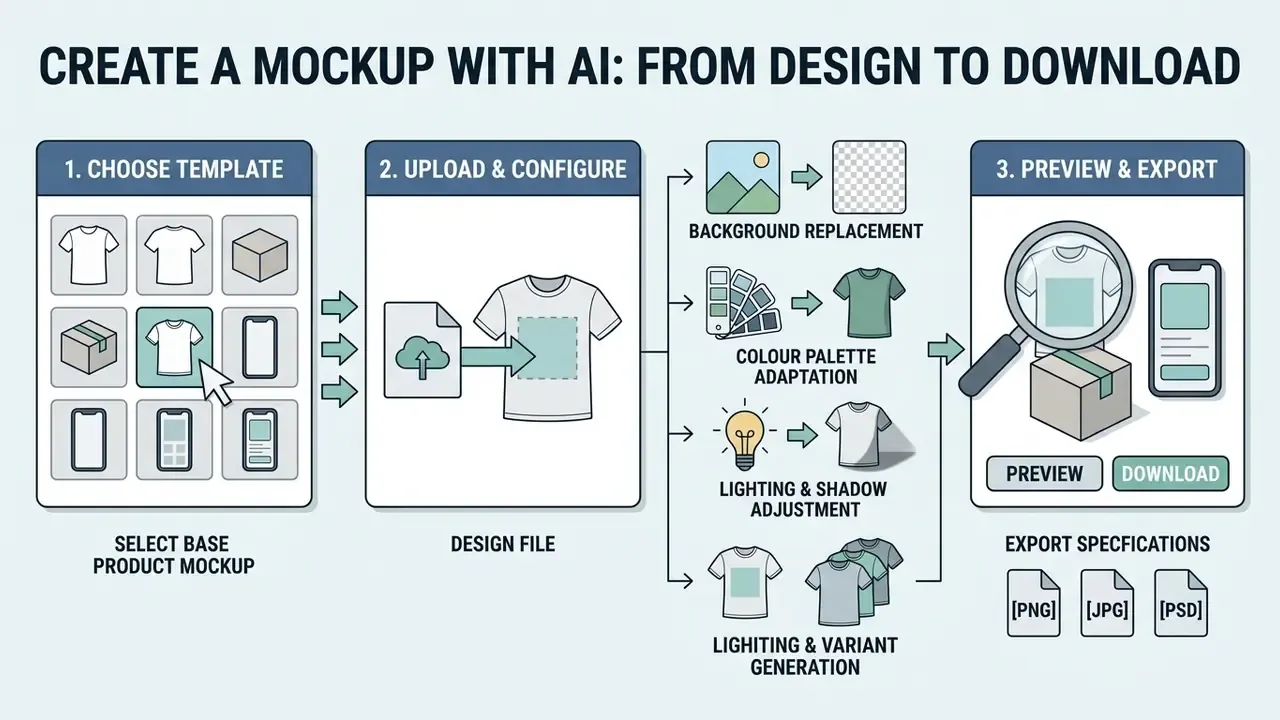
Choose a template or a base product mockup
The workflow starts with picking a category base or defining a prompt scene structure. That choice fixes spatial geometry, camera focal length and surface boundaries. Frameworks aligned with standard AI task taxonomies (NIST AI Use Taxonomy, 2024) suggest that category selection should match the eventual data classification of the physical or digital product, which keeps aspect ratios and lighting angles honest. In practice: choose by intended outcome, whether that is a listing image, a hero banner, a compliance review frame or a packaging proof, rather than by product label alone.
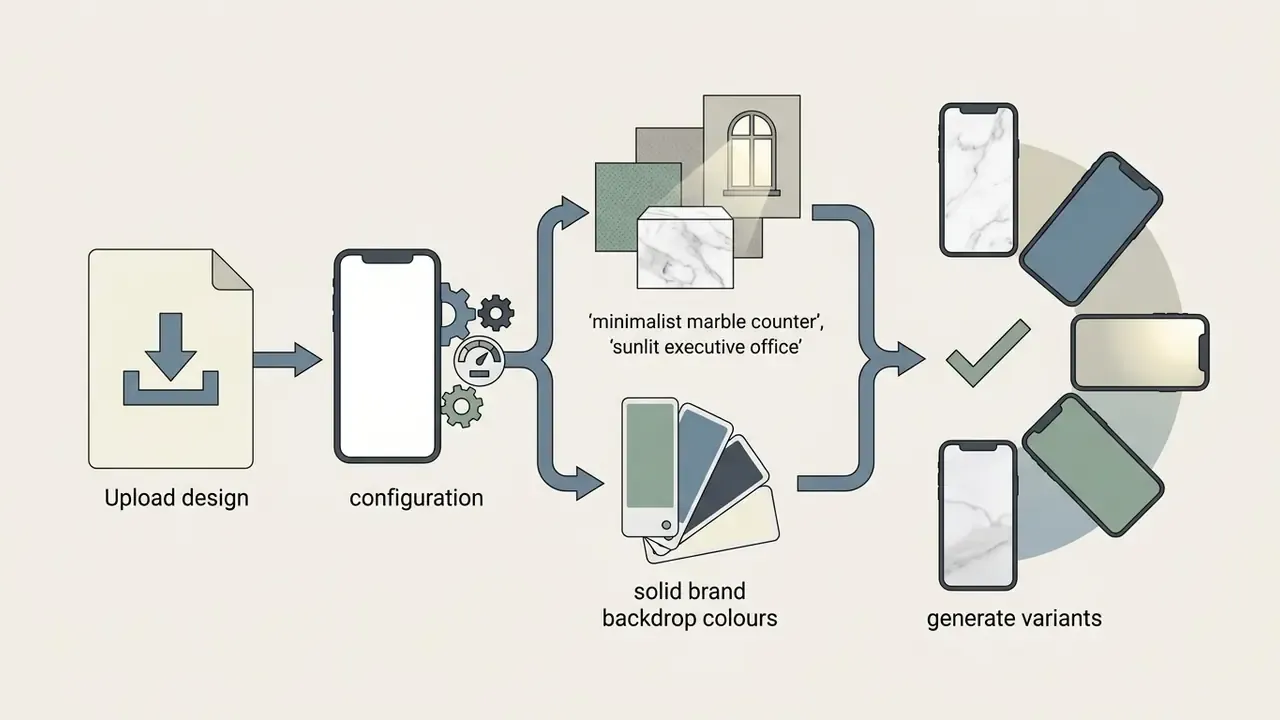
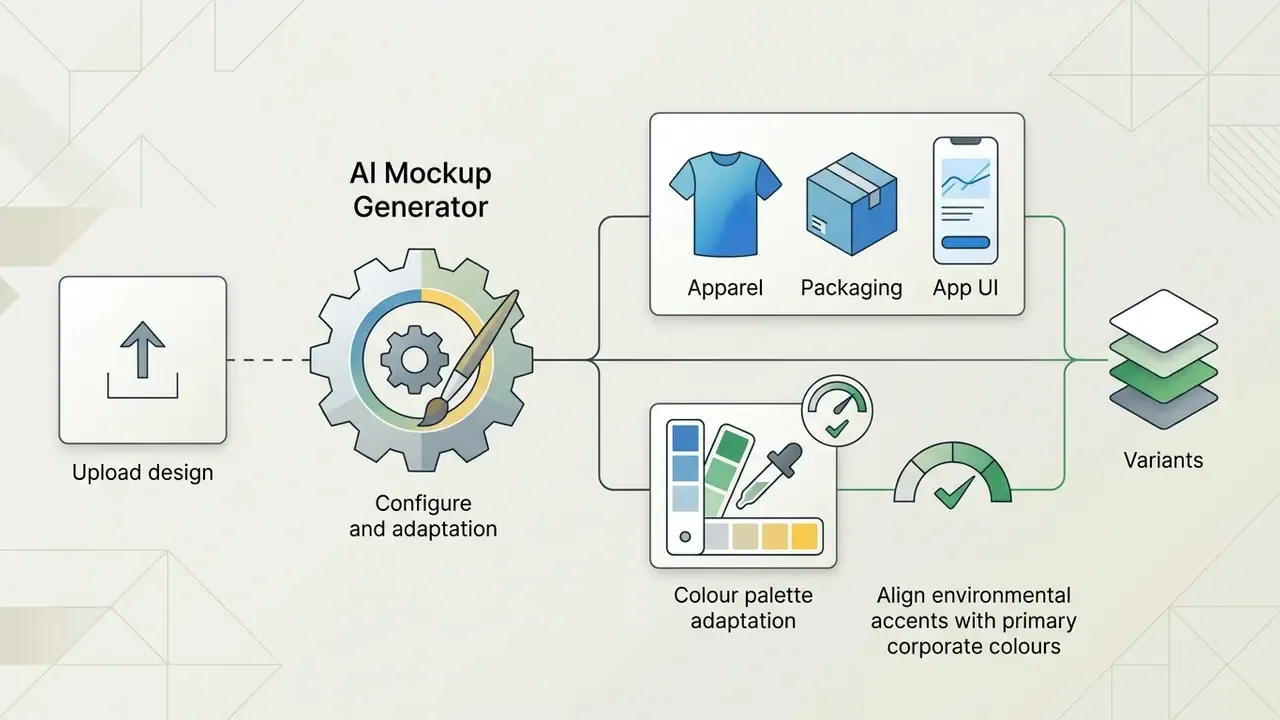
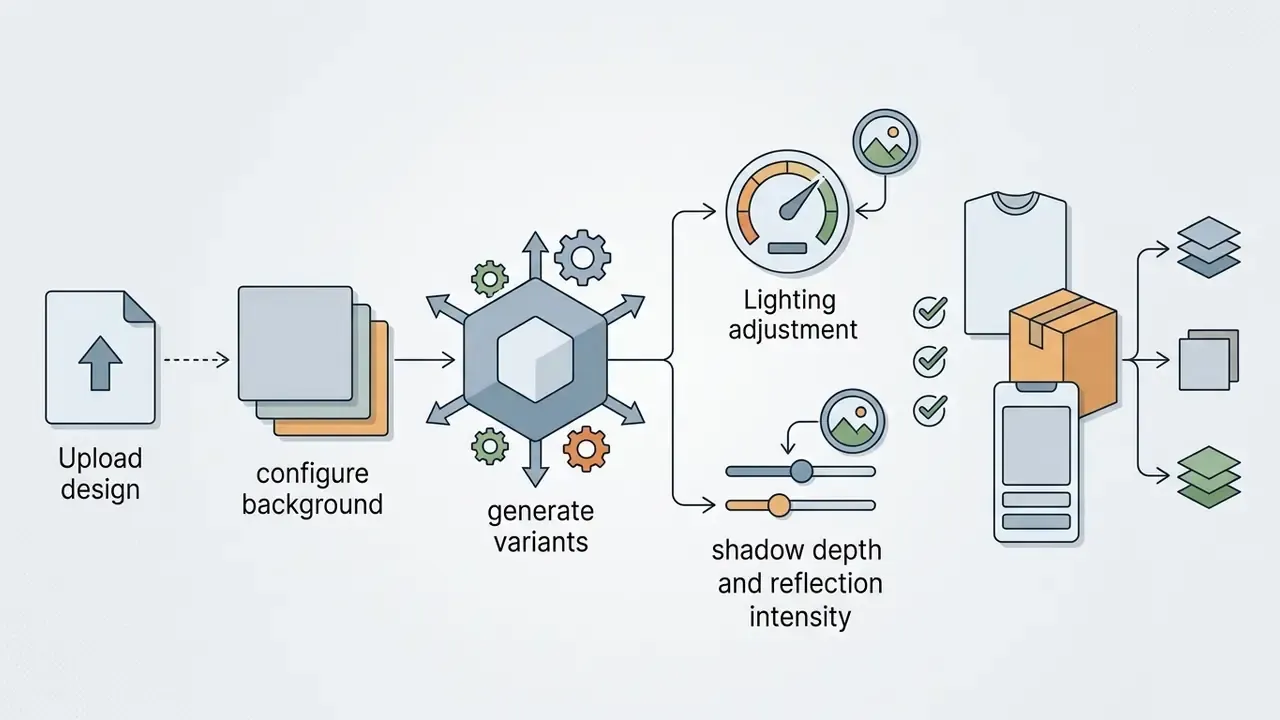
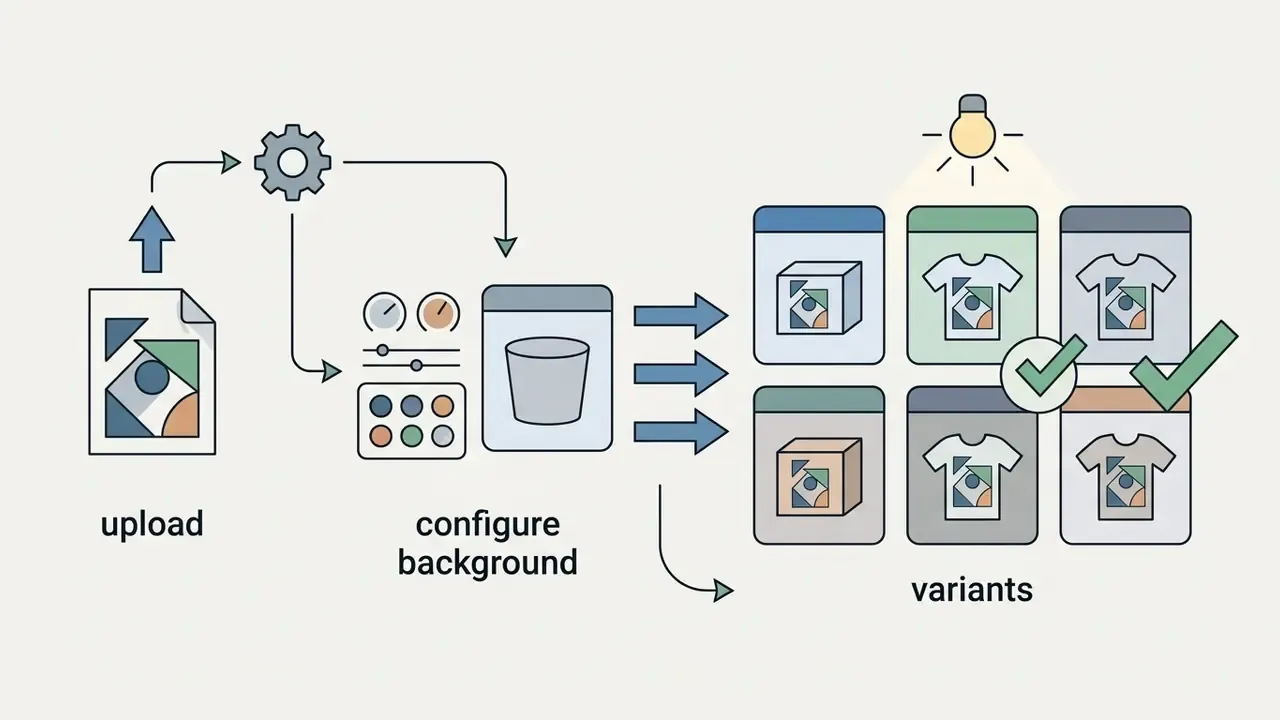
Upload design, configure background and generate variants
The operator uploads a high-resolution design file, ideally vector SVG or PDF, or a 300+ DPI PNG with transparency. The ai design mockup generator processes the upload and isolates the foreground target.
Environmental variables get configured at this stage:
Preview check, download and export
Before final retrieval, the generated asset goes through visual quality inspection. The operator checks surface edge alignment, label text legibility, colour profile fidelity, seam and fold plausibility and, for UI renders, screen-edge alignment plus any glare that could hide an interactive element.
Export specification. Professional tools support five paths:
- Transparent PNG (300+ DPI, up to 4K). Lossless with an alpha channel, for dropping the product straight into banners, landing pages and email templates without a baked background.
- High-density JPG (up to 2400×2400 px, or 3840×2160 for 16:9). The practical default for marketplace listings, paid social and display networks where file weight matters.
- Layered PSD or Smart Objects. The source file split into layers: AI-generated background, shadow and highlight pass, and a Smart Object holding your artwork, so the mockup can be refined locally in Adobe Photoshop or Photopea. Note the constraint: several generative export APIs support single-layer PSD only, while multi-layer export is limited to JPEG, PNG or TIFF. Confirm layer support before building a retouch workflow on top of it.
- MP4 (video mockups). Typically a 5-second clip, watermark-free on paid tiers, sized for feed placements.
- Vector-safe proofs (PDF). For packaging and print collateral, where dielines and colour separations must survive intact.
Where a render must be enlarged beyond its native output, think large-format print or billboard proofs, pair the export with AI image upscalers for print-ready export rather than interpolating in the browser. And if you plan to render at catalogue scale, check the platform's batch endpoints early; teams building automated pipelines can browse the hub for integration patterns.
What drives realism in AI mockups
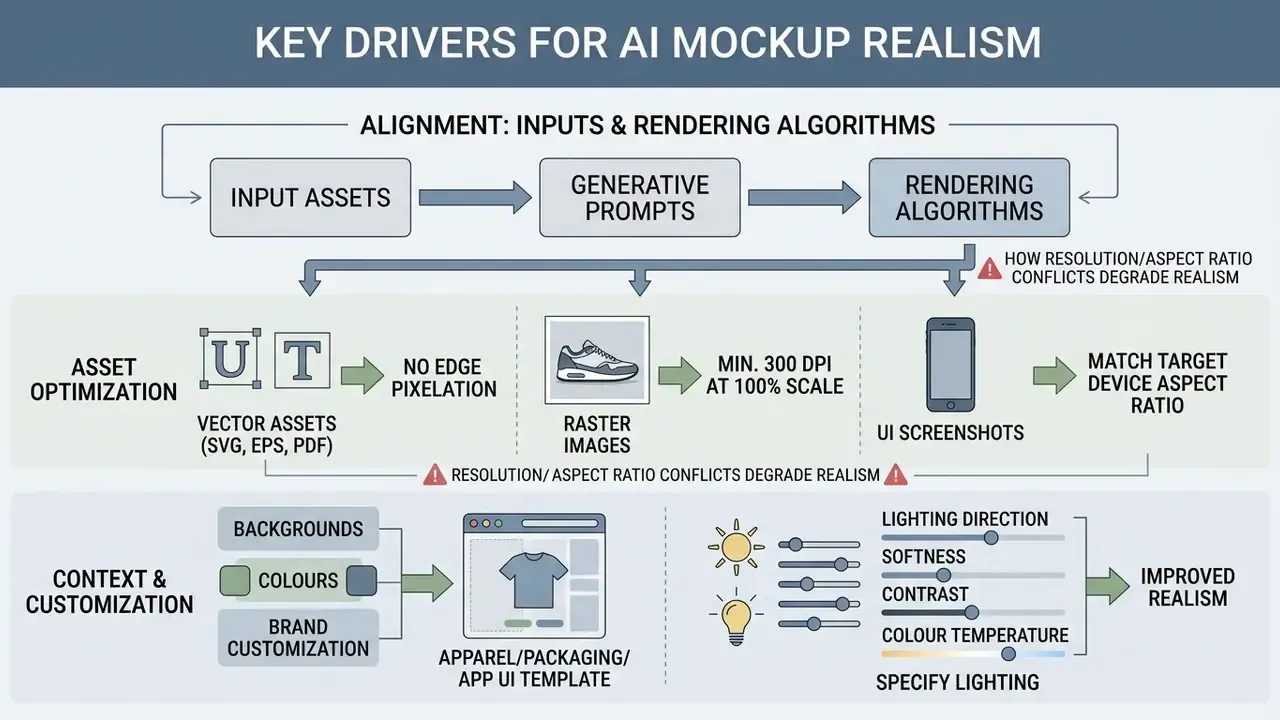
Photorealistic synthesis depends on strict alignment between input assets, generative prompts and rendering algorithms. Four parameters carry most of the weight: source-asset quality, scene-matched lighting, camera-consistent perspective and physically plausible material texture.
Matching the design to the chosen product and template
Realism degrades fast when input resolution or aspect ratio conflicts with the target product geometry. Multi-product creative research notes that naive generative workflows regularly produce scaling distortions and implausible spatial arrangements when input dimensions ignore physical product boundaries.
«Experts identified recurring failures in naive generative pipelines: incompatible product pairings, inaccurate scale, and unrealistic layouts.»
To hold professional fidelity:
- Use vector assets (SVG, EPS, PDF) for logos and typography, which removes edge pixelation during surface warping.
- Keep raster images at a minimum of 300 DPI at 100% placement scale. Web-grade 72 DPI inputs produce blurry, unconvincing mockups; detail-heavy photographic inputs benefit from 600 DPI.
- Match uploaded UI screenshot aspect ratios to the target device specification precisely, or accept stretch artefacts.
- Specify lighting direction, softness, contrast and colour temperature rather than leaving them to the model. Image-based lighting references align reflections and ambient tone with the intended scene.
- Keep micro-texture inspectable. Over-smoothed surfaces remain the most common tell of a synthetic render.
Background, colour and customization for brand mockups
Holding brand identity steady requires control over the secondary environment, not just the mark. Enterprise brand guidelines (RDA Style Guide, 2024; Daikin Visual Identity, 2024) specify that primary logos sit on high-contrast, neutral or light backdrops to preserve legibility, and that on dark backgrounds a mark should be reversed to white rather than recoloured by the model.
Generative models built on patch-enhanced mask encoders let operators apply high-contrast background changes while locking the exact hexadecimal codes of the uploaded logo.
«The patch-enhanced mask encoder achieved the best FID scores in its comparison set, preserving fine foreground detail during background synthesis.»
That prevents ambient scene colour from bleeding into core trademark assets. For the final colour pass, matching brand primaries across a batch or correcting cast introduced by a synthesised light source, dedicated AI photo editors give tighter numerical control than prompt-level nudging.
Free AI mockup generator: what to check before you use it
Free tiers are a reasonable way to test generative capability. They also impose technical and commercial limits that paid subscriptions do not.
Table 2. Comparative feature matrix: free tiers versus paid subscriptions
| Feature category | Typical free tier access | Paid / enterprise subscription |
|---|---|---|
| Daily or monthly quota | 3 to 30 generations or downloads per day | Unlimited or high-volume API rendering |
| Export resolution | Capped at 400×500 px or 720p HD | Full HD, 2400×2400 px, 4K, high-DPI print export |
| Watermark restrictions | Visible brand watermark or corner tag (some vendors ship watermark-free JPG at low resolution instead) | 100% watermark-free output |
| File export formats | Standard compressed JPG / web PNG | Uncompressed PNG, vector SVG, PDF, single- or multi-layer PSD, MP4 |
| Video & 3D features | Preview only, or a small monthly credit pool | 5-second MP4 export, animation presets, multi-shot batches |
| Commercial usage licence | Personal or non-commercial evaluation only; attribution sometimes required | Full commercial, ad and print-on-demand resale rights |
| Governance features | None (personal account, no logs) | SSO/SAML, roles, audit logs, DPA, no-training commitments |
Plan economics change once iteration volume rises, so compare per-render credit models rather than headline monthly fees; the pricing patterns are collected if you want to browse the hub before shortlisting.
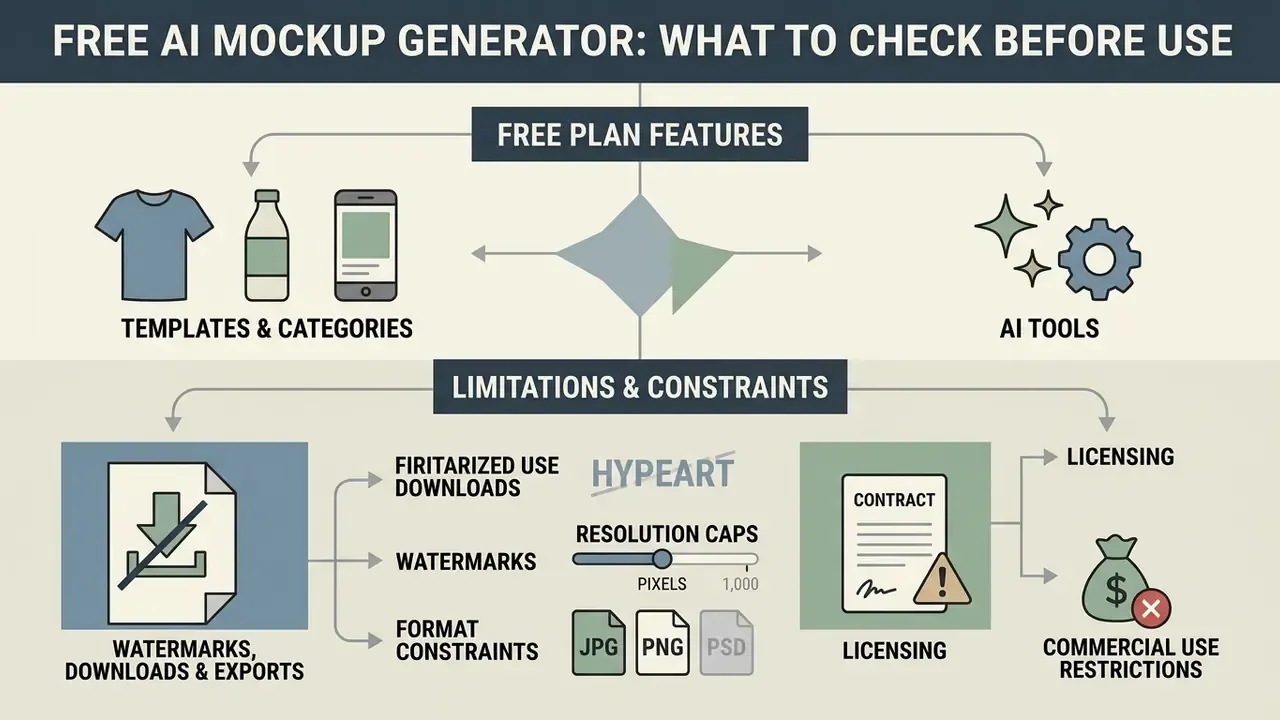
Templates, categories and AI tools on the free plan
A search for an ai mockup generator free online or an ai free mockup generator usually surfaces platforms offering basic categories: standard T-shirt flat-lays, plain coffee mugs, simple smartphone frames. Vendor-reported free libraries can look enormous, some advertise 30,000+ templates across 60+ categories, or 2,000+ products with unlimited watermark-free previews. The catch is capability, not catalogue size. Custom prompt-based background generation, AI scene creation, automated multi-product composition, animation and high-resolution texture synthesis are frequently restricted, credit-gated or pushed to premium on an ai mockup generator free plan.
Watermark, download and export: possible limits
When evaluating an ai mockup generator site or ai mockup generator app, map export boundaries before the tool enters an enterprise workflow:
- Watermarks. Free tiers often stamp visible logos across the preview, which makes the file unusable for client-facing decks. A minority of vendors invert the trade-off: watermark-free output, but hard caps such as three downloads per day at 400×500 px.
- Resolution caps. Free downloads are frequently limited to low-density output (720p or sub-500 px), which looks pixelated on high-density displays and in print collateral.
- Format constraints. Layered PSD export and transparent PNG channels usually sit behind a paid tier, the same pattern documented across free AI image generators with watermark and export limits.
- Licence constraints. Some free licences require visible attribution and explicitly forbid client work, business use and paid work regardless of watermark status. Read the licence, not the pricing page. For side-by-side capability breakdowns you can also view the guide library.
Can you use AI mockups for commercial use and print-on-demand
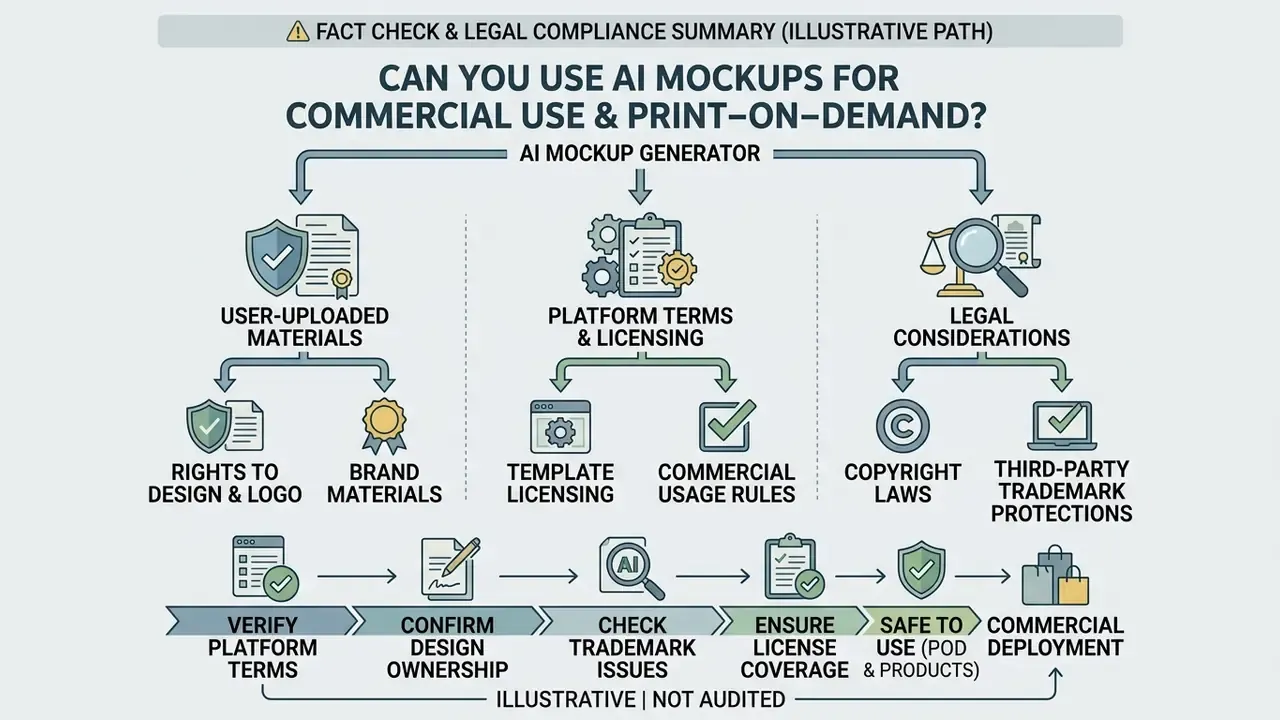
Commercial deployment of AI-generated mockups has to satisfy copyright rules, platform terms of service and third-party trademark protections. There is measurable audience appetite for AI-assisted creative output, which raises the stakes on getting the paperwork right:
«AI-generated advertisements were preferred 59.1% of the time versus 40.9% for human-made content (p < 0.001), attributed to more complex messaging and visual coherence.»
Fact check and legal compliance summary:
- Copyright ownership. Under guidance from the US Copyright Office (USCO AI Registration Guidance, 2026), purely AI-generated visual output lacking human authorship cannot be copyrighted. Human-authored vector logos, proprietary patterns and custom design graphics that you upload remain fully protected under standard intellectual property law. In mixed works, applicants must disclose the AI-generated portions and may register only the human contribution.
- Platform terms of service. Commercial permission is governed by contract. Major platforms (Adobe Generative AI Product Specific Terms, 2025; Mock It AI ToS, 2026) explicitly allow commercial use of outputs on paid plans, provided the user holds rights to all uploaded trademarks and inputs. Adobe's terms additionally prohibit submitting trademarked material without sufficient rights and reserve a licence over gallery-submitted inputs and outputs.
- Print-on-demand restrictions. Many services allow generated mockups in POD store listings and marketing campaigns. Sublicensing or reselling raw generated mockup files as standalone digital stock templates is prohibited across virtually every vendor licence. Vendor positions on POD diverge sharply: some permit it explicitly, others ban any workflow where an end user customises and downloads a product. Confirm per tool.
- Digital replicas. Where a mockup features an identifiable person (AI models wearing your garment, spokesperson-style ads), US policy direction in 2026 favours licensing of likeness rather than assignment, and proposes federal restrictions on unauthorised commercial use of AI-generated replicas. Model-release logic still applies.
Rights to uploaded design, logo and brand materials
Uploading corporate trademarks into an ai mockup creator or ai image mockup generator does not transfer copyright to the software vendor. Terms of service normally state that users retain ownership of their inputs, though such clauses are usually qualified by «to the extent permitted by applicable law», which is precisely why statutory human-authorship rules still govern what you can register. Users warrant that they hold all necessary trademark rights and licences for material submitted to the pipeline. For brand marks produced with automated tooling, check how AI logo generators and business-use rights allocate ownership before the mark ever enters a mockup workflow.
Template licensing for product and print projects
Commercial licensing models separate marketing display rights from print-on-demand resale rights. A standard commercial licence authorises generated mockup images in web storefronts, social ads, digital pitch decks and printed marketing collateral. Extended or «commercial-plus» tiers raise limits on print runs, end products or client scope while keeping file-transfer bans intact. If a business intends to use an ai clothing mockup generator free output for direct POD sales, it must verify that the paid licence explicitly permits commercial product display without mandatory attribution. Broader licence comparisons live in the commercial-use library, and you can open the hub for the current breakdown.
Illustrative compliance path (composite example, figures not audited). An e-commerce brand preparing a print-on-demand apparel launch across US marketplaces runs a three-step clearance before publishing. One: confirm the paid tier's commercial licence covers marketplace listings and paid ads, and check whether POD is explicitly permitted or excluded. Two: document that every uploaded graphic is a human-authored vector file, so copyright in the artwork is unaffected by the AI-generated scene around it. Three: log which SKU previews were generated with which model and licence version, so a later takedown or platform query can be answered from records rather than memory. The metric worth tracking is not a headline revenue figure but clearance rate and time-to-listing: how many SKU previews passed review on first pass, and how much time the legal check added per batch. Publish revenue attribution only if you can isolate it from pricing, ad spend and seasonality. Most teams cannot, and say so.
How to choose an AI mockup generator tool for your task
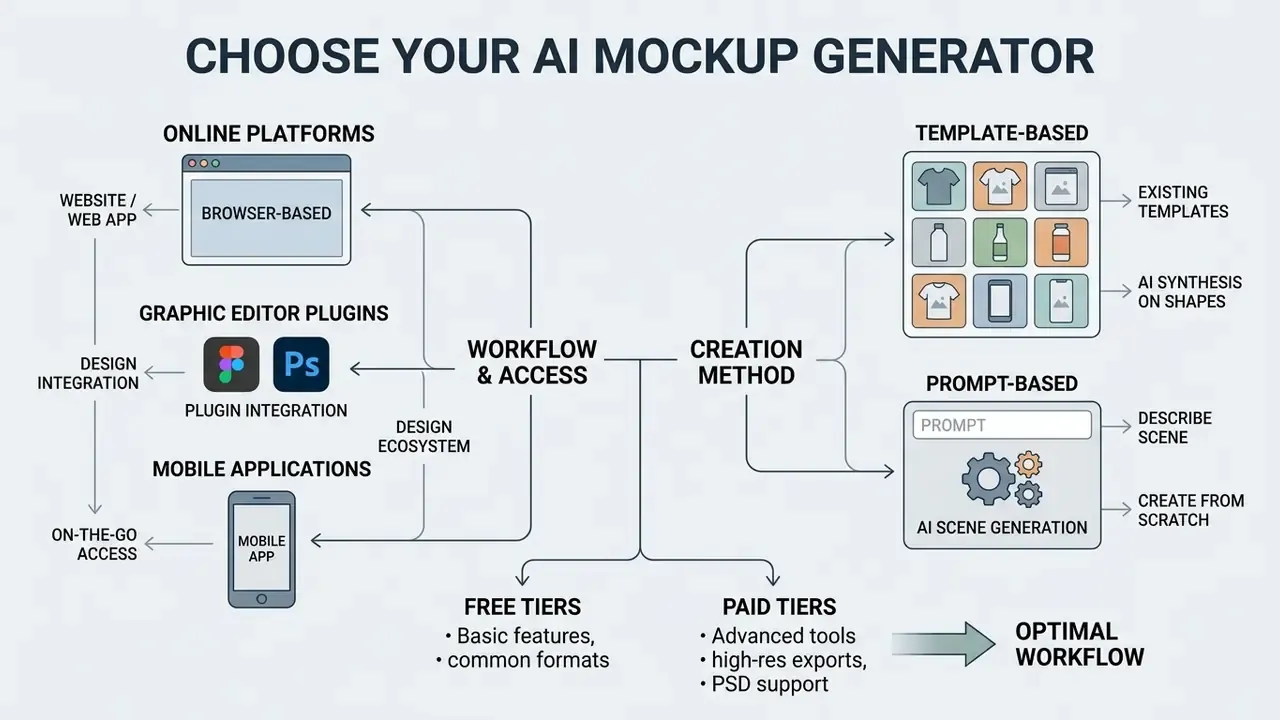
Choosing well means matching workflow requirements against delivery models and control mechanisms. Public evaluation frameworks give a usable scoring spine: NIST's usability framing (effectiveness, efficiency, satisfaction in a defined context of use) plus its draft evaluation guidance on trustworthiness and lifecycle stage, and W3C's WCAG-EM process, which runs scope, representative sample, evaluation, report, for anything customer-facing.
Online service, website or app for mockups
- Browser-based platforms (ai mockup generator online / website). Broadest cross-platform access, multi-user collaboration and cloud rendering power without local GPU hardware.
- Graphic editor plugins (Figma, Photoshop). Fastest operational velocity for professional designers, since assets render inside the existing canvas. That is the same integration logic behind image-to-image AI generators for design transformation, where source files never leave the working environment.
- Mobile applications (ai mockup generator app). Useful for rapid on-the-go asset creation and social previews, though constrained by small-screen editing.
Ecosystem access. For work away from the desk, several platforms ship mobile apps through the Google Play Store and Apple App Store that generate and download mockups without downgrading output quality, alongside Figma plugins with a preview-then-download flow and browser extensions that pull assets straight into the editor. When one vendor offers browser, desktop, plugin and mobile entry points to the same rendering engine, teams cut context switching. The security review then has to cover every entry point, not just the web app. Easy to forget that.
Template-based mockups or AI generation from scratch
- Template-based AI synthesis. Fixed, human-designed scene structures plus AI lighting, warping and shadow adaptation. Predictable geometry, guaranteed brand consistency. Ideal for enterprise catalogues and multi-language asset production at volume.
- Prompt-based AI scene generation. Whole environments synthesised from text (Opus AI Scene Architecture, 2026). Unlimited creative range for hero shots, more prompt iteration required to clear visual artefacts.
- Hybrid, the 2026 default. AI for ideation and hero imagery, templates for production runs that must be exact, repeatable and localisable.
Tool choice is also a people question, and adoption fails quietly when that part is ignored:
«Interviews with ten practitioners revealed a wide range of attitudes toward AI, from fear of deskilling to a sense of empowerment, depending on how much control they retained.»
Adoption succeeds where designers keep authorship over the decisive layers, layout, brand marks, final selection, and delegate only repetitive synthesis.
Enterprise selection checklist
Treat this as a procurement gate, not a wish list. Score each item pass or fail before pricing negotiation starts.
- Licence scope.Commercial display, paid ads, POD resale, client work, each stated explicitly and in writing.
- Indemnification.Does the vendor defend you against third-party IP claims arising from generated output, and what are the caps and exclusions?
- Training exclusion.Contractual guarantee that your uploads and prompts never train shared models.
- Security artefacts.Current SOC 2 Type II or ISO 27001 report, sub-processor list, data-residency options, DPA.
- Access governance.SSO/SAML, role-based permissions, per-asset audit log.
- Export completeness.Transparent PNG, high-density JPG, layered PSD, PDF proof, MP4, plus documented DPI and pixel ceilings.
- Brand control.Hex-code locking, uploadable brand kit, restricted scene list, approval states.
- API and bulk rendering.Batch endpoints, template IDs, credit model, rate limits, all required for catalogue-scale work.
- Integration surface.Figma and Adobe CC plugins, storage connectors, webhook or DAM handoff.
- Exit and continuity.Asset portability, template ownership and the fate of stored files at contract end. The precedent is real: a widely used mockup platform was acquired and then sunset, stranding workflows built on it.
- Accessibility check.For UI mockups, a documented method for contrast and touch-target validation.
- Support and SLA.Response times, custom-template turnaround, named escalation contacts.
Integration map
| Layer | What it connects | Why it matters | What to verify |
|---|---|---|---|
| Design editor plugin | Figma, Photoshop, Illustrator | Renders from live design files, no manual re-upload | Layer fidelity, Smart Object support, offline behaviour |
| Brand kit / DAM | Approved logos, palettes, fonts, dielines | Keeps off-brand or outdated assets out of renders | Version pinning, hex locking, permission scopes |
| API / bulk render | PIM, catalogue, CMS, storefront | Scales SKU previews without manual sessions | Credit model, rate limits, template IDs, retries |
| Asset register | Prompt, model version, operator, licence | Makes published creatives reconstructible and auditable | Log export, retention period, immutability |
| Review workflow | Brand, legal, accessibility sign-off | Blocks unlicensed or non-compliant assets from publishing | Approval states, comment trail, rollback |
FAQ about AI mockup generators
What is the fundamental difference between a wireframe, a mockup and a prototype?
A wireframe is a low-fidelity structural blueprint focused on layout architecture and user flow. A mockup is a static, high-fidelity visual representation showing final colours, typography, brand assets and atmospheric lighting; it answers form, not function. A prototype adds interactive behaviour and state transitions, so users can simulate a live digital interaction.
Can an AI mockup generator create realistic mockups without a pre-existing design?
Yes. Modern tools generate complete previews from text prompts, category parameters or rough hand-drawn sketches, and input modality measurably shifts perceived quality:
«Sketch input averaged 2.75 for quality versus 1.50 for structured semantic drawings; participants rated it more intuitive and more accurate.» Sketch-Based Mockup Synthesis Study, peer-reviewed (2023). https://ijiemr.org/public/uploads/paper/707951781525674.pdf The model interprets the prompt or sketch layout and synthesises a high-fidelity scene. Still, uploading vector artwork remains the only reliable way to guarantee brand accuracy in logos and typography.
Can I generate animated or video mockups?
Yes. Video-capable platforms accept a static design plus a motion prompt and return a short clip, typically a 5-second MP4, showing camera movement, animated lighting, garment movement on a model or product rotation. Free tiers usually restrict video to previews or a small credit pool; watermark-free MP4 export and animation presets are generally paid features. Review clips at full resolution for identity drift and highlight flicker before publishing.
Which export format should I use for which channel?
Transparent PNG at 300+ DPI for compositing into banners and landing pages. High-density JPG (up to 2400×2400 px, or 3840×2160 for 16:9) for marketplace listings and ad networks. Layered PSD or Smart Objects when the render needs local retouching. PDF for packaging and print proofs where dielines and separations must survive. MP4 for feed placements. Confirm whether the platform's PSD export is single-layer or multi-layer before designing a retouch workflow around it.
Are my uploaded screens and designs used to train the vendor's models?
That depends entirely on the contract, not on the interface. Look for an explicit training-exclusion clause, a documented retention and deletion policy, current security attestations and admin controls for deletion. Strip PII from any screenshot before upload, using synthetic names, masked identifiers and dummy amounts, because redaction after generation is unreliable.
How do AI mockups support iterative design refinement in professional workflows?
They let design teams generate and evaluate dozens of variants in minutes. By adjusting prompts, lighting parameters or background colours in real time, teams fold stakeholder and compliance feedback in immediately, which cuts the revision cycles a traditional PSD template workflow demands. Teams comparing platforms on iteration speed and cost should weigh AI image generators capabilities and pricing against per-render credit models, because iteration volume, not headline output quality, usually determines total cost.
Do free plans allow commercial use?
Frequently not. Free tiers are commonly licensed for personal or evaluation use only, sometimes require visible attribution, and may prohibit client and business work even where the output carries no watermark. Commercial rights, watermark removal and print-grade resolution normally arrive together at the paid tier. Verify the licence text, not the marketing claim.
Can AI mockups replace product photography entirely?
For catalogue-scale previews, concept validation and social creatives, generative mockups remove most scheduling and studio overhead. They do not replace photography where a physical proof matters: colour-critical packaging sign-off, material samples for buyers, and any claim about a real product's appearance that must be literally accurate. The reliable pattern is AI for exploration and volume, photography for verification and hero assets that need documented provenance.
Appendix A: superseded formulations retained for transparency
- Prior export wording: «Professional tools support high-resolution PNG, JPEG, or single-layer PSD file downloads, with high-tier platforms offering 4K (3840×2160) export options for commercial print and presentation use.» Superseded by the five-path export specification above, which separates transparent PNG, high-density JPG, layered PSD or Smart Objects, MP4 and PDF proofs.
- Prior case-study wording contained specific unverified figures: a two-hours-versus-four-business-days comparison and an $85,000 first-quarter revenue claim. Both have been reframed as illustrative composites with measurement guidance, since neither figure rests on a citable, auditable source.
- Marcus Hale, author. It has been replaced with an editorial standards note describing the actual review methodology, which keeps authorship claims verifiable.
Related reference material: AI Media Glossary. For sensory and audio-led generative formats, see the ai asmr generator entry.