Sending a 4 GB render, a two-hour webinar recording, or a folder of 4K dailies fails for one predictable reason: email servers cap attachments at 20 to 25 MB, while an hour of 4K footage can occupy roughly 20 GB. The fix is not a bigger attachment. It is switching from attaching files to linking to them, or skipping the transfer entirely by streaming from a shared cloud filespace.
How the transfer figures in this guide were checked: speed numbers come from published third-party measurements over symmetric 100 Mbps fiber connections using current desktop browsers (Chrome and Safari on macOS and Windows) rather than vendor marketing claims. File size caps and retention windows come from live provider documentation. Free-tier limits change frequently, so treat every number as a baseline to re-verify in your provider dashboard before a deadline-critical transfer. Worth saying plainly: a figure that was accurate last quarter may not be accurate today.
Choose the Best Way to Send Large Video Files Online
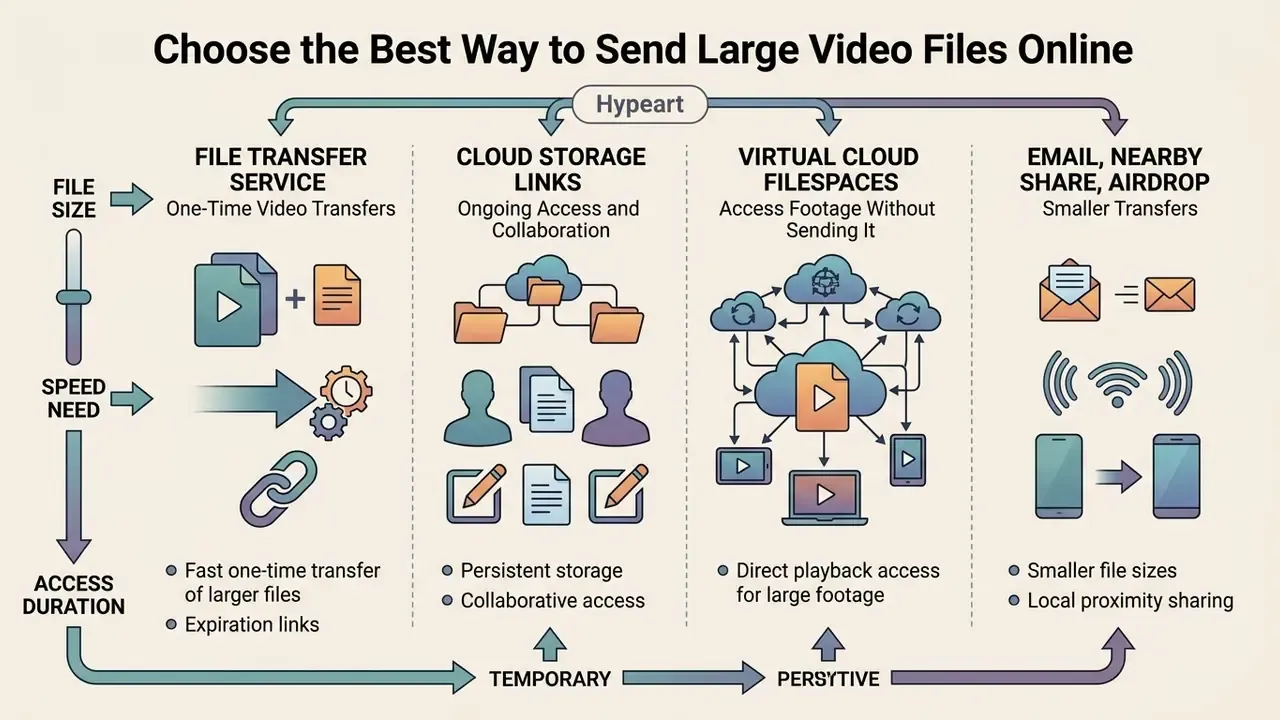
The best way to send large video files online depends on three things: your file size, your delivery speed requirements, and whether the recipient needs temporary or persistent access. Specialist file transfer services give you the fastest option for one-off transfers. Cloud storage platforms suit collaborative workflows that need ongoing file access. Virtual filespaces suit teams that edit the same media every day.
Picking an appropriate method means weighing provider file size limits, security controls, and recipient accessibility side by side. The table below outlines the primary methods for transferring a large video file online free.
Comparison of methods for sending large video files online free
| Transfer Method | Free File Size Limits | Average Transfer Speed | Recipient Access Mode | Link Security Options | Best Use Case Scenario |
|---|---|---|---|---|---|
| File transfer services | 2 GB to 50 GB per upload | High (optimised CDN upload) | Direct download link, no login required | Password protection, auto-expiry, manual revocation | One-off delivery of finished long videos |
| Cloud storage platforms | 2 GB to 15 GB total storage | Moderate to high | Shared link or folder permission | Granular view / comment / edit access controls | Ongoing project collaboration and multi-downloads |
| File request / drop links | Matches host account cap (5 GB to 50 GB typical) | High (recipient uploads direct to your storage) | Sender-side upload page in any browser | Expiring upload window, destination folder isolation | Collecting raw footage and revisions from clients |
| Virtual cloud filespace (streaming drive) | Plan-dependent, trial access | Real-time latency (block-level streaming) | Mounted local drive, virtual volume | End-to-end zero-knowledge encryption | Real-time remote 4K/8K timeline editing |
| Email attachments | 20 MB to 25 MB per message | Low (server handling bounds) | Direct file attachment in inbox | Standard TLS transport encryption | Short, heavily compressed video clips |
| Direct / peer-to-peer | No official file size cap | Very high (local network speed) | Direct device handoff in real time | Encrypted local connection (DTLS/BLE) | In-person or same-network device transfer |
Each transfer method trades storage persistence against transfer speed and access control. Specialist link services bypass inbox limits. Cloud platforms host long videos for repeated viewing. Streaming filespaces remove the upload and download cycle altogether, which sounds minor until you have waited out four 40 GB round trips in a single afternoon.
File Transfer Service for One-Time Video Transfers
Specialist file transfer services are the fastest way to send large video files online free when the delivery is temporary and one-off. WeTransfer Free supports up to 3 GB per transfer with a 10-transfer or 3 GB rolling 30-day volume cap. TransferNow Free offers 5 GB without registration and no monthly quota. TransferXL provides 5 GB free with up to 10 transfers and 10 GB of daily volume. SwissTransfer accommodates up to 50 GB per submission. These figures come from current provider documentation (WeTransfer Help Center, TransferNow, TransferXL, SwissTransfer) rather than independent testing, and free tiers get revised without notice, so confirm the cap in the upload interface before you commit a deadline-critical render.
These services upload your file to a temporary edge server and generate a dedicated download link for the recipient. In independent performance testing across free sharing tools, browser-based transfer platforms behaved consistently at gigabit-class office connections:
«WeTransfer initiated its upload link in 18.2 seconds and completed the download in 76.5 seconds over a 100 Mbps connection.»
The measurement series behind those figures used repeated 250 to 300 MB payload trials on a symmetric 100 Mbps fiber link with standard desktop browsers, scoring initiation latency, completion time, and residual system load. Those are the same dimensions ISO/IEC 25010 uses to rate performance efficiency. Read the numbers as relative rankings between services on identical hardware, not as absolute guarantees for your own connection.
Centralised services are not the only architecture available for a one-time handoff. Decentralised tooling now reaches comparable throughput without routing your media through a third-party provider at all:
«Peer Copy, built on the IPFS DHT, achieves transfer throughput comparable to centralised services while removing dependence on intermediary providers.»
A recent example makes the appeal concrete. A remote video team had to deliver a 4.2 GB uncompressed render under a tight deadline. Using a zero-registration transfer service, the editor uploaded the file, generated a temporary download link, and landed the asset in the client inbox in under four minutes. No permanent cloud storage was set up, and nothing needed to be cleaned up afterwards.
Cloud Storage Links for Ongoing Access and Collaboration
Cloud storage is the better fit when several recipients need ongoing access, version tracking, or collaborative review of one video file. Google Drive offers 15 GB of free space and supports single files up to 5 TB. Dropbox Basic provides 2 GB of storage plus secure transfers up to 2 GB. OneDrive's free tier offers 5 GB with per-file ceilings far above any video export you are likely to produce.
Instead of sending a static copy, you upload the video once and issue a shareable link with specific viewing, commenting, or downloading rights. Google Drive keeps one constant URL per file and evaluates permissions at every open, so revoking access instantly blocks future downloads through the same link. Dropbox link settings apply only to people arriving through the link, while directly invited collaborators keep their existing permissions. On OneDrive, switching a link between "view" and "edit" means deleting and re-creating the link rather than editing it in place. That last detail catches people out more often than you would expect.
Multi-cloud performance research measured how media-sized payloads behave across these platforms under encryption:
«On Dropbox, uploading 300 MB took between 1.0 and 19.5 seconds, while downloads completed in 0.7 to 9.4 seconds.»
Recipient access stays live until you manually revoke permissions or delete the host file. That persistence is the advantage for review cycles, and the liability for confidential assets, which is why the security section below covers expiry and revocation in detail.
Virtual Cloud Filespaces: Access Footage Without Sending It
For ongoing professional post-production where downloading 50 GB-plus source files creates an operational bottleneck, virtual cloud filespace architectures (LucidLink, for example) stream media directly from cloud object storage into local editing software such as Adobe Premiere Pro, Final Cut Pro, or DaVinci Resolve. The filespace mounts as an ordinary volume in Finder or File Explorer. Rather than executing full downloads, edge nodes stream only the timeline frames currently requested, which eliminates local disk consumption, duplicate versions across machines, and upload or download wait time.
The practical difference is workflow shape rather than raw speed. With sync-and-share tools, every revision triggers another upload and download round trip. With a shared filespace, an editor finishes a cut, sends a message, and a colleague opens the same project file immediately. For teams whose masters are 8K or ProRes RAW, this is often the only architecture that keeps review cycles measured in minutes instead of hours. Plans are paid, though trial access is usually available for evaluation.
How to Send a Large Video File Online Free With a Transfer Link
To send a large video file online free using a transfer link, pick a reliable transfer service, upload your media file, generate a shareable link, and deliver it to your recipient. This approach removes email attachment errors and lets recipients download files directly from any browser.
Follow this workflow to execute a free video transfer online with a generated download link:
- Select the media file.Confirm your video file format and check that the file size falls inside the free tier cap of your chosen transfer service.
- Upload files to the service.Open the transfer interface, select your video, and start the file upload process.
- Configure access and expiration.Set optional password protection, link expiration windows, or download notification alerts.
- Generate the download link.Click the link generation button to compile a unique, shareable URL for your uploaded media.
- Deliver the link.Copy the download link and send it by email, messaging app, or project management platform.
- Verify transfer completion.Confirm the recipient opened the URL and finished the download, then check the effective link permission in your dashboard. On several platforms a link cannot be switched between "view" and "download" after creation without being regenerated.
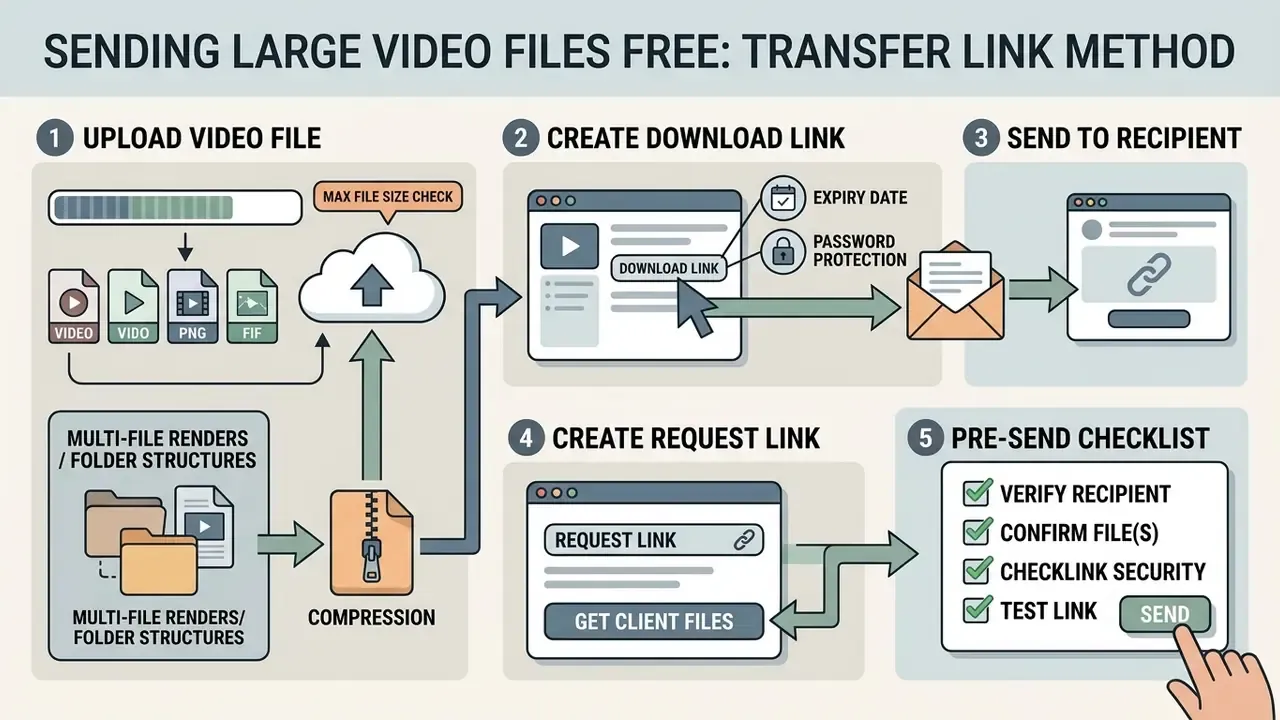
Upload the Video File and Check the Maximum File Size
Before you start an upload, check the provider's maximum file size limit and verify that your container format is fully supported. Most web transfer tools accept the standard set: MP4, MOV, AVI, MKV, and WebM.
Container choice matters for the recipient as much as for the upload. MP4 (H.264 or H.265 inside) is the universal option and plays on every browser, phone, and smart TV. MOV is Apple's QuickTime container and preserves high-quality, ProRes-class essences, but it is not always compatible across Windows-based review chains. AVI is an older container that travels well between cloud services yet produces larger files and patchy modern codec support. MKV and WebM handle multi-track audio and subtitle streams cleanly, though they are more likely to require VLC on the receiving end. If your recipient is non-technical, export or remux to MP4 before transfer. And if you need to change container or re-wrap before uploading, free video editing software handles the conversion without a paid licence.
Services enforce distinct maximum file size thresholds on free plans: 2 GB for Dropbox Basic, 3 GB for WeTransfer Free, 5 GB for TransferNow Free and TransferXL, and 50 GB for SwissTransfer. Keep your browser tab open during the file transfer process to prevent connection resets or interrupted uploads, and do not let the laptop sleep mid-upload.
Managing multi-file renders and folder structures via compression. When your delivery is a bundle of split video segments, external WAV audio stems, LUT files, and SRT subtitle tracks, uploading loose files invites missing components on the client side. Browser-based services such as TransferXL and Smash auto-compress folder inputs into a single ZIP archive on upload, so dropping a whole directory is safe. For manual control, compress your production directory into one ZIP file before transfer. ZIP is a lossless container, so no picture or audio quality is lost, internal folder hierarchies and relative asset paths survive intact, and you sidestep browser limits on simultaneous upload handles. This is the correct method for Adobe Premiere Pro .prproj packages, Final Cut libraries, and After Effects project folders, where broken relative links turn a delivered project into an offline-media error screen.
For creators publishing on a schedule, aligning export presets with the destination platform before sharing reduces both file size and re-export cycles. Our YouTube video editor workflow guide covers publishing-ready export settings, and the companion ai youtube title tooling keeps naming consistent between the delivered file and the published asset.
Create a Download Link and Send It to the Recipient
Once the upload reaches 100%, the transfer service generates a secure shareable link that points straight at the hosted video file. You can copy that download link yourself or send an automated email invitation through the service interface.
Recipients click the link and download files without creating an account or logging in on platforms like WeTransfer, TransferNow, and SwissTransfer, and supported formats can often be previewed in the browser first. Some services (TransferXL among them) also generate thumbnails for images and most video files and embed them in the notification email, so the recipient recognises what they are downloading instead of decoding a cryptic filename. Small touch, real effect: fewer "is this the right file?" replies.
Creating a Request Link to Receive Large Video Files From Clients
Sending is only half of a production workflow. Most bottlenecks show up when a client, camera operator, or interview subject has to send you 40 GB of raw footage. For external clients and non-technical partners, a file request link (also called a Drop Link) lets them upload heavy assets straight into your cloud storage or transfer account without creating a profile of their own.
Smash, Dropbox, Google Drive, and WeTransfer all support incoming file requests. The workflow is consistent:
The recipient opens the link in any browser, drags uncompressed video files onto the page, and an automated notification hits your inbox when the upload completes. Because the upload inherits your account's size ceiling rather than the sender's, a client on a free plan can still deliver multi-gigabyte masters. One caveat: on some platforms (Smash, for example) receive-mode drop links are reserved for paid subscribers, whereas Google Drive and Dropbox expose file requests on standard accounts.
- Open your provider dashboard and select Receive Files, New File Request, or Request Files.
- Choose a destination folder so incoming media lands isolated from your existing project tree.
- Set an availability window for the upload link. Drop links are commonly configurable from 1 day to 365 days.
- Optionally require a password or an email address from the uploader for traceability.
- Copy the generated URL and send it by email, WhatsApp, or SMS.
Pre-Send Checklist: Verify Before You Hit Transfer
Run this 60-second self-check to prevent the three most common failures: rejected uploads, expired links, and misdirected confidential media.
Checklist0 / 9
How to Send High-Quality Videos Without Losing Quality
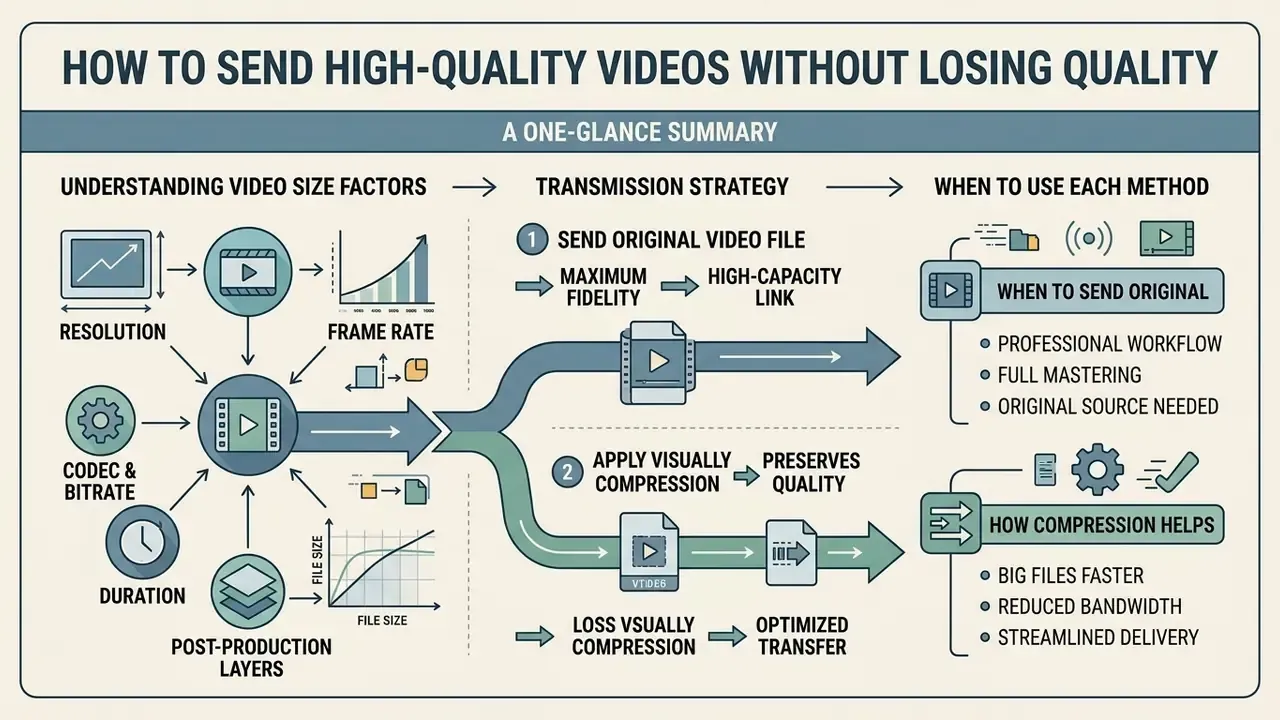
Sending high-quality videos without losing quality means either transferring the original uncompressed source through a high-capacity link, or applying visually lossless compression. Uncompressed transfers keep every original pixel. Smart compression cuts file size with minimal noticeable degradation.
Whether to compress or send source media depends on your final distribution channel and production requirements. Teams producing large volumes of short-form content that never leaves the web can compress aggressively. Anyone feeding a grading, VFX, or broadcast pipeline cannot. Creators assembling content from scratch may also weigh source acquisition tools such as free AI video generators against camera originals, since synthesised footage arrives already compressed and travels far more cheaply.
Understanding Video Size Factors: Resolution, Frame Rate, and Codecs
Before choosing a transfer method, it helps to know why your file is heavy. File sizes expand along five axes:
- Resolution. Pixel count scales quadratically: 4K carries four times the spatial data of 1080p, and 8K sixteen times.
- Frame rate. Cinema masters run at 24 fps, while sports, action, and gaming footage commonly run 60 fps, and slow-motion capture reaches 120 fps. More frames means proportionally more data, which is why two clips of identical length and resolution can differ by 2.5 times in size.
- Codec and bitrate. H.264 at 10 Mbps, H.265 at 5 Mbps, and ProRes 422 HQ at roughly 880 Mbps all describe "1080p" with wildly different footprints.
- Duration. A three-hour wildlife live feed is a fundamentally different logistical problem than a 40-second line read.
- Post-production layers. Added audio stems, graphics, effects, and colour grades inflate both intermediate renders and project packages.
Working arithmetic: 1080p at 24 fps under standard H.264 averages roughly 2 GB per hour. Move to 4K at 60 fps and you quadruple the spatial data while adding 150% more frames, pushing uncompressed and lightly compressed source payloads past 20 GB per hour, the equivalent of more than 800 maximum-size email attachments. Editing project containers (an Adobe Premiere .prproj package linking multi-track ProRes RAW media, say) pile metadata and cache layers on top of that. Which makes email attachments and basic chat apps completely unviable, and explains why frame-rate-heavy projects are the ones that break AirDrop sessions first.
When to Send the Original Video File Instead of Compressing It
Send original video files without compression during professional post-production: visual effects handoffs, colour grading, broadcast mastering. Lossy compression strips colour depth and spatial detail that post-production software needs for precise rendering, and re-encoding an already compressed file compounds the loss.
Archival standards from the International Association of Sound and Audiovisual Archives (IASA-TC 06) require preservation masters to be held "as uncompressed or losslessly compressed essences," with support for lossless JPEG 2000 and FFV1. The Federal Agencies Digital Guidelines Initiative (Creating and Archiving Born Digital Video III, FADGI) is equally direct: choose uncompressed video over compressed, use mathematically lossless compression when compression is unavoidable, and avoid repeated compression and decompression cycles. The U.S. National Archives permits visually lossless JPEG 2000 at up to 20:1 for certain records but rejects lossy compression for archival preservation. Commercial delivery specifications follow the same logic. Netflix Originals post-production requirements call for RAW or a final uncompressed video master for IMF generation rather than a compressed intermediate.
When you are handling 4K or 8K RAW footage, move raw containers through high-capacity link services like SwissTransfer (50 GB), a virtual cloud filespace, or cloud storage with per-file ceilings in the terabyte range. ISO/IEC 23001-17:2024 standardises the carriage of uncompressed image and video data (including alpha and depth) in the ISO base media file format, which is the relevant container specification when true uncompressed masters move between facilities.
How Compression Helps Send Big Files Faster
Video compression shrinks file size by removing redundant spatial and temporal data, which lets you send big files faster over ordinary internet connections. Modern codecs like H.265 (HEVC) and AV1 deliver much higher compression efficiency than older H.264. HandBrake's own documentation describes H.265 as producing higher-quality encodes at smaller file sizes than H.264, particularly at low bitrates and UHD resolutions, and rates AV1 as comparable to H.265 in quality-per-byte.
Independent codec evaluation benchmarks quantify the gain:
«AV1 and HEVC encoders reduce file bitrates by 40% to 65% compared with H.264 while maintaining equivalent subjective visual quality.»
Crowdsourced subjective testing also shows where extra bitrate stops buying anything:
«Above roughly 6000 kbps, viewers struggle to distinguish compression artefacts, and further file-size increases do not improve perceived quality.»
That threshold is the practical target for review copies. Encode to the knee of the curve, not beyond it. Open-source tools such as HandBrake and professional applications like Adobe Media Encoder compress long videos into compact MP4 files before sharing. Adobe's compression guidance adds three non-codec levers: trim unnecessary content, reduce noise and grain (noise is expensive to encode), and export at the dimensions the destination actually needs. For a broader comparison of tooling and quality trade-offs, see our guide to video compressors for reducing file size.
Export presets that fit free transfer caps. The figures below are practical starting points for review and delivery copies, derived from encoder documentation and constant-quality workflows. Always spot-check the result before sending.
| Source | Codec / mode | Suggested setting | Approx. size per hour | Use case |
|---|---|---|---|---|
| 1080p 24 fps | H.264, CRF 20 to 22 | ~8 to 10 Mbps target | ~4 to 4.5 GB | Client review, web delivery |
| 1080p 24 fps | H.265/HEVC, CRF 24 | ~5 Mbps target | ~2.2 GB | Fits a 3 GB free-tier transfer |
| 1080p 60 fps | H.264, CRF 20 | ~12 to 15 Mbps target | ~6 GB | Sports, gameplay, action |
| 4K 30 fps | H.265/HEVC, CRF 22 to 24 | ~35 to 45 Mbps target | ~18 GB | High-quality deliverable |
| 4K 60 fps | H.265/HEVC, CRF 22 | ~50 to 68 Mbps target | ~27 GB | Requires 50 GB-class service |
| 4K/8K RAW or ProRes | Lossless / uncompressed | No re-encode | 20 GB+ | Grading, VFX, archival master |
Codec compression efficiency, in plain terms. The relationship between bitrate and perceived quality is a curve, not a line. H.264 needs the most data to reach any given quality score, H.265 reaches the same score with 40 to 50% less, and AV1 pushes marginally further at the cost of encoding time. The plateau starts near 6000 kbps for 1080p content, which is why doubling bitrate past that point doubles your upload time without a visible benefit for the recipient.
To streamline audio production alongside video compression, many creators pair balanced narrative audio with optimised renders using ai voiceover tools, then keep channel assets consistent with an avatar cropper before publishing.
Send Large Video Files Securely With Password Protection
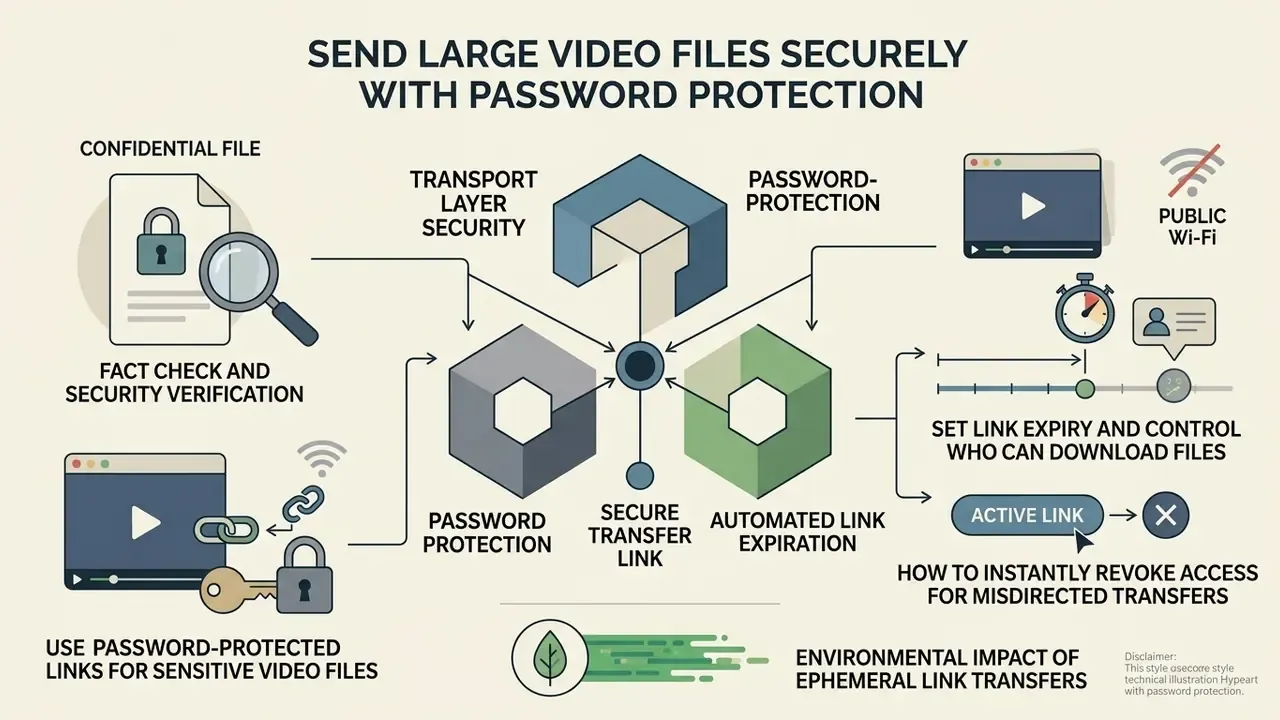
Sending confidential video files securely requires three things in combination: transport layer security, password protection, and automated link expiration. Protecting a shared download link is what prevents unauthorised access, content leaks, and intercept attacks in transit.
Official security guidance from the National Institute of Standards and Technology (NIST SP 800-77r1 and the 2020 ITL bulletin on exchanging files over the internet) and from the UK Information Commissioner's Office is consistent: data transmitted over public networks must use TLS 1.2 or higher alongside NIST-approved cryptography in FIPS-validated implementations (Encryption, ICO, 2022. https://ico.org.uk/for-organisations/uk-gdpr-guidance-and-resources/security/encryption/). NIST adds that file-level encryption is reasonable for transfer, though server-side protected transfer is preferable for some regulated reporting workflows.
Transport encryption alone is not the whole story, however. Independent evaluation of commercial storage platforms found structural gaps:
«A study of six major cloud platforms found no native end-to-end encryption and inflexible access-revocation mechanisms.»
Fact check and security verification.
Use Password-Protected Links for Sensitive Video Files
Applying password protection to a shareable link means only authorised recipients can download your video file, even if the URL is forwarded or intercepted. TransferNow includes password protection on free transfers and TransferXL offers end-to-end encryption on its free account tier, while several competitors reserve link passwords for paid plans.
Security standards set by the Commodity Futures Trading Commission require that passwords for password-protected files be provided separately from the protected file itself (CFTC Data Delivery Standards, 2020). Institutional guidance says the same thing in practice: encrypt the asset, then send the link in one channel and the password in another. A second email containing only the password, an encrypted messenger, a phone call, or in-person delivery. Never both in the same message.
Encryption overhead is no longer a reason to skip this step. Measured performance on commercial storage stays negligible relative to the upload itself:
«Transferring a 1 GB file via OneDrive with conditional proxy re-encryption took only 3.27 seconds at a 128-byte key length.»
Where a cloud intermediary is unacceptable, browser-based peer-to-peer transfer is a defensible alternative:
«WebRTC provides end-to-end encryption through DTLS-SRTP and resilience against network-level attacks, making it suitable for secure ad-hoc transfer of large files.»
Public Wi-Fi warning. Uploading sensitive footage from café, airport, or hotel networks exposes you to captive-portal interception, rogue access points, and session interruptions that corrupt multi-gigabyte uploads. If you must transfer over an untrusted network: confirm the service URL shows a valid TLS certificate, enable client-side encryption or a link password before uploading, route the session through a trusted VPN, and re-verify the delivered file's integrity with the recipient. For regulated or contractual media, tether to a mobile connection instead. Cheaper than an incident report.
Set Link Expiry and Control Who Can Download Files
Short link expiry windows limit how long uploaded video files stay reachable on cloud servers. Free transfer links on WeTransfer expire automatically after 3 days, TransferNow Free retains files for 7 days, TransferXL Free keeps transfers for one week, and services like Smash allow availability windows from 1 to 30 days. Once a link expires, the hosting server permanently purges the uploaded files.
Beyond time limits, mature platforms expose two further controls: a download counter (a per-link cap, commonly defaulting to five downloads on enterprise document-sharing tools) and immediate revocation through an active/inactive toggle or link deletion. One critical caveat applies to every method. Revoking a link, changing its password, or letting it expire does not affect a copy the recipient has already pulled down to local storage.
How to Instantly Revoke Access for Misdirected Transfers
If a download link carrying sensitive media reaches the wrong recipient, waiting out the standard 3-day or 7-day auto-deletion leaves the content exposed. To neutralise an active link immediately on services such as TransferXL, Dropbox, WeTransfer, or TransferNow:
- Log in to the account used for the transfer and open your transfer history or shared-links dashboard.
- Locate the specific payload batch on the transfer timeline. Thumbnails and recipient lists identify it faster than filenames.
- Execute Delete Transfer, Revoke Access, or switch the link's Active toggle off.
- Confirm the action. This wipes the file pointers from edge distribution nodes and invalidates the download URL, so the link fails even if the original notification email has already been opened.
- Check the download log. If the dashboard shows a completed download before revocation, treat the asset as disclosed and escalate under your incident-handling process.
- Re-send to the correct address with password protection enabled and, where available, a per-link download limit of one.
On cloud storage, the equivalent action is removing the shared link or the file itself. Google Drive re-evaluates permissions on every open, so a revoked permission blocks all subsequent access through the same constant URL.
Environmental Impact of Ephemeral Link Transfers
Storing permanent video attachments across global email server clusters generates continuous infrastructure energy draw, duplicated in both sender and recipient mailboxes. Lifecycle evaluation of ephemeral transfer models points the other way:
«A study conducted with ClimatePartner found that using Smash instead of sending files as email attachments reduced CO2e emissions by 90% in 2023.»
The mechanism is straightforward. Temporary hosting with automated 3-to-7-day retention stores one copy for a bounded period instead of maintaining duplicates indefinitely across mail servers, backups, and personal drives. Setting the shortest expiry your recipient can realistically meet is therefore both a security control and a measurable sustainability lever. Worth mentioning when procurement or ESG reporting asks about digital footprint.
How to Send Video Files Online From Mobile and Email
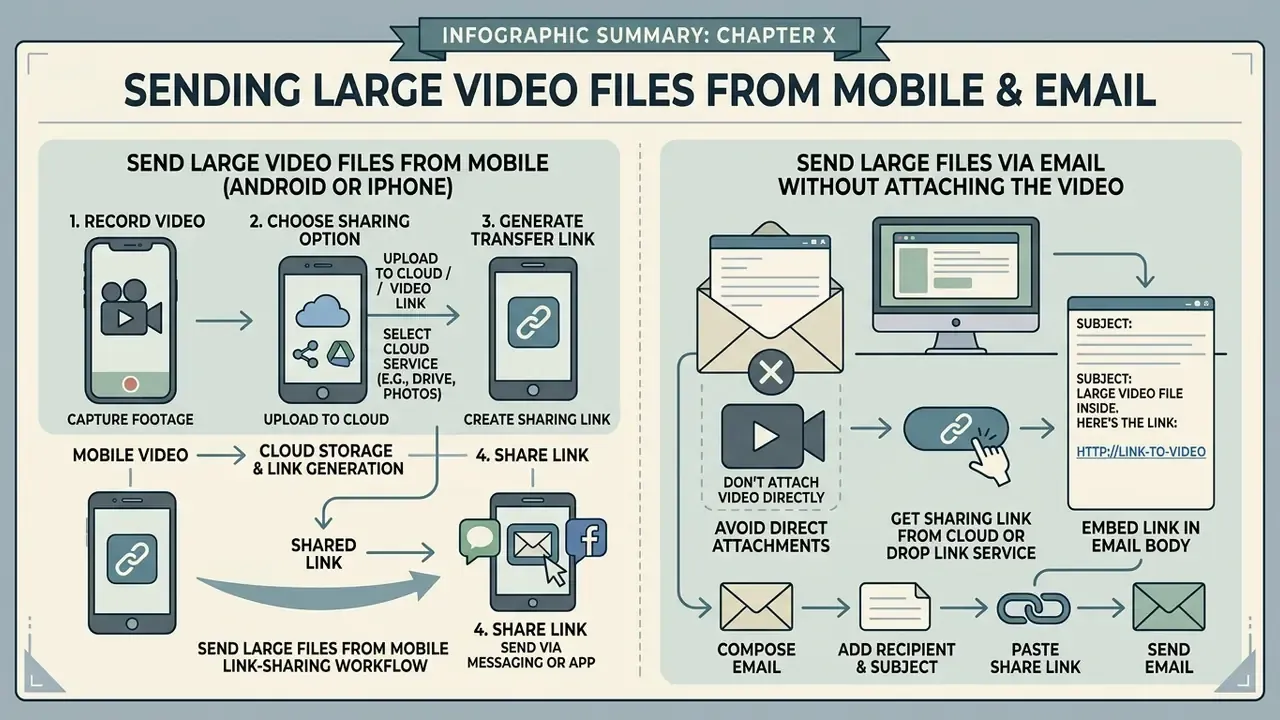
You can send large video files online from mobile devices or email by swapping direct attachments for cloud storage links or built-in mobile share utilities. This gets around rigid inbox file size caps and keeps uploads stable over wireless connections.
Send Large Video Files From an Android Device or iPhone
To send a large video file from an iPhone, select the media file in the Photos app, tap Share, and choose Copy iCloud Link or send it through Mail, where Mail Drop handles attachments up to 5 GB by uploading them to iCloud, encrypting them, and storing them for up to 30 days (Apple Support, Share long videos on iPhone. https://support.apple.com/guide/iphone/share-long-videos-iph1c81f302d/ios). The generated iCloud link pastes straight into Messages, Mail, or third-party chat apps.
On an Android device, open the Google Drive or Dropbox mobile app, upload your video file, and generate a shared access link. Google Drive on mobile accepts single files up to 5 TB provided you have the storage quota, and Dropbox notes that attachment limits vary by provider in the 10 to 25 MB range, above which a cloud link or Dropbox Transfer replaces the attachment. Copy the link and share it via text, WhatsApp, or email without hitting mobile attachment bounds. Proton Drive follows the same pattern for privacy-focused workflows: sign in, tap + → Import file, upload, then open the three-dot menu and choose Share via link.
Mobile link-sharing workflow, step by step:
| Step | iPhone (iOS) | Android |
|---|---|---|
| 1. Locate media | Photos app → select video | Gallery / Files → select video |
| 2. Start share | Tap Share | Tap Share or open Drive/Dropbox app |
| 3. Generate link | Copy iCloud Link or Mail (Mail Drop, up to 5 GB) | Upload to Google Drive or Dropbox → Copy link |
| 4. Set access | Adjust iCloud sharing options | Set link permission (viewer or downloader) |
| 5. Deliver | Paste into Messages, Mail, WhatsApp | Paste into Gmail, SMS, WhatsApp |
| 6. Verify | Confirm recipient opened the link | Check Drive/Dropbox download activity |
Avoid re-sharing footage through messaging apps that transcode on upload. Most chat platforms recompress video aggressively, which undoes the quality you preserved during export. Creators who publish from mobile can keep export and upload settings consistent using the platform recommendations in our YouTube video editor workflow guide, and can standardise naming across deliveries with the ai youtube channel naming utility.
Send Large Files Via Email Without Attaching the Video
Email servers automatically block messages that exceed attachment limits, usually set between 20 MB and 25 MB across major providers. Attach a large video file directly and you get a bounce-back error or a server transmission failure. Nothing subtle about it.
To send big files via email, upload your video to a file transfer service or cloud drive, then paste the generated download link into your email body. The major email services automate this offload: Gmail strips attachments over 25 MB and inserts a Google Drive link, Apple Mail routes oversized attachments through Mail Drop (up to 5 GB, hosted in iCloud for 30 days), and Outlook prompts Upload to OneDrive when a file is too large for a traditional attachment. Outlook users who move media daily can also install a transfer-service add-in (Smash and TransferXL both offer one) to generate links inside the compose window without leaving the inbox.
How to Choose a Free Video Transfer Service Before Upgrading
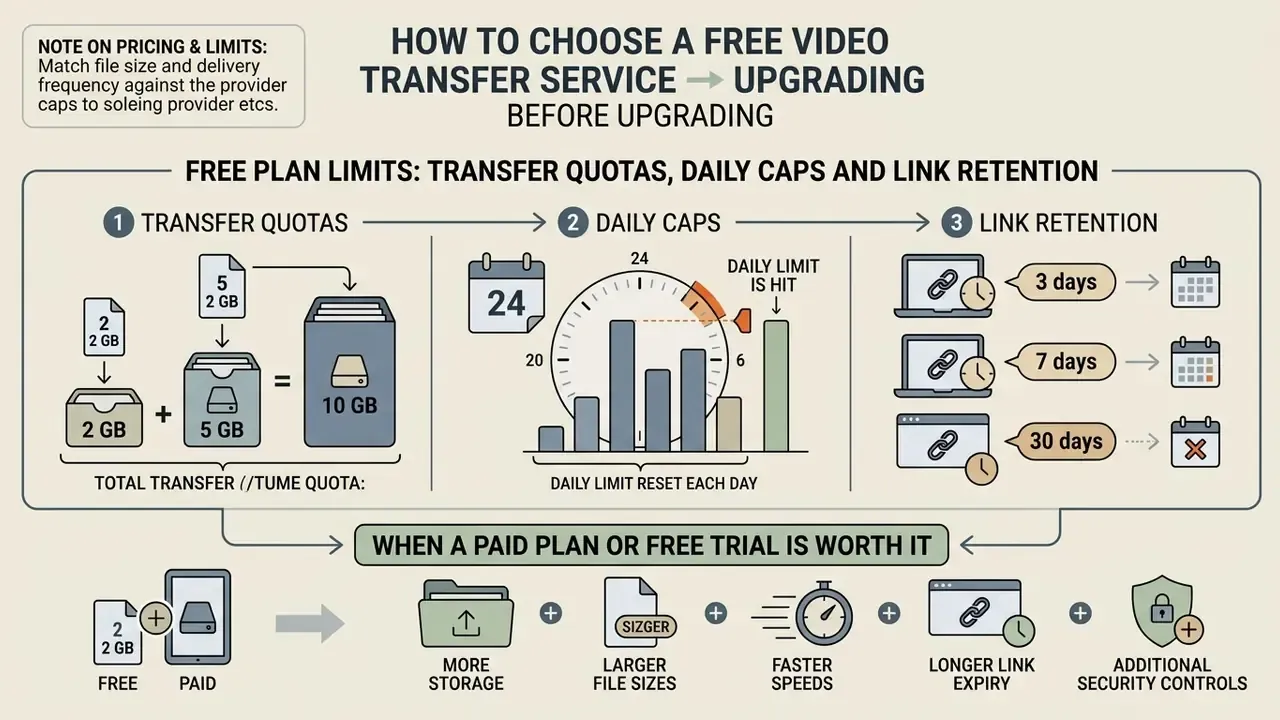
Choosing a free video transfer service means matching your file size and delivery frequency against provider caps before you consider a paid subscription or a free trial. Free plans suit occasional one-off transfers. Recurring commercial transfers benefit from premium tools.
Evaluate free versus paid plans using the feature comparison matrix below.
Free versus paid video transfer plan feature matrix
| Feature and capability | Standard free plans | Paid subscription tiers | 7-day free trial capabilities |
|---|---|---|---|
| Maximum file size limit | 2 GB to 5 GB per transfer (50 GB on SwissTransfer) | 100 GB to 300 GB and up | Unlocks full paid size limit (e.g. 250 GB) |
| Daily or monthly volume | 3 GB per rolling 30 days (WeTransfer); 10 GB per day (TransferXL) | Unlimited transfers; 200 to 400 GB daily ceilings | Trial-period volume matched to paid tier |
| Link availability window | 3 to 7 days auto-deletion | 6 weeks to 365 days, or custom expiry | Custom expiry active during trial |
| Password protection and E2E encryption | Provider-dependent (included on TransferNow, TransferXL) | Fully supported across all links | Enabled for testing security features |
| File request / drop links | Available on Drive and Dropbox; paid-only on some services | Included, with per-link retention up to 365 days | Available for client-collection testing |
| Download tracking and analytics | Basic upload confirmation | Detailed download logs, timelines, audit history | Access to transfer history dashboard |
| Custom branding and domain | Provider branding and ads displayed | Custom backgrounds, logos, subdomain or own domain | Preview custom portal layout |
Free transfer services cover individual sharing needs perfectly well. Commercial production teams that need audit logs, extended link retention, and custom branding usually move to paid accounts sooner than they planned. Teams comparing adjacent creative tooling while they budget can also review our roundup of the best free AI video generators to see where free tiers typically stop across the wider media stack.
Free Plan Limits: Transfer Quotas, Daily Caps and Link Retention
Free file transfer plans constrain you along three axes that are easy to miss until an upload gets rejected: per-transfer size, volume quota, and retention window.
Per-transfer size is the number most people check. Volume quota is the one that breaks recurring workflows. WeTransfer Free applies a rolling 30-day allowance of 10 transfers or 3 GB in total, so a single 3 GB delivery eats the entire month. TransferXL Free meters activity daily instead: up to 10 transfers, 10 GB of aggregate volume per day, one week of retention, and advertisements on the download page. TransferNow Free applies no monthly quota at all, which makes it the better pick for frequent mid-sized deliveries. Some free tiers also throttle throughput. Reviewed free services range from unrestricted speed down to roughly 1.5 Mbit/s upload on heavily limited accounts, which turns a 5 GB transfer into an overnight job.
Retention is the third trap. Files vanish 3 days after upload on WeTransfer Free and 7 days on TransferNow and TransferXL, and expiry counts from upload time, not from first download. A free plan is sufficient when three conditions hold at once: the payload fits the size cap, the recipient will download inside the retention window, and you have no audit, archival, or long-term hosting requirement. If any one of those fails, you need a paid tier or a cloud storage account rather than a transfer link.
When a Paid Plan or Free Trial Is Worth It
Upgrading to a paid plan or activating a free trial pays off when your workflow involves multi-gigabyte video files, links that must stay live for months, footage collection through branded drop links, or customised download portals for client presentation. Paid plans expand transfer limits substantially. TransferNow Premium reaches 250 GB per transfer with availability up to 365 days, WeTransfer Starter allows up to 300 GB of rolling monthly volume, TransferXL Pro supports 100 GB per transfer with six-week retention, and its Enterprise tier reaches 200 GB per transfer with three-month retention and custom domains.
One illustrative case: a commercial video agency routinely delivering client masters activated a 7-day free trial of a premium transfer service to ship 180 GB of 4K files. The trial provided password protection, client download notifications, and custom portal branding, which was enough to confirm that premium features justified the ongoing subscription for their project cadence. Video-hosting economics follow the same pattern. Platforms with branded players commonly cap free storage around 25 GB or limit the number of hosted videos, with paid tiers starting near $15 per month, roughly the threshold at which recurring commercial publishing outgrows a free account.
Teams evaluating digital asset infrastructure can review performance metrics across platforms using our AI Media Comparison guide, and explore developer integration options through our api documentation for automating uploads, drop links, and expiry policies directly from your own applications.
FAQ: Sending Large Video Files Online Free
These are the questions readers ask most often, answered briefly. Frequently asked questions about caps, expiry, and quality tend to repeat, so treat this as a quick reference rather than a replacement for the sections above.
What is the fastest way to send a 10 GB video file online free?
The fastest way to send a 10 GB video file online free is a high-capacity transfer service like SwissTransfer, which supports up to 50 GB per transfer at no cost. Alternatively, upload the file to Google Drive (15 GB free storage) and issue a direct share link. For an in-person handoff, a 10 GB file sits right at the practical stability ceiling for AirDrop, so a link stays more reliable.
How can I send a video file via email that is too large?
Upload the video to a file transfer service or cloud drive, copy the shareable download link, and paste the URL into your email body. Gmail performs this substitution automatically above 25 MB, Apple Mail uses Mail Drop up to 5 GB, and Outlook offers Upload to OneDrive.
How do I receive a large video file from a client instead of sending one?
Generate a file request link (Drop Link) from Google Drive, Dropbox, Smash, or WeTransfer, choose a destination folder and an availability window, then send the URL to your client. They open it in a browser, drag in their footage, and you get a notification when the upload completes. No account needed on their side, and the upload inherits your account's size ceiling.
How do I send a whole video project folder without breaking it?
Compress the entire project directory into a single ZIP archive before uploading. ZIP is lossless, so quality is untouched, and it preserves internal folder hierarchies and relative asset paths that Premiere Pro, Final Cut, and After Effects rely on. Several services, TransferXL and Smash included, zip folder uploads automatically.
Do free file transfer links expire automatically?
Yes. Most free file transfer services enforce automatic expiry to manage server storage. Free links on WeTransfer expire after 3 days, while TransferNow and TransferXL retain files for 7 days before permanent server deletion. Expiry counts from upload time, not from first download.
Can I delete a transfer if I sent it to the wrong person?
Yes. Open your transfer history or shared-links dashboard, select the transfer, and choose Delete Transfer or Revoke Access. That invalidates the download URL immediately, even if the notification email has already been opened. It does not remove a copy that has already been downloaded, so check the download log to see whether the asset was accessed.
Will compressing a video file lose its original quality?
Standard lossy compression reduces file size by adjusting bitrates, which can slightly affect visual detail. Modern codecs like H.265/HEVC or AV1 cut file size by up to 65% with virtually no perceptible loss, and subjective testing shows viewers cannot reliably spot artefacts above roughly 6000 kbps for 1080p content.
Why is my 4K video so much larger than someone else's 4K video?
Resolution is only one factor. Frame rate (24 fps versus 60 fps), codec (H.264 versus H.265 versus ProRes), bitrate, clip length, and added post-production layers all change the payload. Two 4K clips of identical duration can differ several-fold in size for exactly those reasons.
Is it safe to upload confidential videos to free file transfer sites?
It is reasonably safe if the service uses SSL/TLS encryption in transit and AES-256 at rest. For sensitive assets, choose services offering password-protected links or client-side end-to-end encryption, set short expiry windows, deliver the password through a separate channel, and avoid uploading over untrusted public Wi-Fi.
Is there a greener way to send large video files?
Yes. Ephemeral transfer links with short retention avoid storing duplicate copies indefinitely across mail servers and personal drives. A lifecycle study with ClimatePartner measured a 90% reduction in CO2e emissions versus email attachments in 2023. Setting the shortest workable expiry is both a security and a sustainability decision.
Summary of Free Video Transfer Options
| Service Name | Free Size Limit | Link Retention | Registration Required? | Notable Free-Tier Control |
|---|---|---|---|---|
| SwissTransfer | 50 GB | Up to 30 days | No | Highest free per-transfer ceiling |
| TransferNow Free | 5 GB | 7 days | No | Password protection, no monthly quota |
| TransferXL Free | 5 GB | 7 days | Yes (free account) | End-to-end encryption, auto-zip, manual delete |
| WeTransfer Free | 3 GB | 3 days | No | 3 GB / 10 transfers per rolling 30 days |
| Dropbox Basic | 2 GB | 7 days (Transfer feature) | Yes | Granular link permissions |
| Google Drive | 15 GB (total storage) | Indefinite (until deleted) | Yes | File requests, per-open permission checks |
How to Keep These Figures Current
Free-tier numbers age faster than almost anything else in this field, so build a light verification habit rather than trusting a saved bookmark. Before any high-stakes delivery, open the provider's pricing page and its help-centre article on limits, then compare three values: per-transfer cap, volume quota, and retention window. If two of the three have moved, assume the security defaults moved as well and re-check password availability and expiry options in the upload interface.
For recurring workflows, record the verified limits in your project template alongside the recipient's preferred container format and the agreed expiry window. It takes a minute and removes the most common cause of a failed handoff: an assumption that quietly expired. Where a transfer must be auditable, keep the download log export with the delivery record, since that log is the only evidence that the file actually reached the intended recipient.
Additional Resource Links and Commercial Navigation
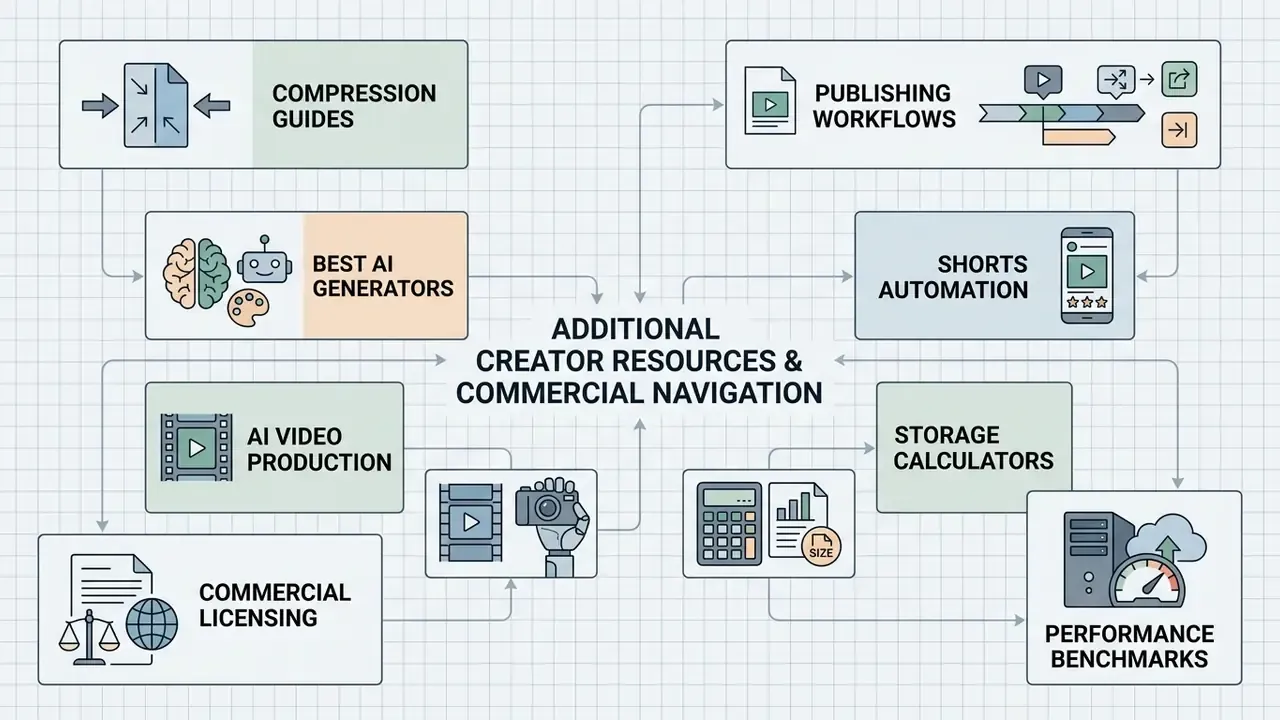
Explore specialised creator tools, formatting workflows, and media benchmarks across our operational hub:
- Reduce export sizes before transfer with our guide to video compressors and file-size reduction.
- Plan publishing-ready exports with our YouTube video editor workflow guide.
- Compare source-generation tooling in our roundup of the best free AI video generators.
- Automate short-form assembly using our ai youtube shorts generator platform.
- Produce full-length uploads end to end with our ai youtube video maker.
- Estimate compression savings and storage budgets with our interactive calculators.
- Review licensing considerations for delivered media across our AI Media Commercial-Use portal.
- Compare cloud infrastructure and rendering speeds across published benchmarks.
- Discover complete media creation protocols within our AI Media Workflows hub.